


Cloud migration costs are hard to forecast for one simple reason: the numbers that matter rarely sit where teams expect them. FinOps teams see this pattern repeatedly. A model looks reasonable on paper, then reality introduces friction, and the run rate starts drifting.
Cloud migration costs include both the one-time cost of moving workloads and the long-term cloud run rate that remains after cutover. For small workloads, costs may start around $20,000 to $100,000, while enterprise cloud migration programs can run into the millions once labor, double-run, compliance, and integration work are included.
This guide walks through the cost mechanics behind that drift and shows how experienced teams structure cloud migration costs so forecasts hold up once workloads start moving.
Last updated: June 2026
Expert reviewed: This guide was reviewed by Kyle Burk, Cloudaware expert for migration cost modeling, CMDB-backed inventory, cost allocation, and post-cutover governance.
Key insights for cloud migration costs in 2026
- Cloud migration costs can range from $20,000-$100,000 for small workloads to multi-million-dollar programs for enterprise cloud migration.
- The biggest cost drivers are usually labor, data movement, integration work, and the double-run period, not just compute and storage.
- Cloud migration cost savings usually appear only after workloads stabilize and temporary migration overhead is gone.
- Many enterprises target 20-40% infrastructure cost reductions, but results depend on workload fit, ownership, and post-cutover controls.
- The benefits of migrating to the cloud are broader than cost alone: scalability, faster delivery, stronger cost attribution, and better compliance visibility.
- For enterprise planning, the most reliable model separates project costs from steady-state run costs.
Making sense of cloud migration costs
Cloud migration costs are often underestimated because the obvious items rarely drive the overruns. VM sizes and storage tiers matter, but the real spend sits in labor, data movement, temporary environments, and the operational work needed to keep systems stable after cutover.
In enterprise migrations, this effect compounds. Each workload carries owners, dependencies, compliance scope, and operational habits built over years. When those details are not fully understood at the start, both the migration budget and the steady-state run rate begin to drift in parallel.
The most reliable way to reason about cloud migration costs is to separate what exists only to move workloads from what remains as the long-term cloud bill.
The two cost stacks: project costs vs run costs
Every migration follows the same pattern:
- Project costs are temporary but volatile. These costs disappear after cutover, but they tend to spike when planning is weak.
- Run costs are your long-term cloud bill. These are the charges that determine whether the migration actually produces savings.
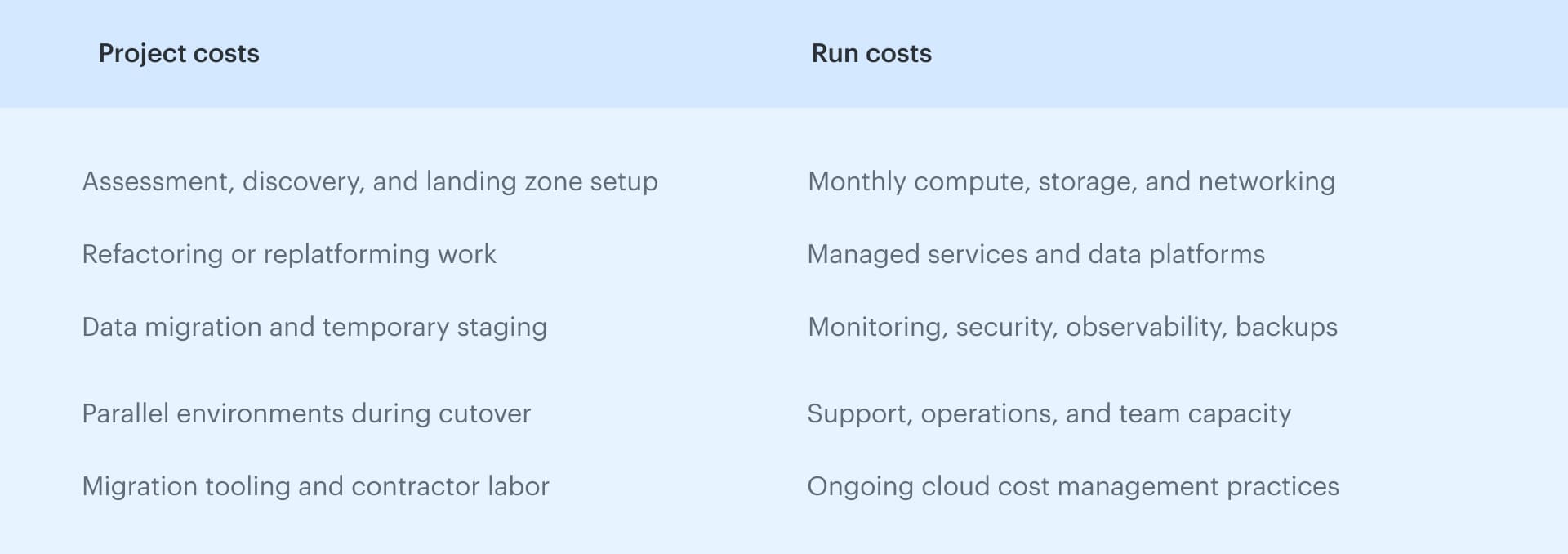 Keeping these buckets separate prevents teams from mixing one-time expenses with recurring cloud operational costs. It also makes the business case defensible when Finance reviews assumptions.
Benchmarks by workload size
The first question most teams ask is simple: how much does cloud migration cost? Recent market guides put smaller migrations in the tens of thousands of dollars and larger enterprise programs from the high six figures into the millions, but those numbers are only useful as planning benchmarks.
In practice, cloud migration costs depend less on the provider itself than on workload count, dependency complexity, migration strategy, hybrid overlap, data movement, and compliance scope.
Small workloads: under 100 servers
For smaller estates, cloud migration costs are usually contained because dependencies are limited and coordination overhead stays manageable. Most of the effort sits in initial setup, basic data transfer, and validation rather than deep refactoring or compliance-heavy redesign.
Typical ranges fall between $20,000 and $100,000, depending on how clean the inventory is and whether workloads can move without major changes. In this range, cost models tend to hold because the hybrid period is shorter and ownership is clearer.
Mid-market migrations: 100–500 servers
At this scale, the migration starts behaving like a program rather than a project. Dependencies surface later than expected, integration work expands, and the hybrid period becomes harder to control. This is where cloud migration costs begin to drift if assumptions are not tied to real workloads.
Typical costs move into the $100,000 to $500,000+ range, with a meaningful impact on the first-year run rate. The biggest variables are how much refactoring is required, how long environments overlap, and whether teams stabilize workloads quickly after cutover.
Enterprise cloud migration: 500+ servers and multi-wave programs
Enterprise cloud migration introduces a different cost profile entirely. Workloads move in waves, ownership is distributed across teams, and compliance, audit, and security validation often run in parallel with technical execution. The migration model must account for prolonged double-run, portfolio-level dependencies, and ongoing changes in scope.
Costs typically range from $500,000 to several million dollars, but the more important factor is variability. At this level, cloud migration costs are shaped by governance, coordination, and the ability to control overlap and enforce ownership, not just by technical design.
| Migration size | Typical project costs* | First-year run-cost impact | Main variables |
|---|---|---|---|
| Small workload migration | $20,000-$100,000 | Moderate and easier to model | labor, tooling, data transfer |
| Mid-market migration | $100,000-$500,000+ | Meaningful run-rate change | integration depth, hybrid period, refactoring |
| Enterprise cloud migration | $500,000 to several million | Large and often multi-wave | compliance, double-run, ownership, portfolio complexity |
*Planning benchmarks based on recent vendor and partner estimates; actual totals vary by migration strategy, dependency depth, compliance scope, and overlap period.
Enterprise cloud migration: the cost plan behind large-scale workload moves
Enterprise cloud migration is the phased movement of applications, data, infrastructure, and dependencies from legacy, on-premises, or hybrid environments into cloud operating models. Here the cost problem is the number of teams, owners, compliance scopes, dependencies, and migration waves that have to move without breaking production.
Enterprise cloud migration needs a cost plan before it needs a cloud bill estimate. Basic calculator cannot explain which applications depend on shared databases, which owners must approve cutover, which controls must be validated, or which temporary environments will keep running after the wave ends.
Large migration programs usually follow the same operating pattern: discover the estate, assess each workload, prepare the landing zone, migrate in waves, optimize the steady-state bill, and govern the environment after cutover.
AWS, Google Cloud, and Microsoft use different language for these phases, but the principle is consistent: migration is a lifecycle, not a one-time transfer.
| Enterprise migration phase | Main cost risk | Control to add before spend drifts |
|---|---|---|
| Discover | Missing workloads, owners, and dependencies | Build a CMDB-backed inventory before migration planning starts |
| Assess | Wrong migration strategy for the workload | Classify workloads with the 7R model and document cost assumptions |
| Mobilize | Landing zone, IAM, networking, and policy gaps | Set ownership, tagging, security, and cost allocation baselines |
| Migrate | Double-run, temporary environments, and repeated data syncs | Timebox migration waves and assign owners for every temporary resource |
| Optimize | Overprovisioned steady-state cloud spend | Review rightsizing, budgets, tagging, storage tiers, and commitments after production usage stabilizes |
| Govern | Configuration, ownership, and cost drift after cutover | Run continuous policy checks tied to owners, applications, and cost centers |
The biggest mistake in enterprise cloud migration is treating these phases as technical milestones only. Each phase changes the cost model:
- Discovery affects whether the baseline is complete
- Assessment affects whether the team rehosts a workload that should have been retired or modernized
- Mobilization affects whether accounts, subscriptions, projects, IAM, networking, logging, and policy controls are ready before workloads arrive
- Migration affects how long old and new environments run in parallel
- Optimization affects whether the cloud bill reflects real production behavior or migration-phase sizing
- Governance determines whether the post-cutover environment stays clean
This is where enterprise migration costs differ from smaller projects. In a small migration, missing one dependency may delay one application. In an enterprise cloud migration, missing ownership or dependency data can delay an entire wave, extend double-run, and push unallocated spend into Finance reports for months.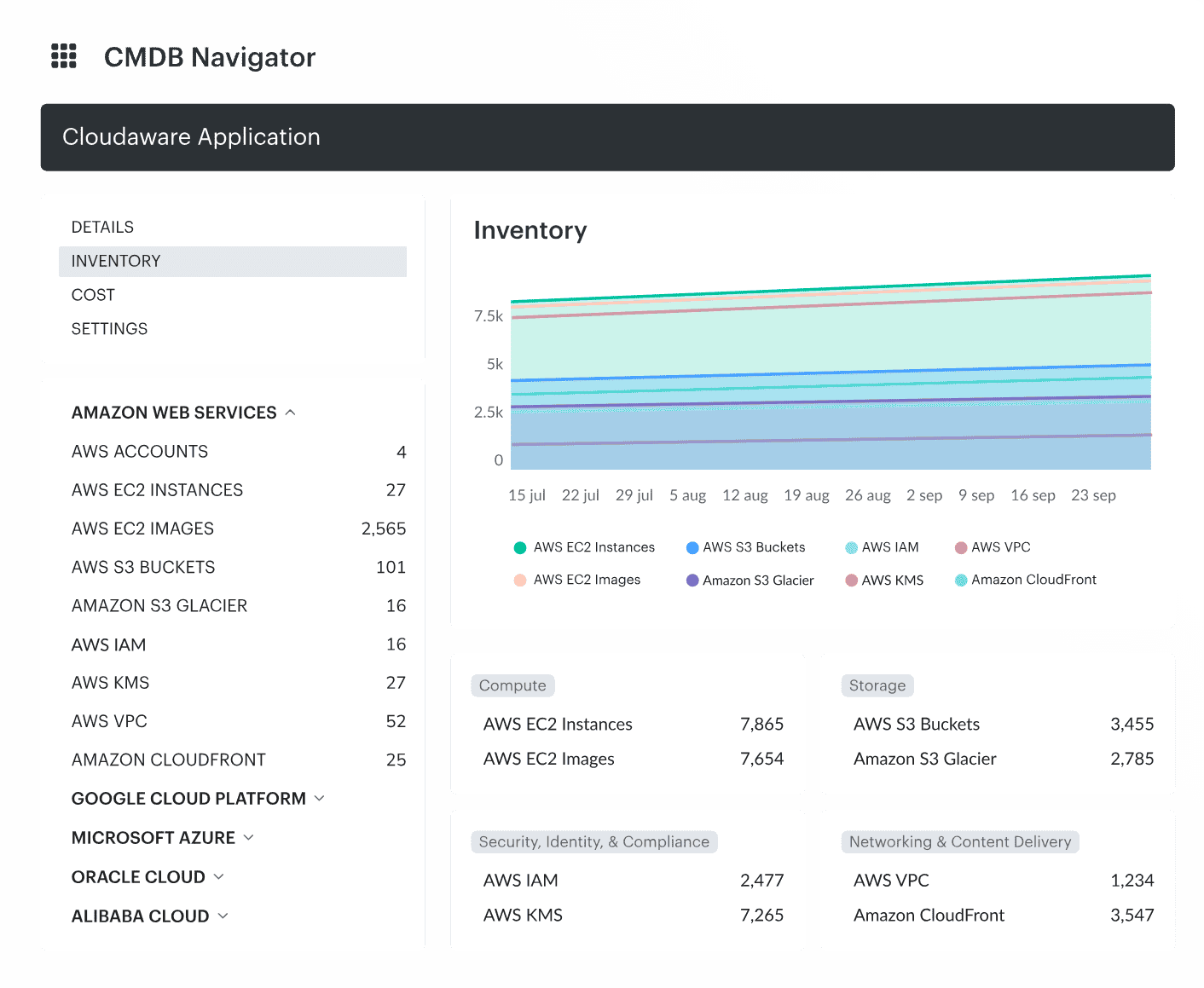 Cloudaware supports this planning model by connecting cloud resources, billing data, owners, applications, environments, and cost centers in the CMDB. Instead of modeling migration costs from disconnected spreadsheets, teams can tie cost assumptions to the assets and services that actually exist.
That matters because enterprise cloud migration changes every week. A cost plan built on inventory, ownership, and workload context gives Finance a model it can challenge without restarting from zero. It also gives engineering, FinOps, security, and operations the same view of what is moving, what it costs, and who is accountable when the plan changes.
How one-time and temporary costs affect cloud migration benefits
Understanding these one-time costs is essential for projecting cloud migration benefits accurately. One-time migration costs cover the work required to prepare, move, and stabilize workloads. These costs disappear after cutover, but they determine how quickly the benefits of cloud migration show up.
When this work takes longer than planned, the savings timeline shifts, and the ROI model changes with it.
Foundation and data movement work that front-loads the budget
Before workloads move, teams build the landing zone: IAM patterns, network layout, encryption, logging, and compliance controls. None of this shows up clearly on a bill, but it requires meaningful engineering time and often external help.
Data movement adds another cost layer. Migrations rarely happen in one pass. Teams run multiple syncs, create temporary snapshots, validate loads, and repeat cycles during testing. Transfer charges, egress, and short-lived storage often become the biggest early spikes, especially when on-prem dependencies draw out the process.
Refactoring, tooling, and organizational work that shape long-term benefits
The 7R framework affects both the upfront migration bill and the long-term cloud run rate. In practice, teams do not “pick an R” in isolation. The right choice comes from three constraints that show up in every enterprise migration:
- Workload behavior. Workloads with frequent change or high business impact often justify refactoring or replatforming. Higher engineering effort can pay back through lower operational cost, better scaling, or reduced support overhead.
- Business priorities. When speed is the primary constraint, rehost is usually the fastest path. In this case, teams need to plan remediation early or accept that inefficiencies will carry into steady state.
- Engineering capacity. Deep refactors only work if the organization can maintain them. A design that looks optimal on paper creates risk when teams lack the skills or time to support it.
Workloads that behave consistently over time usually land between the extremes. Moving them onto managed cloud services tends to produce the best outcome, since teams reduce day-to-day operational effort without taking on the risk of a full rewrite.
In most enterprise programs, migration work also pulls in outside help and short-term tools. Partner time, migration utilities, third-party software licenses, and team training push costs up early. None of this is permanent, but when it is missed in planning, the point where cloud savings show up moves further out than expected.
Hidden costs in cloud migration that derail enterprise budgets
Hidden costs in cloud migration usually come from overlap, dependencies, and validation work that were never modeled clearly in the first place.
Most migration forecasts assume the hard part is choosing services, when in reality, cost pressure comes from everything that sits between systems: undocumented dependencies, hybrid operation, and the effort required to prove that workloads are safe to move and run.
The double-run period
Double-run remains the most common source of budget overruns. Teams plan for a short overlap, but in practice testing takes longer, approvals slip, and cutover gets delayed. Legacy and cloud environments end up running in parallel while performance is validated, edge cases are resolved, and business sign-off moves through the organization.
Without firm ownership and clear cutover criteria, this overlap quietly becomes one of the largest migration expenses. Every additional week means duplicated cost across:
- Compute and storage in both environments
- Legacy and cloud licensing
- Support and operations effort
- Temporary networking and data-transfer paths
What starts as a temporary phase often turns into a prolonged period where both stacks are fully active, and expected savings never materialize on time.
Read also: Compliance Across a Multi-Cloud Setup - Case Study
Integration and dependency costs
Integration work compounds almost every migration cost assumption. Inventories often appear complete until an untracked server or undocumented dependency shows up. At that point, sizing assumptions shift and estimates move with them.
Large application portfolios expose this quickly. A workload planned for a simple rehost may depend on:
- On-prem identity systems
- Reporting platforms and shared databases
- Batch jobs and shared libraries
- Sync jobs, retries, and temporary network paths
Once these dependencies surface, the migration path changes and engineering effort expands. Integration work touches identity, networking, data, and security at the same time, which is why it consistently shows up as one of the least predictable cost drivers.
Read also: One IT Asset Management Guide to Rule Your Hybrid Cloud Setup
Training, change management, and productivity loss
Migration programs also create temporary productivity loss. Teams spend time learning new operating models, validating unfamiliar tooling, and supporting old and new environments at the same time. Even when this cost never appears as a line item in the cloud bill, it affects delivery speed and total migration effort.
In most enterprise migrations, partner involvement, migration tooling, and internal enablement add another layer of effort early in the program. These costs are not permanent, but when they are not planned explicitly, they shift timelines and delay the point where cloud migration benefits become visible.
Read also: 9 parts of IT Asset Management Policy That Works for Hybrid Setup
Compliance and security validation costs
Compliance adds its own layer of friction to enterprise cloud migration. Encryption validation, PCI evidence, audit trails, and security approvals often take as long as the technical work itself. These requirements rarely appear in early estimates, yet they influence both timelines and cost behavior once execution begins.
Because compliance work spans multiple teams and systems, delays tend to cascade. A single control gap can block cutover, extend the double-run period, and increase both project and run costs at the same time.
In enterprise cloud migration, a CMDB-backed inventory reduces compliance validation effort because teams can tie workloads, owners, environments, and controls back to a stable system of record. When that mapping exists from the start, validation becomes a controlled process instead of a late-stage bottleneck that reshapes the entire migration budget.
Why do enterprises underestimate migration expenses?
- Inventories often appear complete until an untracked server or undocumented dependency shows up. At that point, sizing assumptions shift and estimates move with them
- Ownership gaps have a similar effect. When no one is clearly responsible for a workload, forecasts lose accountability. Spend drifts, corrections stall, and Finance later flags the costs as unallocated.
- Double-run lasts too long while teams plan for a short overlap. In practice, testing takes longer, approvals slip, and cutover gets delayed. The legacy and cloud stacks run together, quietly becoming one of the largest costs in the migration.
- Integration work compounds all of this. Identity systems, firewall rules, legacy databases, and audit requirements introduce effort that rarely appears in early budgets, yet touches nearly every enterprise migration.
Cloud workload migration cost savings 2024-2025 vs 2026
Cloud workload migration cost savings in 2024 and 2025, and broader cloud migration cost savings 2024-2025 planning, looked very different from what teams expect in 2026. Not because cloud pricing changed overnight, but because organizations learned where migration models actually break.
Earlier plans assumed savings would appear naturally after cutover. In practice, most savings were delayed or lost because costs became opaque during migration. Ownership drifted, environments overlapped longer than planned, and Finance had no stable way to validate whether the run rate was improving or just shifting.
Three changes now define how enterprises approach migration cost savings in 2026.
What will change in enterprise migration planning in 2026
- Double-run is treated as a financial risk, not a scheduling detail. Teams no longer assume a clean cutover. Parallel environments are budgeted explicitly, timeboxed, and tracked as a risk with clear owners. This alone prevents months of silent double spend.
- Finance expects ranges, not single-point forecasts. FP&A teams now require best, likely, and worst-case scenarios tied to real workloads. They want to know which assumptions move the numbers and what breaks if dependencies surface late. One “approved number” is no longer enough.
- Allocation must work before workloads move. Tagging and ownership are no longer cleanup tasks. Without allocation in place from day one, early cloud bills land as unallocated spend and savings become impossible to prove. In 2026, migration success is measured as much by cost attribution as by technical completion.
Read also: 7 Cloud Cost Allocation Strategies from FinOps Experts
An enterprise cost model you can hand to Finance
Once teams understand where migration costs actually come from, the next challenge is turning that knowledge into a model that Finance can approve and defend. This is where many migration plans stall.
Finance is not looking for a perfect number. They are looking for a model that explains why the number moves. If the forecast changes every time a dependency surfaces or an environment appears, confidence disappears fast.
The migration cost models that survive review share three traits. They are built on real inventory, they make ownership explicit, and they document assumptions clearly enough that Finance can test them.
Why most migration cost models fail the review
Many models collapse because they are built too early and too abstractly. They rely on averages, idealized architectures, or pricing calculators without context. As soon as workloads start moving, those assumptions stop holding.
When Finance asks simple questions — “Which workloads drive this increase?” or “What happens if cutover slips by a month?” — the model cannot answer without a rewrite. That is usually where trust breaks down.
What Finance actually needs from a migration model
A usable model does not need to predict the future perfectly. It needs to stay stable as reality changes. That means:
- Costs tied to named workloads, not generic resource pools
- Clear separation between one-time migration spend and recurring run costs
- Scenario ranges that show best, likely, and worst cases
- Assumptions that can be traced back to inventory, usage, or ownership
When those elements are present, Finance can review, challenge, and approve the model without restarting the conversation every time the plan shifts.
Using CMDB-backed inventory as the source of truth
A cost model only works when it reflects the real environment. A CMDB-backed inventory provides that grounding, especially in enterprise migrations where workloads span dozens of owners and environments.
- Owners. Every workload needs a clear business and technical owner. Without owners, forecasts drift and accountability disappears during cutover.
- Environments. Tagging dev, stage, prod, and shared environments ensures the model accounts for every resource, including the ones that should not move.
- App, service, infra mapping. Mapping at this level exposes dependencies early. This prevents a simple rehost plan from turning into an unexpected replatform effort halfway through migration.
- Accurate baseline from day zero. When inventory, utilization, and ownership come from the CMDB, the baseline reflects what actually exists.
This is the difference between an enterprise cloud migration forecast that Finance trusts and one that collapses under review.
Cloud migration benefits: what enterprises actually gain after the cost model holds
Cloud can reduce fixed infrastructure spend, speed up delivery, improve resilience, and make scaling easier. Microsoft Azure describes the benefits of cloud migration as cost efficiency, scalability, flexibility, simpler management, and business continuity.
But those benefits do not appear because workloads moved. They appear when the migration has an operating model behind it: current inventory, known dependencies, accountable owners, cost allocation, and post-cutover governance.
The 2026 data supports that caution. Flexera’s 2026 State of the Cloud report found that estimated wasted cloud spend rose to 29% for the first time in five years. NTT DATA’s 2026 cloud research found that only 14% of organizations have reached the highest level of cloud maturity, even though 99% say AI is increasing their need for cloud investment.
For enterprises, the biggest benefit of migrating to the cloud is a more flexible operating model where infrastructure decisions follow workload behavior instead of hardware cycles.
Cost benefits: lower fixed infrastructure spend, but only after cleanup
Most cloud migration cost savings come from changing the cost structure: enterprises reduce fixed capacity commitments, avoid some hardware refresh cycles, retire unused workloads, and shift selected operations work to managed services.
But cost benefits only hold when teams remove waste before and after migration and cloud makes waste easier to detect
This is why the 29% waste figure from Flexera’s 2026 report matters for migration planning. It shows that cloud spend can grow faster than governance when temporary resources and new workloads are added without clear ownership.
A practical benefits model should separate avoided costs, reduced run costs, and future optimization opportunities:
- Avoided costs may include hardware refresh, data center contracts, and application retirement.
- Reduced run costs may come from rightsizing, storage tiering, managed services, and better utilization.
- Optimization opportunities usually appear after workloads stabilize and production usage patterns are visible.
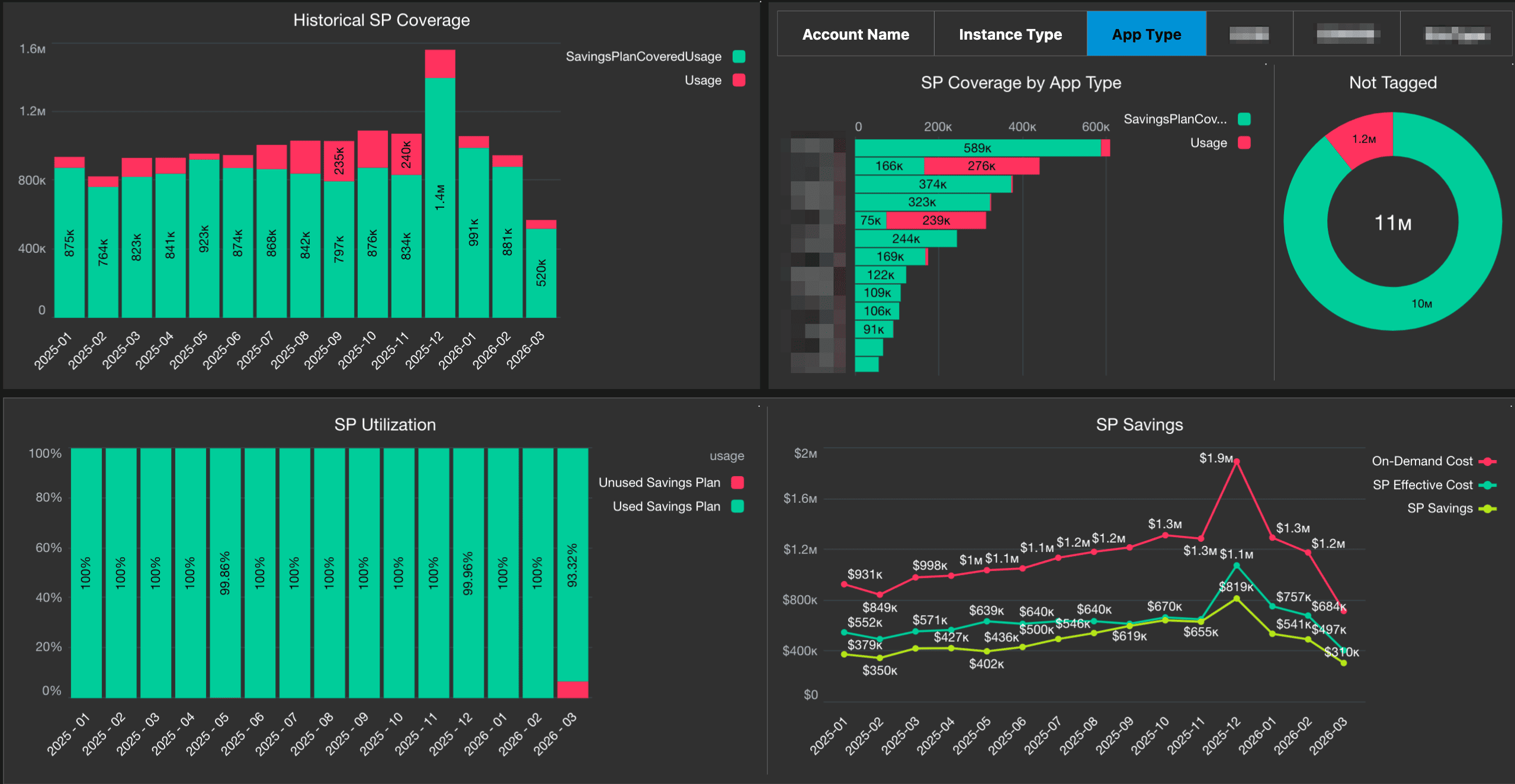 AWS EC2 Savings Plan coverage and utilization dashboard in Cloudaware showing historical coverage, app-type coverage, utilization rate, savings, commitment usage, and tagging status.
Operational benefits: faster provisioning, fewer infrastructure bottlenecks
Operational benefits often appear before direct savings. Teams can provision environments faster, test changes without waiting for hardware, scale capacity during demand spikes, and use managed services instead of maintaining every infrastructure layer manually.
Microsoft Azure lists improved DevOps, automated testing, scaling, and provisioning among the IT benefits of cloud migration. In enterprise environments, that matters because infrastructure requests often move through approval and capacity planning queues.
Cloud migration can reduce that delay, but only when the operating model is ready. If the landing zone, IAM model, network design, and approval workflow are unfinished, cloud access becomes the new bottleneck.
Governance benefits: clearer ownership, tagging, and cost accountability
Governance is one of the most underrated cloud migration benefits. A well-run migration forces teams to define workload ownership, service context, funding responsibility, and migration priority before spend moves into the cloud.
That ownership model improves cost allocation, chargeback readiness, incident routing, and post-cutover optimization. It also gives Finance a cleaner view of cloud spend by business context instead of raw provider invoices.
The FinOps Foundation’s 2026 Framework reinforces this shift. Its Executive Strategy Alignment capability connects technology spend and usage to business strategy, tradeoffs, and value governance. In migration terms, cloud spend has to be explainable before teams can call the move successful.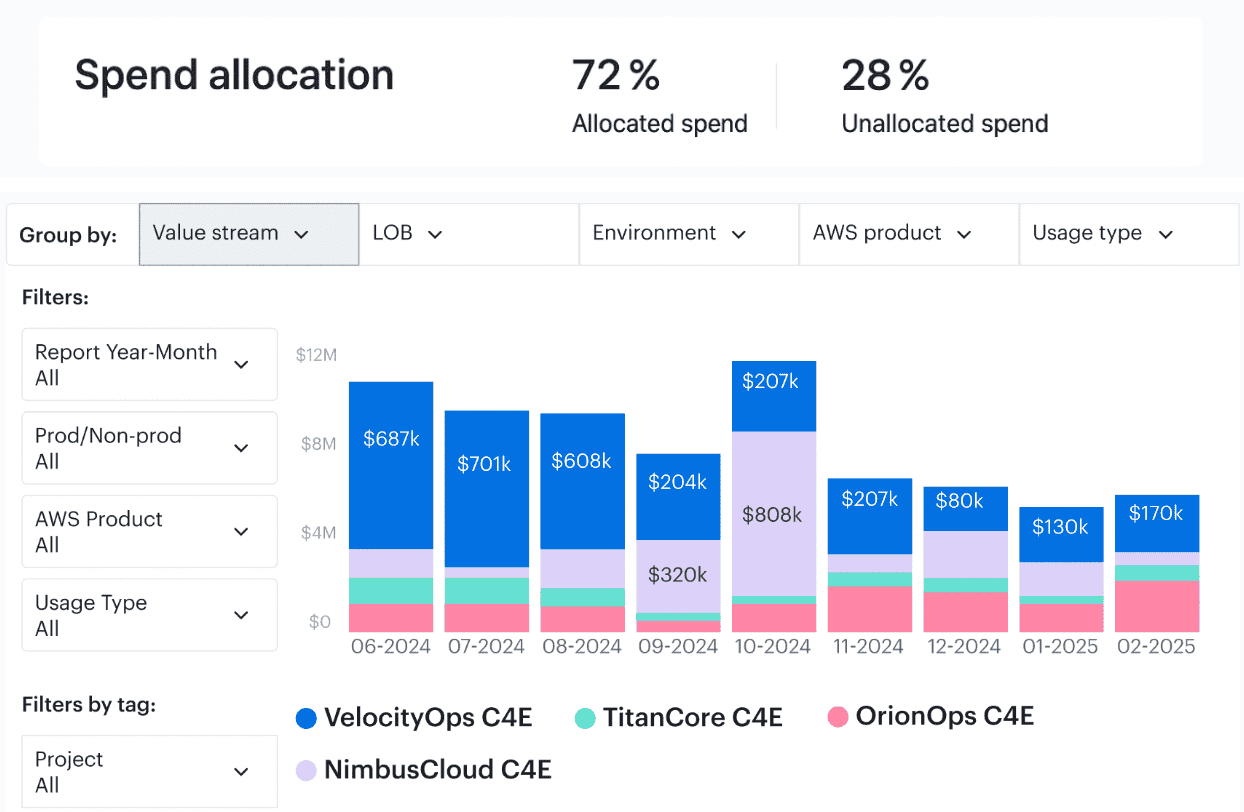 For example, Cloudaware centralizes spend data and enriches it with CMDB inventory, ownership, and tagging context. During migration, that context is critical because the environment changes every week.
Security and compliance benefits: better evidence when controls map to workloads
The security and compliance benefits of cloud migration depend on evidence quality. Cloud providers offer strong control capabilities, but enterprise teams still need to prove which workloads are covered, which environments are in scope, who owns exceptions, and where remediation stands.
NTT DATA’s 2026 cloud research notes that ecosystem complexity puts more pressure on security investment and cloud fundamentals. That applies directly to migration. The more fragmented the environment, the harder it becomes to prove control coverage.
When cloud resources are mapped to applications, environments, owners, and compliance scope, security validation becomes easier to manage. Teams can connect controls to workloads instead of rebuilding evidence late in the migration.
This matters when compliance affects cutover. If encryption, logging, identity, or evidence requirements are validated too late, the technical migration may be ready while the business still cannot approve production movement.
Performance and resilience benefits: workload placement becomes measurable
Cloud migration also gives teams a chance to place workloads more deliberately. AWS explains cloud migration as a way to move applications, data, and IT resources into cloud environments that can support better performance, elasticity, and operational scale. Microsoft also lists business continuity and disaster recovery among the main benefits of cloud migration.
But those gains depend on placement decisions. Workloads should only move when the cloud operating model improves cost, resilience, performance, governance, or delivery speed.
Resilience is where that decision becomes visible. After migration, teams need to know:
- Which resources are protected
- Which applications still have backup gaps
- Whether critical workloads are distributed across the right regions and availability zones
Cloudaware helps make that control visible by tying backup status and fault tolerance data to application context.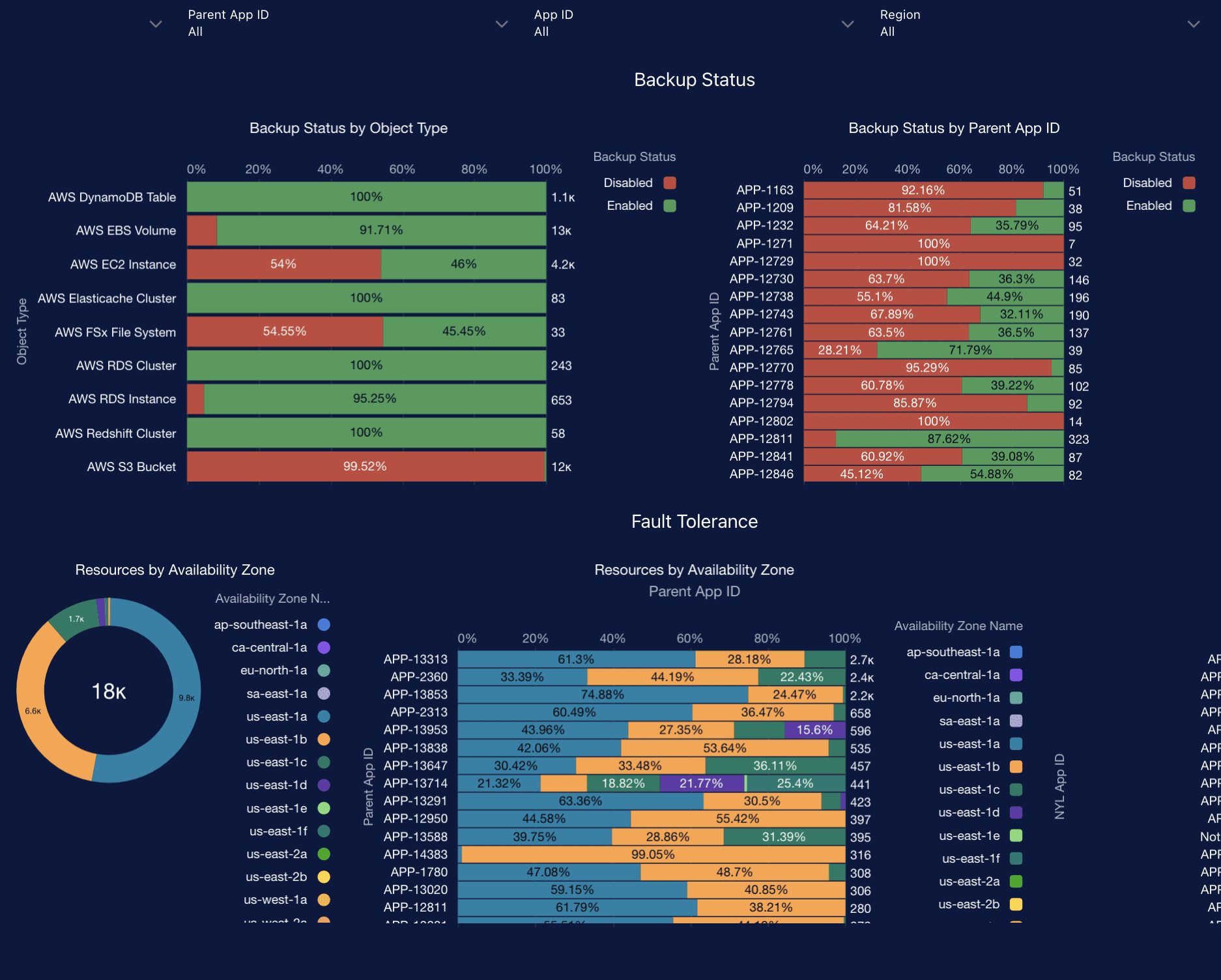 Instead of checking protection at the raw resource level, teams can review resilience by object type, app ID, parent app, region, and availability zone.
Enterprises capture more value when they decide which workloads should retire, rehost, replatform, refactor, remain, or move later. That decision protects the cost model because the team avoids paying migration effort and future run costs for workloads that should not move.
Cloud migration benefits become real when they are tied to baseline data, workload ownership, and post-cutover controls. Without that proof layer, the business case remains a forecast.
Cost optimization strategies for cloud migration for the enterprise
Cloud migration does not produce savings by default. Cost outcomes are set by decisions made before the first workload moves, reinforced during execution, and either locked in or lost after cutover.
Teams that treat optimization as a post-migration task usually spend the first quarter correcting avoidable mistakes. Teams that plan cost controls alongside the migration reduce waste while the environment is still flexible.
Before migration: remove costs that should never move
The cheapest workload to run in the cloud is the one you never migrate. Retiring unused or low-value applications reduces both migration effort and future run costs.
- Oversized on-prem servers should be normalized before mapping to cloud instances. Lifting legacy overprovisioning into the cloud turns historical safety margins into immediate spend.
- Tagging and ownership must be fixed upfront. Without clear owners before migration, forecasts break, and early cloud bills arrive as unallocated spend.
During execution: control the messy middle
Most overruns happen here. Staging, testing, and parallel environments tend to outlive their purpose. Timeboxing these environments is one of the fastest ways to protect the budget.
- Data movement needs explicit design. Repeated syncs, hybrid traffic, and cross-region transfers often incur egress costs that were not accounted for in planning.
- Rehost decisions are not always final. Some workloads only stabilize after a quick replatform. Delaying that decision increases redesign effort and mid-migration spend.
Once workloads stabilize, attention shifts to steady-state cost control.
- Rightsizing and autoscaling should be reviewed within weeks, using real production usage. Waiting preserves migration-phase sizing.
- Commitments such as Savings Plans or RIs should follow stabilization, not precede it. Early purchases lock in inefficient patterns.
- Storage tiering, lifecycle rules, tagging, budgets, and alerts keep costs tied to owners. Without them, drift usually appears within the first 60–90 days.
AWS-specific cloud migration costs
AWS migrations introduce cost patterns that rarely show up in early forecasts. The services are familiar, but the way they behave during migration is not. Most “first bill shock” moments come from compute sizing habits, storage defaults, and data movement that only becomes visible once workloads are live.
Compute, storage, egress, transfer, and DMS tooling
The biggest AWS migration costs usually fall into a few categories.
- Compute. Workloads often map into EC2 instance families by habit rather than need. That leads to oversized instances and inflated run costs. Migration windows also create temporary compute usage for staging, validation, and lift-and-shift testing
- Storage. S3 and EBS behave differently from on-prem storage. S3 lifecycle rules are optional, not automatic, and EBS snapshots accumulate quickly during migration testing. Storage spend rises fast if teams do not clear temporary snapshots or move data into the correct tier
- Egress and transfer. Data rarely moves the way teams expect once the migration starts. A small sync job can become a noisy neighbor, and cross-region or hybrid traffic creates real costs that calculators never surface
- AWS DMS. DMS simplifies database moves, but the meter keeps running as long as CDC tasks run. Big tables and long replication windows can turn into noticeable transfer and compute costs if no one keeps an eye on them
Read also: 6 Ways to (not) Fail AWS Cloud Cost Optimization in 2026
EC2 family mapping and right-size modeling
The fastest way to overspend on AWS is to size EC2 based on hardware specs instead of utilization. CPU burst patterns, memory pressure, and IO behavior matter more than core counts.
Teams that use CloudWatch or migration discovery data to pick instance families usually end up with smaller, cheaper, and more stable configurations — especially when they test Graviton.
Read also: AWS Cloud Cost Management - A Practical Guide
Commitments strategy after stabilization
SP and RI can reduce AWS compute costs significantly, but only when purchased at the right time. Buying too early locks in migration-phase sizing, which rarely matches steady-state demand. Buying too late leaves discounts on the table.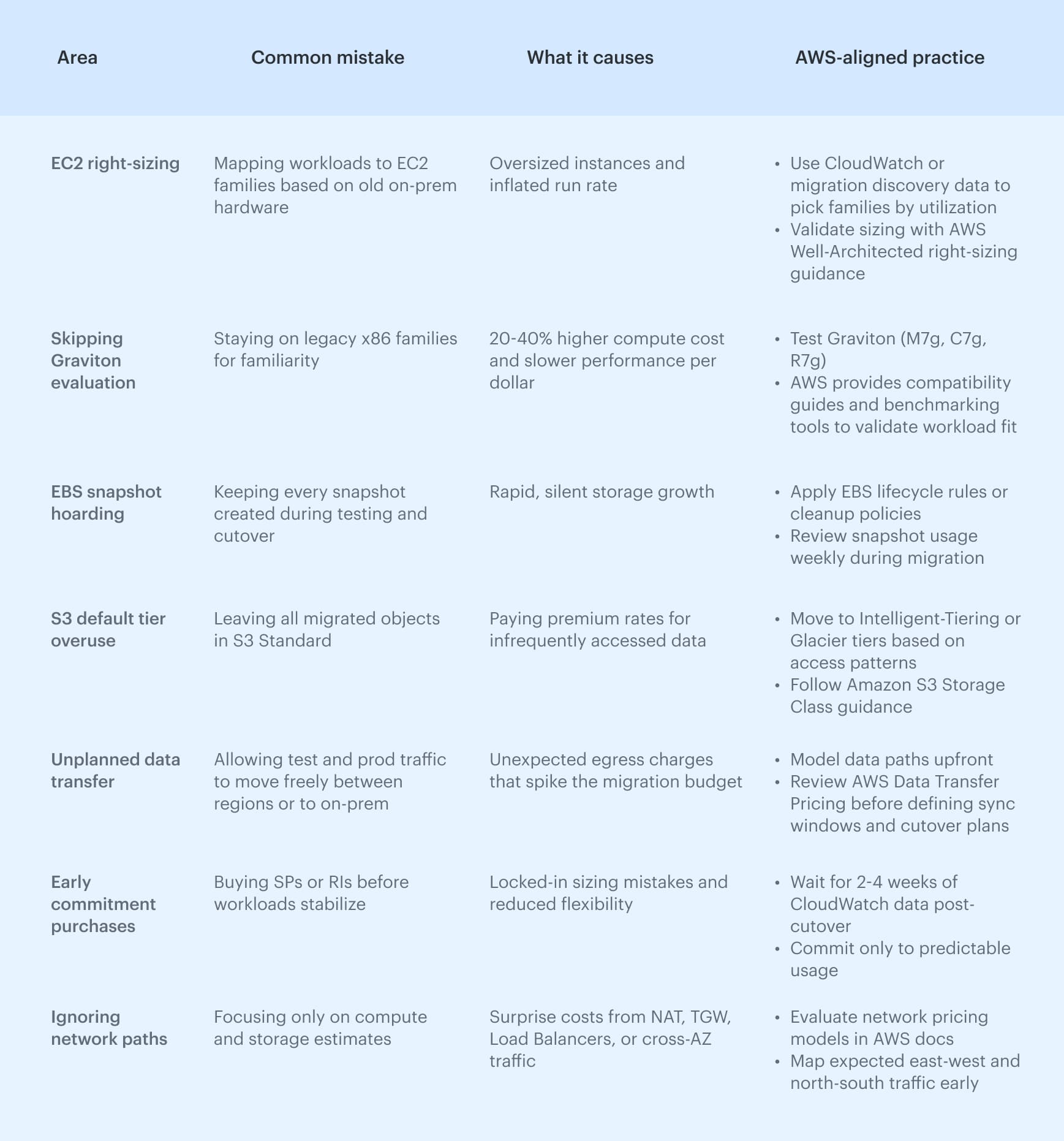
Considerations for cloud migration cost savings US
Most US organizations do not operate a single shared cloud environment. They run multi-account AWS, Azure, or GCP structures tied to business units, product lines, or regulatory boundaries. During migration, this adds two requirements:
- Chargeback readiness from day zero. Finance expects cloud costs to be distributed by business unit immediately after workloads move.
This means tagging, ownership, and cost-center alignment must be validated before the migration starts. If not, early cloud bills land as unallocated spend which is a major blocker for US FP&A teams. - Strong governance for account sprawl. As more teams adopt cloud services, US enterprises often see rapid account proliferation. Without clear governance, spend becomes fragmented and savings opportunities (like Savings Plans or shared services) go unused. Migration teams now plan their account hierarchy upfront to avoid rework once workloads are live.
US compliance and operating-model factors
US migration programs also carry cost assumptions that are less visible in generic models. Labor costs for cloud engineers, architects, and compliance teams are often higher, while requirements tied to SOC 2, HIPAA, or FedRAMP-sensitive environments can extend validation work and delay the point at which cloud migration cost savings become visible.
How Cloudaware empowers cloud migration cost savings
After watching dozens of enterprise migrations up close, the pattern is always the same: teams don’t fail because they pick the wrong cloud service. They fail because the financial foundation of the migration is unstable.
Cloudaware fills that gap by giving teams a stable, unified source of truth that holds up even as architectures, owners, and environments shift throughout the migration.
Accurate baseline before migration
Cloudaware’s CMDB gives you a clean baseline before the first workload moves. Resources are tied to applications, environments, owners, and cost centers, so forecasts do not start with guesswork.
Tag completeness improves because Cloudaware checks metadata across all accounts and providers and pushes exceptions back to the teams responsible.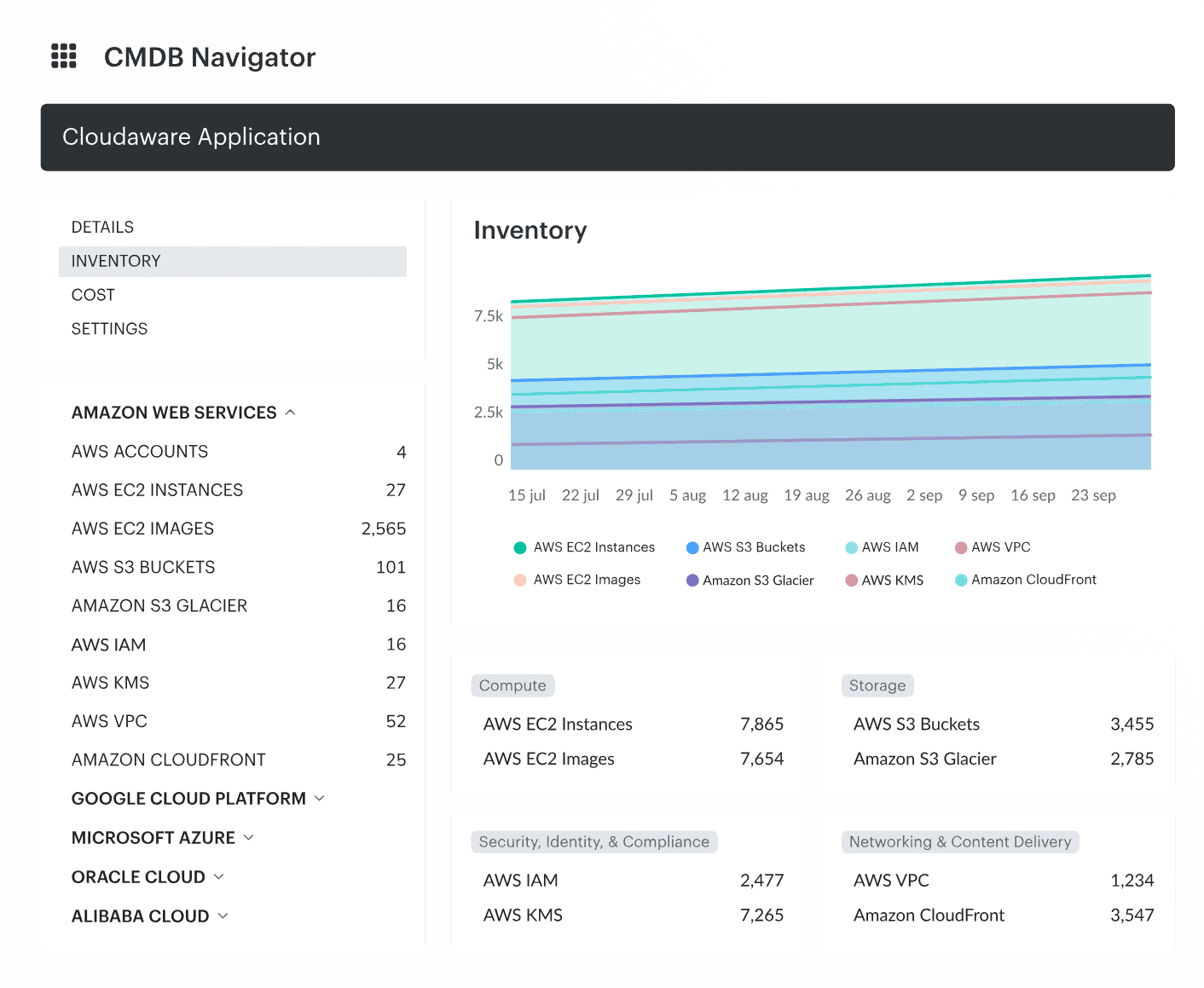 Daily visibility that keeps costs from drifting
As the migration unfolds, cost patterns change every day. Cloudaware brings in billing and usage data continuously and links it to the CMDB to expose duplicate compute, lingering staging stacks, unplanned egress, unexpected storage growth, and early signs of double-run.Because spend is tied to applications and services rather than raw resources, FinOps teams get actionable visibility from the first migration wave.
Governance and automation that stabilize post-cutover spend
Cloudaware applies policy and compliance controls to hold the run rate steady after cutover. Tag rules, budget thresholds, drift detection, and environment hygiene checks detect idle resources, mis-tagged assets, and footprints that inflate steady-state costs.