

Work in Jira with the CI on every issue
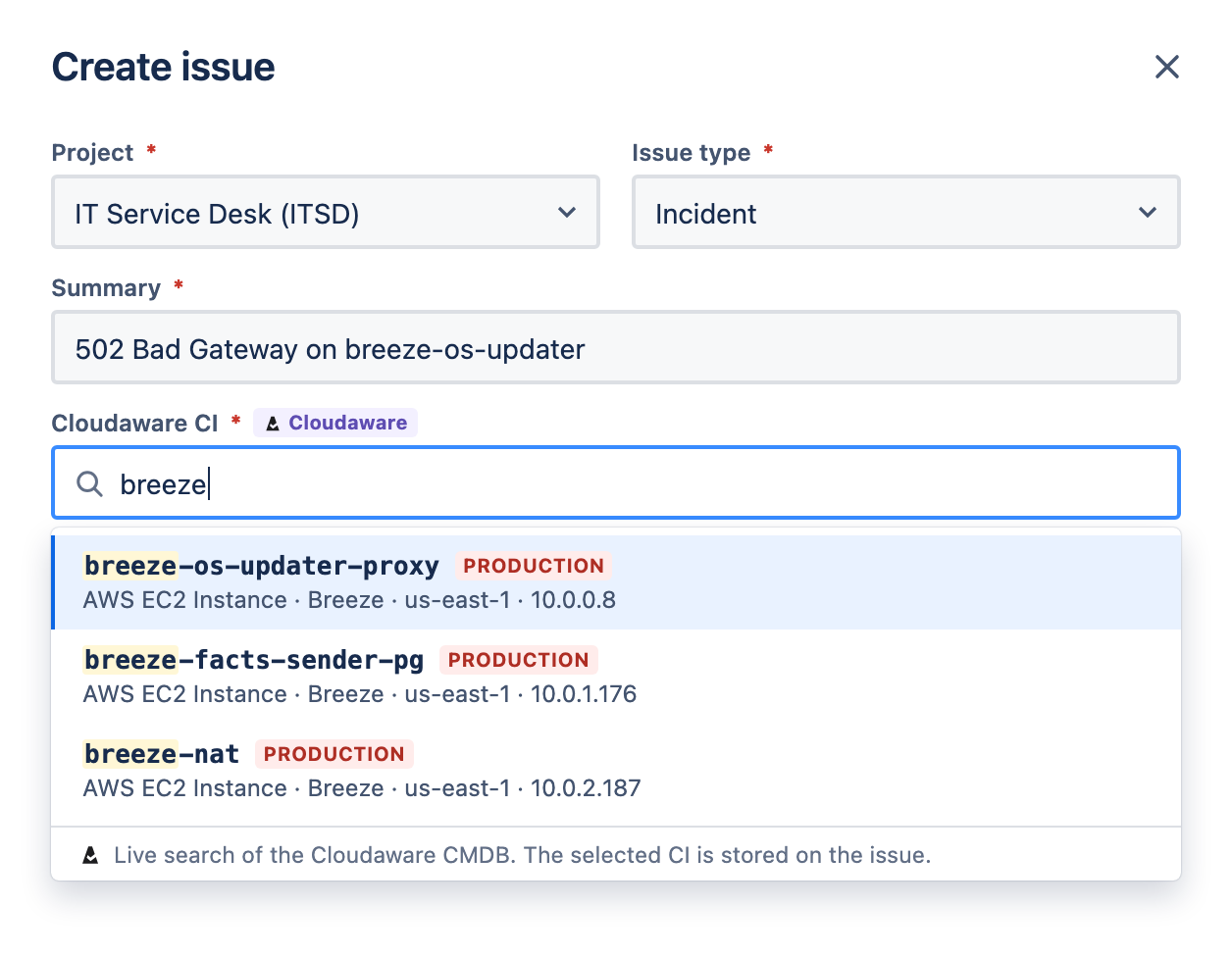
Search the Cloudaware CMDB from the issue screen. Find a CI by name, instance ID or IP address.
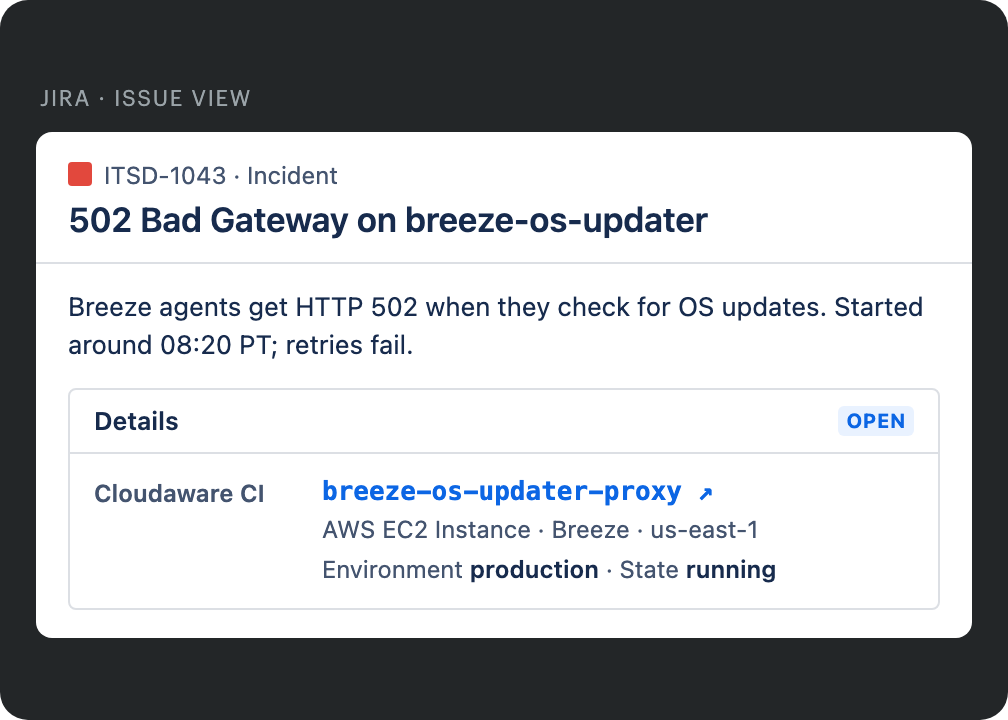
Alerts and emails often name an instance or an IP address. Cloudaware finds it and links the matching CI.
Cloudaware adds the CI's application, environment and owner. The person working the issue knows who owns it.
Cloudaware discovers your resources and tracks every change. Nothing is copied into Jira Assets.
Teams that run their CMDB on Cloudaware
What Cloudaware discovers
Cloudaware connects to your clouds, data centers, devices and tools through their APIs. Nobody types in a CI. Every CI stays current as things change.
Cloud
Every resource type in every account, from virtual machines to keys and queues.
- AWS
- Azure
- Google Cloud
- Oracle Cloud
- Alibaba Cloud
- Kubernetes
Data center
Virtual machines, hosts, datastores and bare-metal servers.
- VMware vCenter
- Nutanix
- SCCM
Network
Switches, routers and other devices on your network. Cloudaware scans with SNMP, or reads a source you already trust.
- SNMP discovery
- IP discovery
- SolarWinds
End-user devices
Laptops, phones and tablets, matched to the people who use them. Add purchase records to track warranty and end of life.
- Microsoft Entra ID
- Jamf
- SCCM
- Cloudaware agent
Software
Installed software and versions on every server and laptop. Cloudaware flags software that isn't on your approved list.
- Endpoint tools
- Cloudaware agent
Security and monitoring coverage
Cloudaware matches your security and monitoring data to each CI. You see which machines nobody scans or monitors.
- CrowdStrike
- Qualys
- Tenable
- Rapid7
- Datadog
- New Relic
- Dynatrace
- Cloudaware checks each source against the others. A host your security tool sees but your inventory doesn't is flagged.
- Devices with no purchase record are flagged too.
- Every change is kept, including resources that no longer exist. You can see what a CI looked like last week.
How Cloudaware connects Jira issues and CIs
Choose the CI when you create the issue
The Cloudaware app adds a CI field to Jira. Type a name, instance ID or IP address, then pick the match. The issue links to that CI in Cloudaware. Nothing is copied into Jira Assets.
- Search by name, instance ID or IP address
- Open the CI in Cloudaware from the issue
- Works in Jira Cloud
Link issues that come from alerts and email
These issues often name an instance ID, IP address or host name. The Cloudaware linker reads each new or updated issue. It links every CI it finds and adds the application, environment and owner. Its comments come from the Cloudaware CMDB app, not from a person's account.
- Links only identifiers that match a CI
- Takes application, environment and owner from the service catalog
- Lets you choose the projects and fields
See every issue on the CI
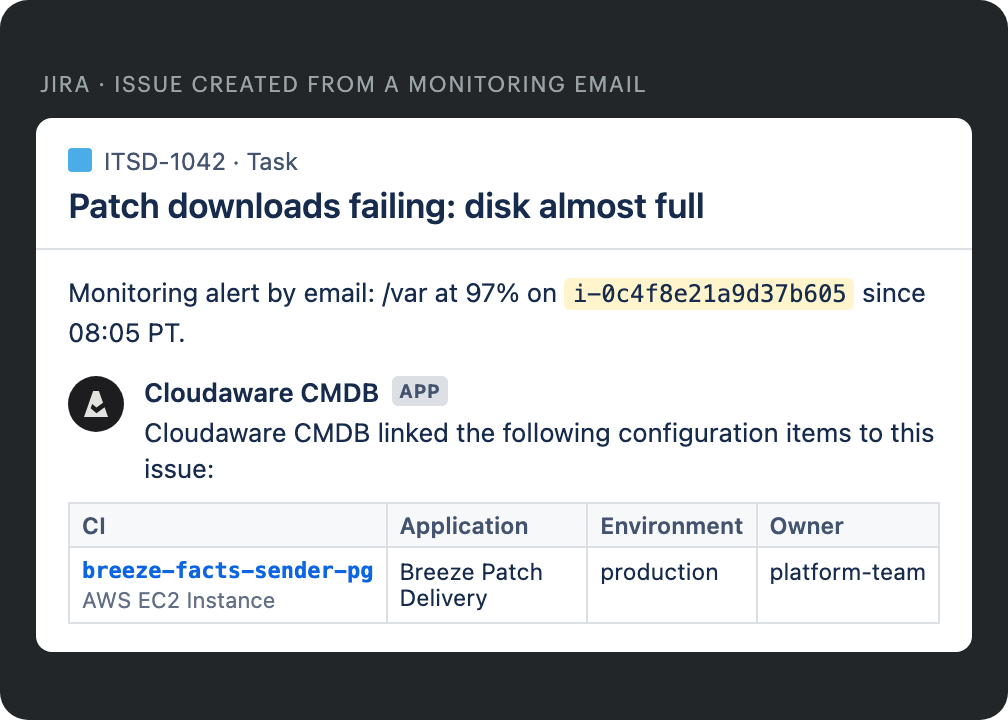
Cloudaware imports Jira issues and matches each one to its CIs. Open a CI to see its issues next to its changes and dependencies.
- Connects to Jira Cloud or Jira Server with an API token
- Reaches a private Jira Server through TunHub
- Reads every project its Jira account can see
Open Jira issues from Cloudaware
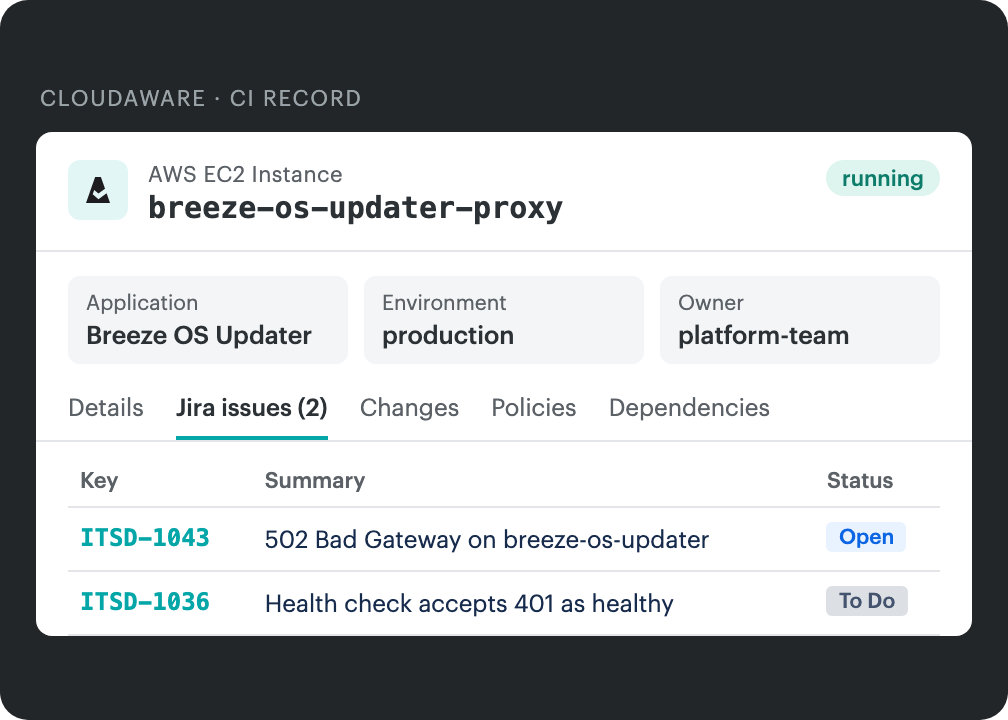
Set a condition in a Cloudaware Workflow. When a CI meets it, Cloudaware opens a Jira issue in the project you choose. When the CI is fixed, Cloudaware comments on the same issue. Jira Automation can then close it.
- Fills the project, issue type and summary from the CI
- Posts updates as comments on the same issue
- Leaves status changes to Jira Automation
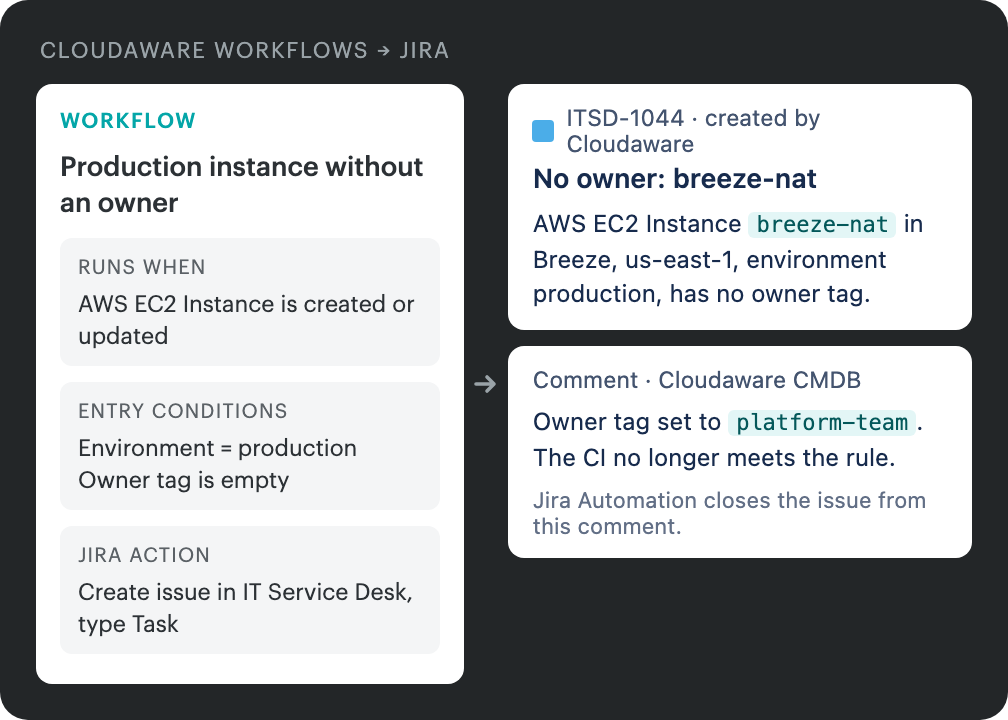
Issue keys and issue text are examples. CI, application and owner names come from the Cloudaware demo environment.
AI agents that work in Jira and Confluence
Cloudaware's AI-based products read the CMDB and the service graph through Cloudaware's hosted MCP. They know each CI's application, owner and dependencies. They post their work where your teams already look.
Get an investigation on every linked incident
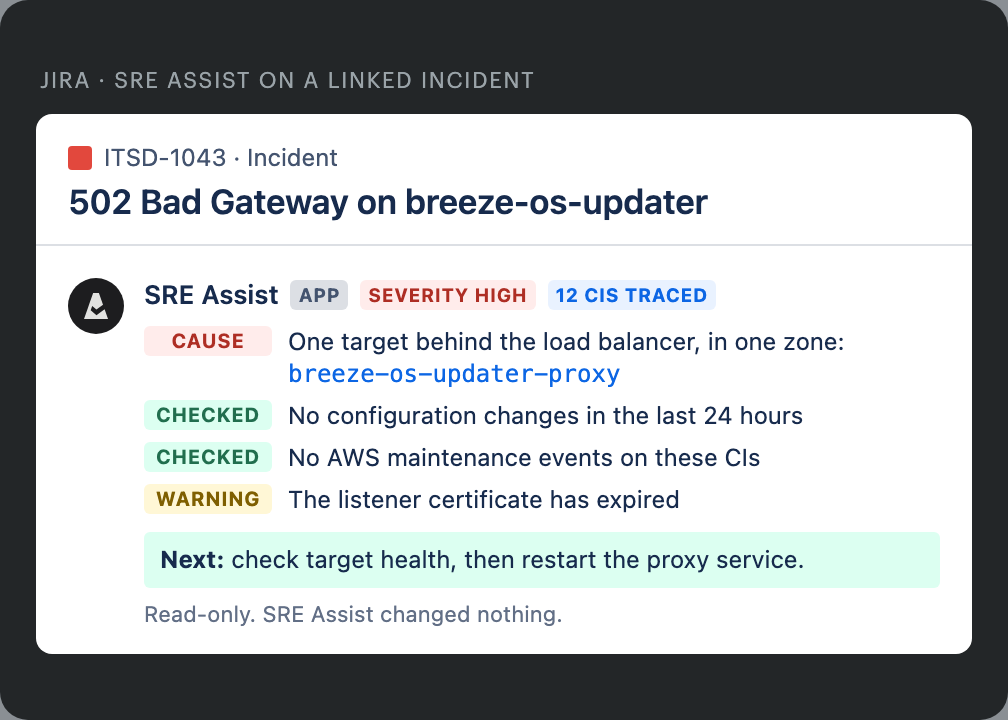
When an incident is linked to its CI, SRE Assist investigates. It checks recent changes, the request path and the CI's dependencies. It posts what it found and the next steps on the issue. It changes nothing.
- Reads the CMDB and the service graph
- Posts findings on the Jira issue
- Read-only
Keep every DR runbook current in Confluence
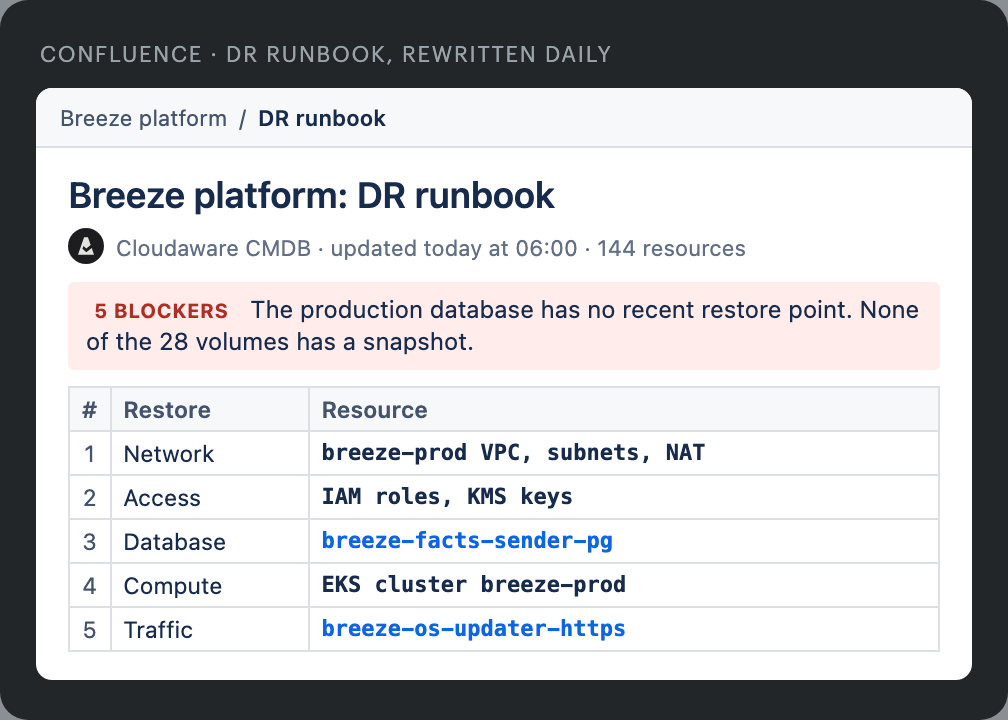
An agent writes each application's DR runbook from the CMDB. It lists the resources, the order to restore them and what blocks recovery. It rewrites the page on your schedule, such as every morning. The same agent can write architecture pages with diagrams.
- Recovery order from real dependencies
- Blockers listed first
- A new version on every run
Give each application owner one page
Agents assess each application for resiliency, security, compliance, cost and modernization. The results land on one Confluence page per application. The owner works from one ranked list instead of separate requests from each team. Findings from your other tools can land there too.
- One page per application
- One ranked list per owner
- Updated from the CMDB
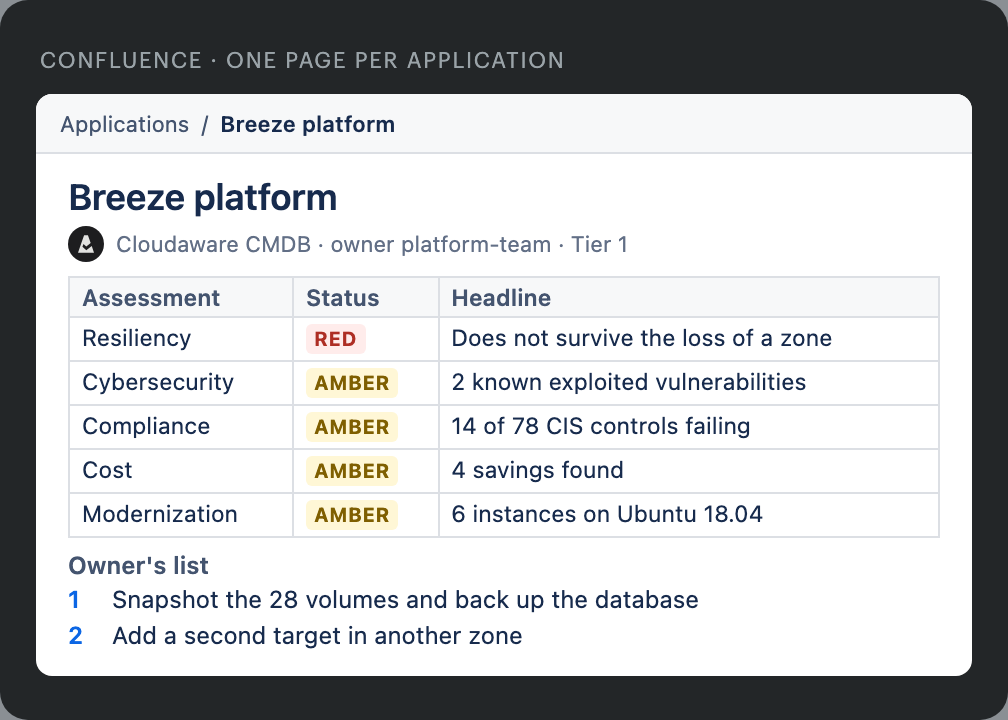
Issue keys, page names and findings are examples. CI and application names come from the Cloudaware demo environment.
Jira Assets works best with a curated set
Business services, accounts, long-lived servers and network devices fit it well. Cloud resources change all day. Instances start and stop, and settings change on resources nobody tracks as CIs. A copy in Jira Assets falls behind unless someone curates it. Loading it also runs into Atlassian's limits.
Capacity
Atlassian allows 3 million objects per site by default. You can request up to 10 million. Atlassian tests your site first, and you pay for the larger tier.
Price
Objects above your plan's allowance cost $0.02 each per month at list price. Premium includes 50,000 objects. Enterprise includes 500,000.
Loading
The Assets API creates one object per call. Most endpoints allow 1,000 calls a minute. At that rate, 3 million objects take about 50 hours to load.
Need some CIs in Jira Assets too? Cloudaware can load a filtered set on request. We don't recommend loading everything. See how the Cloudaware CMDB discovers resources
Cloudaware costs $0.008 per CI per month
Monthly list prices, before volume discounts. Jira Assets charges only for objects above the plan allowance. Jira Service Management agent licenses are not included.
Jira Assets: objects above the allowance × $0.02. For example, 3 million objects on Premium is 2.95 million above the allowance. Cloudaware: CIs × $0.008.
Sources: Atlassian Assets licensing, Atlassian Assets pricing update, 10 million objects in Assets
Jira CMDB FAQ
What is a Jira CMDB?
What does Cloudaware discover?
Does Cloudaware replace Jira Assets?
How does a CI get onto a Jira issue?
Does the CI field use Jira Assets objects?
Which Jira deployments does Cloudaware support?
What does the linker add to an issue?
Can Cloudaware open Jira issues?
How does the price compare with Jira Assets?
How long does setup take?
Do the AI agents change my infrastructure?
Can I use my own AI assistant?
What else can run on a linked issue?
Try Cloudaware with Jira
- One hour with a solutions engineer and a technical account manager
- Built around your team's Jira use cases
- Run on a Cloudaware demo environment