

FinOps for AI: from cost visibility to value finance accepts
Cloudaware maps AI charges from AWS, Azure, Google Cloud and Anthropic billing to the application, business service and owner in your CMDB, so every value claim starts from allocated cost.
Automated and guided setup
Read-only cloud billing access
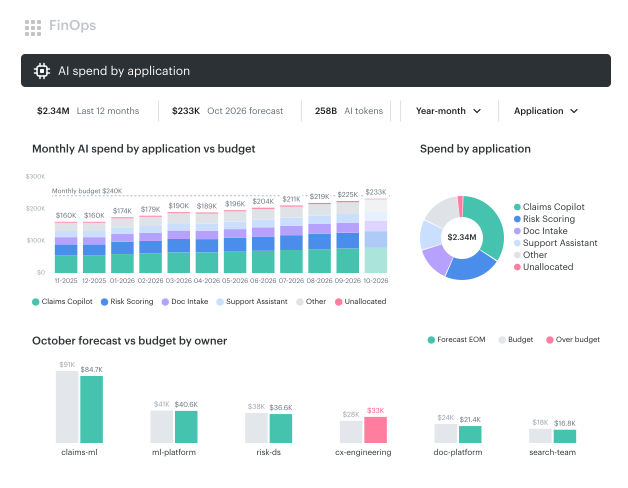


Turn AI cost visibility into value reporting for finance
Once AI spend is tracked, finance asks which business service it supports, who owns it and what it returned.
name proving AI value as their top challenge, 7% name pricing complexity
can't connect AI spend to an outcome their CFO would accept
more likely to show value when AI economics has a named owner
say finance owns AI economics
Source: Tokenomics Foundation, State of Tokenomics, September 2026, 472 organizations.
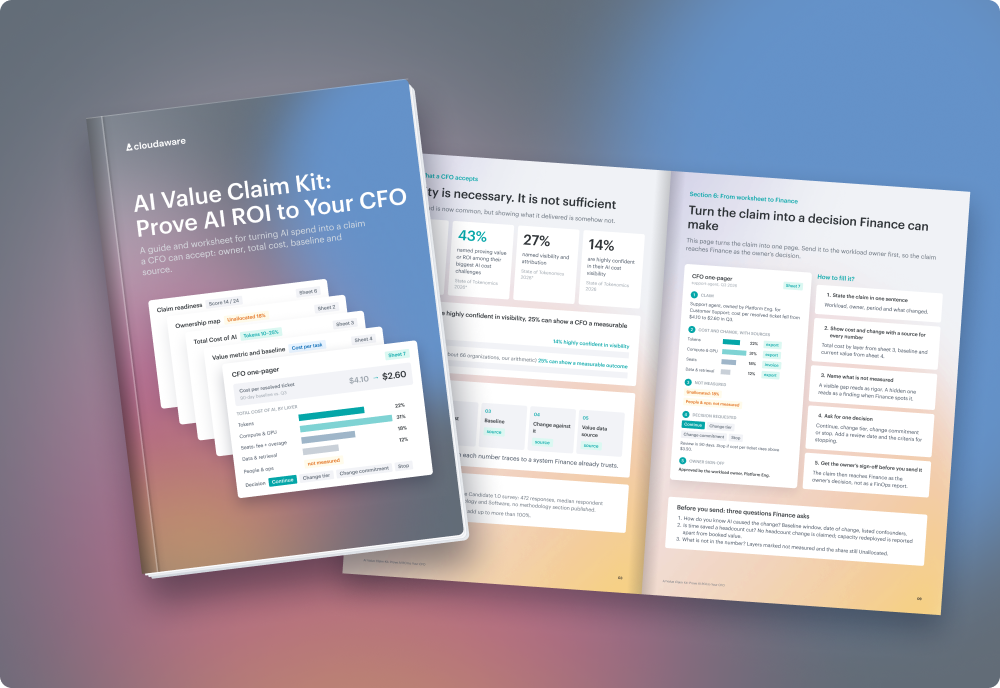
Allocate AI spend to applications, business services and owners
Cloudaware takes the application, cost center and owner from the CMDB, not from a spreadsheet of API keys.
- Bedrock, SageMaker and Azure OpenAI charges mapped to CMDB owners
- Applications rolled up to the business services you model as Virtual Applications
- Shared deployments split by fixed percentage or usage
- Unmapped AI cost kept on a separate unallocated line
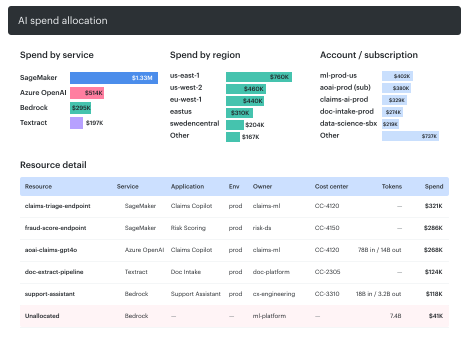
From AI billing data to a value claim in four steps
Read-only access to AWS, Azure and Google Cloud billing exports, plus the Anthropic usage API
Each mapped charge gets an application, business service and owner, the rest stays unallocated
Budgets, forecasts, anomaly alerts and chargeback per team
Outcomes recorded in the AI Value Claim Kit against allocated cost
Govern AI spend with budgets per owner instead of hard caps
Each team gets a budget, a forecast and anomaly alerts on its own AI cost, so a request for more budget comes with its own numbers.
- Budgets and month-end forecasts per application or team
- Anomalies routed to the workload owner
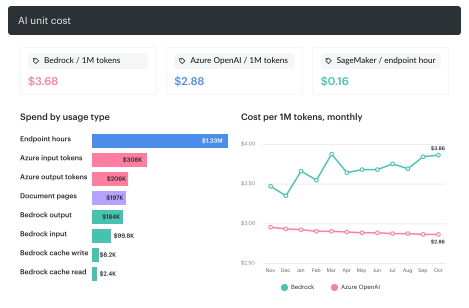
- Tokens next to cost for Bedrock, Azure OpenAI and Anthropic
- Showback and chargeback per team
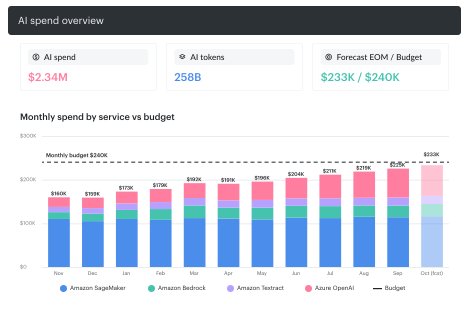
Track model fees, compute and commitments in one cost model
Token charges sit next to the endpoint hours, storage and commitments of the same AI workload.
- Commitments planned from historical usage, including SageMaker ML Savings Plans
- AI cost in the same allocation and reports as compute and Kubernetes
Add owner context to the AI cost tools you already run
Show one provider at a time. Cloudaware puts AWS, Azure, Google Cloud and Anthropic in one cost model.
Meter only the traffic that passes through them. Cloudaware reads billing, including traffic that bypasses the gateway.
Depend on how well AI resources are tagged. Cloudaware adds CMDB relationships and mapping rules on top of tags.
FinOps for AI FAQs
What is FinOps for AI?
How do you measure AI ROI?
How does Cloudaware allocate AI spend to applications and owners?
Which AI services and billing sources does Cloudaware cover?
What are AI unit economics?
How do you govern AI spend without hard spending caps?
How is Cloudaware different from an LLM gateway?