Cloud bills rarely spike because the cloud is overpriced. More often, the trouble comes from how we architect and operate our systems. As teams roll out more microservices, Kubernetes clusters, and AI pipelines, cloud computing cost savings shift from a budgeting task to a daily engineering habit.
We’ve all been there. Tags exist, but ownership doesn’t. Alerts fire, but nothing gets fixed. CUR files grow, yet no one agrees who owns which slice of spend. Without a shared understanding of cost drivers, each team optimizes locally while the total bill keeps drifting upward.
This piece focuses on the approaches that consistently work in real environments — practical ways to cut waste without slowing delivery, adding friction, or rewriting half the stack.
In this guide, you’ll learn how to:
- Surface cost drivers by workload and owner
- Eliminate idle, overprovisioned, and orphaned resources
- Introduce real elasticity into compute, storage, and data flows
- Use commitments only where usage patterns justify them
- Build cost accountability into build, deploy, and ops routines
How much you can actually save with cloud computing
The first question everyone asks before architecture reviews, before commitments and tagging is: “So how much is cloud computing really going to cost us, and what can we realistically save?”
There isn’t a single number that fits every shop. Still, after enough migrations, audits, and end-of-quarter reviews, you start to see reliable patterns in how the “cost savings of cloud computing” actually play out in the real world.
Some teams do win big. A few FinOps folks on Reddit mentioned cutting spend by a third once they cleaned up provisioned capacity and moved to actual usage-based models.
Others told the opposite story: a straight lift-and-shift doubled their cloud costs because old habits like overprovisioning, guessing capacity, and ignoring data paths, followed them into the cloud untouched. And there are always cases where a steady, boring workload is simply cheaper on hardware the company already owns.
In short, cloud computing cost reduction only shows up when the architecture and the operating model are designed to take advantage of cloud, not fight against it.
Benchmark ranges by industry
- SaaS and online platforms: usually 25-50% savings once elasticity and commitments are aligned with reality
- Traditional enterprises: 10-30%, but only after refactoring; lift-and-shift rarely saves anything
- Data-heavy or AI teams: sometimes no savings at all until storage policies and job scheduling are fixed
Different sectors land in different places. But most of the impact comes from compute and storage efficiency, not discounts.
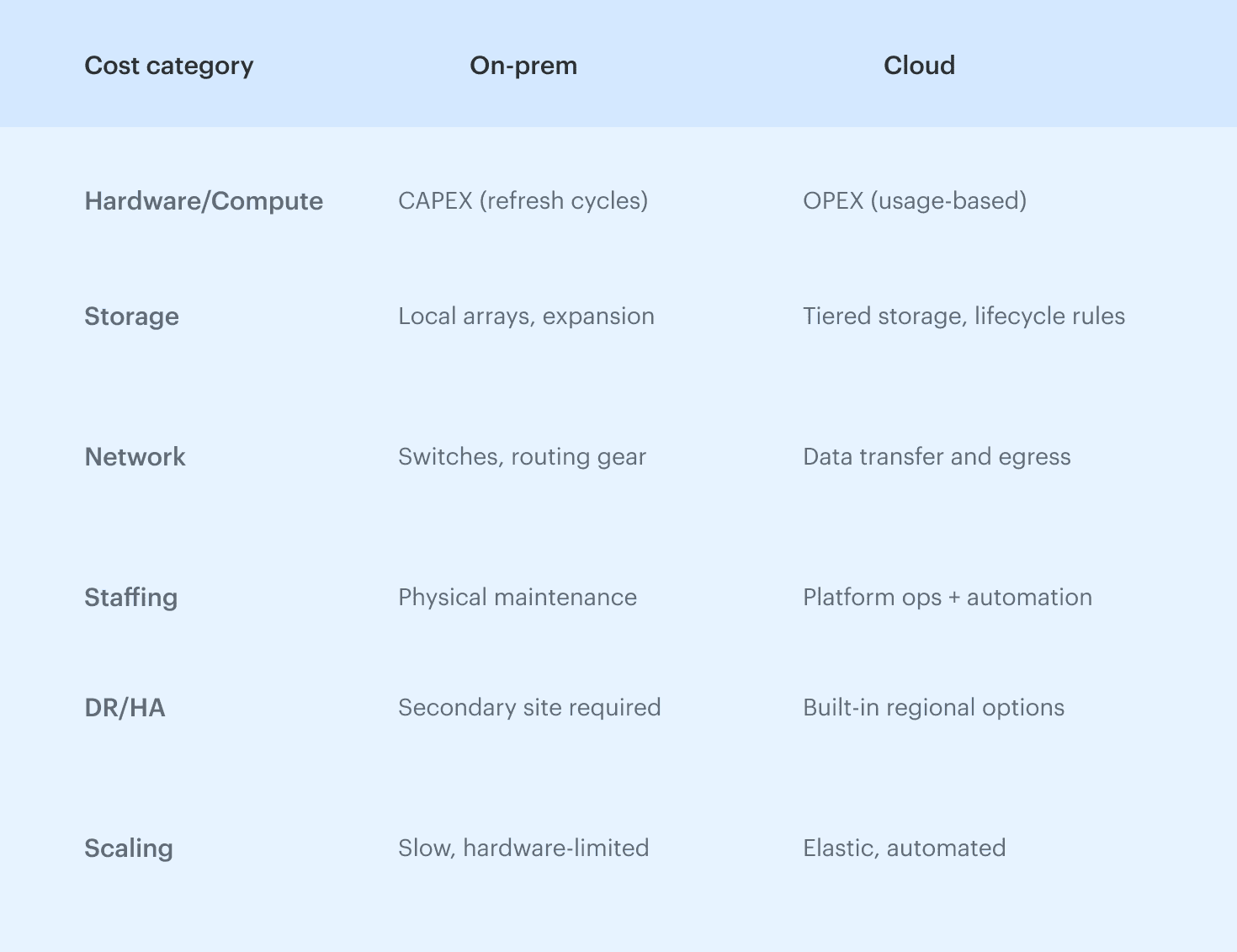
On-prem vs cloud TCO in one snapshot
On-prem wins when workloads barely move. Cloud wins when demand shifts hourly. On-prem gives you predictable bills; cloud gives you room to grow and shrink without buying hardware.
The crossover point depends on how disciplined the team is, how much of that “idle but necessary” capacity you actually carry, and whether shared visibility exists across engineering and finance.
What drives cloud compute costs: cost driver explanation
When people ask why their cloud compute costs look unpredictable, it’s rarely because anything “mystical” is happening inside AWS, Azure, or GCP. More often, it’s the mix of architecture choices, traffic patterns, and the way teams interact with infrastructure that drives cloud costs up or down.
Once you break a bill into the levers that actually move, cloud computing becomes far easier to reason about. A tiny change in data flow, a scaling rule left unchecked, or orphaned resources nobody remembers can shift cloud costs overnight.
1. Compute pricing models
Compute usually gets expensive because it’s sitting in the wrong pricing model for how the workload behaves. A steady service belongs on commitments; a seasonal or spiky one doesn’t.
Low utilization tells you you’re paying for capacity no one is using. Commitment drift shows up when new services launch or old ones quietly disappear and no one adjusts the portfolio.
2. Storage classes & lifecycle
Storage spend climbs when fast tiers grow without a clear reason, or when snapshots and buckets pile up untouched. The real fix is simple: lifecycle rules based on access patterns, colder defaults, and regular checks of “last accessed” timestamps. That alone catches most silent growth.
3. Network & data transfer
Transfer charges tend to surprise teams because they reflect architecture, not resource count. Cross-AZ chatter, inter-region replication, service-mesh noise, or a feature that suddenly ships large payloads can all push spend past expectations.
4. Managed services vs DIY
DIY clusters look cheaper until they don’t scale down or demand constant babysitting. Managed databases, queues, and ML services cost more per hour but behave better under real load. Rule of thumb: Use managed services for bursty or high-ops workloads; use DIY only when the load is flat and predictable.
Cloud computing cost benefit analysis: a simple TCO model you can reuse
When teams try to compare on-prem and cloud without a structured model, the conversation turns into guesswork. A solid cloud computing cost benefit analysis fixes that by forcing everyone to look at the total cost of ownership (TCO) instead of line items.
TCO is a way to stack up all the real costs over the full lifecycle of running something, not only what appears on a quote.
A big part of this is understanding CAPEX vs OPEX. On-prem is mostly CAPEX: large upfront hardware purchases that you depreciate over three to five years, plus refresh cycles that come around whether you want them or not. Cloud shifts you toward OPEX: you pay for what you use (and sometimes what you forget to stop using).
On-premises cost buckets (CAPEX, facilities, DR)
On-prem TCO usually hides more layers than people remember:
- Hardware purchases and refresh cycles
- Racks, facilities, power, and cooling
- Network equipment and maintenance contracts
- Staff work: patching, racking, testing, and physical interventions
- Disaster recovery: second site, replication tooling, extra routing
When you assign real numbers, the “cheap hardware” story often fades. On-prem looks economical only when the workload is steady, the hardware is amortized, and DR expectations are low or already paid for.
Cloud cost buckets (compute, storage, network, services)
Cloud replaces large upfront spend with consumption-based OPEX:
- Compute: hours, commitments, and idle headroom you may not notice
- Storage: tier decisions, lifecycle, snapshots that never get cleaned up
- Network: cross-AZ, cross-region, internet egress
- Managed services: databases, queues, ML endpoints, observability
- Support & training: often missing from early estimates
Cloud looks expensive when the architecture can’t scale down or when old constraints are carried forward unchanged.
Soft benefits: reliability, velocity, fewer outages
Soft benefits are harder to price but matter more than teams admit:
- Mean Time to Recovery (MTTR): track improvement after moving to cloud-native services
- Deployment velocity: measure cycle time before/after migration to show faster value delivery
- Incident load: count how many infrastructure issues disappear once teams stop managing hardware
- Staff redeployment: hours moved from patching/racking to feature development
- Global reach: how many regions can now be supported without new datacenter build-outs
These don’t sit neatly in spreadsheets, but they drive the real ROI of cloud computing adoption.
Average cost savings with cloud computing: realistic ranges by scenario
If you’re often asked, “What are the average cost savings cloud computing can actually deliver?” You know, there’s no single answer, but after enough migrations and quarterly reviews, patterns emerge.
Most variation comes from three factors: workloads (steady vs spiky), the migration path you choose, and how mature your FinOps discipline is. When you group cloud migration scenarios the right way, the savings bands become surprisingly consistent across industries and company sizes.
In other words, cloud cost outcomes depend less on the cloud itself and more on how the organization operates it. FinOps Foundation highlights that cloud cost outcomes fall into recognizable patterns, not random chaos. The scenario you’re in tells you more about likely savings than any vendor calculator.
Below are the three scenarios that consistently show up across industries and company sizes.
Lift-and-shift: minimal savings
A pure lift-and-shift almost never reduces cloud compute costs. You’re simply renting the same architecture from someone else.
Typical outcomes:
- Enterprise: +10-40% spend increase (unchanged patterns, static VMs, heavy inter-AZ traffic)
- Mid-market: 0-10% variation
- SMB: occasionally a ~10% reduction if workloads are bursty
Why savings are low: no rightsizing, no lifecycle policies, no network redesign, and the same idle capacity that existed on-prem.
Replatforming and modernization
Once teams start using the cloud the way it’s designed to work, savings appear. Usually, the moment organizations introduce autoscaling, right-size compute, tune storage, or containerize parts of the stack, the economics shift.
Typical outcomes:
- Enterprise: 10-25% reduction
- Mid-market: 15-30%
- SMB: 20-40%
Drivers include:
- reduced VM footprint,
- proper storage tiering,
- fewer cross-region transfers,
- cleanup of idle and orphaned resources,
- matching workloads to the right service models.
Advanced FinOps practice outcomes
When engineering, FinOps, and product teams operate as one system, the curve changes again.
Typical outcomes:
- Enterprise: 20-45%
- Mid-market: 25-50%
- SMB: 30-55%
These results come from:
- Mature commitment strategy
- Continuous rightsizing loops
- Anomaly detection tied to deployments
- Cost ownership at the app/team level
- Forecasting and cost-to-serve modeling
How does cloud computing reduce costs?
The short answer here is that it eliminates the need to own capacity you don’t fully use, and replaces fixed, upfront spending with usage-based economics. But the longer, more practical answer comes from how engineering teams actually design, scale, and operate systems. When you break down the levers, the cost advantages become much easier to see.
1. No upfront CAPEX
Traditional infrastructure demands capital: servers, storage arrays, networking gear, spare hardware, and the facilities to house and cool it all. Every refresh cycle resets the clock, whether workloads grew or not.
Cloud computing removes that burden entirely. You don’t buy hardware—you rent what you need. That reduces financial risk, avoids multi-year depreciation schedules, and shifts planning from multi-year forecasts to month-over-month operations.
2. Elasticity vs overprovisioning
On-prem systems must be sized for their highest expected peak, even if that peak appears only a few days per year. Everything above average utilization becomes stranded capacity—fully paid for, rarely used.
Elasticity flips that model: workloads expand and contract with demand, allowing real resource optimization without manual intervention. This is one of the largest drivers of it cost savings, especially for variable or seasonal traffic patterns.
3. Managed services and the shared responsibility model
Running infrastructure is expensive not just because of hardware, but because of the operational load. Databases, queues, caching layers, monitoring, backup systems—each demands skilled engineers.
Managed services replace these with consumption-based APIs. Under the shared responsibility model, cloud providers handle patching, redundancy, and high availability, while teams focus on application logic. The reduced operational overhead translates directly into lower run costs and fewer outages.
4. Higher developer productivity
A major but often unpriced component of cost is time. When developers stop waiting for hardware, stop managing OS upgrades, and stop firefighting infrastructure tickets, delivery speed increases.
Cloud platforms improve operational efficiency, shorten release cycles, and reduce the time spent maintaining undifferentiated infrastructure. Faster delivery doesn’t always show up as a line item, but it dramatically increases the value extracted per engineering hour.
One question that comes up often is “Which characteristic of cloud computing enables cost savings by serving multiple consumers?” In practice, it’s the combination of elasticity and shared infrastructure models that let workloads share capacity safely without overbuilding.
10 strategies for cost optimization in cloud computing
Most of the real work in cost optimization in cloud computing happens long before anyone opens a dashboard. Tools help you see the problem, but savings appear only when engineering habits change and teams start treating infrastructure as something that needs constant tuning.
Most cost reduction in cloud computing comes not from quick fixes but from sustained engineering habits. That’s why the strategies below aren’t theoretical “best practices”, they’re the things FinOps teams see working over and over in AWS, Azure, and GCP environments.
Strategy 1. Rightsizing in cloud computing and managed services
Right-sizing is still the highest-leverage move in cloud computing cost optimization.
The usual sign you’ve got a rightsizing problem is that CPU and memory graphs are basically flat, even during peak hours, or a managed database sits at 10-20% utilization month after month.
Actionable workflow: review 30-60 days of behavior, compare it with what the workload actually needs, then shrink instance sizes or adopt autoscaling. For managed services, check whether you’re running production-sized tiers for test workloads or old deployments nobody updated.
Strategy 2. Schedule non-production environments
One of the easiest savings signals is when dev, test, or QA environments show zero requests outside business hours but still run 24/7. If graphs show zero traffic outside business hours, or engineers can’t explain why a test cluster is always on, that’s a clear opportunity. Scheduling shut-downs at night and on weekends usually cuts non-prod spend in half within a month.
The trick is to automate it so nobody has to remember anything. And if you see sandboxes with no commits or activity for days, retire them. This strategy works because it removes pure idle time, not actual functionality.
Strategy 3. Enforce storage lifecycle & archival policies
If you see buckets with no reads for months or snapshots piling up without purpose, the environment needs lifecycle rules.
The place to start is identifying objects never accessed after creation, because these almost always belong in cheaper layers. Regular cleanup of snapshots and logs prevents silent, long-term accumulation. And remember, you don’t need to understand every object; you just need to understand its access pattern.
Strategy 4. Treat commitments as a portfolio, not a purchase
Commitments like RIs, Savings Plans, and CUDs reduce long-term compute cost only when they reflect actual workload behavior. If coverage drops whenever a new workload ships, or if utilization stays low because systems were retired, the portfolio needs restructuring.
The solution is to treat commitments like a portfolio that needs continuous rebalancing as patterns change. Look for stability windows rather than snapshots in time—steady workloads deserve long-term commitments; volatile ones don’t.
Strategy 5. Remove idle and orphaned resources continuously
If disks, load balancers, or Kubernetes nodes show zero activity for weeks, they’re idle and need to be retired. The harder problem is ownership, because teams forget what belongs to whom, and idle resources slip through cracks.
When inventory is tied to a CMDB, you can trace each forgotten item back to the right team instead of running detective work. Once owners are accountable, cleanup becomes routine, not an annual crisis. This is exactly how companies can optimize cloud compute infrastructure spending without slowing delivery.
Strategy 6. Reduce data transfer through architectural alignment
You usually know you have a transfer problem when the data line grows faster than compute, or when microservices chat across zones far more than they should. Sometimes inter-region replication or serverless egress surprises new workloads, and no one notices until the bill spikes.
The fix is almost always architectural rather than financial: colocate services that talk to each other, keep data and compute close, and rethink replication rules meant for old patterns. Even small placement changes can remove thousands of dollars because transfer fees multiply quickly. Teams underestimate this strategy until they see the before/after graphs.
Strategy 7. Engineer for efficiency (serverless, autoscaling, containers)
If workloads rarely scale down, or if container limits are inflated, compute resources stay oversized regardless of pricing. Rewriting autoscaling to track real load, improving container density, and shifting spiky services to serverless all drive meaningful efficiency.
Teams often discover 20-40% waste just by revisiting scaling rules nobody touched after the initial launch. Efficiency-oriented patterns also simplify operations because the system stops carrying excess weight. This strategy pays off over long horizons, so be patient and it will be worth it.
Strategy 8. Rationalize SaaS and BYOL licensing
Your cloud environment can look optimized from a compute perspective while still burning money through licenses. The symptoms are workloads running Windows or SQL Server where a cheaper base image would work, or marketplace AMIs purchased long ago that now cost far more than BYOL alternatives.
The fix is to surface every workload tied to a license and check whether it still needs one. Architectures evolve, but entitlements stay unless someone removes them. Rationalizing licensing often delivers immediate savings with no engineering changes at all, which is why it’s a favorite “quick win” in enterprise environments.
Strategy 9. Build a tagging and allocation model that enforces accountability
When resources aren’t tagged with owner, app, environment, and cost center, optimization turns into guesswork. Consistent tagging routes spend to the people who can actually change it.
Platforms that merge tagging with CMDB context, like Cloudaware, make missing ownership visible instead of buried. Once teams see their slice of spend, behavior changes naturally—cost becomes part of the engineering conversation. This strategy is foundational because nothing else sticks without it.
Strategy 10. Integrate FinOps checks into CI/CD and change management
Most cost surprises follow deployments, not planning meetings. You’ll see sudden spikes in instance size, new replication paths, more verbose logging, or unexpected storage growth (none of which show up until after rollout).
The fix is to put cost checks inside CI/CD so teams validate sizing, logging levels, regions, and replication before code goes live. Anomalies become easier to trace because each change links back to a deployment. Over time, teams treat cost the same way they treat reliability or security: a quality attribute that must pass before shipping.
Cloud computing cost management as a FinOps practice
Most teams eventually reach the point where visibility isn’t the issue anymore, but discipline is. That’s where cloud computing cost management becomes a FinOps lifecycle practice instead of a reporting function.
Keeping cloud spend under control isn’t about chasing anomalies or pulling one-off savings — it’s about running a predictable operating model across engineering, finance, and platform teams. When these groups work from the same assumptions, cloud costs stop behaving like a surprise and start behaving like any other managed budget.
In FinOps terms, the structure is simple: Inform → Optimize → Operate.
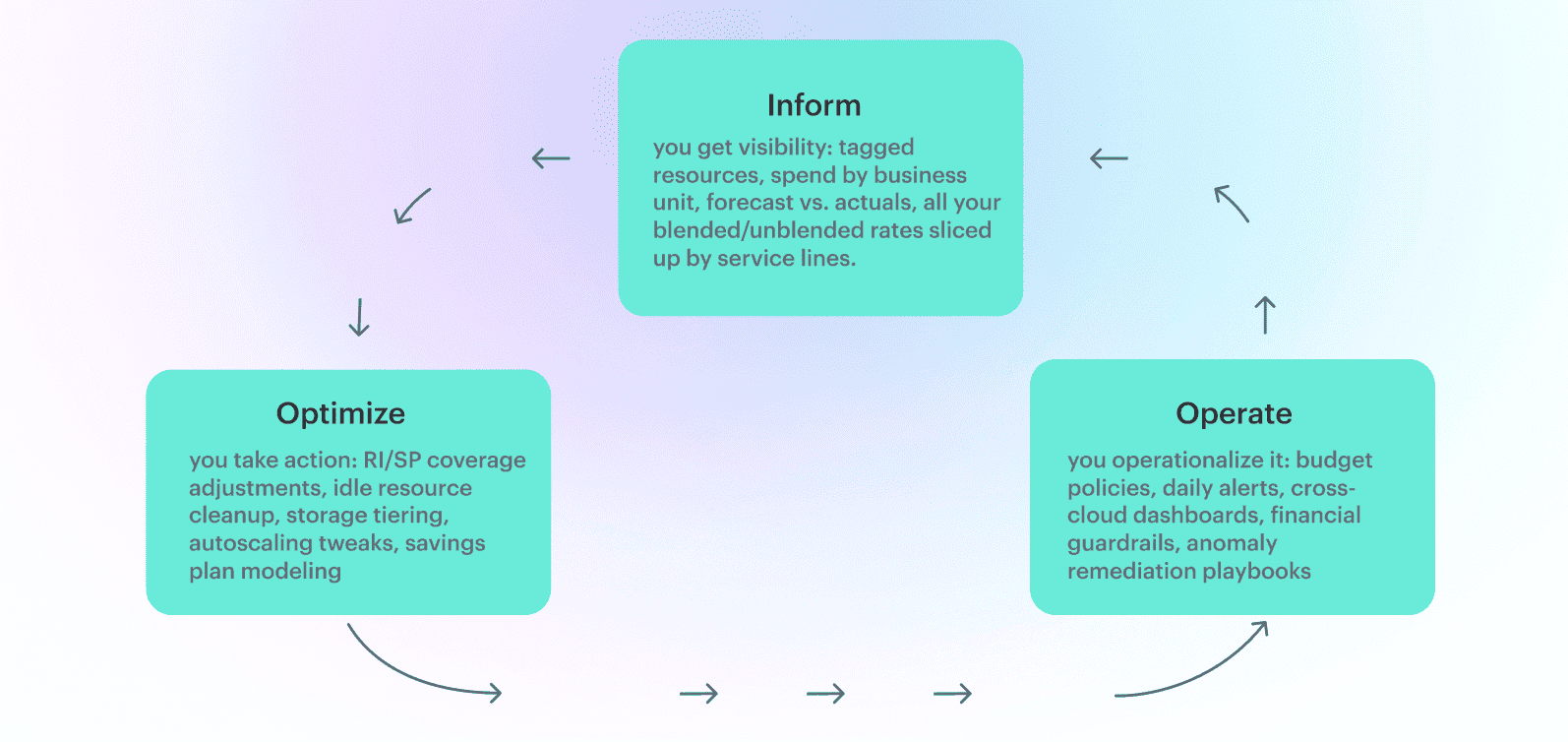
Most of cloud cost management in computing falls apart because teams skip directly to “Optimize” without building alignment first.
Ownership matters as much as tooling. Finance needs predictable forecasts, engineering needs clarity on what they own and the room to rightsize safely, and procurement needs context before negotiating enterprise agreements. Platform teams need a clean signal on which workloads drive which patterns. Without shared understanding, cloud computing becomes an unstructured cost center rather than an engineered system.
And here’s what this looks like in Cloudaware’s practice:
Caterpillar runs workloads across AWS, Azure, and an on-prem OpenStack cluster — more than 1,300 cloud accounts. Their Inform phase depended on a part-time financial analyst manually pulling CUR and Azure EA exports into Excel every Friday. Tagging was inconsistent, and Kubernetes spend was essentially unknowable.
With Cloudaware platform, the picture changed fast. Within two weeks, they had tagging coverage across environments, RI/SP utilization by region, and daily visibility into idle EBS volumes, oversized RDS, and unused VMs that had been invisible for months.
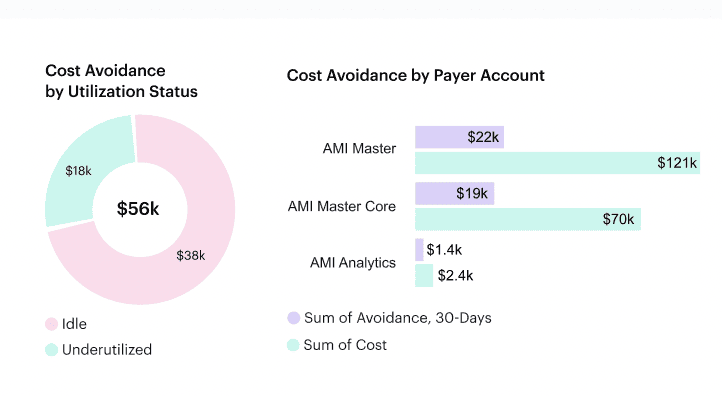
When we came to the Optimize stage, we found a deeper issue: a Terraform pipeline recreated inefficient configs every night, wiping out any savings. The fix had nothing to do with spreadsheets — we synced Cloudaware’s FinOps alerts with their GitHub Actions pipeline so PRs violating cost policies were blocked before they merged. That’s when optimization finally stuck.
Movin on to the final stage meant adding rhythm: weekly Slack alerts for spend thresholds, product dashboards for engineering leads, and a workflow where anything over 20% budget deviation triggered a Jira ticket and a FinOps review. No one “completed” FinOps; the practice kept evolving as their architecture evolved.
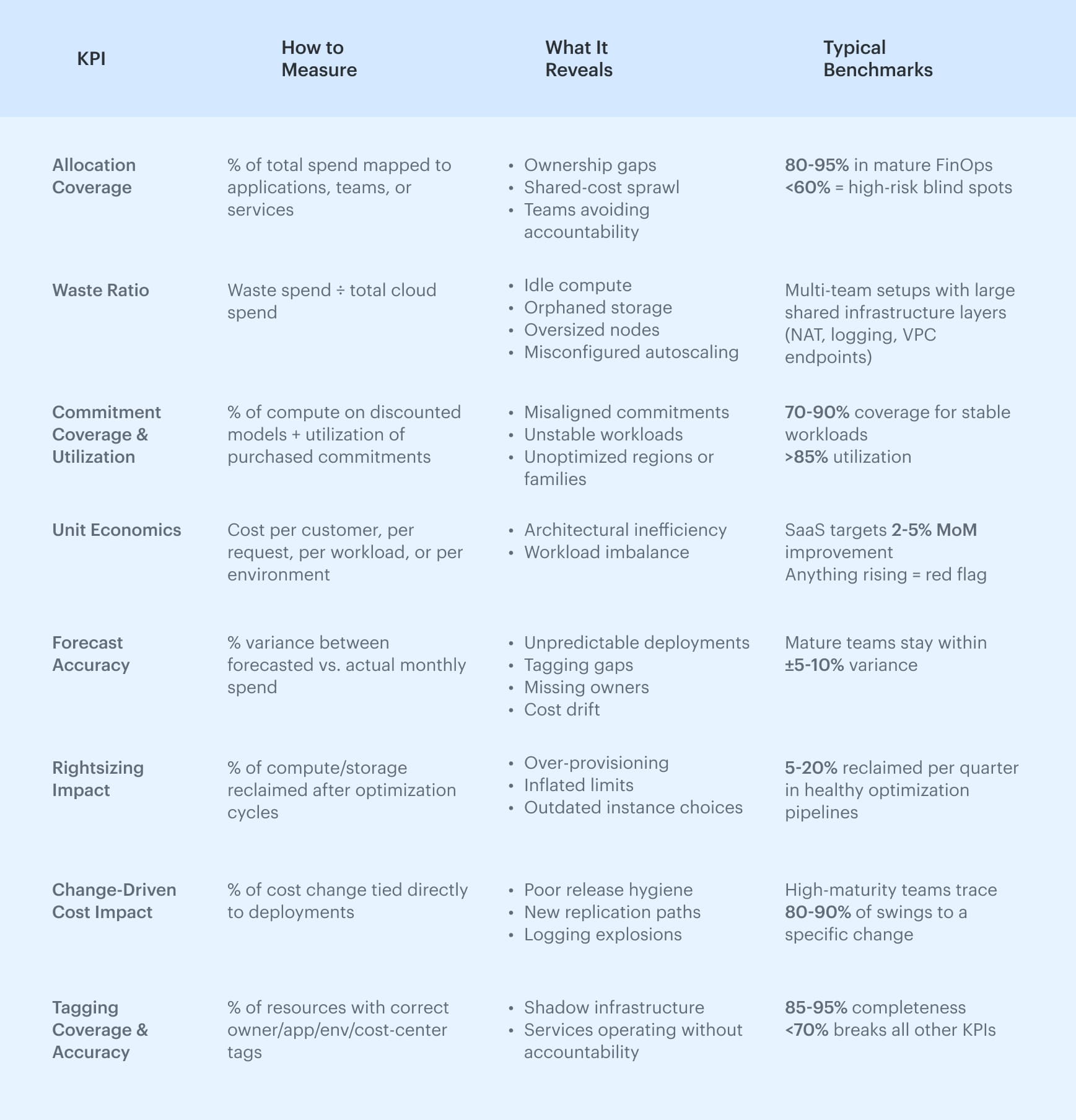
KPIs for proving cloud cost savings
You can reduce spend all you want, but unless you can prove it, the organization won’t treat cloud computing cost optimization as anything more than quarterly cleanup.
Decision-makers want to know not just what you saved, but why it happened, whether it’s repeatable, and whether it aligns with finance’s expectations. This is where KPIs matter. Without them, even strong optimizations fade into noise, and the same patterns that erased the average cost savings cloud computing can deliver return right back.
Below is the KPI set that consistently proves cloud cost optimization metrics in real environments — the same ones mature FinOps teams use to govern spend and measure the impact of engineering decisions.