


Even experienced FinOps teams have trouble answering questions like "Who is responsible for this spending?" or "Why did our AWS bill go up so much last month?" When resources scale across accounts, subscriptions, projects, and Kubernetes environments, it can be difficult to determine which teams, applications, or services should own each part of the bill.
That's where cost allocation software comes in.
It connects raw billing and usage data with business context, so organizations can analyze cloud spend by team, project, application, service, or cost center. Instead of working from one aggregated provider bill, FinOps teams can build an allocation model that makes shared costs easier to trace and explain. In this guide, we compare seven cloud cost allocation software tools available in 2026. You'll see how they handle multi-cloud cost data, tagging and allocation rules, shared costs, ownership context, reporting, and chargeback across environments such as AWS, Azure, and Google Cloud.
A quick boundary before the shortlist: cost allocation software can also refer to FP&A and accounting systems that distribute overhead across profit centers, products, and cost objects. This guide focuses on cloud and technology cost allocation for FinOps teams, where provider billing, tags, account structure, usage telemetry, and business context need to reconcile into one explainable view.
By the end, you'll have a practical basis for evaluating which approach fits your cloud environment, allocation model, and governance requirements.
Key takeaways
IBM Cloudability, Vantage, CloudZero, and Cloudaware are all strong cost allocation tools, but they solve different allocation problems. Datadog and Finout stand out when the operating model is more engineering-centric. CloudHealth still offers broad enterprise capabilities, although its documented reporting and governance constraints make it less competitive for teams prioritizing explainable allocation.
| If your hardest allocation problem is... | Strongest shortlist |
|---|---|
| Formal enterprise financial allocation, hierarchical business mapping, and chargeback | IBM Cloudability |
| Allocation-as-code, auditability, and engineering-led FinOps | Vantage |
| Product, customer, and unit-economics allocation with strong rule versioning | CloudZero |
| Allocating cloud and AI spend to applications, services, owners, and infrastructure relationships | Cloudaware |
| Allocating cost alongside observability telemetry | Datadog |
| Telemetry-driven shared costs across cloud, SaaS, and Kubernetes | Finout |
| Established enterprise cloud governance with mature Perspectives and reallocation | CloudHealth |
For the feature-by-feature comparison, including allocation controls, Kubernetes coverage, governance, pricing, and ratings, see the full comparison table below.
How we researched these cost allocation tools
We evaluated each platform using current product documentation, pricing information, and vendor materials, with a focus on how the software handles cloud cost allocation rather than general cloud cost management.
The comparison looks at allocation inputs, shared-cost handling, multi-cloud and Kubernetes coverage, business dimensions, rule governance, reporting workflows, and pricing visibility. Public prices are included only when they can be supported by current vendor sources. Where pricing requires a quote, we say so rather than relying on older marketplace or third-party estimates.
This is a desk-research comparison, not a controlled hands-on benchmark. The goal is to show what each platform is designed to support and what a FinOps team should verify during a proof of value.
How to choose the best cloud cost allocation software?
Choosing cloud cost allocation software is less about dashboard design and more about whether the allocation output can be explained, reconciled, and governed. A tool may ingest AWS, Azure, and Google Cloud billing data and still leave FinOps teams with large pools of shared or unallocated spend.
For this comparison, we focused on the controls that matter once allocation moves beyond basic reporting:
- Tagging and allocation inputs: Can the tool use native tags, virtual tags, account structure, Kubernetes metadata, or other business context when provider tags are incomplete
- Multi-cloud normalization: Can it normalize cost and usage data across AWS, Azure, and Google Cloud without forcing teams to maintain separate allocation models
- Shared-cost handling: Can teams distribute platform, Kubernetes, support, and other shared costs using documented allocation rules
- Ownership and business context: Can costs be mapped to applications, services, teams, products, or cost centers rather than stopping at the cloud account level
- Showback and chargeback: Can finance and engineering trace allocated spend back to the rule and source data behind it
- Rule governance and exceptions: Can teams identify unallocated spend, review exceptions, and control changes to allocation logic
Multi-cloud coverage matters, but provider count alone is not enough. The harder test is whether the same allocation model remains explainable when billing data, tags, ownership mappings, and shared services come from different systems.
That is why the seven tools below are compared not only on cloud coverage and dashboards, but also on how they turn source billing data into allocation outputs that FinOps teams can review and defend.
Test the allocation result, not the dashboard
Give every shortlisted tool the same closed billing period and a deliberately difficult allocation set: a shared Kubernetes cluster, support charges, an untagged database, platform-team costs, and a resource whose owner changed during the month.
Then compare the resulting allocation against the source bill:
| Control | What good looks like | Metric to capture |
|---|---|---|
| Completeness | Direct, shared, and exception costs reconcile to the source bill | Allocated cost / total eligible cost |
| Shared-cost logic | Allocation drivers are documented and reproducible | Share of shared spend covered by an approved rule |
| Freshness | Reporting cadence is explicit and tied to source availability | Hours from source availability to report |
| Exception ownership | Untagged or disputed spend enters an accountable workflow | Unallocated cost and oldest unresolved exception |
| Reconciliation | Credits, refunds, adjustments, and rounding remain explainable | Difference between source bill and allocated output |
| Rule governance | Allocation changes have owners, approvals, and effective dates | Share of active rules with owner and approval |
| Business usability | Finance and engineering can reproduce the same business view | Time to answer one agreed unit-cost question |
Cloudaware
Gartner Peer Insights: ★★★★★ 5.0/5
Trial days: 30
Best for: mid-size and enterprise teams that need multi-cloud cost allocation tied to CMDB context, plus AI-assisted analysis across billing, ownership, and infrastructure data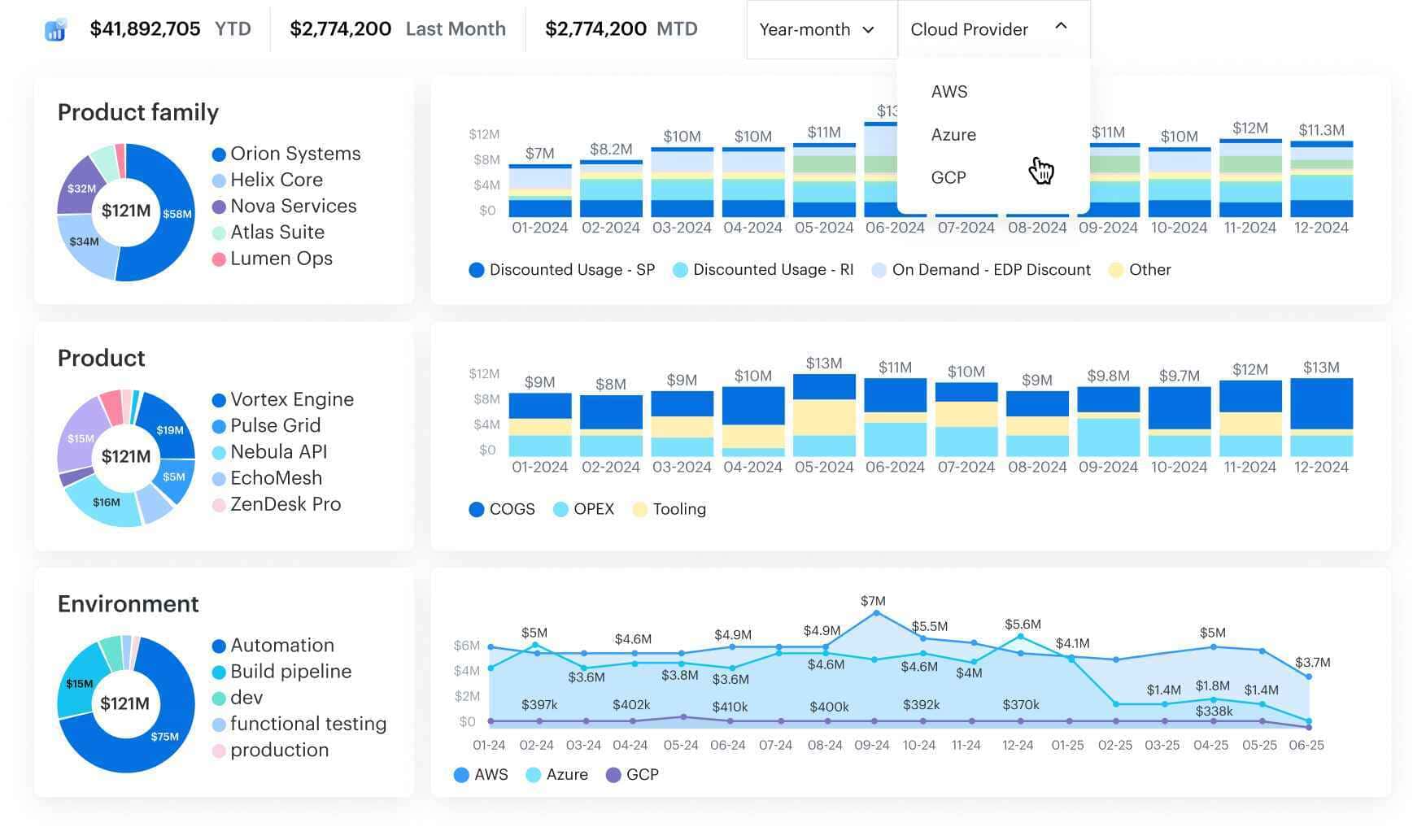 Cloudaware brings cloud billing, asset inventory, and business context into one FinOps model across AWS, Azure, Google Cloud, Oracle Cloud, Alibaba Cloud, and additional cost sources such as Datadog, Snowflake, and Databricks.
Its CMDB connects spend to the applications, services, owners, environments, and cost centers behind it. That gives FinOps teams more than tag-based allocation: they can assign shared and untagged costs, normalize business dimensions, and build showback or chargeback views from the same underlying context.
Cloudaware also exposes FinOps and stateful CMDB data through its MCP interface for AI-assisted analysis.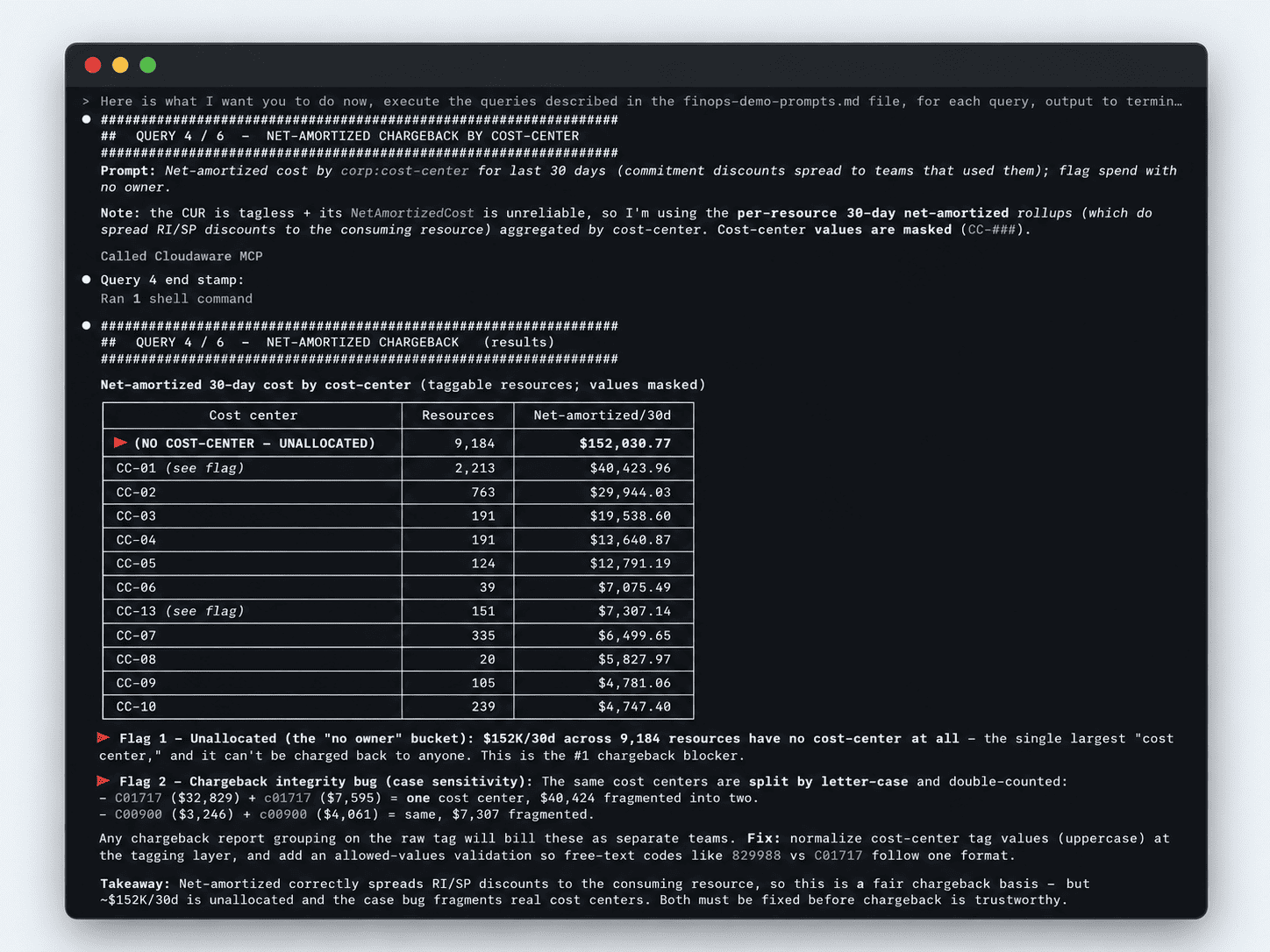 Teams can ask an AI assistant to break down net-amortized cloud cost by cost center, flag unallocated spend, and identify inconsistent cost-center values before they distort chargeback. The AI model performs the reasoning, while Cloudaware supplies the billing, inventory, relationship, and service-catalog data behind the answer.
Cloudaware cloud cost allocation features
- Billing and CMDB context: Combine cloud cost records with asset relationships, ownership information, tags, and business mappings
- Multi-cloud cost data: Work with billing and infrastructure context across AWS, Azure, Google Cloud, Oracle Cloud, and other supported environments
- AI-assisted FinOps analysis via MCP: Query billing and CMDB context through an AI assistant to investigate unallocated spend, cost changes, commitment coverage, ownership, and resource-level cost questions
- Business mapping: Organize spend by applications, services, teams, environments, products, or cost centers
- Shared-cost allocation: Apply rules to costs that cannot be assigned directly through provider-native metadata
- Tag normalization: Identify and normalize inconsistent tagging data used for allocation
- Showback and chargeback: Build allocation views around the same ownership and business dimensions used by finance and engineering
Pricing
Cloudaware's current public pricing calculator lists starting configurations rather than a flat FinOps list price.
- Core: Starting at $67/month, with capacity for up to 25,000 configuration items
- Enterprise: Starting at $200/month, with additional reporting, workflow, permission, SSO, and compliance capabilities
The calculator starts with a 50-server environment. The final configuration can also depend on the Cloudaware modules, integrations, and implementation scope required.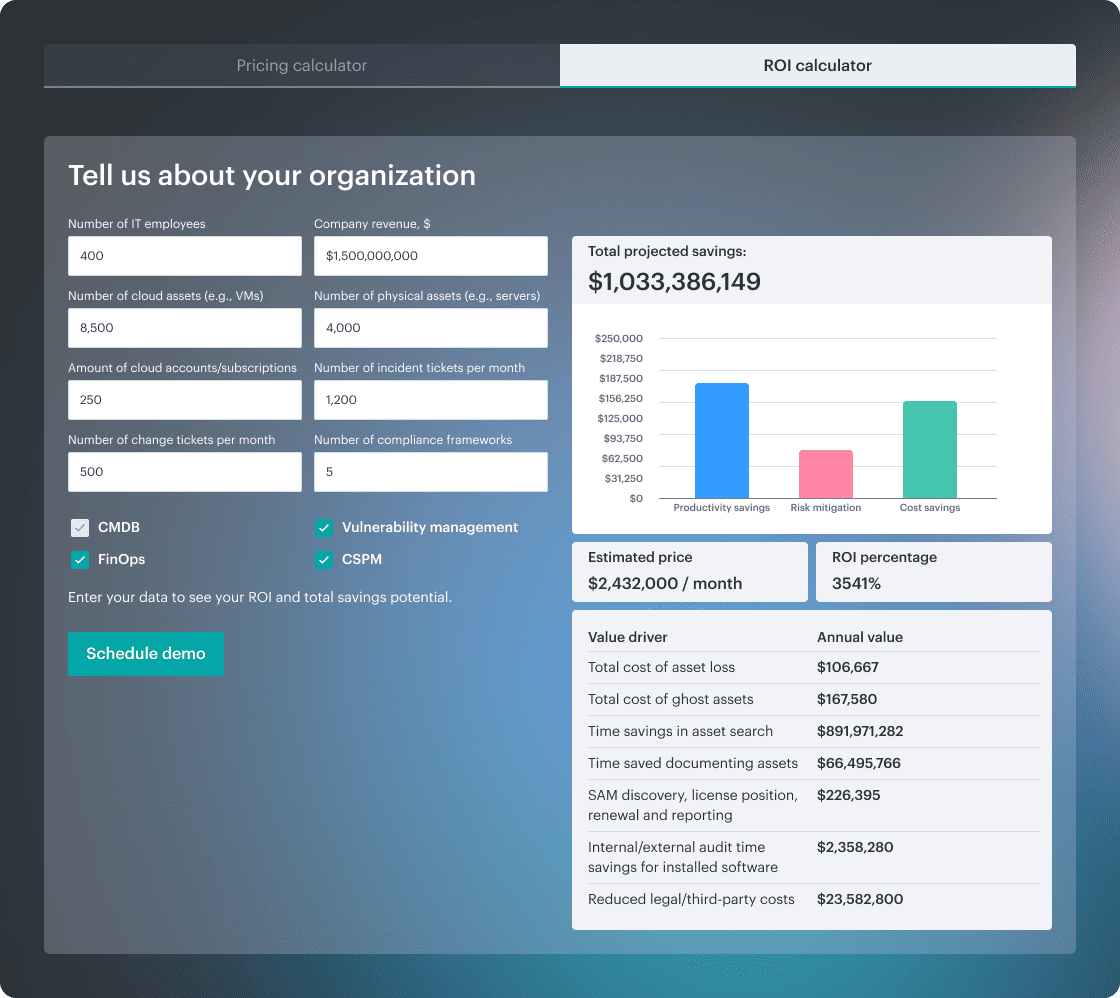 For FinOps evaluation, request pricing for the complete allocation workflow rather than extrapolating from the older per-CI pricing example previously used in this article.
A 30-day trial is available, giving teams an opportunity to test Cloudaware against their own cloud environment before committing. The research confirms the trial through Cloudaware's AWS Marketplace listing.
Check Cloudaware’s value for your company now
Pros and cons
✅ You get a dedicated support person who stays on the account for years, responds every week and builds new reports as your needs change. Gartner Peer Insights, Aug 2026
✅ Reporting, cost management and flexible tagging make underused assets and savings easy to spot. Asset details also speed up incident response. Gartner Peer Insights, Aug 2026
✅ Imports every public cloud resource type, which none of the other vendors could do (BMC Helix, ServiceNow, CloudZero, OpenText). With the ServiceNow integration, cloud resources pick up service catalog properties as tags. Gartner Peer Insights, Aug 2026
⚠️ There's a cap on how many budget alerts you can set, and cost optimization recommendations could go further. Gartner Peer Insights, Aug 2026
⚠️ The platform is made up of several applications, so it can be hard to find what you need. Gartner Peer Insights, Aug 2026
⚠️ Complex reports can be hard to build, and sometimes Cloudaware's support engineers have to prepare the datasets. Gartner Peer Insights, Aug 2026
Vantage
G2: ★★★★☆ 4.7/5
Trial days: 14 (Pro and Business); Starter is free
Best for: developer-led teams and cloud architects who want quick setup, team-level cost views and allocation without heavy configuration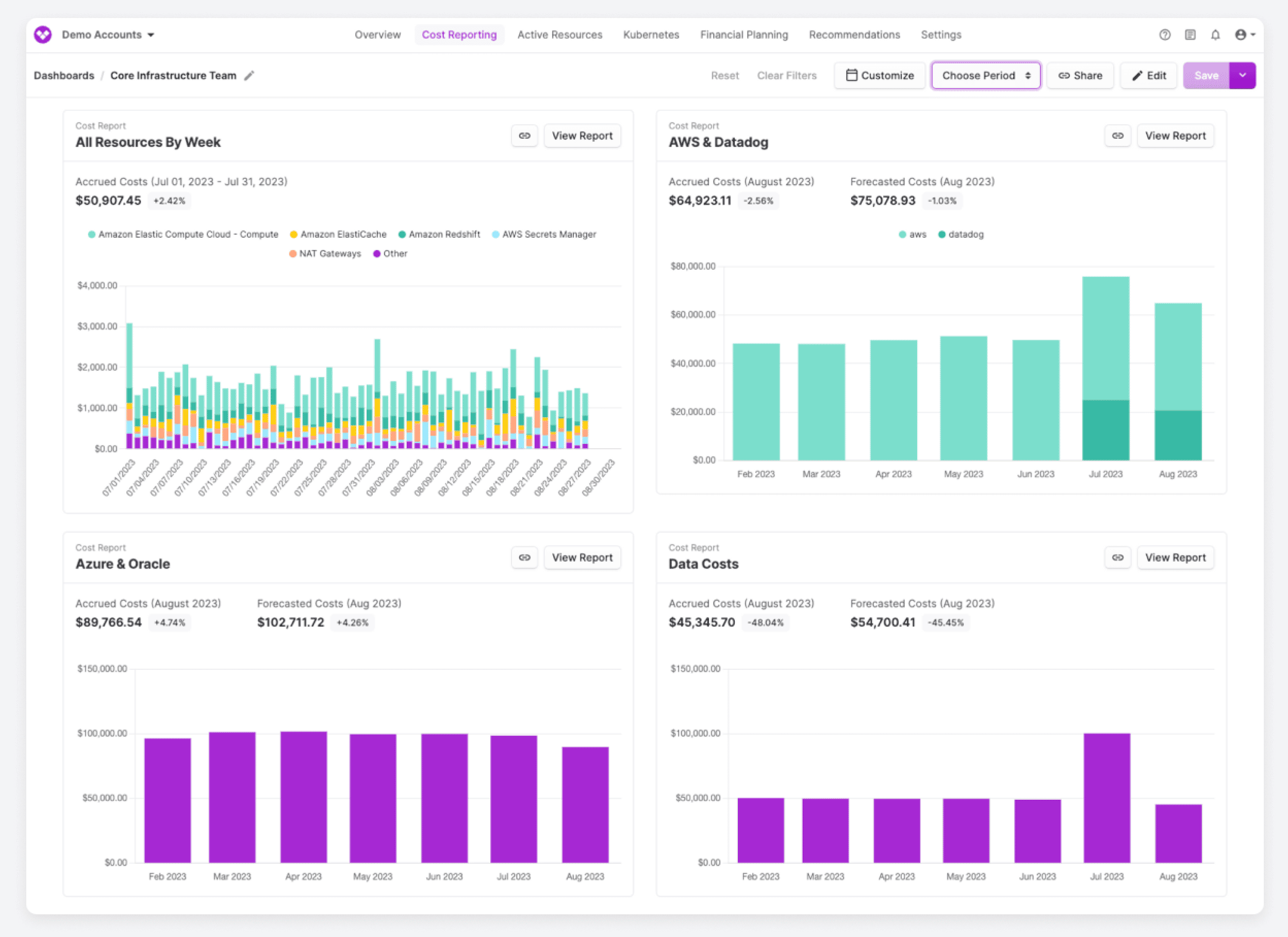 Image source.
Vantage is a cloud cost management platform designed primarily for engineering teams. It brings billing data from more than 30 providers into one interface, including AWS, Azure, Google Cloud, Kubernetes, Datadog, and OpenAI, so teams can analyze spend without maintaining separate reporting workflows for each source.
For cost allocation, Vantage relies on tags, virtual tags, and segments. Teams can create business-specific groupings on top of provider metadata, which is useful when native tags are incomplete or when the same resource needs to be viewed by team, project, or application.
Compared with CMDB-backed allocation platforms, Vantage keeps the model relatively lightweight. That makes it easier to deploy for engineering-led FinOps teams, but organizations that need CI relationships, service ownership, or complex business-service mapping should test whether tags and segments provide enough context for their chargeback model.
Vantage cloud cost allocation features
- Virtual tags and segments: Create allocation dimensions without changing the underlying provider tags
- Multi-provider cost reporting: Analyze spend by team, project, account, or provider across more than 30 supported sources
- Kubernetes cost allocation: Break down container spend by namespace, label, and workload
- Self-service cost reports: Give engineers filtered views of spend without requiring finance to build every report
- Infrastructure as code: Manage reporting and allocation configuration through Vantage's Terraform provider and API
- FinOps automation: Enterprise includes an automated FinOps Agent, while Autopilot supports AWS Savings Plans management
Pricing
Vantage publishes tiered pricing based on the amount of cloud spend tracked rather than a percentage-based enterprise quote.
- Starter: Free for up to $2,500 in tracked spend per month and 3 users
- Pro: $30/month for up to $7,500 in tracked spend and 5 users
- Business: $200/month for up to $20,000 in tracked spend and 10 users
- Enterprise: Custom pricing for unlimited tracked spend, unlimited users, and dedicated account support
Pros and cons
✅ Virtual tagging reduces manual allocation work: A February 2026 reviewer says Virtual Tagging automatically organizes costs and makes billing data easier for finance teams to interpret. G2, February 2026
✅ Granular ownership views: Vantage can break spend down by business unit, team, resource, or individual query, helping teams assign cost to the right owner. G2, February 2026
✅ Fast onboarding: An SRE reviewer highlights straightforward setup and Terraform support for connecting cloud providers. G2, November 2025
⚠️ Cost data can lag: A reviewer reports roughly a 24-hour delay between infrastructure changes and updated cost data. G2, February 2026
⚠️ Limited report customization: Reviewers cite filtering and customization constraints for larger or more complex environments. G2, September 2025
⚠️ Integration depth varies: Some supported integrations provide a more complete experience than others. G2, November 2025
Read also: 13 Cloud Cost Optimization Best Practices to Use in 2026
Finout
G2: ★★★★☆ 4.5/5
Trial days: 14
Best for: teams that want cloud, Kubernetes and SaaS bills in one view, with strong shared-cost reallocation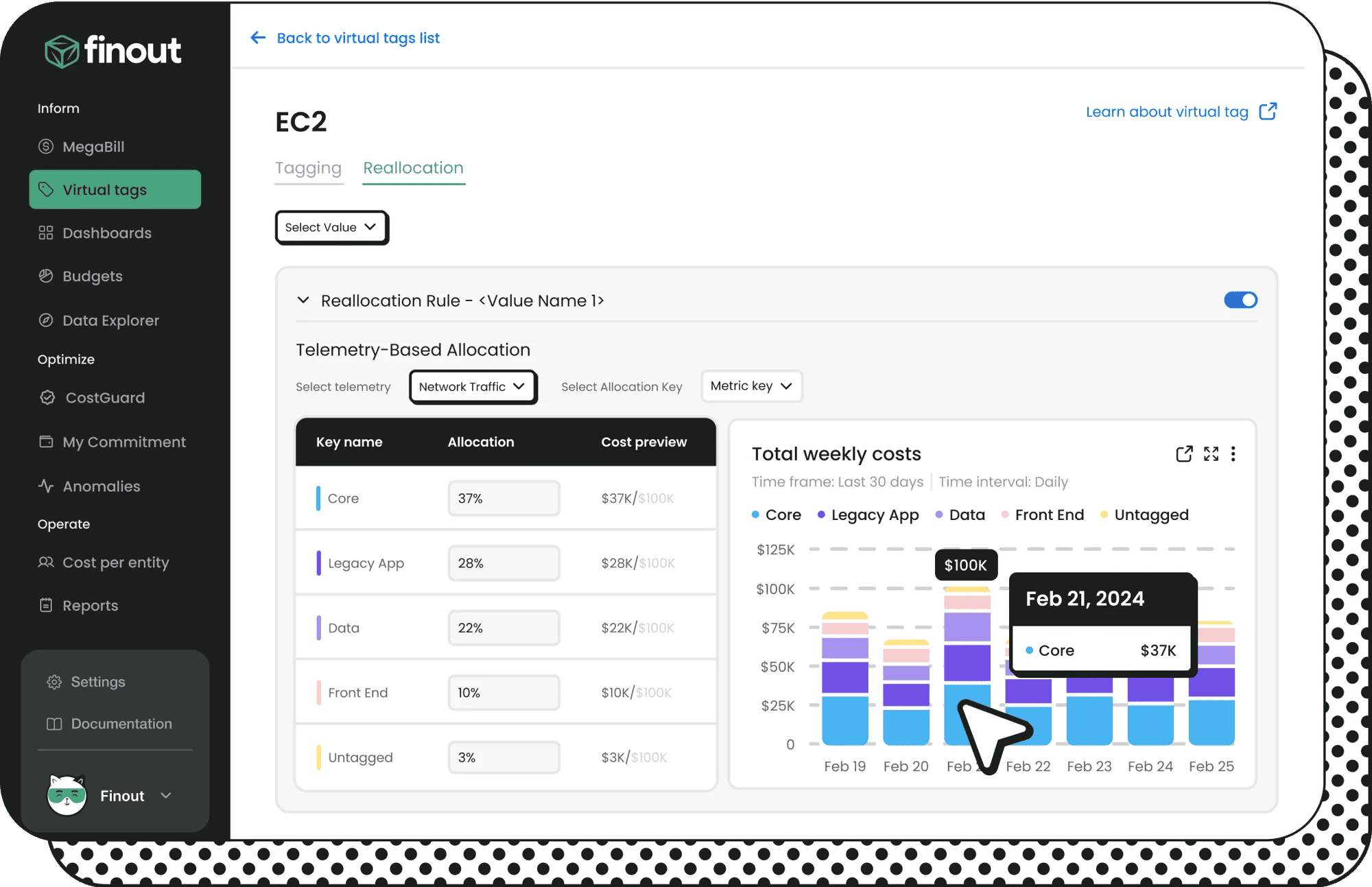 Image source.
Finout creates a common cost layer across cloud infrastructure, Kubernetes, and SaaS services. Its MegaBill view combines sources such as AWS, Azure, Google Cloud, Kubernetes, Snowflake, and Datadog, giving FinOps teams one place to analyze spend that would otherwise sit in separate billing systems.
The platform is particularly focused on shared and indirect costs. Virtual Tags let teams create allocation dimensions without changing native cloud tags, while reallocation rules can distribute platform, Kubernetes, or other shared spend across teams and cost centers.
This makes Finout useful when the allocation problem is less about discovering infrastructure relationships and more about normalizing multiple cost sources and deciding how shared spend should be divided.
Finout cloud cost allocation features
- Virtual Tags: Create retroactive allocation dimensions without modifying native provider tags
- Shared-cost reallocation: Split common infrastructure costs using telemetry or custom allocation rules
- MegaBill: Consolidate cloud, Kubernetes, and SaaS costs into one cost model
- FinOps dashboards: Analyze allocation alongside anomaly detection, alerts, and forecasting
- Custom cost ingestion: Bring in cost sources that do not have a native integration
- Cost API: Expose normalized cost and allocation data to other reporting or FinOps workflows
- CostGuard: Identify idle resources and other optimization opportunities
Pricing
Finout no longer publishes these tiers directly on its website. Its current AWS Marketplace listing provides 12-month contract pricing based on committed cloud spend:
- Business: $12,000/year for up to $500,000 in annual AWS spend
- Pro: $40,000/year for up to $2 million in annual AWS spend
- Enterprise: Custom pricing, with unlimited cost centers and Kubernetes included
For Business and Pro, Kubernetes support adds 25% to the contract price. Cost Per Customer is also offered as a paid add-on, while longer 24- and 36-month agreements may include discounts.
Pros and cons
✅ Virtual Tags work across providers: A 2026 reviewer highlights cross-provider Virtual Tags and MegaBill for analyzing costs without changing tags at the source. G2, October 2026
✅ Strong core FinOps coverage: Reviewers cite tagging, unit economics, anomaly investigation, financial planning, and fast reporting as strengths. G2, September 2026
✅ Broad integrations and support: A senior cloud infrastructure cost analyst highlights integrations across cloud and AI platforms along with responsive support. G2, September 2026
⚠️ Workflows are not always connected: One reviewer notes that anomalies do not automatically appear as variances in financial plans and that some custom telemetry still requires Finout support. G2, September 2026
⚠️ Virtual Tag complexity can grow: A reviewer describes a steep learning curve and difficulty managing large numbers of Virtual Tags. G2, September 2026
⚠️ Kubernetes visibility still has gaps: An enterprise reviewer calls out Kubernetes visibility, recommendations, and hourly usage tracking as areas for improvement. G2, September 2026
Read also: 10 Cloud Cost Optimization Benefits or Why It’s a Must In 2026
CloudHealth by Broadcom
G2: ★★★★☆ 4.1/5
Trial days: no public trial; demo on request
Best for: enterprise FinOps teams focused on governance, budget enforcement and multi-cloud accountability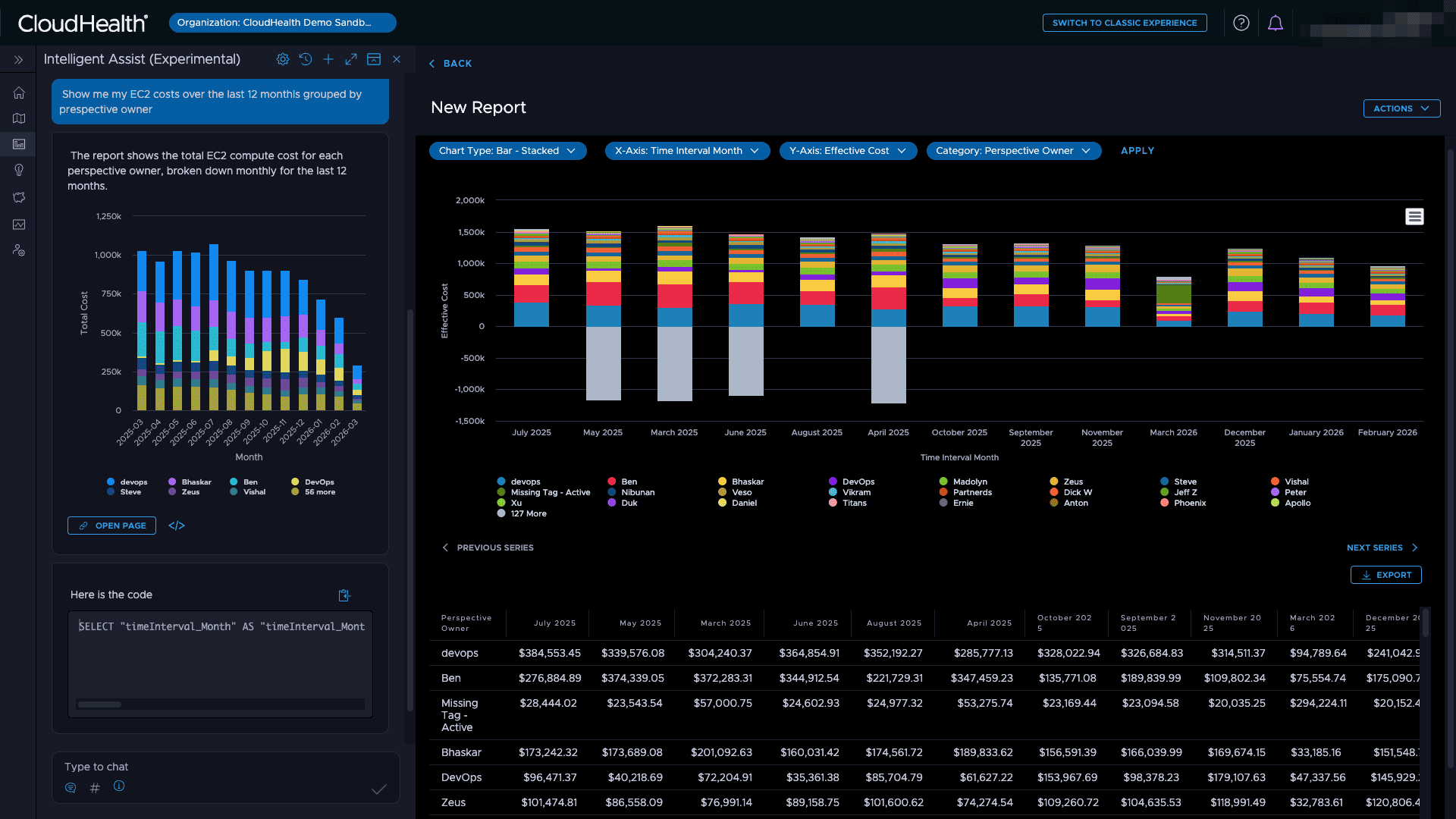 Image source.
CloudHealth by Broadcom is an enterprise cloud financial management platform for AWS, Azure, and Google Cloud. Its allocation model is designed for organizations that need to distribute spend across teams, business units, and products while applying governance and budget policies to the same cost data.
The platform combines cost allocation with policy management, budget controls, and reporting. That makes it relevant for mature FinOps programs where allocation is not only a reporting exercise but also part of the governance model used to control spend and hold business units accountable.
CloudHealth has also added AI-assisted analysis features. Intelligent Assist supports natural-language questions with editable SQL, while Smart Summary helps explain changes in cloud bills. These additions improve investigation workflows but do not replace the need to validate how shared costs, account structures, and allocation policies behave in the organization's own environment.
CloudHealth cloud cost allocation features
- Multi-cloud cost visibility: Analyze AWS, Azure, and Google Cloud spend in one platform
- Cost allocation and reallocation: Distribute costs across teams, business units, product lines, and other organizational dimensions
- Policy-based governance: Apply policies and automated actions around budgets and cloud spend
- Budget reporting: Compare planned and actual spend across teams and environments
- Kubernetes allocation: Break down container costs by team or namespace
- AI-assisted analysis: Use Intelligent Assist and Smart Summary to investigate cost changes and query financial data
Pricing
Broadcom does not publish a standard CloudHealth price list on its product page. The current AWS Marketplace listing shows annual pricing by managed AWS spend:
- CH150K: $45,000/year for up to $150,000 in monthly AWS spend
- CH300K: $90,000/year for up to $300,000 in monthly AWS spend
- CH500K: $150,000/year for up to $500,000 in monthly AWS spend
Spend above the contracted tier is billed at $0.03 per additional dollar, equivalent to 3%. Direct and partner quotes can vary based on cloud scope, modules, services, and contract structure.
Pros and cons
✅ Cost allocation and budgeting by organizational dimension: A 2026 reviewer highlights allocation by team or environment alongside identification of underused resources. G2, September 2026
✅ Policy-based governance: A verified reviewer points to the ability to define and enforce common governance policies across the environment. G2, August 2026
✅ Budgeting and reporting: Reviewers highlight forecasting, flexible reporting, and consolidated multi-cloud views. G2, September 2026
⚠️ Onboarding takes time: Reviewers say significant setup work can be required to align tagging and account structures. G2, September 2026
⚠️ Cost data is not real time: One reviewer specifically notes delayed cost synchronization and a more difficult onboarding process than expected. G2, August 2026
⚠️ Reporting can slow down at scale: A reviewer reports complex dashboard navigation and slower reporting in large environments. G2, September 2026
Datadog
Capterra: ★★★★☆ 4.6/5
Trial days: 14
Best for: engineering-led FinOps teams that want cloud cost data alongside observability and infrastructure telemetry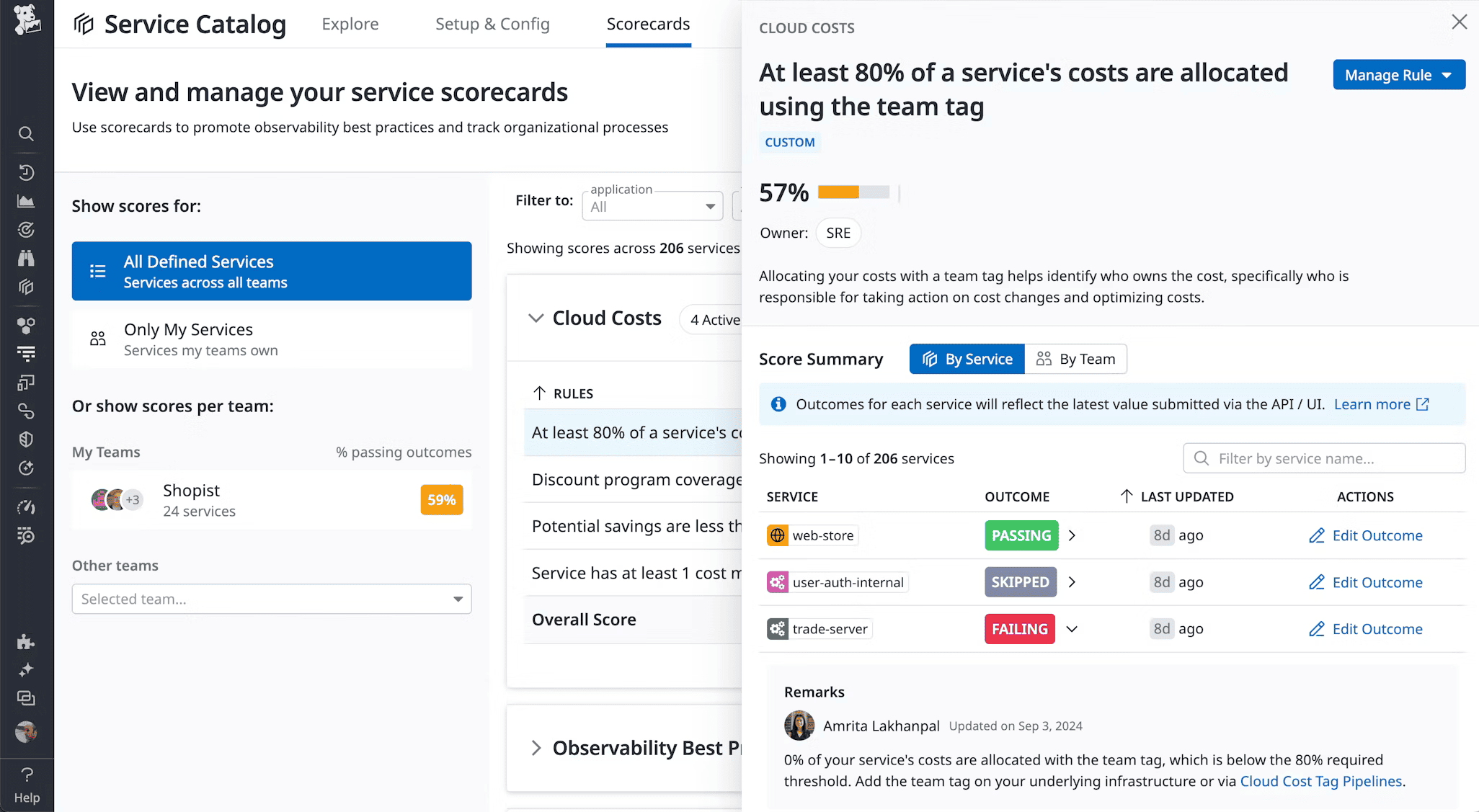 Image source.
Datadog Cloud Cost Management brings cloud spend into the same platform engineering teams already use for infrastructure and application monitoring. Instead of separating FinOps analysis from operational telemetry, teams can analyze cost by service, container, tag, or workload alongside performance data.
The module supports AWS, Azure, Google Cloud, and Oracle Cloud, and can also ingest SaaS and custom cost sources. That makes it useful for engineering teams that want infrastructure, container, and third-party technology costs in one operational view rather than a finance-only reporting layer.
For allocation, Datadog supports tag correction, inferred business tags, shared-cost rules, and container cost attribution. Its main differentiator is not deep ITFM or CMDB modeling, but the ability to put cost signals directly next to the telemetry engineers already use to investigate infrastructure behavior.
Datadog cloud cost allocation features
- Cost + observability context: Analyze cloud spend alongside infrastructure and application metrics
- Tag rules: Correct missing or inconsistent tags and add inferred business tags
- Shared-cost allocation: Apply custom rules to distribute costs that cannot be assigned directly
- Container cost allocation: Attribute Kubernetes and container costs across Kubernetes, Amazon ECS, Azure, and Google Cloud
- Multi-cloud and SaaS cost sources: Bring AWS, Azure, Google Cloud, Oracle Cloud, SaaS, and custom cost data into the same reporting layer
- Cost monitoring: Track anomalies, thresholds, budgets, forecasts, and unexpected changes in spend
Pricing
The current article incorrectly describes Cloud Cost Management as roughly $5–$10 per server per month. The research confirms that the module is actually priced per $1,000 of cloud and SaaS spend under management.
Datadog prices Cloud Cost Management separately from its host-based Infrastructure Monitoring products:
- CCM Pro: $5 per $1,000 of managed spend per month on an annual plan
- CCM Enterprise: $10 per $1,000 of managed spend per month on an annual plan
- On-demand pricing: Higher rates apply when not billed annually
For example, $100,000 in monthly cloud spend would equal about $500/month for CCM Pro, before any separate Datadog monitoring charges. Infrastructure Monitoring itself remains host-based, starting at $15 per host per month for Pro and $23 for Enterprise on annual plans.
Pros and cons
✅ Cloud cost management inside the observability stack: Gartner Peer Insights reviewers highlight the ability to work with FinOps and monitoring data in the same platform, including daily spend analysis that can expose infrastructure waste. Gartner Peer Insights, top “Likes”
✅ Multi-cloud cost visibility: A June 2026 audit manager specifically highlights visibility across AWS, Azure, and other providers for cost-governance work. Gartner Peer Insights, June 2026
✅ Useful visibility into spending problems: A software engineer reviewer notes that the cost views make it easier to identify where spend is becoming a problem. Gartner Peer Insights, January 2026
⚠️ The interface can become complex: Gartner reviewers describe some cost-management workflows as cluttered or more complicated than necessary for straightforward cost tracking. Gartner Peer Insights, top “Dislikes”
⚠️ Limited visibility into Datadog's own charges: One reviewer specifically calls out difficulty understanding Datadog's own platform costs. Gartner Peer Insights, June 2026
⚠️ Total platform cost needs active control: A July 2026 reviewer notes that log ingestion, custom metrics, and retention can make Datadog expensive at scale if teams do not continuously manage usage. G2 via AWS Marketplace, July 2026
Read also: Cloud Cost Forecasting: Build a Reliable Cloud Budget
IBM Cloudability (formerly Apptio Cloudability)
G2: ★★★★☆ 4.2/5
Trial days: Free trial on request
Best for: large enterprises that need formal cloud cost allocation, chargeback, and FinOps reporting connected to IT financial management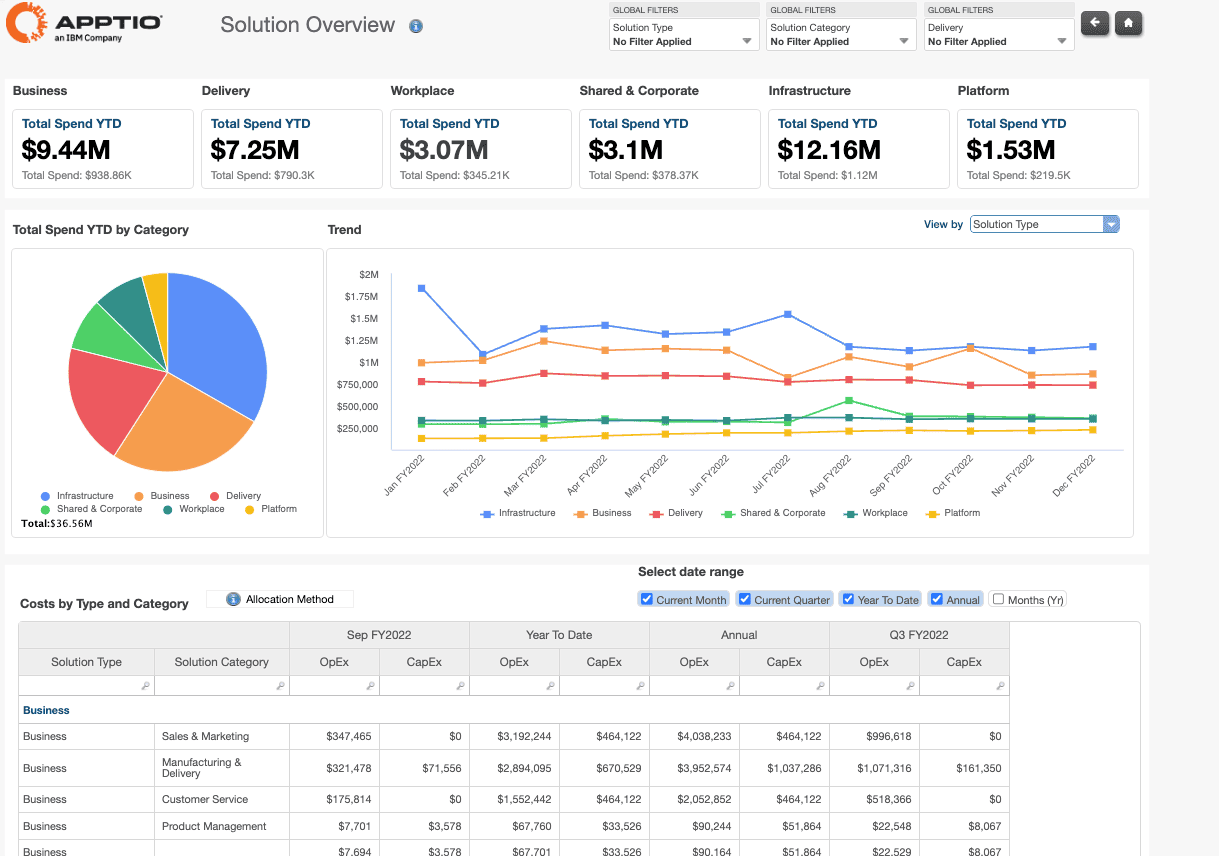 Image source.
IBM Cloudability is an enterprise FinOps platform for organizations that need cloud cost management to fit into a broader IT financial model. It brings AWS, Azure, and Google Cloud spend into a common view and uses business mappings to organize costs by business unit, product, team, or other internal dimensions.
For cost allocation, Cloudability supports shared and untagged spend, showback and chargeback, container allocation, budgets, forecasting, and unit economics. Its strongest fit is with enterprises that already use formal ITFM processes and need cloud cost data to align with the same financial structures and accountability model.
IBM Cloudability cloud cost allocation features
- Business mapping: Organize cloud spend by business unit, product, team, and other enterprise dimensions
- Shared-cost allocation: Apply allocation rules to shared and untagged costs
- Showback and chargeback: Report allocated spend back to accountable business units
- Container cost allocation: Include Kubernetes and container costs in the same financial model
- Forecasting and budgets: Track planned versus actual spend and investigate anomalies
- Unit economics: Measure cloud cost against business or product-level dimensions
- ITFM alignment: Connect FinOps reporting with the wider Apptio financial management portfolio
Pricing
IBM does not publish a simple flat list price for Cloudability. Its current AWS Marketplace listing shows 12-month contracts based on managed cloud spend:
- Up to $1 million in annual cloud spend: $30,000/year
- Up to $3 million: $76,680/year
- Up to $6 million: $132,480/year
Overages are billed separately, with rates depending on the Cloudability edition. Savings automation is also priced separately.
Pros and cons
✅ Business mapping supports enterprise allocation: A March 2026 financial-services reviewer specifically highlights business mapping alongside cost allocation, data ingestion, and standardization. TrustRadius, March 2026
✅ Consolidated cloud cost view: An IT manager reports strong dashboards and consolidated cloud visibility, particularly for AWS optimization. TrustRadius, March 2026
✅ Cost sharing and container reporting: A senior consultant highlights cost sharing, container insights, and drill-down BI reporting. TrustRadius, March 2026
⚠️ Reporting can be difficult to interpret: One reviewer says reports are not always intuitive and that optimization logic can lack transparency. TrustRadius, March 2026
⚠️ Azure capabilities can lag AWS: A reviewer reports weaker Azure optimization and gaps in commitment coverage for some newer services. TrustRadius, March 2026
⚠️ Complex reporting has performance and allocation gaps: One reviewer cites slow BI reports, limitations in the reporting API, and difficulty assigning AI token costs to teams. TrustRadius, March 2026
Read also: How to Use FinOps Framework: Top 10 Mistakes & Their Fix
CloudZero
G2: ★★★★☆ 4.6/5
Trial days: No self-service trial; demo on request
Best for: SaaS and product-led FinOps teams that need unit economics and cost allocation by product, customer, feature, or team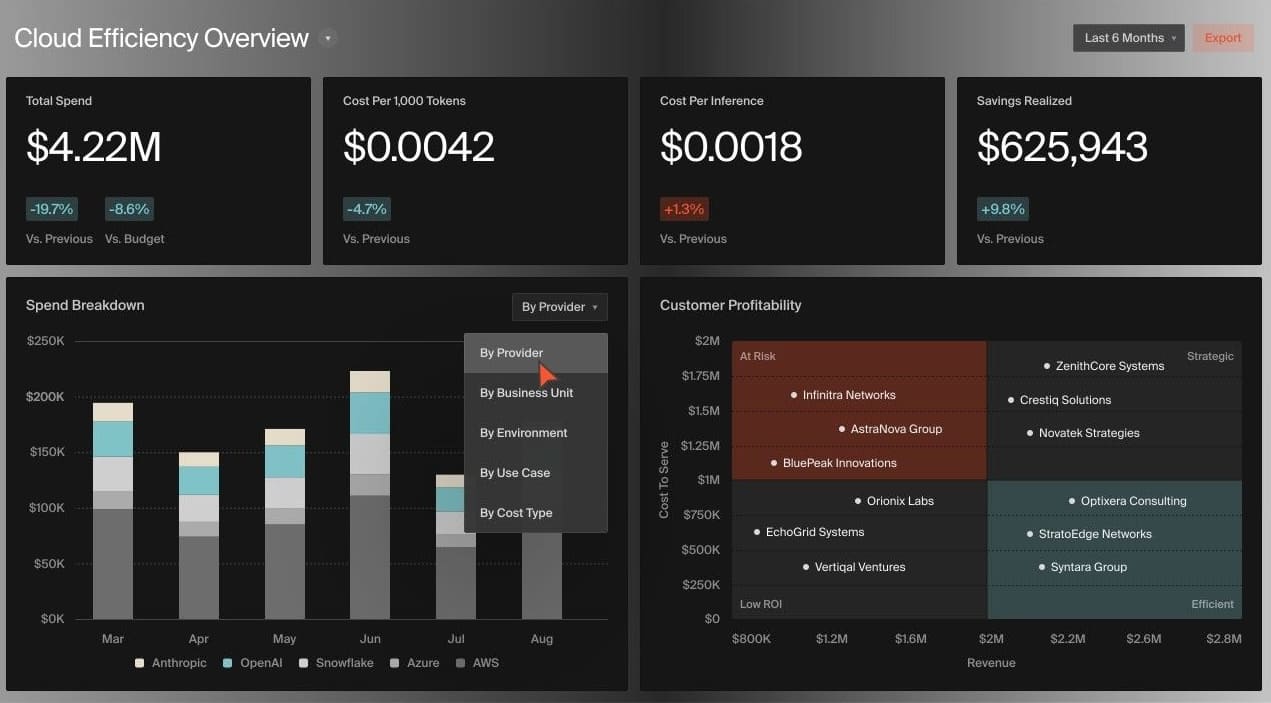 Image source.
CloudZero is a FinOps platform built around unit economics. Its Dimensions translate raw cloud billing data into business-specific cost views, so teams can analyze spend by product, customer, feature, team, or other internal dimensions rather than stopping at provider accounts and tags.
The platform supports allocation of shared, untagged, and Kubernetes costs across AWS, Azure, Google Cloud, and additional cost sources such as Snowflake, Databricks, and Datadog. This makes CloudZero particularly relevant for SaaS and product organizations that need to connect infrastructure spend with the products or customers generating it.
Cloudzero cloud cost allocation features
- Dimensions: Group spend by product, customer, feature, team, or another business-defined dimension
- Shared-cost allocation: Distribute shared and untagged spend across business dimensions
- Kubernetes allocation: Include container costs in product and team-level cost models
- Multi-source cost data: Combine AWS, Azure, Google Cloud, Snowflake, Databricks, Datadog, and other cost sources
- Unit economics: Track infrastructure cost against customers, products, features, or other business outputs
- Budgets and anomaly detection: Monitor unexpected cost changes alongside forecasts
- API and workflow integrations: Expose cost data to BI, engineering, and automation workflows
Pricing
CloudZero uses a spend-based subscription model. Its public pricing page does not provide a simple flat list price, but the AWS Marketplace listing shows on-demand pricing at:
- $19/month per $1,000 of AWS spend under management
Longer 12- to 36-month contracts may be discounted.
Pros and cons
✅ Strong unit economics: A May 2026 reviewer highlights the ability to translate raw cloud spend into business-level unit costs, including individual ML models and daily ETL workloads. G2 via AWS Marketplace, May 2026
✅ Flexible business dimensions: A reviewer calls out custom views that make it easier to isolate anomalies by the dimensions that matter to the business. G2 via AWS Marketplace, February 2026
✅ Role-specific dashboards and multi-cloud visibility: A senior enterprise cloud architect highlights dashboards for different stakeholders, multi-cloud spend views, and unit economics. TrustRadius, April 2026
⚠️ Initial setup takes coordination: A reviewer says implementation requires significant upfront work across teams before the cost model becomes useful. G2 via AWS Marketplace, May 2026
⚠️ Azure capabilities can lag AWS: One reviewer describes CloudZero as too AWS-focused and calls out weaker Azure recommendations. G2 via AWS Marketplace, February 2026
⚠️ Analytics can feel inconsistent: A reviewer reports slow performance and says some dashboard views do not align cleanly with Explorer. G2 via AWS Marketplace, February 2026
Read also: 10 Cloud Cost Optimization Tools That Actually Reduce the Bill in 2026
Comparison table: best cloud cost allocation tools 2026
Legend: ✅ Strong / 🟡 Capable, with limitations / ⚠️ Meaningful limitation
| Criteria | Cloudaware | Vantage | Finout | CloudHealth by Broadcom | Datadog | IBM Cloudability | CloudZero |
|---|---|---|---|---|---|---|---|
| Rating | ★ 5.0 Gartner | ★ 4.7 G2 | ★ 4.5 G2 | ★ 4.1 G2 | ★ 4.6 Capterra | ★ 4.2 G2 | ★ 4.6 G2 |
| Best fit | CMDB-backed ownership | Engineering-led FinOps as Code | Shared cloud/SaaS/K8s costs | Enterprise governance | Cost + observability | Enterprise financial allocation | Unit economics + governed allocation |
| Shared-cost allocation | ✅ Fixed + usage-based | ✅ Cost + metric + % | ✅ Telemetry + fixed/even | ✅ Proportional + fixed | ✅ Even + fixed + spend + metrics | ✅ Four allocation methods | ✅ Even + proportional + telemetry |
| Ownership & business context | ✅ Apps, services, owners, CMDB | 🟡 Hierarchical dimensions; no relationship model | 🟡 Business dimensions + service catalog | 🟡 Perspectives; scale/reporting limits | 🟡 Tags + Service Catalog; lighter hierarchy | ✅ Hierarchical Business Mappings | 🟡 Flexible Dimensions; lighter ownership model |
| Kubernetes / containers | 🟡 OpenCost ingestion | ✅ Pod + namespace + storage + network + GPU | ✅ EKS/GKE/AKS workload allocation | ✅ CPU/memory/custom allocation | ✅ Pod/workload allocation | 🟡 Advanced Containers add-on | ✅ Pod + namespace + workload + idle |
| Showback / chargeback | ✅ Statements + billing cycles | ✅ Reports + chargeback | 🟡 Strong showback; lighter chargeback | ✅ Mature reallocation/reporting | 🟡 Dashboard-led showback/chargeback | ✅ Enterprise chargeback | 🟡 Dimensions-based chargeback |
| Rule governance | 🟡 RBAC + audit; no rule versioning | ✅ Terraform + audit log + timed rules | 🟡 RBAC/ACL; no version history | ⚠️ No policy export/import/versioning | 🟡 API/Terraform; no rule versioning | 🟡 APIs + rule metadata; no publish/rollback | ✅ Publish + diff + history + restore |
| Reconciliation & traceability | 🟡 Source bill + unmapped controls; limited lineage | 🟡 Strong controls; no full reconciliation workflow | ⚠️ Reallocated tags absent from raw data | ⚠️ Pre/post drilldowns can differ | 🟡 allocated_by_rule + processing history | ✅ Direct/shared/total cost reconciliation | ✅ Bill totals preserved + version history |
| Reporting workflow | ✅ Dashboards + exports + statements | ✅ Cost Reports + dashboards | ✅ MegaBill + dashboards + API | 🟡 Broad reports; slower processing | ✅ Dashboards + sharing + observability | ✅ Enterprise reports + cost-sharing exports | ✅ Explorer + dashboards + scheduled delivery |
| Allocation score | 24/27 | 25/27 | 22/27 | 20/27 | 23/27 | 25/27 | 25/27 |