As organizations adopt microservices, Kubernetes, serverless, and AI workloads, AWS cloud cost optimization becomes a core part of building a reliable and scalable architecture, not a post-facto clean-up task.
AWS’s own Well-Architected Framework calls cost optimization a continuous engineering discipline. Flexera’s State of the Cloud report shows that 82% of organizations now list managing cloud spend as a top challenge
The problem isn’t a lack of tools. It’s that teams keep repeating the same failure patterns: optimizing without ownership, treating cost work as a quarterly event, running architectures that can’t scale down, or ignoring compute and storage layers until bills spike.
In this guide, we break down how AWS cloud cost optimization actually fails in real environments and how to avoid each trap.
You’ll see:
- Why AWS costs explode even when tagging, budgets, and FinOps processes exist
- Architectural patterns that reliably cut spend at scale
- Efficiency metrics that expose hidden waste across EC2, EKS, Lambda, and storage
- Practical opportunities teams consistently overlook
- Expert cloud cost recommendation from FinOps
What AWS cloud cost optimization looks like in 2026
AWS loves the clean definition: a cost-optimized workload is one that meets its requirements using only the resources it truly needs — not a dollar more. In the Well-Architected Framework, cost optimization sits right next to reliability and performance because AWS treats it as an engineering discipline, not a financial toggle.
In 2026, the reality is far messier. You don’t “fix” AWS costs by resizing a few EC2 instances anymore. Most teams are running dozens of AWS accounts, microservices scattered across regions and environments, Kubernetes clusters that auto-scale in ways nobody fully understands, and serverless components created during past sprints that no one remembers owning.
This is where many organizations fail without realizing it.
AWS costs rarely spike because someone “forgot to optimize.” They spike because modern AWS architectures are dynamic, fragmented, and constantly shifting, and AWS is painfully explicit about this: without visibility and a deliberate account structure, you are optimizing blind.
Key drivers of AWS cost complexity
- Multi-account sprawl with no unified visibility
- Idle EC2 instances and forgotten resources after migrations
- Untagged EBS volumes, snapshots, and load balancers
- Idle GPU instances left behind after AI experiments
- Kubernetes clusters with inflated pod requests and over-provisioned nodes
- Cross-AZ traffic patterns that silently increase egress charges
AWS Well-Architected cost optimization basics
The AWS Well-Architected whitepaper makes something very clear: cost optimization is an engineering capability, not a quarterly budget ritual. AWS puts it on the same level as reliability and performance because it changes how workloads should be built.
AWS outlines five design principles for cost-efficient workloads, but most teams only treat them as guidelines. In reality, they’re warnings: ignore these, and your AWS costs will drift forever. Here is what AWS really means:
- Cloud Financial Management. AWS says organizations must invest in CFM to make sound decisions. FinOps teams know what that translates to: one source of truth for billing (CUR/CUDOS), clean ownership, and regular engineering conversations about why yesterday’s deploy changed today’s bill.
- Adopt a consumption model. AWS frames it as “pay only for what you use.” Reality: autoscaling that actually scales in, turning off non-prod, and using scale-to-zero compute wherever possible. Teams fail here when they oversize everything “just to be safe” or design synchronous systems that can’t scale down.
- Measure efficiency. AWS pushes unit metrics — cost per workload, per request, per environment. Not tracking these is a classic failure pattern. If you can’t express cost relative to workload output, you’re not optimizing, but rearranging numbers.
- Avoid undifferentiated heavy lifting. This is AWS politely saying: stop running infrastructure we’ve already abstracted away. If you're still running databases, queues, or schedulers on EC2, you’re paying twice: once for compute, and again in operational overhead.
- Optimize over time. AWS explicitly calls cost optimization a continual review process. Teams fail when they treat it as a “spring cleaning” event. Real improvements come from recurring rightsizing, commitment tuning, cleanup cycles, and periodic architecture reviews.
Understanding the Well-Architected pillar isn’t optional. Most AWS cost failures happen precisely because teams misunderstand or selectively ignore these principles.
Core AWS cost efficiency metrics teams ignore
One thing AWS repeats is that spend alone is meaningless. What actually matters is whether a workload is efficient relative to what it produces. And this is where most teams (even mature FinOps teams) underestimate how deep AWS expects you to go.
The metric AWS actually cares about
AWS explicitly recommends defining workload outcomes and measuring efficiency as cost per business output, not per account or per service.
This is the missing layer in most reporting stacks. Teams track EC2 cost, S3 cost, maybe cluster cost — but AWS wants something more actionable:
- “What does it cost to serve one page?”
- “What does it cost to run this workflow?”
- “Does this deployment increase cost for reasons unrelated to usage?”
That level of granularity instantly exposes architectural and scaling issues that service-level reporting hides. You don’t need 20 metrics. AWS advises picking fewer than five per workload — but ones that mean something.
Where most real waste hides
AWS calls usage awareness the foundation of cost optimization: cost must be evaluated relative to usage, or you can’t interpret any changes correctly.
This is also where teams discover the uncomfortable truth: most workloads are sized for their peaks, not their reality. So track efficiency at each layer and understand whether resource allocation matches expected usage patterns.
Example AWS KPIs worth adopting
AWS includes a KPI set not to “grade” teams, but to push them beyond raw cost reporting. A few stand out:
| KPI | Why it matters |
|---|---|
| EC2 usage coverage | Shows how well commitments and purchasing align with real workloads. |
| vCPU cost | Makes compute efficiency visible across heterogeneous instance fleets. |
| Storage utilization | Surfaces poor lifecycle policies and overuse of expensive tiers. |
| Untagged resources, % | Indicates how much spend cannot be allocated — and therefore cannot be optimized. |
Now that you know how to measure efficiency the way AWS intends, the next step is turning those signals into action. That’s where the core best practices of AWS cost optimization come in.
Failure #1. Optimizing without ownership (Cost intelligence breakdown)
Here’s the uncomfortable part: most AWS environments never reach the level of visibility AWS expects. Tag coverage gets stuck at 70–75%, shared services pile up in the “misc” bucket, and multi-account setups turn every cost review into a debate rather than a decision. It’s not negligence — it’s that tagging alone simply cannot carry the weight.
AWS specifically calls out the need for a deliberate structure for your accounts and resources to make cost data meaningful. FinOps teams translate that into a simple rule: tags help, but ownership solves the problem.
Why tagging alone fails
Tags are great for single-purpose workloads. But the moment you introduce shared VPCs, RDS clusters, EKS node groups, multi-tenant services, or cross-team pipelines, pure tagging collapses. You get:
- Resources nobody can explain
- “unallocated” cost buckets that never shrink
- Dashboards that look fine but don't tell you which team or product is spending
That’s why AWS encourages going beyond tags to incorporate organizational context, workload boundaries, and real ownership.
Read also: Proven FinOps Tagging Strategy
How to map AWS resources to applications and teams
Modern cost intelligence requires stitching together signals from multiple layers, not relying on one imperfect metadata field. That usually means combining:
- Tags (when they exist)
- AWS account structure
- Resource relationships
- Service catalog or CMDB layer that reflects how the business actually works
Once you stop reporting by “account” and start reporting by product, team, or environment, cost patterns become obvious: which services scale correctly, which teams run hot, and where waste consistently appears.
Read also: Dependency mapping between CIs: 5-step strategy to map infrastructure
What complete AWS cost visibility looks like
AWS calls cost visibility foundational because, without it, every optimization effort becomes a one-off cleanup instead of a sustainable practice. A functional visibility stack typically includes:
- Normalized billing (CUR, discounts, Marketplace). The authoritative dataset AWS expects you to use
- Unified ownership model. Apps, teams, BUs, environments
- Minimal, enforced tag schema & allocation rules
- Resource-to-service mapping. Linking infrastructure to business functions
- Dashboards organized by products/teams/environments instead of accounts or services
Failure #2. Treating cost optimization as a one-time cleanup
This is the failure almost every team makes: treating AWS cloud cost optimization as a quarterly chore rather than an architectural responsibility. Turning off a few unused EC2s feels productive, but AWS has never defined cost optimization as “cleanup.”
Most teams leave the biggest savings untouched because their systems simply can’t scale down. They weren’t built for it. And no amount of tagging or rightsizing fixes an architecture that’s fundamentally “always-on.”
Scale-to-zero compute and event-driven design
The most reliable way to stop AWS costs from growing is to stop paying for compute that isn’t doing anything. When a workload can scale to zero, your bill finally reflects actual demand.
AWS gives you multiple building blocks for this:
- Lambda for sporadic or bursty workloads
- Fargate with aggressive scaling for ephemeral tasks
- Step Functions for orchestrating processes without idle compute
- SQS/SNS to buffer demand and smooth spikes
- Batch for time-flexible jobs
Serverless-first thinking and asynchronous workflows
Serverless isn’t a silver bullet — but when workloads are spiky, unpredictable, or IO-heavy, it’s almost always cheaper long-term. Where it doesn’t pay off is predictable, sustained throughput at scale — that’s where ECS/EKS often win.
The real cost unlock is shifting heavy operations off synchronous paths. Async pipelines reduce provisioned capacity dramatically because your system doesn’t need to stay oversized for peak traffic.
Architectural levers that determine your AWS bill
Below are architectural switches that decide whether a workload costs $10K/month or $200K/month (even though none of them are achieved through one-time cleanup):
- Replace always-on instances with scale-to-zero patterns wherever latency requirements allow
- Offload heavy computations into asynchronous pipelines instead of inflating synchronous service capacity
- Use caching layers (CloudFront, ElastiCache) to cut repeated expensive database or compute calls
- Move rarely accessed data to cheaper storage classes or archival tiers
- Reduce cross-AZ and cross-region hops in critical data paths — one of the easiest ways to tame unpredictable data transfer costs
Failure #3. Architectures that don’t scale-to-zero compute
If there’s a single reason AWS bills grow silently month after month, it’s this one: many workloads simply cannot scale down, because the architecture was never designed for it.
It comes from decisions made months or years earlier: an instance family nobody revisited, an autoscaling group that only scales out, a Kubernetes node group sized for a spike that happened once, or a Lambda function tuned “just to make it work.”
You can clean up snapshots and tweak S3 lifecycles all day, but if compute can’t scale down, your AWS cost curve will always drift up.
Rightsizing EC2 and keeping autoscaling honest
Every FinOps team eventually has the same realization: short-window metrics lie.
If you want to size EC2 correctly, you need long-window telemetry — 30, 60, 90 days of CPU, memory, network, and actual workload behavior.
Autoscaling suffers from the same problem. The number of ASGs that only scale out is astonishing. Without scale-in rules, cooldown tuning, or real demand patterns, “autoscaling” becomes a very expensive illusion.
When Spot Instances are safe (and where they absolutely are not)
Spot can feel like cheating with 70–90% savings compared to On-Demand. But it only works if workloads tolerate interruption.
The safe bets never change:
- Batch jobs
- CI/CD pipelines
- Stateless workers
- Asynchronous processing
- EKS managed node groups running fault-tolerant pods
If the workload can restart, retry, or be queued, Spot is your best friend. If not? Keep it on On-Demand or Savings Plans, unless you like surprise paging.
Lambda and serverless cost patterns worth knowing
Lambda cost optimization is mostly about three levers:
- Pick the right memory (don’t assume bigger = worse; sometimes bigger = faster + cheaper)
- Set sensible timeout values
- Control concurrency to avoid noisy-neighbor cost spikes
And the biggest win: anything that can scale to zero should scale to zero.
So, what does real compute optimization look like?
- Move fixed EC2 fleets to autoscaling
- Resize to newer instance families (or to smaller shapes)
- Shift non-critical workloads to Spot Instances
- Run cron/batch workloads on Lambda or Fargate — eliminates idle VM time entirely
- Combine Savings Plans for steady load & Spot for flexible load
Failure #4. Ignoring the compute layer (where cost tools actually matter)
Unlike compute, storage rarely crashes or gets noisy, so there’s no natural forcing function to look at it. And without intentional cleanup, data tends to live forever — which is great for engineers and terrible for AWS bills.
S3: lifecycle policies aren’t optional anymore
Most S3 waste stems from the same story: a bucket created “temporarily” becomes the permanent home of logs, exports, and backups nobody planned to store for six years. AWS built lifecycle policies because data ages, and costs should age with it.
The highest-impact moves are simple: put logs on automatic expiration, archive infrequently accessed objects to Glacier, and let Intelligent Tiering handle unpredictable patterns. For many workloads, just enabling lifecycle policies drops storage cost by 30–60% without touching the application.
EBS: gp2, snapshots, and the graveyard of forgotten volumes
If you want to see pure AWS waste, look at EBS. Two patterns appear everywhere:
- Old gp2 volumes that were never migrated to gp3 (even though gp3 is cheaper with better performance)
- Orphaned volumes left behind after instance rotations or migrations
Snapshots add to the mess — every environment rework generates a trail of backups nobody remembers, but everyone pays for. A quarterly sweep of unattached volumes and snapshots is one of the easiest wins in AWS optimization.
RDS and Aurora: the “set it and forget it” tax
Databases are notorious for silent waste. Once teams size them “big enough,” they almost never revisit them. That’s why RDS and Aurora costs drift upward even when traffic doesn’t. Most issues fall into a few categories:
- Instance classes that don’t match real usage
- Read replicas that nobody queries
- Storage that grows without lifecycle rules
- Retention policies far beyond business needs
Failure #5. Forgetting storage and databases until it's too late
Most teams don’t track it, don’t forecast it, and rarely design architectures with data transfer pricing in mind. That’s why networking is the most common “we didn’t see it coming” failure in AWS cloud cost optimization.
Nobody opens a cost review thinking, “I bet cross-AZ traffic wrecked our budget this month.”
And yet — it happens every month.
Data transfer patterns: cross-AZ, cross-region, NAT Gateway
AWS data transfer pricing is notoriously uneven — some paths cost nothing, others cost a fortune. Common trouble spots:
- Cross-AZ traffic for chatty microservices (because every hop between AZs adds egress cost)
- Cross-region replication, designed “for resilience,” was never revisited
- NAT Gateways act as the universal choke point for all outbound traffic
- Unnecessary public egress where PrivateLink or VPC Endpoints would be cheaper
Load balancers and edge optimization patterns
Over the years, environments accumulate:
- idle ALBs, no traffic passes through
- NLBs from past migrations
- Multiple endpoints doing the same job
- Public traffic is going straight to workloads instead of through CloudFront
- Old pathways that still exist “just in case”
CloudFront alone often cuts egress dramatically for applications serving public users — but many teams deploy it reactively instead of by design.
Failure #6. Relying on AWS cost tools alone
If there’s a quiet failure nobody wants to admit, it’s this: teams expect AWS native cost tools to run their FinOps practice. The tools are good — Cost Explorer, Budgets, CUR, Trusted Advisor, Compute Optimizer, Cost Anomaly Detection — but none of them solve the problem end-to-end.
Reddit threads make this brutally clear:
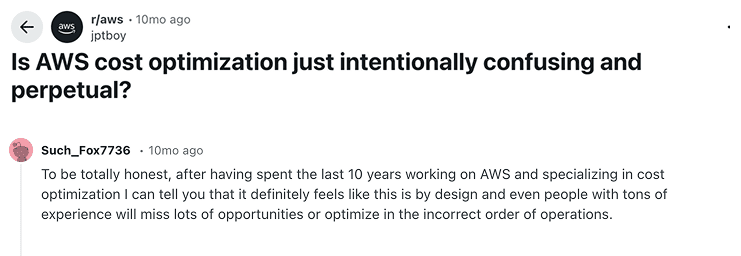
AWS gives excellent building blocks. But teams fail when they assume those building blocks magically assemble themselves.
Where AWS native cost tools work and where they don’t?
| AWS Tools Can | FinOps Actually Needs |
|---|---|
| Show how much you spent | Persistent ownership |
| Break down cost by service/account/region | Unified cross-account views |
| Give basic rightsizing signals | Daily normalized billing data |
| Suggest potential savings | Context about apps, teams, environments |
| Send anomaly alerts | Allocation rules that match the business |
| Check for missing tags | Tagging compliance with enforcement |
| Focus on AWS-only | Multi-cloud visibility |
| Notify you after spend happens | Governance that prevents waste before it ships |
The gaps FinOps teams consistently hit
1. No single place to merge billing + ownership + architecture. Cost Explorer tells you what you spent, but it can’t tell you who spent it
2. Rightsizing lacks workload context. Compute Optimizer doesn’t know if an EC2 instance belongs to a critical path, a batch system, or a shared cluster.
3. No cross-cloud or on-prem visibility
4. No daily operational guardrails. Budgets and Anomaly Detection fire alerts, but they do not enforce tagging, policy checks, or safe resource limits
5. Limited multi-account workflows. FinOps at scale needs connectivity: 200+ accounts → teams → apps → services → environments. AWS tools don’t stitch this together
Avoiding these failures isn’t about perfection; it’s about building habits, architecture patterns, and review cycles that prevent silent waste from becoming systemic. And while AWS gives the principles and the tools, what actually works in practice comes from seeing these patterns play out across hundreds of accounts, teams, and environments.
Which brings us to the final piece of this guide 👇
Cloudaware perspective: Cloud cost recommendations from FinOps
Across thousands of AWS accounts, we see the same pattern: the five failures in this article don’t happen because teams lack discipline or tooling — they happen because AWS-native tools don’t offer a unified model of the environment. Costs, resources, owners, relationships, and policies all live in different places, so teams are constantly stitching data together instead of acting on it.
Instead of separate dashboards for billing, tagging, rightsizing, and compliance, Cloudaware merges billing, inventory, CMDB relationships, and governance into a single FinOps layer.
The result is not “more visibility” — it’s a complete operational model of how your cloud actually works.
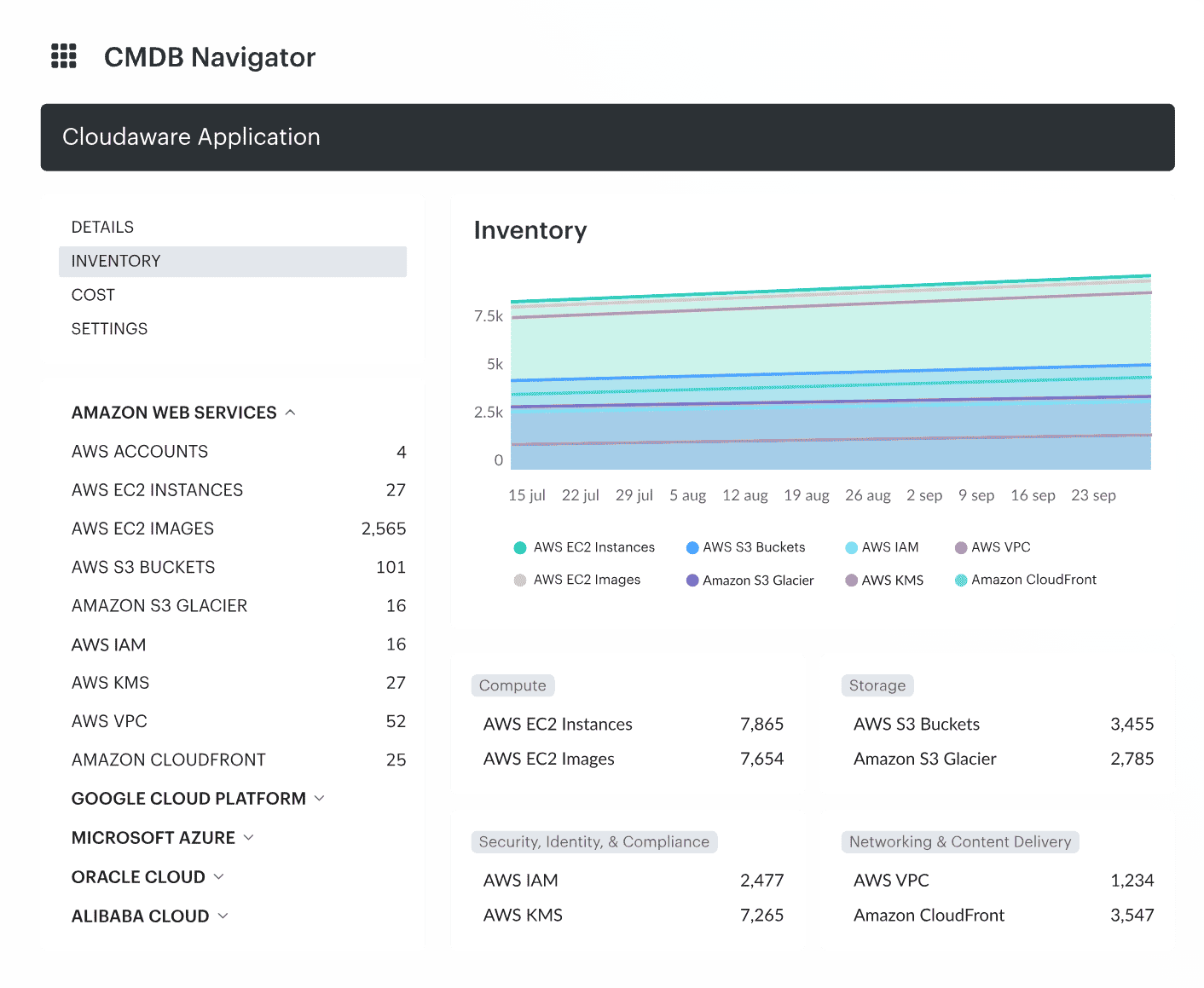
This single source of truth directly addresses every failure above:
- Ownership gaps shrink because Cloudaware allows teams to consistently map resources to applications, services, teams, and environments using CMDB structures, tags, and imported metadata
- Cleanup becomes continuous rather than one-off, because Cloudaware ingests billing and inventory daily, making it easier to spot drift and waste as environments evolve
- Architectural inefficiencies become visible because cost and usage signals are tied to real workloads through CMDB context, not isolated service-level charts
- Compute waste becomes easier to identify with rightsizing insights and idle-resource reports enriched with CMDB context and ownership metadata
- Storage and networking issues surface earlier because Cloudaware highlights anomalies, policy violations, and unused resources as part of its continuous inventory and cost analysis
Where AWS native tools stop and Cloudaware completes the picture
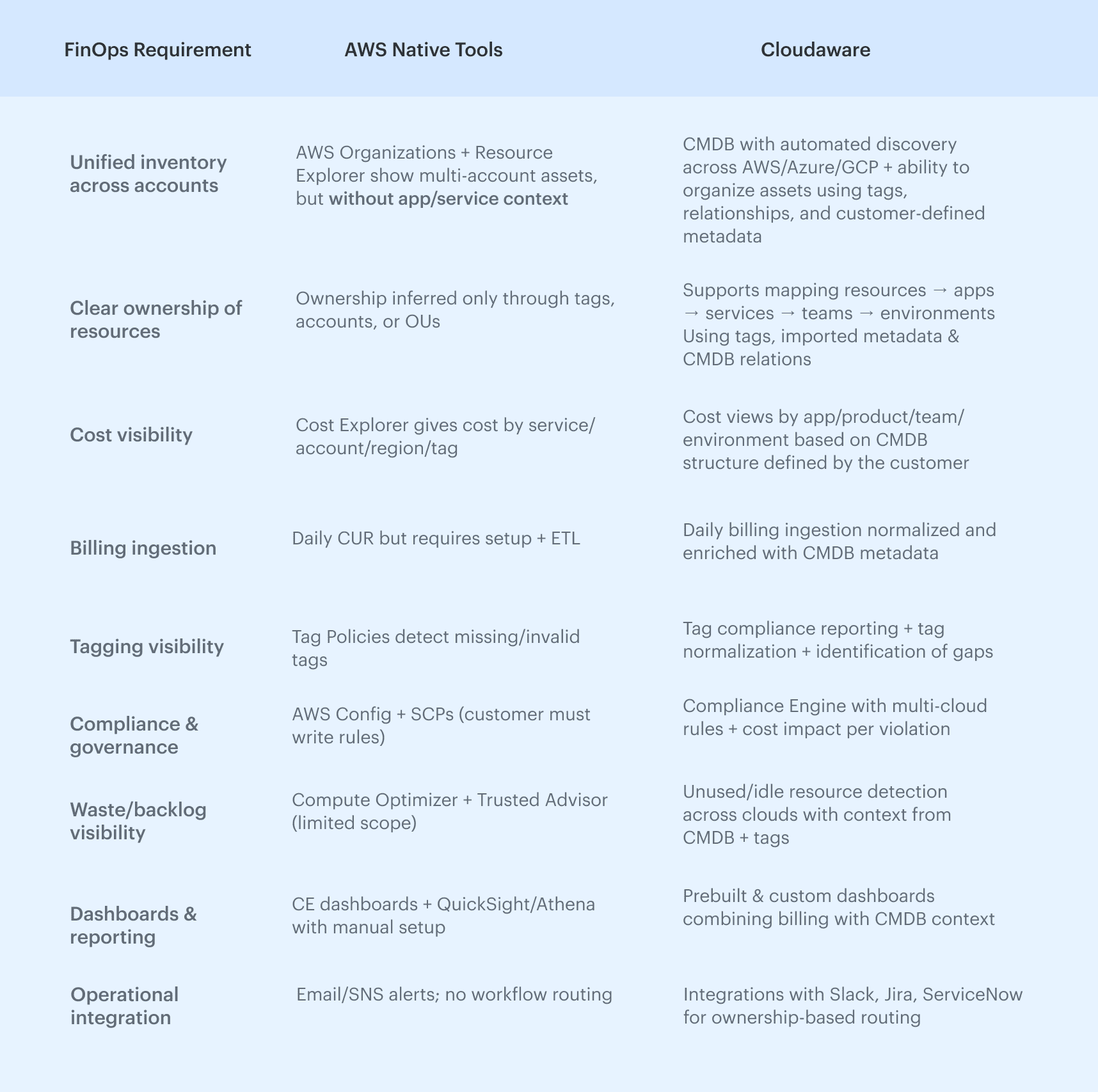
AWS gives the raw materials, but none of them provide the unified model that FinOps actually runs on: consistent ownership, normalized billing, cross-cloud visibility, and a CMDB tying workloads to applications and teams.
Cloudaware doesn’t replace AWS tools, but connects the layers AWS leaves fragmented. Below is a clear view of how each approach fits into a real FinOps practice: