


Updated: September 2026
Expert Reviewed: Alla Lebedeva, ITIL 4 Expert & CMDB Architect, Cloudaware
A dependency map earns its keep when someone is about to change a component or when an incident is already burning. In both moments, the team needs the same answer: what relies on this, which path matters, and who owns the next move?
A diagram cannot answer that reliably if its relationships are stale, if it records communication without direction, or if nobody can trace an edge back to evidence. Useful dependency mapping combines discovery, relationship context, service ownership, and a routine for challenging what the map thinks it knows.
This guide explains application dependency mapping, application discovery and dependency mapping, the signals different tools use, and a five-step operating model for keeping maps useful across hybrid and multi-cloud estates.
Let’s get started 👇
What is dependency mapping — and why 'just visualizing it' is the wrong goal
Picture this. Your team gets an alert at 2:47 AM. A critical application is down. Nobody knows why. Someone pulls up the monitoring dashboard — it's green. Someone else checks the database — healthy. The app server looks fine. You're staring at a set of individually healthy systems that are collectively producing an outage, and you have no idea what they have to do with each other.
That's a dependency mapping problem.
Not a monitoring problem. Not a tooling problem. A visibility problem — specifically, the kind where you don't know which components your systems depend on, which means you can't trace a failure through the chain that caused it.
When you ensured what is CMDB check the insights we have collected on how to apply it in 2026 in the linked article.
How CI relationships become usable dependencies
A CMDB stores configuration items and typed relationships. That structure becomes operational when a team can tell which relationship is merely an association, which one is a functional dependency, which direction it runs, and how the conclusion was reached.
Treat each important edge as a record with evidence. Capture the source, last observed time, direction, service owner, criticality, and review status. A cloud API may prove that a load balancer targets an instance. Flow data may prove that two services communicate. An owner or runbook may still be needed to confirm that the traffic is essential to the business service.
Dependency mapping: the actual definition
Dependency mapping is the practice of identifying and documenting which systems, services, and components rely on each other to function — and exactly how.
In IT infrastructure, that means mapping the relationships between servers, applications, databases, APIs, network devices, and cloud services. Not just 'these things exist' — but 'this application cannot serve users unless this database is up, which cannot be reached unless this firewall allows traffic, which routes through this load balancer, which depends on these two backend nodes.'
Application dependency mapping — the most common form in enterprise IT
When most IT teams say 'dependency mapping,' they mean application dependency mapping — mapping the relationships between software applications and the infrastructure components they depend on.
This is where the real complexity lives in hybrid environments. Take a typical enterprise application stack:
A customer-facing web application depends on an authentication service (Okta or an internal identity provider), a caching layer (Redis), a database cluster (PostgreSQL on RDS), a CDN for static assets, and an API gateway connecting it to three backend microservices. Each of those microservices has its own dependencies — other services, queues, data stores, external APIs. And the entire stack runs on infrastructure that has its own dependency chain: EC2 instances depending on specific VPCs, security groups, route tables, and NAT gateways.
Application dependency mapping documents all of this. Not as a one-time exercise — as a living, continuously updated record of how your application ecosystem actually works.
I want to be specific about 'continuously updated' because that phrase gets used a lot and means nothing without teeth. A dependency map that was accurate six months ago and hasn't been touched since is not a map — it's a historical document. Infrastructure changes every week. Containers spin up and down. New services get added. Dependencies shift. A dependency map that doesn't track those changes in real time gives you false confidence, which is arguably worse than no map at all.
Relationships vs. dependencies — they're not the same thing, and the difference matters
This distinction trips up a lot of teams, so let's be clear about it.
A relationship between two CIs just means they communicate. Server A talks to Server B. Database B is accessed by Application C. Those are relationships.
A dependency is directional and functional. Application C cannot function if Database B is unavailable. That's a dependency — not just a relationship, but a critical reliance. Take it away, and something breaks.
Why does this matter? Because it changes how you prioritize. Two systems can have a bidirectional relationship but only a unidirectional dependency — one relies on the other, the other doesn't rely back. In a failure scenario, knowing the direction of the dependency tells you which system to fix first, which teams to page, and what the cascading failure sequence looks like.
Dependency mapping captures both: the relationship (the communication exists) and the dependency (the functional reliance, its direction, and its criticality). Most monitoring tools show you relationships. Full dependency mapping shows you dependencies — and that's the layer that makes incident response go from two hours of scrambling to twenty minutes of targeted action.
What dependency mapping covers — the full scope
Application dependency mapping is the most common, but dependency mapping as a practice covers several layers of IT infrastructure:
- Application-to-infrastructure dependencies. Which applications run on which servers, which databases, which cloud resources. The layer most directly impacted by cloud migrations, server upgrades, and database failovers.
- Network dependencies. Which application components depend on specific network paths, firewall rules, load balancers, and DNS configurations. Critical for incident response when application behavior changes without any application code changing.
- Business service dependencies. Which IT components support which business services — mapping 'the payment processing service depends on these 14 CIs' rather than just 'these 14 CIs exist.' This is what turns infrastructure maps into business impact maps.
- Service-to-service dependencies. Microservices, APIs, and third-party integrations that applications call. In modern architectures, this is where the most invisible dependencies live — the ones nobody documented because the team assumed the external API would always be available.
In a CMDB, all of these layers are captured as Configuration Items (CIs) with typed relationship records between them. That's what turns a dependency map from a diagram into a queryable, maintainable, operational asset.
Network dependency mapping
Network dependency mapping charts the relationships between the infrastructure components your applications run on — switches, firewalls, load balancers, DNS servers, and the connections between them. Unlike application dependency mapping, which tracks service-to-service calls and software integrations, network dependency mapping operates at the infrastructure layer: it answers not what talks to what, but what your traffic physically routes through.
This distinction matters enormously during incident response. When an alert fires, knowing your application dependencies tells you which services are affected. Knowing your network dependencies tells you why — and how far the blast radius extends. If your load balancer depends on two upstream firewalls and one fails, every service behind that load balancer is at risk. Without a live map of that dependency chain, your team is troubleshooting blind.
Cloudaware automatically discovers network-layer dependencies by combining cloud provider APIs, configuration data, and traffic flow analysis — mapping relationships across VPCs, security groups, gateways, and DNS zones in real time. The result is a continuously updated network dependency map that reflects your actual infrastructure, not a snapshot from last quarter's manual audit.
Business Service Dependency Mapping
The difference between knowing a server is down and knowing which business services are affected by that server being down, that’s what business service dependency mapping answers.
Here’s why that matters in real life. An alert says a database node failed. Fine. But for an ops lead, a cloud architect, or an incident manager, the real question is bigger: does this hit login, payments, customer support, or your revenue-critical app flow? That’s where service mapping earns its keep. It connects infrastructure components, servers, databases, load balancers, Kubernetes clusters, SaaS apps, and other CIs, to the business services they actually support. Think of it like tracing every technical dependency behind something like “Online Banking Service” or “Customer Portal.”
That model lines up closely with ITIL, where business services sit above the technical estate and help teams understand impact, priority, and ownership faster. In Cloudaware, CMDB records are tied directly to business service records, so a CI is not just an isolated asset on a list. It becomes part of a service context. When something changes, breaks, or drifts, teams can see which service is exposed, who owns it, and why it matters.
Worked example: retire a server without guessing
Suppose a team plans to retire an EC2 instance after a migration. Inventory data says the instance still exists. That is not enough to approve the change.
The dependency review starts with evidence. The instance is still a target behind a load balancer. Flow records show recent traffic from an application tier. The CMDB links that tier to the customer portal and names the service owner. A change record from the migration says traffic should have moved, but the observed path disagrees.
Now the map has done useful work. The team pauses retirement, asks the service owner to verify the remaining traffic, removes the stale target, watches the path through an agreed observation window, and only then completes the change. The map did not predict the answer. It exposed the contradiction before production did.
Use the same pattern for an outage, migration, or vulnerability response: identify the target CI, trace upstream and downstream dependencies, check freshness and evidence, confirm ownership, then record the decision and the change.
Application Discovery and Dependency Mapping (ADDM): How Automated Discovery Changes the Process
Application Discovery and Dependency Mapping, or ADDM, matters because discovery without mapping leaves you with a pile of assets, and mapping without discovery turns stale almost immediately. Teams usually learn this the hard way. They can name the servers, maybe the databases too, but once someone asks which services rely on them, who owns the chain, and what breaks if one node disappears, the room gets quiet. That gap is exactly where application discovery and dependency mapping earns its place.
The discovery side is the engine. Automated scans look across cloud accounts, virtual machines, containers, databases, network paths, and installed software to find CIs without waiting for someone to type them into a spreadsheet or update a ticket after a late-night change. Then the dependency mapping layer connects the dots. It shows that this app depends on that load balancer, that database cluster, this identity service, and those APIs. Now your CMDB starts reflecting how systems actually run, not how someone documented them six months ago.
That is why ADDM tools changed the process. ServiceNow ADDM, BMC ADDM, and platforms like Cloudaware all aim to reduce manual CI upkeep and keep relationships current enough to support incident response, change planning, and service impact analysis. On the open source side, tools like Netdisco and OpenNMS can help with network and infrastructure visibility, especially for teams that want flexibility and lower licensing costs, though they often need more assembly work if your goal is business-service-level dependency context.
Compared with manual dependency mapping, automated discovery usually wins on speed, coverage, and survivability. Manual mapping can work in a small environment. Once you have hybrid cloud, ephemeral workloads, and teams deploying every week, the maintenance overhead climbs fast. Accuracy drops first. Trust drops right after. The tradeoff, of course, is cost and setup effort. Good ADDM tooling is not free, and tuning discovery logic takes work. Still, most teams pay for that one way or another, either in software or in engineer hours spent chasing outdated diagrams.
Cloudaware insight: the useful part is not just finding CIs. It is tying discovered infrastructure back to CMDB relationships, cloud context, tags, and business services so a dependency map can answer operational questions fast. Which application is exposed? Which service owner needs to know? What change caused the drift? That is the level where dependency mapping becomes operational, not decorative.
What is CIs dependency mapping?
CI (Configuration Item) Dependency Mapping is all about untangling the web of relationships between your IT assets in your IT environment. Think servers, databases, applications, network devices — you name it. Understanding how these components interact with each other helps you see how a change to one piece can ripple through your entire infrastructure.
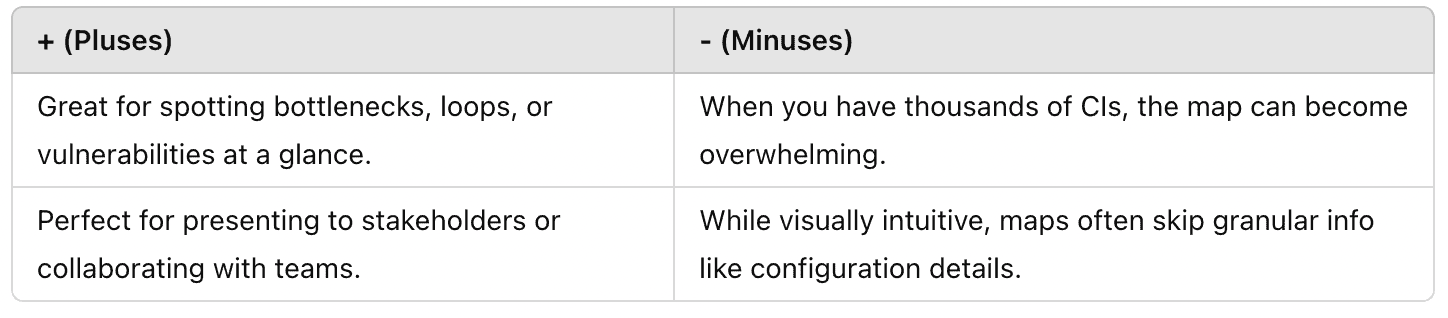
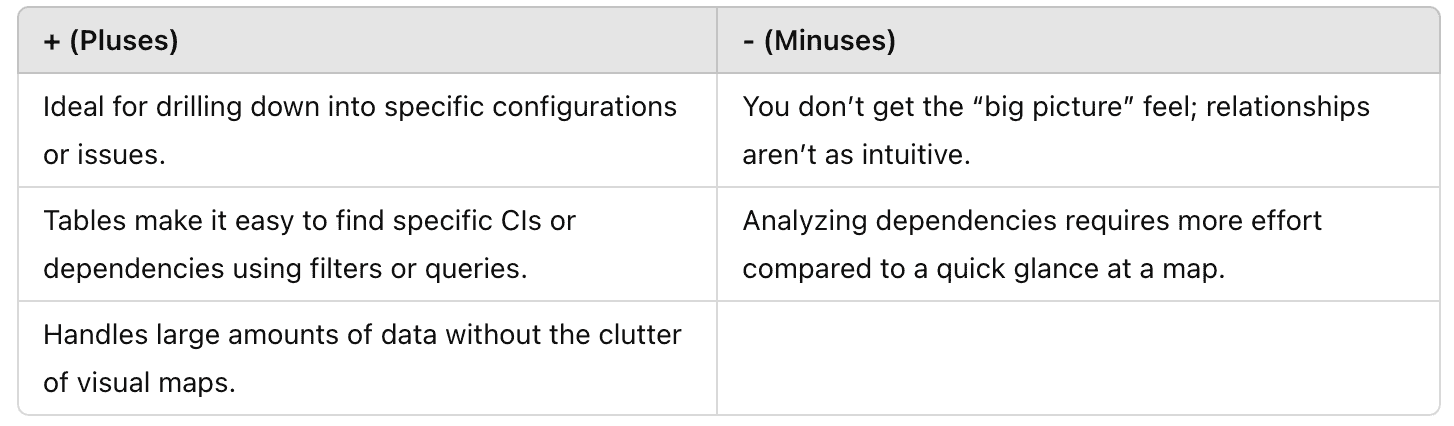
When it comes to representing dependencies between CIs, there are two main approaches: visual dependency maps and tabular formats. Each has its strengths and limitations, and the best choice often depends on your specific needs and workflow.
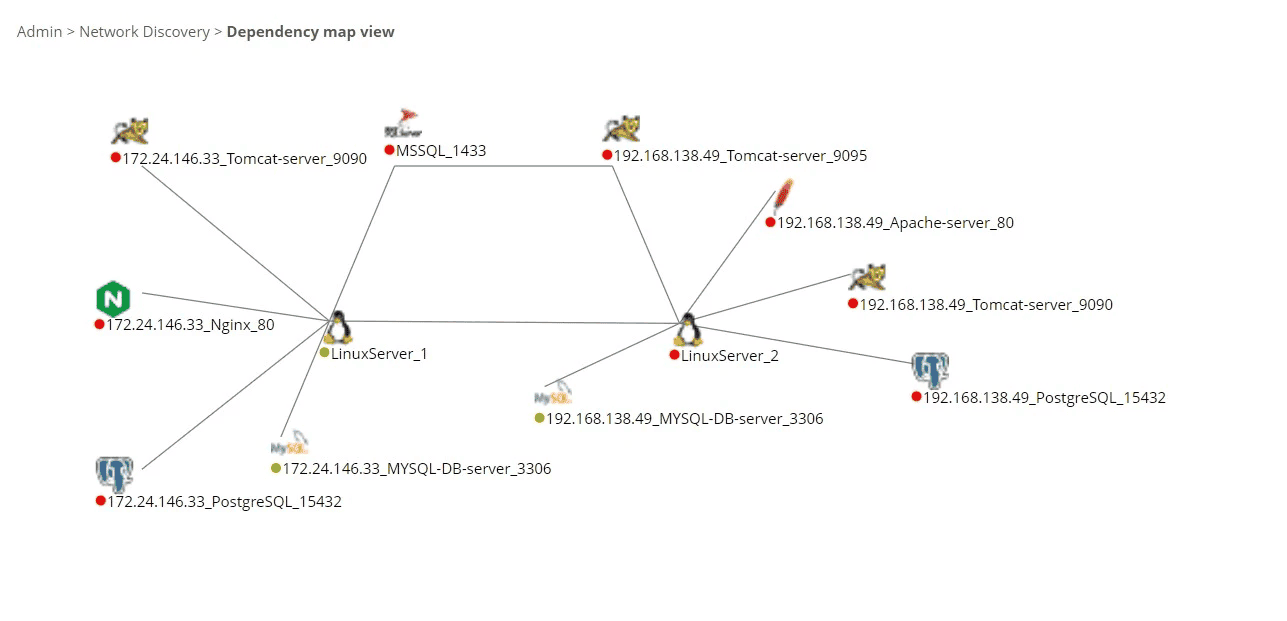
1️⃣ Visual Dependency Map is bird’s-eye view of your infrastructure — lines connecting nodes like a web, showing how CIs interact. Each node represents a CI (e.g., servers, databases, apps), and the lines show their dependencies.
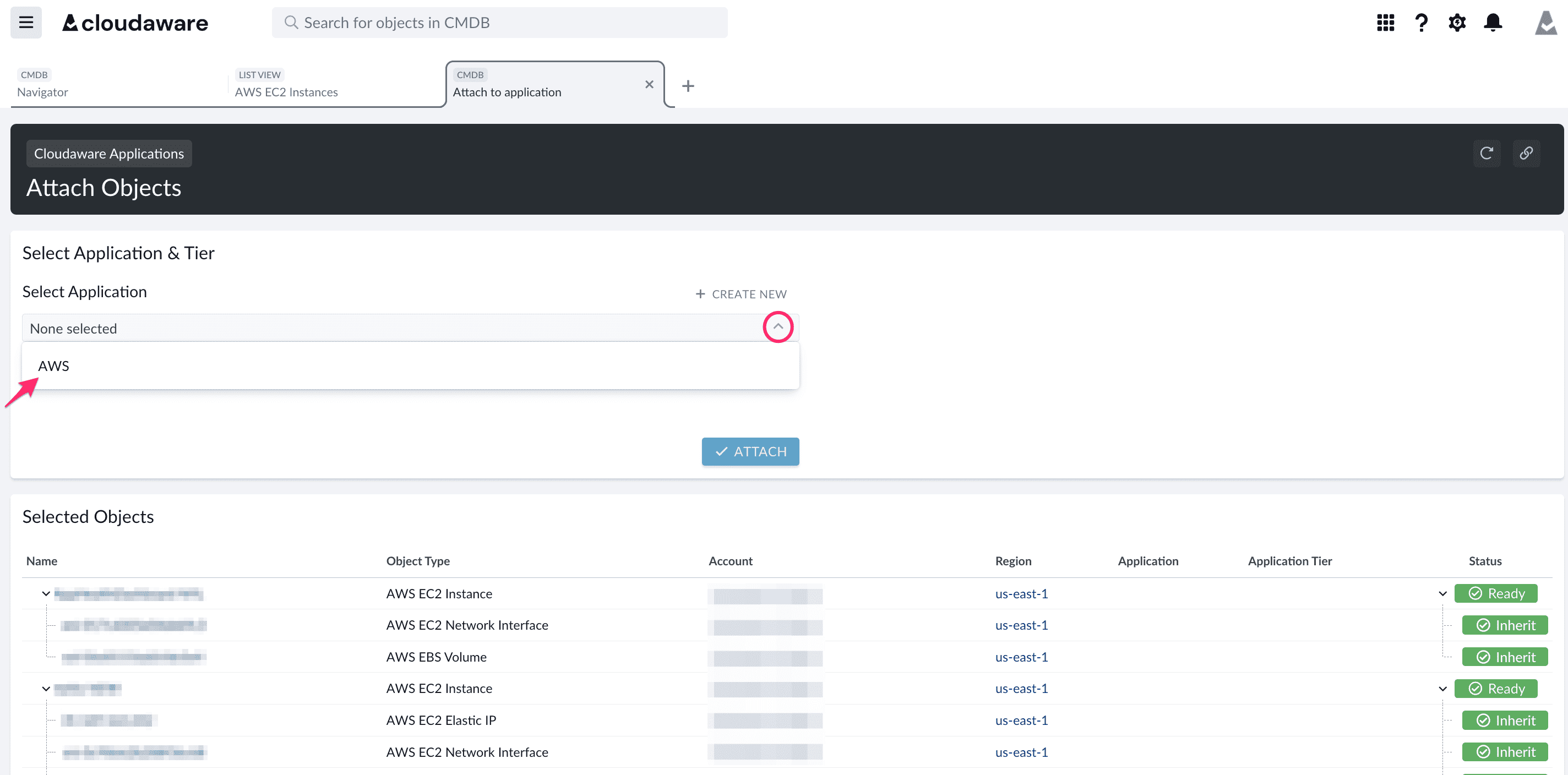
2️⃣ Grid Format. Think rows of CIs with columns detailing relationships between them, metadata (e.g., versions, IPs, ports), and statuses.
How does application dependency mapping work?
Picture this: an IT manager at a mid-sized enterprise sitting in the war room after another mysterious outage. The culprit? Their hybrid infrastructure — a chaotic mix of AWS, Azure, and on-prem servers. Something broke, again, and no one has a clue why. The team is frustrated, sleep-deprived, and spinning in circles.
Sound familiar? That was daily life for one Cloudaware client (NDA - can’t name it). Every update felt like Jenga, with invisible dependencies causing surprise collapses. They needed clarity — fast.
They turned to the Cloudaware CMDB. Step one? Integrating their sprawling environment — AWS accounts, Azure subscriptions, VMware clusters. From there, the CMDB’s automated discovery process went to work, collecting data from every corner of their infrastructure.
What it found was staggering. EC2 instances hosting web servers, Kubernetes pods managing containerized apps, RDS databases powering critical workflows — the CMDB captured it all. It didn’t stop at inventory. The dependency mapping tool pulled metadata like OS details, network configurations, and active services with laser precision.
The CMDB analyzed communication flows, identifying relationships between IT assets they hadn’t documented.
For example, a web server on EC2 wasn’t running solo; it depended on a MySQL database in RDS. And their load balancer? It was quietly handling traffic across multiple app servers, flagging a sneaky bottleneck in the process.
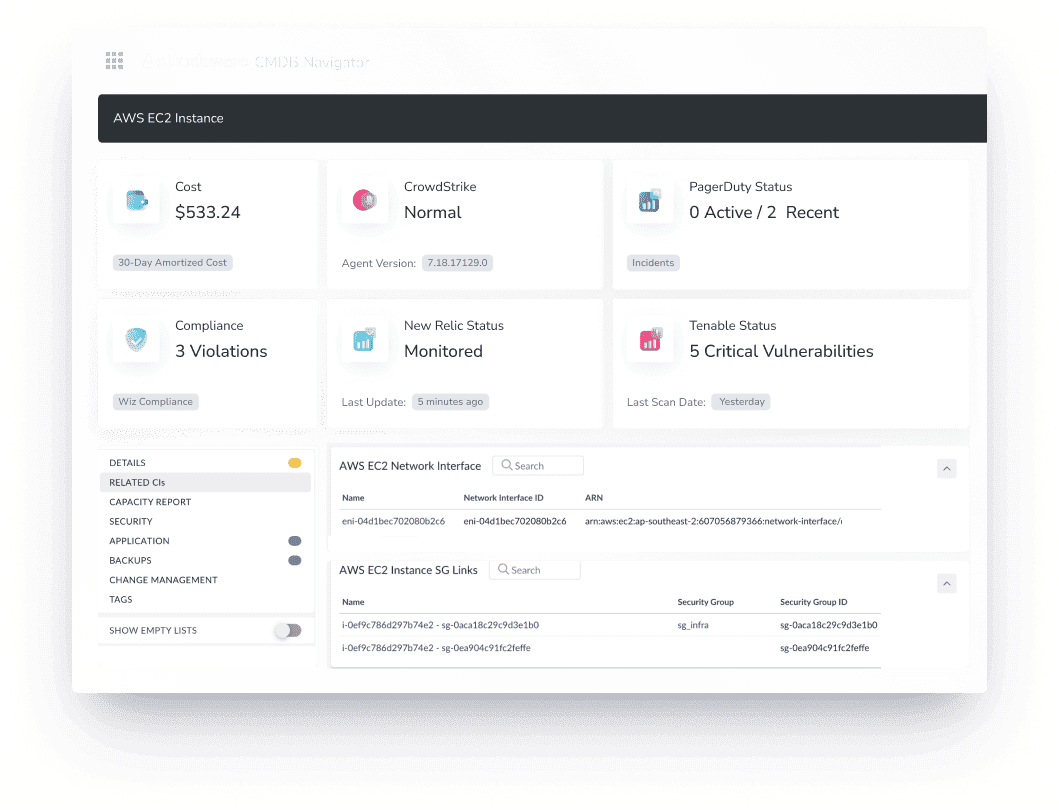
For this team, their new dependency map wasn’t just a diagram — it revealed relationships between CIs they hadn’t fully understood. This insight became their secret weapon, turning chaos into clarity and saving a lot of sleepless nights.
But wait, aren’t relationships and dependencies between CIs are the same?
Difference between “relationships” and “dependencies” between CIs
Relationships and dependencies between CIs are like the foundation of any solid dependency mapping process — but they’re not the same thing.
- Relationships. Think of them as the web that shows which server interacts with which database, which application communicates with which API, and so on. A relationship map lays it all out, helping you visualize how everything in your IT environment is interconnected.
But here’s the thing: just because two CIs are connected doesn’t mean one relies on the other to function. - Dependencies. Dependency mapping dives deeper, pinpointing where one CI’s performance or functionality is directly tied to another.
For example, if your app server depends on a database to operate and that database goes down, your app is toast.
Dependencies reveal those critical links that could disrupt your operations if something breaks.
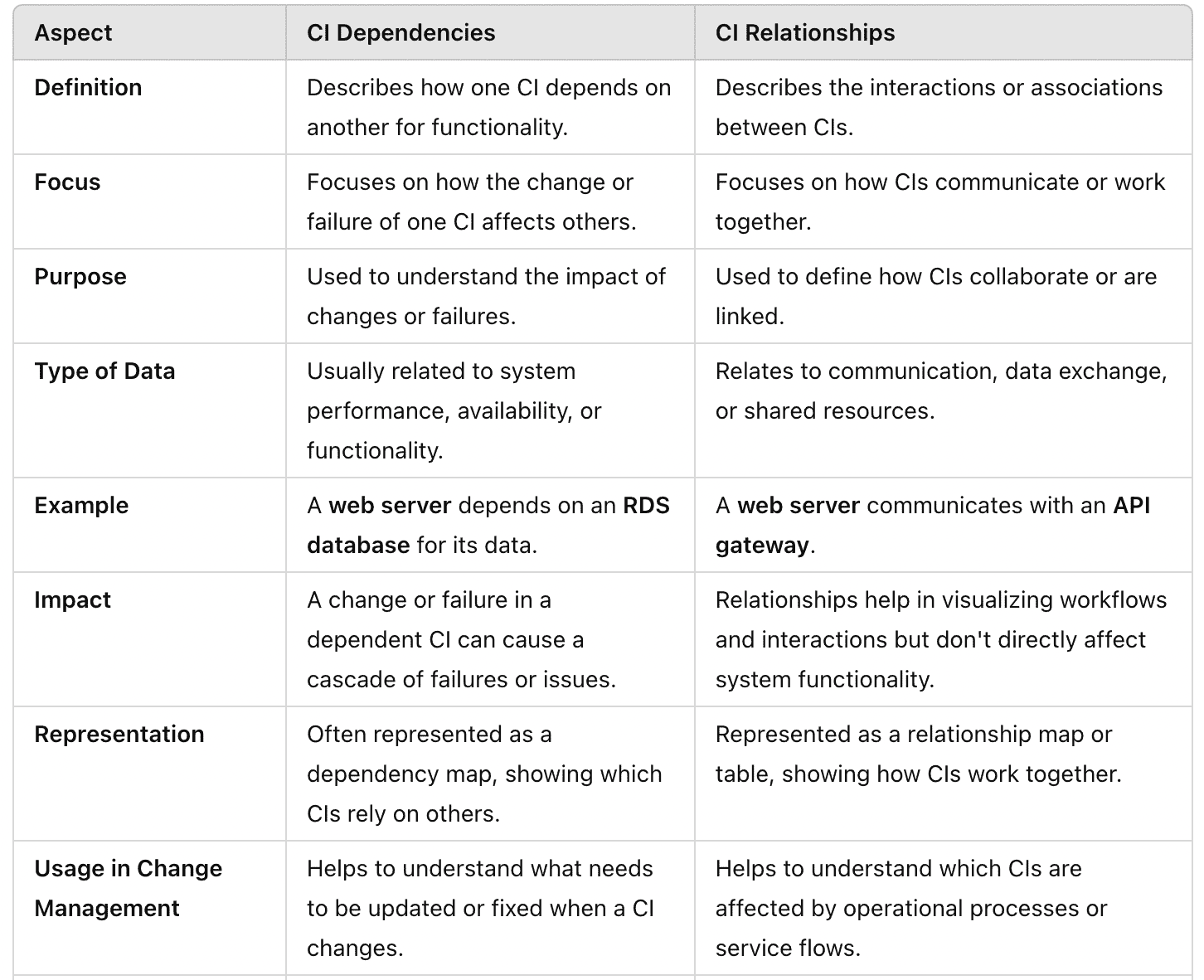
The magic of dependency mapping lies in showing both relationships (such as how servers, applications, and databases interact) and dependencies, which help you focus on the critical paths that need protection.
Why do you need to define CI dependencies?
Why is application dependency mapping important? Because without clear visibility, you’re risking unnecessary outages and inefficiencies. In a hybrid IT environment with thousands of CIs — servers, databases, applications — you need to know how everything connects. Dependency mapping lays it all out for you, showing the impact of changes and ensuring smooth operations.
For example: Your company updates its network infrastructure after switching to a new internet provider. Suddenly, DNS entries and firewall rules aren’t working as expected, causing disruptions. With dependencies mapped, you’d know exactly which CIs needed adjustments to maintain connectivity and avoid downtime.
Benefits of Application Dependency Mapping:
- Prevent Downtime. A clear dependency map identifies risks and ensures seamless transitions during updates.
- Faster Troubleshooting. Pinpoint the root cause of issues quickly with well-documented relationships between your infrastructure elements .
- Optimized Planning. Dependency mapping supports proactive changes and smarter upgrade planning.
- Improved Collaboration. A defined map of dependencies keeps all teams aligned and informed.
The benefits of dependency mapping aren’t just about avoiding issues. They’re about running your IT environment efficiently, reducing headaches, and staying ready for growth. With every dependency between IT assets documented, your infrastructure becomes easier to manage and optimize.
4 types of application dependency
Alright, let’s dive into the types of application dependencies you’ll see in your hybrid IT setup. Each type plays a specific role in keeping your systems connected, and knowing how they work is essential for your infrastructure performance.
1. Service Dependencies
These are the connections between your applications and external or internal services they rely on. For example, your customer portal app (CI: CustomerPortal_App01) might depend on an identity management service like Okta (CI: Okta_AuthService01) to validate users or an email server (CI: MailServer_01) for sending notifications.
How it works: Dependency mapping links these services to your applications, tracking uptime and performance metrics. If your Okta_AuthService01 is down, you’ll know why customers can’t log in.
2. Data Dependencies
These involve applications that depend on data from other systems. For instance, your analytics dashboard (CI: Analytics_Dashboard01) pulls transactional data from a CRM database (CI: CRM_DB01). If that database is unreachable, your dashboard is running blind.
How it works: A dependency map visualizes data flows, showing paths, query dependencies, and even access configurations. This helps you troubleshoot issues like failed API calls or database locks faster.
3. Infrastructure Dependencies
This type ties applications to the underlying infrastructure, like servers, storage, or network settings. For example, your e-commerce platform (CI: Ecomm_App01) might rely on an EC2 instance (CI: AWS_EC2_WebServer01), an RDS database (CI: AWS_RDS01), and a load balancer (CI: AWS_LB01).
How it works: Mapping these links ensures you can pinpoint which infrastructure issue (like AWS_LB01 throttling traffic) affects your applications.
4. Application-to-Application Dependencies
Applications talking to other applications — this is where APIs, integrations, and workflows come into play. For example, your ERP system (CI: ERP_System01) might exchange data with your financial app (CI: FinanceApp01) or sync with a warehouse management tool (CI: WarehouseMgmtApp01).
How it works: Dependency mapping tracks these interactions, keeping tabs on API statuses, version mismatches, and compatibility issues that might otherwise disrupt operations.
By mapping all these dependencies, you’re not just untangling relationships between Cis — you’re building a rock-solid system where every IT asset plays its part without surprise breakdowns. That’s the dream, right?
How to know whether a dependency map is trustworthy
Map quality is not the number of nodes on the screen. Track the conditions that make a dependency safe to use in a change or incident decision.
| Control | What to measure | Failure signal |
|---|---|---|
| Discovery coverage | Assets and services observed compared with an agreed source of truth | Known production components are absent |
| Freshness | Median and 95th-percentile age of active nodes and edges | Ephemeral resources outlive the map's update cycle |
| Orphan rate | Active CIs with no owner, service, or meaningful relationship | The graph grows while accountability shrinks |
| Evidence traceability | Critical edges linked to API, flow, trace, configuration, or approved manual evidence | A reviewer cannot explain why an edge exists |
| Direction confidence | Critical dependencies whose direction and impact were verified | Communication is treated as functional reliance |
| Change coverage | Changes reviewed against affected dependencies and rechecked after implementation | The map is viewed but not used |
| Expiry discipline | Inactive edges reviewed or expired under a defined rule | Historical traffic remains a permanent dependency |
1. Handling a server upgrade: The chain reaction
You’re managing a hybrid environment with AWS and on-prem servers. You need to upgrade a web server hosted on an EC2 instance, but you’re not sure how this change will ripple through the infrastructure. So, you pull up your dependency map to get a better picture of the relationships between your cloud assets.
Here’s what you discover:
- The web server depends on an RDS database for backend operations.
- Internal DNS entries are tied to this web server.
- Your load balancer is routing traffic to multiple app servers that are connected to this EC2 instance.
With the dependency mapping tool, you can plan the upgrade properly. You realize that the database and app servers will also need scheduled downtime. What you thought was just a simple server upgrade becomes a coordinated effort across multiple CIs. You avoid breaking connections and ensuring everything runs smoothly.
2. Troubleshooting a mysterious outage: The missing link
One of Cloudaware’s clients, an enterprise with thousands of servers and cloud accounts, faced a sudden outage. No one knew what changed to cause it, but you’ve got the tools to dig deeper. You open the dependency mapping tool and start analyzing your CIs.
You quickly discover a misconfigured firewall rule on your load balancer, blocking traffic to EC2 instances. As you continue examining the dependency map, you find that several Kubernetes pods depending on these instances aren’t functioning properly.
Thanks to the dependency mapping, you pinpoint the root cause and fix the firewall issue quickly, avoiding unnecessary downtime and frustration for your team.
3. Preparing for an AWS migration: mapping dependencies first
When migrating from on-prem to AWS, one of Cloudaware's clients needed to ensure they wouldn’t face unexpected problems. They used dependency mapping to understand their existing infrastructure and relationships between key CIs, like VMware servers, network configurations, and API gateways.
Through the map, they discovered that their app servers were heavily dependent on an on-prem database, which wasn’t yet replicated in AWS. Thanks to the clear visualization of these dependencies, they adjusted their migration plan to set up a hybrid connection between on-prem and cloud environments to maintain continuity.
4. Responding to a security breach: The weak link
A Cloudaware client discovered a vulnerability in one of their SQL databases hosted on RDS, and security was top priority. They opened their dependency map to assess how this might affect other parts of their infrastructure.
What they found:
- The app servers are directly connected to the SQL database.
- Web servers interact with the database less frequently but still rely on the same API connection.
With the dependency mapping tool, they identified which CIs to patch first to secure the vulnerable database without disrupting the entire infrastructure. They could patch the database while ensuring the API connections between the web and app servers stayed intact.
5 steps strategy to map dependencies between Cis
Step 1: Set up automated discovery for your infrastructure
The first step in application discovery and dependency mapping is ensuring you have a complete inventory of your infrastructure. You can achieve this by integrating your systems with a CMDB, such as Cloudaware’s.
Automated discovery tools are crucial here. They scan your entire environment across clouds, data centers, and on-prem systems, pulling in detailed information about each CI. Key assets typically discovered include:
- Web servers (e.g., EC2 instances)
- Application servers (e.g., Kubernetes pods)
- Databases (e.g., MySQL, RDS instances)
The goal is to ensure that every Configuration Item (CI) is captured. The discovery process will pull in all relevant metadata — operating systems, IPs, ports, services, and configurations — automatically, eliminating the need for manual tracking.
Step 2: Identify relationships between CIs
This is where dependency mapping truly comes into play. Once you have your CIs, you need to map how they interconnect manually or use automated CMDB for this task. This involves understanding how each CI depends on others to function.
For example, web servers (on EC2) depend on application servers to handle business logic and databases for persistent storage. Application servers often rely on APIs, microservices, or backend services to perform various functions. This is where application dependency mapping tools really shine — they track communication patterns such as:
- API calls: Between web servers and app servers
- Database queries: From application servers to MySQL or Postgres
- Traffic routing: From load balancers to application servers
By identifying and capturing these relationships, you can visualize how failure in one CI impacts others, ensuring you have a clear understanding of your system's dependencies.
Step 3: Visualize your dependency map
Once dependencies are identified, it’s time to visualize them in applications dependency map. This map should be interactive, giving you a clear view of how all your CIs are interconnected.
Each CI is a node in the map, and lines indicate the dependencies between them. For example:
- Web Server (EC2) → App Server (Kubernetes pod) → Database (RDS)
- App Server → Cache (Redis) → Queueing System (RabbitMQ)
This visual map enables you to assess how a change in one component — say, modifying a database configuration — could disrupt the connections between CIs. With this map, you can plan changes without causing unintentional disruptions.
Step 4: Analyze and fine-tune dependencies
Now, with your dependency map in hand, it’s time to analyze the relationships for potential risks. You should look for:
- Bottlenecks. Any services that are overloaded and might not scale effectively.
- Single points of failure. For example, a single web server handling all requests with no redundancy.
- Redundant or unnecessary dependencies. Some CIs might be over-relied upon, causing inefficient dependencies.
Fine-tuning these dependencies is vital to understanding both your system’s performance and resilience, especially under stress or failure conditions.
Step 5: Monitor continuously
The final step is ensuring your applications discovery and mapping stay current. As your infrastructure evolves, your CMDB must continue discovering and monitoring any changes. Automated discovery tools should run at regular intervals, ensuring new CIs are captured as soon as they’re introduced — whether that’s a new microservice in Kubernetes or a fresh load balancer.
Additionally, as your teams make changes (like patching servers or scaling applications), you need to monitor your dependency map accordingly. This ensures that any dependency changes — no matter how small — are accounted for, so you don't accidentally break something important.
Application dependency mapping best practices
It’s one of those things that sounds super simple until you’re knee-deep in a sprawling cloud infrastructure. After working with Cloudaware clients and seeing the ins and outs of dependency mapping, I’ve picked up a thing or two.
So, if you’re looking to master this art (and trust me, it is an art), let’s dive into some best practices that’ll help you keep your infrastructure clean, reliable, and scalable.
1. Automate everything, seriously
Don’t even think about manually tracking your CIs and dependencies. In 2025, that’s a recipe for disaster. Trust me on this one. You need automated discovery tools to make sure you're not missing a single CI across your entire environment.
Cloudaware’s application discovery and dependency mapping tools are your best friend here. They scan your entire environment — cloud, on-prem, hybrid setups — and pull in all CIs in real time. I’m talking about servers, databases, load balancers, virtual machines, containers — everything. It picks up on the underlying metadata like OS versions, IP addresses, ports, and configurations, and that’s just the beginning.
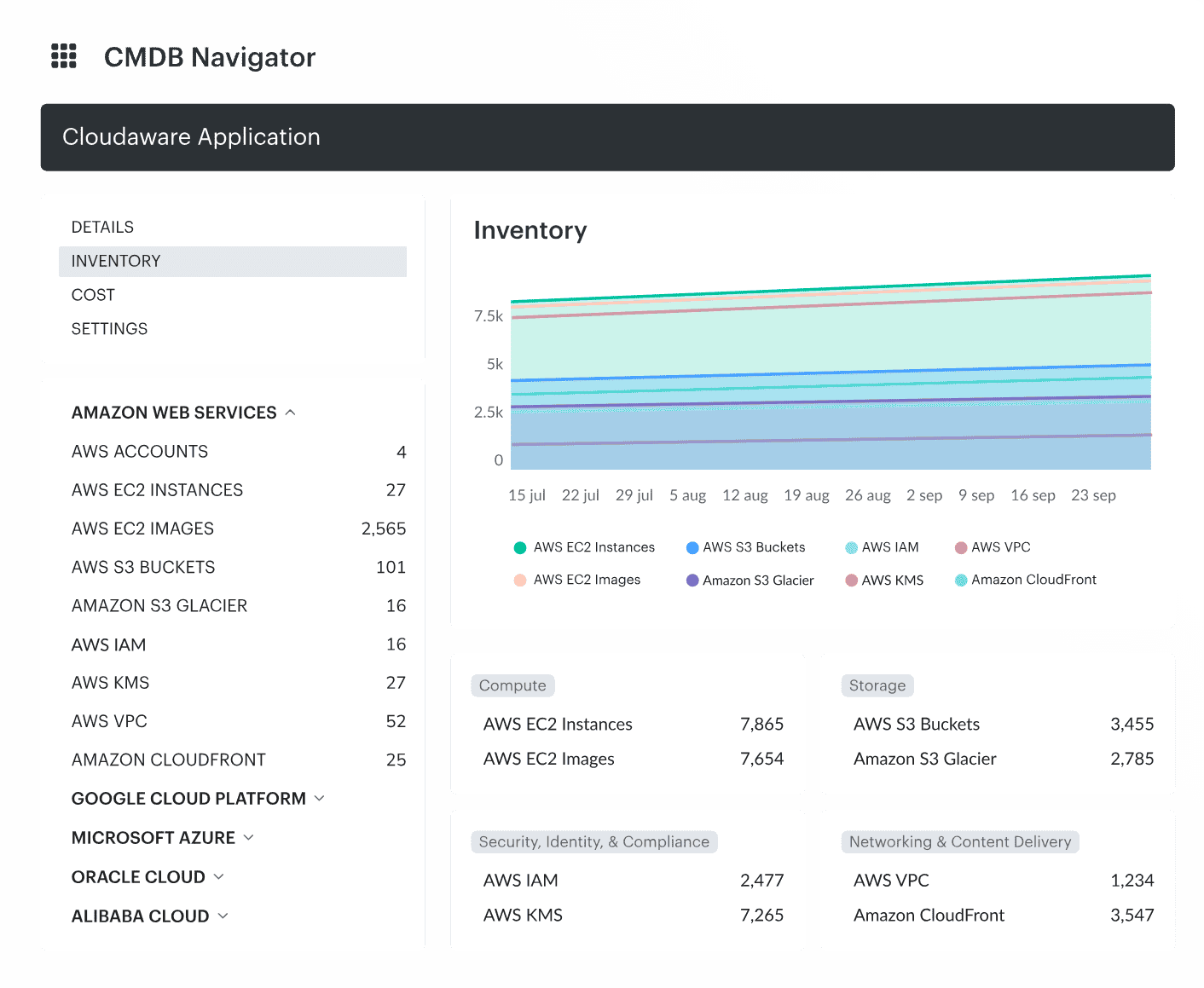
Automating this process means you’re always working with a live, up-to-date inventory of your infrastructure. No more worrying about missing critical components or dealing with outdated data that makes everything else fall apart. It’s the core of your application dependency map.
2. Don’t just map, understand dependencies between CIs
Okay, so you’ve got your CIs in place. Now, it’s time to map them. But here's the thing: just identifying dependencies between CIs isn’t enough. You need to understand it.
Let’s say you have a web server. It might depend on a load balancer, which depends on an app server, which depends on a database. And guess what? That’s not the full picture. You need to know the direction of the data flow, the frequency of requests, and what could break if something goes down.
Tack not just direct connections, but also indirect ones. Look for things like:
- API calls between your app servers and microservices
- Database queries going from your app server to your RDS instance
- Traffic routing through load balancers, etc.
This is about understanding the critical paths and how every piece of the puzzle impacts the others. It’s like a complex web of relationships, and knowing how it all fits together will save your life when troubleshooting.
3. Keep dependencies between IT assets lean and mean
As systems grow, developers and teams might add new dependencies without fully considering the downstream effects. You can end up with a lot of unnecessary connections that aren’t adding value.
My advice? Regularly audit your dependencies to make sure you’re not over-relying on a single CI. Look for things like:
- Unused dependencies. Is a database that’s been decommissioned still showing up in your map?
- Over-dependencies. Is one web server handling all the requests with no failover or redundancy?
- Over-complicated connections. Are multiple apps connected in ways that could be simplified?
You can fine-tune your infrastructure by removing or consolidating redundant dependencies, which makes it leaner and more efficient. Think of it like decluttering your office — once everything has its place, work gets easier.
When you get dependency mapping right, you're not just managing infrastructure — you’re controlling it. With automated discovery and a clear, dynamic application dependency map of your system elements, you’re ready to tackle anything that comes your way.
Dependency mapping tools: choose the evidence signal first
Two tools can draw similar graphs from completely different evidence. That difference matters more than the screenshot. Start with the signal your decision requires, then compare products inside that lane.
| Evidence model | Strongest use | Blind spot to test | Example tools |
|---|---|---|---|
| Cloud API, configuration, and CMDB relationships | Inventory, ownership, change history, service context, and hybrid governance | Runtime calls and code-level causality may need another source | Cloudaware, ServiceNow, Device42 |
| Application traces and runtime telemetry | Microservices, latency, call paths, and root-cause analysis | Physical assets, contracts, and manually defined business context | Dynatrace, Datadog |
| Network polling and flow data | Ports, network paths, latency, packet loss, and communication evidence | A conversation does not prove business dependency | SolarWinds SAM, Netdisco |
| Passive traffic discovery | Rapid migration scoping and connection inventory | Encrypted, serverless, and low-frequency paths may need validation | Faddom |
| Manual collaborative modeling | Workshops, architecture planning, and small stable systems | Freshness and automatic change detection | Miro, diagrams.net |
Shortlist rule: ask each vendor to reveal the source behind one edge, show when it was last observed, explain how direction is inferred, and demonstrate what happens when evidence conflicts. A map that cannot answer those four prompts is a picture, not an operating control.
| Tool | Best For | Pricing Model | Key Differentiator |
|---|---|---|---|
| Cloudaware CMDB | Multi-cloud enterprises with hybrid infra | Subscription (30-day trial) | CMDB-native; maps CIs to business services; change history tracking |
| ServiceNow Discovery | ITSM-integrated enterprises | Enterprise licensing | Best-in-class CMDB integration; ADDM module built-in |
| Dynatrace | Application performance monitoring | SaaS subscription | Real-time AI-driven dependency detection; code-level visibility |
| Device42 | Data center + hybrid IT | Subscription | Strong network dependency mapping; physical asset tracking |
| Faddom | Mid-market hybrid IT | Subscription | Fast deployment; agentless discovery; good for cloud migration |
| Netdisco (open source) | Network teams, budget-constrained | Free / self-hosted | Network device mapping only; no cloud; requires DevOps setup |
| SolarWinds NPM | Network ops teams | Subscription | Network topology + dependency visualization; strong alerting |
But the real selection criterion is not “which tool maps dependencies.” Plenty do that. The sharper question is: what kind of dependency are you trying to manage? Infrastructure relationships, application runtime flows, network paths, or business service impact? Pick the wrong category, and your team ends up with visibility that looks impressive in a demo but falls apart during an incident.
Visualize your cloud infrastructure with Cloudaware CMDB
Cloudaware CMDB is designed to give enterprises a clear, real-time view of their complex hybrid IT infrastructure. It automatically discovers both cloud and on-prem assets and enriches them with valuable data. Think cost, vulnerabilities, patch statuses, and business role.
This makes managing thousands of accounts and servers much easier.
The system also goes a step further by mapping dependencies and relationships, giving a clear understanding of how everything connects. Whether it’s tracking connections between servers or seeing how applications rely on cloud services, Cloudaware’s dependency mapping tool simplifies decision-making.
Its top features include:
- Real-time asset discovery and mapping
- Automated relationship and dependency mapping
- Deep data enrichment from cloud and third-party sources
- Customizable dashboards and reports
- Secure, compliant infrastructure with built-in encryption and MFA
Read also:
📌 What Is Configuration Management? Definition. Processes. Recommendations
📌 Decoding configuration management vs change management in a multi-cloud environment
📌 Master Cloud Configuration Management: Tools & Tips
📌 CMDB Configuration Items: How CI Drive Configuration Management Database
📌 7 Strategies for CMDB Application Mapping Success in Hybrid IT Infrastructure
📌 The best configuration management software: Top 10 tools review
📌 ITIL CMDB Insights: Simplify 7 Processes Across Hybrid Environments