


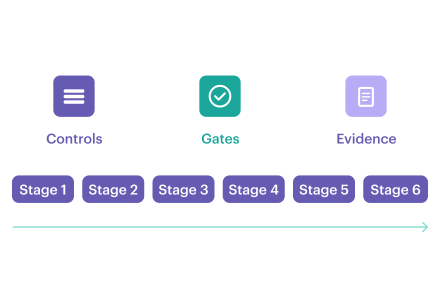
When teams talk about DevSecOps automation, they usually mean fewer manual reviews and faster releases. That is part of it, but the real shift is bigger: automation works only when security decisions become part of delivery, with a clear outcome and evidence that survives the pipeline run.
Running more scanners is easy, but turning signals into a repeatable decision is a challenge. DevSecOps automation is the operating model that answers those questions across CI/CD. It embeds controls into pipeline stages, expresses enforcement as policy-as-code, and makes every gate produce a deterministic outcome.
As Anchore noted in its 2026 guidance on continuous compliance monitoring, mature programs move beyond static reports and periodic assessments by embedding automated policy enforcement, vulnerability detection, and configuration checks directly into CI/CD and runtime.
Microsoft made the same point more bluntly in 2026: policy without enforcement is just aspiration, and enforcement without evidence is unverifiable. That is why mature teams stop thinking in terms of “more scanning” and start thinking in terms of gates, ownership, exceptions, and evidence.
This guide breaks that model down into the CI/CD stages where security decisions actually happen, then shows how to make those decisions repeatable, govern exceptions, and keep evidence attached to the release.
Key Insights
- DevSecOps automation is not just scanning. It is a decision system that turns security signals into deterministic outcomes across CI/CD: block, route, or allow with evidence.
- The real bottleneck is decision latency. Teams slow down when approvals, findings, and exceptions rely on manual interpretation instead of predefined gate logic.
- Hard gates should stay narrow. Use them for high-confidence controls such as exposed secrets, unsigned artifacts, and critical policy violations. Route everything else with ownership, SLA, and escalation.
- A reusable DevSecOps automation framework needs four parts: controls, gates, exceptions, and evidence. If one is weak, the whole model becomes noisy or easy to bypass.
- Exception debt is a security problem. Waivers should be governed objects with scope, TTL, approver, rationale, and re-check conditions, or they turn into permanent blind spots.
- Evidence must survive the pipeline run. Tie scan results, approvals, and exceptions to artifact versions and release records, not screenshots or tool-specific dashboards.
- Automation maturity is about traceability, not tool count. Mature teams can show what ran, what decision was made, who approved it, and what shipped without reconstructing the story later.
- Runtime signals should feed back into delivery controls. Drift, new exposure, and vulnerability changes matter most when they update future gates, not when they sit in a separate monitoring stream.
What is DevSecOps automation?
DevSecOps automation is the ability to run security controls automatically at the points where delivery decisions are made, so each change produces a repeatable outcome instead of a manual debate.
In practice, that means controls are embedded across the pipeline and expressed as policy-as-code, so CI/CD gates can consistently return one of three outcomes: block, warn with routing, or allow with evidence. The goal is not just to detect risk, but to decide what happens next in a way that teams can defend later.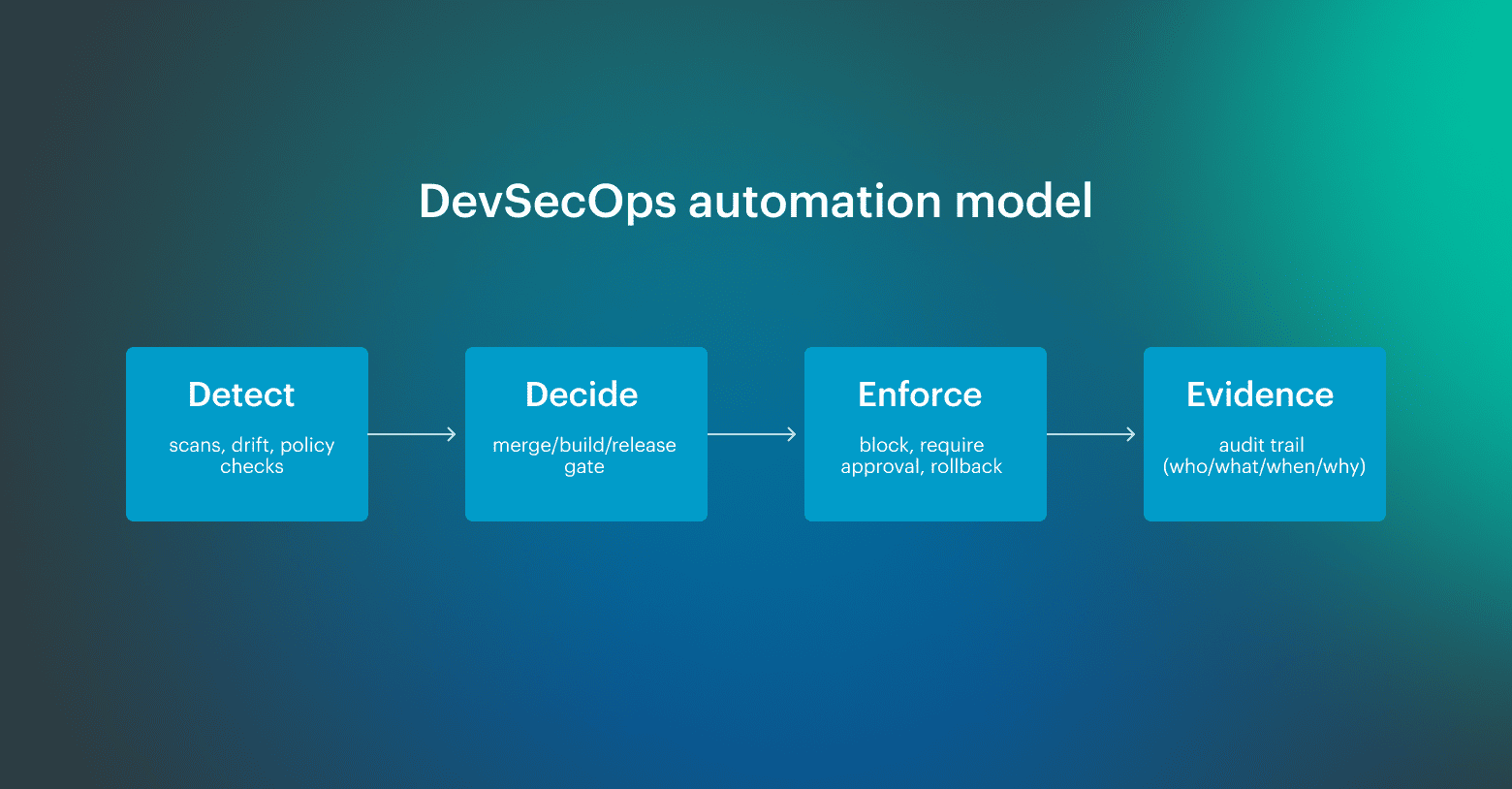 What DevSecOps automation is not is also important. It is not adding more tools, generating more alerts, or moving manual review earlier in the sprint. If automation only increases signal volume without tightening ownership, gate logic, and evidence quality, delivery gets slower, not safer.
A mature setup separates four things clearly: controls detect a condition, gates return a decision, enforcement applies it, and evidence preserves what happened, when, and why. Once that model is in place, teams can automate DevSecOps without turning every release into a negotiation.
Three bottlenecks that force DevSecOps automation
Teams try to automate DevSecOps when the pipeline turns into a waiting room.
- Review queue: a few people become the approval choke point, and releases start slipping for reasons that have nothing to do with engineering work, which is how decision latency quietly becomes your default operating mode.
- Alert fatigue: if findings are duplicated, poorly scoped, or land without an owner, they stop being signals and turn into background noise, and then everyone learns the same bad habit: treat “security passed” as a checkbox instead of a decision with consequences.
- Audit scramble: when evidence lives in screenshots, Slack threads, and exports someone ran once, every audit request becomes a mini-incident, because you are reconstructing approvals and control results from memory after the fact, instead of pulling a traceable record tied to the change.
DevSecOps automation framework you can reuse
After you have operated a few pipelines at scale, you stop looking for the “right DevSecOps toolchain” and start looking for a repeatable decision model. A DevSecOps automation framework is a reusable decision model that defines what you check, where you decide, how exceptions are handled, and how evidence stays attached to the exact change that produced it.
Treat it as a thin layer you can map onto any CI/CD stack, whether you run GitHub Actions, GitLab CI, Jenkins, or something homegrown. Use this table as the backbone:
Framework maturity, or where most teams actually are
Most teams are not starting from zero. And they are usually somewhere between partial automation and partial control.
- Level 1: ad hoc. Checks run, but outcomes are inconsistent. Findings land in dashboards or chat channels, ownership is unclear, and audits require manual reconstruction from screenshots, exports, and memory.
- Level 2: managed. Some gates exist, and some controls already block. The main weakness is that exceptions pile up, routing depends on tribal knowledge, and evidence stays trapped inside tool-specific UIs instead of linking back to the release.
- Level 3: optimized. Gate outcomes are deterministic, ownership is explicit, exceptions expire automatically, and evidence is tied to the artifact and release record. Runtime signals also feed back into policy, so the framework improves based on what actually happens in production.
Most enterprise teams operate at Level 2 in some stages and drop back to Level 1 under delivery pressure. The goal is not perfection everywhere. It is to make the riskiest stages predictable first.
The four parts of a reusable framework
1. Controls
Controls detect conditions. They find secrets, vulnerable dependencies, unsafe IaC patterns, unsigned artifacts, risky permission changes, or runtime drift. What they should not do on their own is make the final decision.
That is where many teams get stuck. They wire all findings into the same response pattern, even though a plaintext credential and a medium-severity inherited CVE are not the same class of signal. High-confidence controls should block. Lower-confidence findings should route with ownership, deadlines, and escalation.
2. Gates
A gate turns a signal into a decision. That decision should be deterministic: same input, same outcome. Block, warn with routing, or allow with evidence.
If the outcome changes depending on who is on call, which team is under deadline pressure, or how much context someone happens to have in Slack, it is not really a gate. It is a manual exception process pretending to be automation.
3. Exceptions
Exceptions are a part of the framework that silently break everything when they are not governed. Teams approve a waiver to keep a release moving, but then the waiver never expires, nobody rechecks the condition, and the pipeline learns to ignore the issue forever.
A workable exception record needs five fields: scope, TTL, approver, rationale, and a re-check trigger. Without those, waivers turn into permanent suppressions that outlive the risk decision they were meant to document.
4. Evidence
Evidence is what your framework is really producing. The test is simple: pick a production release from six months ago. Can you show which commit produced the artifact, what checks ran, what the outcomes were, who approved promotion, and which exceptions were active at the time?
If the answer requires manual reconstruction, your evidence model is still weak, even if your scanner coverage looks impressive.
Read also: 15 DevSecOps Tools - Software Features & Pricing Review
Pre-commit and PR: automate security checks
Use this as a quick map of the six CI/CD stages where automation should produce a deterministic gate outcome and durable evidence, then drill into each stage below.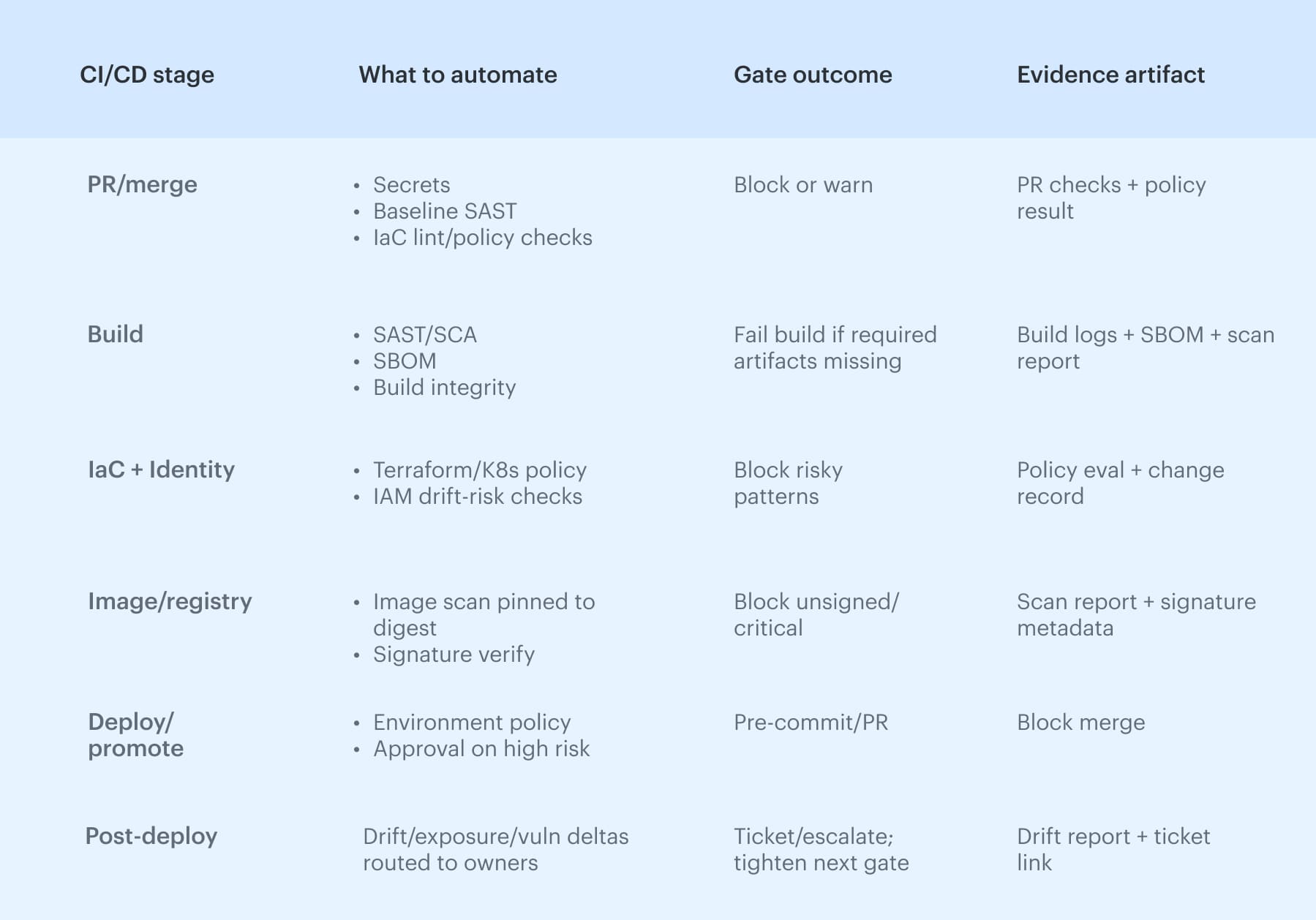 To automate security checks in the DevSecOps pipeline without turning every commit into a debate, start with pre-commit and PR. Secrets detection belongs here because it is high-signal, and lint rules can catch risky patterns before they harden into production defaults.
PR merge rules are the first real gate: they encode who can approve what, which branches can merge, and which policy checks are non-negotiable. The stage only works with routing and traceability, so the PR carries change metadata, maps to an owner, and later links to the artifact that shipped, which is why automated DevSecOps workflows scale.
Build automation: SAST/SCA, SBOM, artifact integrity
The build stage is where “security checks” either become enforceable or turn into noise, because this is the first point where you can tie results to a specific artifact version. Run SAST and SCA here, but treat the output as input to a build integrity gate: the build either produces what your downstream stages require, or it does not ship.
At minimum, a serious build should output an SBOM, capture dependency inventory, and stamp artifact versioning in a way you can trace later.
Add checksums and provenance metadata so you can answer basic questions under pressure:
- Which commit produced this image?
- Which dependencies were inside it?
- Has anything changed since it was signed and promoted?
Reproducibility matters because if you cannot rebuild the same artifact, you cannot prove what you shipped.
Read also: Inside the DevSecOps Lifecycle - Decisions, Gates, and Evidence
Cloud security and DevSecOps automation: IaC and identity as the control plane
In cloud environments, misconfigurations behave like code bugs: a bad Terraform module, an overly permissive security group, or a Kubernetes manifest that exposes a service can replicate across accounts and clusters in minutes.
That is why IaC checks belong in the same decision path as application controls, with explicit environment boundaries so “prod-like” cannot silently inherit production risk.
The control plane is identity. If role trust is widened, wildcard permissions appear, or a policy change expands access to critical resources, the risk profile shifts even when no application code moves. Gates should treat identity deltas as first-class changes and stop promotion when privilege expands outside the approved intent.
Automated vulnerability scanning: severity rules, false positives, and exception debt
Pipelines rarely fail because they cannot run vulnerability scanning; they fail because nobody agrees on what the results should do. Container scanning only holds up when it is pinned to an image digest, not whatever “latest” resolves at deploy time.
Record findings against the image digest, treat the registry as part of the trust boundary, and watch base image drift. Signature verification is the enforcement step: unsigned images or signatures that do not match the expected provenance should not be promotable.
To automate security checks in DevSecOps pipeline stages reliably, you need deterministic severity thresholds, SLAs by class, and a false-positive path that does not turn into permanent blind spots. Tie results to the artifact version, not a repo or a vague “build,” and manage waivers with a waiver TTL, scope, and approver. Track exception debt as a metric, because that backlog is usually where the next incident starts.
Read also: DevSecOps vs DevOps: What’s the Difference [Explained by a Pro]
Deploy automation: promotion gates, environment policy, and change approval
Deploy is where automation either holds the line or gets bypassed. If teams can “just rerun” a deploy with a slightly different input, you do not have a gate; you have theater.
This is also where DevSecOps automation needs a clean release record: what was promoted, to which environment, under which policy outcome, with whose approval.
A practical high-risk workflow is straightforward:
- Detect that the change affects a production service and crosses a risk threshold
- Identify the correct owner based on service scope and environment boundaries
- Require approval from the right group rather than “whoever is online”
Then record the decision, the approver, and the rationale, and link both the approval and the supporting evidence to the exact release record. If the path includes an exception, that record should also include scope, TTL, and re-check conditions.
Post-deploy signals that keep approvals honest
Post-deploy security automation is where runtime stops being a separate world and starts feeding the delivery model back with real signals. The goal is a feedback loop that turns real production signals into updated gates, ownership routing, and faster decisions the next time a similar change ships.
Signals worth wiring into the loop include:
- Deploy events (what changed, where, and when)
- Permission and trust changes (role drift, new policy edges)
- Exposure deltas (new public endpoints, widened network paths)
- Vulnerability deltas (new CVEs from base image or registry drift)
DevSecOps automation strategies: minimum viable setup
Strong DevSecOps automation strategies start with better decisions. The pipeline should stop only for the things you can defend, route ambiguous findings to the right owner, and keep evidence structured enough that teams do not have to reconstruct what happened later.
1. Hard gate only what you can defend
Use hard gates for high-confidence, low-false-positive controls: exposed secrets, unsigned artifacts, critical policy violations, and clearly disallowed permission changes. Teams bypass gates when they block on noisy findings. They respect gates when the rule is obvious and consistent.
2. Route soft gates with SLAs, not FYI alerts
Many findings are important but not reliable enough to justify stopping delivery every time. That does not mean they should disappear into dashboards. Route them to a named owner with a due date and escalation path. Soft gates work when they create managed follow-up, not passive visibility.
3. Treat exceptions as expiring objects
Waivers are necessary. Permanent waivers are failure disguised as process. Every exception should have scope, TTL, approver, rationale, and a re-check trigger. If teams cannot explain why an exception still exists, it should re-fire automatically.
4. Standardize evidence before expanding coverage
A common mistake is adding more controls before defining what evidence needs to survive. Standardize how scan results, approvals, and release decisions are recorded, and anchor them to artifact versions and release records. Without that step, more automation just creates more fragmented history.
5. Feed runtime signals back into gate logic
The best automation strategies do not end at deploy. They use runtime drift, exposure changes, and new vulnerability signals to refine future gates. That feedback loop is what turns DevSecOps automation from static policy enforcement into a system that learns from production reality.
The minimum viable setup is usually smaller than teams expect: a few defensible hard gates, a wider layer of routed soft gates, governed exceptions, and evidence that stays attached to the change. That is enough to automate DevSecOps in a way that scales without slowing everything down.
DevSecOps automation tools that match the right scanner to the right gate
The same scanner can be useful or useless depending on where it runs, what decision it feeds, and whether the output is tied to a real gate outcome.
DevSecOps automation tools should be mapped to pipeline stages, control types, and expected outcomes, not just collected into a generic stack diagram. The goal is to place the right control at the stage where it can still change the outcome cheaply and predictably.
| CI/CD stage | Control type | Tool examples | Gate outcome |
|---|---|---|---|
| Pre-commit | Secrets detection | Gitleaks, git-secrets, TruffleHog | Block or warn |
| Pre-commit / PR | Static rules, IaC linting | Semgrep, Checkov, tfsec | Warn, comment, or block |
| Build | SAST | CodeQL, Semgrep, SonarQube | Block on critical findings |
| Build | SCA / SBOM | Syft, Grype, OWASP Dependency-Check | Block or route by severity |
| Build | Artifact signing | cosign, Notary | Block unsigned artifacts |
| Registry / image | Container scanning | Trivy, Grype, Snyk | Block or require exception |
| IaC / cloud config | Policy-as-code | OPA/Rego, Checkov, tfsec | Block, warn, or approval |
| Deploy | Release enforcement | Argo CD, Spinnaker, native CI/CD gates | Promote or halt |
| Runtime | Drift / behavior monitoring | Cloudaware, Falco, Wiz | Alert, route, or feed back into policy |
The key is to keep the decision model stable even if tools change. If secrets still block at pre-commit, unsigned artifacts still fail promotion, and runtime drift still routes to the accountable owner, you can swap products without rewriting the whole operating model.
Cloudaware insight: Tool outputs become useful when they are tied to service context, ownership, and change history. Cloudaware helps connect findings and gate outcomes to the affected service and accountable team, so routing is based on real environment context rather than static paths, stale spreadsheets, or whoever notices the alert first.