


Most teams searching for Azure DevSecOps need a few practical things that are hard to piece together from docs, tooling pages, and best-practice guides.
This article is built around patterns we hear from practitioners and lessons that come up repeatedly in real Azure environments across Cloudaware client rollouts.
TL;DR
- Azure DevSecOps is a control model, not a single tool. A workable setup combines four layers: delivery, control, identity, and evidence.
- The strongest enforcement point is usually pre-deploy. That is where approvals, environment checks, Policy, Defender signals, and access validation can still stop a bad release.
- Keep the block path narrow. Block only issues that create immediate production risk or break the trust boundary. Use warn for calibration and monitor for patterns.
- Most failures come from weak operating mechanics. Gating contracts, scoped approvals, ownership, and exception lifecycle matter as much as scanners and policies.
- A narrow release path on top of a broad control plane is still weak. Broad access, long-lived credentials, and passive audit review can undermine otherwise clean pipeline controls.
What Azure DevSecOps solutions actually include
In Azure environments, Azure DevOps often serves as the delivery platform for repositories, pipelines, approvals, and release orchestration. That makes it a core part of many DevSecOps setups, but not the full solution. An Azure DevSecOps solution usually combines four layers around the same delivery path:
- Delivery layer: source control, CI/CD workflows, approvals, environments, and deployment stages
- Control layer: security checks, policy enforcement, and runtime signals
- Identity layer: secrets handling, service connections, workload identities, and access boundaries
- Evidence layer: approval history, policy results, deployment traces, exceptions, and audit records
In production, the model only works when those layers stay connected. Security checks without deployment context create noise. Approvals without scoped identities are weak. Evidence without ownership is hard to use.
The next step is mapping those layers to the Azure-native tools that perform each job.
The core Azure DevSecOps toolset
A workable Azure DevSecOps stack usually separates a few core jobs. One part moves through the delivery path. Another validates code, configuration, and runtime risk. A third controls secrets, identities, and access. A fourth preserves evidence after deployment.
This functional breakdown reflects the structure that works well across practitioner environments and makes it easier to map Azure services to specific control jobs.
CI/CD and release orchestration
Azure DevOps runs the delivery path. It covers repositories, pipelines, environments, approvals, and release conditions. And teams define branch protections, build validation, deployment stages, and the points where a release can pause or stop.
Preventive and detective security controls
Azure Policy is the main Azure-native control for configuration guardrails and required standards. It is strongest when tied to deployment scope and used as a pre-deploy or post-deploy control signal.
Microsoft Defender adds exposure and runtime security signals. It is strongest for environment risk, runtime findings, and post-deploy review, although some signals can also influence release decisions earlier in the path.
Dependency, container, and IaC scanning also fit here, but the Azure-native core is usually Policy plus Defender.
Secrets, identities, and access
- Key Vault handles secret storage and retrieval for pipelines, workloads, and supporting services. It reduces ad hoc secret handling and gives teams a single boundary for managed secret access.
- Service connections define how the delivery path reaches Azure resources. Their scope matters directly because broad service connections weaken every downstream control.
- Workload identities reduce reliance on static credentials. In durable Azure setups, federation usually ages better than secret-based CI access.
- RBAC controls what each identity can do once it reaches the target environment. It is the main boundary between scoped deployment access and broad standing privilege.
Evidence, traceability, and governance
- Logs and approval history preserve the release path: what ran, what was approved, and when.
- Policy results and scan results preserve the control outcomes tied to that release.
- Exception records and audit streams preserve the review path around deviations, overrides, and post-deploy activity.
Read also: DevSecOps Vulnerability Management. A Weekly Loop That Survives Critical Spikes
A practical Azure DevSecOps architecture for production pipelines
A practical Azure DevSecOps architecture for production pipelines varies by team, environment, and release model. The exact controls and service mix can differ, but the main control points tend to repeat.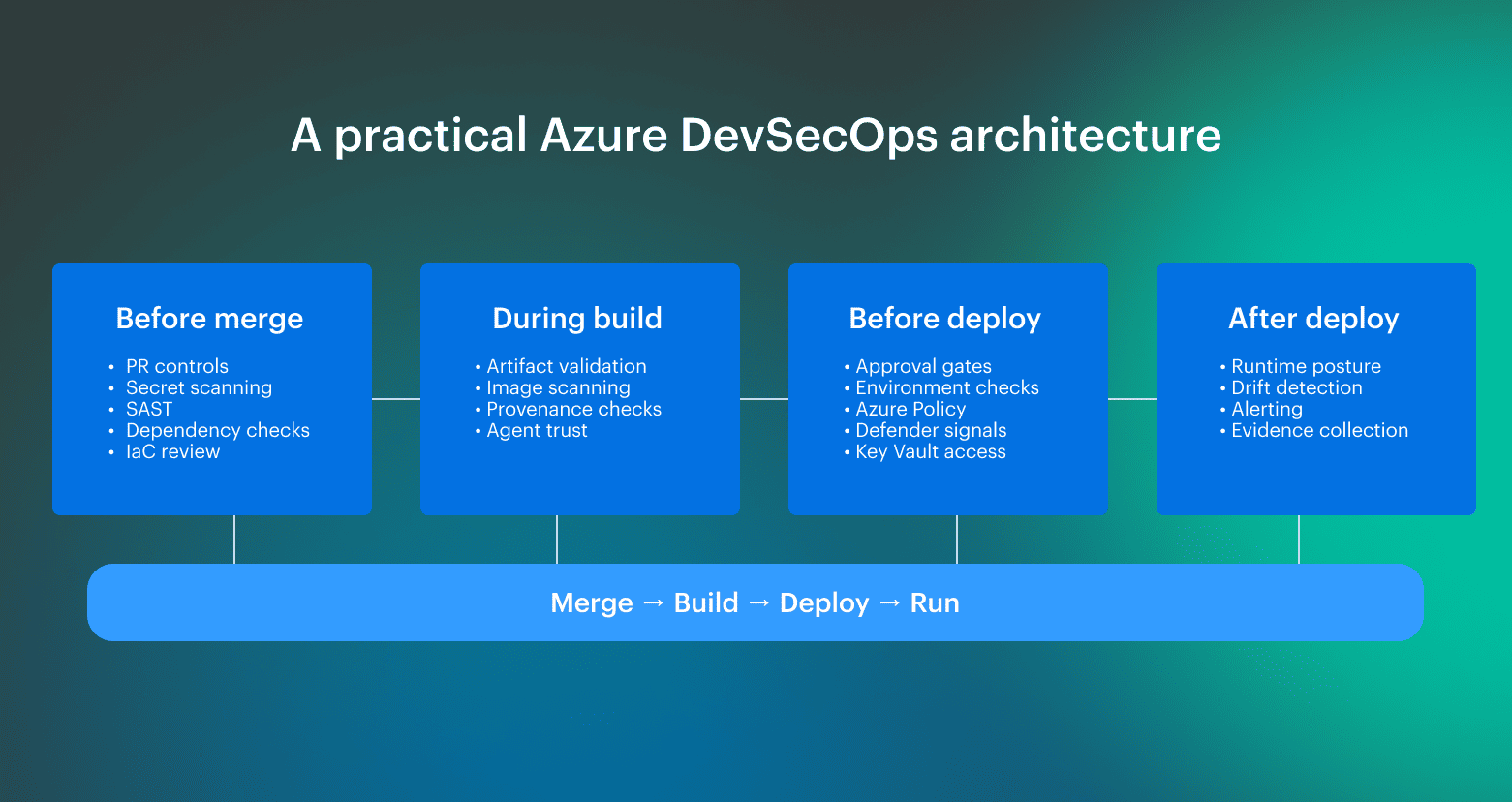 The blueprint below is based on input from Cloudaware Technical Account Managers and engineers working with Azure client environments on pipeline implementation, governance, and rollout design.
Before merge
Before the merge is where teams remove cheap-to-catch problems before they enter the main path. The main goal here is fast feedback and low noise later. If branch protections and basic security checks are still optional at this point, downstream stages inherit work that should have been filtered earlier.
During build
During the build, the focus shifts from code review to build integrity. Here teams validate whether the artifact can still be trusted. Findings that can still change promotion should surface here, not later.
Before deployment
Pre-deploy is usually the main enforcement point. This is the last stage where the release path is still controlled, which is why approvals, environment checks, and environment-specific signals matter most here. These controls only hold when they are backed by scoped access and clear deployment boundaries.
After deployment
After deployment, the model shifts from promotion control to runtime verification. Here teams validate that the environment still matches the intended state and that drift or new exposure stays connected to the release that introduced the change.
What practitioners consistently do is place controls where they can still change the outcome: before merge, before deployment, and again after release to detect drift and runtime exposure.
Read also: 8 DevSecOps Container Security Vulnerabilities and How to Fix Them
What to block, to warn, and to monitor in Azure DevSecOps
Most teams can define the obvious hard blocks. The harder problem is deciding where to stop. In Azure delivery, the block set tends to expand over time, especially when new controls, policy findings, and exception paths accumulate faster than teams can calibrate them.
This section focuses on the practical enforcement line: what belongs in hard block, what should stay in warn, and which signals are more useful as monitoring data than release gates.
Block
Reserve a block for findings that should stop promotion with minimal interpretation. In practice, these usually fall into four groups: secret exposure, production-bound misconfiguration, release integrity failures, and delivery-path trust violations.
Where teams often get this wrong
- Expanding the block set too early: controls move into hard enforcement before signal quality is stable.
- Using scanner severity as the only rule: high severity does not always mean hard block if the finding still needs heavy context.
- Blocking on noisy first-pass controls: this is common with immature policy checks, dependency findings, or early-stage scanning rollouts.
- Treating all environments the same: a block condition in production does not always belong in the same category outside production.
- Letting exceptions become a hidden override path: once block conditions are routinely bypassed, the category loses meaning.
Warn
Use warn for findings that require ownership and remediation but do not justify stopping promotion by default. This usually includes medium findings outside production, lower-environment drift, exceptions still within SLA, non-critical hygiene gaps, and controls that need more calibration before hard enforcement.
Warn is where most tuning happens. Teams use it to separate stable signals from noisy ones, tighten scope, and decide which controls are mature enough to move into the block later. In practice, most DevSecOps for Azure programs either mature or start to accumulate gate fatigue.
Where teams often get this wrong
- Leaving warn findings unowned: visibility without ownership turns warn into a reporting bucket.
- Keeping controls in warn indefinitely: some findings belong there temporarily, not permanently.
- Using warn as a dumping ground for unresolved policy decisions: this usually hides weak enforcement logic.
- Ignoring recurrence: single warning findings may be acceptable; repeated ones often are not.
- Failing to define when warn escalates: without escalation rules, the category loses operational value.
Monitor
Monitor-level findings are weak as single-event gates but useful in recurrence, concentration, or aging. This usually includes low-risk recurring findings, informational items, weak drift indicators in isolation, and repeated hygiene patterns across the same team, service, or environment.
This category should stay outside the promotion path. Its value is trend visibility, concentration, and review over time. In a mature DevSecOps Azure model, monitor-level signals are useful when they show accumulation, ownership gaps, or recurring control failures, not when they are treated as one-off release blockers.
Where teams often get this wrong:
- Pushing monitor signals into the release path: this adds friction without improving control quality.
- Reviewing monitor findings one by one: the value is usually in recurrence or concentration, not the single event.
- Treating informational output as a control decision: monitor data is often useful for review, not for gating.
- Missing aging and clustering patterns: weak signals become meaningful when they persist or group around the same service or team.
- Letting monitor become invisible: if nobody reviews the trends, the category becomes dead weight.
How to keep Azure DevSecOps enforceable under delivery pressure
Release pressure usually exposes the same weak points: inconsistent gate logic, weak approval paths, and unmanaged exceptions.
The practices below are based on recurring failure points seen by Cloudaware Technical Account Managers in Azure client environments and show what tends to keep the model stable as delivery speed goes up.
1. Use a gating contract, not ad hoc pipeline logic
The same class of findings should produce the same decision across teams and environments. In practice, that means defining five things up front: the signal, the decision, the owner, the expiry path, and the evidence left behind.
This is what keeps the model consistent when pipelines start to diverge. Without it, one team blocks, another warns, and a third creates an exception outside the control path.
What to standardize
- Signal: what enters the decision path
- Decision: block, warn, or monitor
- Owner: who is responsible for action
- Expiry: how long a deviation can remain open
- Evidence: what proves the control ran and the decision was taken
2. Make approvals enforceable with platform controls
Approvals only work when the surrounding path is hard to misuse. The approval step should sit behind RBAC, environment checks, protected branches, and scoped identities. That is what turns an approval from a procedural step into a real control boundary.
What to put behind approvals
- RBAC: the identity can only perform the actions the path requires
- Environment checks: the target environment enforces its own boundary
- Protected branches: promotion starts from a controlled source path
- Scoped identities: read and apply paths do not share the same trust boundary
Read also: DevSecOps Maturity Model. A Practical Scorecard You Can Measure, Store, and Improve
3. Don’t let exceptions become a silent policy removal
Exceptions should be part of the control model, not a way around it. Each one needs an owner, a business reason, an expiry date, and a review cadence. Without those fields, the exception path starts to outlive the original risk decision.
Teams usually keep exception handling workable when review is tied to an existing engineering cadence, not a separate process that nobody wants to own.
What every exception needs
- Owner: who is accountable for closure or renewal
- Reason: why the exception exists
- Expiry: when it stops being valid by default
- Review cadence: when it is checked again
Security controls that matter
Most teams already know the control catalog. The harder question is which controls are worth putting into the release path, which ones are stronger as runtime signals, and which ones mainly add output.
Microsoft’s own Azure DevOps security guidance points in the same direction:
- Automate security scanning
- Scope permissions and service connections tightly
- Replace long-lived service-account patterns with Entra-based alternatives
- Keep audit streams enabled for review and response
Read also: Implementing Zero Trust in DevSecOps Workflow
Code, dependency, and secret checks
This layer is strongest when it removes low-ambiguity issues early. Secret detection usually has the shortest path from signal to decision. Dependency and code findings are more sensitive to context, especially if the same pipeline handles both production-bound and lower-environment changes.
| Control type | Best use in the model | Typical decision weight |
|---|---|---|
| Secret scanning | Early hard stop | High |
| Dependency scanning | Gate or warn, depending on path and exploitability context | Medium to high |
| SAST | Gate for narrow classes of findings; otherwise, warn | Medium |
Read also: GCP DevSecOps. Pipeline, Tools, and Delivery Model
IaC, policy, and configuration controls
This layer validates the declared environment before deployment and the allowed environment before promotion. In Azure, this is usually where the most useful pre-deploy control weight sits. IaC checks and Azure Policy signals tend to be closer to the final resource shape than generic code scanning.
| Control type | Best use in the model | Typical decision weight |
|---|---|---|
| IaC security checks | Pre-deploy gate for production-bound changes | High |
| Azure Policy evaluation | Pre-deploy gate or post-deploy review depending on signal timing | High |
| Configuration validation | Gate when tied to mandatory environment rules | High |
Read also: AppSec vs DevSecOps. Key Differences and How They Work Together
Artifact, container, and runtime signals
This layer answers two different questions: “Can the build output still be trusted?” and “Does the live environment still stay inside the intended boundary?”
| Control type | Best use in the model | Typical decision weight |
|---|---|---|
| Artifact provenance and integrity | Pre-deploy gate | High |
| Container image validation | Gate for production-bound artifacts, otherwise warn | Medium to high |
| Defender and runtime findings | Post-deploy review, selective gate input | Medium |
| Activity data and audit streams | Drift review and evidence path | Medium |
Read also: AWS DevSecOps Reference Architecture and Pipeline Example
3 reasons to secure the delivery platform itself
Most teams know the principle. The part that gets underestimated is treating it as a separate design layer. A narrow release path on top of a broad control plane is still a weak model. In Azure, users, permission inheritance, service connections, long-lived credentials, and audit visibility all shape the trust boundary around the pipeline.
The best way is to treat these as first-class controls through least privilege, scoped service connections, service account reduction, and regular audit review.
Reason 1: broad access weakens every downstream control
A strict pipeline does not offset broad access behind it. If the platform still carries wide project permissions, inherited access, persistent elevated rights, or service connections scoped too broadly, downstream controls lose force.
Use small groups, least privilege, just-in-time elevation, and service connections scoped to the resources they actually need.
What breaks when this layer stays broad:
- Approvals lose value: the approval step exists, but the identity behind it can still do too much.
- Environment boundaries weaken: dev, test, and prod look separate in the pipeline, but the same broad access path reaches all of them.
- Inherited permissions re-expand access silently: the intended boundary looks narrow, but group inheritance widens it again.
- Guest and stale user access stays inside the platform scope: repository rules look clean, but unnecessary users still sit behind the control plane.
Read also: DevSecOps Compliance. How to Achieve Audit-Ready Security
Reason 2: long-lived credentials create a weaker trust model
PATs, static service account secrets, and other long-lived credentials create a second trust model outside the release path. That model is harder to review, harder to rotate cleanly, and easier to keep alive long after the original use case has changed.
Replacing PAT-based service account patterns with Microsoft Entra tokens, service principals, managed identities, and workload identity federation where possible.
What breaks when this layer stays secret-based:
- Credential lifecycle becomes separate operational debt: rotation, reuse, and revocation sit outside the delivery model.
- Old automation paths persist too long: the credential remains valid after the process around it has changed.
- Two trust models emerge: one scoped and modern inside the pipeline, and one older and weaker around it.
- Secret handling becomes inconsistent across teams: one path uses federation, another still depends on static credentials.
Read also: DevSecOps vs SRE. What's Different and How to Run Both?
Reason 3: audit data is ineffective if it stays passive
Audit logs and streams only help when they are used as live review signals. If permission changes, admin activity, service connection usage, and off-path actions are logged but not reviewed, the platform stays weakly reviewed even when the data exists.
Enabling auditing, reviewing audit logs and streams regularly, and using them to look for unexpected usage patterns, especially around administrators and privileged users.
What breaks when this layer stays passive:
- Privilege drift stays invisible: access changes are recorded, but not acted on.
- Off-path actions surface late: unexpected admin activity or service account use gets reconstructed after the fact.
- Audit turns into storage only: evidence exists, but it does not improve control quality.
- Security review stays detached from platform activity: logs are retained, but they do not influence how the control plane is managed.
Read also: My Kubernetes DevSecOps Implementation Playbook
How Cloudaware helps operationalize Azure DevSecOps
Cloudaware becomes useful when the controls already exist, but the operating context around them does not stay consistent.
Findings, approvals, drift, and audit evidence start to spread across too many systems. Cloudaware is built for that layer: it adds CMDB-based context, approval routing, drift checks, and auditability to the same operating flow.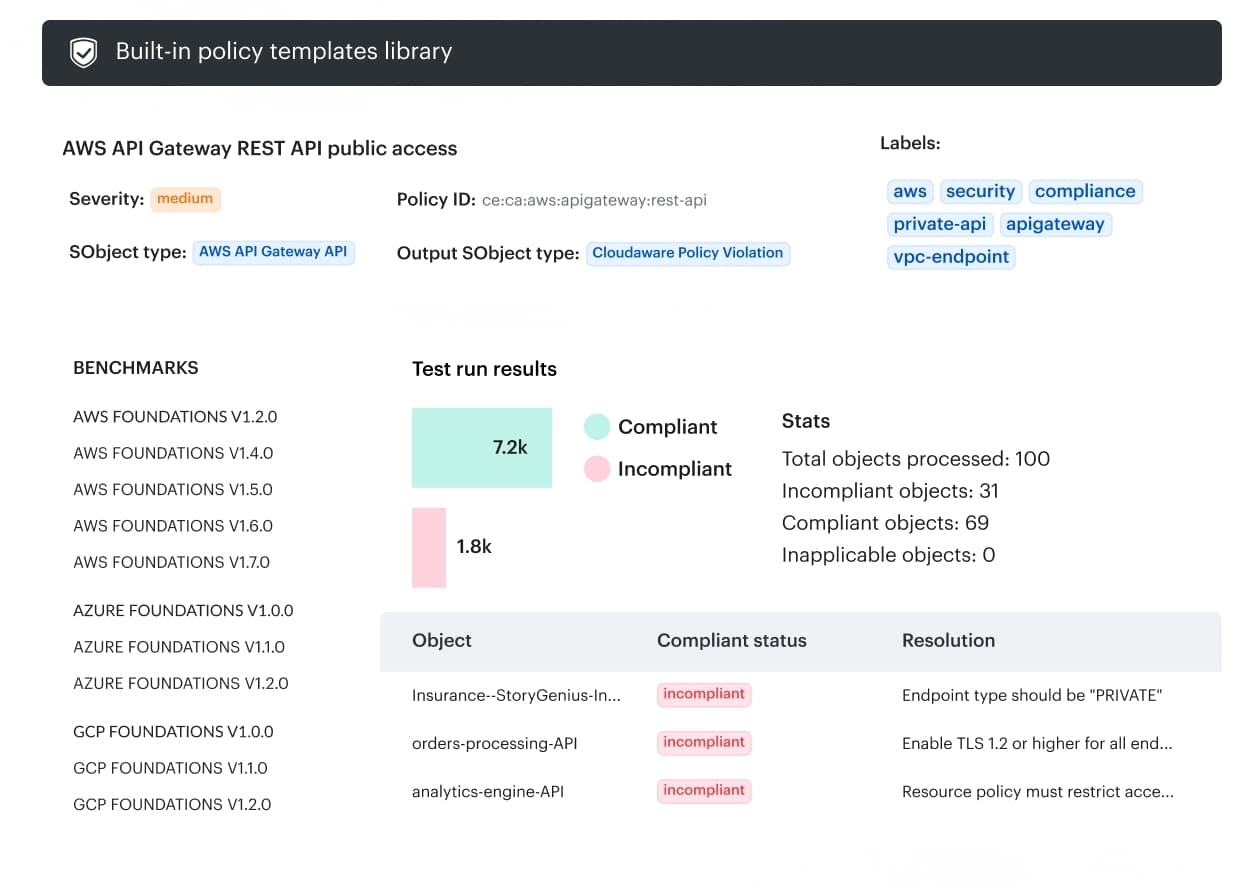
- CMDB-based context: helps tie findings and changes back to assets, environments, and change scope.
- Approval routing by scope: approvals can follow account, group, or environment instead of one generic workflow.
- Drift detection against baselines: live configurations are compared to baselines to catch unexpected Azure changes earlier.
- Auditability in the delivery flow: approvals, drift, and change tracking stay tied to the same evidence path.
- Integration with existing workflows: teams can add these controls without replacing their current CI/CD and ops systems.