


When you run Kubernetes across multiple accounts and clusters, workload security rarely fails in one obvious place. It fails when a “temporary” exception becomes the default, a registry tag drifts from what CI produced, a build runner gets more access than production, or a privileged workload ships because nobody wants to block the release.
If you keep seeing the same findings return, spend more time arguing about scan noise than fixing issues, or cannot prove what actually ran in production, this guide is for you.
DevSecOps container security is the practice of securing containers across the full delivery path: Dockerfile, build runner, image, registry, Kubernetes admission, runtime, and drift evidence. The goal is to ensure that trusted images are built, verified artifacts are promoted, risky workloads are blocked, and production changes remain traceable.
This piece is written by Cloudaware experts Valentin Kel, Software Developer, and Igor K., DevOps Engineer. They operate container platforms in a multi-account environment and work across the release path from build through runtime.
Key inisghts
- DevSecOps container security must cover the full delivery path: Dockerfile, CI runner, image, registry, Kubernetes admission, runtime, and change evidence. Image scanning alone does not prove who built an artifact, whether it changed after scanning, or whether production still matches the approved state.
- The strongest control model connects one artifact identity across build, promotion, deployment, and runtime. Teams should be able to trace source revision, CI job, image digest, scan result, signature or attestation, admission decision, deployed workload, and later drift.
- Docker security starts before Kubernetes. Trusted base images, multi-stage builds, controlled build context, secret-safe builds, non-root execution, regular rebuilds, and restricted CI publishing identities reduce risk before an image reaches admission.
- Kubernetes admission should block a narrow set of high-confidence production risks. Typical blockers include unsigned images, unapproved registry paths, privileged containers, Docker socket mounts, dangerous service-account permissions, expired exceptions, and exploitable critical vulnerabilities without approval.
- Runtime security is not only about detecting malicious behavior. Teams also need to detect untracked divergence between approved and running state, preserve who changed what and when, and connect drift to the affected workload, environment, release, and owner.
DevSecOps for containers: where Docker, Kubernetes, and CI/CD controls fit
DevSecOps container security works when every handoff in the delivery path leaves a decision and an evidence trail.
A Dockerfile becomes an image. CI builds and tests it. The registry stores and promotes the artifact. Kubernetes admission decides whether the workload can run. Runtime controls show whether production stayed aligned with what was approved.
A clean vulnerability scan is only one part of that chain. It does not prove who built the image, whether someone replaced a mutable tag, whether the CI runner had excessive permissions, or whether the workload drifted after deployment.
The practical control model looks like this:
| Stage | What can go wrong | Control that helps | Evidence to keep |
|---|---|---|---|
| Dockerfile | Bloated base image, root user, unnecessary packages, or embedded secrets | Trusted minimal base images, multi-stage builds, non-root execution, and secret-safe build practices | Dockerfile policy result, build ID, image digest |
| CI runner | Broad cloud or registry permissions, long-lived credentials, or shared identities | Isolated runners, short-lived credentials, and CI-only publish identities | Job ID, actor, permission scope, credential lifetime |
| Registry | Mutable tags or manual pushes replace trusted artifacts | Digest-based promotion, signed images, and restricted push permissions | Digest, signature, attestation, publisher identity |
| Kubernetes admission | Risky workloads reach production because controls are missing or too broad | Environment-scoped policies with a narrow production blocker class | Allow or block decision, policy ID, exception owner, expiry |
| Runtime | Running state diverges from the approved deployment state | Drift detection tied to workload, namespace, environment, and owner | Changed field, actor, timestamp, runtime diff |
| Remediation | Findings remain open because ownership is unclear | Routing by service, environment, owner, and business context | Ticket, owner, SLA, exception status |
That is the difference between scanning containers and running DevSecOps for containers.
A scanner can identify a critical CVE in an image. The operational question is whether that image is running in production, which service depends on it, who owns the workload, whether an exception exists, and which release introduced the affected artifact.
The rest of this guide follows those control points through the failures that repeatedly reach production.
Container security in 2026: why the same failures keep repeating
Container security incidents keep repeating because most teams already have scanners, policies, and runtime alerts, but the controls do not stay connected across the delivery path.
The failure usually happens at a handoff. A build passes scanning, but someone later replaces the tag. An admission policy exists, but production exceptions have no expiry. A runtime alert fires, but nobody can map the workload to an owner or the release that introduced the change.
That is why adding another scanner rarely fixes the underlying problem.
The recurring pattern is a break between what was approved, what was deployed, and what is running now. In multi-account and multi-cluster environments, that gap becomes harder to trace because the same image, service, or identity may appear across different registries, namespaces, accounts, and environments.
Three failure patterns show up repeatedly:
- Drift: the running workload no longer matches the state approved by CI, GitOps, or admission policy.
- Privilege: the workload, service account, runner, or registry identity can do more than its role requires.
- Secret exposure: credentials escape the secret-management boundary through Dockerfiles, build arguments, image layers, logs, caches, or environment variables.
These are not separate tooling problems. Each one points to a missing control at a specific stage of the container delivery path.
The practical question is not only, “Did the scanner find something?” It is, “Where should this issue have been prevented, who owns the affected workload, and what evidence proves the control worked?”
Threat model for container workloads: where controls need to sit
A useful container threat model separates risk by control boundary. NIST SP 800-190 groups container security concerns around images, registries, orchestrators, containers, and the host operating system.
For DevSecOps teams, those layers translate into practical control points across build, promotion, deployment, and runtime.
The main boundaries to assess are:
- Image and build path: untrusted base images, vulnerable dependencies, embedded secrets, and artifacts that cannot be traced back to an approved build.
- Registry and promotion path: mutable tags, manual pushes, broad publish permissions, and cross-environment access that allows unapproved artifacts to reach production.
- Orchestration layer: weak admission controls, excessive RBAC, over-permissioned service accounts, privileged workloads, and unsafe namespace boundaries.
- Runtime state: manual changes, configuration drift, weak workload defaults, and production state that no longer matches the approved deployment.
- Host and daemon boundary: Docker daemon access,
docker.sockmounts, excessive Linux capabilities, and other paths that allow a container or build process to gain host-level control.
Use the threat model to decide where prevention belongs. An image provenance problem should be stopped before or during promotion. Excessive workload privilege should be rejected at admission. Runtime drift should be detected against the approved desired state.
The control should sit as close as possible to the point where the risk becomes enforceable.
Pattern: if ownership is unclear, fixes never land
A finding without an owner becomes backlog noise.
Ownership should follow the workload and the environment in which it runs, not only the scanner finding. The same image may exist in several registries or clusters, but its urgency changes depending on whether it is running in development, supporting an internal service, or exposed in a production workload.
Route remediation using context such as service, namespace, environment, cloud account, and accountable team. That turns a generic container finding into work that can be assigned, prioritized, and closed.
10 container security vulnerabilities and what prevents them
The container security vulnerabilities below are recurring production failure modes, not isolated scanner findings. Each one maps to a control point where the risk can be prevented, blocked, or traced before it spreads across environments.
The pattern matters. If the same issue keeps returning, the problem is usually not that the team failed to find it. The problem is that the control sits too late, is easy to bypass, or produces evidence without ownership.
High-impact misconfigurations attackers still exploit
Some misconfigurations deserve a narrow production blocker because they materially increase the blast radius or bypass expected isolation boundaries:
- privileged containers or unnecessary Linux capabilities
docker.sockmounts or Docker daemon access- root-by-default execution
- promotion by mutable tag instead of immutable digest
These controls should stay small and explicit. Blocking every medium-severity issue at admission creates exception sprawl. Blocking the few configurations that can quickly turn workload compromise into broader platform access gives teams a defensible production baseline.
Vulnerability 1: untrusted images and unknown provenance
An image scan tells you what is inside an artifact. It does not prove who built it, whether it passed the approved pipeline, or whether someone replaced it before deployment.
This becomes a production risk when teams promote mutable tags, allow manual pushes, or let multiple identities publish into the same registry path. In those cases, a clean scan can still be attached to the wrong artifact.
Build images from a small, vetted base-image set. Sign CI output, promote artifacts by digest, and keep the artifact identity connected to the release record. Production should resolve to the exact immutable artifact that passed the approved build and security checks.
Container image policy: define what production is allowed to run
A container image policy should define the conditions an artifact must meet before it can run in production.
“Verified image” needs to be measurable. The policy should be able to answer:
- which pipeline built the image
- which source revision produced it
- which checks ran
- which digest was approved
- who or what identity published it
- whether the required signature or attestation is present
Signing and provenance attestations make those conditions enforceable at admission instead of leaving them buried in pipeline logs.
The result should be a stored release decision that can later be connected to the artifact that actually ran.
Fix: admission rules that block only production-breaking risk
Admission controls should be environment-specific. Production can enforce strict artifact requirements while development and staging use audit or warning modes until policies are stable.
Keep the production blocker class narrow. For image trust, that can include:
- unsigned or unverifiable images
- mutable tags where digest-based deployment is required
- images from unapproved registry paths
- artifacts without required provenance evidence
Image security is only one part of the cluster boundary. Our guide to Kubernetes workload security across cloud environments connects image provenance with admission, identity, network, and runtime controls.
Vulnerability 2: known vulnerabilities shipped because scanning is noisy
Teams do not usually ship known vulnerabilities because scanning is absent. They ship them because scan output is too noisy to support a consistent release decision.
A severity score alone does not tell you whether the vulnerable package is reachable, whether the image is running in production, whether the workload is internet-facing, or whether an approved exception already exists. When every critical finding becomes an automatic blocker, teams accumulate exceptions. When the gate becomes too noisy, they bypass it.
Container vulnerability scanning should happen early enough to prevent rework and late enough to evaluate the artifact that will actually be promoted.
A practical sequence is:
- Scan dependencies and build inputs before or during the build
- Scan the completed image before registry publication
- Recheck the artifact before production promotion when policy or freshness requirements require it
- Continue monitoring deployed images for newly disclosed vulnerabilities after release
The scan result should follow the artifact through the delivery path so the same finding is not repeatedly rediscovered and re-triaged at every stage.
Fix: use risk-based thresholds that produce a release decision
Set blocking thresholds by environment and operational risk.
Development can collect findings and expose trends without blocking every build. Staging can enforce a smaller set of controls. Production should block a narrow class of issues where the risk justifies stopping promotion, such as a known exploitable critical vulnerability on a production workload without an approved exception.
The decision should result in one of four outcomes:
- Fix before promotion
- Approve a time-bound exception
- Defer with an owner and due date
- Block the release
Deduplicate repeated findings into one remediation item and keep exception scope narrow. Every exception should include an owner, affected artifact or workload, reason, and expiry date.
Fix: rebuild base images and dependencies on a defined cadence
Scanning only finds the problem. The remediation process has to move the fix into a new artifact.
Set a regular rebuild cadence for base images and dependency layers, then add event-driven rebuild triggers for high-impact vulnerabilities or urgent upstream fixes. Track whether rebuilt artifacts actually move through promotion and reach running workloads.
If the same vulnerable base layer appears sprint after sprint, the problem is no longer detection. The rebuild and promotion path is broken.
Vulnerability 3: privileged containers and dangerous Linux capabilities
Containers become dangerous when workload manifests allow more host access than the application requires.
The common failure modes are privileged execution, root users, unnecessary Linux capabilities, writable root filesystems, and host namespace access. These settings increase the impact of a compromised workload and weaken the isolation assumptions platform teams rely on.
Containers share the host kernel. Root inside a container is not automatically equivalent to root on the host, but excessive capabilities, privileged mode, unsafe mounts, or kernel-level weaknesses can turn workload compromise into a broader node-level risk.
The safest approach is to make restrictive settings the default and require teams to justify deviations.
Fix: enforce a hardened runtime baseline with time-bound exceptions
Set a default workload baseline that includes:
- Non-root execution where the workload supports it
- Removal of unnecessary Linux capabilities
- Read-only root filesystems where practical
- No privileged mode by default
- Restricted host namespace and host path access
Enforce these requirements through admission controls rather than relying on individual teams to remember them in every manifest.
Kubernetes Pod Security Standards provide a useful policy model through three levels: Privileged, Baseline, and Restricted. For production workloads, teams can use those levels as a starting point and then add environment-specific controls where the platform requires stricter rules.
Exceptions should remain narrow. Require an owner, workload scope, reason, and expiry date, then revalidate the exception before future promotion. The goal is to prevent high-risk privileges from becoming an invisible default across clusters.
Vulnerability 4: exposed Docker daemon or docker.sock access
The Docker daemon controls containers, images, mounts, and other host-level operations. A workload or build process that can access docker.sock or an exposed daemon API may be able to create privileged containers, mount host paths, inspect sensitive artifacts, or otherwise cross the intended container boundary.
This risk is common in CI and build environments, where mounting the Docker socket is often used as a shortcut to build or manage images.
Treat daemon access as a privileged infrastructure capability, not a normal application dependency. A compromised runner with broad daemon access can inherit the permissions available to that daemon and use the build path as an escalation route.
Fix: block socket mounts in production and isolate the build path
Block docker.sock mounts and unnecessary daemon API access in production through admission policy.
For build workloads, prefer isolated build environments that do not give general-purpose runners direct control over the host daemon. Separate build identities and infrastructure from production workloads so that compromise of one runner does not create a direct path to broader platform access.
Where daemon access is unavoidable for a legacy build process:
- Run it on dedicated infrastructure
- Limit which identities can access it
- Restrict network exposure
- Keep the access scope narrow
- Review and remove the exception on a defined schedule
The important boundary is simple: application workloads should not gain host-equivalent control because a build convenience became part of the production runtime.
Vulnerability 5: CI/CD identity and build runners as a production backdoor
CI/CD identities often sit on a direct path to production. A compromised runner does not need to attack the cluster first if it can publish an artifact that downstream systems already trust.
The common failure pattern is excessive pipeline authority: runners with broad cloud permissions, long-lived credentials, shared registry tokens, or the ability to publish outside an approved repository path.
The attack path can be: runner compromise → credential theft → unauthorized artifact publication → trusted promotion → production deployment
That is why the build environment should be treated as part of the production security boundary.
A pipeline should not become trusted simply because it is called CI. Trust should come from a controlled build path, narrowly scoped identity, immutable artifact identity, and a downstream verification decision.
Fix: isolate build infrastructure and restrict publishing identities
Separate build execution from artifact publishing authority.
Use isolated runners where the workload requires stronger trust boundaries, short-lived credentials, and identities scoped to the exact registry paths and actions they need. Avoid shared credentials across pipelines or environments.
For production artifact paths:
- allow publishing only from approved CI identities
- restrict manual pushes
- scope permissions by repository and environment
- rotate or expire credentials automatically
- record which job and identity published each artifact
- verify the artifact again before production promotion
The build system should produce evidence that downstream controls can verify: build ID, source revision, artifact digest, publishing identity, and required signature or attestation.
This prevents a compromised runner from turning its existing access into invisible production trust.
Vulnerability 6: secrets leakage in builds, layers, logs, and environment variables
Secrets often leak through the delivery process rather than the application itself.
Common exposure paths include Dockerfile literals, build arguments, environment variables, pipeline logs, image layers, artifact caches, temporary files, and repository history. Once a credential enters an image or build artifact, removing it from the latest Dockerfile does not necessarily remove it from older layers, registries, caches, or downstream copies.
The same applies to CI logs. A token printed once may remain accessible to anyone with log access long after the job finishes.
Treat build logs, image layers, caches, and generated artifacts as untrusted surfaces. The build process should prove that secrets were not embedded into the artifact that will be promoted.
Fix: separate secret delivery from the artifact lifecycle
Do not store secrets in Dockerfiles, image layers, build arguments, committed configuration, or persistent CI variables where short-lived credentials are available.
Use separate controls for build and runtime access:
- Inject build-time secrets through mechanisms that do not persist them in the final image
- Use short-lived credentials for CI jobs and registry access
- Mask sensitive output and prevent secret values from being written to logs
- Scan repositories and build artifacts for exposed credential patterns
- Retrieve runtime secrets from an approved secret-management system rather than baking them into images
- Scope credentials to the workload, environment, and action that requires them
For incident response and audit, keep evidence of which identity requested a secret, which workload or job used it, when the credential expired, and which release or environment was affected.
The goal is to keep credentials outside the artifact supply chain and make their use traceable when a release or workload is investigated.
Vulnerability 7: weak cluster RBAC and over-permissioned service accounts
Kubernetes access risk often starts with defaults that are broader than the workload requires.
Shared service accounts, wildcard permissions, cluster-wide roles, and cross-namespace access can turn one compromised workload into a larger control-plane problem. The risk increases when Kubernetes identities connect to cloud IAM roles or other external permissions, because excessive access may extend beyond the cluster itself.
The question is not only whether a pod can call the Kubernetes API. It is what that identity can read, change, create, or impersonate across namespaces, secrets, workloads, and connected cloud services.
Treat RBAC and service-account changes as part of the release path. A workload should enter an environment with an identity and permission scope that match its actual function.
Fix: scope permissions to the workload, environment, and namespace
Assign permissions to the workload that needs them, not broadly to the team or namespace by default.
Use dedicated service accounts for distinct services and avoid wildcard verbs, resources, and cluster-wide roles unless the workload genuinely requires them.
Admission and policy checks can flag or block high-risk patterns such as:
- Requests for
cluster-admin - Wildcard verbs or resources
- Cross-namespace secret access
- Default service-account use in production
- Unnecessary token mounting
- Bindings that grant cluster-wide scope to a namespace-level workload
Where Kubernetes workload identities connect to AWS IAM roles, Azure managed identities, or Google Cloud service accounts, review both sides of the permission path. A narrowly scoped Kubernetes role does not help if the linked cloud identity still has broad access.
Route violations to the workload owner with the affected namespace, service account, environment, and permission path attached. That makes least-privilege remediation specific enough to act on instead of becoming another generic IAM finding.
Vulnerability 8: registry and environment access drift across cloud accounts
A container registry is both an artifact store and a trust boundary. In multi-account environments, that boundary weakens when push, pull, and promotion permissions drift between development, staging, and production.
The common failure modes are broad inherited roles, temporary cross-account permissions that never expire, and identities that can publish or pull from paths outside their intended environment.
That creates a promotion problem. Production may be able to consume artifacts that never passed the approved release path.
Mutable tags create a second risk. A deployment manifest can remain unchanged while the image behind the tag points to different bytes. The same deployment reference may resolve to different digests across environments or over time.
For production, artifact access and artifact identity should both be explicit.
Fix: separate publishing, promotion, and runtime pull permissions
Scope registry permissions by environment and action. A practical model is:
- Build identities can publish only to approved build or staging paths
- Promotion identities move or approve artifacts through the release path
- Production deployment identities can pull only from approved repositories
- Human users do not publish directly to production artifact paths
- Production deployments use immutable digests where the release model requires exact artifact identity
- Cross-account permissions have explicit scope, owner, and expiry
This keeps artifact movement predictable without forcing development environments to use the same restrictions as production.
For example, a production deployment identity may be allowed to pull only approved digests from a defined repository path, while tag-based references and unauthorized cross-environment pulls are rejected.
The evidence trail should preserve the artifact digest, source repository, publishing identity, destination environment, and promotion decision.
Vulnerability 9: mutable runtime configuration and untracked drift
A trusted image does not guarantee a trusted runtime state.
Manual kubectl changes, emergency patches, direct configuration edits, and other out-of-band updates can move production away from the state approved through CI, GitOps, or admission policy. The issue is not that every runtime change is malicious. The issue is that the change may bypass the normal approval path and leave no reliable record of why production now differs from the desired state.
That creates the “unknown change” problem: the workload is behaving differently, but the team cannot quickly prove which field changed, who changed it, whether the change was intentional, or which release should be considered the last known good state.
Fix: detect drift against an approved desired state
Anchor production workloads to an approved desired state and continuously compare that state with what is actually running.
For each detected difference, preserve:
- Workload and namespace affected
- Changed field or configuration value
- Previous and current state
- Actor or identity behind the change where available
- Timestamp
- Environment and cloud account
- Related release, ticket, or approved exception
Emergency changes should still be possible, but they should become explicit, reviewable events. After the incident is contained, the change should either be reconciled back into the approved configuration or reverted.
Once runtime drift is connected to workload, owner, release, and change evidence, incident response becomes a traceable sequence instead of a comparison exercise across cluster state, CI logs, and tickets.
Vulnerability 10: inconsistent runtime defaults across teams and clusters
Container security weakens when every team defines its own runtime baseline.
One service runs as non-root, another relies on privileged mode, a third mounts host paths, and a fourth carries an exception copied from an older cluster. Over time, the platform stops having one enforceable definition of an acceptable production workload.
Without a shared baseline, security teams cannot distinguish an intentional deviation from configuration drift. Platform teams cannot roll out controls consistently across clusters. Exceptions also become difficult to review because nobody knows which rule was supposed to apply in the first place.
Fix: enforce one production baseline and control deviations
Define a default runtime profile that applies to production workloads across clusters and environments.
The baseline should cover controls such as:
- User and group execution requirements
- Linux capability limits
- Privileged mode
- Host namespace access
- Host path mounts
- Read-only filesystem requirements where practical
- Seccomp or equivalent runtime profiles where supported
- Service-account and token defaults
Apply the baseline through admission policy so teams receive the same decision regardless of which production cluster receives the workload.
Where a workload cannot meet the default, treat the deviation as an explicit exception. Review exceptions before they are carried into another release or environment.
Docker DevSecOps: secure the build before Kubernetes ever sees the image
Docker DevSecOps starts with the build path. By the time an image reaches Kubernetes admission, several security decisions have already been made: which base image was trusted, what entered the build context, which packages were added, which identity built the artifact, and whether sensitive data persisted in a layer.
Use trusted and minimal base images
Start from a small, approved set of base images rather than allowing every team to choose arbitrary public images.
A smaller production image usually means fewer packages, fewer transitive dependencies, and less unnecessary software to patch. Keep development and build tooling out of the final runtime stage where possible.
Control what enters the build context
The Docker build context can expose more than the application requires.
Use .dockerignore to exclude files that should never reach the builder, such as local credentials, development artifacts, temporary files, test output, and repository metadata that the build does not need.
Do not rely on later deletion inside the Dockerfile as the primary control. Sensitive data copied into an earlier layer may remain recoverable from image history or cached layers.
Keep builds reproducible and base images current
A build that succeeded six months ago does not prove that the same dependency and base-image state is still acceptable today.
Rebuild images on a defined cadence and when high-impact upstream fixes require it. Where reproducibility matters, pin dependencies and image references at the level appropriate for the release process, then update those references through a controlled rebuild workflow.
The point is to balance two needs:
- Production should run a known artifact
- Base-layer and dependency fixes still need a reliable path into new releases
A pinned image that is never rebuilt is stable but stale. A mutable reference that changes silently is current but untraceable. The build process needs controlled updates, not either extreme.
Run the final container with only the privileges it needs
Docker hardening should start in the image and continue at runtime. Where the application supports it, define a non-root user in the production image and remove packages, shells, debugging tools, and permissions that the workload does not need.
The Dockerfile is not the only enforcement point. Kubernetes admission and runtime policy should still verify that the deployed workload follows the expected baseline.
Keep publishing authority inside the controlled CI path
Developers need to build and test images. That does not mean every local identity should be able to publish artifacts into production registry paths.
Use CI-specific publishing identities with narrow repository and environment scope. Keep human pushes out of production artifact paths and preserve the build ID, source revision, image digest, and publisher identity as part of the release record.
A secure Docker DevSecOps path should answer four questions before promotion:
- What source produced this image?
- Which controlled build created it?
- What exact digest passed the required checks?
- Which identity published the artifact?
Kubernetes admission should verify the result of that process, not compensate for a Docker build path that was never controlled.
Kubernetes admission controls: what to warn on and what to block
Kubernetes admission should enforce a small set of production-critical controls without turning every finding into a deployment failure.
Development and staging environments can start with audit or warning modes while teams validate signal quality. Production should block the conditions that break artifact trust, workload isolation, or ownership accountability.
| Control | Dev and stage mode | Production mode |
|---|---|---|
| Unsigned or unverifiable image | Warn | Block |
| Mutable image tag | Warn | Block where digest-based deployment is required |
| Privileged container | Audit | Block |
| Root execution | Warn | Block unless an approved exception exists |
**docker.sock** mount | Block | Block |
| Missing workload owner | Warn | Block promotion for production workloads |
| Critical exploitable vulnerability | Audit or warn | Block unless a time-bound exception exists |
| Unapproved registry path | Warn | Block |
| Broad service-account permissions | Audit | Block high-risk patterns |
| Expired policy exception | Warn | Block |
The exact policy set will vary by platform, but the operating model should remain stable:
- Start broad controls in audit mode
- Measure false positives and recurring exceptions
- Narrow the production blocker class
- Require owner, scope, reason, and expiry for exceptions
- Preserve the admission decision as part of the release evidence
Kubernetes Pod Security Standards provide three policy levels, Privileged, Baseline, and Restricted, that teams can use as a starting point for workload hardening. Admission policy should then add the artifact, ownership, and environment-specific controls required by the release model.
Read the full playbook on Kubernetes DevSecOps to learn more about the topic.
Container signal checklist: how to tell the control model is failing
Container security problems usually become visible through recurring operational signals before they become major incidents.
Use this checklist to find where the delivery path is breaking.
1. Exceptions have no owner or expiry
Review policy exceptions by environment. If an exception has no accountable owner, scope, reason, or end date, it is no longer temporary. It has become part of the production baseline without formal approval.
2. Production still deploys by mutable tag
Check whether production workloads reference tags or immutable digests. Where tags are used, verify whether the same tag resolves to the same digest across environments and over time.
If the same deployment reference can point to different bytes, release evidence is incomplete.
3. Findings take too long to reach the right owner
Measure how long it takes to identify the team responsible for a vulnerable or misconfigured workload.
Slow routing usually means the finding is missing workload context such as service, namespace, environment, cloud account, or ownership mapping.
4. The same base-image findings return every sprint
Repeated findings in the same base layers usually indicate a broken rebuild and promotion process.
Check whether updated base images are being rebuilt, tested, promoted, and deployed to running workloads. Closing the scanner finding without moving the fix into production does not reduce exposure.
5. Approved and running state cannot be compared quickly
Test whether the team can answer:
- What changed
- Who or what identity changed it
- When the change happened
- Which workload and environment were affected
- Whether the change came through the approved release path
If those answers require manually comparing cluster state, CI logs, Git history, and tickets, runtime drift is not being managed as a traceable control.
A useful signal is not just something that produces an alert. It should point to a control failure, an affected workload, and an owner who can act on it.
We cover the full checklist of gates, drift controls, and evidence patterns in “10 DevSecOps Best Practices That Actually Survive Production.”
DevSecOps toolchain: connect findings, policies, and evidence
A DevSecOps toolchain works only when the outputs of separate tools converge into one release decision.
Image scanners, secret scanners, policy engines, CI systems, registries, Kubernetes admission controls, runtime monitoring, and ticketing systems can each produce useful signals. The operational problem appears when those signals cannot be connected to the same artifact, workload, release, and owner.
For a deeper view of control points across source, build, test, registry, deployment, and runtime, see our DevSecOps toolchain guide.
One evidence trail per release
The artifact digest should be the anchor that connects build, promotion, deployment, and runtime evidence.
Supply-chain frameworks such as SLSA use provenance metadata to describe how an artifact was produced so downstream systems can verify its origin and make policy decisions.
For example, production is pinned to an approved digest and admission verifies the required artifact evidence. Later, drift detection shows that the running workload no longer matches the approved state.
Instead of reconstructing the incident from several systems, the remediation record can already contain:
- Affected digest
- Release or build ID
- Admission policy decision
- Workload and environment
- Runtime diff
- Accountable owner
The response can then focus on restoring the last approved state and fixing the control that allowed the divergence.
DevSecOps rollout plan for production security
Container security controls should move into enforcement gradually. Starting with broad production blockers usually creates false positives, exception sprawl, and bypass behavior.
The rollout plan is grounded in widely used practices: phased enforcement modes in Kubernetes Pod Security Admission for warn/audit/enforce, policy engines that support Audit to Enforce progression, and GitOps drift detection against a desired state.
| Phase | Objective | Key actions |
|---|---|---|
| 1. Build the evidence baseline | Understand the current container delivery path before blocking anything | Capture image digests, registry paths, scan results, CI identity, source revision, admission decisions, workload ownership, runtime drift, and exception expiry |
| 2. Run policies in audit or warn mode | Measure signal quality and identify controls that are ready for enforcement | Track policy triggers, false positives, recurring violations, ownership gaps, and exception patterns |
| 3. Enforce a narrow production blocker set | Stop only the conditions that create unacceptable production risk | Block unsigned images, unapproved registry paths, privileged containers, docker.sock mounts, high-risk service-account permissions, expired exceptions, and known exploitable critical vulnerabilities without approval |
| 4. Govern exceptions | Prevent temporary bypasses from becoming permanent production state | Require workload scope, environment, owner, reason, expiry, and compensating control where applicable |
| 5. Close the loop with runtime drift | Verify that production stays aligned with the approved deployment state | Compare running state with desired state, capture meaningful drift, and connect it to release, digest, policy decision, exception, and owner |
Use this rollout as a baseline, then adapt the enforcement point to your stack. The sequence stays stable because it is tied to artifacts, promotion decisions, and runtime state, so it scales across clusters and accounts without rewriting the model for every platform.
How Cloudaware makes container security controls auditable at scale
Container security becomes difficult to govern when the evidence for one production change is spread across CI logs, registry records, security tools, tickets, and cloud configuration history.
Cloudaware provides the operational context around those controls. Its CMDB and change-management capabilities help teams connect infrastructure records, ownership context, configuration changes, approval workflows, and audit evidence instead of investigating each signal in isolation.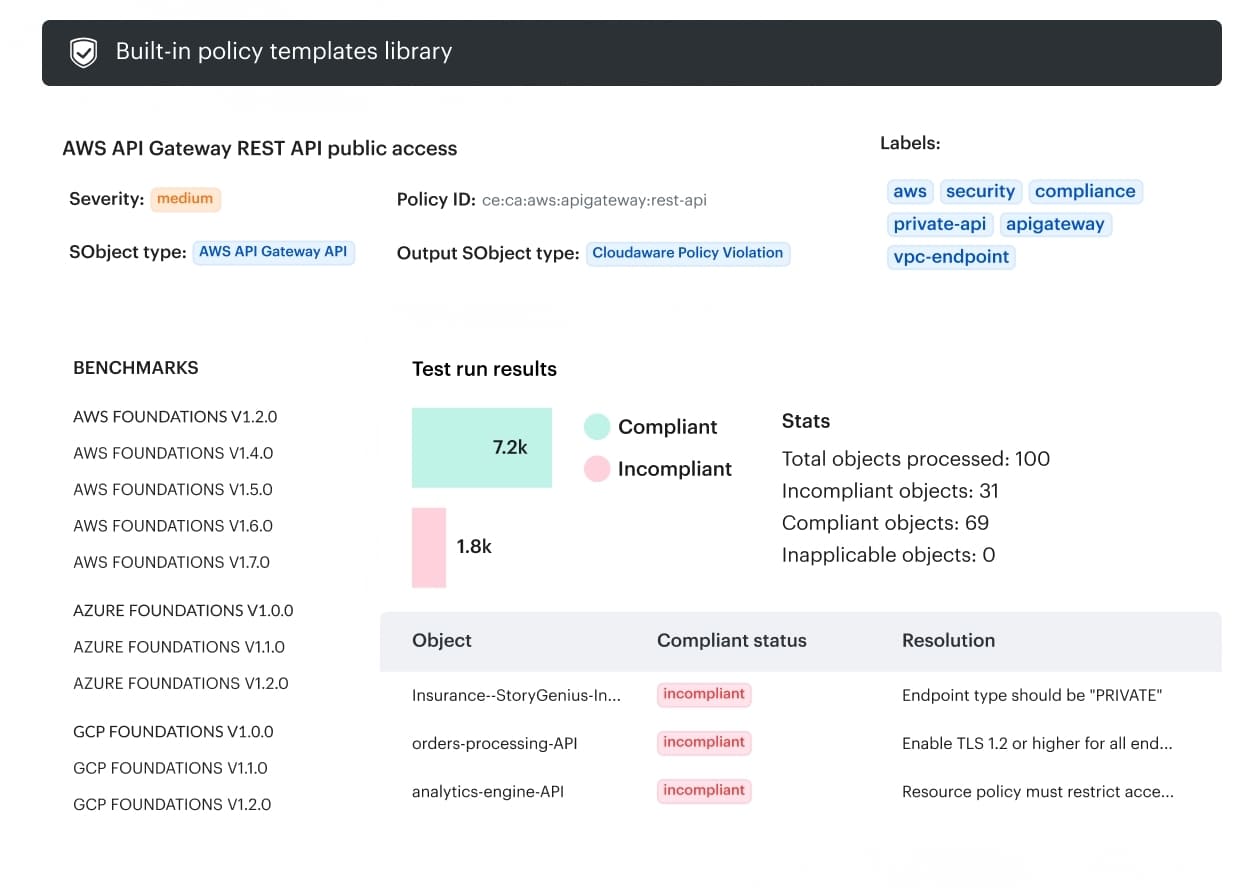 Core capabilities:
- Asset and environment context. Identify which cloud resource, service, account, subscription, project, or environment is affected by the finding.
- Ownership context. Connect the affected infrastructure to the team or owner responsible for investigation and remediation.
- Change history. Review what changed, when the change happened, and how the affected configuration evolved after the original finding.
- Approval and governance records. Check whether the change followed the expected review and approval process or happened outside the normal path.
- Audit evidence. Use change history and auditing records to reconstruct configuration changes and support investigation, control review, and compliance evidence.
- Remediation routing. Give security, platform, and infrastructure teams enough context to move from a generic finding to an affected asset, environment, owner, and follow-up action.