


Security teams rarely have a no-tool problem. They have posture findings, workload agents, code checks, identity analysis, native cloud alerts, and a ticket queue that still cannot tell them which exposure threatens a production service. That is why comparing cloud security tools as one category goes wrong. A CSPM, CNAPP, CWPP, CIEM, DSPM, SIEM, and AppSec platform may all touch the same resource while answering different operational questions.
This guide compares ten platforms by the job they perform, the signal they collect, the context they add, and the handoff they support. If your immediate job is control testing, audit evidence, and recurring posture assessment, use our cloud security assessment tools guide. If you are building or replacing the broader stack, start here.
Questions we’ll answer:
- Which tool fits CNAPP, CSPM, vulnerability management, runtime security, or code security best?
- Where do users say each platform actually saves time?
- Which tools create alert noise, setup pain, or pricing friction?
- What should enterprise teams check before booking a demo?
TL;DR on the cloud security tools in this article
- Best for connected enterprise context: Cloudaware
- Best for adaptive protection from AI-driven attacks: Cloudaware NeoSec
- Best for attack-path CNAPP: Wiz, Orca
- Best for runtime-heavy cloud teams: CrowdStrike, Sysdig
- Best for Microsoft-first environments: Microsoft Defender for Cloud
- Best for AppSec and code-to-cloud fixes: Snyk
- Best for open CSPM and audit checks: Prowler
- Best for exposure management programs: Tenable
- Best for broad CNAPP depth inside a large security stack: Prisma Cloud
How this cloud security tools comparison was researched
We reviewed official product documentation, current product and pricing pages, release information, attributable customer evidence, and the review sources linked in each profile. This update was checked on September 22, 2026.
We did not run a controlled benchmark across all ten products. The article therefore does not score detection accuracy, implementation time, alert reduction, or support quality as if those results came from one lab. Vendor outcome claims remain clearly attributed. Pricing uses an official public figure when one exists; otherwise the profile says quote required and names the units buyers should count.
Each platform is evaluated against the same operating questions: What signal does it collect? Which cloud, code, data, identity, workload, and on-prem assets can it cover? How does it prioritize risk? Can it attach an owner and service? Where does remediation work land? Which capabilities require another module, agent, or product?
Cloud security tools comparison criteria
After the first shortlist, each tool was checked against the questions buyers usually ask too late:
- Coverage: Does it support AWS, Azure, GCP, Kubernetes, and the on-prem systems still sitting in the environment?
- Asset context: Can it connect findings to CMDB data, ownership, business service, environment, tags, and asset relationships?
- Compliance: Does it map controls to HIPAA, PCI, SOC 2, ISO, FedRAMP, and internal policies with evidence security teams can actually use?
- Detection model: Is it agentless, agent-based, or both? Agentless gives fast coverage. Agents usually give deeper runtime detail.
- Remediation workflow: Does it route findings into Jira, ServiceNow, Slack, or PagerDuty with status sync, owners, and exceptions? Or does it stop at “alert created”?
- Pricing model: Is pricing based on assets, workloads, developers, credits, modules, or data volume? A 12-month TCO model matters more than the demo quote.
- Customer pattern: Are real users on G2, Capterra, TrustRadius, Reddit, and Quora describing problems similar to yours?
- Roadmap velocity: Are release notes recent? Did acquisitions make the product stronger, or just more complicated?
We deliberately excluded pure-play DLP, CASB, and WAF tools. They matter, but this list focuses on primary cloud security platforms, not category-specific point solutions.
Read also: Popular DevSecOps Frameworks for Cloud Security in 2026
Choose the security job before the vendor
A ten-logo grid becomes useful only after the buying job is clear. Use this map to decide which product category deserves a proof of value.
| Security job | Category to evaluate | Proof to request |
|---|---|---|
| Find and govern configuration drift | CSPM | A new risky resource appears, receives policy context, an owner, and a tracked remediation path |
| Connect code, posture, identity, data, and runtime risk | CNAPP | One attack path traces a deployable issue from source or image to reachable production impact |
| Protect running workloads | CWPP or CDR | The tool detects and contains representative runtime behavior with measured overhead |
| Reduce excessive permissions | CIEM | Effective permissions and a safe least-privilege change are visible |
| Find sensitive data exposure | DSPM | A data store is classified, linked to access paths, and assigned to an owner |
| Fix risk in developer workflow | AppSec, SCA, SAST, IaC | A developer receives a precise fix in the repository or pull request |
| Correlate and respond across sources | SIEM or security operations | A cloud signal joins related events and drives an investigation or response |
| Detect and investigate adaptive, machine-speed attacks | Behavioral detection with AI investigation | An anomaly on one host becomes a timeline with observed vs inferred evidence, business impact and a response ready for approval |
| Attach business ownership and service context | CMDB-aware security context | A finding carries application, environment, owner, control scope, ticket, and history |
Top 10 cloud security tools at a glance
This is a routing table, not a universal ranking. Product packaging changes quickly, and several capabilities are module-dependent. Use the best-fit column to build a shortlist, then verify the proof request in your own environment.
| Tool | Best fit in this shortlist | Check before buying |
|---|---|---|
| Cloudaware | CMDB-aware CSPM, compliance, ownership, hybrid context, and NeoSec threat detection | Code and pipeline security depth (pair with an AppSec tool) |
| Wiz | Agentless CNAPP and attack-path context | Module scope, runtime needs, and ownership workflow |
| Cortex Cloud | Code-to-cloud posture, runtime, and SOC convergence | Packaging, agents, and platform complexity |
| CrowdStrike Falcon Cloud Security | Cloud runtime and SecOps teams already using Falcon | Posture breadth, modules, and workload count |
| Microsoft Defender for Cloud | Microsoft-first cloud security operations | Multi-cloud parity and protected-resource pricing |
| Tenable Cloud Security | Exposure and identity programs extending into cloud | Cloud modules and workflow fit |
| Sysdig Secure | Container and Kubernetes runtime | Deployment model, retention, and non-container scope |
| Orca Security | Agentless CNAPP with fast estate coverage | Ownership, reporting, and sensor requirements |
| Snyk | Developer-first code, dependency, container, and IaC fixes | Runtime and posture depth outside the pipeline |
| Prowler | Open-source posture and compliance checks | Who will normalize, assign, and track remediation |
| Tool | G2 | Capterra | Best for |
|---|---|---|---|
| Cloudaware | 5 / 5 | 4 / 5 | Continuous multi-cloud security posture visibility through a unified CMDB — surfacing misconfigurations, unpatched assets, and compliance drift across AWS, Azure, GCP, and on-prem in one inventory. NeoSec adds behavioral threat detection with AI investigation on the same asset model. |
| Wiz | 4.7 / 5 | 5.0 / 5 | Agentless full-stack cloud risk detection with attack-path analysis that correlates vulnerabilities, misconfigurations, identities, and secrets into prioritized "toxic combinations." |
| Palo Alto Prisma Cloud | 4.1 / 5 | 4.0 / 5 | End-to-end code-to-cloud CNAPP covering CSPM, CWPP, CIEM, IaC, and runtime in a single platform — strongest where SOC workflows already run on Palo Alto. |
| CrowdStrike Falcon CS | 4.6 / 5 | 4.7 / 5 | Cloud workload threat detection and response driven by adversary intelligence — unifying endpoint, container, and cloud breach signals in one EDR-grade engine. |
| Microsoft Defender for Cloud | 4.4 / 5 | 4.0 / 5 | Native CSPM and workload protection for Azure (with multi-cloud coverage), tightly wired into Microsoft Sentinel and Entra ID for SecOps response. |
| Tenable Cloud Security | 4.6 / 5 | 5.0 / 5 | Identity-first CIEM (ex-Ermetic) for finding excessive entitlements, toxic IAM combinations, and privilege-escalation paths across cloud accounts. |
| Sysdig Secure | 4.8 / 5 | 4.4 / 5 | Runtime threat detection for containers and Kubernetes — Falco-based behavioral detection that catches active exploits and drift in cloud-native workloads. |
| Orca Security | 4.6 / 5 | 4.8 / 5 | Agentless SideScanning CNAPP delivering deep workload, data, and identity risk coverage across the full estate with no agents and the fastest time-to-coverage. |
| Snyk | 4.5 / 5 | 4.6 / 5 | Developer-first cloud application security — shifting SCA, SAST, container, and IaC vulnerability scanning left into the IDE and CI pipeline. |
| Prowler | Not listed | Not listed | Open-source CSPM and compliance auditing for AWS/Azure/GCP/Kubernetes — the de facto free CLI scanner for CIS, PCI, HIPAA, and NIST benchmark checks. |
Read also: Cloud Security Threats in 2026: Top Risks & How to Defend
1. Cloudaware for CMDB-anchored multi-cloud security
Gartner: 5/ 5
Capterra: 4.0 / 5
Best fit: enterprises that need posture and compliance findings tied to applications, owners, environments, service relationships, tickets, and evidence across cloud and on-prem assets.
Cloudaware belongs in the shortlist of cloud security tools for large organizations that cannot treat cloud risk as a flat alert feed. Think Coca-Cola, NASA, ServiceChannel, Caterpillar, Boeing: environments with many teams, clouds, services, and compliance paths.
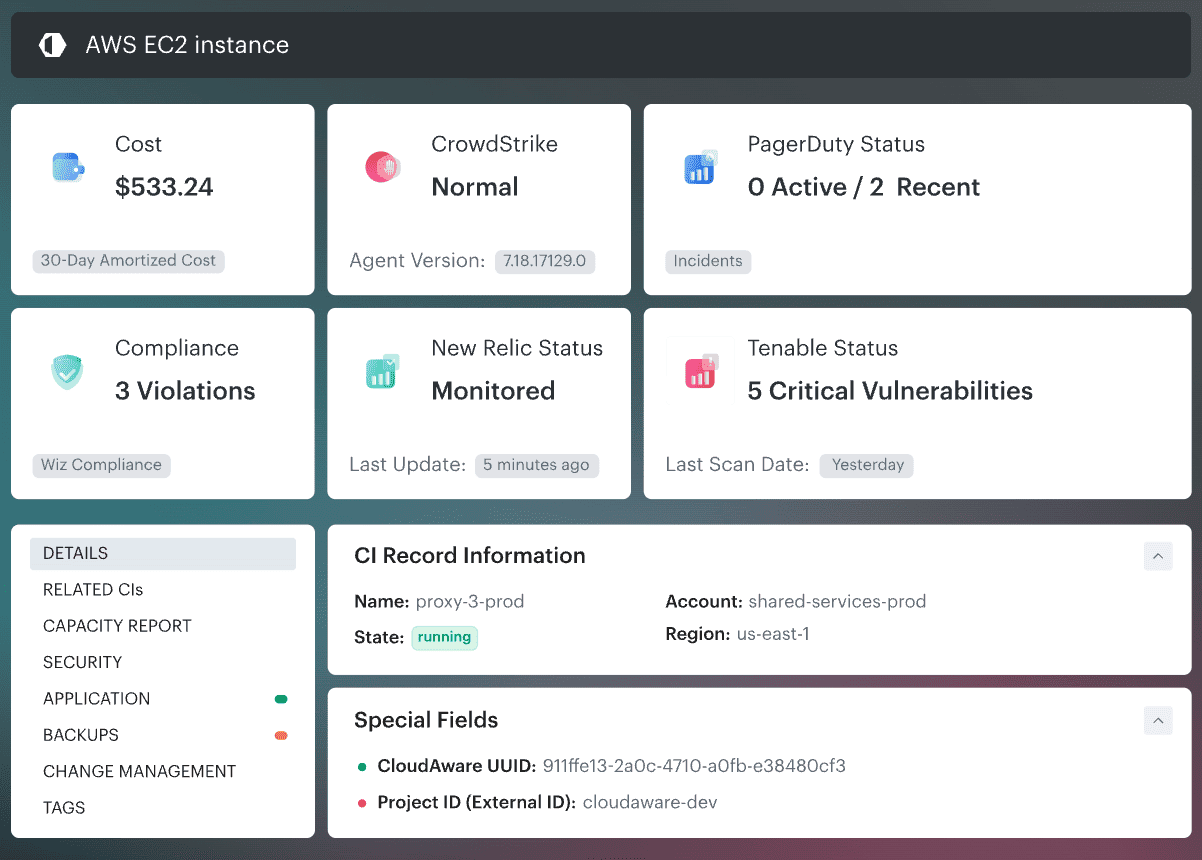
It covers: AWS, Azure, GCP, Kubernetes, VMware, Oracle, Alibaba, SaaS, and on-prem assets. The useful part is the CMDB layer. A vulnerable EC2 instance becomes “payment API, prod, owned by Platform Ops, linked to PCI scope, and Jira overdue.”
That is why Cloudaware feels different from many multi cloud security tools.
NeoSec: adaptive protection from dynamic attacks
Attackers now use AI to find new paths, brute-force at machine speed and change tactics mid-attack. Static rules and CVE scans can't keep pace. NeoSec learns normal behavior for every asset, flags deviations the moment they surface, and sends an AI agent to investigate. The agent builds the timeline, tests what actually worked, separates observed evidence from inference, and adds owner, exposure and blast radius from the CMDB. Actions your policy already approves run automatically, and consequential steps go to your team for sign-off. You get a finished investigation, not another alert.
Features cloud security experts use
- NeoSec threat detection: per-asset behavior baselines plus detection rules, file integrity with exact diffs, malware detection, cloud logs and MITRE ATT&CK mapping, with an AI agent that investigates and drives policy-approved response
- Unified CMDB across AWS, Azure, GCP, Oracle, Alibaba, VMware, Kubernetes, on-prem with 3,000+ supported CI types
- CMDB-aware CSPM with declarative YAML/DSL policies; UCF mapping to 900+ authority documents
- Risk-based vulnerability management integrating Tenable, Qualys, Wiz, Nessus, CrowdStrike, AWS Inspector
- IT compliance-as-code with ‘rule findings’ as first-class objects (owner, SLA, evidence, lifecycle)
- SIEM (Conflux) with CMDB-enriched events, Tines-based automated response, 70% lower storage cost via hot/cold tiering
- Intrusion Detection: file integrity + log inspection for HIPAA §164.312, PCI, SOC 2 control evidence
- Open integration: 63 native integrations across cloud, observability, and ITSM stacks
Pricing
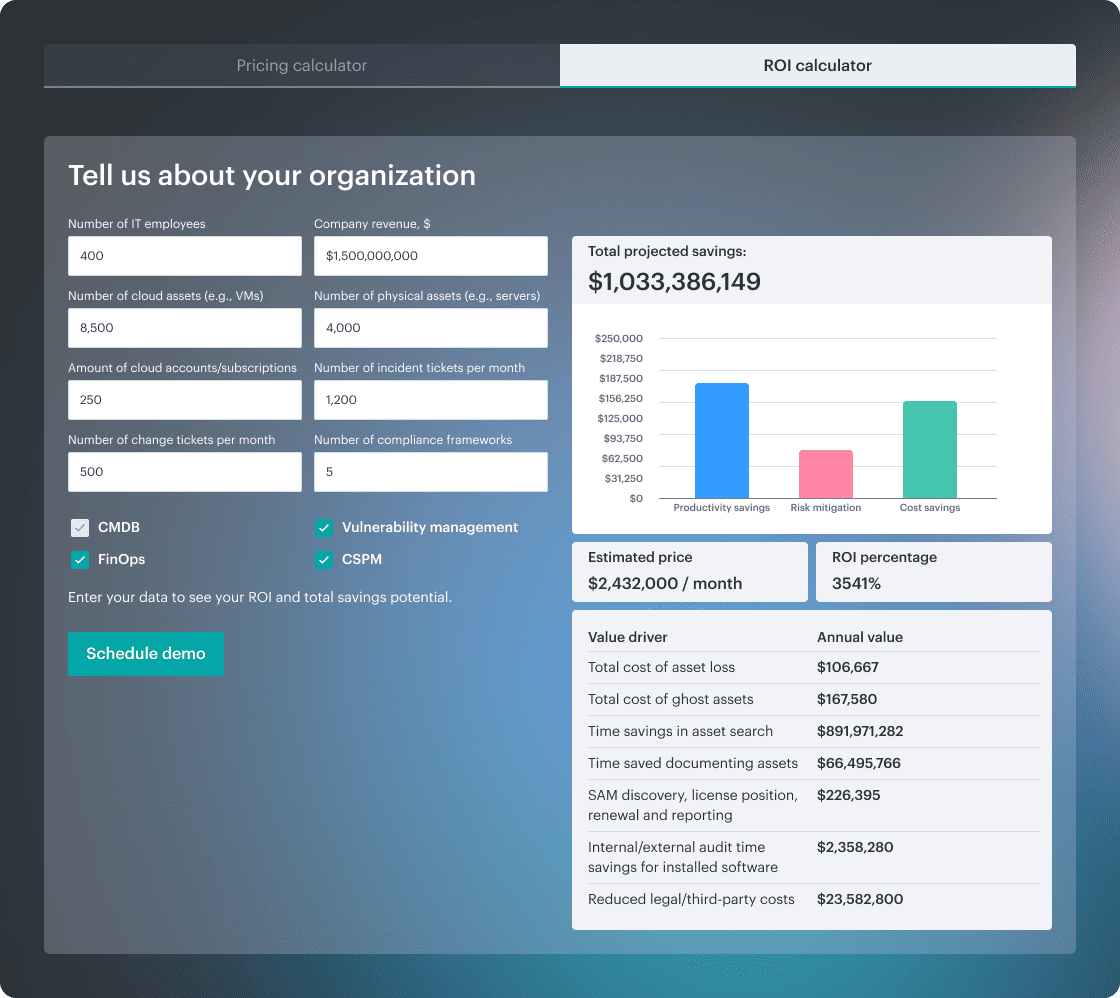
Cloudaware pricing begins with the CMDB, because every module needs asset data underneath it.
The base layer is priced around the configuration items you manage: servers, databases, disks, services, cloud accounts, owners, tags, relationships. The public calculator starts at $200/month and includes capacity for up to 25,000 CIs.
A practical example:
- 100 cloud servers: about $400/month for CMDB
- Add CSPM: +20% of CMDB, so +$80/month
- Add Vulnerability Management: another +$80/month
- Add IT Compliance: another +$80/month
So a 100-server setup with CMDB, CSPM, Vulnerability Management, and IT Compliance would land around $640/month.
Threat detection is priced separately: NeoSec starts at $6.70 per asset per month, with no per-endpoint sensor license. The agent and its tuning are included.
The price grows in two ways. First, your environment gets bigger: more servers, assets, accounts, tickets, frameworks, and CIs. Second, you add modules on top of the CMDB base.
That matters for buyers comparing cloud security management tools because the question changes from “what does the license cost?” to “which parts of our security workflow need asset context badly enough to pay for the module?”
There’s also a 30-day free trial, no credit card required.
Check Cloudaware’s value for your company now
Now the sharper question: when users actually run Cloudaware, where does it feel strong, and where does it create friction?
Pros and cons
✅ Threat detection + compliance via CMDB: "Cloudaware has been a game-changer for securing our cloud infrastructure. The CMDB platform gives us complete visibility and control, allowing us to quickly detect and respond to threats while ensuring our cloud environment remains compliant." — Linda Cureton, CIO, NASA (Cloudaware case study)
✅ CSPM misconfiguration + unauthorized-access risk detection: "Cloudaware helps organizations identify potential security risks, such as misconfigured resources, unauthorized access, and data breaches, and provides recommendations to mitigate these risks." — Pourya M., Senior Consultant (G2)
✅ Compliance auditing + access controls + automated reports: "CloudAware helps me ensure that my cloud workloads comply with relevant regulations and industry standards. It provides features for auditing configurations, managing access controls, and generating compliance reports, which can be crucial for industries with strict regulatory requirements". — Verified User, Computer Software, Mid-Market (G2)
⚠️ Bundled Wazuh/Kibana SIEM frontend has a learning curve: "The software comes with Wazuh as the IDS, and the front-end is Kibana-based. It definitely takes some learning and getting used to using Kibana." — Pedro K., Information Security Officer (Capterra)
Cloudaware update: NeoSec now puts an AI investigator on top of the raw events, so analysts start from a finished investigation report with every conclusion linked back to its source events.
⚠️ Hard to wire into existing security stacks: "Integrating Cloudaware with existing systems or workflows was challenging for me, especially when I have complex IT environments." — Verified User, Computer Software, Mid-Market (G2)
⚠️ Compliance tools hard to locate in the UI: "The navigation can feel overwhelming and counter-intuitive for non-IT professionals, often requiring significant time to locate specific survey sections or compliance tools." — Anonymous Architectural Specialist (Capterra)
2. Wiz — Best for agentless CNAPP at enterprise scale
Best fit: CNAPP teams that need attack-path context across cloud, identity, workload, and data risk.
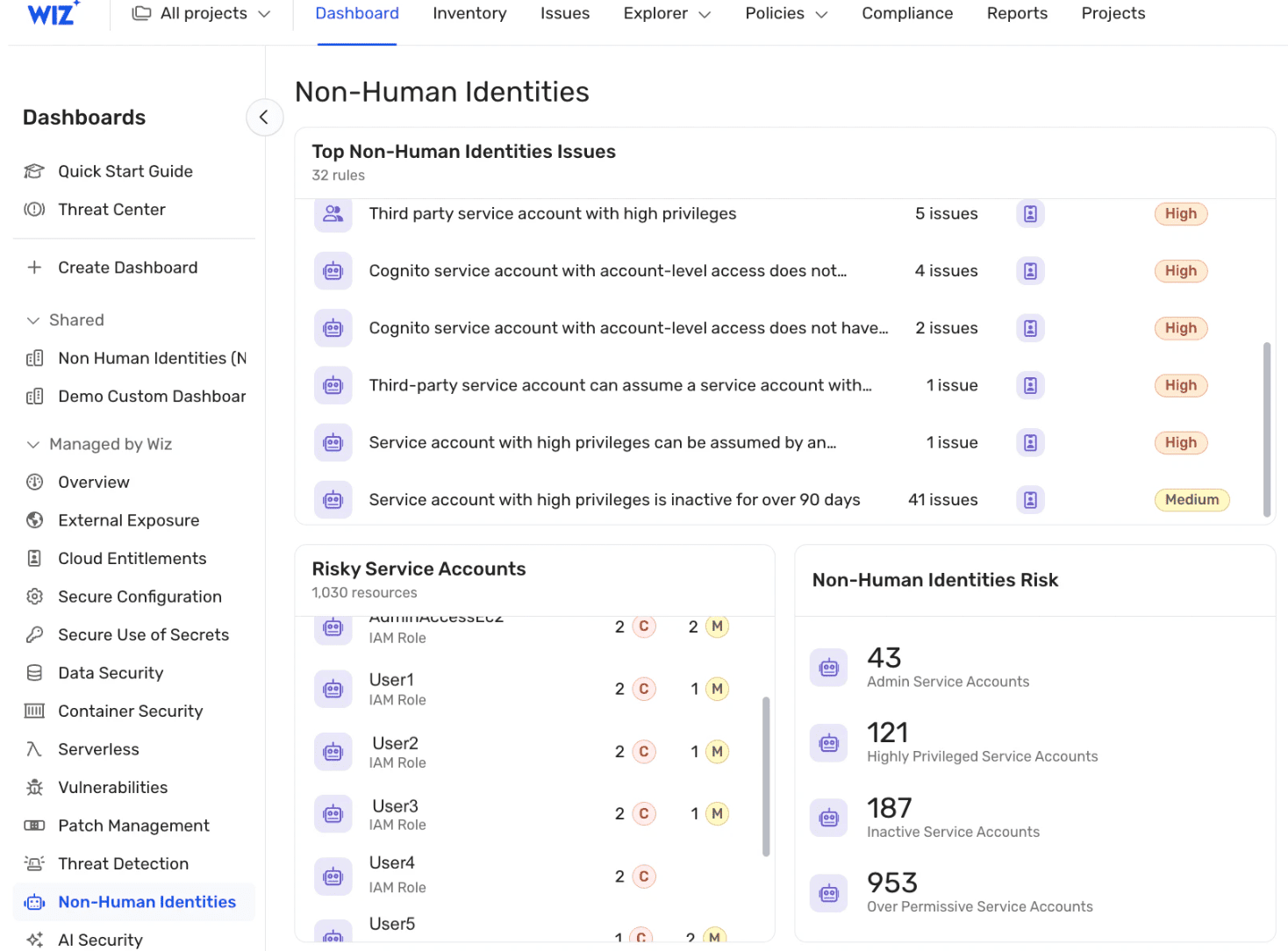
Wiz gives security teams a fast way to see which cloud risks can actually turn into exposure. Public VM with a critical CVE? Useful, but not enough. Wiz adds context: reachable from the internet, tied to an overprivileged identity, connected to sensitive data, running in production.
That Security Graph is the reason it keeps showing up in enterprise shortlists for cloud security tools.
Used by: Morgan Stanley, Siemens, BMW, Salesforce, LVMH
Covers: AWS, Azure, GCP, OCI, Alibaba Cloud, VMware, Kubernetes, SaaS, CI/CD
Features
- Agentless full-stack scanning via cloud APIs across AWS, Azure, GCP, OCI, and Alibaba
- Security Graph correlates misconfigurations, vulnerabilities, identities, and data into attack-path narratives
- CIEM with effective-permissions analysis (the ‘who can actually do what’ view)
- DSPM with sensitive-data discovery across cloud storage and databases
- Container and Kubernetes security: image scanning, registry scanning, k8s misconfiguration detection
- Wiz Code (IaC scanning, GitHub/GitLab integration), Wiz Runtime Sensor (optional agent)
- Native integrations with Slack, Jira, ServiceNow, PagerDuty, plus extensive cloud-vendor partnerships
Pricing
Public pricing is thin, so use buyer data.
Pricing model: modular quote
Trial: 0 public trial days
Cost range: $24,075–$351,500/year
Median buyer: $115,000/year
The bill moves with workloads, active developers, log ingestion, sensors, and modules. Count cloud accounts, containers, repos, runtime coverage, and logs before the first call.
Next: what users say once the Security Graph meets production reality.
Pros and Cons
✅ Agentless attack-path graph: "Agentless, quick to set up, no headaches. Best part: it doesn't drown you in alerts—it shows real attack paths, so you know what to fix first." (G2)
✅ Toxic combinations prioritization: "Wiz completely eliminates the noise by mapping our entire multi-cloud environment onto a single Security Graph. Instead of chasing thousands of minor alerts, it surfaces 'toxic combinations” — the exact intersection of a vulnerability, public internet exposure, and an over-privileged role." (G2)
✅ Fast multi-cloud connection: "The agentless, API-driven architecture connects AWS, Azure, and GCP tenants in minutes without impacting production. It also integrates smoothly into CI/CD pipelines and IaC (Terraform) to catch secrets and misconfigurations pre-deployment." (G2)
⚠️ Phantom container CVEs: "The platform frequently flags vulnerabilities in libraries that are technically present inside a container or file system, but are completely untouched, unimported, and unused by the running application… developers end up wasting time investigating and 'fixing' vulnerabilities that pose zero actual runtime risk to the active application." (G2)
⚠️ Opaque licensing for Wiz Code: "Licensing for WIZ Cloud and WIZ Code is the weak spot — it's rigid and not transparent enough, and figuring out what you actually need (and what it'll cost) takes more effort than it should. You also can't assign owners for fixing vulnerabilities, which makes remediation harder to track." (G2)
⚠️ API 10k-event result cap: "The API has limitations, like I cannot pull more than 10,000 events which in some cases becomes tedious. If I have an aggressive GraphQL query, the event count becomes too high, so pulling out that data using APIs does not help when the count is above 10,000 events." (G2)
Read also: Cloud Security Strategy: Roadmap, Pillars & Metrics
3. Palo Alto Networks Prisma Cloud — Best for full-stack CNAPP suites with bundled CWPP and IaC scanning
G2: 4.1 / 5
Capterra: 4.0 / 5
Best fit: enterprise teams that want CNAPP coverage across code, cloud posture, workloads, APIs, and runtime.
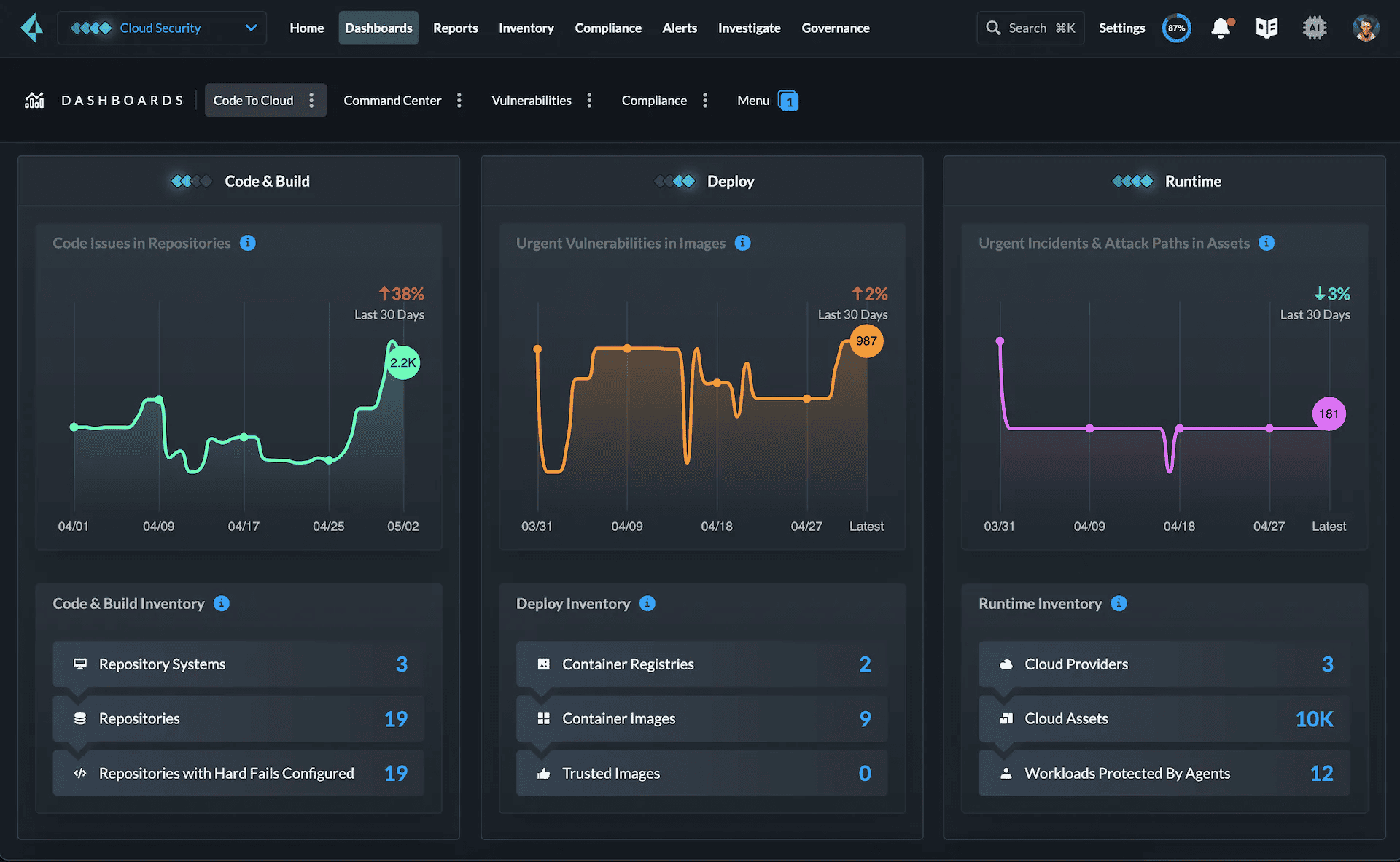
Prisma Cloud makes sense when security needs to trace risk across the full path: IaC misconfiguration, vulnerable image, exposed workload, over-permissive identity, and runtime alert. Global Atlantic uses it for multicloud visibility. PEXA uses it for cloud threat detection. Coverage includes AWS, Azure, GCP, Kubernetes, containers, hosts, and serverless.
Check before buying: module scope, alert tuning effort, CI/CD fit, and whether teams can handle Palo Alto-level platform complexity.
Features
- CSPM with thousands of pre-built policies for AWS, Azure, GCP, Oracle, Alibaba
- CWPP: agent-based runtime protection, host and container scanning, drift detection
- Code Security (formerly Bridgecrew): IaC scanning for Terraform, CloudFormation, Kubernetes manifests
- Web Application and API Security (WAAS) with bot protection
- CIEM with permission analysis and policy generation
- Defender architecture supports agent-based and agentless deployments side by side
- Deep integration with Cortex XDR and the wider Palo Alto stack
Pricing
Prisma Cloud pricing stays behind a quote. Public pages show no starting price, no ceiling price, and no free trial, so buyers should model cost around modules, cloud accounts, workloads, containers, serverless, code security, API security, runtime protection, and support. Capterra rates value for money 3.0/5, and one reviewer calls pricing “on the higher end.” Among cloud based security tools, this is PoC-before-budget territory.
Next: depth looks great on paper. Users explain the trade-offs.
Pros and cons
✅ IaC + CloudFormation scanning: "The ability to look at my Terraform scripts is a huge benefit to using Prisma Cloud. It also helped with resolving major issues in my CloudFormation scripts… It is an agentless workload so we do not need to install any cumbersome agents. It provided us on-prem and cloud vulnerability detection and management which is huge." (G2)
✅ Consolidates CSPM/CWP/IAM/DSPM: "Palo Alto Prisma Cloud — great product, with a single console for complete cloud security. Likes CSPM, CWP, IAM, DSPM, KSPM and other security components of cloud." (TrustRadius)
✅ Strong compliance templates: "Leveraging its robust compliance capabilities, including predefined policy templates and automated checks, we can assess our cloud environments against regulatory requirements such as GDPR, HIPAA, and PCI DSS." (TrustRadius)
⚠️ Overwhelms a single team: "A separate team is really needed for this product. We dumped it on the security engineering team and they became overwhelmed with the workload. We had to diversify the various alerts to different teams." (G2)
⚠️ Asset explorer hard to use: "Asset explorer is difficult to use. No good documentation for manual search. Hard to use for new users." (TrustRadius)
⚠️ Usage-based pricing escalates: "The initial onboarding can be time-intensive — there's a lot of policy fine-tuning required before you hit 'optimal' settings, and some advanced modules lack step-by-step guides… usage-based pricing can escalate quickly for larger environments unless you carefully manage data ingestion." (G2)
Read also: Cloud Security Policy: Components, Template & Management Guide
4. CrowdStrike Falcon Cloud Security — Best for EDR-led cloud workload protection with strong CWPP
G2: 4.6 / 5
Capterra: 4.7 / 5
Best fit: SOC-led teams that need cloud runtime defense, not posture-only scanning.
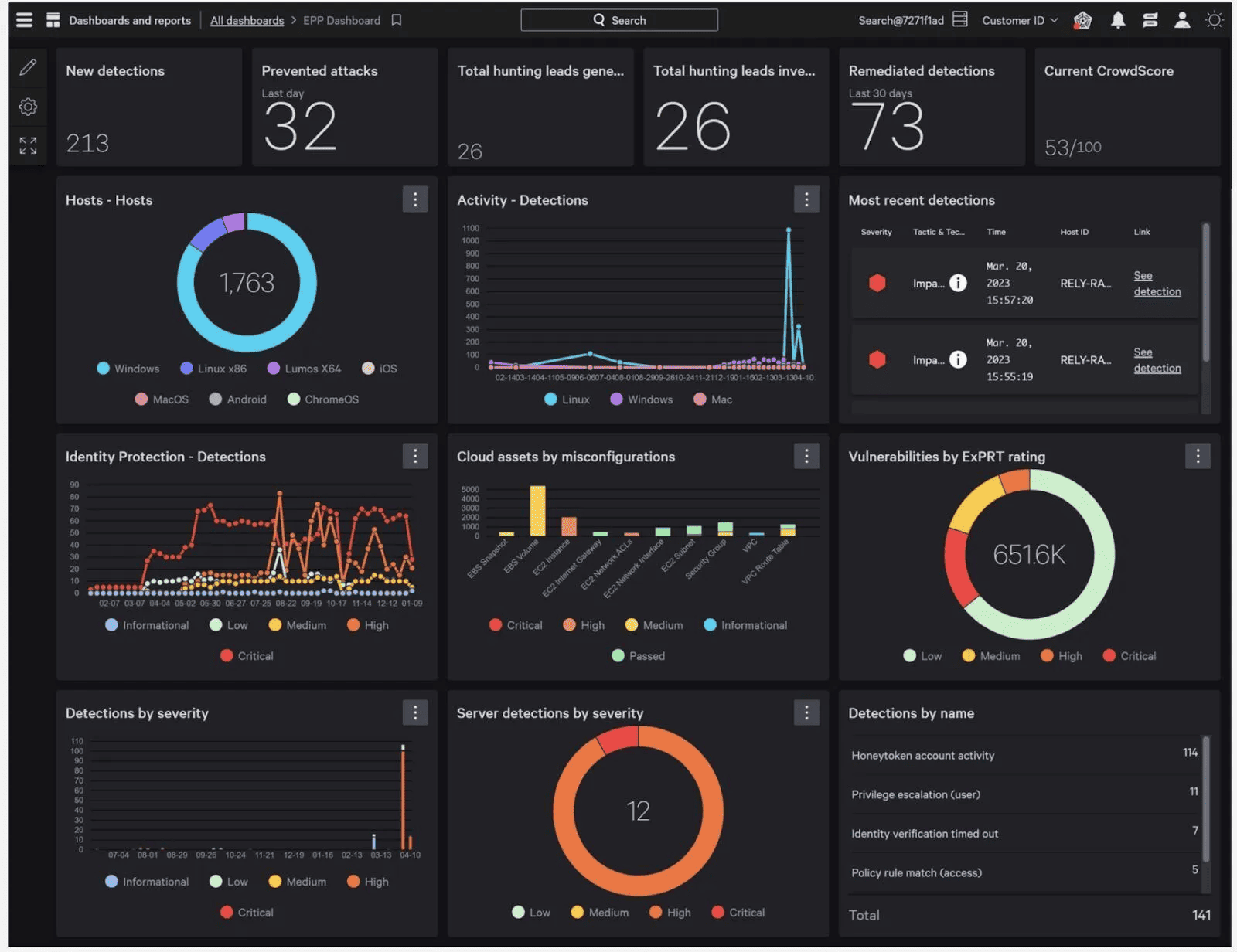
Falcon Cloud Security combines agentless discovery with Falcon sensor data, so findings can be checked against live workload behavior, identity activity, container signals, and threat intel. Vodafone Oman uses it for containerized workload protection. Monvia points to Kubernetes visibility and automated alert handling. Avalon runs it across cloud services at a 100M+ member scale.
For buyers comparing cloud security tools, verify three things before the PoC: sensor coverage, SIEM handoff, and how well cloud findings map to existing CMDB or ITSM ownership.
Features
- Falcon Cloud Workload Protection: lightweight agent + Falcon Sensor for containers and Kubernetes
- CSPM with multi-cloud coverage across AWS, Azure, GCP
- Threat detection with Indicators of Attack (IOA) backed by CrowdStrike’s threat-graph
- Image scanning, runtime detection, container drift detection
- Identity Protection module for cloud and Active Directory identity threats
- Falcon Managed XDR option — managed detection-and-response service
- Integration with Falcon endpoint platform for unified workload + endpoint detection
Pricing
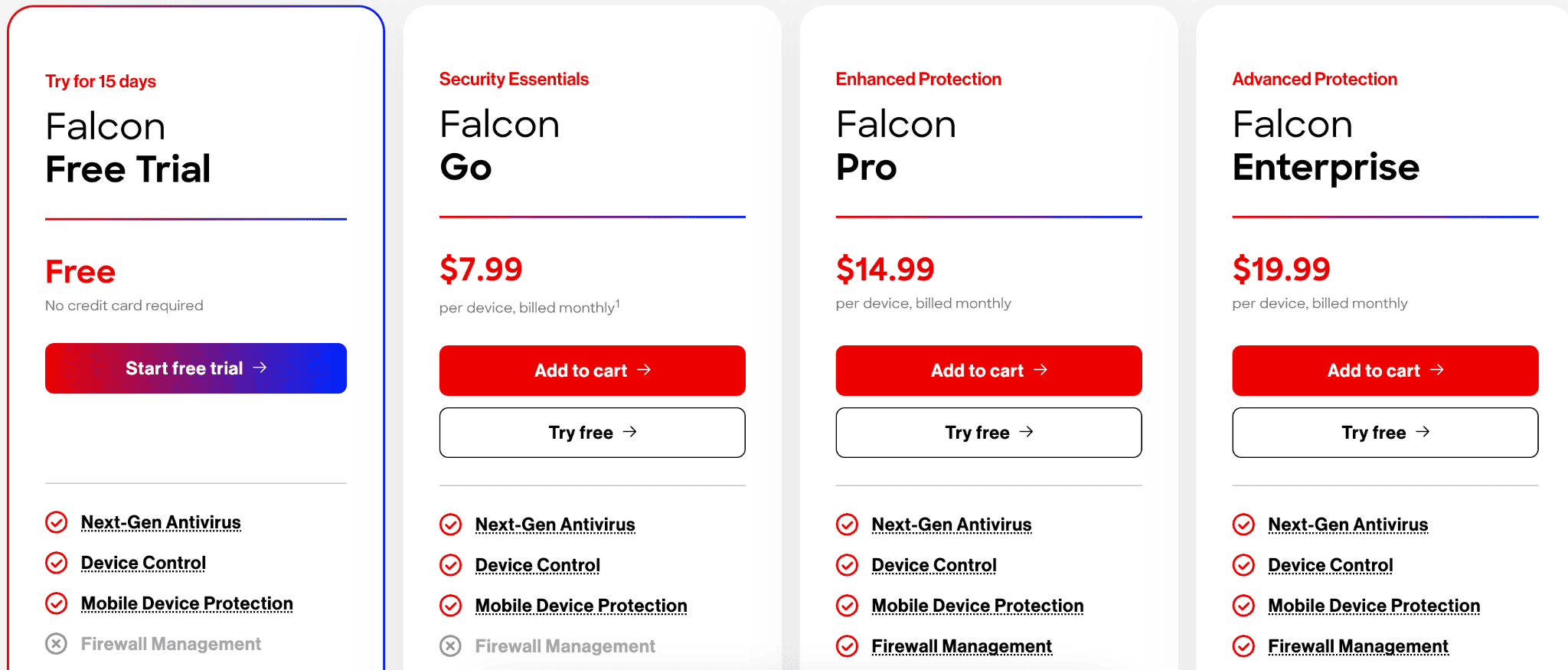
Pricing gets clear at the endpoint layer, then custom in cloud.
- Trial: 15 days
- Public floor: $59.99/device/year
- Top listed plan: $184.99/device/year
- Falcon Cloud Security: quote-based
“Price the fleet before you price runtime.”
Budget grows with devices, sensors, cloud workloads, modules, MDR, identity protection, and SIEM data. For teams comparing cloud computing security tools, the real model is coverage depth: endpoint estate first, cloud runtime second.
Pros and cons
✅ Agentless + agent-based combo: "I LOVE the fact that you can get agentless visibility with agent-based protection. That's an absolute game changer. Being able to get visibility into something before we get an agent on it is insanely cool — the three pillars of CNAPP being CSPM, CWP, and CDR." (G2)
✅ Strong runtime/container security: "Threat intelligence integration is solid, and the runtime and container security are strong." (G2)
✅ Easy AWS plug-in, low overhead: "I like how easily it plugs into our AWS environment and gives us real-time visibility into what's happening across our cloud workloads. The threat detection is strong — it quickly flags unusual behavior or misconfigurations without a lot of noise. I also appreciate how lightweight it is; it doesn't slow anything down." (G2)
⚠️ Requires the full CrowdStrike stack: "To get the best results and achieve a strong security posture for your cloud assets, it's necessary to have a complete CrowdStrike environment. This helps ensure full visibility and provides all the telemetry needed to deliver a solid response to the different threats you may face in a cloud platform environment." (G2)
⚠️ Opaque pricing for partners: "They do not provide partners with price lists, and to sell new functionalities or products, the prerequisites to be considered are not clear (a lot of complexity). I think it is because they are new alliances or acquisitions." (G2)
⚠️ Noisy low-risk findings: "I've noticed that some of the findings can feel a bit noisy at times, especially when it flags low-risk configuration issues that don't always need immediate attention. The pricing can also be on the higher side as you scale." (G2)
5. Microsoft Defender for Cloud for Azure-first multi-cloud organizations wanting deep native integration
G2: 4.4 / 5
Capterra: 4.0 / 5
Best fit: Microsoft-heavy teams that want CNAPP, posture, workload protection, and compliance inside the same security stack.
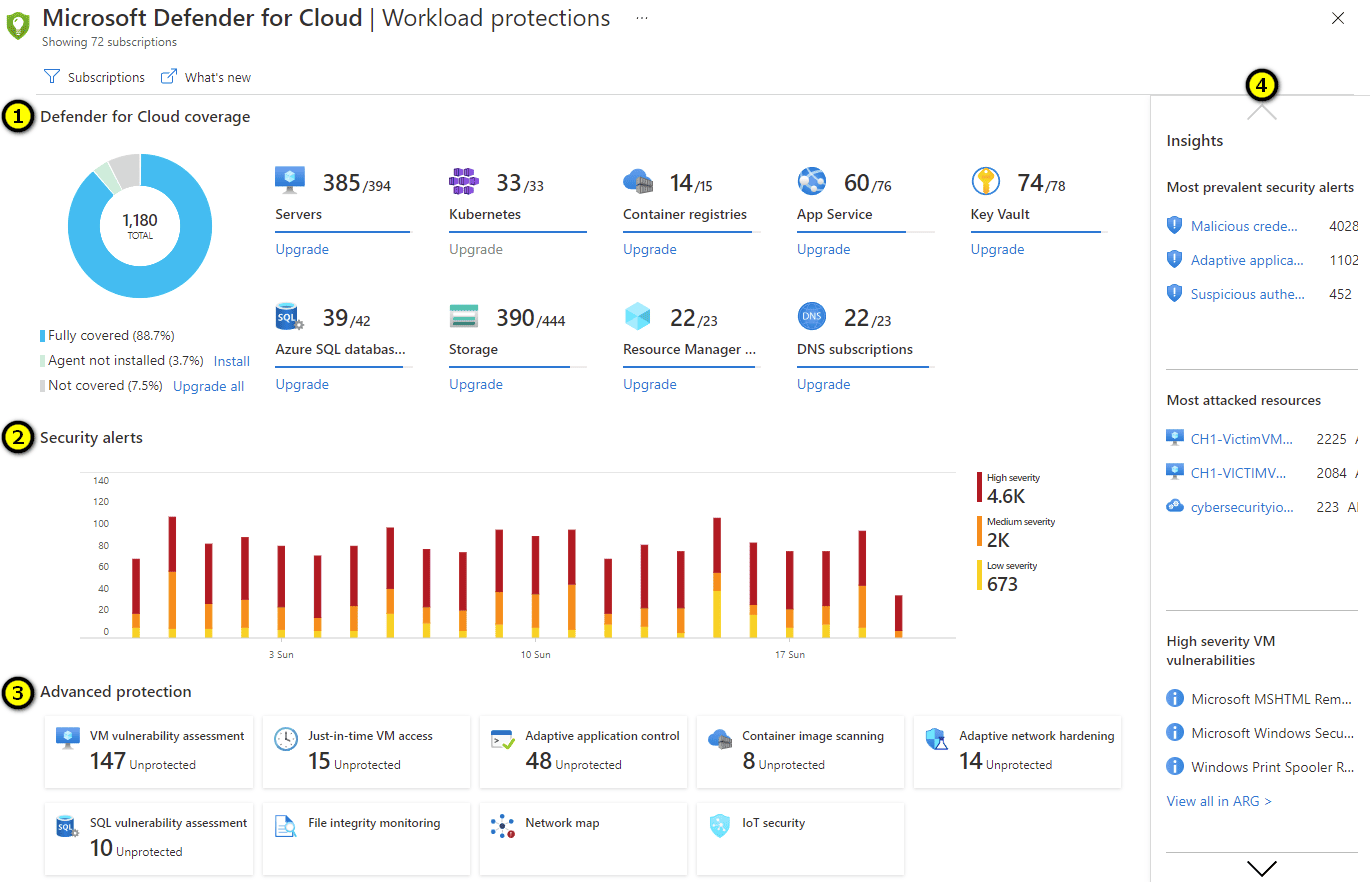
Defender for Cloud is practical when Azure is the center of gravity, but AWS, GCP, Kubernetes, and on-prem servers still need coverage. It handles CSPM, server protection, containers, storage, databases, APIs, DevOps findings, and attack paths. Among cloud native security tools, its edge is Microsoft context: identity, Defender XDR, Sentinel, policies, and resource data already speak the same language.
Check-in PoC: owner mapping and CMDB sync.
Features
- CSPM with Azure-native, AWS, and GCP coverage
- Cloud Workload Protection: VM, container, serverless, App Service, SQL, storage
- Defender for Containers: image scanning, Kubernetes-native protection, admission control
- Defender for DevOps: GitHub and Azure DevOps repository security
- Native integration with Microsoft Sentinel (SIEM) and Entra (identity)
- Secure Score: gamified posture scoring across the organization
- Defender Cloud Security Posture Management (CSPM) Plus tier with attack-path analysis
Pricing
Defender for Cloud pricing depends on what you protect.
Free: Foundational CSPM
Trial: 30 days
Paid meters: servers, databases, storage, containers, APIs, serverless, subscriptions, and vulnerability scans
For buyers comparing cloud computing security tools, the first pricing task is inventory: count protected resources by type, not just cloud accounts. Among cloud-native security tools, Defender’s advantage is Azure-native signal depth. The cost risk is meter sprawl: one platform, many billing lines, and multiple teams creating spend.
Pros and cons
✅ Secure Score "health bar": "Honestly, the best thing about it is the Secure Score. It's basically like a 'health bar' for your entire cloud setup. Instead of digging through endless logs to figure out what's wrong, it gives you a clear percentage and a prioritized 'to-do list' of how to fix things." (G2)
✅ Covers AWS and GCP workloads: "Microsoft Defender for Cloud is not just for the workloads or machines hosted in Azure, but also those hosted in AWS and Google Cloud too… it helps to understand the security posture of our cloud services, scanning current vulnerabilities and security gaps. One of the best parts of Defender for Cloud is it secures CI/CD pipelines too." (G2)
✅ Native Azure integration: "Microsoft Defender works best when you're using Azure and other native Microsoft products. Because of that, it's easy to pull all the logs, maintain security configurations, and monitor everything in real time." (G2)
⚠️ Stale remediation status: "One recurring issue I have faced is with the recommendation status update; even after a security recommendation is remediated, the dashboard continues to show it is pending. There is no way to validate the resolution status in real time. Fine-tuning the alert settings is a time-consuming process." (G2)
⚠️ 7-minute lag in alerts: "It's always lagging. And there is a 7-minute delay with everything." (G2)
⚠️ Misses zero-day attacks: "Features are good but a few times they failed to detect the hidden pattern of malware. Zero-day attack is also not recognized by them most of the time. Their attack analysis did not give you more details a lot of time." (G2)
Read also: 12 Best Cloud Security Assessment Tools for 2026
6. Tenable Cloud Security — Best for vulnerability-led cloud security teams already running Tenable
G2: 4.6 / 5
Capterra: 5.0 / 5
Best for: Identity-first CIEM (ex-Ermetic) for finding excessive entitlements, toxic IAM combinations, and privilege-escalation paths across cloud accounts.
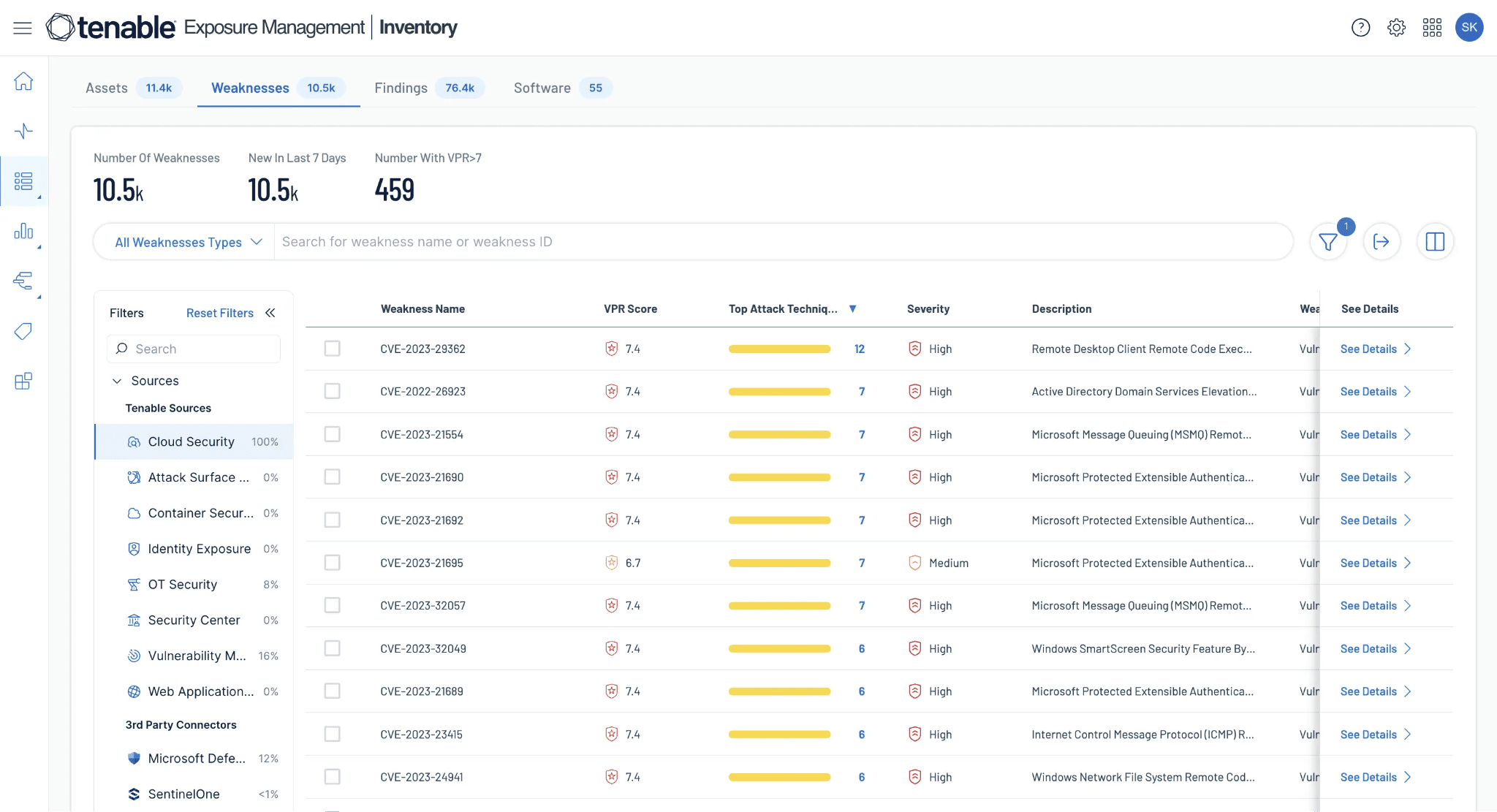
Tenable Cloud Security connects CSPM, CIEM, workload risk, DSPM, and attack-path analysis across AWS, Azure, Google Cloud, Alibaba Cloud, Kubernetes, and hybrid estates. AppsFlyer used it to catch excessive entitlements, public S3 exposure, internet-facing databases, and risky SaaS access. Continental AG uses Tenable One across IT, OT, cloud, and web apps.
Why shortlist it: identity-risk context plus vulnerability and exposure data in one model.
Check before buying: CMDB sync, ticket routing, custom policy depth, and alert noise.
Features
- Agentless CSPM across AWS, Azure, GCP
- CIEM with effective-permissions analysis (Ermetic technology)
- Container security: image scanning, registry integration, k8s posture
- IaC scanning for Terraform and CloudFormation
- Vulnerability data correlated from Tenable’s vulnerability research team
- Unified Tenable One Exposure Management platform integration
- Strong reporting and dashboards inherited from enterprise vulnerability heritage
Pricing
Tenable Cloud Security is quote-priced, so the clean number is the meter: billable cloud resources.
That means VMs, container hosts, Kubernetes, serverless, images, repos, data stores, and databases. Public trial length: not disclosed. Capterra confirms a free trial. For a numeric Tenable benchmark, Vulnerability Management starts at $3,500/year for 100 assets.
Before the PoC, count resources by type.
Pros and cons
✅ Single multi-cloud dashboard: "If you have multi-cloud tenancy using AWS and Azure, you can have a single dashboard where you can onboard all the cloud infrastructure and have visibility into it." (PeerSpot)
✅ Strong vulnerability detection + SCA: "Tenable Cloud Security excels in vulnerability detection, one of its strongest features. Another valuable feature is software composition analysis, which highlights and automates the detection of security flaws." (PeerSpot)
✅ One-click Jira from findings (Ermetic): "Ermetic can provide super visibility for our cloud environment (we are using AWS). The dashboard is simple to use, the findings provide all of the information you require, it provides detection and remediation, and creating a Jira ticket from a finding is just one click away." (PeerSpot)
⚠️ Stability issues: "In my experience, Tenable Cloud Security is not very stable." (PeerSpot)
⚠️ Lacks patch management: "Tenable needs to offer a patch-based solution since it is an area where the tool lacks a bit." (PeerSpot)
⚠️ Slow ad-hoc operations: "If I need to run a script on only those aforementioned ten servers and generate a report, it will be highly time-consuming with Tenable Cloud Security. Even if I need a single ad-hoc command, the solution processes a whole script for all Linux servers, which takes massive time." (PeerSpot)
7. Sysdig Secure for container and Kubernetes runtime security at scale
G2: 4.8 / 5
Capterra: 4.4 / 5
Best fit: Kubernetes-heavy teams that need runtime detection tied to posture and vulnerability risk.
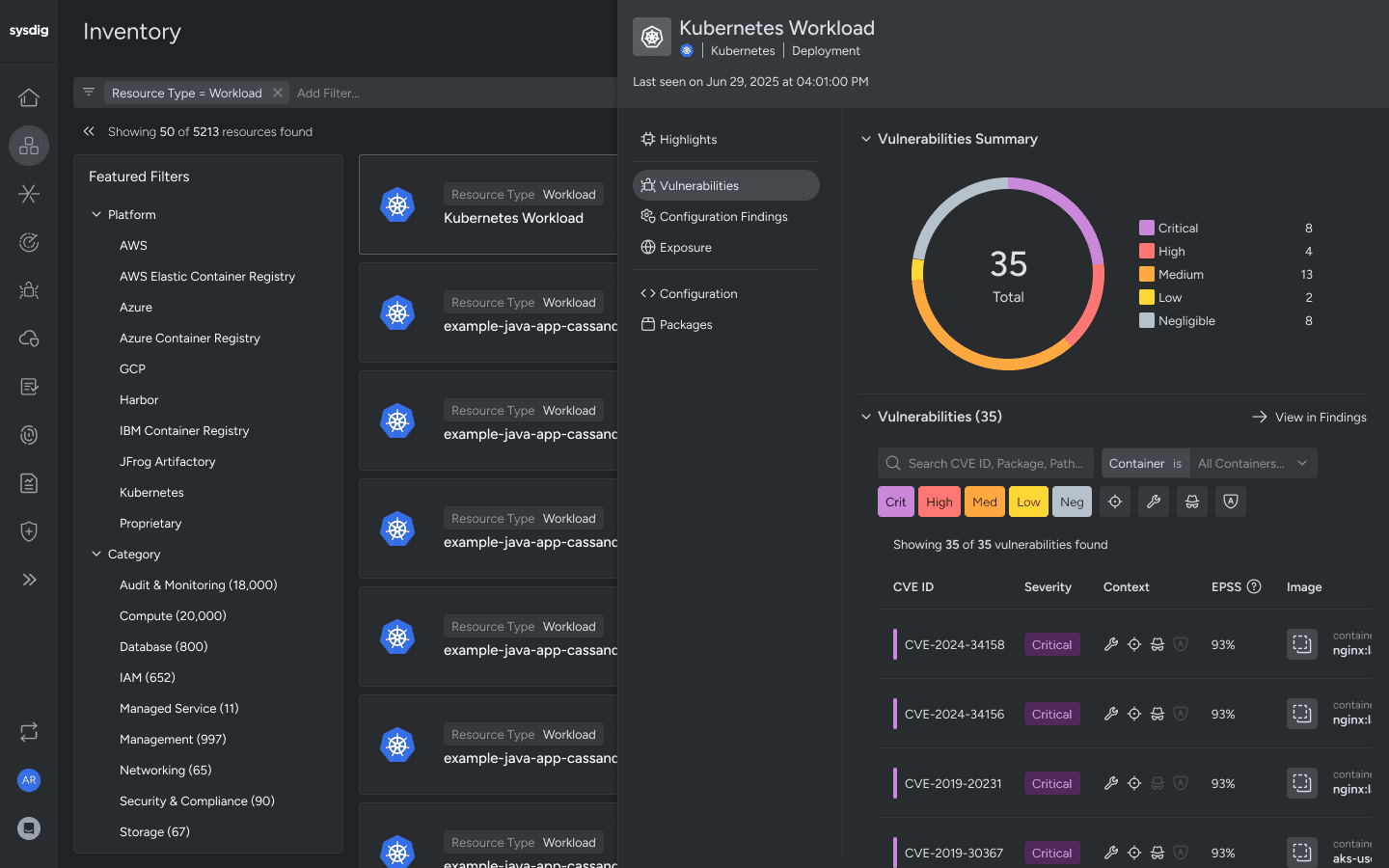
Sysdig Secure is strongest when containers move fast and static scans age out quickly. BigCommerce uses it for real-time visibility and less noise. Neo4j cut false positives 75% and vulnerabilities 80%. BitMEX investigates alerts in about 30 seconds. Coverage spans AWS, Azure, Google Cloud, on-prem, private, and bare metal.
Among multi cloud security tools, its edge is runtime context. Check CMDB and ITSM handoff before buying.
Features
- Falco-based runtime threat detection — the open-source standard for Kubernetes runtime security
- Image scanning (CI/CD integration), admission control, registry scanning
- CSPM coverage across cloud providers + extensive Kubernetes coverage
- CIEM with cloud and Kubernetes identity entitlements
- Sysdig Live: real-time workload telemetry and incident response
- Cost optimization features alongside security (unusual in the category)
- Strong integration with CNCF ecosystem (OPA, Falco, Kubernetes APIs)
Pricing
Sysdig pricing is quote-based, so the buying work starts with meters.
Public price: not listed
Trial length: not disclosed
Main meters: hosts, CSPM compute instances, cloud-log events
Count Kubernetes nodes, Linux/Windows hosts, serverless footprint, cloud accounts, and log volume before the demo. Runtime-heavy teams should model event growth too. That is where “small pilot” pricing can drift once detections, logs, and more clusters come online.
Pros and cons
✅ Falco-powered runtime detection: "Sysdig sees the actual behavior inside the container or kernel and correlates it with Kubernetes infrastructure, which makes detection both earlier and more precise in a cloud-native environment." (PeerSpot)
✅ Reduces alert noise on Kubernetes: "Sysdig Secure has positively impacted our organization by improving visibility into our Kubernetes environment and focusing on real risk, which has reduced alert noise, improved threat detection at runtime, and made vulnerability management more efficient by prioritizing issues that actually affect running workloads." (PeerSpot)
✅ Offline registry image scanning: "Sysdig Secure's standout features include the capability to scan offline container images in container registries and detect vulnerabilities in running containers and libraries." (PeerSpot)
⚠️ Weak CSPM vs. CNAPP leaders: "The solution needs to improve overall from a CSPM standpoint since they can't compete with Wiz or Orca." (PeerSpot)
⚠️ Source code uploaded to SaaS: "If your source code is hosted within your own premises, say on Bitbucket, you naturally wouldn't want your code to be accessible to external parties beyond your company. Keeping your code base private is a standard practice." (PeerSpot)
⚠️ Bundled features can't be unbundled: "Currently, in Sysdig Secure, they bundle multiple features, and we are unable to use them individually. For instance, if we only need compliance scanning, we have to deploy the entire secure package." (PeerSpot)
Read also: Healthcare Data Breaches in 2026: Cases & Lessons
8. Orca Security for agentless, fast-deploy CNAPP for cloud-native organizations
Best fit: teams that need fast cloud coverage without deploying agents everywhere.
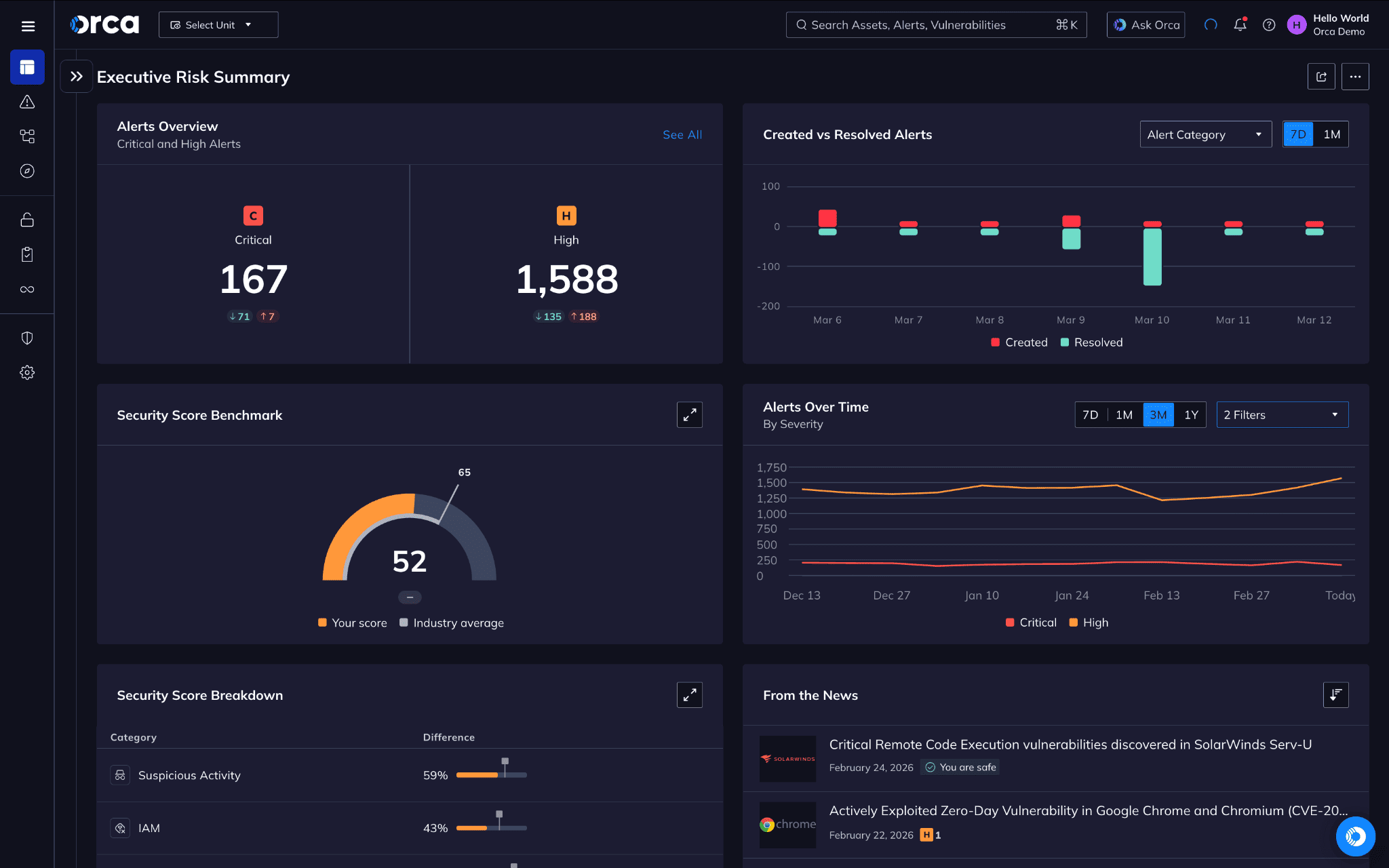
Orca scans cloud estates through SideScanning, then ranks risk with a unified data model: vulnerable workload, public exposure, identity path, sensitive data, and compliance scope in one view. Autodesk uses it for secure generative AI apps.
Swiggy scaled security across 10,000+ containers. Paidy reports saving two FTEs and $500,000/year. Coverage spans AWS, Azure, Google Cloud, Alibaba, Oracle, Tencent, Kubernetes, and hybrid runtime via Orca Sensor.
Check before buying: CMDB sync and ticket ownership.
Features
- SideScanning agentless model: scans cloud workloads via snapshots without runtime agents
- Unified CNAPP: CSPM, CWPP (via SideScanning), CIEM, DSPM, malware detection
- Attack Path Analysis correlating misconfigurations + vulnerabilities + identities
- Multi-cloud: AWS, Azure, GCP, Oracle Cloud, Alibaba
- Container and serverless coverage without per-workload agents
- Strong DSPM features for sensitive-data discovery
- Public-source code review for risk attribution
Pricing
Orca gives pricing signals, not list prices.
Public dollar price: not disclosed
Pricing edition: 1
Trial: available, days not listed
Model: annual, based on average workloads scanned
G2 buyer data: 1-month implementation, 7-month ROI, 16% average discount
Budget depends on workload count, cloud accounts, Kubernetes, data stores, APIs, compliance scope, and sensor coverage.
Pros and cons
✅ Agentless side-scanning, no CPU drag: "Installing traditional security agents on heavily utilized databases creates unacceptable CPU overhead. Orca connects directly to our Azure and AWS environments via API, which fits our setup well." (G2)
✅ Frictionless MSP onboarding: "Client onboarding has traditionally been the most painful part of our business, because clients often hesitate to let third-party agents run on their production servers. Orca Security's agentless side-scanning has completely eliminated this friction." (G2)
✅ Context-aware risk scoring cuts CVE noise: "The alerts are clear, actionable, and prioritized using real context rather than relying only on severity levels. As a result, we no longer waste time combing through huge CVE lists that don't actually apply to our environment." (G2)
⚠️ Initial scan floods dashboard: "Because Orca is so thorough, the initial baseline scan of a new client environment generates an overwhelming number of alerts. It ends up uncovering years of technical debt, forgotten staging servers, and dormant misconfigurations." (G2)
⚠️ Rigid RBAC for data segmentation: "Segmenting data visibility within the Orca dashboard feels a bit rigid. I want my taxonomy engineers to log in and see the security posture for only the specific retail database they manage; however, the role-based access control makes this difficult." (G2)
⚠️ Reporting customization limited: "Some of the more advanced reporting features could be easier to customize. Overall, the interface is solid, but there are a few sections that take a bit of time to fully understand and get comfortable with." (G2)
9. Snyk for developer-first cloud and code security
G2: 4.5 / 5
Capterra: 4.6 / 5
Best fit: AppSec and DevSecOps teams that want cloud risk fixed before deployment.
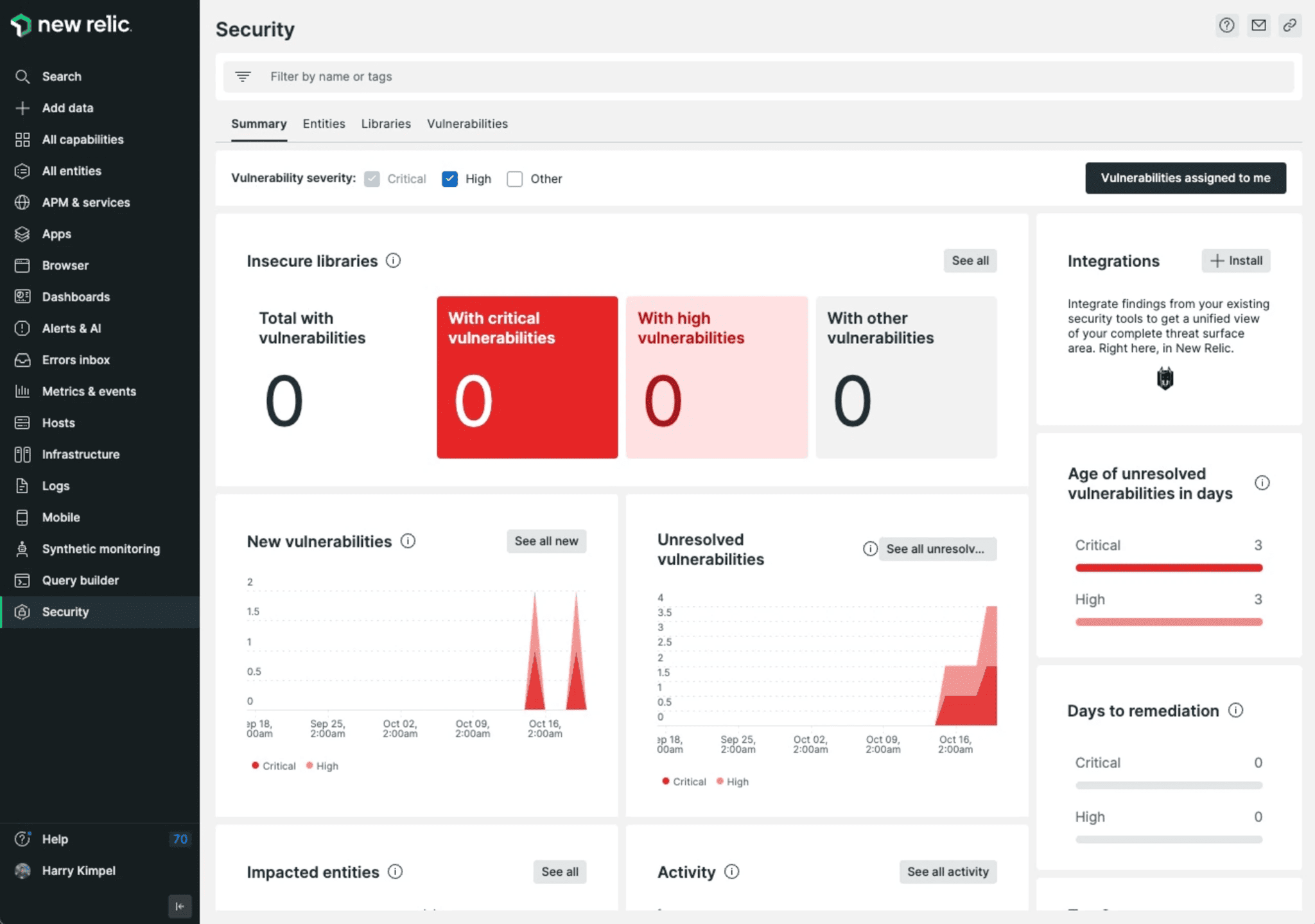
Snyk sits in the developer workflow: SAST, SCA, container scanning, IaC, API, and web app testing. Spotify uses it in build pipelines. Snowflake uses it for developer-led security. Komatsu cut mean time to fix vulnerabilities by 62% in three months.
Why shortlist it: strong repo-level context: owner, package, image, IaC file, fix path.
Check before buying: runtime coverage, cloud posture depth, Jira workflow, and noise from dependency alerts.
Features
- Snyk Code: SAST in the IDE and CI/CD
- Snyk Open Source: SCA for open-source dependency vulnerabilities
- Snyk Container: image scanning with developer-friendly remediation
- Snyk IaC: scanning Terraform, CloudFormation, Kubernetes, Helm
- Snyk Cloud: CSPM with attack-path analysis and runtime context
- Native integrations: GitHub, GitLab, Bitbucket, Azure DevOps, Jira, JetBrains IDEs
- Free tier covering generous limits — common entry point for individual developers
Pricing
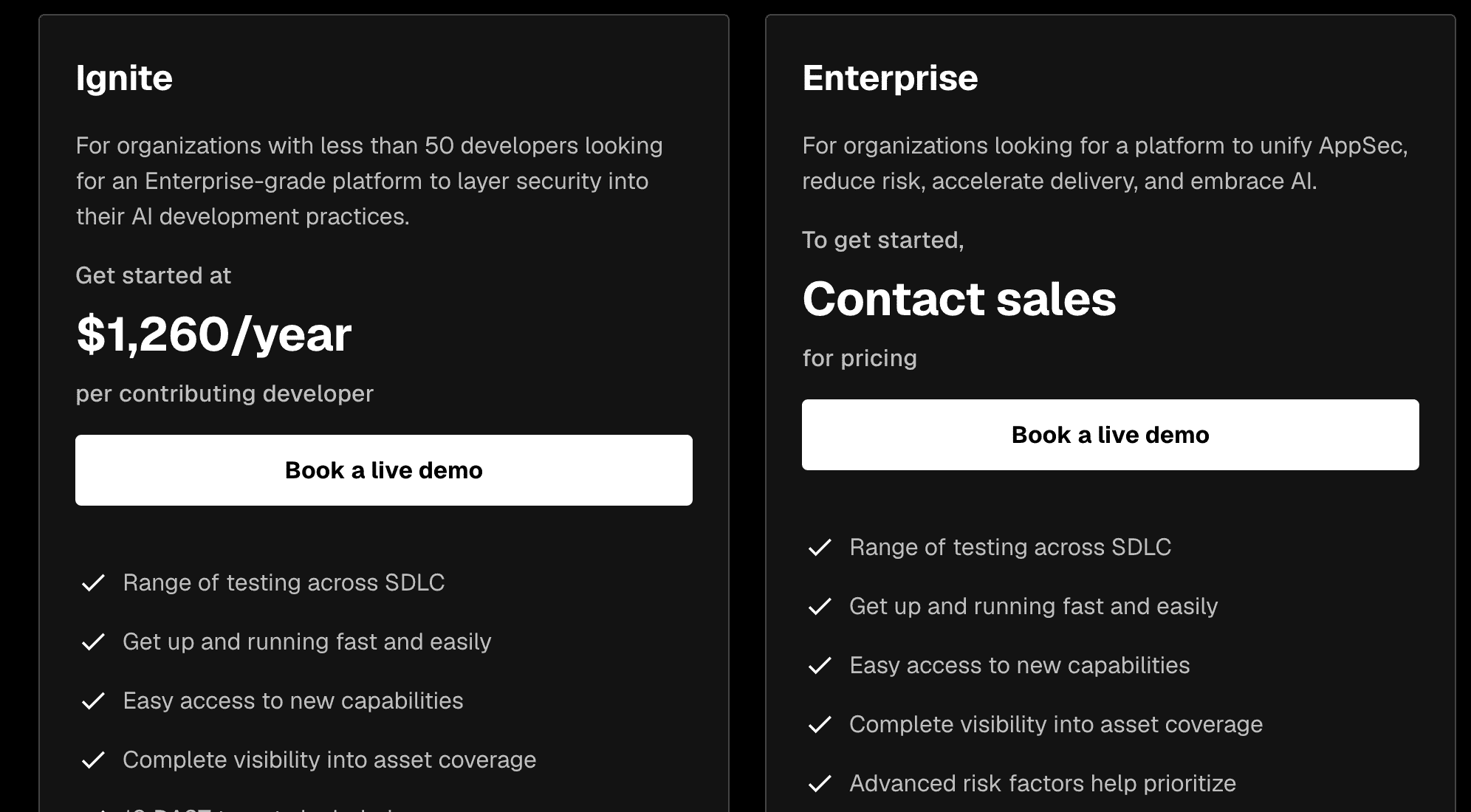
Snyk prices around developers, not cloud assets.
Public floor: $0
Team minimum: $125/month for 5 developers
Highest listed plan: $1,260/year per contributing developer
Enterprise: custom quote
Trial days: not listed
Budget grows with contributing developers, products bought separately, DAST targets, support level, FedRAMP needs, and enterprise controls. Count repos, dev seats, containers, IaC projects, and API/web targets first.
Pros and cons
✅ Auto-fix PRs for new CVEs: "Offers real-time alerts as new CVEs are published. Suggests automated fix PRs with updated, secure versions. Scans project dependencies (npm, Maven, pip, etc.) for known vulnerabilities." (TrustRadius)
✅ IDE plugin shifts left effectively: "The Snyk Code IDE plugin is something that really works very well and brings out the true shift-left story by providing very accurate findings and equally good mitigation solutions to the developers." (TrustRadius)
✅ Broad IaC + container coverage: "Helps in dependency management, SAST — Static Application Security Testing, Infra Code Scan (Terraform, CloudFormation, Docker image scan), OSS." (TrustRadius)
⚠️ No custom policies/rules: "Snyk doesn't allow users to define custom security policies or scanning rules, especially in SAST and IaC modules." (TrustRadius)
⚠️ Enterprise pricing prohibitive at scale: "While Snyk offers a generous free tier, enterprise pricing can be cost-prohibitive for larger teams or startups scanning many repositories or containers." (TrustRadius)
⚠️ False positives in mixed-language code: "Setting up is complex, and when not done properly, it provides too many false positives. We use another tool in parallel because it does not cover all of our languages, especially for older code that is in mixed languages." (TrustRadius)
Read also: Cloud Security Vulnerabilities - A 2026 Practitioner Guide to Detection, Prioritization, and Remediation
10. Prowler for free, open-source cloud security assessment
Best fit: teams that want open CSPM and compliance checks they can inspect, extend, and run through CLI, API, UI, or managed cloud.
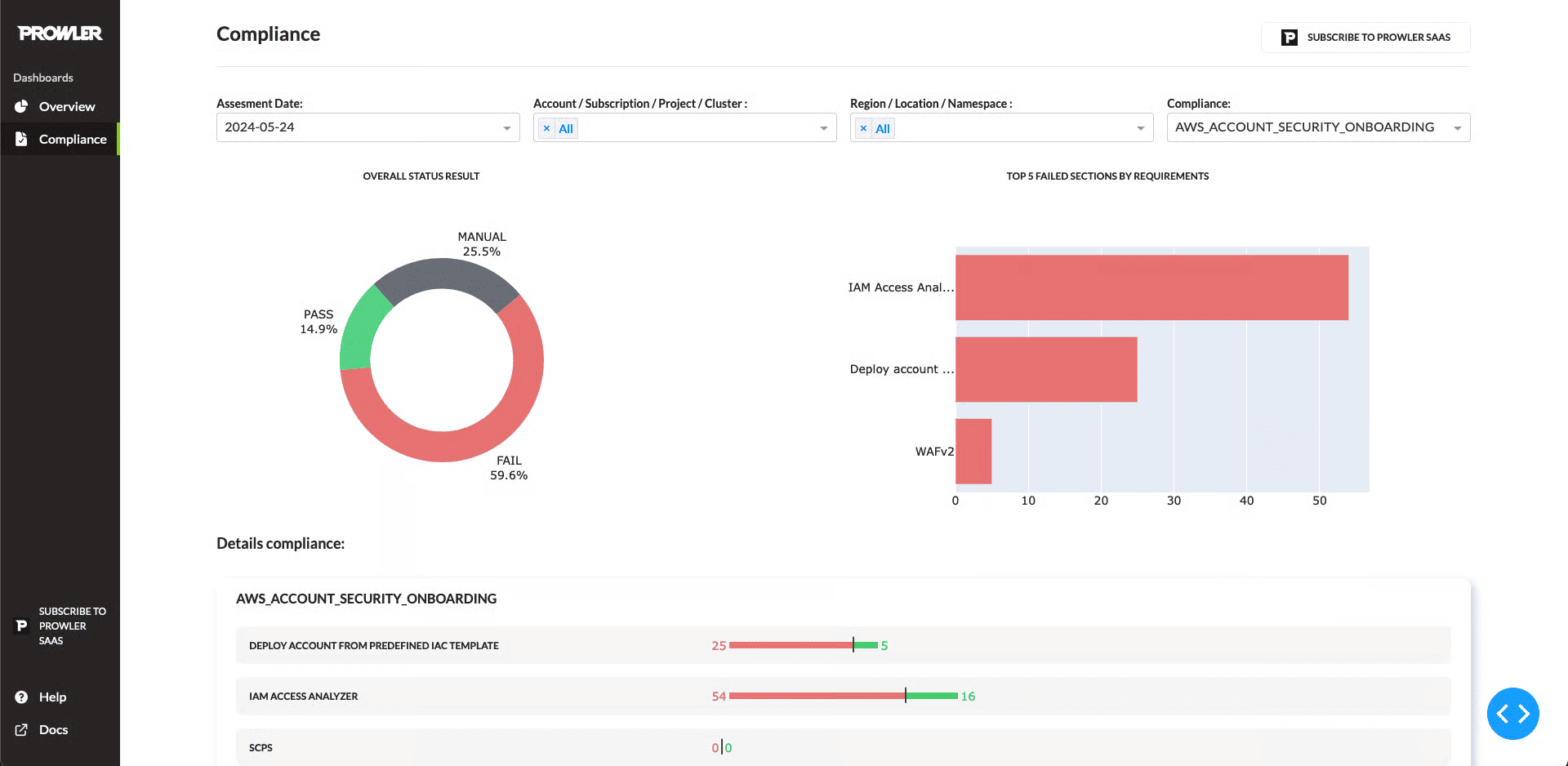
Prowler covers AWS, Azure, GCP, Kubernetes, GitHub, M365, Google Workspace, Oracle, Alibaba, OpenStack, Cloudflare, IaC, containers, and VMware/VCF in Enterprise. Users call out AWS/Azure/GCP assessments, compliance coverage, and audit use cases. It has 45M+ downloads, 13K+ GitHub stars, and 300+ contributors.
Check before buying: CMDB sync, ITSM routing, ownership mapping, RBAC, and evidence export.
Features
- CLI-based scanner: pip install + run from a developer laptop
- Coverage across AWS (300+ checks), Azure, GCP, Kubernetes
- Multiple framework mappings out of the box: CIS, NIST 800-53, PCI DSS, HIPAA, GDPR, FedRAMP, MITRE ATT&CK
- Multiple output formats: JSON, CSV, HTML, OCSF for SIEM ingestion
- Active GitHub project — regular community contributions and releases
- Prowler Pro (commercial SaaS) adds dashboards, scheduling, multi-account management
- Native integrations: AWS Security Hub, Slack, Jira (via Pro)
Pricing
Prowler Cloud starts at $99/cloud provider account/month, or $79 on annual billing. That includes 50,000 resources per scan. Overages run $0.30/resource/month, or $0.24 annually. Trial days aren’t stated; the trial includes one scan for one cloud account. Enterprise goes custom.
For teams comparing security tools for cloud computing, price accounts plus resource volume first.
Pros and cons
✅ Replaces manual compliance spreadsheets: "Before using Prowler, we were spending hours of our engineers' efforts on compliance and misconfiguration checks, saving that configuration in Excel sheets, and after switching to Prowler, these processes are super smooth and easy, and we are currently saving our engineers' time." (PeerSpot)
✅ Surfaces AWS plaintext-secret risks: "I use Prowler to identify AWS infrastructure vulnerabilities, like plaintext secrets, which greatly improved our compliance." (PeerSpot)
✅ Agentless cloud audits save engineer time: "I use Prowler for agentless cloud compliance and security audits, saving significant engineer time. Its setup is smooth." (PeerSpot)
⚠️ Limited PDF reporting: "For the reports, Prowler does not provide PDF reports for all compliances; it only gives reports for the Prowler configuration." (PeerSpot)
⚠️ Severity miscategorization: "Some of the findings in Prowler are not that critical but come in the critical category, so that could be improved." (PeerSpot)
⚠️ No auto-remediation: "I wish it provided PDF reports for all compliances and automatic remediation for identified misconfigurations." (PeerSpot)
To summarize: cloud security tools comparison table
That was a lot of tool-by-tool detail.
And honestly, after ten vendor sections, even a security architect can start mixing up who does posture, who does runtime, who handles compliance, and who only looks “complete” because the homepage says CNAPP.
So here’s the quick version.
This table compares the tools against the capabilities that matter most when buyers evaluate cloud security management tools: asset context, vulnerability risk, CSPM, runtime or SIEM coverage, IT compliance, and container/Kubernetes security.
⚠️ means partial coverage, module-dependent coverage, or coverage that usually needs another system to become operational.
Searches for top-rated container security tools cloud often focus only on runtime and image scanning. This table keeps the bigger buying picture in view.
| Tool | CMDB / asset context | Vulnerability risk | CSPM | SIEM / runtime detection | IT compliance | Container / K8s security |
|---|---|---|---|---|---|---|
| Cloudaware | ✅ | ✅ | ✅ | ✅ | ✅ | ✅ |
| Wiz | ⚠️ | ✅ | ✅ | ⚠️ | ✅ | ✅ |
| Palo Alto Prisma Cloud | ⚠️ | ✅ | ✅ | ✅ | ✅ | ✅ |
| CrowdStrike Falcon Cloud Security | ⚠️ | ✅ | ✅ | ✅ | ⚠️ | ✅ |
| Microsoft Defender for Cloud | ⚠️ | ✅ | ✅ | ✅ | ✅ | ✅ |
| Tenable Cloud Security | ⚠️ | ✅ | ✅ | ⚠️ | ✅ | ⚠️ |
| Sysdig Secure | ❌ | ✅ | ✅ | ✅ | ⚠️ | ✅ |
| Orca Security | ⚠️ | ✅ | ✅ | ⚠️ | ✅ | ✅ |
| Snyk | ❌ | ✅ | ⚠️ | ❌ | ⚠️ | ✅ |
| Prowler | ❌ | ⚠️ | ✅ | ❌ | ✅ | ⚠️ |
A fast read:
- Best for connected enterprise context: Cloudaware
- Best for adaptive protection from AI-driven attacks: Cloudaware NeoSec
- Best for attack-path CNAPP: Wiz, Orca
- Best for runtime-heavy cloud teams: CrowdStrike, Sysdig
- Best for Microsoft-first environments: Microsoft Defender for Cloud
- Best for AppSec and code-to-cloud fixes: Snyk
- Best for open CSPM and audit checks: Prowler
- Best for exposure management programs: Tenable
- Best for broad CNAPP depth inside a large security stack: Prisma Cloud
Read also: 5 Hybrid Cloud Security Best Practices for 2026
How to run a cloud security proof of value
A feature checklist is easy to win in a demo. A shared test is harder to game. Give every shortlisted vendor the same small, representative environment and five pieces of work.
- Inventory test. Connect representative cloud accounts and compare discovered assets with provider-native inventory. Record missing, duplicate, and unsupported resources.
- Risk-context test. Seed or select one misconfiguration, one vulnerable workload, one excessive permission, and one exposed data path. Check which signals the platform correlates and which remain separate.
- Ownership test. Require application, environment, owner, and business criticality on the finding. Watch what happens when ownership is missing or disputed.
- Remediation test. Route work into the team's real system, change the status there, and confirm whether state, exceptions, evidence, and closure synchronize back.
- Attack-chain test. On a test host, run a short chain: failed SSH logins, a successful login, a script run as root, then outbound traffic. Measure the time from the first signal to a finished investigation that names the asset owner, the business impact and the next response step.
- Economics test. Price the connected environment for 12 months, including modules, agents, data, retention, support, implementation, and the staff needed to operate the tool.
- Exit test. Export findings, history, evidence, policies, and ownership data. A security platform should not become the next system your team cannot leave.
How to choose the right cloud security tool for your environment
You’ve seen the ten options. Now comes the annoying part: picking one that fits your infrastructure, not somebody else’s magic quadrant.
Most cloud security management tools look impressive in isolation. The real test is simpler: can the tool tell you what exists, what is exposed, who owns it, why it matters, and what needs to happen next?
Use four decision angles.
1. Environment shape. Running mostly AWS with fast-moving cloud teams? Start with Wiz or Orca for CNAPP coverage, Snyk for the dev pipeline, and Cloudaware as the CMDB join layer.
Running Azure-first with Microsoft already everywhere? Defender for Cloud gives native Azure signal depth. Add Cloudaware when AWS, GCP, SaaS, on-prem, owners, services, and compliance evidence need one asset model. CrowdStrike makes sense if your SOC already lives in Falcon.
For regulated estates with data centers still alive, prioritize hybrid cloud security tools that understand cloud and on-prem together. Cloudaware can sit as the primary platform; Tenable adds vulnerability exposure depth; Prisma or Defender can cover cloud-specific workload protection.
2. Risk job. If your top problem is posture, choose CSPM depth. If vulnerability noise is killing triage, prioritize risk correlation: CVE, exposure, exploit signal, business service, owner, ticket. If containers run production, Sysdig Secure belongs in the mix for runtime. Wiz or Orca can add attack-path context. If attackers adapt faster than your rules update, add behavioral detection. NeoSec baselines every asset and investigates deviations, not just known signatures.
3. Operating model. Developer-led org? Snyk should be early in the stack, especially if teams already use CICD security tools for cloud workflows. Pair it with Sysdig for runtime and Cloudaware for centralized visibility after code becomes infrastructure.
SOC-led org? CrowdStrike, Defender, Prisma, or Sysdig will feel more natural because alerts, detections, and response workflows matter as much as posture.
Small SOC, or no 24/7 coverage? NeoSec's AI agent builds the timeline, scores business impact from the CMDB and routes a ready response, so a lean team can keep pace with automated attacks.
4. Scale and governance. For cloud security tools for large organizations, check CMDB integration, ownership mapping, compliance evidence, Jira or ServiceNow sync, exception handling, RBAC, and audit history. These boring features decide whether findings get fixed or just admired in dashboards.
Budget-constrained and audit-driven? Start with Prowler, native cloud-provider tools, Snyk Free, and a Cloudaware free trial. Cheap can work, as long as someone owns the glue.