


Nearly 99% of cloud security failures are expected to be customer-side. Not because AWS breaks. Or Azure, GCP, or Oracle suddenly forget how infrastructure works. Because one policy document says “encrypt sensitive data,” while the actual cloud computing security policy never says who checks dev restores, expired exceptions, overbroad IAM, or region drift.
That gap is exactly where devsecops experts Igor K. and Valentin Kel spend their time: inside messy cloud estates where policy has to survive CMDB data, ownership gaps, remediation queues, and compliance pressure.
As Igor puts it: “A cloud security policy that does not map to assets, owners, and evidence is just a nice intention.”
So this guide gets into the machinery.
- What belongs in the first version?
- Where does the policy template need provider-specific teeth?
- Why does multi-cloud governance get messy so fast?
- And how do teams keep policy alive after approval, when tickets, audits, exceptions, and remediation start behaving like real life?
TL;DR
- A cloud security policy is not “the security team’s document.” It is the operating agreement between risk, engineering, platform, IT ops, and GRC. The useful version tells teams what secure enough means, who owns the decision, which controls enforce the rule, and what evidence proves it worked.
- One parent policy is not enough for a real cloud estate. Most teams need a parent policy plus specialty policies for BYOD cloud access, network security, storage, email, SaaS apps, provider-native controls, and public-sector requirements like CJIS. Personal devices do not fail like S3 buckets. WAF policies do not fail like IAM.
- Policy and controls are not the same thing. The policy says, “restricted production data must use customer-managed encryption.” The control is the KMS configuration, bucket policy, CIS Benchmark check, alert, ticket, and evidence trail that proves the rule held up in AWS, Azure, GCP, Oracle, or SaaS.
- Provider-specific policies need translation, not copy-paste governance. AWS IAM policies, OCI policy statements, Google Cloud Armor rules, and Microsoft Defender for Cloud Apps policies all enforce different slices of the written policy. None of them replaces the policy. They implement it inside one provider’s operating model.
- The template matters less than the lifecycle. A strong cloud security policy template gives you purpose, scope, definitions, roles, policy statements, standards, exceptions, enforcement, review cadence, and version history. After that, the real work is ownership, version control, exception expiry, attestation, remediation, and policy evidence.
- Annual review is necessary that’s why continuous enforcement is what saves you. A policy reviewed once a year cannot keep up with daily configuration drift, emergency access, new cloud assets, SaaS changes, and expired exceptions. High-risk clauses need recurring checks, violation routing, owner notification, and closure evidence.
- Audit readiness comes from traceability. The question is not “do we have a policy?” It is: can you trace one written clause from rule → asset → control → violation → owner → exception → ticket → remediation → evidence? That is where a cloud security policy becomes defensible.
What is a cloud security policy?
A cloud security policy is a written document that defines how cloud assets, identities, data, networks, logging, exceptions, and remediation must be secured. It turns business risk into rules engineers can enforce across cloud accounts, workloads, SaaS integrations, Kubernetes, and hybrid infrastructure.
Most companies do not write it in one clean workshop. Security architecture brings control logic. Platform teams bring the AWS, Azure, GCP, and Oracle reality. DevSecOps explains what can run in CI/CD without blocking releases. GRC checks the audit trail. IT operations asks the brutal question: who owns this when the alert fires at 2 a.m.?
Final approval usually sits with the CISO or security leadership. In regulated environments, the parts tied to risk appetite, customer data, audit scope, or exception authority may become board-approved.
A cloud computing security policy is not the same thing as a security strategy.
Strategy says: reduce exposure, improve governance, clean up identity risk.
Policy says: No production database restore without the same encryption class as source. No public endpoint without approved business justification. No exception without owner, expiry date, and compensating control. No remediation queue without a RACI clear enough to survive handoff.
Kate Lichkina from Cloudaware ITAM says it cleanly:
That is the real job of a cloud security policy. Not to sound mature. To remove guessing from security decisions before the cloud estate starts making those decisions for you.
8 components of a cloud security policy
Before the policy gets into provider syntax or control mappings, it needs a spine. These eight components are that spine.
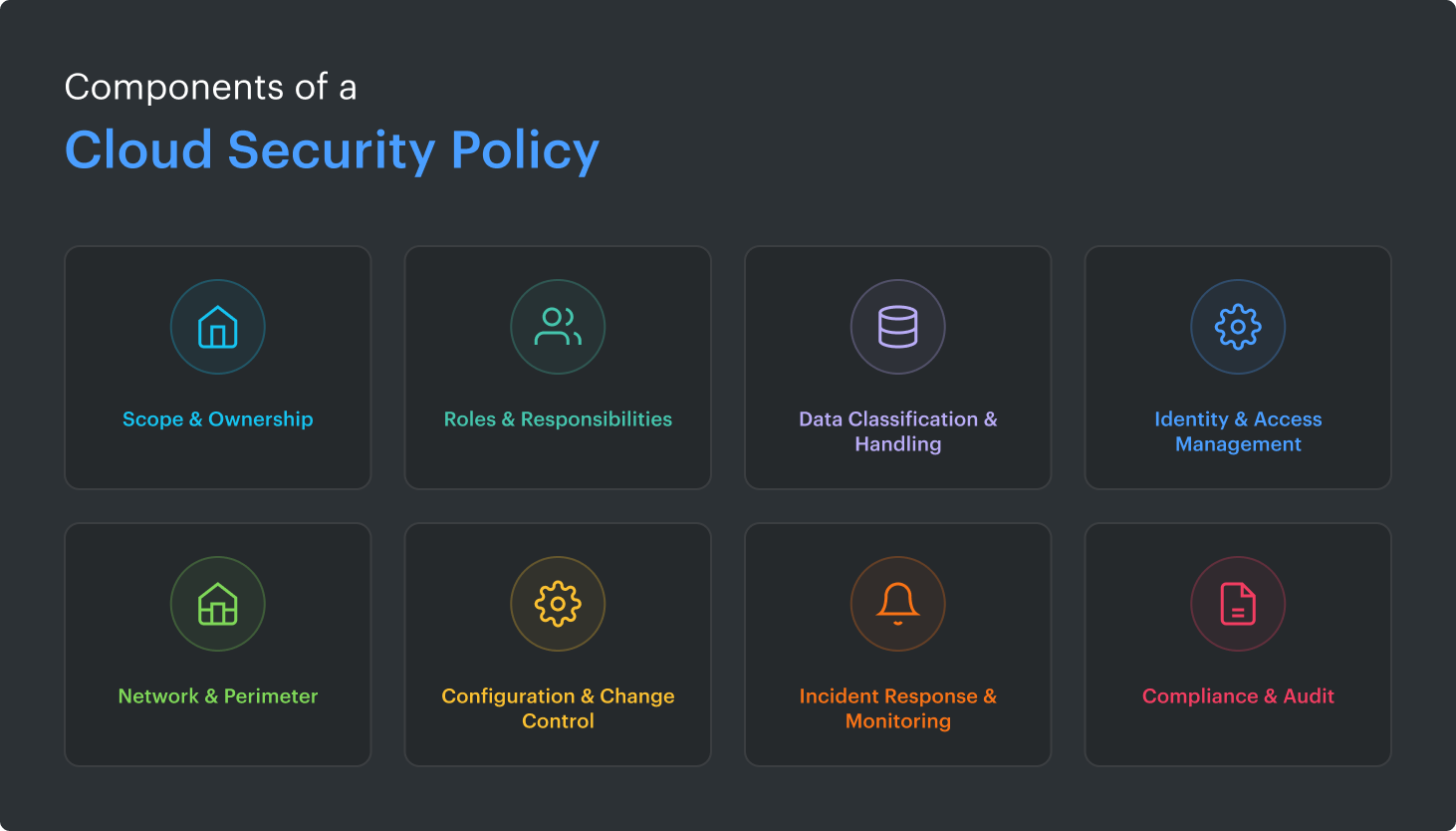
They connect cloud security controls and security policy in a way practitioners can actually use: what is covered, who owns the call, how strict the rule is, what gets monitored, and which evidence proves the rule held up outside the document.
In other words, this is where policy stops being a “security says so” page and starts behaving like an operating model for AWS, Azure, GCP, Oracle, Kubernetes, SaaS, CI/CD, backups, and everything else your teams keep shipping.
- Scope & ownership. Name the estate. AWS accounts, Azure subscriptions, GCP projects, Oracle tenancies, Kubernetes clusters, SaaS apps, CI/CD systems, backups, exports, and on-prem links. Then name the owner. Policy without ownership turns into archaeology.
- Roles & responsibilities. Build the RACI before the first exception appears. The CISO owns risk acceptance. Cloud owners manage platform guardrails. App owners fix workload-level breaches. GRC validates evidence. IT operations keeps the handoffs from turning into hallway folklore.
- Data classification & handling. Public, internal, confidential, restricted. Four labels are usually enough. The useful part comes next: encryption rules, allowed regions, retention, masking, backup handling, AI usage, and export restrictions. Sensitive data cannot be protected if nobody agrees on what "sensitive" means.
- Identity & access management. IAM is where policy becomes personal. Require MFA, least privilege, access reviews, break-glass paths, key rotation, service account owners, and expiry dates for elevated access. “Temporary admin” has a strange habit of becoming permanent architecture.
- Network & perimeter. Define what can face the internet, what needs private connectivity, and what requires explicit approval. Include segmentation, egress, VPN, WAF, firewall rules, DNS, and public exposure. A customer-facing API and an accidental open port should not live under the same vague rule.
- Configuration & change control. Tie CIS Benchmarks, IaC checks, approved images, drift detection, and pull-request review into one operating flow. This is where a cloud security controls policy earns its keep: the rule, the baseline, the control check, the ticket route, and the SLA.
- Incident response & monitoring. Logging, alerting, escalation, runbooks, evidence preservation, and on-call ownership belong here. Link this step to your cloud incident response process so the policy does not stop at “notify security.”
- Compliance & audit. Map rules to PCI DSS, HIPAA, GDPR, SOC 2, ISO 27017, and NIST only where they matter. Put evidence beside the requirement: asset record, access review, ticket, control result, exception approval, and configuration snapshot.
Kate Lichkina, Cloudaware ITAM:
How a cloud security policy differs from a strategy, a standard, and a control
Cloud teams mix these up all the time. Totally normal. The problem starts when the mix-up lands in production.
A CISO asks for stronger governance and means risk appetite, funding, and board-level direction.
A platform team hears “add guardrails” and starts writing Terraform checks.
GRC asks for evidence and gets a screenshot from an AWS console.
Engineering wants to know whether the deployment will be blocked or just flagged.
That is why the layers matter. Strategy, policy, standards, and controls are not four names for the same thing. They sit in a chain. Break one link, and the rule becomes either too vague to enforce or too technical to govern.
| Layer | What it means | Cloud example |
|---|---|---|
| Security strategy | Direction | “Reduce public exposure across production workloads by 80% this year.” |
| Security policy | Rules | “No production storage bucket may be public unless approved as a documented exception.” |
| Standards | Approved implementation patterns | “S3 Block Public Access must be enabled. Azure Storage public access must be disabled. GCP buckets must enforce uniform bucket-level access.” |
| Controls | Enforcement and proof | CSPM check, IAM deny rule, CI/CD policy-as-code test, SIEM alert, policy violation record, ticket with remediation SLA. |
Strategy sets the direction. Policy draws the boundary. Standards turn that boundary into approved build patterns. Controls prove whether production stayed inside it.
That last part is where teams usually get burned.
A policy may require sensitive data encryption. Sounds fine. But what about snapshots? Restored databases? SaaS exports? Analytics buckets? Dev copies made from production? Replicas in another region?
If the policy does not point to provider-specific standards and running controls, the sentence is mostly a wish with formatting.
So when someone asks about cloud security controls and security policy, the answer is simple: policy defines the rule; controls enforce it and produce evidence.
A practical cloud security controls policy should connect seven things in one chain:
- rule owner
- technical standard
- control check
- exception path
- remediation SLA
- evidence source
- review cadence
Good cloud security governance keeps that chain alive. Not once a year before the audit. Every time an account is created, a workload ships, a permission changes, or an exception quietly tries to become permanent architecture.
Why does your organization need a cloud security policy in 2026?
Because cloud risk now moves faster than review cycles.
- The shared responsibility model still puts most cloud failure on the customer side. Gartner's often-cited warning that nearly 99% of cloud security failures are customer-side is still the cleanest frame: AWS, Azure, GCP, and Oracle secure the cloud platform. Your team still owns configurations, IAM, encryption choices, data exposure, exceptions, remediation, and evidence.
That distinction matters in real work. AWS will not know whether a restored claims database should use a customer-managed key. Azure will not decide whether a public endpoint was approved for production. GCP will not chase an expired exception. The policy has to define those rules before people start improvising. - AI is making cloud change even faster. Orca’s 2025 State of Cloud Security Report found that 84% of organizations use AI in the cloud, and 62% have at least one vulnerable AI package in their environment. That means new services, libraries, permissions, identities, and data paths can appear before security has reviewed the risk.
- Audit windows are longer than cloud memory. SOC 2 Type II usually reviews control operation across a 3–12 month observation window. ISO 27001 keeps pressure on through annual surveillance audits after certification. So the question is not just “did we approve the policy?” It is: can we prove the control worked every week the auditor cares about?
That is why a cloud security policy matters in 2026.
Not as a PDF. As the operating rulebook for multi-cloud ownership, configuration drift, exception expiry, remediation routing, and audit readiness before “temporary” quietly becomes architecture.
Cloud security controls vs the policy that requires them
This confusion shows up fast in cloud security reviews.
The team has an encryption policy. Great. Now the auditor asks for proof.
Which production assets are covered?
Which key pattern is approved?
Who owns the KMS key?
What catches a restored database using provider-managed encryption?
Where does the exception live?
How fast does the ticket need to close?
That is where the difference matters.
A cloud security policy defines the rules the organization agreed to enforce. A control is the technical or procedural mechanism that blocks, detects, proves, or routes action when reality drifts from that rule.
| Policy requirement | Control that enforces or proves it |
|---|---|
| Production data must use encryption at rest with a customer-managed key. | KMS configuration, approved key policy, key rotation status, key owner, and a posture check that flags provider-managed keys in production. |
| Public access is not allowed for production databases. | Private endpoint, security group rule, firewall baseline, exposure scan, and ticket route for any internet-facing database. |
| Privileged access must be temporary. | IAM workflow, MFA, approval record, expiry date, access review, session logging, and audit trail. |
| Encryption changes must be visible to security. | Detective control that alerts on KMS policy edits, disabled keys, key deletion schedule, or encryption drift after restore or replica creation. |
A weak cloud security controls policy stops at “encrypt sensitive data.” That line looks responsible. It is also useless during remediation.
A useful version names the control owner, approved encryption pattern, environments in scope, evidence source, exception path, and remediation SLA. For example,
- Restricted production databases must use customer-managed keys,
- Key owners must be assigned,
- Rotation must follow the approved schedule,
- Restored copies must inherit the same encryption class,
- Any drift opens a high-priority ticket for the application owner.
That is the practical link between cloud security controls and security policy.
The policy defines the boundary. Preventive controls block risky changes before deployment, like a Terraform plan trying to create an unencrypted production bucket. Detective controls catch what slips through later, like a manual console edit, restored database, disabled key, public endpoint, or overbroad IAM role.
The dashboard should not show “encryption: pass/fail” and call it done. Practitioners need the operating view:
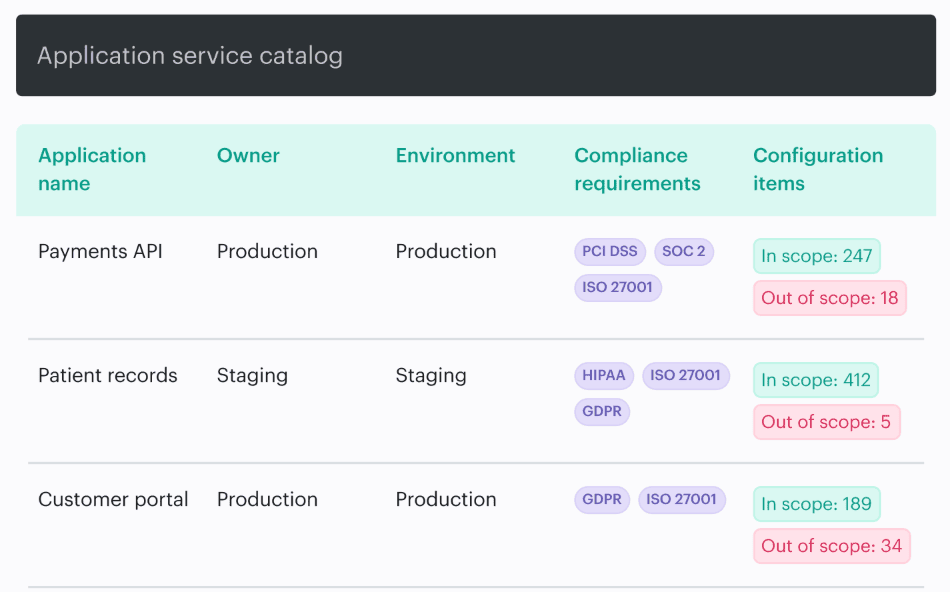
One of the IT Compliance dashboards Cloudaware clients use. Schedule a demo to see it live
That is what GRC, platform, and security teams need when evidence gets real. Not a policy sentence. Not a screenshot from one console. A trace from rule to asset, control state, owner, exception, ticket, and closure proof.
Alla L., Cloudaware ITAM expert
For private cloud environments, use the Private Cloud Data Security: How to Operate and Prove Controls Across Infrastructure guide.
Cloud security policy template and document structure
A cloud security policy document has one job: remove guessing from cloud decisions. Not inspire teams. Not prove security maturity with a 40-page PDF. Remove guessing.
- Can this workload run in this region?
- Who approves a public endpoint?
- What counts as restricted data?
- When does an exception expire?
- Which control proves encryption stayed on after the release?
That is what a good cloud computing security policy template gives you: the skeleton for a policy people can actually use.
Every cloud security policy document includes
| Section | What it should answer |
|---|---|
| Purpose | Why this policy exists. A strong purpose statement might say: “Reduce unauthorized exposure of production cloud data by enforcing encryption, access, and monitoring requirements.” |
| Scope | Which environments, accounts, subscriptions, projects, workloads, SaaS systems, data stores, backups, and teams are covered. The scope statement is where ambiguity either dies or quietly becomes audit pain. |
| Definitions | Terms like production, restricted data, customer-managed key, privileged access, exception, owner, and evidence. Boring? Yes. Necessary? Absolutely. |
| Roles & responsibilities | Who writes, approves, implements, reviews, and attests to the policy. Name the owner, control owner, approver, GRC reviewer, and operational team. |
| Policy statements | The rules themselves. Example: “All production data stores must use encryption at rest with approved customer-managed keys.” |
| Standards & references | The baselines behind the rules: CIS Benchmarks, NIST, ISO 27017, PCI DSS, HIPAA, SOC 2, internal architecture standards, or provider-specific requirements. |
| Exceptions process | How teams request exceptions, who approves them, what compensating control is required, and when the exception expires. This is exception management, not “security said okay in Slack.” |
| Enforcement & consequences | What happens when a rule fails: blocked deployment, remediation ticket, risk acceptance, escalation, or access removal? |
| Review cadence & version history | How often the policy is reviewed, what changed, who approved it, and what version control proves during an audit. Include version history and attestation records. |
In Cloudaware IT Compliance, that same idea becomes more operational. A policy can define the object being checked, the scope query that decides which assets enter evaluation, the logic that determines compliance, and the output object where policy results land.
So instead of leaving “production data must be encrypted” as a sentence in a document, the policy can evaluate real cloud assets, create a policy violation when an object is noncompliant, and close the violation once the object is fixed.
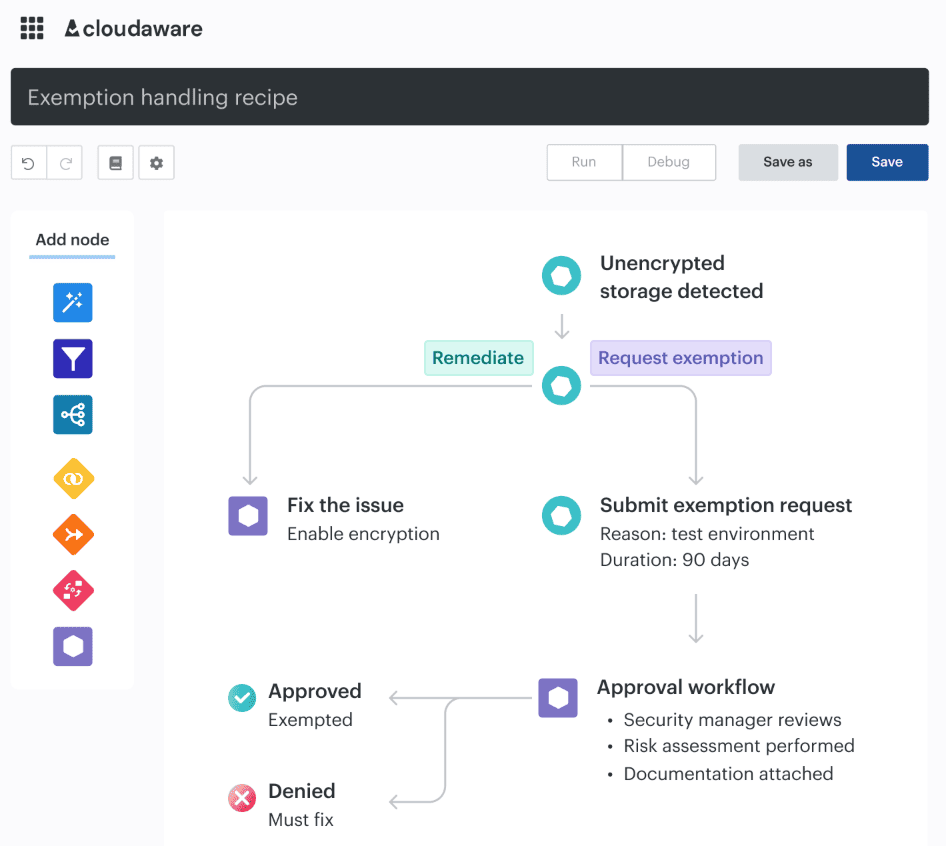
That leaves policy results, violation records, close dates, and reports that support audit evidence later.
The Templates Library gives teams a faster starting point: prebuilt policy templates available for deployment and customization.
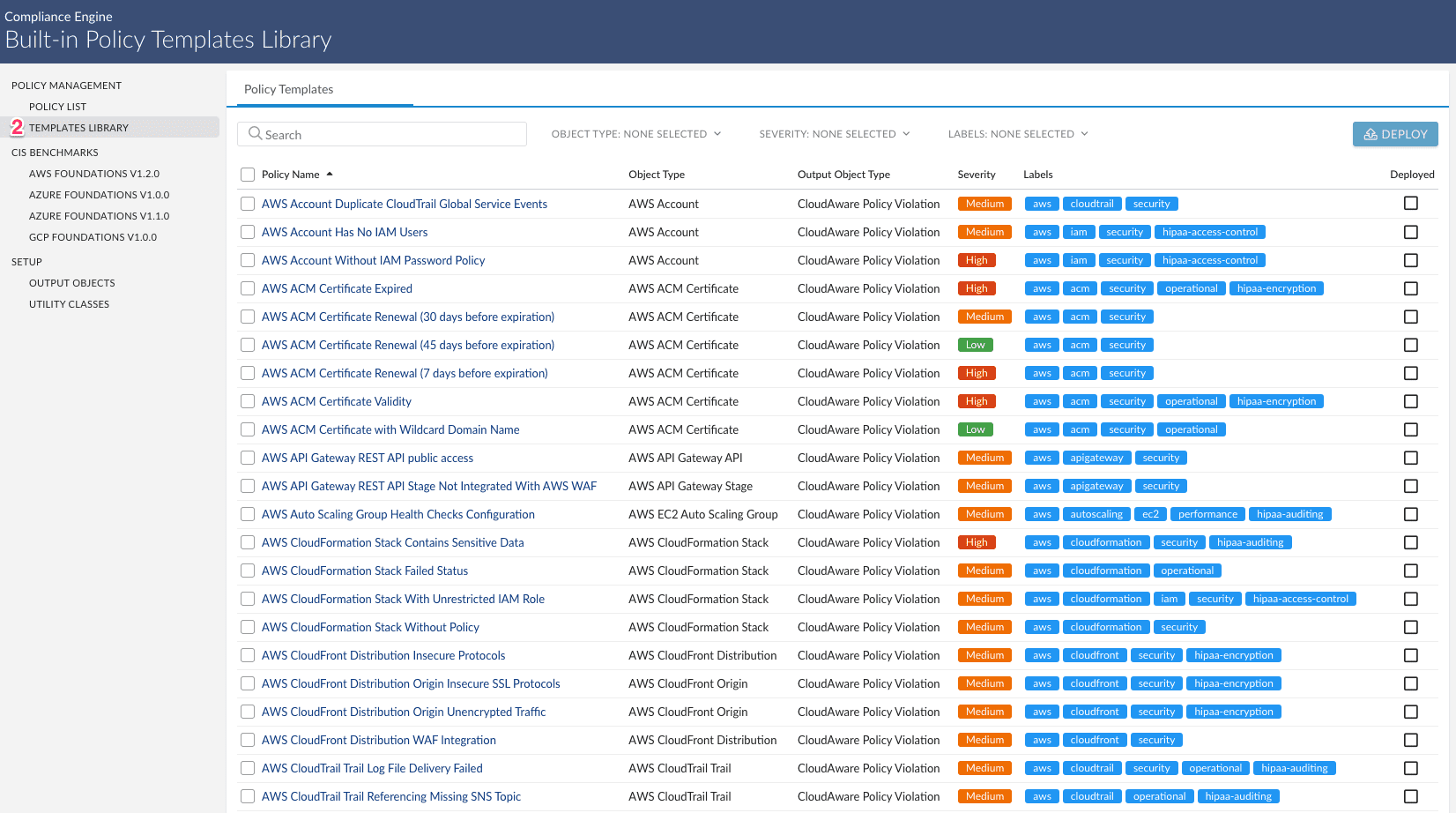
Teams can clone a template, adjust the policy name, description, severity, labels, scope, and evaluation logic, then validate and deploy it. If the requirement is too specific for an existing template, a custom policy request can define the expected outcome, evaluation criteria, violation details, and test objects.
For a common storage or encryption requirement, you might adapt an existing policy pattern. For a business-specific rule, like “restricted customer exports in production must use approved KMS keys and named data owners,” the policy should be built around your actual assets, owners, exceptions, review cadence, and evidence model.
That is the practical value of a cloud security policy template. It gets you out of blank-page mode. Then the real work begins: tuning the policy to your assets, owners, exceptions, review cadence, and evidence model.
Valentin Kel, Cloudaware DevOps Engineer:
Specialty cloud security policies you also need
Most organizations have a parent policy plus 4–6 specialty policies for the surfaces where cloud risk behaves differently. Personal devices do not fail like VPCs. Object storage does not fail like email. SaaS approval does not fail like Kubernetes networking.
That is why the policy hierarchy matters. The parent policy defines governance: ownership, exception rules, audit evidence, and review cadence. Each sub-policy turns that model into rules a team can enforce without opening a 40-page document during remediation.
The five most searched specialty policy areas are BYOD cloud access, cloud network security, cloud storage security, cloud email security, and cloud application security operations.
Kate Lichkina, Cloudaware ITAM:
Sample BYOD cloud access security policy
Bring-your-own-device plus cloud apps is where shadow IT stops looking shadowy. It looks normal.
A contractor opens Microsoft 365 from a personal laptop. A sales manager downloads a customer export from Google Workspace before a flight. Someone checks a SaaS dashboard from an unmanaged phone. Nobody meant to bypass security, yet restricted data just left the governed environment.
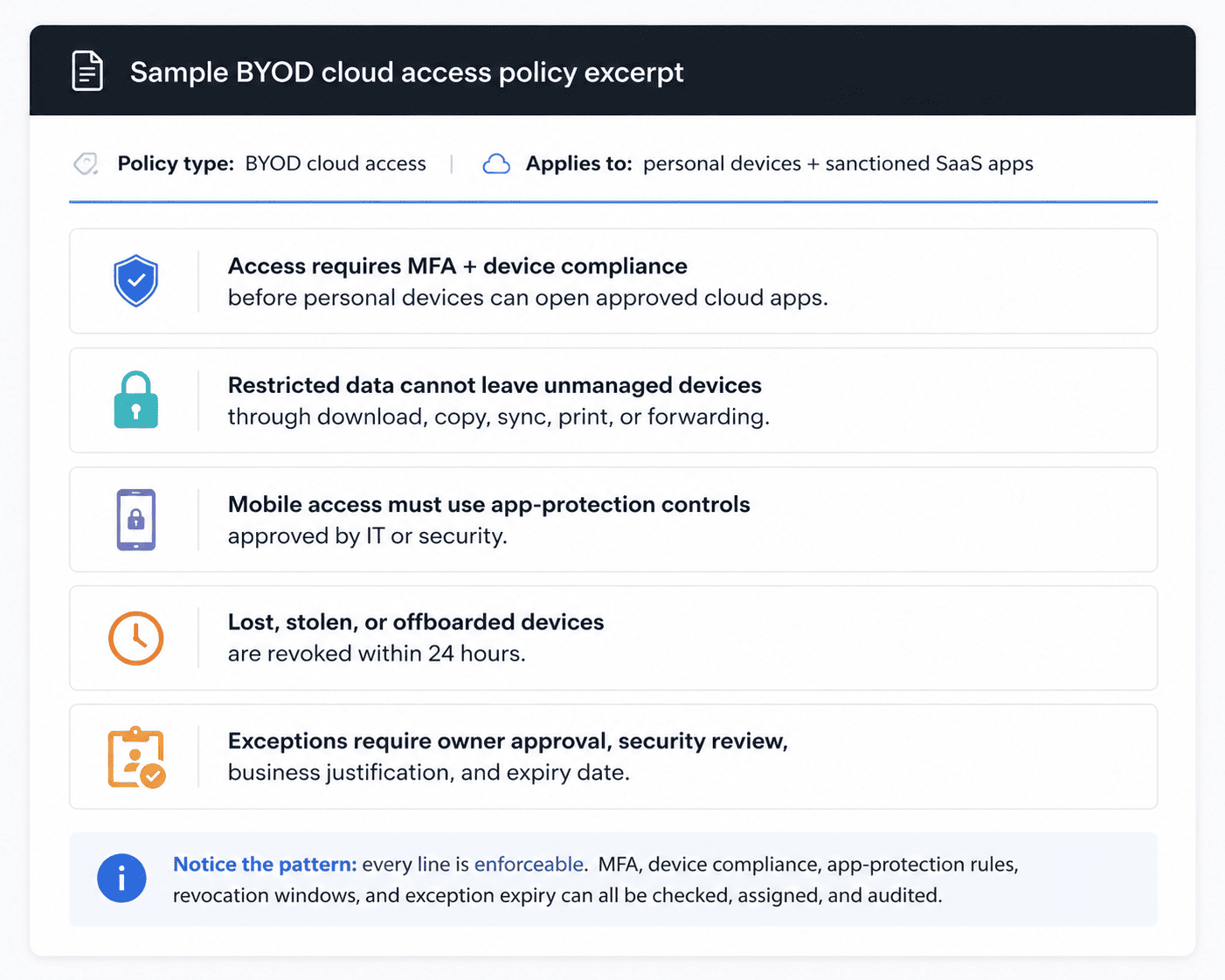
A sample BYOD cloud access security policy should define device enrollment requirements, MFA, conditional access, MDM, MAM, CASB monitoring, and app-level restrictions. Microsoft Intune, JAMF, and app-protection policy settings usually enforce the rule underneath.
Full policy: BYOD cloud access security policy
Cloud network security policy
The risky part of cloud networking is not that teams expose something. Some workloads need to be public. The risk starts when nobody can explain why a resource is public, who approved it, or whether the exposure still matches the architecture.
A cloud network security policy should cover VPC design, segmentation, security group hygiene, public IP exposure, VPC peering, egress filtering, private endpoints, micro-segmentation, and transit gateway routing. Good rules get specific: no internet-facing admin ports in production, no broad inbound CIDR ranges without exception approval, no unmanaged peering path between sensitive environments.
Here is an element of its requirements represented in CloudAware PCI DSS v3.2.1 policy template:
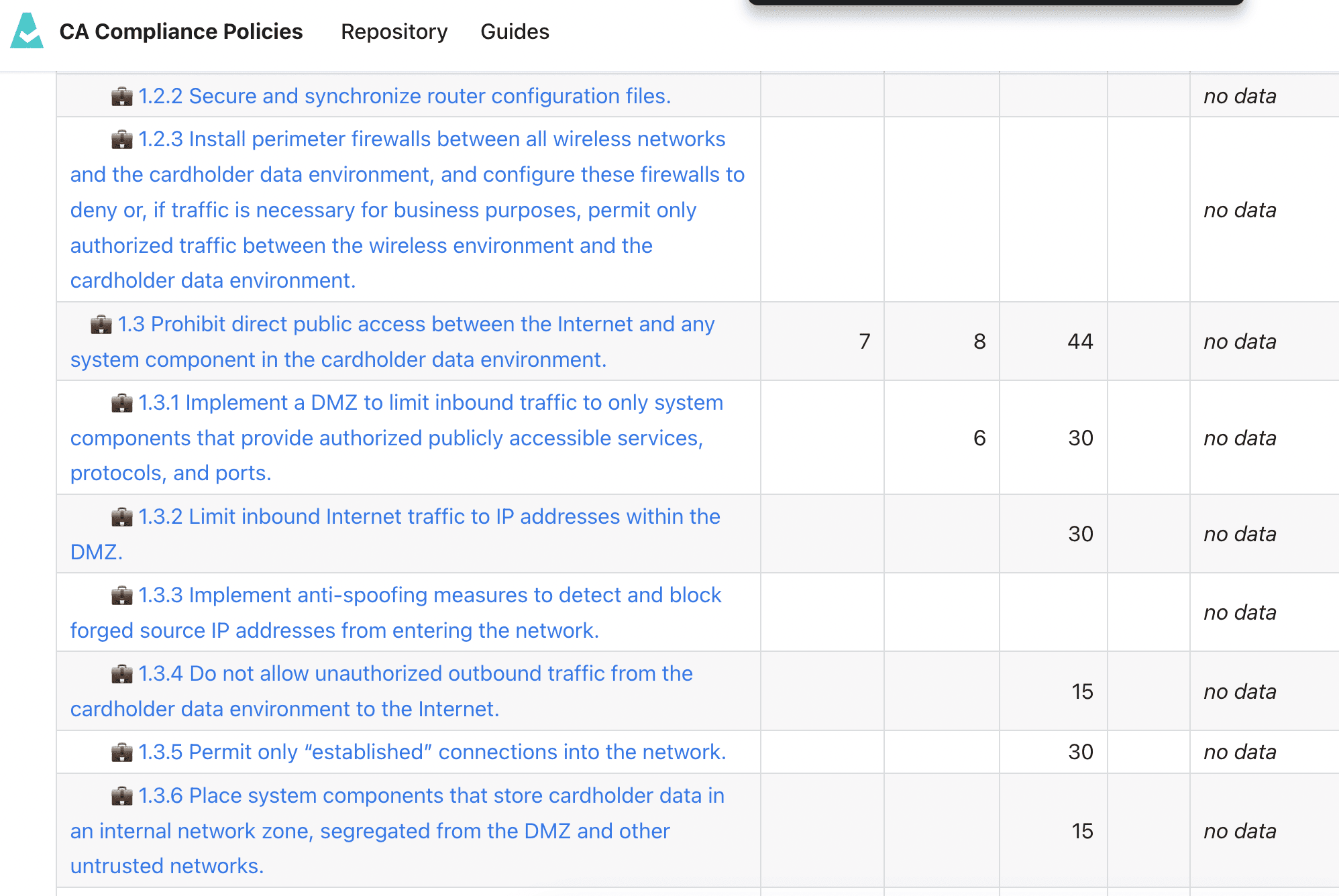
Cloud network security policy usually gets teeth through CIS Benchmark checks, IaC tests, and continuous posture monitoring. When the policy is launched, Cloudaware gives dashboard flags every public-facing resource that violates the policy, then show the asset, account, environment, security group, open port, owner, exception status, CIS mapping, and remediation ticket.
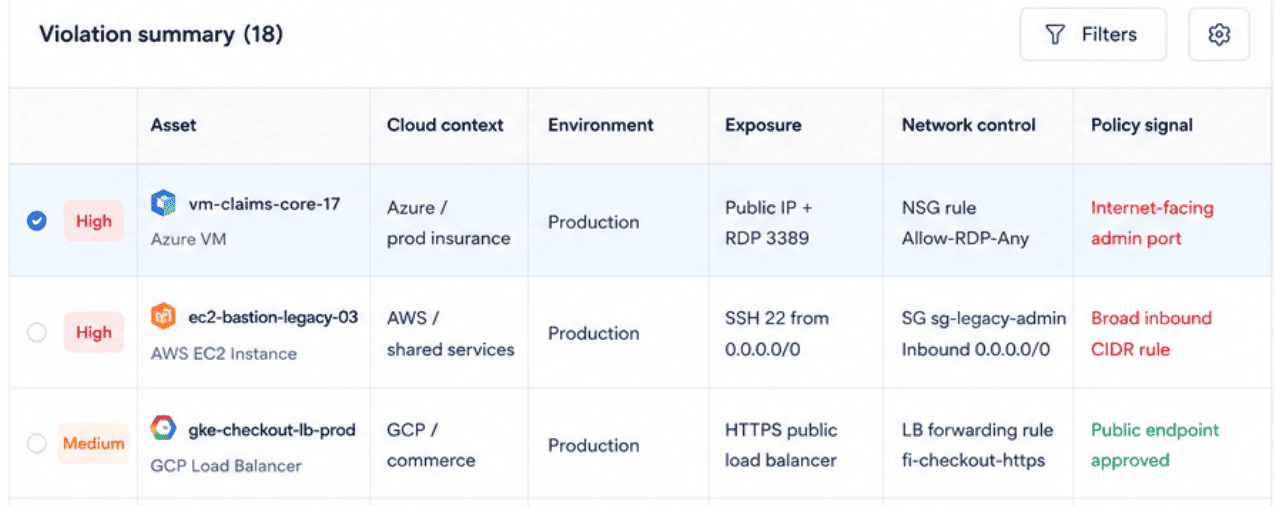
That is the moment a network policy becomes operational evidence.
Read also: Cloud Security Automation: The Practical Framework for Multi-Cloud Teams
Cloud storage security policy
Object storage is quiet until it is not.
A test bucket looks harmless. A copied export gets created for analytics. Someone relaxes a bucket policy during troubleshooting. A lifecycle rule survives long after the data class changes. S3, Azure Blob Storage, GCS, and OCI Object Storage make storage easy to create, but painfully easy to lose track of once teams start copying data across regions, backups, dev environments, and AI experiments.
A cloud storage security policy should define the rules for public access, server-side encryption, approved KMS usage, access logging, object versioning, retention, immutability, lifecycle rules, backup handling, and evidence. For regulated data, it also needs to answer the harder questions: which data can be replicated, which regions are allowed, who owns the bucket, and when must the data be deleted?
In practice, storage policy gets teeth through checks that look boring until they save you during an audit. Cloudaware policy templates cover storage requirements such as:
- Bucket is anonymously or publicly accessible
- Bucket logging is not enabled
- Bucket with Log Sink does not have Versioning
- Bucket Uniform Bucket-Level Access is not enabled
- Google Storage Bucket is located in a less cost-effective region
That last one matters more than teams expect. Region choice is not only a FinOps decision. It can affect latency, data residency, backup design, and whether the “approved location” in the policy still matches where the bucket actually lives.
A useful dashboard should not stop at “bucket failed.” Show the operational context:
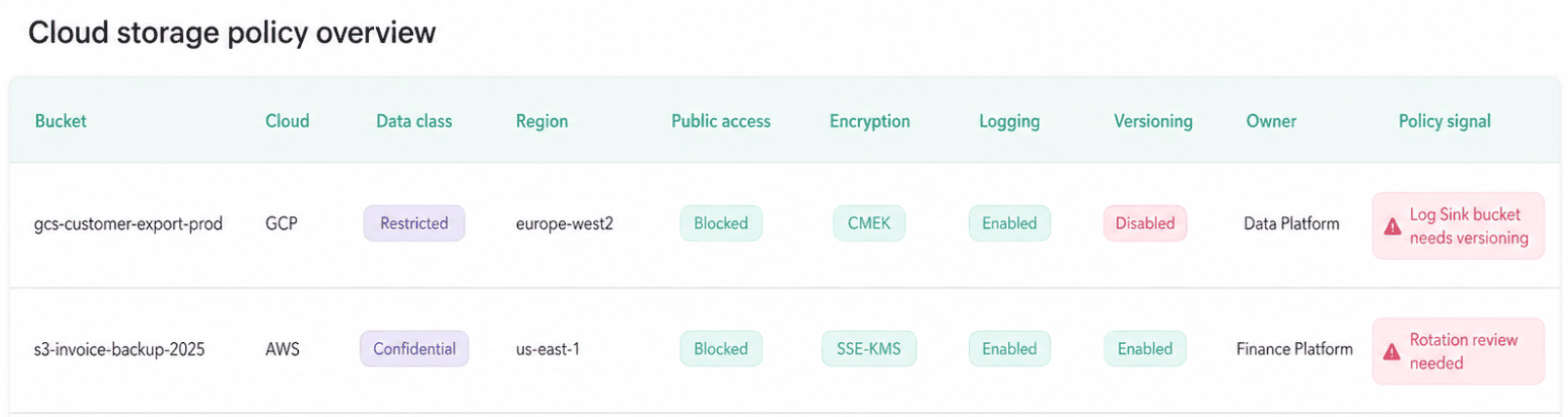
This is the storage policy view GRC and platform teams actually need:
- Bucket,
- Data class,
- Region,
- Access posture,
- Encryption state,
- Logging,
- Versioning,
- Owner,
- Open violation,
- Evidence link.
Nobody wants to reconstruct storage history from console screenshots three months after the fact. The policy should already know what changed, which rule failed, who owns the fix, and whether the exception is still valid.
Read also: Zero Trust Cloud Security: A Practical Multi-Cloud Architecture and Approach
Cloud email security policy
Email is not “just collaboration.” It is identity, data movement, legal recordkeeping, phishing surface, and executive risk sitting inside Microsoft 365 or Google Workspace.
A cloud email security policy should define SPF, DKIM, DMARC, MFA, admin-role restrictions, external-mail labeling, anti-phishing controls, malware scanning, mailbox forwarding, sensitive-data DLP, retention, and eDiscovery holds. The uncomfortable part is usually delegation: who can approve mailbox access, who can set forwarding rules, and which data classes cannot leave the tenant.
A crisp test for the policy: can it answer this in ten seconds? Can a finance user forward customer billing data from Google Workspace to a personal Gmail account? If the answer is “depends,” the policy is not finished. “Depends” is fine for architecture debates. It is terrible for audit readiness.
Sample cloud application security and operational policy
SaaS and PaaS apps create a different kind of risk. Less firewall drama. More ownership fog.
A team buys a tool. Another team integrates it. Someone enables admin access. Secrets land in the deployment pipeline. Logs exist, technically, but nobody knows where. Six months later, audit asks who approved the app and whether SSO was required before customer data entered the system.
When application records, integrations, and policy checks are configured, a Cloudaware CSPM report connects the app to its owner, environment, related CIs, policy violations, exception status, and evidence. Keep vendor risk, SSO, deployment approval, secrets, and logging fields source-aware: they should come from the CMDB, identity tools, CI/CD, ticketing, GRC, secrets managers, or log integrations, not from guesswork.
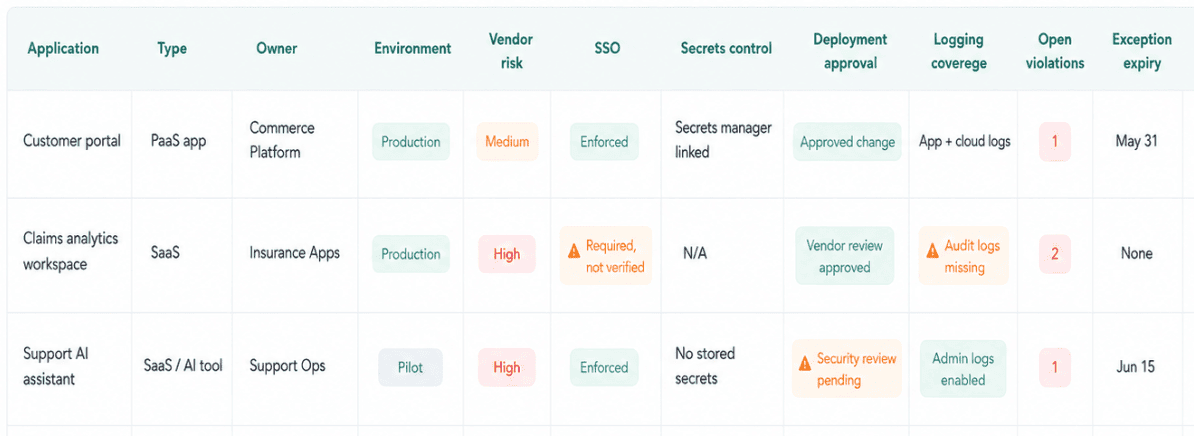
The dashboard version should be your application record, not a checklist.
Read also: 15 DevSecOps Tools - Software Features & Pricing Review
Provider-specific cloud security policies (AWS, Oracle, GCP, Microsoft)
A cloud provider security policy can mean two different things. Same phrase. Different job.
Sometimes people mean the provider’s own security policy: the platform security, infrastructure protections, compliance programs, and service commitments you inherit under the shared responsibility model.
Other times they mean the in-product policy your team writes inside a provider console: an AWS IAM policy, Azure Policy assignment, GCP organization policy constraint, Oracle Cloud Infrastructure IAM policy, or another console policy that works as a native control.
That naming overlap creates real confusion in multi-cloud governance.
The provider’s policy tells you what AWS, Microsoft, Google, or Oracle secures. Your written cloud security policy tells your teams what must be true in your environment. Provider-native policies enforce pieces of that rule inside one platform.
So when someone says, “We already have policies in AWS,” the next question is not “where are they?” It is: What written rule do those policies implement, who owns the exception path, and where is the evidence?
| Written policy rule | AWS | Microsoft / Azure | GCP | Oracle |
|---|---|---|---|---|
| Restrict production admin access | IAM policy, SCP, permission boundary | Azure RBAC, Azure Policy, Conditional Access | IAM allow/deny policy, Org Policy | OCI IAM policy, compartments |
| Block public storage exposure | S3 bucket policy, Block Public Access | Storage account policy, Defender for Cloud alert | GCS IAM, public access prevention | Object Storage policy |
| Enforce approved regions | SCP in AWS Organizations | Azure Policy allowed locations | Organization Policy constraints | OCI governance rules |
| Require encryption for regulated data | KMS key policy, resource policy | Key Vault, storage encryption policy | Cloud KMS, CMEK policy | Vault keys, Object Storage encryption |
This is the cleanest way to frame provider-specific cloud security policy work: the written policy defines intent; the provider-native policy translates that intent into enforcement.
AWS cloud security policy
An AWS cloud security policy has to separate the rule your organization approves from the AWS mechanisms that enforce parts of it. Otherwise, teams end up saying “we use IAM” as if IAM alone explains least privilege, ownership, exception expiry, and audit evidence.
In AWS, provider-specific policy usually shows up in three technical layers:
| AWS layer | What it controls | Practitioner note |
|---|---|---|
| Identity-based IAM policy | What a user, role, or service principal can do | Useful for least privilege, but risky when roles keep gaining permissions release after release. |
| Resource-based policy | Who can access a bucket, key, queue, role, or other AWS resource | This is where cross-account access often hides in plain sight. |
| Service Control Policy | The maximum permissions allowed for an AWS account or organizational unit | SCPs are guardrails. They can limit access, but they do not grant access by themselves. |
That SCP detail matters. An SCP can block a risky action across an OU, but it will not tell you whether an exception was approved, whether the owner is still valid, or whether the workload still needs that path. AWS gives you the native enforcement layer. Governance still needs business context.
Take production admin access. The written policy may require elevated access to be temporary, reviewed, and tied to a named owner. AWS implementation can involve IAM roles, MFA conditions, permission boundaries, access review workflows, and session logging. Miss one piece, and “temporary admin” starts behaving like permanent architecture.
For restricted S3 data, one policy clause turns into several control points:
- S3 bucket policies,
- Block Public Access,
- KMS key policies,
- CloudTrail object-level logging,
- Config coverage,
- and posture checks.
No public restricted data” sounds simple until you have copied exports, analytics buckets, backups, and cross-account consumers.
Cross-account access gets even messier. A KMS key policy may look reasonable. A role trust policy may look reasonable. Together, they can create access nobody owns. That is why the policy should require a business reason, named owner, review date, exception expiry, and evidence. Not just “approved IAM configuration.”
Cloudaware’s policy library is organized across AWS domains such as Account, IAM, S3, KMS, CloudTrail, EC2, RDS, VPC, WAF, GuardDuty, Security Hub, and more. Account-level templates include checks for requirements like
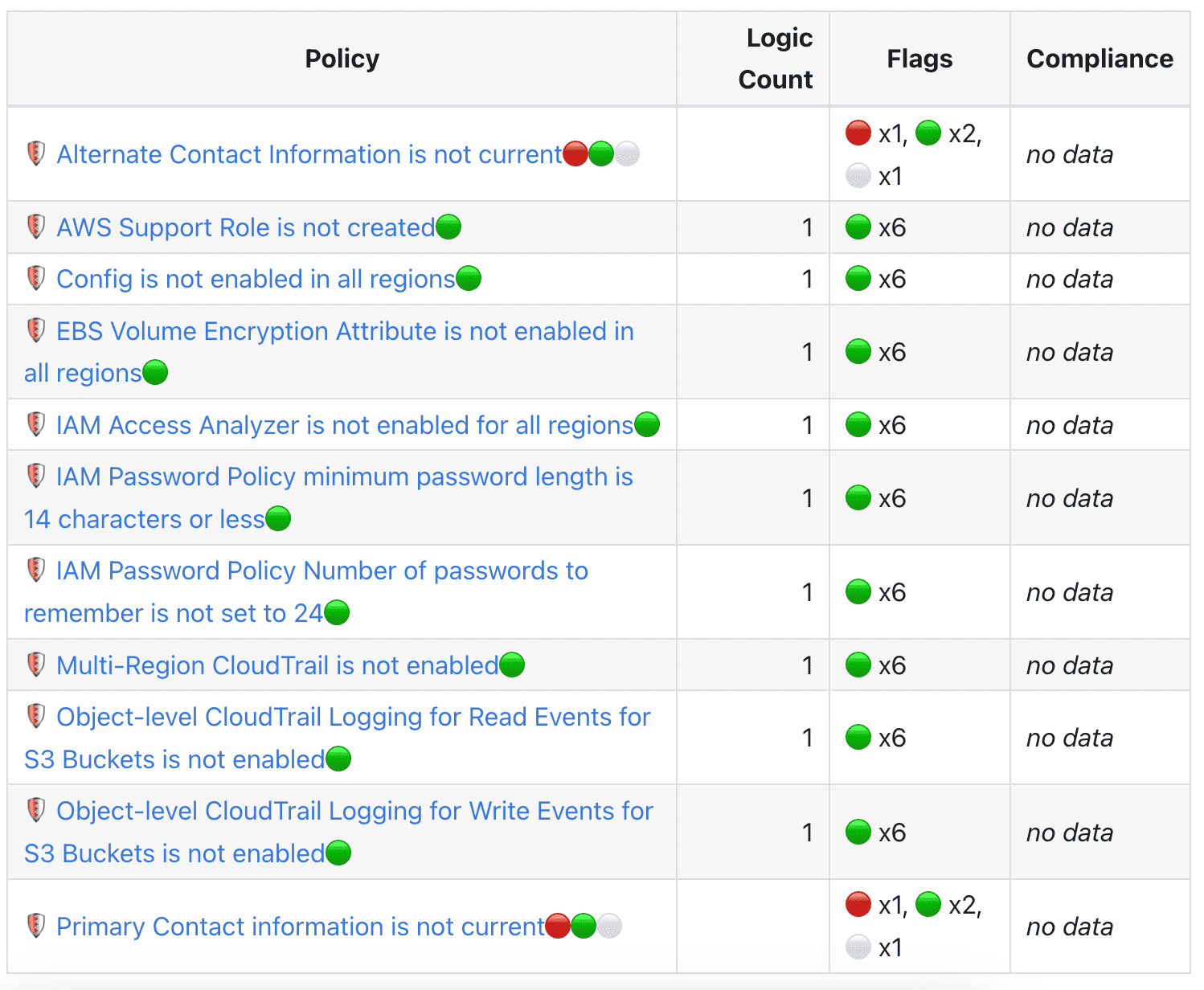
That is the bridge practitioners need: not another place to admire JSON, but a way to connect AWS-native controls back to the rule the business approved.
| Policy requirement | AWS-native control layer | What the evidence view should show |
|---|---|---|
| Restricted S3 data must not be public | S3 bucket policy, Block Public Access, CloudTrail object logging | Bucket, account, owner, public access state, policy result, open violation, evidence record |
| Admin access must be reviewed and time-bound | IAM role, permission boundary, MFA condition, access review workflow | Role, account, owner, last review date, exception expiry, ticket status |
| Cloud activity must be traceable | CloudTrail, AWS Config, object-level logging | Account coverage, missing regions, logging gaps, policy result |
| Storage encryption must stay enabled | EBS encryption setting, KMS key policy, S3 encryption controls | Asset, encryption state, key type, owner, drift signal, remediation status |
The real job of provider-specific policy management is not collecting every native policy object for the sake of completeness. It is connecting the AWS control layer to the policy clause, the asset, the owner, the exception, the violation, and the evidence trail.
That is where an AWS cloud security policy becomes useful in production. Not because it mentions IAM, SCPs, KMS, and S3. Because it tells teams what “secure enough” means when those controls collide in a real account.
Oracle security policy cloud (OCI IAM policies)
Oracle needs a slightly different brain than AWS.
In AWS, teams often think in actions, resources, JSON conditions, and account-level guardrails. In OCI, policy work starts with tenancy structure: identity domains, groups, verbs, resource families, and the compartment where the workload lives.
That is why OCI IAM policy language feels unusually readable. It looks like a permission sentence: allow group <group_name> to <verb> <resource-type> in <location> where <conditions>
A simple policy statement might say: allow group DatabaseAdmins to manage autonomous-database-family in compartment Prod-ERP
Nice and clean. Also easy to over-trust.
Enterprise teams moving Oracle databases, ERP, analytics, or finance workloads into OCI often bring old access assumptions with them. On-prem, a DBA group may have made sense because the boundary was a database, a server, or an internal network zone. In OCI, that same group can become too powerful if it gets manage database-family across a compartment that also contains test clones, backup databases, reporting replicas, and migration leftovers.
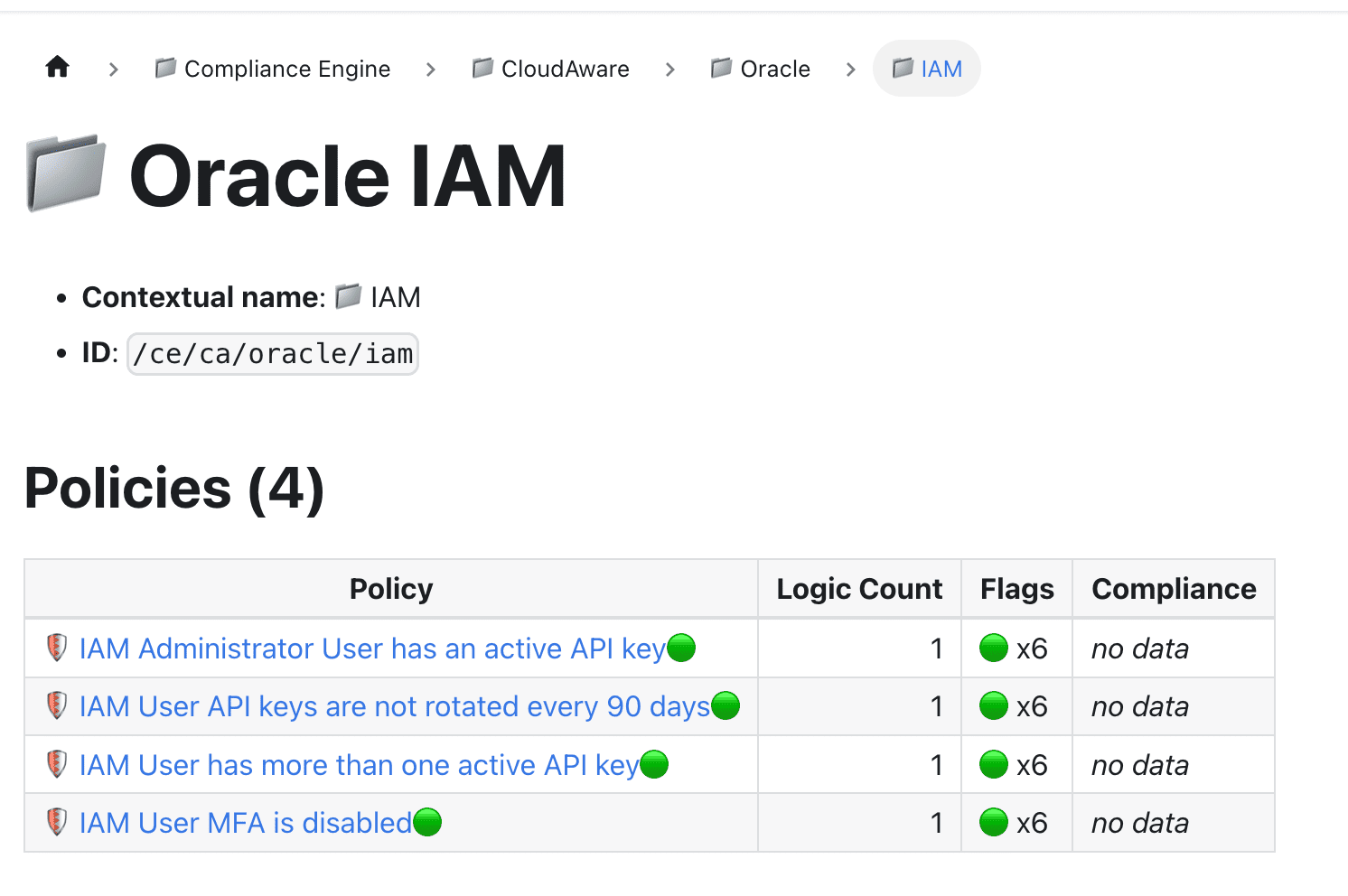
A written cloud security policy might say: “Production Oracle databases must be managed only by approved database operations groups.”
OCI turns that into native enforcement:
| Written policy rule | OCI-native implementation |
|---|---|
| DBAs can manage production databases only in approved environments. | OCI IAM policy granting database-family permissions in the Prod-DB compartment. |
| Application instances can read from Object Storage without embedded user credentials. | Dynamic group for compute resources plus policy allowing access to specific buckets. |
| Security teams need read access to posture findings. | Read policy for Oracle Cloud Guard problems, detectors, targets, and compartments. |
| Privileged access must be scoped and reviewable. | Group-based OCI IAM policy, compartment boundary, condition clause, owner, and review cadence. |
The practitioner trap is not syntax. The syntax is friendly.
The trap is scope.
A policy can look controlled because it says “allow group X to manage Y in compartment Z.” Then the team discovers the compartment includes more workloads than expected. Or the group has inherited users. Or a dynamic group kept matching compute instances after migration. Or Cloud Guard flags a risky configuration, but nobody knows whether that resource belongs to finance, ERP, or the shared platform team.
That is where the dashboard view matters.
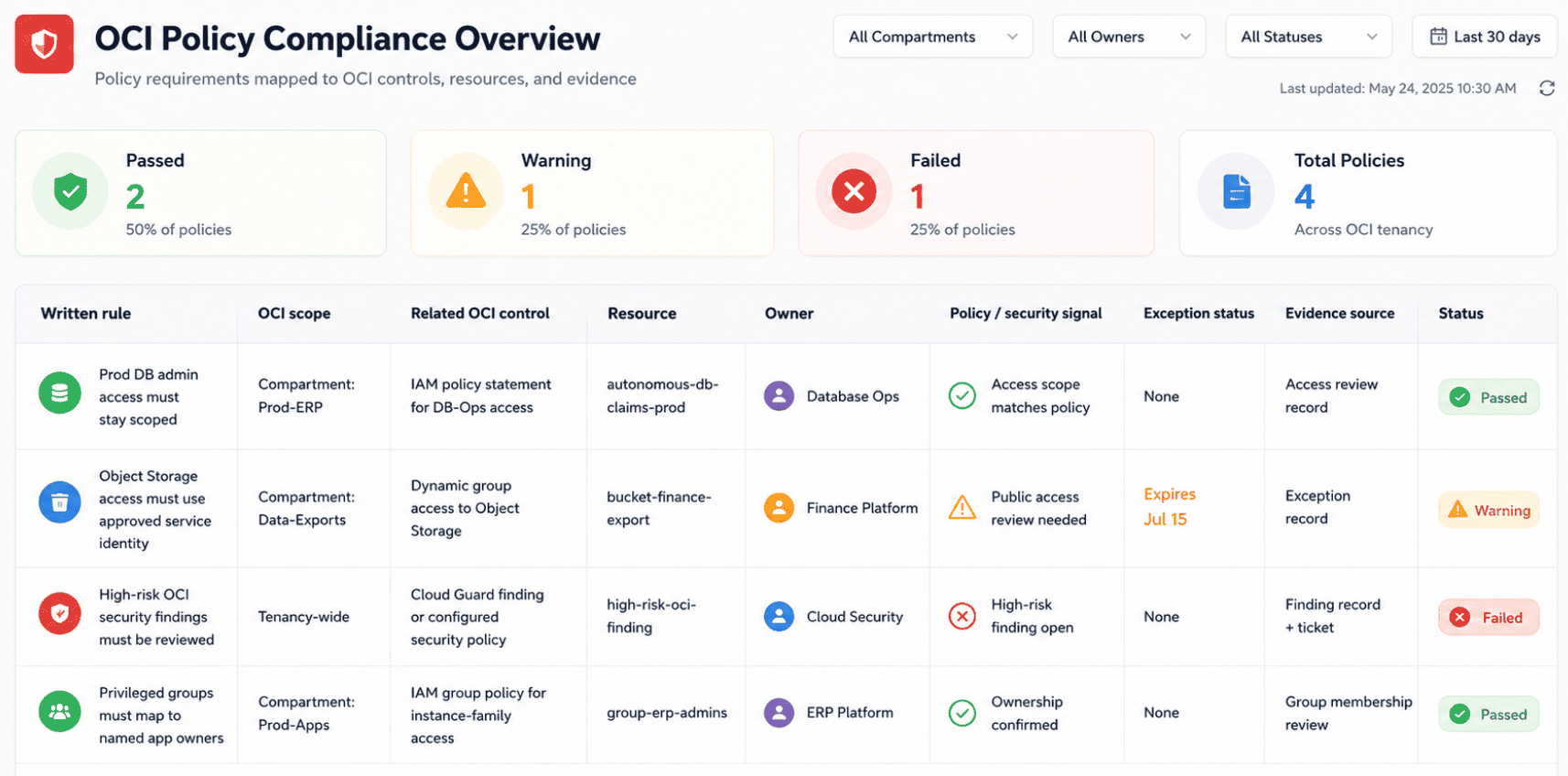
Readable does not mean governed.
The audit question is sharper: can you prove that this OCI statement is scoped to the right compartment, tied to the right group, reviewed by the workload owner, and still valid after migration? That is the difference between “we wrote an Oracle security policy cloud statement_” and “_we can defend how OCI access actually works in production.”
Read also: Cloud Data Security Challenges: 10 Issues & Fixes
Cloud Armor security policy (GCP WAF / DDoS)
A Cloud Armor security policy is not the policy your CISO approves. It is the edge control your GCP load balancer actually uses.
That distinction matters. The written network security policy might require every production internet-facing app to have WAF coverage, DDoS protection, geo restrictions where required, and rate limits on abuse-prone endpoints. Google Cloud Armor turns that clause into security policies and rules that protect applications at the Google Cloud edge, usually through backend services behind external Application Load Balancers.
A practical Cloud Armor policy can include preconfigured OWASP WAF rules, custom match expressions, IP allowlists or denylists, geo blocking, bot controls, and rate limiting for login pages, checkout flows, public APIs, or partner endpoints.
Mature teams also track whether rules run in preview or enforce mode. False positives are not a paperwork problem. One strict WAF rule can break checkout faster than an attacker can.
A useful Cloud Armor policy template should capture purpose, scope, load balancer, backend service, required rule sets, rate-limit thresholds, geo restrictions, preview/enforce mode, owner, exception expiry, evidence source, and review cadence.
| Written network requirement | Cloud Armor enforcement | Evidence to check |
|---|---|---|
| Production internet-facing apps need WAF coverage. | Cloud Armor policy attached to the backend service. | Load balancer, backend service, attached policy name, rule count. |
| Public apps must block common web attacks. | OWASP rules for XSS, SQL injection, LFI/RFI, and protocol attacks. | Enabled rule set, preview/enforce mode, excluded signatures. |
| Login and API endpoints need abuse protection. | Rate limiting, throttle rules, or rate-based bans. | Threshold, key type, action, logs, false-positive review. |
| Restricted apps should limit traffic by geography. | Geo-based allow or deny conditions. | Country list, business justification, exception expiry. |
| Edge controls must survive release changes. | Load balancer policy association monitored after deploy. | Last change, owner, policy violation, ticket status. |
The practitioner trap is attachment drift.
A Cloud Armor policy can exist in the console and still protect nothing important. Platform creates the load balancer. Security approves the WAF rule set. Then an app team replaces a backend service during a release, and the policy association does not follow.
The written standard still looks perfect. Production traffic is now entering through an endpoint without the edge controls the policy requires.
That is the useful audit question: not “do we use Cloud Armor?” but “which production load balancers have the Cloud Armor policy the written rule requires?”
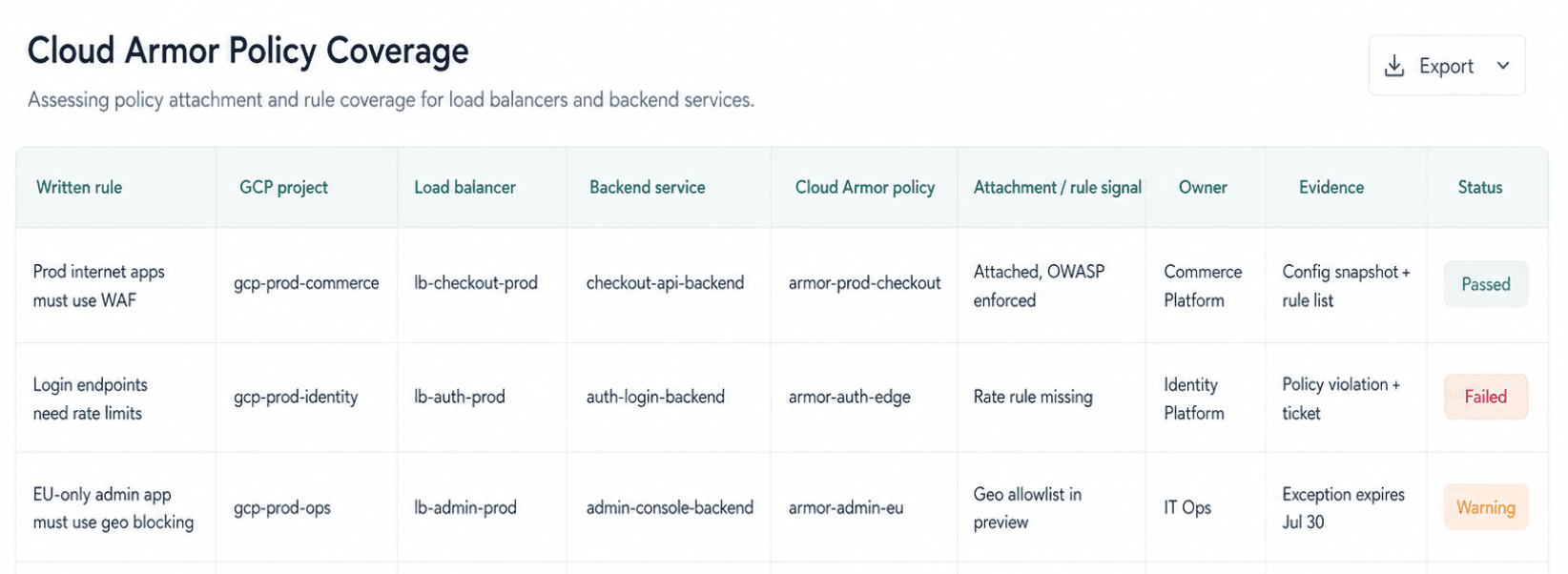
For GRC, that becomes evidence. For platform engineering, it becomes a drift queue. For the CISO, it shows whether WAF rules, geo controls, and rate limits exist where customer-facing traffic actually enters the environment.
That is where a Cloud Armor security policy earns its place in cloud security policy management. Not because the control exists in GCP. Because the team can prove it is attached, enforced, owned, reviewed, and still protecting the workload after the next release.
Cloud app security malware detection policy (Microsoft Defender for Cloud Apps)
A cloud app security malware detection policy defines how sanctioned SaaS apps handle malicious files: which apps are monitored, which file events trigger alerts, who investigates, what gets contained, and when findings move into the central detection queue.
That matters because SaaS malware rarely arrives with a big red sign over it.
It can be a partner file uploaded to SharePoint. A sales attachment synced into OneDrive. A suspicious document dropped into Box, then shared externally before SecOps sees the signal. The written policy has to turn that mess into a decision path.
For Microsoft-heavy environments, the enforcement layer is usually Microsoft Defender for Cloud Apps, still called MCAS by plenty of teams. It uses app connectors to monitor connected SaaS apps, inspect file activity, detect risky behavior, and apply governance actions through app-specific policy rules. If Defender XDR and Microsoft Sentinel are connected, those alerts and incidents can flow into the queue your SOC already works.
The written clause might look like this: Files uploaded to sanctioned SaaS applications must be scanned for malware. Confirmed malicious files in high-risk apps must trigger same-business-day investigation, containment action, and escalation into the central detection queue.
A useful policy template should capture the operational details, not just the security intent.
| Template field | Example |
|---|---|
| Purpose | Detect and contain malware uploaded to sanctioned SaaS apps. |
| Scope | Microsoft 365, SharePoint, OneDrive, Box, Salesforce, and other approved SaaS apps. |
| Policy type | File policy, malware detection, and anomaly detection for unusual file behavior. |
| Detection criteria | Malware verdict, external sharing, sensitive data, unusual upload/download activity. |
| Severity logic | High for regulated apps, externally shared files, executive users, or restricted data. |
| Routing | Defender XDR and Microsoft Sentinel for SOC triage, where integrated. |
| Evidence | Alert, affected file, user, app, owner, investigation status, ticket, action taken. |
The baseline is simple. High-risk SaaS apps need malware detections treated as high severity, routed to SecOps, and investigated within the same business day. Lower-risk collaboration apps may start at medium severity, unless the file is externally shared, tied to a privileged user, or contains sensitive data.
“Default threshold” should not mean “same treatment for every app.”
App criticality changes the response.
| Written cloud app security policy | Defender policy or control check | Evidence to keep |
|---|---|---|
| Sanctioned SaaS apps must scan uploaded files for malware. | Malware detection policy and file monitoring enabled for connected apps. | App connector, file monitoring status, policy name, alert history. |
| High-risk malware findings need fast SOC escalation. | High severity for regulated apps, sensitive data, or externally shared files. | Alert record, affected file, user, app, owner, investigation status. |
| Suspicious SaaS behavior must be reviewed with file risk. | Anomaly detection for unusual downloads, uploads, risky sign-ins, or mass sharing. | Behavior signal, activity log, related user, app, timeline. |
| Confirmed malware must feed central detection. | Alert routed into Microsoft Sentinel or Defender XDR incident flow. | Incident ID, correlation ID, playbook run, ticket. |
| Exceptions must not become blind spots. | Temporary exclusion with expiry, owner approval, and compensating control. | Exception record, business reason, expiry date, next review. |
The trap is assuming “Defender is enabled” means SaaS malware policy is governed.
Not quite.
A file policy can exist, but only cover Microsoft 365. A sanctioned app can be connected, but not monitored for the file events your policy cares about. A malware alert can fire, then never reach the SOC queue because the Sentinel connector, incident rule, or playbook is not wired the way the policy assumes.
Then the audit asks the brutal question: who owns the app where the file landed?
That is where the evidence view matters. When SaaS app records, ownership fields, Defender/Sentinel signals, tickets, and exception data are connected or modeled in Cloudaware, teams can use a Cloudaware-style dashboard to show whether the policy is actually covered.
Igor K., Cloudaware developer
Cloud security policy management: keeping the document alive
Cloud security policy management is the recurring set of activities that turns a static document into an enforced control: versioning, ownership, exception handling, attestation, continuous monitoring, and scheduled review.
The document is only the first artifact.
The real work starts after approval, when AWS accounts keep changing, Azure subscriptions get new workloads, GCP projects drift from approved baselines, Oracle compartments pick up new access paths, and SaaS apps start moving files into places the first draft never mentioned.
That is why every policy needs an operating rhythm. A policy owner reviews the rule. Platform teams verify control coverage. GRC checks attestation. Security watches for drift. App owners handle remediation when a violation lands in their queue.
Cloud environments do not wait for annual review. A public test endpoint approved in March should not still be open in September after the workload moved into production. A temporary encryption exception should not survive three releases because nobody owned the expiration date.
A policy update from v1.2 to v1.3 should not disappear into “we changed the wording.” It should show what changed, who approved it, and which assets are now affected.
The strongest model treats policy management like cloud operations, not documentation hygiene. Policy results, violations, run history, dashboards, routed tickets, and evidence records should all connect back to the approved rule.
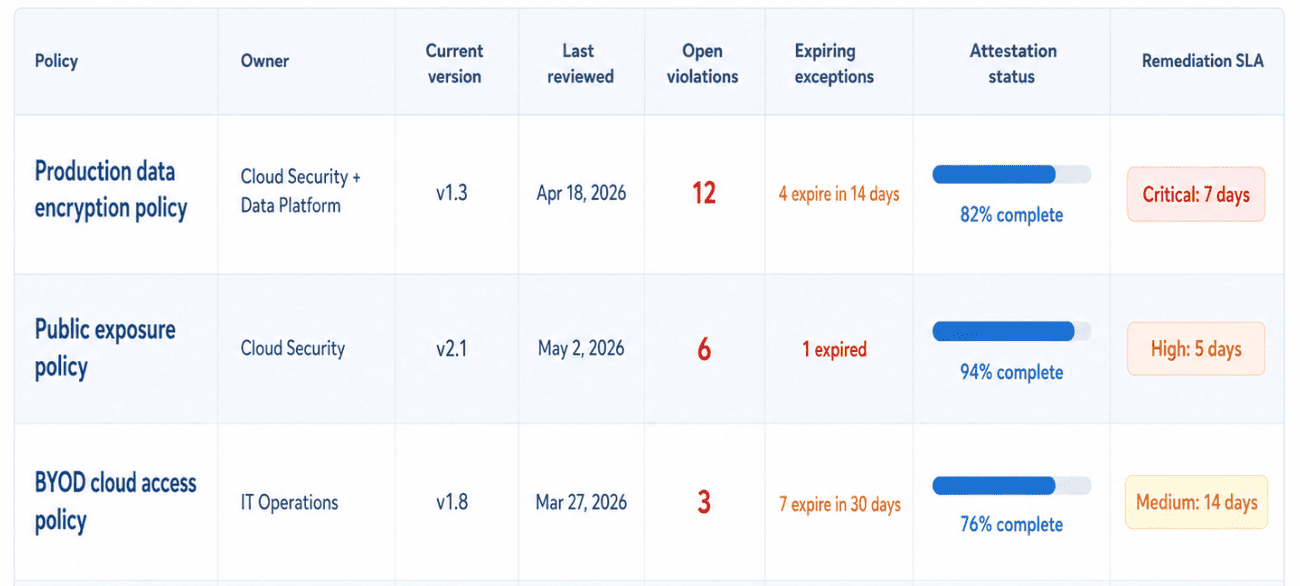
That dashboard is what the CISO wants before the audit meeting. Not “where is the PDF?” but “which policy is current, who owns it, what is failing, what expires soon, and what still needs proof?”
Versioning, ownership, and exception handling
Every policy needs four boring things that save teams during an audit: a named owner, a version number, a review date, and an exception process.
Boring wins here.
Without a policy owner, nobody can approve changes with authority. Without version control, teams cannot prove whether v1.2 or v1.3 was active when a violation happened. Without a change log, auditors end up asking people to reconstruct intent from Slack, ticket comments, and memory.
That is not governance. That is archaeology with screenshots.
The exception path should be explicit:
request → review → approval or rejection → exception record or routed finding ticket → expiration → revalidation
A useful exception record shows the affected asset, rule bypassed, business reason, compensating control, approver, expiry date, owner, and remediation plan. “Temporary public access for testing” should not become part of the architecture because nobody set an expiration.
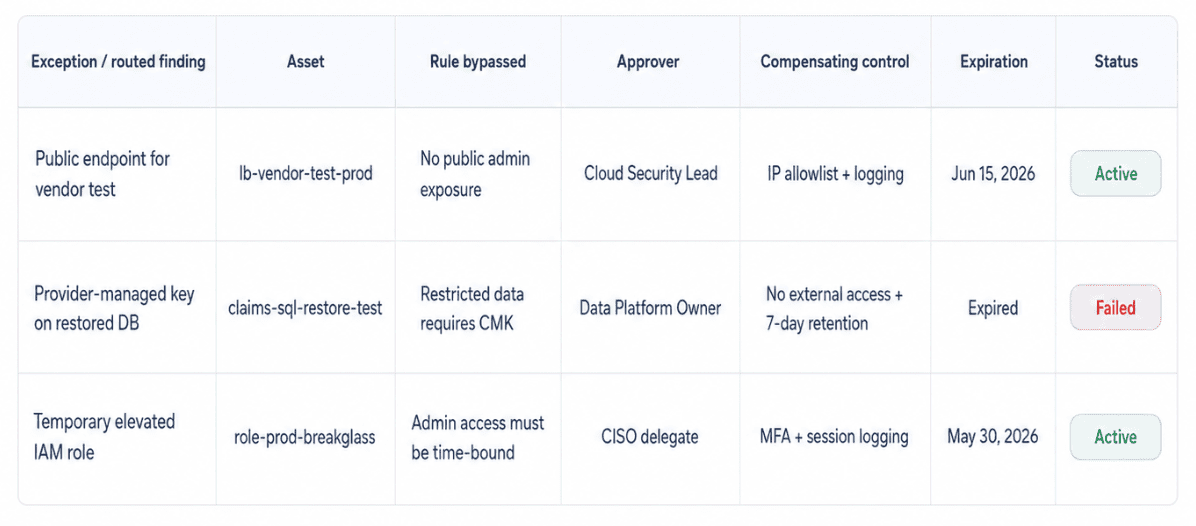
This is also where revision tracking becomes useful. Teams need to see exactly what changed between policy versions instead of comparing two documents by hand.
Continuous enforcement vs annual review
Annual review is necessary but not sufficient. Pair every high-risk clause with a recurring check, using an hourly cadence where the control is production-critical and the data source supports it.
That is the part many cloud policy programs learn the hard way. The review meeting says the policy is current. Production says something else. A storage bucket changed yesterday. A firewall rule opened this morning. A privileged role got extended during a release. A new workload drifted from the approved baseline before anyone updated the policy register.
Annual review catches policy intent. Continuous compliance catches cloud behavior.
A serious cloud security controls policy should connect each written clause to a running check:
| Policy clause | Continuous check | Routing path |
|---|---|---|
| Production storage must use customer-managed keys. | Detect assets using provider-managed encryption. | Create policy violation, notify owner, route to Jira or ServiceNow once the workflow triggers. |
| Public access requires approval. | Monitor public-facing resources and expired exceptions. | Open remediation record with policy context. |
| Admin access must be time-bound. | Flag elevated roles without expiry or recent review. | Alert IAM owner and GRC. |
| Critical baseline changes require review. | Detect configuration drift from approved controls. | Send email alert or route remediation ticket. |
The operating model looks like this:
policy clause → scheduled evaluation → policy violation created → owner notified → Jira / ServiceNow routing → remediation → closure evidence
That workflow is where annual review stops being the only checkpoint. When a rule fails, the violation should carry the policy context, affected asset, owner, severity, violation record, and evidence trail. For a critical production issue, that may mean routing into Jira or ServiceNow as soon as the workflow triggers. For lower-risk drift, an email alert to the policy owner may be enough during rollout.
Email alerts still matter during rollout. Not every violation needs an incident workflow on day one. Sometimes the smarter move is to notify the owner, watch the pattern, tune the rule, and then turn on ticket routing once the signal is clean.
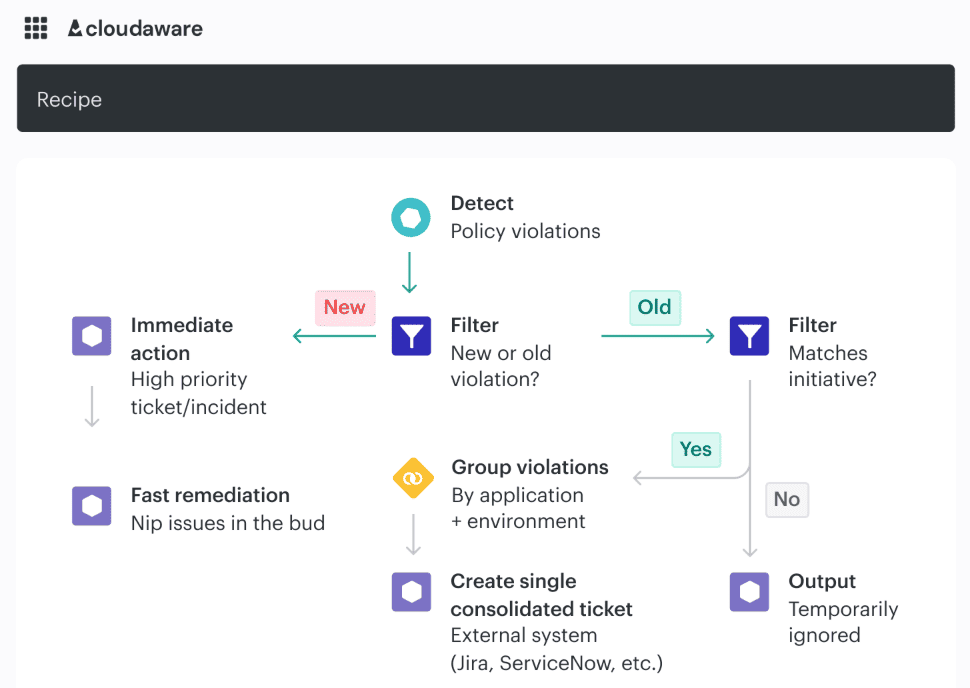
Annual review still belongs in the program. It confirms the policy reflects current risk, regulations, architecture, and business ownership.
Continuous enforcement does a different job. It shows whether production still follows the rule after releases, exceptions, emergency access, provider changes, and human shortcuts. That is the proof practitioners need before the audit starts asking awkward questions
Valentin Kel, Cloudaware DevOps Engineer:
Build, manage, and track a cloud security policy with Cloudaware
Cloudaware helps cloud security, platform engineering, IT operations, and GRC teams turn policy from a static document into a working control system across AWS, Azure, GCP, Oracle, VMware, Kubernetes, SaaS, and hybrid infrastructure.
That matters because the hard part is not writing a cloud security policy template. The hard part is proving the policy still works after the estate changes. Cloudaware can organize that work into policy views, policy results, violation records, reports, dashboards, owners, workflows, and remediation status.
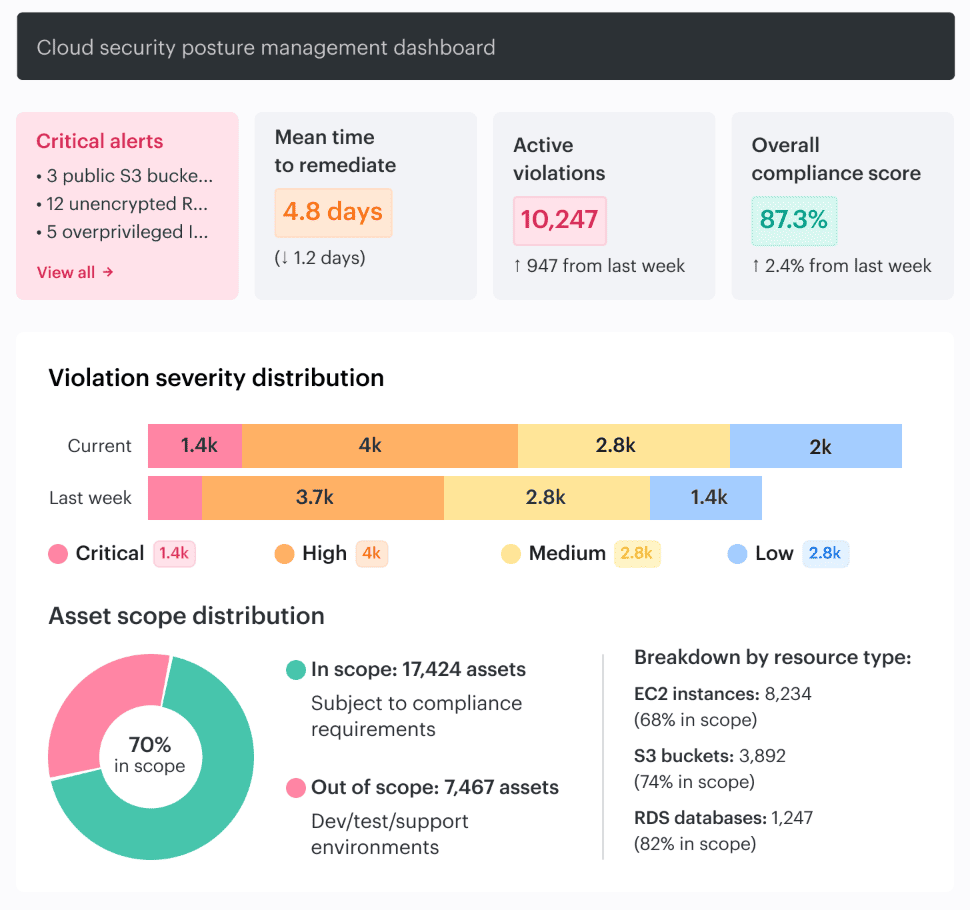
Start with the policy library and built-in templates for common cloud and compliance checks, including CIS Benchmark patterns. Then tune the scope. Accounts, subscriptions, projects, compartments, environments, data classes, and owners all matter. A rule that works for production S3 buckets may need different logic for Azure Blob, GCP buckets, OCI Object Storage, restored databases, or SaaS exports.
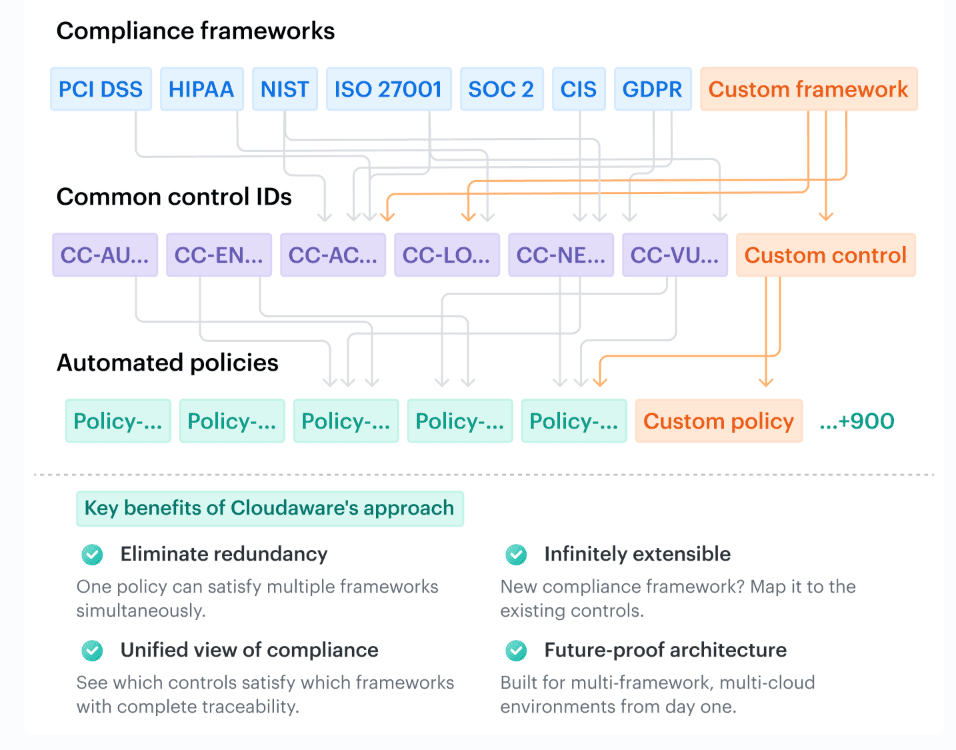
When a standard template does not match the architecture, create a custom policy or submit a Custom Policy Request with the expected outcome, evaluation logic, violation details, and test objects. That is how the policy starts reflecting the actual environment instead of forcing the environment into a generic rule.
This is where cloud security policy management becomes real.
Cloudaware’s policy-as-code model lets a policy define the input object, output object, scope query, lifecycle behavior, and evaluation logic. In practical terms, the policy anatomy answers: what enters scope, how it gets checked, where the result lands, and what happens when the asset becomes compliant or non-compliant.
A violation can then support reports, dashboards, and workflows such as email, Jira, or Slack alerts when configured.
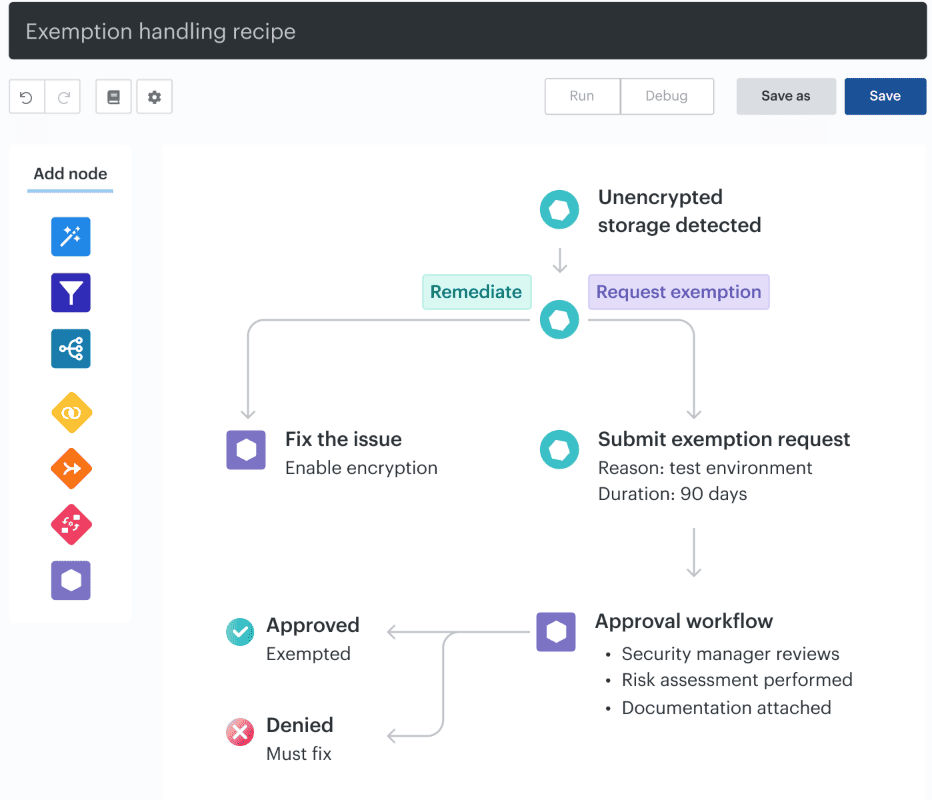
The useful demo is not “look, templates.” It is sharper: Can we take one written policy clause, like “restricted production data must use customer-managed encryption,” and trace it all the way through Cloudaware?
From cloud security policy template → custom scope → asset check → violation → owner → exception → workflow → closure evidence.
That is the moment a cloud security policy stops living in a document and starts behaving like a control your teams can defend.