


The average breach now costs $4.4 million. IBM found that most breached organizations store data across cloud, on-prem, and hybrid environments, which is exactly where cloud data security challenges get nasty: not at the “do we encrypt?” level but at the “who owns this dataset, why is it exposed, and why did nobody see the access path?” level.
This article comes from fresh Cloudaware fieldwork with DevOps experts Igor K. and Valentin Kel, and ITAM experts Alla L. and Kate Lichkina working side by side with our clients, enterprise security leaders.
So here’s the case file:
- Why does shadow data keep appearing after every cleanup?
- Where does posture drift quietly widen the blast radius?
- Which shared responsibility gaps turn IAM into regulatory exposure?
- Why do AWS, Azure, and GCP data controls look similar, then behave differently under audit?
- And where do data exposure, exfiltration, and data integrity risks actually start?
We’ll break down 10 cloud data security issues, compare provider parity, cover emerging trends, and give mitigation pointers for each challenge, not a primer.
Key takeaways on the challenges of 2026
- Shadow data is the first exposure problem. Dev databases, restored backups, forgotten snapshots, departed-team buckets, SaaS exports, and AI training extracts often carry production-grade data without production-grade ownership, retention, or access control.
- Storage misconfigurations still leak data because “private” is not one setting across clouds. S3, Azure Blob, and GCS all handle public access, signed URLs, IAM bindings, private endpoints, and org policies differently, so one missed exception can expose customer exports, logs, backups, or regulated files.
- APIs create data exposure paths that inventory tools often miss. Public endpoints, internal microservices, partner integrations, and SaaS connectors can read sensitive datasets, return excessive fields, bypass object-level authorization, or move data into systems security never reviewed.
- Over-permissioned access turns IAM into a data-layer risk. The real question is not “who has a role?” It is “who can read, copy, export, decrypt, or share this dataset?” Shared service accounts, inherited groups, vendor scopes, and old admin roles make that answer messy fast.
- Account hijacking becomes a data breach when the stolen identity can reach sensitive stores. A compromised admin, leaked service-account key, stolen session token, or over-scoped CI/CD role can give attackers access to buckets, databases, backups, key systems, and exports.
- Fragmented visibility makes data security uneven across AWS, Azure, GCP, SaaS, Kubernetes, and on-prem. Each platform shows its own inventory. SaaS may show almost none. So teams lose the map of where sensitive data lives, who owns it, and which controls apply.
- Encryption and key management drift across clouds. Data may be encrypted, but with different key types, owners, rotation rules, decrypt permissions, and exception paths across production, backups, replicas, restores, analytics exports, and SaaS tools.
- Multi-tenant and side-channel risks sit under the shared cloud model. Most teams must trust CSP isolation, but tenant separation still needs evidence: strict cross-account trust, dedicated keys, network segmentation, scoped service accounts, workload boundaries, and audit-ready attestations.
- Compliance fragmentation turns one data control into four evidence stories. GDPR, HIPAA, PCI DSS, and SOC 2 may ask about the same encryption, access, logging, or retention control, but each wants different proof, scope, format, and review history.
- AI and LLM data leakage is the newest shadow-data problem. Customer tickets pasted into chat tools, RAG systems over internal docs, vector databases with sensitive embeddings, prompt logs, and over-permissioned AI connectors create data paths most cloud security programs do not fully govern yet.
- For private cloud environments, use the Private Cloud Data Security: How to Operate and Prove Controls Across Infrastructure guide.
The 10 cloud data security challenges
These challenges come from the messy, very real patterns that Cloudaware sees inside enterprise and mid-market environments running AWS, Azure, GCP, SaaS, Kubernetes, and on-prem together. Think of Coca-Cola trying to get multi-cloud visibility and governance under control, Caterpillar improving cloud and on-prem operations, and Boeing tracing multi-cloud plus AI cost signals back to owners and workloads.
And below are the last issues these companies are facing. 👇
Data exposure challenges
Most exposure starts with legitimate copies of sensitive data that lose ownership, context, or retention rules after the original project moves on.
1. Shadow data and unmanaged data copies
Shadow data is not “mystery data” in the dramatic sense.
Usually, it has a very normal origin story. A developer clones a production database to debug a payment issue. A platform team restores a backup during migration testing. Analytics exports customer records into BigQuery. A security team creates a snapshot before patching. Someone in product pulls support tickets into an AI experiment because they need real examples, not fake lorem ipsum.
All reasonable.
Then Monday becomes next month. The team ships the project. The owner leaves. The bucket stays.
That is how shadow data turns into one of the nastiest cloud computing data security issues: the copy carries the same sensitivity as the source, but not always the same controls. Encryption may be missing. IAM may be broader. DLP may not scan that location. The lifecycle policy may say nothing because the asset was never classified as data-bearing in the first place.
Valentin Kel, Cloudaware DevOps Engineer:
A useful fix starts with changing the inventory view. Not “show me all S3 buckets.” That gives you noise.
Better: show data-bearing assets created from known production sources where one of the control fields is weak or blank.
For example, Cloudaware clients often build views around fields like
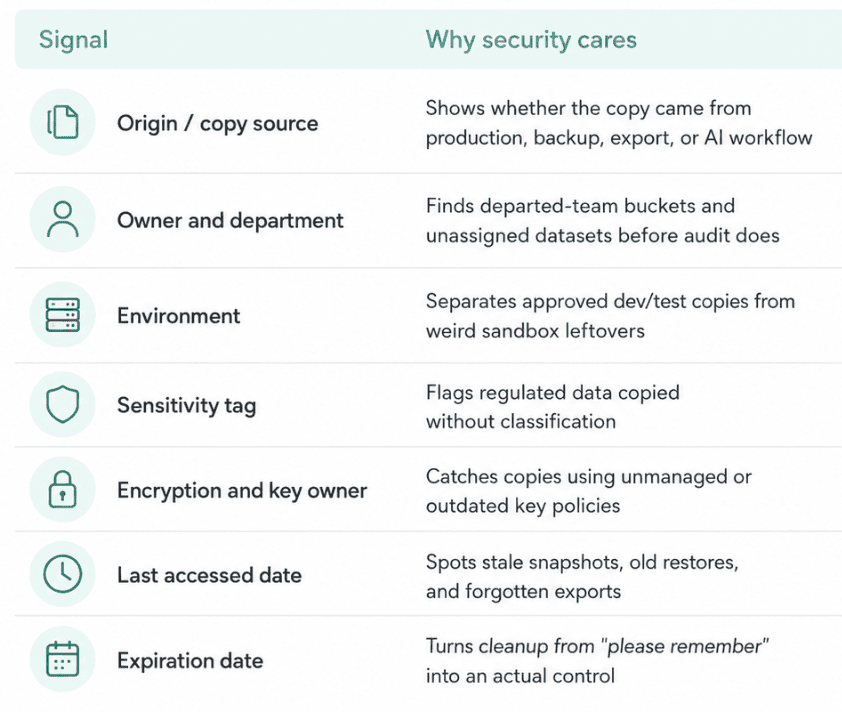
The workflow is boring in the best possible way: discover the copy, tie it back to the source, assign ownership, confirm business purpose, narrow access, apply retention, and then delete what no longer earns its risk.
Shadow data rarely looks dangerous when it is created. It becomes dangerous when nobody can explain why it is still there. Many of these issues sit at the intersection of data security and privacy in cloud computing, where teams must protect sensitive data while proving who can access it, where it moves, and which controls apply.
2. Storage misconfigurations and exposed buckets
A storage leak usually does not announce itself like a breach.
It starts as something painfully ordinary: a bucket for invoice exports, a blob container for migration files, a GCS bucket behind an analytics job, a backup location used by a team that needed to move fast. Then one permission gets widened. One exception stays open. One shared link keeps working after the project is done.
Now the data is not “lost.”
It is sitting exactly where someone put it, with the wrong people able to reach it.
That is what makes storage exposure one of the most persistent data security challenges in cloud computing. S3, Azure Blob Storage, and Google Cloud Storage all have native guardrails, but the risk rarely lives in one console. It lives in the gap between policy and context. Public access may be blocked in one AWS account, relaxed in another for a partner workflow, replaced by broad IAM in GCP, then mirrored into Azure during a migration.
A severity label alone will not tell you whether the bucket contains public images, debug logs, customer exports, claim documents, or payment files.
The better question sounds more like this: Which storage assets are exposed, what data could be inside, who owns the workflow, and what breaks if we shut access down today?
A practical exposure view should make that answer visible fast:
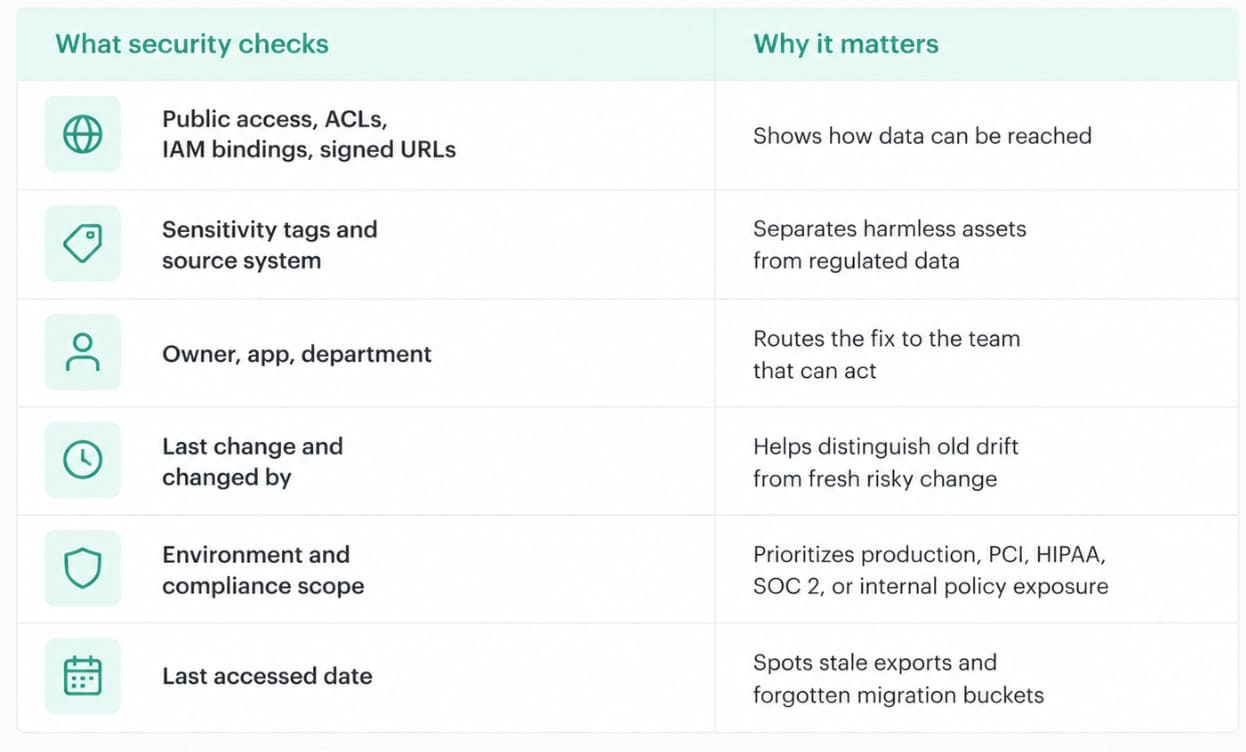
Cloudaware clients often turn this into a storage exposure dashboard that joins cloud configuration with CMDB context. Not a bucket inventory. Nobody needs another graveyard of 6,000 storage names.
The useful view is smaller and meaner:
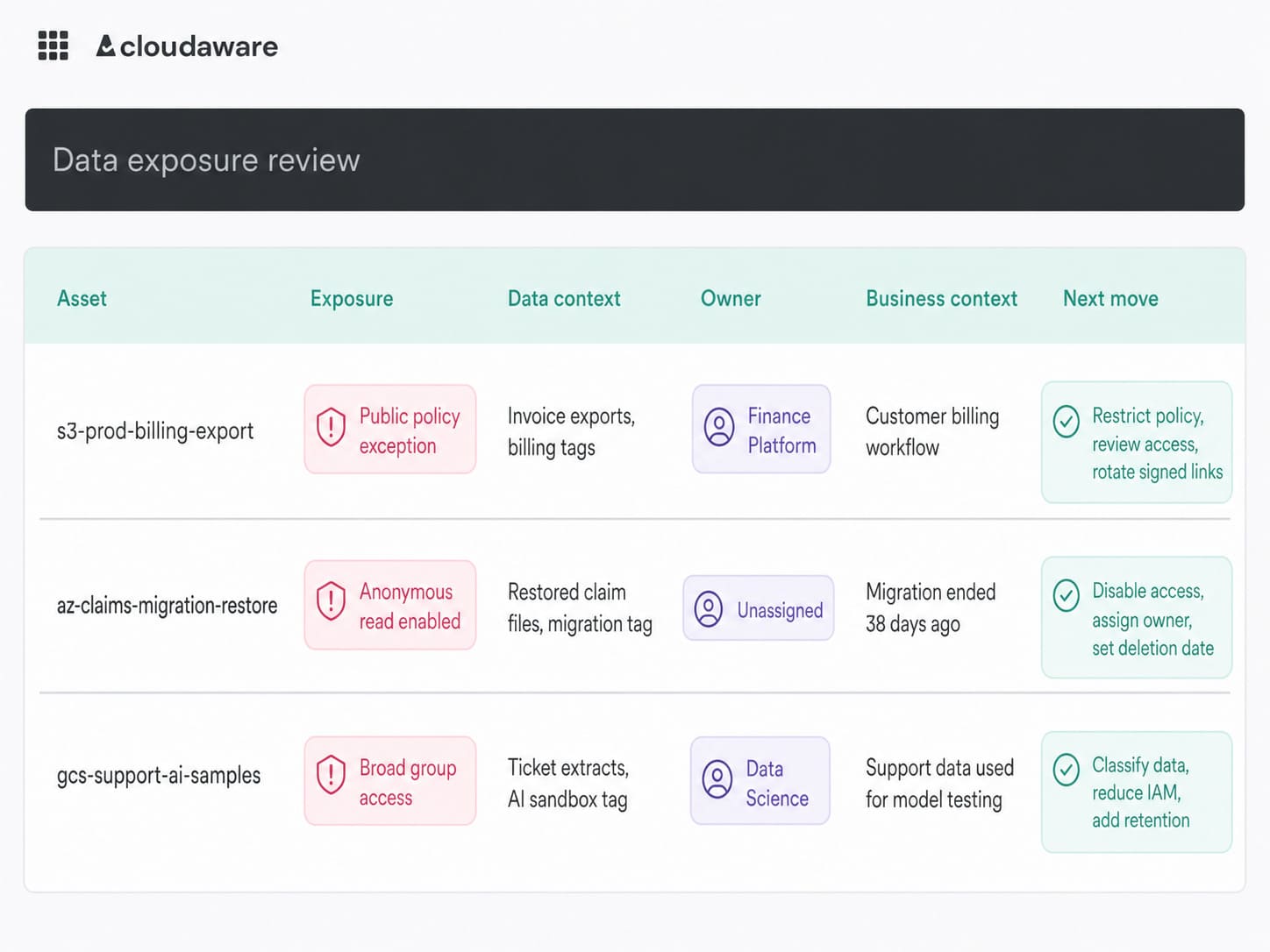
Cloud security dashboard in Cloudaware. Schedule a demo to see how it works for your environment.
The problem becomes sharper in public cloud data security, where AWS, Azure, and GCP controls differ, but the same questions remain: what data is exposed, who owns it, and what evidence proves the control state.
Valentin Kel, Cloudaware DevOps Engineer:
One of the real disadvantages of cloud data security is speed asymmetry. Storage can be created in seconds. Governance still needs classification, access approval, lifecycle rules, exception expiry, and evidence. When those pieces lag behind, the cloud does what it was designed to do: it scales the mistake.
The fix is not glamorous. Good.
Block public access by default. Detect permission drift continuously. Require owner and purpose metadata before data copies are approved. Add expiration dates to temporary buckets and restored backups. Watch for risky changes to IAM, ACLs, bucket policies, and external sharing. Then route each fix with the asset, owner, app, data sensitivity, and recent change history attached.
Because an exposed bucket is rarely just an exposed bucket.
Sometimes it is last quarter’s customer export, waiting for someone outside the company to find it first.
3. Insecure APIs touching sensitive data
APIs are the polite way data leaves the room.
A customer lookup endpoint. A claims-sync service. A partner billing integration. A support export feeding an AI workflow. None of that sounds reckless. It sounds like the business is working.
Then the estate grows.
Public APIs sit behind gateways. Internal microservices talk across clusters and accounts. SaaS integrations pull records on a schedule. Service accounts collect permissions because breaking production feels worse than over-scoping access. Six months later, nobody can answer the ugly question: which API can return sensitive data, to whom, and under what identity?
That is one of the harder data security in the cloud challenges, because the risk is not only “internet-facing endpoint bad.” The risk is data movement without enough context.
Look for the boring failure modes first:
- API responses returning more fields than the caller needs
- Weak object-level authorization, especially on customer IDs
- Internal APIs trusted only because they are “inside”
- Third-party integrations with broad read scopes
- Service accounts shared across workloads
- Old migration endpoints still live after cutover
A practical dashboard here should not pretend every API is equal. The useful view connects API-adjacent assets to data, identity, and ownership:
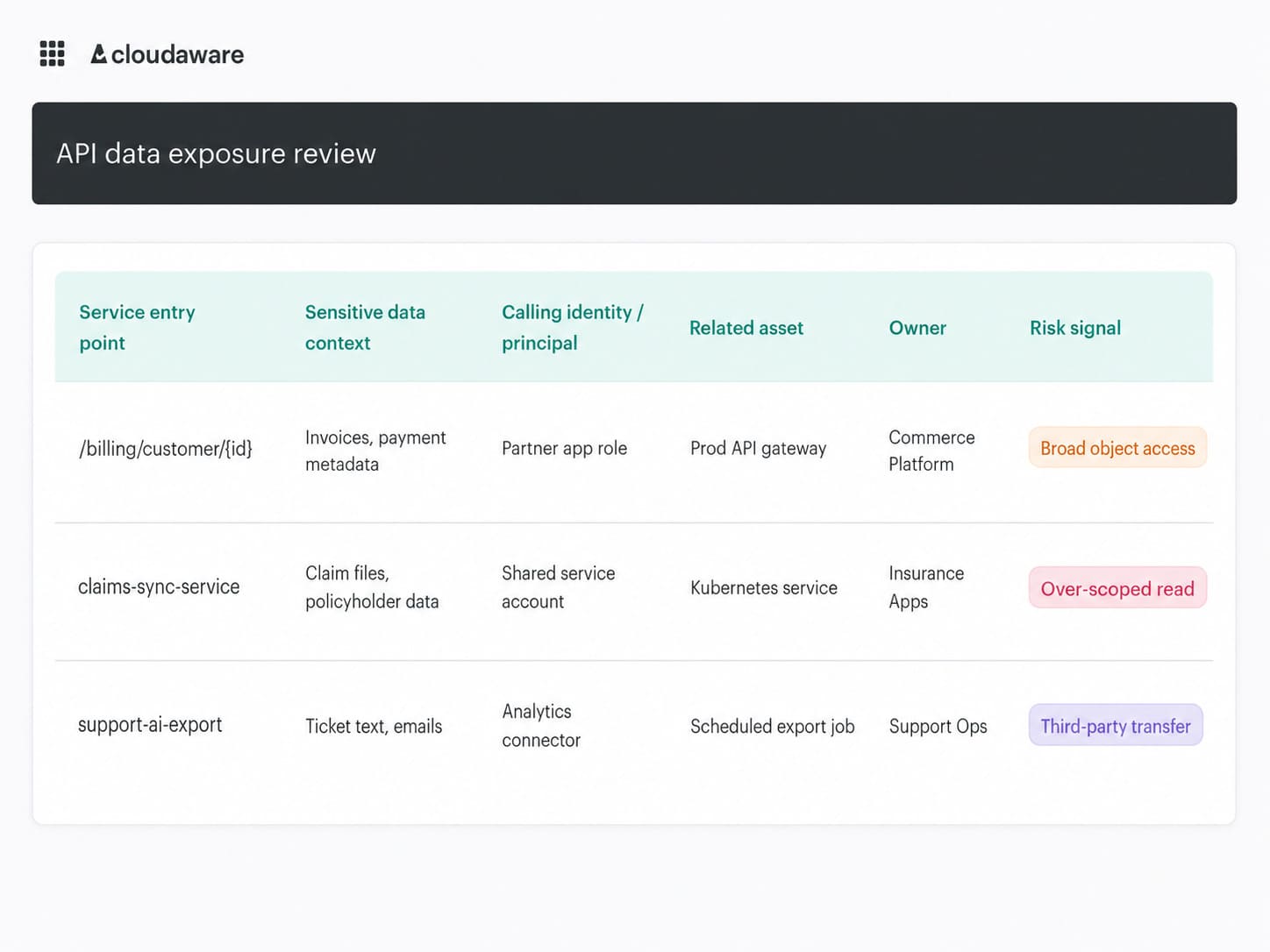
Cloud security dashboard in Cloudaware. Schedule a demo to see how it works for your environment.
Example view built from CMDB relationships, ownership metadata, cloud configuration, and connected log or policy signals. Sensitive data context should come from tags, classification, naming, or imported data catalog/DLP sources, not assumed content inspection.
That is how remediation stops being a vague security ask.
Igor K., DevOps Engineer at Cloudaware
The fix starts with discovery, then gets sharper. Map APIs and integrations to the data sources they touch. Test for broken object-level authorization. Cut response payloads to the fields actually needed. Separate service accounts by workload. Review third-party scopes before renewal. Monitor new external destinations, auth failures, and sudden access spikes.
Identity and access challenges
Identity is where data security gets personal: not “is the bucket private?” but “who, exactly, can still read what’s inside?”
4. Over-permissioned access to data
Over-permissioned access is IAM viewed from the dataset outward.
Start with the data. A customer export. A BigQuery table. A restored backup. An S3 bucket with invoice PDFs. A file share used by claims ops.
Now ask the uncomfortable question: who can read it?
Not who should read it. Who can?
That list usually gets weird fast. A CI/CD role with broad read access because one deployment once needed it. A shared analytics service account. A vendor integration approved two renewals ago. A developer group inherited from an old project. A break-glass role nobody wants to touch because “what if something breaks?”
That is why over-permissioning keeps showing up as one of the stubborn data security issues in the cloud. Access grows naturally. Revocation feels risky. Nobody wants to be the person who removes a permission and takes down month-end reporting.
Alla L. Cloudaware ITAM expert
CIEM is the right tool category for deep entitlement analysis: effective permissions, unused permissions, privilege paths, and toxic combinations. But CIEM findings still need operational context, or they land in security’s queue as another scary-but-vague alert.
A useful access review view joins identity risk with the asset story:
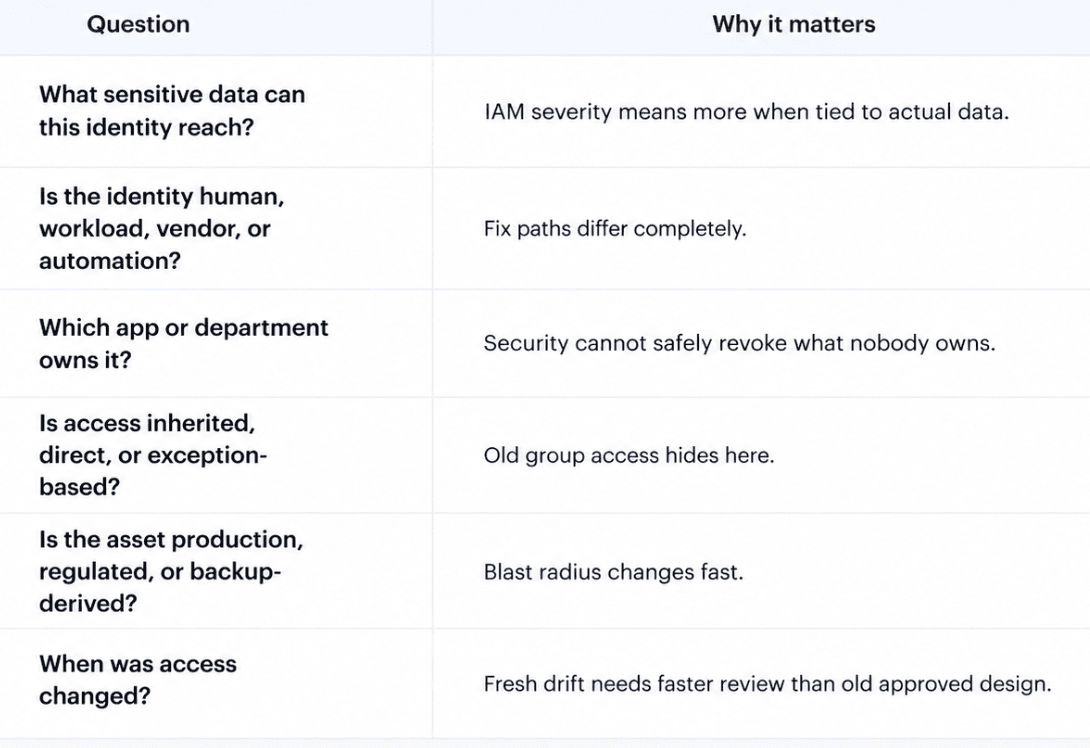
Companies use CMDB-backed views to connect posture findings such as over-permissioned identities with account, environment, application, owner, department, related asset, configuration, and compliance scope.
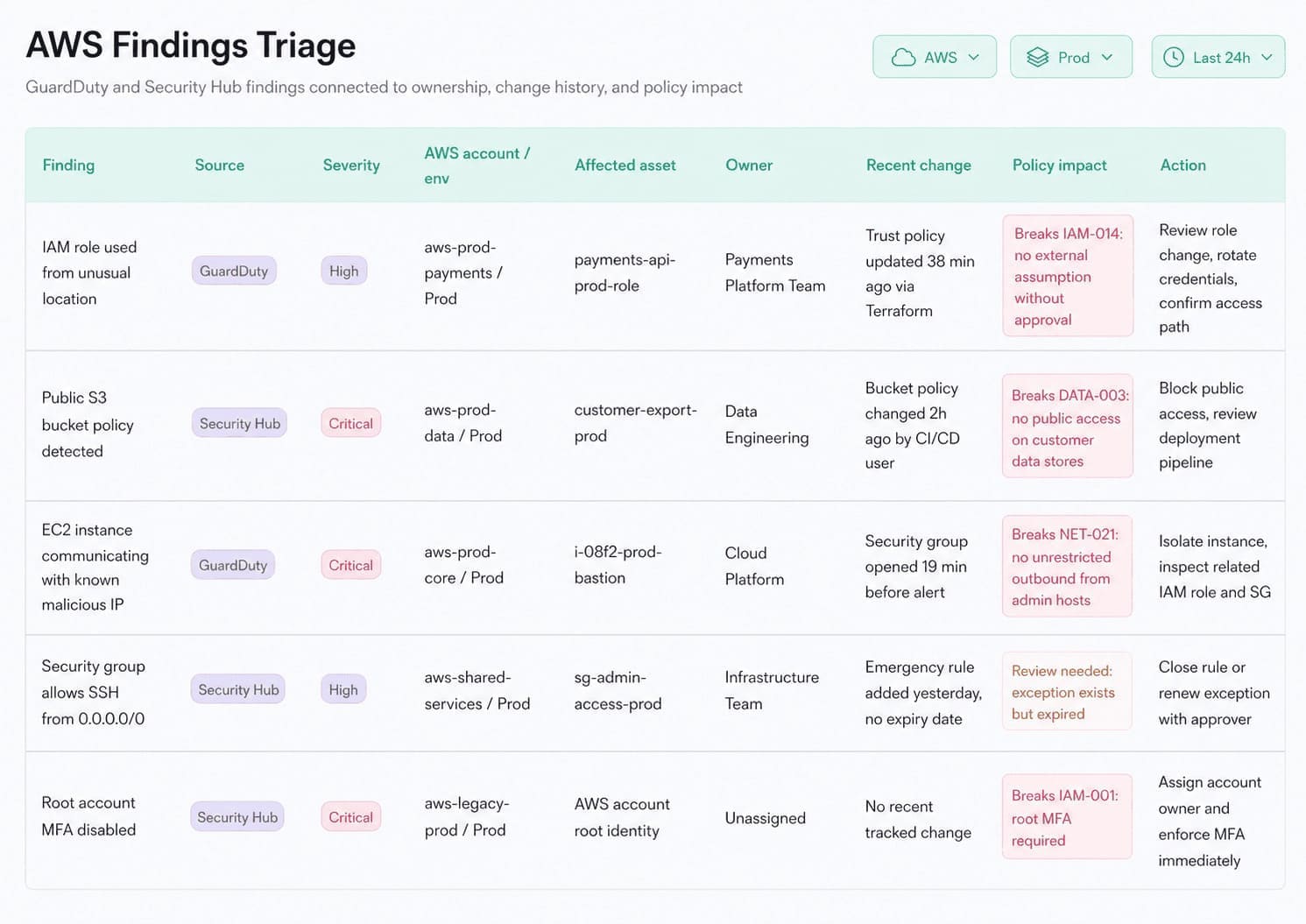
Cloud security dashboard in Cloudaware. Schedule a demo to see how it works for your environment.
The value is giving the CIEM or IAM finding enough context to become fixable.
The workflow sounds simple because the best controls usually do.
- Find the identity.
- Tie it to the data.
- Confirm the owner.
- Check whether access is direct, inherited, or temporary.
- Use CIEM or native IAM data to validate effective permissions.
- Remove broad access in slices, not one heroic Friday change.
The real fix is not “remove all broad roles.” That sounds nice in a policy doc and terrifying in production. The better first move: no sensitive dataset should sit in AWS, Azure, GCP, SaaS, Kubernetes, or backup storage without a current answer to this question: Who can read it, and why are we still okay with that?
Read also: Cloud Security Posture Management - CSPM Guide for 2026
5. Account hijacking and credential theft
A hijacked admin account is not just an identity incident. It is potentially full data access.
That is the part teams sometimes underweight. They view account takeover as simply “someone got into the console.” Fine.
- But what can that identity do once inside?
- Can it read customer tables?
- Export storage objects?
- Create new access keys?
- Disable logging?
- Change bucket policies?
That is the real story.
In cloud environments, credentials do not only belong to people. They belong to service accounts, workloads, CI/CD pipelines, automation scripts, data connectors, Kubernetes jobs, SaaS integrations, and “temporary” migration tools that somehow made it into year two.
Humans still matter. MFA fatigue works because people are busy, distracted, and trained to approve prompts all day. Phishing works because login pages look boringly real. Session theft works because attackers do not always need the password if they can steal the session. Then there are leaked secrets: access keys in GitHub, old JSON keys on a developer laptop, tokens pasted into Slack, pipeline variables with too much reach.
This is why addressing data security challenges in the cloud has to include identity hardening, not as a separate IAM project, but as data protection work.
The practitioner's move is to trace stolen identity risk to data impact.!
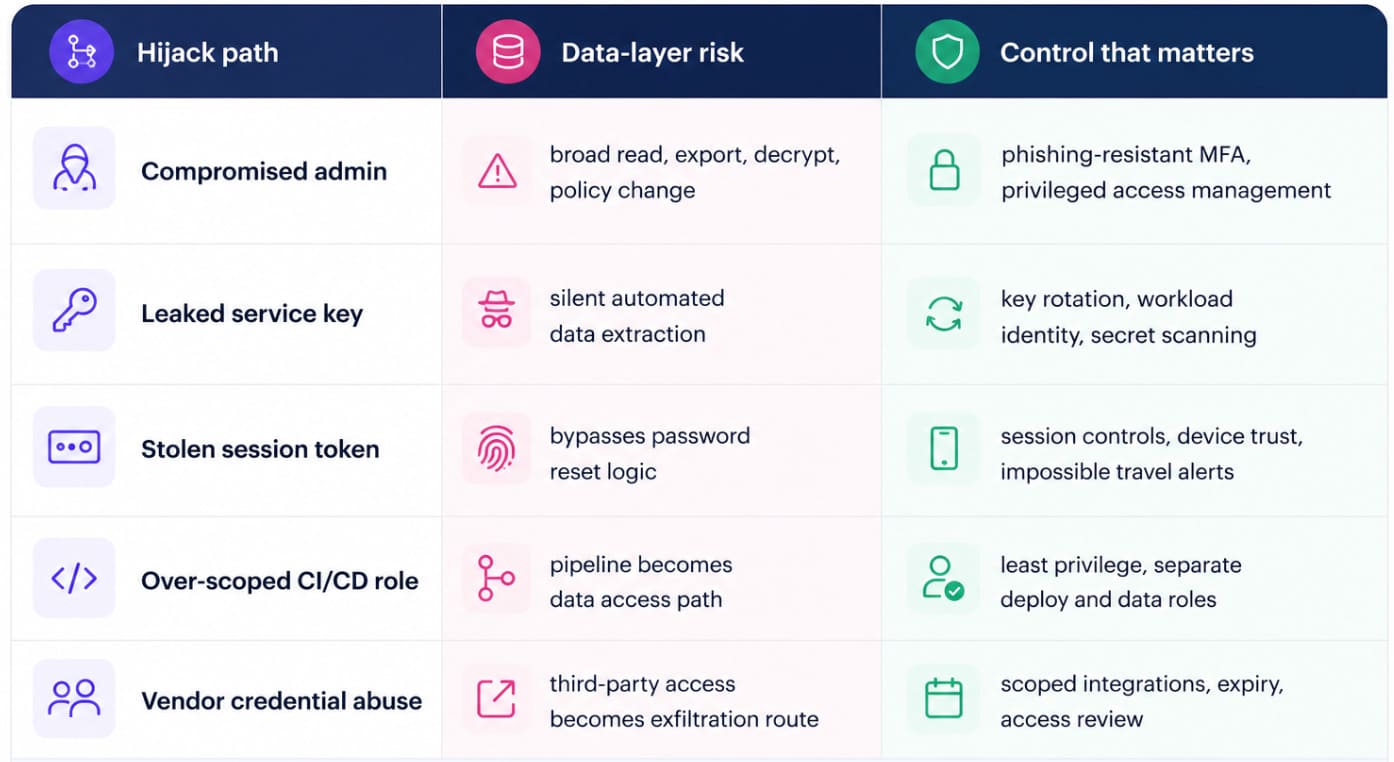
The hard part is not knowing the controls. You know them.
The hard part is making them stick across AWS, Azure, GCP, SaaS, Kubernetes, and on-prem workflows without breaking everything that depends on those identities.
- Start with the accounts that can touch sensitive data.
- Enforce phishing-resistant MFA for admins. Move service accounts away from long-lived static keys wherever possible.
- Split deployment roles from data-read roles.
- Monitor new key creation, unusual exports, privilege changes, failed MFA storms, and access from unfamiliar locations.
- Put expiration dates on temporary credentials. Review third-party scopes as if they were production access, because they are.
Multi-cloud & architecture challenges
6. Fragmented visibility across clouds and SaaS
The most dangerous answer in cloud data security is, “We think it’s covered.”
AWS shows you S3 buckets, RDS snapshots, Glue jobs, KMS keys, IAM policies, and CloudTrail. Azure shows storage accounts, SQL databases, Key Vault, managed identities, and activity logs. GCP gives you Cloud Storage, BigQuery, service accounts, Cloud KMS, and audit logs.
Each platform is useful. None of them tells the whole story.
Then SaaS enters the chat. Support tickets in Zendesk. Customer contracts in Salesforce. Product usage exports in analytics tools. Billing data in finance systems. HR files in workforce platforms. AI experiments pulling extracts from three places at once.
Some of it lands back in cloud storage. Some stays inside the SaaS app. Some moves through connectors nobody thinks of as “infrastructure.”
That is why fragmented visibility is one of the hardest data security concerns in cloud computing. You cannot enforce encryption, access review, retention, DLP, logging, or evidence collection on data you cannot see, classify, or connect to an owner.
The real failure mode is rarely “we had no tools.”
It is more annoying than that.
A BigQuery dataset is labeled dev, but stores production emails. An Azure SQL restore exists for migration testing, with no current owner. A private S3 bucket contains customer exports, yet nobody knows whether it falls under PCI scope. A SaaS connector pushes support-ticket data into an AI workflow, and the export never appears in the cloud inventory.
All technically explainable.
Operationally messy.
Katherine Lichkina, Senior Technical Account Manager – CloudAware
The useful view is not “show me every cloud asset.” That turns into a graveyard of names.
A better view starts with data-bearing infrastructure and the context needed to act:
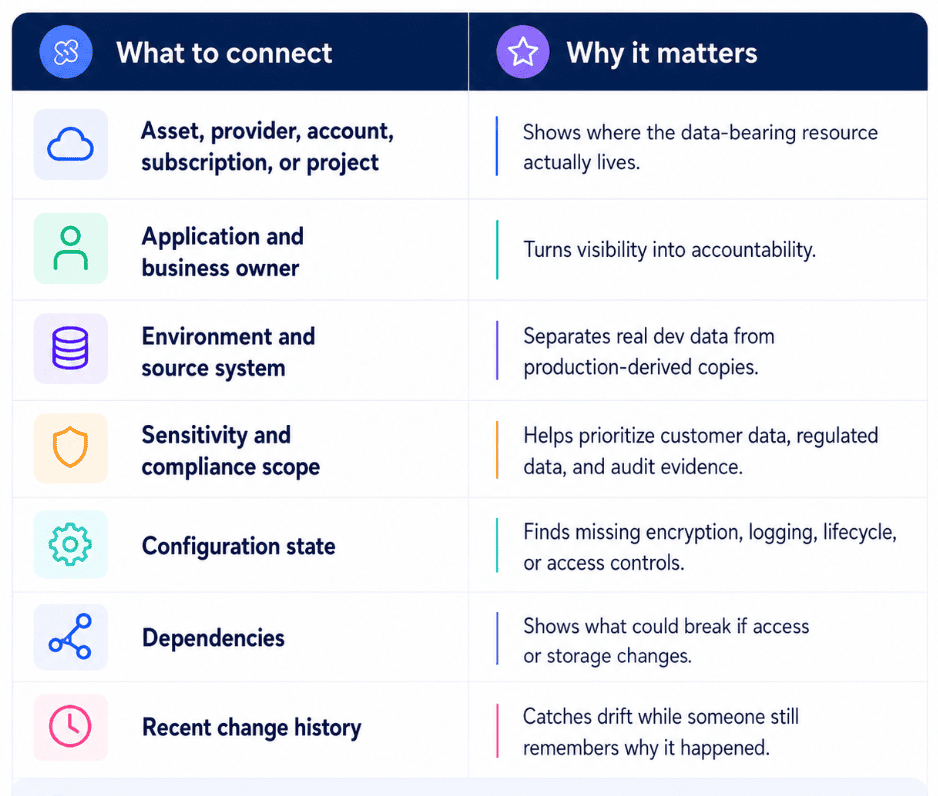
Security teams usually turn this into CMDB-backed operating views where storage accounts, databases, snapshots, export jobs, cloud functions, Kubernetes services, and related infrastructure are tied to owner, app, environment, provider account, configuration state, dependency context, recent changes, and compliance scope.
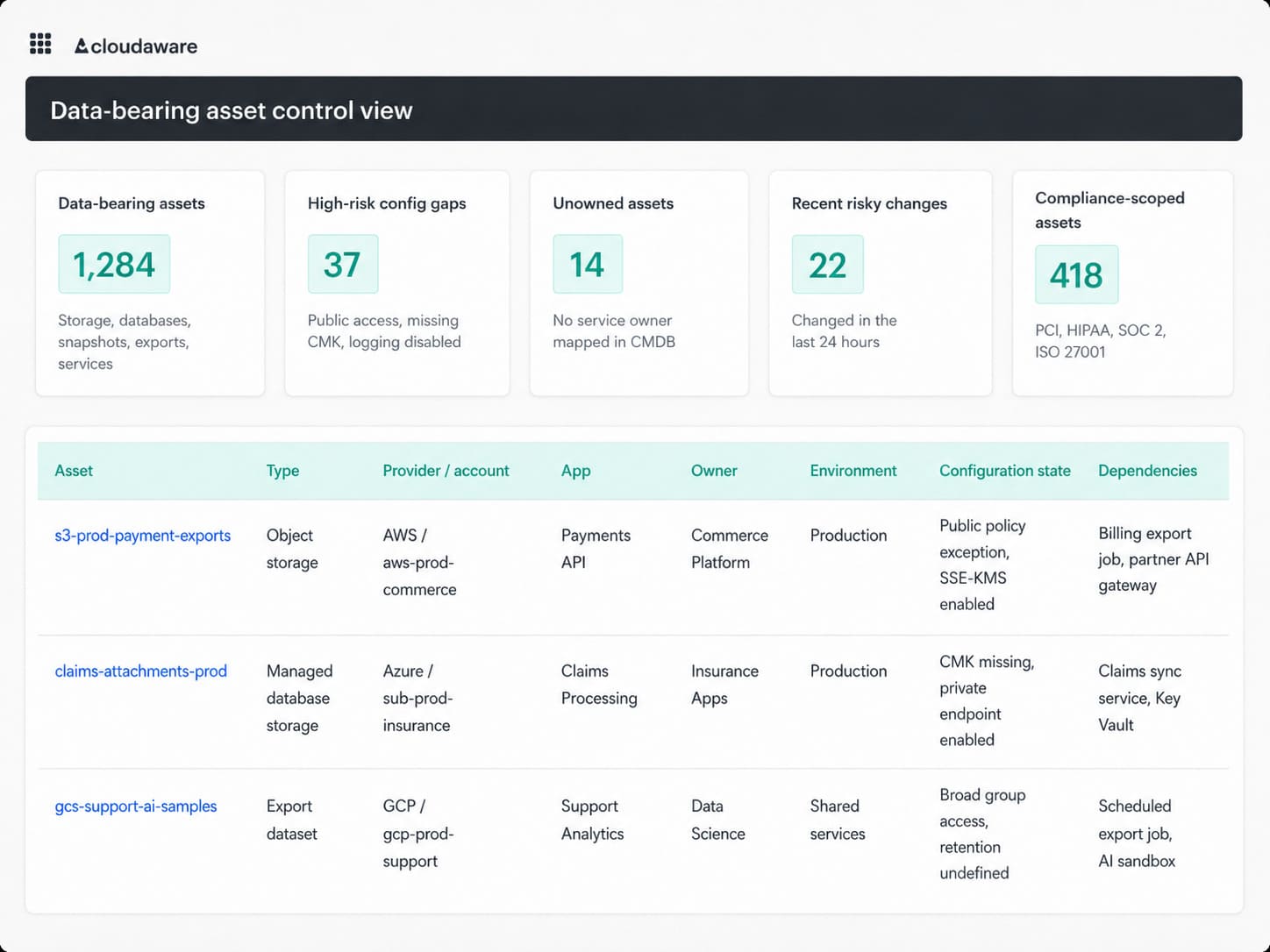
Cloud security dashboard in Cloudaware. Schedule a demo to see how it works for your environment.
That context changes the conversation fast.
The finding is no longer “S3 bucket has policy drift.” It becomes: “This production-linked bucket contains customer exports, belongs to Commerce Platform, changed access policy yesterday, has no retention date, and maps to a PCI-adjacent workflow.”
Now security has a fix path.
When SaaS exports and integrations are represented in the same asset model, the picture gets sharper. A support-ticket export feeding an AI workflow can be reviewed next to the storage location, access path, owner, retention rule, and compliance impact instead of living as a forgotten note in someone’s onboarding doc.
Fragmented visibility persists because every team creates data from a different angle. Engineering creates services. Analytics creates datasets. Support exports tickets. Finance syncs invoices. AI teams pull samples. Compliance asks for evidence after the fact.
The fix is not another passive inventory.
It is a living data map that keeps up with change.
Because if your team cannot answer where sensitive data lives, who owns it, what controls apply, and what changed last week, the cloud estate is already ahead of the security program.
7. Inconsistent encryption and key management across clouds
Nobody gets nervous when the report says “encrypted.”
That is the trap.
A storage bucket can be encrypted. A database can be encrypted. A backup can be encrypted. A SaaS vendor can promise encryption in the security appendix. And still, the data security team may have no clean answer to the question that matters:
Who controls the key?
Because encryption is not one control in a multi-cloud estate. It is a chain of decisions spread across AWS KMS, Azure Key Vault, Google Cloud KMS, SaaS encryption settings, backup tooling, Kubernetes secrets, data warehouses, and restored test environments.
Production is usually where teams behave.
The trouble starts around the edges.
A customer database in AWS uses a customer-managed key. The replica in another account uses a default provider-managed key. A restored Azure SQL copy lands in test with weaker access to Key Vault. A GCP BigQuery dataset has CMEK enabled, but the service account with decrypt permissions is shared across unrelated workloads. A SaaS export is encrypted by the vendor, but your team cannot audit key ownership, rotation, or who can trigger access.
So yes, encryption exists.
Control does not.
That is one of the quieter disadvantages of cloud data security: providers make encryption easy to enable, while consistent key governance becomes your problem the moment data crosses clouds, environments, tools, and teams.
The failure pattern is usually not dramatic.
It looks like this:
- The source dataset follows policy, but the backup does not
- The production key has an owner, while the restored copy has nobody
- Key rotation is documented, but exceptions never expire
- Decrypt access is broader than data-read access
- Audit evidence proves that encryption is enabled, but it does not confirm that the correct team has control over it.
A sharper review starts with data, not with keys.
For each sensitive asset, ask the ugly little questions:
- What key protects it?
- Who administers that key?
- Which identities can decrypt?
- Does the same rule apply to replicas, exports, backups, and restores?
- Did anything change last week?
That last question saves teams from pretending encryption posture is static. It is not. A migration, restore, policy exception, new analytics pipeline, or AI data extract can change the risk shape in one afternoon.
Alla L. Cloudaware ITAM expert:
Cloudaware clients usually make this visible in the same place they review the asset context. Not a key-management screen trying to replace KMS or Key Vault. More like an operating view where the storage account, database, snapshot, volume, dataset, or backup is tied to application, owner, environment, provider account, configuration state, dependency context, recent change history, and compliance scope.
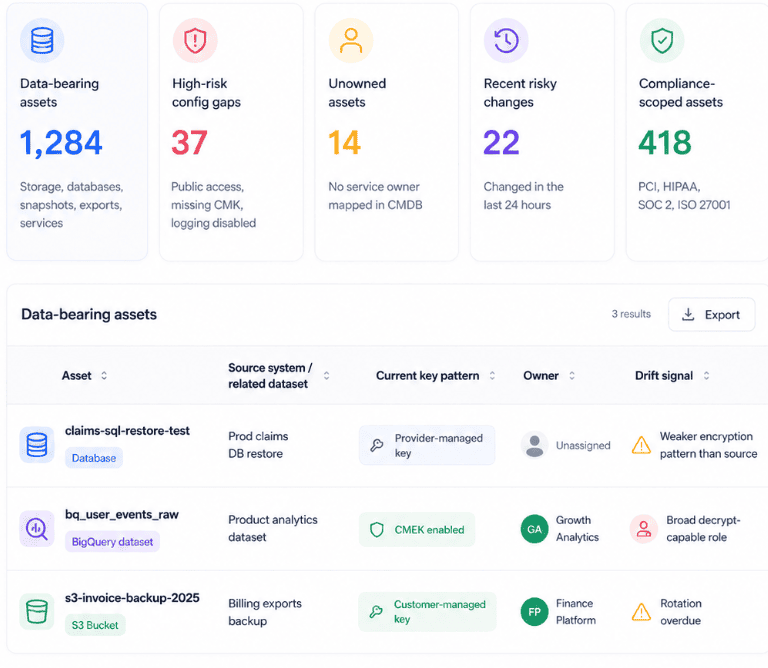
Cloud security dashboard in Cloudaware. Schedule a demo to see how it works for your environment.
That changes the finding from:
Encryption: enabled
to something security can actually act on:
Azure SQL restore from production claims data. Test environment. Owner missing. Key type differs from source. Key access includes legacy admin group. Created 19 days ago for migration testing.
Now the fix has a route.
- Platform can correct the key pattern.
- The app owner can confirm whether the restore is still needed.
- GRC can see whether the exception is approved.
- Security can check decrypt access without guessing which team will scream.
Read also: The Importance of Cloud Security Posture Management: 9 Reasons
8. Multi-tenant data commingling and side-channel risks
Multi-tenant cloud means your data runs on shared infrastructure, separated by logical controls: hypervisors, IAM boundaries, namespaces, network policies, encryption keys, and tenant IDs.
That model works until isolation fails.
Sometimes the risk is low-level, like Spectre or Meltdown-class side channels where shared compute leaks signals. More often, it is boring and fixable: cross-account IAM trust that is too broad, SaaS tenant IDs mixed in export logic, shared encryption keys across environments, Kubernetes namespaces treated like hard security boundaries, or partner access that reaches the wrong customer dataset.
This is one of the quieter cloud data security challenges because teams must trust CSP isolation, but cannot fully inspect it.
So the control is evidence. Prove tenant separation through dedicated keys, strict cross-account trust, segmented networks, scoped service accounts, tenant-aware logging, workload placement rules, and compliance attestations.
Emerging challenges of 2025/2026 years
These are recent additions to the threat landscape. They didn't make most competitor articles published before 2025 — and they are where the most urgent CISO conversations are happening today.
9. AI and LLM data leakage (shadow AI)
Shadow AI is a data leak that masquerades as productivity.
A support lead pastes customer tickets into ChatGPT. A product analyst uploads usage exports to test churn prompts. Engineering builds a RAG assistant over internal docs, then stores embeddings from contracts, logs, or customer records in a vector database nobody classified. DevOps connects an LLM to deployment notes, cloud logs, and IAM context because searching manually is slow.
Useful? Obviously.
Safe by default? Not even close.
This is one of the fastest-moving data security challenges in cloud computing because AI adoption is beating governance. The risk is not the same as AI-generated phishing. That is the attacker's side. This is your own data leaving through prompts, retained chat history, training extracts, over-permissioned RAG connectors, unmanaged vector stores, and prompt-injection paths that trick an assistant into revealing data it can access.
The control question is brutally practical:
What can the model read?
Where does the prompt go?
What gets stored?
Can sensitive content be reconstructed from embeddings, outputs, logs, or retrieval context later?
Treat every LLM workflow like a data-processing system. Classify inputs. Scope connectors. Block regulated data from unmanaged tools. Log retrieval activity. Review retention. Separate experiment data from production data. Put an owner on the pilot before it becomes infrastructure by accident.
10. Post-quantum cryptography risk to long-lived data
Post-quantum risk is not “your encrypted database gets cracked tomorrow.”
The sharper threat is quieter: harvest now, decrypt later.
An attacker collects encrypted traffic, backups, archives, database exports, signed documents, or long-retention records today. They cannot read it yet. Fine. They store it anyway, betting that future quantum capability will break the RSA and ECC-based protections still sitting under key exchange, certificates, signatures, and some key-wrapping patterns.
That matters most for data with a long secrecy life: patient records, legal files, financial histories, government data, identity documents, source code, product IP, and regulated backups kept for seven to ten years.
So yes, this belongs in data security in the cloud challenges, even if nothing looks broken in the dashboard today.
NIST finalized its first post-quantum cryptography standards in 2024: ML-KEM for key encapsulation, plus ML-DSA and SLH-DSA for digital signatures. NIST says these standards are meant to become the foundation for most post-quantum deployments and can be put into use now.
The practical move is crypto inventory by data lifetime:
- Which datasets must stay confidential after 2030?
- Where do RSA, ECC, TLS, VPNs, certificates, HSMs, KMS integrations, and SaaS vendors touch that data?
- Which backups, replicas, exports, and third-party transfers keep encrypted copies for years?
- Which vendors have a real PQC roadmap?
“Encrypted today” is not enough when the data needs to stay protected into the quantum era.
How these challenges manifest differently in AWS, Azure & GCP
The same data security challenge often looks different in each cloud, and the defensive primitive is named differently in each. The table below maps five high-impact patterns across AWS, Azure, and GCP so security architects can build cloud-agnostic controls without flattening the provider-specific details that matter in production.
One control goal. Three operating languages.
That is where addressing data security challenges in the cloud gets messy. “Prevent public storage exposure” sounds clean in a framework. In AWS, the team checks S3 Block Public Access. In Azure, they look at public network access, private endpoints, and storage account exposure. In GCP, Public Access Prevention and org policy become the stronger guardrails.
Same risk.
Different buttons, policies, logs, defaults, and evidence.
| Challenge | AWS | Azure | GCP |
|---|---|---|---|
| Exposed storage / public access | S3 Block Public Access at account and bucket levels | Public network access disabled on Storage account, plus private endpoints | Public Access Prevention through org policy |
| Encryption key custody | AWS KMS customer-managed keys, AWS CloudHSM for HSM-grade isolation | Azure Key Vault, Managed HSM, customer-managed keys | Cloud KMS, customer-managed encryption keys |
| Data-event audit visibility | CloudTrail S3 data events, queried with Athena | Storage diagnostic logs into Log Analytics, plus Defender for Storage | Data Access audit logs, Security Command Center |
| Cross-tenant data isolation enforcement | SCPs at org level, plus Resource Control Policies for resource-side guardrails | Management groups plus Azure Policy | Org policies plus VPC Service Controls |
| Immutability for ransomware defense | S3 Object Lock, MFA Delete | Immutable blob storage with time-based retention and legal hold | Bucket Lock and retention policies |
The trap is assuming parity means sameness.
It does not.
AWS, Azure, and GCP can all help prevent public storage access, enforce encryption, capture data events, separate tenants, and protect backups from ransomware. But the evidence trail looks different. The exception model looks different. The remediation path looks different. Even the owner may be different because one team owns AWS Organizations, another owns Azure management groups, and a third manages GCP org policies.
That is how data security issues in the cloud turn into architecture debt. A control exists in three clouds, but nobody can prove that the same risk is handled with the same intent.
Why these challenges persist after teams know about them
The strange thing is that nobody in a serious cloud team needs to be told that public buckets are bad, broad IAM is risky, encryption keys need owners, and shadow data creates exposure.
They know.
Still, the mess keeps coming back because cloud data security is not a knowledge problem. It is an operating model problem.
A platform team restores production data into test to unblock a migration. Sensible. A data team exports customer records for analytics. Also sensible. DevOps keeps a service account broad because nobody is brave enough to break the release pipeline. GRC asks for evidence three months later, and now everyone is reverse-engineering what happened from cloud logs, Jira tickets, Slack threads, and memory.
That is the rhythm.
The control exists. The estate moves. The proof falls behind.
Igor K., DevOps Engineer at Cloudaware
A useful way to read these failures:
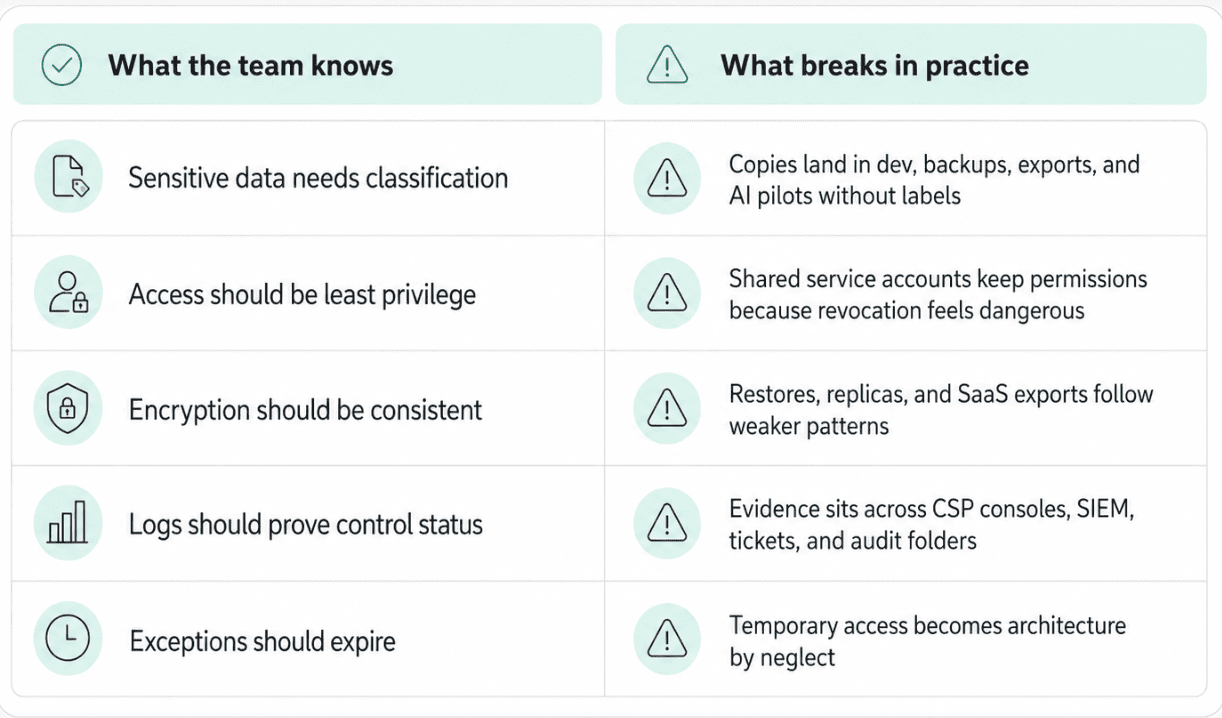
That is why addressing data security challenges in the cloud means watching the lifecycle, not just the control.
Creation. Change. Copy. Restore. Share. Export. Delete.
Miss one step, and the challenge comes back wearing a new resource name.
Valentin Kel, Cloudaware DevOps Engineer
Read also: NIST Cloud Security - A Practical Guide to the Framework, Controls, and Audit Readiness
Mapping challenges to regulatory exposure
Auditors do not care that the control exists somewhere.
They care whether the control protects the right data, in the right scope, with evidence tied to the asset.
That is why data security concerns in cloud computing become compliance exposure so quickly. A public bucket is not only a storage finding. If it contains personal data, PHI, cardholder data, or regulated exports, it becomes a control failure with a specific audit trail: scope, owner, configuration, access path, remediation, and proof over time.
| Challenge | Primary regulatory exposure | Typical control reference | Evidence auditors expect |
|---|---|---|---|
| Exposed storage / public bucket | GDPR Art. 32; HIPAA §164.312(a)(2)(iv); PCI DSS 1.2 | NIST SC-28; CCM IAM-09 | Bucket/container policy, public access setting, data class, owner, remediation record |
| Over-permissioned data access | HIPAA §164.308(a)(4); PCI DSS Req. 7 | NIST AC-3, AC-6; CCM IAM-10 | Identity, role, dataset reached, business justification, approval, last review |
| Insecure API touching data | GDPR Art. 25; PCI DSS Req. 6.5 | NIST SC-8; CCM AIS-01 | API path, auth model, data fields returned, caller identity, test results |
| Data residency violation | GDPR Chapter V; India DPDP §16; China PIPL Art. 38 | CCM DSI-06; ISO 27018 A.11 | Region, data subject location, transfer mechanism, processor/vendor record |
| Encryption key custody gaps | GDPR Art. 32; HIPAA §164.312(a)(2)(iv); PCI DSS 3.5 | NIST SC-12; CCM EKM-02 | Key type, key owner, decrypt permissions, rotation history, exception expiry |
| Audit log gaps | SOC 2 CC7.2; PCI DSS Req. 10 | NIST AU-2, AU-12; CCM LOG-08 | Log source, event coverage, retention, alerting, access to logs, evidence export |
The practitioner mistake is mapping controls only at the policy level.
“Storage must not be public” is not audit-ready.
“s3-prod-customer-exports was publicly reachable for 46 minutes, contained customer billing exports, mapped to PCI-adjacent scope, was remediated by Commerce Platform, and has continuous evidence from policy state plus change history” is audit-ready.
Same with access. A role review does not prove much until it shows the dataset, sensitivity, identity type, approval, last-used context, and removal date for temporary grants.
Regulatory exposure starts when the team cannot connect three things fast:
asset → control state → evidence
Miss one, and the finding becomes a story people have to reconstruct under pressure.
Read also: Cloud Security Frameworks Guide to Multi-Cloud Standards and Governance
See what audit-ready data security looks like before audit week
Cloudaware shows the missing link most teams end up rebuilding by hand:
asset → control state → owner → evidence
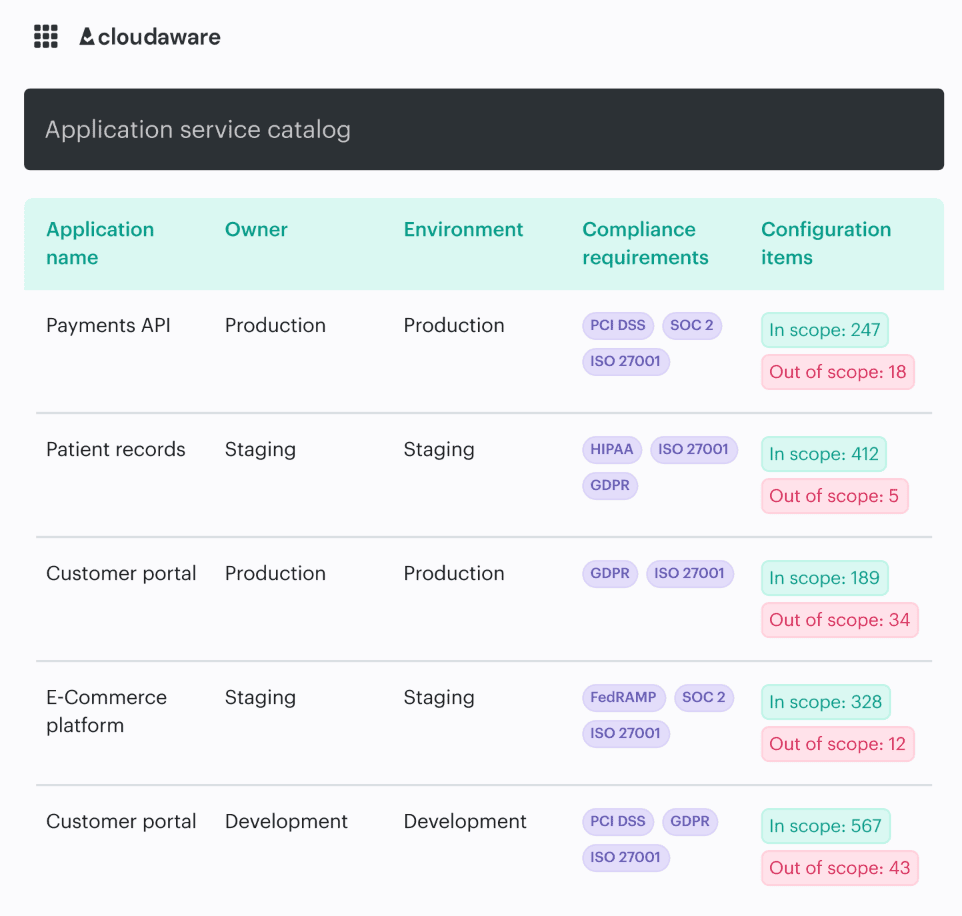
So when a bucket is exposed, a role is over-permissioned, or encryption drifts on a restored backup, the finding is not floating in a security queue with no context. You see the affected asset, cloud account, app owner, environment, recent change, compliance scope, and remediation path in one place.
No screenshot archaeology.
No “who owns this?” hunt.
No rebuilding the evidence story from five tools the week before review.