


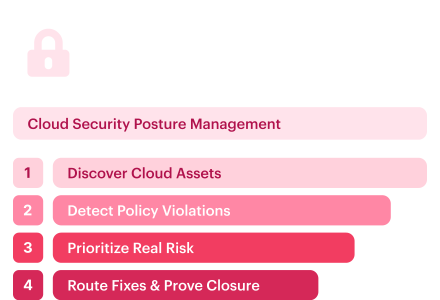
Cloud security posture management, or CSPM, starts with a simple problem: cloud environments change faster than security teams can manually review them. The issue is not only finding misconfigurations, because scanners already do that with depressing enthusiasm.
This guide explains what CSPM is, how cloud security posture management works, which CSPM tools and features matter, and how enterprise teams use ownership, context, remediation workflows, and audit evidence to turn posture findings into actual cloud security work.
For provider-specific implementation, see our guides to AWS cloud security posture management and Azure cloud security posture management.
Key insights
- CSPM connects cloud visibility to cloud risk reduction. It detects misconfigurations, exposed assets, weak identity settings, and compliance gaps, then helps teams prioritize what actually needs remediation.
- The highest-risk CSPM findings combine several conditions. Public exposure, vulnerable workloads, excessive permissions, non-human identities, and missing control coverage often matter more together than as separate alerts.
- Identity context now belongs inside CSPM prioritization. A public workload with broad service-account permissions carries a different risk profile than the same workload with limited access.
- Native CSPM tools are useful, but cross-cloud teams need normalization. Microsoft Defender for Cloud, AWS Security Hub, and Google Security Command Center help inside their ecosystems, while multi-cloud teams still need consistent ownership, policy, remediation, and evidence logic.
- Attack path analysis is becoming part of serious CSPM. Gartner places CSPM inside CNAPP and treats attack path analysis as a key capability for prioritizing posture findings.
- Enterprise CSPM fails when findings do not have owners. A useful CSPM program should show who owns the asset, which application depends on it, where the ticket goes, and what proves closure.
What is cloud security posture management?
Cloud security posture management (CSPM) is the practice of continuously assessing cloud environments for misconfigurations, policy violations, exposed assets, weak identity permissions, and compliance gaps.
CSPM evaluates cloud resource configurations against selected policies, prioritizes findings with context, and supports the workflow used to resolve or accept them. It does not design the cloud architecture or replace vulnerability management. To evaluate Cloudaware’s implementation, explore the CSPM product page.
In a mature cloud security program, CSPM helps teams understand where the risk exists, how severe it is, which owner should act, which compliance framework is affected, and whether the fix was completed.
IBM defines CSPM as technology that automates and unifies identification and remediation of misconfigurations and security risks across hybrid cloud and multicloud environments, including IaaS, PaaS, and SaaS. Microsoft’s CSPM documentation similarly emphasizes continuous visibility, security recommendations, misconfiguration reduction, and cloud compliance monitoring
What problems does CSPM solve?
CSPM solves the gap between fast-changing infrastructure and slower manual security review. Cloud resources appear through IaC templates, deployment pipelines, autoscaling, service-owner changes, test environments, and exception requests.
| Problem | CSPM response |
|---|---|
| Unknown assets | Discovers cloud resources across accounts, regions, projects, subscriptions, clusters, and services |
| Misconfigurations | Flags risky settings such as public access, unrestricted ports, weak encryption, disabled logging, or permissive IAM |
| Compliance gaps | Maps failed controls to frameworks such as CIS, NIST, ISO 27001, PCI DSS, HIPAA, SOC 2, and FedRAMP |
| Alert overload | Prioritizes findings by severity, exposure, identity path, data sensitivity, ownership, and business context |
| Slow remediation | Routes issues to owners with remediation guidance, tickets, exceptions, status, and evidence |
Why CSPM matters in 2026 cloud security
The urgency around CSPM comes from how cloud environments now operate: fast deployments, distributed ownership, multiple providers, short-lived resources, and audit pressure that does not wait for clean inventory.
This section breaks down the engineering and compliance problems that make CSPM a core cloud security function in 2026.
Cloud risk now combines misconfigurations, identity, and exposure
Cloud posture is no longer only about whether a storage bucket is public. Google Cloud’s Cloud Threat Horizons Report shows why CSPM cannot stay limited to static configuration checks. Coverage of the report notes that, in H2 2025, third-party software vulnerabilities accounted for 44.5% of initial access incidents, weak or absent credentials accounted for 27.2%, and misconfigurations accounted for 21%.
The Cloud Security Alliance’s 2026 analysis points to the same operational problem from another direction: teams now manage a non-human identity perimeter where machine and non-human identities can outnumber human users by 100-to-1.
Security maturity still lags behind cloud delivery speed
Red Hat’s 2026 cloud-native security research shows the gap between confidence and operating discipline. While 56% of organizations described their day-to-day security posture as highly proactive, only 39% had a mature, well-defined cloud-native security strategy, and approximately 22% had no defined strategy.
Red Hat also reported that 74% of organizations delayed or slowed application deployments over the previous 12 months due to security concerns.
Teams may have scanners, dashboards, and cloud-native recommendations, but still lack consistent ownership, remediation SLAs, policy exceptions, control mappings, and evidence trails. The result is posture visibility without posture management, which is how everyone gets a dashboard and nobody gets a fix.
Read also: Cloud Security Assessment. Methodology, Checklist, Best Practices, and Remediation
How does cloud security posture management work?
CSPM looks simple from the outside: connect the cloud accounts, scan the resources, and show the findings.
In real environments, that workflow has to account for provider-specific configuration models, incomplete ownership data, evolving infrastructure, and remediation paths that span several teams. 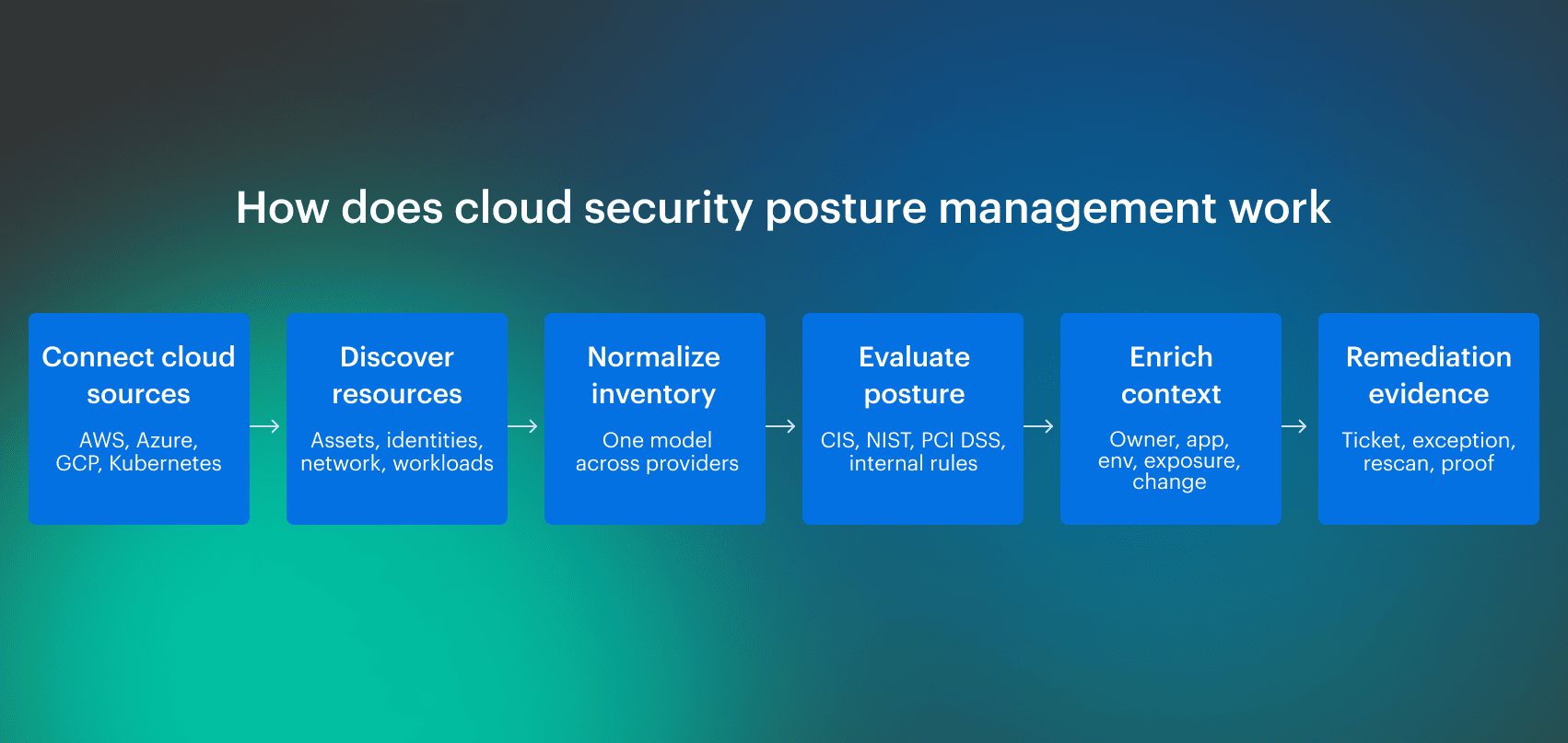 The steps below show how CSPM turns raw cloud inventory into security findings that can actually be prioritized, assigned, tracked, and proven closed.
1. Discover cloud assets across accounts, regions, and services
CSPM begins with discovery. The tool connects to cloud provider APIs and inventories assets across AWS accounts, Azure subscriptions, GCP projects, Kubernetes clusters, databases, storage, networks, serverless services, IAM resources, and security controls.
2. Normalize configuration data into a security model
Every provider models infrastructure differently. AWS accounts, Azure subscriptions, GCP projects, Kubernetes clusters, IAM roles, service principals, firewall rules, network security groups, tags, labels, regions, and logging settings do not line up cleanly.
A CSPM layer needs to normalize those differences into a security model that supports comparison and prioritization.
For example, “public exposure” may involve an AWS security group, an Azure network security group, a GCP firewall rule, a Kubernetes ingress controller, or a load balancer policy. The control objective is consistent, even when implementation details are provider-specific.
3. Evaluate resources against policies and benchmarks
After discovery and normalization, CSPM evaluates resources against policy. Those policies can come from external benchmarks, regulatory frameworks, provider recommendations, or internal engineering standards.
Common policy sources include:
- CIS Benchmarks
- NIST controls
- ISO 27001 requirements
- PCI DSS requirements
- HIPAA safeguards
- SOC 2 control expectations
- FedRAMP requirements
- Microsoft Cloud Security Benchmark
- Internal tagging, ownership, encryption, access, and logging standards
In enterprise environments, internal policy is as important as external policy. A company may require every production database to have an owner, application mapping, backup coverage, vulnerability scanning, approved network exposure, and a valid exception if a control cannot be fixed immediately.
4. Prioritize findings by exposure, identity, data, and business impact
Severity alone is a weak prioritization model. A “high” finding on an isolated non-production resource may matter less than a “medium” finding on an internet-facing production database with sensitive data and excessive identity permissions.
Useful CSPM prioritization considers:
- Public or private exposure
- Reachability from the internet or untrusted networks
- Identity permissions and privilege paths
- Data sensitivity
- Workload criticality
- Production versus non-production status
- Compliance scope
- Known vulnerabilities
- Recent configuration changes
- Missing ownership or stale assignment
- Existing exception status
- Ticket age and remediation SLA
5. Route remediation to the right owner
A CSPM dashboard turning red is not remediation. Findings need ownership, assignment, escalation, instructions, status, exceptions, and closure validation. Otherwise, the same issue sits in a queue while security asks the platform, the platform asks app teams, app teams ask cloud ops, and everyone enjoys a calendar invite named “follow-up.”
6. Preserve evidence for audit and investigation
Each CSPM finding should preserve enough detail to support investigation and audit review:
- Affected resource
- Provider, account, subscription, project, cluster, and region
- Policy or control violated
- Configuration state
- Detection timestamp
- Owner and responsible team
- Application or business service
- Environment
- Exception status
- Remediation action
- Ticket or workflow link
- Closure timestamp
- Control mapping
That record is useful when an auditor asks whether the control is operating, when an incident responder asks when exposure began, or when a platform lead asks why the same issue keeps returning.
Read also: Cloud Workload Security (A Cross-Cloud Guide for 2026)
Core features of cloud security posture management tools
A CSPM tool should not stop at showing failed checks. In complex cloud environments, the useful features are the ones that help teams identify the affected asset, understand priority, route the fix, manage exceptions, and prove closure.
| CSPM feature | What it should do | CSPM tools example: Cloudaware |
|---|---|---|
| Asset discovery | Discover resources across clouds, accounts, subscriptions, projects, regions, and hybrid inventory | Cloudaware evaluates policies against CMDB inventory, which can include mixed inventory across cloud and connected sources |
| Misconfiguration detection | Detect failed controls such as encryption, logging, backup coverage, MFA, and public access | IT Compliance Engine can evaluate conditions such as encryption, logging, backup coverage, MFA-related controls, and access enforcement |
| Compliance mapping | Map findings to frameworks and benchmarks | Cloudaware maps findings to CIS, NIST, FedRAMP, SOC 2, PCI DSS, GDPR, HIPAA, ISO 27001, ISO 27002, and UCF where applicable |
| Risk prioritization | Group violations by severity, environment, owner, application, or other operational dimensions | Cloudaware uses CMDB context to slice large violation volumes into smaller remediation groups |
| Remediation workflow | Route violations to owners, teams, tickets, or workflows | Violations can be grouped by application owner, environment, team, department, severity, or CMDB-linked dimensions |
| Evidence history | Preserve proof that controls were checked and issues were fixed | IT Compliance Engine supports evidence checklists, remediation documentation, and proof such as screenshots of fixes |
Multi-cloud and hybrid asset discovery
Single-provider CSPM can work for a narrow environment, but enterprise teams usually need coverage across AWS, Azure, GCP, Kubernetes, VMware, and on-prem dependencies.
A practical CSPM tool should answer: what exists, where is it, who owns it, what does it support, and which controls apply?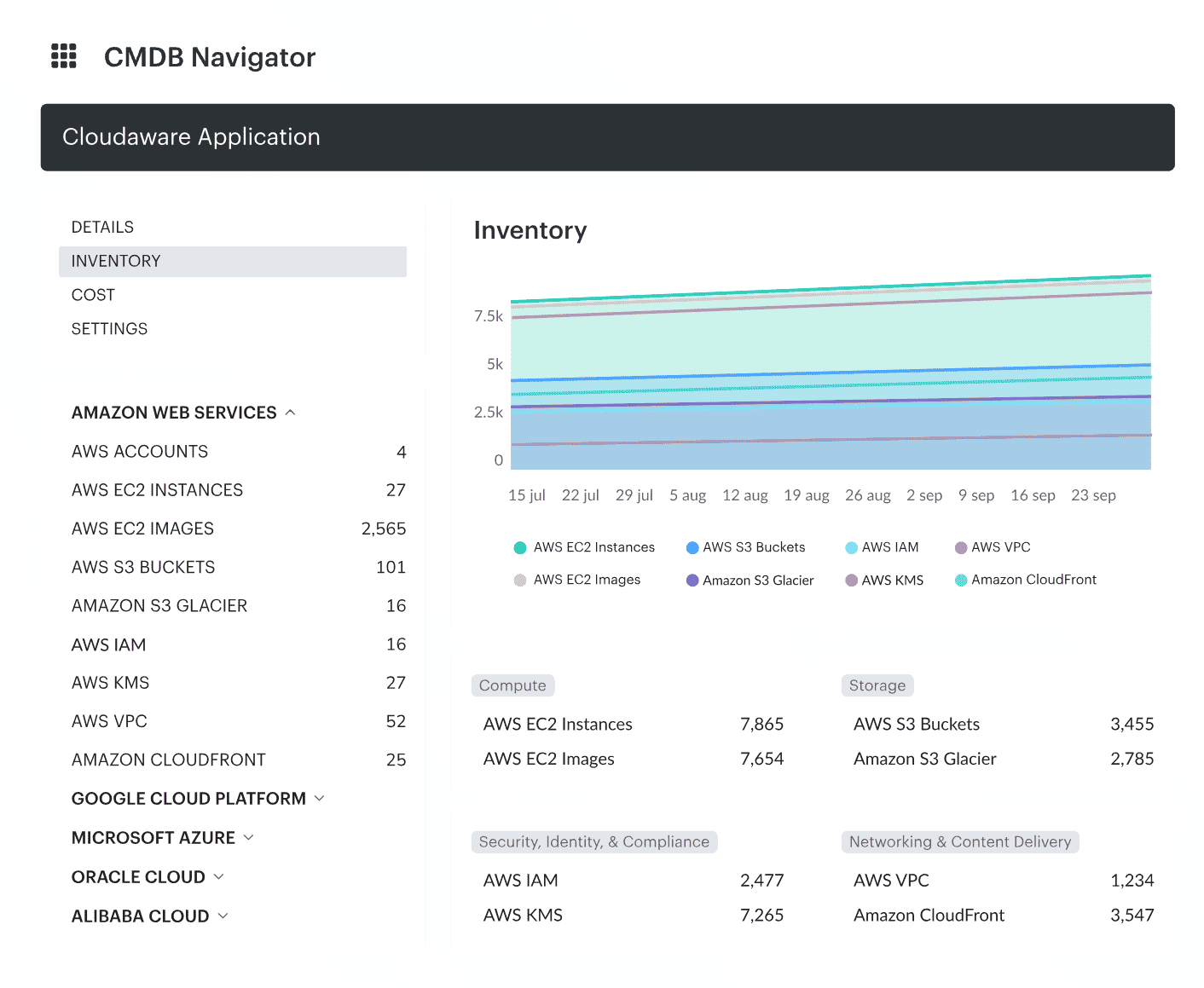 Cloudaware cross-cloud inventory showing resources across cloud accounts, subscriptions, environments, owners, and applications.
Misconfiguration detection and risk prioritization
Detection should be continuous enough to catch changes created by deployments, manual console edits, automation, and emergency access.
This is especially important in environments where teams use Terraform, CloudFormation, ARM/Bicep, Helm, Kubernetes manifests, and provider-native deployment tools at the same time.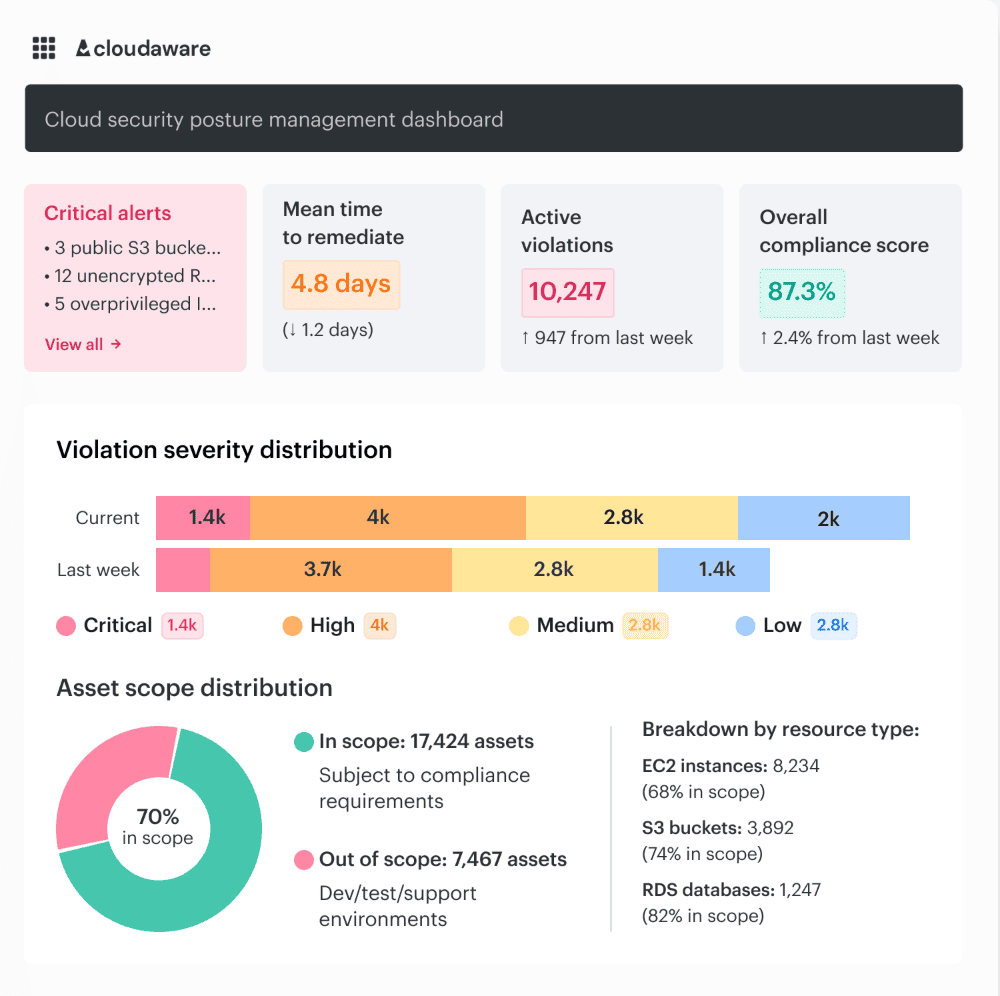 Cloudaware CSPM dashboard showing critical alerts, active violations, mean time to remediate, compliance score, violation severity distribution, and asset scope by resource type.
Compliance evidence and exception management
Enterprise CSPM needs exception handling. Some findings are accepted temporarily because remediation requires a migration, vendor dependency, architectural change, or approved compensating control.
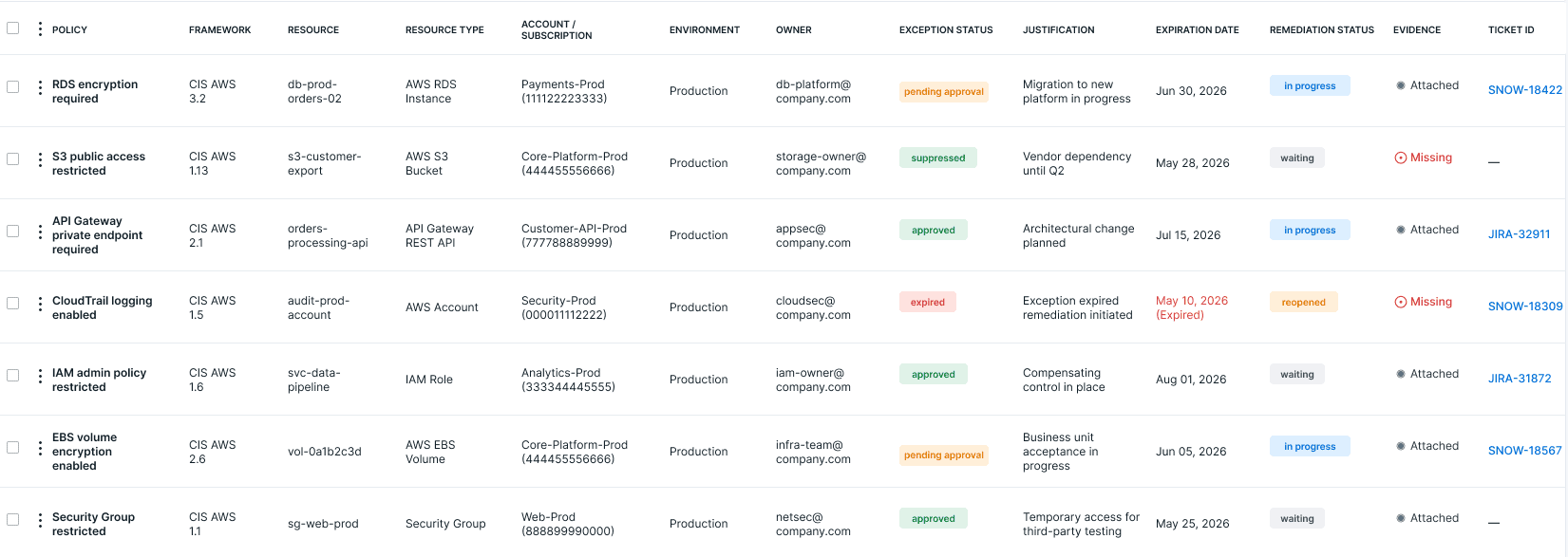 Cloudaware compliance evidence view showing policy violations, affected resources, owners, exception status, and remediation history.
Risk context and attack path analysis
Risk context turns CSPM from a control checklist into an engineering workflow. A finding should be enriched with exposure, identity, data, workload, service, and business context. Attack path analysis helps teams understand whether several conditions combine into a realistic route to sensitive systems or data.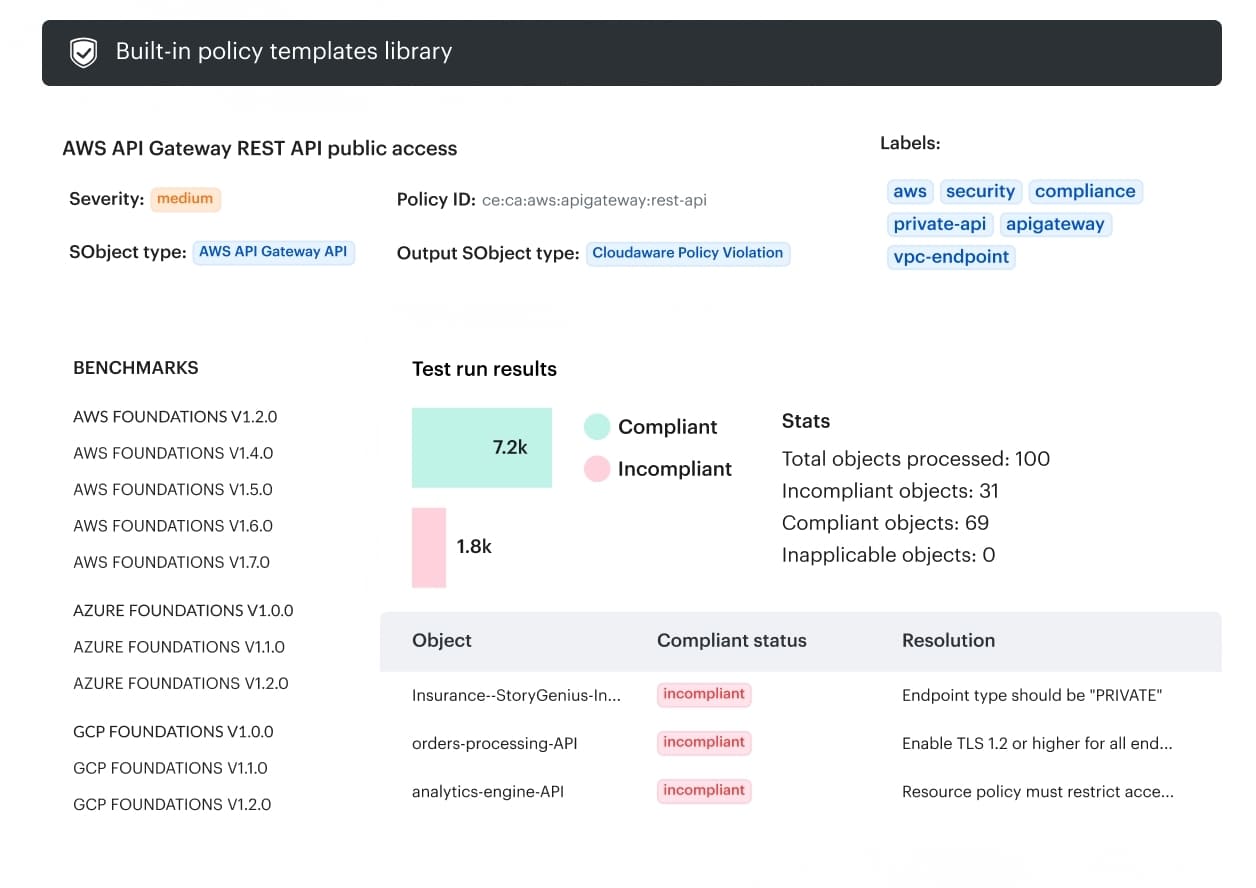 Cloudaware CSPM policy template showing AWS API Gateway public access compliance check, benchmark mappings, test results, and resolution guidance.
CSPM vs. related cloud security tools
CSPM overlaps with several cloud security categories. The difference matters because teams often buy tools before defining workflows, and then everyone gets to discover “platform strategy” during an incident.
| Tool category | Primary focus | How it relates to CSPM |
|---|---|---|
| CSPM | Cloud configuration, posture, compliance, exposure, and remediation | Core layer for discovering and reducing cloud control-plane risk |
| CNAPP | Broader cloud-native application protection across code, infrastructure, workloads, identities, and runtime | CSPM is commonly part of CNAPP |
| CWPP | Runtime workload protection for VMs, containers, hosts, and workloads | Complements CSPM by protecting workloads after deployment |
| CIEM | Cloud identity permissions and entitlement risk | Feeds identity context into CSPM prioritization |
| DSPM | Sensitive data discovery, classification, and data exposure | Complements CSPM by focusing on data-level risk |
| SIEM | Event collection, correlation, detection, and investigation | Uses CSPM context to enrich security events |
| Vulnerability management | Known software, OS, package, and workload vulnerabilities | Complements CSPM configuration and exposure findings |
CSPM vs. CNAPP
CSPM focuses on cloud posture, configuration, compliance, exposure, and remediation. CNAPP is broader and can include CSPM, CWPP, CIEM, IaC scanning, Kubernetes security posture management, cloud detection and response, and other cloud-native security capabilities.
CSPM vs. CWPP
CSPM evaluates cloud control-plane posture and configuration risk. CWPP protects workloads at runtime, including virtual machines, containers, hosts, and workload processes.
CSPM vs. CIEM
CIEM focuses on cloud infrastructure entitlement management, including excessive permissions, unused privileges, risky trust relationships, and least-privilege violations. CSPM uses identity context to prioritize posture findings.
CSPM vs. DSPM
DSPM focuses on discovering, classifying, and protecting sensitive data. CSPM focuses on infrastructure-level cloud posture, including compute, containers, PaaS services, network paths, IAM, logging, and encryption configuration.
CSPM vs. SIEM
SIEM collects and analyzes security events. CSPM continuously evaluates cloud configuration and compliance state.
Read also: 10 Azure Cloud Security Best Practices for 2026
What CSPM looks like in a real investigation
Most CSPM findings look simple at first: a public endpoint, an open security group, a missing encryption setting, or a failed compliance check. The problem is that a single failed control rarely tells the security team enough to act.
In a real investigation, engineers need to know whether the asset is exposed, who owns it, which application depends on it, what permissions are attached, whether sensitive data is involved, and what evidence will prove the fix
Example: public API Gateway policy violation
A public API Gateway finding depends on intended exposure. Some APIs are meant to be public, while others should only be reachable through a private endpoint, VPC endpoint, or restricted resource policy. A useful CSPM check should separate approved exposure from policy violations instead of treating every API the same.
In this scenario, the policy checks whether an AWS API Gateway REST API allows public access when the required state is private access. If the API endpoint type, resource policy, or access configuration does not match the expected control, the result should create a violation tied to the exact API object.
A useful finding should show:
- Policy name and severity
- Affected object type
- Account, region, and API identifier
- Endpoint type and resource policy status
- Framework or benchmark mapping
- Resolution guidance
- Owner, application, and environment context
- Remediation, exception, and evidence status
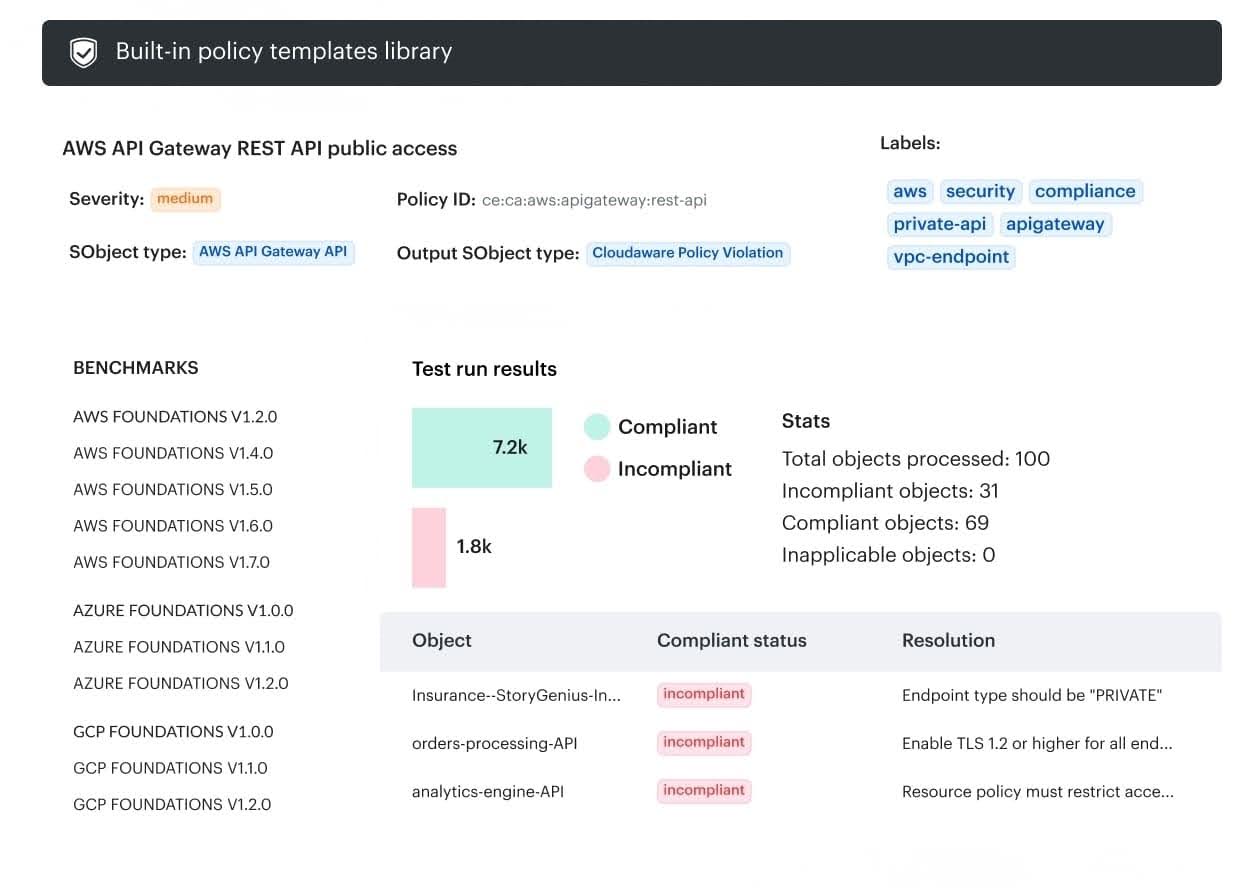 In Cloudaware, this can be represented as a policy template: the policy defines the expected condition, the check evaluates API Gateway objects, and failed results become policy violations with object-level status and remediation guidance.
What an operational CSPM finding should include
| Field | Why it matters |
|---|---|
| Resource ID | Identifies the affected asset |
| Provider/account/subscription/project | Places the resource in the right administrative boundary |
| Region | Supports scope, residency, and response review |
| Exposure path | Shows whether the asset is reachable from the internet or untrusted networks |
| Identity permissions | Identifies privilege impact |
| Application or service | Connects the resource to business function |
| Owner or team | Routes remediation |
| Environment | Separates production, staging, development, and sandbox risk |
| Data sensitivity | Prioritizes findings tied to sensitive data |
| Control mapping | Supports compliance review |
| Policy violated | Explains the failed requirement |
| Change history | Helps determine when and how the issue appeared |
| Exception status | Shows whether the risk was approved |
| Ticket link | Tracks remediation |
| Evidence history | Proves detection, action, and closure |
Read also: 9 AWS Cloud Security Best Practices That Pay Off
Native CSPM vs. third-party CSPM tools
Native cloud security tools have their own tradeoff, which appears when security teams have to manage posture across several clouds. At that point, the question is less “which CSPM tool is best?” and more “where can the team normalize findings, assign owners, track exceptions, and prove remediation across the full estate?”
When native CSPM tools are enough
Native CSPM can be enough when the environment is mostly single-cloud, compliance scope is limited, ownership is clear, and teams can manage remediation inside the provider console.
Common examples:
- Microsoft Defender for Cloud for Azure environments
- AWS Security Hub for AWS environments
- Google Cloud Security Command Center for GCP environments
When enterprise teams need a broader CSPM layer
Enterprise cloud security rarely stays inside one console. Teams often run a stack: CSPM for posture, native services such as Security Hub or GuardDuty for provider-specific findings, CWPP or EDR for workload protection, and so on.
The problem here is that every tool produces findings with different context, ownership, severity, and remediation paths.
A broader CSPM layer becomes useful when teams need to:
- Normalize findings across AWS accounts, Azure subscriptions, GCP projects, Kubernetes clusters, VMware, and hybrid infrastructure.
- Separate compliance coverage from real risk reduction, so audit dashboards do not hide exploitable exposure.
- Reduce false positives by using account purpose, environment, owner, exception status, and business service context.
- Connect posture findings to workload protection, identity risk, data sensitivity, SIEM/SOAR workflows, and DevSecOps pipelines.
- Route remediation to the right owner through Jira, ServiceNow, email, or existing operations workflows.
- Preserve evidence for audits, including resource state, policy mapping, ownership, change history, remediation status, and closure.
- When the workload boundary is Kubernetes, complement provider-level posture checks with Kubernetes security controls for cloud teams
What to look for in third-party CSPM tools
| Capability | Why it matters |
|---|---|
| Multi-cloud and hybrid discovery | Prevents blind spots across AWS, Azure, GCP, VMware, Kubernetes, and on-prem |
| CMDB or asset context | Connects findings to owners, apps, business services, and environments |
| Policy customization | Lets teams encode internal controls, not only vendor defaults |
| Compliance mapping | Supports CIS, NIST, ISO, PCI DSS, HIPAA, SOC 2, and audit reporting |
| Risk prioritization | Reduces noise by using exposure, identity, data, and business context |
| Remediation workflow | Routes findings to Jira, ServiceNow, email, or internal workflows |
| Exception handling | Tracks accepted risk and compensating controls without losing auditability |
| Evidence history | Shows what changed, when, who owned it, and how it was closed |
Read also: What Is the Future of AI in Cloud Security? Trends & Benefits for 2026
4 common CSPM mistakes
CSPM should reduce operational confusion and not generate a larger pile of findings with nicer charts. We asked what Cloudaware experts see when CSPM findings have to become actual remediation work, and what cloud engineers keep saying in practitioner discussions.
Underestimating false positives in multi-account environments
False positives are not just annoying. In large environments, findings can be technically accurate but operationally wrong because they ignore account purpose, environment type, approved exceptions, business service, compensating controls, or temporary access patterns.
A Reddit practitioner called out the false-positive rate in real multi-account environments as one of the questions buyers should ask vendors. That is exactly where posture tools often look strong in demos and then collapse under an enterprise context, because reality loves ruining slide decks.
Treating all policy violations as equal
A CSPM dashboard showing 40,000 violations is not a remediation plan. In large environments, violations need to be broken down by application owner, environment, application, team, department, severity, business service, and other CMDB-linked dimensions so each group can become owned work instead of one giant security backlog nobody can realistically process.
“The mistake is measuring CSPM by total violations instead of asking whether those violations can be decomposed into work that the right team can actually own and close.” — Katerina L., Cloud Security Expert at Cloudaware
Ignoring ownership and service context
A finding without an owner becomes security debt. CSPM should tie assets to teams, applications, business services, environments, accounts, subscriptions, and escalation paths so remediation does not depend on someone recognizing a resource name from 2021.
“I’ve seen countless remediation efforts fail because the finding reached the wrong queue. The owner has to be resolved from the actual service relationship, not guessed from a tag that may be three-quarters out of date.”— Alla L., Technical Account Manager at Cloudaware
Missing secrets exposure from the CSPM workflow
Secrets exposure often sits between posture management, workload scanning, CI/CD security, and data protection, which is exactly why it gets missed. API keys in container environment variables, database passwords in config files, SSH keys in storage buckets, and tokens inside unmanaged workloads may not show up if the team only scans code repositories, Vault, or periodic review samples.
In a Reddit discussion on exposed secrets in cloud workloads, engineers described the same pattern: periodic reviews keep finding new credentials, but teams cannot rotate what they do not know exists.
How Cloudaware empowers CSPM
Cloudaware helps teams move from posture visibility to owned remediation work. Its Compliance Engine evaluates policies against CMDB-backed inventory and creates violations when assets do not meet required conditions.
Teams can then break large violation volumes into smaller remediation groups by owner, application, environment, department, severity, or other CMDB-linked dimensions.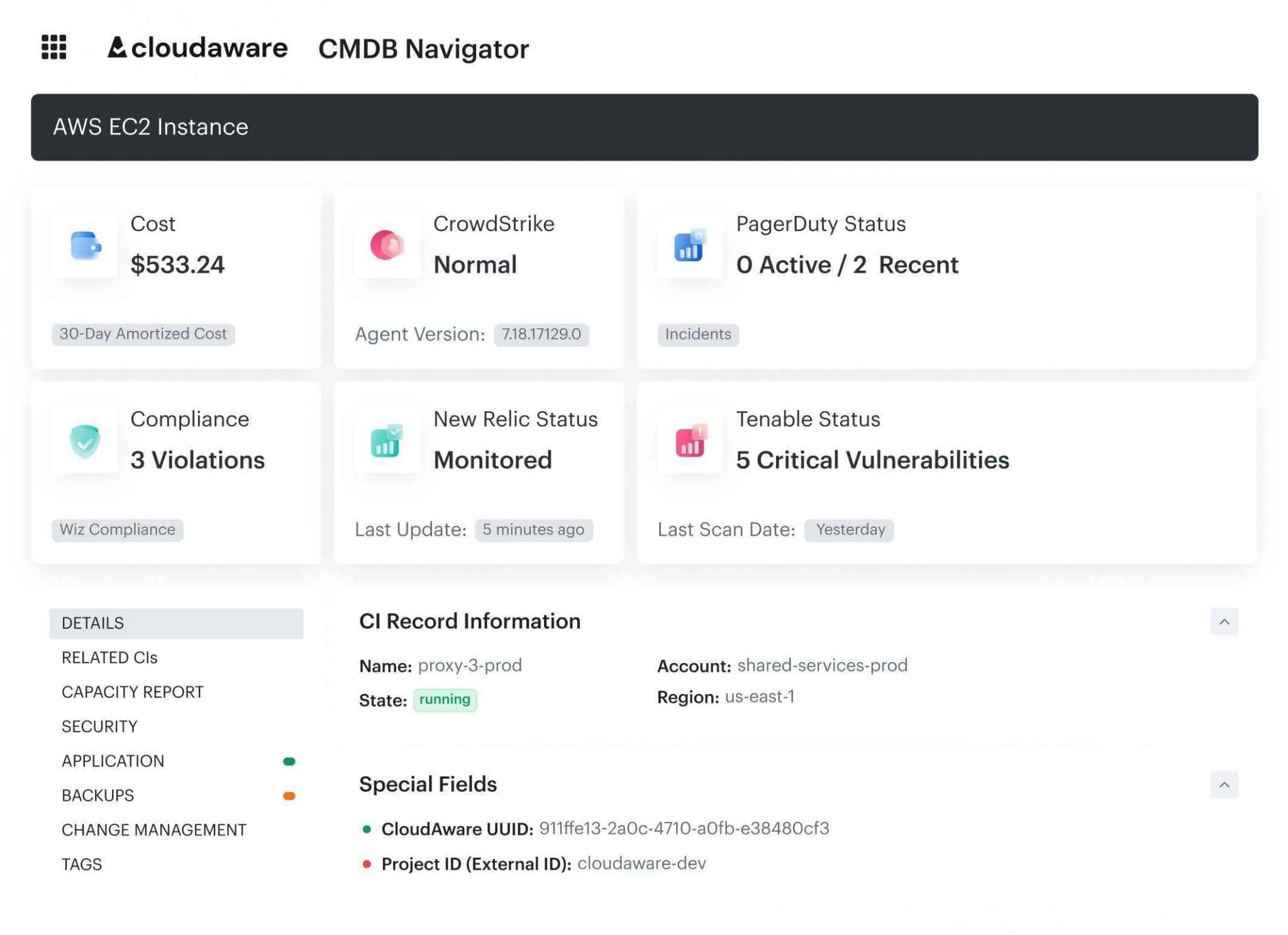 Core capabilities:
- Policy evaluation across cloud and hybrid inventory.
- Security and compliance checks for encryption, logging, backup coverage, MFA, access controls, public exposure, network restrictions, monitoring, segmentation, vulnerability-management requirements, and other framework-driven controls.
- Custom policies for internal tagging, approved regions, access rules, cost-management logic, rightsizing checks, performance controls, and organization-specific governance requirements.
- Framework mapping for CIS, NIST, FedRAMP, SOC 2, PCI DSS, GDPR, HIPAA, ISO 27001, ISO 27002, and UCF.
- CMDB-based evaluation that reduces reliance on repeated live provider API queries.
- Exception and suppression workflows with status, justification, expiration logic, and governance visibility.
- Violation grouping by application owner, environment, team, department, severity, or other operational dimensions.
- Audit evidence support with coverage, exemptions, owners, timestamps, policy differences, remediation trails, and violation closure status.
- Integrations and workflow patterns for Jira, ServiceNow, PagerDuty, and operational remediation tracking.