


Hybrid cloud security architecture is the design model that defines how identity, network, workloads, data, logging, and compliance controls work consistently across public cloud, private cloud, and on-premises environments.
I’m writing this from the operator side of cloud security, where the hard part is never drawing boxes. It’s getting the control plane, access paths, and evidence trail to tell the same story when one app runs across three systems and five teams.
So here’s the real question set:
- Where does hybrid cloud security actually crack first?
- Which controls belong in every architecture, and which ones change by environment?
- What should a usable reference model and diagram show?
- How do you stop drift after hotfixes, exceptions, and rushed changes?
- What proves the architecture is working when audit or incident pressure hits?
Key insights
- Hybrid cloud security architecture is the operating model, not the goal. The goal is lower risk. The architecture is how identity, network, workloads, policy, logging, and data protection stay coordinated across AWS, Azure, GCP, and on-prem.
- Identity is the first real boundary. Before firewalls matter, before segmentation helps, somebody or something already has access. If identities, roles, tokens, and service accounts are loose, the rest of the architecture spends its time compensating.
- One policy intent can span different platforms without requiring identical controls. Mature teams standardize what the rule is supposed to achieve, then adapt enforcement to each environment instead of pretending every provider behaves the same way.
- Drift is a design problem, not just a config problem. A temporary hotfix, a stale exception, or one manual change in a rushed release can quietly rewrite how the environment actually behaves.
- Good dashboards do more than count findings. The useful view shows scope, owner, environment, violation age, MTTR, new-versus-fixed issues, and which accounts or services keep producing the same noise.
- If audit evidence is not created during day-to-day operations, the architecture is not really under control. Strong teams can show what changed, when it changed, who approved it, and when it returned to compliance without building the story by hand later.
- For architecture review preparation, see our guide on conducting a cloud security architecture review.
What is a hybrid cloud security architecture?
Hybrid cloud security architecture is the design behind how security actually works across public cloud, private infrastructure, and on-prem. It defines how identity governance, network and workload protection, telemetry, policy, and compliance are integrated. This integration spans hybrid environments, including AWS, Azure, GCP, VMware, and data centers.
That is the part people skip. They talk about hybrid cloud security like it is the end goal, which it is. But the thing that makes that goal real is the architecture underneath it.
The problem only starts making sense when identity, workloads, network observability, configuration management, and threat detection operate as one model instead of five separate conversations.
And that matters because the old perimeter is gone. A user signs in through one directory, assumes a role in cloud IAM, hits an API, wakes up a workload, and touches data that may still live on-prem. East-west traffic carries risk. The cloud control plane carries risk too, because a dangerous change now looks a lot like a normal admin action until you connect the dots.
Hybrid cloud security architecture diagram:
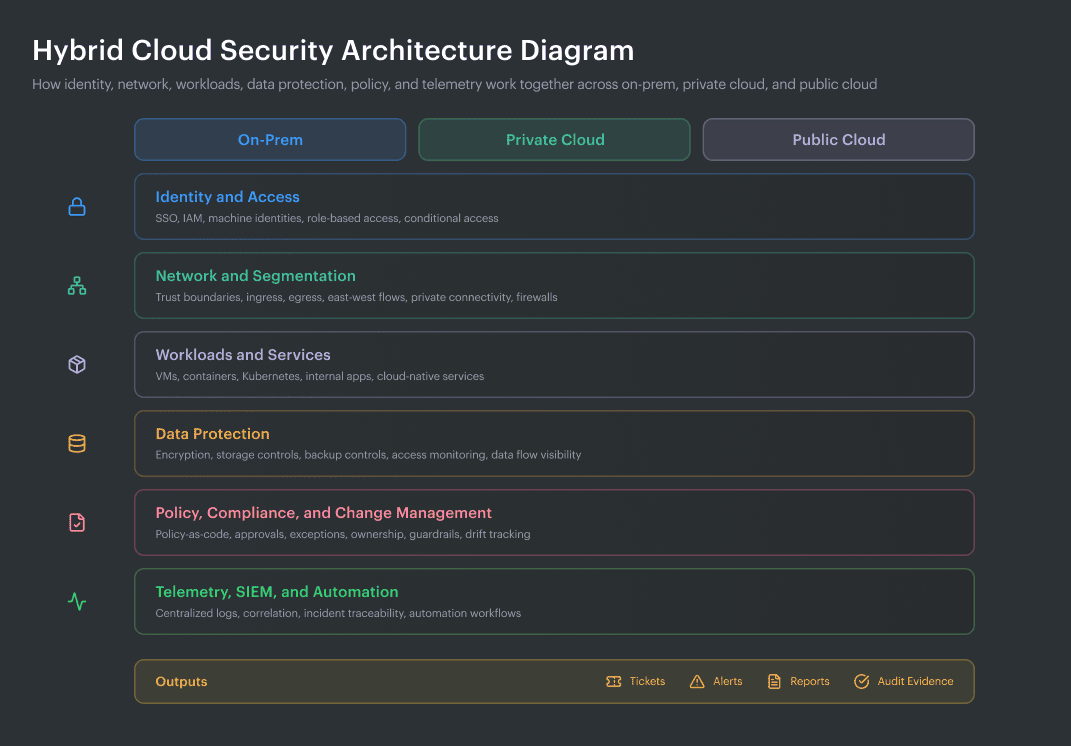
Hybrid cloud security reference architecture showing how identity, network controls, workloads, data protection, policy, and telemetry connect across on-prem, private cloud, and public cloud.
Layers of a hybrid cloud security reference architecture:
- Identity and access layer
- Network and segmentation layer
- Workload and configuration layer
- Data protection layer
- Control plane and policy layer
- Telemetry, detection, and evidence layer
How it differs from hybrid cloud security in general
This is where teams usually blur two very different ideas.
Hybrid cloud security is the broad mission. Keep systems protected. Reduce exposure. Catch bad behavior faster. Pass audits without chaos. Fine. Every security leader wants that.
Hybrid cloud security architecture gets more specific, and honestly, more useful. It forces the hard questions.
- Which identity source wins when Active Directory says one thing and cloud IAM says another?
- Where do API logs meet asset context?
- How do you govern access when a service account in the cloud can still reach something living on-prem?
- Which team owns the fix when one risky path crosses three platforms and two toolsets?
That is the difference. One term describes the outcome. The other describes the design that decides whether the outcome is even possible.
| Aspect | Hybrid cloud security in general | Hybrid cloud security architecture |
|---|---|---|
| What it is | The broad effort to protect cloud and on-prem environments | The design model for how protection actually works across them |
| Main concern | Risk reduction | Control coordination |
| Typical question | “Are we secure enough?” | “How do identity, policy, traffic, logging, and ownership connect?” |
| What teams often buy | Security tools | A trust model, control map, ownership model, and evidence flow |
| Real example | MFA is enabled | Human and machine identities are mapped across directories and cloud IAM, with role assumptions and service access governed in context |
| Common failure | Alerts exist but do not line up | Seams between tools, teams, and control planes are exposed and visible |
| Audit outcome | Evidence gets collected | Evidence is already attached to assets, changes, controls, and owners |
Read also: How to Conduct a Cloud Security Assessment (A Step-by-Step Guide)
Why architecture matters more than isolated controls
Here’s the uncomfortable part—attackers already think in paths when most defenders still buy in categories.
That mismatch gets expensive fast
87% of attacks spanned multiple attack surfaces, while 89% of investigations involved exploited identity weaknesses. So when a team treats identity, SaaS, endpoint, cloud, and network as separate stories, it is already working slower than the attack path.
Identity makes the problem sharper
Organizations are now managing a perimeter shaped by a 100-to-1 ratio of machine and non-human identities to human users. Non-human identities outnumber human identities by 17 to 1, with 38% dormant accounts and 8% orphaned identities swelling the attack surface.
That changes the job. You are not just managing employee access anymore. You are governing service principals, tokens, workload identities, API keys, and automation that can move through the environment at machine speed. In a hybrid estate, that is not a side issue. That is the center of the map.
Then there is speed
The window between vulnerability disclosure and active exploitation collapsed from weeks to days in the second half of 2025. That single line should make every architect sit up.
Periodic reviews are insufficient when exposed software and permissive rules can be exploited days after a disclosure is made. You need shared visibility, clearer ownership, and control logic that reaches across environments without making teams hunt through five dashboards first.
APIs push the same lesson from another direction
IBM observed a 44% increase in attacks that began with exploitation of public-facing applications, and said vulnerability exploitation accounted for 40% of incidents in 2025.
Salt’s API research found that 99% of organizations hit API security issues in the prior year, 55% slowed a new application rollout because of API concerns, and 95% of API attacks came from authenticated sources. So yes, authentication matters.
That is why isolated controls disappoint people.
Read also: Cloud Security Best Practices. Strategy, Checklist, Monitoring, and Automation
Hybrid cloud security reference architecture
Any serious hybrid cloud security reference architecture starts with identity and access.
This is where hybrid environments usually get messy first.
One team manages Active Directory. Another owns Entra ID or Okta. Cloud IAM grows separately in AWS, Azure, and GCP. Service accounts pile up. Federation paths stay open longer than anyone planned. By the time you notice, trust is spread across too many systems to reason about quickly.
Here are the architecture layers ⬇️
| Layer | Summary |
|---|---|
| Identity & access | Goal: control access. Risk: stale roles and weak MFA. Evidence: role history, MFA, owner tags. |
| Network & segmentation | Goal: keep paths tight. Risk: temporary rules become permanent. Evidence: flow logs, firewall and route changes. |
| Workload & config | Goal: keep runtime honest. Risk: drift after release. Evidence: baseline checks, runtime findings, drift trail. |
| Data protection | Goal: protect data and storage. Risk: exposed or overbroad access. Evidence: encryption, access logs, backup controls. |
| Control plane & policy | Goal: enforce rules with traceability. Risk: stale exceptions and weak ownership. Evidence: approvals, policy history, expiry dates. |
| Telemetry & evidence | Goal: preserve proof. Risk: fragmented logs and weak context. Evidence: centralized logs, incident timelines, audit records. |
Identity and access layer
The identity and access layer decides who gets in, what they can reach, and how far they can move once they are inside. In a hybrid cloud environment, that job gets complicated fast. Human users authenticate through one directory, assume roles in another system, trigger workloads through APIs, and touch data that may still live in on-prem services.
That is why federation matters. You want one clean identity story across the estate, not a pile of local accounts scattered across cloud and on-prem.
MFA is table stakes, but not the soft version people enable and forget. Privileged paths need stronger protection. Conditional access matters too, because context matters. A normal user on a managed device is one thing. A privileged request coming from an unusual session is something else entirely.
Then you get to least privilege, and this is usually where the architecture either stays tight or starts drifting. If people keep old roles after moving teams, if workloads run with broad permissions “just in case,” if stale accounts survive migrations, the whole environment starts to look more secure on paper than it is in real life.
Machine identities make this harder. Most hybrid estates now have far more service accounts, tokens, automation roles, and workload identities than human users. That means access design cannot stop at employee logins. It has to cover CI/CD runners, containers, internal apps, scheduled jobs, and every other quiet identity moving between cloud security layers in the background.
Cloudaware clients usually feel this first in the gap between visibility and action. They can see a risky permission in one tool and an exposed service in another, but the ownership trail is fuzzy.
Inside Cloudaware, those findings are tied back to the asset, the application, the environment, and the owner, so identity-related issues stop floating around as abstract alerts.
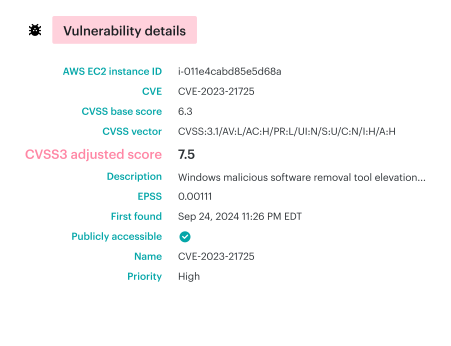
Element of the Cloudaware dashboard. Schedule a demo to see it live
A cloud role with broad access, a publicly exposed asset, a stale server tied to an old app—all of that lands with context. Teams can easily identify the changes, the owner, and the affected part of the hybrid environment without manually piecing together the story.
Read also: Cloud Workload Security (Cross-Cloud Guide for 2026)
Network and segmentation layer
In a hybrid cloud security reference architecture, the network and segmentation layer is where trust gets tested for real. Not in a slide, but in traffic, routes, and quiet little connections teams stop noticing after month three. One internal service talks to another.
A workload in one cloud reaches a database somewhere else. A temporary rule stays open. An egress path nobody meant to keep becomes normal.
That is why strong hybrid cloud security does not stop at perimeter thinking. You need segmentation that reflects actual risk, not org charts. Public-facing workloads should live in a tighter zone. Sensitive data paths need stricter boundaries. East-west visibility matters because lateral movement rarely starts with a dramatic external hit. It often starts inside the environment, moving through allowed paths that nobody revisits.
A solid design here usually does five things well:
- Defines clear network segments and trust boundaries.
- Limits ingress to what a workload truly needs
- Treats egress as a control, not an afterthought
- Uses private connectivity where it makes sense
- Keeps traffic encrypted between critical services
- Makes network changes visible enough to investigate later
Valentin Kel, Cloudaware DevOps Engineer
Workload and configuration layer
In any hybrid cloud security reference architecture, the workload and configuration layer is where architecture meets reality. This is the part that tells you whether your cloud security model still holds after deployment, after a hotfix, after a rushed change on a Friday night.
A Kubernetes workload may pass review and still drift later. A VM may look secure in the baseline, then pick up a risky permission, a config change, or an exposed service path that nobody meant to leave open.
That is why posture management matters. You need a known-good state for workloads across hybrid cloud environments, not just for images and clusters, but for VMs, storage access, encryption, backup settings, and the internal services those workloads depend on.
Cloudaware’s IT Compliance Engine is built around that kind of check. It evaluates real asset scope, ties violations to specific objects, and tracks how long an issue stays open, which makes the gap visible instead of theoretical.
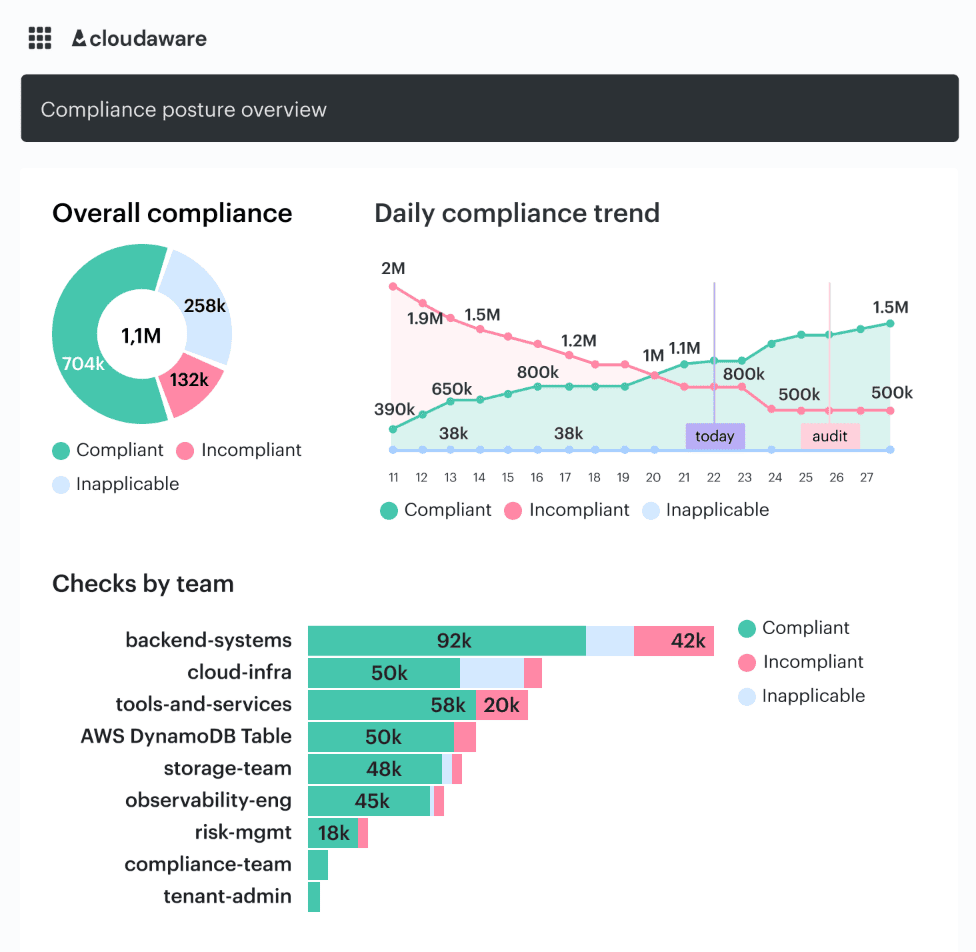
Element of the Cloudaware dashboard. Schedule a demo to see it live
Drift is the real problem here. Not the word. The operational version of it. What was approved is no longer what is running. Cloudaware’s host monitoring helps teams catch that by recording security events and integrity changes such as file content, ownership, and permission updates.
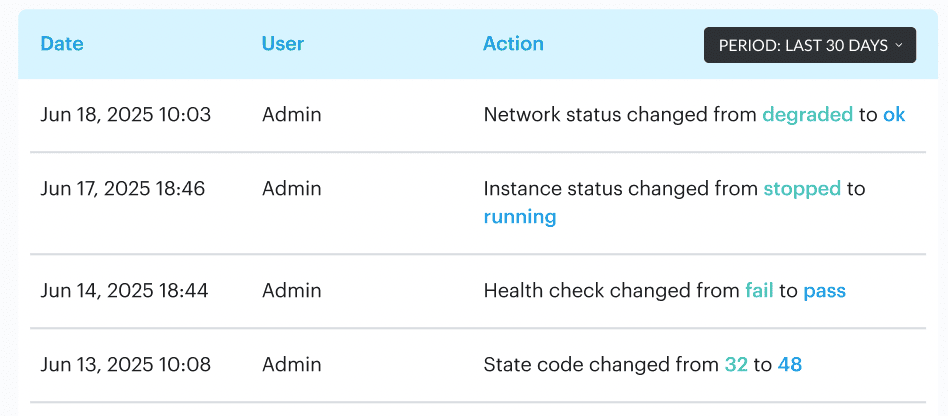
Element of the Cloudaware dashboard. Schedule a demo to see it live
So instead of guessing what changed in the cloud or on-prem, teams get a trail they can follow.
This layer exists for one reason: to keep hybrid cloud security honest after release.
Read also: Cloud Security Assessment. Methodology, Checklist, Best Practices, and Remediation
Data protection layer
In a hybrid cloud setup, data does not politely stay inside one app, one account, or one storage boundary. It moves between workloads, APIs, backups, queues, and internal services. Sometimes across one cloud. Sometimes across three. Occasionally, it goes from cloud to on-prem and back again before anyone notices the path got wider than planned.
That is why the data protection layer has to do more than “turn on encryption.”
It needs to answer four questions:
- Is the data encrypted at rest and in transit?
- Where does it move, and which service is moving it?
- Which storage locations are exposed more broadly than they should be?
- Who or what is accessing it, and does that access still make sense?
A bucket can be encrypted and still be a problem. Same with a database. Same with a backup copy. The weak point is often not the control itself. It is the access around it, or the storage path, nobody revisited after the original launch.
Igor K., Cloudaware DevOps Engineer
In practice, this is where a good dashboard earns its keep. Not the kind that just throws counts at you. The useful one shows which storage controls are failing, which assets are affected, whether the issue touches production services, how long it has been open, and who owns the fix.
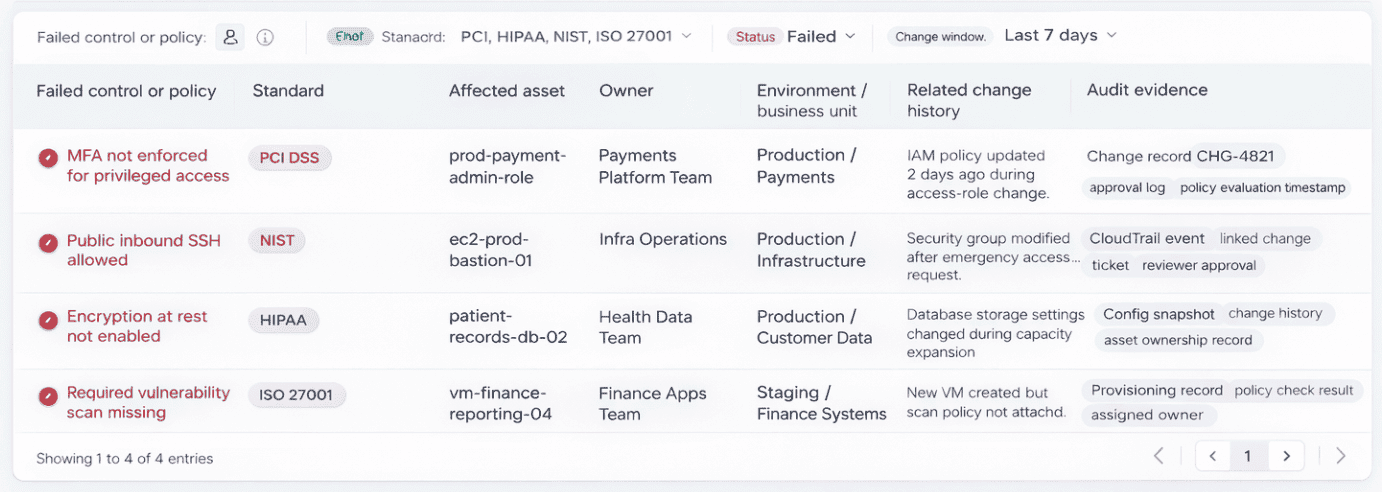
Element of the Cloudaware dashboard. Schedule a demo to see it live
In Cloudaware, teams use that view to spot things like overly exposed storage, missing encryption, or access drift, then work from the actual asset and owner instead of chasing raw alerts across tools.
That is the real job of this part of hybrid cloud security. Keep sensitive data protected, yes. More than that, keep its movement visible, its storage tight, and its access monitorable enough that your cloud security model still holds when the environment gets busy.
Read also: Cloud Security Architecture. A Comprehensive Guide to Protecting Your Cloud Infrastructure
Control plane and policy layer
This layer is where hybrid cloud security stops being a checklist and starts acting like a system. The risky move is usually not dramatic. Someone changes a role. Someone opens a port for a migration. A bucket stays public because the website still needs it. An approval happens in chat, the ticket closes, and the environment keeps the exception long after the reason is gone.
So the control plane has to do a few things at once:
- Turn policy into code, not tribal knowledge
- Keep guardrails close to the actual cloud objects they govern
- Record who owns the resource, who approved the change, and why
- Allow exceptions, but only with scope, justification, and an end date
- Respect provider-specific control logic, because AWS, Azure, GCP, and on-prem never behave exactly the same
That last part matters more than people admit. A strong hybrid cloud model can share intent across environments, but it should not pretend every provider exposes the same controls in the same way.
- One rule may be about root MFA in AWS.
- Another may govern Azure identity settings.
- A third may check whether a public-facing service really needs that exposure.
The point is consistency in governance, not fake uniformity. In Cloudaware, teams usually handle this through customizable policies, scoped violations, and ownership tags like Environment, Product, and Owner, so the control is tied to a real asset and a real person instead of floating around as abstract security guidance.
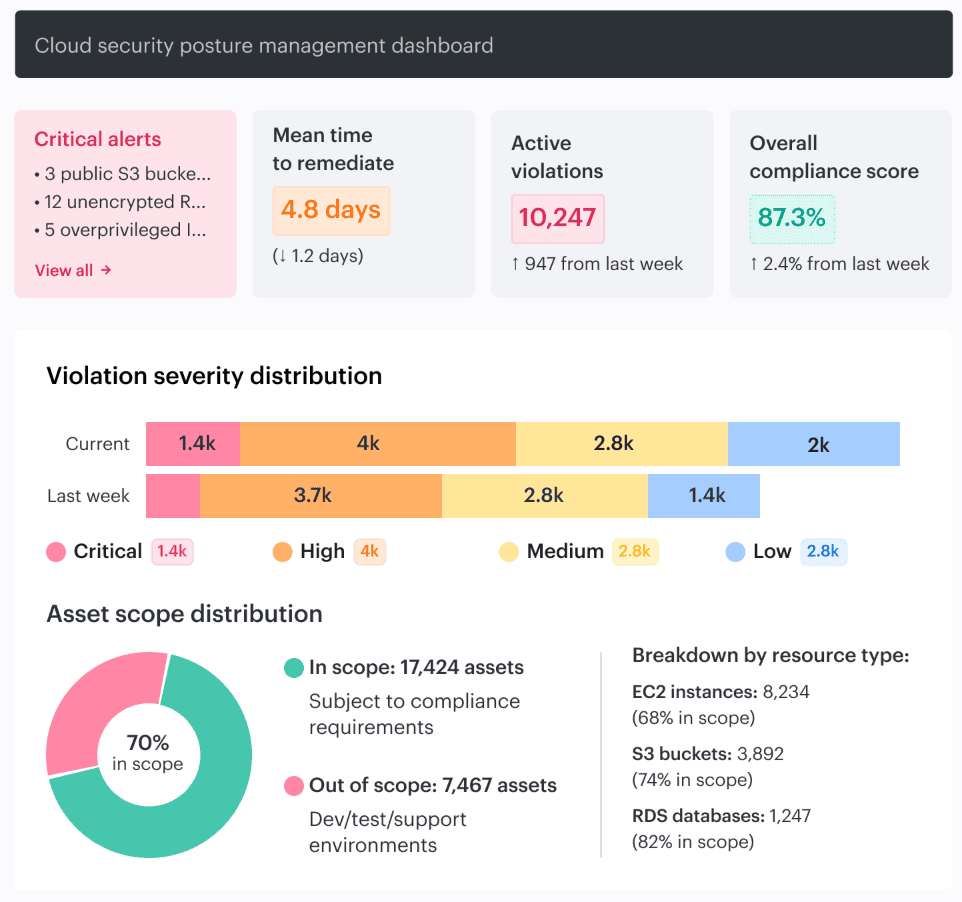
Element of the Cloudaware dashboard. Schedule a demo to see it live
This dashboard here is not the one that just counts violations. It is the one that shows what is drifting, how long it stays open, whether the team is fixing faster than new issues appear, and which accounts or environments are generating the most policy debt.
That is why teams look at policy scores, MTTR, delta between fixed and newly created violations, and account-level breakdowns. The conversation changes immediately. You stop asking, “Are we compliant?” and start asking, “Why is this account still producing the same cloud security issue every week, and who owns the repair?”
Read also: Multi-Cloud Security Architecture. Reference Model and Best Practices
Telemetry, detection, and evidence layer
In a hybrid cloud security architecture, things go wrong across too many systems for memory to help. A change is applied to one cloud account. A noisy host starts generating odd events. A database service throws a warning. Someone asks whether the event is new, whether it touched production data, whether the control worked, and whether there is proof for audit. If your logs are scattered, the conversation slows down quickly.
So the job here is simple to describe and annoying to do well:
- Centralize logs
- Correlate events with assets, workloads, and owners
- Keep audit trails long enough to matter
- Show continuous compliance proof, not one-off screenshots
- Make incident traceability possible without opening five tools
In practice, you want to see which signals are getting louder, which accounts keep producing the same mess, how long violations stay open, and whether the team is actually fixing faster than new issues arrive.
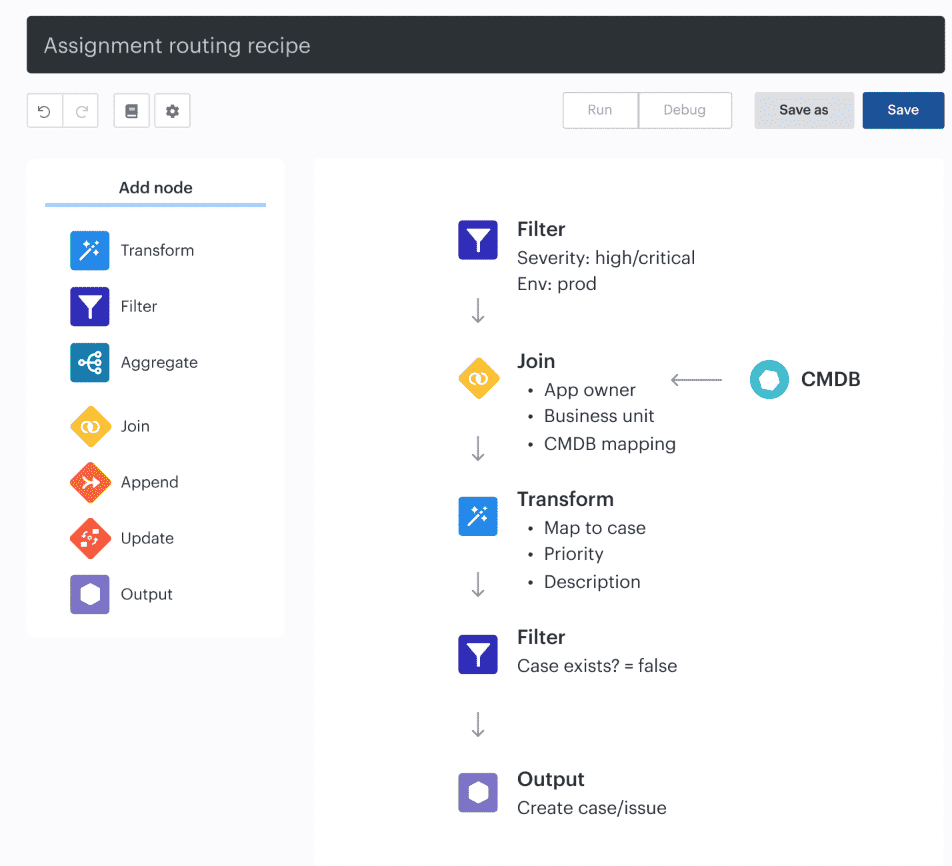
Auto-assignment recipe in Cloudaware
Teams use views like that to move from raw alerts to something usable: this event came from this workload, in this environment, owned by this team, and here is the timeline around it.
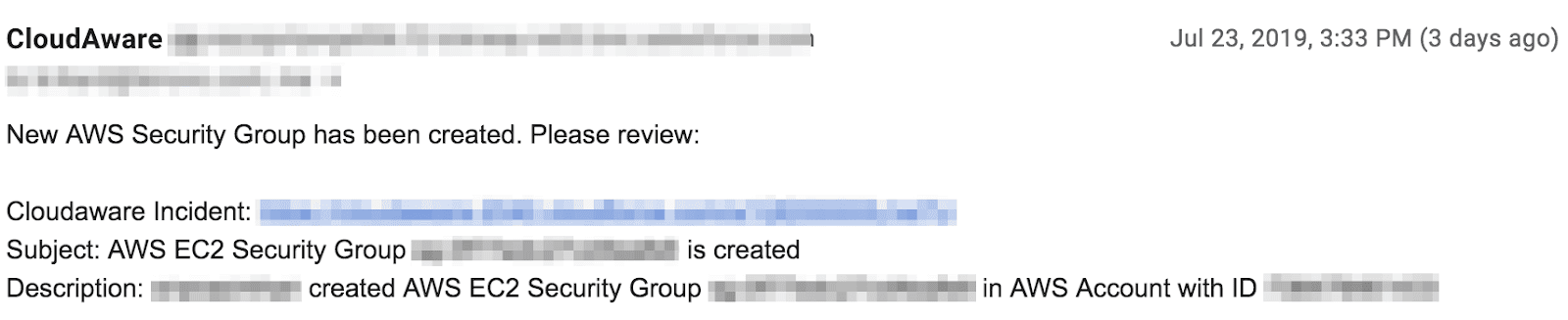
That is a much better place to start an investigation than a pile of logs with no context.
Igor K., Cloudaware DevOps Engineer
Where hybrid cloud security architecture breaks in real life
In the handoff. Not inside one control or cloud console. The cracks show up when identity jumps from directory to IAM, when the same policy gets enforced differently across environments, when east-west traffic goes unseen, when evidence lives in three tools, and when a ticket lands with no owner, no app, and no context.
That is where real hybrid cloud security risks start to stack.
Identity seams between cloud IAM, directory services, and SaaS
Identity problems rarely arrive with drama. They drift in.
A user loses one role in the directory but keeps another in AWS. A SaaS app still trusts an old group. A machine identity keeps broader access than the workload needs. On paper, every system looks fine. Across the hybrid estate, the trust path is wrong.
That is the trouble with identity seams. Nobody sees the full chain at once.
A useful way to catch this early is painfully simple:
- Tie identities to real owners
- Keep the environment and app metadata attached to assets
- Watch for stale privileges after team or workload changes
- Treat machine identities like first-class security subjects, not background noise
Policy drift between environments
This one sounds boring until it bites.
The intent is consistent. Encrypt the storage. Lock down the admin path. Restrict the public service. Then reality gets involved. AWS exposes one control one way. Azure handles the equivalent differently. An on-prem team keeps a manual rule because the migration is not finished. Somebody hotfixes the network path on a Friday night and never cleans it up.
Now the organization thinks it has one policy. In practice, it has several versions of the same idea plus one exception nobody remembers approving.
In Cloudaware, teams often work from dashboards that show which violations are recurring, how long they stay open, and whether new findings are appearing faster than fixes.
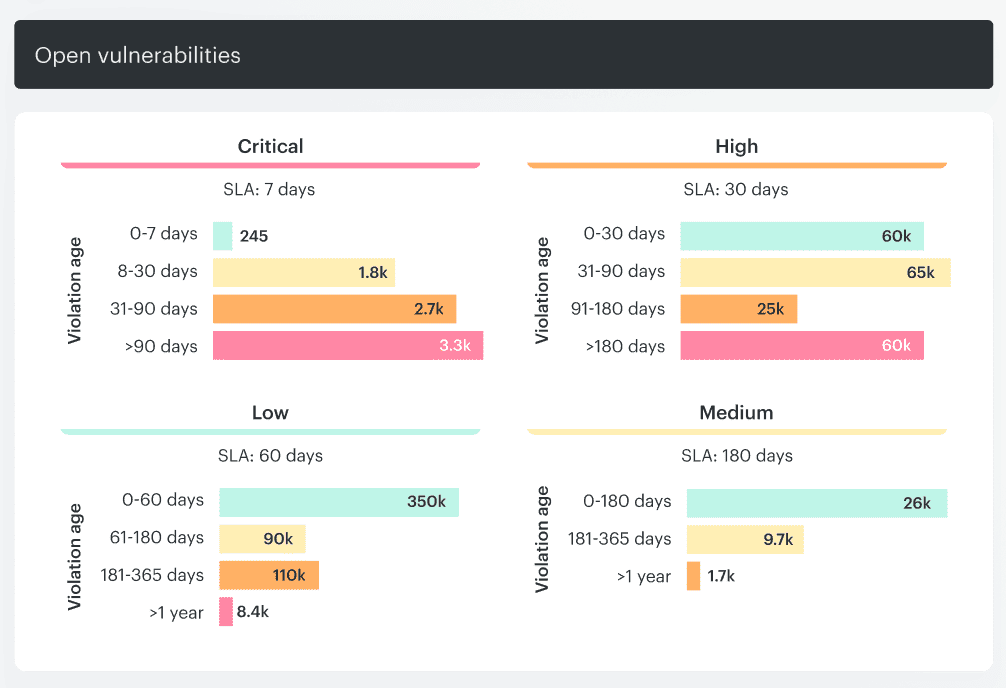
Element of the Cloudaware dashboard. Schedule a demo to see it live
That view is useful because drift is not really a point-in-time problem. It is a pattern problem.
Blind spots in east-west traffic and API activity
Most diagrams are polite, which can’t be said about real systems. They show ingress, firewalls, and clean boundaries. Then a workload starts talking sideways to another workload, an internal service calls an API it should not need, and sensitive data moves across trust zones with almost no visibility.
That is where lateral movement hides.
What tends to go missing:
- East-west flows between internal workloads
- API calls that change the control plane quietly
- Cloud-native traffic that never crosses the obvious perimeter
- Findings in public cloud that have no connected evidence from private infrastructure
Once that context disappears, network security becomes much harder to reason about. You have logs, maybe. You do not have the story.
Evidence gaps during audits and incidents
An incident hits. Security has one set of logs. Platform has another. The app team has a ticket thread. Audit wants timestamps, closure dates, and proof that the control actually worked.
The weak point is almost never “no evidence exists.” It is that the evidence cannot be connected fast enough.
A solid evidence trail should answer:
- When the issue appeared?
- What changed around it?
- Which app and environment were affected?
- Who approved the exception, if there was one?
- When the issue moved back into compliance?
That is why continuous compliance proof matters. Not because auditors like screenshots. Because incidents and audits both punish missing history.
Ownership gaps when nobody knows who should fix what
This is the most human break and probably the most expensive one.
A ticket says high severity. Fine. For which app? In which environment? Which team owns the asset? Is this production or a test? Is it a cloud security finding, a platform issue, or a broken deployment pattern?
If none of that is clear, remediation slows down before it even begins.
A useful dashboard here does not just count findings. It shows the asset, the owner, the environment, the open time, and the trend.
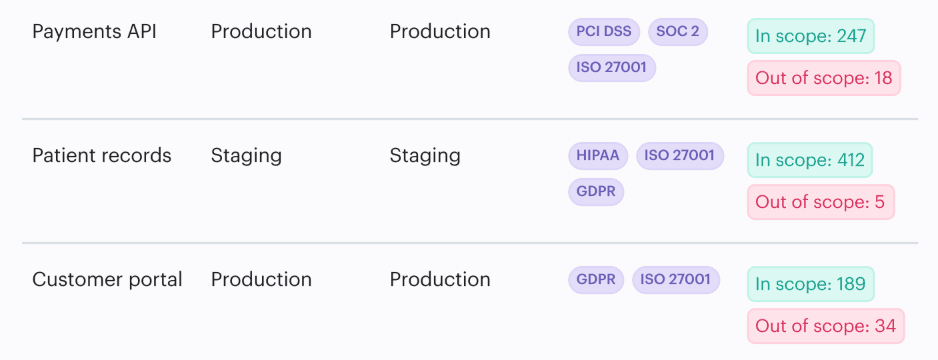
A misconfiguration tied to a named app and a named owner gets fixed much faster than an alert that says almost nothing.
That is how cross-cloud traceability turns into action instead of noise.
5 best practices for a resilient architecture
Resilient hybrid cloud security does not come from making every tool look the same. It comes from making the rule clear enough that every environment can enforce it without losing the point.
That lesson shows up fast in real hybrid cloud estates.
AWS does one thing one way. Azure does the same thing with different logic. Private cloud and on-prem services add their own wrinkles. Teams that stay secure stop chasing perfect uniformity and start standardizing what the control is supposed to achieve.
Standardize intent, not identical tooling
Here’s the mistake teams make. They decide one policy should look identical everywhere, then spend months forcing three different platforms into one shape. The result is usually bad cloud security. Controls drift. Exceptions pile up. The dashboards get noisy. Nobody trusts the signal.
A better approach is simpler:
- Keep the control objective consistent
- Let provider-specific logic do its job
- Make exceptions explicit
- Tie every asset to an owner and environment
- Review patterns, not only one-off findings
That sounds less elegant on a slide. It works much better in production.
Take a common example. The intent is clear: sensitive data should stay encrypted, and public-facing services should not be exposed by accident. Fine.
In AWS, Azure, and a private environment, the implementation will not look identical. It should not. What should stay identical is the decision logic behind it. What are we protecting? Who owns it? Which exposure is acceptable? What counts as a violation? When an exception expires.
Teams need a view that shows which policy categories keep failing, which accounts are generating repeat violations, how long issues stay open, and whether the environment is getting cleaner or simply louder.
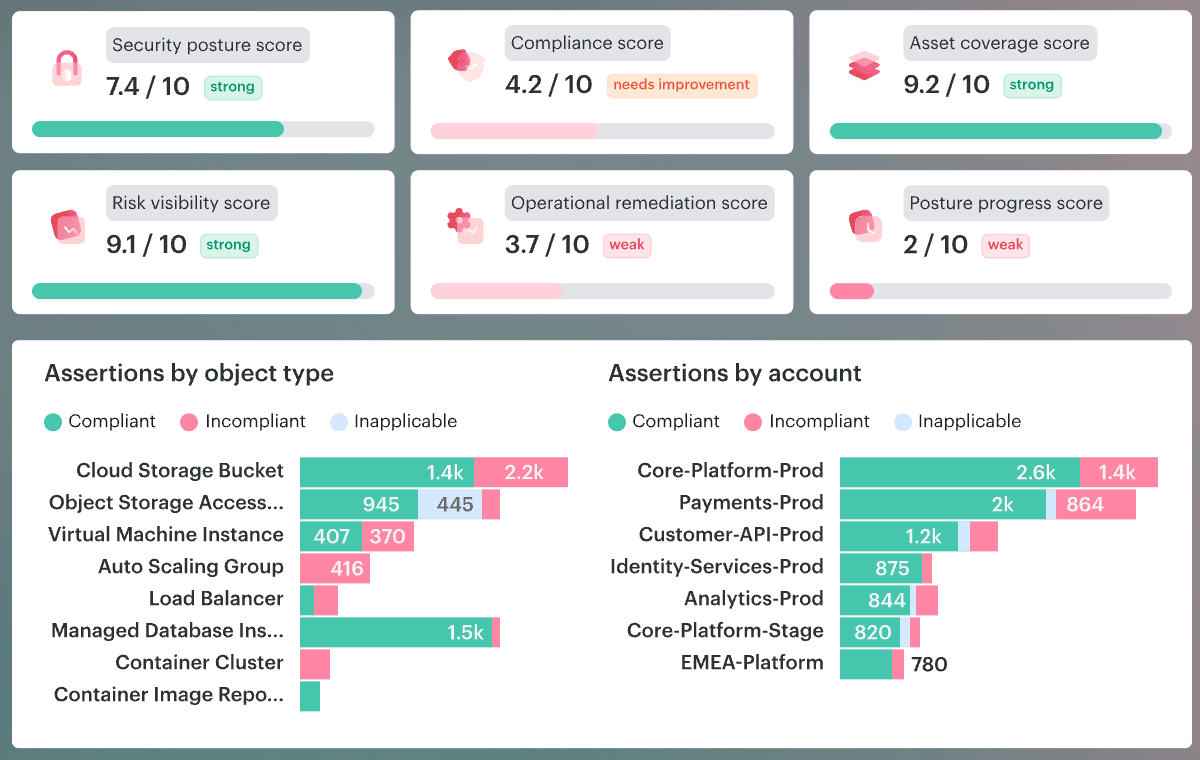
Element of the Cloudaware dashboard. Schedule a demo to see it live
In practice, that is how security teams spot the gap between good intent and sloppy implementation. This is not achieved by reading one alert at a time. By seeing the pattern.
That idea becomes even more practical when ownership is built into the rule. A resource without clear app, environment, and owner metadata is already halfway to becoming somebody else’s problem.
That is why teams often treat tags like Environment, Product, and Owner as first-level control logic, not admin housekeeping. If one is missing, the issue is not just bad management. It is a signal that the control model is already weakening.
That is how resilient hybrid architecture holds together. Not by cloning tools or pretending every cloud behaves the same. By keeping the rule sharp, the ownership visible, and the implementation honest.
Read also: Understanding the DevSecOps Lifecycle in 2026
Treat identity as the first security boundary
Most enterprise teams still feel safer when they can point to firewalls and neat network zones. Fair. Those controls matter. Still, in real hybrid estates, identity usually decides the blast radius before network security ever gets a vote. A user signs in through one directory, assumes a role in cloud IAM, reaches internal services, and touches data across multiple environments. That is why resilient security starts with identity and access. Not later. First.
Igor K., Cloudaware DevOps Engineer
In practice, this advice gets useful when identity stops floating as a standalone topic and becomes part of daily management. Teams examine the same factors as with any other control issue: which account is failing, its environment, how long the issue has been open, and who owns the fix.
In Cloudaware, that often shows up through identity-related violations such as missing MFA on high-risk accounts, plus required ownership tags like Environment, Product, and Owner.
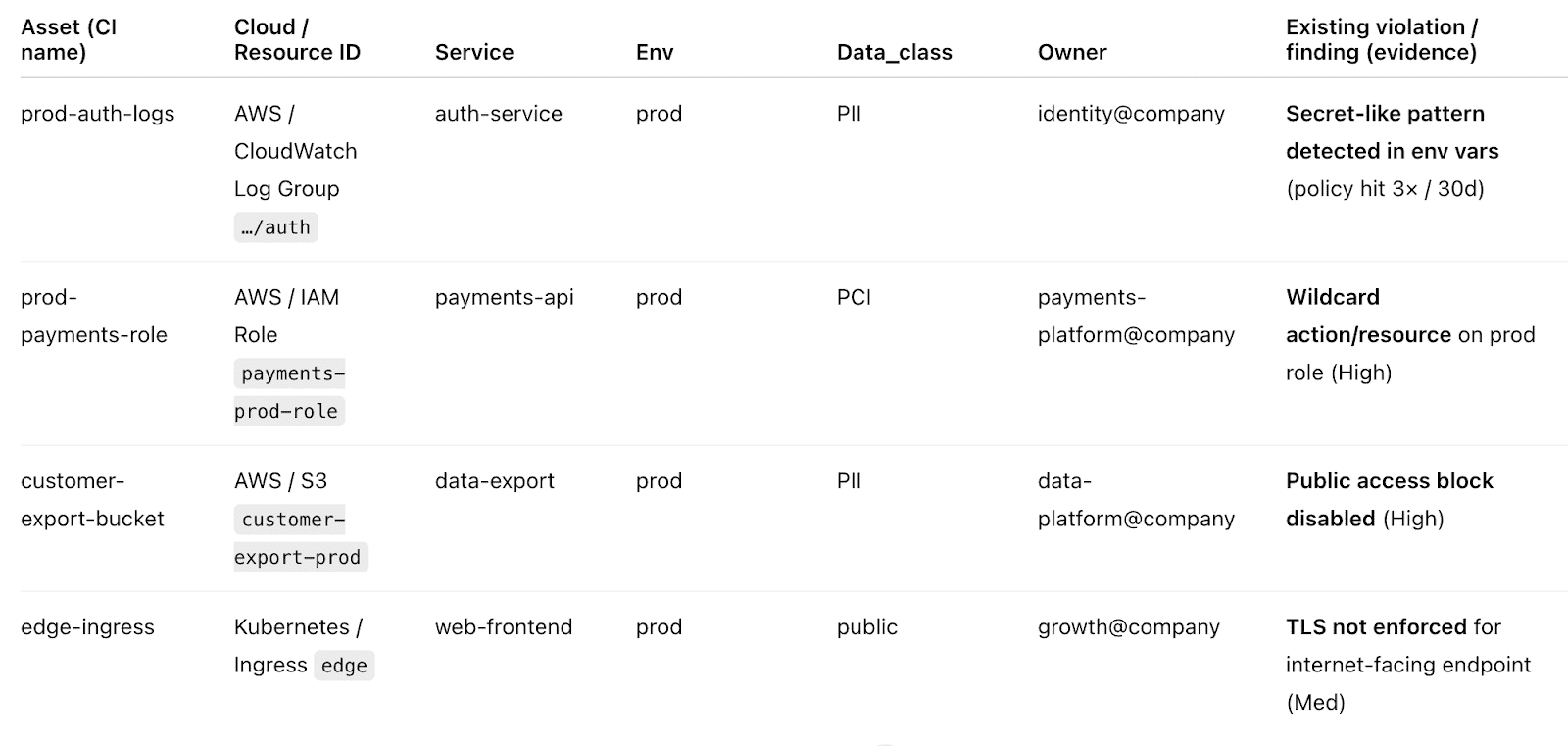
Those tags are simple, almost annoyingly simple. That is precisely why they help. They turn a vague cloud security problem into a fixable one.
A practical way to run this program in organizations:
- Put MFA and stronger controls on privileged access
- Review machine identities after app changes, migrations, and hotfixes
- Require owner and environment metadata on every resource
- Track identity violations by age, not just severity
- Treat stale entitlements as a hybrid cloud security issue, not admin cleanup
That is the real point. In a hybrid cloud architecture, identity is not one control among many. It is the layer that decides whether the rest of the system stays secure or just looks that way.
Use policy and compliance checks continuously
A resilient hybrid cloud security program does not wait for audit season to find out what drifted.
Things change too fast for that. A storage rule gets loosened for a release. A public service keeps yesterday’s exception. A team fixes one issue and creates two new ones somewhere else in the cloud. By the next scheduled review, the architecture may still look tidy while the control logic is already slipping.
That is why continuous checks matter. They turn security from a snapshot into a running conversation.
What to watch in practice:
- Which policy categories keep failing?
- How long do violations stay open?
- Are fixes outpacing new findings?
- Which accounts or services generate the same repeat noise?
- Where are exceptions piling up?
One more detail matters. The logic has to stay flexible.
- Some controls need provider-specific handling.
- Some need scoped exceptions to avoid false positives.
- Some need ownership tags like Environment, Product, and Owner so a finding lands with enough context to be fixed instead of forwarded three times.
That is what makes continuous cloud security checks practical rather than exhausting.
Make change visibility part of the architecture
A resilient architecture is not only about blocking bad changes. It is about seeing normal changes clearly enough to know when one of them turns risky.
That matters more in a hybrid setup because change does not stay in one place. A team adjusts access in one cloud account. Someone edits a route between environments. A hotfix touches a workload behind internal firewalls. Then a different team inherits the fallout and has no clean record of what moved, when it moved, or why. That is how small changes become expensive security problems.
Igor K., Cloudaware DevOps Engineer
What helps in practice is boring, which is precisely why it works:
- Track change history, not just the current state
- Keep the owner and environmental metadata attached to findings
- Separate noisy low-value changes from the ones that affect network security, identity, or public exposure
Teams use dashboards like this to spot the real pattern. Which accounts keep drifting? Which services generate repeat changes? Which fixes close fast, and which ones linger until they become somebody else’s problem?
In Cloudaware, those views usually combine change history, integrity monitoring, violation timelines, and owner context, so a change is not just “something happened.” It is tied to an asset, a team, and an environment that somebody can actually manage.
Read also: DevSecOps Vulnerability Management - CI/CD to Runtime Loop
Build audit evidence into day-to-day operations
Audit pain usually starts long before the audit.
It starts the day a change goes live without a clear trail. Then a violation opens. Someone fixes it. An exception gets approved in a hurry. Six months later, the team remembers the outcome, not the sequence. That is where hybrid cloud security gets expensive. Not only in risk. In time.
A resilient architecture treats evidence like working infrastructure. It moves with the environment.
What that looks like in practice:
- Controls leave timestamps behind
- Exceptions have an owner, a reason, and an expiry
- Findings show when they opened and when they closed
- Change history stays attached to the asset, not buried in chat
- Retention matches the audit reality of the business, not somebody’s guess
The useful dashboard here is almost boring. Good. That is what you want. It should show violation age, open versus closed findings, repair time, repeat offenders by account or environment, and whether the same control keeps slipping back out of compliance.
Element of the Cloudaware dashboard. Schedule a demo to see it live
Once a team can see that pattern, audit evidence stops being a scavenger hunt and starts becoming a side effect of how the architecture is run.
How to evaluate whether your hybrid cloud security architecture is working
You know it is working when it stays visible under pressure.
Not when the diagram looks clean. Not when the tooling list is long. A real hybrid cloud security architecture works when you can measure coverage, spot drift early, fix issues fast, and prove what happened later without turning incident review or audit prep into archaeology.
Coverage metrics
Start here, because weak coverage makes every other metric lie.
Ask four simple questions:
- What percent of assets are in scope for policy checks?
- What percent of assets have owner and environment tags?
- Which services still sit outside the monitoring and policy picture?
- Are on-prem, private cloud, and public cloud assets being measured in one model, or in three disconnected ones?
This dashboard shows total resources evaluated, how many violations sit inside that scope, and which accounts or environments keep falling behind.
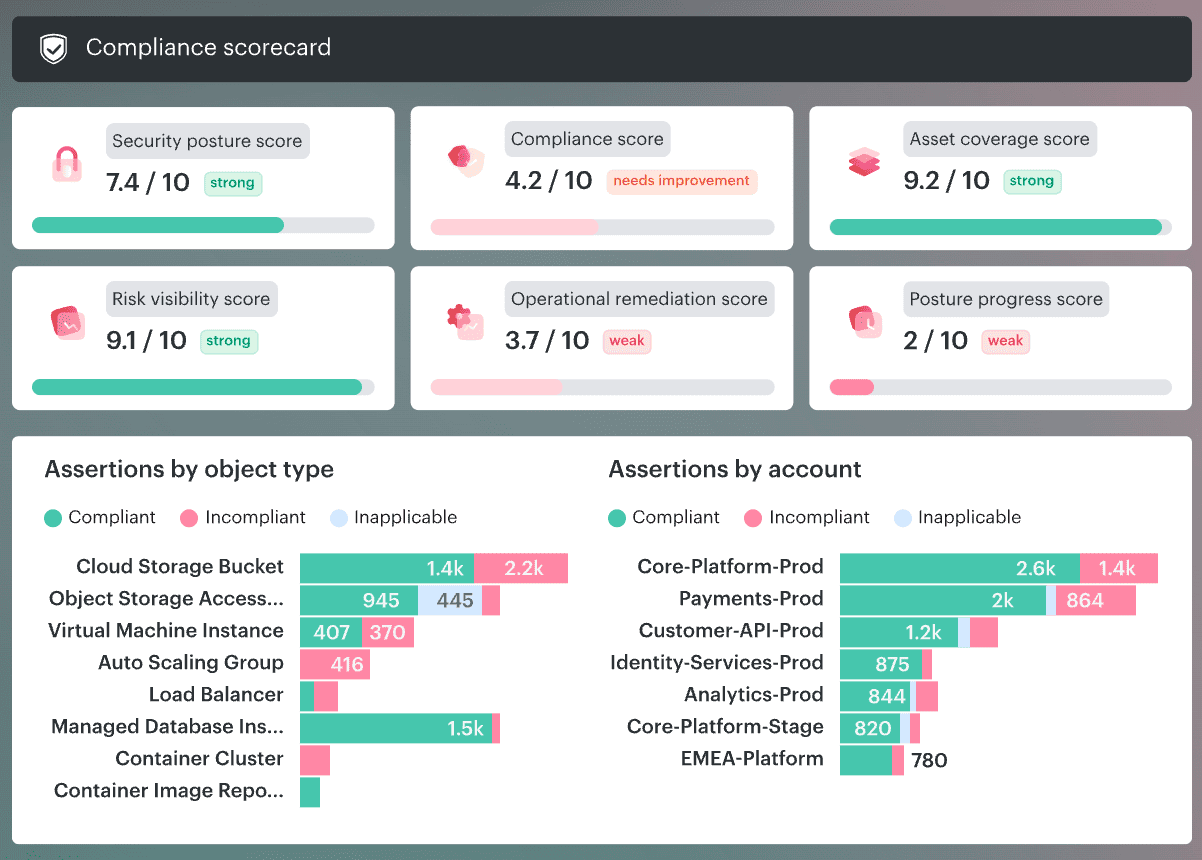
Element of the Cloudaware dashboard. Schedule a demo to see it live
In practice, teams use that view to find the blind spots first, because an uncovered asset can still be risky even when the rest of the estate looks secure.
Read also: Cloud Configuration Management 2026: Real Fixes & Tools
Policy effectiveness metrics
Coverage tells you what you can see. Effectiveness tells you whether the controls are doing their job.
Track things like:
- Drift detected per week
- Time to detect critical posture violations
- Percent of exceptions with expiry and owner
- How often the same policy breaks in the same place
This is also where provider-specific reality matters. The intent may be identical across AWS and Azure. The control logic will not be. Mature cloud security teams measure whether the rule holds across different platforms instead of assuming one policy definition means one outcome everywhere.
Valentin Kel, Cloudaware DevOps Engineer
Response and remediation metrics
This is the part leaders actually feel.
If the architecture works, the team should get from finding to fix without losing days to confusion.
Watch:
- Time to remediate by severity
- Alert-to-ticket routing success rate
- MTTR by policy category
- days/ age,
- by account,
- by object/cloud service
- The delta between newly created and recently fixed findings
A strong remediation dashboard tells a story. Maybe 900 issues were fixed this week, but 1,000 new ones appeared the next day. That is churn. The same goes for routing. If alerts do not land with app, owner, and environment context, incident response slows before anyone starts fixing anything.
Compliance evidence metrics
This is where mature organizations separate themselves from busy ones.
You want proof that lives with the work, not screenshots collected the night before an audit.
Measure:
- Percent of controls with continuous evidence
- Percent of findings with created and closed dates
- Percent of exceptions with owner, reason, and expiry
- Percent of critical events or violations linked to a clear asset trail
A good evidence model lets you answer the boring but expensive questions fast.
- When did the issue open?
- When did it close?
- Which team owned it?
- Was the exception still valid?
- Did the control fail once or keep failing across the same network, workload, or data path?
In Cloudaware, created dates, closed dates, compliance start and end timestamps, and longer retention for stricter frameworks are precisely the kind of details teams use to support both audits and real-world investigations.
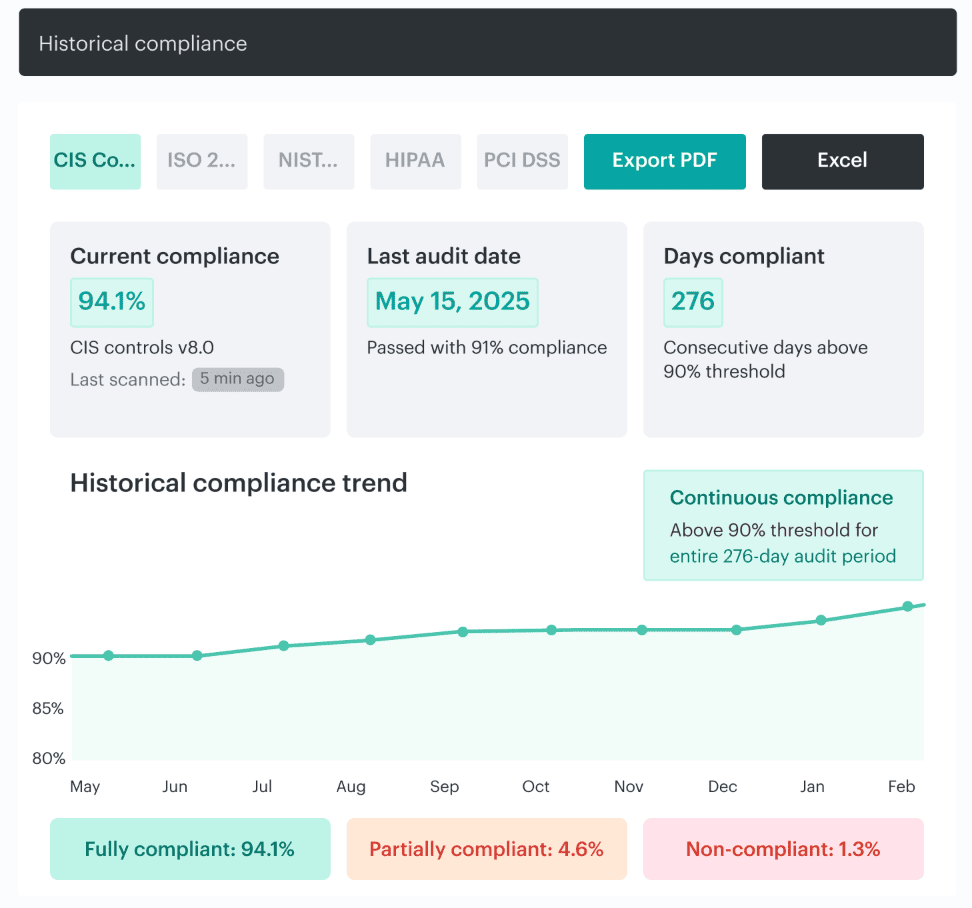
That is the real evaluation model. If your hybrid architecture gives you coverage, control signal, repair speed, and evidence without forcing the team to rebuild the truth by hand, it is working.
Turn the reference architecture into something teams can actually run
Cloud security leaders, security architects, platform engineers, and compliance teams usually reach for Cloudaware when the hybrid cloud security story gets too fragmented to manage in separate consoles. One team sees the asset. Another sees the finding. Somebody else owns the ticket. Audit wants proof.
Cloudaware pulls those threads into one operating view across AWS, Azure, GCP, and on-prem, with CMDB context, posture checks, centralized logs, and routed remediation, so the architecture behaves like a working system instead of a stack of disconnected tools.
Here are the pieces that matter most for this article:
- Cloud CMDB. Use it to search assets across providers, accounts, and regions in one place, then tie findings back to the right app, owner, and environment.
- CSPM with CMDB-aware policies. Useful when you need enforceable guardrails, framework checks, exception handling, owner-aware routing, and posture dashboards that show scope, drift, misconfigurations, and remediation progress.
- SIEM / Conflux. Built for centralized cloud and on-prem logs, CMDB-enriched event context, cross-cloud traceability, anomaly detection, and audit-ready event lineage.
- IT Compliance Engine. Strong fit for continuous assessments, custom policies, advanced exception handling, and violations that can be routed or escalated instead of left sitting in a report.
- Jira & email integration. Helpful when findings need to become real work with linked CIs, created issues, and status updates that move with the remediation process.
- Ticketing and incident sync. Useful for stateful routing into Jira, ServiceNow, or PagerDuty, especially when teams want tickets to update automatically as fixes land.