


Updated: July 27, 2026 | Expert reviewed by Alla L., Cloudaware ITAM expert
One bad IAM role, an overexposed storage bucket, or a forgotten workload in a secondary region can punch a hole straight through your security posture. That is the reality of the cloud today. In multi-cloud environments, risk does not sit in one dashboard waiting politely. It spreads across AWS accounts, Azure subscriptions, GCP projects, Kubernetes clusters, and the messy seams between them.
Misconfigurations pile up fast, compliance evidence gets stale, and remediation drags when ownership is fuzzy. That is precisely why a solid cloud security assessment matters. It gives teams a structured way to see what is exposed, what is drifting, and what needs attention first under the shared responsibility model.
This guide was created in collaboration with Cloudaware DevOps experts Igor K. and Valentin Kel, with a focus on the real questions cloud teams run into when they need signal, not theory.
- What is cloud security assessment, really, when you strip away vendor fluff?
- Which risks deserve immediate remediation, and which ones can wait?
- How should teams review IAM, configs, workloads, and compliance controls?
- What does a practical assessment checklist look like in a multi-cloud estate?
- Where do most security posture gaps hide before they turn into incidents?
Key insights
- A cloud security assessment should show how risk behaves in the environment, not just how many findings a scanner produced.
- Weak visibility is usually the first signal that the environment has outgrown manual control. When teams are unable to answer questions about what is exposed, who owns it, and what has changed, the assessment becomes urgent.
- Vulnerability scanning matters, but it only covers one slice of the problem. A full review also needs IAM, secrets, encryption, segmentation, logging, compliance controls, and incident readiness.
- The quality of the assessment is decided early. If scope, business objectives, and control baselines are vague, the rest turns into noise.
- Identity drift deserves the same attention as exposed infrastructure. Over-permissioned roles, stale service accounts, and weak trust relationships expand blast radius quietly.
- Prioritization should follow business risk, not alert count. Exploitability, internet reachability, privileged access, exposed data, and blast radius are what move a finding up the queue.
- A strong assessment should produce working outputs: a findings register, impact matrix, remediation roadmap, owner mapping, retest plan, and evidence trail.
- Reassessment has to run as an operating rhythm. Continuous monitoring catches movement, periodic reviews validate posture, and event-driven reviews handle migration, IAM redesign, and post-incident change.
- For assessment-focused tooling, check our guide to the 12 best cloud security assessment tools for 2026.
What is a cloud security assessment?
A cloud security assessment is a structured review of your cloud environment that tells you, in writing, where you're exposed and how to fix it — fast enough to matter. Think of it as a physical for your cloud. Configurations, identities, data flows, network exposure, workloads, logs — each gets checked against a baseline (CIS, NIST CSF 2.0, your own internal policy). Anything that drifts gets flagged. Anything risky gets ranked. You walk out with a list of fixes, owners, and deadlines.
Most cloud security assessments arrive as a 400-page PDF that nobody reads. Findings sit in a tracker, owners change roles, and by the time anyone looks back, the environment has moved on. That's not an assessment. That's a snapshot of a moving target.
Here's where most teams get it wrong. They treat the assessment like an audit. One-and-done. Tick the box. Send it to compliance.
That worked when infrastructure changed once a quarter. It doesn't work now. AWS ships roughly 3,000 service changes a year. Your engineers spin up resources every day. A snapshot you took on Monday is stale by Thursday. So a real cloud security assessment isn't a moment in time — it's a baseline you re-check continuously, with the same lens, every time.
A good one will answer three questions your CFO, your auditor, and your on-call engineer all care about:
What are we actually running, and who owns it?
Where are we out of policy — and how bad is it?
What do we fix first, and what can wait until next sprint?
If your last assessment couldn't make all three answerable in five minutes, you got a deliverable. Not an assessment.
Read also: NIST Cloud Security - A Practical Guide to the Framework, Controls, and Audit Readiness
5 reasons why organizations run cloud security assessments
Before we get into the why, here’s the frame: this section is grounded in current cloud security research, but it also reflects what Cloudaware experts and clients keep running into in real environments.
The pattern is familiar. A team starts with a manageable estate, then AWS accounts multiply, Azure subscriptions branch out, GCP projects pile on, SaaS access sprawls, and suddenly nobody can answer simple questions fast anymore.
That pressure is showing up in the data too. Thales found that enterprises now use an average of 85 SaaS applications, and 55% say cloud environments are harder to secure than on-prem.
1. Visibility breaks before security does
This is usually where the trouble starts. Not with a breach. Not with a failed audit. With a basic loss of clarity.
A cloud team should be able to answer things like, "What is internet-facing right now?" Which identity owns this workload? Where is sensitive data sitting? Which account still has logging gaps? When answers become slow, fuzzy, or reliant on three people being online, the environment has already outgrown manual control.
That is when cloud security assessments become necessary. They give teams a clean way to rebuild a reliable map of assets, identities, services, and exposure across a growing attack surface.
Thales’ 2025 study basically describes the same backdrop: more SaaS, more cloud complexity, more moving parts to secure.
2. Then ordinary drift turns into real risk
Once visibility slips, misconfigurations stop looking small.
A public bucket, an inherited security group rule, a forgotten exception in a network policy, missing logs in one region. None of that feels dramatic on its own. Put it inside a fast-changing multi-cloud estate, though, and those routine gaps become usable attack paths. CrowdStrike’s 2026 Global Threat Report found that cloud-conscious intrusions rose 37% overall in 2025, while state-nexus actors drove a 266% increase in cloud-conscious intrusions.
That changes the math. Teams are not running assessments because misconfigurations are theoretically bad. They are running them because small configuration mistakes are now sitting in environments where attackers move faster than cleanup cycles.
3. Identity drift is where the risk gets slippery
After that, the conversation usually moves from infrastructure to access.
Not because identities are new. Because they quietly accumulate power. One extra permission during a migration. One service account that never got scaled back. One old trust relationship nobody wants to touch before release.
That is how blast radius grows without anyone announcing it.
Palo Alto Networks’ Unit 42 reported in 2026 that across more than 680,000 cloud identities, 99% of cloud users, roles, and services had excessive permissions, including access unused for 60 days or more.
CrowdStrike also reported that valid account abuse made up 35% of cloud incidents in its 2026 threat findings.
That is the point where cloud security analysis has to go beyond vulnerabilities and look hard at IAM design, privilege creep, and machine identities.
4. Compliance pressure stops being seasonal
At this stage, teams often find themselves entangled in security and compliance, regardless of their preferences.
The old model was simple: prepare for the audit, gather evidence, survive the questions, move on. Cloud does not really allow that anymore. AWS still states that security and compliance are shared responsibilities between the provider and the customer. Which means the provider secures the underlying infrastructure, but your team still owns access controls, configuration choices, data protection, and the proof that those controls are working.
In practice, many teams experience this pressure. Not when a framework says “have a policy,” but when someone asks for evidence across accounts, services, and environments and nobody can pull it quickly.
That is why assessments matter. They turn compliance from a document exercise into an operational one.
5. What teams really need is order, not more findings
Most security teams have plenty of findings. They suffer from too many findings arriving without a clear order of operations. More visibility alone does not remedy that. More alerts definitely do not help.
What helps is a process that tells the team what exists in the environment, where the attack vectors are, and which fixes matter first. The Cloud Security Alliance puts it cleanly: audit what runs in the cloud, identify the possible attack vectors, then prioritize remediation.
That sequence is the value. It gives teams a defensible way to handle risk prioritization, protect business continuity, and move remediation forward without drowning in noise.
So that is the real reason organizations keep coming back to cloud security assessments.
Read also: Hybrid Cloud Security Architecture - Reference Architecture, Diagram, and Best Practices
Cloud security assessment vs. adjacent terms
This is where cloud teams often lose the thread. “Cloud security assessment” gets used as a catch-all term, even though teams may actually mean a vulnerability review, an IAM check, an infrastructure assessment, or a framework-based questionnaire.
Those are related, but they solve different problems. So before we go deeper, let’s separate the terms clearly and pin down where each one fits.
Cloud security assessment vs. cloud vulnerability assessment
This is where teams often mix up two useful practices and end up expecting the wrong outcome from both.
A cloud vulnerability assessment is built to find weaknesses. Think exposed services, missing patches, known CVEs, risky configurations, and anything with real exploitability. NIST defines vulnerability assessment as a systematic examination used to identify security deficiencies and judge whether security measures are adequate. That is valuable work. It gives security and platform teams a focused view of what is weak right now.
A broader cloud security assessment has a bigger job. It still needs vulnerability scanning, but it also has to look at IAM design, data protection, network controls, logging, governance, compliance exposure, and incident readiness across AWS, Azure, GCP, and connected SaaS services.
CSA describes cloud assessment as auditing what runs in the cloud, identifying possible attack vectors, and then prioritizing remediation. CSA also says this should work in concert with cloud vulnerability management, which is the cleanest way to frame the difference. One stream finds technical weaknesses.
The larger assessment explains how those weaknesses sit inside the environment and which ones deserve attention first.
That difference matters the moment findings start piling up. A vulnerability workflow usually feeds a remediation backlog sorted by severity, patchability, or immediate exposure. A full assessment has to go further. It asks harder questions. Can an over-permissioned role reach the vulnerable workload? Is sensitive data in scope? Are logs good enough to investigate abuse? Will this finding create compliance trouble? That is why mature teams run both. They need weakness discovery, and they need context for prioritization.
| Aspect | Cloud vulnerability assessment | Cloud security assessment |
|---|---|---|
| Main goal | Find technical weaknesses and exploitable exposure | Evaluate overall cloud security posture |
| Core focus | Scanning, exploitability, severity, patching | IAM, data protection, network controls, logging, compliance, incident readiness |
| Typical output | Findings list and remediation backlog | Risk-based view of gaps, attack paths, control coverage, and remediation priorities |
| Best use | Continuous weakness discovery | Broader posture review and decision-making |
So when a team says it needs an assessment, the real question is simple: are we trying to find weaknesses, or are we trying to understand how risk actually behaves inside this environment? Most cloud teams need both answers. They just should not expect one exercise to do the other’s job.
Read also: 9 Reasons on Why Cloud Security Posture Management Matters
Cloud security assessment vs. cloud infrastructure assessment
This is another place where teams use one label for two different jobs.
A cloud infrastructure assessment usually looks at the environment from a wider operational angle. The questions are bigger. Is the architecture sound? Can this setup scale? Are workloads placed well? Is the estate ready for a migration? Are costs under control? How mature are the operating processes around provisioning, monitoring, backup, and change? That kind of review often starts with an environment inventory, then moves into an architecture review, performance patterns, resilience, and day-to-day operations.
A cloud security assessment goes narrower and deeper. It focuses on the parts of the environment that shape risk.
- Access design.
- Data exposure.
- Network controls.
- Logging.
- Encryption.
- Governance.
- Detection coverage.
- Incident readiness.
Same cloud estate, different lens.
That distinction matters because a team can have solid infrastructure and still carry serious security gaps. A migration may be technically clean while IAM is messy. Cost controls may look sharp while logging coverage is weak in one region. Operational maturity can improve uptime without doing much for identity drift or public exposure. So when teams ask for a review, the useful follow-up is simple: are we checking whether the environment runs well, or whether it is defensible?
A mature program usually needs both. The broader cloud infrastructure assessment helps teams understand platform health, readiness, and operational maturity. The security assessment tells them where risk is hiding inside that same architecture and what needs attention first.
| Aspect | Cloud infrastructure assessment | Cloud security assessment |
|---|---|---|
| Main goal | Evaluate overall cloud environment health and readiness | Evaluate security posture and risk exposure |
| Core focus | Architecture, performance, cost, operations, migration readiness | IAM, data protection, network controls, logging, governance, incident readiness |
| Typical questions | Is the environment easy to scale, efficient, and well-structured? | Where are the security gaps, exposed paths, and weak controls? |
| Common output | Recommendations for design, operations, modernization, or migration | Findings tied to risk, exposure, and remediation priorities |
| Best used for | Platform planning and operational improvement | Security decision-making and risk reduction |
So if the team is planning a migration, reworking landing zones, or checking platform efficiency, start with infrastructure. If the concern is exposure, control gaps, or security posture across AWS, Azure, GCP, and hybrid environments, the security assessment is the right tool for the job.
What is a cloud infrastructure security assessment?
A cloud infrastructure security assessment is the technical layer of a broader cloud security assessment. It reviews how the cloud foundation is built, exposed, and protected across architecture, access controls, networking, segmentation, encryption, logging, and workload posture.
This is the part where teams inspect the actual mechanics of the environment:
- identity and access paths
- VPC, VNet, subnet, and routing design
- public exposure and east-west traffic controls
- encryption settings and key management
- workload isolation and runtime protections
- logging, monitoring, and detection coverage
The goal is straightforward: verify that the infrastructure can enforce security the way the team expects. In practice, that means checking whether access is scoped correctly, whether segmentation limits blast radius, whether telemetry is complete enough for investigation, and whether cloud-native controls are configured well across AWS, Azure, GCP, and hybrid environments.
Within the context of a full cloud security assessment, this is the deeper technical slice. The broader assessment looks at overall risk, governance, compliance, and remediation priorities. The infrastructure security assessment zooms in on the cloud foundation itself and tests whether the environment is secure, observable, and resilient at the platform level.
What is a cloud identity security assessment?
A cloud identity security assessment is a focused review of the access layer in your cloud environment.
It checks:
- Who has access
- How that access is granted
- Whether permissions follow least privilege
- Where privilege creep has built up over time
- Whether MFA is enforced where it should be
- How service accounts and machine identities are used and protected
Inside a broader cloud security assessment, this is the part that looks hard at IAM.
The goal is simple: find access paths that create unnecessary risk.
That usually means reviewing the following:
- IAM roles and policies
- Privileged accounts
- Federation and trust relationships
- Stale permissions
- Long-lived credentials
- Unmanaged service accounts
- Weak controls around machine identities
- Signs of identity drift between policy and reality
This matters because identity problems rarely look dramatic at first. A role keeps extra access after a migration. A service account stays over-permissioned. MFA is missing on a sensitive admin path. Nothing breaks, so nobody touches it. Risk keeps growing anyway.
So within the context of a full cloud security assessment, a cloud identity security assessment is the narrower technical review of who can do what, where access is too broad, and what needs to be tightened first across AWS, Azure, GCP, and hybrid environments.
What is the Cloud Security Alliance self-assessment?
The Cloud Security Alliance self-assessment usually means CSA STAR Level 1. It is a provider-facing transparency mechanism, not an internal review of your own cloud estate. In CSA’s model, organizations publish a self-assessment to the STAR Registry to document the security and privacy controls of a cloud offering. CSA describes the Registry as a publicly accessible record of the controls provided by cloud services.
The way it works is specific. A provider completes the CAIQ, which is the control questionnaire aligned to the CCM. CSA says the CAIQ is built into the Cloud Controls Matrix and uses yes-or-no questions to assess security controls. In the current CCM v4.1 release, the CCM contains 207 controls across 17 security domains, and the accompanying CAIQ v4.1 provides the question set used to document those controls.
That makes it useful for provider transparency. It helps customers evaluate a SaaS, PaaS, or IaaS vendor against a common structure instead of chasing custom spreadsheets from scratch. CSA explicitly positions STAR around transparency, and its CAIQ materials say cloud service providers can use the questionnaire to document what cloud security controls exist in their services.
What it does not do is replace your internal cloud security assessment. It does not review your AWS accounts, Azure subscriptions, GCP projects, IAM drift, segmentation gaps, exposed assets, or logging coverage. It tells you how a provider describes its controls against CSA’s framework.
That is useful when you are evaluating vendors. It is a different exercise from assessing your own environment.
Use it when you need to:
- Compare cloud providers against a common framework
- Review a vendor’s documented controls in the STAR Registry
- Use CAIQ and CCM as a framework reference during third-party risk review
Do not confuse it with your:
- internal cloud security assessment
- technical review of IAM, network exposure, or workload posture
- remediation and risk-prioritization process
So inside the context of this article, think of the CSA self-assessment as a structured vendor-assurance reference. Helpful for evaluating providers. Not the same thing as assessing your own cloud environment.
Read also: Cloud Security Architecture. A Comprehensive Guide to Protecting Your Cloud Infrastructure
When to conduct a cloud security assessment
The practical answer is all three ways. Mature teams do not treat cloud security assessments as a once-a-year project. They run them continuously for drift and exposure, periodically for structured review, and event-driven when the environment changes fast enough to invalidate old assumptions.
Upwind’s glossary treatment points in this direction by framing cloud assessment around current control effectiveness and real-world attack paths, while cloud security monitoring is explicitly continuous.
1. Continuous
Use this mode to catch what changes between formal reviews. New workloads appear, permissions expand, logging gets disabled, a security group opens wider than intended, and a SaaS connector lands with more access than expected.
Continuous monitoring is what keeps those shifts visible.
Check Point defines cloud security monitoring as the continuous evaluation and analysis of cloud environments to identify, detect, and respond to threats, and CSA’s recent guidance on continuous controls monitoring makes the same point from a governance angle: continuous assurance finds weaknesses earlier than point-in-time reviews.
2. Periodic
This is the structured review cadence. Think quarterly posture review, pre-audit review, or a scheduled control validation cycle before leadership or auditors ask for answers. Periodic reviews help teams step back from daily noise and look at trendlines, recurring gaps, control coverage, and remediation quality.
Cloud Security Partners notes that regular assessments provide support for audit evidence and reduce compliance risk, and TechMagic recommends scheduling periodic reviews alongside continuous monitoring so teams stay ahead of new threats and compliance updates.
3. When something important changes
That includes a migration, a major IAM redesign, a landing zone rebuild, a merger, a new critical SaaS integration, a major architecture change, or a post-breach review.
This is where timing matters most, because the environment that passed review six weeks ago may no longer be the environment you are running today. Guidance on cloud migration security consistently recommends cloud security risk assessment before or during migration, not after the move is already locked in.
A simple rule works well in practice:
- Continuous for drift, exposure, and day-to-day control health.
- Periodic for quarterly review, audit prep, and formal posture checks.
- Event-driven after major change, during migration, or after an incident.
That mix keeps the process operational. Continuous monitoring catches movement. Periodic review gives structure. Event-driven assessment deals with the moments when risk changes faster than your usual cadence.
If you’re looking for the hands-on version, check out the full 2026 guide on how to conduct a cloud security assessment. Need the basics first? Below you’ll find the methodology, best practices, and a practical checklist.
Cloud security assessment methodology
This methodology is based on the expertise of Cloudaware experts Igor K. and Valentin Kel. Approach real cloud reviews in multi-cloud environments and the security structure that teams already rely on from industry cloud security frameworks such as CSA, NIST, CIS, and shared responsibility models.
The assessment method remains consistent across providers, but the control surfaces and required evidence differ. Use our provider-specific preparation guides for an AWS cloud security assessment, Azure cloud security assessment, or Google Cloud security assessment.
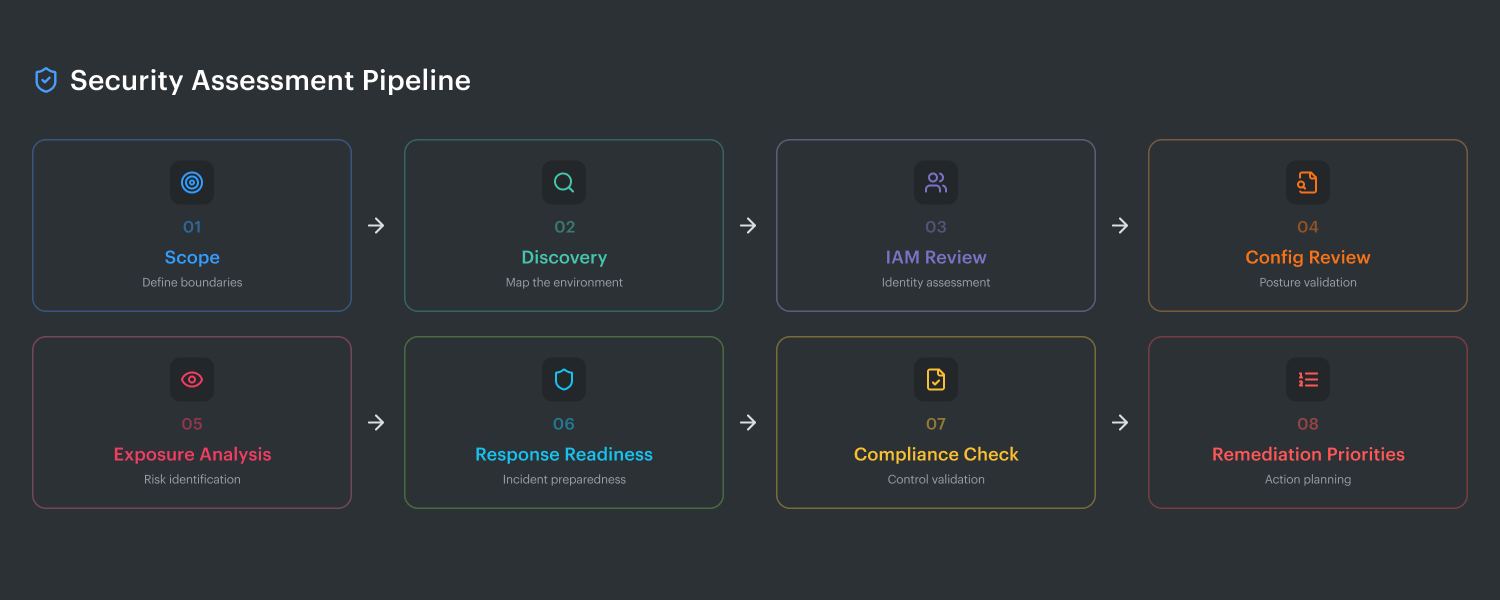
The 8 steps at a glance
- Define scope and business objectives
- Build a current asset and identity inventory
- Map requirements and control baselines
- Review configurations and access controls
- Validate exposure and attack paths
- Prioritize findings by business risk
- Assign remediation owners and deadlines
- Reassess continuously
Step 1. Define scope and business objectives
This is where good assessments stop turning into chaos.
If the scope is vague, the findings will be noisy. If the business objective is fuzzy, the team will end up with a long list of issues and no clear sense of what actually matters. Igor and Valentin both treat this step as the control point for the whole exercise. Before anyone looks at findings, they lock down the environment boundaries and the reason for the review.
Start with the estate itself:
- Which cloud accounts and subscriptions are in scope
- Which regions matter
- Which environments are included: production, staging, dev, sandbox
- Which business units or teams own them
- Which critical applications depend on them
- Where sensitive data lives
- Which SaaS integrations connect into the environment
Then define the business goal. That part changes the rest of the methodology. A pre-audit review is different from a post-migration assessment. A review after a major IAM redesign should focus harder on trust relationships, privilege paths, and service accounts. A production posture review before peak season should pay more attention to resilience, logging coverage, and incident readiness.
Shared responsibility boundaries also need to be explicit here. Otherwise, teams waste time reviewing controls the provider owns while missing the ones the customer actually has to manage. The assessment should clearly separate what belongs to AWS, Azure, or GCP from what your team owns: identity design, network exposure, encryption settings, logging, workload configuration, data protection, and evidence for compliance.
Done right, step one gives the team a clean answer to four questions:
- What exactly are we assessing?
- Why are we assessing it now?
- Which systems and data matter most?
- Where does customer responsibility start and end?
That sounds basic. It is also the step that decides whether the rest of the assessment produces a signal or just another backlog.
Read also: 9 AWS Cloud Security Best Practices That Pay Off
Step 2. Build a full asset and identity inventory
If Step 1 sets the boundary, Step 2 tells you what is actually inside it.
Pull in the full set of moving parts. Cloud assets, identities, service accounts, data stores, internet-exposed assets, and third-party integrations. That means compute, containers, databases, buckets, load balancers, serverless functions, Kubernetes resources, IAM roles, keys, secrets, public endpoints, and SaaS connectors.
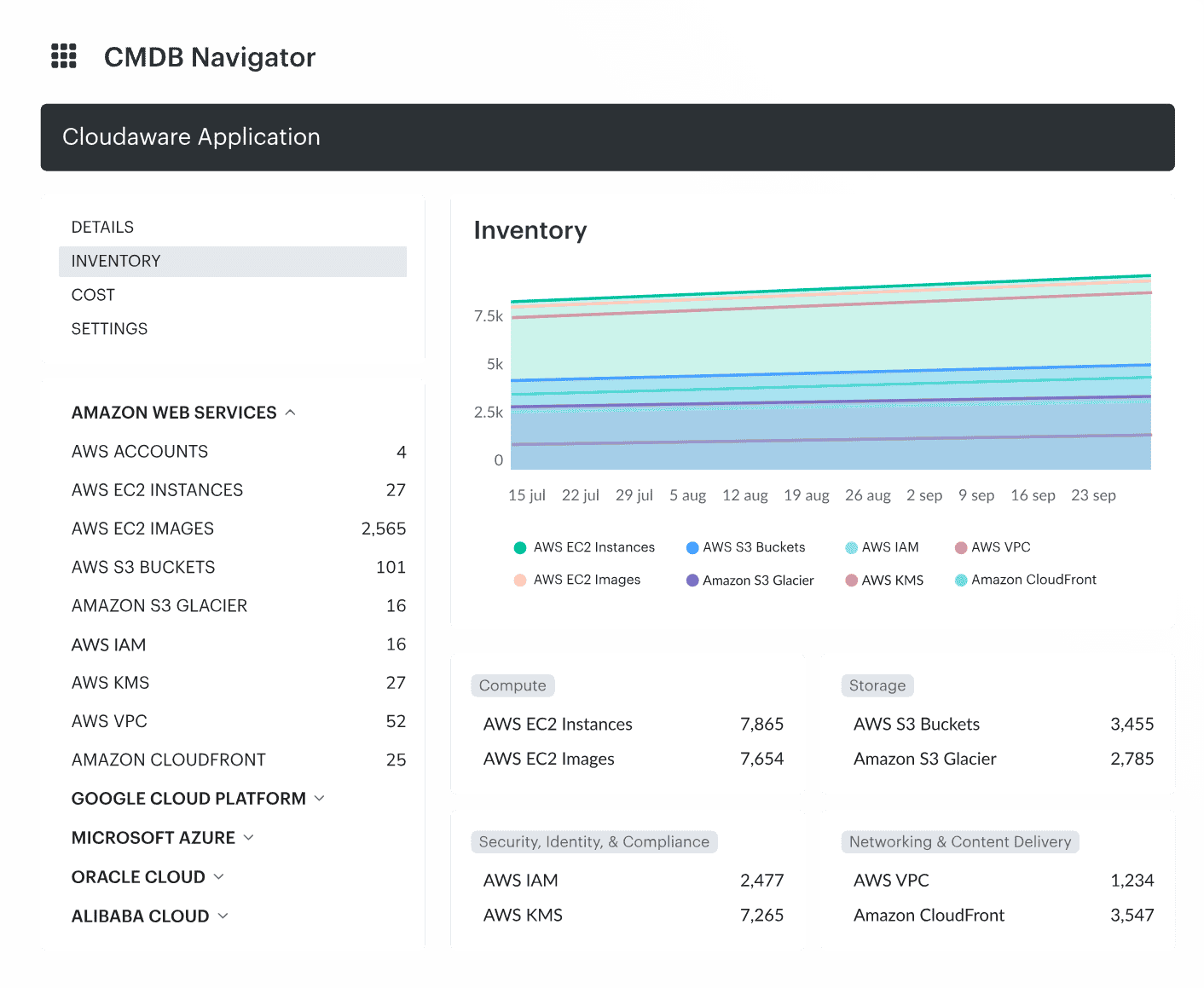
Cloud inventory dashboard in Cloudaware.
This is where assessments often break down. The team inventories infrastructure and misses access. Or they map workloads but overlook the service account that has broad permissions. Or they focus on cloud-native assets and forget the external integration that can still read, write, or move sensitive data.
The working goal is simple:
- What exists
- Who owns it
- What can access it
- What is internet-facing
- What touches sensitive data
- What connects to third parties
Cloudaware, as a CMDB real-time system of record for multi-cloud and on-prem visibility, helps with this task across AWS, Azure, GCP, Oracle, Alibaba, etc. You open the CMDB and see the asset with enriched context around it: owner, related resources, governance signals, cost context, and change visibility instead of a raw infrastructure line item.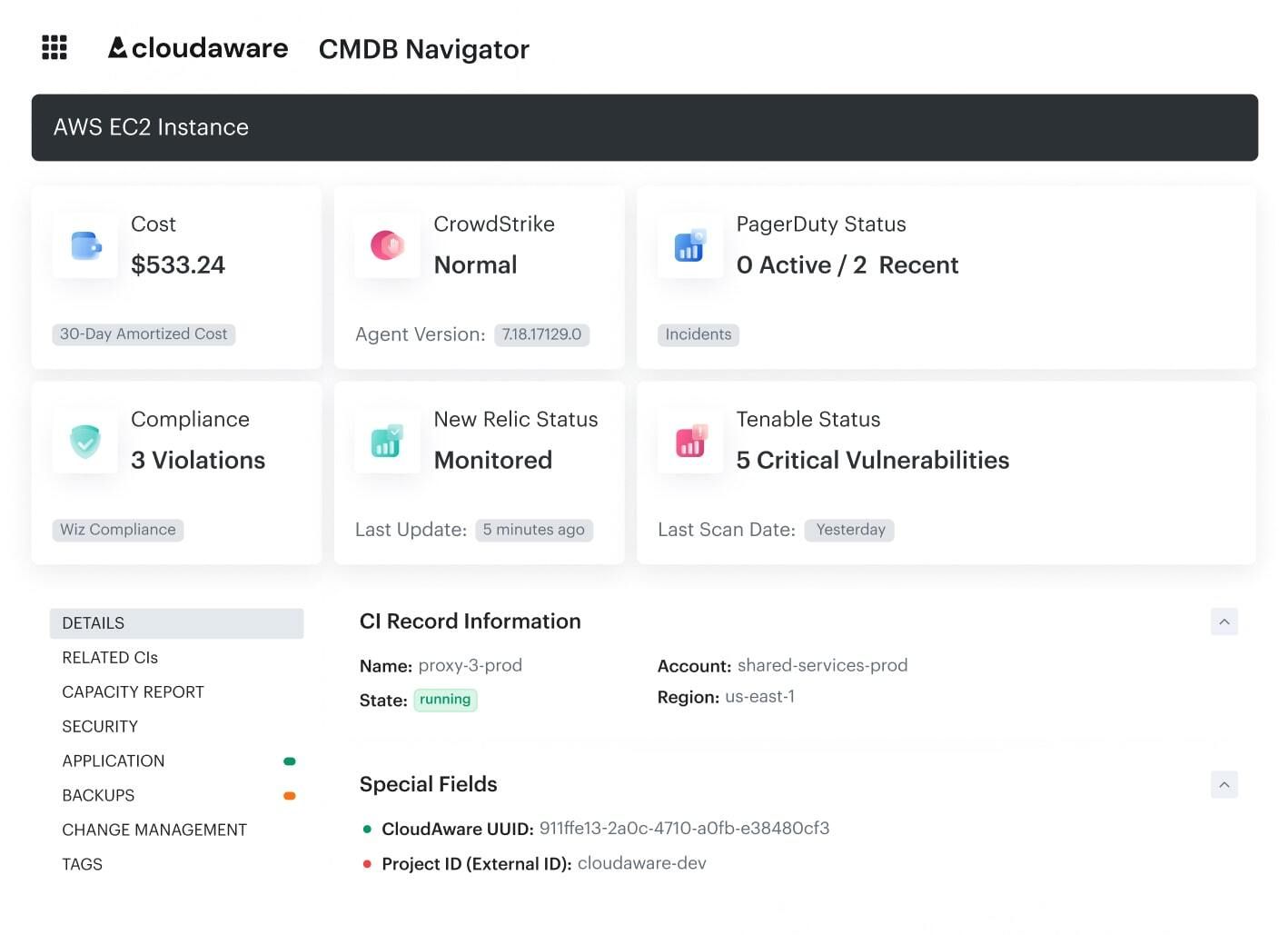 Cloud CI-level data dashboard in Cloudaware. Schedule a demo to see it live
The product pages also frame CMDB as the layer that ties assets to apps, owners, and spending, which is exactly the kind of context an assessment needs before findings start piling up.
So the inventory step should not end with a long export. It should leave the team with a usable picture of the environment. One place to see the element itself, its identity paths, its exposure, and the surrounding context that changes risk.
Read also: What Is a Configuration Management Database (CMDB)
Step 3. Map requirements and control baselines
Now you have the inventory. Good. The next job is to decide what “acceptable” means for this environment.
This is where teams line the estate up against the standards that matter. Use CIS Benchmarks for hardening. Use CSA CCM and CAIQ when you need cloud control coverage and a structured question set. Add the regulatory layer your team actually has to answer to, whether that is PCI, HIPAA, ISO, SOC 2, or something internal. Then bring in your own cloud security policy, because business risk does not end where the framework stops.
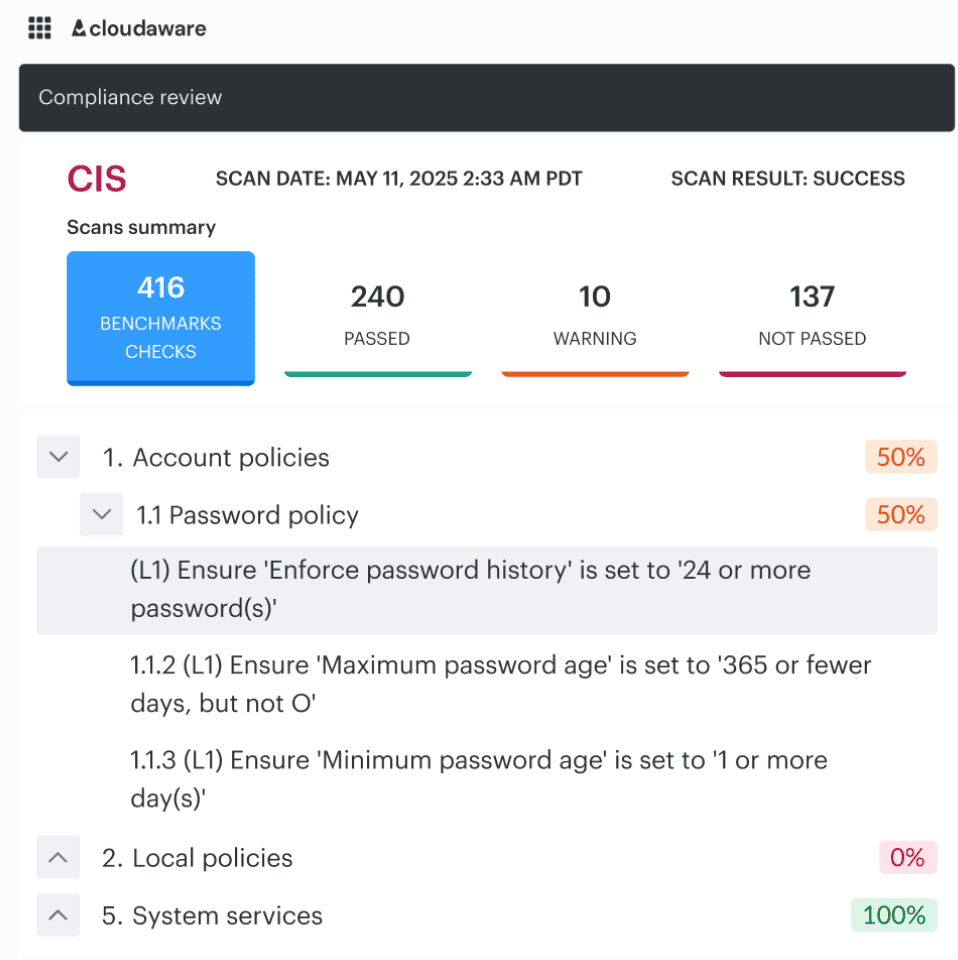
CIs benchmark audit dashboard in Cloudaware. Schedule a demo to see it live
That mix matters. One control may be technically compliant and still break your internal rule for production access. Another may pass a generic hardening check and still be wrong for a regulated workload.
This is the point Igor usually locks down before they let the review go further. Otherwise every finding turns into a debate:
- Is this drift or a policy breach?
- Does this matter in prod or only in lower environments?
- Is this a compliance issue, a security issue, or both?
- Who decides severity?
Baselines solve that. They give the team one shared reference before the findings start stacking up.
Once those baselines are set, the conversation changes.
You are no longer arguing about what “good” looks like. You are looking at where reality diverges from it.
That is where this view becomes the center of gravity for the team.
Instead of a generic list of assets or abstract compliance scores, you see the failure in context. A control breaks, and it is immediately tied to a specific asset, a specific owner, and a specific environment. No guessing who needs to act. No digging across tools to understand impact.
Look at how one failed control unfolds here.
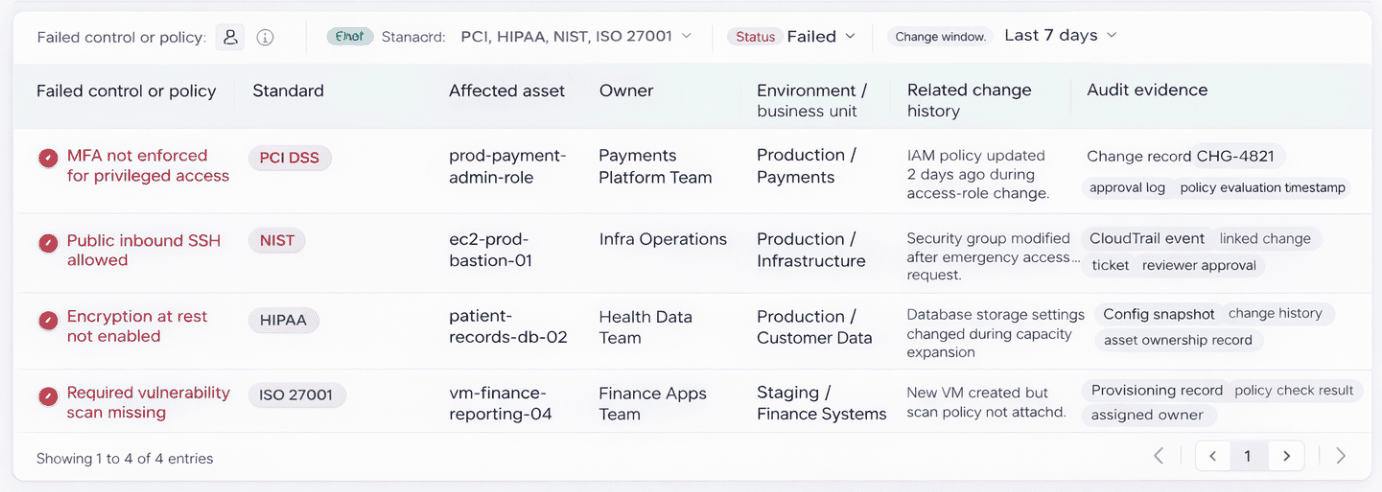
Element of the Cloudaware dashboard. Schedule a demo to see it live
MFA is not enforced. It is not just a checkbox failure. It is tied to a privileged role in production. It belongs to the payments platform team. There was a change two days ago. You can see it. You can trace it. You can decide if it was intentional or a policy breach without starting a Slack thread.
That is the difference baselines make when they meet real infrastructure.
Findings stop being noise. They become decisions.
And decisions become faster when every violation already carries its owner, its environment, and its change history with it.
Read also: Cloud Configuration Management 2026: Real Fixes & Tools
Step 4. Review configurations and access controls
You already know what is in the environment and which baselines matter. Now check whether the controls are actually configured tightly enough to hold up in production.
Start with IAM, MFA, privileged roles, secrets handling, encryption, segmentation, and logging.
Review
- Who has access?
- How that access is granted?
- Whether privileged paths are still justified?
- Whether secrets are handled cleanly?
- Whether encryption is enforced where it should be?
- Whether network boundaries really limit blast radius?
- Whether logs are detailed enough to investigate misuse?
Most teams do not uncover one dramatic failure here. They find drift. A role stayed too broad after a migration. MFA is solid for users and weaker around privileged workflows. Segmentation looked clean in the diagram and looser in the live environment. Logging is enabled, but not where the incident responder actually needs it.
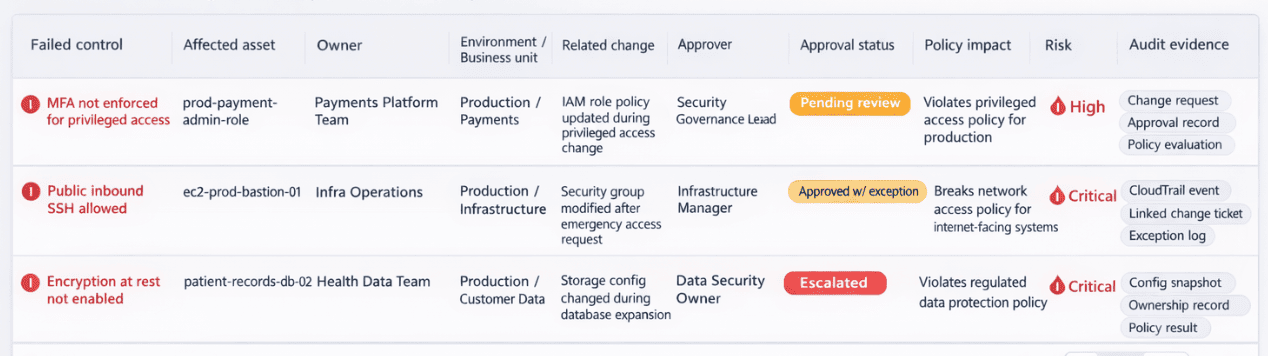
Element of the Cloudaware cloud security dashboard helping with security tasks ownership
Once the review finds weak access controls or risky configuration drift, the next job is governance. Someone has to see the change, score the risk, route it to the right approver, and stop bad changes from moving forward.
Read also: 10 Azure Cloud Security Best Practices for 2026
Step 5. Validate exposure and test the environment
Now stop reading the environment and start challenging it.
Run vulnerability scans first. You need the fast read on known weaknesses across workloads, images, hosts, libraries, and exposed services. Then review attack paths. A high CVE on an isolated dev box is one story. The same issue on an internet-facing workload with a broad IAM path behind it is a very different problem.
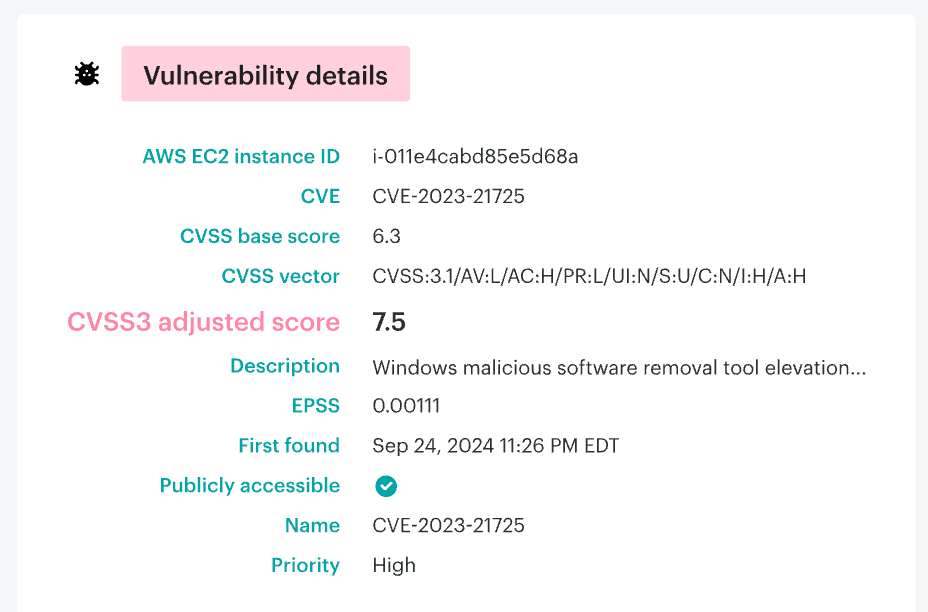
The Vulnerability Management dashboard with CMDB context in Cloudaware.
That is the view where the team can see the vulnerability, the affected asset, its owner, related remediation tasks, and whether the workload is exposed enough to matter right now. If you want a second visual, use the public attack surface report to show exposed assets side by side with the vulnerability view.
Such a scan tells you what is weak. Exposure testing tells you whether anyone can reach it. Attack-path review tells you how catastrophic the outcome gets if they do. That sequence matters. It prevents the team from becoming overwhelmed by raw findings and directs the assessment towards prioritizing actions that truly warrant attention.
Add pentesting where it makes sense, especially for critical apps, public entry points, major architecture changes, or high-risk environments.
Finish with workload exposure checks.
Look for public endpoints, weak ingress rules, missing segmentation, unmonitored assets, and anything reachable from the outside that should not be.
Read also: DevSecOps Vulnerability Management: CI/CD to Runtime Loop
Step 6. Prioritize findings by business risk
This is where the cloud security assessment methodology stops producing noise and starts producing decisions.
Do not sort findings by raw alert volume. That only tells you how loud the environment is. Sort by business risk instead. Look at five things first:
- exploitability
- blast radius
- exposed data
- privileged access
- internet reachability
That changes the order fast. A medium-severity issue on an internet-facing workload with broad IAM behind it usually deserves attention before a higher CVE buried in an isolated dev subnet.
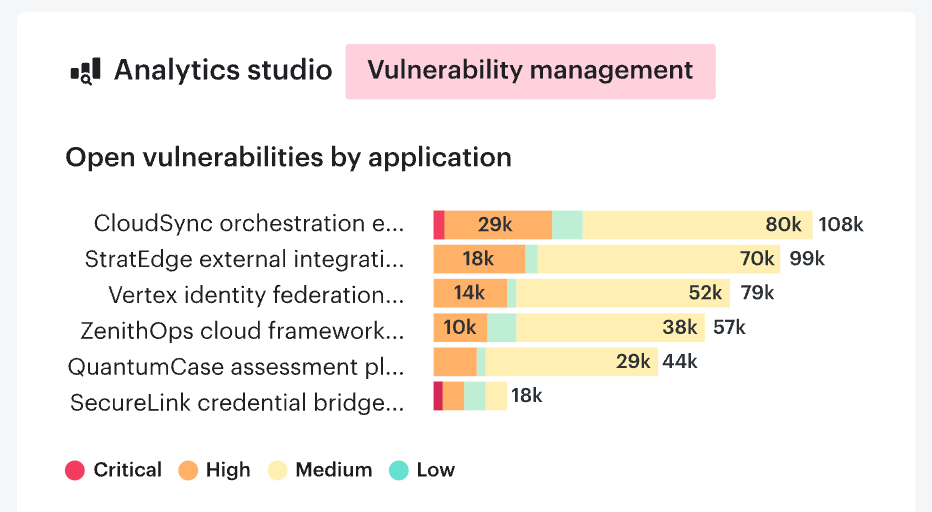
One of Cloudaware vulnerability issue prioritization views. Schedule a demo to see it live
The same logic shows up across modern exposure and validation platforms: the useful question is not “how many findings do we have?” but “which paths can actually hurt us now?”
Step 7. Build a remediation plan with owners and deadlines
This is where the assessment either becomes useful or dies in a spreadsheet.
Every finding that survives prioritization needs three things attached to it right away: an owner, a deadline, and a clear fix path. Not a team name. A real owner. Someone who can change the policy, rotate the secret, tighten the role, close the exposure, or push the ticket through the right approval flow. Deadlines matter for the same reason. Without them, even high-risk items slide behind release work, incident cleanup, and whatever looked louder that week.
Keep the plan practical. State what needs to change, where it sits, who owns it, how urgent it is, and what “done” means. A weak IAM policy may belong to the cloud platform team. A public workload with bad ingress rules may sit with the app or infrastructure owner. A logging gap may need security engineering and operations to close it together. The point is simple: remediation should map to how the environment is actually run.
Good teams also split fixes by speed. Quick wins get closed fast. Structural issues go into tracked work with milestones. That keeps the backlog moving without pretending every problem has the same effort or the same risk.
Step 8. Reassess continuously
This is where cloud security assessment & remediation becomes a habit instead of a project.
A good benchmark is simple. Keep continuous monitoring active all the time. Triage new high-risk findings every week. Run a formal posture review every month or quarter, depending on how fast the environment changes. Then trigger an extra reassessment after anything that changes trust or exposure in a serious way: a migration, a major IAM redesign, a new internet-facing service, or an incident.
That cadence is close to what Cloudaware clients usually settle into. Faster-moving teams tend to review monthly. Regulated or slower-change environments often keep the deep review quarterly, then add event-driven checks when architecture or access changes in a meaningful way.
After the assessment, cloud security observability helps teams continuously detect coverage gaps, investigate changing resource state, and verify remediation outcomes.
Cloud security assessment checklist
A good cloud security assessment should let your team answer one thing fast: where are we exposed right now, and what needs fixing first?
Scope and inventory
- Confirm which AWS accounts, Azure subscriptions, GCP projects, SaaS connections, and hybrid environments are in scope.
- List critical apps, sensitive data stores, internet-facing assets, and third-party integrations.
- Verify ownership for each high-risk asset and identity.
Identity and access
- Enforce MFA on all privileged access paths.
- Review roles, service accounts, and federated identities for least privilege.
- Remove stale permissions, unused roles, and excessive trust relationships.
- Check break-glass access and approval history for privileged changes.
Data protection
- Verify encryption at rest for databases, storage, snapshots, and backups.
- Verify encryption in transit for internal and external traffic.
- Review how secrets are stored, rotated, and accessed.
- Confirm sensitive data is classified and mapped to the right controls.
Network and exposure
- Review public endpoints, ingress rules, load balancers, and exposed ports.
- Validate segmentation between workloads, environments, and sensitive zones.
- Check east-west traffic controls, not just perimeter rules.
- Confirm internet-reachable assets are expected and documented.
Workload and vulnerability review
- Run a cloud vulnerability assessment across workloads, images, hosts, and exposed services.
- Check patch status, exploitable weaknesses, and unsupported software.
- Review attack paths, not just CVE counts.
- Validate whether critical findings sit on public or privileged assets.
Infrastructure controls
- Perform a cloud infrastructure security assessment on VPC/VNet design, routing, key management, workload posture, and platform-level controls.
- Confirm cloud-native protections are enabled where they should be.
- Review resilience settings tied to security, including backups, snapshots, and recovery controls.
Logging, monitoring, and evidence
- Check logging coverage for identity activity, admin changes, network events, and data access.
- Confirm alerts are tied to the risks that matter, not just noisy defaults.
- Verify retention, searchability, and investigation readiness.
- Make sure audit evidence can be pulled without manual scrambling.
Response and recovery
- Confirm incident workflows exist for exposed assets, credential misuse, and suspicious privilege changes.
- Test escalation paths, owners, and remediation deadlines.
- Review backups for coverage, isolation, and recovery readiness.
Prioritization and follow-through
- Rank findings by exploitability, blast radius, data exposure, privileged access, and internet reachability.
- Assign an owner and deadline to every material issue.
- Recheck fixes through continuous monitoring and scheduled reviews.
If you want, I can turn this into a prettier table version for the article.
Read also: 13 CMDB Tools - Choose the Best Configuration Management Tool
Cloud security assessment best practices
Here are three cloud security assessment best practices that actually hold up in live environments, not just in audit decks. Check our guide to building a full cloud security strategy, with roadmap, metrics, and examples, to see how to apply the practices below in a real environment.
Start with change pressure, not static inventory
“The fastest way to waste an assessment is to treat the environment like a screenshot. Production is moving. Terraform changed something yesterday, a pipeline pushed a new permission set this morning, and a team added a connector nobody told security about.
So I want the review tied to change pressure first: what drifted, what bypassed the expected path, and which controls were supposed to catch it. That is where policy as code earns its keep. It gives you a baseline you can validate, instead of arguing over whether a risky state is ‘normal for this team.’”
- Valentin Kel, Cloudaware DevOps Engineer
This matters because drift hides inside routine delivery. A static inventory tells you what exists. Change-aware control validation tells you whether the environment is still operating inside the boundary you approved.
Put machine identities under the same microscope as people
“Human IAM gets attention because it is easy to explain. Machine identities do more damage quietly. Service accounts, workload roles, CI runners, temporary credentials, trust policies between systems.
That is where access grows sideways and nobody notices until an attacker reuses the path. I would rather spend an extra hour tracing machine identities than spend a week cleaning up after a role that was ‘temporary’ six months ago.”
- Igor K., Cloudaware DevOps Engineer
A lot of teams still review users carefully and treat non-human access as background noise. Bad trade. In a serious assessment, machine identities belong in the critical path right next to privileged human roles, especially when they touch production data or deployment systems.
Read also: Cloud Security Best Practices - Strategy, Checklist, Monitoring, and Automation
Make evidence part of the output, not cleanup after the fact
“A good assessment should leave behind proof, not just opinions. I want evidence linked to the finding, the owner, the control, and the fix.
Otherwise the team closes tickets without proving posture improved. Security says it is resolved. Audit asks for support. Engineering has moved on. Then everyone burns time reconstructing what happened. Continuous posture only works when the trail is already there.”
- Valentin Kel, Cloudaware DevOps Engineer
This is one of the most useful habits to build into the process. If the assessment does not produce reusable evidence, ownership, and a way to verify the fix later, the same issue comes back under a different name in the next review.
That is why the strongest programs tie findings to remediation records and check them again through continuous posture review, not memory.
Read also: Cloud Workload Security. A Cross-Cloud Guide for 2026
What deliverables a good cloud security assessment should produce
A solid assessment should leave the team with working outputs, not just a long meeting and a scary slide.
This is where cloud security analysis proves whether it was useful. If the only outcome is a pile of findings, the team still has to do the hard part later: figure out what matters, who owns it, what has to be fixed first, and how to prove the risk actually went down. Good delivery solves that inside the assessment itself.
Here’s what should come out of it.
- Executive summary. A short read for leadership. The current risk picture, the most important exposures, the likely business impact, and the few actions that matter most right now. This is the document that helps a CISO, head of infrastructure, or platform lead understand the situation without reading 40 pages of technical detail.
- Technical findings register. This is the working core. A real findings register should list each issue, the affected asset or identity, the condition observed, the risk created, and the control it breaks. If engineers cannot pick it up and work from it, it is too vague.
- Severity and business impact matrix. Severity alone does not help enough. Teams need to see technical severity next to business impact. A high CVE on an isolated non-production asset may matter less than a medium issue tied to privileged access on an internet-facing workload. This matrix is what stops prioritization from collapsing into alert counting.
- Remediation roadmap. A useful remediation roadmap turns the findings into action. What gets fixed now, what gets scheduled next, what needs deeper redesign, and what can be accepted with eyes open. This is where cloud security assessment & remediation stops being theory and becomes a sequence.
- Owner mapping. Every material issue needs a real owner. Not “security.” Not “platform.” A named team or function that can actually change the policy, tighten the role, remove the exposure, or close the logging gap. Without owner mapping, deadlines slide and findings age badly.
- Framework mapping. Map findings back to the standards and policies that matter. CIS, CSA CCM, PCI, HIPAA, ISO, SOC 2, and internal cloud policy. This approach makes the output usable for security, engineering, governance, and audit at the same time.
- Retest plan. A successful assessment should define how fixes will be validated. What gets rescanned, what gets manually reviewed, what gets checked through drift monitoring, and when that retest happens. Otherwise, teams mark issues as closed and hope for the best.
- Evidence appendix. This is the part many teams leave too late. Store the screenshots, logs, configuration samples, change records, and other evidence that support the finding and prove the fix later. That appendix is what gives you an audit trail instead of a memory problem three months from now.
So the real output of an assessment is not a report. It is a decision package. One part tells leadership what changed. One part tells engineers what to fix. One part gives audit and compliance the trail they would ask for anyway. That is what holds the work up after the presentation ends.
Read also: Multi-Cloud Security Architecture - Reference Model and Best Practices
Operationalize cloud security assessments with Cloudaware
A cloud security assessment is useful the day you run it. The challenging part starts the day after.
That is where Cloudaware fits. The platform is positioned as a real-time CMDB for multi-cloud management, with visibility across AWS, Azure, GCP, VMware, and SaaS. In practical terms, This provides security and platform teams with a single working layer for asset context, governance, and follow-through, rather than a stack of disconnected exports, tickets, and screenshots.
Cloudaware helps teams move from assessment to action:
- See the asset and its owner
- Tie findings to governance context
- Rank vulnerabilities with CMDB context
- Track changes and approval history
- Keep compliance evidence ready for review
- Reassess posture continuously across the estate
Cloudaware solutions that support the assessment workflow:
- CMDB. Use it as the operating layer for the assessment itself. Cloudaware’s CMDB is described as a unified model across cloud and on-prem, with ownership, governance policies, and reporting tied to the same record. That matters when the team needs to understand not just what is exposed, but who owns it, what changed, and what business context sits around it.
- Vulnerability Management / SecOps. This is where findings stop being raw scan output. Cloudaware positions the module to contextualize, rank, and remediate vulnerabilities at scale, using the CMDB to assess risk and workflows to assign vulnerabilities to initiatives and remediation tasks.
- CSPM. Useful for the control-validation side of the assessment. Cloudaware describes CSPM as advanced policies for every CMDB asset, with detailed configuration data used to enforce cloud security controls. That fits the step where teams review baselines, policy breaches, and posture drift.
- IT Compliance. This is the module for framework mapping and audit readiness. Cloudaware says it supports automatic compliance assessment with hundreds of configuration policies and current PCI, HIPAA, NIST, and ISO policies, plus out-of-the-box compliance reports for change-process evidence.
- SIEM. Best used for the reassessment and response loop. Cloudaware’s SIEM is positioned around centralized cloud logs, log source discovery for every cloud service and asset, and enrichment of cloud service logs with CMDB attributes. That gives investigations more context and makes monitoring less blind.
- ITAM / change governance. This supports the remediation side. Cloudaware describes intelligent automation rules for assigning change requests to designated approvers and documenting changes for audit purposes. The CMDB pages also mention change scoring and automated workflows that block promotion of non-conforming changes.