


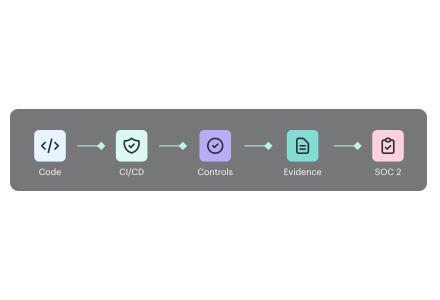
Through 2027, 99% of records compromised in cloud environments will stem from user misconfigurations and account compromise, not the provider.
Cloud security architecture is the blueprint for protecting identities, workloads, data, networks, and control planes across cloud environments. It encompasses policies, trust boundaries, telemetry, and enforcement paths that govern cloud computing security under the shared responsibility model.
Organizations use it to reduce risk, support digital transformation, and make zero trust practical as the threat landscape shifts from perimeter defense to users, assets, and resources.
Built from fresh insights from Valentin Kel, Cloudaware DevOps Engineer, and Igor K., Cloud Security Expert, and client-side CISOs and cloud architects, this article asks the following:
- Where does the architecture of cloud security crack first?
- What changes in cloud security architecture in cloud computing when identity becomes the perimeter?
- Which controls still hold in multi-cloud?
Architecture defines where controls, trust boundaries, identity paths, data protections, and observability belong. CSPM evaluates running cloud configurations against selected policies; it does not replace the architecture. Cloud monitoring tools then show whether workloads and dependencies behave as designed.
Key insights
- If you still want the short answer to what is cloud security architecture, it is the operating model for deciding who gets access, which paths stay open, how data is protected, and what evidence the team keeps when something changes.
- Most cloud failures still come from customer-side decisions, not provider mistakes. IBM calls misconfiguration the most common risk to cloud data security, and CISA keeps pushing identity, segmentation, and zero trust for exactly that reason.
- The old architecture of cloud security used to lean on the perimeter. That does not hold up in hybrid estates anymore. Identity now carries more trust than network location. So broken roles, stale permissions, and weak federation do more damage than one open port ever could.
- Good cloud security architecture in cloud computing is layered, but the layers are not equal. IAM, segmentation, workload protection, encryption, policy controls, and monitoring all matter. Still, identity and ownership usually decide whether a risk gets contained fast or lingers for 250 days while everyone assumes somebody else is fixing it.
- Multi-cloud is where lovely diagrams go to die. AWS cloud security architecture, Azure cloud security architecture, and Google cloud security architecture follow the same security logic. But the control planes, policy models, and hierarchy points differ enough that teams need one operating view above them or drift wins.
- Hybrid security is falling apart. One identity source is on-prem, another in the cloud. Private connectivity in place, but policy enforcement uneven. Logs scattered. That is why conversations about the shared responsibility model are never sufficient on their own. You also need consistent ownership, encrypted paths, and one way to trace a finding back to the service, team, and recent change.
- The best teams do not stop at visibility. They use threat modeling, map attack paths, watch the threat landscape, and design remediation flow into the architecture itself. A finding that lacks an owner, an environment, and a change history is merely expensive trivia. A finding with context becomes action. Visibility itself doesn't solve the problem anymore.
- Digital transformation makes security architecture harder, not easier. Every new service, SaaS connector, identity relationship, and device-to-cloud path expands the surface area. CISA’s cloud guidance keeps pointing back to zero trust because scale without control just turns speed into faster exposure.
- For architecture review preparation, see our guide on conducting a cloud security architecture review.
4 Core components of cloud security architecture
Cloud security architecture only looks simple when you reduce it to a diagram.
In real environments, it is a stack of decisions that either reinforce each other or quietly create gaps. Identity controls trust. Network controls movement. Data controls blast radius. Workload protection tells you whether your assumptions still hold once code is live.
That is the taxonomy practitioners actually use because it maps to how cloud risk shows up in the wild.
The core components:
- Identity and access management
- Network security and micro-segmentation
- Data protection and encryption layers
- Workload protection and runtime security
Identity and Access Management (IAM) as the foundation
If you strip cloud security architecture down to the control that carries the most weight, it is identity.
Not firewalls. Not private subnets. Not even encryption first.
Identity.
A modern cloud estate runs on permissions. Human users log in through SSO. Workloads assume roles. Pipelines call APIs. Contractors get temporary access. Service accounts move quietly between systems. That is why IAM sits at the center of the most important cloud security architecture components.
- MFA matters here, but not as a checkbox. It matters most on privileged paths. Admin consoles. Production change access. Break-glass accounts. CI/CD maintainers. One weak login on one high-trust identity can undo a lot of expensive architecture.
- Then comes RBAC. Good RBAC does not mean neat role names in a spreadsheet. It means the platform engineer can manage clusters without touching finance data. The analyst can read logs without editing policies. The outside consultant gets scoped SSO access that expires cleanly. That is what least-privilege looks like when it leaves the policy doc and enters the real world.
- Multi-cloud makes this harder fast. One directory in one provider is manageable. Three clouds, SaaS apps, on-prem systems, and local exceptions create messiness unless you design federation and identity governance on purpose.
That is where an identity-first architecture for cloud security changes the model. Trust stops living at the network edge. It moves to authenticated identity, session context, device posture, role scope, and continuous verification.
That shift is not theoretical anymore. It is how cloud teams survive scale.
Network security and micro-segmentation
Now zoom out from identity and look at movement.
Network design in the cloud is really about permissioning communication. Which service can talk to which other service? On which port? In which environment? Under which constraints?
That is the heart of cloud security network architecture.
At the outer layer, the controls look familiar enough:
- VPCs define isolation boundaries
- Security groups shape allowed traffic around instances and services
- Network ACLs add subnet-level filtering
- Private links, VPNs, and SD-WAN paths stitch hybrid infrastructure together
That is the visible part. The more important part sits inside the estate. East-west traffic. Service-to-service calls. Database access between tiers. Lateral movement after one foothold. Traditional north-south firewalling was built to watch ingress and egress. Cloud attackers love what happens after ingress, when one compromised workload can still see too much of the environment.
Micro-segmentation exists to break that path.
In a healthy design, dev does not quietly reach prod. A build runner does not get to talk to a sensitive database just because both live in the same account. Internal admin tools do not sit one misconfigured rule away from public-facing workloads. That is what segmentation should do. It should reduce the number of wrong conversations that are even possible.
Hybrid estates complicate this again. A device to cloud security architecture often spans branch offices, plant devices, remote users, private circuits, and cloud hubs connected through encrypted tunnels or SD-WAN overlays. The trap here is assuming connectivity equals security. It does not. You still need network visibility. You still need to know who is talking, where, how often, and whether that path still makes sense.
Without that, segmentation becomes decorative.
Data protection and encryption layers
Teams love to say data is the priority. Then they protect infrastructure better than they protect the data itself.
That is the gap this component closes. Data protection in cloud architecture works in layers:
- Encryption at rest for stored data
- Encryption in transit for service and user communications
- Encryption in use for sensitive processing scenarios
- KMS and key ownership controls
- Data classification and DLP policies
- Retention, masking, and access monitoring tied to compliance
They are key elements in cloud security architecture because they decide what remains protected when another control fails.
- The first design question is usually key ownership. Provider-managed keys reduce friction. Customer-managed keys give security teams tighter control, clearer separation of duties, and stronger audit positioning. That choice matters more once regulated data enters the picture.
- The second question is classification. Because not all data deserves the same handling. Public content, internal documents, customer records, payment data, health data, secrets, legal documents. If a team has no classification model, it usually ends up encrypting broadly, but governing poorly. That is where DLP and policy logic start to drift. The controls exist, but they are not connected to data sensitivity.
Compliance pressures force clarity here. GDPR changes how you think about personal data exposure. HIPAA changes what counts as acceptable protection for health information. SOC 2 pushes teams to prove that controls are not just present, but operating.
This is why cloud security architecture components around data should never be described as “encryption enabled.” That tells nobody enough.
A better view is practical.
- Which data classes exist?
- Which keys protect them?
- Who can decrypt them?
- Which services touch them?
- Where do copies move?
- Which alerts fire when policy breaks?
That is the layer auditors ask about. It is also the layer attackers want most.
Architecture controls also need telemetry that shows when workload behavior, availability, or dependencies diverge from the design. Compare cloud monitoring tools by the signals and response workflows they support.
Workload protection and runtime security
A workload can be perfectly designed in Terraform, but it can still drift into trouble on Tuesday afternoon.
A new container image gets deployed with an unpatched library. A serverless function inherits permissions that nobody meant to give it. A VM that was hardened at launch gets changed by hand three weeks later. Suddenly the diagram is still correct, but the environment is not.
Workload protection covers that gap.
The component usually includes:
- CWPP for cloud workload coverage
- Container security across images, registries, and runtime
- Serverless security around permissions, triggers, and dependencies
- VM hardening and configuration baselines
- Runtime monitoring for drift, suspicious behavior, and exposure changes
- Asset visibility tied to ownership and criticality
Containers need one style of control. Serverless needs another. VMs refuse to disappear, so they bring their own baseline and patching burden. Runtime security matters because these assets do not fail in the same way.
What ties them together is context.
A runtime alert without context is just noise. A runtime alert attached to the asset owner, environment, recent change history, related items, and exposure state becomes usable.
That is why teams often rely on dashboards that connect workload findings to the broader configuration graph. One exposed instance is not just one exposed instance. It may sit behind a customer-facing auth service, belong to production, carry sensitive tags, and show a policy drift event from yesterday.
That kind of view changes triage quality immediately. And that is the point of this component. Not more alerts. Better meaning.
Runtime is also where attackers adapt fastest. A signature only catches what someone has seen before. Cloudaware NeoSec learns what normal looks like for each workload, flags the deviation, and sends an AI investigator to check whether the attack actually worked. The verdict reaches the asset owner with the evidence attached.
Read also: Cloud Security Assessment. Methodology, Checklist, Best Practices, and Remediation
Cloud security architecture across major providers
Cloud security architecture is never one-size-fits-all. AWS, Azure, and GCP all give you identity controls, logging, guardrails, and posture tools. The catch is that they wire them differently.
So the architecture has to follow the provider’s logic, not your favorite diagram.
AWS cloud security architecture
The best starting point for AWS cloud security architecture is AWS’s own Security Reference Architecture. It is built around multi-account design, not one giant account with good intentions. AWS is pretty direct about this. Accounts are hard isolation boundary, and the Well-Architected guidance recommends separating workloads by function, compliance needs, and control requirements.
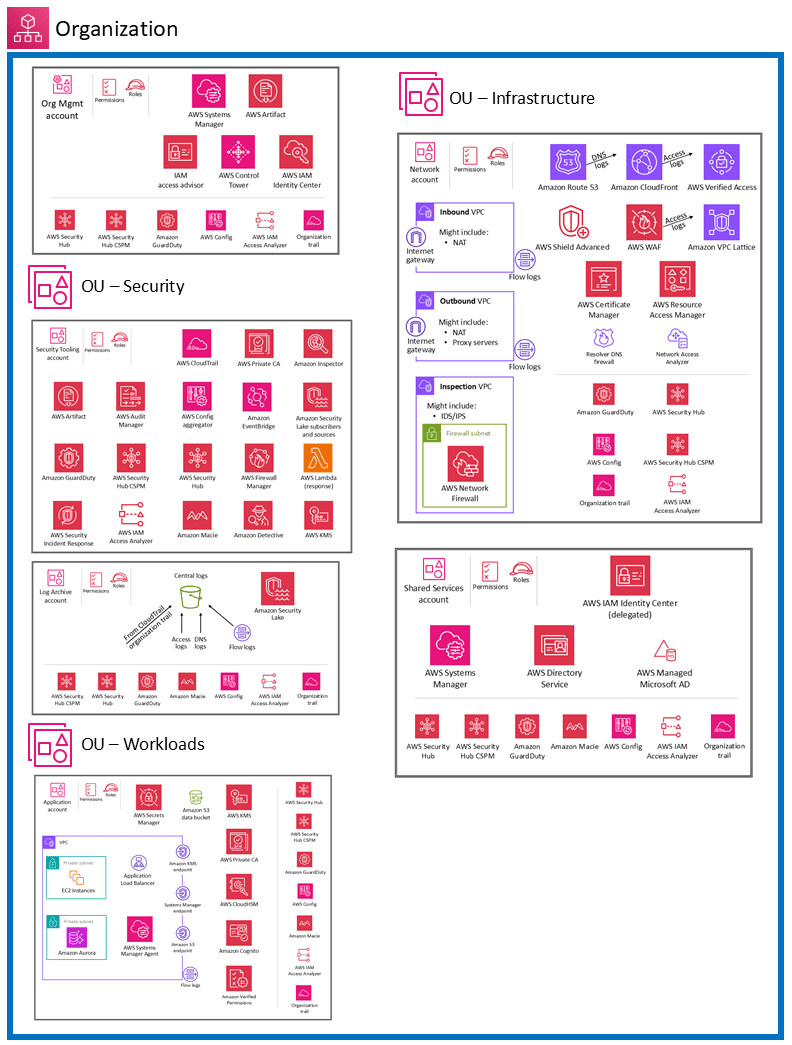
Most AWS security mess starts the same way: too much happens in one account, too many permissions live too long, and nobody can tell which signal matters first. Read about 9 AWS cloud security best practices That Pay Off in our guide.
What matters most here:
- AWS Organizations gives you the structure to manage accounts at scale.
- SCPs set the maximum permissions available in member accounts. They are guardrails, not permission grants.
- GuardDuty continuously analyzes AWS logs and data sources with threat intelligence and machine learning to catch suspicious activity.
- Security Hub CSPM gives a centralized view of posture against standards and best practices across accounts and services.
- The AWS Well-Architected Security Pillar ties the whole thing together with design principles for building and operating secure workloads.
The trap is assuming AWS handles more than it does. The shared responsibility model is clear. AWS secures the infrastructure of the cloud. You still secure what runs in the cloud: your data, identities, configurations, operating systems where applicable, and service settings.
When teams review AWS findings, the hard part is seeing whether that alert belongs to a production account, which owner sits behind it, what changed before it appeared, and whether the issue breaks an internal policy or just looks scary at first glance.
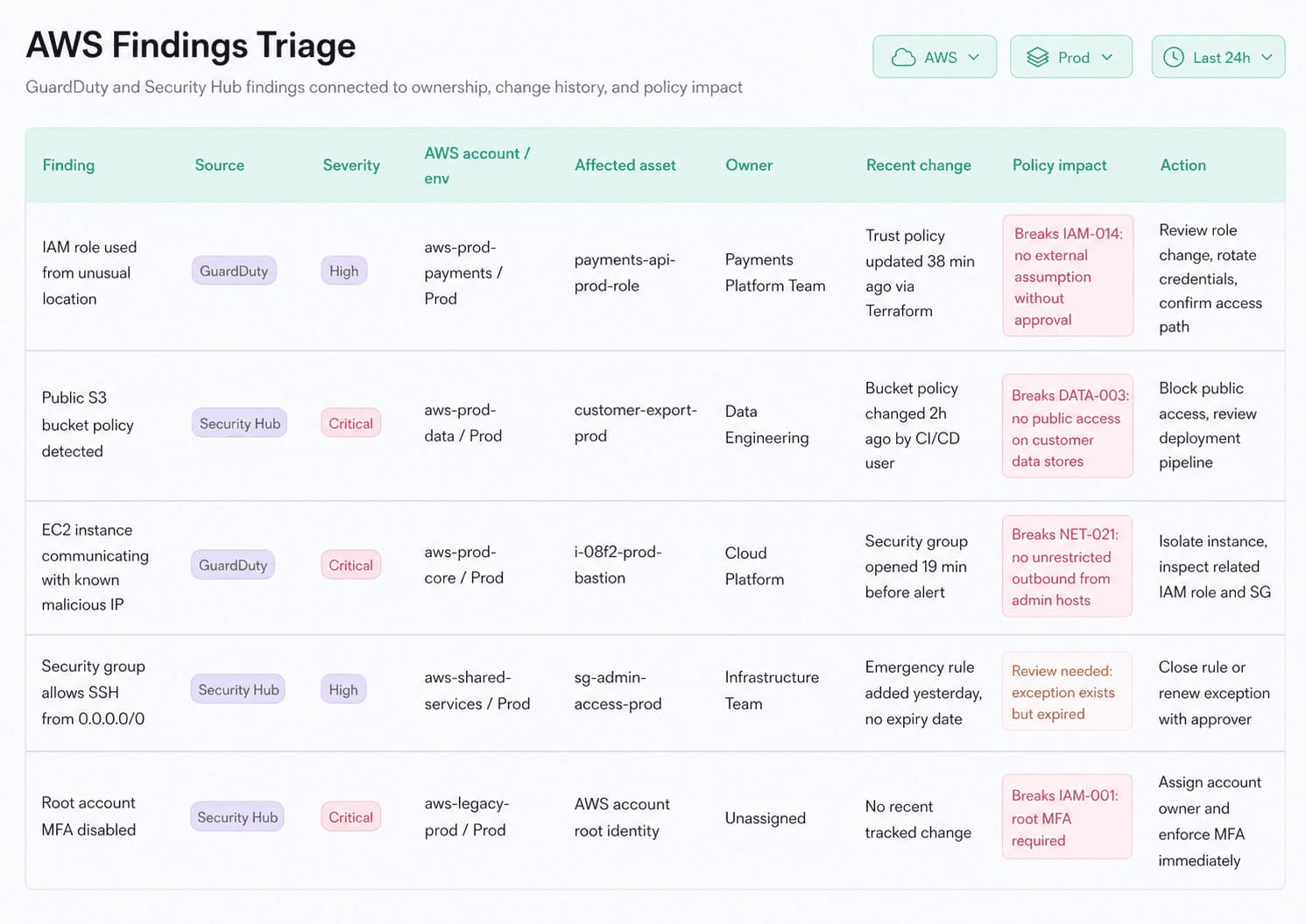
This Cloudaware dashboard connects GuardDuty or Security Hub findings with account ownership, environment tags, recent change history, and related assets, which makes that triage faster and more defensible. Instead of treating AWS signals as isolated events, the team can read them in context and decide what actually needs action first.
Read also: 25 Cloud Security Best Practices That Pay Off
Azure cloud security architecture
In Azure, governance is designed to flow from the top down. Management groups sit over subscriptions. Policies, access rules, and security controls can be pushed through that structure so teams are not rebuilding the same guardrails over and over.
Microsoft’s landing zone guidance describes Azure landing zone architecture as scalable, modular, and built to apply configurations and controls consistently across subscriptions.
What makes Azure distinct
- Management groups for governance scope
- Subscriptions for workload and ownership boundaries
- Microsoft Entra ID as the identity layer
- Azure Policy as the enforcement engine
- Defender for Cloud as the posture and recommendation layer
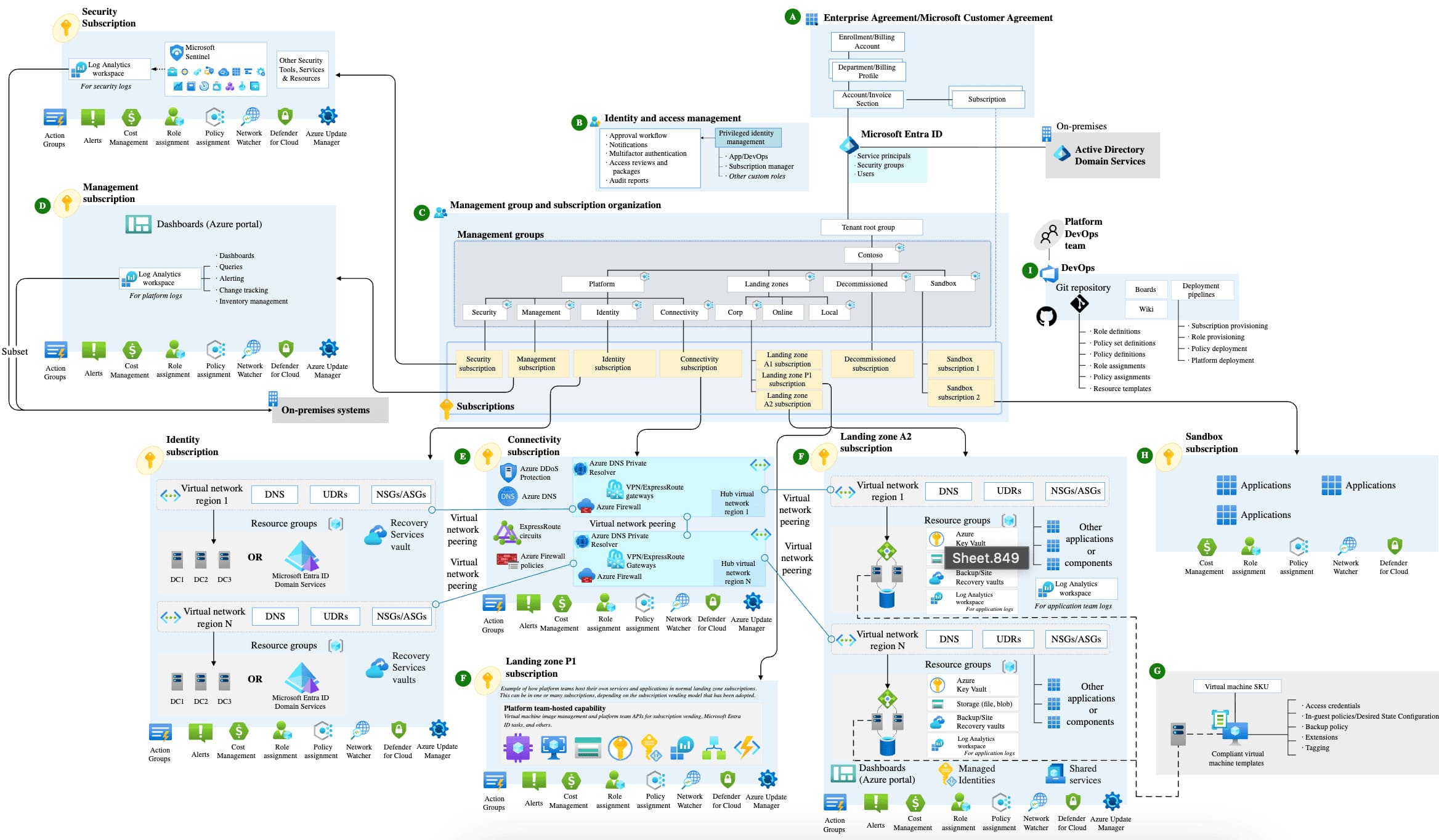
Azure cloud security architecture
Azure gets powerful when central governance stays strict, but workload teams still get room to run.
That is why Azure cloud security architecture feels different from AWS. The structure is less about stitching together separate accounts and more about using hierarchy well from day one. A platform team can define policy at the management group level, then let application teams work inside controlled subscriptions.
Microsoft also documents that Azure Policy can enable Defender for Cloud across all subscriptions in the same management group, even when those subscriptions have different owners. That is a big deal for enterprise environments because it keeps baseline coverage from drifting team by team.
The other Azure-specific strength is how Defender for Cloud organizes the work. Resources and workloads are assessed against built-in and custom policies plus compliance frameworks, and the recommendations can be filtered by exposed asset, asset risk factors, environment, and workload. Risk prioritization is available when Defender CSPM is enabled.
So instead of staring at one flat queue, teams can read recommendations through exposure and context.
That matters a lot for Microsoft cloud security for enterprise architects. Check our guide on 10 azure cloud security best practices for 2026
Read also: How to Conduct a Cloud Security Assessment (A Step-by-Step Guide)
Google cloud architecture
The core of Google cloud security architecture is the resource tree. Organization at the top. Folders underneath. Projects at the edge where teams actually build. Access inherits down that structure, which is why Google governance can stay surprisingly clean even when the environment gets big.
What makes Google feel distinct is the way it treats trust. It does not lean on “inside the network equals safe” thinking. It leans on zero-trust logic, IAM, and controls like VPC Service Controls to reduce data exfiltration risk around managed services. Cloud Armor sits further out, protecting internet-facing apps from abuse.
What tends to matter most
- Organization, folders, projects
- IAM inheritance across the hierarchy
- VPC Service Controls
- Cloud Armor
- Strong exfiltration controls around managed services
IBM cloud architecture
IBM cloud security architecture starts at the account level, then moves through resource groups and IAM policies. IBM’s twist is that its IAM model is attribute-based at heart. Access groups help organize people, sure, but the deeper logic is ABAC. That changes how policies are written and how finely access can be tuned.
Then there is the part IBM takes very seriously: auditability and crypto.
Activity Tracker Event Routing gives teams tighter control over where audit events go and how they move. Hyper Protect Crypto Services raises the bar even more with dedicated HSM-backed key management and customer-controlled key custody. That is not a minor feature. In regulated environments, it changes the whole trust conversation.
The IBM pieces worth noticing
- Resource groups as the main organization boundary
- ABAC-style IAM
- Activity Tracker Event Routing
- Hyper Protect Crypto Services
Where this gets useful in practice is triage. If an IBM finding is tied to a resource group handling regulated workloads, and the same view shows the owner, recent configuration activity, and the policy that triggered the issue, the team does not waste time translating the alert into business context. They already have it.
Read also: Multi-Cloud Security Architecture. Reference Model and Best Practices
Top 3 cloud security architecture frameworks and standards
There are more frameworks out there than most teams need.
In practice, the shortlist stays pretty tight.
- CSA is the cloud-native favorite when you want architecture and controls to speak the same language.
- NIST is the classic baseline.
- CISA is useful when you want a more operational, technical government-style lens.
- SANS still belongs in the room, mostly because practitioners trust it when theory has to survive production.
CSA cloud security reference architecture
If you want the version that feels closest to how cloud environments actually behave, start with the Cloud Security Alliance reference architecture.
CSA does not treat architecture like a picture for an audit slide. It treats it more like a working map. The stack is layered in a way teams can recognize fast: infrastructure lower down, platform and information services in the middle, and application and presentation layers higher up.
That matters because real cloud estates rarely fail at one layer only.
The issue might start in IAM, show up in an app workflow, and spill into data handling two services later.
This is where teams usually get humbled. They secure the bottom of the stack, then realize the messy part lives higher up.
That is why CSA cloud security architecture is useful. It forces a full-stack view.
A few things it does well:
- Shows how trust shifts across infrastructure, platform, and application layers
- Helps map controls to real cloud service models instead of abstract boxes
- Makes it easier to spot where responsibility changes hands
- Gives teams a way to see architecture and governance in one frame
A lot of companies think they have a solid cloud security reference architecture because the base layer looks locked down. Then the trouble shows up in APIs, identity flows, managed services, or application logic. Not in the compute. Not in the storage. Higher up.
That is the usual struggle with CSA too. The model is strong. The implementation gets messy when teams cannot define who owns what across infrastructure, platform, and app layers.
One useful way to make it operational is simple: look at findings in context.
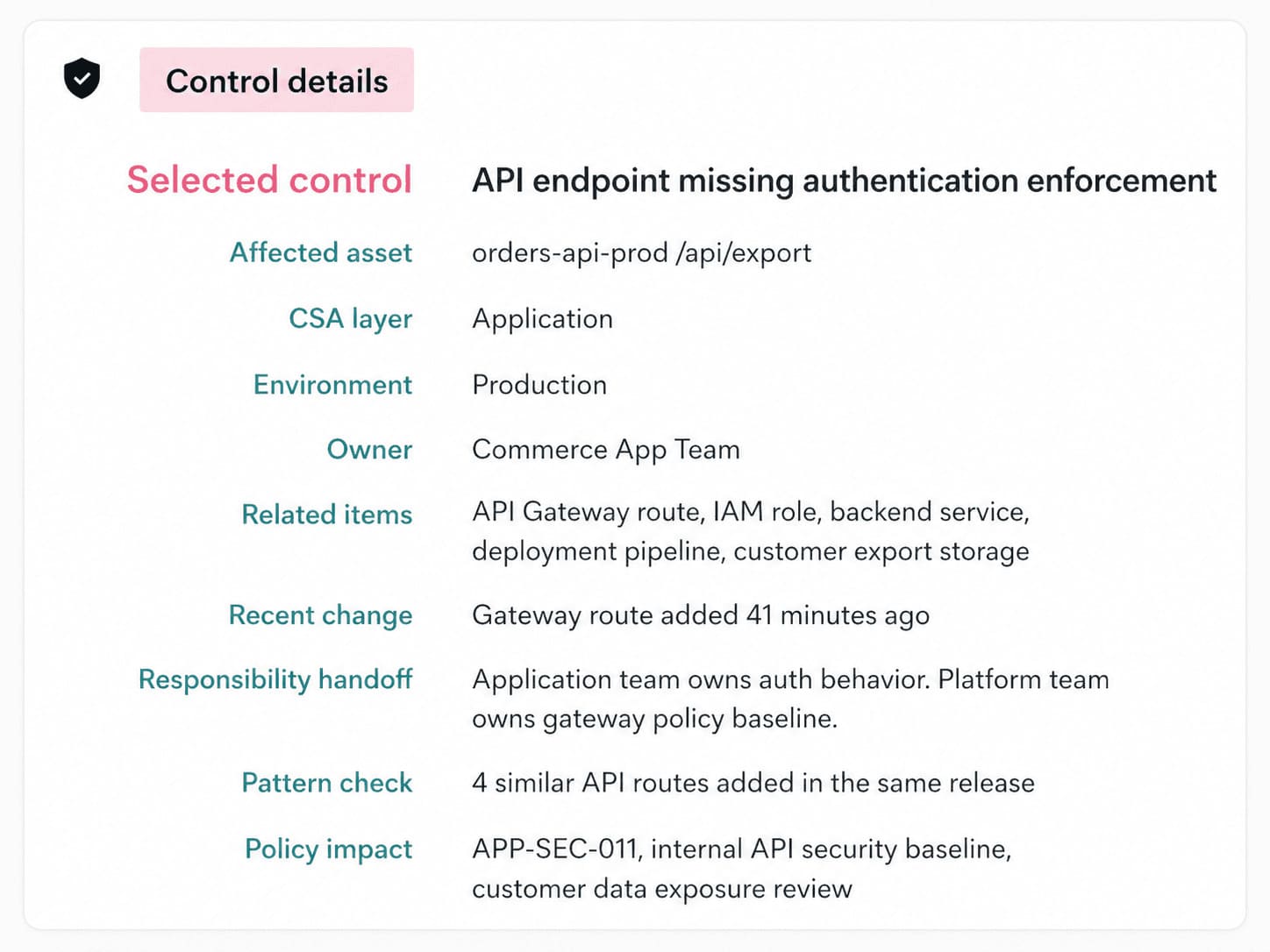
This Cloudaware dashboard puts the failed control, affected asset, owner, environment, and recent change in one view, which makes the framework feel less like guidance and more like something a team can actually run.
CISA cloud security technical reference architecture
Some frameworks help you think. This one helps you stop guessing.
The CISA Cloud Security Technical Reference Architecture was written for federal agencies that have to move messy, high-stakes environments into the cloud without losing control of data, ownership, or security services.
CISA describes the TRA as guidance that shows recommended approaches to cloud migration and data protection, and says it is meant to clarify considerations for shared services, cloud migration, and cloud security services.
Why agencies use it
- Too many owners
- Too many legacy dependencies
- Very little tolerance for fuzzy responsibility
- Constant pressure to standardize security across different teams and systems
The real value here is architectural discipline when the environment gets political, crowded, and complicated.
That is why enterprise teams should borrow from this cloud security architecture framework. Because they have the same problems in different clothes:
- Multiple business units.
- Shared platforms.
- Hybrid sprawl.
- Security controls that look fine until nobody can say who owns the failure.
NIST, SANS, and Complementary frameworks
If CSA gives you the cloud-shaped control map, and CISA gives you the hard-nosed operating model, NIST and SANS fill in two other gaps. NIST gives you the structure and the security overlay. SANS gives you the practitioner layer, where architecture has to survive real design choices, messy IAM, and logging that never seems clean enough.
That is where the bigger cloud security framework and architecture picture starts to feel usable.
| Framework | Coverage area | Best use |
|---|---|---|
| NIST SP 500-292 | Core cloud reference model, cloud actors, roles, activities, and taxonomy. | Use it when the team needs a common cloud language before arguing about controls. |
| NIST SP 500-299 | Security-centric overlay on the NIST cloud model, with core security components mapped to cloud actors and service/deployment models. NIST lists it as an initial public draft and marks it obsolete in the publication search. | Use it when you want the architecture discussion to move from “what is in the cloud” to “who secures what.” |
| SANS SEC549 | SEC549: Cloud Security Architecture focuses on designing secure, scalable cloud infrastructure through hands-on work in IAM, organization policy, network security, data security, and log aggregation. | Use it when the model is clear, but the implementation still feels fuzzy. |
NIST SP 500-292 is the baseline. It tells you who the actors are and how the cloud ecosystem is supposed to be understood. SP 500-299 then adds the security layer on top, which is why it still matters even as a draft reference. It pushes the conversation toward components, responsibilities, and trust boundaries.
SANS comes at it from a different angle. SANS cloud security architecture training is not trying to be the formal reference model. It is trying to make architects better at decisions that hurt when they go wrong. Identity design. Policy structure. Network control. Data protection. Centralized logging.
That is why these frameworks work well together instead of competing. NIST explains the shape. SANS pressures the design.
One practical way to use them together: define the architecture with NIST, pressure-test the security responsibilities with 500-299, then read runtime findings and policy failures in a dashboard that shows the owner, environment, and recent change.
That is when the framework stops being a diagram and starts being something a team can run.
Security architecture for hybrid cloud environments
Hybrid cloud is where a lot of security teams discover their “standardized controls” were never really standardized.
One user signs in through on-prem identity. The request crosses a private link. The workload runs in cloud. The logs land somewhere else. Ownership gets blurry fast. That is the real challenge here. Not the diagram. The seams.
What makes hybrid harder:
- Two control planes, sometimes more
- Different logging formats
- Uneven policy enforcement
- Too many places for trust to quietly drift
Read also: 5 Hybrid Cloud Security Best Practices for 2026
How to apply security controls across on-prem and cloud
The old controls do not disappear in hybrid. They just stop being enough on their own.
A firewall in the data center still matters. So does IDS/IPS. So does SIEM. But once traffic starts moving between on-prem and cloud, those controls need to travel too. Or at least their logic does.
That is where teams usually trip.
They protect the connection, then forget to normalize the policy.
A site-to-site VPN, Direct Connect, or ExpressRoute gives you the path. Good. That solves transport. It does not solve consistency. If the on-prem firewall blocks one class of traffic, but the cloud side allows it through a security group or route configuration, the architecture is already splitting in two.
Hybrid security usually breaks in the handoff, not the headline control.
That is the part worth watching:
- Firewall logic has to map cleanly into cloud-native controls
- IDS/IPS visibility cannot stop at the edge of the data center
- SIEM needs both on-prem and cloud telemetry or it misses the story between them
- policy exceptions need one owner, not three people half-owning them
A practical way to make that visible is simple. Put the failed control, the affected asset, the environment, the owner, and the recent change in the same view.
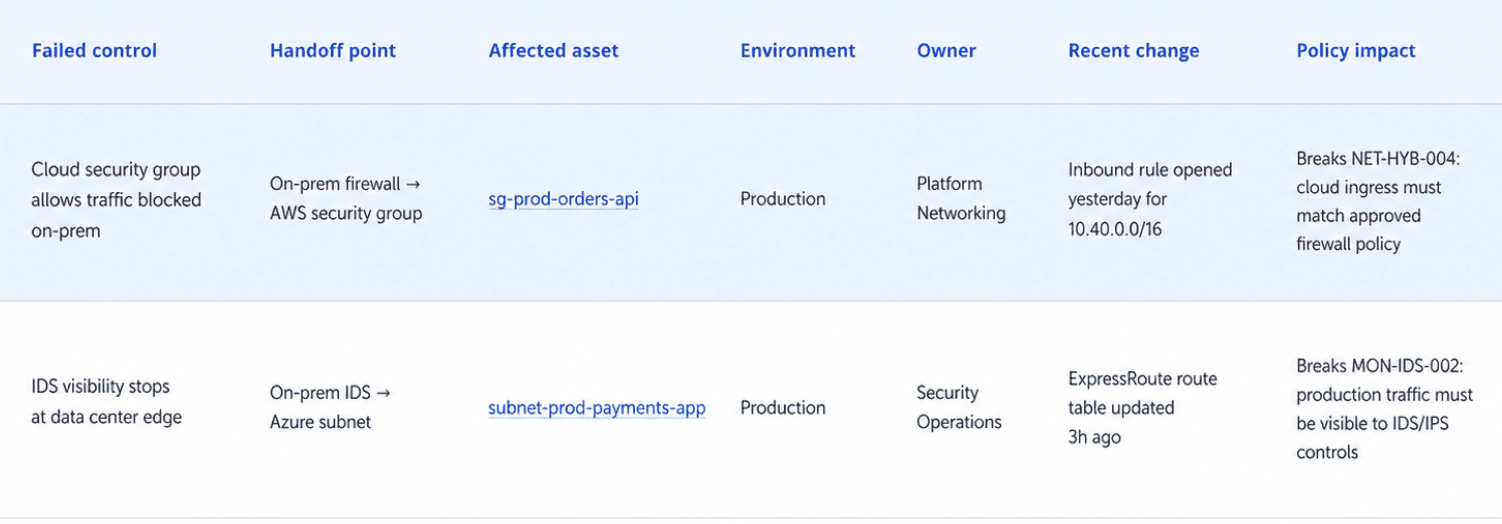
Then a hybrid finding stops being “something weird between on-prem and cloud” and becomes “this production-connected asset changed yesterday, now violates policy, and here’s who needs to look at it.”
Host-level detection needs the same treatment. NeoSec runs one agent on cloud VMs, on-prem servers, and container hosts, so an intrusion signal from the data center and one from AWS land in the same view, tied to the same owner.
Read also: Hybrid Cloud Security Architecture. Reference Architecture, Diagram, and Best Practices
Device-to-cloud security architecture patterns
The risk is not just the device. It is the route.
An edge camera, sensor, gateway, or controller has to prove what it is, connect through the right path, send data to the right service, and keep that trust intact after updates, certificate rotation, and policy changes.
That is where device-to-cloud security architecture gets real. One weak certificate workflow or one over-permissioned gateway, and the cloud side inherits the mess.
Where device identity meets cloud policy
Start with device identity
Every serious pattern depends on it. A device needs a unique identity, strong enrollment, short-lived credentials where possible, and a clean way to revoke trust. Otherwise the environment cannot tell a legitimate edge node from a clone, a rogue replacement, or a device that should have been retired two months ago.
Then the path needs shaping
Most mature environments do not let devices talk freely to cloud services. They push traffic through gateways, brokers, ingestion layers, or tightly scoped APIs. That matters for IoT security because the edge layer becomes a control point, not just a relay. It is also where edge computing earns its keep. Local enforcement. Local filtering. Less blind trust.
The network side changes too:
- SSE helps push inspection and policy into cloud-delivered security services
- SASE pulls networking and security closer together
- Zero trust network access keeps remote users, vendors, and admins from getting broad reach just because they touched the right tunnel once
That is the real pattern. Identity first. Narrow paths. Explicit trust.
How to design a cloud security architecture step by step
Here’s the practical sequence:
- Pick the service with the highest business impact.
- Map the identities and trust paths around it.
- Run threat modeling before the build hardens.
- Set non-negotiable controls high in the hierarchy.
- Keep owner, environment, exposure, and change data visible together.
- Treat exceptions like temporary engineering decisions, not permanent folklore.
Here’s where a lot of teams go wrong. They start with tools. Then diagrams. Then the provider controls. By the time they ask what actually matters, the architecture is already halfway built around convenience.
Good cloud security architecture design goes the other way. You start with the service that can hurt you most. Then you trace trust, access, data, and exposure around it.
That sounds slower. It usually saves months.
Before you draw anything, answer this
What are you protecting first? Not “the cloud.” Not “the estate.” Pick one thing with a real blast radius. Maybe it is:
- customer-facing auth service
- payment workflow
- regulated data pipeline
- internal admin plane with broad privileges
That first choice shapes everything that follows. It is where risk assessment stops being generic and starts becoming useful. Applying this workflow can also help you build a practical cloud security strategy.
Step 1: Draw the service boundary, not the cloud boundary
Start with one business service and work outward.
Map:
- the users who touch it
- the workloads that support it
- the data stores behind it
- the identities it depends on
- the third parties or internal teams that can change it
This is the first real check on the attack surface. You are not asking, “What assets do we have?” You are asking, “Which paths could actually damage this service?”
That single shift makes the rest of the architecture sharper.
Step 2: Put identity in the middle
If the old model prioritized perimeter security, this new model prioritizes trust.
This is important in a hybrid cloud environment because identity now spans all aspects.
- On-prem AD or Entra.
- AWS roles.
- GCP service accounts.
- Azure managed identities.
- CI/CD tokens.
- Vendor access.
- Emergency admin access.
If those trust paths are messy, the architecture will be messy no matter how nice the network diagram looks.
This is where enterprise cloud security architecture gets real. You decide:
- Where federation happens
- How privileged paths are separated
- Which machine identities are allowed to assume broader roles
- What gets break-glass access and how that access is monitored
Step 3: Pressure-test the system before you decorate it
Now do the uncomfortable part.
Run threat modeling while the architecture is still cheap to change.
Use STRIDE when you want to challenge the system design itself. Use MITRE ATT&CK when you want to think through how a real attacker would move once one foothold exists. Both matter. One exposes weak design assumptions. The other exposes weak operating assumptions.
Quick recap:
- If one identity gets compromised, where can it move?
- If one internet-facing workload is exposed, what else becomes reachable?
- If one change bypasses the normal path, who even notices?
That is where cloud security architecture in cloud computing stops being theoretical. You are designing for abuse paths, not just happy paths.
Step 4: Set your hard rules high up
Do this earlier than feels comfortable. At the org, folder, management group, account, or subscription level, set the controls. Nobody should be negotiating service by service:
- Required logging
- Encryption defaults
- Approved regions
- Mandatory tags for owner and environment
- Internet exposure rules
- Blocked services for sensitive workloads
That is one of those cloud security architecture best practices people call boring right up until they have fifty production exceptions and no clean way to govern them.
Here’s the decision table that usually helps:
| Decision area | Centralize early when... | Keep more local control when... |
|---|---|---|
| Identity baseline | You have multiple teams, regulated data, or shared admin paths | A small team owns the full stack and the blast radius is contained |
| Logging and telemetry | You need cross-cloud visibility and hybrid investigations | The environment is isolated and incident response stays local |
| Network guardrails | Internet exposure or east-west movement would create broad impact | Workloads are tightly separated and low criticality |
| Policy exceptions | Audits matter, ownership is distributed, or drift is common | The team is small and changes are reviewed manually every time |
Step 5: Decide what must always stay visible
Not all telemetry deserves the same level of attention. The signals that usually matter most are the ones that answer five questions fast:
- What failed?
- What asset is affected?
- Who owns it?
- What environment is it in?
- What changed right before the report appeared?
That is why dashboards matter here, but only when they reduce translation work. Some teams use a Cloudaware view during design reviews to line up the failed control, the affected asset, the owner, the environment, and recent change history in one place.
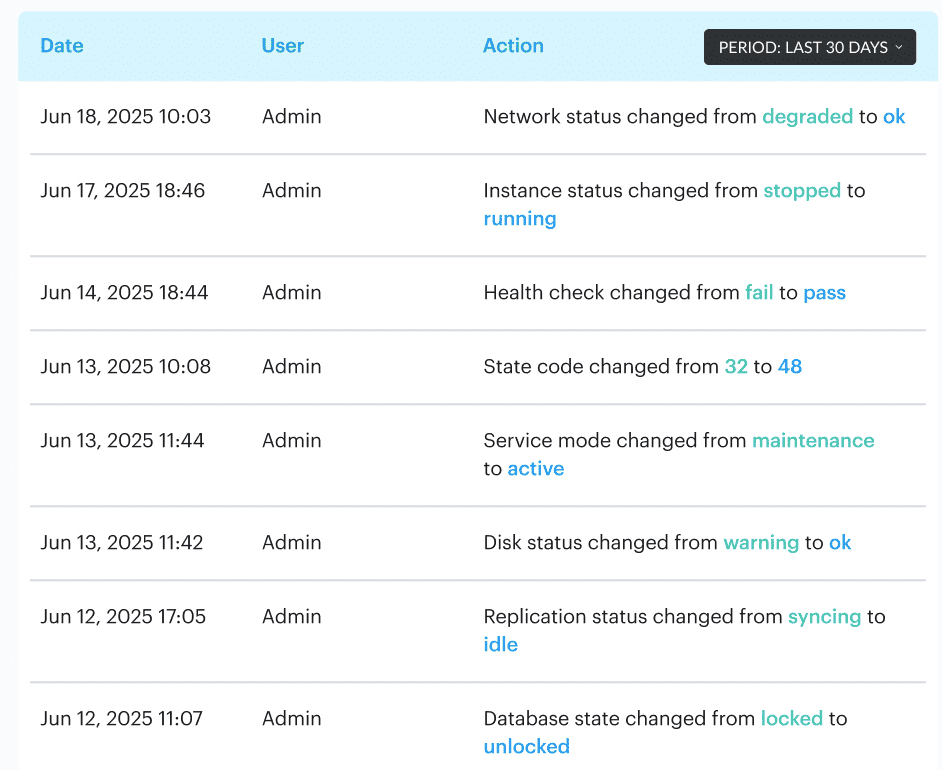
That makes architecture reviews much more honest. A policy failure stops looking like generic posture noise and starts reading like an operational fact.
What this looks like in practice
Say you are designing a hybrid payments service. The public API sits in AWS. Customer identity is federated through Entra. Transaction processing touches an Azure analytics pipeline. Settlement data lands in GCP. A legacy reconciliation system still runs on-prem and reaches the cloud over private connectivity.
Looks normal enough.
Now walk the steps:
- Define the payment service as the boundary
- Map every identity with write, read, admin, and deployment access
- Trace data flows between AWS, Azure, GCP, and on-prem
- Model abuse paths, not just expected flows
- Place hard rules high in the provider hierarchy
- Make sure every critical asset has an owner, environment tag, and change trail
That is how you catch the real problems early. The AWS workload role that can still read too broadly. The Azure integration account that nobody rotates. The GCP data sink has weaker restrictions than the source. The on-prem service account still behaves as if it were in 2018.
Step 6: Design the exception path before the first exception arrives
Because it will.
A vendor will need odd access. A legacy integration will miss the standard. A business unit will ask for a carve-out. Fine. But if exceptions are not designed into the architecture, they eventually become the architecture.
Every exception should have one:
- owner
- approval path
- expiry date
- reason
- extra monitoring condition
That is containment.
Read also: Cloud Workload Security. A Cross-Cloud Guide for 2026
Turn the architecture into something your team can actually run
You can design a smart cloud security architecture and still fail to execute it effectively in operations.
That happens when every control failure has to be translated by hand. Someone has to figure out which asset failed, whether it is in production, who owns it, which application depends on it, whether there is an approved exception, and what changed just before the issue appeared.
Cloudaware is built for that exact gap. Its CSPM merges CMDB data with multi-cloud and on-prem checks, then turns that context into enforceable guardrails instead of one more flat list of posture alerts.
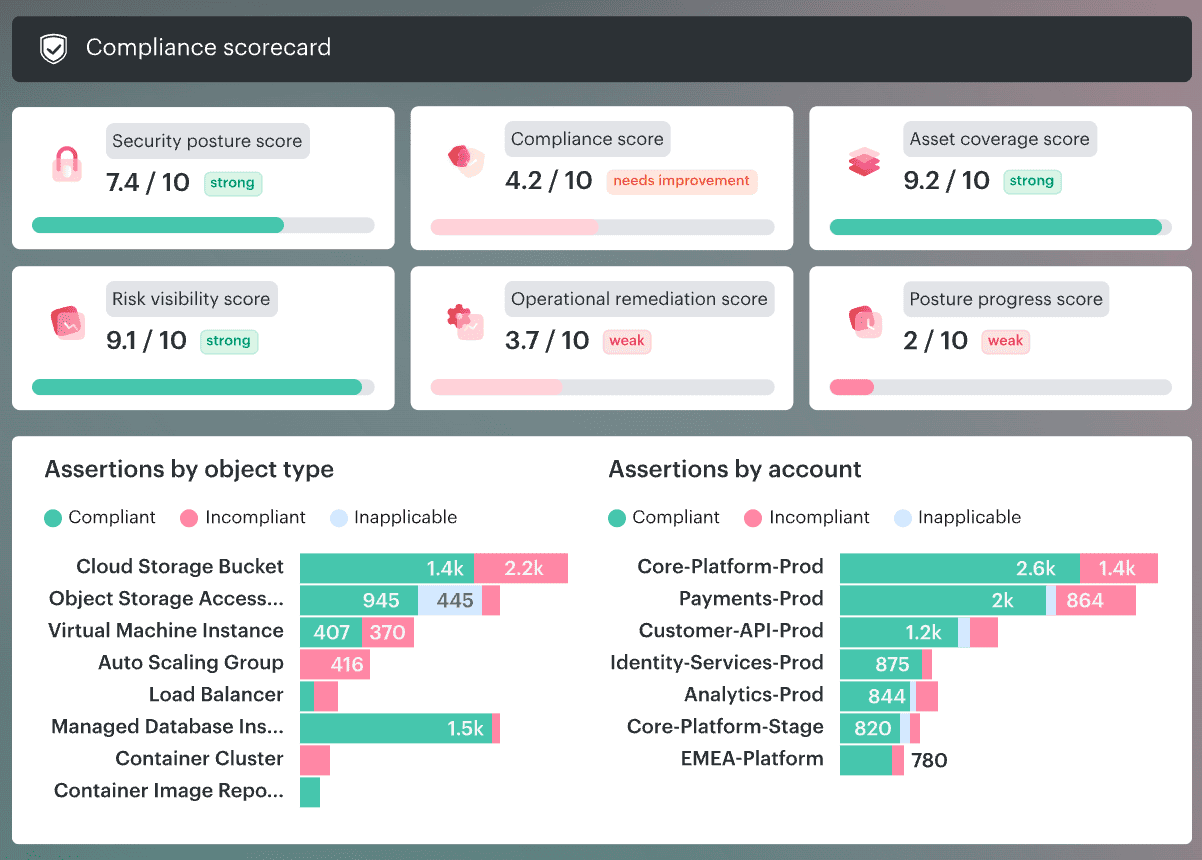
Our platform keeps the finding close to the owner, app, environment, scope, and policy context, so a misconfiguration reads like a real situation, not like archaeology. It also evaluates cloud and non-cloud configurations in one model, which makes it a much better fit for hybrid estates than tools that stop at cloud-only checks.
Here’s the practical value inside this topic:
- CMDB-aware CSPM so findings are decorated with owners, apps, environments, severity, and scope.
- Hybrid and multi-cloud coverage across AWS, Azure, GCP, Kubernetes, VMware, and on-prem data in one view.
- Ongoing framework assessments for CIS, NIST, ISO, PCI, and HIPAA, with policy tuning by tag, account, app, or environment.
- Risk prioritization that is actually useful, with ranking by owner, exposure, and blast radius instead of generic severity alone.
- Formal exemption handling with review and approval workflows, so legitimate deviations do not get mixed up with real violations.
- Routing and remediation workflows into Jira, ServiceNow, Slack, and email, plus bidirectional ticket sync and auto-remediation playbooks for repeat issues.
- Audit-ready evidence and dashboards with exports, scorecards, pass/fail heatmaps, owner and SLA views, and remediation trails that auditors can follow.
- Runtime detection through NeoSec, a separate module on the same CMDB, with per-asset behavior baselines and AI investigation of deviations ranked by exposure and business impact.