


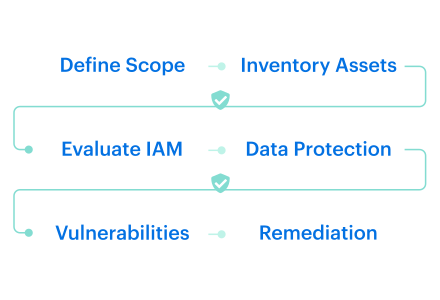
A security team can have a CWPP, CSPM, SIEM, and three native cloud consoles open, then still miss the workload that matters. That’s the ugly little secret behind cloud workload security in 2026.
Maybe the scanner never enrolled the VM. Maybe the owner tag is blank. Maybe last week’s “clean” workload drifted after one manual change. Maybe the logs exist, beautifully useless, buried across five buckets until audit week starts breathing down your neck.
This guide pulls fresh field notes from Cloudaware experts Valentin Kel and Igor K, plus what our clients’ cloud security leaders, platform engineers, and DevSecOps teams keep running into across AWS, Azure, GCP, and on-prem.
So we’re investigating:
- What is the real cloud workload security definition once you leave the glossary?
- Where do CWPP tools quietly lose coverage?
- Which workload signals actually matter before remediation starts?
- How do cross-cloud teams prove security without spreadsheet archaeology?
Key insights
- Cloud workload security breaks first at the inventory layer. If the team does not know every VM, container, function, database workload, and storage-connected app that actually exists, every later control gets weaker.
- A green dashboard can still hide real risk. Teams keep learning the same painful lesson: the scanner may be healthy, while workloads in forgotten accounts, old subscriptions, or newly migrated environments were never enrolled at all.
- Ownership is not admin hygiene. It is the remediation speed. The moment a finding is tied to the app, environment, department, and named owner, it stops being abstract and starts becoming fixable.
- Vulnerabilities tell you what could go wrong. Host events tell you what may already be moving. That is why mature teams do not stop at CVEs. They read IDS, file integrity, and workload behavior too.
- Containers, Kubernetes, and serverless shrink the time window and widen the trust problem. Short-lived workloads are not automatically safer. They just push more risk into image pipelines, workload identity, service permissions, triggers, and policy layers.
- Single-cloud visibility fails quietly in multi-cloud estates. AWS can look clean. Azure can look clean. GCP can look clean. The blind spot lives in the space between them, where inventory, ownership, policy logic, and evidence no longer line up.
- The useful workflow starts after detection. Findings need owners, ticket flow, exception rules, expiry dates, status tracking, and enough context to prove what changed, what was fixed, and what still needs action.
What is cloud workload security?
Cloud workload security is the discipline of protecting cloud and hybrid workloads, including VMs, containers, Kubernetes workloads, serverless functions, databases, and storage-connected services, from vulnerabilities, misconfigurations, risky access, suspicious host activity, file changes, and compliance drift from deployment through retirement.
A workload is rarely just “a server.” In AWS, it might be an EC2 instance with an old OpenSSH package. In Azure, a VM with a broad service account. In GCP, a container running in a project nobody checks weekly. On-prem, it’s a long-lived host that still matters because one finance process depends on it.
And here’s where teams get burned: the workload can look fine in one tool and risky in another.
- The scanner sees the CVE
- The cloud console sees the open port
- The IDS catches a suspicious host event
- The log bucket has the activity trail
- The ticketing system knows who was supposed to fix it
Nobody has the full sentence.
A stronger cloud workload security definition usually includes the next elements:
- Discovery: which workloads exist, where they run, and whether they are dev, test, prod, idle, or orphaned.
- Vulnerability scanning: OS packages, libraries, container images, and running hosts checked on a clear cadence, often weekly or daily, for stricter compliance needs.
- Access control: workload roles, service accounts, API keys, secrets, and machine identities reviewed for overreach.
- Host-level monitoring: suspicious processes, service changes, and intrusion detection signals watched beyond the deployment pipeline.
- File integrity checks: changes to file content, permissions, ownership, and attributes captured as evidence.
- Logging: cloud service logs, host logs, security events, and audit trails kept close enough to investigate.
- Remediation tracking: tickets, owners, exceptions, comments, due dates, and proof of closure tied back to the affected workload.
That last part matters. A workload is not “secure” because it passed a scan last Tuesday. Someone can open a port on Wednesday. A package can become vulnerable on Thursday. A file permission can change during a maintenance window.
By Friday, the dashboard still looks calm, but the evidence trail is already messy.
Good cloud workload security gives teams the chain of custody for risk: asset, owner, environment, vulnerability, event, log, control, ticket, and fix.
That is the difference between seeing red alerts and knowing what to do next.
What counts as a cloud workload?
A cloud workload is any compute resource, service, or application component that runs in your cloud or hybrid environment and supports business activity.
It might process transactions, store data, run a backend service, trigger automation, move traffic, or quietly keep one “temporary” internal tool alive for three years.
That’s why security teams get into trouble when they treat cloud workloads as “just servers.” In a mid-market or enterprise setup across AWS, Azure, GCP, and on-prem, the workload estate usually looks more like a crowded airport than a neat rack diagram.
| Workload type | Example | Security concern |
|---|---|---|
| Virtual machines | EC2, Azure VM, Compute Engine | OS patching, vulnerable packages, exposed ports, configuration drift |
| Containers | Docker containers, ECS tasks | Image vulnerabilities, embedded secrets, runtime behavior |
| Kubernetes workloads | Pods, deployments, services | RBAC, network policies, admission controls, exposed services |
| Serverless functions | AWS Lambda, Azure Functions | Function permissions, event triggers, dependency risks |
| Managed databases | RDS, Cloud SQL, Azure SQL | Access controls, encryption, backups, retention gaps |
| Storage-connected workloads | S3, Azure Blob, GCS-linked apps | Public access, data exposure, overbroad permissions |
Where cloud providers stop and your team starts
The shared responsibility model sounds clean on a slide. In production, it gets messy fast.
AWS, Azure, and GCP secure the cloud foundation: data centers, physical hardware, managed infrastructure, core networking, and the services they operate underneath your environment. That part is theirs.
Your side starts the moment your team configures something.
That one layer higher is where most workload risk lives.
- An EC2 instance with SSH open to the internet? Yours.
- An Azure VM running old packages? Yours.
- A GCP service account with broad storage access? Also yours.
- A container image shipped with a vulnerable library? Nobody at the provider is patching that for you.
CSA’s 2025 Top Threats Deep Dive keeps circling the same failure patterns: misconfigurations, identity and access gaps, and confusion around shared responsibility.
That tracks with what cloud teams feel every week.
The breach path often starts with something boring. A permissive role. A public bucket. A port opened for testing and never closed.
This is where cloud workload security gets practical. You are not replacing the provider’s security layer. You are securing your own operating layer:
- OS settings and patching
- Container images and dependencies
- Workload permissions and service accounts
- Secrets and certificates
- Encryption choices
- Open ports and network exposure
- Application behavior
- Logs, alerts, remediation, and evidence
For teams researching cloud insights storage workload security, the ownership line matters even more.
The provider gives you encryption controls, IAM policies, access logs, and storage configuration options. Your team decides whether cloud workloads use them safely, whether access is too broad, and whether anyone can prove it before the auditor asks.
Read also: Cloud Security Architecture. A Comprehensive Guide to Protecting Your Cloud Infrastructure
Why cloud workload security is harder in 2026
This is not the “cloud is scary” section. More useful than that. The real issue is that cloud environments now change faster than most security workflows can interpret them.
IBM’s 2025 breach report gives the business pressure: the global average breach cost reached USD 4.4 million, while organizations using extensive security AI and automation saved USD 1.9 million compared with those that did not. That is the money version of the problem. Speed helps. Blind speed gets expensive.
Workloads now move faster than inventory can follow
A VM used to sit there long enough for someone to name it, patch it, tag it, and argue about who owned it.
Now a workload can spin up from Terraform, run for 30 minutes, write to storage, call three services, and disappear before the weekly review starts. Autoscaling does this all day. Containers and serverless make it normal. AI-assisted deployment only adds more volume.
That is why cloud workload security gets harder in 2026. The estate keeps moving while ownership, scanning, and evidence trails try to catch up.
Cloud accounts multiply, but ownership gets weaker
Every new region, business unit, acquisition, sandbox, and “quick test” creates another place for risk to hide.
Dev and test workloads linger because nobody wants to delete the thing that might still support an old workflow. A migrated app keeps its legacy access. A team changes structure, but the owner tag does not. Six months later, security finds a vulnerable workload, and the first question is not technical.
It is, who is supposed to fix this?
That delay is where remediation quietly dies.
Workload identity has become its own attack surface
The identity problem is not only for human users anymore.
A Lambda function has an IAM role. A Kubernetes pod has a service account. A CI job uses an API key. A VM talks to storage through machine-to-machine permissions. None of these identities join onboarding calls, leave the company, or complain when access reviews are overdue.
CSA’s 2025 State of Cloud and AI Security report names identity as the biggest cloud risk, which tracks with what hybrid teams see in practice. One over-permissioned workload can turn a small weakness into a bigger path.
Good workload identity hygiene means asking: what can this workload touch if it gets compromised?
That is where least privilege stops being policy language and starts becoming actual cloud workload security.
Single-cloud tools do not explain cross-cloud risk
AWS, Azure, and GCP each give you useful native security signals. The problem starts when your environment spans all three, plus on-prem.
One console sees the EC2 risk. Another sees the Azure VM. GCP has its own IAM and log trail. Kubernetes has a different permission model again. The SIEM may collect alerts, but it may not know the business owner, environment, related app, exception status, or remediation ticket.
This is why multi-cloud visibility matters for attack surface reduction. The goal is not another pretty dashboard. The goal is one operational view where teams can see what exists, what changed, what is exposed, and who owns the fix.
CWPP has grown beyond scanning, but internal context still lags
Forrester’s Cloud Workload Security Wave evaluated 13 major providers across 21 criteria. That market signal matters because workload security has outgrown the old “install a scanner and move on” model.
Modern CWPP cloud security now touches vulnerability management, runtime security, reporting, integrations, strategy, and market presence. Strong tools can detect more. Great.
Still, tools cannot magically answer the internal truth questions:
- Which workloads exist?
- Which ones are enrolled?
- Which ones changed after deployment?
- Which findings are accepted risk?
- Who owns remediation?
- Where is the evidence?
That is the hard part in 2026. Not detection alone. The harder job is turning scattered workload signals into owned, provable action.
Read also: Multi-Cloud Security Architecture. Reference Model and Best Practices
What is CWPP and how does it fit cloud security?
A CWPP section can get boring fast if it turns into acronym soup. So let’s keep it practical.
Once workloads leave the neat architecture diagram and start running across AWS, Azure, GCP, Kubernetes, and on-prem, security teams need a way to protect the thing that is actually executing code. Not just the cloud account. Not just the network. The workload itself.
What is CWPP?
CWPP stands for Cloud Workload Protection Platform. A CWPP protects workloads such as virtual machines, containers, serverless functions, and sometimes hybrid or on-prem hosts through vulnerability scanning, runtime monitoring, compliance checks, segmentation, and threat detection.
In CWPP cloud security, the job is to catch the risks that posture tools alone can miss. A VM with vulnerable packages. A container behaving oddly at runtime. A function with too many permissions. A host where file permissions changed before an audit. A workload talking to another workload it should never touch.
Read also: Hybrid Cloud Security Architecture - Reference Model + Diagram
Core CWPP capabilities
CWPP tools vary by vendor, but the core capabilities usually sit around the same practical jobs: find risk, watch behavior, reduce blast radius, prove compliance, and give teams enough evidence to respond.
| Capability | What it does | Why it matters |
|---|---|---|
| Vulnerability scanning | Finds CVEs in OS packages, images, and libraries | Shows what needs patching before attackers find it |
| Runtime monitoring | Watches behavior while workloads run | Catches suspicious process, file, and network activity |
| File integrity monitoring | Tracks file changes, permissions, ownership, and content | Helps detect unauthorized changes and support audits |
| Microsegmentation | Limits workload-to-workload communication | Reduces lateral movement if one workload is compromised |
| Compliance checks | Maps workload state to frameworks | Turns workload posture into audit evidence |
| Identity controls | Reviews workload permissions and access paths | Reduces over-permissioned machine identities |
| Logging and correlation | Connects workload activity with investigation data | Helps security teams reconstruct what happened |
Don’t confuse CWPP vs. CSPM vs. CNAPP
Before we compare the categories, one useful warning: none of these tools tells the whole story alone.
A CWPP can protect the workload but miss the owner. CSPM can flag a risky cloud setting but say nothing about runtime behavior. CIEM can expose over-permissioned identities without knowing which business app depends on them. CNAPP pulls more of the stack together, but even then, remediation gets messy when asset ownership, environment, and change history are weak.
| Category | Main focus | Protects | Common weakness |
|---|---|---|---|
| CWPP | Workload protection | VMs, containers, serverless, hosts | May miss workloads not enrolled or not monitored |
| CSPM | Cloud posture | Cloud configurations and services | May lack runtime workload context |
| CIEM | Identity and entitlement risk | Human and machine permissions | Can miss business ownership context |
| CNAPP | Unified cloud-native security | Code, cloud, workloads, identities, runtime | Can still struggle with messy asset ownership and remediation workflows |
| CMDB / asset intelligence | Operational truth | Assets, owners, environments, relationships, history | Needs current discovery and strong data hygiene |
Read also: Enterprise Cloud Security and Governance - CISO Guide
Cross-cloud workload security: why single-cloud visibility breaks
This part is worth your time because the failure is rarely dramatic at first. It looks small. A missing account. A stale owner tag. A workload that never made it into scanning.
Then one day the team realizes the dashboard was accurate only inside one provider’s fence. The core cross-cloud problem: single-cloud tools can be excellent locally and still miss the organizational truth the team actually needs.
What breaks in practice:
- The inventory stops being complete the moment the estate spreads. AWS knows AWS. Azure knows Azure. GCP knows GCP. None of them is responsible for telling you what exists everywhere. That gap matters because CWPP, CSPM, and CNAPP all work better when the underlying inventory is complete. The brief makes that point directly.
- Coverage can look healthy while real workloads sit outside it. This is the ugly one. In the Cloudaware brief, product leadership calls out a pattern from enterprise deployments: teams discover that 20 to 40% of actual workloads were never enrolled in the scanner because they lived in accounts security was never told about. That is not a weak scanner problem. It is a visibility problem.
- Ownership falls apart across clouds faster than teams expect. One workload has the right owner and app context. Its twin in another provider has different tags, a vague department field, or nothing useful at all. Once ownership drifts, remediation slows down.
- Policy logic stops lining up cleanly. The same control can mean different things in different providers because IAM models, metadata structures, and compliance views are not built the same way. So the team spends time translating instead of deciding. The brief defines cross-cloud workload security as the fix for that exact sprawl: normalized asset inventory, unified policy engine, cross-provider compliance, and one reporting pane.
- Single-provider dashboards hide the business context that makes findings actionable. Severity alone is weak triage. Teams need to know app, owner, environment, department, and remediation path. A critical issue on a finance-owned production workload lands differently from the same issue on an abandoned test box.
- Investigations turn into archaeology. Once logs, findings, and ownership live in different provider-shaped views, the team wastes time stitching together the story. That is where multi-cloud visibility stops sounding like a category phrase and starts sounding like an operational requirement.
Teams that handle this better usually work from one normalized workload view across providers, with the fields they actually need close together: workload, owner, application, environment, provider, finding, and remediation status.
Cloud native workload security: containers, Kubernetes, and serverless
Cloud-native workloads do not behave like old servers. That’s the whole problem.
A VM can sit there for months, wait for its next scan, take a patch, and keep its identity. A container might exist for minutes, get replaced by a new image, and leave you with a clean host and the same bad package in the next rollout.
That is why cloud native workload security forces teams to think in windows, not snapshots. Cloud-native workloads are ephemeral, scale horizontally, and are defined by code, so security has to move earlier and stay continuous.
Containers change the scan window
Classic scanning assumes the workload will still be there when you come back.
Containers break that assumption.
A container can start, serve traffic, and disappear before a slow review cycle becomes useful. So the real question is no longer “Did we scan this host last week?” It becomes “Did we scan the image before it shipped, and can we still see the risk pattern after it fans out across environments?”
That is what makes container security feel different in practice. The problem is not only the CVE. It is the shrinking amount of time you have to attach that CVE to something real and actionable.
Here is how teams actually make that review usable. They do not stare at one giant vulnerability list. In Cloudaware, they break findings down by platform, environment, application, department, ownership, and remediation group.
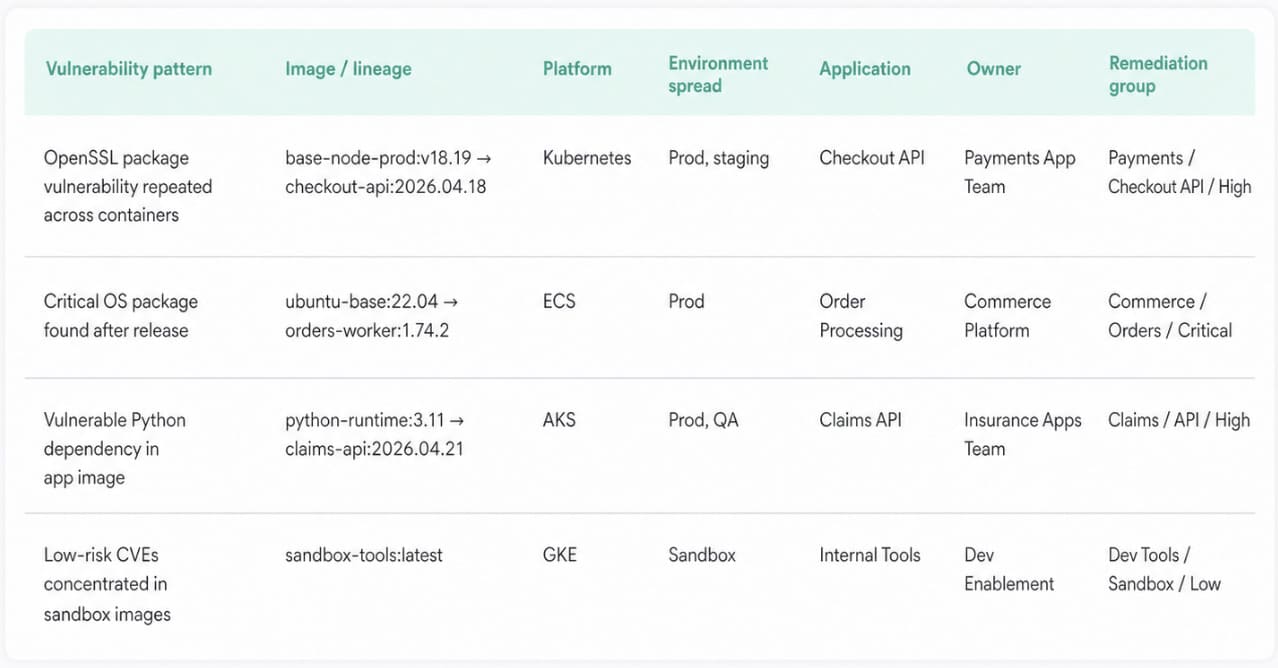
Then they use that context to decide whether the issue belongs to a golden image, a production workload, or a noisy lower-risk lane.
That matters for containers because the vulnerable thing is often the image lineage, not one short-lived instance.
A practical pattern looks like this:
- Scan on cadence for broad coverage
- Trigger on-demand validation after urgent fixes
- Review findings by application and environment, not just by host
- Treat repeated findings across short-lived instances as one image problem
And this is where runtime protection still matters. Build-time scanning catches bad packages early. Runtime tells you whether the container that made it through is now doing something strange, noisy, or clearly worth escalation. The brief makes that two-part model clear too: shift left, yes, but keep runtime monitoring because the workload shape itself has changed.
Then the next layer gets harder, because now the workload is not only about packages and image drift. It also carries service identity, east-west traffic, and policy decisions at execution time.
Kubernetes adds identity, network, and policy layers
Kubernetes makes workload security harder because the risk is no longer sitting in one obvious place.
A container image can be clean enough, patched enough, and scanned enough, and the workload can still be risky once it lands in a cluster.
Now it runs with a service account. Now it can talk east-west. Now admission rules, namespace boundaries, and deployment policy start deciding what that workload is allowed to become.
That is the shift.
In Kubernetes, security moves from “what package is vulnerable?” to “what can this workload reach, assume, and do from here?”
Put it another way:
- Identity gets attached to the workload itself. The dangerous mistake is reusing broad service accounts or leaving cloud permissions wider than the pod actually needs. Least privilege stops being a useful architecture principle here. It becomes the difference between one compromised pod and a much larger blast radius.
- Network decisions multiply quietly. In a VM world, teams often think north-south first. Kubernetes adds east-west reality fast. One permissive network path between workloads can undo a lot of careful patching. That is why microsegmentation matters more in clusters than people expect.
- Policy becomes runtime-adjacent. Admission controls, namespace rules, image requirements, and execution constraints are all important factors to consider. These are not background guardrails. They shape what gets deployed and how it behaves once it does. A pod can be technically healthy and still violate the control logic that matters most.
Cloudaware keeps the findings tied to business context instead of letting it dissolve into pod noise. Usually, teams break issues down by platform, environment, application, department, ownership, and remediation group.
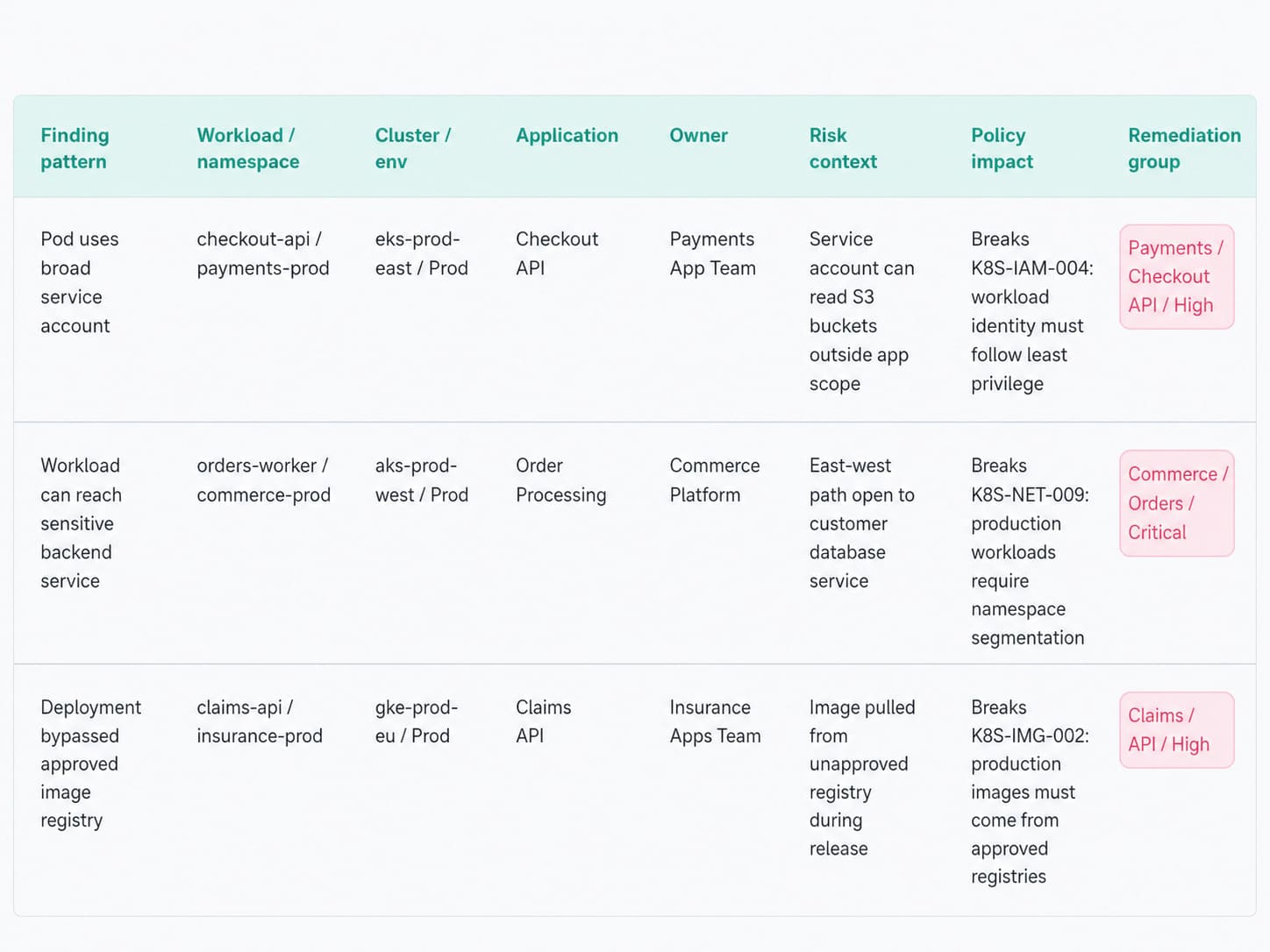
This is precisely what makes a Kubernetes problem readable when identical workloads are scaling horizontally.
Then the shape changes again, because the next workload type gets smaller while the permission surface usually gets bigger.
Read also: 5 Kubernetes Security Best Practices for Cloud Teams
Serverless shrinks the workload and expands the permissions problem
Serverless removes a lot of server-shaped work. It does not remove workload risk.
A function may run for seconds. The execution role behind it can stay broad for months. That is the trap. Teams look at the tiny runtime and assume the problem got smaller.
In practice, the risky surface often moves outward: event triggers, IAM role scope, secret access, storage permissions, database calls, retry paths. The workload got shorter-lived. The trust chain did not.
What changes in real review:
- The function is short-lived. The permissions are not. You usually do not lose sleep over patch drift first. You look at what the function is allowed to invoke, read, write, or assume. One overbroad role on a busy function is a bigger operational problem than the tiny package size makes it look. Least-privilege workload identity matters more here, not less.
- The trigger path matters as much as the code. A function can be wired to queues, APIs, buckets, schedulers, and service events the team forgot were still active. That means the useful question is not only “is the function secure?” It is “who or what can wake it up, and what can it touch once it runs?”
- The evidence is split across services fast. When a function misbehaves, the story rarely lives in one neat place. You end up pulling activity logs, Lambda logs, database logs, load balancer logs, and other service logs together to see what happened.
Cloudaware visualizes that exact pattern across cloud providers, with cloud-service logs visualized together and enriched with host-side telemetry where relevant.
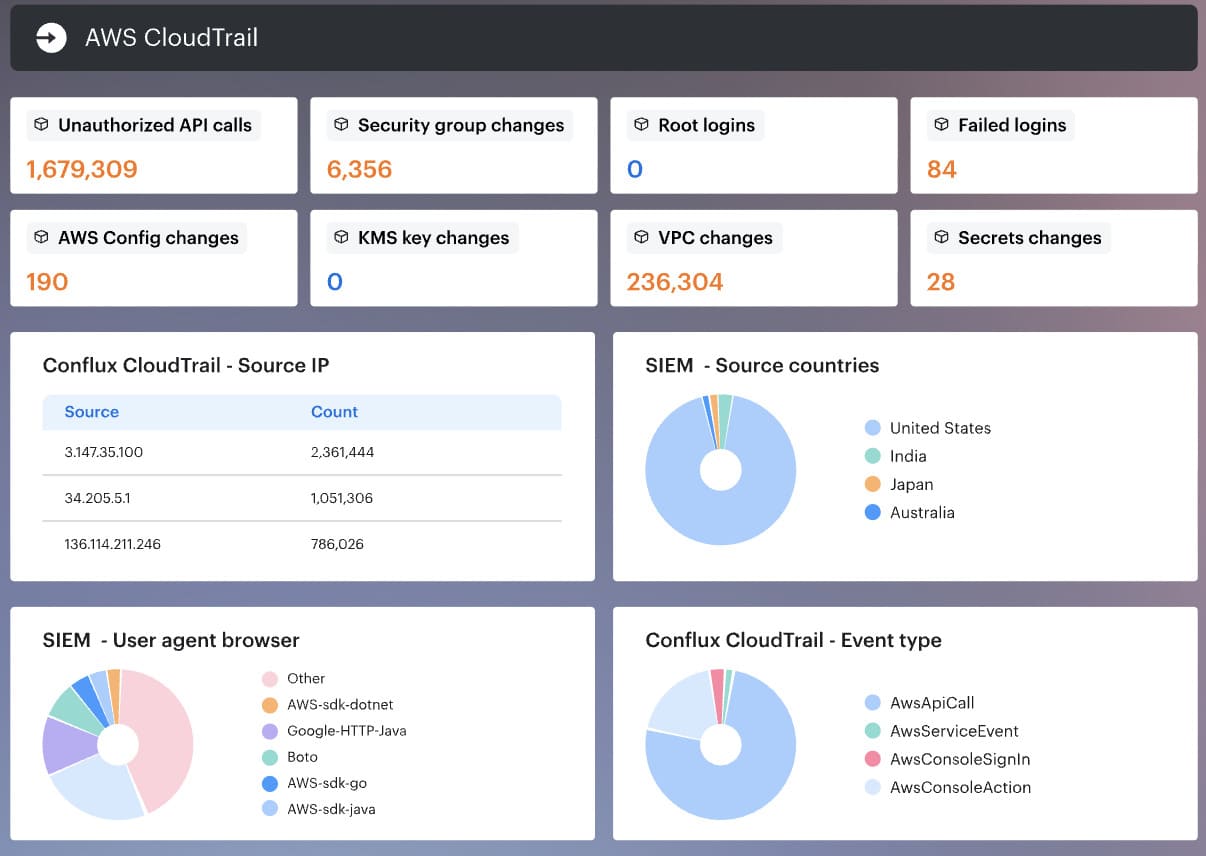
That makes serverless reviews much less guessy, because the timeline remains readable.
Where vendor tools fit
Most teams do not have a tooling problem first. They expect one product to cover runtime behavior, vulnerability findings, cloud posture, ownership, remediation, and cross-cloud truth all at once.
That is usually where the confusion starts. Your brief makes the stack logic clear: CWPP protects workloads, CSPM checks cloud configuration posture, and CNAPP tries to unify more of the picture, but all of them still depend on knowing what actually exists.
A more useful way to think about vendor tools:
- Use workload tools for workload questions. If the question is “what is vulnerable, exposed, or behaving strangely on this workload,” that is CWPP territory: vulnerability scanning, runtime monitoring, segmentation, workload behavior, and compliance checks.
- Use posture tools for configuration questions. If the question is “is storage public, is IAM too broad, is the cloud baseline broken?" that is CSPM territory. Important. Just not the same job.
- Use CNAPP when you want fewer silos, not magic. Consolidation helps. It does not cancel the visibility gap. The brief says that directly: point solutions are converging, but the blind spot stays the same if the platform assumes it already sees every workload.
Vendor tools such as Cloud One Workload Security Essentials, Microsoft Defender for Cloud, CrowdStrike, Prisma Cloud, Sysdig, and others approach workload security from different angles:
- runtime protection,
- vulnerability management,
- agent-based monitoring,
- agentless scanning,
- or CNAPP consolidation.
Neutral fact. Different tools, different strengths. The mistake is asking one of them to be the full operating model.
In practice, the missing layer is usually context.
Read also: Cloud Security Assessment - Methodology, Checklist, Best Practices, and Remediation
5 Cloud workload security best practices
These cloud workload security best practices are worth your time because they come from the part nobody puts in architecture diagrams: the operational mess after deployment.
Cloudaware teams keep seeing the same pattern in client environments. The issue is rarely “we had no tools.” It is more often “the workload was never discovered, the owner was stale, or the finding landed with the wrong team.”
Start with workload discovery and ownership
You cannot secure what your team does not know exists. Obvious sentence. Expensive lesson.
A lot of cloud workload security programs look strong right up to the moment a critical issue appears on a workload nobody had enrolled, tagged, or assigned properly. Then the delay starts. Security has the finding. Platform has partial context. Compliance wants proof. Nobody has one clean answer.
That is why discovery has to work like an operating discipline, not a setup task.
The takeaway is not “discover more stuff.” It is sharper than that:
- Enumerate every account and subscription
- Auto-discover new workload types continuously
- Assign ownership early
- Keep the environment and application context clean
- Review orphaned or stale assets before they become security delays
That first step does more than improve visibility. It decides whether the rest of the program can work under pressure.
Scan workloads on a schedule and after critical fixes
Many teams treat scanning like hygiene. Run it weekly. Export the findings. Move on.
That works right up to the moment a critical issue lands on a production host, the platform team patches it, and security still has no proof the risk is gone until the next cycle. Five days can feel very long when the workload matters.
So the practical best practice is not “scan regularly.” It is more exact than that.
Use a normal cadence for coverage. Use a faster cadence where compliance demands it. Then use immediate validation when the fix cannot wait.
- Weekly works as the default rhythm for standard environments.
- Daily makes sense when the compliance window is tighter and the organization needs fresher evidence.
- On-demand matters after a critical remediation, when the team needs to confirm the vulnerable instance or workload group is actually clean now, not next week.
Monitor host-level events, not only vulnerabilities
Vulnerabilities are future tense. They tell you what could be exploited. Host events drag the conversation into the present. They help show whether a workload has already started behaving in a way that deserves a faster response. That is why mature cloud workload security work does not end with a CVE list. It moves one layer down, to the host.
A practical review usually goes like this.
- First, check whether the host is actually reporting. Cloudaware’s IDS view starts with agent health for a reason. In one example from the product walkthrough, the team could immediately see 211 active agents and 122 disconnected ones, with Breeze drop-off named as one possible cause. That is not a cosmetic metric. If the agent is down, your visibility is down too.
- Next, read the trend before you read the event. The useful summary is not the raw flood. It is the pattern around it: severity levels, trend lines, top agents producing the most rules, top rules firing most often. One walkthrough example showed 17,000 events generated in a 15-minute window by a single frequent rule. Nobody should triage that one line at a time. The smart move is to ask why that host got loud in the first place.
- Then decide what deserves escalation. This is where noisy event tuning matters. Low-value chatter gets tuned down. Higher-severity rules stay visible. Critical events get routed. Some teams also use the same security-event history during audits, because trend data and recorded event history help support the evidence trail when an auditor asks what changed and when.
Inside Cloudaware, teams use this as host-based intrusion detection and security-event visibility inside a wider workload workflow. More like the layer that tells you whether the host attached to a risky workload is quiet, drifting, or suddenly worth a closer look.
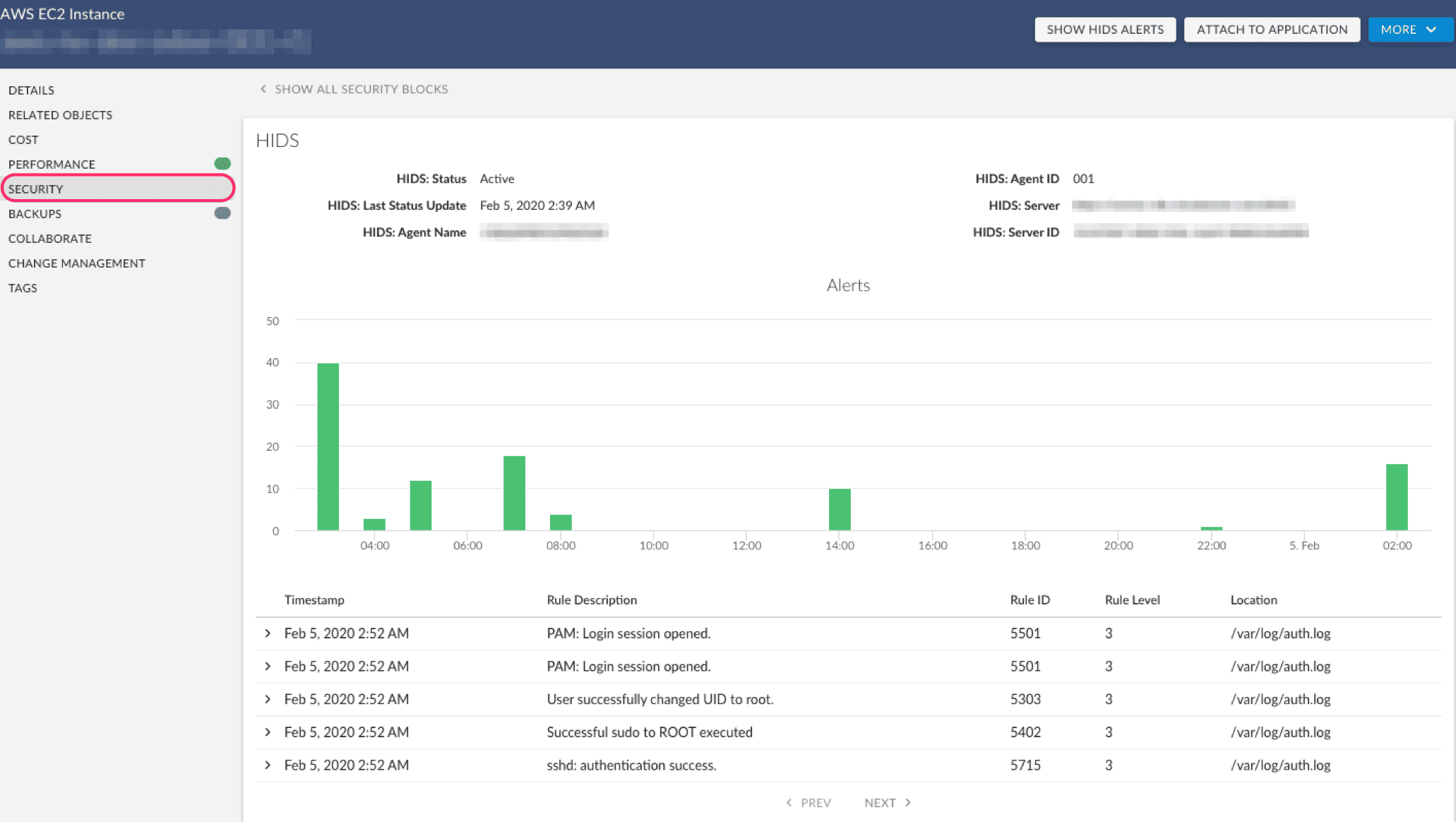
That makes runtime threat detection more useful, because it stops being a pile of alerts and starts becoming a prioritization signal.
Read also: 2026 Guide on How to Conduct a Cloud Security Assessment
Centralize logs before the investigation starts
A workload investigation falls apart fast when the evidence is scattered.
One clue is in CloudTrail. Another sits in Azure Activity Logs. GCP audit logs show part of the sequence. Then you still have VPC flow logs, load balancer logs, Lambda output, database logs, host logs, and security logs. Nobody wants to spend the first 30 minutes asking which bucket has what.
That is why centralized cloud workload logs matter before anything goes wrong.
In Cloudaware, teams use Conflux to review cloud-service and host-level logs in one place. That usually includes activity logs, change-management logs, security logs, Lambda logs, database logs, load balancer logs, and service-specific streams.
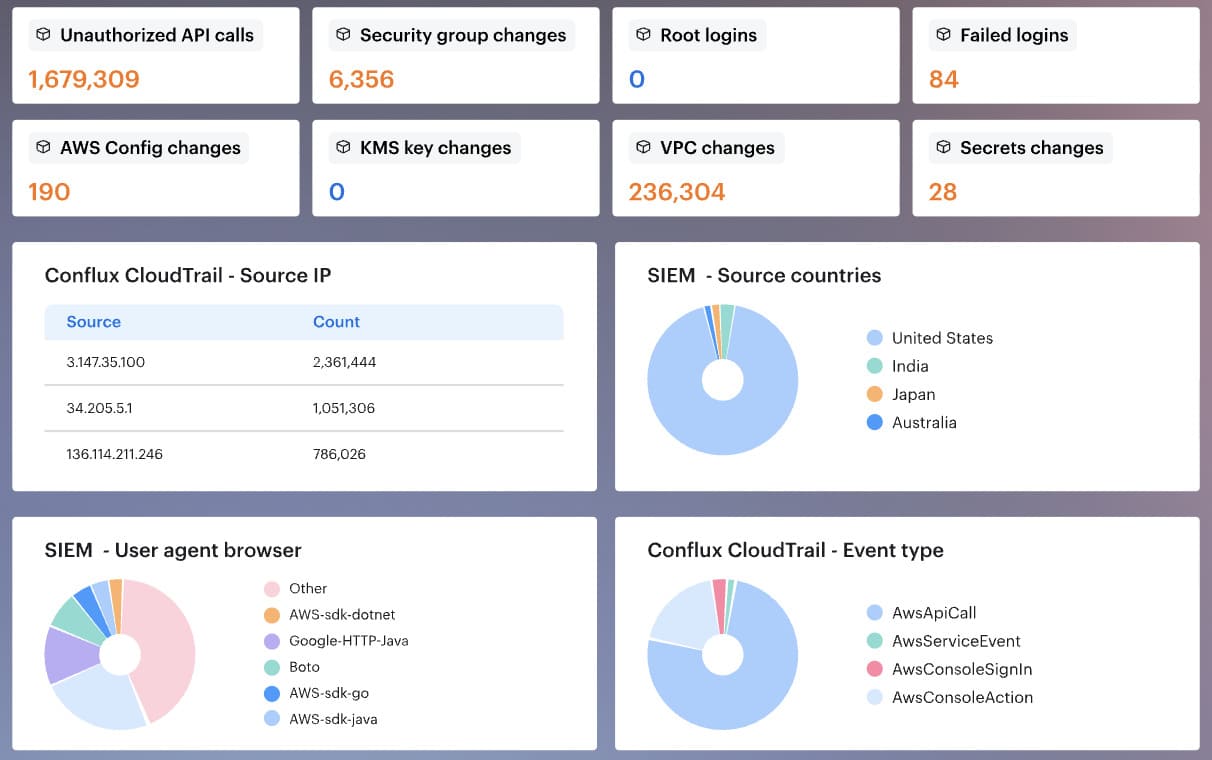
The value is simple: faster review, cleaner investigations, and fewer blind spots.
Retention matters too. Some logs support day-to-day operations. Others need to stay available for audits and compliance monitoring. Keep too little, and the evidence disappears. Keep everything forever, and the archive turns into expensive clutter.
That is a very practical cloud workload security habit: centralize early, set retention on purpose, and make the log view usable before the incident starts.
Read also: Cloud Security Best Practices - Strategy, Checklist, Monitoring, and Automation
Connect findings to remediation workflows
A finding matters only when it lands with the right team and stays visible until closure.
Most programs do not fail at detection. They fail in handoff. The issue gets found, but nobody owns it, the ticket goes stale, or an exception sits there forever with no expiry. Every serious finding needs an owner, a status, a comment trail, and a deadline if risk is being accepted. Otherwise, the workflow is not managing risk. It is hiding it.
A practical remediation workflow should do six things well:
- Assign the finding to the right owner or team
- Create or update tickets when the issue is found or resolved
- Keep status visible: open, closed, suppressed, exception
- Require justification for false-positive suppression
- Add expiration dates to exceptions
- Route urgent findings differently from low-risk ones
Cloudaware teams also review remediation trends by application, department, environment, owner, and remediation group. That makes vulnerability management more useful, because it shows where work is moving and where it is aging in place.
That is one of the most practical cloud workload security best practices: do not stop at detection. Make the finding traceable from discovery to closure.
3 cloud workload security examples
These examples are based on the kinds of workload security patterns Cloudaware teams see in client environments across AWS, Azure, GCP, and on-prem.
The names change. The shape stays painfully familiar: one tool finds the risk, another knows the owner, a third holds the evidence, and the remediation clock keeps running while everyone tries to stitch the story together.
Example 1. Critical vulnerability on a production VM
A Nessus scan finds a critical CVE on a production VM.
Simple finding. Not a simple decision.
The first question is not “is this critical?” The scanner already answered that. The better question is: critical to what?
In a Cloudaware workload view, the security team checks the surrounding context before firing off another noisy ticket:
- Workload owner
- Production environment
- Related application
- Department or business unit
- Affected asset details
- Last scan date
- Current remediation status
- Related IDS or file integrity signals
That context changes the tone of the work. A critical CVE on an abandoned test VM is one queue. A critical CVE on a production payments workload with recent host-level security events is a very different Tuesday.
The team checks IDS activity next. No suspicious host events? Good. Keep the work in vulnerability remediation. Related IDS activity or unexpected file changes? Escalate faster, because now the issue is no longer only theoretical exposure.
Then the fix gets assigned to the right owner. Not “platform team, maybe.” Not “security to investigate.” The actual team responsible for the app gets the task.
After patching, the team requests an on-demand scan instead of waiting for the next weekly cycle.
That last part is the quiet win in cloud workload security: the ticket does not close because someone said “fixed.” It closes because the follow-up scan proves the workload no longer carries the same risk.
Example 2. File permission change before audit
A compliance team was preparing for an audit when file integrity monitoring flagged a permission change on a production host.
Nothing dramatic at first glance. No ransomware note. No obvious outage. Just one file permission changed on a workload that supported a regulated business process.
That’s exactly why this kind of signal matters.
A permission change can be harmless maintenance. It can also be the first quiet sign that someone gave a service, script, or user broader access than the control allows. Before audit week, that difference becomes very expensive to explain.
In Cloudaware, the event links back to the workload and host, so the audit team does not have to chase a raw file event with no context.
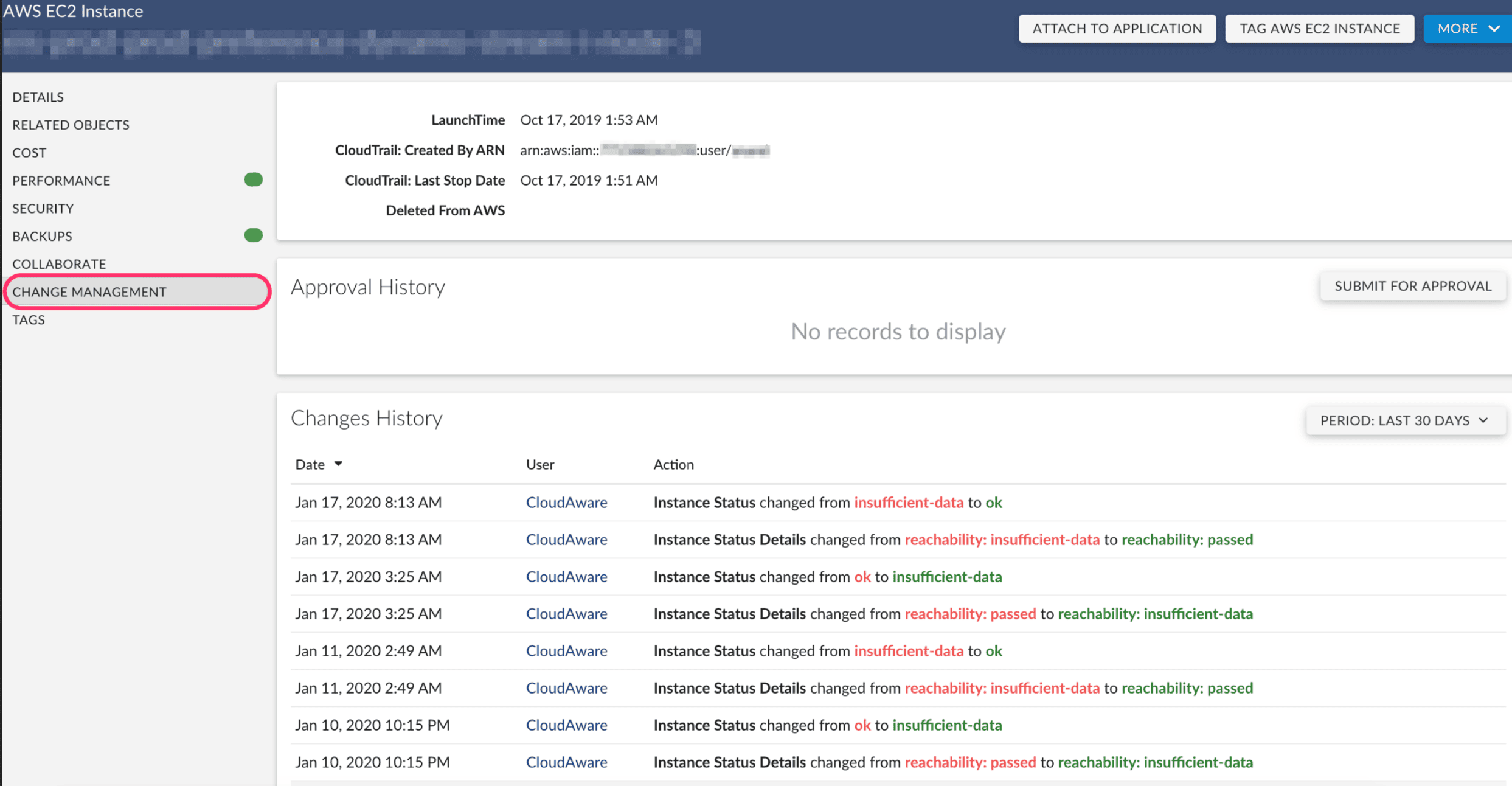
They can see the affected host, environment, owner, related application, timestamp, and security event details in one place.
The review usually starts with four questions:
- Which file changed?
- What permission or ownership value changed?
- Which workload or host did it happen on?
- Was this tied to an approved change, maintenance window, or deployment?
If the change was expected, the team documents the exception: reason, approver, expiration date, related ticket, and audit note. If it was not expected, it becomes remediation work. The owner restores the correct permission, adds the explanation, and keeps the evidence trail attached to the workload.
That sounds small. It is not.
Auditors rarely want a heroic story. They want proof that the team can detect sensitive changes, trace them to the right asset, explain why they happened, and show what was done next.
This is where file integrity monitoring turns from “another noisy security feed” into audit evidence. Not because every file change is dangerous. Because every important file change needs a clean answer.
Example 3. Suspicious host event with noisy logs
The IDS/HIDS alert came in clean.
The surrounding log stream did not.
One client team was looking at a cloud host that had started throwing security events at a volume nobody wanted to read line by line. Some were low-level rule matches. Some were routine host chatter. A few looked close enough to risky that ignoring them felt irresponsible.
This is the part where weak workflows turn into panic browsing.
A useful security events view gives the team somewhere better to start:
- Filter by rule level, not just timestamp
- Isolate the affected host
- Check whether the same rule fired repeatedly
- Compare the event with recent file integrity changes
- Review cloud activity logs around the same window
- Confirm the owner, application, and environment before assigning work
That last bit matters more than people admit.
A noisy event on a dev host after a planned deployment is one thing. The same event on a production workload tied to regulated data deserves a different room, a different clock, and usually a different owner.
In Cloudaware, the practical view is less about staring at raw logs and more about building the story around the host. Security events, workload details, owner, environment, related app, timestamps, and supporting cloud logs sit close enough for the team to triage without bouncing between five screens.
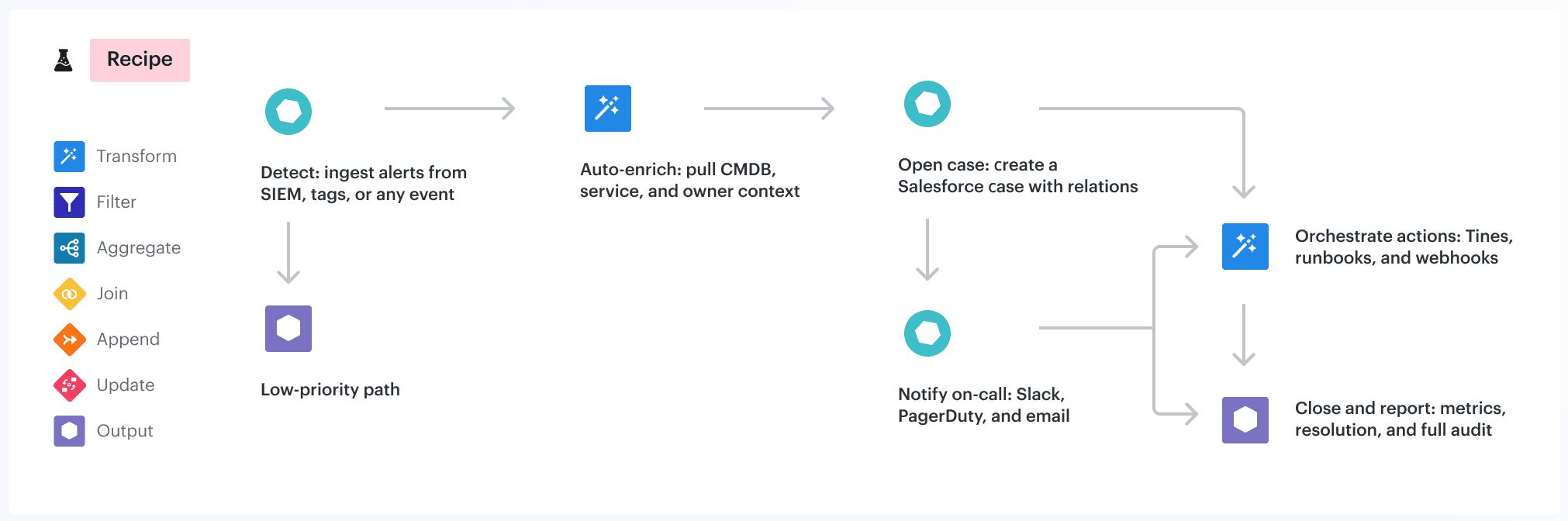
If the activity looks risky, the finding becomes a ticket with the host, rule, severity, owner, timestamp, and evidence attached.
If the activity is expected, it becomes an audit artifact: reviewer notes, related change, reason, and supporting logs.
That is the real win. Fewer heroic Slack threads. More proof.
Example 4. Cross-cloud compliance drift
The audit issue did not start with a failed control.
It started with two workloads that were supposed to be twins.
One ran in AWS. One ran in Azure. Same application family. Same data classification. Same production scope. Same business owner, at least according to the spreadsheet everyone trusted a little too much.
Then the evidence split.
AWS had the owner tag, environment tag, and encryption setting the compliance team expected. Azure had a different tag format, no department field, and an encryption exception that nobody had reviewed since the migration.
Tiny differences. Big audit headache.
A normalized Cloudaware compliance view gives the team one place to compare the workload record instead of hopping between provider consoles:
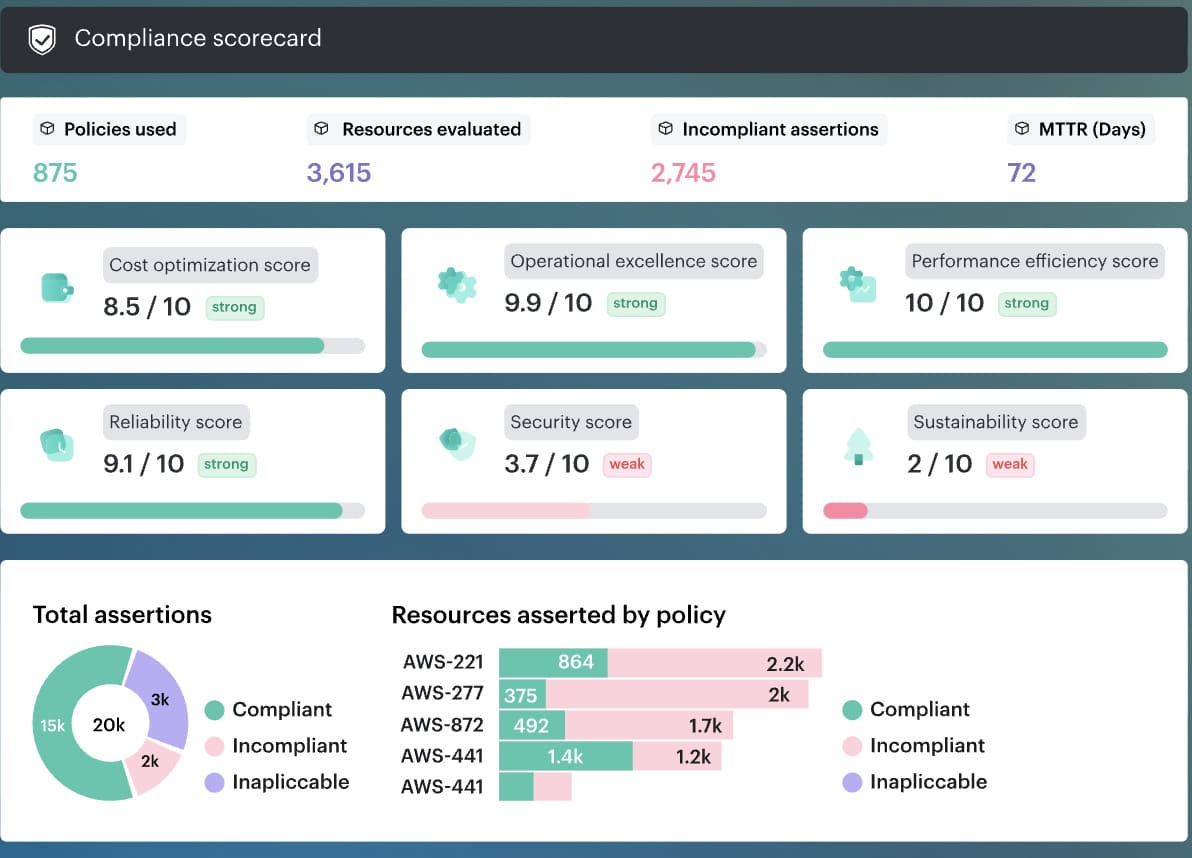
The compliance team does not need AWS and Azure to behave identically. That will not happen.
They need the violations to land in one workflow.
A missing tag goes to the workload owner. Weak encryption moves to the platform team. An approved exception keeps its reason, reviewer, and expiry date attached. A stale exception becomes remediation.
That is the useful part of cross-cloud compliance drift management: not pretending the clouds are the same, but making the evidence comparable enough to act before the audit turns into archaeology.
Cloud workload security checklist
Use this checklist when the workload needs a real review, not a casual glance.
Best moments to pull it up: during a monthly posture review, after a high-severity finding, before an audit, after a major deployment, during a migration, or any time a team says, “This looks off, but we need the full picture.”
- Can we see the workload clearly? You should know the provider, account, region, workload type, and lifecycle state without hunting across tools.
- Does it have a real owner? Every workload needs a named team, application, environment, and business context attached to it.
- Was it scanned recently enough to trust the result? Look at the last scan date, coverage status, severity, and whether remediation was already started.
- Is the host showing suspicious behavior? Check IDS/HIDS events, repeated rules, severity level, and the specific host involved.
- Did anything important change at the file level? Review permission changes, ownership changes, content edits, and timestamps through file integrity monitoring.
- Does the workload have more access than it should? Review IAM roles, service accounts, secrets, API keys, and machine-to-machine permissions.
- Could your team investigate this fast today? Cloud activity logs, host logs, and security events should be easy to review together, not scattered.
- Which controls failed? Check encryption status, tag completeness, policy violations, framework mapping, and active exceptions.
- Is remediation moving or just documented? Look for ticket owner, due date, comments, follow-up validation, and proof of closure.
- Are equivalent workloads governed the same way across clouds? Compare similar workloads in AWS, Azure, GCP, and on-prem for drift in tags, ownership, encryption, and policy status.
And if you want to make that checklist real instead of leaving it as a nice article takeaway, you need one working place to review it.
Make cloud workload security operational with Cloudaware
Most teams already have scanners. They already collect logs. They already see compliance findings. What breaks under pressure is the handoff between those signals. A critical vulnerability shows up in one view. The workload owner lives in another. File integrity events are somewhere else. Audit evidence is sitting in a queue nobody wants to open twice.
Cloudaware is the layer teams use when they need that story to hold together across AWS, Azure, GCP, and hybrid infrastructure.
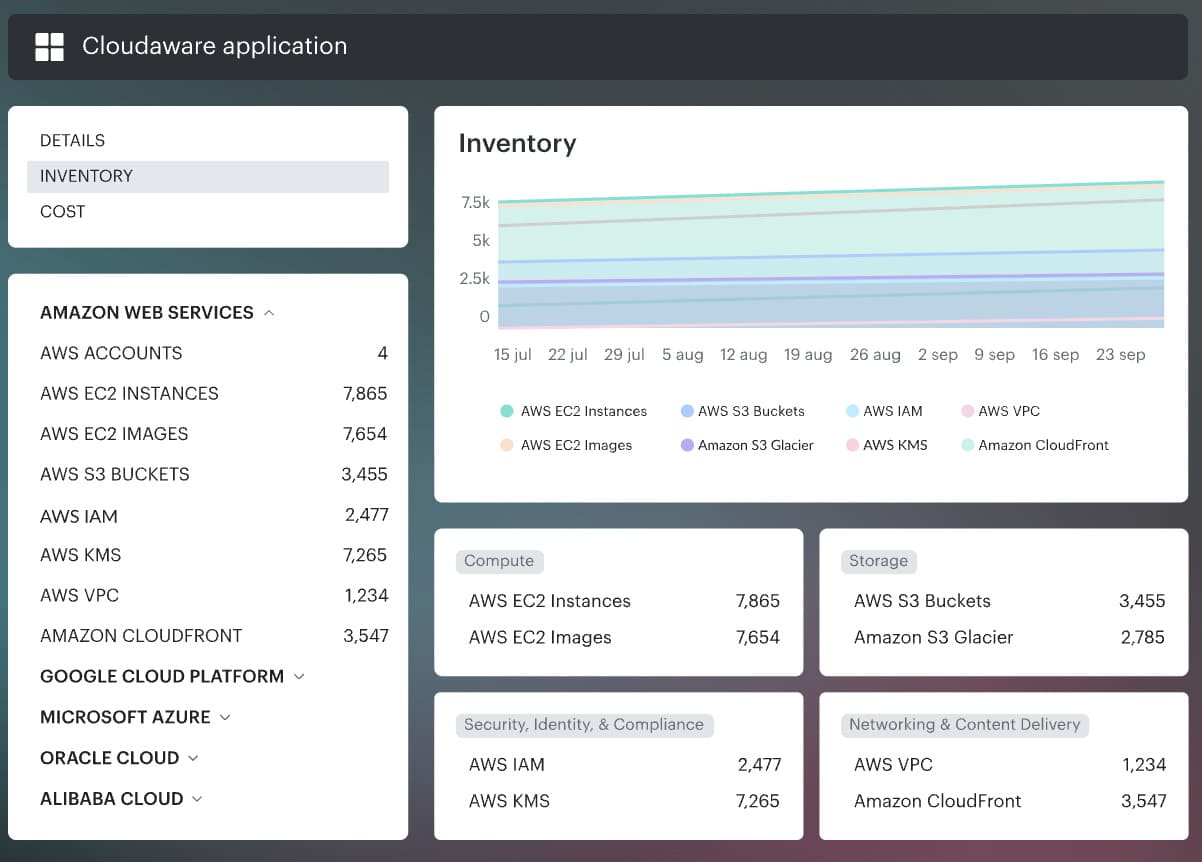
What that looks like in practice is less glamorous than marketing usually makes it sound.
A workload record needs to answer boring, expensive questions fast:
- What is this workload
- Who owns it
- Which app and environment it belongs to
- What changed
- Which findings are open
- Whether there is a task, an exception, or proof
That is why the CMDB layer matters so much in this article’s logic. The brief makes that point directly: discovery comes first, because every later control depends on knowing what exists and keeping that inventory current.
We see it in every enterprise deployment: the CWPP dashboard shows green across the board, but when we connect our CMDB, we find 20–40% of actual workloads were never enrolled in the scanner. They weren’t ‘invisible.’ They were sitting in a cloud account nobody told the security team about.
That gap is where Cloudaware becomes useful.
Not as a replacement for the rest of the stack. More like the operating surface that gives the rest of the stack enough context to work properly.
A few parts matter most for cloud workload security:
- Cross-cloud inventory and asset context through the Cloudaware platform. Our CMDB normalizes workloads and feeds the rest of the workflow.
- Vulnerability management with business context. Vulnerabilities view is broken down by platform, environment, application, department, ownership, and remediation group. That is a much more actionable shape than a flat severity list.
- Security events and file integrity close to the workload record. Security events and integrity monitoring are reviewed in the same working area, with summaries, top rules, host-level detail, and audit relevance.
- Governance and evidence across clouds through Cloudaware compliance and multi-cloud visibility. The cloud workload security events are tied directly to identity governance, encryption, compliance coverage, and cloud security controls.
One thing I like here is that the workflow stays concrete.
The scanner finds the issue.
CMDB gives it ownership and application context.
Security events add signal.
A remediation task gets created.
Compliance has evidence when the question comes back later.
So the practical value is pretty simple. Cloud workload security gets real when the team can move from detection to decision without archaeology. And if you want to see that on an actual workload record, not in another abstract diagram, this is the moment to schedule a demo 👇