


A configuration management database, or CMDB, is a system used to record configuration items across an IT environment, along with the attributes and relationships that connect those items to applications, services, owners, and business processes.
In plain English, a CMDB shows more than what technology exists. It shows how that technology fits together.
A server listed with its hostname, operating system, and IP address is inventory. Once that server is connected to the application it supports, the database it queries, the cloud account where it runs, the team responsible for it, and the changes made to it, the record becomes useful configuration data.
That relationship context is what makes a CMDB valuable during incidents, changes, security investigations, audits, and cost reviews.
For example, imagine a vulnerability scanner finds a critical issue on a virtual machine. An inventory can confirm that the machine exists. A well-maintained CMDB can also show that the machine:
- Runs in a production AWS account
- Hosts an API used by the checkout service
- Connects to a customer database
- Belongs to the payments engineering team
- Has an open change scheduled for the same evening
- Supports a service classified as business-critical
The vulnerability has not changed. The response priority has.
If you are comparing products rather than learning the concept, review our CMDB tools comparison. To evaluate Cloudaware specifically, see the cloud CMDB software page.
What is CMDB? Definition
CMDB stands for configuration management database. The records tracked in a CMDB are called configuration items, usually shortened to CIs. A CI can be a physical device, cloud resource, application, database, Kubernetes cluster, network component, software package, business service, or another component that must be managed to deliver an IT service.
A configuration items (CIs) record commonly contains:
- a unique identifier;
- type and technical attributes;
- environment and lifecycle status;
- location or cloud account;
- owner and support team;
- business criticality;
- configuration history;
- related incidents and changes;
- dependencies on other CIs;
- links to applications or business services.
Not every asset needs the same level of configuration detail. A spare mouse may belong in an asset inventory. A production database serving a payment application belongs in a CMDB because its condition and relationships affect service delivery.
CMDB vs inventory vs IT asset management
These systems overlap, but they answer different operational questions.
| System | Primary question | Typical data |
|---|---|---|
| Inventory | What exists? | Device, resource, version, location, status |
| IT asset management | What do we own, spend, maintain, and retire? | Purchase, contract, license, cost, owner, lifecycle |
| CMDB | What supports what, and what will be affected by a change or failure? | Configuration, dependencies, services, incidents, changes, ownership |
An inventory gives you a list. IT asset management adds financial and lifecycle control. A CMDB adds the relationships required for impact analysis.
Modern organizations may store this information in several systems rather than one physical database. The useful result is still the same: a governed operational view of configuration items and the connections between them.
How does a configuration management database work?
A CMDB turns records from discovery tools, cloud platforms, service-management systems, security scanners, and other sources into a usable model of the IT environment.
The workflow usually has five stages.
1. Discover configuration items
Data enters the CMDB through cloud APIs, network discovery, agents, ITSM records, infrastructure-as-code pipelines, security tools, manual input, or existing asset systems.
Discovery may identify an EC2 instance, Azure subscription, Kubernetes workload, database, application, network interface, or physical device. At this stage, the system knows that an object exists. It may not yet know which record is authoritative or how the object supports a service.
2. Normalize the data
Different sources describe the same type of resource in different ways. One tool may record an operating system as “Windows Server 2022,” while another uses a version number or vendor-specific label.
Normalization converts those values into a consistent data model. It also standardizes names, dates, regions, resource types, lifecycle states, and other attributes used in search, reporting, and policy logic.
3. Reconcile duplicate and conflicting records
The same configuration item may appear in several systems.
A cloud API can supply the resource identifier and current state. An ITSM platform may contain the assigned owner. A vulnerability scanner adds software and exposure data. A finance source contributes account or cost-center information.
Reconciliation determines whether those records represent the same CI and which source should take precedence for each field. Without source rules, the CMDB becomes a collection of competing versions of the truth.
4. Map relationships
Relationships turn discovered records into an operational model.
A CMDB can connect:
- a virtual machine to the cloud account where it runs;
- a workload to its Kubernetes cluster;
- an application to its databases and APIs;
- a technical component to a business service;
- a CI to its owner, incidents, vulnerabilities, and recent changes.
Those connections support impact analysis. Before a change, the team can inspect downstream dependencies. During an incident, responders can trace the affected service back through the components that support it.
5. Use the data in operational workflows
Once configuration records are normalized, reconciled, and related, other teams can consume them.
IT operations can investigate incidents and assess changes. Security can prioritize findings by exposure and business criticality. Compliance teams can collect evidence and identify configuration drift. FinOps can connect resources to owners, services, and cost centers.
A CMDB may store some information directly, retrieve some information from connected systems, or combine both approaches. The architecture matters less than the result: users need current, attributable data with enough relationship context to make a decision.
How to tell whether CMDB data is usable
Record count alone is a weak success metric. A large CMDB can still fail during the first serious incident.
Track the health of the data instead:
| Metric | What to measure |
|---|---|
| CI coverage | Percentage of in-scope infrastructure represented in the CMDB |
| Required-field completeness | Percentage of required CI fields populated |
| Freshness | Percentage of records updated inside the agreed SLA |
| Relationship coverage | Percentage of applicable CIs connected to a service, owner, or dependency |
| Ownership coverage | Percentage of production CIs assigned to a current accountable team |
| Reconciliation exceptions | Duplicate or conflicting records still awaiting resolution |
| Orphan CI rate | Production records with no meaningful relationship to a service, owner, or parent CI |
The practical test is simple. Pick a production service and trace it from the business service to the application, infrastructure, owner, open vulnerabilities, and recent changes. Gaps in that path show where the CMDB needs work.
This version fixes the inaccurate “CMDBs never store or duplicate data” claim and adds the terminology present across the strongest SERP results.
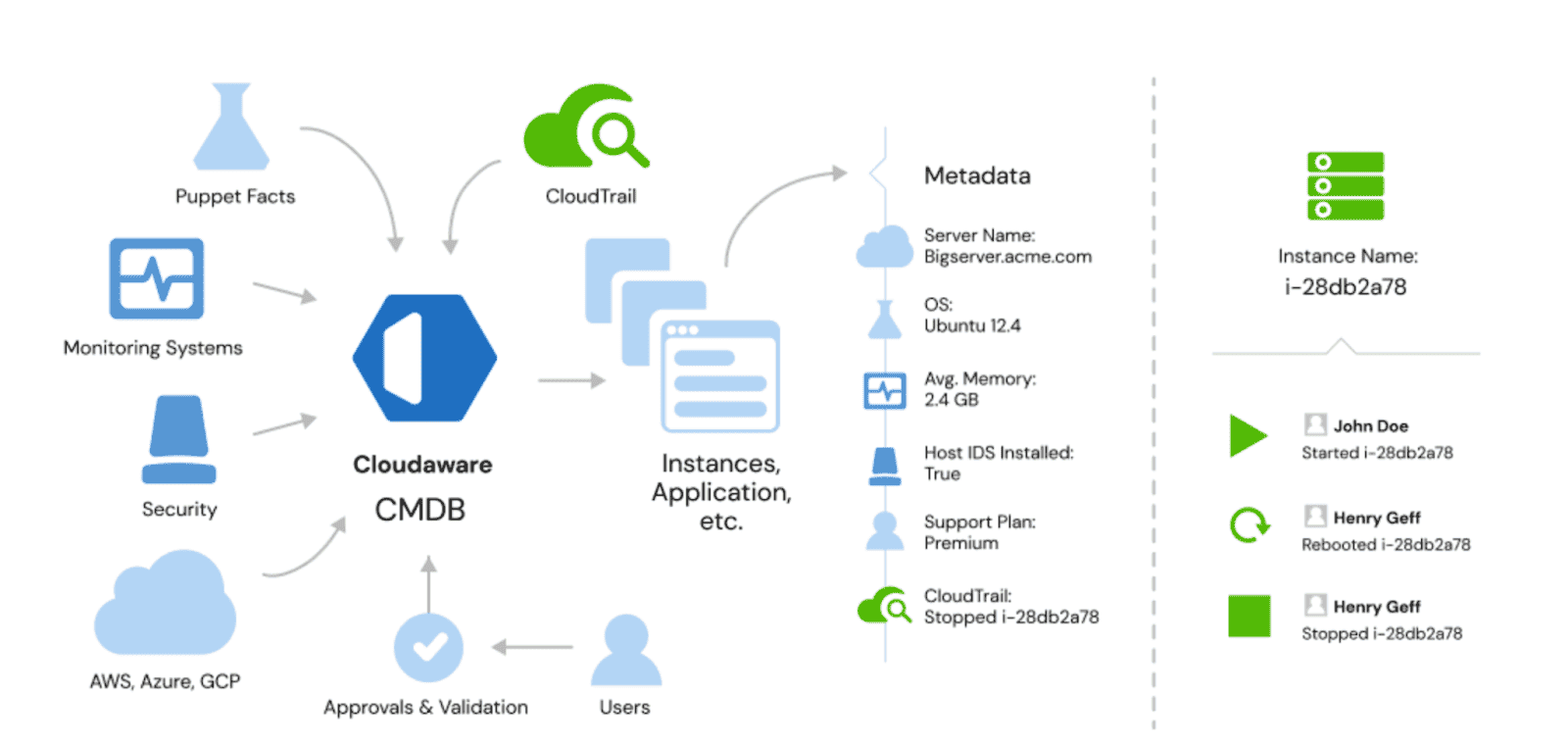
Here is how the process goes based on Cloudaware Configuration Database Management example
Who uses a configuration management database (CMDB)?
CMDBs aren’t just for tech giants. Think global banks, e-commerce giants, or multinational manufacturers — are the obvious users. Their IT infrastructures are complex. They have hybrid environments, thousands of resources across AWS, Azure, and GCP, and on-prem systems.
But mid-sized businesses are catching on too. As soon as your environment spans multiple clouds, a CMDB becomes invaluable. Add geographically distributed teams to the mix, and its importance skyrockets.
Imagine a gaming company rolling out features globally. Or a healthcare provider juggling sensitive data compliance in various regions. These companies need clarity, control, and compliance. That’s what a cloud CMDB offers.
The roles
CMDBs serve many masters, and their appeal lies in how they bridge silos:
- IT Managers. They need to know what’s out there — assets, dependencies, vulnerabilities — and how to plan for growth.
- DevOps. For them, it’s all about dependencies and change management. They use CMDBs to plan migrations and ensure nothing breaks.
- Security Teams. Compliance risks, vulnerabilities, shadow IT — these teams rely on enriched data from a CMDB to stay ahead.
- Finance Teams. Tracking cloud costs is easier with accurate reports on spending and optimization opportunities.
- Service Desk Agents. A CMDB helps them troubleshoot issues faster by showing what connects to what.
What is a configuration management database used for?
Companies turn to CMDBs for one main reason: their IT environments are complex. Picture a global enterprise with AWS in the US, Azure in Europe, GCP in Asia, and a sprinkling of on-prem servers everywhere else. Add distributed teams, legacy systems, and shadow IT into the mix, and you’ve got a real challenge.
That’s where a CMDB management steps in.
- IT Asset Discovery. First up: finding everything. A CMDB discovers virtual machines, Kubernetes clusters, databases, and storage buckets across platforms. For example, it might spot idle AWS EC2 instances in the US costing $500/month. Or it could flag an untagged GCP bucket in Asia with sensitive data — or even a forgotten VMware server in your Paris office.
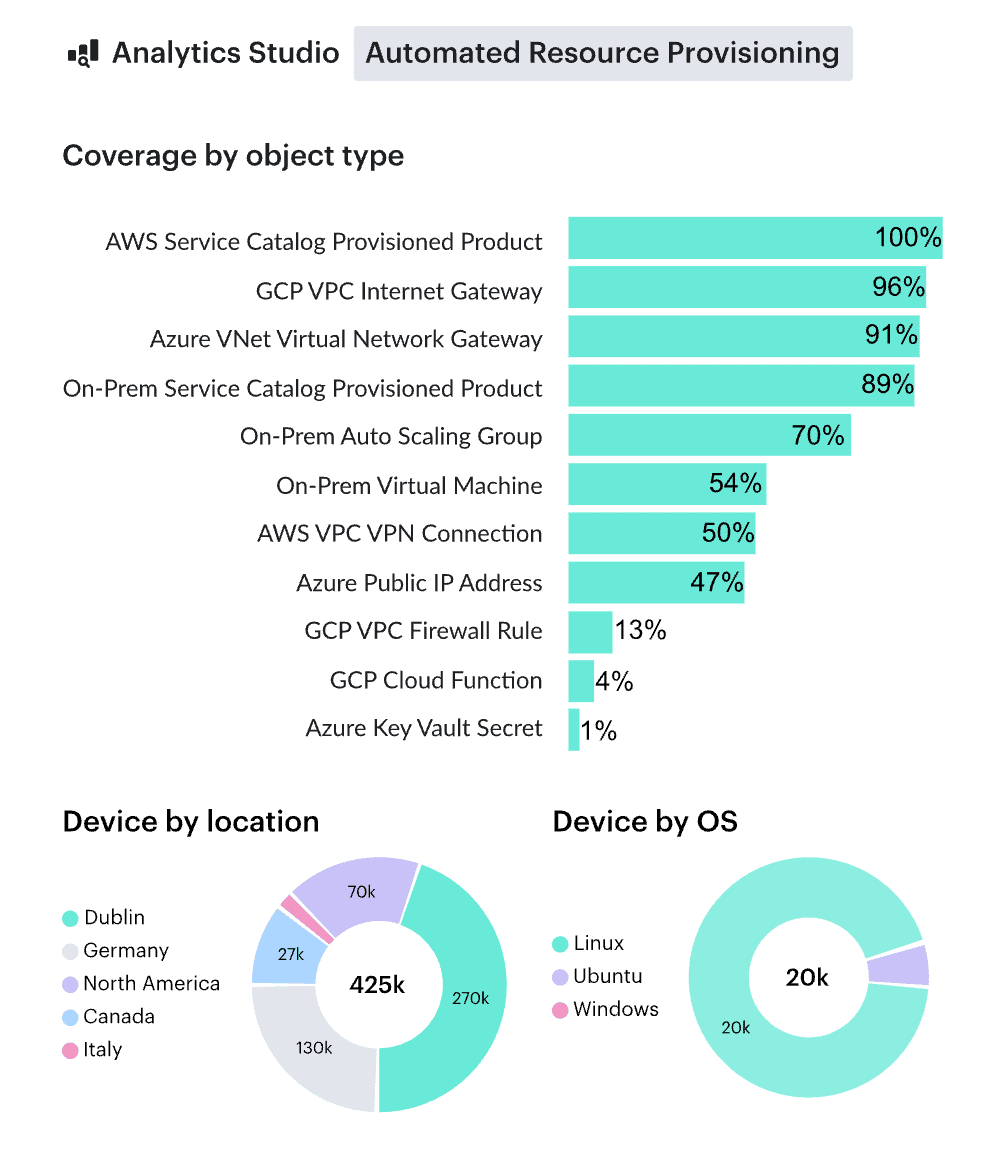
- Visualization & Organization. Once the assets are found, the CMDB organizes them. Tagging allows resources to be grouped by team, location, purpose, or custom logic. Let's say the operational team’s Azure VMs, DevOps’ Kubernetes clusters, and Finance’s storage accounts are neatly categorized.
With tools like Cloudaware, you can even group these assets into “virtual applications.” This lets you visualize how they work together — even when spread across multiple clouds. - Relationship Mapping. Every asset is connected to something. Cloudaware maps these relationships in a tree structure, showing how servers connect to databases or apps depend on APIs. For instance, a misconfigured database in GCP could impact a web app running in AWS. Knowing these dependencies is invaluable for troubleshooting, migrations, and planning.
- Change Management. Change happens, but it shouldn’t bring chaos. A CMDB tracks every update and configuration tweak in real time. Accidentally deployed unapproved changes? The CMDB detects it, notifies the right team, and can even trigger remediation workflows.
- Analytics & Reporting. Need a cost breakdown? A security or compliance audit? A report on server utilization across clouds? CMDBs provide insights to inform decisions, cut costs, and keep stakeholders happy.
- Compliance Monitoring. AWS Config or Azure Policy integrations help CMDBs monitor compliance across your environment. Cloudaware can flag non-compliant assets, recommend fixes, and even provide automated remediation.
- Cost Management. Finally, a CMDB helps companies understand and control their IT spend. It tracks costs by cloud, project, or team. So you can see inefficiencies like unused resources or overprovisioned instances.
In short, companies with hybrid environments and global footprints use CMDBs to bring order to IT chaos.
What is a CMDB in cybersecurity?
A CMDB is not a security control by itself. It supplies the asset, ownership, dependency, and business context that security controls need to produce a useful response.
Consider a vulnerability-management workflow.
A scanner identifies a vulnerable software package on 600 resources. Treating every finding as equally urgent creates a queue, not a remediation plan.
CMDB context can separate:
- internet-facing production systems from isolated development resources;
- components supporting critical services from unused test workloads;
- findings with a confirmed owner from resources that require ownership review;
- vulnerabilities on active services from records scheduled for retirement;
- isolated assets from components with broad downstream dependencies.
That context helps the security team determine what to remediate first and where to send the work.
A typical workflow looks like this:
- A security tool identifies a vulnerability or configuration issue.
- The affected resource is matched to a CI.
- The CMDB adds environment, service, owner, exposure, and dependency data.
- Priority is adjusted using technical severity and business context.
- A remediation ticket is routed to the responsible team.
- Updated source data confirms whether the issue has been resolved.
The same model supports incident response. When a compromised credential, exposed resource, or suspicious change is detected, responders can use CI relationships to identify connected systems and estimate the potential blast radius.
A stale CMDB creates its own security risk. Missing resources hide exposure. Incorrect ownership delays remediation. Broken relationships make a critical production asset look like an isolated server. Security use cases therefore depend on discovery coverage, reconciliation quality, and frequent updates.
Key benefits of CMDB for ITSM, Security & FinOps
You know that feeling when you walk into a chaotic room, where every object is out of place, and you can’t find what you need? That’s what managing IT without a CMDB feels like. But with a CMDB, everything has its place, and suddenly, the chaos feels manageable — even calming.
Bringing Order to Complexity
A CMDB is like Marie Kondo for your IT environment. It takes your sprawling hybrid setup — AWS in one corner, Azure over there, and legacy servers you’re still figuring out. And organizes it into a cohesive system. This centralization isn’t just nice to have. It’s transformative. With all your assets and their relationships in one place, you can finally see the big picture.
The power of real-time awareness
But this isn’t just static organization. The CMDB breathes life into your data. It updates in real time, pulling information directly from clouds, monitoring tools, and ITSM tools. What does that mean? No lag, no guesswork. When something changes — a new EC2 instance spins up, or a compliance risk emerges — you know immediately.
Clarity leads to confidence
One of the most surprising benefits of a CMDB is how it empowers decision-making. It’s not just about knowing what’s in your environment. It’s about understanding it. The enriched data — costs, compliance, vulnerabilities — turns a CMDB into a well of insights. You’re not just reacting; you’re planning, optimizing, improving.
Streamlined teamwork
And let’s talk about people. CMDBs foster collaboration in ways you might not expect. Security knows when something’s non-compliant. Finance tracks cloud expenses effortlessly. DevOps sees how a server in Azure connects to an app in AWS. It’s like the CMDB becomes this quiet yet powerful mediator, keeping everyone aligned.
All of these benefits of CMDB compound as your environment grows — which is exactly when spreadsheets, static diagrams, and siloed tools start to fail.
CMDB and ITIL: Where it fits in the configuration management process
The ITIL is a Information Technology Infrastructure Library. It is a framework for managing IT services. It provides a set of best practices aimed at aligning IT services with the needs of the business. Think of it as a well-organized playbook that helps IT teams deliver consistent and efficient services.
Now, where does the Configuration Management Database fit into this framework?
In ITIL, configuration management database (CMDB) goal is to ensure that IT assets are properly identified, controlled, and accounted. This is where the CMDB shines. By tracking CIs throughout their lifecycle, it gives teams the visibility they need to manage IT services effectively.
CMDB in ITIL supports several processes, with the most important being:
- Incident Management. When a service breaks, teams need to know what’s affected. The CMDB provides a map of the infrastructure, showing exactly which components are tied to the service. For instance, if a customer-facing application is down, the CMDB will help trace the issue to a malfunctioning server or database.
- Change Management. Changes are inevitable. A CMDB helps assess the impact of changes before they happen. If you’re rolling out a new update, the CMDB shows how this change might affect other systems or services. Think of it as a risk assessment tool.
- Problem Management. Sometimes, issues reoccur. By analyzing the CMDB data, teams can identify issues with certain assets or configurations and fix them.
For example:
Let’s say your company wants to move a legacy application to the cloud. Using the CMDB, you can see how the application is tied to databases, servers, and network. This is a must for change and risk assessments. You won’t be flying blind.
Configuration management database in ITIL provides clarity, control, and insight for your team. Thus, ITIL processes became more efficient and proactive.
Discover the best CMDB tools review: features, prices compared in September 2026
ITAM vs CMDB: Assets vs Configuration Items
ITAM, or IT Asset Management, is all about managing the lifecycle of your IT assets. There is no matter whether that’s software, hardware, or virtual infrastructure. It ensures the right assets are available when needed. It also helps track costs, ensures compliance, and minimizes waste.
Simply put, ITAM is about knowing what you have, where it is, and how it’s being used.
Now, the CMDB’s part:
So ITAM focuses on tracking and managing assets from a financial, operational, and compliance point. Comparing to that, CMDB is more focused on the technical configuration and relationships of those assets. It maps out how each component in your IT ecosystem is connected. A CMDB takes the data captured by ITAM — such as asset ownership, value, and location — and adds technical insight. It tracks relationships and dependencies between assets.
For example: Imagine you’re managing software licenses as part of ITAM. You need to ensure compliance and avoid fines. The CMDB enhances this by showing which servers are running the licensed software and which systems depend on it.
If you’re planning an upgrade or decommissioning a server, the CMDB ensures you’re aware of any dependencies. This helps you avoid unexpected disruptions.
Configuration management database examples & use cases
Let’s look at a few configuration management database examples from real-world teams:
- Change impact analysis for a payment service. A global retailer wants to roll out a new version of its payment API. Before the change, the team queries the CMDB for all services that depend on that API, all underlying databases, and the load balancers in front. They see that a legacy reporting service also consumes that API from a single region. With that insight, they can plan a phased rollout and avoid breaking month-end reporting.
- Incident response for a critical Kubernetes cluster. A cluster goes unhealthy in one region. Using the CMDB, SREs pivot from the failing nodes to affected namespaces, customer-facing services, backing databases, and dependent message queues. They also see who owns each service and which on-call rotation is responsible. So incident coordination takes minutes instead of guesses.
- Cloud cost optimization for shared services. A platform team uses the CMDB to tag and group shared resources—NAT gateways, transit gateways, shared logging, and monitoring stacks—then links them to consuming business units. That visibility lets Finance allocate shared costs fairly and spot where teams overuse expensive shared components.
How to evaluate CMDB software
Start with the environment and decisions the system must support. A tool that works for a static on-premises estate may struggle with resources that appear and disappear across several cloud providers and Kubernetes clusters.
Evaluate these capabilities:
- coverage for the cloud, data center, SaaS, and container platforms in scope;
- automated discovery and update frequency;
- normalization and duplicate reconciliation;
- relationship and service mapping;
- ownership and business-service mapping;
- history of configuration changes;
- integrations with ITSM, security, compliance, and FinOps workflows;
- data-quality reporting;
- APIs and export options;
- access controls and evidence history.
During a proof of concept, do not judge the product by the number of records it imports. Select two or three production services and test whether the system can build a trustworthy relationship path from the service to its infrastructure, owner, recent changes, security findings, and operational history.
A polished inventory screen is useful. A relationship model that survives an incident is the stronger test.
The cybersecurity section should reference authoritative security or vulnerability-management material during publication. The SERP currently rewards pages that connect CMDB records with prioritization, exposure, ownership, and vulnerability workflows, not pages that merely append the word “security” to a generic benefit list.
Top 3 CMDB configuration management challenges
Despite all the benefits, managing CMDBs is like tending a garden. It requires constant attention, the right tools, and sometimes, a little patience. After years of helping companies implement and maintain CMDBs, I’ve noticed three key challenges that keep popping up.
1. Data Accuracy and Completeness
The first challenge is data accuracy. In a hybrid cloud environment, you’re juggling assets across AWS, Azure, GCP, on-prem systems, and more.
The risk? Outdated or incomplete data. A CI might be added to the CMDB, but if the system isn’t properly integrated or the discovery tools aren’t updated, the data could be inaccurate. This leads to incomplete visibility, which, of course, impacts decision-making.
Example. Imagine the team is planning a cloud migration, but the CMDB misses a crucial legacy server that’s still running some key applications. The project hits a snag.
Read also: CMDB Configuration Items: How CI Drive Configuration Management Database
2. Change Management and Impact Analysis
Keeping the CMDB in sync with the real-world IT environment — can be tricky. The challenge comes when you need to assess the impact of a change. If you can’t easily track dependencies in the CMDB, you might make a change that breaks something else down the line.
Example. A network team makes an update to a switch, not realizing it’s part of a larger application infrastructure managed by a different team. Chaos ensues when services go down because dependencies weren’t fully understood.
3. Integration with Other Tools
In a multi-cloud, hybrid environment, your CMDB isn’t a standalone tool. It needs to work seamlessly with ITSM, monitoring tools, security platforms, and more. However, integrating all these systems can be a major headache. If the CMDB can’t pull in data from tools like ServiceNow or AWS Cost Explorer, its value decreases.
Example. The security team wants to monitor vulnerabilities. But if the CMDB isn’t pulling in real-time data from vulnerability scanners, they’re left in the dark.
Unlocking the future of CMDB: What's next?
In the next few years, CMDBs will be more intelligent. We’re talking about AI and machine learning integration. They’ll make CMDBs not just repositories but active participants. These systems will predict changes before they happen and recommend actions to mitigate risks.
- Automation will be king. CMDBs'll integrate deeper with other enterprise tools, automating workflows, notifications, and even remediation. Imagine the CMDB flagging issues, creating tickets, and resolving problems without manual intervention. It’s happening already.
- Cloud-first environments are the new norm. CMDBs will include cloud-native resources, containers, and serverless architecture. The hybrid environment is growing, and CMDBs will keep up.
- Real-time data will be essential. No more stale, outdated information. CMDBs will continuously sync, ensuring the data is fresh, accurate, and actionable.
AI access to the CMDB already works through the Model Context Protocol (MCP). The Cloudaware MCP server lets Claude, ChatGPT and other MCP clients query CIs and their relationships across AWS, Azure, GCP and VMware, read-only and with the permissions of the signed-in user.
The future is connected, automated, and intelligent. CMDBs are transforming from static databases to dynamic decision-making hubs.
The best part? You get to be a part of this evolution 😉
How Cloudaware boosts your configuration management processes?
When it comes to configuration management, Cloudaware makes it easier to keep track of your IT environment. No matter whether it’s across multiple clouds or on-premise infrastructure.
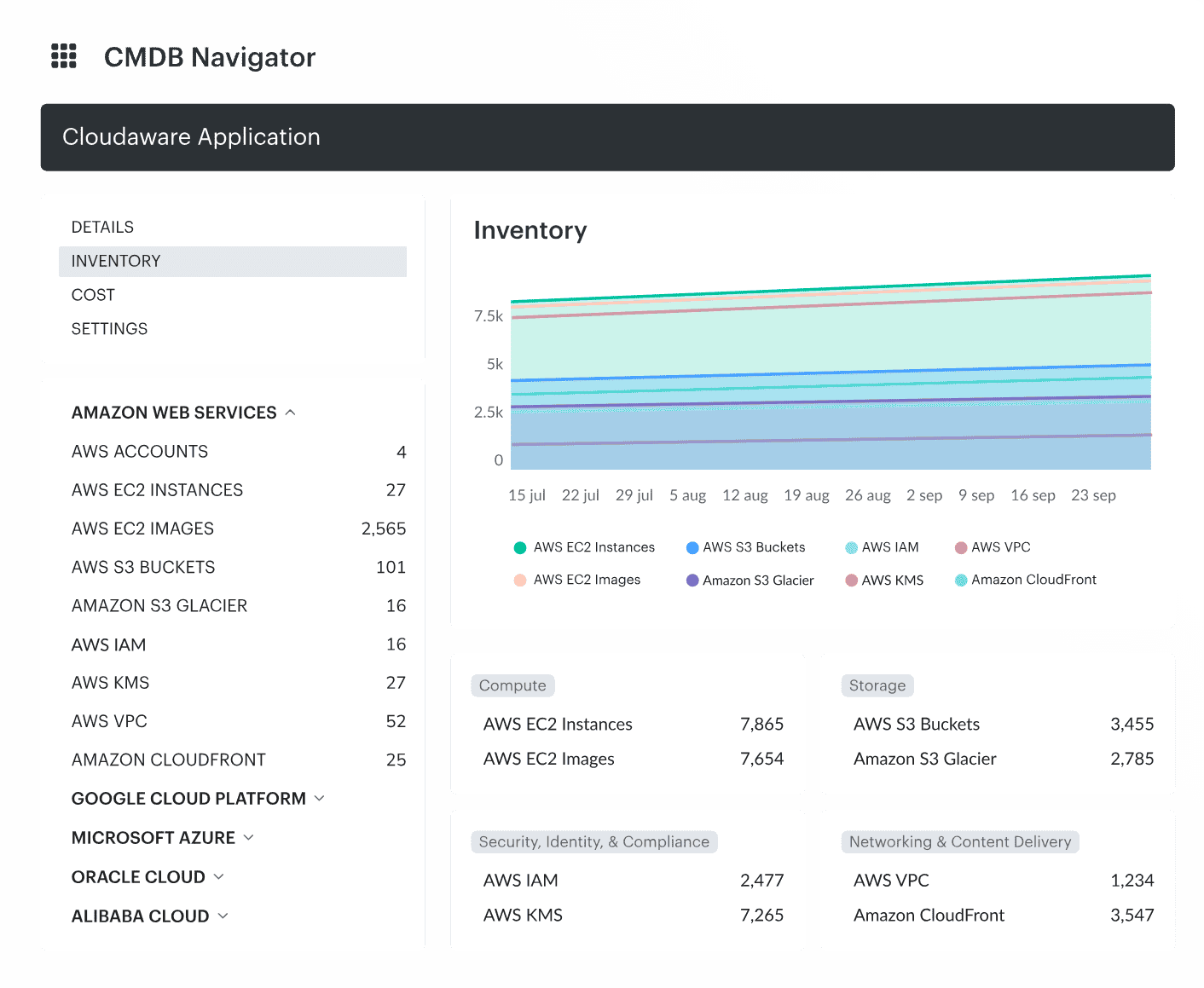
Here's how:
- Unified Data Source. Cloudaware acts as a single source of truth by cross-referencing data from your IT ecosystem. It merges information from various discovery tools and keeps it organized, so you’re always working with accurate data.
- Automation. With Cloudaware Discovery and Dependency Mapping, data updates automatically in real-time. This helps eliminate manual work and keeps configurations in sync without constant oversight.
- Data Enrichment. It enriches CIS information for greater accuracy and deeper insights. You'll also get a clear view of dependencies between different parts of your infrastructure.
- Integrations. Easily connect with third-party IT processes through open APIs and sync with your tech stack.
- Reporting & Analytics. Cloudaware offers advanced analytics and lets you generate reports on-the-fly.
Read also:
📌What Is Configuration Management? Definition. Processes. Recommendations
📌Decoding configuration management vs change management in a multi-cloud environment
📌Master Cloud Configuration Management: Tools & Tips
📌CMDB Configuration Items: How CI Drive Configuration Management Database