



Updated June 22, 2026 · Reviewed by Valentin Kel, Software Developer at CloudAware
Why trust this update: Cloudaware has run CMDB rollouts for 400+ multi-cloud teams since 2014. This refresh reflects what's actually working in 2026 — not what worked when the original ITIL v3 books were written.
Think your CMDB is a "set it and forget it" kind of deal? Spoiler alert: It’s not.
CMDB implementation and maintenance are more like running a marathon than a sprint. It’s ongoing. It’s evolving. And if you’re not careful, it can turn into a chaotic mess faster than your inbox on a Monday morning.
Here’s the thing: CMDB failures aren’t just annoying — they’re costly. Missing data? That leads to downtime. Poor mapping? Say hello to audit nightmares. Outdated records? Congrats, you’re flying blind in your infrastructure.
But don’t panic. This article’s got your back.
We’ll walk you through the Top 7 CMDB Best Practices that’ll keep your system in tip-top shape. You’ll learn:
- How to nail down governance (without drowning in bureaucracy).
- The secrets to data accuracy (hint: it’s not magic).
- What processes will save your CMDB from becoming a glorified paperweight.
Ready to avoid the pitfalls and master your CMDB game? Let’s dive in.
TL;DR — the 7 CMDB best practices in one screen
Short on time? Here's what 12 years of Cloudaware rollouts boil down to.
- A CMDB fails around month four — usually when nobody can answer "who owns this record?" Build governance before you build the database.
- Implement in five phases. Plan & scope (3 weeks), discover (3 weeks), populate and normalize (~4 weeks), validate to ≥95% accuracy, then operate. Total: 12–18 weeks for a focused rollout, 5–9 months if you're juggling multi-cloud and compliance.
- Scope on use cases, not assets. If a CI class doesn't show up in incident, change, FinOps, audit, or security workflows, leave it out. A lean CMDB beats a complete one every quarter of the year.
- One source of truth per attribute. SCCM owns OS patch level. AWS Config owns instance state. Cloudaware reconciles. Two tools fighting over the same field is how data drift starts.
- Audit by criticality. Tier-1 CIs quarterly. Tier-2 every six months. Schedule the next audit before the current one ends — otherwise nobody does it.
- Automate the boring parts. Discovery, reconciliation, tag updates, compliance flags. Manual maintenance is how a CMDB goes stale by Q2.
- Watch a real health dashboard. Accuracy, completeness, compliance — the three numbers your director will actually look at on Monday morning.
Check if we are on the same page about what is CMDB in our recent guide.
CMDB implementation: a 5-phase roadmap (without the 18-month horror story)
Updated June 2026 · Reviewed by Valentin Kel, ITSM/CMDB Lead · Based on 400+ multi-cloud CMDB rollouts since 2014
A CMDB implementation is the process of standing up a configuration management database — discovering your assets, loading and reconciling the data, certifying it's accurate, then operating it as a living source of truth. The five phases below get a focused environment live in roughly 12 weeks. The catch is in phase five, and it's the one most teams skip.
Most CMDB implementations don't fail on day one. They fail in month seven — quietly — when the data nobody owns goes stale and the team stops trusting it.
So here's the truth no vendor demo tells you: a CMDB isn't a project you finish. It's a system you run. The gap between "we bought the tool" and "we actually rely on this thing" is exactly where most implementations die.
Below is the roadmap we use to take a CMDB from empty database to single source of truth — the same one we've run with teams managing 200 servers and teams managing 200,000. Before you touch a single CI, get three things straight:
- Why you're doing this. "Better visibility" isn't a goal. "Cut change-related outages by 30% this year" is. Pin it to a number your CFO would repeat.
- Who owns the data — not the tool, the data. Every CI class needs a name attached to it. No owner, no accuracy.
- What "done enough" looks like. You'll never map everything. Decide which services matter, and start there.
Nail those three, and the phases below stop feeling like a marathon you're dreading and start feeling like a plan you can defend in a review.
Phase 1 — Plan and scope (weeks 1–3)
You finish this phase with a charter, a scoped CI list, and a cost envelope — not a single CI loaded yet.
Forget the CI catalog for a minute. Start with the question your CFO will actually ask: "What does this CMDB pay for?" If you can't answer in two sentences, you don't have a project — you have a project request.
Three things come out of this phase:
- A one-page charter naming the sponsor, the five use cases, and the kill criteria.
- A scoped CI list — usually 8 to 15 classes for a first rollout, not 40.
- A time-and-cost envelope. Most mid-size phase-1 rollouts land between 12 and 18 weeks.
Common trap: the senior engineer who wants every printer modeled. Politely table it. Printers can come in v2.
Phase 2 — Discover and inventory (weeks 3–6)
Point discovery at every cloud and on-prem network; within days you have raw inventory in a staging CMDB.
This is where Cloudaware does most of the heavy lifting. You aim discovery at AWS, Azure, GCP, vSphere, and your on-prem networks, and the staging CMDB fills itself in. Three things to watch:
- Coverage. Did discovery reach every account, every region, every VPC? Missing one AWS region is how a "complete" CMDB ends up 30% short.
- Identification. Two EC2 instances with the same private IP from different VPCs are not the same CI. Your rules have to know that.
- Cost. Agents and API calls aren't free. Budget for them up front — a surprise $2k/month bill kills CFO trust fast.
Phase 3 — Populate and normalize (weeks 5–9)
Now you reconcile, so two sources can't tell two stories about the same asset.
Two data sources almost always disagree about something. Reconciliation rules let one source win per attribute: SCCM owns OS patch level, AWS Config owns instance state. Pick one. Don't let them fight.
A normalized record looks boring. That's the point — boring records are queryable records.
Phase 4 — Validate and certify (weeks 8–11)
Before anyone outside the team trusts this CMDB, you prove it's right.
Pull 50 random tier-1 CIs and check each by hand against the source system. Accuracy under 95%? You don't go live — you fix the rules and resample.
Yes, this step is tedious. It's also why the next four years don't feel like a slow leak.
Phase 5 — Operate and improve (week 12 onward)
Go-live isn't the finish line. It's the moment the project becomes a service.
- Run the first audit at week 14, not week 26.
- Watch the health dashboard weekly for the first quarter.
- Re-scope every two quarters: cut classes no use case touches, add the ones a new use case demands.
- Re-train when ownership changes. CMDB knowledge walks out the door with the engineer who built it — unless you write it down.
How long does a CMDB implementation take?
For a single-cloud, mid-size environment with focused scope: 12 to 18 weeks to a working production CMDB. For multi-cloud plus on-prem under strict compliance scope: 5 to 9 months. Anyone quoting "a few weeks" is selling you a discovery tool, not a CMDB.
CMDB data population best practices
Managing a CMDB can feel like a rollercoaster. But when it’s done right? It powers IT operations, making them smoother, faster, and more reliable. I’ve seen it all: messy CIs, broken integrations, and CMDBs that would leave you wondering if you’re living in an alternate reality.
When you get the processes right, you get a CMDB that works as hard as you do. Here’s what I've learned.
Identification rules: Keeping the "evil twins" at bay
The CI identifier is like a bouncer at the hottest club in town. It lets the right CIs in and kicks out duplicates. But if the rules aren’t clear, it’s like a bouncer with no clue what they’re doing — and suddenly, you’re looking at 30% duplicate CIs across your assets. Not fun.
When setting your identifier rules, don’t skip the details. If your out-of-the-box rules are fine, great. But for custom configurations or older systems, take an extra step. Refine the rules by leveraging unique attributes from your data sources. It’ll save you hours of cleanup down the road, and it’ll make your ITIL best practices stand out.
Action plan: Use Cloudaware to ensure each CI is correctly recognized from the get-go, reducing the chance of duplications.
Reconciliation rules: avoiding data fist fights
Think of reconciliation rules like referees in a wrestling match. When two data sources — say, Discovery and SCCM — compete to control the same CI class, you need clear rules to keep them from battling. Without these rules, you’ll end up with mismatched identities and a lot of confusion.
Define clear responsibilities. Maybe Discovery handles IP addresses, while SCCM covers software details. This approach keeps everything in order and allows each tool to shine in its role.
Action plan: In Cloudaware, you can set reconciliation priorities. This allows you to specify which tool or source owns which data, ensuring your system stays neat and the data is always accurate.
CMDB integrations: connect the right way, not the hard way
Integrating third-party tools with your CMDB can feel like wiring up a smart home — easy if done right, but a nightmare if not. The key? Leveraging APIs or ready-made integrations. By tapping into Cloudaware’s existing integration options, you can ensure a smoother, faster setup and avoid the pitfalls of complex custom builds.
One client had previously struggled with integrating a critical tool into their CMDB. Their existing system lacked a reliable way to connect, forcing them to build a patchwork integration that was fragile and labor-intensive. Every update required manual fixes, and data inconsistencies kept creeping in. When they switched to Cloudaware, they were able to use its API to create a stable, automated connection—eliminating ongoing maintenance issues and ensuring accurate, real-time data flow.
Custom integrations should be a last resort, only when there’s no better option. Instead, whenever possible, take advantage of Cloudaware’s APIs or pre-built integrations.They take the guesswork out of integration and ensure smoother, faster, and more reliable data syncing.
Bulk data imports
I’ve seen teams treat bulk imports like a quick copy-paste job. Big mistake. Done wrong, it’s like throwing confetti into a hurricane — chaotic, unpredictable, and hard to control. But when done right? You’ll save hours and reduce errors by up to 80%.
Use Integration Hub ETL (Extract, Transform, Load) for bulk imports. It respects your identifier rules and ensures consistency. I promise, the extra steps upfront will save you a world of trouble later.
Action plan: Instead of relying on import sets or transform maps, use Cloudaware’s Integration Hub ETL for bulk data. This tool offers more control and ensures the data is clean before it lands in your CMDB.
CSDM alignment: your CMDB’s blueprint for success
The Common Service Data Model (CSDM) isn’t just a nice-to-have. It’s the blueprint for your CMDB’s structure. Without it, your CMDB is like a house built without plans — messy and unstructured.
Get stakeholders involved early. Don’t wait until you’re deep in the weeds. Bring operations, security, and even finance into the conversation. By mapping your CSDM alignment early, you’ll set a foundation that ensures everyone is on the same page.
CMDB data scoping
When implementing a CMDB, the scoping is crucial. I’ve seen it countless times with Cloudaware clients — getting the scope wrong leads to a cluttered, messy CMDB that just doesn’t work. In hybrid IT environments, especially, it can spiral into confusion and inefficiency.
At Cloudaware, we know it’s not just about filling up the CMDB. It’s about smart scoping that aligns with your business goals. Let me break down the best approach I’ve seen working with clients who juggle both cloud and on-prem environments.
Involve stakeholders early
Start with configuration managers, service owners, asset managers, and application owners. Gather them together early in the process. Their input is essential for ensuring your CMDB aligns with your business objectives.
I’ve seen firsthand the chaos that occurs when the right stakeholders aren’t on the same page. Cloudaware always emphasizes that a unified vision is crucial for CMDB success. Without it, you risk misaligned CI classes. Which can quickly spiral into wasted time and confusion, especially in hybrid IT environments.
Action plan:
- Step 1. Identify the key stakeholders: configuration managers, service owners, and asset/application owners.
- Step 2. Facilitate a kick-off meeting to align on business goals and CMDB objectives.
- Step 3. Discuss and agree on which CI classes and attributes are business-critical.
- Step 4. Establish rules for data exclusion — set clear boundaries on what stays in and what’s left out of the CMDB.
Always align on the CI classes and attributes that are vital to your organization’s operations before populating the CMDB. Get it right from the start, and you’ll avoid later headaches.
Focus on what actually matters
If you try to include every CI that crosses your path, it will create chaos. In an environment with thousands of servers, devices, and services, too much data leads to zero clarity.
Cloudaware’s approach focuses on aligning the data with business priorities. For instance, if IT service management (ITSM) is the focus, only include the CI classes that directly support service operations. Otherwise, you’ll just be drowning in irrelevant data.
Action plan:
- Step 1. Identify your business objectives (e.g., IT service management, asset management, etc.).
- Step 2. Define which CI classes align with those objectives and should be in scope.
- Step 3. Use Cloudaware’s scoping tools to define which attributes are needed to support business operations.
- Step 4. Exclude irrelevant data sources or systems that don’t tie back to your objectives.
Make sure your CMDB is lean and actionable. If the data doesn’t directly impact your operations or business goals, leave it out. If a CI doesn’t support your business processes, it shouldn’t be in your CMDB. Cut out unnecessary discovery data or obsolete legacy system settings that are no longer in use.
Keep it simple: focus on actionable data
I’ve seen clients make the mistake of thinking more data means more insights. But in reality, too much data just clutters the CMDB and makes it harder to extract meaningful insights. Your CMDB should only contain data that’s actionable.
Cloudaware’s flexibility allows you to define which data stays relevant. With asset management, you don’t need to track outdated equipment. Unless it’s directly tied to a critical business service. The data in your CMDB should be streamlined and relevant to your operational needs.
Action plan:
- Step 1. Prioritize actionable CIs that are currently in use.
- Step 2. Don’t waste resources tracking outdated or non-critical assets.
- Step 3. Customize your CMDB to include only the essential CIs.
- Step 4. Continuously audit your CMDB to ensure it remains lean and actionable.
Less is more when it comes to data in your CMDB. If a CI doesn’t directly inform business decisions, it doesn’t need to be in the database. Keep the focus on actionable data that supports critical services or operations.
Read also: Automated IT Asset Management - How to Automate Your Entire ITAM Process
CMDB data maintenance best practices
Managing a CMDB is like playing Tetris with data. You think you’ve got it all sorted, then boom — data duplication appears out of nowhere, updates get messy, and CI classes go rogue.
It’s a constant struggle. You might be juggling thousands of assets across multiple clouds. But without the right practices in place, it feels like you’re throwing everything into a blender. That’s the reality of CMDB data maintenance.
But here’s the kicker: if your CMDB isn’t clean, your entire IT operation is like trying to drive blindfolded. I’ve seen teams stuck in that storm. You need clarity, not chaos.
The good news? With the right data practices and a focus on IITIL-aligned configuration management, you can turn this nightmare into a dream. It’s all about aligning your systems, getting your data in check, and maintaining that steady course.
Lock down access rights: protect your data like a secret lair
Think of your CMDB as a vault. Would you just hand out keys to everyone? Of course not! You need strict access control. Only allow the configuration managers, CI class owners, and application owners to edit the data that pertains to them.
The key to smooth access control is early setup. If you wait too long, you’ll end up with a mess. It's like trying to fix a leaky roof after the house is built — too late! Set up roles during the initial CMDB configuration to prevent unauthorized updates. Imagine a service owner mistakenly updating a CI they don’t own — hello, chaos!
With Cloudaware, you can configure roles and permissions directly in your setup, so each stakeholder only has access to what they need. It’s a simple, yet effective, strategy to avoid data confusion.
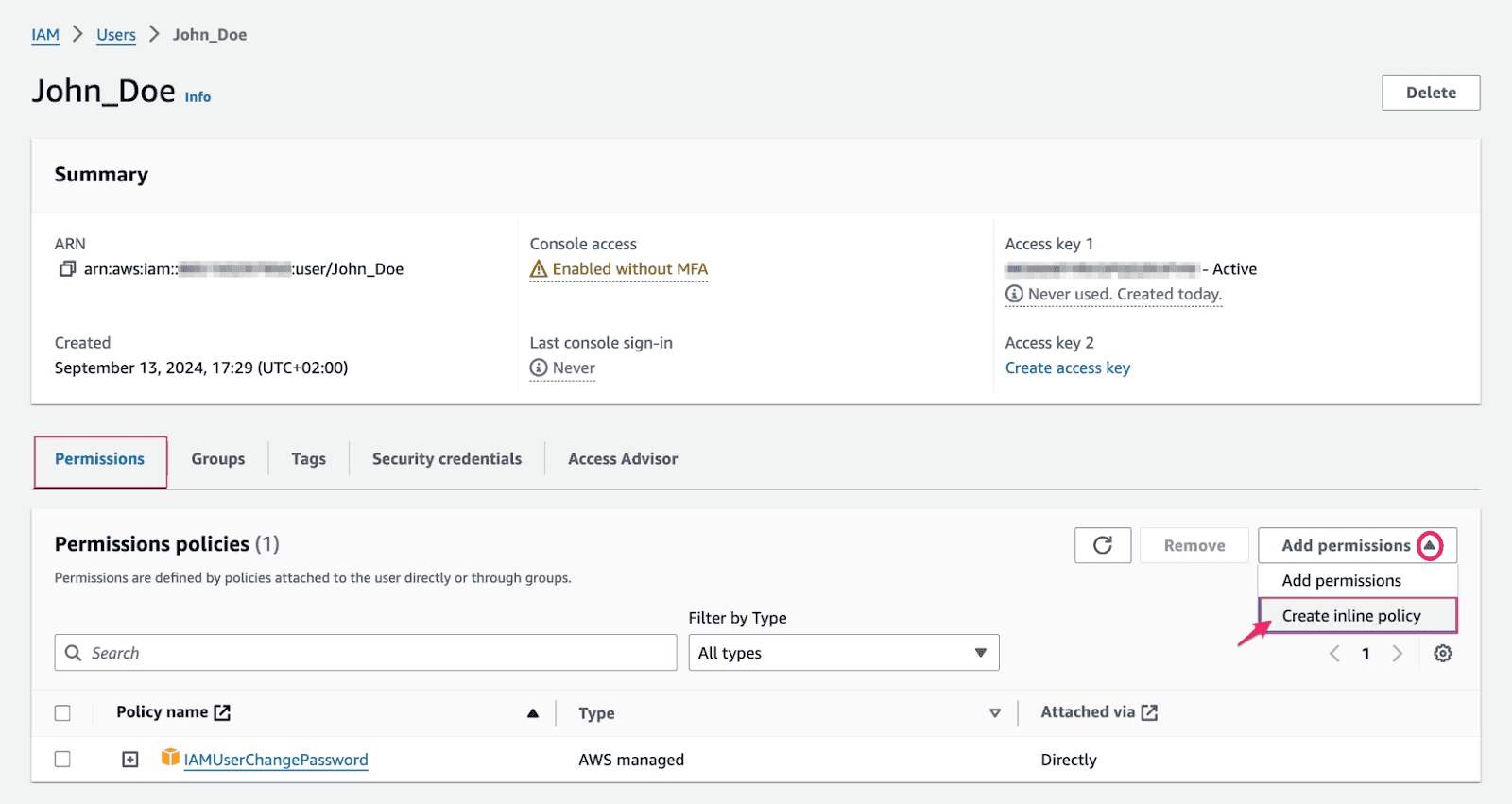
One of dashboards for management of the access rights in Cloudaware.
Certify your data because accuracy matters
Think of data certification like a quality check for your CMDB. Without it, you’re working with outdated or incorrect information, which could lead to serious headaches.
Regular audits and certification of critical CI attributes should be a top priority. I recommend you check manually maintained CIs more frequently. This isn’t a one-size-fits-all process. For example, experts recommend auditing CI attributes tied to critical services every few months.
Action plan: Cloudaware gives you the tools to schedule data certification tasks and audits. Set these up to automatically trigger based on the CI's criticality. For instance, you might set up quarterly audits for CIs related to business services or critical infrastructure.
By doing this, you ensure that your data stays in top shape and doesn’t become a source of confusion down the line.
Automate processes
Think about automation as your secret weapon for data management. You can set it up to monitor your assets, track configuration changes, and even run discovery processes. All without needing constant human input. This means your team can focus on learning new skills, improving services, and optimizing workflows.
Here is an example of how it works in Cloudaware:
Workflows handle field updates, attach assets, manage tags, and flag incidents automatically. No need to micromanage these processes — it’s all on autopilot.
Got alerts? Cloudaware ensures your team stays in the loop. Email notifications and Slack updates can be triggered instantly for critical events.
The magic lies in customization. Workflows adapt to your unique setup. You can define triggers based on CI attributes, relationships, or even time-based criteria.
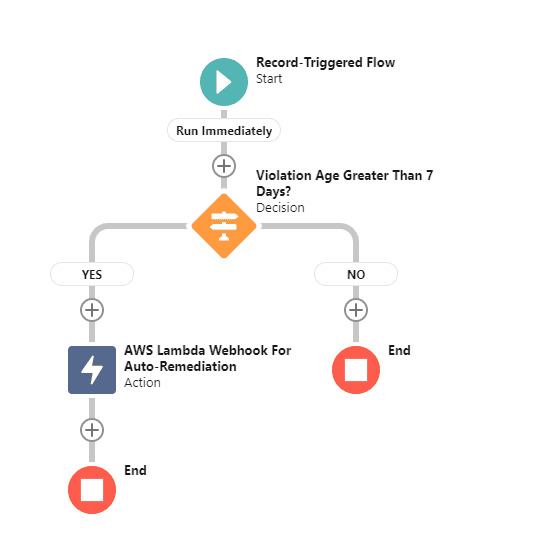
Problem: AWS S3 Bucket allows non-encrypted traffic
Solution: Create a flow that will perform an auto-remediation process if the bucket owner has not addressed the issue within 7 days
Asset: Compliance Policy Violation
Criteria: Compliance Policy Violation Age > 7 days
Action: Webhook to trigger AWS Lambda auto-remediation function
Action plan:
- Automatically run discovery routines to identify assets and track configuration changes.
- Set up workflows that automatically trigger responses to events. So that your team can focus on resolving issues instead of dealing with the data.
- Set up resource management. Cloudaware helps you manage your groups and resources with minimal effort.
The key to effective CMDB management is data consistency and accuracy. With workflow automation, your CMDB is always aligned with best practices.
Perform regular audits to ensure CMDB health
You wouldn’t drive a car without getting the oil changed, right? The same goes for your CMDB. Regular audits are crucial to keeping everything running smoothly. You can’t just set it and forget it, especially when managing thousands of assets.
As a Cloudaware expert, I’ve seen clients wait too long between audits. That’s when problems snowball. For critical CIs, schedule audits every 3 months. For less crucial items, every 6 months is fine. It’s like keeping your house in order — let the clutter pile up too long, and you’re in for a headache.
Action plan: In Cloudaware, you can easily set up scheduled audit tasks for specific CI classes or modules. Use the CI categorization feature to prioritize which CIs need more frequent checks. For example, critical servers or network devices should be audited quarterly. And supporting systems can go every six months.
Focus on high-risk areas
Just like you focus on high-risk areas of a project first, prioritize audits based on the criticality of your CIs. Manually updated records, service dependencies, or external platforms integrations are prone to errors.
From my experience, CIs tied to business-critical services need special attention. These are the parts of your CMDB that impact service delivery and uptime. Think of it as checking the brakes and engine of a car before a road trip — no one wants to find out their brakes are faulty when they’re already on the highway.
Action plan: Use Cloudaware's classification system to flag high-risk CIs. Mark them as “high priority” for more frequent audits. Create an audit schedule that aligns with the business impact. If you’re managing something like a database or a key application, ensure those are checked every month or after any major changes.
For example, if a new version of an app is deployed, perform an audit right after to ensure nothing breaks.
Leverage the data’s state dashboards
Imagine checking your phone’s battery status — would you just ignore it until it dies? Same goes for your CMDB health. Keep an eye on your CI health using a dashboard that tracks key metrics like accuracy, completeness, and compliance.
I’ve worked with companies who didn’t realize their CMDB had major health issues until it was too late. They ignored the early signs of data drift — small discrepancies that compounded over time. Cloudaware dashboards give you real-time insight into the data’s state. So you can catch issues before they snowball into disasters.
Action plan: Set up a health monitoring system for your CI classes. In Cloudaware, activate Health Dashboards to track data quality metrics in real time. Regularly review the health scores for key CIs. If the score drops, take immediate corrective action. This could be cleaning up duplicate records or updating missing information.
How Cloudaware boosts your configuration management processes
When it comes to configuration management, Cloudaware makes it easier to keep track of your IT environment. No matter whether it’s across multiple clouds or on-premise infrastructure.
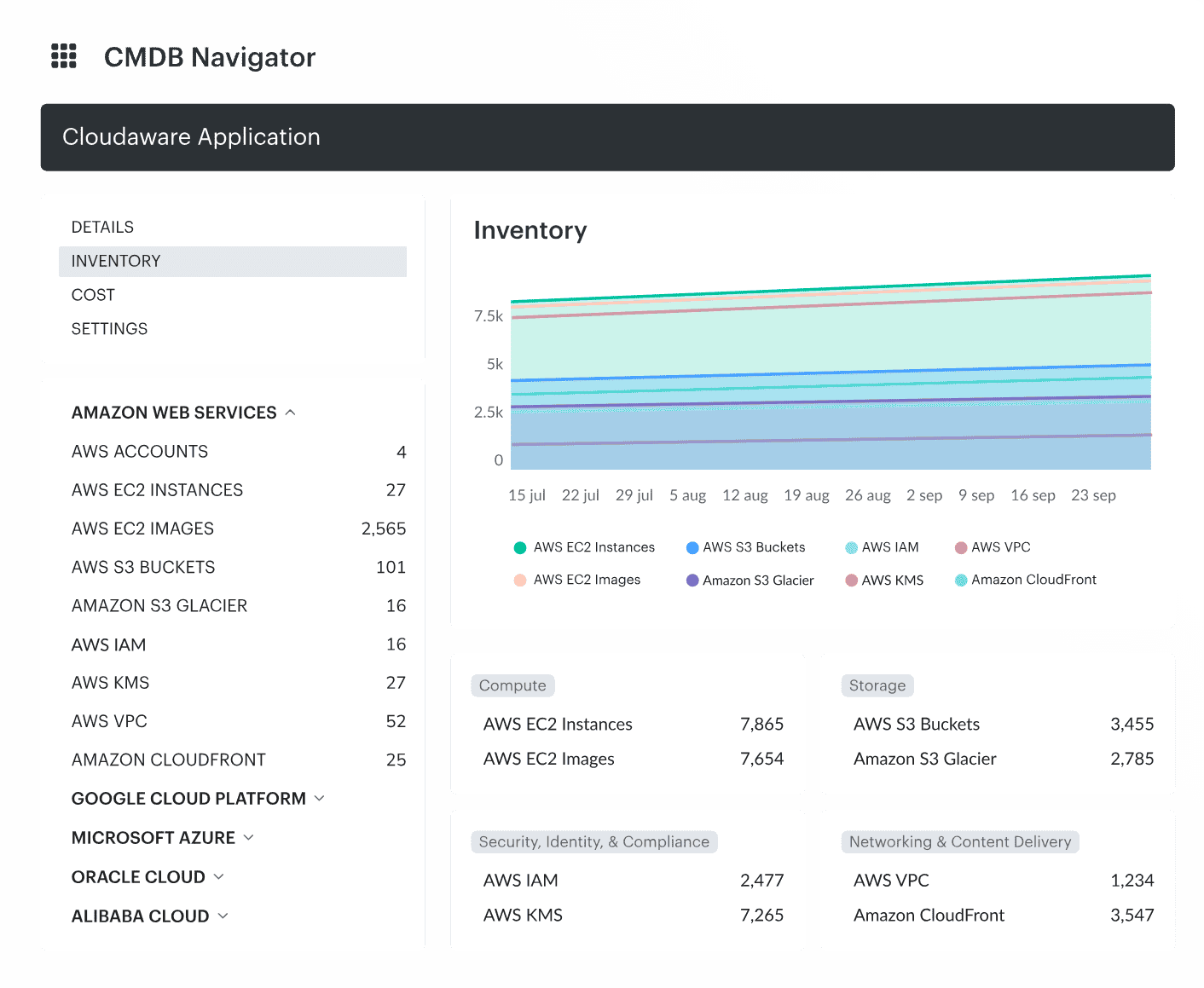
Here's how:
- Unified Data Source. Cloudaware acts as a single source of truth by cross-referencing data from your IT ecosystem. It merges information from various discovery tools and keeps it organized, so you’re always working with accurate data.
- Automation. With Cloudaware Discovery and Dependency Mapping, data updates automatically in real-time. This helps eliminate manual work and keeps configurations in sync without constant oversight.
- Data Enrichment. It enriches CIs with information for greater accuracy and deeper insights. You'll also get a clear view of dependencies between different parts of your infrastructure.
- Integrations. Easily connect with third-party IT processes through open APIs and sync with your tech stack.
- Reporting & Analytics. Cloudaware offers advanced analytics and lets you generate reports on-the-fly.
Read also:
📌 What Is Configuration Management? Definition. Processes. Recommendations
📌 Decoding configuration management vs change management in a multi-cloud environment
📌 Master Cloud Configuration Management: Tools & Tips
📌 CMDB Configuration Items: How CI Drive Configuration Management Database