


Azure security rarely fails because a team forgot to enable a native control. It fails between controls. A privileged role outlives the project that required it. A new subscription misses the baseline policy initiative. Defender for Cloud raises a recommendation, but the affected resource has no current application owner or remediation due date.
The ten Azure cloud security best practices below treat responsibilities as an operating model. Each practice defines what to implement, what evidence to inspect, and what must be true before the control can be considered operational.
The sequence starts with scope and ownership, then moves through access, policy, networking, data protection, monitoring, posture management, and remediation. For formal evidence collection and readiness checks, use the separate Azure cloud security assessment process.
Looking for cloud provider-specific guidance? Learn more in our Google Cloud security best practices and AWS cloud security best practices guides.
How Azure security practices were selected
This guide is based on current Microsoft guidance for shared responsibility, Zero Trust, the Microsoft cloud security benchmark, and Azure’s service-specific operational documentation.
A practice made the list when it does at least one of two jobs: reduces a material exposure path or improves the route from detection to verified remediation.
This is a documentation-based implementation model, not a customer benchmark. Exact coverage, licensing, and enforcement behavior depend on the Azure services and tiers configured in your environment.
The 10 Azure security best practices at a glance
The useful distinction is between a control that exists and one that is operating. The pass condition below defines the observable state teams should be able to verify.
| Practice | Implementation check | Pass condition |
|---|---|---|
| 1. Establish scope and ownership | Reconcile tenants, subscriptions, resources, applications, and owners | Every in-scope production resource has a current owner |
| 2. Narrow Azure RBAC | Review privileged roles, principal type, scope, and inheritance | Privileged access is no broader than the job requires |
| 3. Enforce Conditional Access | Check policy coverage, exclusions, and risky sign-ins | Target identities are covered and exclusions are owned |
| 4. Use PIM for privileged access | Review eligible, active, and permanent assignments | Human privileged access is time-bound by default |
| 5. Apply Azure Policy consistently | Check initiative scope, inheritance, exemptions, and failures | New subscriptions inherit the required baseline |
| 6. Restrict network exposure | Review public endpoints, NSGs, segmentation, and exceptions | Every public path has an approved business reason |
| 7. Protect keys and secrets | Check Key Vault access, managed identities, recovery, and rotation | Secrets use approved identities and lifecycle controls |
| 8. Verify logging coverage | Check diagnostic settings, destinations, and ingestion | Required logs arrive and support investigation |
| 9. Prioritize Defender findings | Add workload, exposure, owner, due date, and exception context | High-impact findings have an owner and remediation date |
| 10. Verify remediation | Reevaluate the affected control and resource population | Closure requires a passing control state, not just a closed ticket |
1. Establish Azure scope and ownership before scoring risk
Start with the Azure estate you expect to govern, rather than the findings already visible in Microsoft Defender for Cloud or another security console. Reconcile Microsoft Entra ID tenants, management groups, subscriptions, resource groups, and active resources with the production and regulatory scope your team is responsible for.
Microsoft’s Azure shared responsibility model defines where Microsoft’s responsibility ends and the customer’s begins. For most Azure workloads, customers still own identities, configurations, applications, data, and access controls. The operational problem is knowing which resources fall inside that responsibility and who is accountable for them.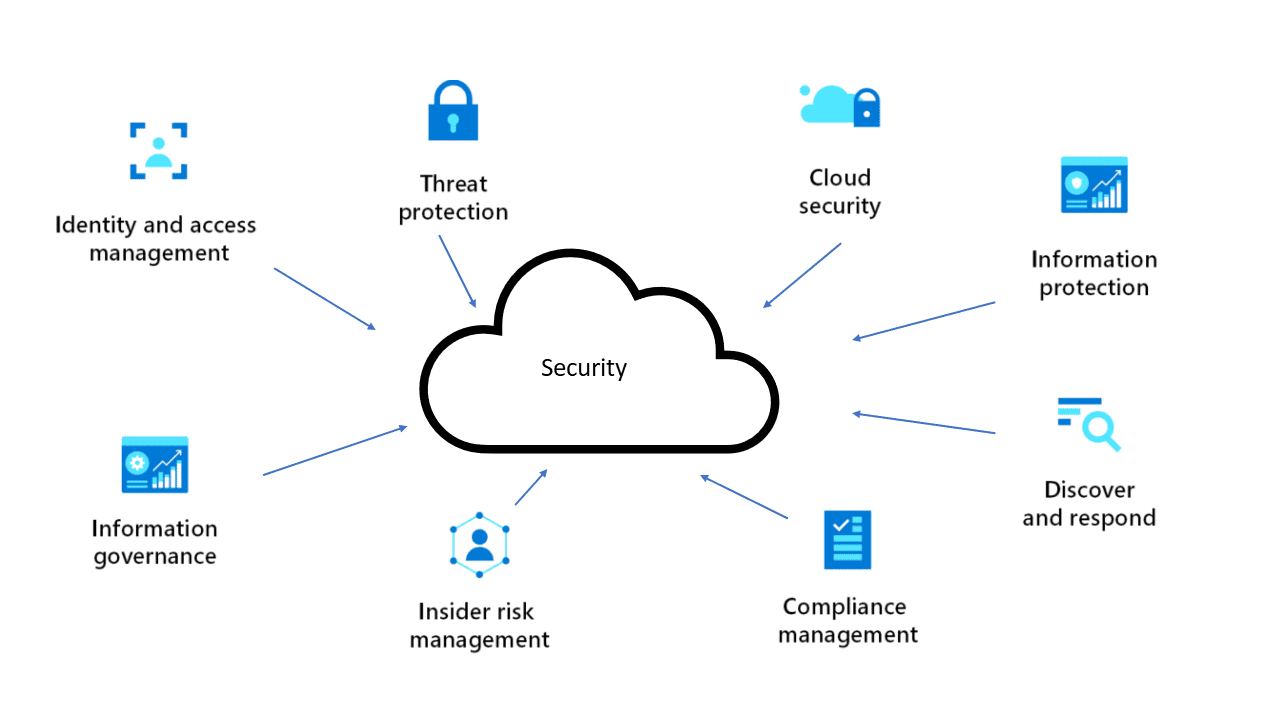 Image source.
The resource record needs more than an Azure resource ID. At minimum, security teams should be able to resolve:
- Management group and subscription
- Resource group and resource
- Application or business service
- Environment
- Current owner
- Lifecycle state
- Last observed date
This is where several existing Azure security problems become visible. Subscription sprawl creates inconsistent baseline coverage. Ownership mappings go stale after reorganizations or workload transfers. Newly created resources may never enter the expected governance path. Alerts then reach a security queue without enough context to determine who can validate or remediate them.
A resource can therefore be technically visible while still being operationally unmanaged. For example, an ownership tag may exist but point to a team that no longer supports the application.
Pass when: every in-scope production resource resolves to a current accountable owner, and failures in that mapping enter a defined ownership-repair workflow instead of remaining unidentified inside the security backlog.
Azure identity and access management best practices
Azure identity and access management drifts when access is granted faster than it is reviewed. Role assignments accumulate, service principals outlive workloads, and temporary exceptions become permanent.
Microsoft’s Zero Trust model treats identity as a primary control plane. For a broader rollout across identity, network, and workload controls, see our Zero Trust cloud security architecture.
2. Scope Azure RBAC to the smallest useful boundary
Azure RBAC should give a principal enough access to perform its job without extending that access across resources it does not need.
Management group and subscription assignments make sense when permissions genuinely need to apply across their descendants. For privileged roles, however, use the smallest scope that meets the requirement and review inherited access alongside direct assignments.
Check:
- Prefer job-function roles over broad Owner or Contributor access
- Prefer groups or managed identities over direct user assignments
- Place assignments at the lowest useful scope
- Review inherited permissions
- Record an owner and review date for privileged exceptions
Pass when: privileged assignments are no broader than required and every exception has a current owner and review date.
3. Enforce Conditional Access based on risk
Azure Conditional Access should increase controls when the identity, sign-in, device, or target resource presents more risk.
The common failure is incomplete coverage: policies exist, but privileged accounts, unmanaged devices, legacy authentication paths, or sensitive applications remain outside them.
Test new policies in report-only mode before enforcement and keep emergency-access exclusions explicit and monitored.
Check:
- Review covered and excluded identities
- Confirm target applications and resources
- Inspect grant and session controls
- Validate configured risk conditions
- Check actual sign-in outcomes
Risk-based user and sign-in conditions also depend on the Microsoft Entra capabilities licensed in the tenant.
Pass when: target identities and applications are covered and every exclusion has an owner, reason, and review date.
4. Replace standing privilege with PIM
Use Microsoft Entra Privileged Identity Management to replace routine permanent privileged access with eligible, time-bound activation.
For high-impact roles:
- Set a maximum activation duration
- Require MFA and justification
- Add approval where needed
- Review eligible and permanent assignments
PIM limits when a role is active. It does not fix an oversized RBAC assignment, so least-privilege scope still applies.
Permanent access may remain necessary for specific service principals or emergency accounts, but it needs a documented reason and accountable owner.
Pass when: human privileged access is time-bound by default and permanent assignments are limited to documented requirements.
Read also: Cloud Security Best Practices. Strategy, Checklist, Monitoring, and Automation
Azure governance and policy enforcement best practices
Azure governance breaks when baseline controls are applied inconsistently across the hierarchy. Management groups should define where common guardrails apply, while subscriptions and resource groups preserve the boundaries required by individual workloads.
5. Apply Azure Policy through the management group hierarchy
Use Azure Policy at the management-group level that matches the intended control scope so new subscriptions inherit the required baseline automatically.
Do not assign every policy at the tenant root by default. A global assignment makes sense only when every descendant subscription should receive the same rule and enforcement effect.
Check:
- Apply baseline initiatives at the appropriate management-group scope
- Confirm new subscriptions inherit the expected assignments
- Review non-compliant resources and remediation tasks
- Track exemptions with an owner, reason, and expiry or review date
- Test policy effects before broad enforcement
The Microsoft cloud security benchmark provides a current Microsoft baseline that can be extended with organization-specific requirements.
RBAC and Azure Policy control different parts of the same deployment path:
| Azure RBAC | Azure Policy |
|---|---|
| Controls who can perform an action | Evaluates or restricts the resulting resource configuration |
A user can have correctly scoped permissions and still deploy an insecure configuration if no policy evaluates or blocks it. Conversely, Azure Policy does not replace least-privilege access.
Pass when: new in-scope subscriptions inherit the required policy baseline, non-compliant resources have a remediation path, and every exemption is documented and reviewed.
Azure network security and Zero Trust segmentation best practices
Azure network security should limit both unnecessary internet exposure and lateral movement between workloads. Microsoft’s Zero Trust guidance assumes breach, so network controls need to restrict how far an attacker or compromised workload can move after initial access.
6. Restrict public exposure and segment workloads by trust boundary
Treat internet reachability as an explicit exception. Storage accounts, databases, Kubernetes APIs, and management endpoints should use private access where the workload does not require a public path.
Temporary exposure created for testing, migration, or vendor access is a common source of drift because the endpoint often remains public after the original requirement disappears.
Check:
- Use private endpoints or private access where required
- Restrict NSG rules to necessary sources and destinations
- Separate frontend, application, data, and management tiers
- Review public endpoints and peering relationships
- Record an owner and expiry date for exposure exceptions
- Validate segmentation against current workload traffic
Microsoft’s Azure network security best practices recommend subnet segmentation and network controls between workloads. Configuration alone is not enough: broad east-west rules can remain technically valid while exposing production tiers that no longer need to communicate.
Pass when: every public path has an approved purpose and owner, and traffic between workload tiers matches the current application design rather than accumulated NSG and peering rules.
Azure data security and key management best practices
Azure encrypts data at rest and in transit across many services, but encryption alone does not secure the access path. Data can still be exposed through public endpoints, overprivileged identities, copied credentials, or unmanaged secrets.
7. Protect keys, secrets, and their access paths
Use Azure Key Vault as the controlled store for application secrets, certificates, and encryption keys. Where supported, authenticate workloads with managed identities instead of credentials stored in code, app settings, or pipelines.
The control also needs a lifecycle around the vault and its objects:
- Restrict administrative and workload access
- Use private access where required
- Enable soft delete and purge protection
- Define expiration and rotation ownership
- Remove credentials from code and deployment variables
- Review stale or broadly accessible secrets
Encryption should remain the baseline, not the pass condition. An encrypted storage account can still be publicly reachable, and an encrypted database can still be exposed to an overprivileged identity.
Pass when: workloads retrieve secrets through approved identities, privileged vault access is controlled, and recovery plus rotation can be demonstrated.
Application and deployment-pipeline security require a separate implementation path. See Azure DevSecOps controls for CI/CD and application-security guidance.
Azure CSPM, monitoring, and remediation best practices
Defender for Cloud, Azure Monitor, Sentinel, and Azure Policy can surface security state, but the control only becomes operational when the signal reaches the right owner and the fix is verified against the affected resource.
8. Collect the logs detection and response depend on
Define the investigation or detection first, then collect the Azure data required to support it. Azure Activity Log and platform metrics provide platform-level telemetry, while many resource logs require configured Azure Monitor diagnostic settings.
For every in-scope resource type that supports a required detection or investigation:
- Enable the required log categories
- Route logs to an approved destination
- Define retention requirements
- Monitor ingestion health
- Record who owns the collection path
- Test retrieval with a known recent event
A configured diagnostic setting is not enough if the expected events never reach the investigation workflow.
Pass when: required logs arrive within the expected window and can support a defined detection or investigation.
9. Prioritize Defender for Cloud findings with workload context
Microsoft Defender for Cloud continuously evaluates Azure resources and produces recommendations, posture signals, and Secure Score data.
The priority queue should not rely on severity or Secure Score alone. A recommendation affecting an internet-facing production workload may require action before the same recommendation on an isolated sandbox resource.
Prioritize findings using:
- Exposure
- Environment
- Application importance
- Resource owner
- Due date
- Exception state
Preserve the recommendation ID, affected resource, owner, first observed date, remediation due date, and current exception or ticket state. For the broader posture workflow, see Azure cloud security posture management.
Pass when: high-impact findings have an accountable owner and due date, while accepted risk has a current approval and review path.
10. Verify remediation against the affected population
A closed ticket does not prove that the Azure control now passes. Reevaluate the affected resource after remediation and check whether the same failure still exists elsewhere in the original control population.
For Azure Policy controls, use the current compliance state rather than ticket state as the technical verification point. Microsoft documents Azure Policy compliance evaluation and compliance data.
Track at least:
- First failed date
- Remediation ticket
- Exception state
- Last evaluated date
- Current control state
If the underlying policy, recommendation, or connected security control has not reevaluated the resource since the change, keep the record open as awaiting reevaluation.
Also query the original resource cohort. If one public storage account was corrected, inspect the other in-scope storage accounts governed by the same control to determine whether the failure came from a broader deployment pattern.
Pass when: the control has reevaluated successfully for the intended scope and the current Azure state agrees with the ticket and exception state.
A 30/60/90-day Azure security rollout plan
Sequence the work so each phase produces the scope, control coverage, and remediation evidence the next phase depends on. This is an implementation plan, not an audit checklist.
First 30 days: establish scope and baseline coverage
Start with the controls that define what is governed and who owns it:
- Reconcile tenants, management groups, subscriptions, and production resources
- Review RBAC assignments and remove unnecessary broad access
- Identify public storage, databases, and management endpoints
- Confirm Azure Policy and Defender for Cloud coverage
- Define the required logging baseline
- Repair missing or stale ownership mappings
Days 31-60: enforce the control baseline
Move from visibility to consistent enforcement:
- Narrow privileged RBAC assignments
- Move eligible privileged access into PIM
- Test and enforce Conditional Access
- Apply baseline Azure Policy at the correct hierarchy
- Restrict public access and segment sensitive workloads
- Centralize secrets and keys in Azure Key Vault
- Deploy required diagnostic settings
Days 61-90: operate and verify remediation
Use workload context to turn findings into owned work and confirm that fixes actually changed the control state:
- Prioritize Defender findings by exposure and application context
- Assign remediation owners and due dates
- Review expiring policy and security exceptions
- Reevaluate remediated resources
- Track overdue work and records awaiting reevaluation
- Check whether the same control failure persists across the wider resource cohort
For formal readiness, evidence collection, and audit checks, use the Azure cloud security assessment guide.
Metrics that matter
Track whether security work actually moves:
- % of in-scope Azure resources with a current owner
- Number of unmanaged public endpoints
- Number of high-impact findings without an owner or due date
- Number of expired or overdue exceptions
- Percentage of subscriptions covered by the required policy baseline
- Number of remediated records awaiting reevaluation
- Mean time from finding creation to owner assignment
- Mean time to verified remediation
Turn Azure findings into owned, verifiable work
Azure Policy, Microsoft Defender for Cloud, Azure Monitor, and Microsoft Entra ID expose different parts of the security state. The operational gap starts after detection: the affected resource still needs application context, a current owner, an exception state, a remediation task, and a verified control result.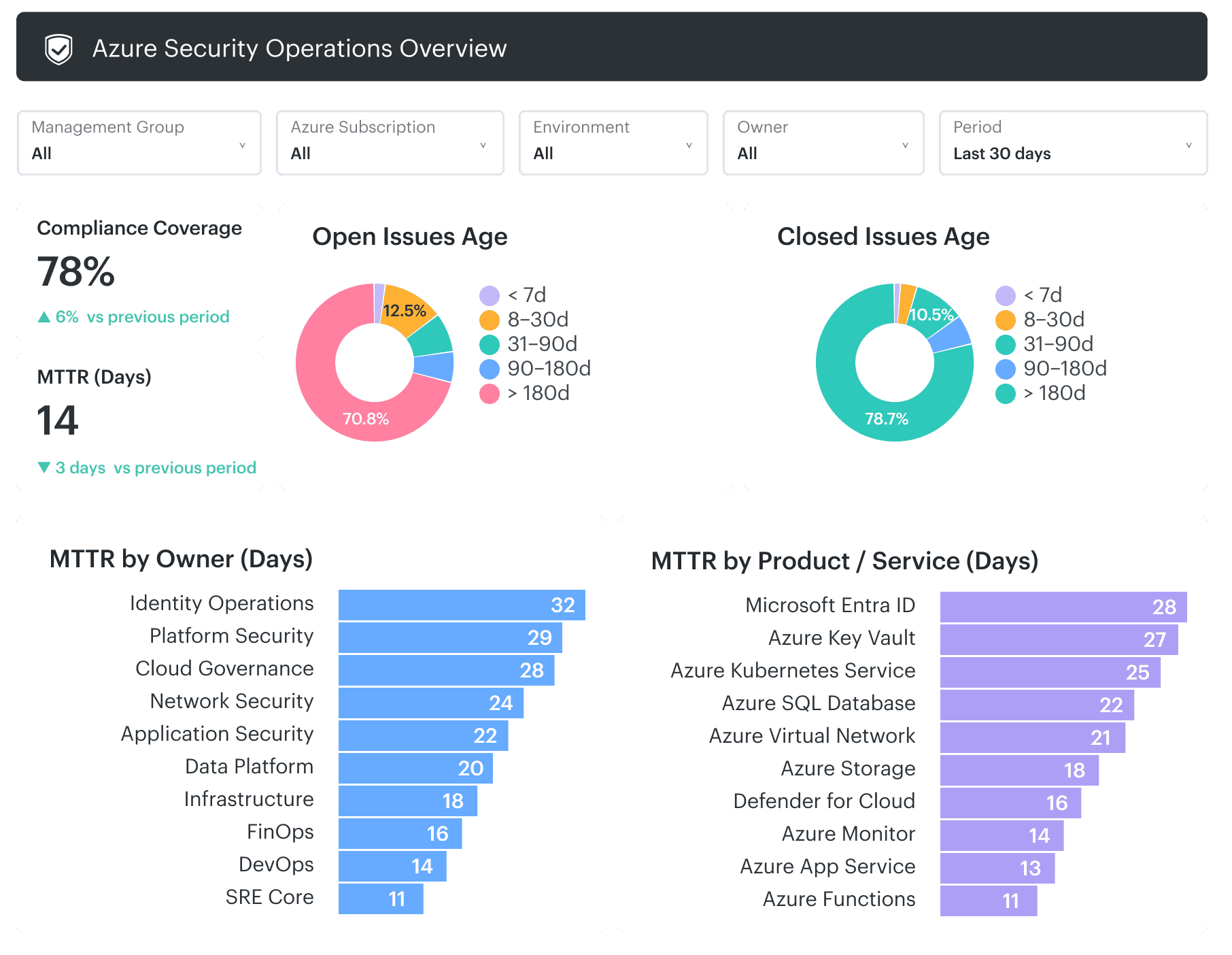 Cloudaware can bring configured Azure inventory into its CMDB and relate Azure resources to applications, environments, ownership, and other operational context. This gives security teams a consistent path from an Azure security record to the team responsible for the affected workload.
Core capabilities:
- Connect assets to ownership and context. Cloudaware provides a centralized asset inventory (CMDB) that discovers Azure resources and links them to owners, applications, and environments.
- Make IAM and RBAC auditable at scale. By correlating identity data with resource inventory, Cloudaware helps teams understand which identities have access to which assets across subscriptions.
- Turn findings into assigned work. Cloudaware enriches security findings with context such as resource, environment, and ownership, and integrates with ticketing systems to support remediation workflows.
- Severity alone does not reflect real risk. Cloudaware uses asset relationships and metadata (such as environment, ownership, and resource type) to help prioritize issues based on impact.
- Track IT compliance and evidence. Cloudaware maps cloud configurations to compliance frameworks and tracks changes over time, helping teams maintain continuous visibility into compliance posture and simplifying audit preparation.
- Extend Azure practices to multi-cloud environments. Cloudaware supports AWS, Azure, GCP, and hybrid environments, providing a unified model for asset visibility, security posture, and compliance.