


In 2026, it is not another copilot sitting beside an overworked SOC team. It is the connective tissue between AWS accounts, Azure subscriptions, GCP projects, Kubernetes clusters, SaaS tools, identities, misconfigurations, ownership data, change history, and audit evidence.
In a hybrid cloud estate, risk does not arrive as a single clean alert. It arrives as 40 weak signals nobody has time to stitch together.
AI in cloud security changes that. This guide breaks down
- Where is the technology heading?
- What benefits are real?
- Where do the risks hide?
- How to choose AI solutions that security teams can trust, operate, and defend to auditors?
TL;DR
- AI in cloud security is moving from rule support to bounded autonomy. The serious version is not “let the bot fix production.” It is agentic AI that can triage findings, enrich evidence, open tickets, propose remediation, and escalate approval when the change touches critical workloads.
- Predictive, attack-path-aware detection is becoming more useful than raw alert volume. A vulnerable VM matters more when it is public, tied to production, reachable through a risky identity path, and connected to sensitive data. Mature SOCs are starting to prioritize those combinations instead of chasing every standalone signal.
- GenAI can shrink the distance between cloud change and compliance evidence. A failed CIS, NIST 800-53, or ISO 27001 control should not sit in a dashboard until audit season. The stronger workflow maps the drift to the asset, owner, environment, last change, ticket, and proof trail within minutes.
- AI-versus-AI risk is now part of the cloud security model. Prompt injection, adversarial AI, poisoned retrieval data, and LLM supply-chain exposure become dangerous once AI tools can read logs, inspect resources, generate IaC fixes, or call APIs.
- Multi-cloud visibility is the trust layer for AI decisions. Partial asset data across AWS, Azure, GCP, Kubernetes, SaaS, and on-prem creates confident-but-wrong findings. If ownership, tags, identities, dependencies, and exceptions are messy, AI will automate the mess.
- Explainable AI and AI governance are becoming procurement gates. Security leaders will need model versioning, evidence trails, human approval rules, retention policies, and alignment with NIST AI RMF, the EU AI Act, and ISO/IEC 42001 before AI recommendations can influence real remediation.
- The fastest ROI comes from fixing asset and ownership data first. AI reduces MTTD, MTTR, alert fatigue, and compliance prep only when it can see who owns the asset, what changed, which control failed, and where remediation should land.
What is AI in cloud security? What does it mean in 2026?
AI in cloud security is the use of machine learning models, behavioral analytics, and autonomous reasoning to detect cloud risk, prioritize response, and keep hybrid environments continuously compliant.
In 2026, cloud security teams are no longer protecting one neat environment. They are watching AWS accounts, Azure subscriptions, GCP projects, Kubernetes clusters, SaaS apps, CI/CD pipelines, service accounts, cloud workload security, policies, exceptions, and audit evidence move at the same time.
That is where AI stops being a shiny layer on top of a dashboard and becomes part of the operating model.
- It finds the weird API call
- It notices the identity path nobody reviewed
- It connects a critical CVE to an internet-facing workload, a missing owner, a recent change, and a failed compliance control
Not as four separate alerts, but as one risk story your team can actually act on.
So when we talk about AI in cloud security now, we are really talking about three working layers: detection, response, and continuous compliance.
How AI is currently used across cloud security workflows
Detection is no longer an issue for most cloud security teams. They have a context problem.
One tool flags an unusual API call. Another catches configuration drift. CSPM shows a failed control. CNAPP finds an exposed workload. The vulnerability scanner adds a critical CVE. IAM data points to a risky permission path. Somewhere in the middle, a platform engineer wants to know, "Is *this actually dangerous, or is this just another red badge on a dashboard?*”
That is where AI in cloud security is already earning its seat.
- Machine learning models scan cloud telemetry for anomaly detection patterns humans would miss at scale.
- Behavioral analytics can spot when a service account, admin role, or workload starts acting outside its normal baseline.
- Identity-graph reasoning helps expose toxic access paths across users, roles, policies, secrets, and cloud resources.
- Drift detection catches the quiet changes that happen after deployment, when the Terraform plan looked clean, but the live environment no longer does.
The practical value is in prioritization. AI connects a vulnerable internet-facing workload to its owner, business service, recent change, failed compliance control, and blast radius. Now the SOC is not staring at 4,000 findings. The team sees the 17 that could hurt the business first.
That is the real shift: SOC automation, CSPM, CNAPP, and cloud workload protection are moving from alert generation to risk explanation.
And once AI starts explaining cloud risk faster than humans can manually investigate it, the next question becomes harder to ignore: can cloud security still work without it?
Why ‘cloud + AI security’ is no longer optional
The painful truth: most cloud security teams are not short on alerts. They are short on time to understand which alert actually matters.
One workload gets deployed in AWS. A role changes in Azure. A GCP project inherits a permission nobody meant to expose. Kubernetes spins up a service. A scanner flags a CVE. CSPM catches a failed control. The SOC sees noise. Compliance sees risk. Platform engineering sees another ticket with no owner.
That is the daily mess cloud + AI security now has to solve.
The scale made manual review unrealistic at first. AI made the gap impossible to ignore. Zscaler’s CSPM guidance says enterprises with more than 10,000 cloud resources need scalable metadata collection, short scan times, and security posture dashboards built for volume. It also describes cloud scans using thousands of parallel serverless functions to collect metadata and generate reports in minutes.
And that is before you add hybrid complexity.
82% of organizations run hybrid infrastructure, 63% use more than one cloud provider, and 59% name insecure identities and risky permissions as their top cloud infrastructure risk. (Cloud Security Alliance)
Tenable’s 2025 cloud risk data makes the blast-radius problem even clearer: 29% of organizations had at least one toxic cloud trilogy, meaning a workload that was publicly exposed, critically vulnerable, and highly privileged.
That combination is the quote your security team never wants to hear in a review meeting:
"We saw the finding. We just didn’t know it was connected to that identity path, that workload, and that failed control.”
In Cloudaware, that kind of view can be built from the CMDB and policy context instead of asking AI to guess from a raw alert. The model can see the resource, its relationships, ownership data, environment, policy result, and supporting evidence. If the fix needs a ticket, the action can be routed through the existing workflow. If the finding is covered by an exception, the dashboard should show that too.
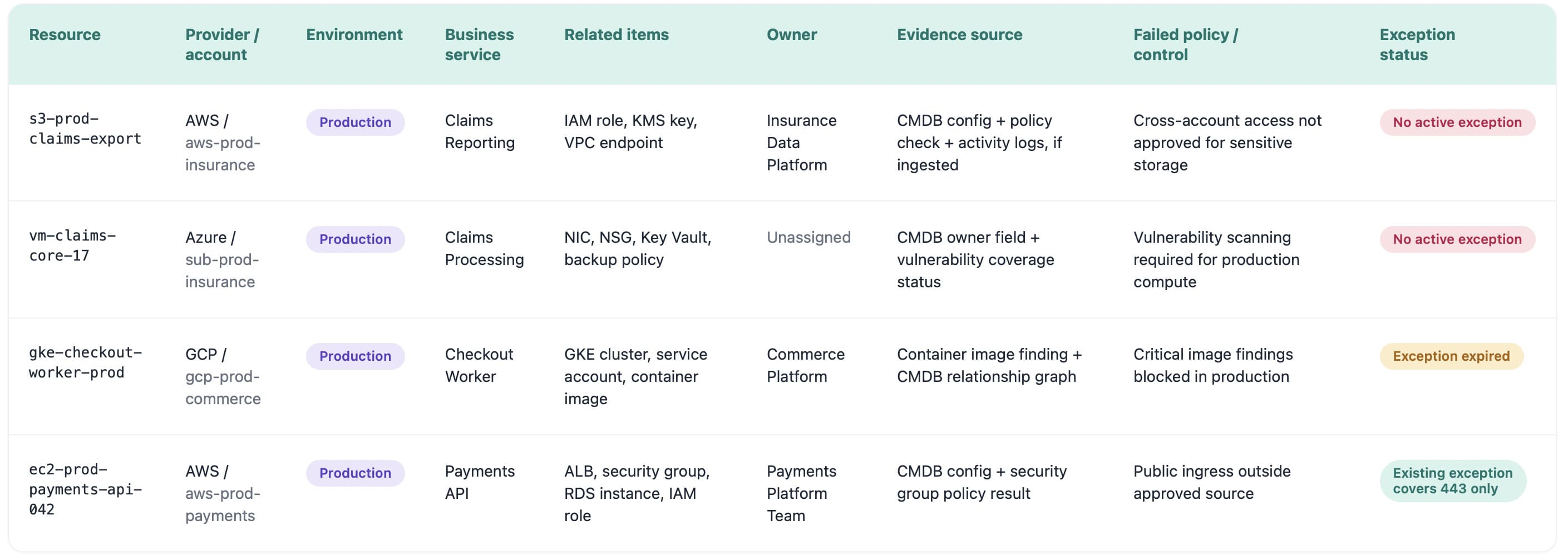
That is the difference between “AI says high risk” and “the security team knows exactly what to check next.
So the question is no longer, “Should we use AI in cloud security?”
The better question is, which decisions are safe to accelerate, which ones need human approval, and which risks are already moving faster than your team can investigate by hand?
5 benefits of AI in cloud security
The benefits of AI in cloud security are easy to oversell. Faster detection. Better response. Cleaner compliance. Lovely. But enterprise cloud teams have heard enough tool promises to wallpaper a SOC.
The useful question is narrower: where does AI remove the work humans cannot keep doing manually across AWS, Azure, GCP, Kubernetes, SaaS, and on-prem?
These insights come from recent breach-cost research, AI security guidance, and field patterns seen in hybrid cloud environments where security teams are trying to connect alerts, assets, identities, owners, policy evidence, and remediation workflows without turning every finding into a three-day investigation.
The global average breach cost was USD 4.4M, and organizations with extensive use of AI in security saved an average of USD 1.9M compared with those not using these solutions. (IBM)
The five benefits worth paying attention to:
- Faster detection and reduced MTTR
- Better prioritization of real cloud risk
- Less SOC noise from duplicated findings
- Continuous compliance evidence
- Safer automation with policy and approval controls
Read also: 13 DevSecOps Metrics - The Scoreboard for Security + Delivery
Faster detection and reduced MTTR
The first win is not “AI finds more alerts.”
Most teams already have plenty. A little too much.
The real win is faster understanding. AI can pull together the signal that usually sits across five places: a vulnerability scanner, CSPM result, IAM graph, change log, ticket queue, and CMDB record. That shortens MTTD because the team sees the risk pattern sooner, not just the raw event.
“The clock does not start when the alert fires. It starts when someone understands what the alert means.”
That is where MTTR improves.
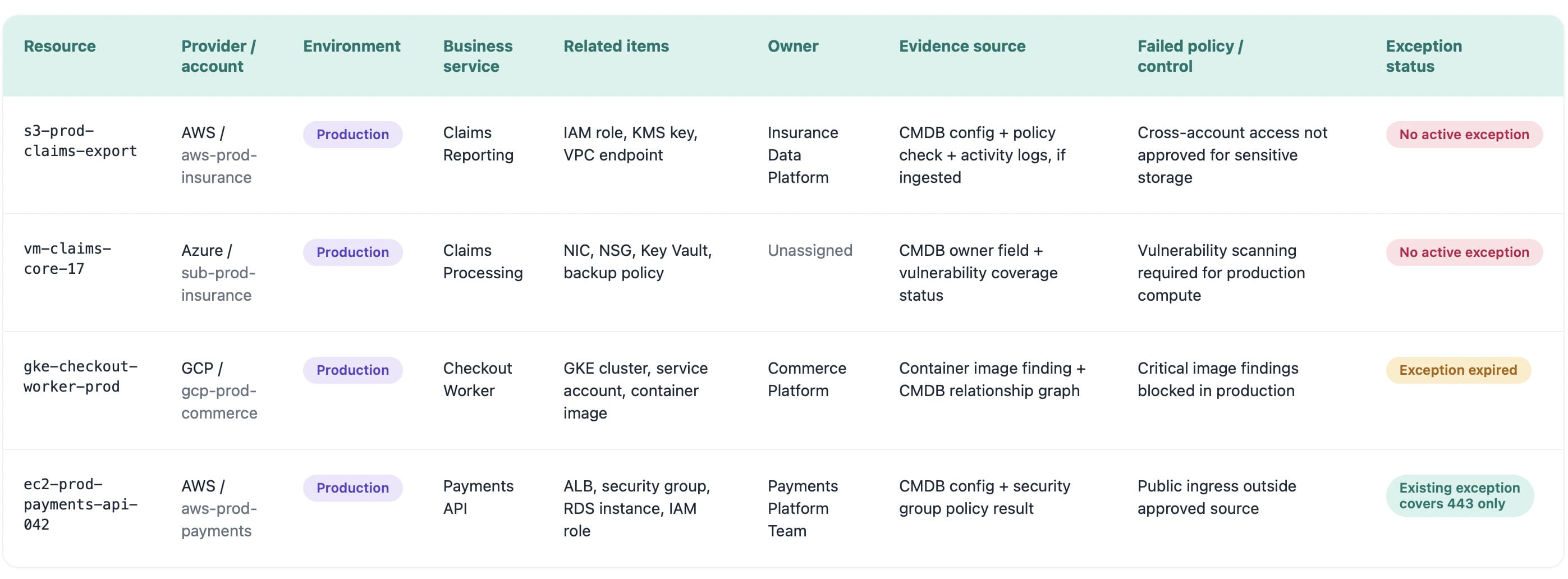
A Cloudaware risk dashboard with affected workload, provider account, environment, owner, business application, internet exposure, risky identity path, last change, failed control, and remediation group. Not five tabs. Not a Slack archaeology project.
A critical CVE on an isolated dev box is work. A critical CVE on a public production workload with broad permissions and no owner is a business risk. AI helps teams spot that difference early enough to act.
Smarter prioritization of cloud risks at scale
Cloud risk prioritization gets messy because every system speaks in its own emergency language.
The vulnerability scanner cares about CVSS. CSPM cares about the failed control. IAM cares about the permission path. The platform team cares whether the workload is production. Compliance cares, which framework now has weak evidence.
AI helps when it turns those separate signals into one ranked risk story.
A high CVE on a private dev VM can wait. A medium weakness on a public production API with broad identity permissions, sensitive data access, and no clear owner probably cannot. That is the judgment enterprise teams need at scale.
The best AI prioritization models look beyond severity and ask:
- Can this asset be reached from the internet?
- Does it support a business-critical service?
- Which identity can touch it?
- Is the weakness exploitable now?
- Who owns the fix?
- Which compliance control is affected?
That is the difference between sorting alerts and making a security decision.
For buyers, this becomes a sharp test: if the platform cannot explain why one cloud risk jumped ahead of another, the priority queue will turn into politics. Security says urgent. Engineering says later. Compliance asks for proof. Everyone loses two days.
Cost reduction and analyst productivity
The cost argument works only when it gets out of the clouds and into hours.
Organizations using AI extensively in security saved USD 1.9M on average compared with organizations that did not use these solutions. IBM also reports a USD 4.4M global average breach cost, with the year-over-year drop driven by faster identification and containment.
Now bring that down to the SOC floor.
A team receives 900 low-context alerts a week. Each one takes 8 minutes for L1 triage: check the asset, enrich the finding, search for duplicates, find the owner, compare against existing tickets, add evidence, and update status.
That is 120 hours a week.
If AI handles only 40% of that plumbing, the team gets back 48 hours. Every week. That is one senior analyst no longer buried in ticket reconciliation or two people with enough time to investigate identity paths, review architecture patterns, and fix the root cause behind repeat alerts.
That is the productivity benefit worth trusting. AI in cloud security cuts costs when it removes repetitive triage labor, shortens the path from finding to owner, and gives senior people their brains back.
Continuous compliance and configuration drift detection
Compliance breaks in the tiny gap between “approved” and “changed.”
A security group gets opened for testing. An S3 bucket policy changes after a migration. MFA enforcement slips on a privileged account. A Kubernetes setting drifts from the hardened baseline. Nobody meant to create a policy breach. It just happened while the cloud kept moving.
AI is useful here because it watches change as a stream, not as an audit-season cleanup project. Every configuration update can be checked against control families like CIS Benchmarks, NIST 800-53, and ISO 27001. The system does not need to wait for a quarterly review to notice that production no longer matches the approved state.
A practical flow looks like this:
- Drift appears on a production workload
- The change is mapped to the affected control
- The asset owner and application are identified
- A ServiceNow ticket is created within minutes
- The ticket carries the failed policy, evidence, environment, and remediation context
That last part matters. “Fix encryption” is weak. “Production database db-prod-billing-02 drifted from ISO 27001 encryption control, owner is Billing Platform, last change came from this deployment, ServiceNow ticket assigned here” is something a team can act on.
Continuous compliance becomes believable when every violation has context, owner, proof, and a path to closure.
Better signal-to-noise: less alert fatigue
Alert fatigue is not about exhausted analysts.
It is math.
If one analyst gets 80 alerts in a shift, and 50 are duplicates, accepted exceptions, low-risk dev findings, or symptoms of the same bad image, the SOC is not underperforming. The queue is badly shaped.
The metric to watch: alerts per analyst per shift.
AI earns its keep when that number drops for the right reasons. Duplicate alerts collapse into one issue. Known exceptions stay suppressed until expiry. Low-value signals stop fighting production risks for attention. Findings get grouped by root cause: bad base image, overbroad role, repeated policy drift, exposed workload pattern.
One example tells the story.
A vulnerable golden image creates 240 findings across AWS and Azure. Without AI, that looks like 240 tickets. With root-cause grouping, it becomes one remediation path: update the image, identify affected workloads, assign the owner, track the rollout.
Cleaner queue. Fewer fake emergencies. More time for the risks that can actually hurt the business.
What is the future of AI in cloud security? 7 trends shaping 2026-2030
The future of AI in cloud security is governed by autonomy: AI that understands cloud context, explains risk, triggers bounded action, and leaves behind evidence security leaders can defend.
That is the pattern behind these seven trends. They come from industry research, AI governance frameworks, and what Cloudaware teams see while working with enterprise clients running multi-cloud estates across AWS, Azure, GCP, Kubernetes, SaaS, and on-prem.
The punchline is not “AI will replace cloud security teams.”
Please. No.
The real shift is sharper - AI will take over the parts of cloud security that already broke under human review: correlating weak signals, finding owners, prioritizing toxic risk combinations, packaging evidence, and routing remediation before the queue becomes a museum.
1. Cloud context becomes the foundation for AI decisions
AI cannot secure what the platform cannot explain.
That sounds obvious until a security team tries to automate response across 40 AWS accounts, 18 Azure subscriptions, a few forgotten GCP projects, Kubernetes clusters, SaaS integrations, and a pile of on-prem assets nobody wants to admit still matter.
A model can summarize findings all day. If it cannot tell which workload is production, who owns it, what changed last night, which identity can reach it, and whether the exception is still valid, it is not making a security decision. It is guessing faster than your team.
The useful AI layer sits on top of a connected cloud context:
- Asset
- Owner
- Environment
- Application
- Identity path
- Exposure
- Vulnerability
- Policy result
- Change history
- Exception status
- Remediation owner
That is why the first serious trend is not agentic AI. It is the data model under it.
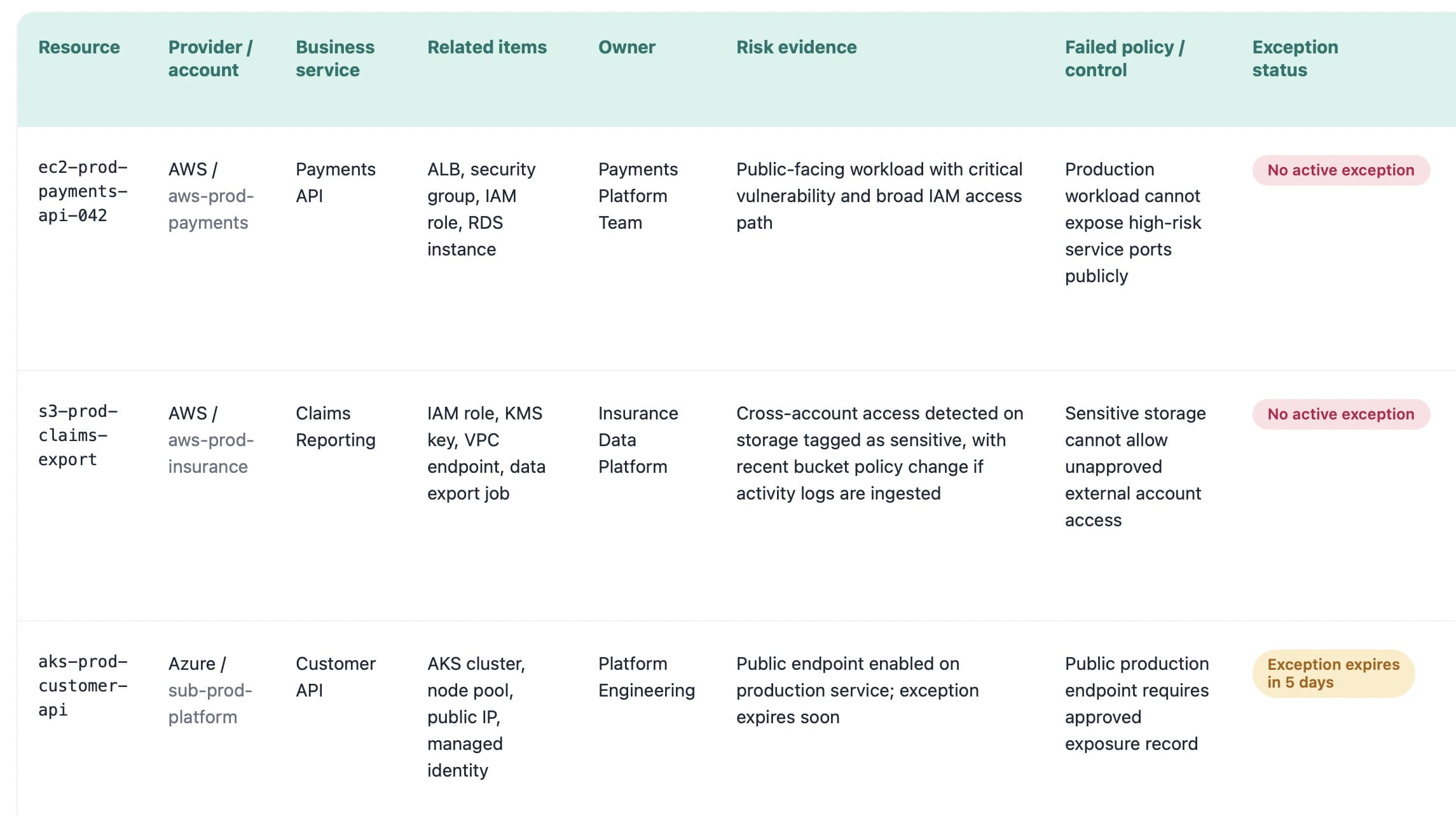
Cloudaware dashboard businesses use in this case
AI expands cloud footprints, raises compliance pressure, and makes visibility, governance, and cost control prerequisites rather than essential add-ons.
2. Agentic AI enters SecOps, but only inside guardrails
Now we can talk about agentic AI.
The shift from copilot to action-taker is real. In cloud security, that means AI will move from “I summarized the alert” to “I enriched the finding, found the owner, opened the ticket, attached evidence, drafted the Terraform change, and requested approval.”
That is the early shape of the autonomous SOC. The boring, useful version. Not the cinematic one where an LLM gets broad admin rights and starts “fixing” production while everybody sleeps.
A safer operating model looks more like this:
- Let AI deduplicate findings.
- Let AI enrich alerts with owner and environment.
- Let AI group risks into remediation tasks.
- Let AI propose IaC fixes.
- Let AI isolate low-risk test workloads under policy.
- Require approval for production changes.
The buyer's question: What can the agent do without approval, and where does it stop?
A mature agent action log should show the affected asset, environment, owner, proposed action, source evidence, approval state, rollback option, ticket link, and outcome. If that log does not exist, the automation is not ready for serious enterprise use.
3. GenAI becomes the investigation layer
Security teams will not keep clicking through 11 tools to answer a single question.
Generative AI will become the investigation layer for cloud risk. A cloud architect asks, “Why did this workload become critical after yesterday’s deployment?” A DevSecOps lead asks, “Which IaC change caused this drift?” A compliance owner asks, “Show evidence for this control across production accounts.”
That is where GenAI earns its place.
The answer still needs to be supported by evidence. Every AI-generated explanation should connect back to:
- Resource record
- Scanner output
- IAM relationship
- Policy result
- Change log
- Ticket
- Exception
- Audit evidence
Without source evidence, GenAI is just a confident paragraph wearing a security badge.
For Cloudaware clients, this is exactly where CMDB context becomes practical. A finding rarely lives alone. The vulnerability sits on the workload. The owner lives in the asset record. The compliance impact depends on the policy. The urgency changes when the workload is internet-facing, production, and tied to a business-critical app.
AI becomes useful when it can pull those pieces into one readable risk story.
4. Predictive threat intelligence gets asset-aware
Most predictive threat intelligence still arrives like a weather warning for the entire planet.
“Critical exploit observed.”
Okay. Where, exactly?
The future version is much more specific. A new CVE drops. AI checks which workloads run the affected package, which assets are public, which identities can reach them, which business applications depend on them, and whether the remediation owner already has an open task.
Now the feed becomes a work plan.
This matters because cloud risk is usually combinational. Tenable’s 2025 cloud research found that 29% of organizations had at least one “toxic cloud trilogy”: a workload that is public, critically vulnerable, and highly privileged. That is the kind of risk AI should surface first, because each signal alone can look manageable, while the combination can become ugly fast.
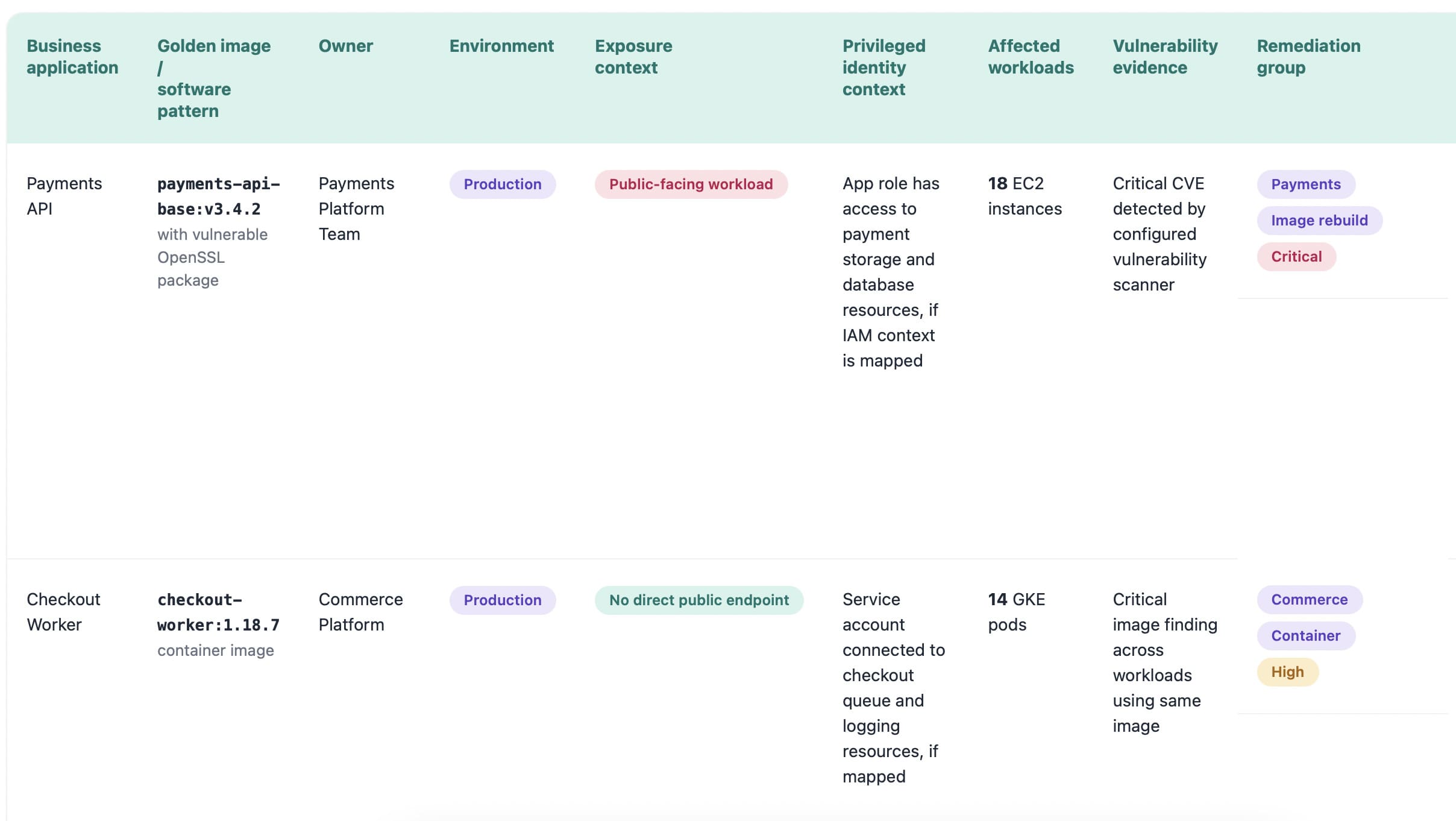
Cloudaware dashboard companies use in this case
That is the part security leaders care about. Less alert cleanup. More pattern removal.
5. Prompt injection becomes a cloud control-plane risk
Here is the uncomfortable part: prompt injection will not stay neatly inside app security.
Once AI assistants can read tickets, parse logs, inspect cloud resources, generate IaC, summarize runbooks, and call security tools, malicious instructions can hide almost anywhere. A Jira comment. A log entry. A support email. A GitHub issue. A document retrieved by the model.
Suddenly, the question is not “Can someone trick the chatbot?”
The better question is: Can poisoned operational data influence a cloud security action?
OWASP’s 2025 LLM risk list names prompt injection as a top LLM application risk, and AWS guidance maps it to agent scoping, threat modeling, prompt handling, and access control boundaries.
Security leaders should look for controls like:
- Untrusted input isolation
- Tool access limits
- Source logging for AI answers
- Human approval for risky actions
- Separation between evidence and instructions
- Protection against adversarial AI patterns
6. Explainable AI becomes the trust test
Black-box AI will age badly in cloud security.
A score that says “93” is cute. A security architect needs the why.
Was it the public IP? The admin role? The vulnerable package? The exposed storage bucket? The missing owner? The production tag? The failed CIS control? The 180-day MTTR on similar findings?
That is why explainable AI (XAI) becomes a procurement requirement.
A useful risk explanation card should show:
- Affected asset
- Exposure path
- Identity path
- Vulnerability context
- Business application
- Owner and department
- Recent change
- Policy impact
- Recommended action
The explanation matters more than the score because enterprise teams need to defend decisions to platform engineering, compliance, audit, and sometimes legal. “The model said so” will not pass that room.
One good test for buyers: ask the vendor to show why two similar findings received different priorities. If the system cannot explain the difference, it is not ready to guide remediation.
7. AI governance merges with cloud governance
By 2030, AI governance will not live in a policy PDF that nobody opens after procurement.
It will sit inside cloud governance, security architecture, compliance operations, vendor review, and change management.
- The NIST AI RMF gives organizations a structure for managing AI risk, including governance, mapping, measurement, and management.
- The EU AI Act uses a risk-based model with stricter requirements for high-risk AI systems, including human oversight and risk mitigation.
- ISO 42001 defines requirements for an AI management system, including responsible AI use, transparency, traceability, and continual improvement.
For cloud security leaders, that changes the buyer’s guide completely.
You are no longer buying “AI features.” You are buying an AI-enabled operating model.
The review should cover:
- What data can the AI access
- Which actions can it take
- Who approves high-risk changes
- How outputs are logged
- How models are monitored
- Where evidence is stored
- How exceptions expire
- Who owns governance
This is where the whole section lands: the future of AI in cloud security belongs to teams that can connect automation with ownership, policy, evidence, and control.
The rest will get a faster mess.
Top 5 challenges of implementing AI in cloud security
Data quality and the ‘garbage in, garbage out’ problem
This is the challenge most AI security decks skip because it sounds unsexy.
Data quality.
Not the model. Not the prompt. Not the GenAI interface.
The problem starts in the cloud estate itself. AWS calls one thing an account. Azure calls another a subscription. GCP has projects. Kubernetes adds clusters and namespaces. SaaS brings its own identity layer. On-prem still exists in the corner, quietly ruining your “cloud-native” diagram.
Now ask AI to prioritize risk across that.
A missing owner turns into a delayed ticket. A dev asset tagged like production burns analyst time. A production database without dependency mapping looks less critical than it is. An expired exception gets treated as accepted risk. Fragmented inventory makes the AI sound useful while its reasoning is already compromised.
The mitigation is practical: build a unified, normalized cloud CMDB before trusting AI with prioritization, triage, or remediation routing.
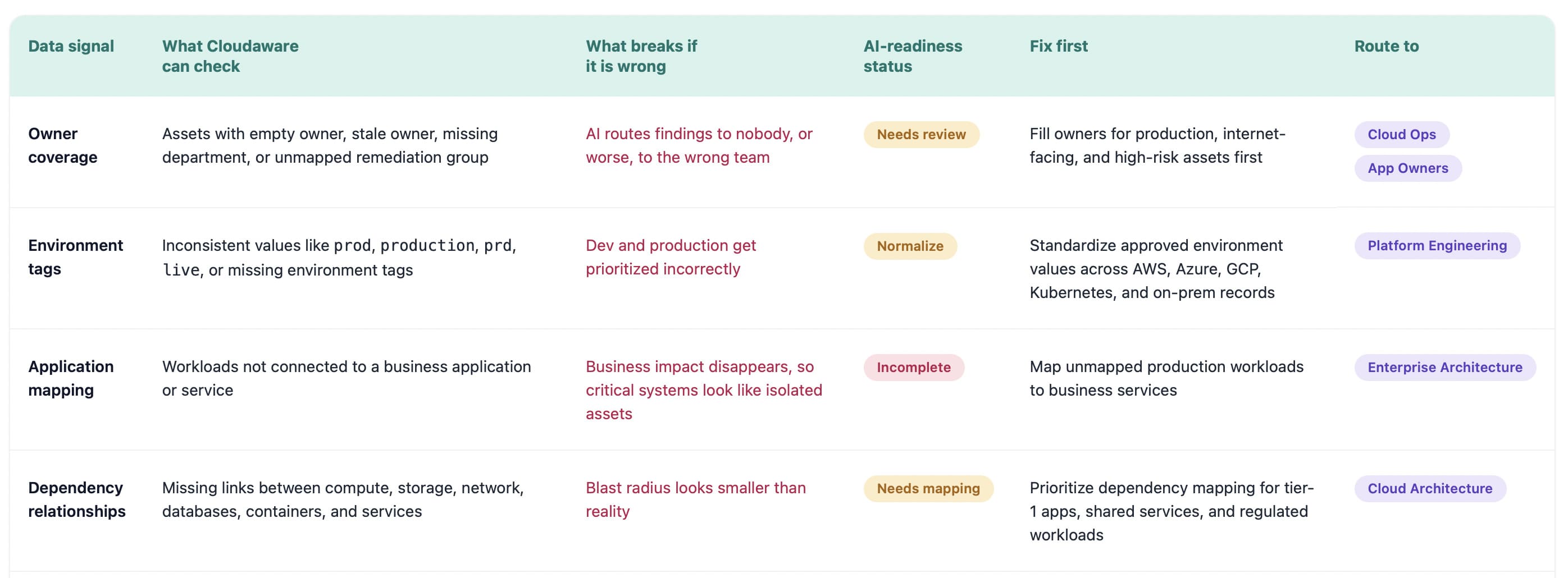
This dashboard is AI risk control.
Because the moment AI starts recommending actions, your cloud data becomes part of the security decision chain. Bad context does not stay in the CMDB. It leaks into prioritization, tickets, compliance evidence, and executive reporting.
That is why the first implementation challenge is not “how smart is the AI?”
It is much colder than that: Can your cloud estate tell the truth clearly enough for AI to use it?
Hallucinations, model drift, and false positives
An AI security tool can be wrong in three very different ways.
It can hallucinate a root cause that is not in the evidence.
It can suffer model drift when your cloud estate changes faster than the model’s assumptions.
It can create false positives that look reasonable enough to waste engineering time.
That last part is where enterprise teams get burned.
A model says a production workload is high risk because it sees public exposure and a suspicious permission path. The SOC opens a priority ticket. Platform engineering investigates. Two hours later, they learn the access path was already blocked by a compensating control, but the model did not factor that in.
One wrong call is annoying. Fifty wrong calls become trust collapse.
The mitigation is not “add a human reviewer” and call it done. That is too thin.
Use a control loop:
- Build a golden set of real findings. Include confirmed risks, false positives, accepted exceptions, harmless dev changes, toxic identity paths, and production misconfigurations.
- Test every model update against that set. A new model version should prove it still catches the important cases without creating a fresh pile of noise.
- Track drift by cloud context. False positives should be visible by provider, account, environment, asset type, policy, team, and remediation owner.
- Version AI recommendations. Every AI decision should carry model version, input sources, confidence score, supporting evidence, reviewer feedback, and outcome.
Shadow AI and ungoverned model usage
Shadow AI does not usually arrive as a formal multi-cloud architecture decision.
It arrives through a shortcut.
A support team connects an LLM tool to ticket history. Product analytics tests a model against customer exports. Engineering spins up a bot that reads deployment notes. Finance uploads billing data into a forecasting assistant. Everyone calls it a pilot, which is adorable until the pilot starts touching production-adjacent data.
Now, security has a different problem.
Not “are employees using AI?” They are. That question is already late.
The better question is: which AI tools can access cloud data, where does that data leave, and who owns the risk?
A practical discovery view should answer this in one pass:
- Which LLM tool or model endpoint is active?
- Which cloud account, SaaS app, bucket, repo, or log source does it touch?
- What data classification is involved?
- Is traffic leaving an approved region or vendor boundary?
- Who approved it?
- When does that approval expire?
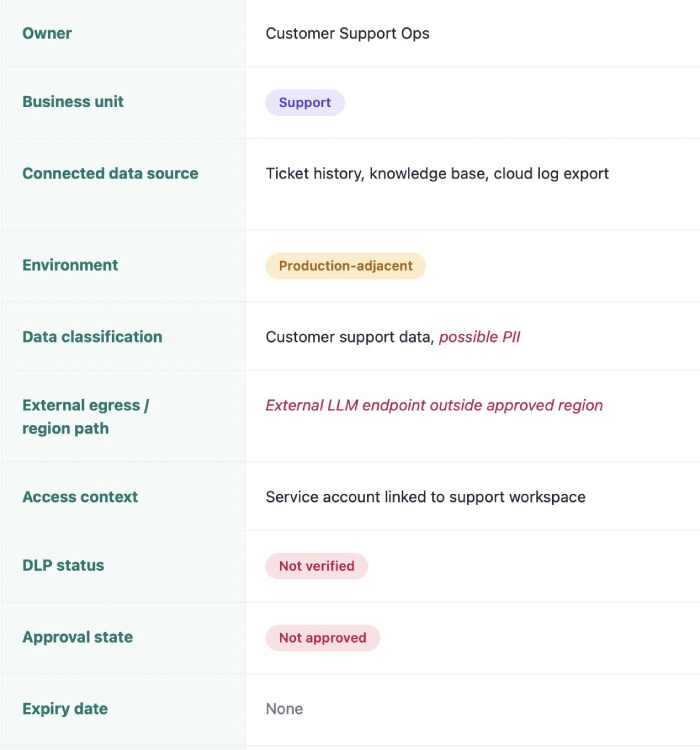
A security lead should be able to see that an unapproved model endpoint in a product workspace accessed customer exports, then route the finding to the right owner with policy context already attached.
No detective work. No “please confirm if your team uses AI” spreadsheet.
The mitigation is boring in the best possible way: inventory shadow AI, classify the data, review identity access, apply DLP, control egress, and make exceptions expire.
Ungoverned model usage becomes manageable when it stops hiding outside the asset graph.
Data sovereignty, residency, and privacy concerns
The privacy risk in AI security does not always look like customer data being copied into a chatbot.
Sometimes it is quieter.
A SOC analyst asks an AI assistant to summarize a suspicious authentication pattern. The prompt includes usernames, IPs, account IDs, hostnames, cloud regions, maybe a customer tenant name. A compliance owner asks for evidence around a failed control, and the answer pulls from tickets, logs, asset records, and remediation notes.
That data may not look like “production data.”
Legal may still care.
For enterprise teams, the buyer review should get painfully specific:
| What to verify | Why it matters |
|---|---|
| Model hosting region | Residency can fail at the model endpoint |
| Prompt retention | Prompts may contain personal or regulated data |
| Training use | Customer contracts may block model improvement use |
| Support access | Vendor access to prompts becomes a privacy control |
| Subprocessors | GDPR and customer agreements may require review |
| Output storage | AI summaries can become new audit evidence |
| Regional controls | EU, UK, healthcare, finance, and public-sector teams often need strict boundaries |
Integration with legacy CSPM, SIEM, and ITSM stacks
The graveyard of security tooling is full of products that “found risk” beautifully.
Then nothing happened.
That is the integration problem with AI in cloud security. The model can detect a risky cloud workload, summarize the issue, rank the blast radius, and recommend the next step. Great. But if that recommendation stays trapped in a separate console, it does not change the way the team works.
Enterprise teams do not remediate inside an AI demo.
They remediate inside ServiceNow, Jira, Splunk, existing CSPM queues, SIEM cases, Slack or Teams approvals, change workflows, and whatever internal process already survived procurement, audit, and platform engineering.
The integration trap looks like this:
- AI flags the issue.
- SOC copies the summary.
- Engineer asks for asset context.
- Compliance asks for evidence.
- Ticket status changes somewhere else.
- The AI view goes stale by Tuesday.
That is not automation. That is a prettier handoff problem.
For an RFP, I’d make this painfully specific.
Ask vendors to prove:
- Can the AI read from CSPM, SIEM, CMDB, cloud APIs, vulnerability scanners, and IAM sources?
- Can it write to ServiceNow, Jira, Splunk cases, Slack or Teams, and remediation queues?
- Can it sync status changes both ways?
- Can it preserve evidence after the ticket closes?
- Can it handle exceptions, suppressions, reopenings, and expired approvals?
- Can it show who approved the action and which model produced the recommendation?
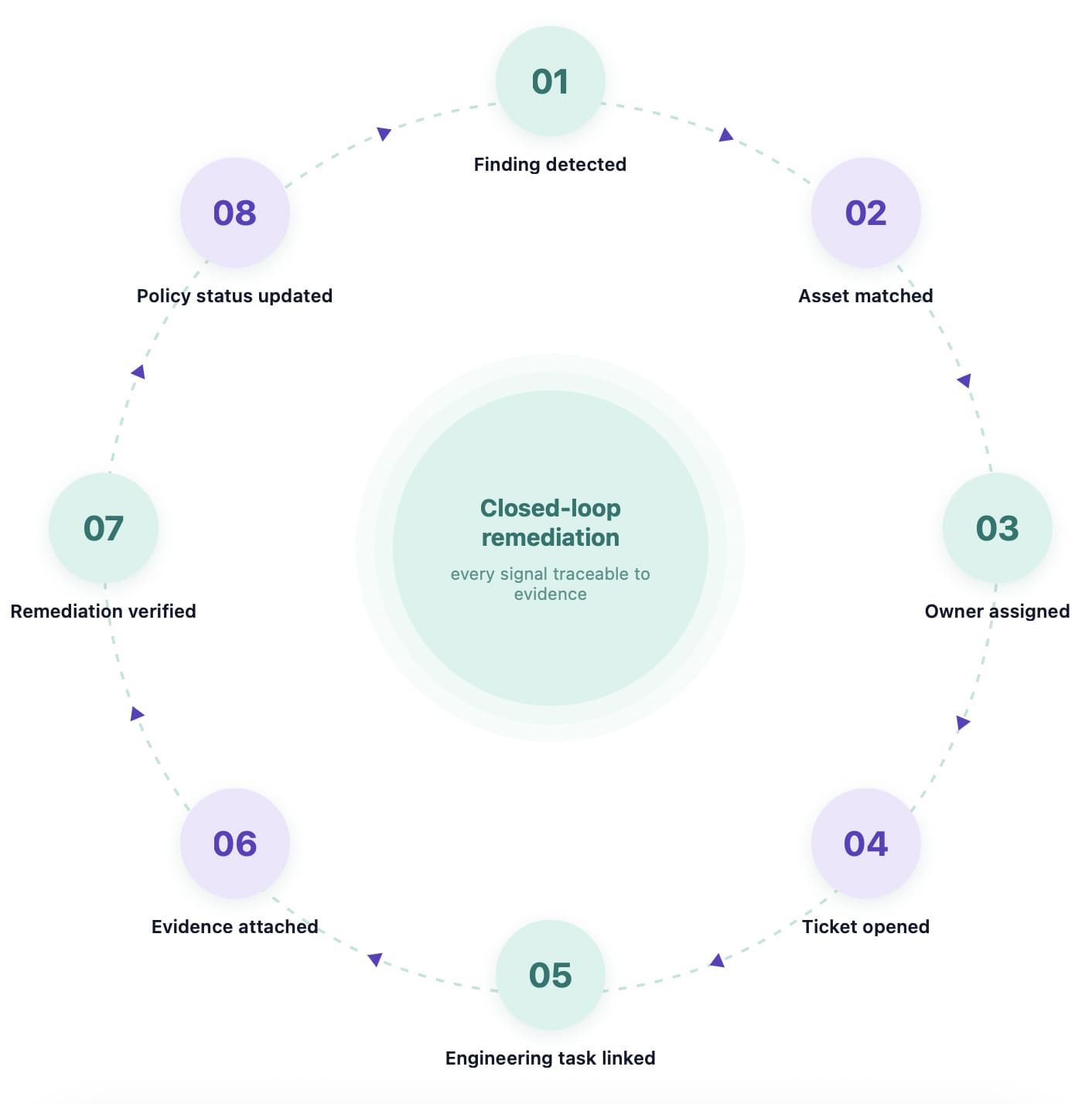
That is what enterprise cloud leaders should demand from AI security platforms. Because a tool that cannot move work through legacy CSPM, SIEM, and ITSM stacks does not reduce operational load. It just moves the bottleneck into a newer interface.
7 tips for choosing AI solutions for cloud security
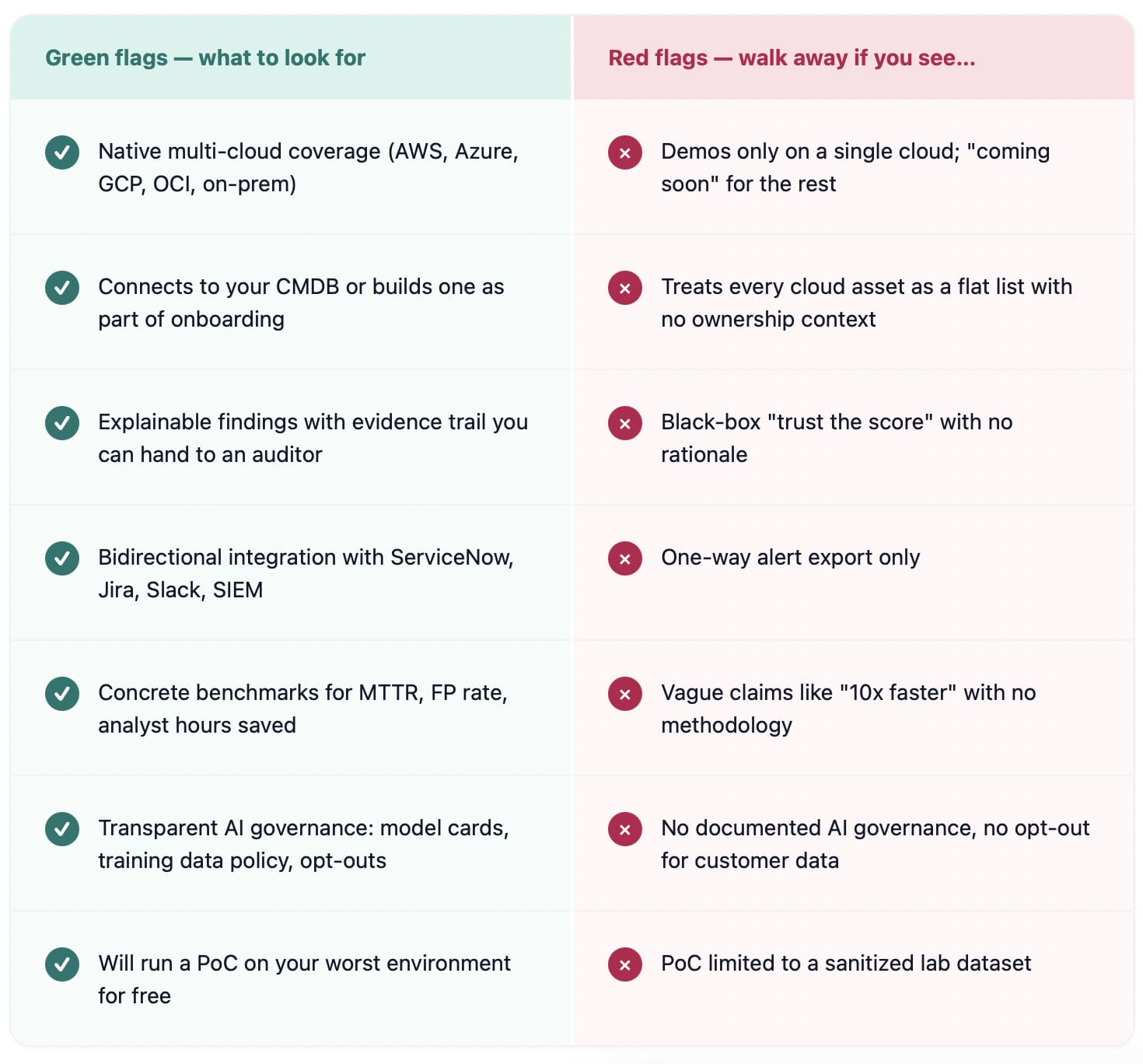
Tips for picking AI solutions for cloud security start before the vendor demo. Start with your own estate: the half-tagged AWS account, the Azure subscription nobody fully owns, the GCP project created for one experiment and somehow still running, the Kubernetes cluster with noisy findings, the on-prem system still tied to production.
That is where AI security tools either prove themselves or become another expensive console.
“Do not buy the AI that performs best in the demo. Buy the one that survives your worst cloud environment.”
That is the mindset behind serious vendor evaluation.
- Start with your data context. AI does not reason over “the cloud.” It reasons over the cloud data you give it. So before you audit vendors, audit the foundation: CMDB, asset inventory, ownership fields, environment tags, configuration history, identity relationships, exceptions, and application mapping.
A tool may say it can prioritize risk. Lovely. Can it tell the difference between a public production workload owned by Payments and a forgotten dev VM with no customer path? If not, the model is ranking partial context. - Demand native multi-cloud and hybrid coverage. A vendor being strong in your main cloud is not enough. That is coincidence, not coverage.
Test across multi-cloud reality: AWS, Azure, GCP, OCI if relevant, Kubernetes, SaaS, and on-prem. Ask the vendor to trace one business service across providers, identities, policies, vulnerabilities, owners, and tickets.
Weak answer? Expect weak prioritization later. - Insist on explainability and auditability. A risk score without evidence is just a number with confidence issues. Real explainability means the tool shows why the finding matters: exposure, identity path, vulnerability, sensitive data, failed control, recent change, business criticality, expired exception.
Auditability means the decision survives review. You need source data, model version, recommendation logic, reviewer action, ticket history, and final outcome.
“The score is 87” will not help when audit asks, “Why was this accepted risk for 42 days?” - Evaluate integration depth, not logos. Integration slides are cheap. Workflow is harder. Your AI solution should read from SIEM, ITSM, ticketing, CSPM, vulnerability scanners, IAM systems, cloud APIs, and the CMDB. More importantly, it should write back into the tools where work closes: ServiceNow, Jira, Splunk cases, Slack, Teams, remediation queues.
Look for bidirectional movement:
Finding detected → owner assigned → ticket created → engineering task linked → remediation verified → status synced back → evidence preserved.
CSV export is not integration. It is homework with branding. - Test the AI on your messiest data. The proof of concept should not run in the vendor’s clean demo tenant. Put it in the ugly place. Use the legacy account. The noisy subscription. The business unit with inconsistent tags. The environment where exceptions exist, ownership is patchy, and security findings overlap across CSPM, vulnerability scanners, and IAM. That is where you learn if the AI can separate real risk from operational dust.
A clean POC tells you the product can perform. A messy POC tells you whether your team can use it. - Look for transparent AI governance. AI governance should show up before legal asks for it. Ask for model cards, model versioning, training data policies, customer opt-outs, prompt retention rules, evaluation methodology, human review controls, and alignment with NIST AI RMF or ISO 42001.
One quiet red flag: the vendor can describe the feature, but not how it is tested.
Another: they cannot explain what happens when the model changes.
For cloud security leaders, the question is not only “does it use AI?” The better question is, “Can we govern this AI when it starts influencing security decisions?” - Measure ROI in operational terms. The cleanest ROI case is not “AI saves time.” Measure what changes in the work. Track MTTD, MTTR, alerts per analyst per shift, duplicate findings suppressed, false-positive rate, owner assignment accuracy, tickets auto-enriched, remediation cycle time, and audit evidence preparation hours.
Then calculate total cost of ownership honestly: licensing, integration work, CMDB cleanup, governance review, model monitoring, admin time, and training.
If AI reduces investigation drag, shortens remediation, and gives audit cleaner evidence, the math will show it.
If the math only works in the sales deck, keep the budget.
How Cloudaware helps you operationalize AI in cloud security
Cloudaware gives AI something it badly needs before it touches cloud security: clean operational context.
Security leaders, cloud architects, DevSecOps teams, platform engineers, and compliance teams use Cloudaware to bring cloud assets, owners, configurations, dependencies, vulnerabilities, policies, tickets, and evidence into one working model across AWS, Azure, GCP, VMware, Kubernetes, SaaS, and on-prem. That matters because AI cannot prioritize a risk, explain a blast radius, or route remediation safely if the asset story is incomplete.
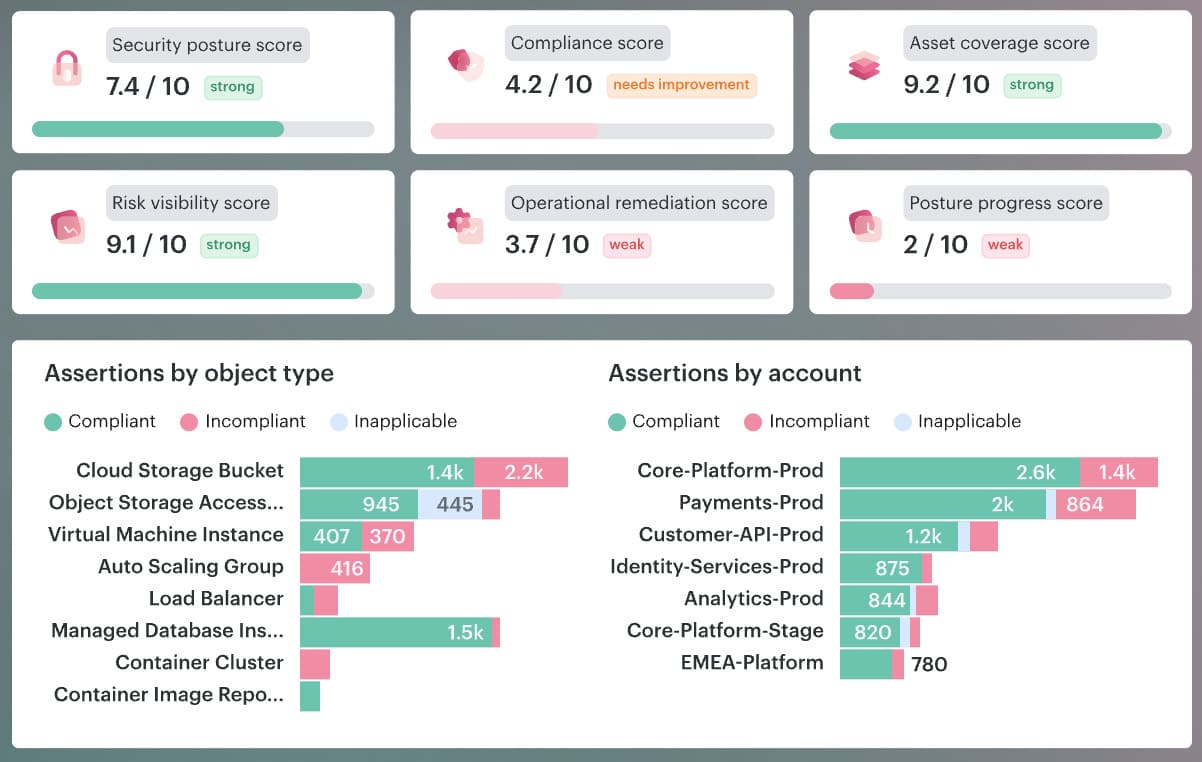
Cloudaware’s CMDB is built to auto-discover and normalize infrastructure data across multi-cloud and hybrid environments, then connect it to security and operational workflows.
For AI in cloud security, that foundation becomes the difference between “the model found something” and “the team knows what to do next.”
The useful layer looks like this:
Risk appears. Cloudaware ties it to the asset, environment, application, owner, policy, dependency, and remediation path. The AI layer can now summarize, prioritize, recommend, and route based on context your teams can verify.
Relevant Cloudaware capabilities for AI-ready security operations:
| Capability | Why it matters for AI in cloud security |
|---|---|
| CMDB | Gives AI a normalized asset graph across clouds, SaaS, VMware, Kubernetes, and on-prem, so findings are tied to real resources instead of floating alerts. |
| CSPM | Runs CMDB-aware posture checks across multi-cloud and on-prem environments, maps findings to apps and owners, and supports CIS, NIST, ISO, PCI, and HIPAA assessments. |
| Vulnerability Management | Pulls vulnerability findings into CMDB context, prioritizes by exposure and business impact, and supports remediation workflows through ServiceNow, Jira, and PagerDuty. |
| Vulnerability Scanning | Supports agent-based, IP-based, URL, Docker image, compliance benchmark, malware, patch audit, and CVE-specific scanning, with vulnerability data available directly in CMDB. |
| Intrusion Detection | Uses CMDB context to prioritize suspicious activity, reduce alert noise, support custom detection rules, and provide file integrity and log inspection for audit needs. |
| Cloud Management Workflows | Turns findings into action with low-code workflows for governance, incident handling, cybersecurity, and automation across growing cloud estates. |
| Operational Analytics | Lets teams combine CMDB context with dashboards and cross-referenced datasets, so security, compliance, and operations can review the same evidence instead of arguing from separate tools. |
This is the practical version of operationalizing AI in cloud security. Not handing an LLM the keys. Not letting an opaque score decide which production workload gets touched first.
Start with visibility. Add ownership. Keep the evidence. Route the work. Measure the outcome.
Then AI has a real job: shorten investigation, explain risk, reduce duplicate triage, flag drift, and help teams act before cloud noise becomes security debt.