


According to Gartner, through 2025, 99% of cloud security failures will be the customer’s fault. In AWS environments, these incidents rarely come from advanced exploits. They come from things that were left exposed, misconfigured, or simply never tracked.
AWS gives you a secure foundation, but security in cloud computing is not something you “set and forget.” It is an ongoing process of knowing what exists, controlling access, and verifying that configurations still hold as your environment changes. This is where most cloud security best practices break down in real systems.
If you can’t account for every resource across your accounts and regions, you are not securing your environment.
Key insights
- AWS cloud security best practices are a set of controls that help organizations secure access, protect data, monitor activity, and enforce policies across AWS environments. In practice, they focus on visibility, least-privilege access, centralized logging, and continuous validation of configurations.
- Most teams approach AWS security as a list of configurations: enable encryption, tighten IAM, restrict network access. That works in a static environment, but it does not work in AWS, where resources change constantly and controls drift over time.
- Most incidents come from access and misconfiguration. Teams prioritize IAM, root account protection, and access boundaries because overly permissive access is still the most common failure point.
- Visibility is a prerequisite, not an advanced capability. Without a reliable cloud asset inventory and ownership context, other cloud security controls operate on incomplete information.
- Logging and detection provide immediate operational value. Services like CloudTrail and GuardDuty are consistently used because they surface real issues such as compromised credentials and unusual API activity.
- Preventive controls are more effective than reactive ones. Guardrails like AWS Organizations and service control policies reduce risk by blocking unsafe actions before they happen.
- Not all best practices are equally adopted. Teams focus first on access, visibility, and detection, while deeper compliance mapping and advanced tools are often implemented later or treated as optional.
- Looking for cloud provider-specific guidance? Start with our Google Cloud security best practices and Azure cloud security best practices guides.
Why AWS security fails in real environments
Most AWS security issues are caused by how the controls are applied and maintained over time. In theory, cloud security is well understood and well documented. In practice, environments grow faster than teams can track, configurations drift, and ownership becomes unclear.
This gap between design and day-to-day operation is where most failures in AWS security occur.
Misconfiguration is still the default failure mode
According to the Cloud Security Alliance, misconfiguration remains one of the leading causes of cloud security incidents. This is because configurations do not stay correct as environments change.
The same patterns appear across most environments:
- An S3 bucket created for internal use becomes publicly accessible
- A security group is opened for troubleshooting and never restricted again
- An IAM role accumulates permissions over time and is reused across services
They are configuration decisions that were never revisited after the initial setup.
The shared responsibility model breaks down in practice
The shared responsibility model clearly defines that AWS secures the infrastructure, while customers are responsible for everything deployed on top of it.
The main challenge is usually operationalizing the model itself. Teams may assume that because a service is managed, it is secure by default, but that assumption breaks down as soon as customer-owned configurations enter the picture.
Example: If an EC2 instance is left unpatched, if an IAM policy grants broader access than required, or if data is made publicly accessible, the risk sits entirely on the customer side of the model.
The issue is not understanding the model, but consistently applying it across a changing environment.
Lack of visibility across your cloud estate
Most teams do struggle with knowing what actually exists in their environment at any given time. Without a complete cloud asset inventory, AWS cloud security becomes an exercise in assumptions rather than control.
As environments scale, this lack of visibility shows up as orphaned resources, unused roles, and temporary environments that were never cleaned up. Security tools can surface findings, but without context, such as ownership, relationships, and purpose, those findings are difficult to act on.
As Igor K., Cloudaware Engineer, puts it: “Every incident tends to start the same way: a resource no one actively tracked, running in an account that was not part of daily operational visibility. Until visibility becomes continuous, other cloud security controls operate on incomplete information."
The AWS cloud security model
Most teams treat AWS security as a collection of independent controls, but in practice, it behaves more like a system where each layer depends on the previous one. You can implement IAM, encryption, and logging correctly in isolation and still miss risk if those controls are not connected through a consistent cloud security framework.
The model that tends to hold up in real environments is simple, but it is enforced continuously rather than configured once.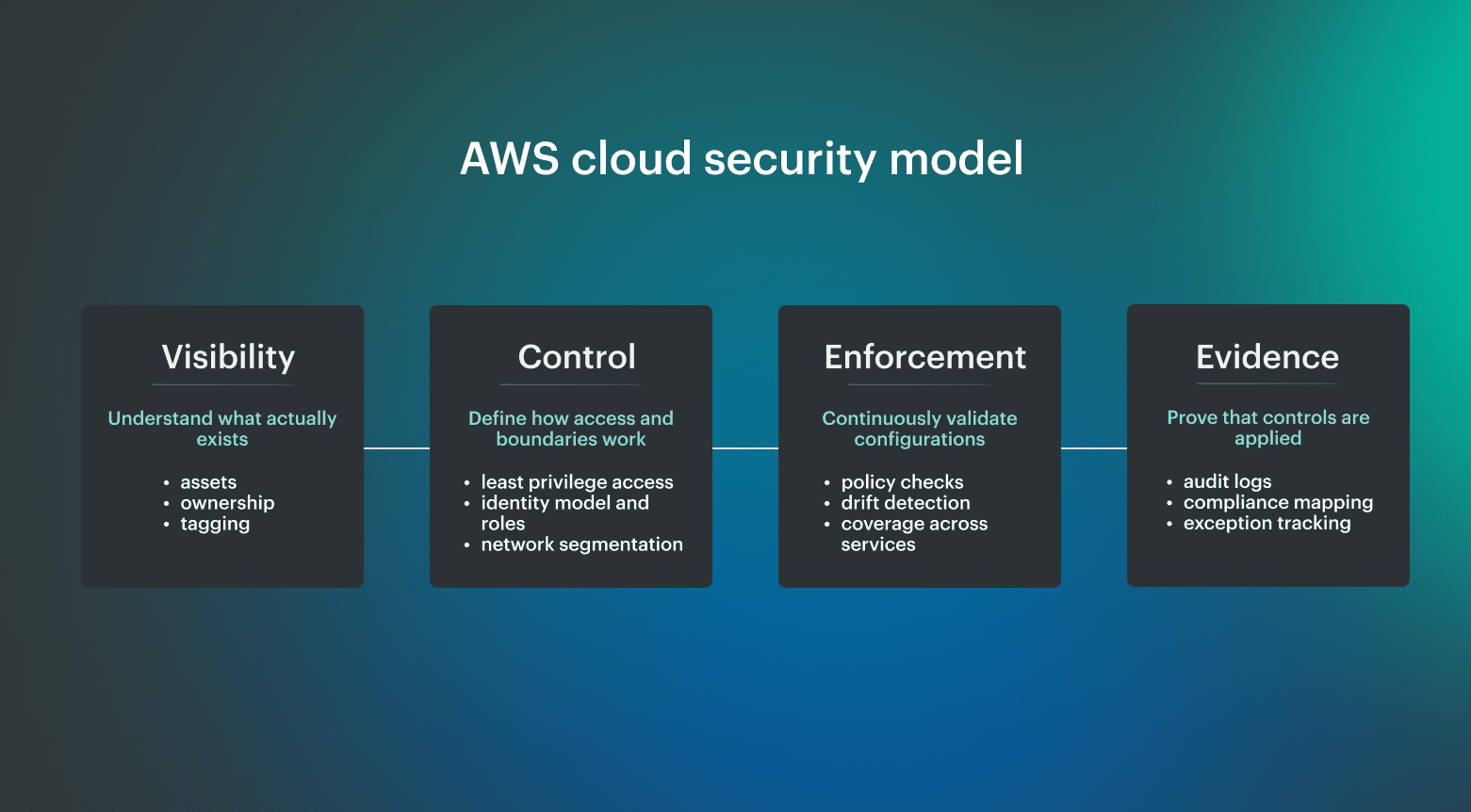 If you cannot map resources, you cannot control access. If you cannot enforce controls, you cannot prove compliance. That sequence defines how cloud security architecture actually works at scale.
- Visibility starts with cloud asset inventory. Every control depends on knowing what exists across accounts and regions. This includes not only listing resources, but understanding relationships between them, such as which roles access which services and which data stores are connected to which compute layers. Without a continuously updated cloud asset inventory, everything else operates on partial information.
- Control defines AWS security boundaries. Once resources are known, access and configuration boundaries can be defined. This is where IAM policies, network segmentation, and encryption standards come into play. Controls only make sense when they are applied to a complete set of resources rather than a subset that happens to be visible at the time.
- Enforcement keeps cloud security controls active. Controls need to be continuously evaluated against real configurations. This includes detecting drift, validating policy compliance, and triggering remediation when something moves out of the expected state. Enforcement is what turns defined policies into an actual cloud security posture.
- Evidence proves cloud security best practices are working. At scale, security is not only about applying controls, but proving that they are consistently applied. This is where logging, monitoring, and compliance mapping come together to provide continuous evidence that controls are in place and functioning as intended.
9 AWS cloud security best practices that actually pay off
These AWS cloud security best practices are based on two sources: official guidance like the AWS Well-Architected Framework and CIS AWS Foundations Benchmark, and what engineers consistently prioritize when running production workloads.
Frameworks define what secure systems should look like, but real environments show which controls actually prevent incidents and which ones are expensive to maintain without a clear return.
The practices below reflect that overlap, where industry standards and operator experience align.
Enforce least-privilege IAM and eliminate long-lived access
Access control is consistently treated as non-negotiable because most real incidents involve credentials or permissions. In practice, the priority is not just defining policies, but removing unnecessary access and avoiding long-lived credentials entirely.
This typically includes:
- Using roles instead of IAM users wherever possible
- Removing wildcard permissions and scoping access to actions and resources
- Enforcing MFA, especially for privileged access
- Avoiding shared credentials and static keys
Use IAM Identity Center or SSO as the default access model
Multiple practitioners highlighted that managing individual IAM users does not scale and introduces risk. Centralized identity through SSO or IAM Identity Center simplifies access control and reduces the chance of unmanaged credentials.
In practice, this also enables:
- Consistent MFA enforcement
- Easier role assignment
- Clearer audit trails
This is less about adding a feature and more about standardizing how access works across the environment.
Protect and isolate the root account
Root access remains one of the highest-risk areas in any AWS environment. The common pattern is not frequent misuse, but a lack of control over how and when it is accessed.
Effective approaches include:
- Enabling MFA and separating control between individuals
- Avoiding any routine use of the root account
- Monitoring all root activity
This is basic, but repeatedly reinforced as a control that should never be left weak.
Build and maintain a cloud asset inventory you can trust
Inventory matters most when it reflects the current state of the environment, not a snapshot. Practitioners consistently rely on regular inventory checks to understand exposure, especially for network access and public resources.
This includes:
- Identifying resources exposed to the internet
- Tracking ownership of workloads
- Reviewing unused or orphaned infrastructure
Centralize logging and enable real-time threat detection
Logging and detection are repeatedly cited as the controls that catch real incidents. Tools like CloudTrail and GuardDuty are not just for compliance, but for identifying compromised keys, unusual API activity, and unexpected behavior.
- Enabling CloudTrail across all accounts
- Aggregating logs into a central location
- Using detection tools that generate actionable alerts
Use AWS Organizations and SCPs to enforce guardrails
As environments scale, account-level controls become insufficient. Organizations and service control policies are consistently mentioned as high-impact controls because they prevent risky actions before they happen.
Typical use cases include:
- Restricting high-risk services or regions
- Enforcing baseline security requirements
- Limiting administrative actions
Apply secure defaults for storage and data access
Many incidents still come from data exposure rather than system compromise. Secure defaults reduce that risk without requiring constant intervention.
Common baseline controls:
- Block public access for S3 by default
- Enable encryption for EBS and S3
- Restrict access paths to storage resources
These are simple to implement but critical to get right early.
Design network exposure deliberately, not reactively
Network controls are often adjusted in response to issues, which leads to overly permissive configurations. Practitioners consistently highlight the need to reduce unnecessary exposure.
This includes:
- Minimizing public endpoints
- Using private subnets where possible
- Controlling ingress through defined entry points, such as load balancers or WAF
Store and manage secrets outside of application code
Secrets management appeared as a practical control that prevents common mistakes, especially in development and deployment workflows.
In practice:
- Avoid storing secrets in environment variables or code
- Use managed services such as parameter stores or secrets managers
- Rotate secrets regularly
This reduces the risk of credential leakage and improves control over access.
Read also: Cloud Security Best Practices. Strategy, Checklist, Monitoring, and Automation
Which AWS security practices are overrated or fail in practice
Not every recommended practice delivers equal value in real environments. Some controls are difficult to maintain, provide limited operational benefit, or are prioritized differently depending on workload. Understanding these trade-offs is as important as implementing best practices.
Compliance frameworks are necessary, but rarely operational drivers
Frameworks like CIS and NIST define what compliant configurations should look like, but practitioners often treat them as a reporting requirement rather than a security mechanism.
Common feedback includes:
- High maintenance overhead
- Difficulty keeping controls aligned with changes
- Limited impact on real-time risk reduction
In practice, compliance becomes effective only when tied to continuous monitoring and drift detection, rather than periodic validation.
Advanced security services often become shelfware
Many AWS security services provide deep analysis, but not all are widely adopted in production environments. Tools like Macie or Inspector can be valuable, but are often seen as optional unless there is a specific need.
The common pattern is:
- Enabled initially
- Not integrated into workflows
- Eventually ignored
This does not mean they lack value, but their impact depends heavily on how they are used.
CI/CD and runtime security are important, but not top-of-mind for most teams
While DevSecOps practices emphasize securing pipelines and runtime environments, these controls are not always prioritized by operators focused on infrastructure security.
This is often because:
- Teams focus first on access control and visibility
- Pipeline security is handled separately by development teams
- Runtime monitoring is partially covered by detection tools
These practices are important, but they are usually implemented after foundational controls are in place.
Read also: 10 Azure Cloud Security Best Practices for 2026
More tools do not automatically improve cloud security
Adding tools without improving visibility or ownership often increases complexity without reducing risk. Practitioners consistently prioritize fewer, well-integrated controls over a large number of disconnected tools.
The takeaway is simple: effective cloud security depends more on consistency and visibility than on the number of tools in use.
How to implement AWS cloud security best practices at scale
Everything looks fine in one account. It usually stops working somewhere between account 10 and 20, when teams start duplicating roles, exceptions, logging rules, and network patterns without a shared operating model. At that point, cloud security best practices AWS need to move from account-level configuration to organization-level governance.
AWS recommends organizing workloads into separate accounts grouped by function, compliance requirements, or common controls, because AWS accounts act as a hard boundary and help isolate production from development and test environments.
That separation is the baseline for scalable AWS cloud security, but it only works if governance, visibility, and security tooling are designed centrally.
1. Standardize governance with AWS Organizations
AWS Organizations should define how accounts are created, grouped, restricted, and monitored. In practice, it usually means grouping accounts into organizational units, applying service control policies, and keeping workloads out of the management account. A workable baseline usually includes:
- Separate accounts for production, non-production, security, logging, and shared services
- SCPs that restrict high-risk regions, services, and administrative actions
- Centralized identity through IAM Identity Center rather than standalone users
- Clear ownership for every account
Where this typically breaks is ownership. Teams can enforce SCPs, but still struggle to answer who is responsible for a specific resource or exception.
Cloudaware adds a missing layer by mapping every account and resource to an owner and business context. Instead of applying policies blindly, teams can enforce guardrails with awareness of who will be affected and route exceptions to the right team.
2. Centralize visibility across accounts and regions
Multi-account security fails when every account becomes its own small security program. Logs, findings, configuration changes, and resource inventory need to roll up into a central view, otherwise teams spend more time reconciling data than reducing risk.
The AWS Security Reference Architecture is built around this same idea. It describes how services like Security Hub, GuardDuty, CloudTrail, and AWS Config should be aggregated centrally across accounts and regions.
Centralized visibility should answer questions like:
- What is publicly exposed right now across all accounts
- Which resources changed in the last 24 hours
- Which findings map to production systems vs test environments
- Who owns the resource behind each alert
AWS-native tools provide the raw data, but not always the context. Cloudaware correlates security and configuration data into a single asset model, so a finding is no longer just an alert, but a resource with ownership, environment, and relationships that teams can act on.
For example, instead of seeing “public S3 bucket detected,” teams see:
- Which account does it belong to
- Whether it is production or test
- Which application uses it
- Who owns it
3. Define and enforce guardrails as code
At scale, manual enforcement does not work. Guardrails need to be defined once and applied automatically across accounts.
This typically includes:
- Service control policies to restrict actions at the account level
- AWS Config rules to enforce configuration standards
- Automated remediation for common misconfigurations
Your team can combine AWS-native controls with centralized platforms like Cloudaware to ensure that violations are not only detected, but also assigned, tracked, and resolved.
4. Connect security findings to ownership and workflows
Detection without ownership creates a backlog. At scale, every finding needs to map to a responsible team and a defined workflow.
This means:
- Linking resources to owners and environments
- Routing findings to the correct team automatically
- Tracking remediation as part of normal operations
With Cloudaware, security findings are enriched with ownership and context and routed into systems like Jira or ServiceNow, so teams can remediate issues directly within their existing workflows.
5. Continuously validate that controls still hold
The final step is not implementation, but validation. Controls that are correct today may not be correct tomorrow as environments change.
At scale, teams need to continuously answer:
- Does this resource still meet policy requirements
- Has access changed since the last review
- Are exceptions still valid
This is where AWS cloud security moves from configuration to continuous operation. Instead of relying on periodic audits, teams monitor drift in real time and validate that controls remain effective.
Read also: Multi-Cloud Security Architecture. Reference Model and Best Practices
AWS cloud security best practices checklist
If you need a quick way to validate your baseline, this checklist captures the AWS cloud security best practices that consistently show up as high-impact in real environments.
These are the controls teams treat as non-negotiable because they prevent the majority of common failures:
- Maintain a continuously updated cloud asset inventory across all AWS accounts
- Enforce least-privilege access using IAM roles and remove long-lived credentials
- Use IAM Identity Center (SSO) with MFA for all privileged access
- Enable centralized logging with CloudTrail and real-time detection with GuardDuty
- Apply AWS Organizations and SCPs to enforce account-level guardrails
- Secure storage by default with encryption and blocked public access
- Control network exposure using private subnets, security groups, and defined entry points
Why AWS-native security tools don’t scale in multi-account environments
This problem shows up clearly in practitioner discussions around AWS multi-account security. Engineers generally agree that separate accounts help reduce blast radius. But they also point out the operational cost: landing zones are complex, account structures can become cumbersome, and teams have to find a middle ground between what is theoretically optimal and what is manageable day to day.
AWS-native tools are strong, but they are just service-level building blocks. At a small scale, this is manageable because one team can still understand the environment by memory.
On a larger scale, the same approach creates fragmentation:
- Findings without owners
- Alerts without prioritization
- Compliance data that requires manual consolidation
- Account structures that are secure on paper but hard to operate
- Guardrails that exist centrally but are difficult to connect to workload context
CIS treats AWS security as a configuration baseline, and AWS integrates CIS checks into Security Hub, but those controls still need to be implemented, assessed, and maintained. The issue is that they provide the pieces, while the operating model still has to connect accounts, controls, findings, ownership, and remediation into one workflow.
Read also: How to Conduct a Cloud Security Assessment (A Step-by-Step Guide)
How Cloudaware operationalizes AWS cloud security best practices
AWS tools give you data. With Cloudaware, that data becomes a system.
Cloudaware stands on top of AWS-native services and connects their outputs into a single operational model. Instead of treating inventory, security findings, and compliance data as separate streams, it links them to the same set of assets and ownership context.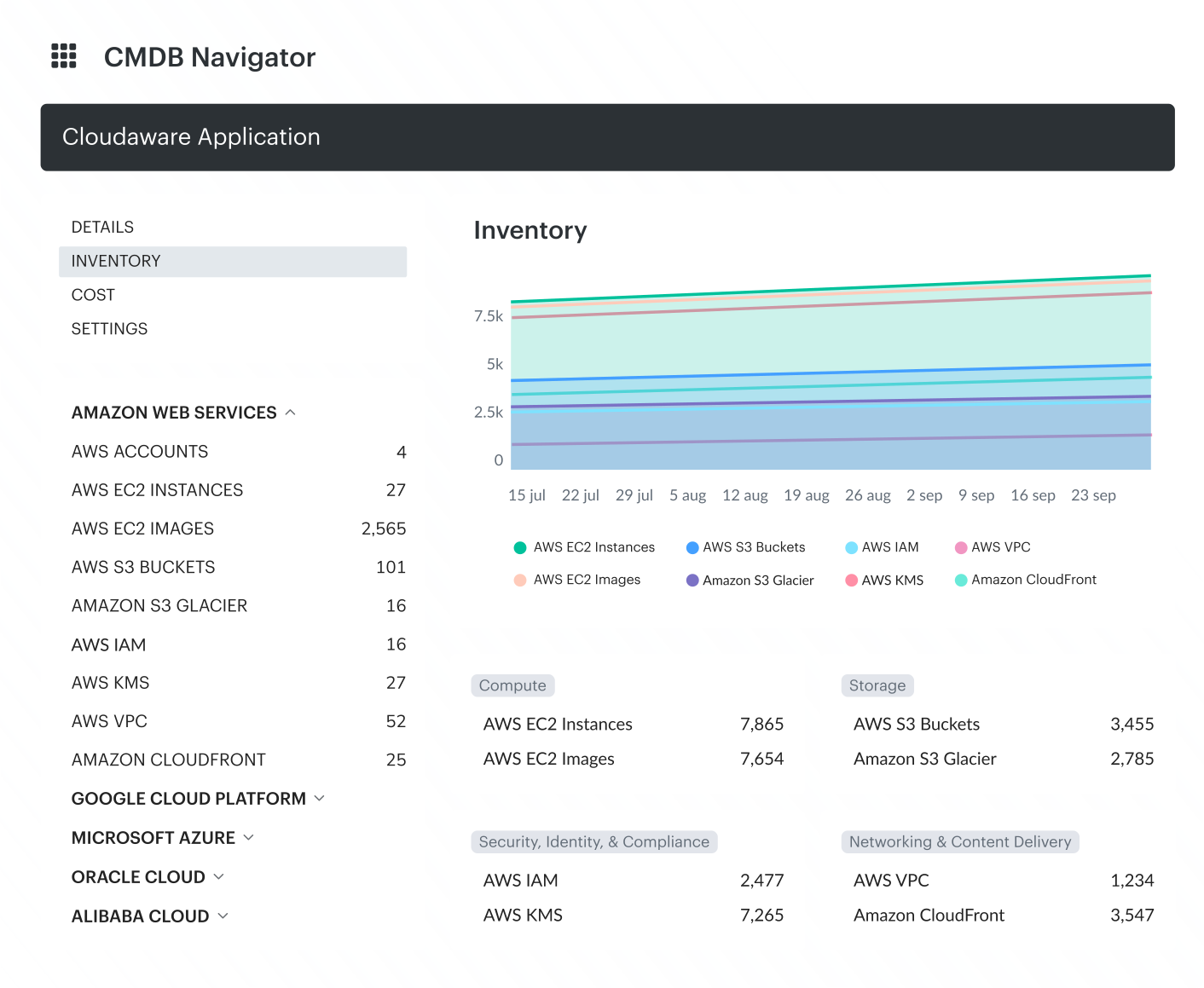 Key capabilities:
- Asset visibility with ownership and relationships. Cloudaware maintains a unified inventory across AWS, Azure, GCP, VMware, SaaS, and on-prem environments, then links assets to owners, applications, environments, and related resources.
- CMDB-aware compliance policies. Cloudaware evaluates security and compliance policies against CMDB context, with ready-made policies and benchmarks plus support for custom controls.
- Framework-based compliance visibility. Teams can assess posture against frameworks such as CIS, NIST, PCI DSS, HIPAA, ISO, and other standards without manually consolidating results across accounts.
- Ownership-based remediation. Findings include owner, application, environment, and severity context, so issues can be routed to the right team through Jira, ServiceNow, email, or related workflows.
- Vulnerability management with context. Cloudaware integrates scanner data into the CMDB, adds asset-level context, and helps teams prioritize vulnerabilities by exposure, business impact, severity, and ownership.
- Centralized logging with CMDB context. Cloudaware helps aggregate security-relevant logs across environments and enrich them with asset, owner, and relationship data.
- Unified multi-cloud posture. The same inventory, policy, compliance, and remediation model can extend across AWS, Azure, GCP, VMware, SaaS, and on-prem infrastructure.