


Most cloud security teams do not have a detection problem anymore. They have a decision problem. Findings arrive from CSPM, CI/CD, identity, runtime, vulnerability, and compliance tools, but the hard part is deciding what can be routed, what can be blocked, what needs approval, and what has to be verified after deployment.
Manual handling no longer matches cloud speed. Sysdig’s 2026 Cloud-Native Security and Usage Report says more than 70% of security teams use behavior-based detections across 91% of cloud environments. Datadog’s 2026 DevSecOps research also shows why raw severity is not enough: only 18% of vulnerabilities labeled critical remain critical after runtime context is applied.
This guide explains how to structure cloud security automation so findings become owned work, controls get verified after deployment, and audit evidence survives the full path from detection to remediation.
Key insights
- Cloud security automation is broader than auto-remediation. Most teams should automate classification, routing, exception review, validation, and evidence before they let automation change production resources.
- Context decides whether automation is safe. A finding needs owner, environment, exposure, policy, exception status, and blast-radius context before it becomes an action.
- Start with high-confidence controls. Public exposure, missing encryption, disabled logging, missing backup, expired certificates, and unmanaged agents create clearer automation paths than complex IAM or network changes.
- Multi-cloud automation needs shared control intent. AWS SCPs, Azure Policy, GCP Org Policy, and Kubernetes admission controls enforce different layers, but the control question should stay stable.
- Compliance automation works only when evidence follows the fix. A closed ticket is not enough. The record should show the resource, owner, policy, action, exception state, and verification result.
What is cloud security automation?
Cloud security automation is a part of cloud operations that turns security signals into controlled action. A CSPM finding, an IaC scanning result, a policy-as-code failure, or a runtime drift alert should not stop at detection. It should match the signal to policy, carry owner and environment context, route the issue to the right queue, create or update a ticket, and record what proves the resource was fixed.
The work usually spans two points in the lifecycle:
- Before deployment, automation checks code, templates, images, secrets, and policy rules in the CI/CD path.
- After deployment, it checks whether the running resource still matches the expected control state.
NIST SP 800-204C describes DevSecOps pipelines as workflows that move code through build, test, package, deployment, and operations with automated tools and feedback mechanisms. That model fits cloud security because the control has to survive both the pipeline and the runtime environment.
Cloud security automation vs. cloud automation
Cloud automation makes infrastructure operations repeatable. It provisions resources, scales services, applies configuration, runs backups, and moves changes through deployment workflows.
Cloud security automation puts control around those operations. It checks whether resources meet policy, blocks unsafe changes, routes findings, tracks exceptions, verifies remediation, and preserves audit evidence.
| Area | Cloud automation | Cloud security automation |
|---|---|---|
| Main purpose | Make cloud operations repeatable | Make security controls enforceable |
| Common tasks | Provisioning, scaling, backups, configuration, deployment | Policy checks, guardrails, finding routing, exception tracking, remediation verification |
| Primary inputs | Infrastructure templates, deployment workflows, resource settings | CSPM findings, IaC scanning results, policy-as-code checks, runtime drift alerts |
| Enforcement point | Cloud APIs, CI/CD pipelines, orchestration tools | CI/CD gates, SCPs, Azure Policy, GCP Org Policy, admission controls, ticket workflows |
| Ownership requirement | Resource owner or platform owner | Asset owner, application owner, environment owner, control owner |
| Audit output | Change record or deployment log | Control status, exception record, remediation evidence, verification result |
| Failure mode | A resource is created, changed, or scaled incorrectly | A risky state is detected but not owned, verified, or closed |
Read also: Zero Trust Cloud Security. A Practical Multi-Cloud Architecture and Approach
Why cloud security automation matters now
Manual review breaks when cloud resources change through CI/CD pipelines, identity permissions drift, Kubernetes workloads rotate, and exceptions stay open past their original risk decision.
The question is not only why is automation important in cloud security? The harder question is which security decisions can be trusted without a human reading every finding by hand?
1. Misconfiguration still creates real breach paths, but the operating model has changed.
An AWS account may use IAM roles, SCPs, and Security Hub findings. An Azure subscription may use Entra ID, Azure Policy, and Defender signals. GCP may use IAM, Organization Policy, and Security Command Center.
Kubernetes adds service accounts, admission controls, workload runtime state, and short-lived pods. The shared responsibility model does not assign an owner to a finding. Your workflow has to do that.
2. Runtime verification is the part that teams usually underbuild.
A CI/CD gate can block a bad Terraform plan, but it does not prove the resource stayed compliant after emergency access, manual console edits, policy drift, or a temporary exception. Automation has to keep checking the deployed state and route the result to the asset owner, not to a generic security queue.
The 2026 cloud-native data shows why manual loops are losing ground. More than 70% of organizations use behavior-based detections across 91% of environments, and only 27% have automated responses implemented. That gap says the problem is not alert generation. It is trust, blast radius, and ownership.
Read also: Cloud Security Architecture. A Comprehensive Guide to Protecting Your Cloud Infrastructure
Cloud security automation framework
A cloud security automation framework has to show how a signal becomes an enforced decision. The tools may include CSPM, CNAPP, CWPP, CIEM, KSPM, drift detection, runtime guardrails, CMDB context, and evidence workflows. The framework matters because those tools do not share ownership, policy state, or remediation proof by default.
The tools may vary by organization, but the sequence should not. The framework below uses 5 layers.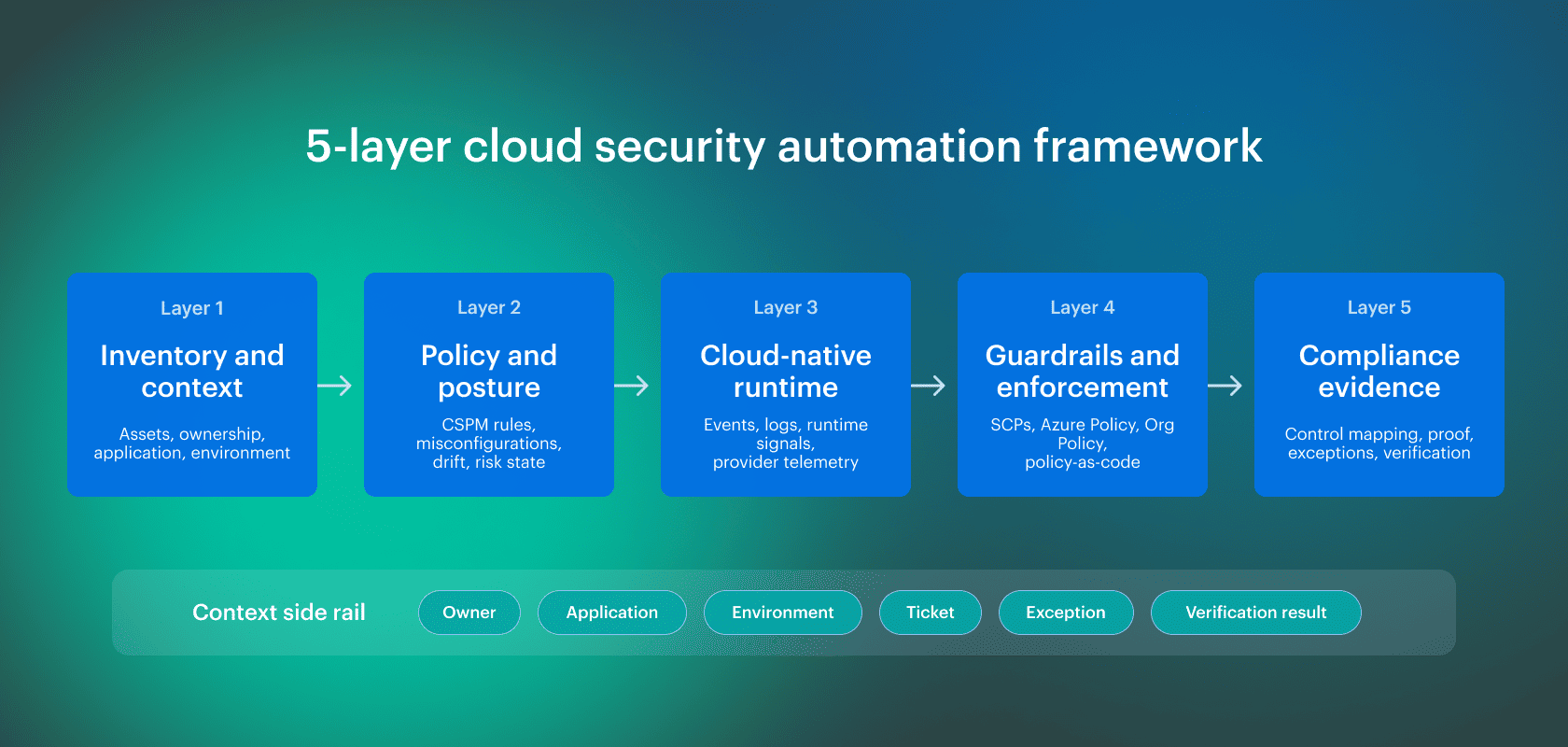 Each layer answers one operational question: what exists, what policy applies, what changed, what action is allowed, and what evidence proves the control held.
Inventory and context layer
Automation starts with asset context, not scanners. A finding needs to map to an AWS account, Azure subscription, GCP project, Kubernetes cluster, configuration item, owner, application, and environment. Without that mapping, the workflow cannot tell whether a resource belongs to production, a regulated workload, a shared platform service, or an abandoned test deployment.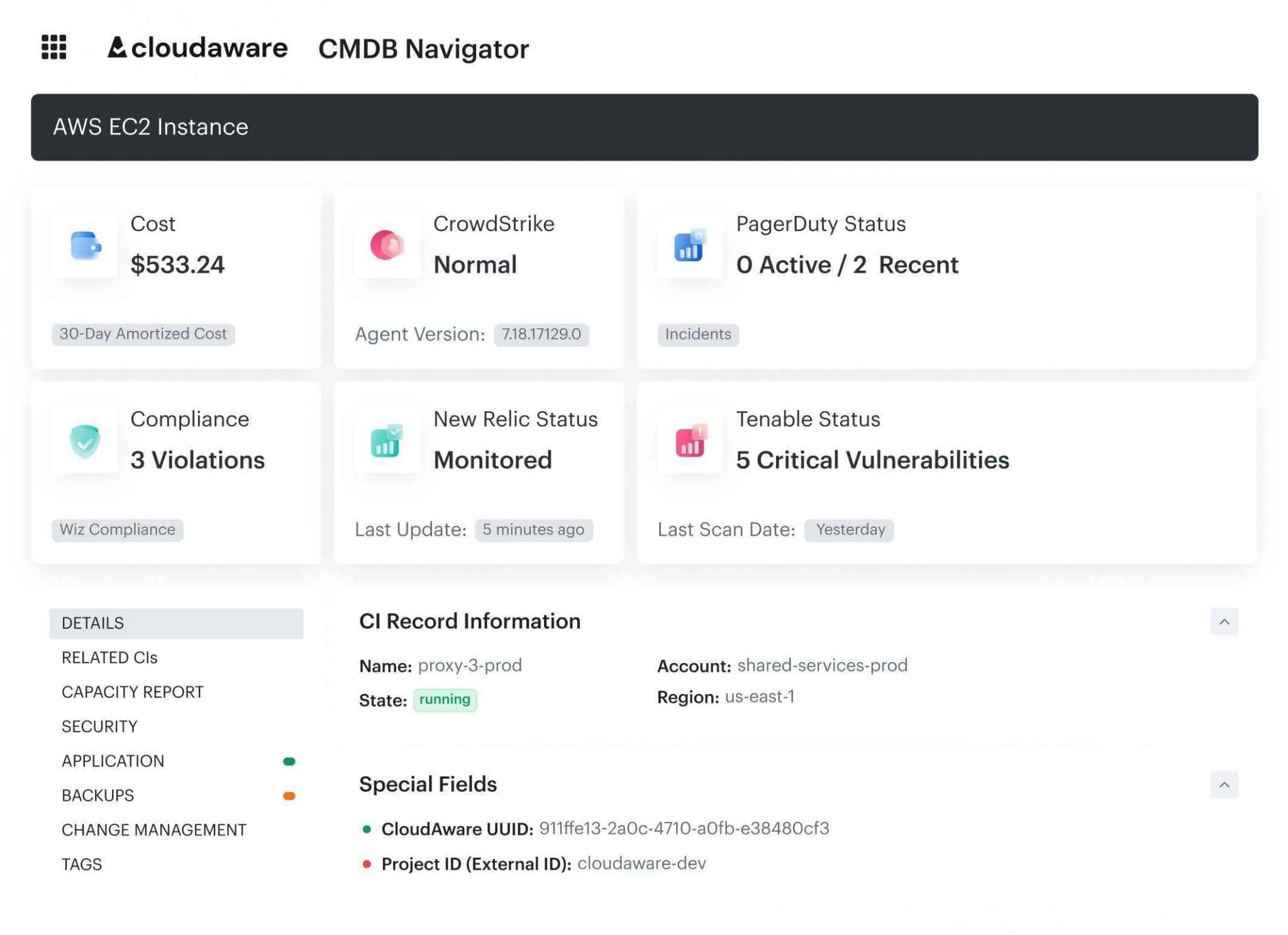 This layer is where a CMDB or asset graph earns its place. It keeps the relationship between resource, owner, environment, and business service close enough for routing and verification. It also gives security teams a way to handle duplicated resources, unmanaged assets, and ownership gaps before they become audit exceptions.
Policy and posture automation layer
This layer checks resources against required controls and expected states. CSPM normally sits here. It flags misconfiguration patterns such as public exposure, missing encryption, disabled logging, weak network rules, backup gaps, and untagged assets.
The control set should map to the frameworks the organization is audited against. CIS Benchmarks provide prescriptive configuration recommendations across many vendor product families, including cloud and Kubernetes environments.
NIST CSF 2.0 provides a broader risk management framework, while NIST 800-53, PCI DSS 4.0, HIPAA, SOC 2 Type II, ISO 27001, and FedRAMP define control expectations that often drive evidence requests.
Cloud native security automation
Cloud-native security automation covers the parts of the environment that do not remain static long enough for periodic review. Kubernetes, EKS, AKS, GKE, containers, service identities, admission controls, image checks, and runtime signals all fit here.
KSPM can flag cluster configuration issues. CWPP can track workload behavior. Runtime drift detection can show when a container starts an unexpected process, opens a shell, changes files, or breaks the expected workload profile. That matters because many cloud-native controls can pass before deployment and still fail after the workload starts running.
Cloud security guardrails automation
Cloud security guardrails automation needs 3 control types: preventive, detective, and corrective.
1. Preventive controls block known-bad changes before they land:
- AWS SCPs set maximum available permissions across accounts in AWS Organizations.
- Azure Policy enforces organizational standards and assesses compliance at scale across resources.
- GCP Organization Policy uses constraints to restrict allowed behaviors across the resource hierarchy.
2. Detective controls catch drift after deployment.
3. Corrective controls route, roll back, quarantine, or remediate when the blast radius is understood. Policy-as-code gives control logic a review path through OPA, Rego, Sentinel, or similar systems.
Cloud security compliance automation
Cloud security compliance automation keeps the control trail intact. A failed control should record the asset, owner, environment, policy, exception status, remediation action, and verification result. A closed ticket does not prove that the control is fixed. The resource state has to be checked again.
Cloud security and compliance automation also has to handle exceptions without turning them into permanent suppressions. Each exception needs scope, owner, justification, expiration date, remediation history, and a review path.
Continuous compliance means the system can show what failed, who accepted the risk, when the exception expires, what changed, and what evidence proves the final state.
Read also: Cloud Security Frameworks. 7 Top Standards Compared (2026)
Cloud security and DevOps automation
Cloud security and DevOps automation move controls into the delivery path, then prove those controls still hold after deployment. A CI/CD gate can block a bad Terraform plan, a risky CloudFormation change, or a Kubernetes manifest that violates policy. It cannot prove that production stayed compliant after console edits, emergency access, identity changes, or policy drift.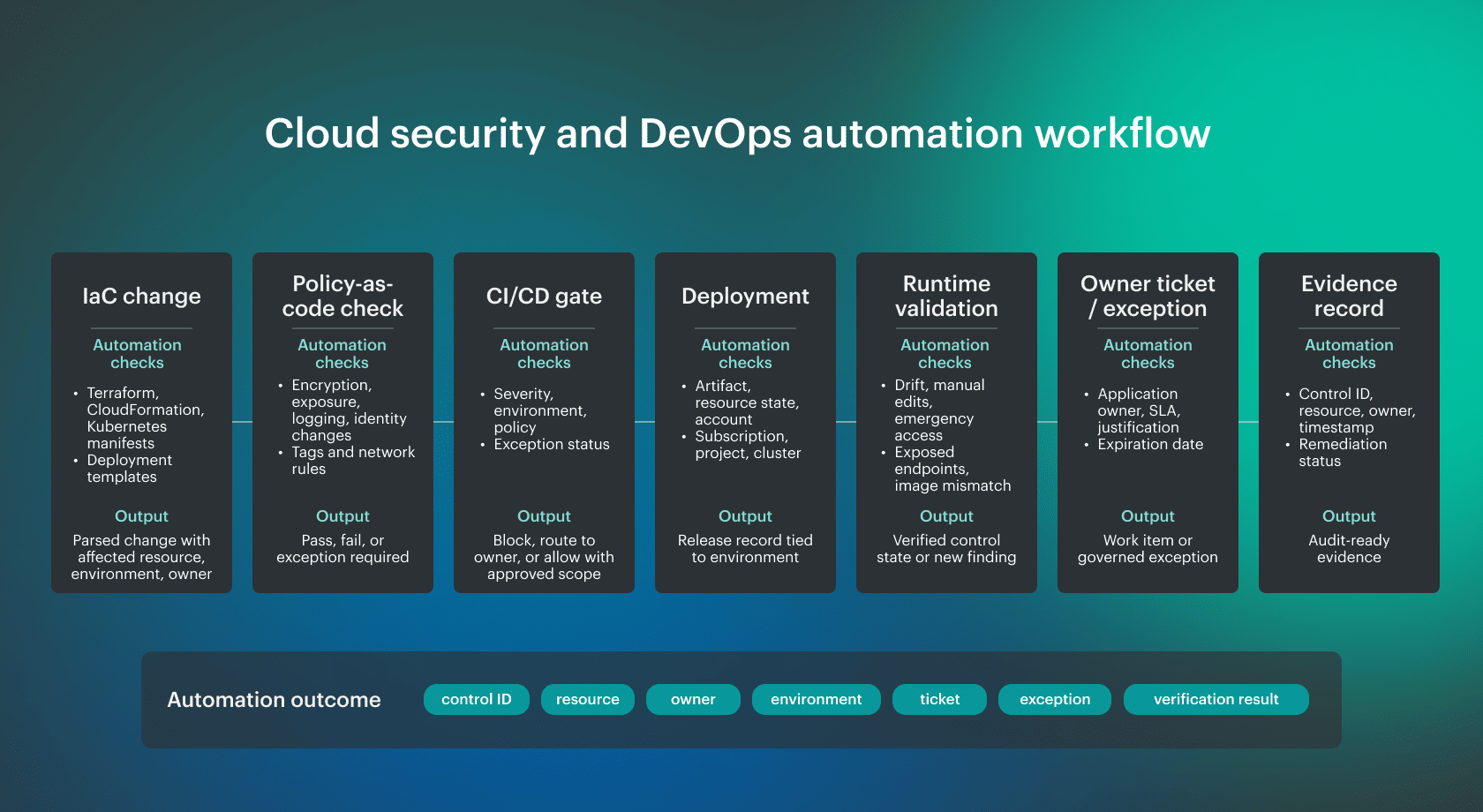 Before deployment, the control point is the pipeline:
- IaC scanning checks Terraform, CloudFormation, Kubernetes manifests, and deployment templates before they reach an environment.
- Policy-as-code checks encryption, public exposure, logging, identity changes, image sources, and environment boundaries.
- A CI/CD gate should return a decision the team can use: block the change, route it to an owner, or allow it under an approved exception with scope, expiration, and evidence.
That same pipeline is also a privileged system. It holds access to source repositories, registries, cloud APIs, deployment credentials, and sometimes production paths. Treating it only as a security checkpoint misses the risk it carries.
SANS SEC540 covers this attack surface through cloud-native security and DevSecOps automation, including DevOps toolchains, pre-commit and pre-merge controls, cloud infrastructure as code, container security lifecycle, and software supply chain security.
Because the pipeline can only judge the change at release time, the next control point is runtime validation. NIST SP 800-204C places DevSecOps automation across build, test, package, deployment, and operations with automated tools and feedback mechanisms.
Read also: NIST Cloud Security - A Practical Guide to the Framework, Controls, and Audit Readiness
Six practical steps to implement cloud security automation
The following steps are based on patterns Cloudaware experts see in client environments where security teams need to move from visibility to owned, repeatable remediation across AWS, Azure, GCP, Kubernetes, and hybrid infrastructure.
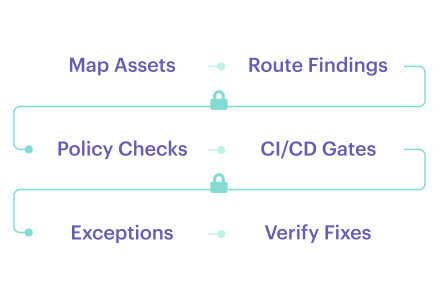
These cloud security automation strategies follow the same order most teams need operationally: identify the asset, classify the control failure, route the work, enforce guardrails, govern exceptions, and verify the final state.
Step 1. Map assets, owners, and environments before automating controls
Start with the asset model. Every finding needs a configuration item, owner, application, environment, cloud account, subscription, project, cluster, and relationship context.
Tip: This is where the CMDB and asset graph do the heavy lifting. That gives automation the inventory layer it needs before routing or remediation can be trusted.
Step 2. Start with high-confidence posture controls
Do not start with the risky stuff. Start with controls that have a clear expected state:
- Public exposure
- Missing encryption
- Disabled logging
- Open admin ports
- Missing backups
- Expired certificates
- Missing tags
- Unmanaged security agents
Tip: CIS Benchmarks are a good starting point because they convert common hardening expectations into concrete checks.
Step 3. Turn findings into routed work
A finding should become assigned work, not dashboard inventory. It needs:
- Owner
- SLA
- Severity
- Affected asset
- Environment
- Remediation state
- Context for the receiving team to act without opening 5 other tools
Example: a CSPM rule flags an internet-facing workload with a critical CVE. Routing should not create a generic “critical vulnerability” ticket. It should create work for the owning team with the resource ID, application, environment, exposure path, CVE, patch or mitigation target, due date, linked policy, and current status.
If the workload belongs to a production payment service, it should not follow the same path as the same CVE on an isolated dev instance. Same scanner severity, different owner path, SLA, and blast radius.
Step 4. Add CI/CD and policy-as-code guardrails
Move known checks into the delivery path: Terraform, CloudFormation, Kubernetes manifests, policy-as-code, and CI/CD gates. Keep runtime validation in the loop because pre-deploy checks cannot see console edits, emergency changes, or post-deploy drift.
Tip: Do not stop at the pipeline. NIST SP 800-204C places DevSecOps automation across build, test, package, deployment, and operations with automated tools and feedback mechanisms. That means pre-deploy checks should block bad changes early, while runtime validation confirms the deployed resource still matches policy later.
Step 5. Automate exceptions without hiding risk
Exceptions are normal. Invisible exceptions are not. A suppression without expiration removes work from the queue without reducing risk. Every exception needs:
- Scope
- Owner
- Justification
- Expiration date
- Compensating control
- Blast-radius review
If those fields are missing, automation should not treat the risk as accepted.
Tip: Use exception automation to track review dates and reopen findings when the expiration date passes. Suppression should change the finding state, not erase accountability.
Step 6. Validate fixes and preserve audit evidence
A ticket marked done is not verification. The resource state has to be checked again. Automation should confirm the control passed, record the verification result, and keep remediation history attached to the asset, policy, owner, and environment.
Tip: This is where continuous compliance becomes useful. The evidence trail should show what failed, who owned it, what changed, when the result changed, and what proves the control now holds.
Multi cloud security automation across AWS, Azure, GCP, and Kubernetes
Multi cloud security automation should start with shared control intent, then map that intent to each enforcement layer. Do not force one provider’s model onto another. AWS accounts, Azure subscriptions, GCP projects, and Kubernetes clusters all expose different policy surfaces, identity models, and drift patterns.
A simple example is public exposure. The intent is clear: production workloads should not expose administrative access to the internet. The enforcement path changes by platform.
| Control intent | AWS | Azure | GCP | Kubernetes |
|---|---|---|---|---|
| Limit maximum permissions | SCPs, IAM policies | Entra ID, Azure RBAC, Azure Policy | IAM, Organization Policy constraints | RBAC, admission controls |
| Block unsafe resource configuration | SCPs, AWS Config, security group rules | Azure Policy, NSGs | Organization Policy, firewall rules | Validating admission controls, network policies |
| Control public exposure | Security groups, NACLs, IAM, load balancer settings | NSGs, public IP rules, Azure Policy | Firewall rules, IAM bindings, load balancer settings | Ingress, services, network policies |
| Govern workload identity | IAM roles, EKS service accounts | Managed identities, service principals, AKS identities | Service accounts, Workload Identity Federation | Service accounts, RBAC |
| Verify deployed state | Config/security findings, runtime signals | Defender/security findings, resource state | Security Command Center, resource state | KSPM, runtime drift, admission logs |
These mechanisms do not behave the same way, but automation has to map them back to the same control question: is this state allowed?
That is why multi-cloud automation needs a control model, not a pile of provider rules. The control intent stays stable. The enforcement layer changes by platform.
Automation should also produce evidence that can be reproduced during formal review. Use our provider-specific preparation guides for an AWS cloud security assessment, Azure cloud security assessment, or Google Cloud security assessment.
Read also: What Is Cloud Security Posture Management? Definition, Tools, and Use Cases
What cloud security tasks should be automated?
Use a simple filter: automate tasks where the expected state is clear, the signal can be trusted, and the next action can be routed without a 30-minute debate.
Datadog’s 2026 DevSecOps research shows why automation should start with context, not raw severity: only 18% of vulnerabilities initially labeled critical should remain critical after runtime exposure, exploitability, and reachability are evaluated.
| Task area | Good automation examples | Avoid automating blindly |
|---|---|---|
| Posture management | Detect public exposure, missing encryption, disabled logging | Changing production network rules without approval |
| Vulnerability management | Prioritize CVEs by exposure, owner, environment, EPSS, and KEV status | Patching critical workloads without maintenance context |
| Identity and access | Flag stale privileges, risky roles, unused access, and least privilege drift | Removing IAM or Entra ID permissions without dependency mapping |
| Compliance evidence | Map violations to controls and preserve proof of fix | Treating suppressions as permanent fixes |
| Incident response | Enrich alerts and route to owners or SOAR playbooks | Triggering disruptive containment without blast-radius review |
| CI/CD security | Block high-risk IaC changes | Blocking all warnings equally |
| Kubernetes security | Detect exposed services, risky RBAC, and image issues | Auto-changing cluster policies without app owner review |
Cloud security automation tools and platforms
Cloud security automation tools are harder to evaluate because the environment is no longer a clean set of cloud accounts and static workloads. Teams now deal with cloud accounts, subscriptions, projects, Kubernetes clusters, SaaS integrations, CI/CD systems, machine identities, runtime signals, and AI-driven workloads.
Cloud security compliance automation tools
Cloud security compliance automation tools fall into a few working categories. Some assess provider resources. Some manage audit evidence. Some route work. Some hold asset context. The failure usually happens when a control needs all 4.
| Tool type | What it usually covers |
|---|---|
| Provider-native compliance tools | AWS Security Hub, Microsoft Defender for Cloud regulatory compliance, Google Security Command Center |
| CSPM / CNAPP platforms | Misconfigurations, posture findings, cloud exposure, compliance mapping |
| Audit-prep / GRC platforms | Evidence requests, control ownership, audit workflows |
| CMDB / asset-context platforms | Asset identity, owner, application, environment, configuration item relationships |
| ITSM / workflow tools | Jira, ServiceNow ITSM tickets, assignment, SLA, escalation |
| SIEM / SOAR tools | Alert correlation, SOAR playbooks, incident response |
| Runtime / workload tools | Runtime behavior, workload drift, vulnerability context, monitoring |
The problem is that none of these categories owns the full loop by default. The policy result may sit in CSPM, the owner in CMDB, the ticket in ITSM, the runtime signal in SIEM or monitoring, and the exception in a compliance workflow. If the records do not connect, continuous compliance becomes evidence stitching.
How to evaluate cloud security automation tools
Once the categories are clear, evaluate the handoff. Take one real case: an internet-facing production workload has a critical CVE, risky identity permissions, missing logging, and an expired exception. The tool should show the asset, owner, environment, exposure, vulnerability context, policy violation, exception status, ticket state, and verification result without forcing an engineer to reconcile 5 systems by hand.
Use this checklist:
- Multi-cloud coverage: AWS accounts, Azure subscriptions, GCP projects, Kubernetes clusters, and hybrid or on-prem assets.
- Inventory quality: normalized resource identity, configuration item, asset graph, owner, application, and environment.
- Custom policy support: controls for internal tagging, encryption, logging, exposure, access, and environment rules.
- Workflow integrations: Jira, ServiceNow ITSM, SOAR playbooks, escalation, and owner-based routing.
- Exception lifecycle: scope, justification, compensating control, expiration date, approval, and review state.
- Safe remediation controls: approval gates, blast-radius limits, rollback path, and action logging.
- Runtime and vulnerability context: exposure, exploitability, EPSS, KEV, patch state, monitoring, and log signals.
- Evidence and APIs: audit reporting, evidence export, API access, and event history.
Cloud security automation training and certification
Before choosing a certification path, check whether the credential maps to future cloud roles, not whether the badge sounds impressive.
In cloud security career threads, the recurring advice is to build real cloud exposure, learn networking and automation, go deep on at least one major CSP, and prove the work through labs or projects. In another thread, the concern is not the certification order alone. It is whether the person can work with rules, noisy alerts, cloud environments, and engineering workflows.
Top training and certification paths in 2026:
- GIAC Cloud Security Automation (GCSA): validates cloud-native toolchain knowledge, DevSecOps methodology, and security controls throughout CI/CD pipelines.
- SANS SEC540: Cloud Native Security and DevSecOps Automation: covers cloud-native security, DevOps automation, CI/CD security, Kubernetes, container security, and software supply chain risk.
- GIAC cloud security certifications path: covers DevOps automation and cloud-specific security across public cloud, multi-cloud, and hybrid-cloud environments.
Read also: Cloud Security Controls - How to Implement Them Across Multi-Cloud
Cloud security automation best practices for 2026
Cloud security automation best practices in 2026 should survive 3 checks: can the signal be trusted, can the owner act, and can the system prove the state changed?
The list below is grounded in NIST CSF 2.0 risk-management outcomes, NIST DevSecOps automation guidance, CIS secure configuration baselines, and CISA KEV prioritization for known exploited vulnerabilities.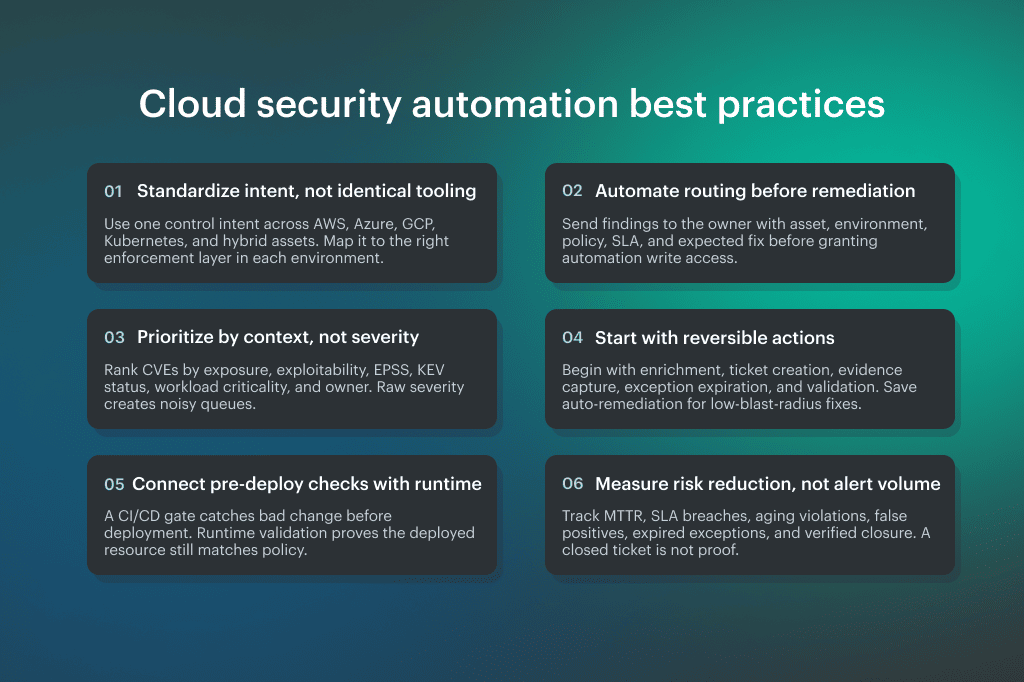 These cloud security automation strategies are not about automating everything. They define where automation should route, verify, escalate, and preserve audit-ready evidence before it changes production.
For provider-specific implementation, see our guides to AWS cloud security best practices, Azure cloud security best practices, and Google Cloud security best practices. For the orchestration layer, use our Kubernetes security best practices for the cloud.