


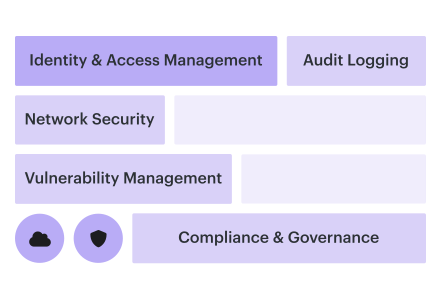
According to the 2025 Verizon DBIR, the human element still shows up in about 60% of breaches. Not exactly comforting when one skipped review, one overbroad role, or one public storage setting can travel across three clouds before Friday lunch.
Cloud security controls are the safeguards that keep cloud access, configuration, data, workloads, and changes inside approved risk boundaries.
The hard part is not naming them. Everyone can say “MFA,” “encryption,” “least privilege,” “logging.” The hard part is making those guardrails behave consistently across AWS, Azure, GCP, SaaS, Kubernetes, and on-prem, where shared responsibility gets messy and drift does not ask permission.
“The control exists” is not the same as “the control is enforced.”
This guide brings together fresh field insight from Cloudaware DevOps experts Igor K. and Valentin Kel, and from the enterprise security teams we work with every day: cloud security leaders, architects, DevSecOps leads, platform engineers, and compliance owners running AWS, Azure, GCP, and on-prem at real scale.
Inside, we’ll investigate:
- What belongs in a real control catalog, not a compliance spreadsheet?
- Where does misconfiguration usually break posture first?
- How do you reduce blast radius when ownership crosses accounts and apps?
- Which checklist items actually help teams implement controls, not just document them?
Key insights
- Cloud security controls are not “security settings.” They are the operating system for risk: prevent the obvious bad path, detect what slips, correct what matters, discourage risky behavior, and document the exceptions that cannot be avoided.
- Most teams do not have a control-design problem. They have a control-survival problem. A bucket is private on day one. A migration opens it on day 38. Nobody reverts it. Drift is where good cloud programs quietly decay.
- Multi-cloud control parity matters more than control count. Having 400 controls means very little if AWS is covered, Azure is half-covered, and GCP was “coming next quarter.” Track whether the same risk outcome is enforced across every in-scope cloud.
- Identity can break controls that look perfect on paper. A storage policy may block public access, but the wrong CI/CD role, service account, or break-glass user can still bypass the guardrail. Least privilege needs blast-radius analysis, not just role cleanup.
- Framework mapping should start with the live control, not the audit spreadsheet. One encryption-at-rest control can satisfy NIST, ISO, PCI DSS, and HIPAA requirements if it is enforced, monitored, tied to assets, and backed by evidence.
- A failed control without an owner is just noise with a severity label. Every finding needs the asset, app, environment, service owner, SLA, related change, exception status, and fix path. Otherwise, remediation turns into detective work.
- The 2026 bar is runtime proof. Cloud security controls need to show what is enforced, where it drifted, who owns the affected service, how it maps to a framework, and whether the fix actually landed. Not once a quarter. Continuously.
- Implement cloud security controls with provider-specific guidance. Start with our Google Cloud Security best practices, AWS Cloud Security best practices, and Azure Cloud Security best practices guides.
What are cloud security controls?
Cloud security controls are safeguards that stop, detect, limit, or correct risky actions across cloud identities, infrastructure, workloads, data, networks, and change.
Not paperwork. Not “we have a policy somewhere in Confluence.” Actual enforcement.
Say a platform engineer creates a storage bucket for payment exports. A good control flow looks boring in the best possible way: public access blocked at creation, encryption checked continuously, owner pulled from the CMDB, failed posture logged, remediation routed to the right team.
That is the job.
A policy says customer data cannot sit in public storage. A cloud security control makes sure the bucket never gets there quietly.
A policy is the promise. A control is the thing that catches reality breaking the promise.
Why cloud controls differ from on-prem controls
On-prem controls were built for slower infrastructure. Servers had names. Change windows existed. Network edges meant something.
Cloud laughs at that model.
A developer can create a VM, attach a public IP, grant a service account, deploy a container, open a security group, and connect a SaaS app before the next standup. Some resources live for minutes. Others survive because nobody knows who owns them.
That is why cloud security controls need to watch drift, identity, APIs, and ownership at the same time.
Verizon’s 2025 DBIR found human involvement in about 60% of breaches, which puts missteps, misuse, and stolen credentials right in the blast zone for cloud teams. Check Point’s 2025 Cloud Security Report found 65% of organizations had a cloud security incident in the past year, while only 35% detected incidents through security tools.
Shared responsibility sharpens the problem. AWS, Azure, and GCP secure the platform. Your team still owns IAM, configuration, workload hardening, logging, data exposure, and remediation. In multi-cloud, that means one control has to survive three providers, five account models, SaaS sprawl, Kubernetes, and the occasional “temporary” exception that becomes infrastructure history.
Controls vs. policy vs. framework: the three-layer distinction
This is where teams lose the thread.
A framework gives the map. A policy turns the map into company rules. A control proves the rule is working on actual assets.
| Layer | What it does | Cloud example | What breaks when it is weak |
|---|---|---|---|
| Framework | Defines the security domains you should cover | CIS Controls, NIST CSF, ISO 27001, CSA CCM | Teams chase random best practices with no structure |
| Policy | States what your organization requires | “Production storage must be encrypted, private, tagged, and owned” | Requirements stay vague, exceptions multiply |
| Control | Enforces or verifies the requirement | Block public buckets, detect encryption drift, route owner-based remediation | Risk shows up only after audit, breach, or customer review |
Here’s the practical version.
CIS may say secure cloud storage. Your policy says production storage cannot be public. The control checks every S3 bucket, Azure Blob container, and GCP Cloud Storage bucket against that rule.
Good multi cloud security controls do not stop at “failed.” They show the asset, account, environment, owner, app, exception status, and fix path.
That last part matters.
A failed control with no owner is just another alert. A failed control tied to a production payments app, PCI scope, and the Commerce Platform team is work that someone can actually finish.
Igor K., DevOps Engineer at Cloudaware
The 5 different types of cloud security controls
Cloud security controls fall into five functional categories: preventive, detective, corrective, deterrent, and compensating.
Each one plays a different role, from blocking risky actions before they happen to covering exceptions when the ideal control cannot be enforced. Mature cloud programs run all five together and map them to the frameworks they must satisfy.
| Control type | What it does | Cloud-native example | Maps to NIST 800-53 |
|---|---|---|---|
| Preventive | Blocks the risky action before it happens | S3 Block Public Access enforced at account level | AC-3, CM-7 |
| Detective | Finds suspicious activity, drift, or failed posture | GuardDuty flags anomalous IAM API calls | AU-6, SI-4 |
| Corrective | Reduces impact or restores a safe state | Lambda re-locks a public S3 bucket | IR-4, CP-10 |
| Deterrent | Makes risky behavior visible and accountable | Azure PIM warning banners plus session recording | PL-4, AT-2 |
| Compensating | Replaces a control that cannot be applied directly | Vault-based break-glass access for a legacy IdP without MFA | Various, documented exceptions |
Preventive controls
Preventive controls are the settings, policies, gates, and guardrails that say “no” before the cloud accepts the change.
An engineer tries to create a public bucket. Blocked.
A Terraform plan opens SSH to the world. Rejected.
A workload is deployed in an unapproved region. Denied before it becomes tomorrow’s audit finding.
These controls usually live in places like AWS Organizations SCPs, Azure Policy, GCP Organization Policy, Kubernetes admission controllers, CI/CD checks, IAM conditions, encryption requirements, and network rules.
The best preventive control is boring. Nobody opens a ticket. Nobody writes an apology. The unsafe path simply is not available.
Read also: Healthcare Data Breaches in 2026-2025. 5 Recent Cases and the Cloud Security Lessons
Detective controls
Detection is what catches the thing prevention missed. Because something will slip. A manual change during troubleshooting. A role permission added “temporarily.” A SaaS connector pulling more data than expected. A service account behaving differently after a deployment.
- Detective controls include GuardDuty,
- Defender for Cloud,
- Security Command Center,
- CloudTrail review,
- Kubernetes audit logs,
- CSPM checks,
- SIEM correlation,
- file integrity monitoring,
- and anomaly detection.
They do not fix the problem. They tell you where reality moved away from the design.
That distinction matters.
A detective control that says “high severity finding” is noisy. One that says “production payments bucket, public access enabled 17 minutes ago, owned by Commerce Platform, PCI scope” is usable.
Read also: The Importance of Cloud Security Posture Management: 9 Reasons
Corrective controls
Corrective controls are the cleanup crew with authority. Sometimes they act automatically: remove public access, disable a stale access key, rotate a secret, quarantine a workload, roll back a network rule.
Other times, they route the work to a human because context matters. You may not want automation deleting a firewall rule that supports a regulated claims-processing app at 2 p.m. on a business day.
Good correction needs the full story:
- Affected asset
- Cloud account or subscription
- Environment
- Owner
- Application
- Business impact
- Required fix
- Evidence after remediation
Without that, correction turns into ticket ping-pong.
Read also: How to Perform a Cloud Security Risk Assessment in 2026
Deterrent controls
Deterrent controls are easy to underestimate because they feel soft.
They are not.
A privileged access banner changes behavior. So does session recording. So does a mandatory reason field before elevation in Azure PIM. So does a login warning that says activity is monitored and tied to an individual identity.
The point is friction at the exact moment someone is about to touch production, escalate access, export data, or bypass a normal workflow.
A control does not always need to block the action. Sometimes it needs to make the person pause long enough to make the better choice.
Read also: 10 Best Cloud Security Tools in 2026 with Comparison, Pricing, and Honest Reviews
Compensating controls
Here is the messy one. Compensating controls exist because enterprise infrastructure is never as clean as the diagram. A legacy identity provider cannot enforce MFA. An old app cannot support modern encryption. A third-party SaaS tool does not expose the logs your audit team wants. A migration is halfway done, and the “temporary” bridge is now business-critical.
So you control the risk another way.
Maybe break-glass access goes through Vault. Maybe the legacy workload gets network isolation, extra monitoring, and monthly access review. Maybe the SaaS tool gets restricted by IP allowlist and monitored through downstream logs.
Not ideal. Still governed.
A compensating control should never be a shrug in a spreadsheet. It needs an owner, reason, substitute safeguard, evidence, review date, and expiry.
Read also: What Are Cloud Security Services? Types, Use Cases, and How to Choose
How to layer the five types
1️⃣ Start with prevention. Block the obvious bad paths before they become findings: public storage, wildcard admin roles, unencrypted databases, risky regions, internet-facing management ports, and insecure IaC. In multi-cloud, this layer has to sit close to the places where change happens: cloud org policies, CI/CD pipelines, Kubernetes clusters, SaaS admin consoles, and infrastructure-as-code workflows.
Detection sits right behind it, watching for the gap between “what should be true” and “what is true right now.”
That gap appears fast. A team hotfixes production. A developer grants broad permissions to unblock a deployment. A sandbox resource gets copied into a real account. No villain required. Just cloud moving at cloud speed.
2️⃣ Then correction needs to be ready before the alert fires. Some fixes can be automated safely. Others need routing with context. The difference is huge. “S3 bucket is public” creates panic. “s3-prod-payment-exports is public, PCI scope, owned by Commerce Platform, encryption still enabled, public access changed 17 minutes ago by CI role” creates action.
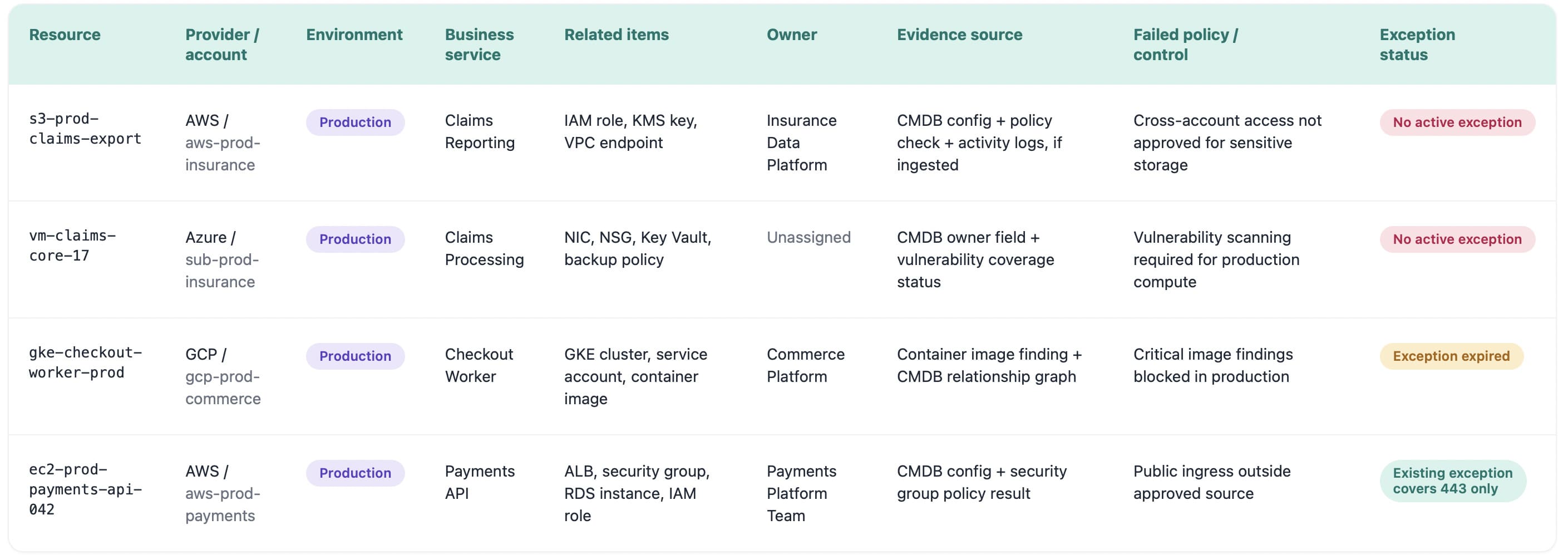
Enriched data about cloud security controls in Cloudaware. Schedule a demo to see it live
Deterrent controls run across the top. They remind people that privileged actions are visible, recorded, and attributable. That matters in environments where identity is the real perimeter and admin access can change the blast radius in seconds.
Compensating controls sit in the exception layer. They should be rare, documented, and reviewed like risk, not treated like a permanent design pattern. The moment nobody remembers why the exception exists, it has already started turning into drift.
That is the practical stack.
Prevent what you can. Detect what moves. Correct what matters. Make risky behavior visible. Wrap every exception in evidence before it becomes architecture.
Read also: A 2026 Practitioner Guide to Cloud Security Vulnerabilities
9 cloud security controls by domain
Beyond functional categories like preventive or detective, cloud security controls are usually organized by the domain they protect. That is how real teams work. IAM has one failure pattern. Data has another. Kubernetes, APIs, IaC, and logging all break in their own special little ways.
Most enterprise cloud programs end up managing nine control domains: identity, network, data, workload, application, infrastructure-as-code, posture, detection-and-response, and governance. Different types of cloud security controls live inside each domain, but the job is the same: reduce risk before it spreads across accounts, regions, clusters, and SaaS apps.
Here is a shortlist of them:
- Identity and access controls
- Network controls
- Data controls
- Workload and container controls
- Application and API controls
- Infrastructure-as-Code controls
- Posture and configuration controls
- Detection, response, and recovery controls
- Governance and compliance controls
Identity and access controls
Identity is where the blast radius usually begins.
IAM controls enforce least privilege, MFA, role assumption, federated SSO, just-in-time access, and privileged access review. In AWS, that may mean IAM Identity Center with permission sets. In Azure, Microsoft Entra ID and PIM handle conditional access and elevation. In Google Cloud, IAM roles need to stay tied to folders, projects, and service accounts without turning into “Editor” soup.
A practical check: any human or machine identity with admin-level access should have an owner, expiry logic, MFA or equivalent control, and monitored activity.
Read also: 5 Hybrid Cloud Security Best Practices for 2026
Network controls
Network controls are not just “close the ports.”
They define which workloads can talk, which paths stay private, and where traffic is allowed to leave. Think VPC and VNet segmentation, security groups, NACLs, private endpoints, egress filtering, WAF policies, DDoS protection, and firewall rules between cloud and on-prem.
The ugly case is familiar: port 22 opened to 0.0.0.0/0 in a test account, then copied into production through a reused Terraform module. Good network controls catch the pattern before the mistake becomes architecture.
Read also: Cloud Data Security Best Practices - A Playbook for Multi-Cloud and Migration
Data controls
Data controls protect the asset everyone pretends is “just logs” until audit asks what is inside.
Encryption at rest with customer-managed keys, TLS 1.2+ in transit, KMS rotation, tokenization, DLP, data classification, and access logging all belong here. The control should know whether a storage bucket contains debug logs, customer exports, PHI, payment data, or backup snapshots.
That distinction matters. A public bucket is bad. A public bucket inside PCI scope with customer exports is a different Tuesday entirely.
Read also: 7 Pillars of Cloud Security Strategy with Roadmap, Metrics & Examples
Workload and container controls
Workload controls follow compute that may not sit still long enough to be named properly.
VMs, containers, Kubernetes jobs, serverless functions, and managed workloads need vulnerability scanning, hardened images, image signing, admission controllers, runtime protection, secrets controls, and CWPP coverage. A vulnerable container image is not one finding. It can become 40 running pods across dev, staging, and production by the time someone checks the board.
Best pattern: scan before build, verify before admission, monitor after runtime starts.
Read also: 12 Best [Cloud Security Assessment Tools](/blog/ cloud-security-assessment-tools/) for 2026
Application and API controls
Application controls live where cloud infrastructure meets business logic.
Input validation, secrets management, API gateway throttling, schema validation, OAuth scope hygiene, rate limiting, and bot protection sit here. The risk is usually practical, not dramatic. A partner integration asks for read-write access when read-only would do. A token lands in CI logs. An API endpoint accepts traffic without throttling during a campaign spike.
Tiny permission decisions become big exposure windows when APIs sit in front of customer data.
Read also: Cloud Security Threats in 2026. Top Risks & How to Defend
Infrastructure-as-Code controls
IaC controls are the closest thing cloud teams have to catching the bad decision while it is still cheap.
Pre-merge scanning, OPA/Rego, Terraform Sentinel, policy-as-code, approval workflows, and drift detection stop risky infrastructure from reaching runtime.
deny[msg] {
 input.resource.type == "aws_security_group_rule"
 input.cidr_blocks[_] == "0.0.0.0/0"
 input.from_port == 22
 msg := "SSH cannot be open to the internet"
}
In practice, the useful view is not the Rego rule by itself. It is the runtime gap the rule was meant to prevent: which asset drifted, who owns it, what changed, which framework control is affected, and whether an approved exception exists.
Cloudaware’s CMDB model is built for that operating context, with assets, configurations, dependencies, ownership, and governance data connected instead of scattered across separate reports.
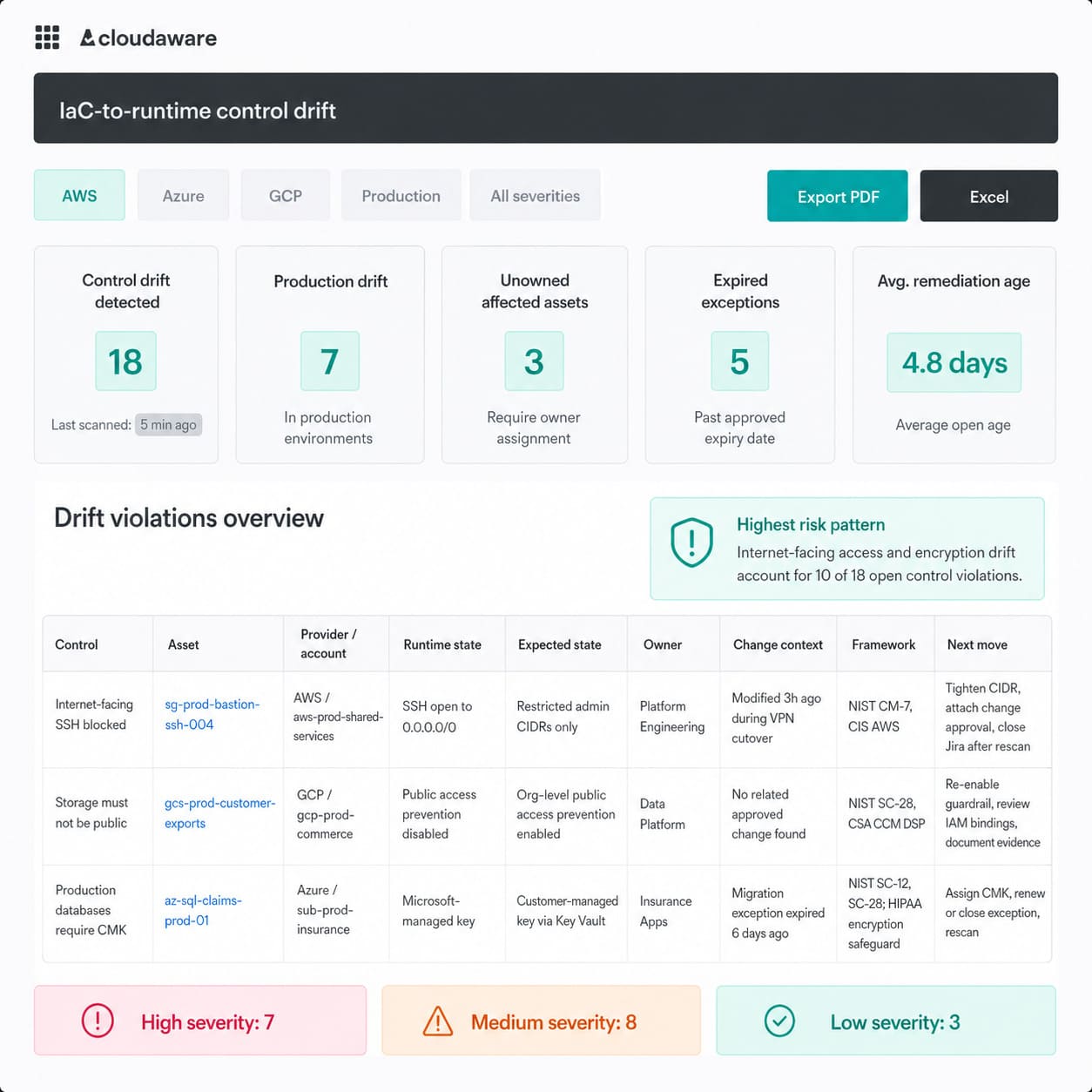
Enriched data about policy drift in Cloudaware. Schedule a demo to see it live
Read also: How to Create a Cloud Security Policy in 8-Steps
Posture and configuration controls
Posture controls watch the everyday cloud settings that quietly decide whether your environment is safe or leaking.
Public storage, unencrypted databases, weak logging, open management ports, permissive IAM, exposed Kubernetes dashboards, disabled backups, missing tags, and unapproved regions all sit here. None of these needs a genius attacker. They need speed, sprawl, and one missed review.
The control failure is rarely “we had no rule.” More often, the rule existed in one cloud, one account, or one team’s memory.
That is why multi cloud security controls need continuous checks, not quarterly snapshots.
Detection, response, and recovery controls
Detection controls tell you what happened. Response controls decide what happens next. Recovery controls prove the business can keep moving.
- CloudTrail,
- Azure Activity Log,
- Google Cloud Audit Logs,
- SIEM correlation,
- SOAR workflows,
- immutable backups,
- incident response playbooks,
- tested restore procedures,
- and evidence capture belong here.
A useful alert does not stop at “critical.” It says: affected asset, cloud account, environment, owner, related app, last change, likely control gap, and recovery path. That is the difference between triage and archaeology.
Governance and compliance controls
Governance controls make security enforceable across teams that do not report to the same leader.
This domain covers control ownership, exception workflows, policy approvals, evidence collection, framework mapping, audit trails, and review cadences. For SOC 2, ISO 27001, PCI DSS, HIPAA, DORA, or NIS2, the question is not only “is the control present?” It is “can we prove it worked on the right assets during the right period?”
The cleanest governance view ties policy, control, asset, owner, evidence, and exception status together. Otherwise, compliance becomes screenshot farming two weeks before the audit.
Read also: 9 Reasons Cloud Security Posture Management Matters in 2026
Cloud storage security controls
Cloud storage security controls protect object stores, file shares, backups, and managed storage services from exposure, exfiltration, tampering, and silent misuse.
The risk usually starts small.
A bucket for payment exports. A blob container for support attachments. A GCS bucket full of analytics snapshots. Someone opens access for a vendor, copies a Terraform module, skips key policy review, or leaves diagnostic logging off because “it’s only temporary.”
Then the temporary becomes architecture.
Strong storage control is not one setting. It is four questions answered continuously:
- Who can read, write, delete, or share this data?
- Is the data encrypted with the right key model?
- Can traffic reach it from the public internet?
- Can we prove who touched it, when, and from where?
For cloud security leaders, storage is one of the highest-ROI places to tighten cloud security controls because a single misstep can expose regulated data without touching a workload exploit chain.
The five storage controls with the fastest risk reduction
- Block public access at the highest possible level. Do not rely on every team to configure every bucket perfectly. Enforce S3 Block Public Access at account and bucket level, Azure Storage public network access restrictions with private endpoints, and GCS Public Access Prevention through organization policy. Per-resource settings are useful. Org-level guardrails are safer.
- Require customer-managed keys for sensitive data. Use SSE-KMS with customer-managed keys in AWS, Azure Key Vault-backed customer-managed keys, and Cloud KMS keys in GCP. The practical rule: if data is Confidential, regulated, customer-owned, or business-critical, the key lifecycle should not be invisible. Rotation cadence should follow your policy and risk tier. For high-sensitivity environments, 90 days is common, but not universal.
- Keep storage traffic private by default. VPC endpoints, AWS PrivateLink, Azure Private Endpoint, and Google Private Service Connect reduce exposure by keeping storage access away from the public internet. This matters most for production apps, backup flows, regulated workloads, and hybrid connections where on-prem systems still read or write cloud data.
- Turn on object-level audit logging before you need it. “Storage was accessed” is not enough after a suspected breach. You need object-level read, write, delete, and permission-change events. In AWS, that means CloudTrail data events and S3 access logging where appropriate. In Azure, diagnostic logs should flow into Log Analytics or Sentinel. In GCP, Data Access audit logs need to be enabled and retained long enough to support investigation and audit.
- Make recovery harder to sabotage. Versioning, S3 Object Lock, MFA Delete, Azure immutable blob storage, GCS Bucket Lock, and retention policies are not just compliance features. They are ransomware controls. If an attacker or compromised admin can delete or overwrite your backups, your backup strategy is theatre.
The storage control that saves you is often not the one that blocked the first mistake. It is the one that gives you proof, rollback, and ownership when the mistake slips through.
Multi-cloud storage controls at a glance
| Control | AWS | Azure | GCP |
|---|---|---|---|
| Block public access | S3 Block Public Access at account and bucket level | Public network access disabled, private endpoints, firewall rules | Public Access Prevention through organization policy |
| Customer-managed encryption | SSE-KMS with customer-managed KMS keys | Customer-managed keys through Azure Key Vault | Customer-managed encryption keys through Cloud KMS |
| Private network access | VPC Gateway Endpoint, Interface Endpoint, PrivateLink patterns | Private Endpoint for Storage | Private Service Connect where supported |
| Object-level audit logs | CloudTrail S3 data events, S3 server access logs | Storage diagnostic logs to Log Analytics or Sentinel | Data Access audit logs |
| Immutability and recovery | S3 Object Lock, Versioning, MFA Delete | Immutable blob storage with time-based retention | Bucket Lock and retention policies |
| Ownership and evidence | Tags, AWS Organizations, CloudTrail identity context | Resource tags, Entra ID, Azure Activity Log | Labels, IAM principals, Cloud Audit Logs |
The useful view for a platform or security team is not “storage control failed.” It should look more like this: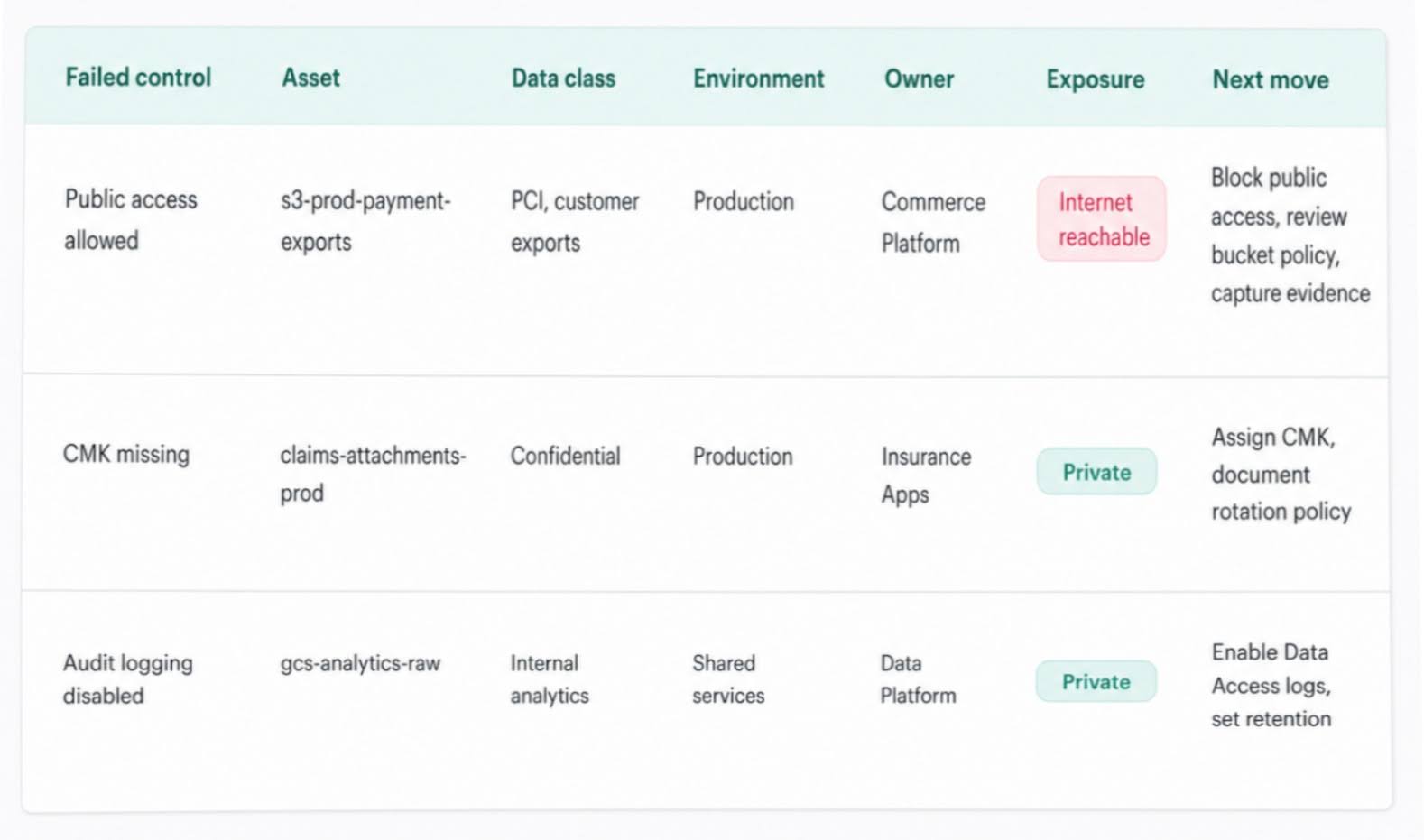 For private cloud environments, use the Private Cloud Data Security: How to Operate and Prove Controls Across Infrastructure guide.
Multi-cloud security controls: building parity across AWS, Azure & GCP
Multi-cloud security controls are safeguards designed to produce the same risk outcome across every cloud you run, even when each provider uses different names, objects, and enforcement models.
That sounds simple until you try to prove it.
AWS has IAM policies. Azure has RBAC roles. GCP has IAM bindings. All three can support least privilege. None of them express it the same way. So the real problem is not “can we configure the control?” Of course we can.
The harder question is: can we prove the same intent is enforced across AWS, Azure, GCP, SaaS, Kubernetes, and the on-prem systems still feeding production?
Most multi-cloud gaps fall into three buckets.
| Failure mode | What goes wrong | What it looks like |
|---|---|---|
| Naming drift | Same intent, different provider language | “Admin access” means IAM policy in AWS, RBAC role in Azure, binding in GCP |
| Coverage drift | Control exists in one cloud but not the others | AWS logging baseline is enforced, but a new GCP project launches without audit log retention |
| Posture drift | Control was correct, then changed locally | A migration team opens public access for cutover and nobody re-aligns it afterward |
The four practices that actually work in 2026
Centralize the source of truth
Parity dies when AWS lives in one report, Azure in another, and GCP in someone’s spreadsheet. A working control program needs one asset inventory or CMDB that ingests accounts, subscriptions, projects, clusters, SaaS apps, and on-prem dependencies. Not just names. Context. Owner, app, environment, business unit, data class, related changes, and control scope.
Because “GCP project missing logging” is vague. “gcp-prod-commerce-analytics, production, Data Platform, customer behavior data, missing audit log retention” is work.
Express controls as cloud-agnostic policies
Write the intent once. Translate it per provider.
Example: production storage must not be publicly reachable. In AWS, that may mean S3 Block Public Access. In Azure, public network access disabled plus private endpoints. In GCP, Public Access Prevention at org policy level.
Different mechanics. Same risk outcome.
A clean control catalog gives that intent one ID:
| Control ID | Intent | AWS | Azure | GCP |
|---|---|---|---|---|
| ST-001 | Production storage must stay private | S3 Block Public Access | Public network access disabled | Public Access Prevention |
| IAM-004 | Privileged access requires approved elevation | IAM Identity Center | Entra ID PIM | IAM conditions / workforce identity |
| LOG-002 | Admin activity must be retained | CloudTrail | Azure Activity Log | Cloud Audit Logs |
Map controls to frameworks, not cloud consoles
Auditors do not care that Azure calls it one thing and AWS calls it another. They care whether the requirement is met.
So map the control to NIST, CIS, ISO 27001, PCI DSS, SOC 2, HIPAA, DORA, or NIS2 first. Then attach each cloud implementation underneath. That changes the conversation from “Azure has 14 findings” to “NIST AU-6 is not fully enforced because GCP audit log retention is missing in two production projects.”
Much easier to prioritize. Much harder to hide.
Measure parity, not control volume
“500 controls configured” sounds impressive until 430 apply to AWS, 120 apply to Azure, and GCP is still catching up after the migration.
A better metric:
Control parity rate = controls enforced equivalently across all in-scope clouds / total required controls
For enterprise environments, anything under 90% parity should be treated like a finding. Not a nice-to-have backlog item. A finding.
A useful parity dashboard might show:
| Domain | Required controls | Equivalent across clouds | Parity | Priority gap |
|---|---|---|---|---|
| Identity | 42 | 39 | 93% | GCP service account review |
| Network | 36 | 31 | 86% | Azure public exposure rules |
| Logging | 28 | 22 | 79% | Missing GCP retention |
| Storage | 24 | 24 | 100% | None |
| Recovery | 18 | 14 | 78% | Immutable backup gaps |
In a Cloudaware-style control view, clients would use this as an operating dashboard: failed control, mapped framework, affected asset, provider, account or project, owner, environment, last change, exception status, and evidence link.
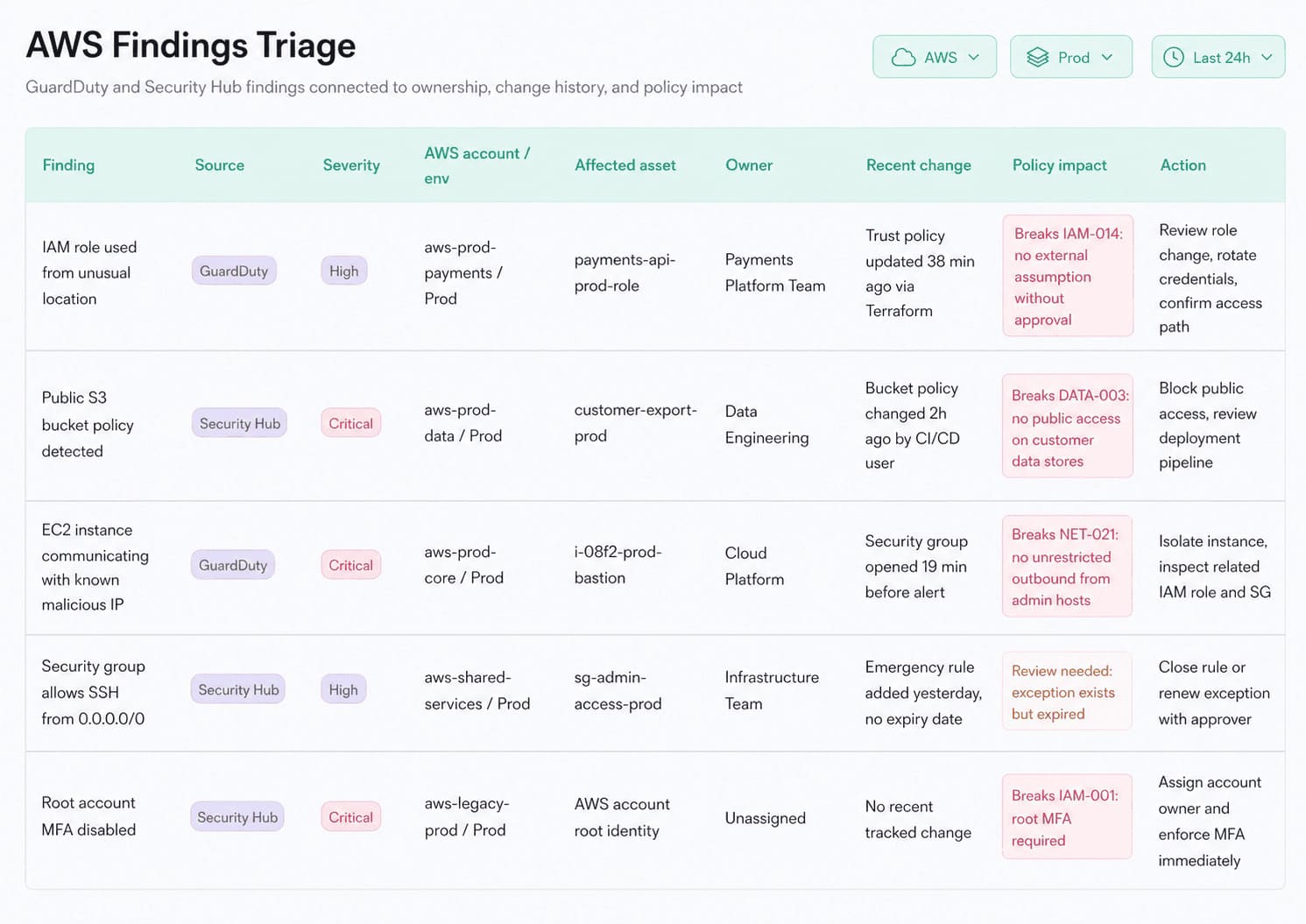
That is the useful layer. Not “Azure failed.” Not “GCP missing.” A precise gap with a person, a system, and a fix path attached.
Because multi-cloud security controls do not fail loudly at first.
They fail quietly. One project. One exception. One provider-specific setting that was “basically the same” until audit, breach response, or customer security review proved otherwise.
AWS says one thing. Azure says another. GCP has its own language.
Cloudaware gives teams one operating view of cloud security controls across accounts, subscriptions, projects, SaaS, Kubernetes, and on-prem, with ownership and evidence attached.
Schedule a demo and see your controls in one place.
Read also: Cloud Security Frameworks Guide to Multi-Cloud Standards and Governance
Mapping controls to frameworks
Frameworks define what good looks like; controls are how good is achieved in production. The same encryption-at-rest implementation can satisfy NIST 800-53 SC-28, ISO/IEC 27001 A.10.1.1, PCI DSS 3.5, and HIPAA §164.312(a)(2)(iv) simultaneously, provided it is documented, enforced, and continuously monitored.
That last clause is the whole game.
Not “we mapped it.”
Not “we have a policy.”
Not “someone has a screenshot from last quarter.”
A mapped control only matters when the team can point to the live asset, the rule, the owner, the last scan, the exception status, and the proof.
Quick framework cross-reference
| Framework | What it gives you | How it talks about controls |
|---|---|---|
| NIST SP 800-53 Rev. 5 | Catalog of roughly 1,000 controls and enhancements across 20 families | Most granular. Auditor-grade language for regulated and enterprise programs |
| CSA Cloud Controls Matrix v4 | 197 cloud-specific controls across 17 domains | Cloud-native catalog. Strong for mapping cloud controls to NIST, ISO, PCI, SOC 2 |
| ISO/IEC 27017 | Cloud extension of ISO/IEC 27002 | Clearer split between cloud customer and provider responsibilities |
| CIS Benchmarks | Per-service hardening recommendations | Most useful for engineers and CSPM configuration checks |
| FedRAMP | US government baselines built on NIST 800-53 | Required for US federal cloud sales and high-evidence environments |
| MITRE ATT&CK Cloud Matrix | Cloud attacker tactics, techniques, and procedures | Best for testing detective controls and response coverage |
Read also: Cloud Security Posture Management - CSPM Guide for 2026
The clean way to map a control
Sensitive production data must stay encrypted at rest with approved key management.
Now make it operational.
| Layer | What you define | Example |
|---|---|---|
| Risk outcome | What must not happen | Customer data readable without approved encryption |
| Control intent | What must always be true | Production storage uses approved encryption at rest |
| Cloud implementation | How each provider enforces it | AWS SSE-KMS, Azure CMK via Key Vault, GCP CMEK via Cloud KMS |
| Framework mapping | Which requirements this supports | NIST SC-28, PCI DSS 3.5, HIPAA §164.312(a)(2)(iv) |
| Evidence | What proves it | Asset config, key ID, scan result, owner, change history |
| Monitoring | How it stays true | Continuous posture check plus review after storage or key changes |
One well-built control can answer four frameworks. That is the efficiency most teams miss.
They build separate compliance workstreams. Then security, platform, and audit all ask for the same evidence in slightly different formats.
What the control evidence should look like
A useful control view does not say: “Encryption control passed.”
It says:
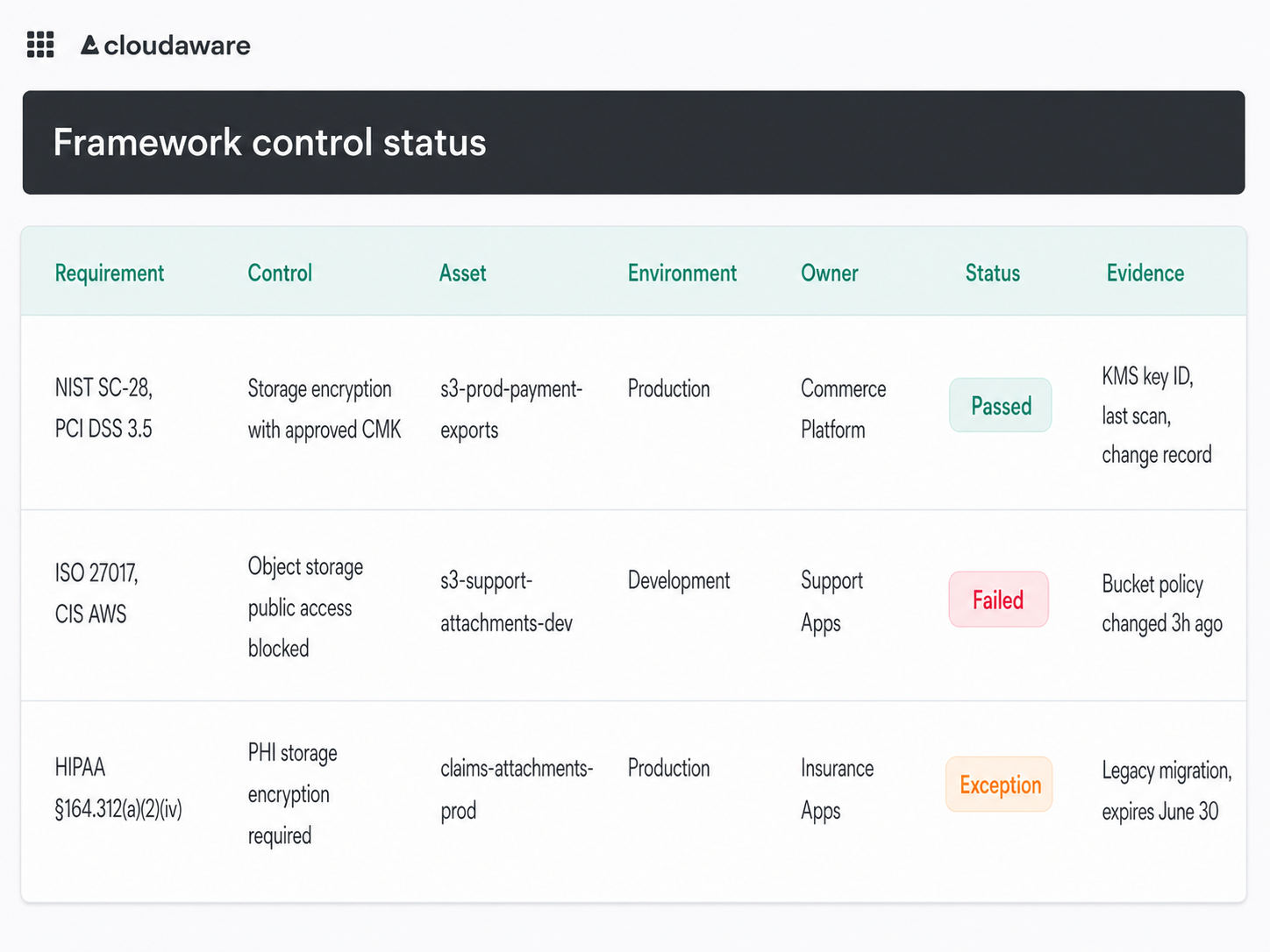
That is the difference between compliance theater and control operation.
Valentin Kel, Cloudaware DevOps Engineer
The simple rule: Map the control once. Then test it everywhere it applies. A framework row gives you the requirement. A cloud security controls program gives you the operational proof: live assets, enforced rules, monitored drift, named owners, and evidence that survives more than one audit cycle.
Read also: NIST Cloud Security - A Practical Guide to the Framework, Controls, and Audit Readiness
The cloud security controls checklist for 2026
The cloud security controls checklist below is cloud-agnostic and maps to NIST CSF 2.0 and the CSA Cloud Controls Matrix. Treat it like an operating check, not a PDF your team updates when audit starts breathing down everyone’s neck.
One tweak before we get into it: customer-managed keys should be mandatory for sensitive, regulated, customer-owned, and business-critical data. Not every cache. Not every throwaway disk. Good controls reduce blast radius. Badly scoped controls create admin work and call it maturity.
The real test is simple: can you prove each control is enforced, monitored, owned, and fixable across AWS, Azure, GCP, SaaS, Kubernetes, and on-prem?
- Phishing-resistant MFA covers every human identity. Passkeys, FIDO2, hardware keys, or equivalent strong MFA should cover Entra ID, Okta, AWS IAM Identity Center, Google Identity, and any legacy IdP still alive after a merger. Pull the full user list. No sampling. Target 100% enforcement, with exceptions named and time-bound.
- Production has no standing privileged access. Admin access should expire. Use JIT elevation, approval, break-glass accounts, and session logging. The risky place is often not the official admin group. It is the old deployment role with “temporary” permissions from 2023.
- Public storage is blocked above the resource level. Bucket-by-bucket security does not scale. Enforce S3 Block Public Access, Azure public network restrictions, GCS Public Access Prevention, and private endpoints where needed. Then query every bucket, file share, backup store, and object endpoint for public reachability.
- Sensitive data uses approved customer-managed keys. For regulated and high-value data, check AWS SSE-KMS, Azure Key Vault CMK, and GCP CMEK. Include databases, buckets, disks, snapshots, backups, and managed storage. The control only works when encryption status is tied to data class.
- Service traffic stays encrypted and private where possible. Production workloads should use TLS 1.2+ and private routes: VPC endpoints, Private Link, Private Service Connect, service mesh rules, and controlled egress. Any public path needs a business reason, owner, and expiry date.
- Cloud and identity logs land in one place. CloudTrail, Azure Activity Log, Google Cloud Audit Logs, Kubernetes audit logs, SaaS admin logs, and IdP events need central retention and alerting. After a risky change, your team should know who changed what, from where, and on which asset without opening five tools.
- Workloads are scanned before deploy and at runtime. Containers, VM images, serverless packages, and base images need pre-deploy checks. Runtime scanning matters because yesterday’s clean image can become today’s critical exposure. Verify against running production workloads, not repo coverage.
- IaC fails fast before merge. Terraform, CloudFormation, ARM/Bicep, Kubernetes YAML, and Helm should hit policy gates before deployment. At minimum, block public SSH, wildcard IAM, unencrypted storage, disabled logging, and unapproved regions before they become live infrastructure.
- Public apps and APIs sit behind WAF controls. Inventory every public-facing app, API, ingress controller, and load balancer. Match each one to WAF policy, managed rules, rate limits, bot controls, and an owner. Team memory is not evidence.
- Every failed control has an owner and SLA. A failed control without ownership is just noise with a severity label. Route deviations into Jira, ServiceNow, or the workflow teams actually use. Asset, provider, account, environment, owner, fix guidance, SLA, and evidence should travel together.
- Backups are immutable and restore-tested. Ransomware recovery depends on backups attackers cannot delete. Use object lock, retention locks, protected snapshots, separate recovery permissions, and restore tests. For critical systems, 90 days is a healthy restore-test baseline.
- IR runbooks cover the top cloud attack patterns. Credential compromise. Public storage exposure. Ransomware. Suspicious API activity. Privilege escalation. Each runbook should name the logs, containment steps, owners, recovery actions, evidence to preserve, and notification triggers. Test them at least once a year.
Igor, Cloudaware DevOps Engineer
Why cloud security controls fail in production
Cloud security controls usually fail in the space between “we designed the rule” and “the cloud kept changing after we shipped it.”
That space is where production lives.
A control can be perfectly valid on day one. Logging enabled. Public access blocked. Admin roles reviewed. Owners mapped. Then a migration runs late, an incident gets messy, a team creates a new account outside the usual path, or a break-glass role quietly becomes someone’s everyday shortcut.
No villain needed. Just speed, pressure, and a cloud estate big enough for small exceptions to hide.
Drift: the control was right until someone touched it
The classic pattern: a security group is opened during an outage, a bucket policy is relaxed for a vendor transfer, or logging is paused while a team debugs noisy events.
Everyone means well. Nobody reverts it.
That is drift.
The mitigation is not “remind teams to clean up.” That does not survive production. Use continuous configuration scanning and require every exception to carry metadata: owner, reason, affected control, approved window, review date, and expiry. If “temporary” has no end date, it is not temporary. It is architecture waiting to embarrass you.
Scope blindness: 14 covered accounts still leave 3 exposed
This one looks healthy from far away.
The control exists. The dashboard is mostly green. Security says the baseline is deployed.
Then someone finds a new GCP project with no audit log retention. Or an Azure subscription created for a regional rollout that never got the WAF baseline. Or an AWS sandbox that started handling production-like data because a team needed “just one quick test.”
Coverage drift is not a percentage problem. It is an onboarding problem.
Fix it at the front door. Every new account, subscription, project, cluster, and SaaS workspace should hit inventory, logging, ownership, and baseline policy checks within 24 hours. No record in inventory means no trust.
Identity blast radius: the bypass is sitting in a role
A control can pass and still be weak.
Public storage is blocked. Great. Who can disable the block?
Logging is centralized. Lovely. Which service account can turn it off?
IaC checks reject risky network rules. Fine. Can the deployment role override them after merge?
That is identity blast radius.
CIEM-style permission analysis should look beyond violations and inspect control-changing power. Focus on admin roles, CI/CD identities, break-glass accounts, third-party integrations, and service accounts with write access across IAM, logging, KMS, network, and storage.
Least privilege only matters when it includes the people and machines that can change the guardrails.
Ownership ambiguity: the alert fires into fog
This is where technical controls become organizational debt.
A failed check appears. The severity is high. The asset is real. Nobody argues with the risk.
Still, nothing moves.
Why? The control is not mapped to a service owner. The cloud team thinks the app team owns it. The app team says platform created the resource. Platform says security owns the policy. Compliance wants evidence, not a debate.
The mitigation is boring and powerful: every control needs an owner path in the CMDB. Asset, application, environment, business unit, service owner, escalation route, SLA. Without that, alerts become shared anxiety.
A practical Cloudaware control-ops view would show the failed check with the affected asset, provider, account, app, environment, owner, related change, exception status, mapped framework, and evidence link.
So the finding does not read: “Public storage violation.”
It reads: “s3-prod-payment-exports, production, Commerce Platform, PCI scope, bucket policy changed 42 minutes ago, no approved exception, remediation owner assigned.”
That sentence can move.
Igor K., DevOps Engineer at Cloudaware
Production does not break cloud security controls all at once. It wears them down through drift, blind spots, over-permissioned identities, and ownerless findings.
The fix is not another policy doc.
It is live proof, scoped coverage, permission visibility, and ownership attached before the alert ever fires.
Make cloud security controls operational with Cloudaware
Cloud security controls do not fail because the checklist was too short.
They fail because the finding sits in one tool, the asset lives in another, the owner is guessed from a tag, and audit evidence gets rebuilt in panic mode two weeks before review.
Cloudaware is a real-time multi-cloud CMDB and cloud security platform that gives security, CloudOps, DevSecOps, platform, and compliance teams one operating view across AWS, Azure, GCP, VMware, Kubernetes, SaaS, and on-prem environments. The useful part is not “more visibility.” Everyone says that. The useful part is context: asset, owner, app, environment, policy, framework, change history, and remediation path sitting together.
That is how a control becomes work someone can finish.
A failed storage control should not read like this:
Public access detected
It should read more like:
S3 bucket s3-prod-payment-exports | Production | Commerce Platform | PCI scope | public policy changed 42 minutes ago | no approved exception | remediation owner assigned
Cloudaware’s own cloud operations model is built around the same idea: assets are discovered continuously, issues carry cost, security, compliance, and ops context in one picture, drift is caught early, and gaps like uncovered or unmonitored resources surface before they become failures.
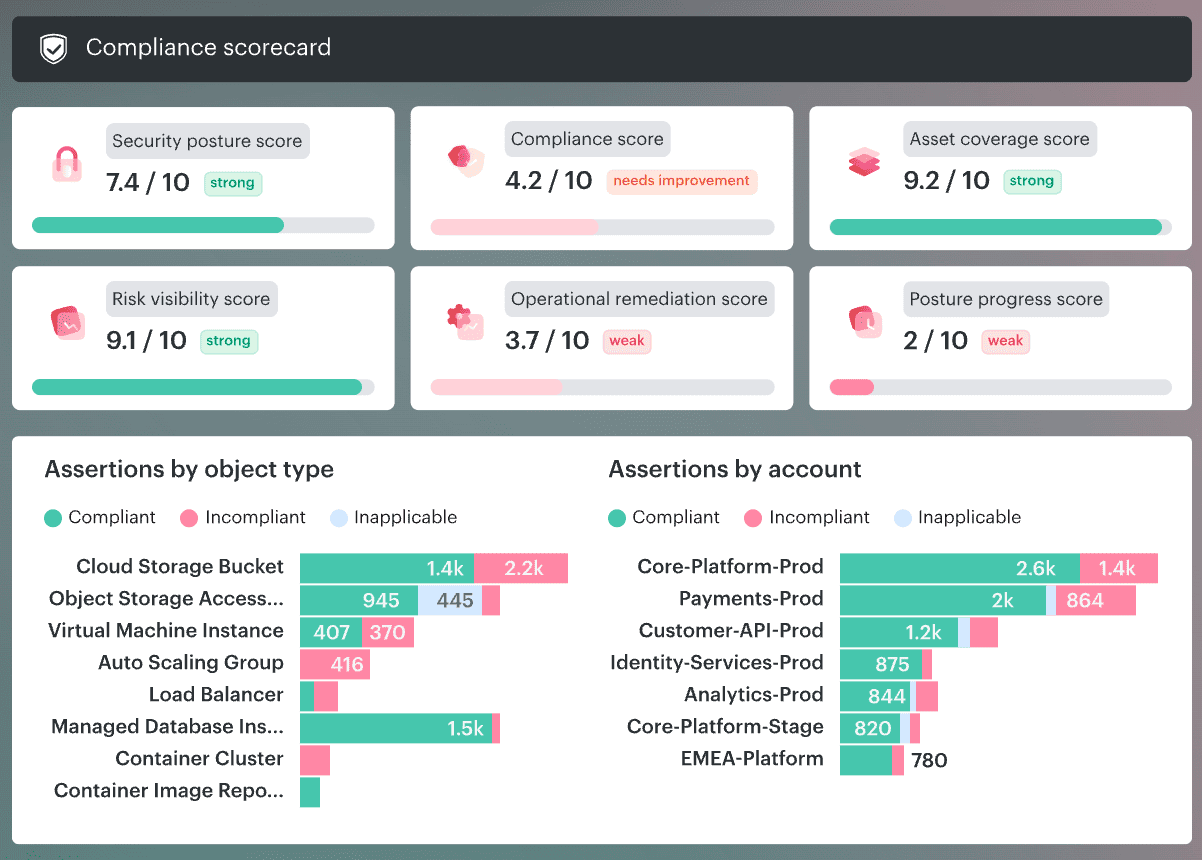
Core capabilities:
- CMDB for multi-cloud asset inventory. Start here when your biggest control problem is scope. Cloudaware’s CMDB gives teams one place to search and report across cloud providers, accounts, regions, datacenter assets, and desktop infrastructure. The product page also describes discovery across 3K+ cloud services and on-premise infrastructure.
- CMDB-aware CSPM. Use it when posture findings need owner, app, environment, and remediation context. Cloudaware’s CSPM combines CMDB data with multi-cloud and on-prem checks, so teams can scope controls by app, environment, or risk instead of drowning in provider-native alerts.
- IT Compliance. Useful for mapping cloud security controls to frameworks like CIS, NIST, ISO, PCI, HIPAA, SOC 2, and internal standards. Cloudaware links each asset and control to the CMDB, shows pass/fail status, ownership, and gaps, and evaluates policies against CMDB data rather than ad hoc live API scrapes.
- Vulnerability Management. Best fit when vulnerability backlogs need business context. Cloudaware groups vulnerabilities into actionable remediation tasks, integrates scanner data, and uses CMDB context to prioritize risks tied to real services, publicly accessible assets, and business-critical systems.
- SIEM and centralized cloud logs. Helpful when detective controls need asset context. Cloudaware describes centralized cloud logs with log source discovery for every cloud service and asset, plus CMDB attributes added to cloud service logs.
- Operational routing to owners. This is where control programs stop being slideware. Cloudaware’s CSPM page describes auto-routing findings to Jira, ServiceNow, and email, assigning owners from CMDB, and auto-closing tickets when fixes land.