


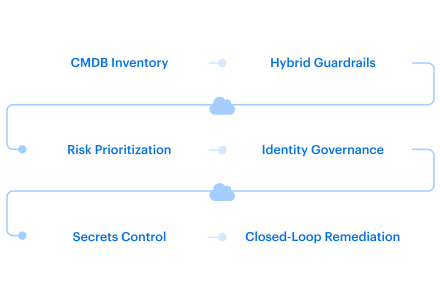
Hybrid cloud security best practices define how teams turn cross-environment risk into something they can actually assign, fix, and prove later.
Most hybrid cloud security tips fail when they ignore ownership. A workload may run in AWS, authenticate through Entra ID, depend on an on-prem database, and fall under PCI DSS because it supports payment processing. Each platform can show local state while no workflow shows the full risk path.
Flexera’s State of the Cloud reporting shows why this isn’t a corner case anymore. Public coverage of the report says 73% of organizations operate multicloud environments, 71% operate a Cloud Center of Excellence, and 81% use AI. The operating model has to catch up.
So the goal is to secure hybrid cloud operations without forcing every environment into the same tooling model.
Key insights
- Start with ownership, not tooling. A hybrid finding is not useful until it resolves to an asset, owner, service, environment, exposure path, and remediation route.
- Treat hybrid security as seam security. The risky parts are usually between systems: cloud workload to on-prem database, CI/CD runner to cloud roles, Kubernetes service account to secret source, or VMware VM to cloud-hosted API.
- Prioritize vulnerabilities by reachability, not scanner color. CVSS helps, but the patch queue should move by exposure, KEV/EPSS signal, service criticality, compliance scope, owner, and recovery posture.
- Review machine identities like production access. Service accounts, IAM roles, service principals, API keys, CI/CD tokens, Kubernetes service accounts, and certificates need owners, scopes, last-used data, rotation state, and revocation paths.
- Create evidence while fixing the issue. Don’t rebuild compliance evidence before audit. Keep the control result, exception, ticket, change history, verification result, and remediation record tied to the affected asset.
- Looking for cloud provider-specific guidance? Learn more in our Google Cloud security best practices, AWS cloud security best practices, and and Azure cloud security best practices guides.
What makes hybrid cloud security harder than single-cloud security?
Hybrid cloud security is harder because the control points sit in different systems while the risk crosses all of them.
What is hybrid cloud security? The practical answer is this: it protects workloads, identities, data, configurations, networks, secrets, and recovery paths across public cloud, private cloud, on-premises infrastructure, VMware, Kubernetes, bare metal, SaaS, and legacy systems.
What hybrid cloud security protects
In 2026, hybrid cloud security has to protect more than workloads in provider consoles. The control surface usually includes:
- Workloads across public cloud, private cloud, VMware, Kubernetes, bare metal, and on-premises infrastructure. A service may run an API in AWS, analytics in GCP, internal apps on VMware, and regulated data on-prem. Provider-native tools show local state, but not always the full dependency path.
- Human and machine identities. Workforce IAM is only one part of the model. Security also has to cover IAM roles, service accounts, service principals, CI/CD tokens, Kubernetes service accounts, certificates, and API keys.
- Network paths and exposure. A workload may not be public, but it can still be reachable through VPN, peering, private link, service mesh, ingress, or east-west traffic from another environment.
- Secrets and credential flows. Shared secrets operators, static credentials, cloud access keys, workload tokens, and bare-metal bootstrap credentials can create cross-environment access paths that do not appear in a single cloud console.
- Configurations, vulnerabilities, and recovery paths. A cloud-native workload can pass one provider check and still create risk through an on-prem database, an unmanaged VM, a stale exception, or a restore path that has not been tested.
The shared responsibility model gets harder because provider boundaries, customer-owned controls, and internal team ownership don’t line up cleanly across platforms.
So don’t stop at “the control exists.” Trace the path the finding would follow during an exposure review, audit request, or incident.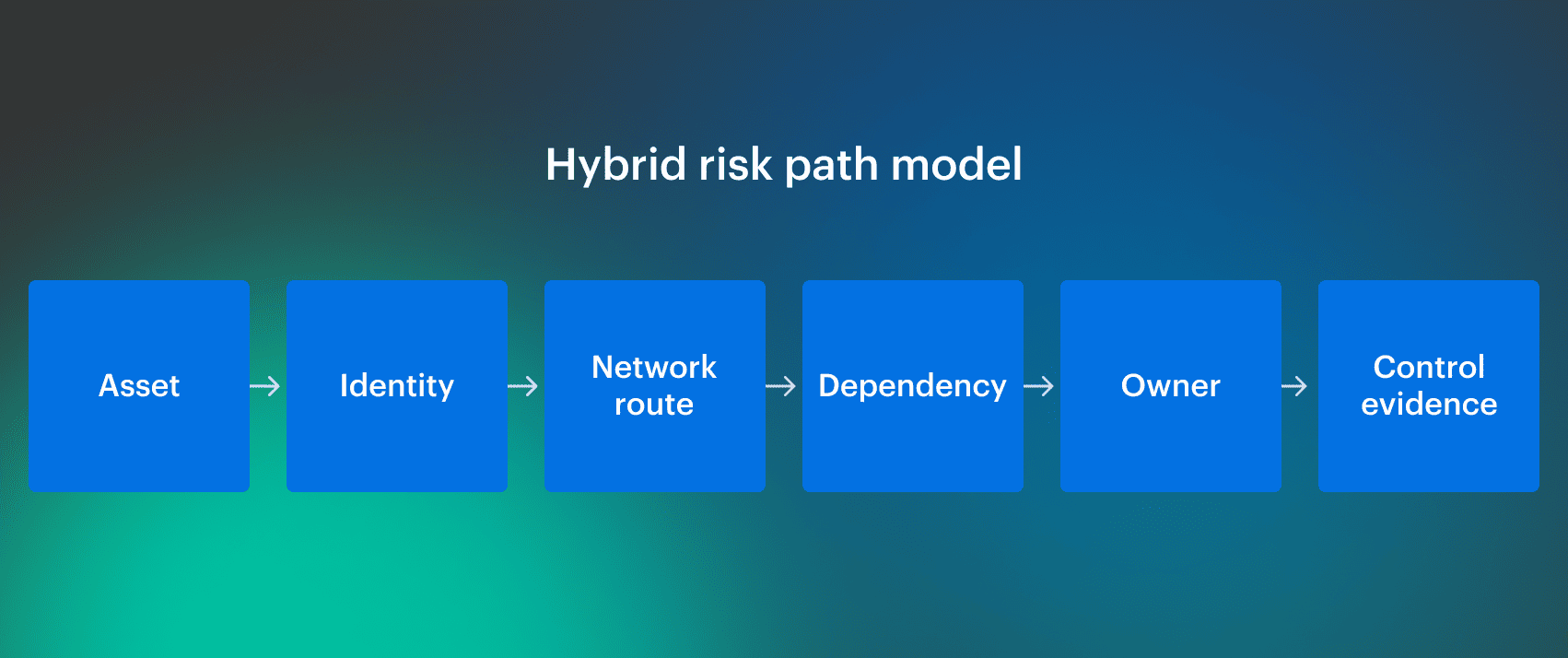 When reviewing a hybrid control, do not stop at “the control exists.” Trace the full path the finding would follow during an exposure review, audit request, or incident.
Where hybrid cloud security challenges show up
The Cloud Security Alliance describes hybrid cloud security challenges around visibility gaps, misconfigurations, network protection, governance, compliance, monitoring, shared responsibility, and unified controls.
In real operations, those categories usually show up as routing failures.
| Failure mode | What breaks |
|---|---|
| Resource exists in billing but not in the CMDB | Security can see spend, but cannot route ownership |
| Control passes in one cloud and fails in another | Same policy intent, different enforcement path |
| Kubernetes workload uses an over-scoped cloud credential | Cluster policy passes, but blast radius remains open |
| Exception suppresses a finding after scope changes | Risk stays hidden after the original justification expires |
| Emergency firewall change opens exposure | Runtime state drifts from approved policy |
That’s why the rest of this article focuses on operating practices, not generic advice.
Read also: What Is the Future of AI in Cloud Security? Trends & Benefits for 2026
Best practice #1. Build a CMDB-backed inventory
A hybrid security finding usually stalls at the same point: the tool knows something is wrong, but the team can’t prove what the asset is, who owns it, or which service is exposed.
A scanner can report a vulnerable package, while CSPM flags public access and CWPP detects workload risk. That’s useful. It still doesn’t become remediation until the finding resolves to an owner, support group, environment, compliance scope, and service context.
Hybrid inventory is not a resource export. It’s the layer that lets security open the right ticket with the right team.
Map assets to ownership and service context
A usable CMDB-backed asset inventory should cover cloud accounts, subscriptions, projects, VMware VMs, bare-metal hosts, Kubernetes clusters, containers, databases, storage, SaaS integrations, and network paths between cloud, on-prem, and third-party systems.
For each asset, keep the context that changes action:
| Required context | Why it matters |
|---|---|
| Owner and support group | Routes the finding to the team that can fix it |
| Business service | Shows what the asset supports |
| Environment and region | Separates production risk from lower-risk scope |
| Exposure | Shows what can reach the asset |
| Workload type and lifecycle status | Flags unsupported, temporary, or orphaned assets |
| Compliance scope | Connects the asset to PCI DSS, HIPAA, SOC 2, ISO 27001, or FedRAMP impact |
| Recovery tier | Shows how the asset should be restored after compromise |
This is where many hybrid cloud security challenges start.
A critical CVE on 10.42.18.91 is not enough. The team needs to know that it is a VMware VM running an unsupported Linux image, supporting a billing integration, reachable via VPN from an AWS-hosted API, owned by Payments Platform, and mapped to the PCI DSS scope. That context changes priority, SLA, and assignment.
Cloudaware CMDB helps keep this context attached to the asset instead of scattered across cloud consoles, spreadsheets, and ticket comments.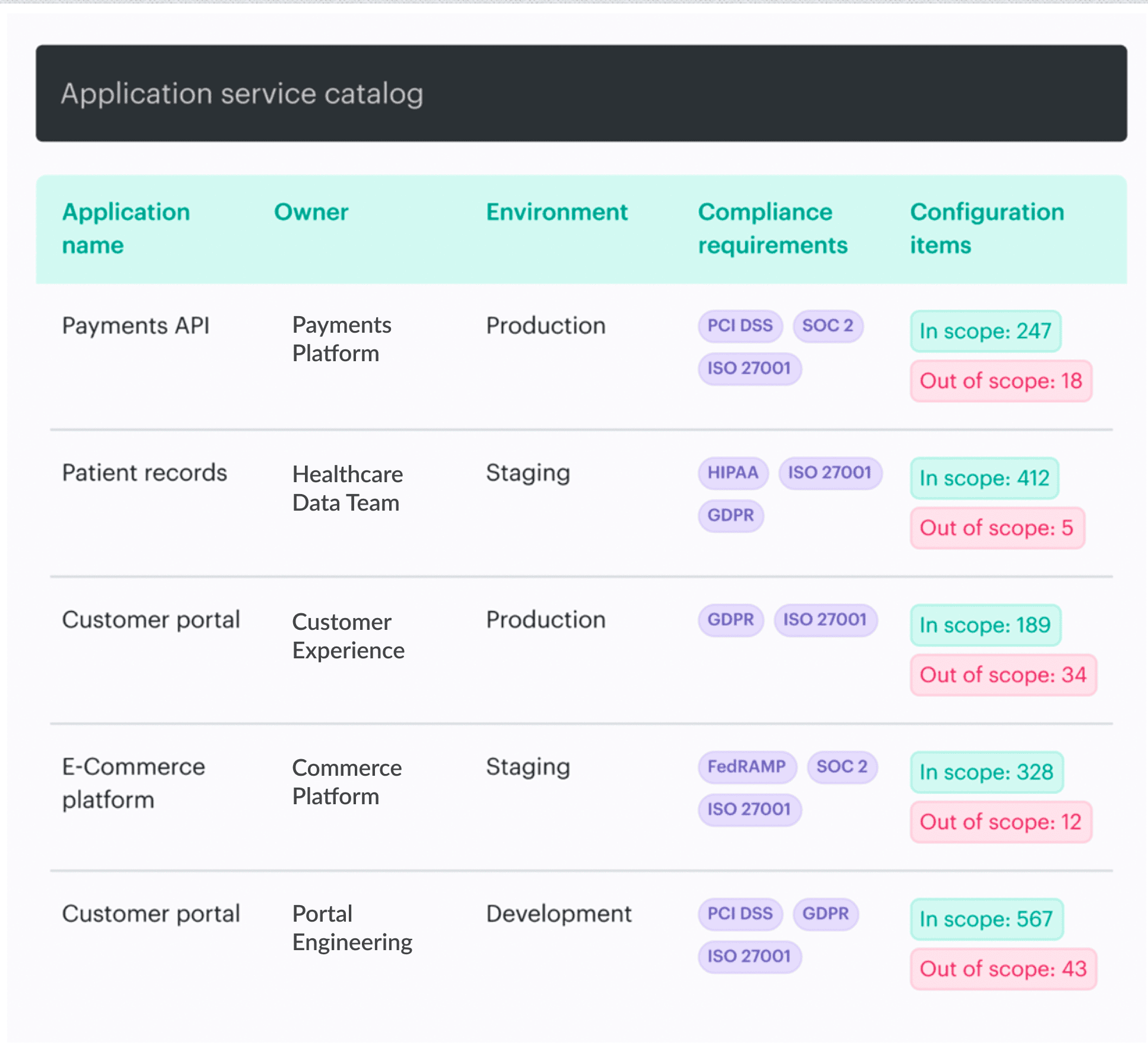 It collects and normalizes asset data across hybrid environments, maps resources to owners and tags, and gives security teams the operational context they need before a finding becomes remediation work.
Read also: Healthcare Data Security. A Multi-Cloud Guide to Protecting PHI in 2026
Include machine identity and Kubernetes context
Hybrid inventory also has to retain identity context for non-human access paths:
| Environment | Identity and context inventory should include |
|---|---|
| Cloud workloads | IAM roles, instance profiles, managed identities, service principals, attached policies, last-used data, linked cloud account/subscription/project, workload owner |
| Bare-metal systems | Hostname, IP/MAC metadata, hardware or provisioning record, assigned role, configuration-management relationship, certificate or token mechanism, allowed secret paths, owning service |
| Kubernetes workloads | Cluster, namespace, workload name, service account, RBAC bindings, ingress exposure, secret source, controller/operator scope, owning team |
| CI/CD and automation | Pipeline runner, deployment token, cloud role or service principal, repository/project link, deployment scope, secret access, approval path |
| SaaS or third-party integrations | Integration owner, API key or OAuth grant, connected application, data scope, rotation status, last-used data |
A bare-metal host should not fetch production secrets just because it has an IP address. It needs a trusted identity tied to a known role, service, and allowed secret path.
Kubernetes has the same problem in a different shape. If a shared secrets operator can read across namespaces, the cluster may look compliant while a lateral movement path stays open.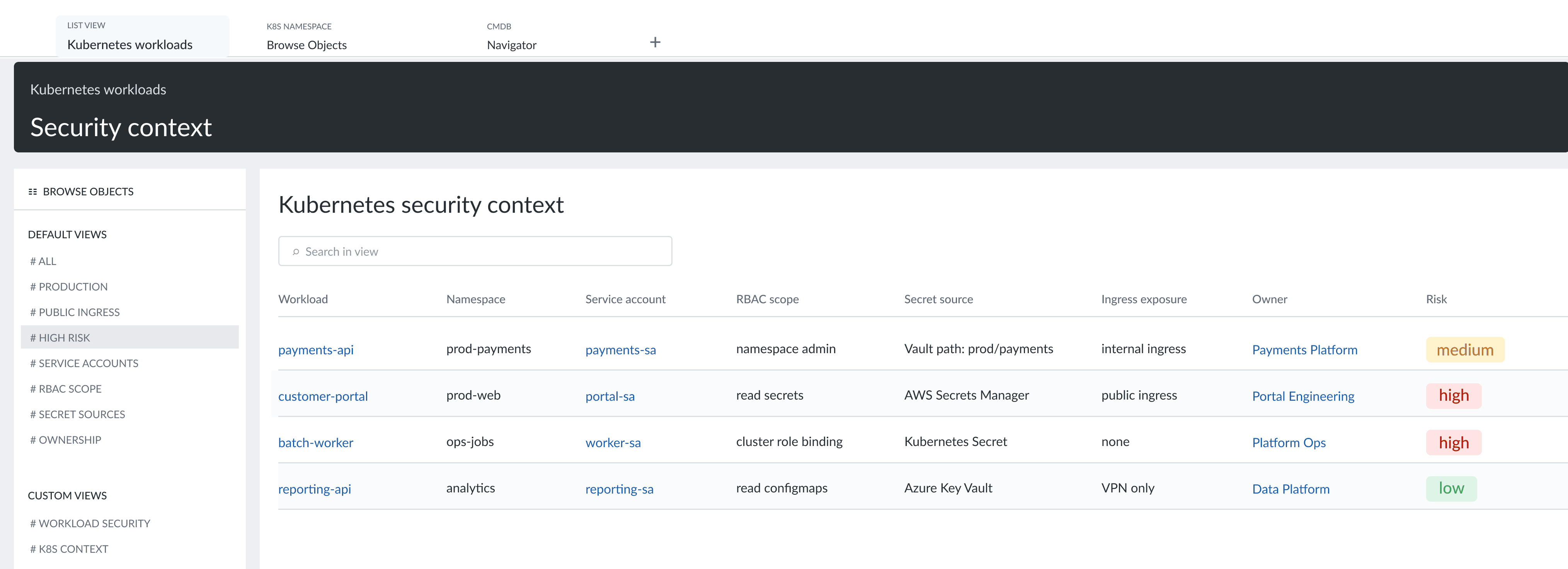 Kubernetes workload security context showing namespace, service account, RBAC scope, secret source, ingress exposure, owner, and risk level.
Best practice #2. Standardize hybrid cloud security policy and guardrails across environments
Hybrid teams rarely fail because they have no policy. They fail because the same control intent is enforced differently across cloud, VMware, Kubernetes, and on-prem systems.
A hybrid cloud security policy has to define the control intent first, then translate it into platform-specific checks, owners, exceptions, and evidence.
Translate one policy intent into platform-specific controls
Take object storage. One policy can require blocked public access, approved encryption, owner metadata, logging, and region controls. Enforcement still differs across S3, Azure Storage, and GCP Cloud Storage. VMware-backed storage, Kubernetes volumes, and on-prem file systems add their own control points.
Baseline hybrid cloud security controls should cover:
| Control area | Required policy output |
|---|---|
| Public exposure | Approved ingress paths, blocked admin ports, public endpoint review |
| Encryption | Required encryption state, key ownership, approved key management |
| Logging | Required logs, retention, destination, and review ownership |
| Ownership metadata | Owner, support group, environment, service, and compliance scope |
| Privileged access | Human and machine least privilege, review cadence, exception path |
| Vulnerability SLAs | Remediation windows based on exposure, exploitability, and service criticality |
| Backup coverage | Recovery tier, backup state, restore testing evidence |
| Secrets handling | No hardcoded cloud keys, no unmanaged static secrets, short-lived tokens where possible |
Use policy-as-code, Terraform, and IaC checks where assets actually flow through code. They can block missing encryption, public buckets, unsupported regions, open admin ports, or missing owner metadata before deployment.
But runtime validation still matters. Not every asset is created through Terraform. Drift detection catches the firewall rule changed during an incident, the manual VM update, or the older system that never passed through the pipeline.
Read also: How to Create a Cloud Security Policy in 8 Steps
Tie hybrid cloud compliance to evidence
Hybrid cloud compliance should map technical checks to frameworks security and audit teams already use: CIS Benchmarks, NIST CSF, NIST 800-53, PCI DSS, HIPAA, ISO 27001, SOC 2, and FedRAMP.
For continuous compliance in hybrid cloud, each failed control needs:
- Affected asset, owner
- Exception state
- Remediation record
- Verification result
- Evidence
Exceptions also need owners and expiration dates. Without expiration, an exception becomes shadow policy.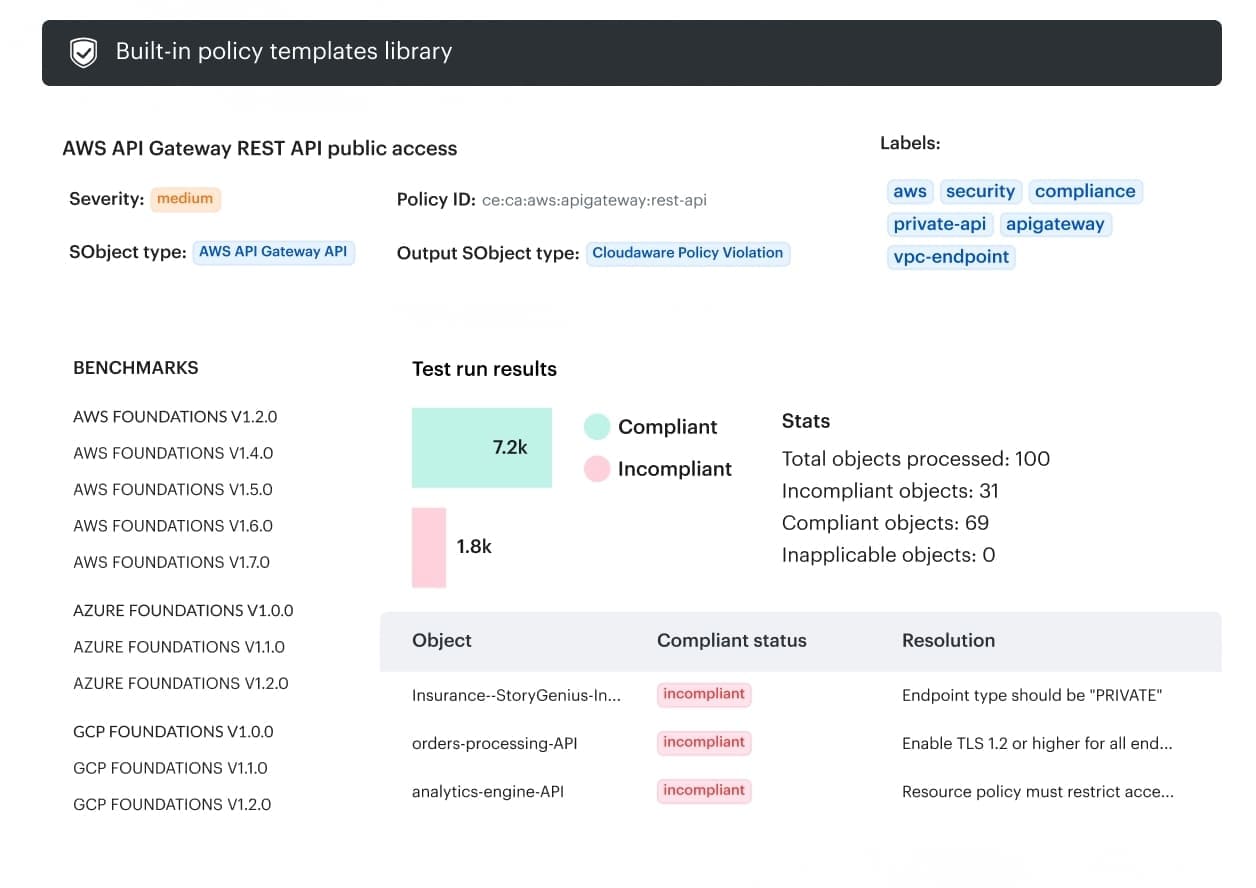 Cloudaware policy template view showing benchmark mapping, compliant and noncompliant objects, and remediation guidance for a public API access control.
Best practice #3. Prioritize hybrid cloud security risks
Hybrid cloud security risks don’t line up cleanly with scanner severity. CVSS can describe technical impact. It can’t tell you whether the affected asset is internet-facing, reachable through VPN, mapped to PCI DSS, or recoverable after compromise.
The vulnerability queue is also getting noisier. NIST reported a 263% increase in CVE submissions from 2020 to 2025 and is prioritizing enrichment for higher-priority records, including CVEs in CISA’s KEV catalog. Enterprise teams now need their own asset context, exposure data, and service mapping before assigning patch management work.
Use exploitability and exposure before scanner severity
Hybrid vulnerability management should combine scanner output with operational context:
| Signal | Why it changes priority |
|---|---|
| CVE severity | Shows technical impact, not remediation order by itself |
| KEV / EPSS signal | Shows known or likely exploitation |
| Exposure | Prioritizes an internet-facing workload, exposed admin service, or external API |
| Business service | Separates revenue-critical, identity, payment, and regulated services from lower-risk systems |
| Ownership | Determines which team receives the SLA |
| Compensating controls | Accounts for segmentation, WAF, isolation, or temporary blocking |
| Compliance scope | Changes evidence needs for PCI DSS, HIPAA, SOC 2, ISO 27001, or FedRAMP |
A high-severity CVE on an isolated dev VM and a lower-severity CVE on an internet-facing API node in PCI scope should not receive the same treatment. Patch the API node first. Exposure and blast radius matter.
Google Cloud’s Threat Horizons coverage adds the same pressure from another angle: public reporting says software vulnerabilities represented 44.5% of initial access vectors, ahead of weak credentials at 27.2% and misconfigurations at 21%. It also notes that 21% of tracked cloud intrusions involved compromised trusted third-party relationships.
Read also: Cloud Security Threats in 2026. Top Risks & How to Defend
Add recovery risk to vulnerability decisions
Hybrid context should show where the asset runs and what it connects to: on-prem or cloud, reachable through VPN or peering, part of Kubernetes, deployed as virtual machines or containers, or connected to a shared identity path. That context affects lateral movement risk, MTTR, and SLA.
Recovery posture belongs in triage. A vulnerable production workload with no immutable backup, no tested restore path, or no clean recovery plan carries more risk during ransomware response.
CISA ransomware guidance should be used as the recovery baseline: protect backups, test restore paths, and avoid restoring compromised systems straight back into production.
Katerina L., ITAM at Cloudaware, “Severity tells you how bad the flaw can be. Hybrid context tells you whether it is reachable, owned, business-critical, regulated, and likely to matter before the next patch window.”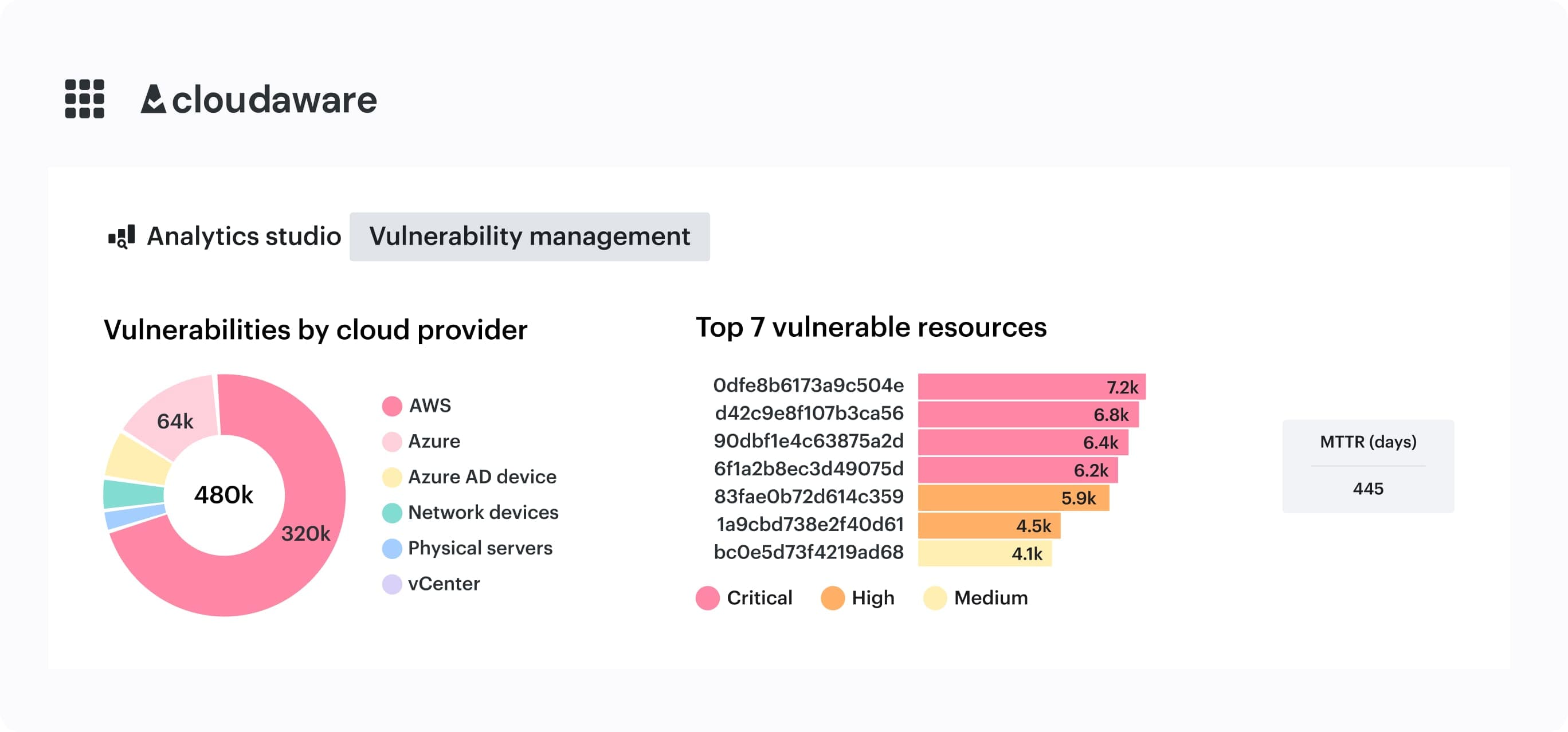 Cloudaware remediation view showing vulnerabilities tied to remediation tasks, application security score, reliability score, and impacted services.
Best practice #4. Govern human access, machine identities, and secrets as one control plane
Hybrid identity breaks when teams review human access but leave workload access paths unmanaged.
A CI/CD runner, service account, API key, or certificate can carry production access across cloud, Kubernetes, bare metal, and private infrastructure without appearing in a standard workforce IAM review.
Treat machine identities as production access
Hybrid identity is broader than IAM users. It includes admins, developers, IAM roles, service accounts, service principals, API keys, certificates, CI/CD tokens, Kubernetes service accounts, database credentials, and secrets used by automation.
The best practices for hybrid cloud identity governance start with inventory and ownership. Every non-human identity needs a service owner, permission scope, last-used signal, and review path.
| Identity type | Common hybrid failure | Control | Evidence to retain |
|---|---|---|---|
| Admin user | Standing privilege across environments | Least privilege and access review | Access review record |
| Service account | No owner or stale permissions | Scoped role and rotation | Owner, role, last-used data |
| CI/CD token | Deployment access across cloud and Kubernetes | Short-lived credentials | Pipeline permission mapping |
| Kubernetes service account | Excessive namespace or cluster permissions | RBAC and workload identity | RBAC policy, namespace mapping |
| Bare-metal machine identity | Weak bootstrap trust | Certificate or inventory-backed identity | Provisioning record, allowed secret paths |
| API key | Hardcoded or long-lived secret | Secrets manager and rotation | Rotation log, code scan result |
A CI/CD runner may hold an AWS role, Azure service principal, and Kubernetes deployment permissions. If compromised, it becomes a cross-environment blast radius problem, not an isolated IAM issue.
Manage secrets by runtime behavior, not storage location
The best practices for securing machine identities in hybrid cloud depend on how credentials behave at runtime.
Secrets in hybrid environments usually include:
- Access keys and API keys
- Database credentials
- Cloud credentials
- Certificates
- Workload identity tokens
- Short-lived tokens used by automation or services
Cloud-native secret managers work inside one provider boundary. Large hybrid environments need a standard model for bare metal, public cloud, private cloud, and Kubernetes.
The Booking.com secret-management discussion gives the scale problem some shape. Dan Popescu describes more than 2 million static secrets and roughly 400,000 to 500,000 requests per minute across bare metal, public cloud, private cloud, AWS, GCP, and VM-based environments.
That is not a password-management problem. It is an access-runtime problem.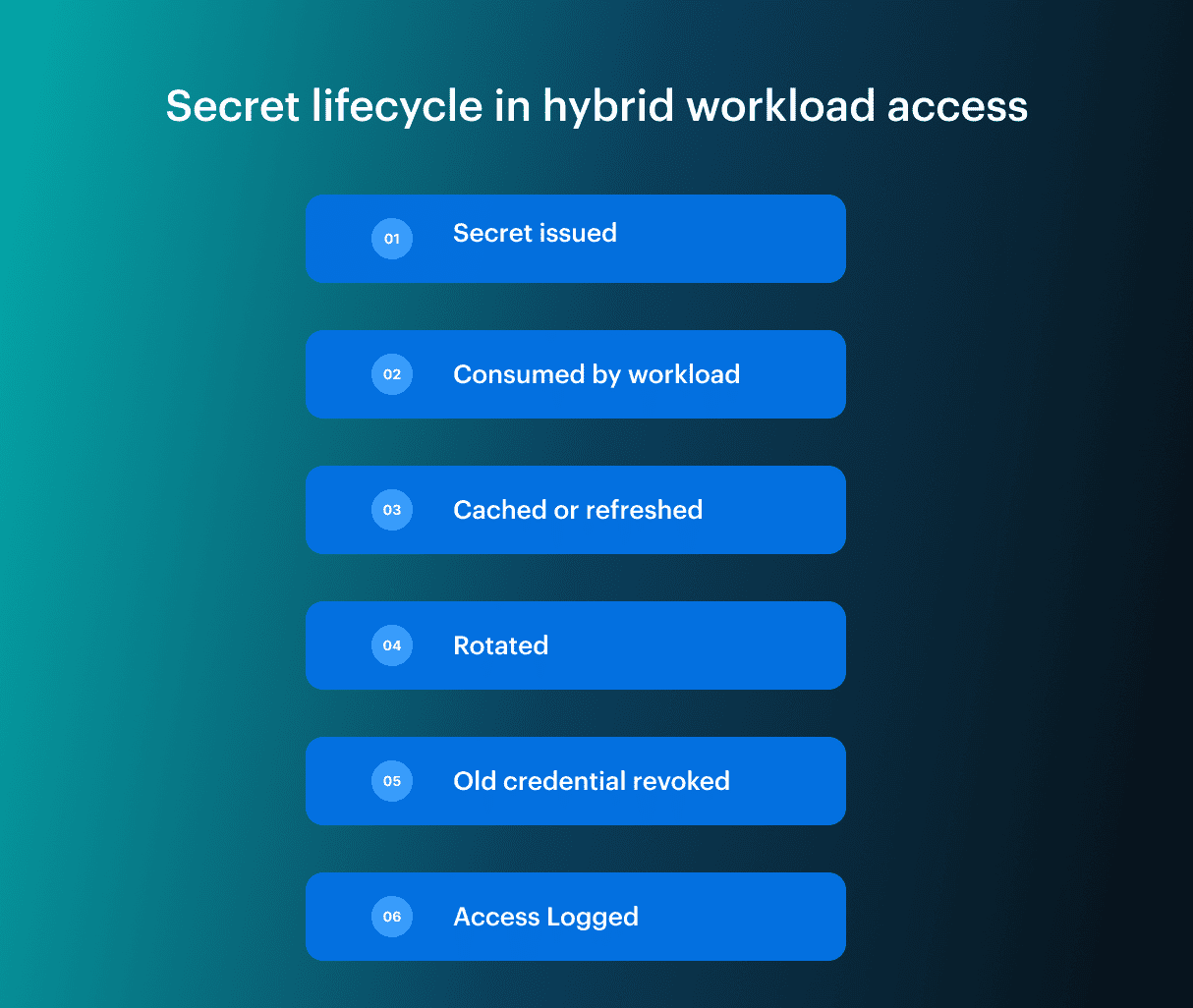 Static secrets create standing access. Dynamic secrets reduce that risk only when applications support token TTL, caching, reload behavior, and failure handling.
Rotating a credential in Vault, AWS Secrets Manager, Azure Key Vault, or another source of truth does not fix an application that cached the old value and never re-authenticates.
Read also: 7 Pillars of Cloud Security Strategy with Roadmap, Metrics & Examples
Apply Zero Trust to workload access paths
A zero trust hybrid cloud model treats users, workloads, service accounts, deployment tokens, and machine credentials as reviewable access paths. Zero trust implementation hybrid cloud fails when it stops at workforce MFA and ignores workload-to-resource permissions.
For workload access, Zero Trust means identity verification, least privilege, credential rotation, segmentation, and evidence. CIEM is useful only if identity findings map back to workload, owner, environment, and last use.
Valentin K., Software Developer at Cloudaware, explains the failure mode well: “In hybrid environments, machine identity risk is usually hidden in the relationship graph: workload to token, token to permission, permission to resource. If that chain is not mapped, access review becomes guesswork.”
Best practice #5. Run hybrid cloud security as a closed-loop operation
A finding becomes useful when it moves through hybrid cloud security management as assigned work. The workflow has to detect the issue, enrich it, assign remediation, verify the fix, and keep the record.
Check Point’s cloud security reporting found that only 9% of breaches were detected within the first hour, while nearly two-thirds of organizations experienced a cloud incident. Detection matters. It still doesn’t close the risk unless the finding gets an owner, an SLA, and a verification record.
Turn findings into routed work
The best practices for managing hybrid cloud security start with a closed-loop workflow.
| Stage | What has to happen |
|---|---|
| Detect | Identify risk across public cloud, private cloud, VMware, Kubernetes, bare metal, SaaS, or containers |
| Enrich | Add CMDB context: owner, service, environment, exposure, identity path, compliance scope, and recent change |
| Assign | Route remediation through ITSM to the right team |
| Track | Attach SLA, exception state, and compensating control |
| Verify | Confirm remediation, secret rotation, policy pass, or recovery readiness |
| Preserve | Store evidence with the asset, control, or ticket |
CSPM, CWPP, CNAPP, CIEM, DSPM, SIEM, and SOAR only matter here if their signals enter the same remediation queue. Otherwise, the team gets parallel queues with different severities and no shared state.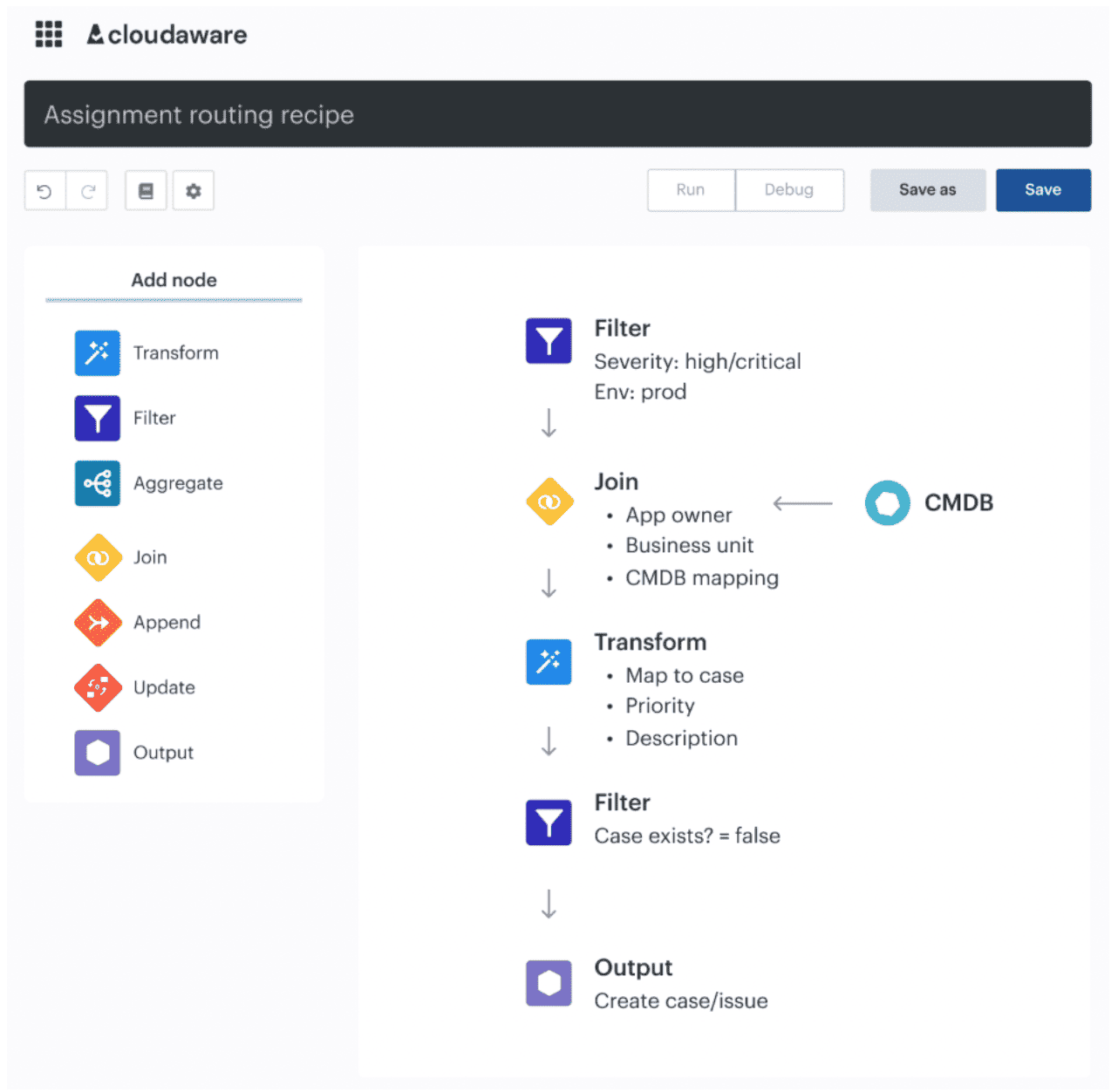 Cloudaware assignment routing workflow showing how high-severity findings are enriched with owner, business unit, and CMDB mapping before a remediation case is created.
Use a public admin port as the test case. It appears on a VM after an emergency firewall change. The workflow should detect the exposure, map the VM to a service and owner, assign remediation, verify the security group fix, record the change, and update compliance evidence.
If the process stops at alert creation, MTTR depends on whoever notices the ticket first.
Read also: 12 Best Cloud Security Assessment Tools for 2026
Preserve change history and evidence
Change history matters because hybrid incidents often start as drift: a firewall change, public endpoint, stopped backup agent, stale secret, or manually modified cloud resource. Drift detection should connect the changed object to the owner, original policy, and current control result.
Cloudaware customers use asset-level change history to investigate when a resource moved away from its expected state and to keep audit evidence tied to the affected CI.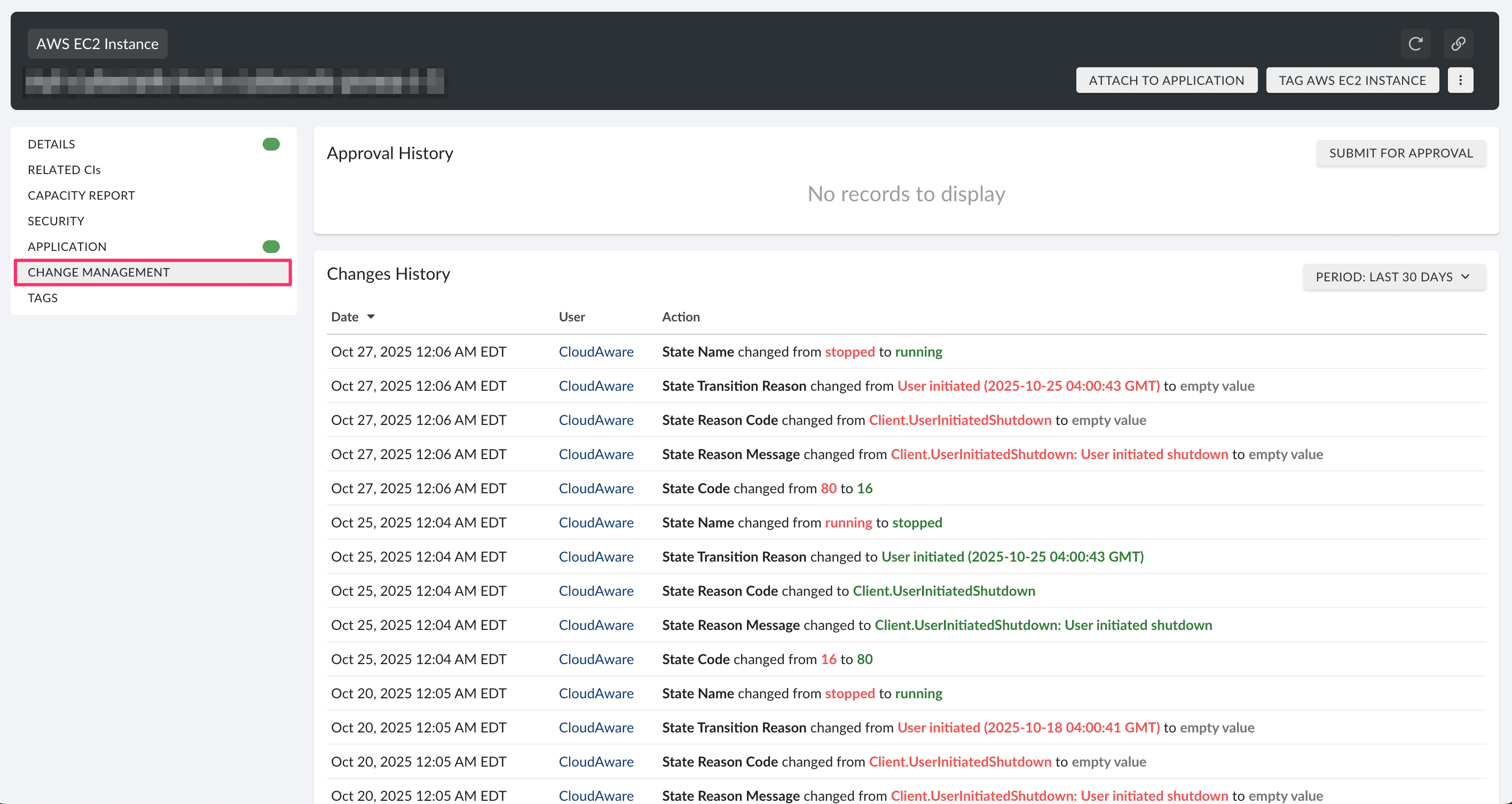 Cloudaware change history view showing asset-level state changes, timestamps, user context, and approval workflow for audit evidence.
Recovery also stays inside the loop. Evidence should show whether the workload has immutable backups, tested restore paths, and a recovery path that does not reintroduce compromised images, credentials, or configs.
For critical workloads, recovery readiness is not a separate resilience topic. It changes security priority.
How Cloudaware supports hybrid cloud security operations
Cloudaware helps teams move from hybrid cloud visibility to remediation assigned to the service owner. Native tools can show that a control failed inside one provider, a vulnerability exists on one host, or a resource changed state.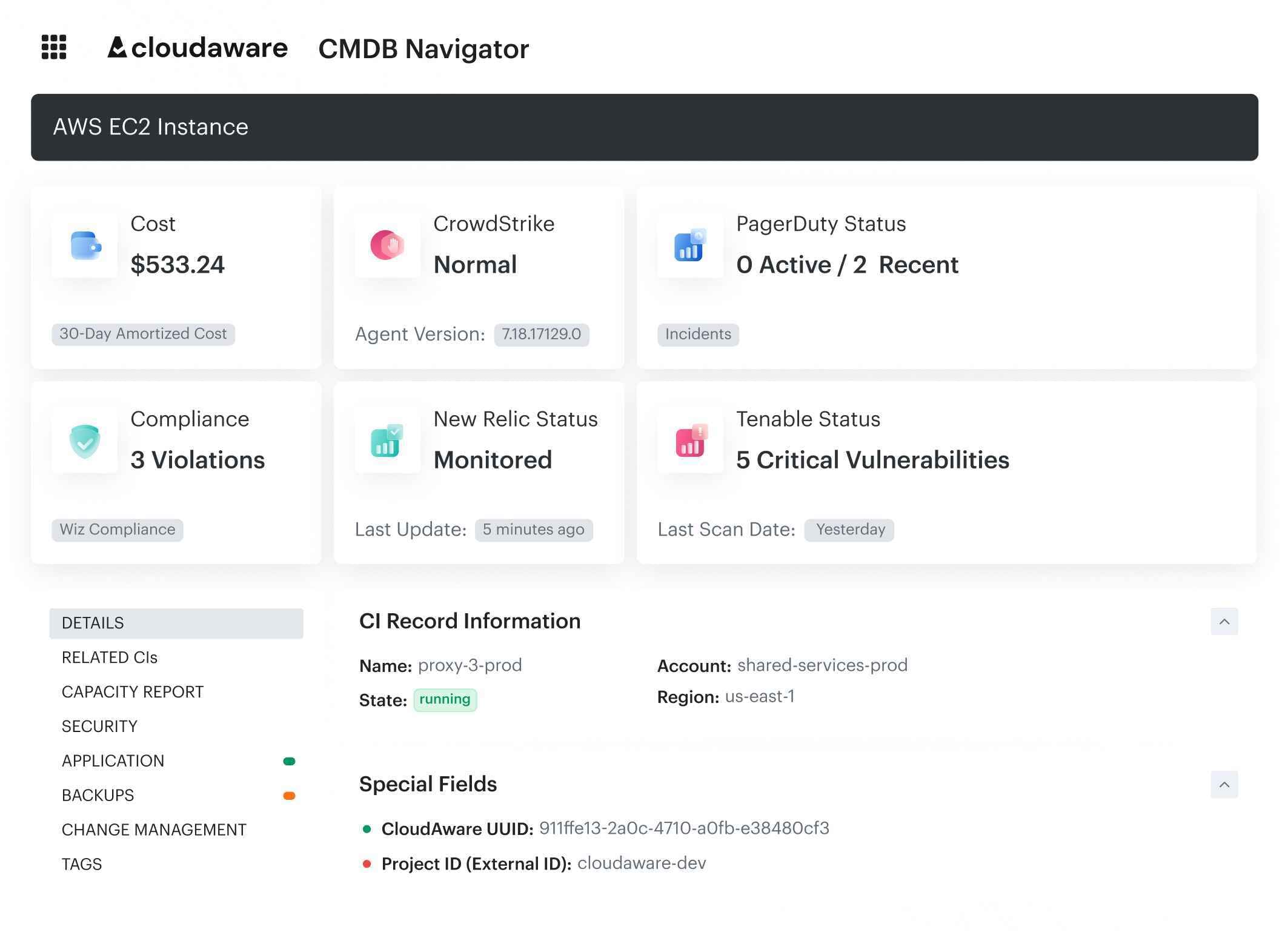 The operating problem starts after that: which asset failed, who owns it, whether the exception is valid, where remediation is tracked, and what evidence proves the issue was fixed.
Core capabilities:
- CMDB-backed asset inventory: Normalize resource data across AWS, Azure, GCP, Oracle Cloud, Alibaba Cloud, VMware, Kubernetes, and on-prem environments into a CMDB-aware model.
- Security posture context: Connect CSPM findings and policy violations to affected assets, owners, support groups, business services, environments, and compliance scope.
- Vulnerability management context: Enrich vulnerabilities with asset inventory, ownership, exposure, environment, business service, and compliance context so remediation can be assigned by operational risk.
- Compliance evidence: Connect failed checks, exceptions, remediation status, and verification evidence to the affected resource instead of leaving audit support scattered across exports and tickets.
- Change history: Keep resource-level change history available for drift detection, incident review, and compliance investigation.
- Remediation workflows: Route findings through accountable remediation workflows without replacing ITSM ownership, cloud-native controls, IAM, SIEM, EDR, or GRC processes.
For hybrid multicloud security, this is where multi-cloud security best practices become measurable. Cloudaware does not replace the native enforcement layer. It sits in the operating layer where signals need CMDB context, owner assignment, policy status, exception handling, and evidence.