


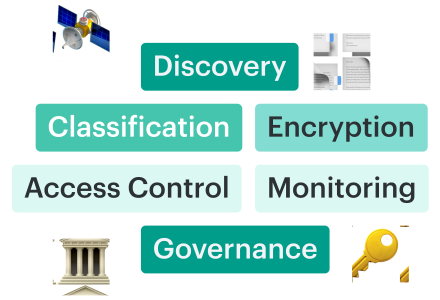
Cloud data security best practices are not a flat checklist of encryption, IAM, monitoring, and backup controls. It is more like a sequence: you discover the data, classify it, protect it, control access, monitor drift, prove compliance, and test recovery across different clouds, on-prem systems, and SaaS.
In 2026, cloud breaches still come from basic control failures. Wiz reports that 80% of cloud breaches in the past year were caused by misconfigurations, exposed credentials, and poor exposure management. For data security, those failures usually resolve to the same path: an unowned store, an over-permissioned identity, or a copy no one monitors.
We selected the best practices for cloud data security by combining NIST CSF 2.0, NIST SP 800-53, CIS Controls, CSA CCM, cloud provider guidance, and Cloudaware experts’ field experience across client environments. The final playbook follows the failure path we see most often: unknown data stores, weak classification, inconsistent encryption, over-permissioned identities, posture drift, missing evidence, and untested recovery.
Key insights
- Cloud data controls now need to cover SaaS, AI workloads, and hybrid paths, not only cloud storage. Check Point’s 2026 Cloud Security Report found that 77% of organizations updated cloud security strategy for AI, but only 26% had architecture ready to enforce it.
- Every SaaS connector, export, and integration needs owner mapping and monitoring. Google Cloud Threat Horizons reported that third-party software vulnerabilities accounted for 44.5% of initial cloud intrusion vectors in late 2025, and 21% of intrusions involved compromised trusted third-party relationships.
- Least privilege has to be mapped to data stores, not only to roles. Palo Alto Networks’ cloud security reporting ties AI-era cloud risk to excessive permissions, misconfigured storage and databases, and unmanaged non-human identities.
- Tier 1 data stores need tested restore paths, not just configured backups. 2026 ransomware recovery research identifies backup over-trust, dependency blindness, identity trust collapse, and lack of proof-of-recovery as failure modes.
- Compliance evidence has to be continuous. NIST CSF 2.0, NIST SP 800-53, CIS Controls, and CSA CCM all push the same operating requirement: controls need scope, owner, status, change history, and proof.
- For private cloud environments, use the Private Cloud Data Security: How to Operate and Prove Controls Across Infrastructure guide.
Why “cloud data security best practices” have changed again
Cloud data security best practices have changed because the data path now crosses cloud storage, SaaS, AI services, analytics platforms, logs, backups, and migration staging locations.
The old control model assumed that the sensitive record resided in a known database, within a known account, and behind a known access path. That is no longer the default operating reality.
A customer record can start in an application database, move into Amazon S3, replicate to Snowflake, land in Databricks or BigQuery, appear in a SaaS support export, and end up in logs or backup storage. Each hop changes the control point.
| Shift | What it changes operationally |
|---|---|
| Cloud providers separate data controls across many services: storage, databases, warehouses, KMS, IAM, logging, backup, and network paths. | The control owner must verify each data state separately: at rest, in transit, in use, copied, exported, logged, and restored. |
| Data platforms such as Snowflake, BigQuery, and Databricks make data movement a normal workflow. | Export, stage, share, and replication rights become part of the data security boundary, not only analytics administration. |
| SaaS systems push data into cloud storage, BI tools, support systems, and ticketing workflows. | The source app may be governed, while the exported copy lands under a different owner, retention rule, and access model. |
| Migration and re-platforming create temporary stores, roles, transfer paths, and snapshots. | Post-cutover cleanup becomes a security control, not a project-management task. |
| Frameworks such as NIST SP 800-53, CIS Controls, and CSA CCM expect controls to be mapped, monitored, and evidenced. | A point-in-time console setting is not enough; teams need control state, owner, exception, remediation, and audit trail. |
For cloud data security, that path usually breaks in five places:
- Data store exists in billing, logs, or SaaS export history, but not in the CMDB
- Identity can reach regulated data, but the access review only counted administrator roles
- Migration created a staging bucket, temporary role, or snapshot share that no one removed
- Posture scanner found the issue, but no owner or remediation route was attached
- Audit evidence proves a point-in-time setting, but not the current runtime state
That is why this playbook uses lifecycle order: discover, encrypt, control access, monitor, govern, and recover. Each practice maps to a control point where data is created, moved, copied, accessed, monitored, audited, or restored.
Read also: Cloud Data Security Challenges. The 10 Problems Slowing Down Modern Multi-Cloud Programs
Best practice #1: Discover every data store before you protect anything
The first of the cloud data security best practices is to discover every data store, copy, backup, snapshot, export, and owner before enforcing policy.
AWS Well-Architected places data classification before data protection because encryption and handling rules depend on sensitivity. CIS Controls v8.1 also starts with enterprise asset inventory and data protection controls, which is the same operating order: find the asset, classify the data, then apply the control.
Apply the practice this way:
- Compare CMDB records against cloud inventories, billing data, storage APIs, backup systems, and SaaS exports.
- Record owner, environment, region, sensitivity level, encryption status, backup relationship, and last-seen timestamp.
- Treat regulated data without an owner as an operational failure, not a tagging cleanup task.
- Repeat discovery after migrations, acquisitions, SaaS onboarding, and major platform changes.
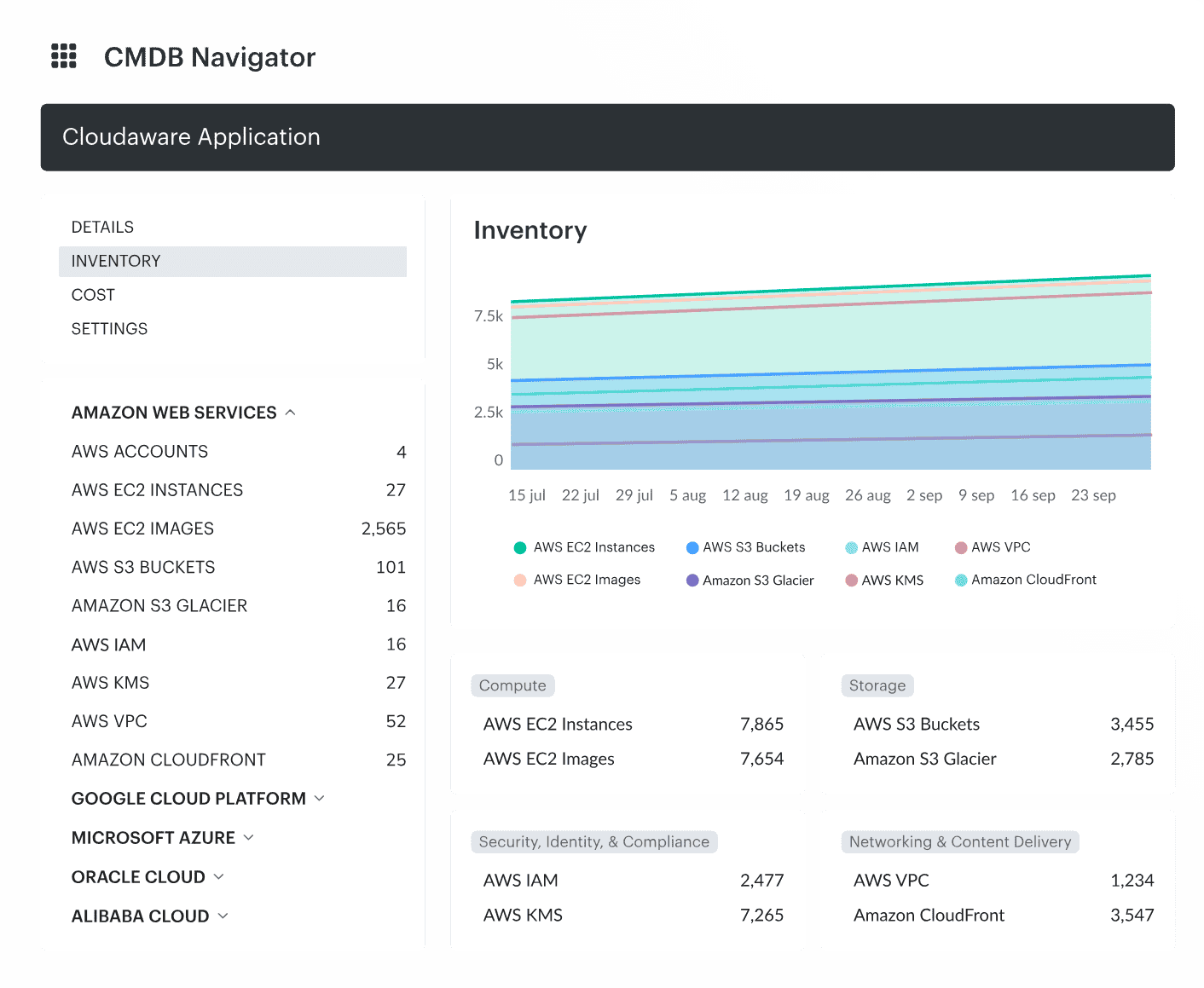 Cloudaware inventory view showing resources collected automatically from connected cloud and hybrid environments and normalized into CMDB records.
Best practice #2: Encrypt data so the controls survive a cloud migration
Migration projects rarely fail because encryption was forgotten entirely. More often than not, it slips somewhere along the journey.
A database arrives in the correct region but uses the wrong key. A snapshot moves across accounts with permissions that were never reviewed. A Terraform deployment recreates storage and quietly removes a setting that engineers added manually months earlier.
Data security best practices for cloud migration focus on consistency: the destination environment should provide at least the same level of protection as the source.
Microsoft and AWS both frame data protection around where data exists and how it moves. That makes migration reviews straightforward. Follow the data from origin to destination and verify encryption at every stop.
Focus reviews on:
- Source systems
- Transfer paths
- Temporary staging locations
- Destination resources
- Backups and replicas
- Legacy copies awaiting retirement
“Cutover is not the end of migration security,” notes Katerina L., Cloud Security Expert at Cloudaware. “The first Terraform run after the cutover is where I expect drift to show up.”
Best practice #3: Anchor least-privilege access to data, not just identity
Least privilege should be reviewed from the data store outward: which identity can read, export, replicate, restore, or delete sensitive data?
Mandiant’s Snowflake investigation showed why this matters. In the incidents Mandiant investigated, compromised customer credentials and weak account protections were enough to access and extract data. Attackers used normal data-platform functions, so the exposure path was identity → permission → data store → export.
Apply the practice this way:
- Map access as identity → permission → resource → data classification.
- Review service accounts, CI/CD identities, backup operators, SaaS connectors, warehouse roles, and temporary migration accounts.
- Flag dormant identities, broad warehouse access, snapshot-sharing permissions, and active migration roles after cutover.
- Require JIT access for production data export, restore, and administrative query paths.
- Monitor suspicious access with asset, owner, environment, and sensitivity context attached.
Alla L., Technical Account Manager at Cloudaware, says, “I had a customer who counted 12 admins on paper and discovered 184 effective admins after an entitlement analysis. None of the 172 unexpected ones were malicious. They came from inherited federation rules, dormant service accounts, and snapshot-sharing grants nobody had unwound.”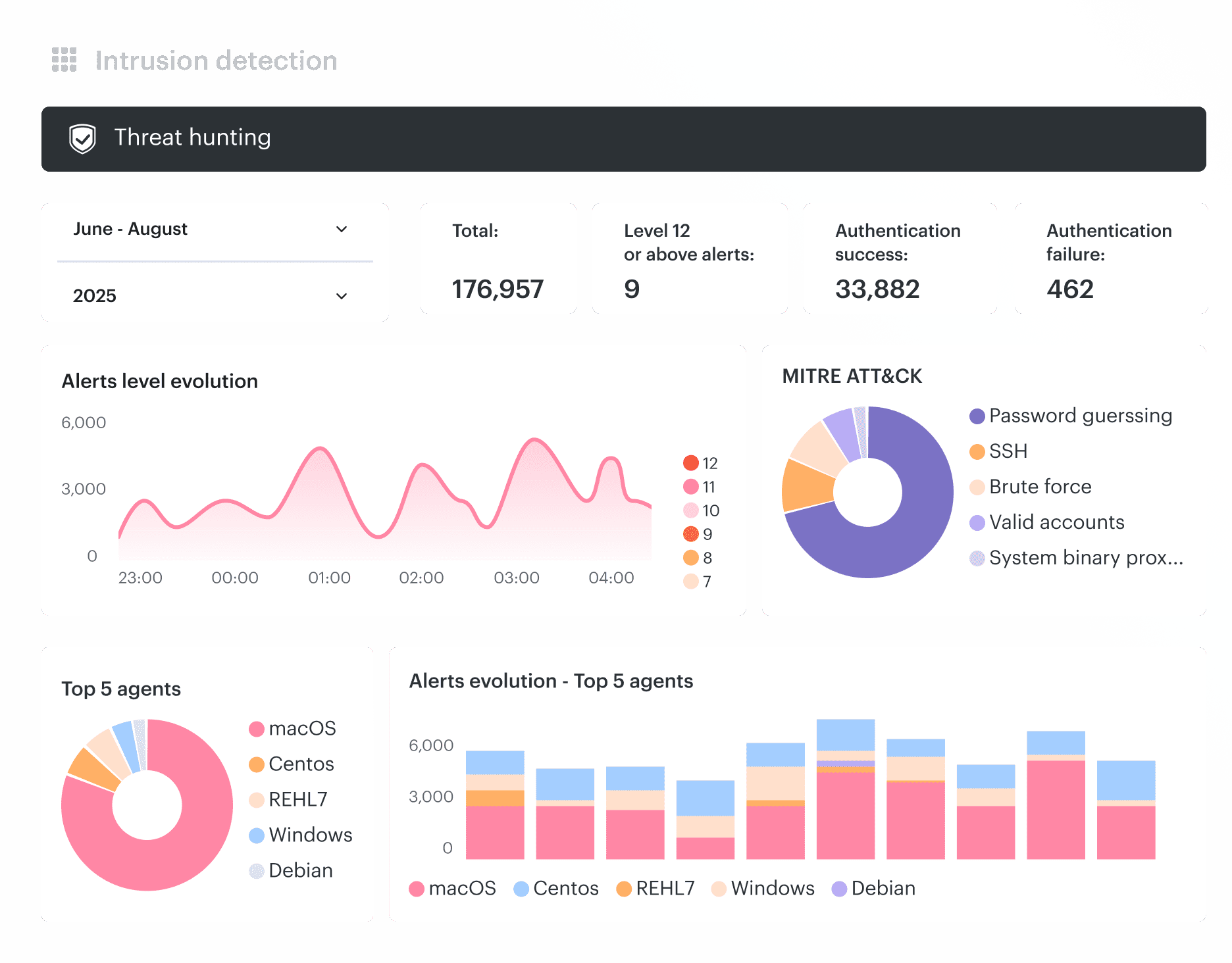 Cloudaware Intrusion Detection correlates suspicious activity with CMDB context.
Best practice #4: Continuously monitor cloud posture and route findings to owners
Cloud posture monitoring should answer one question first: which misconfiguration creates a real data exposure path?
A publicly exposed storage bucket, unencrypted backup, shared snapshot, or overly permissive IAM role matters because it changes who can reach data. The finding is useful only when it shows the affected asset, environment, data sensitivity, owner, policy status, and remediation route.
NIST CSF 2.0 supports this operating order: identify assets, protect them with controls, detect drift, respond to findings, and verify recovery. For data stores, that means posture checks should show whether the failed control affects production, regulated data, backups, exports, or migration copies.
When posture issues appear:
- Prioritize regulated and production data stores
- Review exposure, encryption, logging, backup coverage, and network access
- Attach ownership and business context before creating tickets
- Escalate production findings ahead of development hygiene issues
- Verify remediation before closing the issue
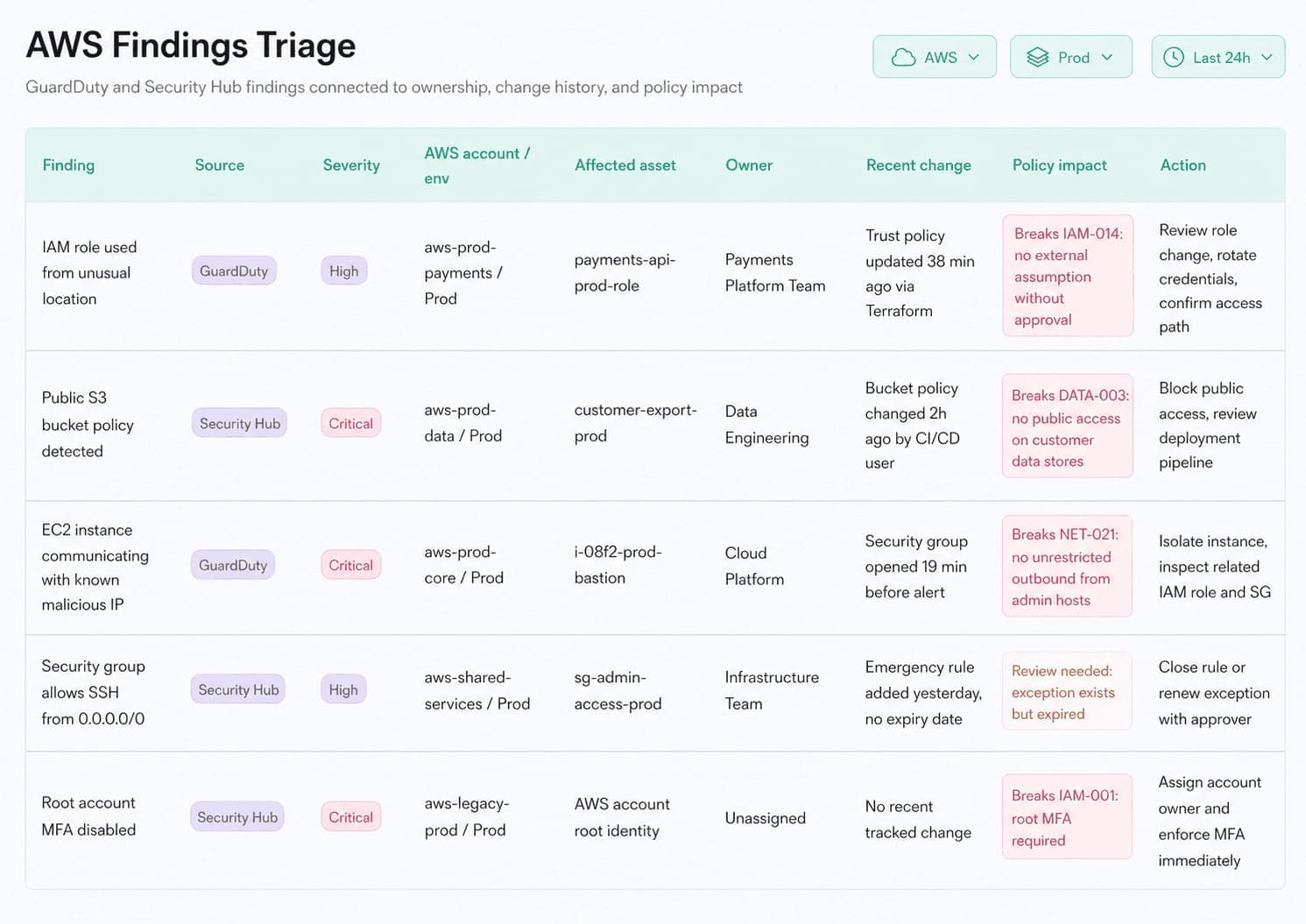 Cloudaware findings triage view connects findings to affected assets, owners, recent changes, policy impact, and remediation actions.
Keep as evidence
- CSPM finding
- Affected asset
- Policy ID
- Owner route
- Exception state
- Remediation ticket
- Verification result
- Closure timestamp
Best practice #5: Treat compliance as continuous evidence, not a quarterly fire drill
Audit preparation becomes painful when evidence only appears before the audit. Experienced auditors always ask: Which asset was covered? Which control applied? When was it checked? What happened when it failed? Who approved the exception?
Those answers should already exist.
Frameworks such as NIST CSF, NIST SP 800-53, CIS Controls, and CSA CCM provide structure, but evidence should come from operational controls rather than separate audit exercises.
A stronger approach looks like this:
- Map data stores to applicable frameworks
- Store evidence alongside the asset record
- Capture control results automatically whenever possible
- Connect findings to remediation activities
- Review exceptions before audit scope is finalized
Igor K., DevOps Engineer at Cloudaware: “The compliance team should be a reporting team, not a research team. If engineers are still gathering screenshots the week before the audit, the program is broken. Continuous evidence makes the audit a query.”
Best practice #6: Build backup and recovery you have actually tested
Teams often discover problems only when recovery begins. The vault permissions are wrong. Encryption keys cannot be accessed. Dependencies were never documented. The engineer who built the process left six months ago.
IBM's research continues to emphasize backup testing and incident readiness because recovery plans fail under pressure when they exist only on paper. Strong recovery programs focus on proof, not assumptions.
Review the following regularly:
- Backup coverage for critical data stores
- Immutable or isolated recovery copies
- Recovery identities and permissions
- Encryption key availability
- Restore procedures
Tier 1 systems deserve scheduled restore testing, ideally performed by someone who did not build the backup process.
Recovery checks should confirm:
| Control | Validation |
|---|---|
| Copy strategy | Required recoverable copies exist |
| Isolation | Recovery copy remains protected from production compromise |
| Identity | Recovery access is independently governed |
| Key management | Data can be decrypted during restore |
| Restore testing | Recovery completes within documented objectives |
Katerina L., Cloud Security Expert at Cloudaware, says, “Operational goal is very simple: every critical data store should have a backup relationship, a recovery owner, a tested restore process, and evidence that the test succeeded.”
Operationalizing the playbook: a 90-day rollout
Cloud data security best practises need a rollout sequence because teams cannot fix access, encryption, posture, evidence, and recovery until the data stores are known and owned.
NIST CSF 2.0 frames cybersecurity work through Govern, Identify, Protect, Detect, Respond, and Recover. CIS Controls v8.1 follows the same operational order: inventory assets, protect data, manage accounts and access, collect logs, recover data, and maintain incident response capability.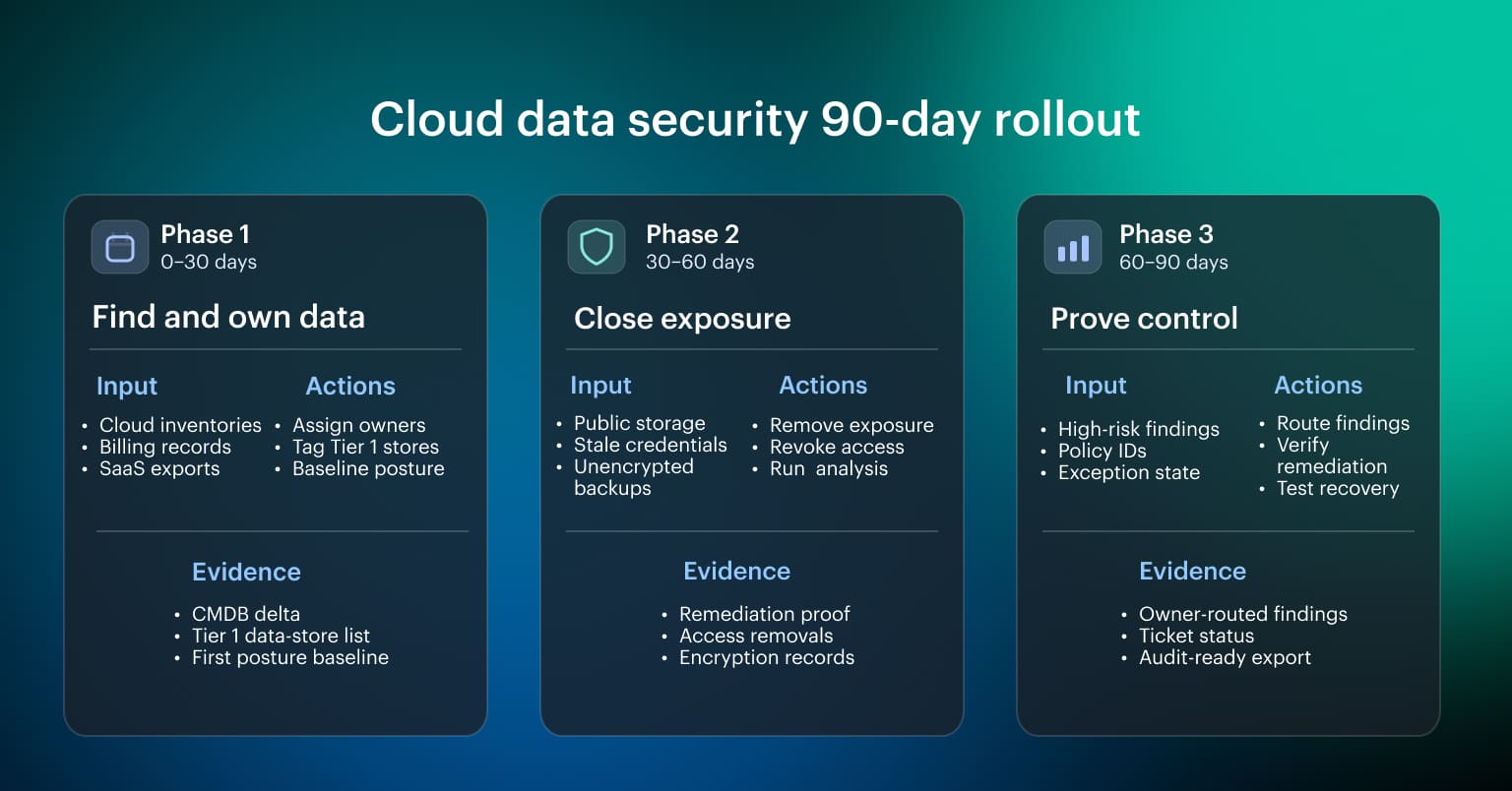 Use the first 90 days to turn that sequence into cloud data controls, not another policy deck.
Days 0-30: find the data and assign ownership
Start with discovery and scope. Pull cloud inventories, billing records, storage APIs, backup systems, data platform accounts, and SaaS exports into one asset view.
Focus on:
- Data stores missing from the CMDB
- Regulated or production stores without an owner
- Public storage and external shares
- Unencrypted backups or snapshots
- Assets with no environment tag
- Data stores created during migration or testing
Baseline posture against CIS Benchmarks and provider-native controls after the asset list is clean enough to trust. A posture score on an incomplete inventory is a comfort metric.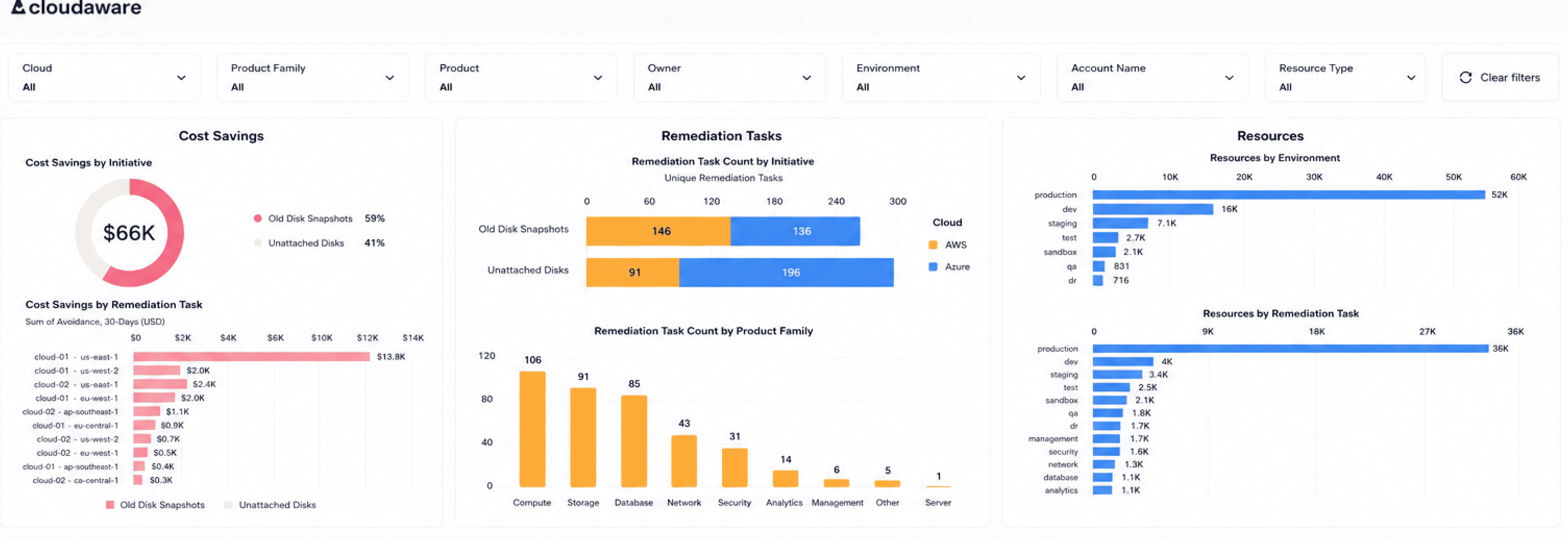 Cloudaware inventory view showing cloud resources by environment, owner, product family, account, and resource type.
Days 30-60: close the exposure paths first
Fix the paths most likely to expose data before tuning lower-risk hygiene findings.
| Exposure path | Action |
|---|---|
| Public or externally shared storage | Remove exposure, verify access path, keep before/after evidence |
| Exposed credentials or stale access keys | Rotate, revoke, or scope access, then check dependent workloads |
| Unencrypted backups or snapshots | Apply approved key model and verify restore access |
| Broad service accounts | Map identity → permission → resource → data class, then reduce scope |
| Active migration roles | Remove or time-bound access after cutover |
| SaaS exports with unclear ownership | Assign owner, destination, retention rule, and monitoring path |
Run the first entitlement analysis during this period. Rank identities by how many regulated or confidential stores they can read, export, replicate, restore, or delete. The first remediation queue should come from that ranking.
Days 60-90: automate routing and prove control
Use the final 30 days to make the process repeatable. At this stage, each high-risk finding should carry:
- Asset
- Owner
- Environment
- Sensitivity tier
- Policy ID
- Exception state
- Remediation route
- Verification result
- Evidence location
Auto-route CSPM findings to named owners where the asset context is clear. Review findings without owners separately, because those are inventory failures, not normal posture work. Schedule the first quarterly restore test for Tier 1 stores and record RTO, RPO, restore owner, dependency issues, and data integrity result.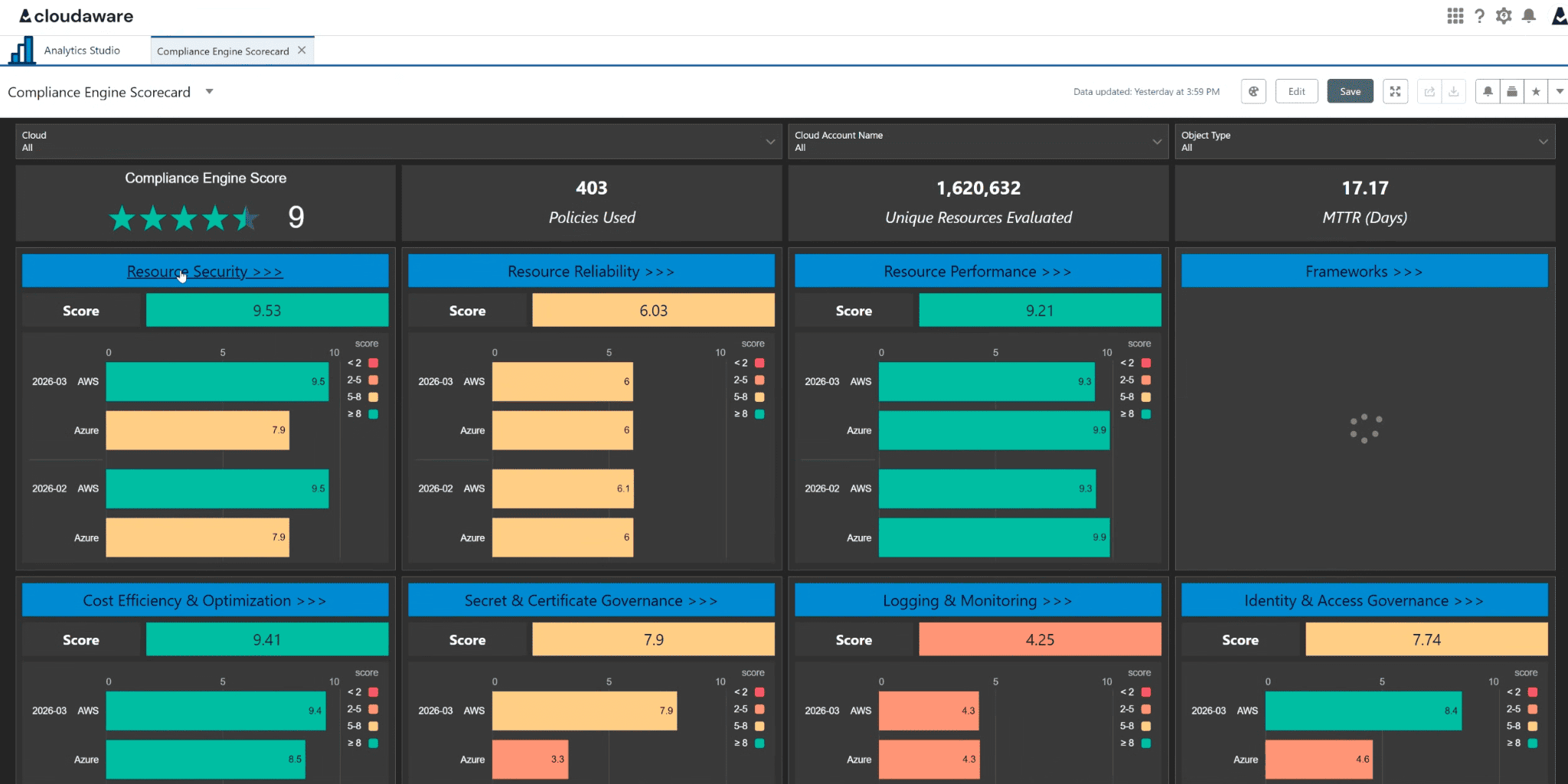 Cloudaware Compliance Engine scorecard showing policy coverage, evaluated resources, MTTR, and control-domain scores across cloud environments.
Publish a one-page data security posture scorecard and keep it operational:
| Metric | Why it matters |
|---|---|
| Tier 1 stores inventoried | Shows whether the scope is known |
| Tier 1 stores with named owners | Shows whether findings can route |
| Tier 1 stores encrypted under approved key model | Shows whether protection matches data class |
| Tier 1 stores with tested restore | Shows whether recovery is proven |
| High-risk findings by age | Shows remediation drag |
| Open exceptions by expiration date | Shows where accepted risk may become shadow policy |
| Mean time to verify remediation | Shows whether closure reflects control state |
Bringing the playbook together
The data security best practices for cloud solutions in this playbook all resolve to one operating question: Сan the team trace a data finding from the affected resource to the owner, policy, remediation path, and evidence?
A public bucket, unencrypted backup, stale service account, or failed compliance check is not useful as an isolated alert.
It becomes actionable only when the finding shows what data store is affected, which application owns it, which environment it belongs to, which policy failed, whether an exception exists, where the ticket should go, and what proof remains after remediation.
The practical flow should look like this: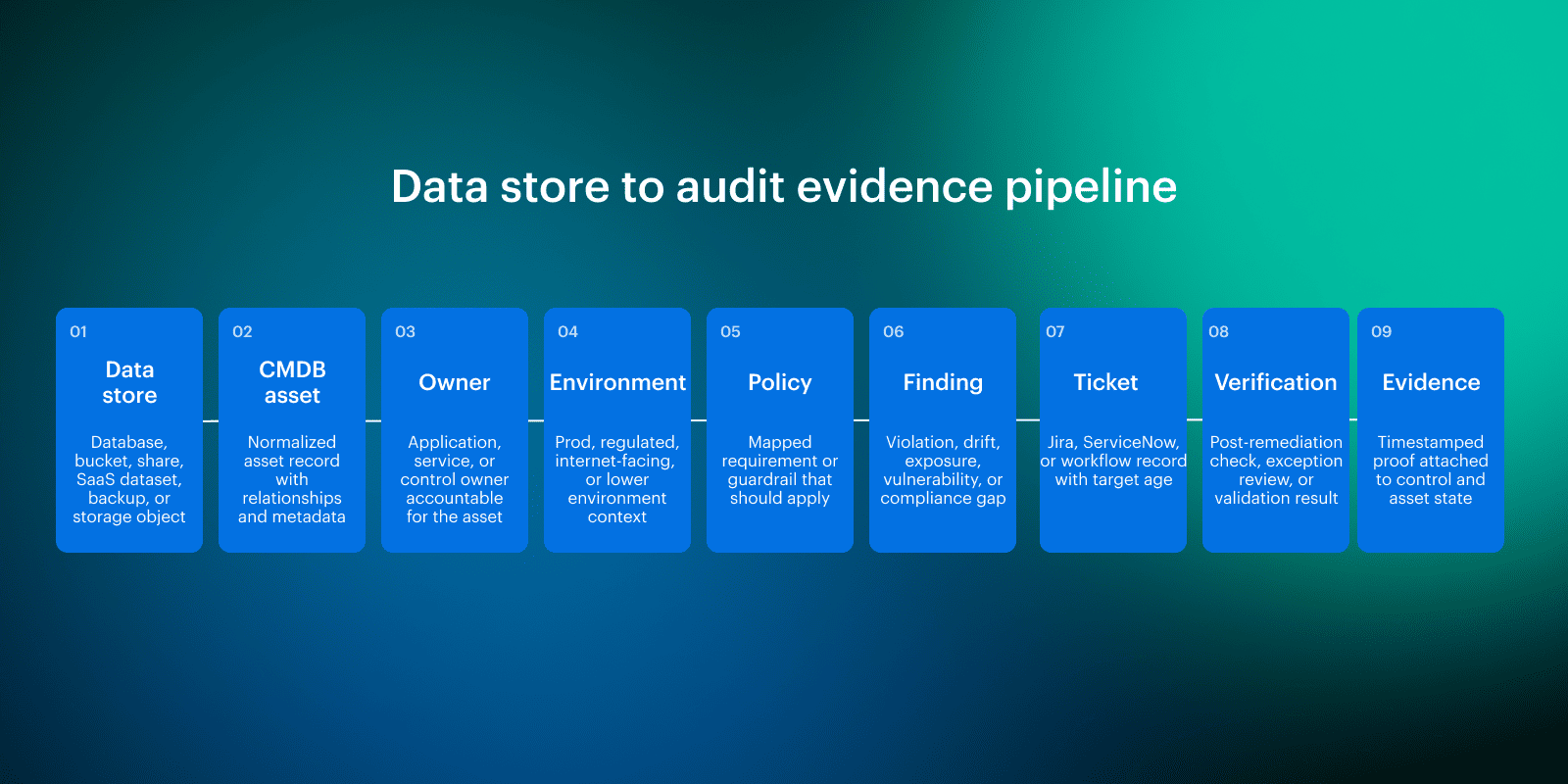
How to operationalize cloud data security?
Cloudaware acts as a context layer around cloud security and compliance signals. It does not replace cloud-native controls, IAM, SIEM, ITSM, backup tooling, or GRC ownership. It connects those signals back to assets, owners, environments, policies, remediation records, and audit evidence.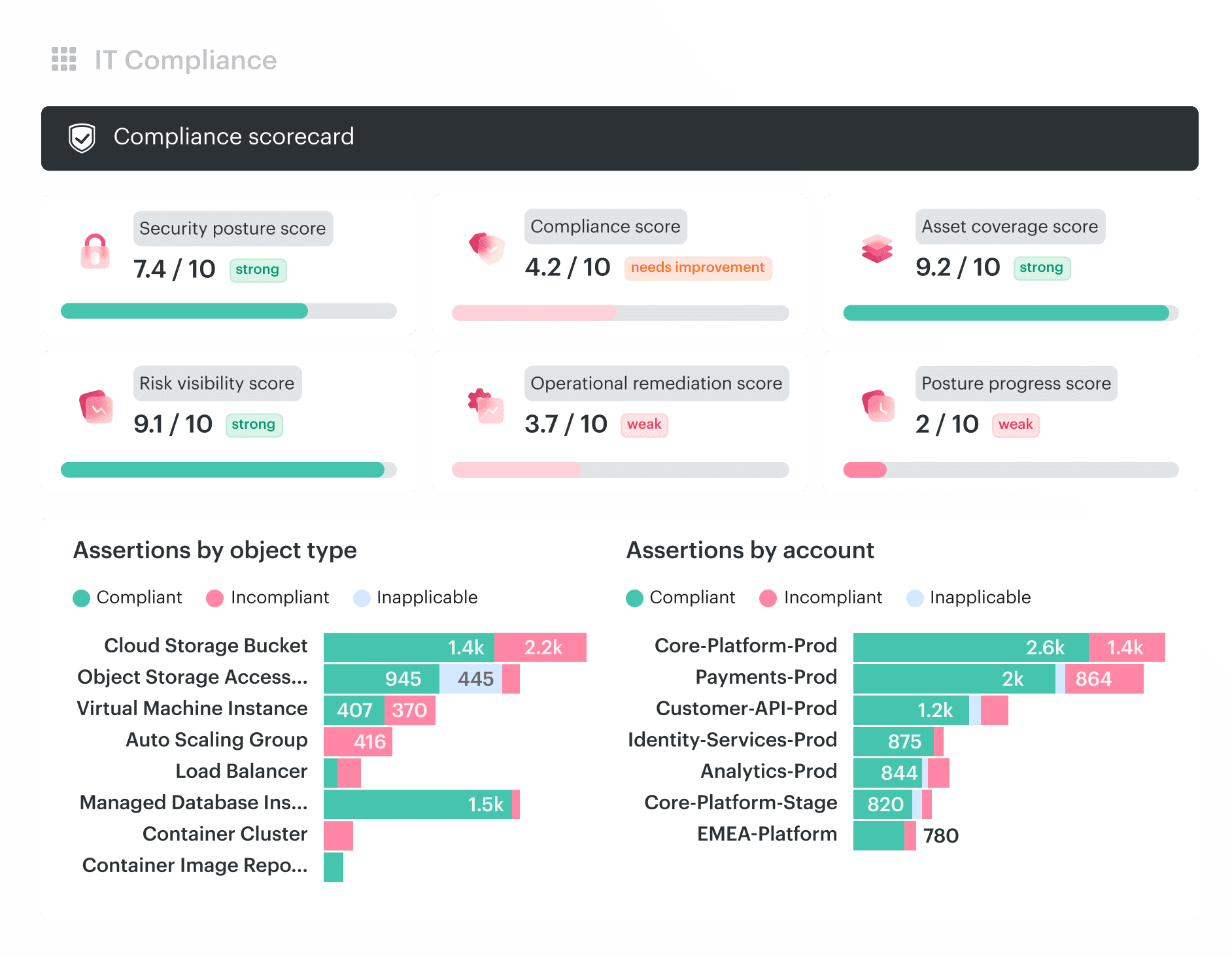 Core capabilities:
- CMDB: Normalize resource data across AWS, Azure, GCP, Oracle Cloud, Alibaba Cloud, VMware, Kubernetes, and on-prem environments into a CMDB-aware model with asset, owner, environment, region, relationship, and change context.
- CSPM: Evaluate cloud configurations against CMDB-aware security policies, so posture findings show the affected asset, policy impact, environment, owner, exception state, and remediation path.
- Intrusion Detection: Correlate host, cloud, and network activity with CMDB context to show which asset triggered the alert, which environment is affected, who owns it, and whether the activity touches production or regulated data.
- SIEM / Log Management: Enrich cloud logs with asset, owner, environment, and configuration context, so investigations can move from raw events to affected resources without manual provider-ID reconciliation.
- IT Compliance: Map cloud assets, control results, framework requirements, failed assertions, exceptions, remediation records, and audit exports into one evidence trail tied to affected resources.
- Vulnerability Management: Connect vulnerabilities to assets, owners, environments, exposure paths, and remediation workflows, so teams can prioritize workloads that are production, internet-facing, regulated, or connected to sensitive data stores.
- Remediation workflow integrations: Route findings into Jira, ServiceNow, email, or related workflows with owner, priority, policy reference, verification requirement, and evidence context attached.