


Most Google Cloud security best practices articles repeat the same safe advice: use least privilege, encrypt data, monitor logs, and patch systems. All true, but still too shallow for a real GCP environment.
Google Cloud has its own security mechanics. Service accounts create a different identity problem than AWS-style role assumptions. VPC Service Controls are designed to reduce data exfiltration from Google-managed services, not to serve as generic network security controls. Data Access audit logs are disabled by default for most services except BigQuery, so “audit logging is on” can be a dangerous assumption.
This guide treats Google’s official documentation as the source-of-truth layer. The recommendations below are based on Google’s official guidance, Google Cloud Threat Horizons H1 2026, CIS Google Cloud Foundations guidance, and the operational patterns Cloudaware experts see in real cloud environments.
Key insights
- Service account keys are security debt. Workload Identity Federation and scoped impersonation should replace long-lived keys wherever possible.
- Preventive controls belong above the project. Organization Policy Service helps security teams block unsafe resource states before every project becomes its own exception factory.
- VPC Service Controls are data-perimeter controls, not generic network security. Their value is reducing API-level data exfiltration from sensitive Google-managed services.
- Audit logs are only useful when they are routed, retained, and joined to ownership context. Admin Activity logs are not enough for sensitive workloads.
- GKE security starts with workload identity and admission control, not only private clusters. A private cluster with broad node service account permissions can still expose too much of Google Cloud.
- The bottleneck is remediation, not finding more issues. Security findings need owner, application, environment, blast-radius, and change-risk context.
Why Google Cloud security needs provider-specific controls
A team opens a project, reviews IAM, checks a few firewall rules, enables logs, and moves on. That may work in a small GCP account structure. It breaks when the company has many projects, shared services, regulated datasets, GKE clusters, CI/CD pipelines, and Terraform modules owned by different teams.
In Google Cloud, control placement matters. A policy applied at the project level is not the same as a policy enforced at the organization or folder level. That difference decides whether security becomes a baseline or a collection of local fixes.
| Generic advice | GCP-specific control layer |
|---|---|
| Use least privilege | IAM roles, service accounts, scoped impersonation, Workload Identity Federation |
| Prevent unsafe configuration | Organization Policy Service, managed constraints, custom constraints |
| Protect sensitive data | VPC Service Controls, Access Context Manager, CMEK, Cloud KMS |
| Monitor activity | Cloud Audit Logs, Log Router, Security Command Center, Google SecOps |
| Secure Kubernetes | Workload Identity Federation for GKE, Binary Authorization, private nodes, runtime detection |
The hierarchy decides where policies inherit, where exceptions live, which projects share the same baseline, and how security proves control coverage during audit.
This is where many GCP programs drift. Teams read Google guidance correctly, then apply it unevenly:
- One project blocks service account keys
- Another still allows them because an old deployment job depends on JSON credentials
- One folder restricts regions
- Another lets teams deploy wherever the default module points
Organization Policy Service is built for that preventive layer. Google says an organization policy enforces one constraint in active mode, dry-run mode, or both. Managed constraints use list or boolean parameters; custom constraints allow more specific restrictions.
A stronger GCP security model starts with provider-native controls, then adds operational context: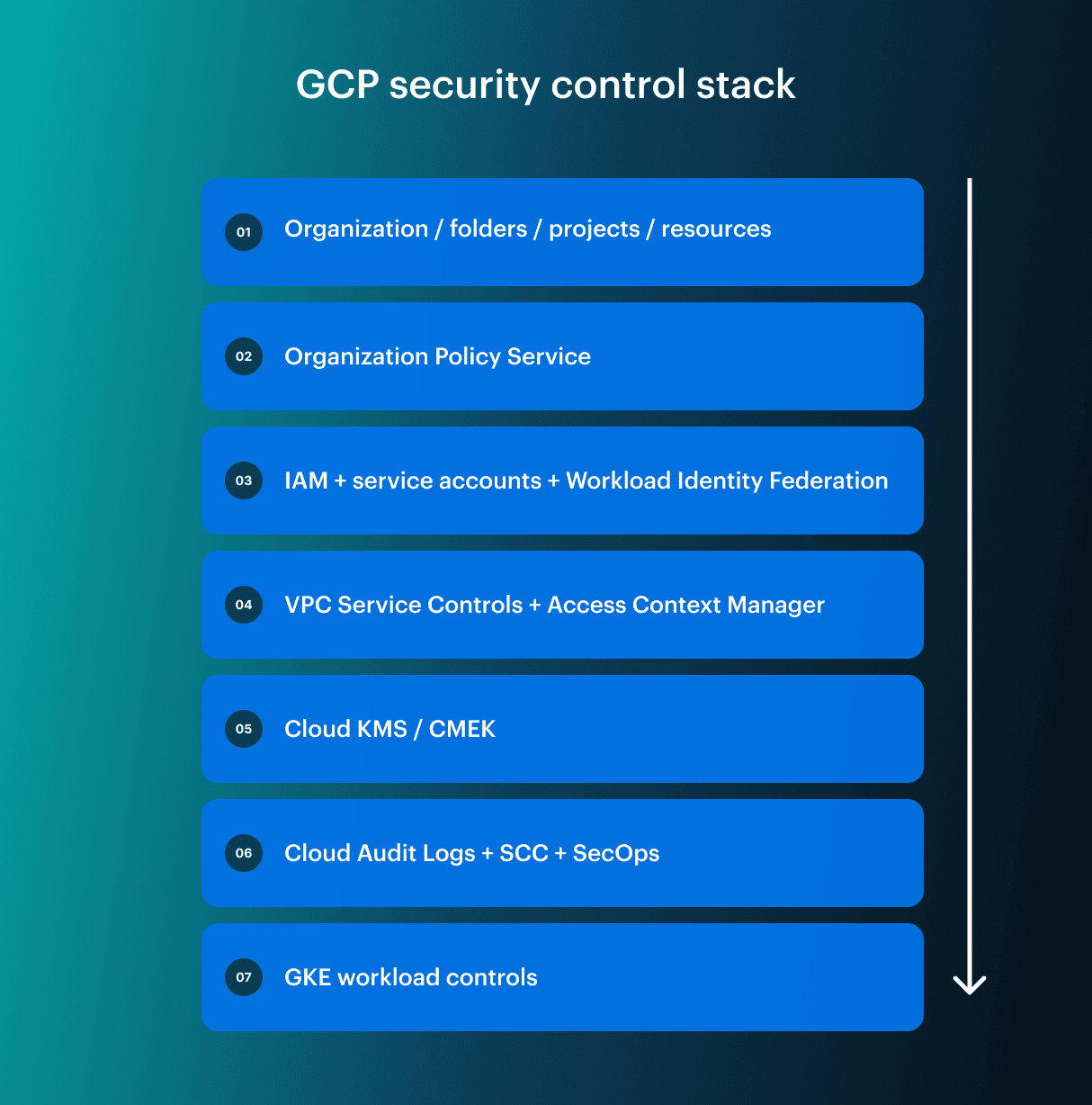 The six practices below follow that control stack. They are based on Google’s official guidance, Google Cloud Threat Horizons H1 2026, CIS Google Cloud Foundations guidance, and the operational patterns Cloudaware experts Igor K., DevOps Engineer, and Valentin K., Software Developer, see in real cloud environments.
1. Build Google Cloud IAM around workload identity, not service account keys
Google Cloud IAM gets risky when teams treat service accounts like reusable technical users.
A service account often starts clean: one workload, one purpose, one permission set. Six months later, it has extra roles because a deployment failed. A JSON key lives in a CI variable. Another copy sits on a developer laptop. Nobody remembers which job still uses it. The account name says deployer-prod, but it can read storage buckets, push images, update Cloud Run, and impersonate another service account.
Google’s guidance is direct here: Workload Identity Federation lets workloads access Google Cloud resources by using external identity credentials instead of service account keys. Google also has dedicated guidance for managing service account keys, including rotation, expiry, and controls for key exposure risk.
For modern GCP security, the pattern should be simple:
- Replace long-lived JSON keys with Workload Identity Federation where possible
- Scope impersonation to the exact external identity, pipeline, or workload
- Grant the service account only the roles needed for that deployment path
- Block new key creation after migration paths exist
- Monitor key creation, role grants, and impersonation changes
A practical example: GitHub Actions deploys to Cloud Run through OIDC. The workflow can impersonate one deployment service account. That account can deploy to one project and one environment. No JSON key sits in GitHub secrets. No developer downloads a key file “temporarily” and forgets it.
A basic key inventory can start here:
gcloud iam service-accounts keys list \
  --iam-account DEPLOYER_SA@PROJECT_ID.iam.gserviceaccount.com
That command is not a full IAM assessment. It only answers the first question: which service accounts still have keys? The next questions matter more: which workload uses the account, who owns it, and whether the role still matches the current deployment path.
In enterprise environments, key inventory is only the starting point. A command can show which service accounts still have keys, but it will not explain who owns the identity, which workload depends on it, whether the key is still used, or where remediation should go.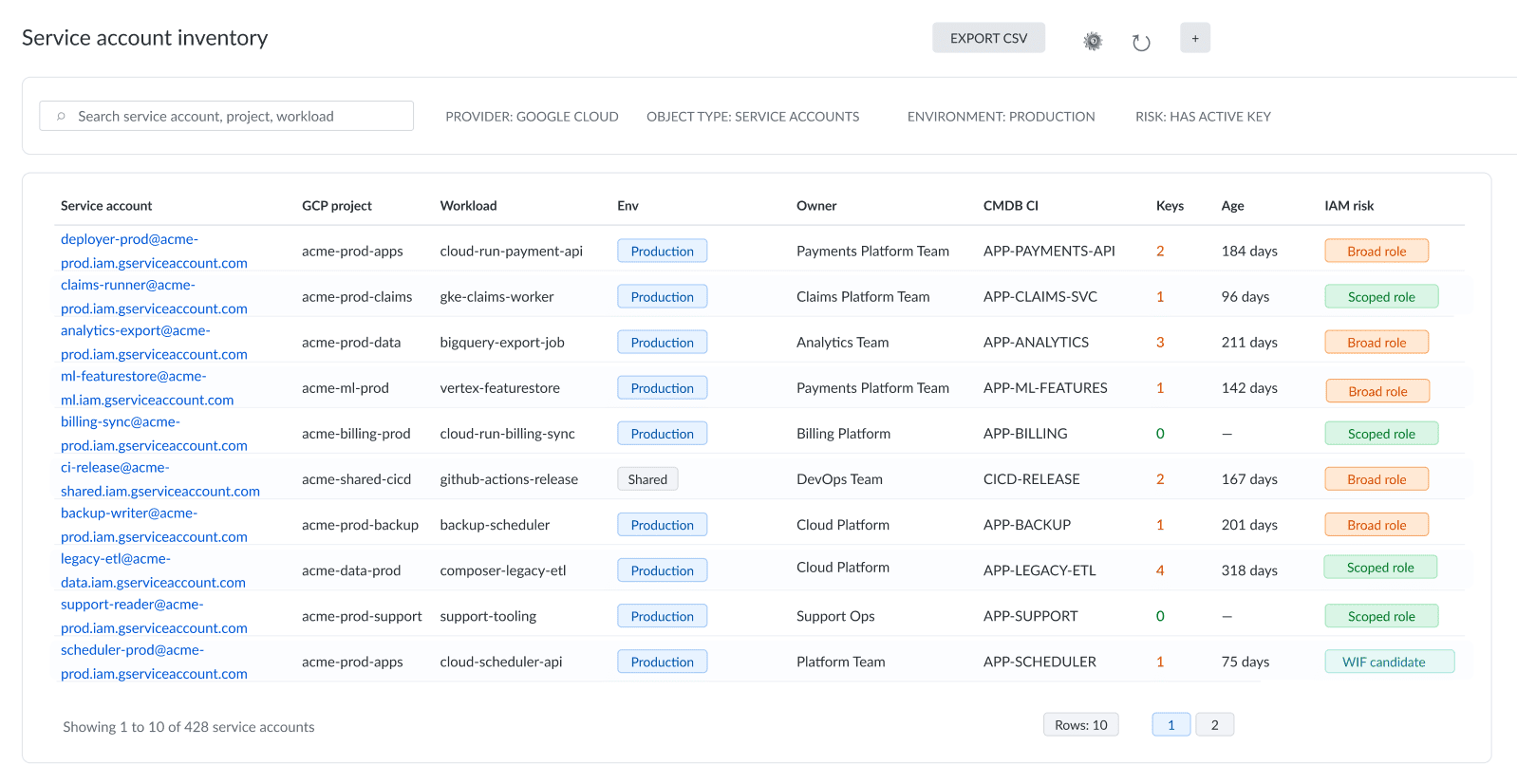 Cloudaware list view for GCP service account inventory: production service accounts with active keys, owner context, workload mapping, CMDB records, IAM risk, and remediation status in one view.
Teams using Cloudaware usually review service accounts as operational assets: each identity is tied to a GCP project, workload, owner, CMDB CI, key age, IAM risk, and remediation status.
Read also: 9 AWS Cloud Security Best Practices That Pay Off
2. Use the resource hierarchy and Organization Policy Service as preventive controls
IAM decides who can act, Organization Policy decides which unsafe states should not exist.
A developer may have permission to create a VM. That does not mean a production folder should allow external IPs by default. A platform team may create service accounts. That does not mean every project should allow service account key creation.
Google Cloud’s resource hierarchy starts with the organization, then folders, then projects, then resources. Policies can inherit through that hierarchy, so control placement changes the security outcome. Organization Policy Service gives administrators centralized control over cloud resources through managed and custom constraints.
This is where Google Cloud security best practices move from “review later” to “prevent before deployment completes.” The problem is that teams apply Google guidance project by project until exceptions become the real security model.
| Risk | Preventive control idea | What the team still needs |
|---|---|---|
| Long-lived service account keys | Disable key creation | Workload Identity Federation migration path |
| Public VM exposure | Restrict external IPs or broad ingress | Exception process for approved public services |
| Data residency drift | Restrict allowed locations | Mapping between workload and compliance scope |
| Unowned projects | Control project and folder patterns | Owner assignment at creation |
| Baseline drift | Apply constraints at org or folder level | Dry-run testing and break-glass process |
Do not lock everything down overnight. That creates a different failure: teams cannot deploy, exceptions get approved in panic, and the policy becomes a blocker instead of a baseline.
A safer rollout looks like this:
- Pick the unsafe state you want to prevent
- Apply the constraint at the right hierarchy level
- Test the policy before enforcement when the control supports it
- Review violations with application owners
- Document the exception path
- Move to enforcement after the approved pattern is clear
This is where GCP programs drift. Enterprise teams usually need more than the native constraint itself. They need to see which baseline checks exist, which Google Cloud objects they apply to, which violations are high risk, and which labels connect the policy to security, compliance, or governance work.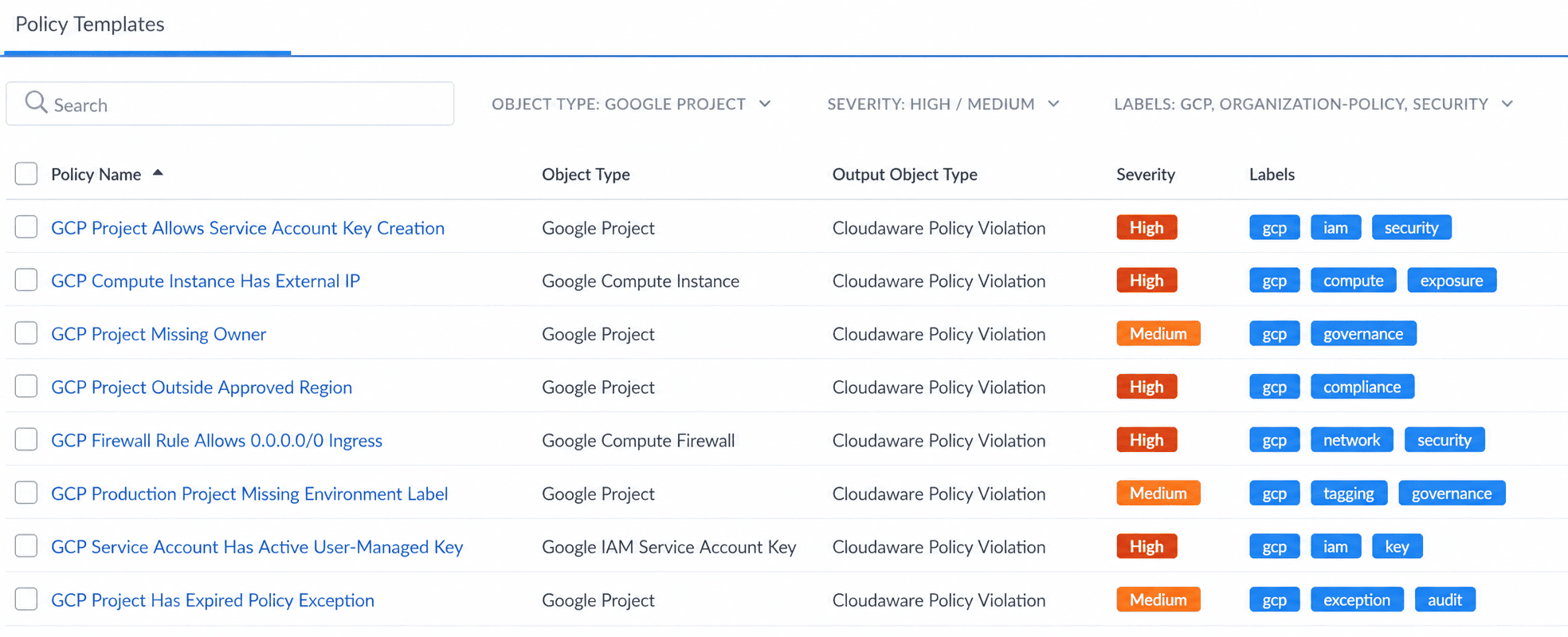 Cloudaware policy templates list view showing policy names, object types, Cloudaware Policy Violation output objects, severity levels, and labels for governance and security checks.
In Cloudaware, this is typically reviewed as a policy template or violation list, so preventive controls become visible as trackable rules instead of scattered project-level decisions.
Read also: How to Create a Cloud Security Policy in 8-Steps
3. Protect sensitive data paths with VPC Service Controls and access context
VPC Service Controls are easy to explain badly. They are not just “network security for Google Cloud.” A better explanation: VPC Service Controls create a trusted perimeter around selected Google-managed services to reduce data exfiltration risk through API access.
Google describes VPC Service Controls as a way to create perimeters that protect explicitly specified Google Cloud resources and data. Its documentation also states that VPC Service Controls complements IAM by adding context-based perimeter security and controlling data egress across the perimeter.
That makes the control useful for a narrower, more important set of cases:
- Sensitive analytics in BigQuery
- Regulated objects in Cloud Storage
- Production data platforms where copy and export paths must stay inside approved projects
Picture a production analytics environment: BigQuery and Cloud Storage sit inside a service perimeter. Approved service accounts can access data from approved projects and networks. A user with valid credentials tries to copy sensitive data into a bucket outside the perimeter. IAM asks, “Who are you, and what can you do?” VPC Service Controls adds another question: “Even if you can access the data, are you trying to move it across a boundary we do not trust?”
Dry-run matters because VPC Service Controls can break legitimate workflows. Data pipelines, service accounts, third-party integrations, and cross-project analytics often depend on movement patterns no one documented well. Ingress and egress rules are where teams define which access is allowed into and out of a perimeter.
Keep the control in its lane. VPC Service Controls do not replace IAM, DLP, logging, or data classification. They reduce one specific class of risk: protected data moving through Google Cloud service APIs into places it should not go.
Read also: 10 Azure Cloud Security Best Practices for 2026
4. Turn Cloud Audit Logs, SCC, and Log Router into an evidence-ready detection layer
The difference between logs and usable security evidence shows up during an incident or a Google Cloud security audit. The team needs to know:
- Who changed the policy?
- Was the change approved?
- Which resource and application were affected?
- Who can safely fix it?
Cloud Audit Logs provide Admin Activity, Data Access, System Event, and Policy Denied audit logs for Google Cloud resources. Admin Activity logs are written by default, but Data Access logs are different. Google says Data Access audit logs are disabled by default for all services except some BigQuery services, so teams must explicitly enable them where needed.
A team says “audit logging is enabled,” then later discovers the logs needed for sensitive data access were never collected. So start with log intent:
| Signal | Why it matters | Context needed before escalation |
|---|---|---|
| IAM policy change | Privilege expansion | Actor, target resource, owner |
| Service account key created | Long-lived credential risk | Workload, owner, rotation status |
| Policy Denied event | Blocked control violation | Policy, identity, affected service |
| SCC finding | Posture or threat signal | Asset owner, business service, severity |
| GKE runtime finding | Possible workload compromise | Cluster, namespace, image, owner |
Cloud Logging can route log entries to supported destinations such as log buckets, BigQuery datasets, Pub/Sub topics, and other Google Cloud projects. Security Command Center adds posture and threat findings, but SCC should not become another isolated console.
Event Threat Detection monitors Cloud Logging streams for threats, while Container Threat Detection detects common container runtime attacks in SCC Premium and Enterprise tiers.
A practical Google Cloud security monitoring setup usually includes:
- Central log sinks for high-value audit logs
- Selective Data Access logs for sensitive services
- BigQuery or SIEM export for investigation and retention
- Alerts for IAM changes, key creation, logging changes, VPC Service Controls violations, and suspicious GKE activity
- SCC findings routed with asset and owner context
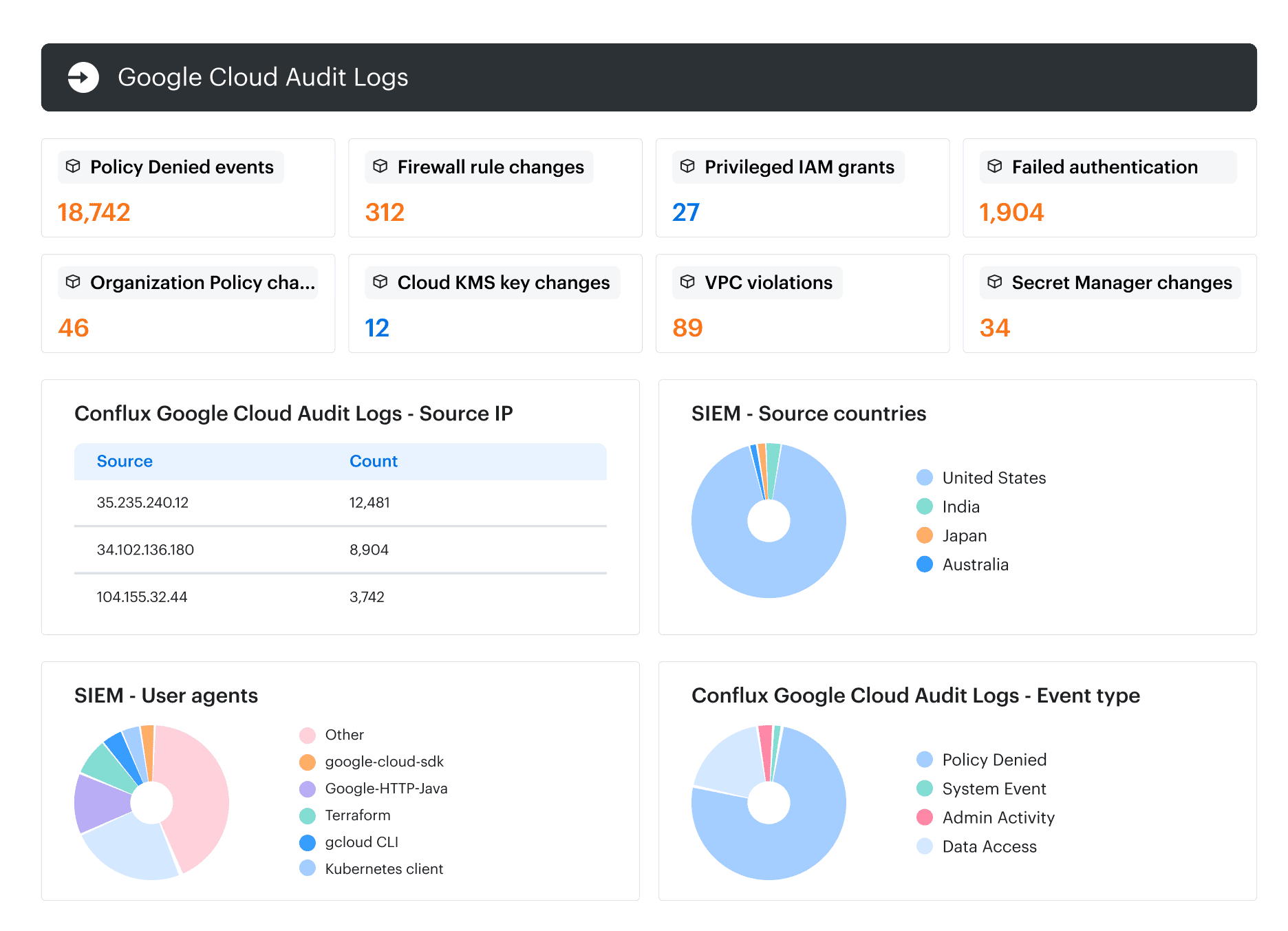 Cloudaware SIEM context view: security events enriched with asset, owner, application, and environment context before escalation to investigation or remediation workflows.
Read also: NIST Cloud Security - A Practical Guide to the Framework, Controls, and Audit Readiness
5. Use CMEK where control over the key matters, not as a blanket encryption policy
Google Cloud encrypts customer content at rest by default, so “use CMEK everywhere” is not a serious Google Cloud data security strategy. Customer-managed encryption keys are useful when the organization needs control over the key lifecycle.
Google’s Cloud KMS CMEK documentation says CMEK gives customers ownership and control over the keys that protect data at rest in Google Cloud. That is the value: control.
Use CMEK when the control objective requires customer-managed key ownership, rotation, access, revocation, or audit evidence. Be careful when the team has no key operating model.
| Use CMEK when | Be careful when |
|---|---|
| Key lifecycle must be customer-controlled | No one owns the key lifecycle |
| Separation of duties matters | Key admins and data admins are the same group |
| Audit requires key-use evidence | Logging and evidence are unclear |
| Key revocation is part of the risk model | Rotation is untested |
| External key control is required | No mapping exists between key and workload |
A bad CMEK rollout is easy to spot. Security says every sensitive workload needs CMEK. Platform creates keys. Data teams attach them. Nobody maps which dataset depends on which key. Rotation is not tested. Alerting is thin. Then someone disables a key version during cleanup, and a production workflow fails in a way the service owner cannot diagnose.
A good CMEK model starts with data classification and dependency mapping. Before applying CMEK, the team should know which data needs customer-managed keys, who administers the key, which workloads depend on it, how rotation is tested, and what evidence auditors need.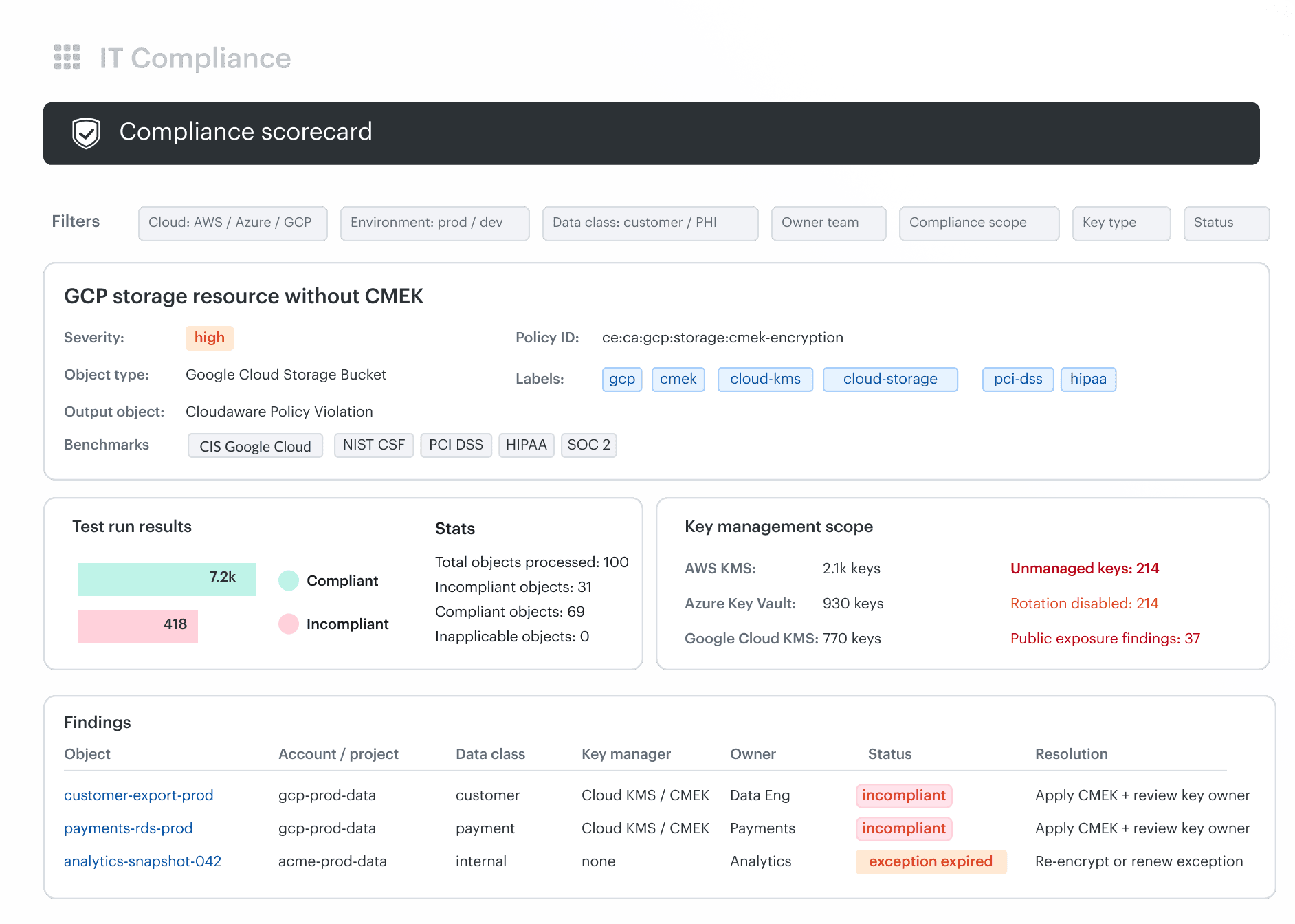 Cloudaware key management posture dashboard adapted for Google Cloud, showing a GCP CMEK policy violation, Google Cloud KMS scope, affected Cloud Storage and BigQuery resources, data owners, compliance benchmarks, exception status, and remediation actions.
Read also: What Is Cloud Security Posture Management? CSPM Definition, Tools, and Enterprise Use Cases
6. Harden GKE beyond private clusters
Private nodes and restricted control-plane access reduce network exposure. They do not fix broad node permissions, shared service accounts, weak RBAC, unapproved images, or missing runtime context. Google’s private cluster guidance explains how private nodes and endpoints work in GKE, but network privacy is only one part of Google Cloud Kubernetes security.
Google says Workload Identity Federation for GKE lets Kubernetes workloads access Google Cloud APIs without service account key files and gives applications distinct, fine-grained identity and authorization. For serious Google Cloud Kubernetes security, that should be the starting point.
Use Workload Identity Federation for GKE
Old GKE patterns often leaned on node service accounts or key files mounted into pods. Both widen the blast radius.
With Workload Identity Federation for GKE, a Kubernetes ServiceAccount can be mapped to a narrow Google Cloud IAM identity. The payment workload can read the exact resource it needs. The analytics job can query its dataset. The image-processing service does not inherit broad project permissions because it runs on a powerful node.
Reduce exposure, but do not stop at private nodes
Private nodes are useful. They reduce public exposure for worker nodes and help teams avoid unnecessary internet-facing infrastructure. But private networking is only one layer.
A better GKE baseline includes:
- Private nodes where appropriate
- Restricted control-plane access
- Least-privilege Kubernetes RBAC
- Workload Identity Federation for GKE
- Centralized audit logs
- Runtime detection where SCC tier supports it
Control images and route runtime findings to owners
Binary Authorization can enforce policy checks before container images are deployed to supported platforms, including GKE. Google describes it as a control for software supply-chain security that can prevent images from being deployed unless they satisfy the policy you define.
The practical goal is simple: production should not accept a random image because someone had cluster access. It should accept images that passed the approved path.
For GKE, track more than “finding exists.” The useful remediation view includes:
- Cluster, namespace, and workload owner
- Image digest and vulnerability severity
- External exposure
- Deployment path
- Rollback readiness
- SLO for remediation
A critical vulnerability in an internet-facing workload with a clear owner and tested rollback path is a different problem from the same CVSS score in a legacy internal service nobody wants to touch. Same severity label. Different operational reality.
Google Cloud security best practices checklist
Use this checklist as a quick review after the six practices above. It is not a full Google Cloud security assessment, and it is not meant to turn GCP security into a checkbox exercise.
The goal is to show whether the core control layers are in place across IAM, service accounts, governance, data security, logging, detection, GKE, and remediation.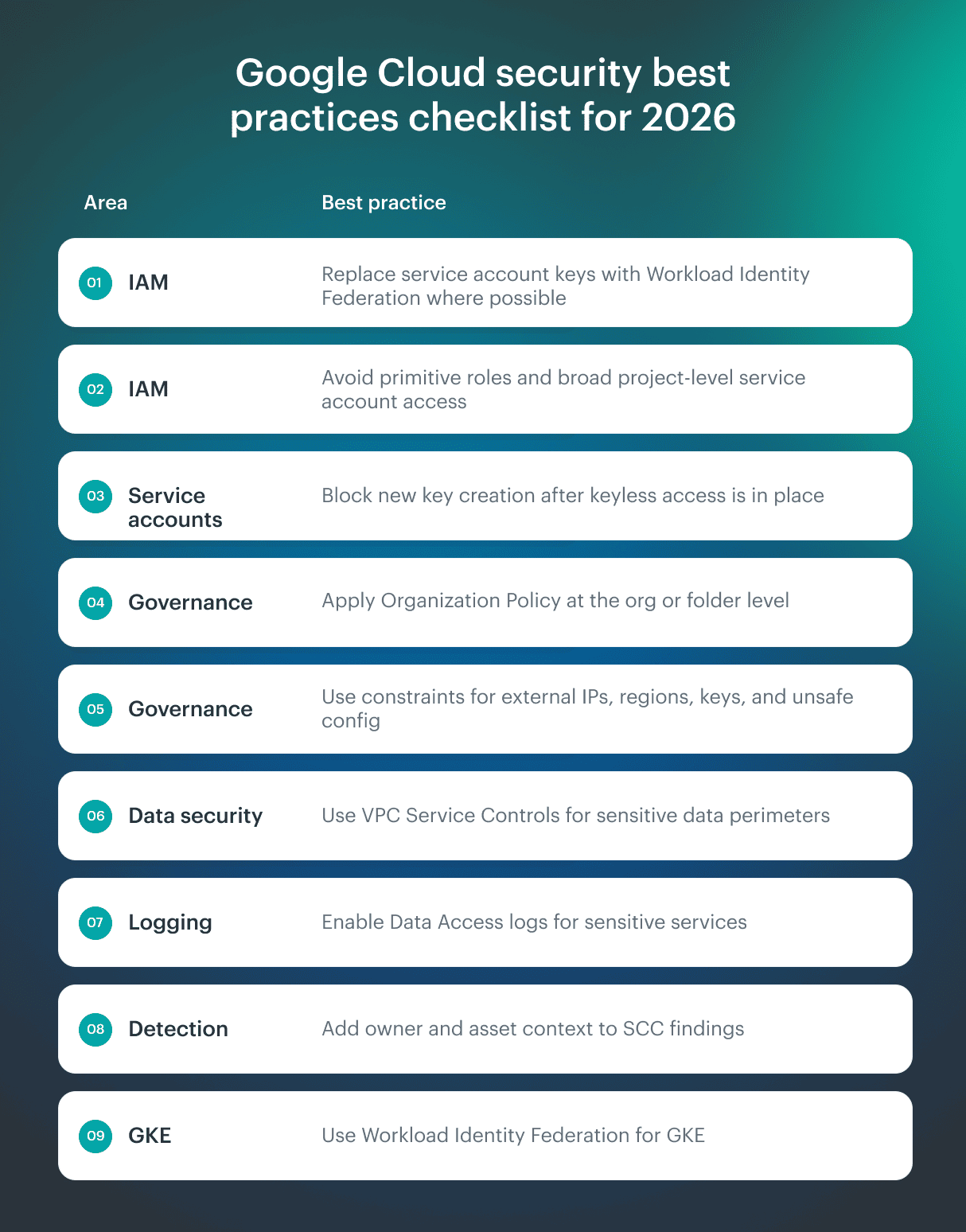 A strong GCP security model usually depends on a few things working together:
- Workload Identity Federation instead of long-lived keys
- Organization Policy at the right hierarchy level
- VPC Service Controls for sensitive data movement
- Cloud Audit Logs and Security Command Center for evidence and detection
- CMEK where key ownership matters
- GKE controls that limit workload blast radius
If one of those layers is missing, the environment may still look “secured” on paper while leaving real gaps in ownership, policy enforcement, or response.
Read also: 10 Best Cloud Security Tools in 2026 with Comparison, Pricing, and Honest Reviews
Operationalize Google Cloud security findings with Cloudaware
Google Cloud gives security teams strong native controls. Enterprise teams still need a way to connect those controls to assets, owners, applications, CMDB records, vulnerabilities, compliance scope, and remediation work across Google Cloud, AWS, Azure, VMware, and hybrid infrastructure.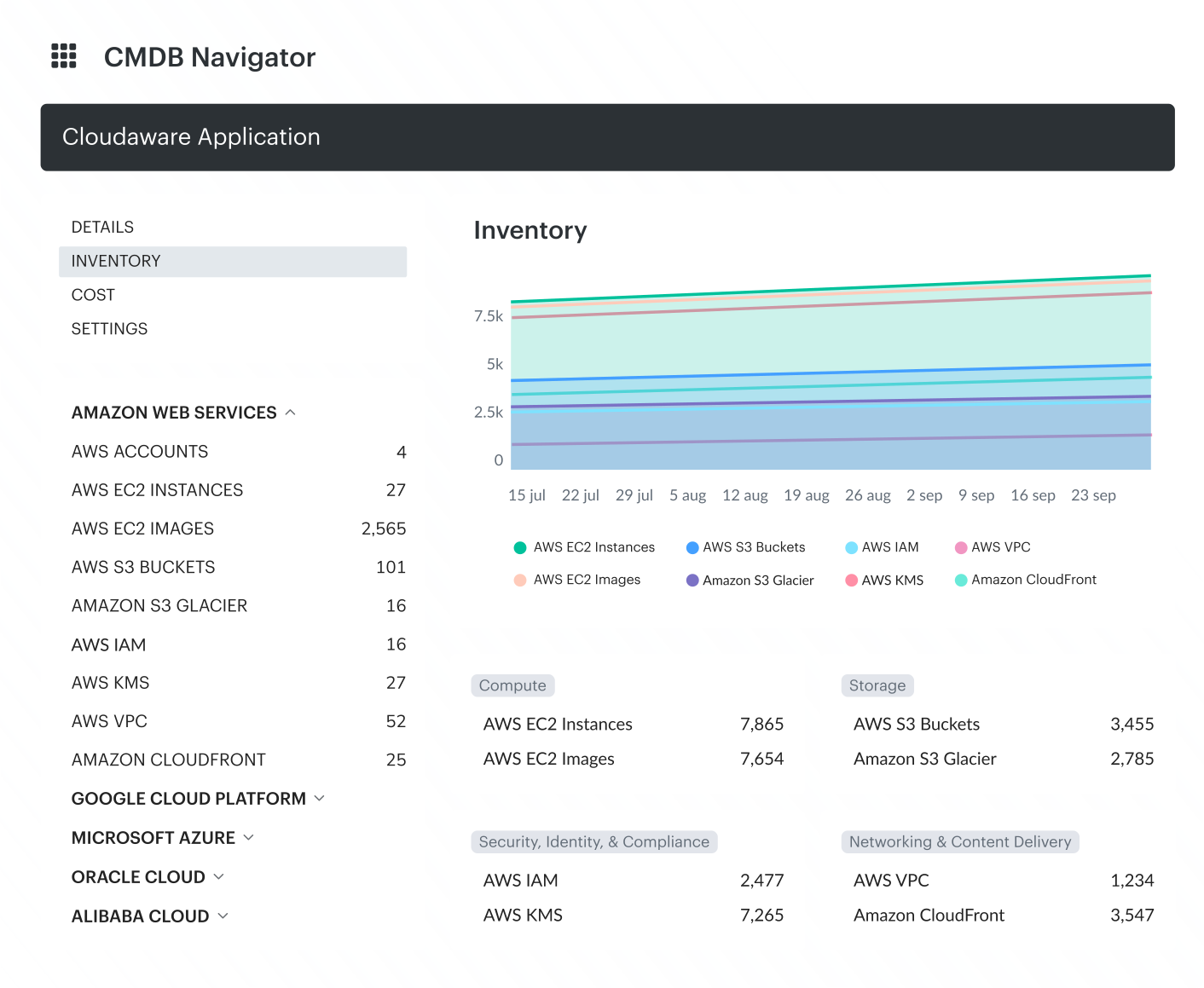 Cloudaware supports Google Cloud security best practices by adding the operational context security teams need after a finding appears. Cloudaware’s role is to turn provider-local signals into work that can be owned, tracked, and audited.
Core capabilities:
- Multi-cloud CMDB inventory: Build one operational inventory across Google Cloud, AWS, Azure, VMware, SaaS, and other connected systems, so GCP projects, resources, and findings are not reviewed as isolated provider-local events.
- GCP hierarchy visibility: See Google Cloud organizations, folders, projects, lifecycle state, access status, and service account assignment in Cloudaware, so teams can spot where collection, ownership, or control coverage breaks before reviewing individual resources.
- IAM and service account context: Track Google IAM roles, IAM policy bindings, service accounts, service account keys, and instance-service-account links in CMDB, so long-lived keys, broad bindings, and unmanaged identities can be tied back to assets and owners instead of staying as raw IAM exports.
- Policy and compliance workflows: Use Compliance Engine policies, policy violations, reports, dashboards, and workflows to turn unsafe configuration into trackable work.
- SCC, logging, and audit context: Bring GCP Security Command Center data and logging-related objects into the CMDB model, then connect findings to the affected resource, owner, environment, and remediation path.
- Vulnerability and remediation routing: Keep vulnerability data in CMDB with scan coverage, severity, affected assets, vulnerability age, CVE-specific reports, and dashboards, then route remediation through systems such as ServiceNow, Jira, and PagerDuty.