


Cloud security vulnerabilities are not painful because scanners miss them. They are painful because scanners find too many.
Fewer than 6% of published CVEs are exploited in the wild, yet the CISO math still looks brutal: 4,000 critical findings this week. Capacity to fix 50. Which 50 move first?
This guide pulls from Cloudaware experts, including DevOps experts Valentin Kel and Igor K. It also reflects field patterns from client-side CISOs, cloud security leads, platform engineers, and cloud architects running AWS, Azure, GCP, Kubernetes, and hybrid estates.
Inside the case file:
- Which Critical CVEs are backlog noise?
- When does a misconfiguration become exploitable?
- Which IAM path turns one vulnerable workload into a blast-radius problem?
- Why can a Medium finding outrank a 9.8 CVSS score?
This guide walks through how to find, assess, prioritize, and remediate cloud security vulnerabilities across AWS, Azure, GCP, and hybrid environments, using the CMDB-backed asset context that makes the workflow usable. It focuses on vulnerability classes, exposure paths, and remediation priorities. For misconfiguration policy evaluation across cloud resources, use the CSPM guide.
Key insights for busy cloud security teams
- Most cloud security vulnerabilities are not “just CVEs.” In AWS, Azure, GCP, Kubernetes, and hybrid estates, the risky weakness may be an exposed API, over-permissioned IAM role, public storage policy, vulnerable container base image, or provider-issued advisory that never appears in a normal host scan.
- CVSS is the starting point, not the fix order. A Critical CVE on a stopped test VM can wait. A Medium issue on an internet-facing production service with regulated data cannot. Prioritization needs exposure, exploitability, business criticality, IAM blast radius, and data sensitivity in the same view.
- Discovery breaks first in the cloud. Ephemeral workloads, serverless functions, short-lived containers, unmanaged test endpoints, and hybrid hosts can appear and disappear between scan cycles. Continuous or near-continuous discovery matters more than a beautiful weekly report nobody can trust.
- Misconfiguration can behave like a vulnerability. A public bucket, weak security group, permissive role, or exposed admin endpoint may create a direct attack path with no CVE involved. Treat these as exploitable weaknesses, not “policy hygiene” tickets.
- Provider-issued CVEs need their own lane. AWS Security Bulletins, MSRC, Google Cloud security advisories, CISA KEV, and NVD should feed into inventory matching. The work starts when the advisory gets mapped to affected accounts, agents, cloud security services, regions, images, and owners.
- Remediation fails when ownership is vague. The best programs route findings through CMDB context: asset, app, owner, environment, SLA, ticket, exception, and verification evidence. “Security owns the queue” does not scale when engineering owns the fix.
- The real goal is not fewer findings. There are fewer unknown attack paths. Cloudaware vulnerability management works when scanner data is joined with CMDB context, so teams can see which weakness is exposed, business-critical, exploitable, assigned, and actually verified after remediation.
What is a cloud security vulnerability?
Cloud security vulnerabilities are exploitable weaknesses in cloud software, identities, configurations, workloads, APIs, or dependencies that can let an attacker access data, move laterally, disrupt services, or change infrastructure. A vulnerability is the weak point. A threat is anything that may exploit that weakness. A misconfiguration is one way that weakness gets created.
In a cloud estate, the weakness rarely lives in one neat place.
Take a normal production service: an internet-facing API behind an ALB, a container image built from an outdated base layer, a runtime role with broad read access, and a database that stores regulated data. The CVE matters. So does the IAM path. So does exposure. So does ownership.
That is where older vulnerability programs start to wobble.
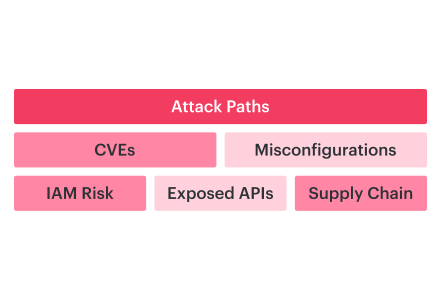
In AWS, Azure, GCP, Kubernetes, and hybrid environments, cloud security vulnerabilities usually fall into five working buckets:
- known CVEs in operating systems, agents, runtimes, databases, Kubernetes components, or application packages
- infrastructure misconfiguration, like public storage, weak encryption, open ports, or permissive security groups
- IAM over-permissions, especially roles that can read secrets, assume other roles, or modify logging
- exposed services, including admin panels, APIs, databases, load balancers, and abandoned test endpoints
- supply-chain weaknesses in container base images, open-source dependencies, CI/CD plugins, and third-party packages
CVE, CVSS, and CWE still give teams useful language. They help name the issue, score technical severity, and group the underlying weakness. But cloud risk does not stop at the score.
A critical CVE on a stopped dev VM is not the same problem as a high-severity CVE on a public production workload that touches PHI, runs with an over-permissioned IAM role, and has no assigned owner.
That is the whole game.
In the cloud, a vulnerability today needs context before it deserves a place in the remediation queue. Ephemeral workloads may appear for minutes. A container can process sensitive data and disappear before a weekly scan runs. One control plane permission can create resources, change routes, read secrets, disable logs, or expand access without touching a server.
A useful Cloudaware vulnerability report makes that context visible in one row: asset, environment, CVE or CWE, CVSS, exposure, IAM path, data sensitivity, container image, owner, provider advisory, ticket status, SLA, and exception expiry.
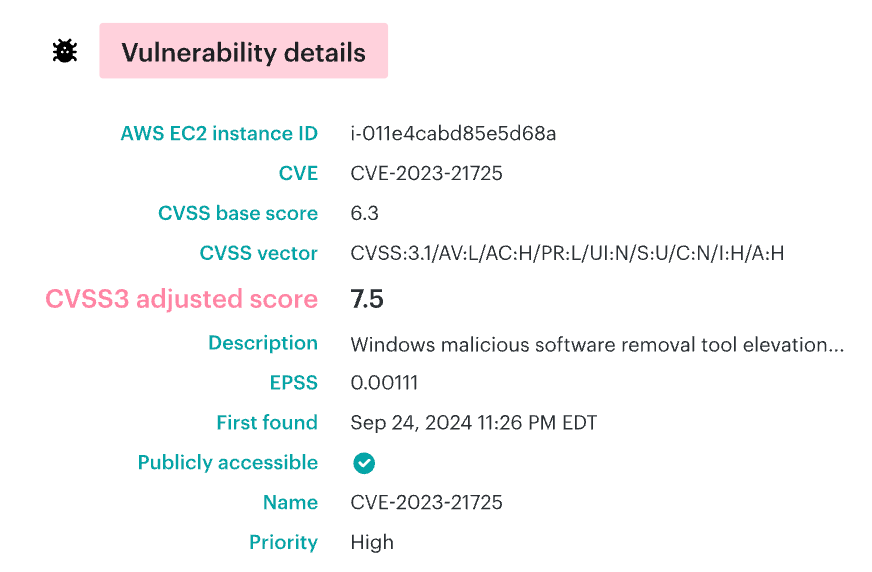
Now security can ask the question that actually matters: “Can this weakness be exploited here, on this asset, through this exposure, with this identity path, against this data?"
Vulnerability vs. threat vs. misconfiguration
Security teams often mix these terms, which leads to poor prioritization.
- A vulnerability is the weakness. Think: an OpenSSL CVE in a container image, an unpatched VM package, a vulnerable library in a Lambda function, or a dependency with a reachable exploit path.
- A threat is anything that can exploit that weakness. That could be an attacker scanning public endpoints, malware targeting an n-day, credential abuse against exposed cloud APIs, or a technique mapped to MITRE ATT&CK.
- A misconfiguration is a bad setting that creates or increases risk. Public S3 access. A security group that is open to
0.0.0.0/0. A Kubernetes dashboard exposed without proper auth. An IAM role that can read secrets across accounts.
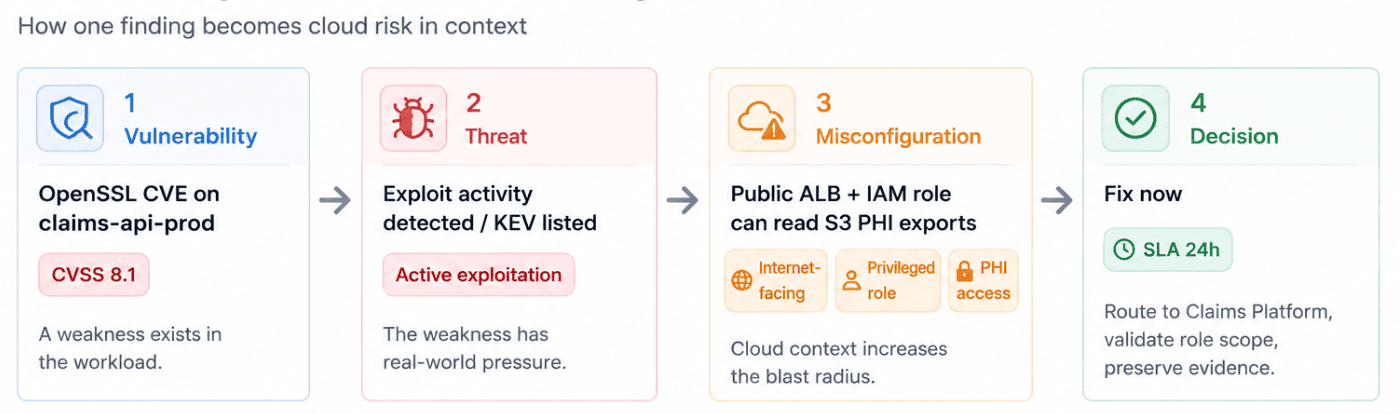
Here is the practical version:
- If
claims-api-prodruns a vulnerable package, that is a vulnerability. - If exploit activity for that CVE is already seen in the wild, that is threat pressure.
- If
claims-api-prodstarts opening outbound connections to an IP it has never contacted, that is threat pressure on your own asset, not just in the wild. - If the workload is public and its runtime role can read PHI exports from S3, misconfiguration has turned a software weakness into a much bigger cloud risk.
That distinction matters in the queue.
A private dev VM with a critical CVE may wait for the patch window. A lower-CVSS issue on an internet-facing API with privileged IAM access may need same-day remediation. The scanner gives you the weakness. Cloud context tells you whether the weakness has a path.
How cloud vulnerability management actually works: the four stages
Cloud security vulnerability management is the operating model for finding exploitable weaknesses across cloud accounts, workloads, identities, images, applications, and hybrid hosts, then getting the right team to fix the right risk inside the SLA. In practice, vulnerability management in cloud security runs as a lifecycle:
- Discover assets, packages, images, identities, APIs, exposed services, and hybrid hosts.
- Assess technical severity, exploitability, exposure, data sensitivity, ownership, and business impact.
- Prioritize fixes with RBVM logic, SLA rules, blast-radius context, and MTTR targets.
- Remediate through patching, configuration changes, access reduction, ticket routing, exception control, and evidence capture.
A scan result is only the input. The program starts working when the finding is tied to asset context: cloud account, environment, owner, internet exposure, IAM path, affected data, fix path, SLA, and MTTR impact.
Discovery: finding vulnerabilities across every cloud account, container, and hybrid host
Discovery answers one uncomfortable question: where can this weakness exist, and did we actually check there?
Agentless scanning gives cloud teams rapid breadth. It can pull inventory from AWS accounts, Azure subscriptions, GCP projects, Kubernetes APIs, and cloud-native services without waiting for engineers to install anything. Agent-based scanning gives depth on hosts. It can inspect OS packages, running services, local configuration, file changes, Syslog, Beats-fed telemetry, and software that cloud APIs do not expose cleanly.
For hybrid environments, both matter.
1️⃣ Containers need separate coverage. Scan the container image before runtime, including Docker base layers and package versions. Use SCA and SBOM analysis to trace vulnerable dependencies back to the application, service owner, repository, and deployment path. In Kubernetes, admission controls should block known-bad images before they reach the cluster, not after the vulnerability queue already has 400 copies of the same issue.
For Kubernetes-heavy environments, map these findings against Kubernetes security options in cloud so image scanning, admission control, runtime detection, and RBAC review are not treated as separate queues.
2️⃣ Serverless changes the shape again. Lambda and cloud functions need dependency checks, trigger mapping, secret detection, and IAM review because there is no long-running host to patch in the classic sense.
3️⃣ Web app scanning belongs in the same discovery layer. OWASP Top 10 coverage, API auth gaps, injection risks, broken access control, exposed admin paths, and risky public endpoints all affect whether a CVE becomes exploitable.
The Cloudaware vulnerability discovery report represents this as one view: asset, cloud account, environment, owner, scan source, CVE, package, container image, SBOM status, public exposure, IAM path, PHI/PII status, and last scan time.
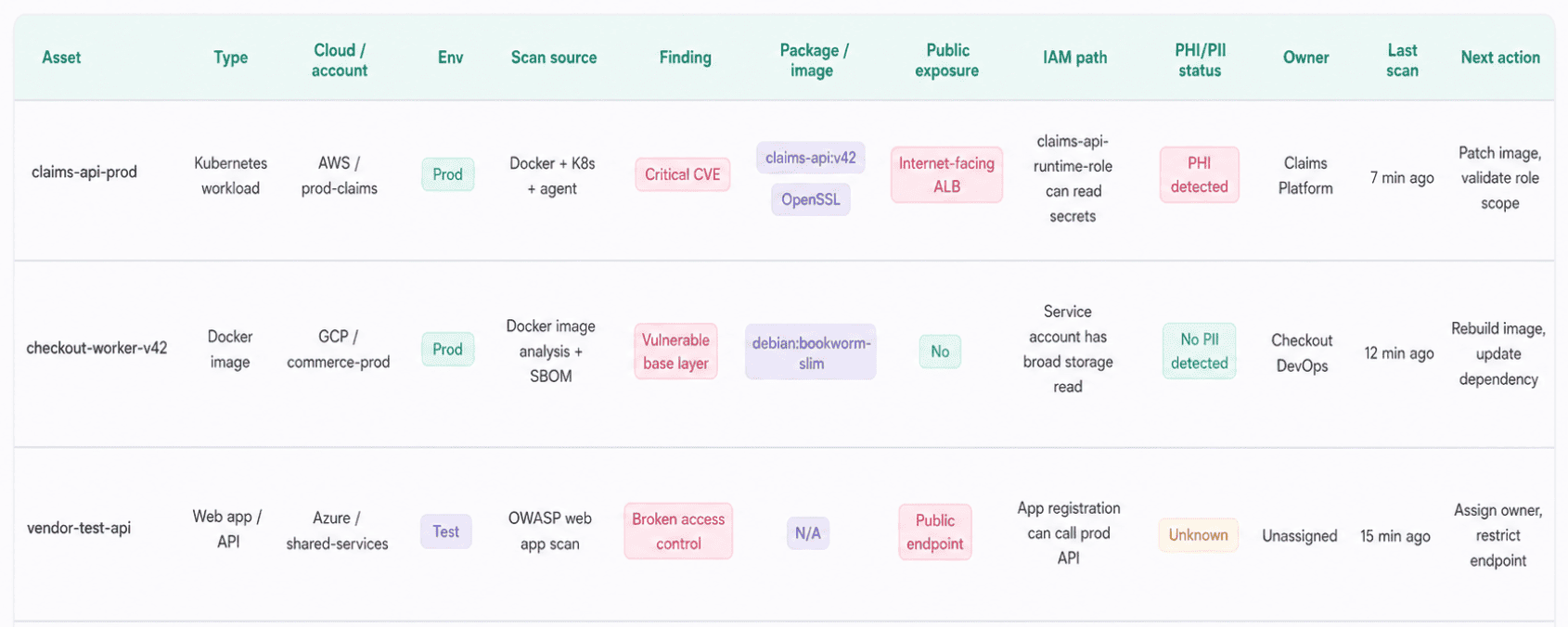
Vulnerability report element in Cloudaware. Schedule a demo to see it live.
With 15-minute scans, agent and agentless options, VM, Docker, Kubernetes, Docker image analysis, OWASP testing, and TNS-based PHI/PII inspection, the team can see whether multi-cloud security threat coverage exists across the estate or only inside one scanner’s comfort zone.
Read also: Cloudaware Guide to FinOps
Assessment: going from “there’s a CVE” to “is it real for us?”
A CVE tells you a weakness exists. Assessment tells you whether that weakness matters in your environment.
CVSS is still the first pass. It gives security teams a common severity language, which is useful when thousands of findings land from scanners, registries, hosts, and dependency tools. But CVSS does not know your cloud account, your IAM model, your public endpoints, your data classification, or whether the affected code path is reachable.
That is where cloud teams get burned.
A CVSS 9.8 on an unused dev image may create less real risk than a CVSS 7.5 in a production API that is internet-facing, handles PHI, and runs under a role that can read S3 exports. The scanner sees severity. The assessment layer has to see the path.
Good assessment usually adds five filters:
- CISA KEV: has this CVE already been exploited in the wild?
- EPSS: how likely is exploitation activity in the near term?
- Exploit availability: is this a zero-day with limited detail, or an n-day with working exploit code already floating around?
- Reachability: is the vulnerable function, route, package, port, or dependency path actually used?
- Cloud context: is the asset public, privileged, production, ownerless, connected to sensitive data, or sitting inside a larger blast radius?
When exploit details are limited or no vendor patch exists yet, use the zero-day vulnerability guide to define mitigation steps, exposure reduction, temporary controls, and owner escalation before the finding enters the normal patch queue.
This is also where teams reduce false positives without pretending the scanner was wrong.
A vulnerable library can exist in a container image and still be unreachable at runtime. A package can be installed on a host, but the service may never load it. A dependency can appear in the SBOM, yet dependency analysis may show the vulnerable method is not invoked. Those findings are not useless. They are lower confidence until runtime evidence, reachability, or exposure proves otherwise.
Cloudaware assessment report shows more than CVE, CVSS, and package. The useful row includes asset, environment, owner, package, image, KEV status, EPSS score, exploit status, reachability, public exposure, IAM path, data sensitivity, ticket, SLA, and exception status.
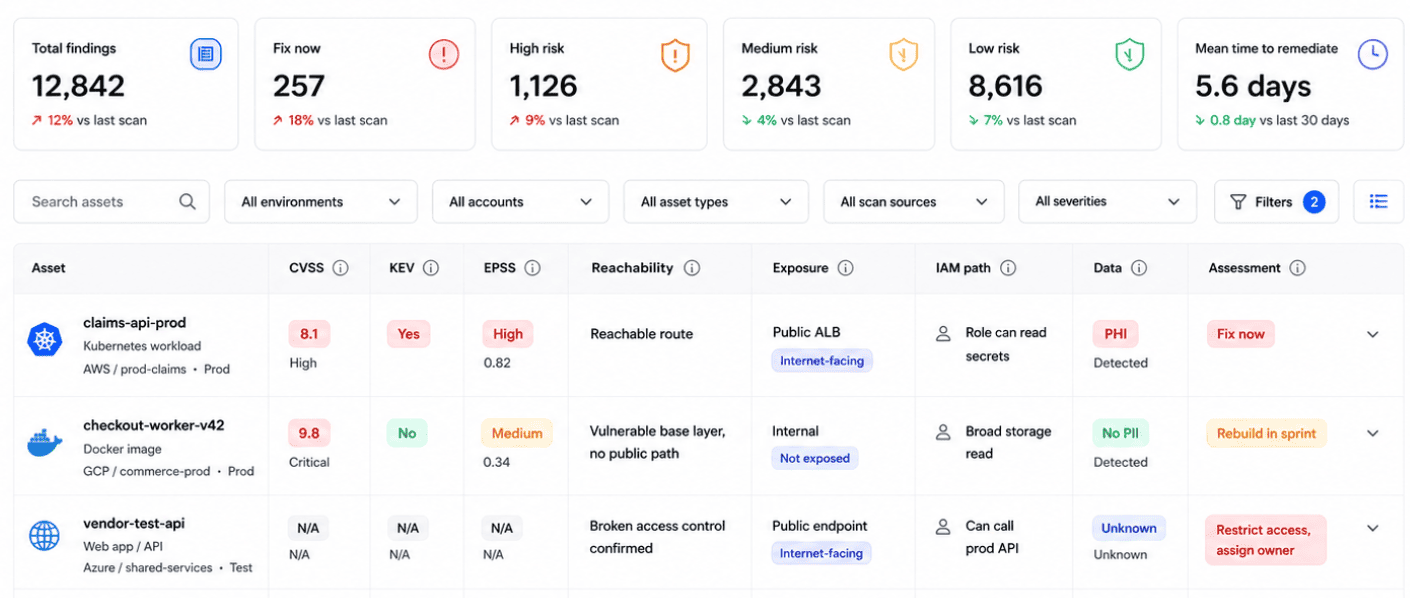
This is an element of the cloud security report in Cloudaware. Schedule a demo to see it live.
That report is the moment assessment becomes useful. The team is no longer arguing over whether “critical” means “drop everything.” They can see why one finding becomes an emergency fix, another becomes sprint work, and a third needs ownership cleanup before remediation can even start.
The question is not “How bad is this CVE in theory?” It is, "Can this weakness be reached, exploited, and turned into impact inside our cloud environment?"
Read also: How to Perform a Cloud Security Risk Assessment in 2026
Prioritization: where most programs drown and how to stop
Prioritizing vulnerabilities in cloud security fails when the queue is sorted by CVSS alone.
CVSS tells you technical severity. It does not know whether the workload is public-facing, whether the affected port is reachable, whether the asset stores regulated data, or whether the runtime role can read secrets across accounts.
That gap is where vulnerability programs drown.
A Monday scan can return 4,000 findings. The useful remediation queue may be 40. Getting there requires a simple risk model:
Exposure × criticality × exploitability
Each factor filters noise. Together, they show which findings can become real cloud risks.
- Exposure proves whether the asset can be reached. A CVE on a private test VM with no active service is not the same as a CVE behind an internet-facing ALB. Cloud security groups and vulnerability mappings make this measurable. If the vulnerable package is used by a service on port
443, and the effective inbound path allows0.0.0.0/0to that port through the security group, route table, NACL, or Kubernetes ingress, the workload is reachable. VPC Flow Logs can add evidence that traffic is actually hitting the path. - Criticality shows what the vulnerable asset supports. Production payment API. Claims data pipeline. Customer portal. Tier-0 identity service. Internal test box. Same CVE, different impact. A Medium 6.5 on a public service holding PHI can outrank a Critical 9.8 on an internal-only test workload with no sensitive data.
- Exploitability adds attacker pressure. KEV status, EPSS score, public exploit code, active scanning, n-day maturity, and runtime reachability all matter. A vulnerable dependency listed in an SBOM is one signal. A loaded dependency tied to a KEV-listed CVE on a public route is a different class of work.
A Cloudaware vulnerability report shows the row-level context that changes the decision. It does the work that severity sorting cannot.
claims-api-prod moves to the top because the evidence compounds: reachable public path, regulated data, KEV status, high EPSS, and IAM blast radius. legacy-test-vm still needs patching, but it should not interrupt production engineering if the service is stopped, private, and disconnected from sensitive data.
In a Cloudaware vulnerability management, the priority row should include asset, owner, environment, CVSS, KEV, EPSS, affected port, effective inbound rule, public exposure, IAM blast radius, data classification, business service, ticket, SLA, and exception status.
That is the difference between “4,000 vulnerabilities found” and “these 40 need action before the next release window.”
Read also: FinOps transformation case study
Remediation: closing the loop without adding a ticket backlog
Remediation is where cloud vulnerability management either becomes operational or turns into ticket theater.
A finding needs a fixed path, not just a severity label.
claims-api-prod should not sit in a generic security queue while three teams argue over ownership. The asset already has context: application, environment, cloud account, owner, business service, exposure, and SLA. Use that.
1️⃣ Start with ownership. CMDB-driven routing sends the finding to the team that can actually fix it:
- A vulnerable container image goes to the service owner or platform team.
- A host package issue is routed to the infrastructure team.
- An exposed API with broken access control needs app engineering plus security review.
- Customers running Tenable for scanning can route those findings through the same workflow, so scanner output becomes assigned work instead of another exported CSV.
2️⃣ Set SLA clocks by risk. A public production workload with regulated data may need a 24-hour SLA. An internal test VM can wait for the next patch window. Track MTTR by owner, service, environment, and severity. That is how security sees whether remediation is stuck with one team, one app, one cloud account, or one class of fix.
3️⃣Keep tickets synced. Jira, ServiceNow, and PagerDuty should reflect the same state as the vulnerability record: open → assigned → accepted risk → in progress → resolved → verified → closed
Bidirectional sync matters because engineers work in ITSM tools, while security needs the evidence trail in the vulnerability system.
4️⃣ Treat exceptions like controlled risk, not storage. Not every finding gets fixed immediately. Some need an exemption. Fine. But the exemption needs an approver, reason, compensating control, review date, and expiry. “Accepted risk” without an expiry date is just backlog decay with nicer language.
5️⃣ Close with patching and proof. Patch management closes most software findings: update the package, rebuild the image, patch the VM, rotate the dependency, and redeploy.
Then rescan.
The ticket should close only when a verification rescan confirms the CVE is gone, the vulnerable dependency is removed, or the affected path is no longer reachable.
6️⃣ Use auto-remediation only where the rule is safe. Simple findings can move faster through Lambda workflows: auto-tag unowned assets, revoke unused access keys, remove stale public rules, or trigger a safe configuration rollback when the cloud security policy is clear and the blast radius is controlled.
Cloudaware clients use this remediation report in this case:
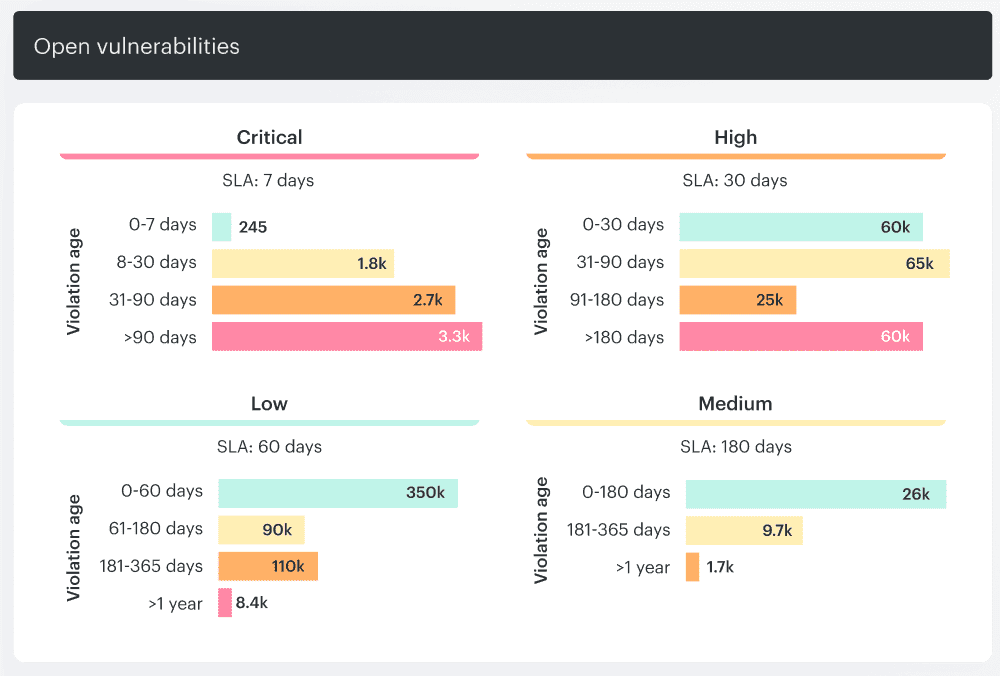
The fix still happens in Jira or ServiceNow. The security value is that Cloudaware keeps the finding tied to the asset, owner, deadline, exception record, and proof that the issue was checked again before closure.
How vulnerabilities become cloud security attacks
Most cloud security attacks are not just one finding that turns into one breach. They are chains: identity weakness, reachable workload, exposed data, permissive role, vulnerable dependency. One link may look medium-risk. Together, they create the path.
For definitions of common cloud security threats, see our cloud security threats guide. This section is about how vulnerability classes combine during real attacks.
Chain 1: stolen access key → RCE → PII exfiltration
Vulnerability classes: IAM, MFA gap, CVE, data exposure
Attack path: credential compromise → resource enumeration → RCE → exfiltration
Reported pattern: 47 minutes from initial access to data theft
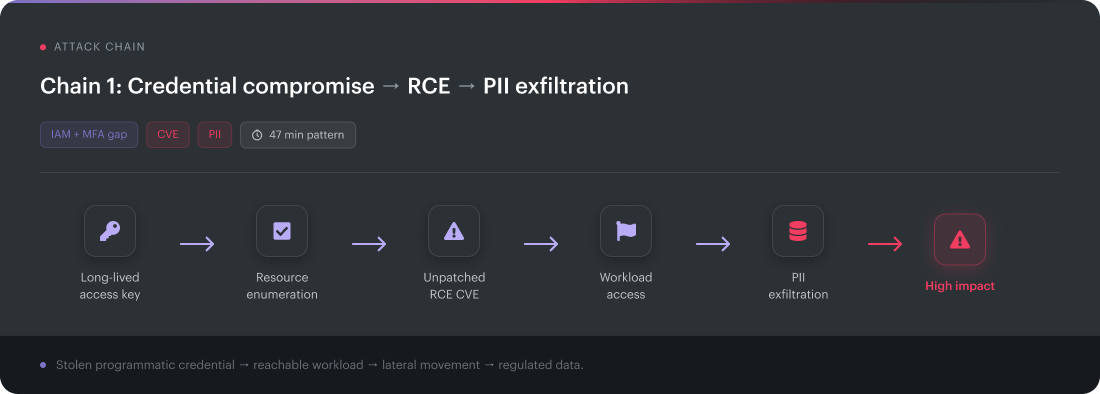
A stolen credential lands in a long-lived access key. MFA does not interrupt the attacker because programmatic access usually bypasses the console login flow.
The identity has enough permission to enumerate resources. The attacker checks buckets, instances, secrets, and reachable workloads. One workload is running an unpatched RCE CVE. That turns a credential issue into a runtime foothold.
From there, lateral movement depends on what the workload can reach. In this pattern, the compromised asset had access to a data store that was tagged with PII. For example, Cloudaware users have access to identity, workload, CVE, owner, environment, IAM path, data classification, and exfiltration signal in one place.
CI vulnerability details report element in Cloudaware. Schedule a demo to see it live.
The cloud security threat is not the CVE alone. It is the chain.
Read also: 10 Best Cloud Security Tools in 2026 with Comparison, Pricing, and Honest Reviews
Chain 2: public bucket → scanner hit → direct download
Vulnerability class: misconfiguration
Attack path: public object storage → scanner discovery → data download
CVE involved: none
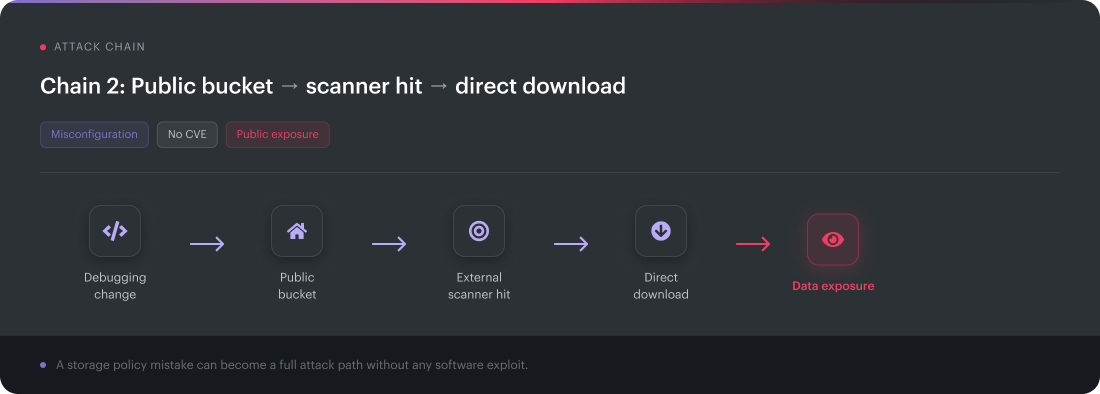
A storage bucket becomes public during debugging. Maybe a team is testing a vendor export. Maybe access gets opened to unblock a release, and the cleanup task never fires.
External scanners find exposed cloud storage quickly. The attacker does not need malware, privilege escalation, or exploit code. The bucket policy already created the access path.
This is why CVEs cannot fully capture threats to cloud security. Misconfiguration can behave like a vulnerability when it grants direct access to data. In AWS, Azure, GCP, and SaaS export locations, the same pattern repeats with different service names.
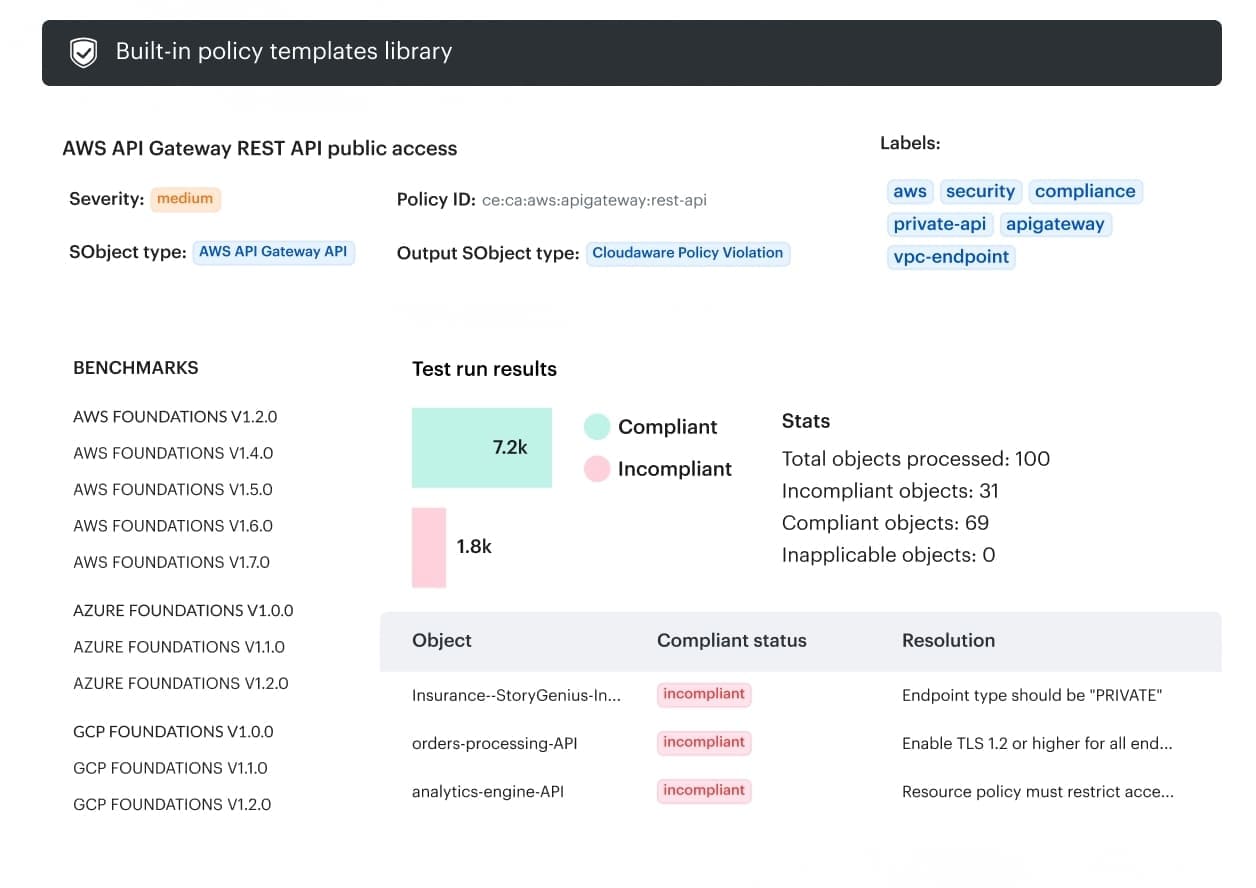
DevSecOps report element in Cloudaware. Schedule a demo to see it live.
That is the multi-cloud security threat version of an ancient problem: exposed data moves faster than humans review access.
Read also: Healthcare Data Security Challenges. The 4 Biggest Threats Facing Hospitals and Health Plans in 2026
Chain 3: poisoned dependency → temporary credentials → application blast radius
Vulnerability class: supply chain
Attack path: compromised npm package → implant → cloud credentials → app-level access
Blast radius: whatever the application role can do
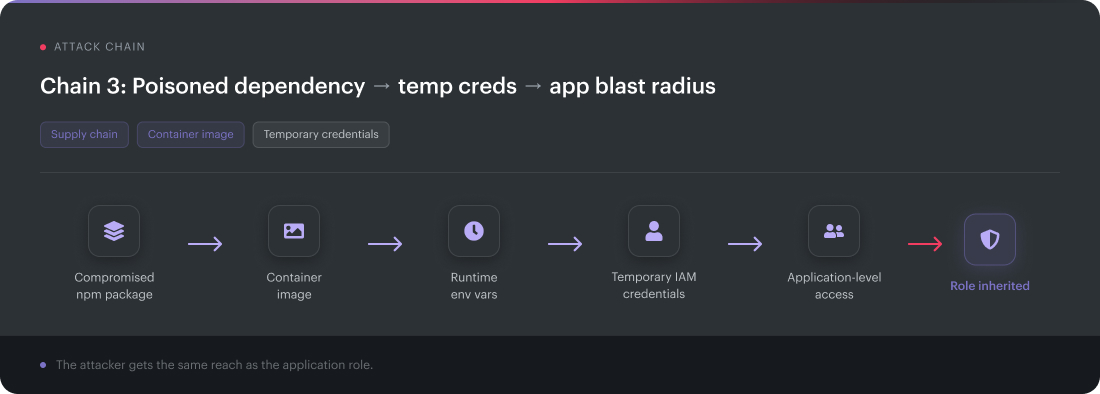
A compromised npm package ships with the production app. It passes the build, lands in the container image, and runs under the application’s normal execution context.
The implant calls home and lifts environment variables containing temporary cloud credentials. Now the attacker inherits the application role. Not admin, necessarily. Just enough access to read objects, write queues, call internal APIs, query databases, or pull secrets.
That is how supply chain risk becomes identity risk.
Kubernetes and hybrid estates make this chain messy because CI/CD runners, container images, pods, registries, cloud accounts, and on-prem build agents all touch the release path.
A dependency finding becomes useful only when it lands inside the asset graph:
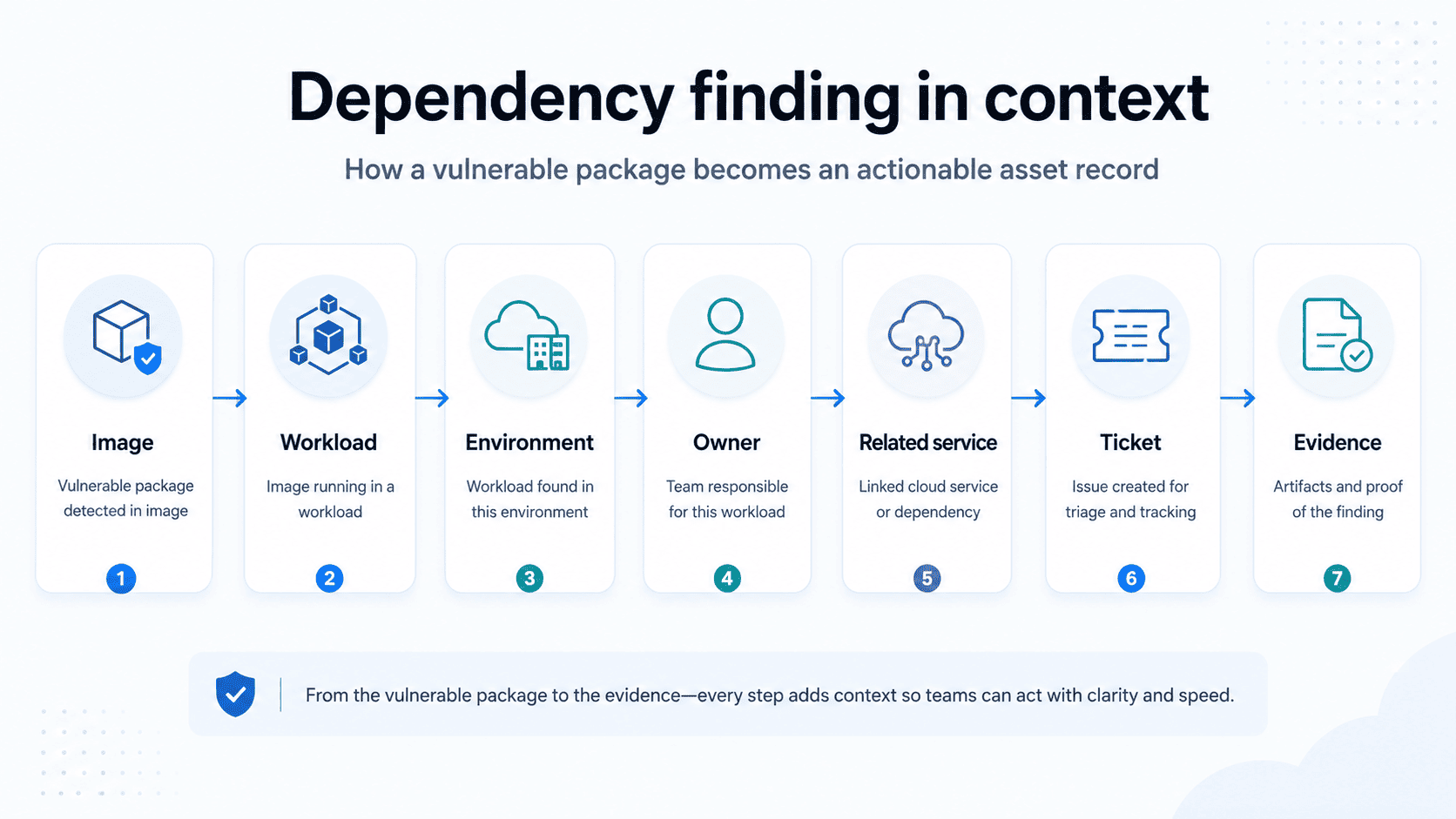
What these chains show
The most damaging threat to cloud security is often a sequence of low- and medium-severity weaknesses that line up:
- stolen credential
- public exposure
- over-permissioned IAM
- reachable CVE
- sensitive data access
- untrusted dependency
Scoring each vulnerability in isolation misses the real blast radius. A Medium issue on a public service with regulated data can outrank a Critical CVE on a private test VM. Cloud risk lives in the path between findings.
Each chain also leaves traces on the way: failed logins, a new process, an API call from an unfamiliar identity. Correlating host telemetry with cloud logs on the same asset is where a chain becomes visible before its last step.
Read also: 12 Best Cloud Security Assessment Tools for 2026
Tracking provider-issued CVEs in AWS, Azure, Google Cloud
Provider-issued CVEs need a separate lane from host, image, and dependency scanning.
A scanner can tell you openssl is vulnerable inside a container. It may not tell you that AWS, Microsoft, or Google published an advisory for a managed service, agent, extension, SDK, or platform component your workloads depend on.
That is shared responsibility with teeth. The hyperscaler owns the service. Your team owns impact analysis, affected scope, customer-side mitigation, tickets, and proof.
Track the official sources first:
| Provider | Advisory source | What practitioners should extract |
|---|---|---|
| AWS | AWS Security Bulletins | Service, affected regions, Amazon Linux advisory, SDK or customer action |
| Azure | MSRC | CVE, Azure service or agent, affected version, mitigation, required customer action |
| Google Cloud | Google Cloud security advisories | Product, severity, affected platform, fixed version, rollout or upgrade path |
Do not treat cloud security vulnerability news as a queue. Treat it as a feed that needs enrichment.
Real examples make the workflow obvious.
- OMIGOD, including CVE-2021-38647, hit the Azure OMI agent in September 2021. Security teams had to find Linux VMs using affected Azure management extensions, check exposure, patch, and then verify.
- ChaosDB, disclosed in 2021 for Azure Cosmos DB, pushed teams to identify Cosmos DB accounts, understand Jupyter Notebook exposure, rotate keys where required, and preserve mitigation evidence.
- Log4Shell added another layer: customers had to track their own Java assets while watching managed services and vendor images for coverage gaps.
- AWS S3 GovCloud disclosures belong in the same operating model: advisory lands, affected services get mapped, and customer-owned actions get routed.
That is usually what people want from Microsoft cloud security vulnerabilities CVE research: not a news recap, but “which Azure services or agents in our estate need action?”
The clean workflow:
- Subscribe to AWS Security Bulletins, MSRC, Google Cloud security advisories, CISA KEV, and NVD.
- Normalize provider, CVE, service, severity, date, affected version, region, and customer action.
- Match advisory scope against inventory: accounts, subscriptions, projects, services, agents, clusters, images, SDKs.
- Route affected assets to owners with SLA, ticket, exception status, and verification evidence.
In a Cloudaware report, this looks like an advisory impact view, not another CVE dump:
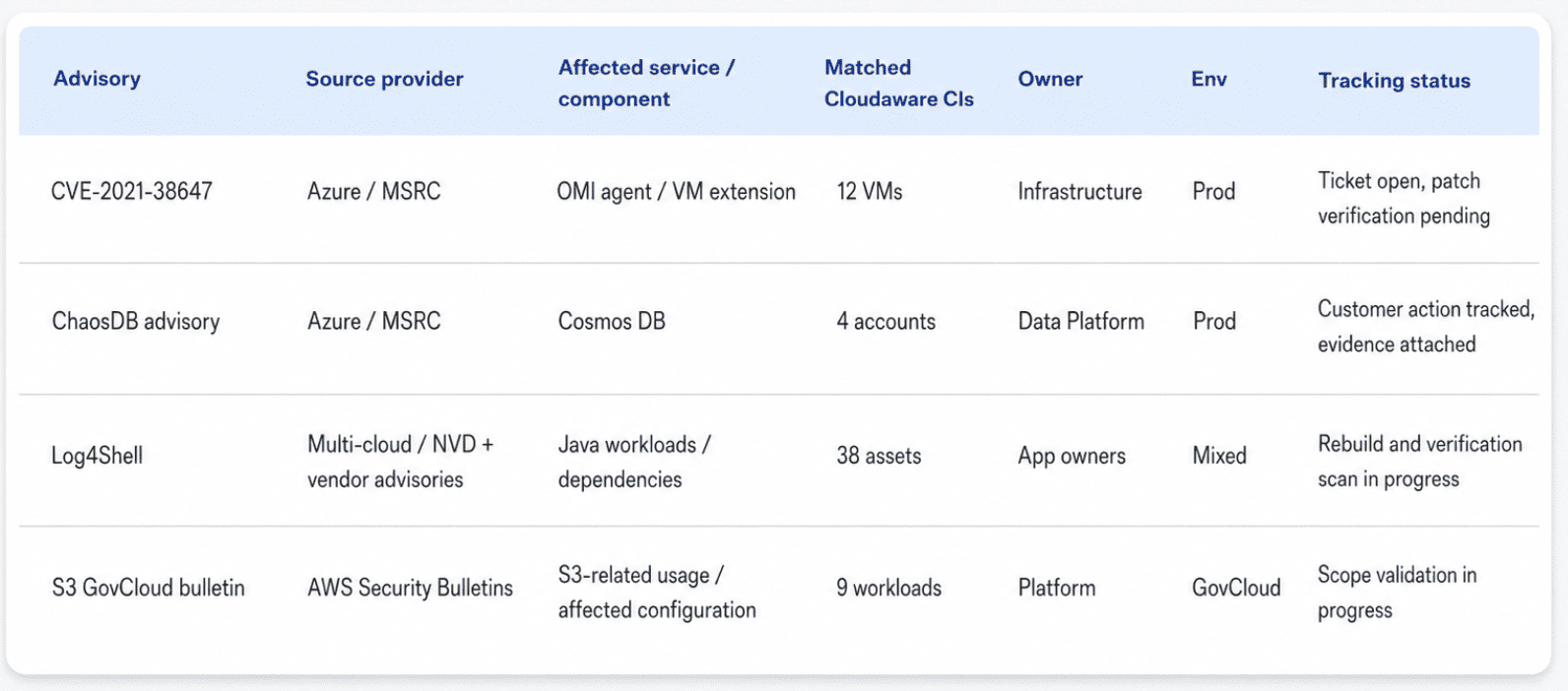
Cloud security report element in Cloudaware. Schedule a demo to see it live.
That is how cloud security vulnerability news today becomes work: advisory in, inventory matched, owner assigned, ticket opened, and evidence retained.
Read also: Cloud Security Strategy: Roadmap, Pillars & Metrics
See which cloud vulnerabilities actually need action with Cloudaware
Cloudaware adds CMDB context to vulnerability management, enabling security teams to move beyond the scanner export and work from the asset record.
A CVE by itself is not enough. Practitioners need the surrounding facts:
- Which asset is affected?
- Who owns it?
- Is it production?
- Is it exposed?
- Does it support a regulated workflow?
- Is there already a ticket, exception, or verification scan?
That is where the queue changes.
claims-api-prod running an OpenSSL CVE is one thing.
claims-api-prod behind a public ALB, owned by Claims Platform, tied to regulated data, and waiting on patch verification is the row that deserves attention.
Security architects, DevSecOps leads, platform engineers, cloud architects, and compliance teams use Cloudaware when vulnerability work needs to stay connected to assets, owners, environments, business services, exposure, tickets, SLAs, exceptions, and evidence.
Cloudaware capabilities:
- Vulnerability management. Track vulnerabilities across cloud and on-prem environments with CMDB context around affected assets.
- Risk-based vulnerability management. Prioritize by severity, exploitability, exposure, asset criticality, and business impact instead of sorting every queue by CVSS alone.
- On-demand vulnerability scans. Trigger scans after a fix, release, advisory, or exception review instead of waiting for the next scheduled cycle.
- Host-based vulnerability scans. Cover private machines and VM-level package findings where cloud APIs do not provide enough runtime detail.
- Docker image scanning. Scan container images across dev, corporate, and production accounts before vulnerable base layers move into running workloads.
- OWASP web app testing. Add application-layer checks for exposed APIs and web services, not only OS packages and image CVEs.
- Cloud CMDB. Tie findings to applications, owners, environments, cloud accounts, dependencies, tags, and service context.
- CSPM. Add misconfiguration and posture context around vulnerable assets, including exposure, ownership, blast radius, exceptions, and policy status.
- IT compliance workflows. Route findings into Jira or ServiceNow, track SLA, keep evidence, and document time-boxed exceptions.
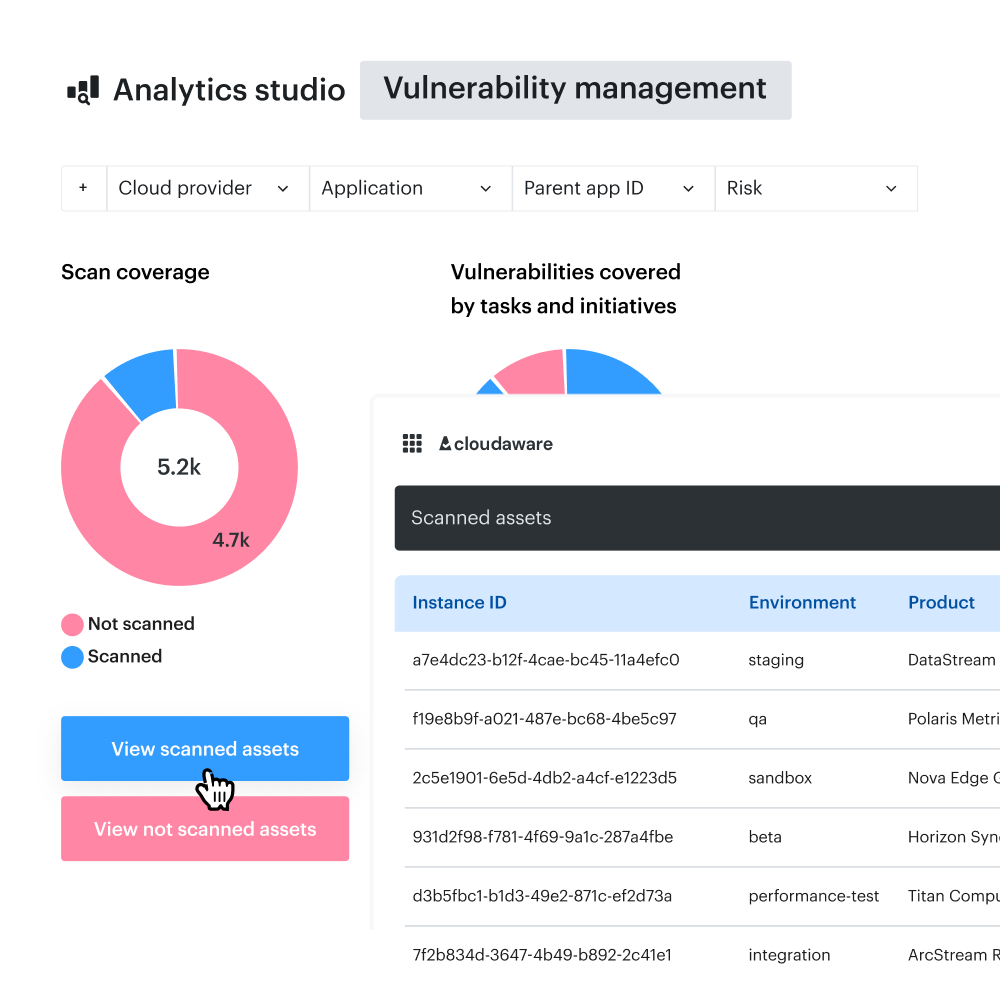
A practical Cloudaware report should look closer to this:
This is the working layer scanners usually miss.
The scanner tells the team what is vulnerable. Cloudaware helps show where the vulnerable asset lives, who owns it, how exposed it is, whether it affects a critical service, and what proof is needed before closure.
Cloudaware NeoSec, a separate module, adds the part the scanner cannot see: whether claims-api-prod is behaving abnormally right now. It baselines each asset, investigates deviations with the same CMDB context, and tells the team whether an attack succeeded.