


If you’re looking for fresh expert insights, you’re in the right place. Here, we pulled together what actually works from client environments, our team’s field experience, and industry signals from 2025 and 2026.
This is a practical guide to cloud security best practices for people who have real systems to protect, not theory to admire.
- Where does the shared responsibility model break in practice?
- Which misconfigurations still expose critical assets?
- How do you enforce least privilege without turning delivery into a traffic jam?
- What should continuous monitoring catch first in a multi-cloud estate?
- When does compliance support better decisions instead of creating paperwork?
- And which cloud security tips improve cloud posture fast enough to matter this quarter, especially when your team must choose what to fix now and what to automate next?
Key insights
Most teams do not lose control because they forgot one clever control. They lose it because basics break quietly under speed, sprawl, and weak ownership. Good cloud security best practices fix that fast. They reduce blind spots, cut noisy work, and make risk easier to prove, prioritize, and remediate.
Here are the cloud security tips that matter most:
- Start with IAM. Weak identity design still creates the fastest path to real damage.
- Build one view of your cloud attack surface before you try to score risk.
- Watch for drift, not just one-time misconfigurations. Cloud changes faster than policy decks.
- Use posture management to catch exposed storage, risky roles, and broken baselines early.
- Treat logging as an operational system, not an archive.
- Route findings by owner, environment, and business impact so remediation moves.
- Make evidence collection continuous if you care about audit readiness.
- Push checks into IaC and CI/CD, because the best fixes happen before deploy.
- Automate repeatable controls first. Leave high-impact exceptions to workflow and review.
That is where the real best practices for cloud security start.
What are cloud security best practices?
Cloud security best practices are the technical, operational, and governance controls teams use to reduce risk across cloud environments. In plain English, they are the habits and systems that keep cloud assets hard to abuse, easy to monitor, and faster to recover when something goes wrong.
A cloud security best practice is only useful if it still works when your infrastructure changes daily, identities multiply, and new services show up faster than manual review ever could.
Why cloud security best practices are different from traditional security
Traditional security assumed a clearer edge. You had a known perimeter, slower infrastructure change, and longer review cycles. Cloud broke that model. Now the control plane is software, identity is everywhere, and one bad permission can travel farther than one bad firewall rule ever could.
That shift is measurable:
Google Cloud says the window from vulnerability disclosure to active exploitation collapsed from weeks to days in the second half of 2025.
CSA says insecure identities and risky permissions are now the top cloud risk, while 21% of teams still struggle to enforce least privilege at scale and 28% cite misalignment between IAM and cloud security teams.
Orca found nearly a third of cloud assets are in a neglected state, and 38% of organizations with sensitive data in databases also have those databases exposed to the public.
Check Point reports that 65% of organizations experienced a cloud-related incident in the past year, yet only 9% detected it within the first hour.
That is why best practices cloud security teams care about now look different. You need:
- controls built for cloud-native change, not for static estates,
- continuous telemetry, not quarterly snapshots,
- identity and access management that covers humans, service accounts, tokens, and automation,
- catch configuration drift before it turns into exposure,
- incident response that starts with context.
The five control areas every team needs
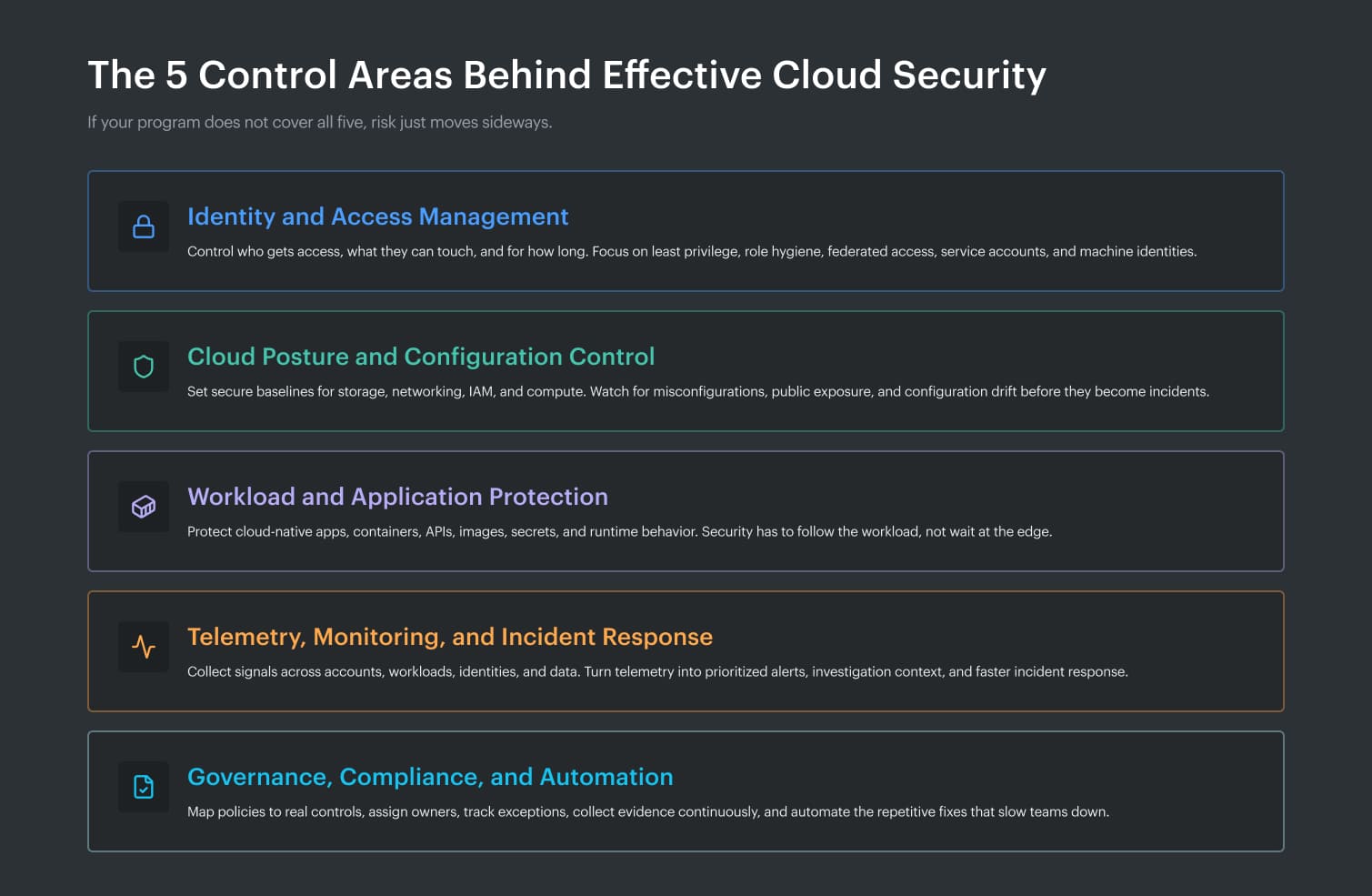
So, what are the best cloud security practices? Start with five control areas that tell you what to prioritize, what to monitor, and what to automate first.
Read also: Multi Cloud Security Beyond AWS Control Tower
3 Best practices for cloud security strategy
This section is built from official shared responsibility guidance from AWS and Microsoft Azure, plus CSA’s Cloud Controls Matrix and Google Cloud’s 2026 threat research. In other words, this is provider documentation and current industry guidance, then sanity-checked by a Cloudaware expert, Igor, against what actually breaks in real environments.
Start with shared responsibility, not tooling
One of the best practices for cloud security is painfully simple and still ignored: decide ownership before you buy controls. But not as a discussion. Ownership has to be visible in the system, derived from real data, not guesswork.
In IaaS, the provider secures facilities, hardware, and core infrastructure. You still own the guest OS, patching, network rules, identities, workload configs, secrets, and data. In PaaS, you own code, IAM, API exposure, encryption choices, and data handling. In SaaS, you still control user access, MFA, tenant configuration, and integrations.
This is where teams get burned. “Managed” gets mistaken for “fully secured,” and nobody can clearly see who owns what.
In practice, ownership should be built from signals that already exist in your cloud. Resource tags like owner, team, environment. Account and project structure. IAM bindings that show which team has control. CI/CD metadata that links resources to repositories and services. Change history from tools like AWS Config, Azure Activity Logs, or GCP Audit Logs that shows who created or modified the asset.
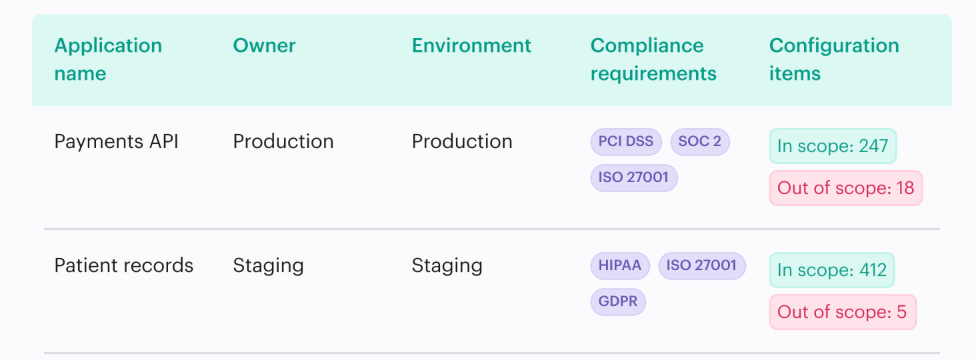
Cloudaware pulls those signals together. It maps assets to applications, teams, and environments using tags, cloud metadata, and relationships between resources. For example:
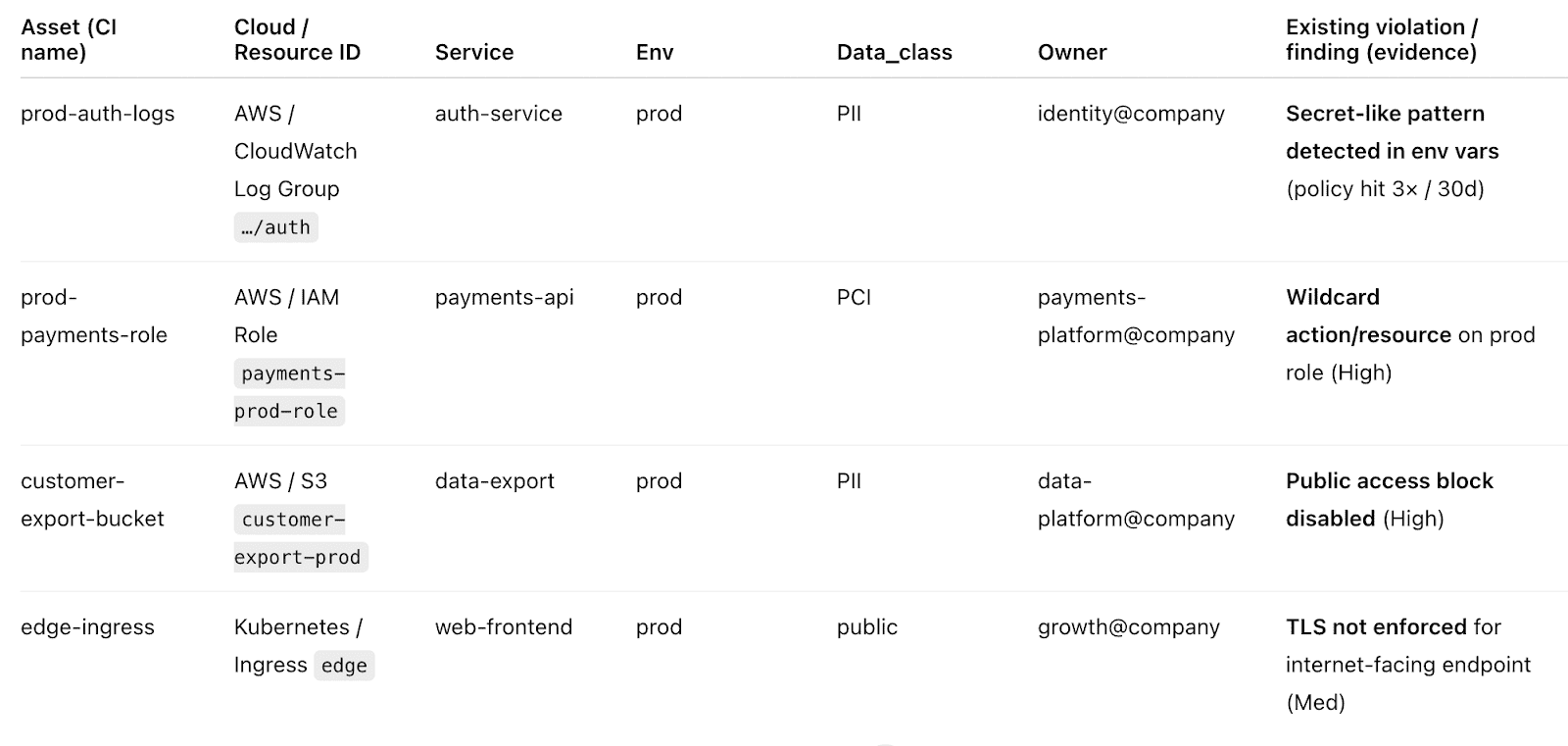
That means ownership is not assigned manually after an incident. It is already attached to the asset, the finding, and the change.
That is the difference. You are not asking “who owns this?” You are looking at it.
Once that ownership model is real, the next question gets sharper: what exactly do you own right now across cloud assets, identities, data stores, and external exposure?
Inventory cloud assets, identities, data stores, and external exposure
You cannot protect what you cannot see. That sounds obvious until you look at a real cloud estate and find abandoned instances, stale roles, unmanaged buckets, test databases with production data, and internet-facing endpoints nobody meant to publish. Strategy fails here because risk is calculated from an incomplete map. That is guesswork dressed up as governance.
A strong cloud security best practice is to build one living inventory that ties assets, identities, data stores, tags, owners, and external exposure together.
Cloudaware CMDB helps by pulling cloud configuration and relationships into one place, so teams can spot orphaned resources, overprivileged identities, public exposure, and drift without stitching five dashboards together.
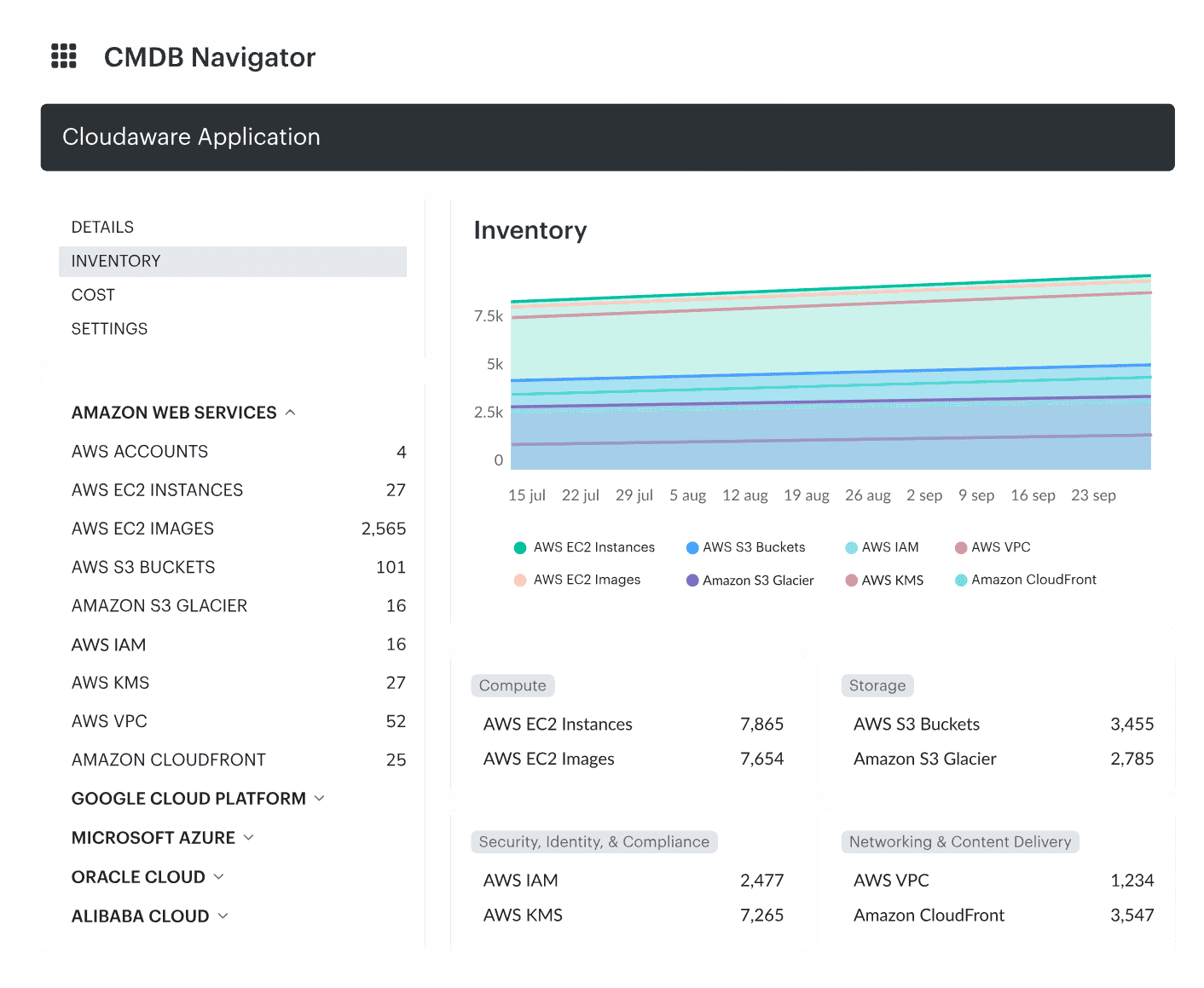
You stop arguing about what exists and start fixing what matters.
Among the cloud security best practices that actually move the needle, this one comes first.
The next question gets harder and more useful: which risks deserve attention first?
Prioritize by business impact, data sensitivity, and blast radius
“Cloud environments are managed and expanding the attack surface at a speed that outpaces traditional security models.” Vincent Hwang put the problem plainly in Fortinet’s 2026 cloud security report. That is exactly why prioritization breaks first.
Not every finding matters equally. A medium-risk issue on an isolated dev workload is not the same as a reachable path into a production database with sensitive data and broad IAM reach.
Orca’s 2025 report makes that painfully concrete: 13% of organizations have a single cloud asset responsible for more than 1,000 attack paths, and 38% of organizations with sensitive data in databases also have those databases exposed to the public.
This is where best practices for cloud security stop being theory. Severity alone is too blunt. You need business context, data sensitivity, and likely blast radius.
Cloudaware fixes that by decorating findings with owner, app, environment, and scope from the CMDB, then routing them with clear severity and context instead of dumping raw alerts into one queue. For example:
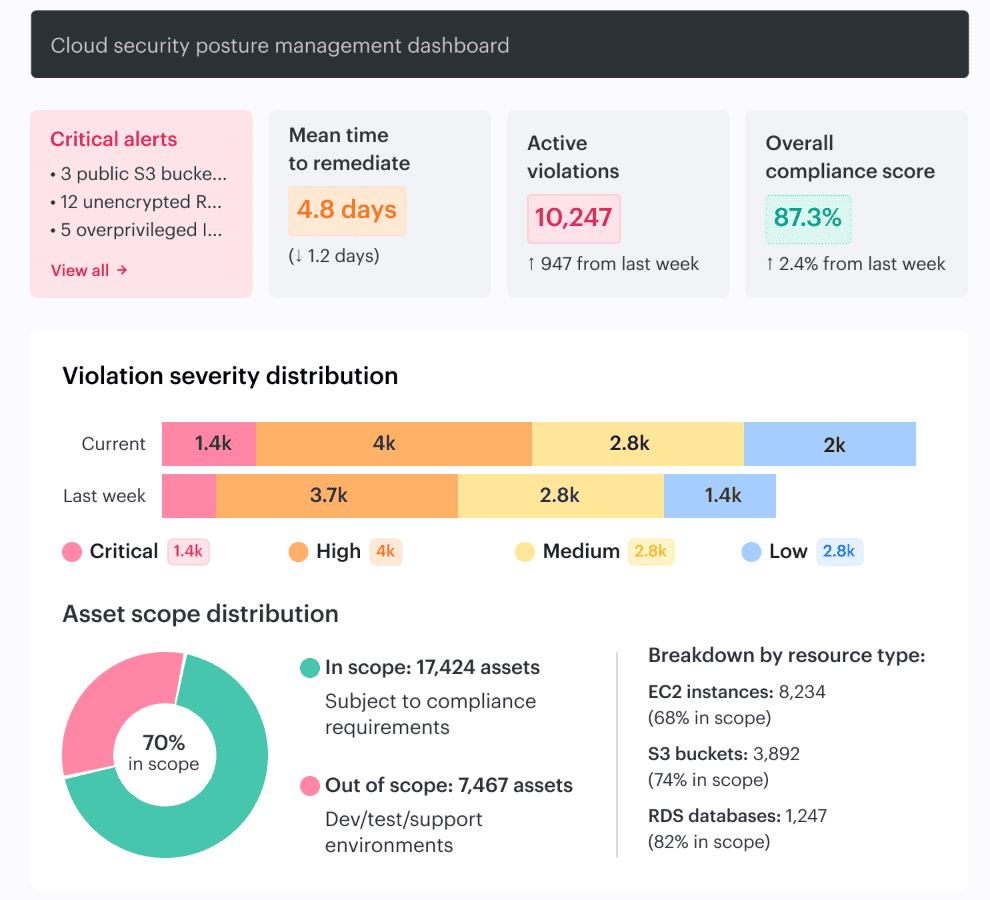
It can also scope controls by app, environment, or risk from day one.
As Valentin Kel, Cloudaware DevOps, puts it: “The fastest way to lose control is letting CI/CD ship whatever Terraform or Helm produced, then hoping someone notices the misconfiguration later.” That line lands because it is true far beyond CI/CD. Context decides urgency.
4 Cloud security monitoring best practices
Collect the right telemetry across accounts, workloads, identities, and data stores
“Cloud environments are managed and expanding the attack surface at a speed that outpaces traditional security models.” Vincent Hwang’s line lands because it describes the monitoring problem exactly.
Telemetry volume is not the blocker anymore. Fragmentation is. Fortinet’s 2026 research says 69% of organizations cite tool sprawl and visibility gaps as the top drag on cloud security effectiveness, and 66% lack strong confidence in their ability to detect and respond in real time.
That is why best practices for cloud security strategy fail when teams collect logs from everywhere but still cannot tell which asset, identity, data store, and exposure path belong to the same risk.
The fix is context. Not just an auth event. Which workload used the identity, in which environment, against what data, with what owner, and after which change? Orca’s 2025 report shows why that matters: attack paths chain together “seemingly isolated risks,” and 13% of organizations have a single asset tied to more than 1,000 attack paths.
Raw logs do not show that story fast enough.
Cloudaware ties change history, approvals, ownership, environment, and CI relationships back to the telemetry.
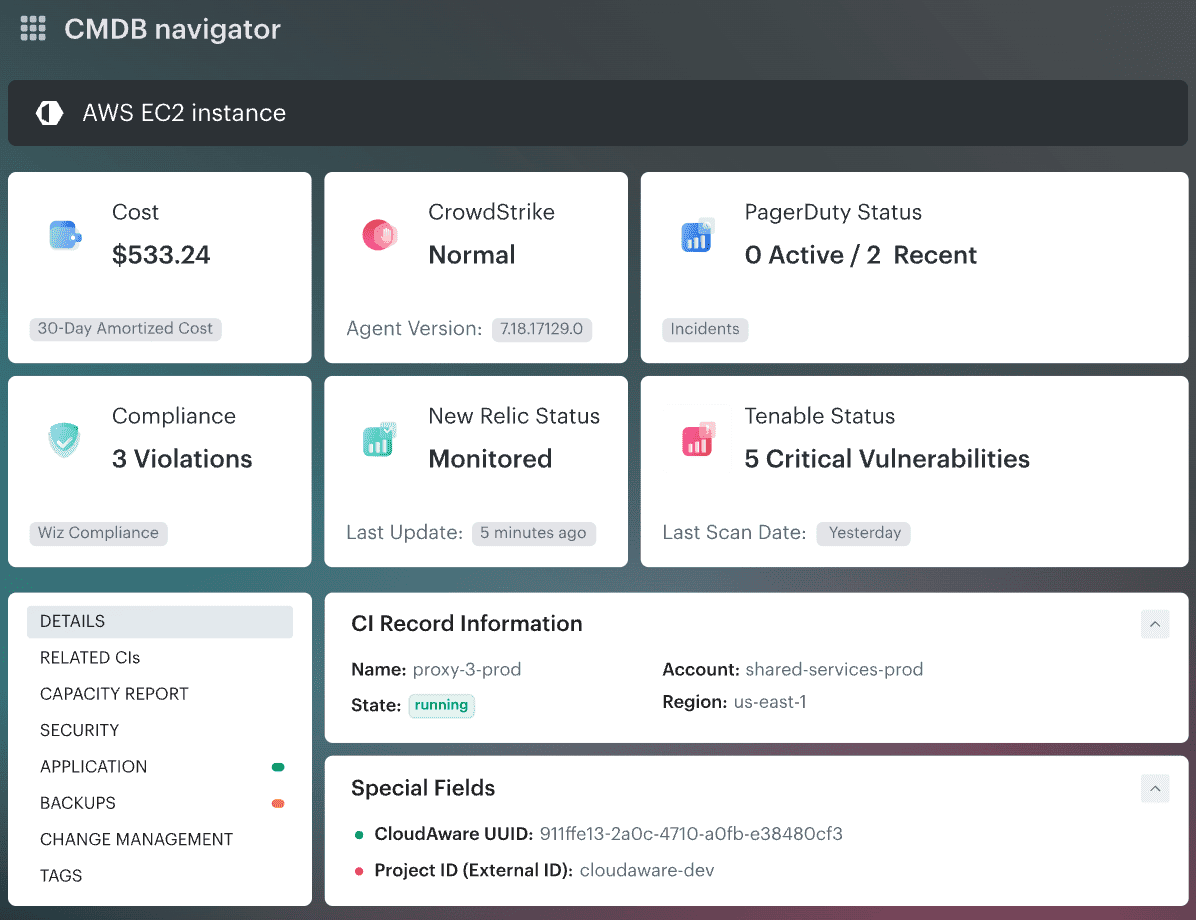
So teams can see what changed, where it changed, and why this finding is urgent instead of merely noisy.
Igor K., DevOps Engineer at Cloudaware
That is one of the most practical cloud security tips for businesses and enterprise teams alike: make observability operational, not archival.
Monitor for misconfigurations, drift, and unauthorized changes
“In 2025, the key to cloud security will be prevention. As attacks grow more automated and complex, businesses will need to design cloud environments that anticipate threats rather than react to them.” Itai Greenberg at Check Point said that about cloud security, and this is exactly where the warning gets real.
Misconfigurations, drift, and unauthorized changes rarely break the app first. They break your assumptions. A security group opens wider than intended. A role inherits extra permissions. A storage policy changes during a rushed deploy.
Nothing crashes, so nobody notices.
Fortinet’s guidance on AWS misconfigurations makes the same point bluntly: these exposures persist in dynamic environments when controls are inconsistent, visibility is limited, and insecure settings get replicated through rapid automation.
Check Point also reports that 65% of organizations experienced a cloud security incident in the past year.
This is why one of the most practical best practices for cloud security strategy is to monitor change, not just events. Cloudaware helps by tracking configuration state, change history, ownership, exposure, and policy context together, then ranking misconfigurations by owner, exposure, and blast radius instead of dropping every alert into the same bucket.
For example, the change history dashboard:
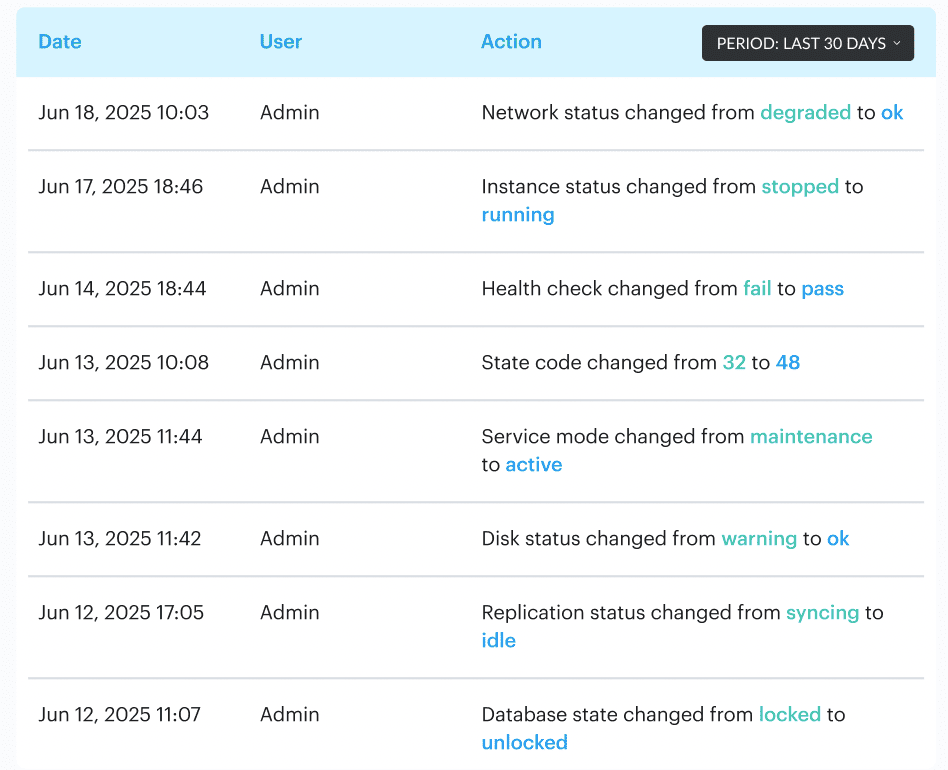
Its workflows can route violations to the right team and auto-remediate repeat issues.
Valentin Kel, Cloudaware DevOps Engineer
Next comes the harder part: deciding which of those alerts deserve attention first based on exploitability and business risk.
Prioritize alerts by exploitability and business risk
Attackers need to be right only once, defenders every time. Orca uses that line to frame the real monitoring problem, and the data under it is brutal: 13% of organizations have a single cloud asset that creates more than 1,000 attack paths.
That is why alert volume is such a trap. One weakly exposed asset can generate a mess of findings, but only a few of them actually move an attacker closer to crown-jewel data or privileged access.
This is where cloud security monitoring best practices get serious. Severity labels alone are lazy triage. A medium alert on an internet-facing workload with lateral movement potential can matter more than a high alert on an isolated test box.
If you do not weigh exploitability, exposed data, reachable identities, and business criticality together, the queue lies to you.
Cloudaware helps prioritize alerts by adding the business and infrastructure context that raw security tools usually miss. Instead of treating every finding as a flat event, it ties the alert to the asset, application, environment, owner, and related items in the CMDB. That matters because a public IP on a disposable test VM is not the same problem as a public path to a production database linked to a customer-facing app.
SIEM events are enriched with CMDB data such as owner, app, environment, and region, while teams can assess risk using CMDB context.
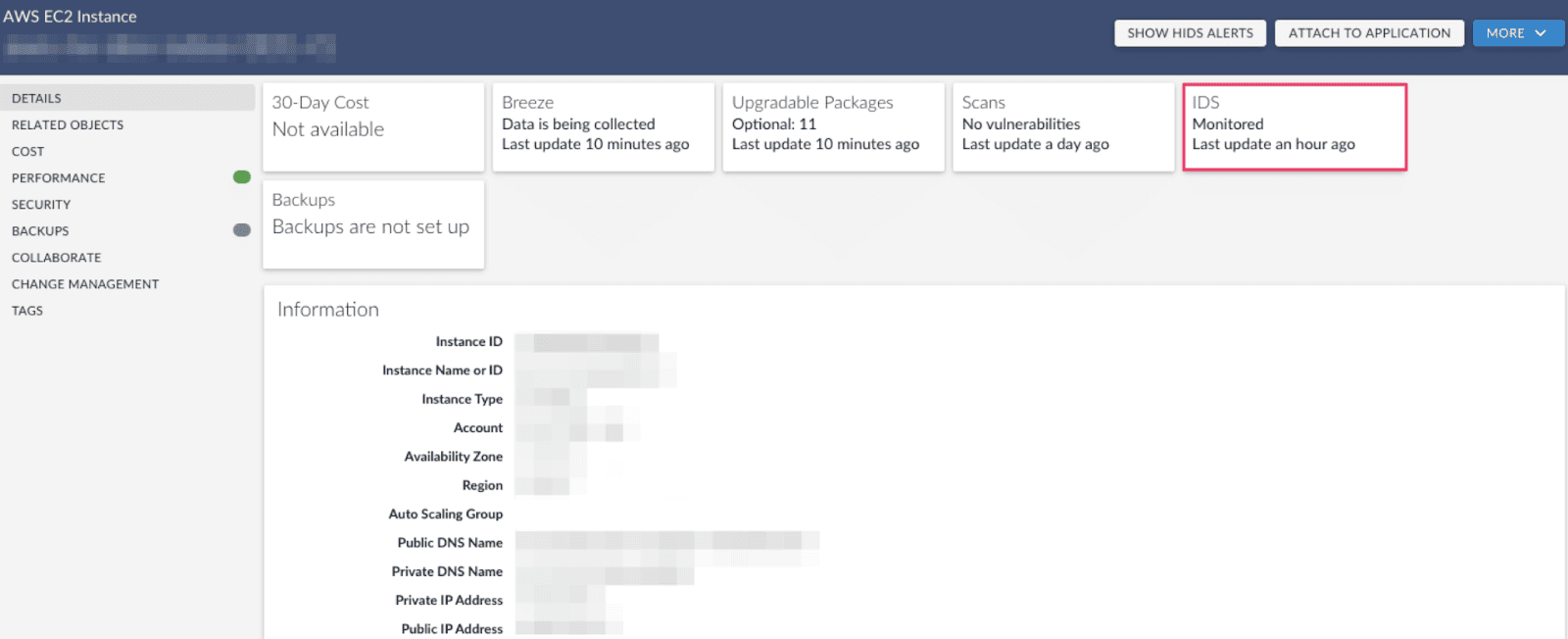
In practice, that means prioritization can work on several layers at once:
- Asset criticality: Is the finding tied to production, regulated data, or a business-critical service?
- Exposure path: Is the resource internet-facing, reachable from another risky asset, or part of a broader attack path?
- Identity context: Which role, service account, or machine identity is involved, and how broad are its permissions?
- Ownership: Which team owns the service, and where should the finding be routed?
- Change context: Was this introduced by a recent deploy, console change, or drift from baseline?
That last point is huge. Drift checks, approval routing, and auditability are in the same operating flow, so teams can tell not just that something is wrong but also whether it was a new change, an approved exception, or an unexpected deviation.
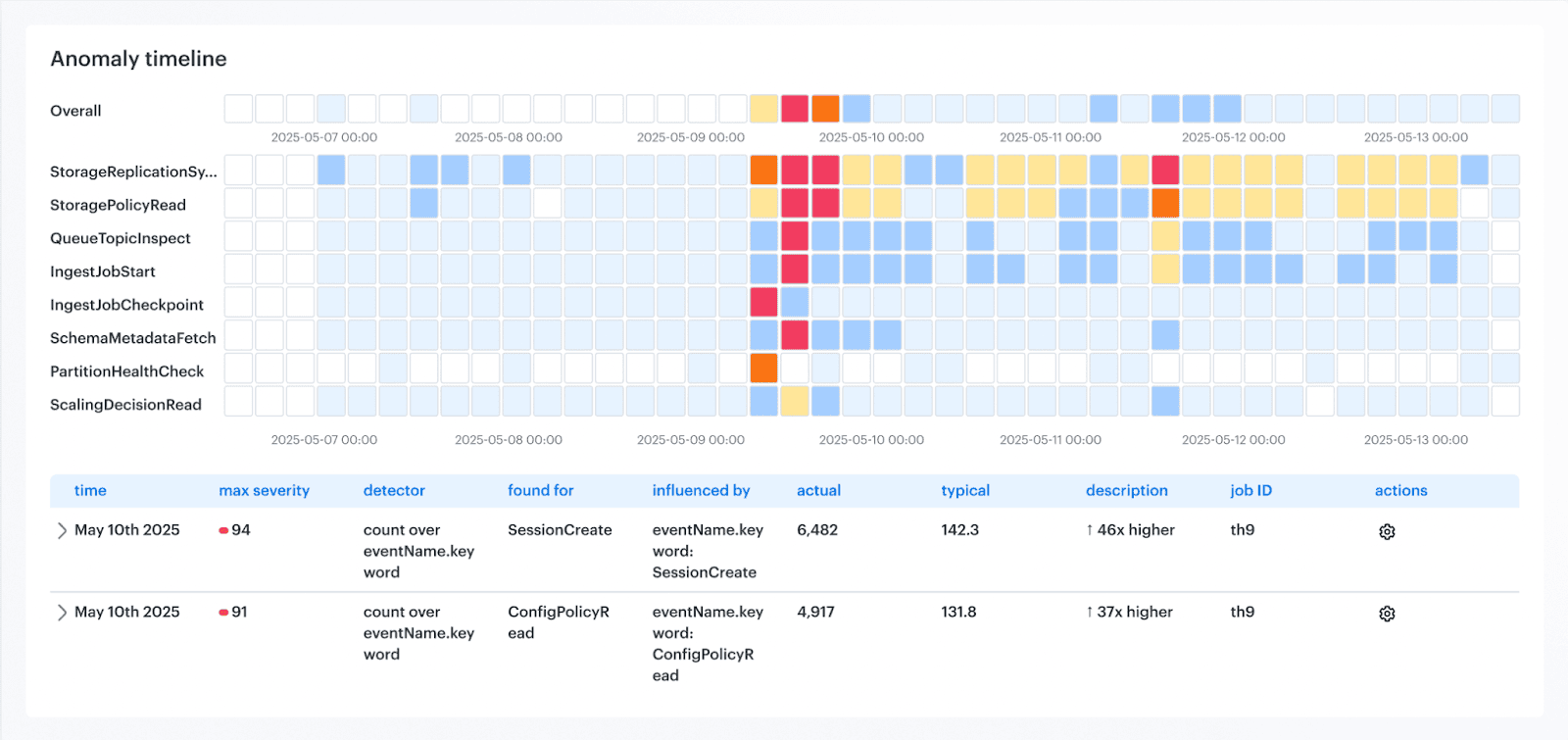
This lets teams do something much smarter than “sort by severity.” They can apply a block, warn, or log model. Block only compounding-risk changes, warn with SLAs for the rest, and log noisy rules until they’re tuned. That is a much stronger prioritization method than a giant undifferentiated alert queue.
That is one of the best practices cloud security teams feel immediately in day-to-day ops.
Once the queue reflects real risk, the next problem shows up fast. How do you make sure the right alert triggers action, not another dashboard glance?
Tie monitoring to response workflows, not dashboards alone
“The velocity of AI adoption is fundamentally changing how cloud environments are managed and expanding the attack surface at a speed that outpaces traditional security models.” Vincent Hwang’s 2026 cloud security report is really a warning about operations. Fortinet found that almost 70% of organizations cite tool sprawl and visibility gaps as the main obstacle to effective cloud security, while 66% do not feel strongly confident in their ability to detect and respond in real time.
A real cloud security best practice starts where dashboards stop: with an action path.
Dashboards are useful for seeing. They are terrible at deciding, routing, escalating, and proving closure. That is why monitoring without action turns into observability theater.
One of the most practical cloud security tips is to define the response before the alert fires. Who owns it, where it lands, what blocks promotion, what opens a ticket, what triggers escalation, and what can be auto-remediated should already be decided.
We explicitly recommend automated workflows such as
- revoking access,
- isolating compromised accounts,
- or triggering investigation when suspicious activity is detected.
Cloudaware closes that gap by pushing context and response into the same flow. It ties findings to affected assets, owners, environments, approvals, and drift history, then routes action through Slack, Jira, ServiceNow, or PagerDuty where teams already work.
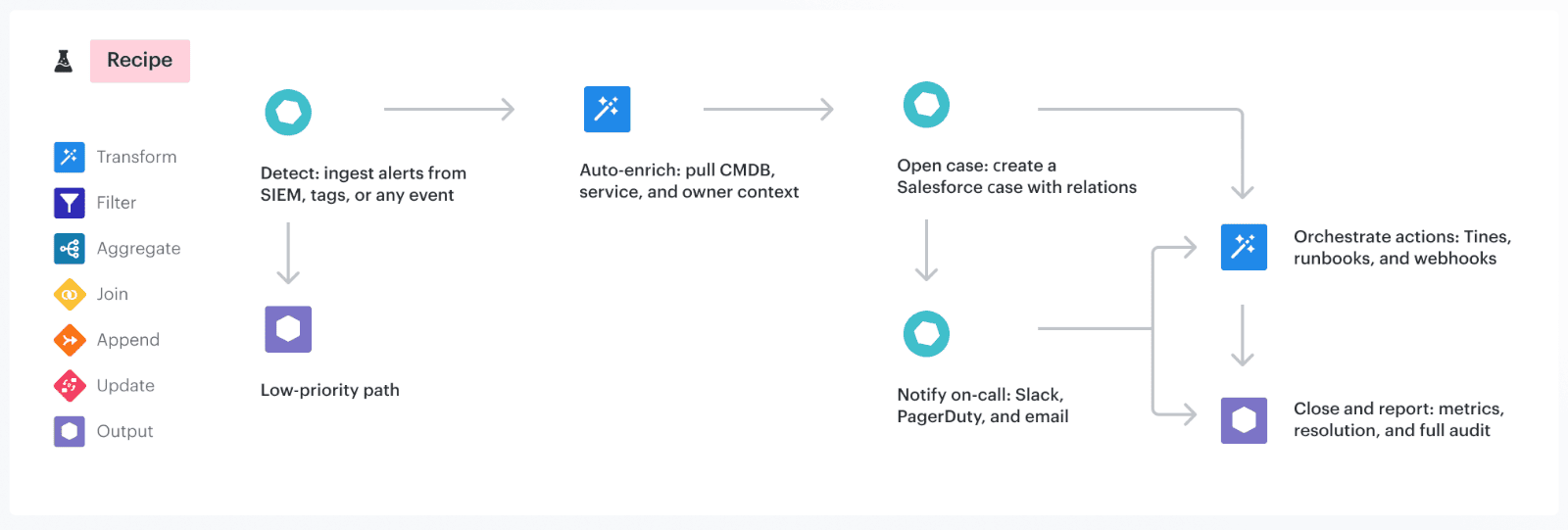
Igor, Cloudaware DevOps Engineer
Read also: DevSecOps Velocity- Ship Faster Without Growing Security Debt
3 Cloud security key management best practices
Rotate keys, review access, and retire unused secrets
“Perhaps the most alarming finding in our four-year lookback is that 64% of valid secrets leaked in 2022 are still valid and exploitable today.” GitGuardian called that lifecycle negligence, and that phrase fits. A secret that should have died months ago can still open a path into production years later.
That is why lifecycle management matters more than checkbox rotation. Google Cloud’s Secret Manager guidance says rotation reduces the risk of unauthorized use after compromise and helps ensure people who no longer need access cannot keep using old values.
AWS goes one step further operationally: its secretsmanager-secret-unused rule flags secrets that have not been accessed within a defined period, with 90 days as the default threshold. In other words, mature teams do three things on purpose. They rotate what stays active, review who can still use it, and kill what no longer serves a live workload.
In cloud security key management best practices, this is where Cloudaware helps. It does not replace your vault or KMS. It adds context around the resources and workflows secrets touch: owner, environment, related app, change history, approvals, and exposure signals.
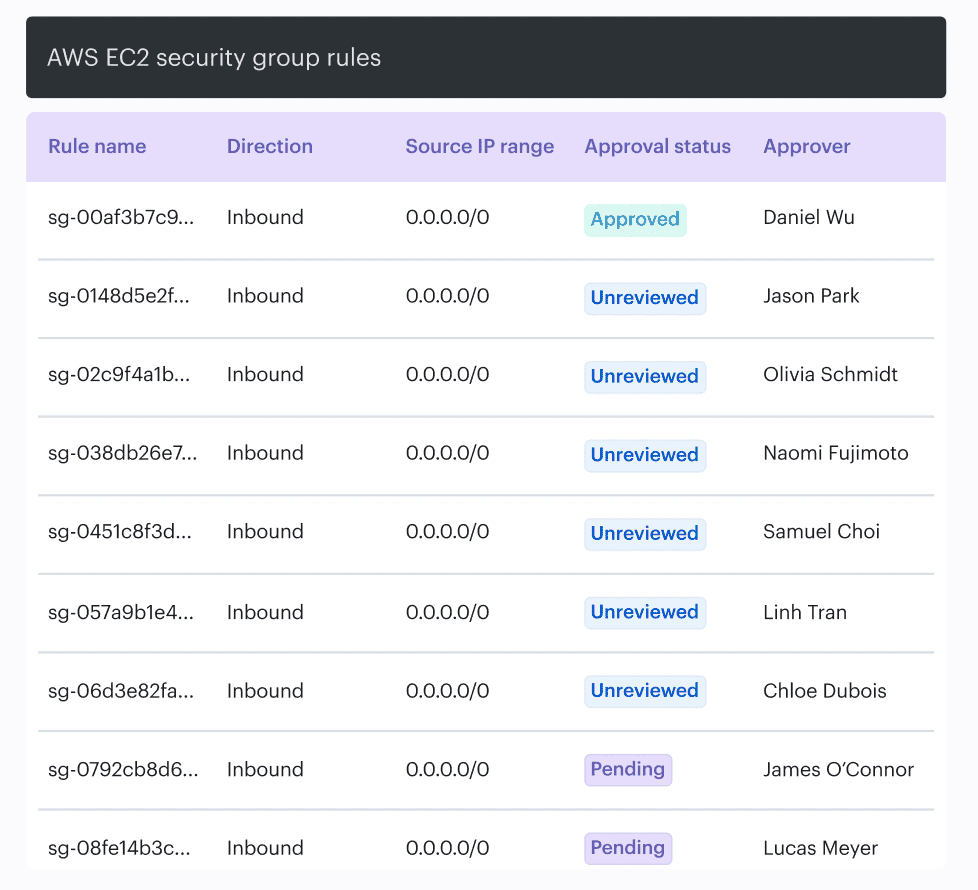
That makes stale access easier to spot and risky exceptions harder to hide.
Alla L. from Cloudaware puts the operating model clearly: zero trust depends on “least privilege access” and on “making security a part of every action, whether it is human or it is machine,” while dynamic secrets and short-lived credentials reduce the need to hardcode long-term secrets into systems or pipelines.
Once lifecycle is under control, the next question gets sharper: where should those secrets live, and how do you protect them in pipelines and at runtime?
Use KMS or HSM for keys. Use a secrets manager for secrets. Then close the gaps in CI/CD and runtime
Do not treat all secrets the same. Encryption keys belong in KMS or HSM because those systems are built for key custody, key rotation, and controlled cryptographic operations. Application secrets such as API tokens, database passwords, and service credentials belong in a secrets manager, where they can be versioned, rotated, and retrieved just in time.
The real failure point is rarely encryption itself. It is secret sprawl across pipelines and runtime. Teams still leak credentials into build logs, CI variables, container images, startup scripts, and app config. That is what turns an ordinary secret into an incident.
The practical control is simple. Keep keys inside the crypto boundary. Pull secrets at runtime. Use short-lived credentials wherever possible. Never hardcode secrets in source, never bake them into images, and never leave long-lived credentials sitting in pipeline configuration just because it is convenient.
This also needs risk-based handling. A production signing key, a CI credential with write access, and a low-privilege dev token should not trigger the same response. You need visibility into where each secret is used, which environment it touches, who owns it, and what changed before exposure happened. That is the difference between reacting to a leak and containing business impact.
A strong operating model looks like this:
- KMS or HSM for cryptographic keys
- secrets manager for app credentials
- short-lived secret injection in CI/CD
- runtime retrieval instead of static environment storage
- ownership, rotation, and usage tracking tied to environment and workload
Once that foundation is in place, the next question is the one that matters: which keys and secrets are actually being used in production, and where is your coverage still incomplete?
Audit key usage and encryption coverage continuously
“To monitor or audit the usage of your KMS keys beyond the 90 days, we recommend creating a CloudTrail trail.” AWS says that because key governance breaks when teams rely on memory, screenshots, or a default event window instead of durable evidence. Google Cloud takes the same idea further with encryption metrics built from Cloud Asset Inventory, showing CMEK coverage and key alignment across resources and keys.
This is the real control: do not just ask whether encryption is enabled. Ask which key protects which asset, whether that key matches policy, who used it, when it was used, and whether the usage was expected.
In cloud security key management best practices, that is the difference between crypto hygiene and governance.
Here’s a practical example. Say your production payments database is supposed to use a dedicated customer-managed key owned by the security team. During a migration, a new snapshot lands under a default encryption path, and an old admin role still has decrypt permissions it should have lost two sprints ago.
Nothing crashes. No customer sees it. Yet your governance model is already broken.
The problem is not “encryption off.” The problem is misaligned coverage, stale access, and no fast way to prove who owns the exception.
3 Cloud security compliance best practices
Map cloud controls to real frameworks and provider guidance
“Evelyn co-chairs the Cloud Security Alliance Cloud Controls Matrix (CCM) which harmonizes regulations and industry standards to a common framework and according to cloud model to enable reduce audit complexity.” That line from CSA is the right place to start, because most compliance programs do not fail on intent. They fail at translation. Teams write one policy, inherit five frameworks, run three clouds, and then discover none of those layers line up cleanly in day-to-day engineering.
A strong set of cloud security compliance best practices begins with one control library that normalizes the mess.
- CSA CCM is the umbrella. It gives you a common control language across cloud models and standards.
- CIS Benchmarks are not that umbrella. They are the hardening layer for specific technologies, which is exactly why they matter.
CISA adds secure configuration baselines and cloud reference architecture, especially useful when you need federal-grade patterns for SaaS and cloud services. Then AWS, Azure, and GCP tell you how to implement the control natively: AWS with Security Hub standards and Audit Manager frameworks, Azure with the Azure Security Benchmark, and Google Cloud with enterprise foundations and its recommended security checklist.
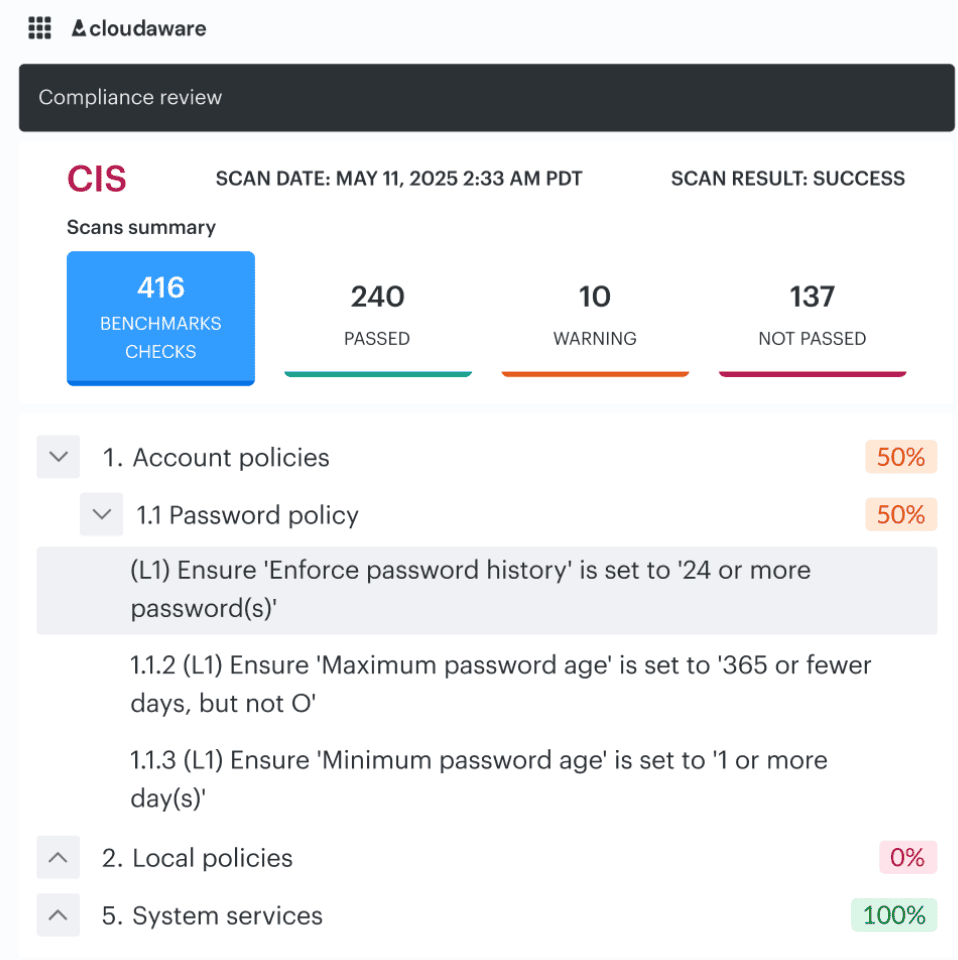
CIs benchmark audit dashboard in Cloudaware. Schedule a demo to see it live.
Say your policy says production storage must not be publicly accessible, must be encrypted with customer-managed keys, and must have logging enabled. CSA CCM helps you classify that as a governance and data-protection control.
The CIs benchmarks cloud security best practices layer gives you provider-specific hardening checks. CISA gives you a secure baseline mindset for cloud service configuration. AWS, Azure, and GCP then give you the native services, benchmark mappings, and policy tooling to enforce it.
That is how one intent becomes one mapped control with three provider implementations instead of three slightly different interpretations and six audit arguments.
And once your controls are mapped to real frameworks and real cloud implementations, the next pressure point becomes obvious. How do you stop evidence collection from turning into a quarterly archaeology project?
Read also: A Mature GCP DevSecOps Setup for Enterprise Teams
Make evidence collection continuous
“To determine that the controls are obtaining the desired effect, we need to collect, monitor, analyze, evaluate, test, and audit evidence data.” CSA’s guidance is blunt because snapshot compliance keeps failing the same way: the control looked fine on audit day, then drift, exceptions, or a rushed change broke it a week later.
AWS makes the operational point even clearer.
In Audit Manager, evidence collection is an ongoing process that starts when you create the assessment.
This is where frameworks fit without doing each other’s jobs. CSA CCM tells you what control to prove. CIS tells you which hardening state to check.
Neither replaces live evidence from the cloud itself. You still need current signals that show whether the control held across accounts, services, and environments after real changes. That is the heart of continuous compliance.
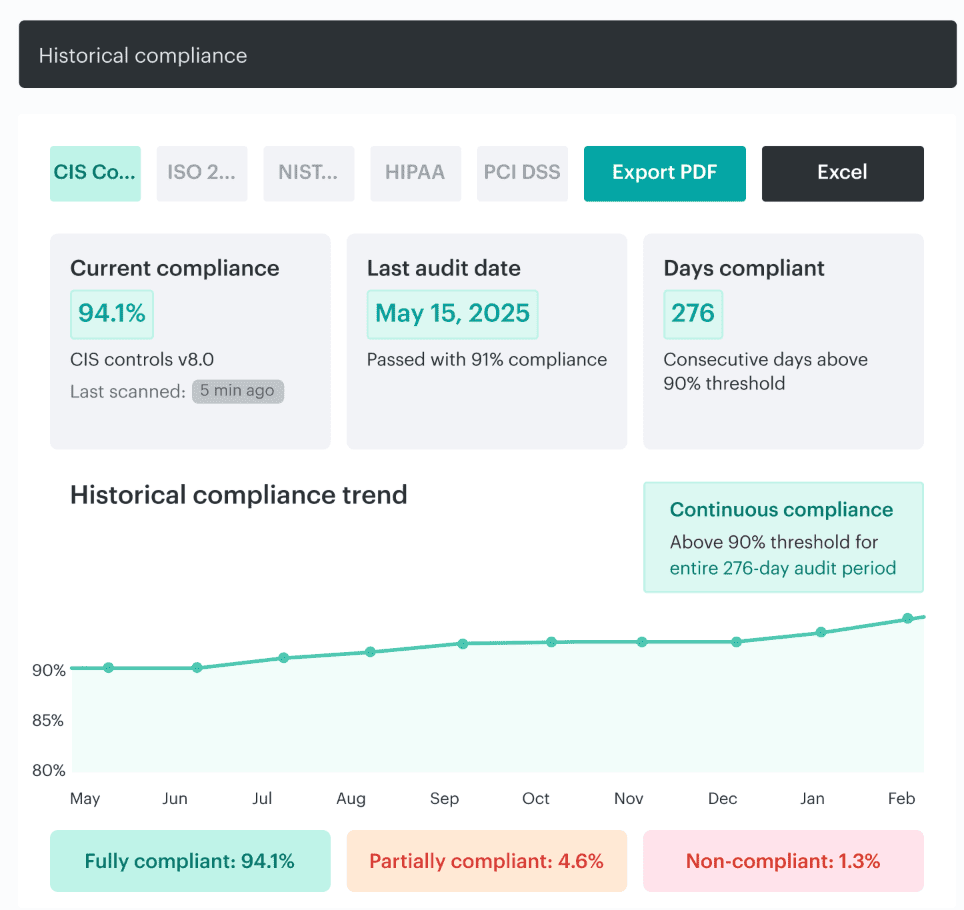
Cloudaware report on compliance trend for an audit. Schedule a demo to see it live.
Track remediation, exceptions, and control ownership
Document all exceptions made during finding remediation and make sure that the respective security stakeholders sign off on them. This phase is where compliance programs quietly fail. The control exists in the policy set, the finding is visible, the audit deck says coverage is in place, and yet nobody can answer who owns the gap, who approved the waiver, or when the exception expires.
Exempted resources still count toward overall IT compliance, exemptions can be temporary waivers or mitigated cases, and expired exemptions are preserved for record-keeping.
Controls on paper are not enough. It needs an owner, a remediation path, and a signed, time-boxed exception model.
This is where CSA and CIS fit, but not as substitutes for the workflow.
- CSA’s CCM gives you the cloud control vocabulary and clarifies which actor in the cloud supply chain should implement which control.
- CIS gives you prioritized actions, hardening baselines, metrics, continuous diagnostics, and automation principles.
Both are essential. Neither one runs your exception queue. Neither one chases overdue remediation. That operational layer still has to be built inside your day-to-day cloud process.
Cloudaware clients using IT compliance module, go further and tie findings, exceptions, change history, and evidence back to the asset, owner, application, and environment that matter in review.
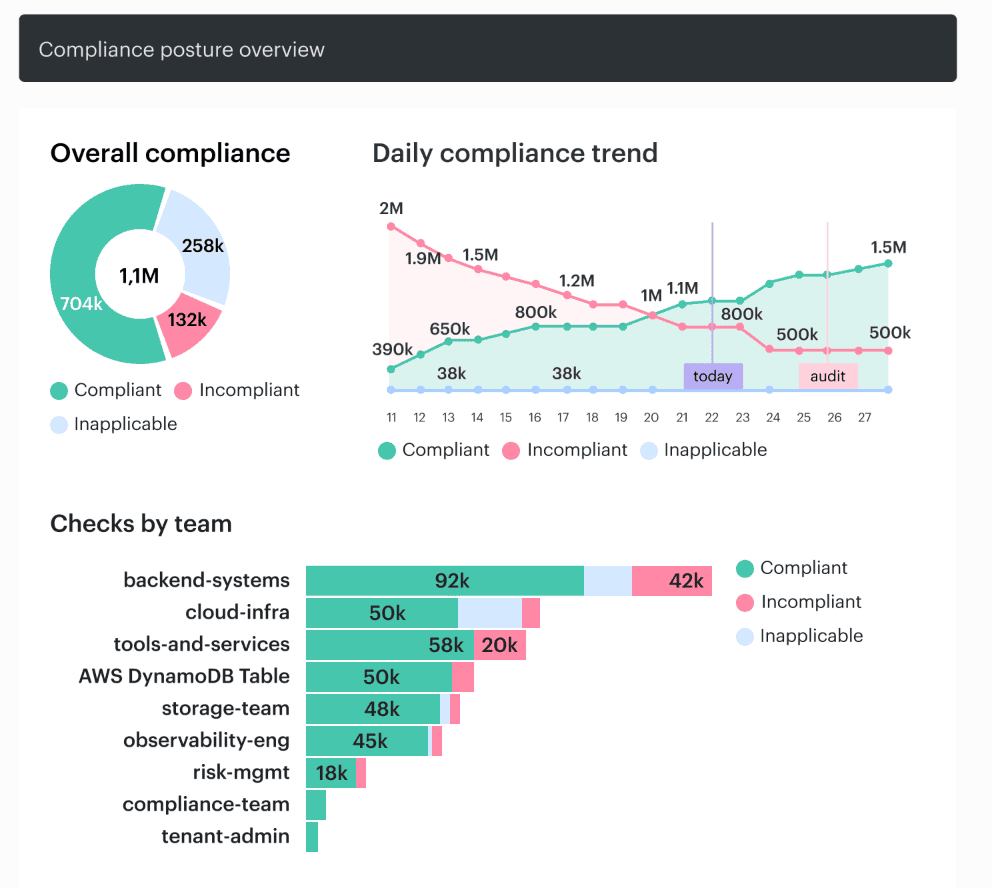
Instead of “storage encryption control failed,” the team sees “production payments bucket, owner: finance platform, open exception expires Friday, related change approved in sprint 12.”
That is how remediation stops dying: “Everyone owns security” turns into nobody owning it, and releases start stalling. Security has to be part of “every action, whether it is human or it is machine.” That is the shift from policy theater to enforceable governance.
Cloud security automation best practices
Start by automating repetitive, high-confidence controls
The findings increasingly point toward integrated frameworks … that consolidate visibility and enable automation grounded in shared context. Do not automate the messy judgment calls first. Automate the controls that are deterministic, repetitive, and boring enough to fail when humans are rushed.
That means baseline checks, required tagging, policy checks, exposure alerts, and ticket creation.
Here is the proof:
- Azure Policy already treats this class of work as machine work: it assesses compliance at scale, supports bulk remediation for existing resources, automatic remediation for new ones, enforces taxonomic tags, and can require diagnostic logs.
- AWS Security Hub does the same on the response side by sending findings to EventBridge in near real time, where they can trigger Lambda, Step Functions, or third-party ticketing and incident tools.
That is the backbone of cloud security automation best practices. You start where the rule is clear and the action is repeatable.
Use automation for policy enforcement and remediation routing
“If there isn't a Fix button in the recommendation, then you can't apply a quick fix.” Microsoft says that plainly in Defender for Cloud, and it captures the real rule for automation: not every issue should be auto-remediated. Some changes are safe and mechanical. Others touch production behavior, shared services, or regulated data and need an owner, context, and a workflow before anyone presses go.
That is the useful version of automating cloud security best practices. A missing tag, a known baseline drift, or a standard logging control can often be fixed automatically. A permissive role on a production app, a public path to sensitive storage, or a failed control with an active exception should be routed, not blindly reverted.
AWS Security Hub’s automation rules follow that logic by matching findings to criteria and then updating, suppressing, or sending them into downstream systems such as Jira Cloud and ServiceNow ITSM instead of treating every finding the same way.
In Cloudaware, that distinction lives in the operating model itself. Findings already carry environment, ownership, and change context, so teams can auto-fix the low-risk repeatables and send higher-impact issues into Slack, Jira, ServiceNow, or PagerDuty with the right app, owner, and approval trail attached.
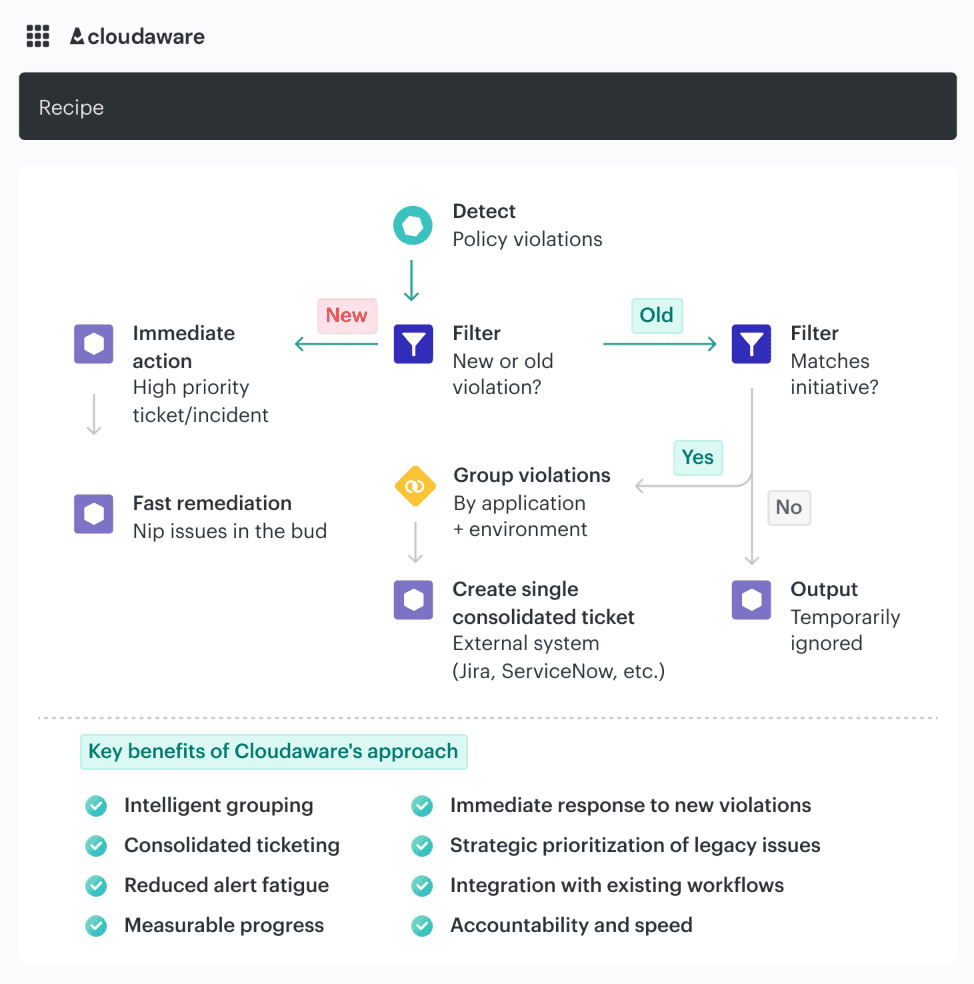
Check it live. Schedule a live call with an IT compliance expert.
Build cloud security integrations that support operations
“Security teams are forced to manually correlate alerts from multiple systems that were not designed to work together.” Nearly 70% of organizations cite tool sprawl and visibility gaps as the main blocker.
The problem is not missing integrations. It is broken execution.
A finding that lands without context forces the receiving team to reconstruct the incident before they can act. Which service is this? Is it production? Who owns it? Was it introduced by a deploy or drift? That delay is where risk lives.
That is why best practices for cloud security integration start with one requirement: every alert must arrive with enough context to support a decision.
Cloud platforms already support routing. AWS Security Hub pushes findings into EventBridge, which can trigger workflows or create tickets. Microsoft Defender for Cloud sends alerts through Logic Apps into Slack, Teams, or DevOps pipelines. Routing is solved.
What is not solved is context.
In practice, useful integrations carry four things together:
- the asset and application affected
- the environment (prod, staging, dev)
- the owner or team responsible
- the change that introduced the state, if there was one
Without that, even a high-severity issue becomes a slow investigation.
This is where the operating model changes. When discovery, relationships, and change history sit in the same system, findings can be enriched before they leave the security layer. Instead of exporting a raw alert, the integration sends a fully described issue into Jira, Slack, or ServiceNow, already tied to the service, owner, and recent change.
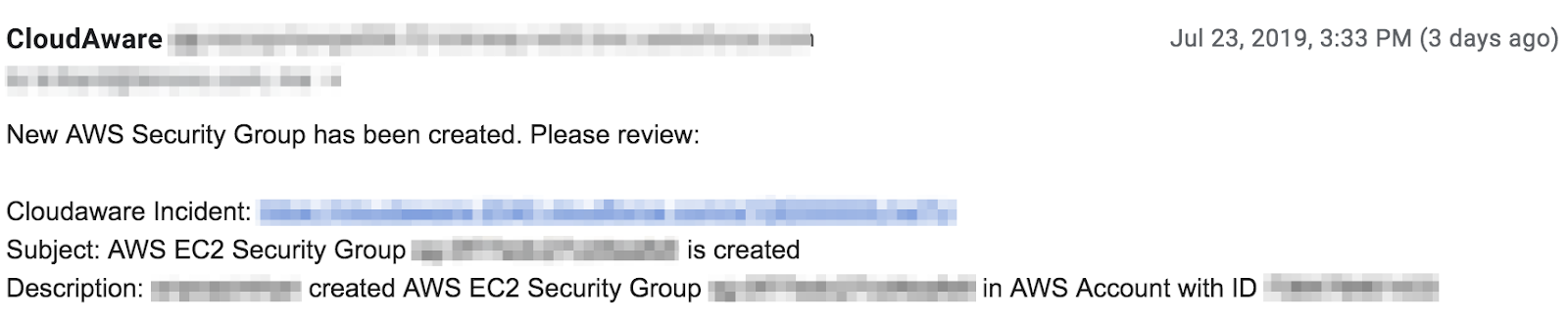
That is how teams stop correlating and start fixing.
Read also: DevSecOps vs SRE - What's Different and How to Run Both
Use agentless or low-friction methods where they improve coverage
Use agentless or low-friction methods first when the goal is broad, sustainable coverage. If you can collect inventory, exposure, misconfiguration, identity, and posture data through read-only cloud access, do that before you add more moving parts. It is the fastest way to see what exists, what changed, what is exposed, and where policy is drifting without adding operational drag to every workload.
What matters is knowing the limit. Low-friction coverage is strong for discovery, posture, and exposure. It is not enough on its own for deep runtime behavior.
In Cloudaware, that model works well because discovery can start from cloud-native data sources and read-only access, then become tied to owner, environment, related assets, and policy state.
That means findings do not stay flat. They arrive with enough context to support review, routing, and remediation.
Best practices for DevSecOps in cloud security
Shift cloud security left with IaC and CI/CD controls
Igor K., DevOps Engineer at Cloudaware, explains it simply: “If your first real security check happens after deployment, you’re already late.”
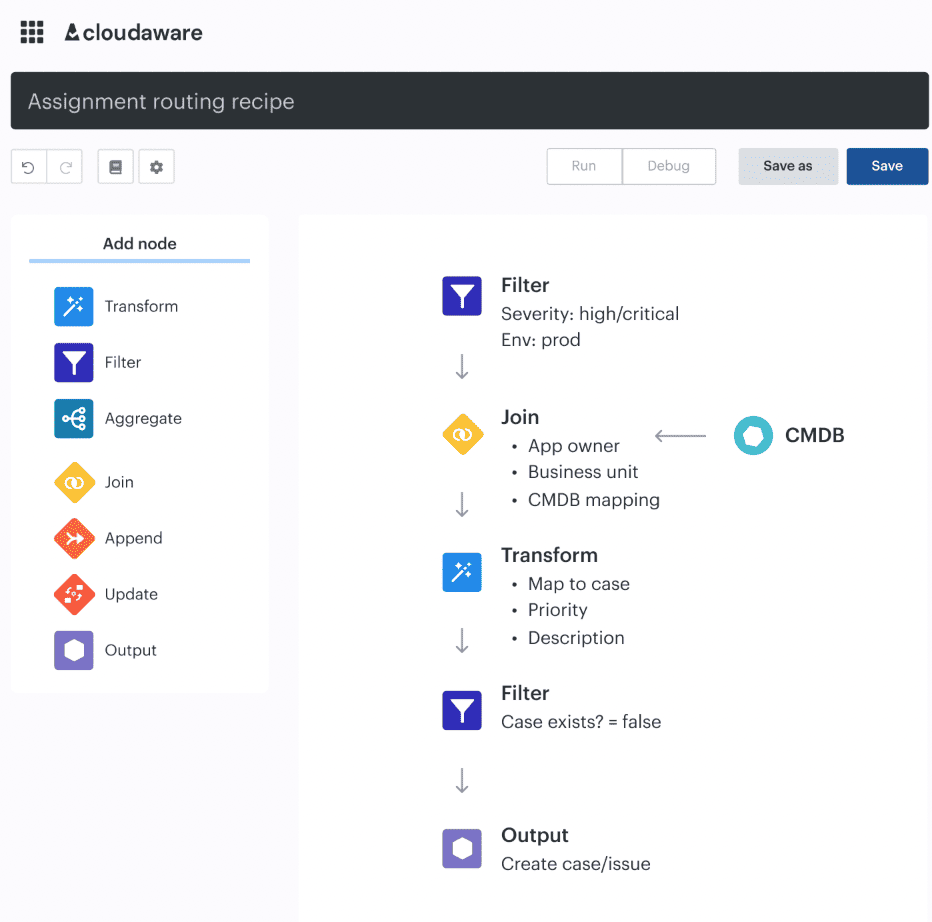
Shift-left only works when policy is enforced at the same place where infrastructure is defined and shipped. That means Terraform plans, CI/CD gates, and pre-deploy checks. A misconfiguration should fail at merge time, not after it creates a public bucket, a wildcard IAM role, or open admin access in production.
In practice, the problem is not detection. It is context. Pipelines often fail with generic messages, so teams bypass them or treat them as noise. What works is when a failed check already carries the service, environment, owner, and change that introduced it.
In Cloudaware, policy results are tied to CMDB context and pushed into CI/CD, so a failure reads like a real decision point, not just “policy failed.”
Feed runtime findings back into delivery workflows
Igor K., DevOps Engineer at Cloudaware, puts it this way: “_If runtime findings don’t change how you ship, you’re just documenting failure._”
Production is where assumptions break. A container runs with broader permissions than intended. A service account reaches data it shouldn’t. A deployment passes checks but introduces drift hours later. If those signals stay in dashboards, the team fixes the incident and ships the same weakness again.
The loop is what matters. Runtime findings should move back into backlog, tests, policies, and CI/CD gates so the same issue cannot pass the next build.
In Cloudaware, runtime signals are tied to the application, environment, owner, and change history that produced them. That means a finding is not just an alert. It becomes an input to the release process.
Treat cloud policy as part of release quality
A job that references an environment must follow any protection rules for the environment before running or accessing the environment’s secrets. Release quality is not just tests passing and deployment succeeding. It also means the change cleared the right security gates, reached the right approvers, and left an evidence trail strong enough to explain why it was allowed into that environment.
81.22% of professionals say application security testing slows development and delivery. The problem is not security itself. It is security bolted on as friction instead of encoded as release criteria.
That is why the useful version of best practices for devsecops in cloud security treats policy outcomes the same way teams treat failing tests, broken builds, or rollout health.
Some conditions should block promotion.
Some should warn with an SLA.
Some should require approval because the change is touching prod secrets, public exposure, or a regulated workload.
GitHub’s deployment environments already support required approvals, protection rules, and custom third-party controls. In other words, the pattern exists. The mistake is acting as if cloud policy belongs outside release engineering when the cloud itself is part of what you are releasing.
Cloud security best practices for small businesses
For a small team, the goal is not coverage of every possible control. It is reducing the few failures that cause the most damage and making those controls sustainable.
Google Cloud’s H2 2025 report says weak or absent credentials drove 47.1% of observed cloud incidents, while misconfigurations added 29.4% more. Verizon’s 2025 SMB snapshot points in the same direction: most breaches still come from intrusion, social engineering, and basic web attacks.
That is the pattern small teams should design around.
Lock down identity and exposure before you invest in advanced tooling
For small businesses, the highest-return work is still identity and external exposure. Enforce MFA everywhere that matters. Cut permissions to the least privileged. Review service accounts and inherited roles. Check what is online every week, not just after a release.
That means buckets, databases, admin ports, public IPs, weak tenant settings, and exposed secrets paths.
This advice sounds basic until you look at how incidents actually happen. Small teams often assume the cloud provider, the SaaS vendor, or the MSP is covering more than they really are. That gap usually shows up first in identity and exposure, not in some exotic zero-day.
One stale admin role or one public path to a storage asset will do more damage than ten missing “nice-to-have” controls.
Cloudaware helps here by keeping discovery, ownership, and exposure context in one place. Instead of jumping across consoles to answer “what is public, who owns it, and was this changed recently?”, the team can review that in one operating view and route the issue fast.
Build recovery and investigation you can actually run with a small team
A lot of small businesses think they need more prevention depth when what they really need is more survivability. Backups should be tested, not assumed. Logging should be good enough to answer what changed, who touched it, and what was affected.
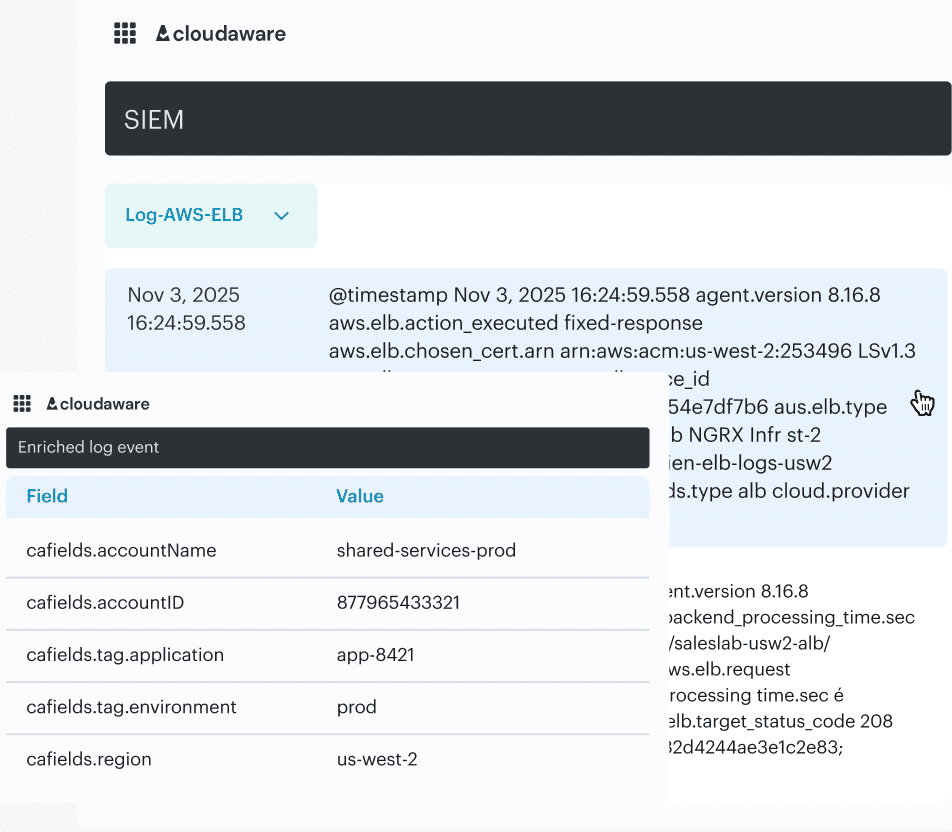
Log event data in Cloudaware. Schedule a demo to see it live.
If in-house depth is thin, third-party support should already be lined up before the incident, not searched for during one.
That is the difference between security that looks responsible and security that holds up under pressure. A small team does not need a giant detection stack first. It needs enough evidence to investigate, enough backup maturity to recover, and enough ownership clarity to move.
Cloudaware supports that model by attaching findings to the service, environment, owner, and change history behind them, so a response starts with context instead of confusion.
Because security only works when it becomes part of “every action, whether it is human or it is machine.
That is exactly the right standard for cloud security best practices small businesses can maintain without drowning in tooling.
Read also: DevSecOps Maturity Model - Scorecard You Can Measure and Improve
Cloud security best practices for growing businesses
Growth changes the security problem before most teams notice it. Google Cloud’s H1 2026 Threat Horizons report says the gap between disclosure and exploitation shrank from weeks to days in late 2025, and identity compromise underpinned 83% of compromises.
That is the moment when a growing business stops being able to rely on memory, tribal knowledge, and one overloaded security owner. The basics still matter. What changes is the need for structure.
Replace periodic reviews with continuous posture management
As the cloud footprint grows, “check it once a month” stops being a security model. It becomes a blind spot.
A growing business usually reaches this point when one team’s clean environment turns into multiple accounts, multiple pipelines, and multiple owners. Broad permissions creep in quietly. A test rule gets copied into production. An internet-facing service stays exposed longer than anyone intended. This is where posture management earns its keep. It gives teams a live view of drift, exposure, and policy state instead of a snapshot from the last review cycle.
That is the practical version of cloud security tips for businesses at this stage: stop relying on periodic cleanup. Start watching the environment continuously enough to catch risky change while it still looks small.
Read also: DevSecOps Culture - Operating System Keeping Security Fast
Automate the controls that should never depend on memory
The worst scaling pattern is simple: the team knows what “good” looks like, but nothing enforces it consistently.
That is where basic automation starts paying for itself. Required tags. Baseline policy checks. Exposure alerts. Logging requirements. Simple approval triggers. These are not advanced controls. They are repeatable controls, and repeatable controls should not depend on whether somebody remembered the standard during a busy deploy.
Google Cloud’s report explicitly recommends turning to more automatic defenses as the threat window narrows. That advice matters most for growing businesses because they are usually past the point where human review can keep pace, but not yet mature enough to absorb constant exceptions without operational drag.
In Cloudaware, this process usually means connecting posture and policy checks to ownership, environment, and workflow data so the control does not just fail silently.
It can warn, route, or escalate when it has enough context to act.
And once those workflows are solid, the next question changes again. How do you keep control when the estate becomes truly enterprise-sized, with stricter segregation of duties, standardized policy intent across clouds, and much heavier audit pressure? 👇
Enterprise cloud security best practices
Standardize policy intent across AWS, Azure, and GCP
One policy cannot mean three different things in three clouds. That is the first enterprise failure mode.
A production encryption rule, for example, should start as one control intent: customer data in production must be encrypted, tied to the right key class, reviewed by the right owner, and provable during an audit.
Thereafter, implementation can differ by provider. AWS, Azure, and GCP all have different services, defaults, and enforcement paths.
That part is normal.
What is dangerous is when the policy itself becomes fragmented and every platform team interprets it differently.
This is where enterprise cloud security best practices need more discipline than smaller environments. The cloud-specific implementation can vary. The control meaning cannot.
In practice, Cloudaware helps by keeping policy outcomes, assets, environments, and ownership in one CMDB-backed model, so teams are not comparing three disconnected interpretations of the same control.
A failed encryption rule arrives attached to the workload, the environment, the owner, and the related change, not as a generic compliance exception.
Enforce segregation of duties in the live workflow, not just in policy documents
At enterprise scale, unclear authority becomes a security issue fast.
The team that defines the control should not be the same team that can quietly waive it in production. The engineer deploying a change should not be the only person who approves the exception. The owner of the service should be visible before the alert fires, not reconstructed afterward.
This matters because large estates generate too much change for informal trust models to hold.
That is the real point of segregation of duties. It is not bureaucratic ceremony. It is a way to stop high-risk decisions from disappearing inside speed, scale, and tool sprawl.
This is also where many cloud security best practices for enterprises stay too shallow. They say “assign owners” but never explain how ownership should work in production. The useful version is concrete: every critical asset, policy breach, exception, and release decision should already carry an owner, an approval path, and an environment context.
In Cloudaware, those links can live with the asset and the finding itself, so the response does not begin with “who owns this?” It begins with the responsible team, the service, the environment, and the related change already attached.
That is how approvals stop floating across chats and spreadsheets.
Automate evidence and drift control from the same system that tracks the asset
Screenshots do not scale. Neither do quarterly evidence hunts.
In enterprise environments, drift is constant. A role changes during a release. A security group opens too far. A storage policy is inherited incorrectly. A deployment passes, but the runtime state diverges from the approved baseline a few hours later.
If evidence collection and drift detection live outside the same operating flow, the audit trail breaks exactly where teams need it most.
That is why the strongest enterprise cloud security best practices treat evidence as a continuous output of operations, not as a separate compliance project. The same system that knows the asset should know the policy result, the owner, the change history, the exception, and whether the resource drifted from the approved state.
Read also: Implementing Zero Trust in DevSecOps Workflow
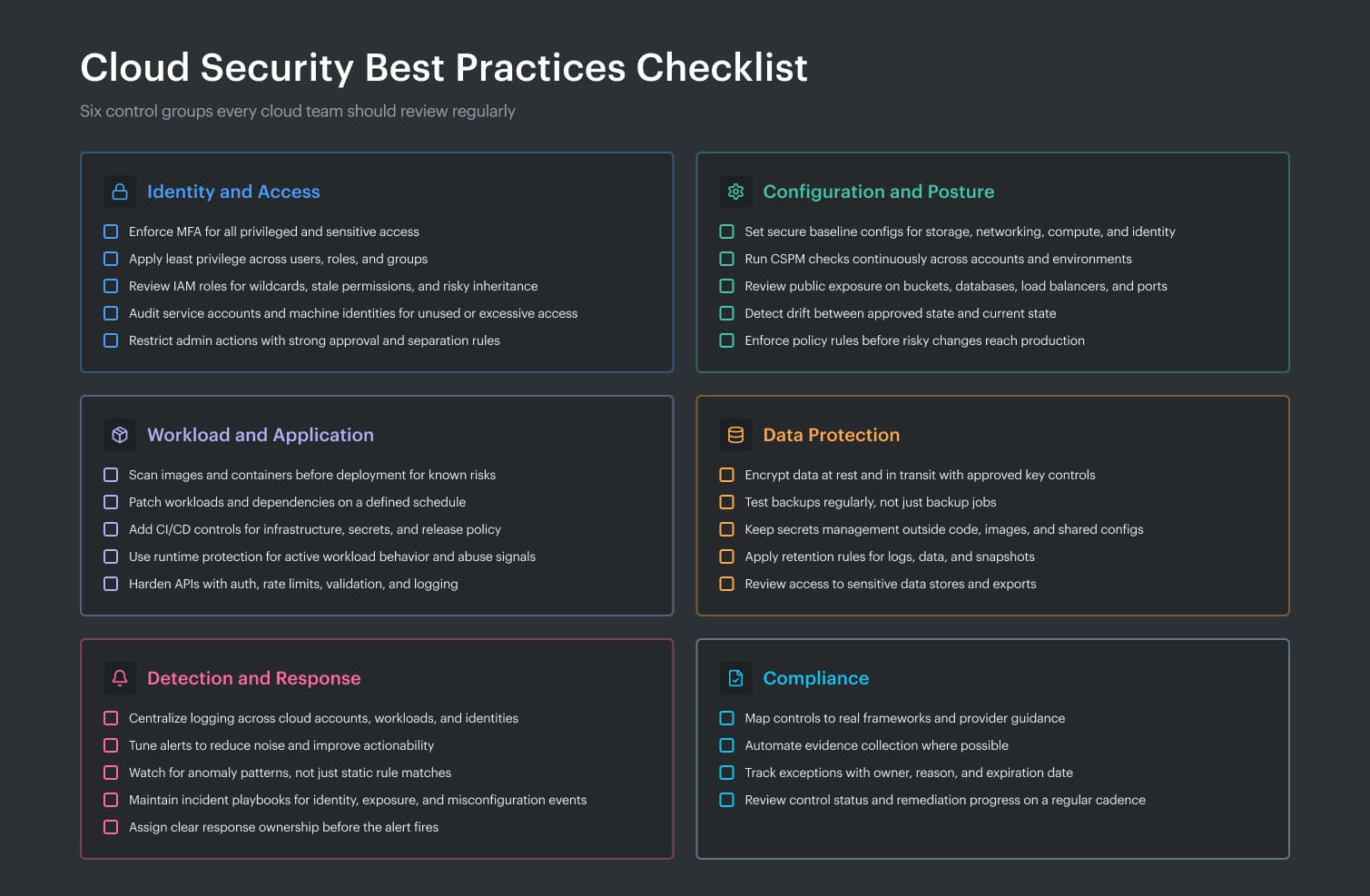
Cloud security best practices checklist
Use this cloud security best practices checklist as a fast way to see whether your program covers the controls that actually reduce risk, not just the ones that look good in an audit deck.
Good cloud security tips are not random hardening tasks. They should help you prevent the most common failures, catch drift early, and make response easier when something breaks.
Automate your cloud security with Cloudaware solutions
Cloudaware is used by cloud security leaders, DevSecOps managers, cloud architects, platform teams, and compliance owners who need one operating layer across AWS, Azure, and GCP instead of scattered findings, tickets, and evidence.
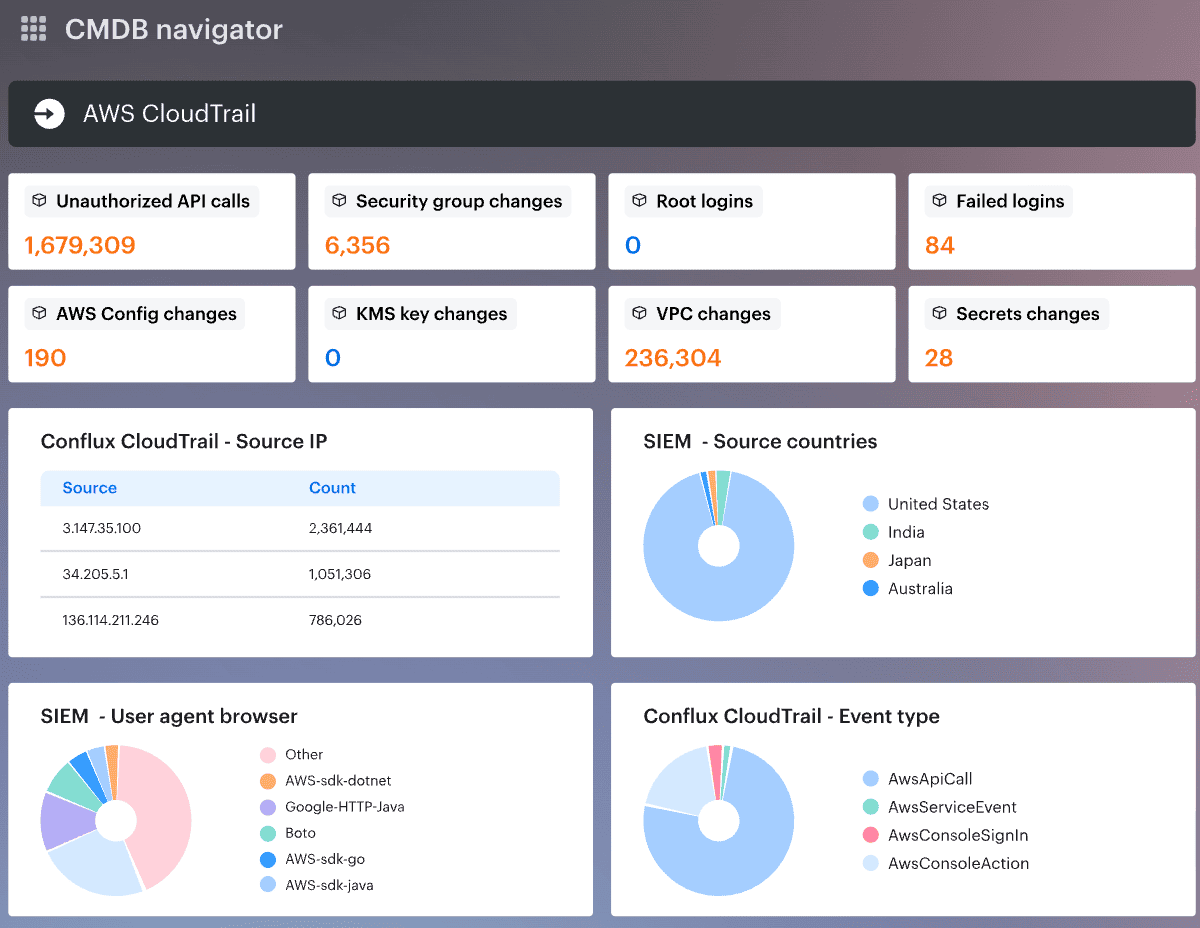
It combines CMDB-driven visibility, posture management, compliance-as-code, and workflow automation, with integrations that push work into tools teams already use.
- Unified visibility across cloud assets, relationships, and change. See assets, dependencies, owners, and recent changes in one place. Cloudaware pulls live data from cloud sources and normalizes it into a CMDB, so visibility includes context, not just inventory. Tools and sources include AWS, Azure, GCP, AWS Config, Azure Resource Graph, and GCP Asset Inventory.
- Policy automation and operational workflows. Turn policy checks into action. Cloudaware supports policy enforcement, routing, notifications, approval flows, and remediation ownership. Common workflow tools include Slack, Jira, ServiceNow, PagerDuty, email, and webhooks.
- Continuous compliance and audit evidence. Track controls, violations, and evidence without rebuilding the story for every audit. Cloudaware supports declarative policies, mapped standards, policy tracking, and compliance reporting tied to CMDB context.
- Support for cloud security operations and DevSecOps workflows. Push findings into the places where engineers already work. Cloudaware supports workflow integration for high-risk changes, approval routing, drift checks, and ticket creation inside existing operational flows.