


You’re shipping faster, yet the security story still sounds like “we ran more scans.” Leadership asks if risk is going down, engineers ask which controls actually block a release, and your answer lives across Jira, pipeline logs, and someone’s spreadsheet.
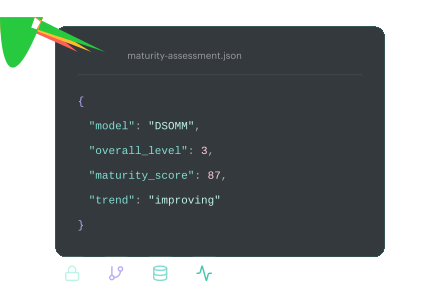
That’s why a DevSecOps maturity model matters. It turns vibes into levels, levels into evidence, and evidence into a score you can trend month over month. Think “how many critical policy breaches stayed open past 7 days” or “what percent of prod changes have an owner, approval trail, and clean baseline?"
Valentin, DevSecOps at Cloudaware, has lived the chaos on both sides. He’s seen what breaks in real enterprise pipelines and what finally sticks for Cloudaware users who need proof, not theater.
- So which ladder do mature teams actually use?
- What can you assess in 60 minutes?
- How do you store results as JSON and stop re-litigating progress every quarter?
- And where does your DevSecOps model fail if exceptions never expire?
Key insights
- A DevSecOps maturity model is only useful when it replaces opinions with evidence you can recheck next month.
- Choose a DevSecOps model based on your goal: DSOMM for CI/CD, PIM for audit-ready evidence, and lifecycle models for leadership alignment with real metrics.
- Your fastest maturity assessment is a 60-minute session with tight scope, proof links, blunt scoring, and three upgrades with owners and due dates.
- Benchmarking works when you score at the service level and slice by environment. “Org-wide averages” hide the risky services that actually need attention.
- Maturity sticks only when the operating model is explicit: ownership is named, decisions are predictable (block/warn/log), and exceptions expire by default.
- Threat modeling DevSecOps stays lightweight when it runs on triggers, outputs a one-page DFD plus five abuse stories, and maps mitigations to pipeline checks with security acceptance criteria.
- Measures that prove progress are boring on purpose: deployment frequency and lead time without a rising change failure rate, MTTR trending down, critical fix time meeting SLA, drift shrinking, and violations open time falling by the owner.
- Store the scorecard as structured data so you can trend it, diff it, and avoid re-litigating maturity every quarter.
- A realistic roadmap that beats big-bang transformation: 30 days to make scope and outcomes predictable, 60 to automate evidence and establish drift baselines, and 90 to tighten exceptions and expand control coverage with intent.
What a DevSecOps maturity model is
A DevSecOps maturity model is a level-based benchmark that describes how security in delivery evolves from ad hoc to repeatable to measurable. Each level has observable behaviors you can verify with evidence, not opinions.
That’s the point. You should be able to say, “We’re Level 2 in release governance because 80% of prod changes have an owner, approval trail, and policy outcome,” and then prove it with logs. SEI frames maturity models as progression patterns teams can assess so they can see what’s next and make improvement repeatable.
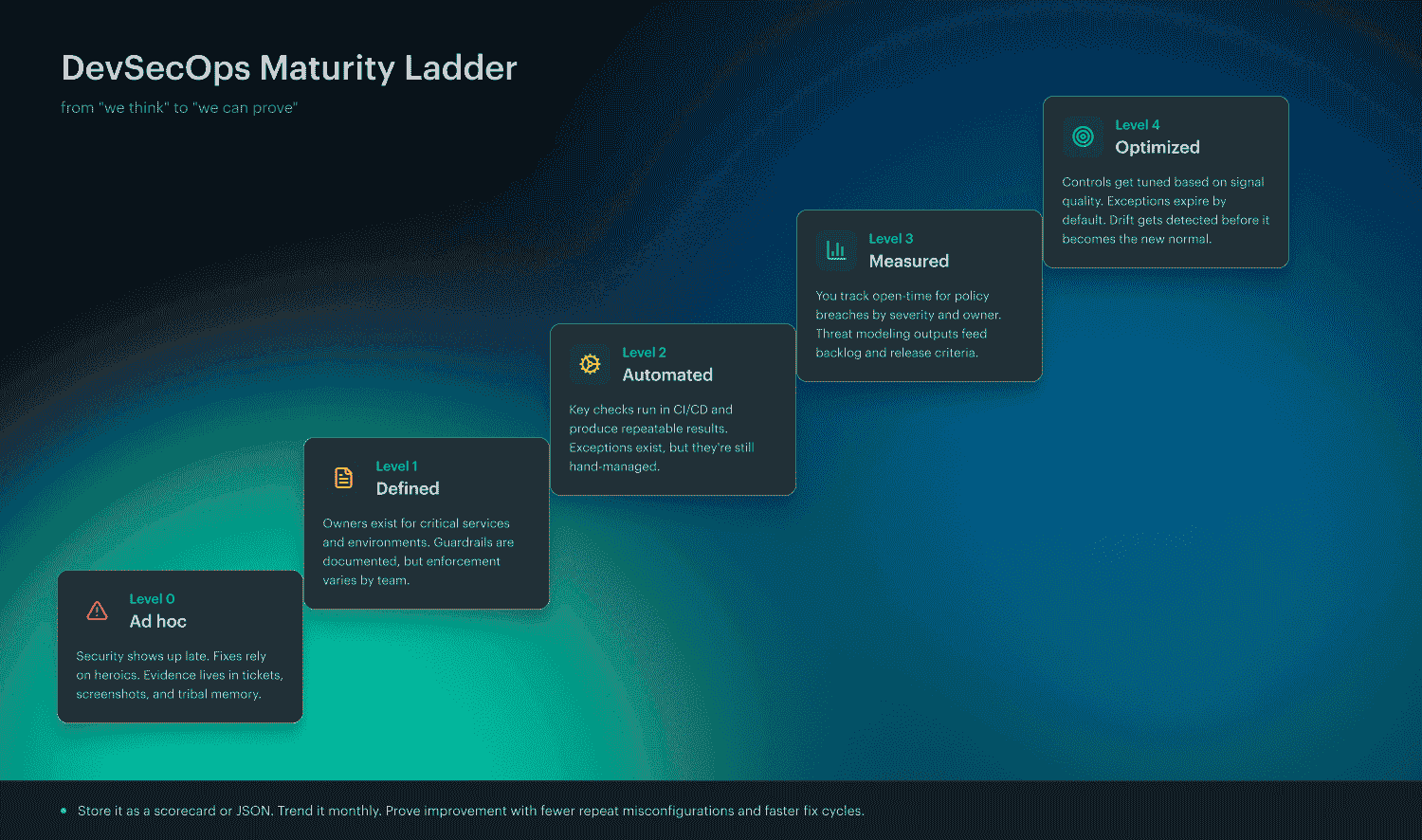
And here’s the trap this ladder prevents: confusing “we did stuff” with “we got better.” That’s why it helps to separate maturity models from capability models and checklists.
Maturity model vs capability model vs checklist
Maturity model tells you where your practices sit on a ladder and what “next” looks like. It’s descriptive. It keeps you from trying to jump from chaos to perfection in one quarter. SEI also makes a practical point that stings a bit: if you automate too early, you simply automate confusion.
Now you’re talking results. A capability model focuses on outcomes you can measure using signals like DORA metrics, then improves the system that produces them.
The DoD DevSecOps Playbook explicitly recommends capability-model thinking and points teams toward performance measures such as deployment frequency, lead time, change failure rate, and time to restore service. DORA’s guidance expands on these delivery outcomes and how to use them without gaming the numbers.
A checklist is an output. “Run SAST.” “Do reviews.” “Add scanning.” Although useful, it fails to indicate whether the risk is decreasing or has simply increased. Without measurement, it's impossible to demonstrate the ROI of automation and make a fair comparison between this quarter and the previous one.
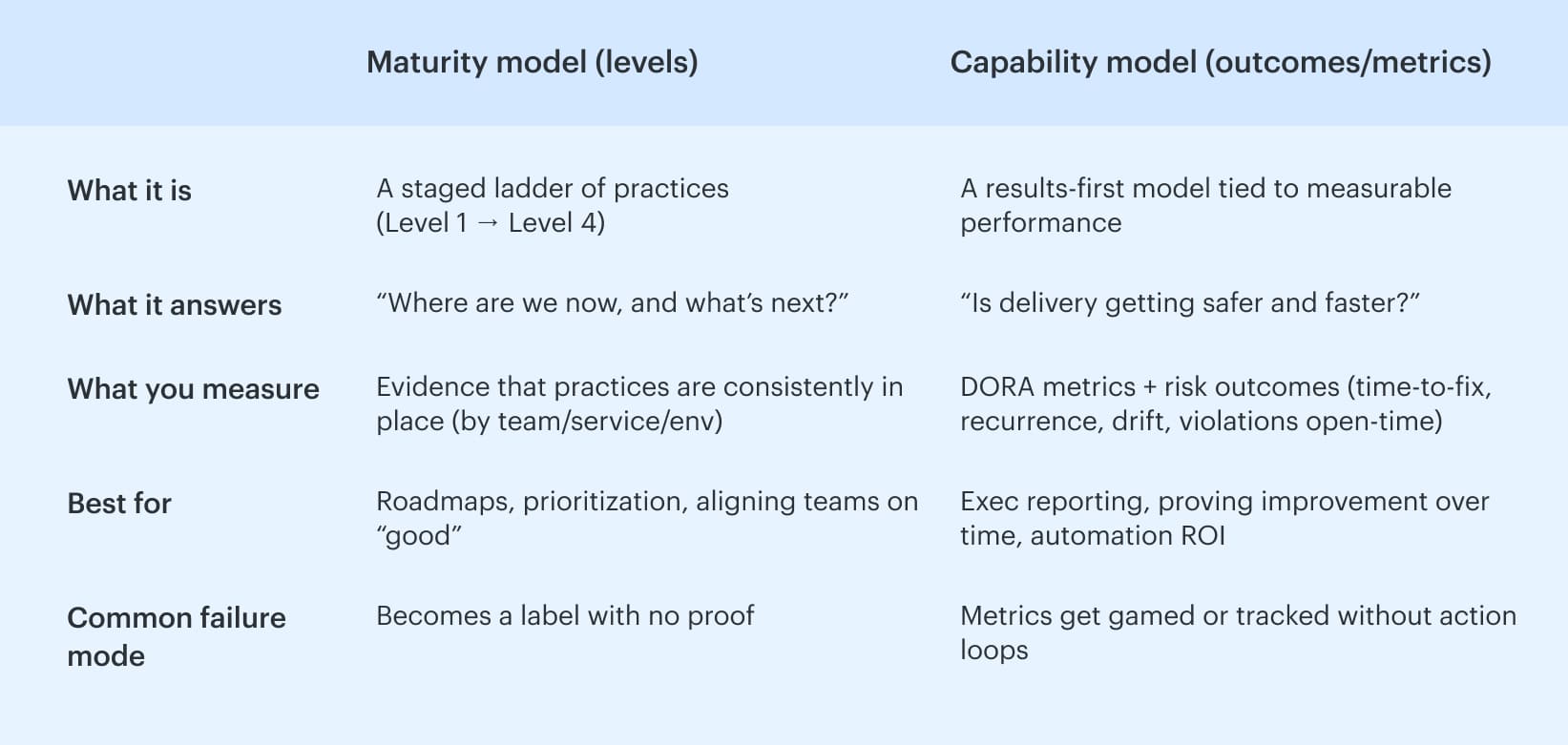
Put together, this is why a DevSecOps model works best when you use levels to choose improvements and capability metrics to prove those improvements actually changed outcomes.
Read also: Six Pillars of DevSecOps. How to Implement them in a Pipeline
Choose the right model for your organization
A maturity program usually fails for one boring reason: you picked a model that doesn’t match how your org actually runs work. Then you spend months scoring the wrong things, arguing about the score, and shipping zero improvements.
Pick the right model, and the opposite happens. The assessment takes a day, the findings turn into a backlog, and you can show progress with benchmarking that survives leadership questions.
Here are the three most practical options, in plain terms:
- DSOMM: a delivery-shaped model. It’s built around CI/CD reality and concrete security activities.
- SEI PIM: a rigorous model. It’s built for evidence-based assessment across lots of requirements, with a tight assessment rubric.
- Lifecycle competency models: a leadership model. It frames maturity in competency areas across phases, usually with a self-assessment.
Now, let’s make the choice feel obvious.
How to understand which model fits your constraints
Start with this question: What do you need the model to do on Monday morning?
- If the answer is “tell teams exactly what to implement in pipelines,” you want DSOMM.
- If you need to "stand up to audits and enterprise-wide assurance," you should choose PIM.
- If the goal is to "get leadership aligned across people, process, and tech," lifecycle competency models will succeed, but only if you tie them to evidence.
That’s the high-level map. Here’s the detailed route.
Pick DSOMM when delivery teams need CI/CD-anchored practices
DSOMM is a valuable model if you seek a clear translation from "add this gate," "make this policy outcome predictable," and "define what evidence we accept." It’s the most common starting point in enterprises that actually live in pipelines because it’s anchored in activities you can implement, review, and score without philosophical debates.
This is where the OWASP DevSecOps maturity model conversation usually lands, because DSOMM gives you a practical backbone: activities mapped to how software gets built and released, not how PowerPoints get approved.
Choose DSOMM if you’re nodding at any of these:
- Your bottleneck is consistency. Team A has guardrails; Team B has vibes.
- You need security improvements that are visible as pipeline behavior, not just policy documents.
- You want a scorecard you can store and trend without hiring a small committee to maintain it.
How DSOMM “wins” in practice
- You can turn activities into backlog items with clear acceptance criteria.
- You can attach evidence directly to the activity score (pipeline run, policy result, approval log).
- You can make threat modeling actionable by tying outputs to checks, not workshops.
It’s opinionated toward delivery. If your world is heavy with compliance mapping across hundreds of requirements, you may outgrow it or layer something more rigorous on top.
And that’s the perfect bridge to PIM.
Read also: 10 Software Asset Management Best Practices from Field Experts
Pick SEI PIM when you need a rigorous, evidence-based assessment across many requirements
Some orgs do not need “a model.” They need a defensible assessment that can survive, “Show me proof.” That’s where PIM shines. It’s built for organizations that want to evaluate maturity against a broad set of requirements, using evidence, with a structured 4-level maturity scale.
Think of it as less “what should we do next?” and more: “can we demonstrate we do this consistently, across teams, with receipts?”
Choose PIM if this sounds like your reality:
- You’re answering to regulators, auditors, or internal assurance teams.
- You have multiple portfolios and multiple delivery models, and maturity varies wildly.
- You need an assessment rubric that reduces subjectivity. No more, "I feel like we're on Level 3.”
What to do with PIM so it doesn’t become a paper exercise
- Define what counts as evidence up front. A screenshot is not evidence if it can’t be rechecked next month.
- Treat scoring like a repeatable process, not a one-time “assessment event.”
- Convert gaps into a prioritized plan. A long requirements list is only useful if it produces a short set of actions.
It’s heavier. The rigor is the point. If teams are already struggling, PIM may seem like just another program, unless you maintain its connection to operational successes.
So if you need something that leadership understands instantly, and you want an easier self-assessment pattern, you’ll like the lifecycle models.
Pick lifecycle competency models when leadership wants people and culture plus phases
Sometimes the problem isn’t tooling or even controls. It’s alignment. Leadership wants a view that includes culture, skills, and how work moves through planning, build, release, and run. Lifecycle competency models do that well because they package maturity into competency areas that execs can reason about.
They’re also great when you need a self-assessment that doesn’t feel like an audit.
Choose lifecycle models if:
- You need to align engineering, security, and platform teams on the same language.
- You’re trying to make maturity visible outside the security org.
- Your main audience is leadership that wants a roadmap they can fund.
How to keep it honest
- Convert “competency” statements into observable signals. Otherwise, it turns into a culture survey.
- Tie each phase to at least one measurable outcome. If “Release” maturity improves, what changes in escape rate or policy breach open time?
- Use it as a framing layer, then map the details to DSOMM activities or PIM-style requirements.
Lifecycle models can drift into “we feel mature” if you don’t force evidence into the conversation.
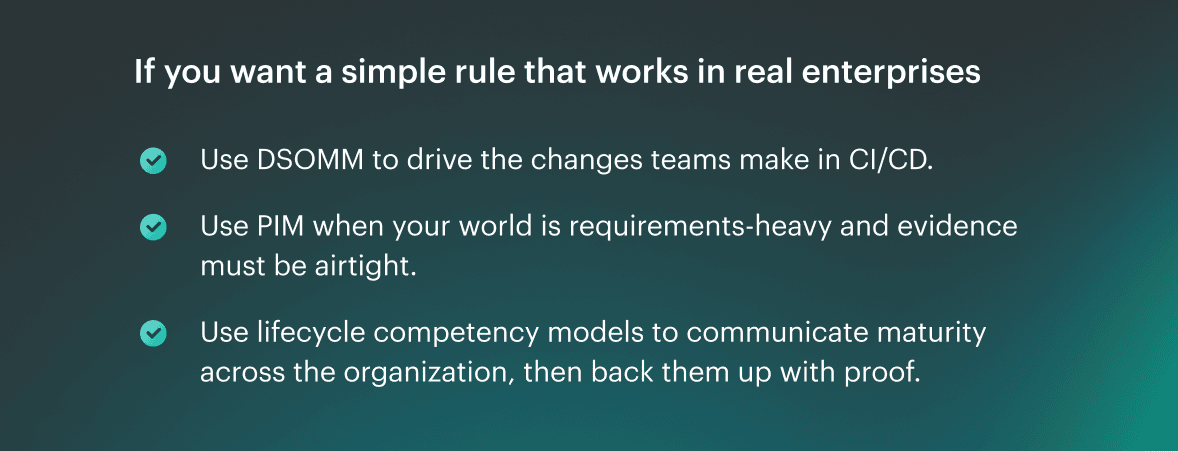
Pick one as your primary lens, not three competing programs. The model should stop arguments, not create new ones.
Read also: 10 DevSecOps Best Practices That Actually Survive Production
The 60-minute DevSecOps maturity assessment
It doesn't take a quarter to determine your current position. You need one focused hour, the right evidence, and zero tolerance for “we usually do this.” The goal is simple: turn DevSecOps maturity model measures into a score you can defend, then into a short upgrade list someone actually owns.
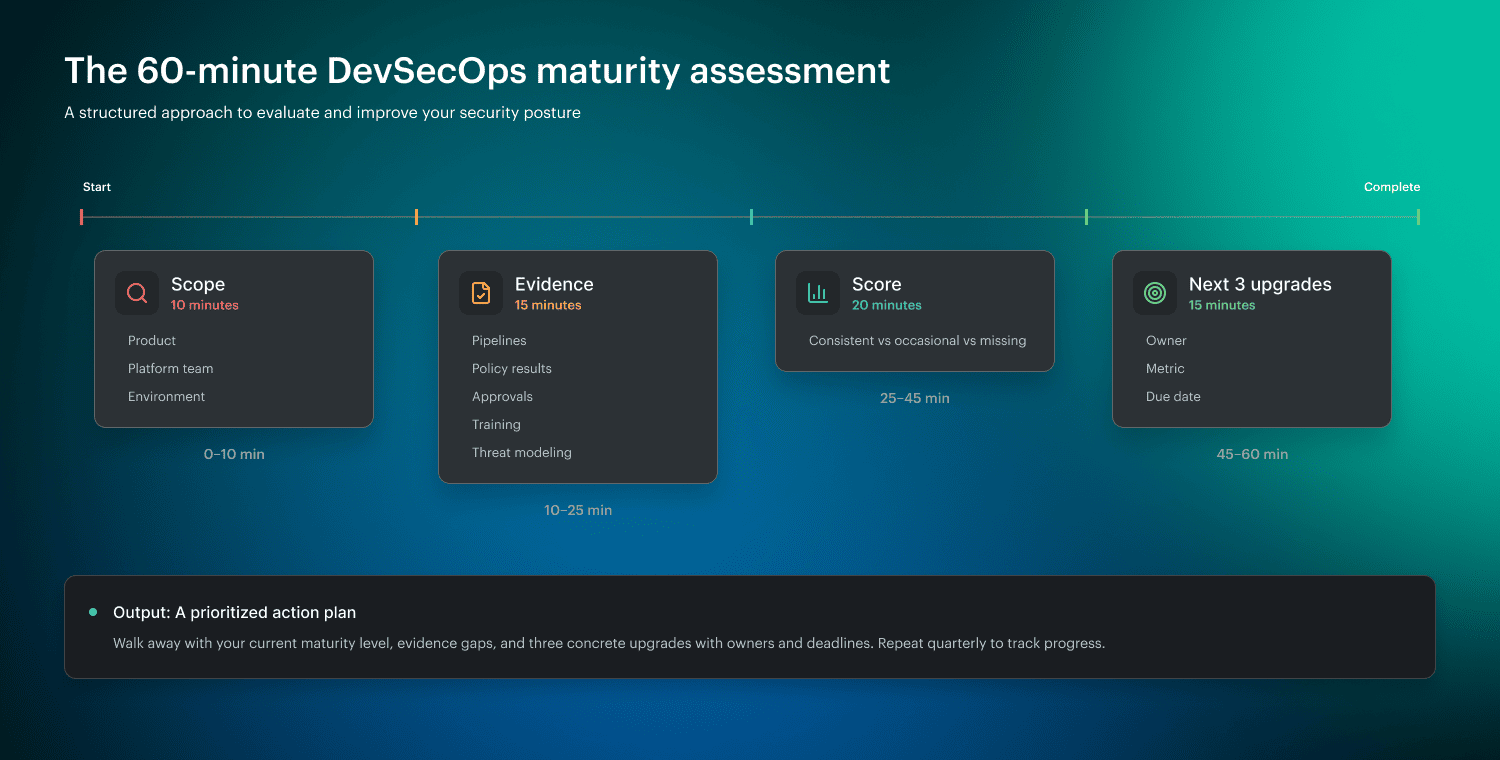
0-10 min: Pick a scope so you don’t score the whole universe
Start small on purpose. Choose one of these:
- One product line (one repo family, one release path)
- One platform team (the shared pipeline, the golden paths)
- One environment (usually prod, because that’s where risk lives)
Here’s the test. If you can’t name the owner and the release pipeline in one sentence, the scope is too big.
Once the scope is tight, you can stop debating and start pulling receipts.
10-25 min: Pull evidence, not opinions
Bring links, not stories. You’re looking for proof across:
- Pipeline runs and gate results.
- Policy outputs and exceptions.
- Change approvals and who signed off.
- Training completion for DevSecOps roles that ship.
- Threat modeling artifacts that influenced backlog or controls.
If you’re using Cloudaware, this step gets faster because you can pull a clean audit trail of approvals, policy results, and compliance trend snapshots by service and environment without hunting across five systems. Treat it like a shared “evidence folder” for the workshop, not a pitch.
Now that you’ve got evidence on the table, scoring becomes almost unfairly easy.
25-45 min: Score what’s consistent vs occasional
Use a blunt rubric. Keep it binary-ish so that no one can challenge it legally:
- Consistent: shows up in the last few releases or the last 30 days, with repeatable proof.
- Occasional: exists, but only for some teams, or only when someone remembers.
- Missing: you can’t produce evidence in two minutes.
Want it even tighter? Define “consistent” as “present in 3 of the last 4 production changes” or “met within the SLA for the last month.” That immediately connects security work to MTTR, drift control, and control coverage instead of vibes.
You’ve scored the reality. Good. Don’t overanalyze it. The win is determined by what you do next.
45-60 min: Pick the next 3 upgrades: measurable, owned, time-bound
Choose three improvements that change behavior in the next 30 days. Each one needs:
- An owner who can ship the change.
- A success metric (not “improve security”).
- A deadline.
- The evidence you’ll use next month to confirm it stuck.
Example upgrades that efficiently utilize your time:
- Policy breaches in production must be routed to the service owner within 15 minutes.
- “Exceptions expire in 14 days unless re-approved with a rationale.”
- “Threat model outputs must create at least one backlog item or control update per new data flow.”
Read also: 13 DevSecOps Metrics. The Scoreboard for Security + Delivery
DSOMM DevSecOps maturity model levels explained
DSOMM is the OWASP DevSecOps Maturity Model. It’s a practical framework that breaks security-in-delivery into concrete activities, then organizes those activities into levels so you can benchmark where you are and choose the next upgrades without guesswork.
OWASP positions it as guidance for what to implement around the build and delivery flow, not a generic “security program” checklist. The model itself is published as structured data across dimensions and activities, which is why teams can score it, store it, and trend it.
Now let’s discuss levels as they appear in real enterprise pipelines, using measures that prevent the conversation from drifting into opinions.
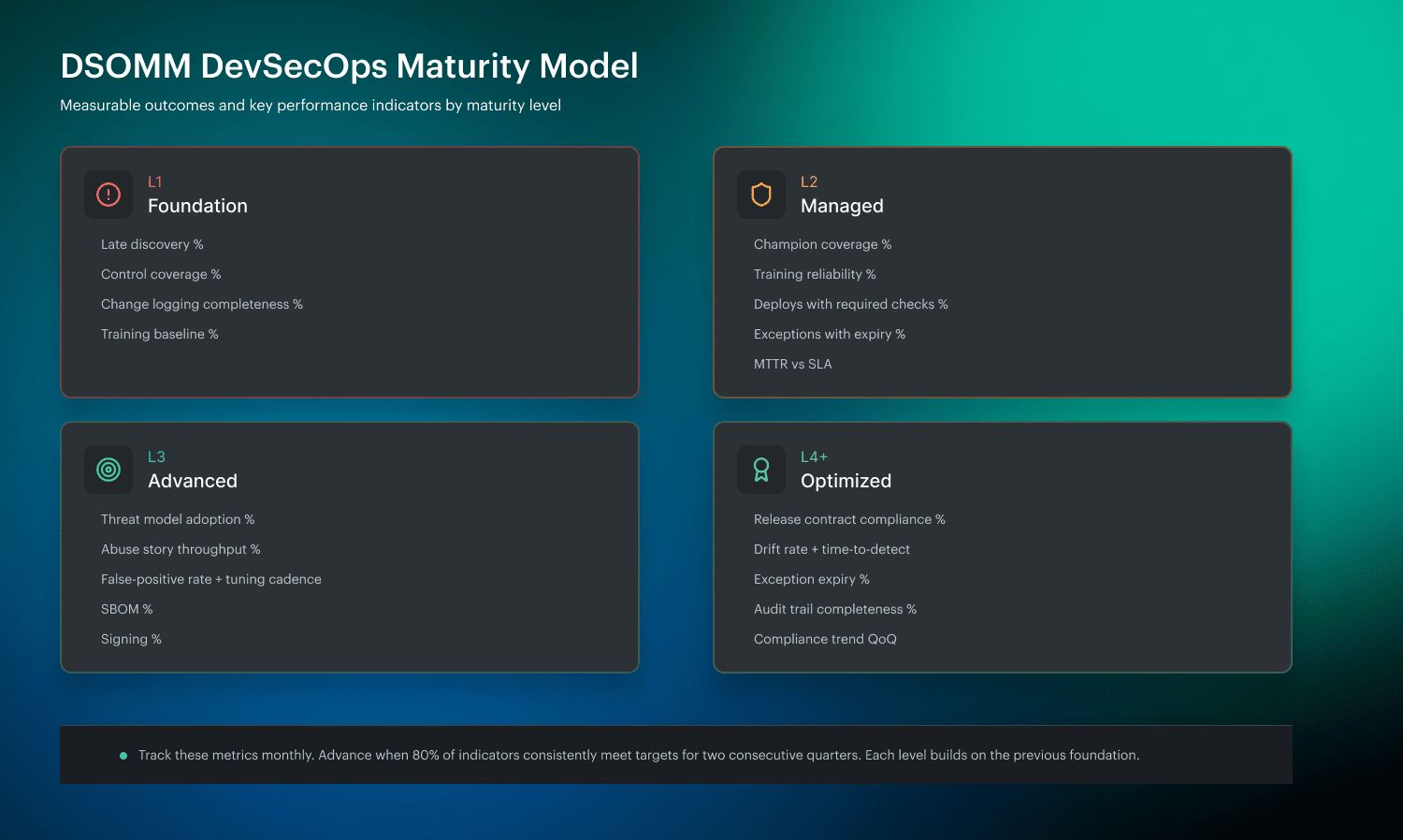
Level 1: Inconsistent practices, ad hoc training, late discovery
In the early stage, security is reactive. Issues are found late, often after a merger or, worse, after deployment. Practices exist, but they’re uneven, and training happens because somebody got burned last sprint. Wiz describes this initial maturity as inconsistent and ad hoc, with discovery happening late in the process.
To move into Level 1, you’re not trying to “do everything.” You’re trying to make reality visible.
What to measure
- Late discovery rate: % of critical issues first detected after a merge or in production.
- Control coverage (baseline): % of repos with at least a minimal set of checks enabled.
- Change logging completeness: % of prod changes with traceable who/what/when (commit + pipeline run + approval record).
- Training baseline: % of engineers who completed a basic secure coding module in the last 90 days.
Once you can pull those numbers without a scavenger hunt, you’ve earned the right to make the next step stick, because Level 2 is less about tools and more about people operating the tools the same way.
Read also: DevSecOps Vulnerability Management. A Weekly Loop That Survives Critical Spikes
Level 2: Security champions and structured training become the norm
Level 2 is where consistency starts winning. Champions exist inside product teams, training stops being optional homework, and guardrails begin to behave like a contract instead of a suggestion. Wiz calls out this shift toward more structured practices as maturity increases.
This is the stage where policy, as a code, becomes useful because it creates predictable outcomes. Teams can finally answer, “What happens if this fails?”
What to measure
- Champion coverage: % of teams with a named, active security champion.
- Training reliability: completion rate by role and refresh cadence.
- Guardrail enforcement: % of production deployments that ran required checks with no manual bypass.
- Exception hygiene: % of exceptions with an owner and expiration date.
- MTTR starter: median time to remediate high-severity policy breaches against a simple SLA.
And here’s the practical move that keeps Level 2 from becoming “champions with no leverage.” Place the evidence in areas where teams are already working. In Cloudaware-heavy orgs, champions can pull approvals, exceptions, and policy results from a single place, then route fixes to the right owners with the proof attached.
Here is an example of a report they use:
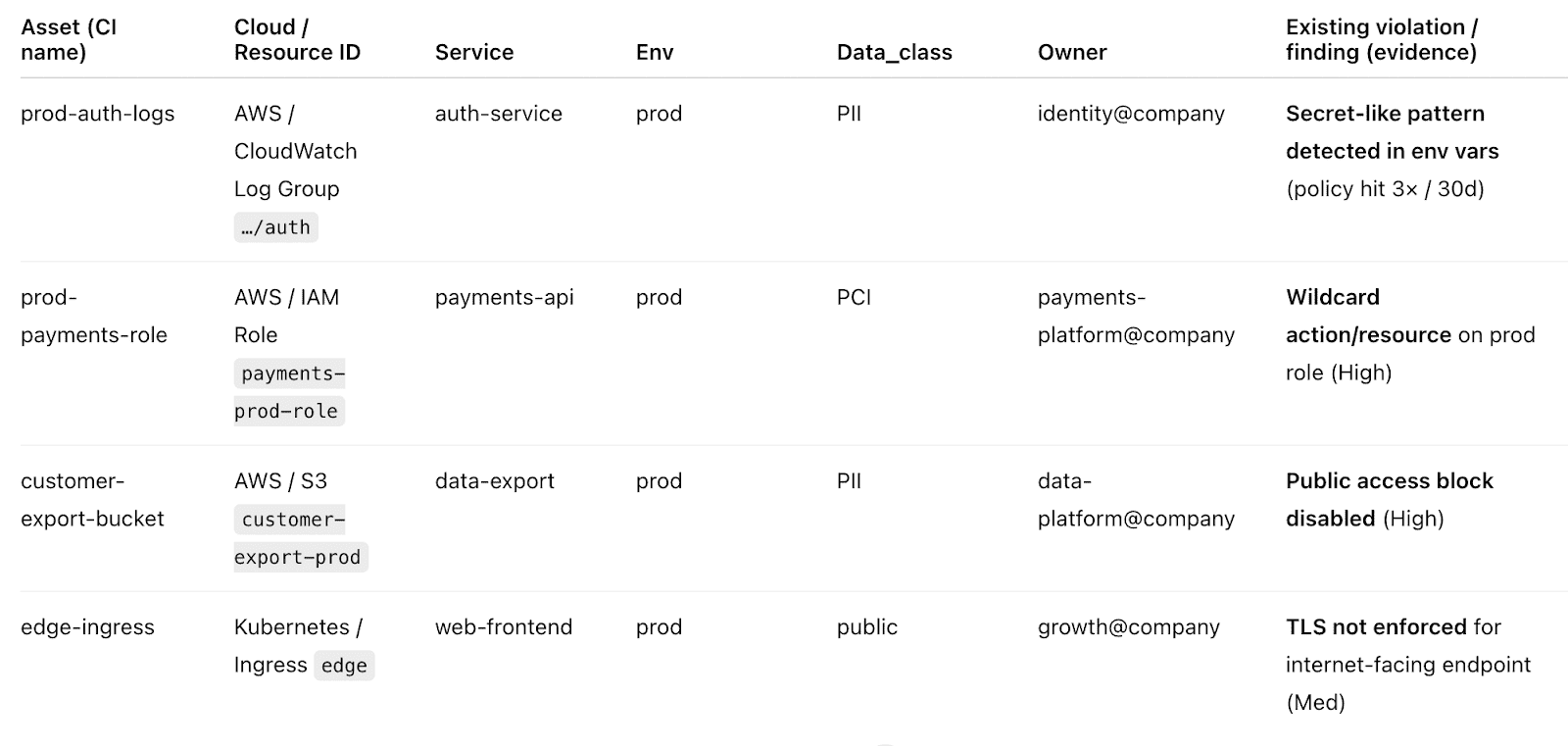
Less screenshot-chasing, more closure.
With champions in place and guardrails predictable, the obvious next question becomes: are we designing security in, or still reacting to findings after the fact?
Read also: 8 DevSecOps Container Security Vulnerabilities and How to Fix Them
Level 3: Standardized threat modeling, abuse stories, tuning tests, and metrics
Level 3 is where threat modeling stops being a special event and turns into a repeatable practice. Wiz describes maturity progressing toward more standardized and integrated threat modeling, including approaches like abuse stories. This level is also when teams learn to treat security signal quality like an engineering problem. No tuning means noise, and disruption means people ignore you.
Abuse stories help here because they connect controls to plausible failure modes. Suddenly, a rule isn’t “security said so"; it’s “this stops token replay on this endpoint.”
What to measure
- Threat modeling adoption: % of meaningful releases with a threat model update (new auth boundary, new public interface, new data store).
- Abuse story throughput: the number of abuse stories produced per quarter for critical services and the percentage that led to an engineering change.
- Signal quality: false-positive rate for key checks and frequency of rule tuning.
- Supply chain proof: % of builds producing an SBOM and % of artifacts enforced with signing.
- Recurrence: rate of repeat policy breaches or repeat misconfigurations in the same service within 30-60 days.
This is where having traceable history stops being “nice.” Teams need to see whether a control change actually reduced repeats. In Cloudaware environments, you can line up the guardrail change, the policy results it produced, and the recurrence/compliance trend that followed.
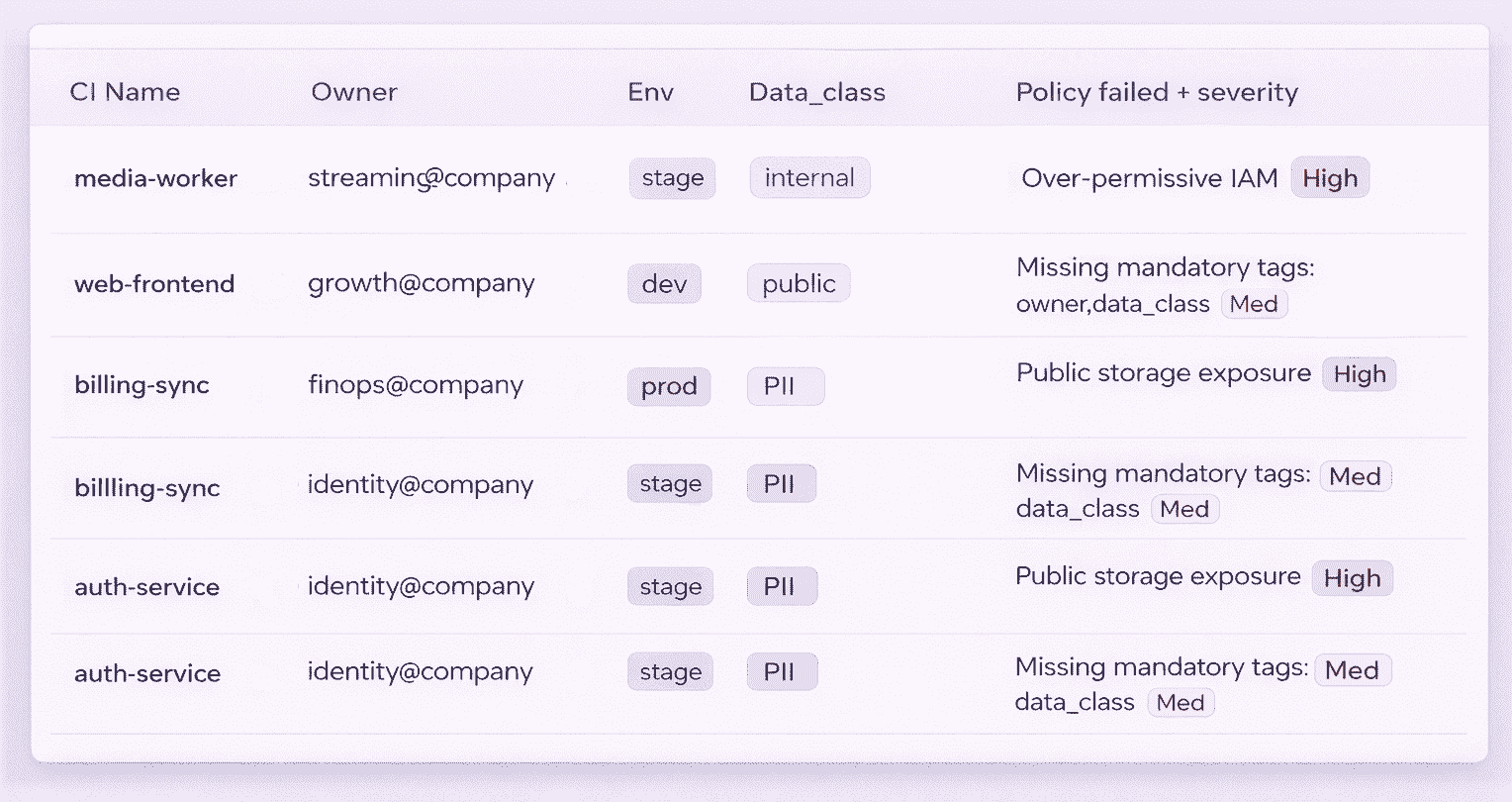
Then decide whether to promote that control, tune it again, or roll it back.
Once threat modeling and tuning become routine, you’re ready for the final shift. 👇
Read also: AppSec vs DevSecOps. Key Differences and How They Work Together?
Level 4: Integrated threat modeling and operationalized guardrails
At Level 4, threat modeling is integrated into planning and delivery. Guardrails are comprehensive enough that teams don’t reinvent controls per service, and the operating model makes security outcomes predictable. Wiz describes this higher maturity as threat modeling becoming integrated and practices becoming more comprehensive.
This is where “secure-by-default” stops being a slogan. It becomes the shape of your platform.
What to measure
- Release contract compliance: % of prod releases that met the contract (required checks, policy outcomes, approval trail) without bypass.
- Drift control: drift rate in prod and median time-to-detect drift after change.
- Exception shrink: % exceptions that expire on time and renewal rate.
- Audit trail quality: % policy breaches with owner, timestamps, remediation evidence, and closure notes.
- Compliance trend: quarter-over-quarter change in open violations by severity and service.
Cloudaware becomes part of the operating cadence here: you pull drift, change logging, and trend lines on demand.
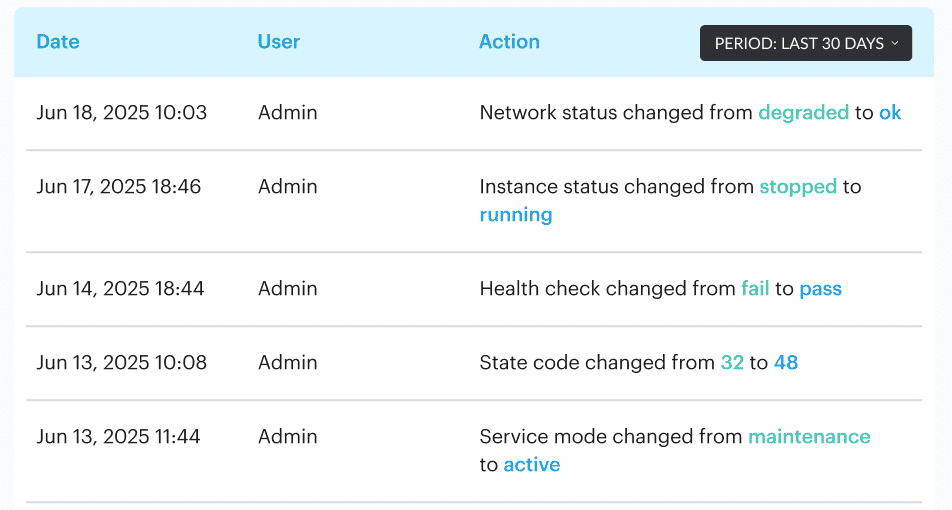
Then the maturity conversation shifts from "trust us" to “here’s the graph, here’s the owner, here’s the SLA.”
That’s the DSOMM payoff. Not a badge. This shared language makes DevSecOps maturity measurable, improvable, and difficult to dispute.
DevSecOps operating model that makes maturity stick
DSOMM levels tell you where you are. They do not tell you how your org will behave on a random Tuesday when a hotfix is due, a scanner screams, and someone says, “Just approve it.” That’s why teams stall at “we have controls” and never reach the point where "controls actually change outcomes.”
A DevSecOps operating model is the missing layer. It’s the set of rules that makes maturity repeatable: clear ownership, predictable decisions, and an exception policy that doesn’t quietly become the real system. You can have Level 3 practices on paper and still operate like Level 1 if routing and approvals are fuzzy.
Here’s the model that keeps the ladder from collapsing.
1. RACI that removes hand-waving
If you want maturity to survive scale, every control needs a human reality attached to it: who defines it, who fixes it, who can approve an exception, and who gets paged when it breaks production.
A simple RACI that works in enterprise delivery:
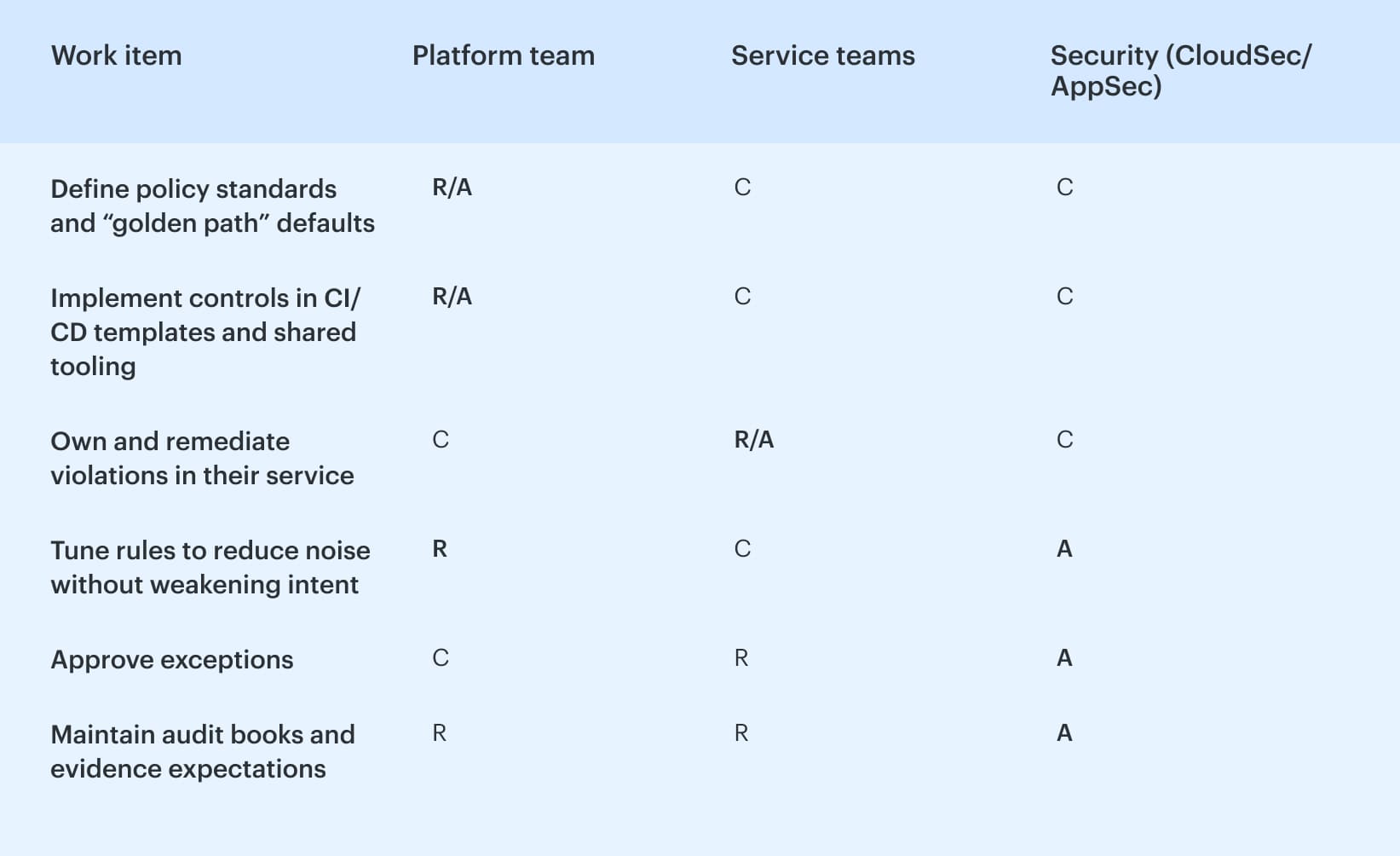
The key to achieving sanity is to ensure that security maintains accountability for the standard, while the team responsible for action takes ownership of the solution. This approach prevents "security filed 400 findings" from becoming the entirety of your maturity narrative.
Cloudaware-heavy orgs usually make this painless by using the same place for ownership mapping and evidence collection. When a policy breach hits, it routes to the service owner instead of bouncing between Slack threads and ticket queues.
Read also: GCP DevSecOps. Pipeline, Tools, and Delivery Model
2. Decision contract: every control is block, warn, or log
Once RACI is clear, your next failure mode is decision chaos. One pipeline block. Another warns. A third of the participants log nothing, and then everyone pretends that the meeting passed. Predictability fixes that.
Write a decision contract for controls with only three outcomes:
- Block: release stops. Used for “high blast radius” conditions, you’re willing to enforce.
- Warn: release proceeds, but someone is accountable for follow-up within an SLA.
- Log: evidence is captured for trend and tuning, not immediate action.
This sounds almost too simple until you realize what it kills: meetings that exist only to interpret a scanner result. It also forces maturity growth to look like promotions, not chaos. A log-only control gets tuned until it’s trustworthy, then it becomes warm, and only then does it earn a block.
Teams using Cloudaware often operationalize this contract by tying violations to release decisions and approvals. The control outcome is consistent across environments, and the audit trail stays attached to the change governance record, so you can answer, “why did this deploy?” in seconds.
Read also: Azure DevSecOps. Operational Patterns, Controls, and Gates That Work
3. Exception lifecycle: time-bound, owner-bound, reviewed on schedule
Exceptions are the final stage of maturity. They are acceptable but become "permanent" when no one takes responsibility for their cleanup.
Treat every exception like a loan with interest:
- Time-bound: it expires automatically. Default 14-30 days is a healthy starting range.
- Owner-bound: a named person, not a team alias. If the owner changes roles, the exception gets reassigned or closed.
- Reviewed on schedule: renewals require justification and evidence that a real fix is planned.
Here’s the trick that makes this feel fair: measure renewals. A high renewal rate is not a developer problem. It usually means your baseline is unrealistic, your control is noisy, or the platform path is too challenging.
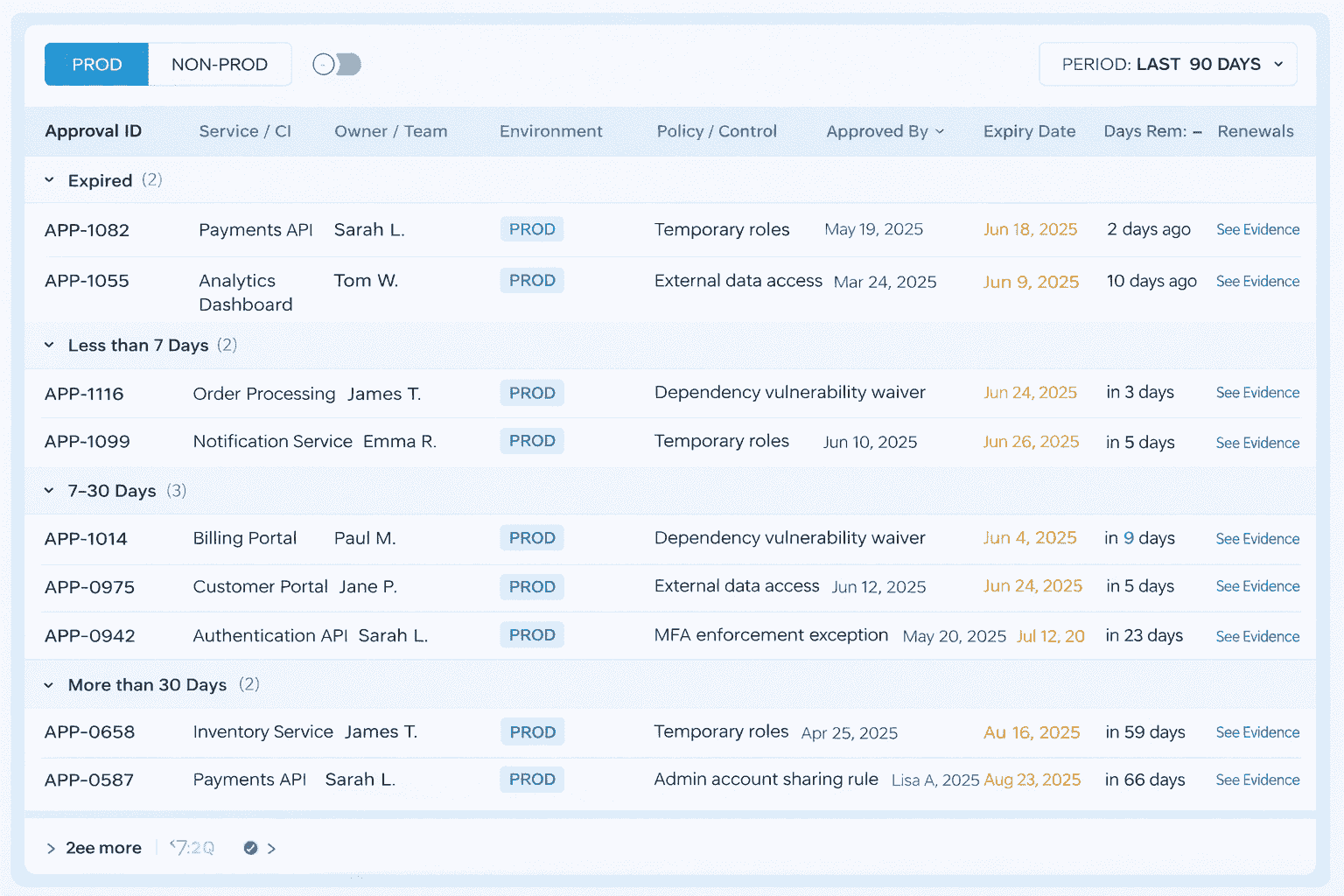
Cloudaware users typically bake these attributes into routing and approvals so exceptions cannot exist without an owner and an expiry, and renewals show up as a visible trend.
That turns exceptions into a governance lever instead of an invisible backlog.
Read also: Implementing Zero Trust in DevSecOps Workflow
Threat modeling that actually works in DevSecOps
DSOMM tells you where you are on the ladder and what “Level 3” looks like in practice. The operating model makes sure ownership, routing, and approvals don’t fall apart under pressure. Threat modeling is different. It’s not a ladder, and it’s not governance. It’s a lightweight design habit that occurs before code hardens into a release, helping you avoid shipping the same class of risk under slightly different names.
And that’s the whole point of threat modeling. DevSecOps ensures fewer surprises after deployment, fewer "urgent exceptions," and fewer emergency fixes that remain unresolved.
Trigger points that keep it sane
You don’t threat model every PR. You model the threats that change risk. Use four triggers that teams can remember without a wiki:
- A new service is created or split out.
- A new auth boundary shows up (new role assumptions, new permission model, new login flow).
- A new data store appears, or data sensitivity changes.
- A new external integration is introduced (partner API, webhook, third-party SaaS).
No trigger, no session. This configuration keeps the process fast enough to survive real delivery.
Once a trigger fires, the output has to be small. Otherwise, it becomes shelfware.
Output artifacts that actually ship with the work
Keep it to three artifacts. They should fit into a ticket and still be useful six months later.
- A one-page DFD. A rough data flow diagram is enough. Show trust boundaries. Indicate the boundaries where tokens, secrets, and sensitive fields intersect.
- Identify your top five abuse stories. Write them like, "The attacker does X to get Y.” If it helps, tag each one with STRIDE categories, but don’t let the framework become the deliverable. The deliverable is clarity.
- The mapping of mitigations to delivery controls is crucial. This is where threat modeling stops being “security output” and becomes engineering input. Every mitigation must land somewhere concrete:
- a pipeline check,
- or a runtime control,
- or explicit security acceptance criteria that the team can test and close.
Now you’ve got something your operating model can route, and your maturity scoring can verify.
The last piece is scale, because one good workshop doesn’t change an organization.
How it scales without turning into a meeting culture
Scaling happens when threat modeling lives inside backlog grooming, not outside delivery.
Use a simple loop:
- Create abuse stories when a trigger fires during planning.
- Convert mitigations into backlog items with owners and acceptance criteria.
- Revisit the top abuse stories quarterly for critical services, especially after major architecture changes.
That quarterly cadence is the bridge back to DSOMM maturity. It matches the “standardized + abuse stories” pattern without forcing every team into a heavyweight ritual. And it reinforces your operating model, because fewer late discoveries mean fewer emergency approvals and fewer exceptions that linger forever.
Read also: AWS DevSecOps Reference Architecture and Pipeline Example
The measures that prove maturity
Your operating model gives you predictable decisions. Threat modeling makes risk visible before it ships. Now you need the part leadership actually believes: numbers that move in the right direction, without hiding the mess inside averages.
Start with one rule: measure at the service level, then slice by environment. “Org-wide” is the point at which reality falters. A platform team can appear impressive while one production service quietly fails.
Delivery measures (can you ship fast and stay stable?)
These are the classic flow signals, but “good” is less about hitting a magic number and more about improving without trading reliability for speed.
- Deployment frequency: healthy looks like more frequent releases for most services without a spike in failures.
- Lead time: trending down per service, with fewer outliers. Watch P90, not the average.
- Change failure rate: the percentage of deploys that cause rollback, hotfix, or customer impact. Mature teams keep it flat or decreasing even as release volume grows.
- Restore time (MTTR): the one metric execs understand instantly. Mature organizations see it shrinking for top-tier services, especially in production.
That’s the “can we deliver?” layer. The next question is sharper: are you reducing security risk or just shipping faster with nicer dashboards?
Security measures (are critical issues actually getting fixed?)
Security maturity shows up when the same class of problem stops returning and when critical fixes stop living in backlog limbo.
- Time-to-fix criticals: pick a simple SLA (for example, “critical within 7 days”) and track adherence by the service owner.
- Recurrence rate: count repeats. If the same misconfiguration or vulnerability comes back in 30-60 days, your process didn’t learn.
- Scan coverage per commit: “We scan nightly" does not count as coverage. Mature looks like scans running on the paths that matter (PRs to main, release branches), with clear pass/fail behavior.
Companies using Cloudaware tag services, map owners, and review time-to-fix and recurrence by owner group, as actionable data, instead of one blended number nobody can act on.
Even if your delivery and security numbers look strong, cloud reality can still punch a hole through the story. Console edits, drift, and “temporary” access are common concerns.
Cloud posture measures. Does prod stay true after the release party?
This is where maturity becomes durable, because it measures what happens after the pipeline says “success.”
- Drift rate: track how often runtime config diverges from the approved baseline and how long it stays that way.
- Violations open time by severity and ownership: a critical breach sitting open for 20 days isn’t “we found it,” it’s “we accepted it.”
- Compliance trendline: watch the direction over quarters, then drill down to which services are driving the line. Combine it with the policy compliance rate by environment to ensure that production is not mixed with development.
Cloudaware users typically make this measurable by tying violations and drift data to the same service tags and owners used for change governance. That’s how you get a trendline you can trust and then route the work to someone who can actually close it.
How to slice so the metrics stay actionable
If you only make three slices, use these:
- Service-level slicing: by service name, tier, and owning team
- Environment: prod vs. non-prod, and separate accounts/subscriptions if you can
- Ownership: group by owner and escalation path, because metrics without routing become trivia
Want the “maturity” move? Add one more slice: change type (IaC change vs console change vs emergency fix). That’s where you’ll see whether your guardrails are working or you’re just cleaning up after drift.
When these measures are sliced correctly, you stop arguing about maturity and start proving it. The scoreboard becomes boring. That’s the goal.
Read also: DevSecOps Compliance. How to Achieve Audit-Ready Security?
Store your maturity model as JSON so you can trend it
A maturity assessment that exists only in a slide deck is ineffective. Next quarter, someone asks, “Are we better?” and you’re back to screenshots, opinions, and a half-remembered workshop.
When you store results as a JSON structure for the DevSecOps maturity model, you get something you can diff, query, and trend. Version it like code. Compare February vs. May. Slice by service and environment. Attach evidence links once, then re-check them instead of re-arguing what “consistent” meant.
That’s also why teams that run Cloudaware often treat their assessment JSON like a hub: the record holds the score plus deep links to the policy result, approval trail, and the exact view that shows the IT compliance trend you discussed.
And to make that work, you only need a small, boring schema.
A simple JSON schema for maturity assessments
Here’s a lightweight schema you can enforce in CI or validate in a script. It keeps the essentials: model metadata, scope, scoring, and per-practice results.
DevSecOps maturity model JSON structure:
{ "model": { "name": "DSOMM", "version": "4.x", "source": "DevSecOpsmaturitymodel/DevSecOps-MaturityModel-data", "exported_at": "2026-02-19" }, "scope": { "org": "ExampleCo", "product": "payments-api", "environment": "prod", "time_window": "2026-02" }, "scoring": { "scale": ["not_applicable", "no_evidence", "partial", "consistent"], "overall_level": 3 }, "results": [ { "dimension": "Build & Deployment", "activity_id": "uuid-or-slug", "practice": "artifact signing", "status": "partial", "evidence": [ { "type": "pipeline_run", "link": "ci://job/123" }, { "type": "policy_result", "link": "cloudaware://policy/456" } ], "owner": "platform-team", "next_action": "make signing mandatory for prod releases", "due_date": "2026-03-15" } ] }
Keep it strict enough to prevent chaos, loose enough that teams will actually fill it out.
Now you need a way to align your assessment record with DSOMM so the IDs don’t drift.
Mapping guidance: DSOMM YAML to JSON you can score
DSOMM is already published as structured model data in YAML, including its dimensions and activities. That’s good news because you’re not inventing structure. You’re just converting it into the format your tooling likes.
A practical mapping that stays stable over time:
- DSOMM “dimension” →
**results[].dimension**
Use the dimension name exactly as DSOMM defines it, or store bothdimension_idand display name if your org renames labels later. - DSOMM “activity” identifier →
**results[].activity_id**
This is your anchor for versioning. Do not key on the human description. Key on an ID or slug so comparisons across months still match. - DSOMM “activity description” →
**results[].practice**
Short human text that makes sense in dashboards. - Your scoring outcome →
**results[].status**
Use your scale (no_evidence/partial/consistent) so you can calculate maturity levels without debate. - Proof →
**results[].evidence[]**
Store links to pipeline runs, tickets, docs. If you’re a Cloudaware user, add links to the exact policy result or change approval record so anyone can re-verify in 30 seconds.
Once you’ve got that mapping, you can do the fun part: trend lines. You can answer, “did we improve?” with a git diff and a chart, not a meeting.
Example
{
"model": {
"name": "DSOMM",
"version": "4.x",
"source": "DevSecOpsmaturitymodel/DevSecOps-MaturityModel-data",
"exported_at": "2026-02-19"
},
"scope": {
"org": "ExampleCo",
"product": "payments-api",
"environment": "prod",
"time_window": "2026-02"
},
"scoring": {
"scale": ["not_applicable", "no_evidence", "partial", "consistent"],
"overall_level": 3
},
"results": [
{
"dimension": "Build & Deployment",
"activity_id": "uuid-or-slug",
"practice": "artifact signing",
"status": "partial",
"evidence": [
{ "type": "pipeline_run", "link": "ci://job/123" },
{ "type": "policy_result", "link": "cloudaware://policy/456" }
],
"owner": "platform-team",
"next_action": "make signing mandatory for prod releases",
"due_date": "2026-03-15"
}
]
}
Read also: DevSecOps vs SRE. What's Different and How to Run Both?
30/60/90-day roadmap working with DevSecOps maturity model
If an assessment document solely contains your maturity model, it turns into a static object. The roadmap is where it turns into behavior. Keep it incremental. Pick wins you can prove. Make the system tighter every month instead of launching a “big transformation” that dies in week three.
First 30 days: ownership, environments, predictable policy outcomes
Start by making your world legible.
- Assign ownership that survives org charts. Every critical service has an owner group and an escalation path. In the absence of an owner, the maturity score remains unchanged.
- Define environments like you mean it. “Prod” is not a vibe. Lock down what counts as prod across accounts, clusters, and subscriptions.
- Choose a policy outcome contract. For the handful of controls that matter, decide upfront whether each one is block, warn, or log. Then make teams see the same outcome everywhere.
What “good” looks like by day 30
- 90%+ of prod services are mapped to an owner.
- A shared definition of "prod" that everyone uses in reporting.
- A short list of policies with predictable outcomes, not a 200-control wishlist.
Once ownership and environments are clean, you can stop fighting about “who should handle this” and start building receipts. That’s your bridge into month two.
By day 60: evidence automation, drift baselines, fewer manual approvals
Now you make the model measurable without extra meetings.
- Automate evidence collection. If proof requires screenshots, you’re not measuring. You’re storytelling. Push evidence into logs and dashboards and link your assessment to JSON. This process is the heart of evidence automation.
- Establish a drift baseline. Pick a baseline state for critical configurations, then measure drift from it in prod. Drift is your post-release truth serum.
- Reduce manual approvals on purpose. Automate the boring, low-risk stuff. Keep humans for high-impact changes. Manual approvals should be a signal, not a default lifestyle.
What “good” looks like by day 60
- You can rerun the 60-minute assessment and attach evidence links for most scored items.
- Drift is measured for a defined slice of prod, and you can show “time in drift,” not just “drift exists.”
- Manual approvals drop for low-risk changes, and the remaining approvals are auditable and explainable.
At this point, you’ve got a system that produces data. Great. The next risk is that exceptions and noisy alerts will drown the signal. Day 90 is where you tighten.
By day 90: tighten exceptions, tune alerts, expand coverage intentionally
This is where maturity stops being fragile.
- Make exception expiry the default. Every exception has an owner and an expiration date. Renewals require a reason and a plan. Track renewal rate because it exposes broken baselines and unrealistic controls.
- Tune alerts, like you tune a product. Promote what’s trustworthy from log → warn. Demote noisy checks until they earn credibility.
- Expand coverage with intent. Add controls only when you can route, measure, and maintain them. Coverage that nobody owns is just future backlog debt.
What “good” looks like by day 90
- Exceptions are time-bound, and renewal rates are visible.
- Alert noise drops, and teams actually respond to warnings.
- You’ve expanded control coverage to new services or environments without breaking your operating model.
That’s the real payoff of a roadmap: not “we implemented DevSecOps.” You built a loop where maturity is assessed, stored, improved, and proven every month.
Read also: My Kubernetes DevSecOps Implementation Playbook
How Cloudaware supports maturity without turning into “tool worship”
A DevSecOps maturity model is only useful if it changes what happens during real releases. Tool worship is when you add scanners, add dashboards, add meetings, and still can’t answer one simple question: “Should this change ship, and can we prove why?”
Cloudaware is most valuable when it does the unglamorous work your operating model needs: predictable policy outcomes, routing, drift evidence, and audit-ready logs.
- Release go/no-go based on violations data (policy outcomes). Instead of “security reviewed it,” you get a release decision tied to violations data. Teams send Cloudaware change validation into their pipeline flow and define go/no-go policies for infra and code promotion based on what actually failed, not who happened to be online.
And once releases have crisp outcomes, approvals stop being a blanket ritual. - Smart approvals that cut toil without cutting control. Mature organizations don’t remove approvals. They make them selective. Cloudaware supports workflows that auto-approve low-risk changes and route the rest to the right approvers, with routing by account, user group, or environment.
- Configuration drift control via baselines and attribute history. Drift is where maturity gets exposed. Cloudaware helps teams establish baselines, track configuration changes, and keep a clear attribute history of what changed, when, and why. In practice, that means approval-based baselines for key configurations and automatic recording of attribute changes across assets, with exportable histories for cleanups and after-action reviews.
- Audit-ready logs with who/when built in. Cloudaware logs approvals, rejections, and changes automatically, including who signed off and when, and provides audit logs and reporting across environments. Put together, this is maturity support that feels like a process, not “another tool”: policy outcomes that gate releases, approvals that route, drift baselines that hold, and evidence you can hand to an auditor or a VP without retelling the story.
Here is one of the most popular dashboards visited by DevSecOps in Cloudaware:
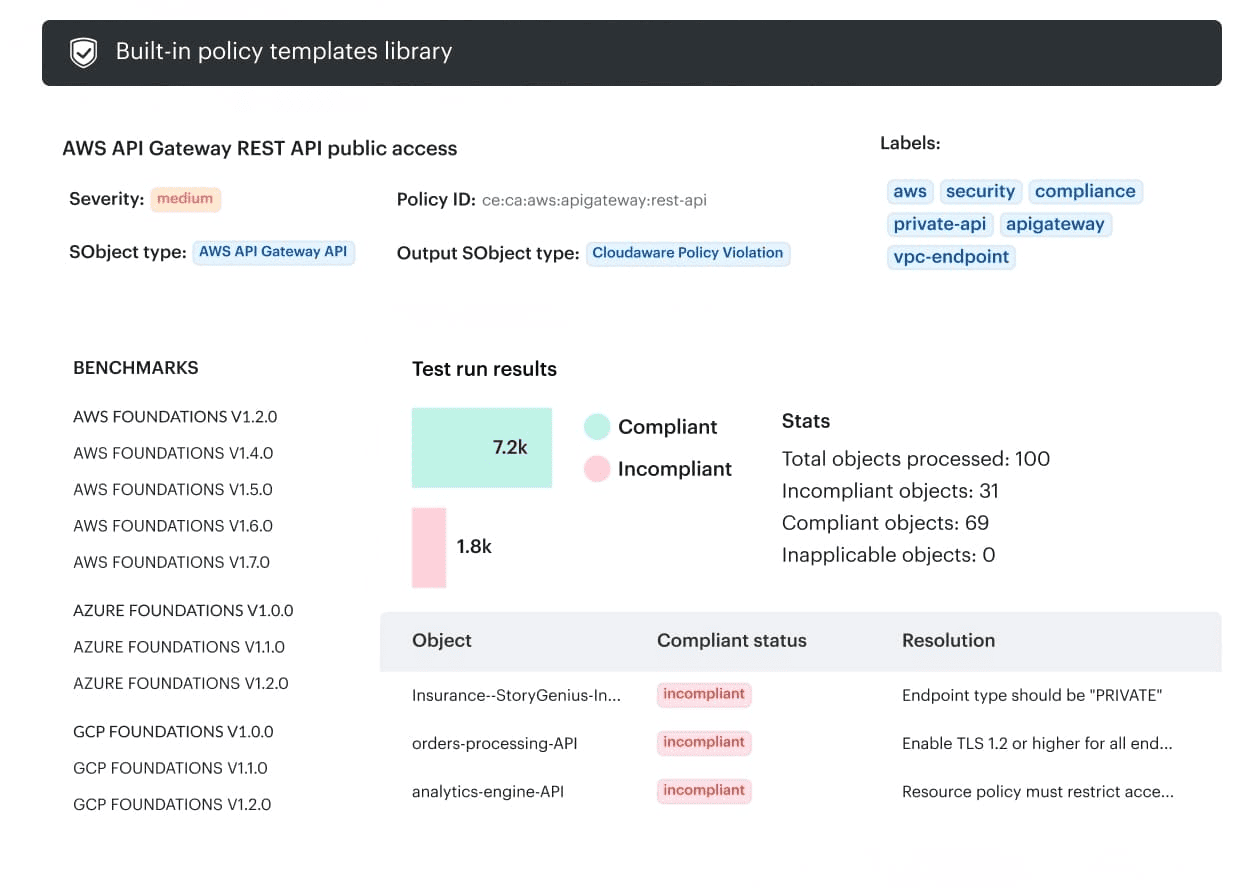
If you want, the fastest way to validate fit is to walk through one real service and one real environment on a live demo, then map Cloudaware’s outputs to the scorecard you just built.