


You came here with a simple task: figure out what you’re actually supposed to change in your workflow so security stops being a last-minute fire drill. Because right now it’s messy. Builds fail on “critical” findings that aren’t exploitable. Alerts pile up until nobody trusts them. A release that used to take 30 minutes turns into two days of approvals and Slack debates.
And when something slips through? It’s always the boring stuff: an exposed key, an over-permissive role, a mis-tagged asset no one owns.
That’s why this DevSecOps vs DevOps conversation matters. The difference between DevOps and DevSecOps isn’t a new team name – it’s how you design gates, evidence, and ownership so risk drops while delivery stays fast.
To answer it, we interviewed Cloudaware clients (DevOps + DevSecOps experts) and Cloudaware DevSecOps specialists. Everything here is expert opinion pulled from real pipelines and real metrics.
And here are quick findings from my research 👇
Key takeaways
- DevOps optimizes flow. Faster releases, fewer handoffs, fewer “who owns this?” gaps. At its best, DevOps makes tasks more efficient because the pipeline is repeatable and the work is visible. That’s how you get more deploys with less chaos.
- DevSecOps keeps that speed, then changes what “green” means. Security controls move into the same path your engineers already follow, so risky changes don’t rely on someone remembering a checklist at 6pm. The pipeline starts catching problems while the context is still fresh in the code, not two sprints later in a ticket queue.
- DevOps is happy when the service is healthy after deploy. DevSecOps is happier when you can also prove why the deploy was allowed, who approved it, what checks ran, what exceptions exist, and when they expire.
- DevOps reduces operational drama by improving ownership and automation. DevSecOps reduces exposure by making risk decisions explicit across cloud environments.
- One more thing: DevOps streamlines collaboration by pulling dev and ops into one loop. DevSecOps extends that loop to security, so fixes don’t ping-pong between tools, dashboards, and people.
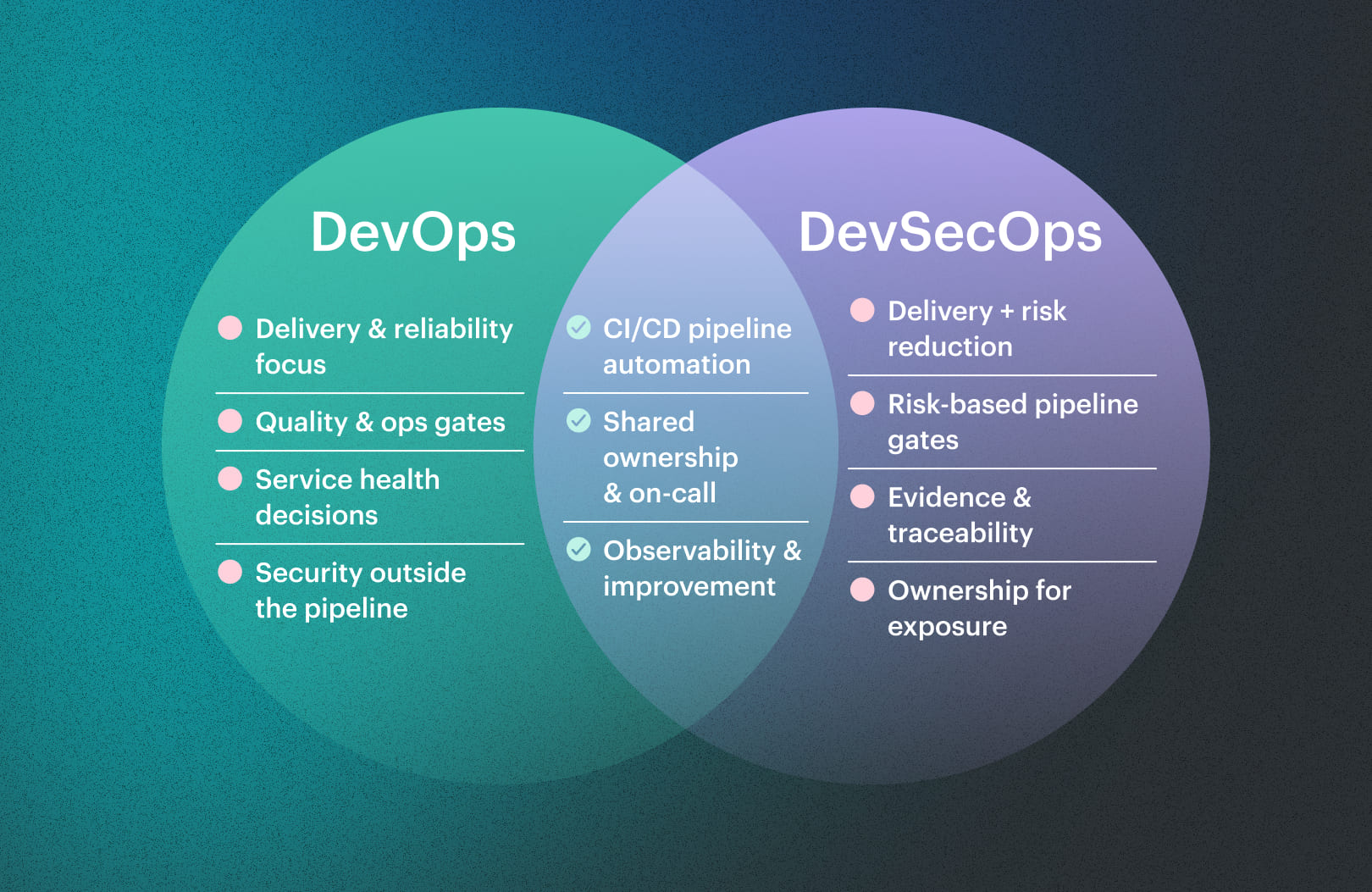
DevOps vs DevSecOps diagram
 Intrigued? Let's dive into details 👇
Understanding what is DevSecOps vs DevOps
Before we zoom into what changes (and what doesn’t), let’s make sure we’re answering the same question: what is DevOps and DevSecOps – in real orgs, with real release pressure, not slide-deck fantasy.
What is DevOps?
DevOps is an operating model where development and operations share one goal: ship value fast and keep it stable.
That means short feedback loops, clear ownership, and work that’s designed to flow.
Practically: you standardize pipelines, treat infrastructure as repeatable configuration, automate deployments, and instrument everything so you can see impact within minutes – not after the “monthly postmortem.”
DevOps lead, fintech (Cloudaware customer): “My routine isn’t ‘build servers.’ It’s keeping delivery boring. I’m in the pipeline every day – reviewing failed jobs, tightening deploy steps, rotating secrets, tuning alerts, and shaving minutes off lead time. If a release breaks at 2pm, I want rollback to be one click, not a meeting.”
Business-wise, DevOps exists to improve delivery performance and reliability at the same time. Think DORA-style outcomes: higher deploy frequency, shorter lead time, lower change-failure rate, faster recovery.
It’s not a department. It’s a set of practices that turns delivery into a predictable system.
What is DevSecOps?
DevSecOps takes that system and adds an explicit emphasis on security – but without turning releases into a permission queue.
Here’s the clean definition: DevSecOps is DevOps with security requirements embedded into the delivery workflow as automated controls, measurable gates, and continuous feedback.
Here you’re not “bolting on” checks. You’re designing the process so risk is managed by default.
In practice, this includes threat-aware design reviews, automated testing in CI, dependency and image scanning, IaC policy checks, secrets detection, runtime signals, and audit evidence generated as part of delivery – not chased later by humans.
DevSecOps lead, B2B SaaS (Cloudaware customer): “*Most days I’m chasing repeat offenders, not people. One repo keeps sneaking in broad IAM. A base image keeps resurfacing the same CVEs. A Terraform module keeps exposing things it shouldn’t. I turn those patterns into guardrails the pipeline enforces automatically. If a control slows engineers down and doesn’t prevent real risk, it gets redesigned. If it blocks something dangerous, it stays and we can show the numbers.*”
The business role is simple: reduce vulnerabilities reaching production, cut the cost of rework, and give the company faster, defensible releases across cloud estates and regulated environments.
This is where DevSecOps vs DevOps becomes visible: same speed mindset, different guardrails and proof.
So… is DevSecOps “DevOps + security tools”?
No. And this is the part most teams miss.
If you just sprinkle more tools onto a pipeline, you get noise, resentment, and workarounds. If you change the workflow, you get leverage: fewer manual approvals, fewer false positives, clearer severity, and fixes that land while the context is still fresh in the code.
The shift is cultural and mechanical at the same time: security becomes a shared responsibility, policies become versioned, exceptions become traceable, and evidence becomes automatic management output – not a scramble.
And yes, you’ll hear people say “DevSecOps DevOps are basically the same.” They’re not – because the second one formalizes risk controls as part of delivery, not as a separate after-the-fact process.
The backbone is this: culture, collaboration, automation, secure SDLC, continuous delivery – with security requirements treated like any other quality bar for the software you ship.
Read also: What Breaks in Delivery When DevSecOps vs SDLC is Misunderstood
What’s common between DevOps and DevSecOps?
Same backbone. Same delivery mechanics. The split shows up in where you enforce risk controls – not in how you ship.
- CI/CD pipelines (build → test → deploy). Both live and die by pipeline health. When a pipeline takes 18 minutes and fails 3×/day across 15 engineers, that’s 13.5 hours/week burned on reruns alone. That’s before context-switching, Slack debugging, and re-queuing jobs. So yes – DevOps and DevSecOps obsess over mean build time, failure rate, queue time, and deploy frequency.
- Version control + pull requests as the change gate. Git is the front door in both models. PR reviews, required checks, branch protections, signed commits (in stricter shops), and traceability from ticket → commit → release.
- Infrastructure as Code + repeatable environments. Both approaches standardize modules, enforce naming/tagging conventions, and rebuild environments from code so staging stops drifting from prod.
- Automated testing as a quality baseline. Unit/integration/e2e suites run in CI in both. Mature teams measure flaky-test rate and time-to-fix because flaky tests behave like a tax: once people stop trusting CI, they bypass it. The goal is predictable feedback: tests that fail for real reasons, fast enough to act on during the same PR.
- Observability in production. Metrics, logs, traces, alerts – same foundation. Both want a deploy to answer one question in minutes: Did this change make things better or worse? That’s why you see canary releases, dashboards per service, SLOs, and alert tuning.
- Incident response + postmortems. On-call, runbooks, incident timelines, blameless (or at least useful) postmortems, action items that actually get closed. Teams that do this well reduce repeat incidents and shrink recovery time because they treat incidents as data: fix the root cause, then add a guardrail to prevent the same class of failure.
- Automation-first operations. Deploy automation, auto-scaling, auto-healing, config management, immutable artifacts. This is shared muscle. Manual ops works until the first time two releases overlap, the pager goes off, and your “tribal knowledge” engineer is on a flight.
- Shared ownership and cross-functional teams. Product + platform + ops working together, with explicit ownership of services. Clear ownership reduces ticket ping-pong and shortens time-to-resolution. The healthiest orgs can answer, instantly: Who owns this service? Who approves changes? Who gets paged?
- The same core tooling categories. CI servers, artifact repositories, container registries, IaC frameworks, monitoring/log platforms, ticketing/issue tracking. The tool names change, the categories don’t – because the workflow needs the same building blocks to ship and operate modern systems.
DevSecOps lead (ex-DevOps), Cloudaware customer: “When I moved into DevSecOps, I didn’t stop doing ‘DevOps things.’ I still live in Git. I still care if the pipeline is slow or flaky. I still maintain Terraform modules and deployment templates. I still tune alerts, write runbooks, and join incident calls. Same Jira flow, same CI runners, same observability stack. The difference is I now treat security checks like reliability checks – if it’s important, it has to be automated, measurable, and enforced in the same pipeline we already trust.”
That’s the overlap: same delivery engine, same reliability loop, same automation DNA. The DevSecOps layer changes how security controls and evidence are integrated – everything else stays familiar.
Read also: SecDevOps vs DevSecOps - Security Models Compared
What is the difference between DevOps and DevSecOps?
Both can ship fast. Both can run stable systems. The difference shows up the minute you ask two questions in the same meeting: “Can we deploy today?” and “Can we prove it’s safe?” That’s the heart of DevSecOps vs DevOps – speed with evidence.
DevOps vs DevSecOps: comparison table
| What changes | DevOps focus | DevSecOps focus |
|---|---|---|
| Quality bar in the pipeline | Reliability + performance checks | Reliability checks + security gates tied to risk |
| Default outputs | Build artifact + deploy record | Build artifact + deploy record + security evidence |
| What gets tracked | DORA, SLOs, incidents | DORA/SLOs + exposure metrics + remediation SLAs |
| How findings get handled | Best-effort fixes, sometimes ad-hoc | Triage rules, ownership, time-boxed exceptions |
| How fast you can answer “what’s affected?” | Depends on tribal knowledge | Depends on traceability data |
Pipeline gates: uptime checks vs risk checks
DevOps gates protect delivery reliability
They answer: “Will this change run?” So the pipeline stops on things that break the release mechanics:
- build fails,
- unit/integration tests fail,
- deployment health checks fail (readiness/liveness, smoke tests),
- SLO signals crater after deploy (error rate spikes, latency jumps), so you roll back fast.
This is about not shipping outages. It’s why teams track change failure rate and time to restore.
DevSecOps gates protect exposure
They answer: “Does this change increase risk in a way we can’t accept?” So the pipeline stops on issues that create real blast radius:
- secrets committed in a PR,
- vulnerable base images / packages that are reachable in runtime,
- IAM changes that introduce wildcard permissions or privilege escalation paths,
- IaC that creates public storage or disables encryption defaults.
Here’s the “120 CVEs” scenario, from both angles:
A DevOps gate won’t fail just because a scanner found 120 CVEs – because the app may still build, deploy, and pass health checks. A DevSecOps gate can fail if even one CVE is critical and reachable in the shipped image. That’s the point: reliability gates keep users online; risk gates keep you from shipping preventable exposure.
Output: deploy logs vs audit-ready evidence
Picture two teams shipping the exact same change: a new API endpoint and a small Terraform update.
Team A (DevOps) finishes the deploy
They’ve got the basics: commit SHA, pipeline run, deployment timestamp, which cluster/environment it hit, and the health checks that stayed green. If something breaks, they can trace it and roll back. Operationally solid.
Then a week later, compliance pings: “Prove this change followed the required controls.”
Now it’s a reconstruction project. Someone pulls PR screenshots. Someone exports CI logs. Someone checks who approved the change. Someone digs through tickets to find the “why.”
Team B (DevSecOps) finishes the deploy
Same deploy record… plus the proof packet is already sitting next to it. Not a PDF someone wrote. A trail generated by the delivery system:
- the PR approval record and required checks that actually ran,
- the IaC policy decision showing the Terraform change didn’t open public access,
- the scan report tied to the exact container image digest that shipped,
- the risk exception (if there was one) with a named owner and an expiry date.
So when compliance asks, nobody goes scavenging. They export the release bundle and move on.
That’s the difference in output: one tells you what happened; the other tells you what happened and why it was allowed.
Ownership: “ops owns stability” vs “everyone owns exposure”
Here’s a clean difference you can operationalize.
In DevOps, ownership is anchored to runtime. A service has an owner. An on-call rotation exists. Alerts route to the team that can restore availability. When latency spikes or pods crash, the fix lands where the power is: the people who deploy and run the thing. | In DevSecOps, ownership extends to exposure created by change. The question isn’t just “who gets paged?” It’s “who owns the risk we’re introducing?” So security work doesn’t sit in a separate backlog that nobody can act on. It routes to the same team that owns the repo, the container image, the Terraform module, or the cloud account boundary. |
What that looks like in practice:
- A critical vuln is found in a service image → ticket goes to the service owner with a remediation SLA.
- A risky IAM change appears in a PR → reviewer rules require a named approver (risk owner) before merge.
- A public S3 bucket is attempted via IaC → the pipeline blocks and the owning team fixes the module, not “security.”
- An exception is needed to ship → the exception is time-boxed and attached to the owner, so it can’t become invisible forever.
This is where “ticket ping-pong” dies. DevOps ownership prevents outages from lingering. DevSecOps ownership prevents exposure from lingering. Same mechanism – clear owner and fast path to change – applied to a broader set of problems.
Read also: DevSecOps Framework in 2026: NIST, OWASP, SLSA, and How to Choose the Right One
Risk backlog: bugs vs security debt
DevOps backlogs usually reflect what you can feel day to day: features to ship, incidents to prevent, performance to tune, infra to refactor, flaky tests to fix. The prioritization logic is familiar: customer impact, uptime impact, engineering time.
DevSecOps adds a second backlog that behaves differently: security debt. It’s sneaky because it doesn’t always break prod today. It just quietly increases blast radius until the wrong day.
What goes into that security debt bucket in practice:
- critical findings that have been open for 30/60/90+ days,
- the same misconfiguration recurring across accounts/projects (“why do we keep creating public endpoints?”),
- exceptions that never expire,
- services without owners or tags, so findings can’t be routed,
- dependency upgrades postponed until they become emergency patches.
Here’s the operational difference: DevOps backlogs are often measured by delivery and reliability outcomes. DevSecOps backlogs get aging and SLA rules because risk grows over time.
A practical workflow many mature teams use:
- Severity is tied to exposure (internet-facing, prod vs dev, privileged access).
- SLAs are explicit (e.g., critical = days, high = weeks).
- Exceptions require a reason, compensating control, and expiry date.
- Repeat offenders trigger root-cause work (fix the Terraform module, update the base image, change the pipeline template).
Example: an overly broad IAM policy ships as a “temporary workaround.”
In a DevOps-only world, it often sits until something breaks or someone remembers.
In DevSecOps, the workaround becomes a tracked item with an owner, an expiry date, and a compensating control – maybe reduced scope + CloudTrail alerts on sensitive actions. When the expiry hits, it escalates automatically. No silent forever.
“What’s affected?”
When a high-profile CVE drops at 9:00, the first hour matters. Not because you can patch instantly – because you need to know where to even aim.
In many DevOps setups, scoping depends on maturity and memory. Someone searches repos. Someone checks what base images teams “usually” use. Someone asks in Slack. You get partial answers, fast… and then spend the next day filling gaps.
DevSecOps teams build scoping into the delivery system. Traceability links the whole chain: ticket → commit → build → artifact → deploy → runtime. So the response starts with facts:
- which services pulled the vulnerable library in the last release,
- which container images with that package are running in production right now,
- which environments are exposed (prod vs staging, internet-facing vs internal),
- who owns the remediation work.
That’s the difference in practice: you stop guessing the blast radius and start querying it.
Feedback loops: performance signals vs security signals
DevOps feedback loops are built to catch reliability problems Deploy goes out → dashboards confirm health → rollback if error rate/latency spikes → postmortem if it hurts users. The signals are familiar: CPU, memory, saturation, 5xx rates, p95 latency, deploy success. | DevSecOps extends the loop upstream and sideways Upstream means security feedback arrives before merge and before deploy. Sideways means security becomes part of the same “release readiness” conversation – not an afterthought. |
What this looks like in practice:
- PR stage: secrets detection and policy checks fail fast, while the diff is still tiny.
- CI stage: dependency and image scanning runs with triage rules (block only on exploitable/high-impact cases).
- Plan stage (IaC): Terraform plan gets evaluated against guardrails, so risky resources never get created.
- Runtime stage: anomalies and drift signals tie back to the release and owner, so fixes are targeted.
Cost difference is the whole reason this exists: Fixing a secret leak in a PR is minutes. Fixing it after deploy triggers rotation, incident process, and blast-radius analysis. Same mistake. Different price tag.
DevOps loops keep you stable. DevSecOps loops keep you stable and reduce exposure by moving high-signal security checks earlier – where teams can act quickly.
Read also: 4 DevSecOps Implementation Steps That Hold Under Release Pressure
The difference between DevOps and DevSecOps in processes
Quick view: how the process shifts at each stage
| Stage | Classic DevOps process | DevSecOps process with security built in |
|---|---|---|
| Plan / Design | Plan features, estimate effort, prioritize by business impact | Add abuse cases, risk impact, and data sensitivity to planning decisions |
| Code & Build | Branch → PR → build → unit tests → merge | Same flow, but with gated scans and supply-chain checks on every build |
| Test & Verify | Functional + performance tests before release | Functional + performance + risk-based checks tied to severity thresholds |
| Release / Deploy | “Pipeline green = deploy” | Go/no-go rules, approvals by environment/account, signed artifacts only |
| Operate & Improve | Monitor uptime, errors, latency | Monitor attack paths, misconfigurations, drift, and suspicious behavior |
Now let’s walk each stage like you and I are looking at the same delivery board.
1. Plan & Design: from “feature only” to “feature + blast radius”
In a lot of shops, planning still means “What can we fit into this sprint?” You size work, argue about story points, and lock a date. That’s it.
In a DevSecOps mindset, planning adds one more column to that board: “What could go wrong if this thing ships?”
You look at:
- What data this change touches (PII, payments, internal only).
- Which systems it connects (internet-facing vs internal).
- Who will own it after release.
Suddenly, a small config tweak to an internet gateway gets more scrutiny than a big cosmetic UI change.
This is where development and risk start talking in the same room instead of in separate Slack channels. You still care about velocity, but you also estimate the blast radius of each card before it moves to “In progress.”
Over time, that gives you cleaner audit trails, fewer “who owns this endpoint?” threads, and easier incident post-mortems because the risk thinking was written down from day one – actual management of risk, not just clean-up after the fact.
Read also: DevSecOps vs CI/CD: How to Build a Secure CI/CD Pipeline
2. Code & Build: same speed, smarter guardrails
In a DevOps-only world, the happy path looks like this:
Ticket → branch → PR → review → build → unit tests → merge → done.
Nothing wrong with that. You get fast feedback on correctness, but not on how safe the change is.
In a DevSecOps pipeline, that same flow grows extra guardrails:
- Every PR kicks off code scanning.
- Builds are repeatable and traceable.
- You treat your pipeline as critical infrastructure, not glue scripts.
This is where people plug in the security stack you keep hearing about: SAST, DAST, SBOM, IaC security, artifact signing, runtime monitoring.
Example: You push a Terraform change for a new VPC. The pipeline:
- Runs static checks on the template.
- Rejects any open inbound rule to
0.0.0.0/0for high-risk ports. - Regenerates the SBOM for the service using that infra.
- Signs the build artifact so you can prove exactly what went to prod.
From your perspective, it still feels like “I push, I get a green or red check.” But under the hood, the software supply chain is being inspected on every run, not once a quarter in a painful audit.
Read also: Top 13 Cloud Monitoring Tools Review - Pros/Cons, Features & Price
3. Test & Verify: from “does it work?” to “does it break safely?”
Traditional QA focuses on behavior: does the feature work, is the page fast enough, do we hit SLAs under load.
DevSecOps keeps all that and adds a brutal question: “If this breaks, how much damage can it do – and how fast will we know?”
So your pre-release gates start to look different:
- You don’t just run testing for functionality; you also run exploit simulations on high-risk paths.
- You fail the pipeline if a critical flaw hits production-bound branches, even if everything else looks fine.
- You tie thresholds to business impact, not just CVSS scores.
Instead of “scan the app once a month,” you:
- Automatically run checks on new code paths.
- Treat high-severity vulnerabilities as blockers, not Jira suggestions.
- Make it painfully obvious when a release went out with known risk, and why.
That’s the moment where DevSecOps stops being a slide in a kickoff deck and becomes a set of non-negotiable rules that everyone understands.
Read also: Inside the DevSecOps Lifecycle: Decisions, Gates, and Evidence
4. Release / Deploy + Operate: where Cloudaware makes “secure delivery” real
This is the stage where a lot of teams say they’re safe… and still push broken changes Friday night. In classic pipelines, “all checks passed” often means “ship it to production.” No nuance for:
- Which account this is going into.
- Whether it touches regulated data.
- Whether the infra already drifted away from what the pipeline thinks is true.
In a security-embedded release flow, you add go/no-go policies that look at context, not just a green build:
- Only deploy to production if the change is approved by the right owner for that system
- Route approvals differently for sandbox vs prod
- Block rollout when the target environment is already misaligned with your templates
This is exactly where a platform like Cloudaware quietly earns its keep. It sees every account, region, and resource, and gives you one place to apply those go/no-go rules, tie them to real infra state, and avoid duct-taping ten different tools together just to answer “is it safe to deploy?”
Concretely, you can:
- Require approvals to be routed by environment or tenant, so a low-risk change in a demo org doesn’t get the same treatment as a change touching cardholder data.
- Use cloud drift detection to stop a rollout if the live stack no longer matches the templates you trust.
- Feed that context back into your release dashboards, so on-call knows exactly what changed, where, and under which policy.
On the ops side, your dashboards evolve from “CPU, memory, 500s” to also show:
- Suspicious config changes,
- Unapproved paths to the internet,
- Anomalous behavior tied to specific rollouts.
Now your teams don’t just know that something broke; they know whether it broke because of a deployment, a misconfig, or an actual attack path lighting up.
Read also: How to Build a Secure DevSecOps Toolchain Without Alert Fatigue
5. Bringing it together: process, not theater
When you line it all up, the DevSecOps vs DevOps differences are mostly invisible to end users but obvious to anyone watching the pipeline closely:
- Planning now includes explicit risk, not just story size.
- Builds carry traceable, signed artifacts instead of opaque blobs.
- Checks before release care about impact, not just pass/fail on a generic scan.
- Deployments are allowed or blocked based on context-aware policies.
- Operations connect production signals back to specific changes and owners.
On paper, DevSecOps vs DevOps might look like a rebrand. In real life, it’s a set of daily practices that decide whether you’re fixing avoidable incidents at 2 a.m. or quietly shipping features while auditors scroll through clean reports.
Read also: DevSecOps Architecture - A Practical Reference Model Teams Actually Use
Security in DevOps vs DevSecOps
When people ask about DevOps vs DevSecOps, they’re usually in the middle of a mess: noisy scanners, red builds, and a release that’s already late.
The real question behind it: who catches dangerous stuff, when, and with how much drama?
The DevOps vs DevSecOps difference shows itself the first time a zero-day drops on a Tuesday morning and you’ve got three hours before customers start tweeting.
Where protections actually run
In a traditional pipeline, security tends to sit off to the side as a weekly scan, a quarterly pen test, or a PDF that lands long after the release is live.
That pattern is common in high-pressure DevOps shops that tuned everything for speed long before anyone wired in risk controls.
A mature DevSecOps pipeline moves those checks into pull requests, build steps, and pre-deploy gates so problems surface while the change is still tiny. You still see green or red in CI; under the hood, the system is deciding whether the risk attached to this change is worth shipping today.
How it feels at the pull-request level
Picture an engineer opening a pull request that touches authentication code for your mobile API.
As soon as the branch hits CI, lightweight testing runs, secrets are scanned, and high-risk patterns are flagged directly in the PR comments.
Only exploitable vulnerabilities with real impact are allowed to fail the build; the rest land as scheduled backlog items with owners and SLAs.
From the engineer’s point of view, they’re still just shipping software, but the pipeline quietly refuses anything that would create obvious blast radius.
Staff engineer, B2B SaaS:
“Before, I’d get ‘security tickets’ weeks after a release and have no idea what I was thinking when I wrote that code. Now the check fails in my PR, points to the exact line, and explains the risk in one sentence. Fixing it is cheaper than arguing.”
What it changes for platform and security owners
Here’s how one platform lead at a regulated fintech described the shift:
“Once we switched from separate DevSecOps DevOps silos to one shared platform team, the pipeline became the place where risk decisions actually happened. Every red gate is either a real stop or a rule we refine – nothing just sits there.”
That team stitched together the scanning tools, the CI system, and the ticketing workflow so every failed gate produced a clear action, not just another red icon.
Because the whole stack runs in a multi-account cloud estate, ownership is resolved by tags and accounts instead of guesswork in Slack.
On-call teams now know exactly which service, which commit, and which owner to page when a high-severity alert fires.
How leadership sees the shift
Over a few quarters, small process changes stack into consistent practices: mandatory threat notes for risky features, SBOM generation on every build, signed artifacts for production workloads, and time-boxed exceptions only.
Roadmaps for development start including budget to refactor unsafe patterns, not just bolt new features on top.
From the leadership view, risk posture turns into something management can read off dashboards: remediation time, coverage of controls per service, and how many releases went out with open high-risk items.
That’s the practical story of DevSecOps vs DevOps: same engineers, same repos, same pipelines – yet the way risk moves through the system is completely different.
Difference between DevSecOps and DevOps in tools
You can ship with either approach. The question is what your toolchain forces you to do on a normal Tuesday – when deadlines are real and nobody has time for “extra steps.” That’s where DevOps vs DevSecOps differences show up: same pipeline spine, different tool categories bolted onto it, and different defaults for what gets blocked, logged, or escalated.
Tooling differences at a glance
| Tool category | DevOps tool focus | DevSecOps tool focus |
|---|---|---|
| Source control | PR workflow, reviews, branching | Same + secret scanning and signed commits for critical repos |
| CI/CD | Build orchestration, deploy automation | Same + risk-based gates and exception handling |
| Testing | Unit/integration/e2e, smoke tests | Same + security testing (SAST/DAST) tuned to reduce noise |
| Artifact & supply chain | Registries, versioning, SBOM optional | SBOM generation, artifact signing, provenance tracking |
| Infrastructure | IaC + config management | IaC + policy-as-code and drift detection |
| Runtime & observability | Metrics/logs/traces, alerting | Same + runtime detection focused on exploit paths |
| Identity & access | IAM automation, role templates | IAM change controls, least-privilege enforcement, privileged access reviews |
| Ticketing & workflow | Incidents, changes, sprint work | Same + vulnerability workflow with SLAs and ownership routing |
| Reporting | DORA + SLO dashboards | DORA/SLO + compliance reporting and control coverage |
A quick way to read this: DevOps tooling optimizes speed and reliability in delivery; DevSecOps tools keep that momentum while making risk visible, enforceable, and reportable.
What that looks like in practice: A DevOps stack helps teams push an application safely and recover quickly when something breaks. A DevSecOps stack helps the same team push changes while continuously checking code and infrastructure for real-world exposure, then routing fixes with owners and deadlines.
Underneath the category names, the shift is consistent: more automation around risk decisions, more policy enforced in the pipeline, tighter process for exceptions, and stronger compliance outputs. That’s how you stop vulnerabilities from becoming a surprise backlog nobody owns – without slowing down development into a permission queue.
(And yes: the number of tools usually grows. The best stacks keep the experience simple by surfacing results inside PRs and CI, not in yet another dashboard.)
Read also: 15 DevSecOps tools: software features & pricing review
What to choose: DevSecOps or DevOps?
Most orgs don’t pick one forever. They start with DevOps discipline, then evolve into DevSecOps when risk and scale demand it. That’s the real story behind DevOps vs devsecops differences.
Choose DevOps first when…
- You can’t ship reliably yet. Builds are flaky. Deploys are manual. Rollback is scary.
- Your biggest pain is delivery health: change failure rate, MTTR, unstable environments.
- You need your teams to standardize pipelines and ownership before adding more gates.
Example: a startup shipping one software product with a small surface area and fast iteration. Tight monitoring plus solid testing gives you the biggest ROI.
Choose DevSecOps now when…
- You’re exposed. Internet-facing workloads, sensitive data, regulated industry, or multiple cloud accounts.
- Audit questions land often: “who approved this change?” “what controls ran?”
- Security work already interrupts development – it just happens late, via fire drills and retroactive tickets.
Example: a company running dozens of services where a single risky IAM change can open a serious hole. You want checks close to the code, not weeks later.
A practical decision rule (use this in a meeting)
If your pipeline can’t produce consistent releases, stabilize DevOps first. If your pipeline can ship consistently but you can’t consistently prove risk decisions or control coverage, move toward DevSecOps.
How to evolve DevOps to DevSecOps: Transition checklist
Readiness (so you don’t “secure” chaos)
- ✅ Stable CI runs (low flaky-test rate)
- ✅ Rollback is real (tested, documented)
- ✅ Clear service ownership (who gets paged, who fixes)
- ✅ Baseline inventory of repos, runtimes, and environments
1) Pick your “block vs warn” rules (day 1 decision)
- ✅ Define what blocks a merge/deploy (critical + reachable + exposed)
- ✅ Define what only warns (low/medium, non-prod, unreachable)
- ✅ Write SLAs by severity (critical days, high weeks)
- ✅ Create an exception policy (owner + reason + expiry)
2) Shift-left checks in PR (fast, high-signal)
- ✅ Secret scanning on every PR + on default branch
- ✅ Dependency risk checks on PRs (fail only on your block rules)
- ✅ Mandatory reviews for high-risk paths (auth, IAM, payments, edge APIs)
- ✅ Commit signing or protected branches for critical repos
3) Harden CI/CD gates (keep them few, keep them trusted)
- ✅ SBOM generated per build and stored with the artifact
- ✅ Artifact signing for production-bound builds
- ✅ Container/image scanning with tuned policies
- ✅ IaC checks on plan (public access, encryption defaults, wildcard IAM)
4) Wire ownership + routing (this kills “security ticket limbo”)
- ✅ Map each service/repo to an owner (team, Slack, on-call)
- ✅ Route findings to owners automatically (not a central queue)
- ✅ Add tags/labels for environment + data sensitivity
- ✅ Track aging findings and repeat offenders
5) Add runtime coverage (don’t stop at “pipeline green”)
- ✅ Drift detection on critical configs (IAM, network, storage policies)
- ✅ Runtime alerts tied back to service + release
- ✅ Incident runbooks include security scenarios
- ✅ Regular game days (one exploit path, one detection, one response)
6) Prove it with metrics (or it won’t stick)
- ✅ Mean time to remediate critical findings
- ✅ % services covered by PR checks + SBOM + signing + IaC policies
- ✅ Change failure rate + MTTR (keep these improving)
- ✅ # of active exceptions + average age
How Cloudaware enhances DevOps and DevSecOps
If you’re trying to make DevOps feel predictable (fewer surprise changes, fewer “who did this?” moments) and make DevSecOps feel real (go/no-go policies that actually stop risky promotions), Cloudaware is built for that exact overlap.
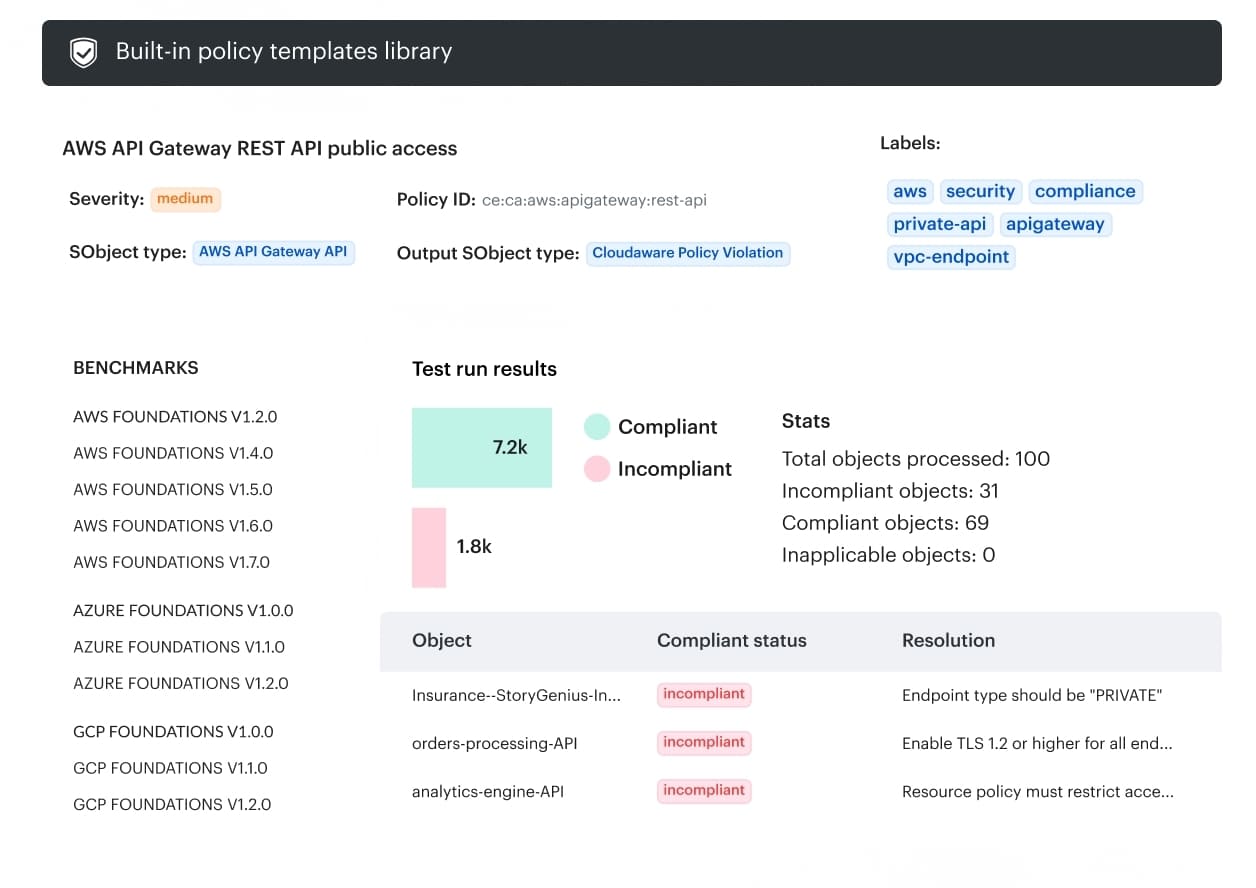
Cloudaware positions is a “digital change management” layer that gives you 100% change visibility across hybrid environments and logs who changed what and when.
Why Cloudaware fits DevOps teams
- Change visibility without manual tagging. You see every change across hybrid environments, plus attribution (who/when).
- Real-time change review. Useful when you’re moving fast and want to spot risky drift before it becomes an incident.
- Fewer “just-in-case” tickets. Cloudaware describes workflows that auto-approve low-risk changes and route only critical ones to approvers.
Why Cloudaware fits DevSecOps teams
- Go/no-go policies that block non-compliant promotions. Cloudaware ties change management to compliance/CSPM signals so you can stop non-conforming changes before they hit production.
- Integrations with security/compliance sources. The page calls out integrations such as Wiz, Palo Alto, and AWS Trusted Advisor to use violations data in release decisions.
- “Secure delivery” becomes enforceable. The point isn’t more alerts; it’s gating releases based on actual violations data and routing approvals where they matter.