


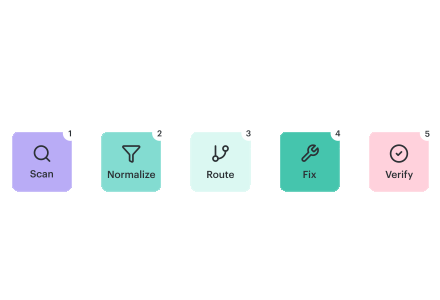
Based on what our Cloudaware DevOps engineers see in customer environments, vulnerability management breaks in predictable ways. The pain rarely starts with missing scanners. It starts when findings pile up across tools and environments, severity labels flatten everything into “critical,” and nobody can answer three basic questions: what should block a release, what should be scheduled, and who owns the fix.
The operating rule is simple: build a secure-by-design delivery process where service owners drive remediation, while security sets controls, keeps evidence, and runs lightweight enablement. That’s the DevSecOps move: fewer debates, more repeatable decisions.
In this article, you will learn:
- Where vulnerability scanning belongs in CI/CD
- How to reduce noise by normalizing and deduplicating findings
- A prioritization model that goes beyond scanner severity
- How to structure remediation work so it scales
- The metrics that prove the program is improving
What vulnerability management in DevSecOps is
Vulnerability management in DevSecOps is a repeatable operating process for turning scanner output into owned remediation work and release decisions, with post-deploy verification that the fix shipped. It defines who owns the fix, what scope is affected, what gets gated versus scheduled, and what evidence proves risk actually went down in production.
A workable model is boring and repeatable. Each cycle answers the same questions: who owns it, where it runs, whether it is exposed, whether there is an exploit signal, and what the smallest change is that removes the risk.
Scanner output turns into a fixable unit: rebuild a base image and roll it out, bump a dependency across repos, close a public policy, and add a guardrail. This is where security vulnerabilities become scoped work across affected components/workloads, exposure, blast radius, and deployment footprint.
“Done” means proof, not closure. Rescan the same target, confirm the new image digest or config state, and keep evidence tied to the change. If you can’t answer the owner/env/exposure/fix path, you don’t have vulnerability management yet. Next, we’ll build the workflow that makes those answers automatic.
Read also: What Is DevSecOps? Definition, Security, and Methodology
The lifecycle that works for security and product teams
If you want a lifecycle that doesn’t collapse after the first “critical spike,” think of it as a feedback loop that runs at the same cadence as your delivery decisions.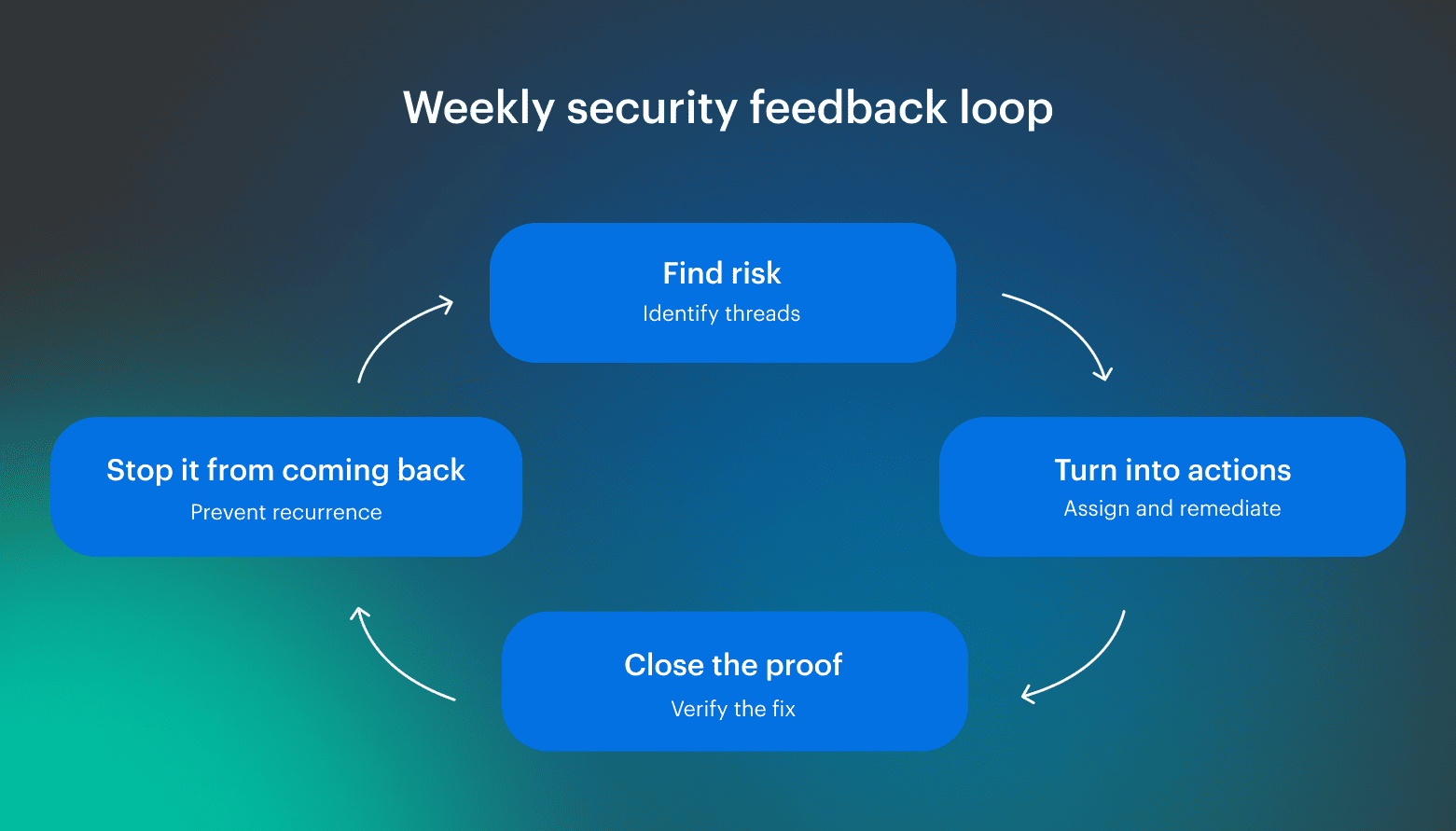 Sounds obvious, but most security programs stall because they only do the first step, then wonder why the same problems keep reappearing. The whole point is to make this a repeatable process that survives new tools, new teams, and faster release cadence.
The most underrated stage is observability. It’s where raw scanner output gets normalized and deduplicated, so teams stop reacting to duplicates and noise. Then the remaining signal becomes operable: trends, SLOs, and risk bands tied to owners and scope.
This is also where vulnerability identification stops being “here’s a list of CVEs” and becomes “here are the few fixable units that reduce exposure.” Each unit comes with clear ownership, scope, and a verification step attached.
And this can’t live in a separate portal. The signals have to show up where the work happens:
- PR checks that fail with a clear fix path
- IDE feedback before code merges
- Tickets that represent one fixable unit instead of 200 duplicates
Vulnerability management stays connected to delivery decisions, and managing vulnerabilities becomes boring and scalable, rather than a quarterly fire drill.
Read also: Inside the DevSecOps Lifecycle - Decisions, Gates, and Evidence
Step 0. Define scope and ownership before you touch tools
Do Step 0 before you debate severity. If you can’t answer “what service is this, who owns it, and where does it run,” triage becomes a weekly debate instead of a process.
In practice, this is where most teams lose time: findings pile up, routing breaks, and the backlog becomes a shared problem that nobody can fix because nobody is accountable for the unit of work.
Your minimum asset/service card should be small but sufficient to drive decisions:
- Owner (service owner or on-call group)
- Environment boundary (dev/stage/prod)
- Exposure signal (internet-facing, privileged path, internal-only)
- Data sensitivity and service criticality
- Deployment scope (accounts/regions, cluster/namespace)
- Repo and artifact mapping (repo, registry, IaC path)
- Fixable unit (smallest change that removes the risk)
At this point, tools transition from serving as "sources of truth" to becoming signal providers. The card is what lets you dedupe, group, and route consistently, and it prevents recurring issues from turning into spreadsheet triage.
Step 1. Route where vulnerabilities come from across CI/CD
Vulnerabilities enter through the artifacts you build and the runtime state that decides what is reachable. CI/CD catches risk early at build time. Runtime catches what changes after deployment, like permission drift and newly exposed endpoints.
Build a coverage map with two lanes: prevent what you can before shipping, and monitor what can still break you after shipping.
CI/CD scans that prevent risky code from shipping
If you want CI/CD to catch real risk without turning every pull request into a committee meeting, treat it like a coverage map. Run security scans where a change becomes a deployable artifact: repos, dependencies/SBOM, IaC, container images, and secrets.
Start with repo changes and dependencies. SAST flags patterns you introduce. SCA flags what you inherit. SBOM matters because dependency risk updates daily, and new CVEs will catch up to shipped components. IaC and secrets belong in the same lane for the same reason: to catch exposure and credential leaks before they merge.
For containers, treat the image as a bill of materials. Run vulnerability scanning on every build, then group results by base image and rollout scope. Otherwise, one vulnerable layer turns into hundreds of duplicates.
Runtime cloud security layers you should monitor
Runtime is where exposure and permissions become real: misconfigurations, identity drift, and endpoints that are reachable in production even if nobody changed a repo. A service can ship clean and still be risky if an IAM role is too wide, a bucket policy is public, or a security group rule opens the wrong port.
Kubernetes adds one practical rule: version gaps create findings that collapse into a single fix, so upgrades are remediation work. What you generally avoid blocking releases on is low-to-medium items in dev, anything not exposed, or anything without an exploit signal. Route those under an SLA, and reserve hard gates for reachable, urgent cases.
Step 2. Make vulnerability findings actionable
If you want vulnerability findings to turn into fixes instead of weekly arguments, normalize and compress them before they hit a backlog.
Start with CVE/CWE normalization, consistent component IDs, and one rule that prevents tool sprawl: when the same vuln shows up in three tools, it stays one work item. Treating every source as separate work inflates noise and burns time on dedupe instead of remediation.
A quick normalization and dedupe pass: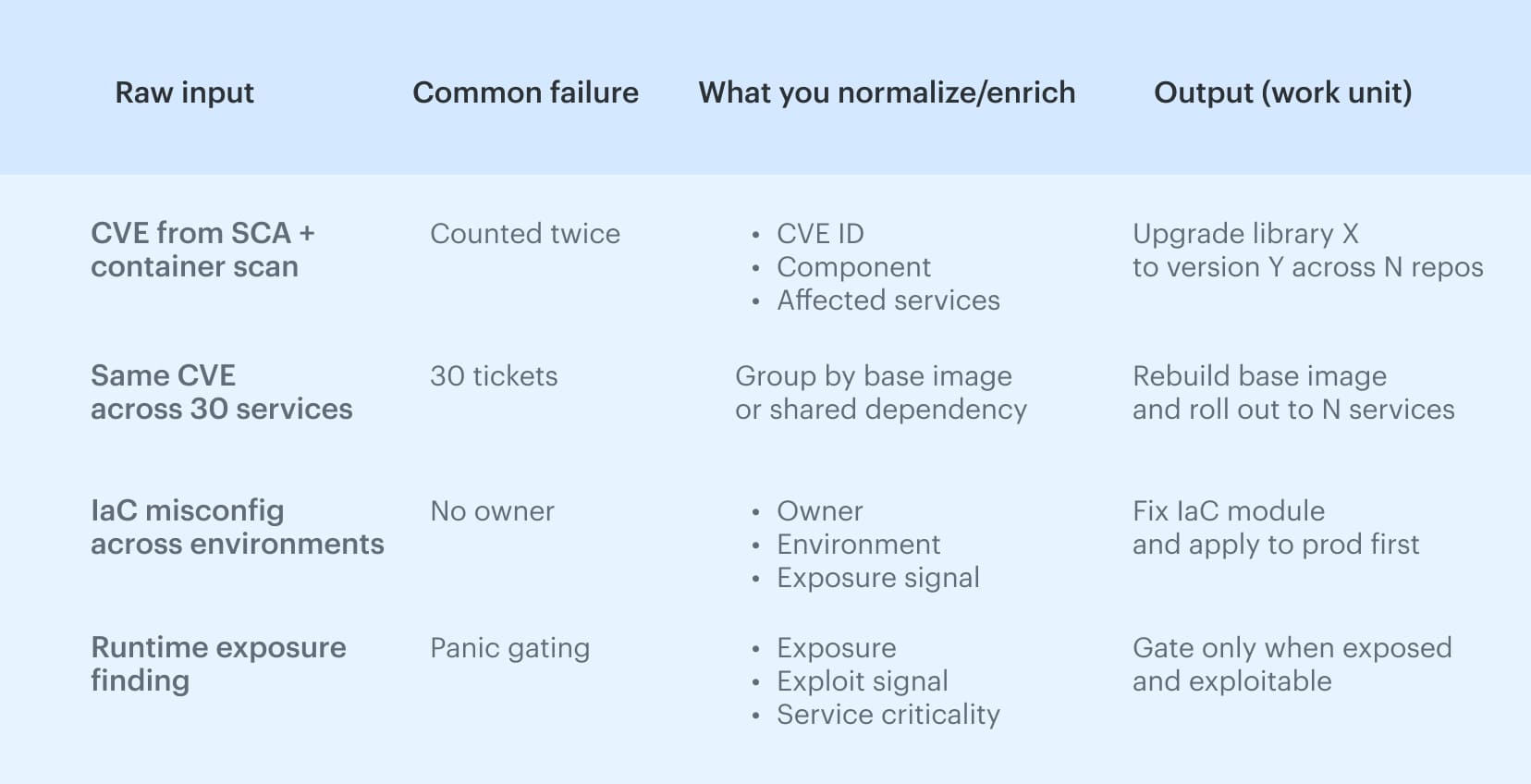 Next, separate the instance count from the unique vulnerability. A single CVE can appear 200 times across images, repos, and accounts, while the fix is one rebuild or one version bump.
Leadership also needs a single view of risk by product and owner, as they will not monitor eight dashboards, and the signal must reach where work occurs. Otherwise, triage becomes a separate ceremony that never scales.
Step 3. Prioritize and route work with a model teams can defend
If you want prioritization that survives audits and doesn’t turn into “who shouts loudest,” you need a scoring rule that uses context, not vibes. Here’s the model we’ve seen work: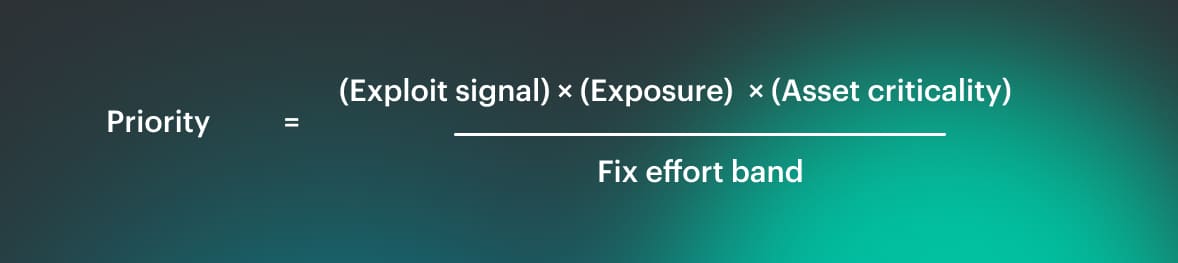 Exploit signal is KEV/EPSS/PoC, exposure is internet-facing or a privileged path, criticality is prod/PII/payments, and effort is the difference between a config tweak and a refactor. This is security prioritization you can explain in one minute, and it keeps vulnerability triage consistent.
CVSS ranges are useful metadata, but CVSS does not know reachability or where the component actually runs. A “high” CVE in a dev-only base image can be lower priority than a “medium” CVE in an internet-facing auth service in prod, because the second one is reachable and exposed.
You’ll also see teams try to “math it” with CVSS plus device count and patch ease, but the common gap (called out in the field) is missing asset criticality and exploitability, which is why severity-only ranking still feels arbitrary.
Once you’ve got the score, routing has to be boring: one ticket per fixable unit, assigned by service owner and environment boundary, beats 200 tickets for 200 instances. It turns issues into work you can finish, keeps the process measurable, and lets teams use tools for execution, not debate.
Step 4. Verify fixes and prevent regressions in cloud environments
Fixing the finding is the easy part. Proving the fix shipped and stayed shipped is where security programs either become credible or turn into ‘we think it’s better now.’
After merge and after deploy, rescan the same target (asset, image, or config), confirm the finding is gone, and keep the evidence. Without that loop, you don’t have vulnerability remediation, you have best-effort cleanup.
A “done means done” verification packet can be lightweight:
- What changed (commit/PR, policy diff, or config change)
- What shipped (artifact version or image digest)
- Where it shipped (environment and target resource)
- Proof it’s clean (post-deploy rescan result)
- Date and owner (who signed off, and when)
Drift is the quiet killer here. Config and policy fixes can slide after the ticket is closed: a security group rule gets widened, a role regains wildcard permissions, or a setting gets reverted during an incident.
In cloud environments, that is normal, which is why cloud security verification cannot be a one-time checkbox. If you are not watching for drift, “fixed” usually means “temporarily less bad.”
Containers add one more gotcha: shared base images create blast radius. You rebuild once, but a vulnerable image can still get redeployed from the registry if nothing blocks it, and the same problem returns on the next rollout.
Treat this as a process requirement: rescan and prove the new artifact shipped, watch drift on the controls you changed, and block known-bad images from promotion. That is how you earn trust, and it is how fixes in code stop being temporary.
DevSecOps best practices that keep releases safe
DevSecOps works when the rules stay consistent under pressure. DevSecOps best practices are simple: define what blocks a release, route everything else as owned work, and verify fixes in the environment that actually runs. Keep it boring, keep it repeatable, and keep decisions explainable.
What consistently holds up:
- Gate only the small set of reachable, urgent cases (exposed + exploitable + production).
- Use one ticket per fixable unit, so a base image issue becomes one rollout plan, not 200 tasks.
- Make exceptions expire by default, with an owner and compensating control.
- Treat verification as part of “done” (post-deploy rescan + artifact/config proof).
- Push signals into PR checks and tickets, so engineers don’t context-switch between dashboards and tools.
- Review rules weekly and tune them based on recurrence, not on opinions.
How to measure whether the practices are working
The fastest way to tell whether your DevSecOps best practices are real is to track a small scoreboard that ties security outcomes to delivery reality per service and environment. We break this down with formulas and “good looks like” examples in DevSecOps metrics:
| Metric | What it proves for vulnerability management | What you do when it’s bad |
|---|---|---|
| Vulnerability mean time to remediate (MTTR) | How fast risk actually leaves production (not just Jira) | Collapse work into fixable units, enforce SLAs by tier, unblock owners, verify post-deploy |
| Vulnerability mean time to detect (MTTD) | How long exposure sits unnoticed, and where you’re blind | Fix coverage gaps, improve onboarding and ownership routing, tighten scan cadence on high-risk paths |
| Time to patch (critical) | Whether you can execute “patch now” flows for known fixes | Define an emergency patch lane, pre-approve playbooks, track compensating controls while patch is pending |
| % exposed criticals older than X days | Whether urgent, reachable risk is aging in production | Add hard gates for exposed+exploitable, escalate overdue items, prioritize blast-radius fixes (base image, shared deps) |
| Recurrence rate (by issue class) | Whether the system learns or keeps re-creating the same problems | Add guardrails, update templates/base images, tighten verification, target focused enablement based on repeats |
Treat this as a DevSecOps program with explicit gates, routing rules, and verification. Otherwise, metrics turn into passive reporting instead of a control loop. If the scoreboard isn’t improving, don’t argue about severity. Tighten scope, collapse work into fixable units, and make “done” require post-deploy proof.
How Cloudaware supports DevSecOps best practices
When you run this as a DevSecOps program, the hardest part is keeping context consistent across tools: one view of ownership, deployment scope, approvals, drift, and audit evidence, without turning it into another dashboard war.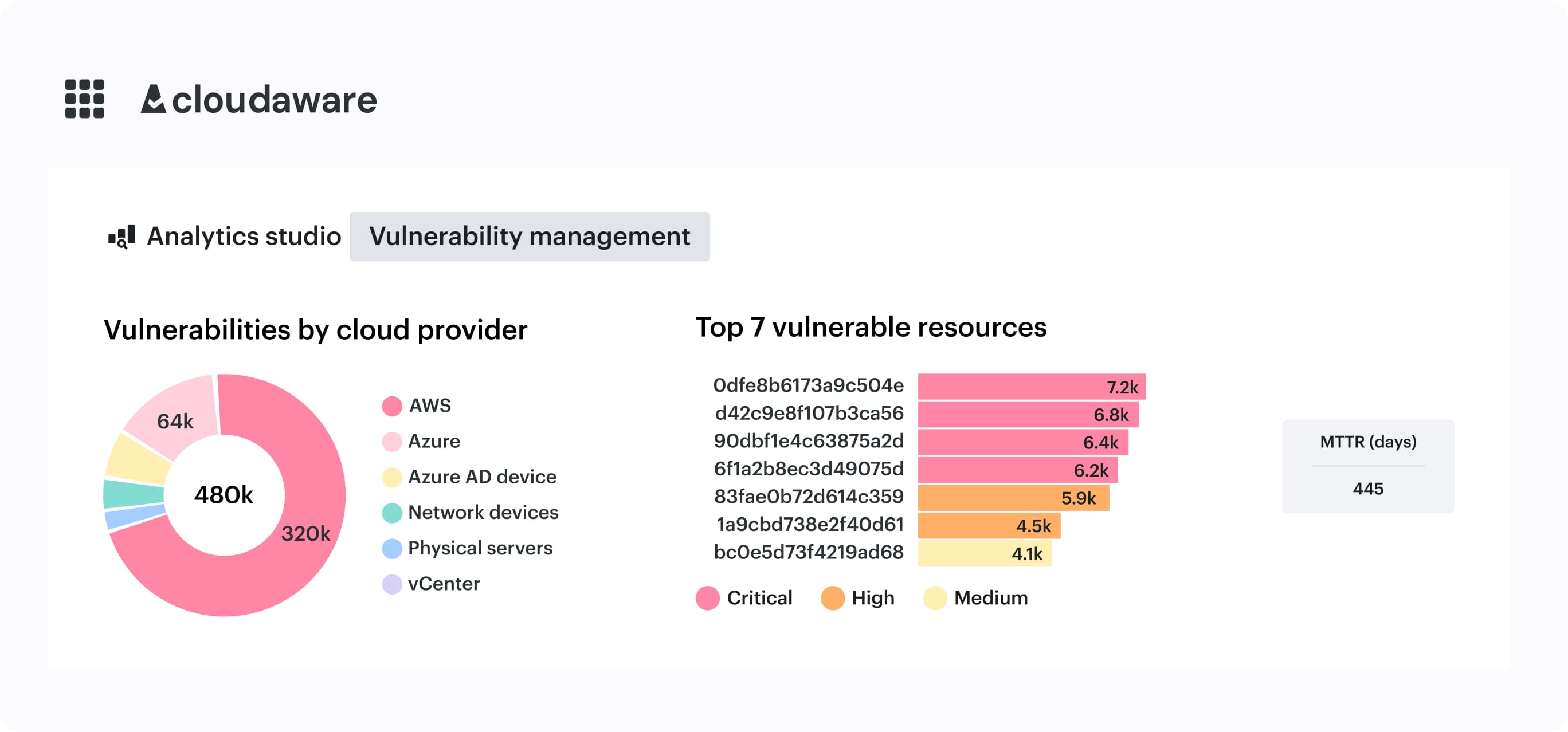 Cloudaware is built around that “context + verification” layer: it uses CMDB context to group vulnerabilities into actionable tasks, and it supports risk-based prioritization beyond technical severity.
What this enables in practice:
- Group vulnerabilities by fixable unit using CMDB context, so “30 services” becomes “1 base image rollout task.”
- On-demand scans via a “Scan Request” flow when you need confirmation before gating or after remediation.
- Host-based scans for assets that won’t be covered by external scanning.
- Docker image scanning across accounts to keep container exposure measurable.
- Approvals + drift checks + audit trails tied to CMDB context, so “done” includes verification and stays verifiable later.
- Integrations with existing CI/CD and work systems so signals land where work happens.