


So you’ve got AWS running your backend, Azure handling compliance, and some rogue GCP projects burning compute. You’re here because managing that chaos takes more than dashboards – it takes real multi cloud management platforms that actually talk to each other.
But the market? A mess. Overlapping promises, vague pricing, and every vendor claiming “single pane of glass.” I spent 5 days sorting through 30+ tools – ran trials, booked demos, read the docs nobody wants to read. Narrowed it to the top 12 that actually deliver.
Backed it up with interviews from DevOps leads, FinOps managers, and our own Cloudaware customers. Pulled fresh reviews from G2, Reddit, and even those painful Quora threads.
Here’s what we’ll answer:
- Which tool shows real-time infra across clouds?
- What’s missing from every cloud monitoring tools list?
- Which vendors break budgets at scale?
- Who actually handles tagging failures and hybrid drift?
Let’s break it down 👇
TLDR: The best multi cloud management tools
- Cloudaware is best for deep CMDB-driven visibility and policy automation across complex multi-cloud environments.
- ServiceNow is best for enterprises needing cloud operations tightly integrated with ITSM workflows and governance.
- Zluri is best for managing SaaS sprawl alongside cloud assets, with strong app discovery and spend control.
- SolarWinds is best for hybrid infrastructure monitoring where traditional networks meet public cloud workloads.
- Asset Panda is best for asset lifecycle tracking across clouds when physical and virtual inventories must align.
- Ivanti is best for unified endpoint and cloud resource management in highly distributed enterprise environments.
- Dynatrace is best for performance-driven monitoring with AI-powered insights across application and cloud layers.
- CloudZero is best for cost-per-feature tracking and unit economics in product-led cloud teams.
- CloudHealth is best for policy-based multi-cloud cost governance and executive-level reporting.
- Flexera is best for global enterprises managing hybrid cloud, on-prem, and SaaS cost optimization at scale.
- Cloudify is best for automating orchestration across multi-cloud stacks with infrastructure-as-code workflows.
- Device42 is best for real-time discovery and dependency mapping of hybrid cloud and data center assets.
Methodology: How we tested these multi cloud management tools
Here’s how we did it – and yeah, it took five full days, three Slack threads, and one lost weekend.
We started with a raw pool of 30+ multi cloud management platforms. Some we’d already used, some we discovered through client pain points, and some – let’s be honest – we pulled from every cloud monitoring tools list we could find. Then came the actual work.
We trialed everything that offered a login. Spun up test environments. Deployed across AWS, Azure, and GCP to see how each platform handled real-world sprawl. Booked demos to watch how sales engineers presented their own blind spots. Some tools crashed at tagging. Others crushed forecasting.
Next, we read every review that wasn’t AI-generated – on G2, Capterra, TrustRadius, Reddit, Quora. We filtered for cloud-native teams, multi-cloud complexity, and hybrid edge cases.
Finally, we matched it against Gartner shortlists and industry RFPs to cut the fluff and keep what works. No reskinned dashboards. No empty buzzwords.
Cloudaware
Capterra: 4.5/5
Trial days: 30
Best for: enterprises and fast-scaling SaaS teams running hybrid/multi-cloud who want one CMDB “source of truth” to drive configuration visibility, compliance evidence, and FinOps workflows.
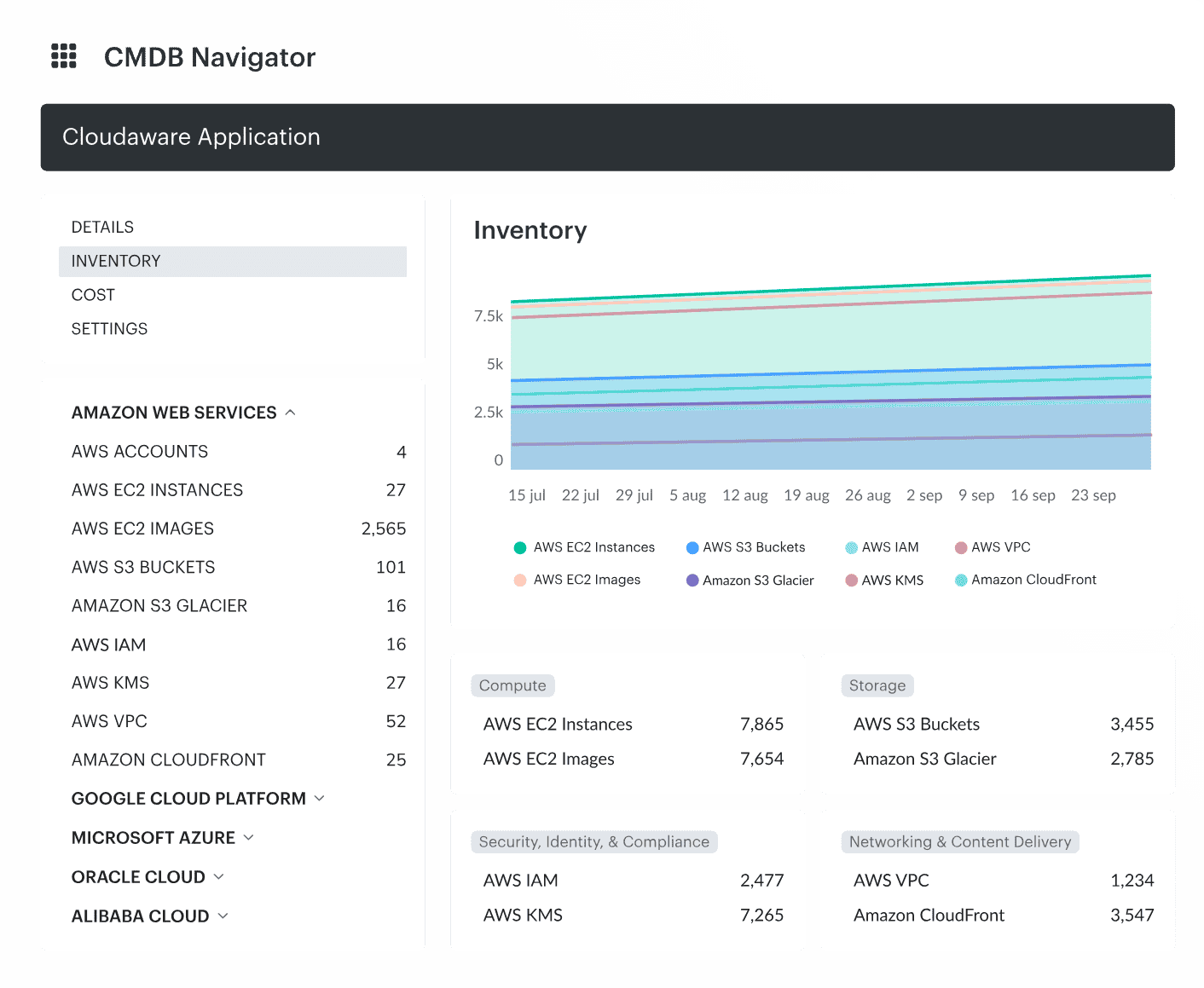
Image source.
Cloudaware is built for multi cloud management platforms where “AWS + Azure + GCP” is just the opening act. The minute you add Oracle Cloud or Alibaba Cloud for a region-specific workload, keep VMware on-prem humming, and sprinkle in SaaS that nobody wants to admit is production-critical… your inventory turns into folklore.
Cloudaware’s whole thing is killing that folklore with auto-discovery and normalization into a real-time CMDB. Read-only permissions, guided setup, and you’re pulling structured asset data fast—without begging every app team to “please update the spreadsheet.”
What DevOps managers usually care about here isn’t “a CMDB.” It’s whether the CMDB stays alive when accounts multiply and teams move fast. Cloudaware leans on collectors/plugins to enrich cloud inventory with context from tools you already run (think New Relic/config tooling signals). So a resource isn’t just “i-0abc123”—it’s tied back to environment, ownership, and operational metadata you can actually use in workflows.
And if you need receipts, not vibes: their published case studies are pretty blunt about outcomes. Caterpillar reports 100% cloud + on-prem asset visibility, a 42% reduction in compliance violations, and $627K annual cloud cost savings—and that’s inside the first three months. Boeing’s case study talks about multi-cloud (and AI) cost clarity with $958,250/year savings.
Features
- Auto-discover + normalize inventory across AWS, Azure, GCP, VMware, and SaaS so your CMDB stays current even when resources spin up/down all day.
- Multi-cloud, multi-regional search: find instances, load balancers, security groups, etc. across hundreds of accounts and regions from one query.
- “Negative discovery” / true visibility: it cross-references multiple systems to surface what’s missing (not monitored, not backed up, not connected to IDS), which is exactly where audit pain and incident surprises come from.
- Extend the schema without a rebuild: add custom fields, build formula/derived fields, use encrypted fields, and roll up values with summary fields.
- Real-time collectors + plugins to enrich cloud objects with data from systems like New Relic, Ansible, Puppet, Chef (and more), so the CMDB record carries operational context—not just cloud-provider metadata.
- Breeze Agent for OS-level facts (users, services, mount points, etc.) streamed into the CMDB when you need host-level truth, not just control-plane truth.
- Build your own collectors via APIs if you’ve got a “weird but critical” internal source (everyone does).
- Cloudaware supports discovery and surfaces relationships as “related items” so you can reason about impact before you touch prod.
- Tag management across providers (AWS/Azure/VMware/GCP called out in docs) so you can standardize ownership, environment, cost center, and app tags at scale.
- List views, reports, exports, layouts, workflows, and more—so the CMDB becomes an operating system, not a museum.
- Out-of-the-box integrations list includes Oracle Cloud, Alibaba, Okta, vCenter, Terraform, GitHub, PagerDuty, ServiceNow, Jira, and more.
On top of that, you’ve got specialized modules dialed in for enterprise-grade ops:
- FinOps to slice and dice cloud spend across apps, teams, and time.
- Vulnerability Management and CSPM to keep your assets locked down without slowing you down.
- And if things escalate? You’ve got SIEM, IT Compliance, and Intrusion Detection ready to deploy — no scrambling for new tools mid-incident.
Pricing
Cloudaware’s CMDB pricing is server-based, starting at 50 servers and 1 user. For example, for 100 servers, the cost is about $400/month. Want to check how much it would cost for your infrastructure? There’s an easy-to-use calculator on the pricing page.
The platform offers a 30-day free trial to explore its capabilities.
Pros & Cons
✅ Unified multi-cloud management: “One of the standout features of Cloudaware is its ability to handle multiple cloud providers… enabling unified management across different environments.” g2.com
✅ Centralized visibility & control: “It provides a unified view of all cloud resources, which allows for better visibility and control over the entire cloud environment… including automated tasks, inventory management, cost optimization, compliance management, and security.” g2.com
✅ Comprehensive cloud platform: “Takes care of everything right from CMDB, cost management, change management, threat center, backup & replication, monitoring and usage analytics.” g2.com
⚠️ Steep learning curve: “Some users may still find the initial learning curve to be steep… [Cloudaware] offers extensive functionalities, and users may need time to become fully comfortable with all the features.” g2.com
⚠️ Overwhelming UI at times: “Cloudaware user interface can be difficult to navigate if you are a newbie.” g2.com
ServiceNow
Capterra: 4.5/5
Trial days: 30
Best for: enterprise IT service management (ITSM) and automation, providing streamlined help-desk workflows and process orchestration across on-premises and cloud infrastructure.
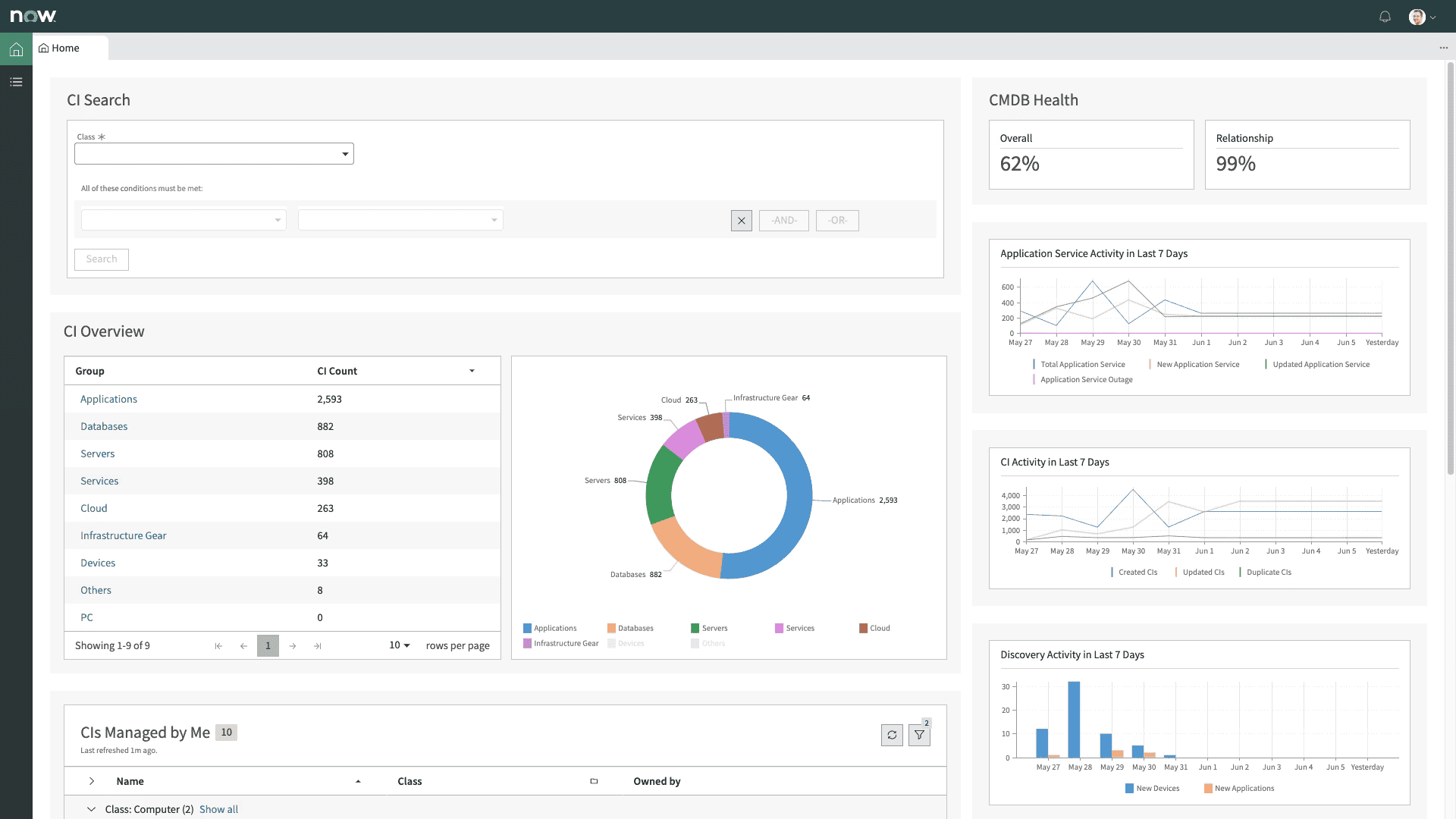
Image source.
ServiceNow shows up when multi-cloud management gets messy and process control becomes critical. Think Deloitte, NASA, or GE – enterprises routing provisioning, access, and governance through automated workflows that cover on-prem, AWS, Azure, and beyond. It’s listed in the ServiceNow Store and AWS Marketplace, with deep ITSM and ITOM integrations.
What makes it click? You define the business logic once – ServiceNow keeps every new cloud resource compliant, tagged, and visible across teams. That means no more shadow infra, no more post-hoc governance cleanups.
Gartner regularly ranks it high for enterprise management. If your org lives in tickets, approvals, and change controls, this platform earns its place.
Features
- Automated Discovery. Automatically discovers assets and configurations.
- Dependency Mapping. Visualizes relationships between configurations and services.
- Incident & Change Management. Integrates seamlessly with ITSM processes.
- Cloud and On-premises Support. Works across both environments.
- Real-time Data. Provides up-to-date and accurate configuration information.
- Customizable Dashboards. Easily create views that work for your team.
- Security. Advanced encryption and compliance features for data protection.
Pricing
ServiceNow doesn’t do flat pricing. You’re looking at $100–$200 per user/month just for ITSM Pro. Once you add cloud management modules – governance, orchestration, integrations – expect monthly totals starting around $5K and climbing fast with scale.
Licensing flexes by role type, active workflows, and how many services or environments you're automating across providers. No public trial – access starts with a custom demo and a sales cycle.
Compared to other multi cloud management vendors, this one’s designed for process-heavy orgs tracking compliance, provisioning, and costs in one control layer. Built for enterprise IT, not startups hacking together scripts.
Pros & Cons
✅ Integration with major cloud platforms: “I like the ServiceNow platform for ITSM… The most loving part is the integration with AWS, Microsoft.” capterra.com
✅ Real-time asset discovery (CMDB): “The real-time asset discovery and mapping features are very helpful for keeping our CMDB updated and in sync with the infra.” g2.com
✅ All-in-one IT management platform: “*With one software I can use all the features… for example Asset Management, document management… incident management… using one software only I can manage all of [my] work, so that’s pretty much useful and handy.*” g2.com
⚠️ High cost for full use: “One thing that I dislike about ServiceNow CMDB is that it’s very pricey… very much expensive.” g2.com
⚠️ Complex implementation (Discovery): “I don’t like how Discovery is complicated to implement… The initial setup process is very complicated, which makes it challenging to get started smoothly.” g2.com
⚠️ Clunky UI & learning curve: “UI can feel clunky, steep learning curve, and administrator setup requires a deep platform knowledge.” capterra.com
Read also: 13 CMDB tools - Choose the best configuration management database
Zluri
Capterra: 4.9/5
Trial days: 14
Best for: SaaS management – discovery, governance, and cost-optimization of cloud-based applications – giving IT full visibility and control of the SaaS stack.
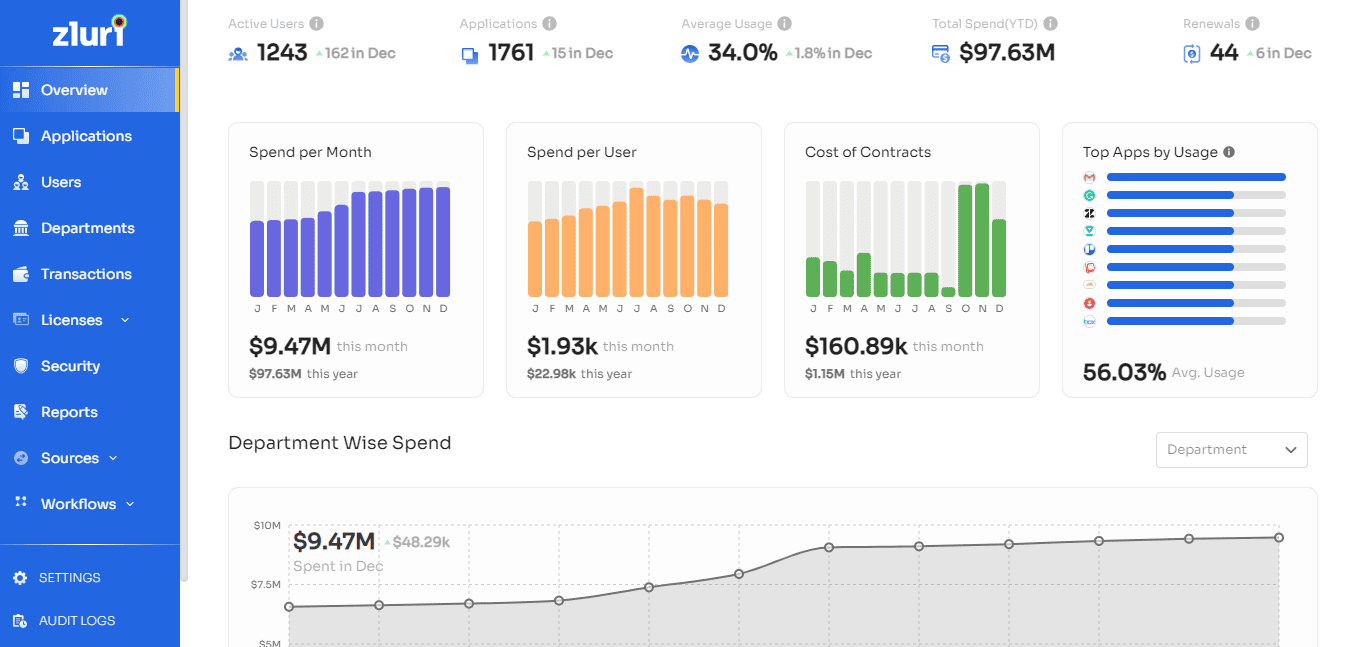
Zluri tackles a blind spot most multi-cloud management platforms miss – SaaS sprawl. Companies like Whatfix, MoEngage, and Smartstaff use it to audit, control, and govern hundreds of SaaS apps spread across departments and cloud identities. It’s live on the G2 Marketplace and integrates cleanly with Okta, Google Workspace, AWS, and more.
What sets it apart? A clean UI, fast onboarding, and discovery that doesn’t rely on perfect data. IT sees usage. Finance sees cost. No more guessing who’s using what.
Among governance-first tools, Zluri owns the SaaS lane without overcomplicating the ops stack. Bonus: G2 Grid Leader badge in SaaS Ops.
Multi cloud management features
- Automated app discovery across hybrid and cloud systems.
- Usage insights tied to actual business value.
- Role-based access controls and approval flows.
- App rationalization + renewal workflows.
- Alerts for risky or shadow tools.
- Unified view across identities, spend, and SaaS licenses.
Pricing
Zluri prices around $4–$7 per user/month, with minimum contracts landing near $500/month for smaller orgs. Annual billing is standard. Trial runs 14 days – plenty to map your SaaS stack and surface hidden costs.
You pay based on number of users and connected services, not raw usage volume. Plans flex depending on how deep you go with automation, approvals, and identity management across environments.
For teams managing spend across dozens of SaaS providers, Zluri fits right between spreadsheets and bloated cloud management platforms. Clean, API-driven, and tuned for renewal season.
Pros & Cons
✅ Comprehensive SaaS discovery: "ability to automatically discover and manage all SaaS applications ... deep visibility into usage, costs, compliance, helping optimize spend..." (aws.amazon.com)
✅ Intuitive interface: "ease of onboarding new apps without any manual intervention. Zluri made it very easy to use, even my coworkers picked it up instantly." (aws.amazon.com)
✅ Automated user provisioning: "It allows us to track and automate onboarding and leaving of employees for new cloud-based app accesses." (aws.amazon.com)
⚠️ Complex integration setup: "initial setup and integration with multiple tools can be time-consuming." (aws.amazon.com)
⚠️ Slow analytics updates: "some analytics dashboards take time to update depending on the usage at first." (aws.amazon.com)
Read also: Top 13 Cloud Monitoring Tools Review: Pros/Cons, Features & Price
SolarWinds
G2 rating: 4.3/5
Trial days: 30
Best for: hybrid infrastructure and cloud monitoring, providing full-stack observability into networks, servers, applications and multi-cloud resources.
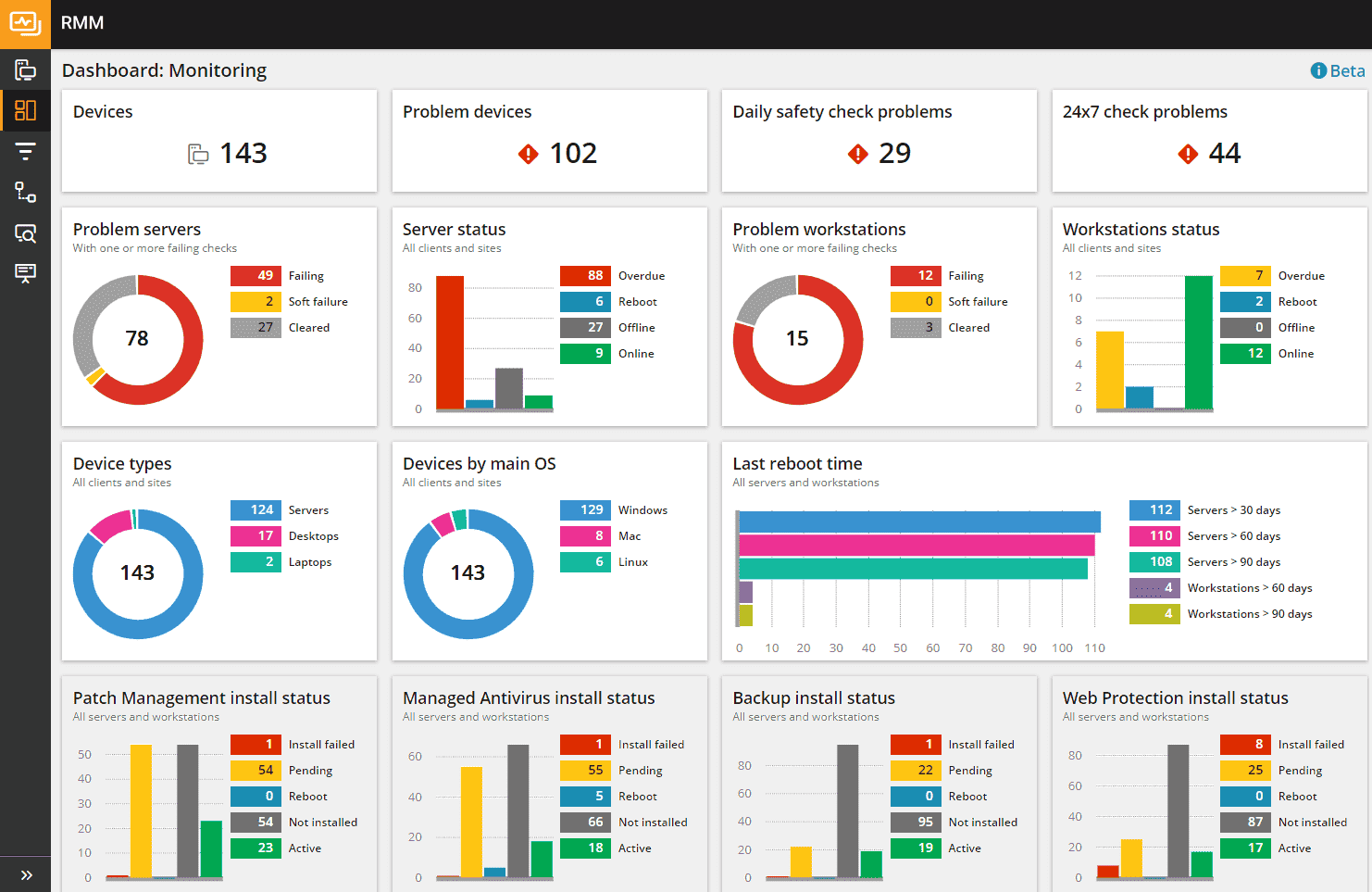
SolarWinds isn’t a CMDB-style “inventory brain.” It’s the observability layer a lot of enterprise teams plug into their multi cloud management platforms stack when the real goal is simple: keep services up, keep latency boring, and spot the weird stuff before a customer writes the first angry ticket.
They run it two ways depending on your reality:
- SolarWinds Observability SaaS (quick start, cloud-delivered)
- SolarWinds Observability Self-Hosted (for tighter control / self-hosted in your environment)
Features
- Unified observability dashboard across hybrid + cloud-native environments (metrics/traces/logs/UX, depending on edition)
- Automated discovery for network devices and infrastructure (less manual “what’s even in this subnet?” work)
- Hybrid cloud monitoring coverage for AWS/Azure/Google Cloud (dashboards + drilldowns for cloud services)
- Alerting + correlation to reduce noise and speed up “what broke first?” triage.
- Root-cause workflows and troubleshooting tooling that’s very network/infra-ops friendly (this is where SolarWinds has lived for years).
- Extensibility: public API + out-of-the-box integrations (so it fits into existing ops pipelines)
Pricing
SolarWinds pricing isn’t “$1,495/year flat.” They publish node/host-based pricing for Self-Hosted and device/host-based pricing for SaaS:
- Observability Self-Hosted: starts at $7.42 per node, per month (billed annually).
- Observability SaaS: starts at $12 per active network device or host (with different ratios for cloud services and containers).
Also worth calling out (because enterprise buyers care): SolarWinds explicitly positions Self-Hosted licensing as node-based—you pay for the entities you monitor, not seats.
Pros & Cons
✅ Integrated asset tracking: “SolarWinds replaces our current ticket system and adds an asset management tracking component to help track the asset… It also adds integration for remote management of systems within the ITSM, which is very helpful.” g2.com
✅ Highly customizable automation: “Highly customizable to whatever automations, rules, reminders, etc. that your team needs to run their ticketing and asset management efficiently.” g2.com
✅ Unified ticketing & inventory: “SolarWinds Service Desk is managing our ticketing system and asset inventory. This helps us keep users, their hardware, and their issues under one umbrella.” g2.com
⚠️ Lacks some integrations & support: “There is no third-party integration from what I’ve seen. Customer support is lacking… I get sent knowledge bases instead of being able to talk to an actual person.” g2.comg2.com
⚠️ Limited automation features: “Some of the automation options are limited… Built-in remote support would also be a useful addition… the Slack integration could be more robust… the mobile app… feels pretty limited.” g2.com
⚠️ Sluggish interface at times: “The ITSM portal takes some time to load the entire page, which sometimes feels sluggish and affects user experience.” g2.com
Asset Panda
Capterra: 4.6/5
Trial days: 14
Best for: tracking and managing physical IT assets (devices, equipment, inventory) via a cloud/mobile platform with customizable workflows and barcode support.
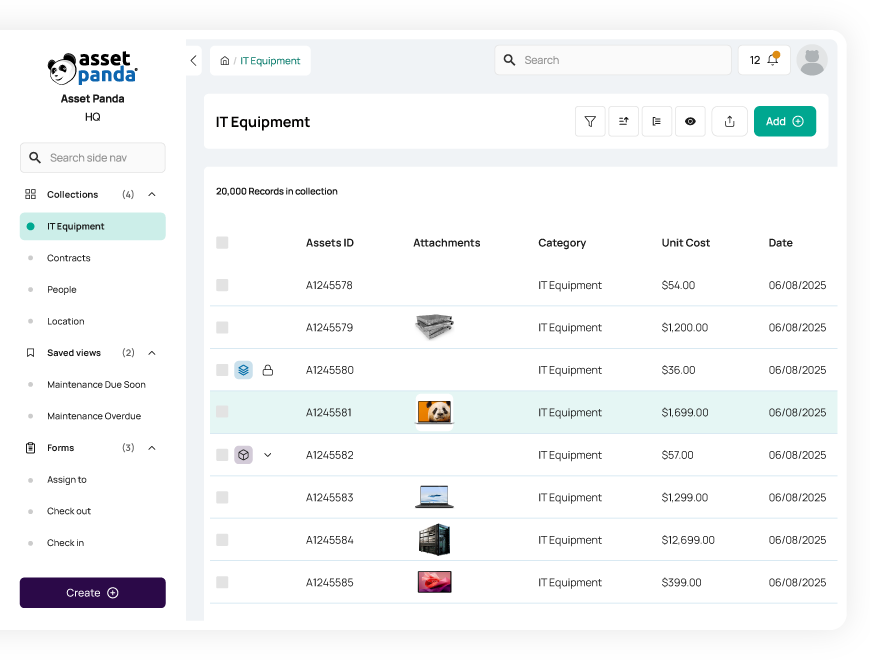
Asset Panda handles the asset mess that happens when cloud, SaaS, and on-prem collide. Companies like Shutterfly, UNT, and AutoZone lean on it to track every device, license, and config item – even across multiple cloud footprints. You’ll find it in the AWS Marketplace and mobile app stores, ready to run on your desktop or handheld.
What sets it apart? Deep configurability. You don’t just tag assets – you customize workflows, automate audits, and route approvals across finance, IT, and ops.
For orgs juggling devices across multi-cloud management stacks, Asset Panda keeps hardware and config data tied to business logic. Not just another tracker – actual management clarity.
Multi-cloud management features
- Custom workflows for asset lifecycle across cloud and on-prem.
- Barcode + mobile check-in/out from any device.
- Configurable reporting tied to audit + cost controls.
- Hardware + software license tracking across tools.
- Sync with Okta, Azure AD, and other AWS-connected systems.
- Dashboard visibility across hybrid + multi cloud management software environments.
Pricing
Asset Panda charges based on asset count, not seats or feature tiers. Plans start near $1,500/year for teams managing up to 500 assets and scale north of $5,000 as you expand across environments. You get 14 days to test-drive the platform – plenty of room to load data, trigger workflows, and tag across systems.
The quote flexes by how many services you plug in – think SSO, integrations, custom fields – and how far you automate. Ideal for hybrid IT shops juggling gear, licenses, and cloud management in parallel. Keeps your inventory traceable across multiple providers while holding down the hidden costs that creep in during growth.
Pros & Cons
✅ Flexible and customizable: “I liked how I could tailor the platform to fit exactly what our team needed, from custom fields to workflows.” capterra.com
✅ Simple asset tracking & reporting: “Asset Panda makes tracking company equipment and inventory simple and flexible with customizable fields and easy reporting.” capterra.com
✅ Mobile-friendly ease of use: “It’s simple to configure… the mobile app… makes it easy for people in the field to use.… The platform’s functions and triggers to automate tasks… are quite handy.” g2.com
⚠️ Pricing and learning curve: “_…the pricing and learning curve might be drawbacks for some_” capterra.com
⚠️ Clunky UI at times: “The interface can feel a little clunky at times.” capterra.com
⚠️ Missing some features: “Some of the basic functions… were missing and I couldn’t find a way to customize it as I meant to.” capterra.com
Read also: The Best Configuration Management Software - Top 15 Tools Review
Ivanti
G2 rating: 4.2/5
Trial days: 30
Best for: unified endpoint management and security – giving IT teams complete visibility and automated healing for desktops, laptops, mobile, and IoT devices across the enterprise.
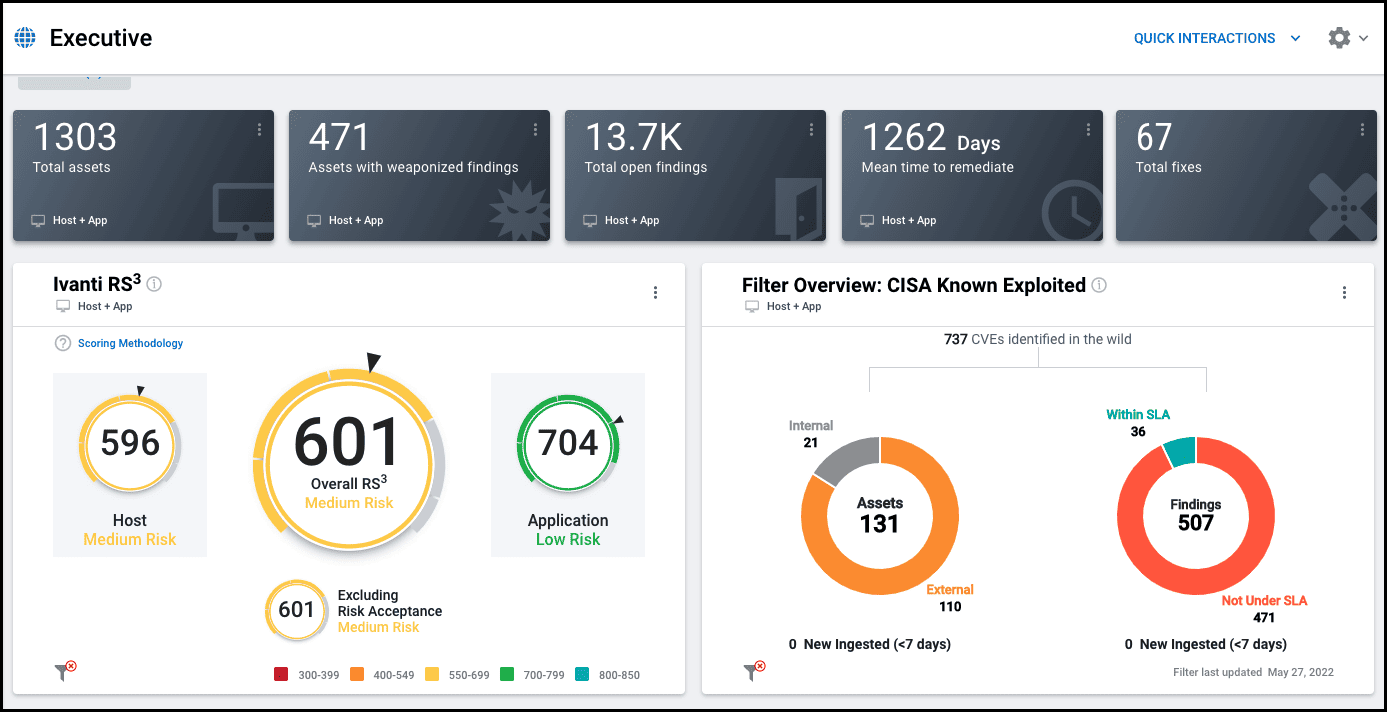
Ivanti steps in when your endpoints, cloud VMs, and SaaS logins need one brain. Big names like Deloitte and Citi use it to automate patching, asset tracking, and identity controls across complex multi-cloud environments. It’s built for scale – works across Windows, Mac, Linux, AWS, and more – and lives on Microsoft Azure Marketplace.
Its edge? Real-time visibility paired with automated remediation. The platform doesn’t just monitor assets – it fixes drift, closes gaps, and reduces manual tickets fast.
Among multi-cloud management tools, Ivanti’s strength is endpoint intelligence fused into cloud-native workflows. Think config + compliance + patch all in one motion.
Features
- Unified asset discovery across cloud and on-prem.
- Automated patching for all major OSes and VMs.
- Role-based access and identity management.
- Policy-driven remediation and self-healing.
- Real-time drift detection across multi cloud management zones.
- Custom workflows built into the management platform dashboard.
- Tight integration with ITSM tools and CMDBs.
- Predictive analytics tied to device usage and cost risk.
Pricing
Ivanti doesn’t publish pricing, but market benchmarks land around $75–$150 per device/year depending on modules. That ranges from $6,000 to $30,000+ annually for midsize environments. Quote shifts based on the number of endpoints, bundled services, and which cloud management features you activate – patching, discovery, risk scoring.
They offer a custom 30-day trial after a sales call – plenty of time to test drift controls across hybrid stacks and link alerts to remediation playbooks.
Among multi-cloud management suites, Ivanti’s model scales with infrastructure complexity – not just user count. Good fit for orgs juggling multiple providers with compliance and endpoint costs that can’t slip through the cracks.
Pros & Cons
✅ Comprehensive asset tracking: “The asset management inside includes everything you would want to know and track about your assets.” g2.com
✅ Highly customizable (with support): “With Ivanti the customizability of the products and support are some of the best in the business.” g2.com
✅ Easy and efficient asset management: “Asset Management has been by far the best one I’ve used in my 10+ years… Its design and functionality makes it so easy to use and administrate.” g2.com
⚠️ Requires expertise to customize: “You do have to have quite a bit of Ivanti back-end knowledge to customize it.” g2.com
⚠️ Not intuitive for non-IT staff: “If you delegate certain asset management tasks to not-so-familiar-with-IT people it may get a little difficult for them.” g2.com
⚠️ Slow performance issues: “Very slow, frequent session cut, require time to load.” g2.com
Dynatrace
Capterra: 4.5/5
Trial days: 15
Best for: AI-powered full-stack application performance monitoring and observability, providing deep insights into user experience and infrastructure across cloud and hybrid environments.
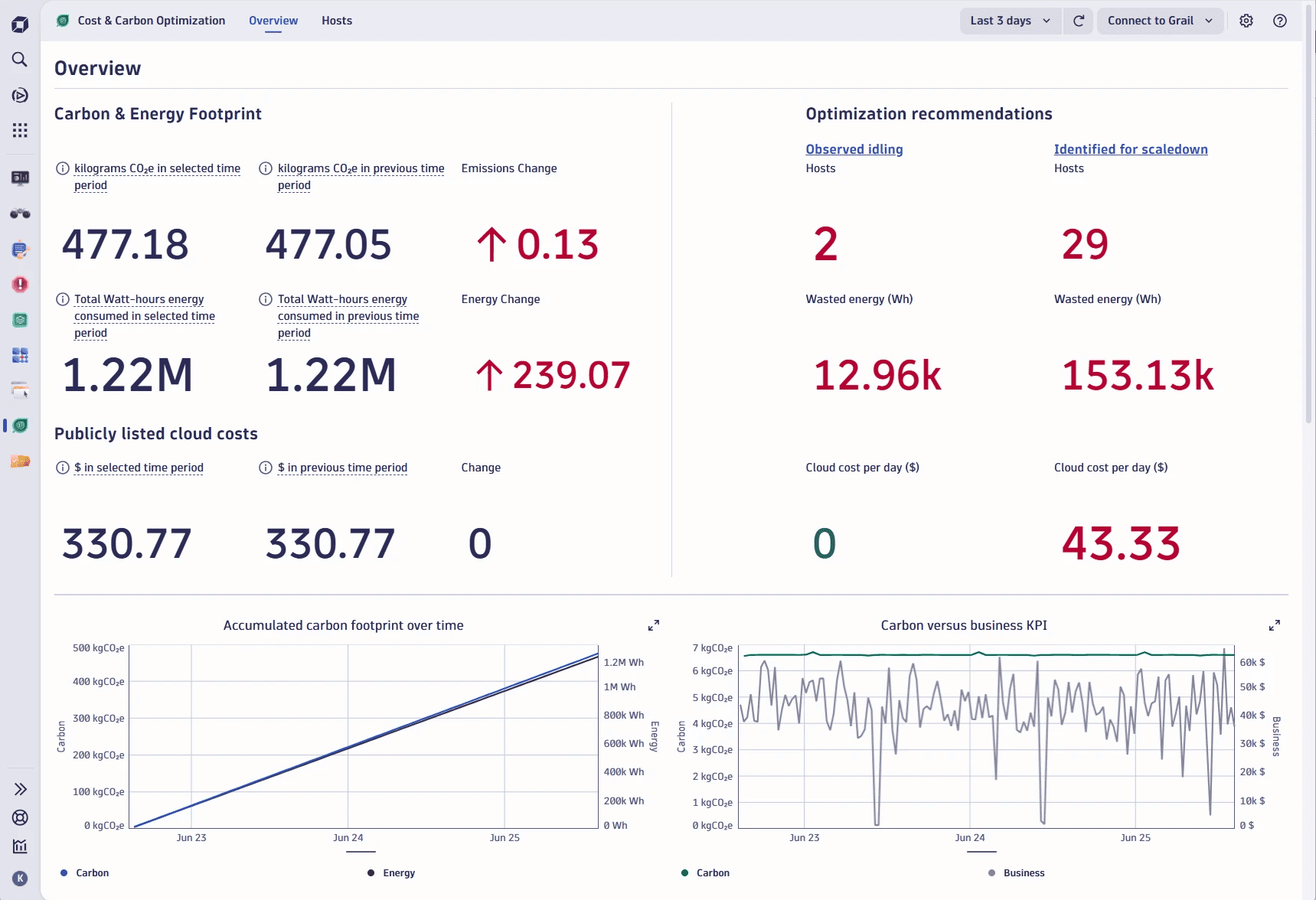
Image source.
Dynatrace doesn’t just monitor – it maps everything. Think real-time observability stitched across cloud, containers, legacy apps, and user sessions. FedEx, Kroger, and SAP run it to track performance and dependencies across multi-cloud management stacks. You’ll find it in AWS Marketplace, Azure Marketplace, and even Google Cloud integrations.
It leans into AI for root cause analysis and anomaly detection before alerts even fire. The beauty? One agent. One platform. Full-stack clarity across hybrid and public cloud.
Analysts keep it ranked among the best multi-cloud management tools 2025 for a reason – it scales deep without drowning teams in dashboards.
Features
- Automatic discovery of apps and infra across cloud zones.
- Smart alerts powered by real-time dependency models.
- Unified dashboards for metrics, logs, traces, and events.
- Native observability for AWS, Azure, GCP, Kubernetes.
- Self-healing automation tied to performance baselines.
- Built-in cloud management cost insight for FinOps-driven teams.
- API-first integration with CI/CD tools and ticketing platforms.
Pricing
Dynatrace starts at $21/month per 8 GB host and climbs fast depending on how much telemetry your environments generate. Pricing splits by data type: $0.00125/event, $0.004/metric datapoint, $0.001/trace span. Infra, apps, logs, and security all priced separately.
You get 15 days free to spin up agents, link providers, and map full-stack performance in real time.
Spend is driven by data volume and how many services you monitor – not user count. Among multi cloud management vendors, Dynatrace is for teams who want deep observability tied to automated management, not just pretty dashboards. FinOps teams should keep eyes on event volume – costs scale fast.
Pros & Cons
✅ Automatic dependency discovery: “It has… real time monitoring, automatic discovery of dependencies and clear visualization of problems that saves a lot of time while troubleshooting.” g2.com
✅ Unified end-to-end observability: “Dynatrace provides a unified observability platform across servers, containers, applications, and network dependencies. We can trace a single user transaction end-to-end, from front-end to database.” g2.com
✅ Complete visibility into apps & infra: “I like the complete visibility it offers over applications and infrastructure. The ability to track user actions is excellent for understanding real behavior, identifying issues, and tracking where they are.” g2.com
⚠️ Steep learning curve: “Quite tough to learn… Basically learning curve is high.” g2.com
⚠️ High cost: “Pretty expensive. If not configured correctly, you will bleed money.” g2.com
⚠️ Information overload by default: “They throw so much info at you, it’s like staring at a Where’s Waldo page, but with graphs… If you don’t tweak ’em, you’ll drown in the chaos. Plus, sometimes they take forever to load.” g2.com
CloudZero
Capterra: 4.5/5
Trial days: 14
Best for: cloud cost optimization and FinOps, giving engineering teams granular, automated visibility into cloud spend and unit economics to uncover savings.
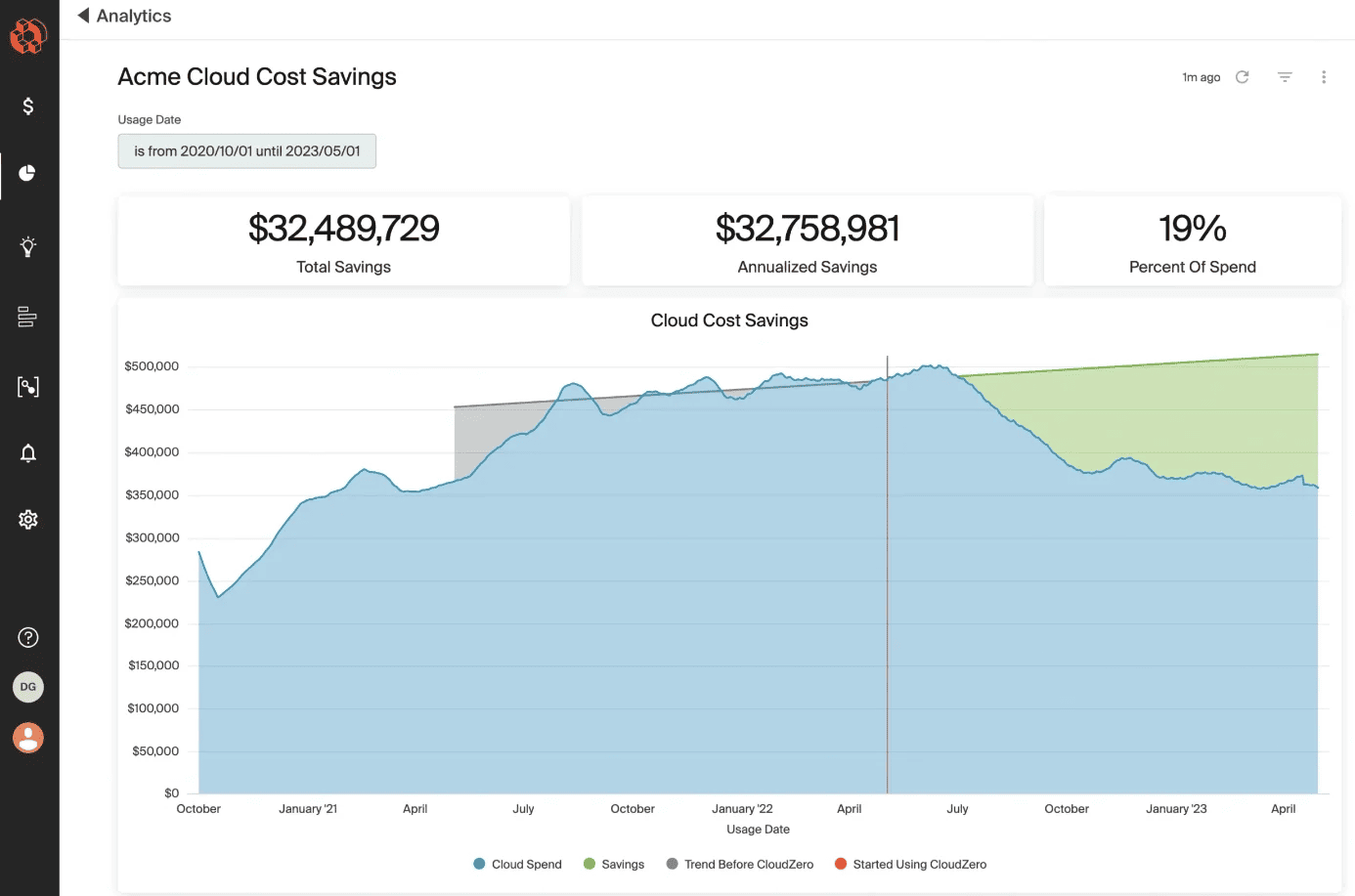
CloudZero turns cloud bills into real-time product insights. Teams at Malwarebytes, Nubank, and Drift rely on it to break down costs by feature, team, and deploy – across multi-cloud environments like AWS, Azure, and Snowflake. It’s not just parsing spend – it’s mapping engineering decisions to dollars in a way finance and devs can both act on.
You won’t find it on public app stores – it’s a sales-led install. But once it’s in, it snaps into your pipelines and scales with zero tagging stress.
Among modern multi cloud management tools, CloudZero feels purpose-built for FinOps maturity. It’s a management platform that explains what happened and what to do next.
Features
- Unit cost tracking across cloud workloads.
- Dynamic spend allocation without enforced tags.
- Slack + Jira routing for cost anomalies.
- Live cost telemetry across all providers.
- Easy integrations with your existing tools and CI/CD.
- Centralized management view across fragmented environments.
- Dev-to-finance alignment built into every report.
Pricing
CloudZero skips flat pricing – plans start near $1,000/month and scale with your monthly cloud bill. You’re billed based on total cloud spend analyzed, not number of users or integrations. They offer a 14-day trial so you can stream real spend, test workflows, and trace usage across all services.
This model clicks for teams managing hybrid apps across fragmented pipelines. The more accounts, the more value.
Compared to most multi-cloud management tools, CloudZero is built for cloud management at the cost-per-feature level – meaning you’ll see dollars by team, product, deploy, and anomaly without needing tag perfection. Great fit for FinOps teams chasing ROI over totals.
Pros & Cons
✅ Single-pane visibility of multi-cloud costs: “CloudZero… really helps the customers to view their multi-cloud spend in [a] single dashboard for tracking the cloud cost spend.” g2.com
✅ Unmatched cost visibility & optimization: “CloudZero provides unmatched visibility into cloud costs, enabling engineering teams to track unit economics, optimize spend, and prevent surprises…” g2.com
✅ Broad integrations and easy setup: “Support for all of our major providers… Flexible reporting… Ability to integrate over 50+ telemetries… Great self-service dashboards, unlocking cost transparency.” g2.com
⚠️ No automation for cost control: “Automation for Cloud cost optimization execution is missing.” g2.com
⚠️ Steep learning curve: “The learning curve for using CloudZero’s key features can be rough for new users.” g2.com
⚠️ Limited custom reports: “No custom usage reports, like number of EC2 instances [or] capacity units for DynamoDB.” g2.com
IBM Cloud Manager
Capterra: 4,5/5
Trial days: 30
Best for: orchestrating private/hybrid cloud infrastructure – deploying on-premises IaaS (using OpenStack) to centrally manage heterogeneous resources.
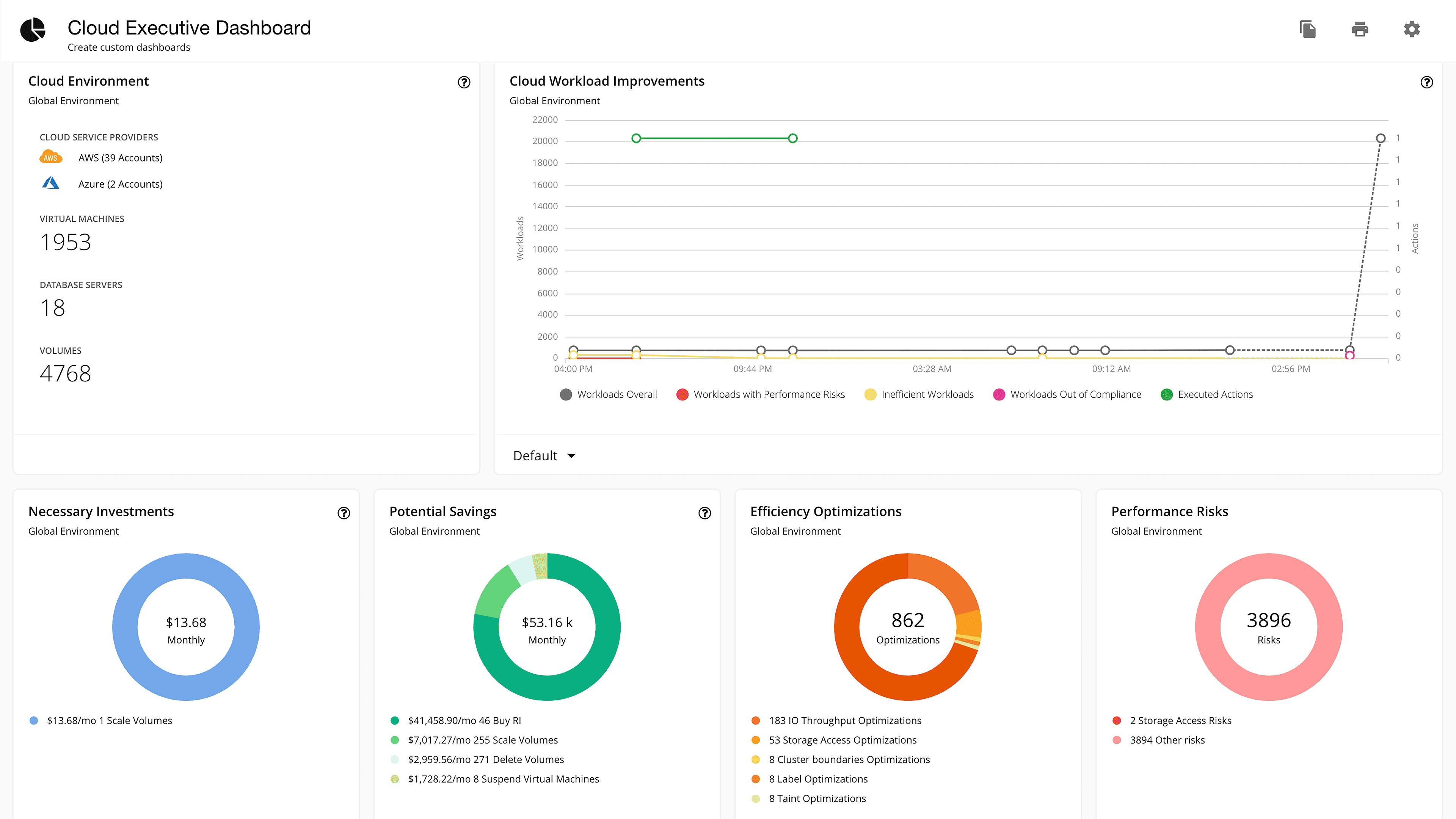
Image source.
IBM steps in when complexity goes enterprise-wide – think banks, airlines, healthcare giants managing cloud and on-prem like one system. Brands like Lufthansa and Anthem trust IBM to streamline automation, compliance, and cost tracking across hybrid and multicloud environments. It’s available via IBM Cloud Catalog and integrates tightly with Red Hat OpenShift and major cloud providers.
Its superpower? Deep policy orchestration baked into your infrastructure pipelines. Provision, govern, and optimize – without a separate UI for each provider.
Among legacy-to-modern management tools, IBM’s stack wins when regulation meets real ops. High control, broad coverage.
Features
- Infrastructure automation across AWS, Azure, IBM Cloud.
- Policy-as-code for secure provisioning.
- Tagging enforcement tied to billing and governance.
- End-to-end visibility into resource use and costs.
- Unified dashboards for all services, regions, and projects.
- Scales across private, public, and cloud management layers.
- Workflow triggers embedded across compliance tools and approvals.
Pricing
IBM Cloud pricing is consumption-based. You can start on Lite / Free plans, then move to Pay-As-You-Go where you’re billed monthly for the compute + services you actually used. If you’re ready to commit spend, IBM also offers Subscription / Committed Use models to unlock discounted pricing across the catalog.
The “try it” path is usually a 30-day starter credit: IBM Cloud gives you $200 to use within your first 30 days, and you get access to the full catalog (including Lite plans). Depending on the sign-up flow, IBM may ask for a credit card to verify identity—but you’re not charged for usage that stays within free tiers/credits.
What you pay for is resource usage + service tier, not seats: things like instance hours, managed service plan level, storage, and network/data transfer—plus the usual “region and availability requirements” knobs you turn in regulated environments. IBM’s own billing docs frame charges around the compute/containers/services your org used, with usage visible in the billing console.
Pros & Cons
✅ Multi-cloud ops from one console: “It… aids in the management of several host operations and Cloud settings.” G2
✅ Multi-datacenter control: “Multiple data centres may be easily managed from a single platform.” G2
✅ Asset/CMDB-style reporting for budgeting: “insightful dashboard… track IT Asset usage/requirements in real-time.” TrustRadius
⚠️ Pricey at scale: “It is very expensive.” G2
⚠️ Steep learning curve: “a somewhat steep learning curve… difficult… for people who are new to it.” G2
⚠️ Implementation + tuning friction: “Deployment procedure documentation can be improved… Fine tuning… could be improved.” TrustRadius
Read also: Revolutionize Your IT Strategy with ITIL Configuration Management
Flexera
G2 rating: 4.4/5
Trial days: 30-60
Best for: hybrid IT asset and license management and cloud cost governance, enabling enterprises to discover, optimize and automate software usage and cloud spend across multi-cloud environments.
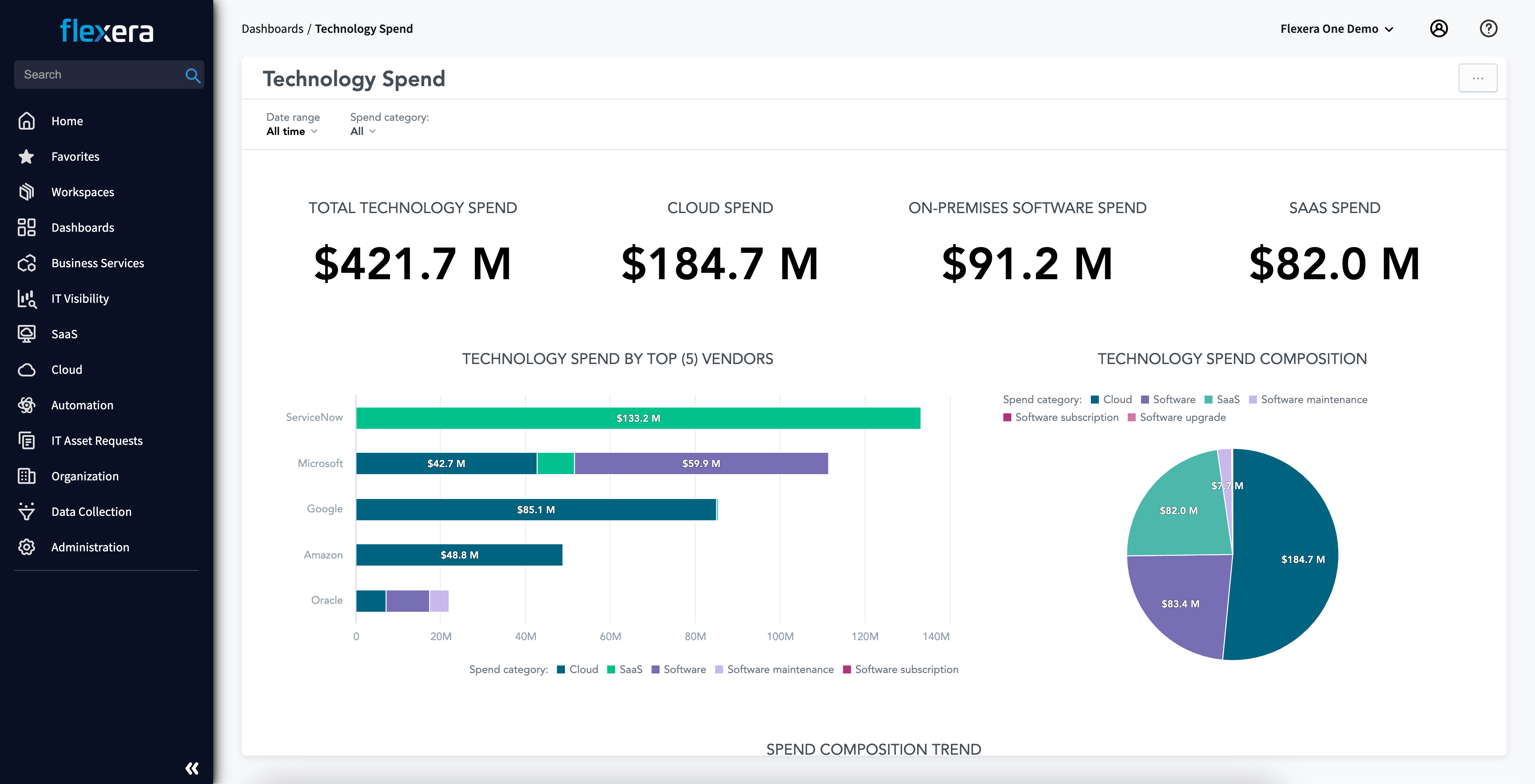
Flexera is what enterprises like Samsung and Novartis use to clean up sprawling cloud environments – from license sprawl to misaligned spend to policy blind spots. It’s not just for tracking; it’s for governing. Find it on AWS Marketplace and directly through Flexera’s enterprise onboarding.
What gives it staying power? Granular visibility across on-prem, AWS, Azure, and SaaS with real-time allocation logic. Finance gets forecasting. Dev gets self-service. Security gets guardrails. Everyone wins.
Consider it the CFO’s favorite in a sea of multi cloud management tools.
Multi-cloud management features
- Cost mapping across regions, business units, and cloud providers.
- Policy-driven provisioning and compliance tagging.
- Intelligent rightsizing and license reclamation across tools.
- Asset inventory across hybrid cloud workloads.
- Forecasting, chargeback, and showback automation.
- Built-in cost optimization triggers and savings recommendations.
- Integrated vulnerability and security scoring.
- Governance across multi-tenant cloud and container stacks.
Pricing
Flexera keeps pricing gated, but enterprise quotes land around $1,000–$5,000/month depending on features, connected services, and how many environments you manage. Trials typically run 30–60 days, with onboarding support baked into the setup.
You’ll pay more as you layer in modules for license management, infrastructure governance, and deep integrations with providers like AWS and Azure. Add-ons for discovery, automation, and vulnerability insight push the final number higher.
If your org’s juggling complex cloud management and hybrid sprawl, Flexera delivers cross-platform clarity. Among the best multi-cloud cost management tools, this one gives FinOps teams the data they need – and execs the costs they trust.
Pros & Cons
✅ Clean, user-friendly interface: “What I like best… is its ease of use — the interface is clean and intuitive, which makes navigating through features simple even for a first-time user.” g2.com
✅ Comprehensive asset & cost management: “Flexera One makes us audit-ready, easy to maintain, and simplifies license tracking. It supports cost optimization, reduces manual work, and provides clear… [reports].” g2.com
✅ Enhanced efficiency: “Users find Flexera One to be extremely user-friendly, simplifying management of IT assets and enhancing overall efficiency.” g2.com
⚠️ Complexity & learning curve: “Users find Flexera One’s complexity challenging, citing a steep learning curve and time-consuming setup.” g2.com
⚠️ Slow with large data sets: “The loading speed can be slow when dealing with large data sets, and the integration process with some tools could be smoother.” g2.com
⚠️ Cost for advanced features: “Less Inspiring; Charges for Enhancements.” (Some advanced functions require additional cost) hr.mcleanco.com
Cloudify
G2 rating: 4.1/5
Trial days: 30
Best for: infrastructure orchestration and automation – deploying and managing cloud, data center and Kubernetes environments via code-defined blueprints and templates (TOSCA, Ansible, Terraform).
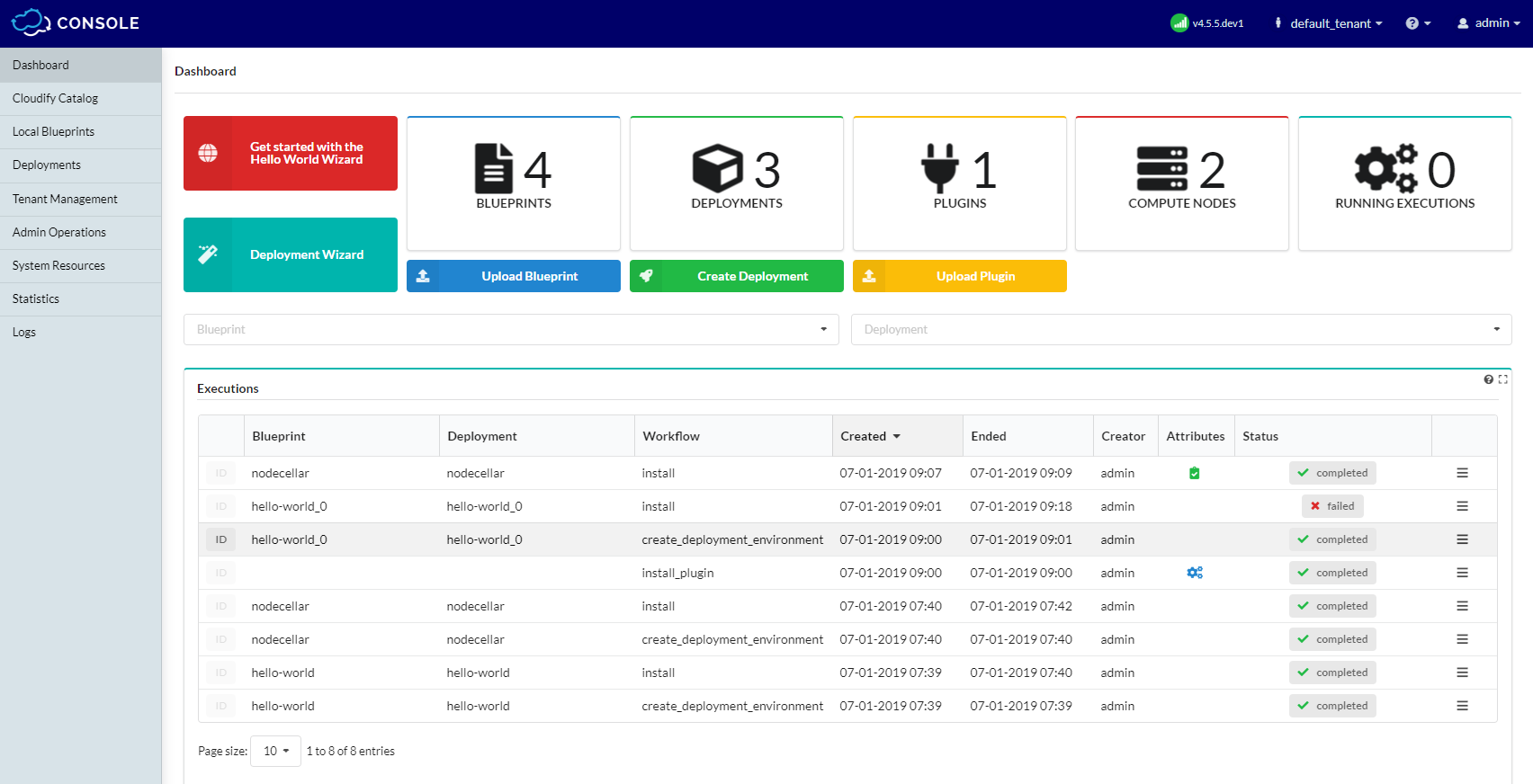
Cloudify is what engineers grab when Terraform’s not enough and Jenkins gets messy. It’s orchestration without the lock-in – used by AT&T, Capgemini, and Proximus to deploy and manage hybrid cloud stacks, microservices, and legacy VMs under one blueprint. Available via AWS Marketplace, it syncs cleanly with your pipeline, not around it.
The standout? Everything’s code-first. You define infra once and use it across cloud providers, CI/CD, and environments. Think repeatable ops, minus the duct tape.
Among multi-cloud management tools, Cloudify leads for automation depth and open architecture – ideal for teams building at scale, fast.
Features
- Declarative blueprints for app + infra orchestration.
- Environment-as-a-service provisioning across cloud stacks.
- Native support for Ansible, Terraform, Helm, Kubernetes.
- Integrated cost guardrails and resource policies.
- Topology-aware rollback and failure recovery.
- Plugin-ready with 50+ services and 3rd-party tools.
- Works across AWS, Azure, OpenStack, and VMware.
- Automates scaling and optimization workflows at runtime.
Pricing
Cloudify’s pricing starts at €0.012/GB/month for object storage, billed monthly. Plans flex based on storage volume and SLA level – not users or UI access. The 30-day trial lets you run workloads, test scaling, and validate automation flows inside cloud environments before you commit.
It’s usage-based, not seat-based, which helps when you're juggling hybrid pipelines or running distributed apps across multiple providers. Add-ons like S3-compatible access, replication, and built-in security options push the quote higher depending on setup.
As far as multi cloud management tools go, Cloudify nails modular cloud management. Lightweight entry, heavyweight automation. Ideal for teams that care more about workflows than UIs.
Pros & Cons
✅ Powerful integration & blueprints: “The platform is very intuitive, the integration plugins are awesome and save lots of time. The blueprint definition and edition are great… all possible features were considered in the design (including Sites and Tenant management).” g2.com
✅ Easy GUI & multi-cloud support: *“Easy to use Graphical User Interface, good integration with critical technologies like OpenStack, AWS, and Kubernetes. You can deploy your [network functions] using the TOSCA templates as well, which is very handy.*” g2.com
✅ Open-source and flexible: “Open source; Community driven; Blueprint concept to visualize the whole infra.” g2.com
⚠️ Steep learning curve & docs: “_Complexity in understanding_… No good documentation.” g2.com
⚠️ Limited community support: “Community support is hit/miss… Cloudify doesn’t have the market share or exposure other deployment tools have. The learning curve is steep for first time users.” g2.com
⚠️ Inconsistent UI experience: “The look & feel of the platform could be improved, and [made consistent] across all components (the composer is a bit different).” g2.com
Read also: Decoding configuration management vs change management in a multi-cloud environment
Device42
Capterra: 4.9/5
Trial days: 30
Best for: hybrid IT discovery and dependency mapping, providing an agentless CMDB that automatically inventories and visualizes servers, applications and network connections across data centers and cloud.
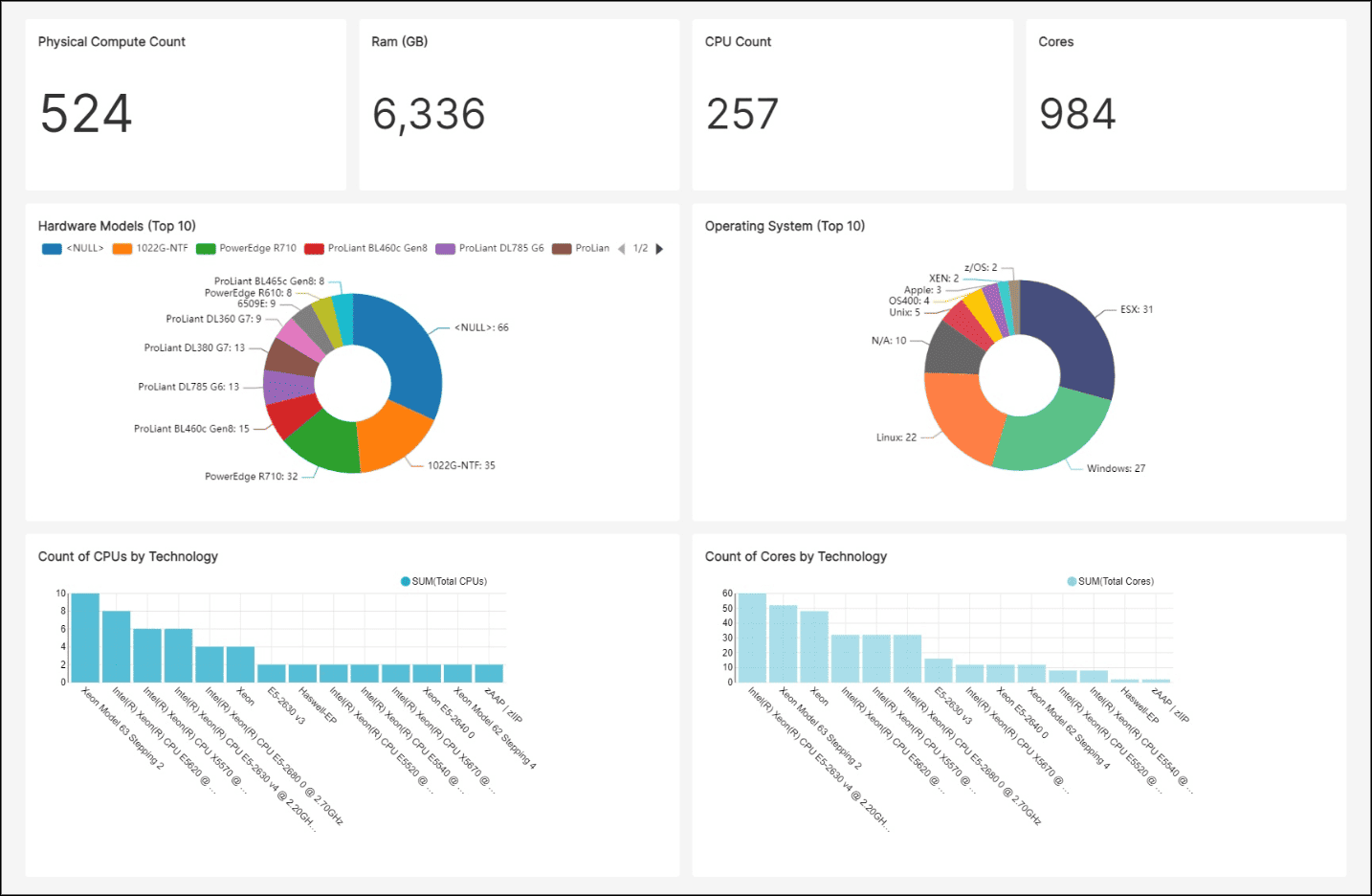
Device42 makes your infrastructure visible – no matter how tangled the topology. Teams at Yale, Nasdaq, and Samsung count on it to auto-discover servers, apps, and dependencies across data centers and cloud environments. It’s deployable on-prem or in your private cloud; you won’t find it on AWS Marketplace, but integration with cloud APIs is built in.
The strength? Agentless discovery that maps everything from power chains to VMs across hybrid and multi-cloud setups. One scan, total clarity.
For orgs deep into CMDB, compliance, and change planning, Device42 earns its place among top multi-cloud management tools.
Features
- Agentless discovery across AWS, Azure, VMware, and physical gear.
- Dependency mapping for apps and services.
- CMDB population tied to live state.
- API-first design that plugs into ITSM tools.
- Resource and license visibility for real cost planning.
- Network, rack, and hardware mapping across all environments.
- Integrated security posture auditing tied to asset roles.
- Built-in intelligence for cloud migration and management planning.
Pricing
Device42 prices by asset count. You’ll see quotes starting around $1,499/year for small deployments and scaling to $10K+ for large infrastructures. They offer a 30-day free trial – plenty of time to map dependencies, test integrations, and benchmark against your hybrid cloud stack.
Licensing flexes based on discovered nodes and enabled modules. That includes cloud discovery, software tracking, and API syncs with cloud providers.
Among multi cloud management vendors, Device42 shines for teams chasing clarity before optimization – you can’t fix what you can’t find. It’s built for cost optimization readiness with rock-solid discovery at the core. One of the few management tools that goes from rack to region in a single UI.
Pros & Cons
✅ Automated discovery & visibility: “Device42’s ability to automatically discover and manage configuration items across the entire enterprise infrastructure… offers complete visibility, especially for hybrid IT environments.” goworkwize.com
✅ User-friendly interface & support: “Users have also praised the easy-to-use and intuitive interface, [and] good customer support.” goworkwize.com
✅ Detailed asset metrics: “The platform’s ability to analyze intricate metrics such as power usage [is] especially praised.” goworkwize.com
⚠️ Steep learning curve: “Device42’s features come with a steep learning curve… New users might find the interface and navigation [challenging].” faddom.com
⚠️ Slow performance at scale: “Device42 can sometimes experience slow performance and latency issues, especially when dealing with large data sets.” g2.com
⚠️ High cost for large deployments: “Device42’s pay-per-device model can make it expensive… one user noted you need to be ready to pay around £50,000 a year, which may not be affordable for all.” goworkwize.com
Summary: Multi cloud management tools comparison table
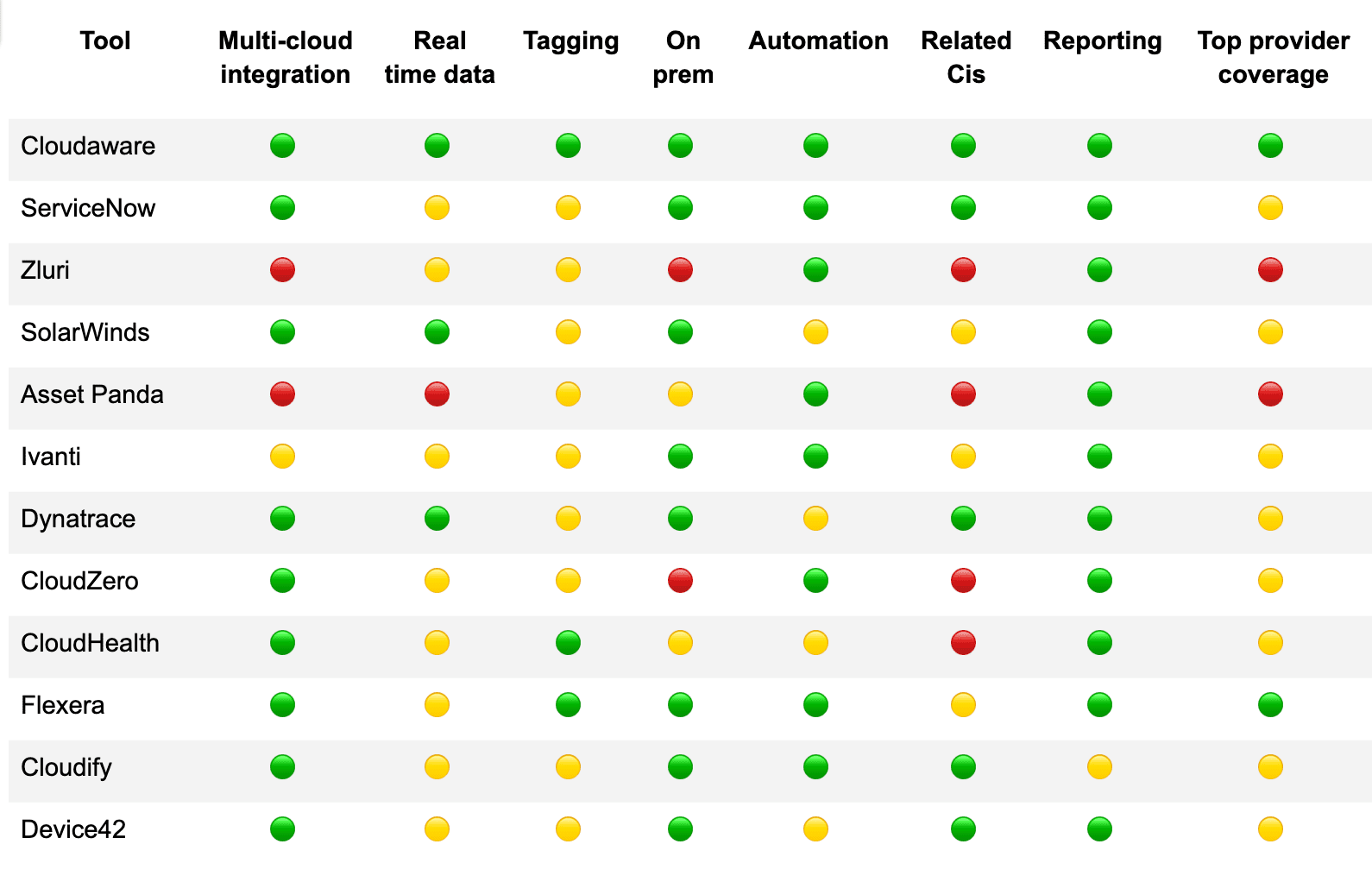
The article is quite long, so let’s refresh the main things about solutions in this list. Here’s a fast, no-fluff comparison table of 12 multi cloud management platforms, sorted by what matters most when you're picking a tool.
Here is a yes/no matrix you can scan in 20 seconds.
🟢- features is available
🟡- limited
🔴 - not available
How to choose the best multi-cloud management tools for your infra?
You’ve made it through the stack. Twelve vendors, dozens of features, a hundred blog tabs open. Now comes the hard part: choosing the multi cloud management platform that actually fits your infra, team, and future roadmap.
Here’s how to filter signal from noise and lock in the one that won’t choke on scale or require a small army to manage.
What to look for in a real multi-cloud management tool:
- Multi-cloud integration that doesn’t flinch at scale. You want native support across AWS, Azure, GCP, OCI, and whatever else your team’s running — all stitched into one interface, no lag, no API throttling. Cloud toggling shouldn’t take longer than a Slack emoji reaction.
- Real-time data, not hourly guesses. Ops teams don’t operate on a cron job. A solid platform ingests cloud events and metrics instantly, so you catch drift, config changes, or budget anomalies the moment they hit your cloud environments.
- Tagging that actually drives decisions. Asset tags should cascade through everything — reports, alerts, dashboards. No tag = no owner = no action. Bonus points if the tool enforces naming conventions at ingest.
- On-prem parity without hacks. If you’re still managing VMware, OpenStack, or local DCs, your management tools need to treat them like first-class citizens. No feature drop-off just because it’s not in the cloud.
- Automated workflows that get stuff done. A good platform doesn't just flag problems — it routes them to the right person, creates a Jira ticket, or kicks off remediation. Think playbooks, not alerts dumped in inboxes.
- Smart relationships between resources. Show me this EC2’s owner, the app it belongs to, the S3 buckets it touches, and its spend trend. That’s security, compliance, and accountability in one view.
- Rich reporting that’s built for roles. FinOps lead needs cost trends and waste. The cloud architect wants utilization deltas. Execs want pie charts. You need reports that match the way your org actually works.
- Support for every major cloud provider and configuration. It should “just work” across VPCs, AKS clusters, autoscaling groups, and whatever mix of legacy and modern services you’ve got running.
If your shortlist can’t handle this, it’s not built for real-world ops. The right platform will tighten cost optimization, boost accountability, and simplify governance across all your clouds — and the stuff not in the cloud yet. Choose with your future infra in mind.