


DevSecOps vs SRE gets mixed up because both live in the same messy reality: production fires, audit pressure, and teams trying to ship faster without breaking things. When you blur the terms, you end up with fuzzy ownership, duplicated checks, and “everyone’s responsible” as your reliability strategy.
So we grabbed coffee with Cloudaware DevSecOps experts Valentin and Igor and mapped it to real work: what changes in a CI/CD pipeline, where security testing belongs, and what “good” looks like when continuous delivery meets actual risk.
Then the story turns into questions worth chasing:
- Who owns site reliability when an SLO slips at 2 a.m.?
- What’s pure reliability engineering vs platform chores?
- Where does security sit in development without slowing software down?
- In the debates between DevSecOps and SRE, what is the cleanest way to run both across a multi-account cloud?
TL;DR
- DevSecOps vs SRE only feels confusing because both show up around releases. The shortcut: DevSecOps protects the change path; SRE protects the running service.
- DevSecOps wins upstream. Put checks where engineers already work (PRs, pipeline runs, change reviews) so fixes happen while the change is still warm.
- SRE wins in production. SLOs and burn-rate alerts tell you when reliability is bleeding, and progressive delivery + rollback triggers stop small issues from turning into outages.
- Risk gets defined differently on purpose. SRE measures user impact with SLIs/SLOs and error budgets. DevSecOps scores change risk by evaluating policy results, the scope of changes, their criticality, and the evidence supporting them.
- If your “security process” is tickets and screenshots, you don’t have DevSecOps. You have a release tax.
- If your on-call is constant firefighting, you don’t have SRE. You have operations with better branding.
- Artifacts are the receipts: SRE produces SLOs, alert rules, runbooks, and postmortems. DevSecOps produces policy-as-code, approval logs, traceability, and drift reports.
- Metrics tell the truth. SRE watches error budget burn, availability, MTTR, and change failure rate. DevSecOps tracks time-to-remediate critical findings, policy pass rate per pipeline, evidence coverage, and drift backlog size.
- Incident handling splits cleanly: SRE owns restore-and-learn; DevSecOps runs the security track, contains exposure, produces the audit trail, and tightens controls.
- The practical org model: DevOps builds the delivery engine, DevSecOps adds guardrails, and SRE keeps production calm. Most teams need all three, just layered in the right order.
What is Site Reliability Engineering (SRE)?
Site Reliability Engineering (SRE) is a discipline that applies reliability engineering and automation to keep software and customer-facing services stable at scale. It turns “reliable” from a vibe into something you can measure, defend, and improve, usually with SLOs, SLIs, and an on-call model that’s engineered to get better over time.
While the definition appears straightforward, the true power lies in the tradeoff it necessitates.
At the heart of SRE methodology is a simple contract: define reliability targets, watch the metrics that prove them, and use error budgets to decide when to ship and when to slow down. If your service burns its error budget too fast, feature work pauses and the team pays back reliability with fixes like safer rollouts, better alerts, less toil, and fewer sharp edges in production.
Cool. Now, who actually owns that work in a real org?
How SRE teams are structured
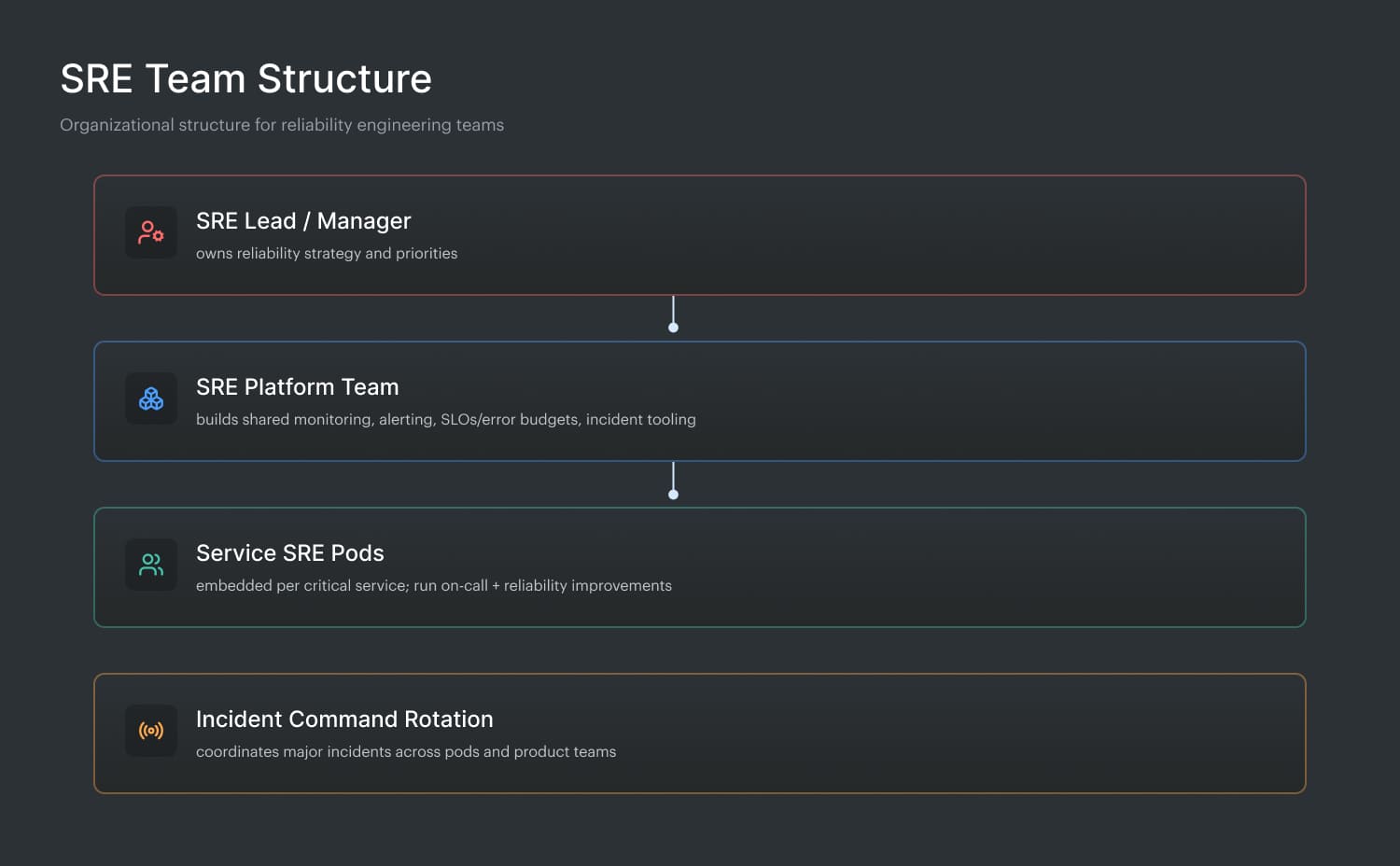
Most SRE teams land in one of two setups: a central group that sets standards and builds shared tooling, or embedded SREs aligned to specific products. Either way, they sit at the seam between operations and development, pairing with app teams on deployment safety, capacity planning, observability, and “this will page us later” design reviews.
Here’s the part most articles skip: you only “get” SRE once you watch the team in motion. At Cloudaware, Valentin Kel is not on that team, but he’s close enough to see how their day really runs.
What is DevSecOps?
DevSecOps is an operating model where teams treat risk controls like engineering work, wired into the way they ship software, not bolted on after the release.
That sounds abstract until you look at the core idea hiding underneath.
Think of it as a feedback loop that stays continuous. The moment a change is proposed, the system should tell you what it breaks, what it violates, and what it puts at risk while it’s still cheap to fix.
To make that real, the work gets organized in a very specific way.
Here is how DevSecOps teams are structured:
- Development owns fixes, because the fastest control is the one engineers can apply immediately.
- Operations teams keep the guardrails runnable at scale, across environments and accounts.
- Policy checks live next to the code, close to where decisions happen.
- Baselines and drift checks sit on top of infrastructure, so config changes don’t hide in plain sight.
- The heavy lifting comes from automated security, not endless human reviews.
- Results from security testing must be categorized as pass, fail, or routed to an approver.
- Everything has to work across the cloud, because real stacks are never just in one place.
- You measure success in safer delivery, not in more tickets.
And here’s what that looks like in practice, from Igor on the Cloudaware side:
Read also: Six Pillars of DevSecOps - How to Implement them in a Pipeline
SRE vs DevSecOps: how do they differ?
SRE and DevSecOps become confusing because they both appear in the same situations: a risky deployment, a surprise outage, an auditor asking, “prove it,” and a team trying to keep shipping. Same hallway, different doors. One is obsessed with reliable outcomes. The other is obsessed with making secure, IT compliant delivery the default.
So let’s cut straight to the differences before we zoom in.
| Criteria | DevSecOps | SRE |
|---|---|---|
| North star | Secure, compliant delivery at speed | Reliable service performance at scale |
| Primary focus | Risk in change and release | Risk in runtime behavior |
| Unit of work | Change (PR, deploy, config update) | Service health (SLOs/SLIs, incidents) |
| Key mechanism | Automated checks + policy gates + approvals | Observability + incident response + toil reduction |
| “Stop shipping” signal | Failed security testing, policy breach, missing approval | Error budget burn, sustained SLO miss |
| Where it lives | CI/CD pipeline, IaC workflows, change management | Production operations, monitoring, on-call |
| Metrics that matter | Policy pass rate, time-to-fix findings, drift rate, audit evidence coverage | SLO attainment, burn rate, MTTR/MTTD, paging volume |
| Typical output | Prevented risky change + logged evidence | Faster recovery + fewer pages + more resilient systems |
| Who partners most | Security + platform + engineering | Platform + engineering + incident command |
Now let’s dive into the details. 👇
#1 What each discipline protects
DevSecOps protects the path your changes travel. Think of it like guardrails for delivery. A PR opens, an IaC plan changes, a pipeline runs, and a change request gets approved.
That’s where DevSecOps proves its value. You’re trying to prevent a risky change from becoming tomorrow’s fire.
In practice, that means controls that can say, quickly and loudly: “this is fine,” “this needs review,” or “this can’t ship.” Bonus points when the system saves evidence automatically so audit prep doesn’t turn into a scavenger hunt.
SRE protects the behavior of running systems. It’s about the reliability of services once users are actually depending on them.
The process includes factors such as latency, errors, saturation, availability, and the human cost associated with maintaining these systems. SRE is involved in Service Level Objectives, burn rates, paging noise, incident response, and the work that makes next week quieter than this week.
When an SLO is rapidly approaching its limit, it's a signal to cease experimenting with releases and address the reliability debt.
In modern cloud organizations, both DevSecOps and SRE safeguard the same software, albeit at distinct stages. DevSecOps reduces the chance you ship a misconfiguration, insecure permission, or policy breach. SRE reduces the chance that customers feel pain even when something inevitably slips through.
Put them together and you get a clean handshake:
- DevSecOps keeps changes safe to introduce
- SRE keeps the system safe to live with
Read also: DevSecOps Vulnerability Management. A Weekly Loop That Survives Critical Spikes
#2 How SRE and DevSecOps define and measure risk
SRE treats risk as reliability debt that shows up in production behavior. The math is practical: SLIs and SLOs, then error budgets to turn “how much failure is acceptable” into a decision tool. When the burn rate climbs, the risk is “we’re on track to miss the SLO by Tuesday.” The metrics that matter are the ones that predict user pain:
| DevSecOps treats risk as “what this change could introduce” before it lands. A change isn’t risky because it’s big. It’s risky because it shifts the blast radius, violates a policy, or exposes data. So the measurement looks like
|
Done well, it’s continuous. Every PR, pipeline run, and config diff gets evaluated the same way, consistently.
Here’s how Igor explains it from the DevSecOps side:
Put together, SRE quantifies risk through user-impact signals over time. DevSecOps quantifies risk through change-impact signals before release. Same goal, different clocks.
Read also: Top 8 DevSecOps Container Security Vulnerabilities
#3 Where they intervene in the delivery pipeline
Once you see where each discipline steps in, the overlap stops feeling confusing. It becomes a relay race. Different handoffs. Same finish line.
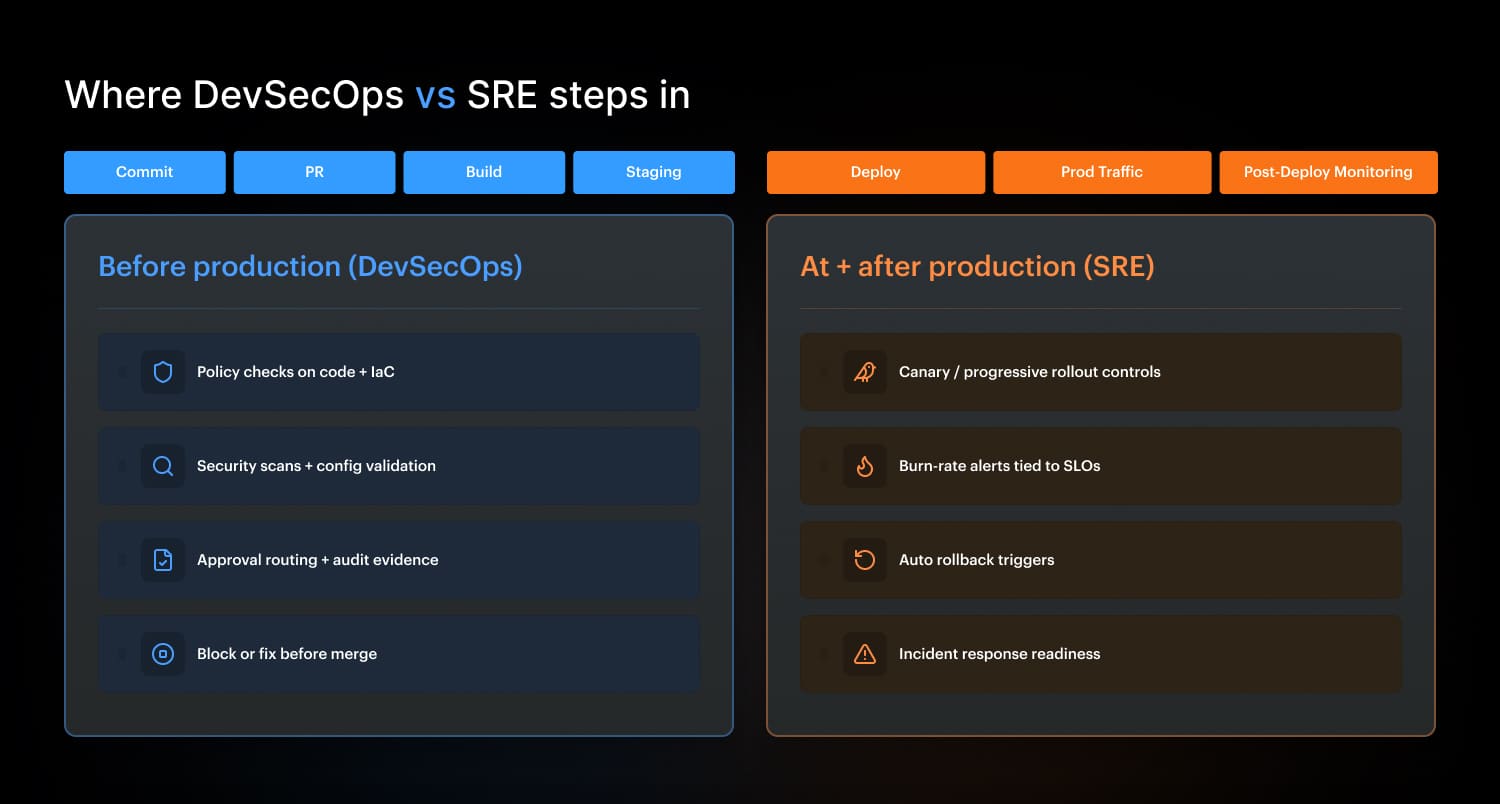
DevSecOps intervenes before production
DevSecOps gates live upstream, while a change is still cheap to fix. Think: code commit, pull request, build, and staging validation. The goal is straightforward: prevent risky items from reaching production.
In a healthy setup, DevSecOps checks are continuous and predictable. The same controls run every time, not just before an audit. A pipeline should be able to say: “this IaC change opens inbound 0.0.0.0/0,” “this role adds admin privileges,” “this container runs privileged," or “this tag policy is missing,” then either block, route for approval, or let it pass with evidence logged.
That’s where development can fix it fast, in context, without a ticket ping-pong.
And even if you do everything right, production still gets a vote.
SRE intervenes at and after production
SRE gates show up where reality lives: at deploy time in prod and after the change is running. This process is less about preventing a policy breach and more about identifying cases that look safe on paper but hurt users in practice.
So SRE leans on progressive delivery controls (canary, blue/green), burn-rate alerts, and rollback triggers. If the P95 latency or error rate starts burning the SLO too fast, the system should slow or reverse the rollout automatically. That’s the SRE signature: protect users first, then engineer the fix so next week is quieter for operations.
Now the connection point matters, because this is where teams either collaborate or collide.
The handoff that makes both work
DevSecOps makes production safer to enter. SRE makes production safer to live in. When both are wired into one pipeline, you experience more clarity and confidence.
Read also: DevSecOps Culture - Operating System Keeping Security Fast
#4 Primary artifacts each team produces
After you’ve seen where they step into the pipeline, artifacts are the easiest tell. They’re the receipts each team leaves behind, and they reflect what that team is protecting for reliability.
SRE artifacts (runtime receipts) SLO/SLI definitions, burn-rate alert rules, and “this is paging-worthy” thresholds are examples of SRE artifacts. Runbooks that cut recovery time, plus postmortems, turned into tracked engineering actions. Capacity plans and load-test notes that keep prod from surprising you. On-call schedules, escalation paths, and handoff notes that keep operations teams sane. That’s the runtime stack. DevSecOps leaves a different paper trail. | DevSecOps artifacts (change receipts) Policy-as-code rules and check results are attached to every PR, so the review happens next to the code. Approval records that show who signed off, when, and for which scope. Baselines + drift reports that prove what changed across infrastructure, not just what was intended. Audit-ready “traceability” reports that map change → checks → deployment, without screenshots. If you want to measure whether it’s working, look at the dashboards. |
DevSecOps metrics usually track things like control coverage, change failure rate, and time-to-remediate.
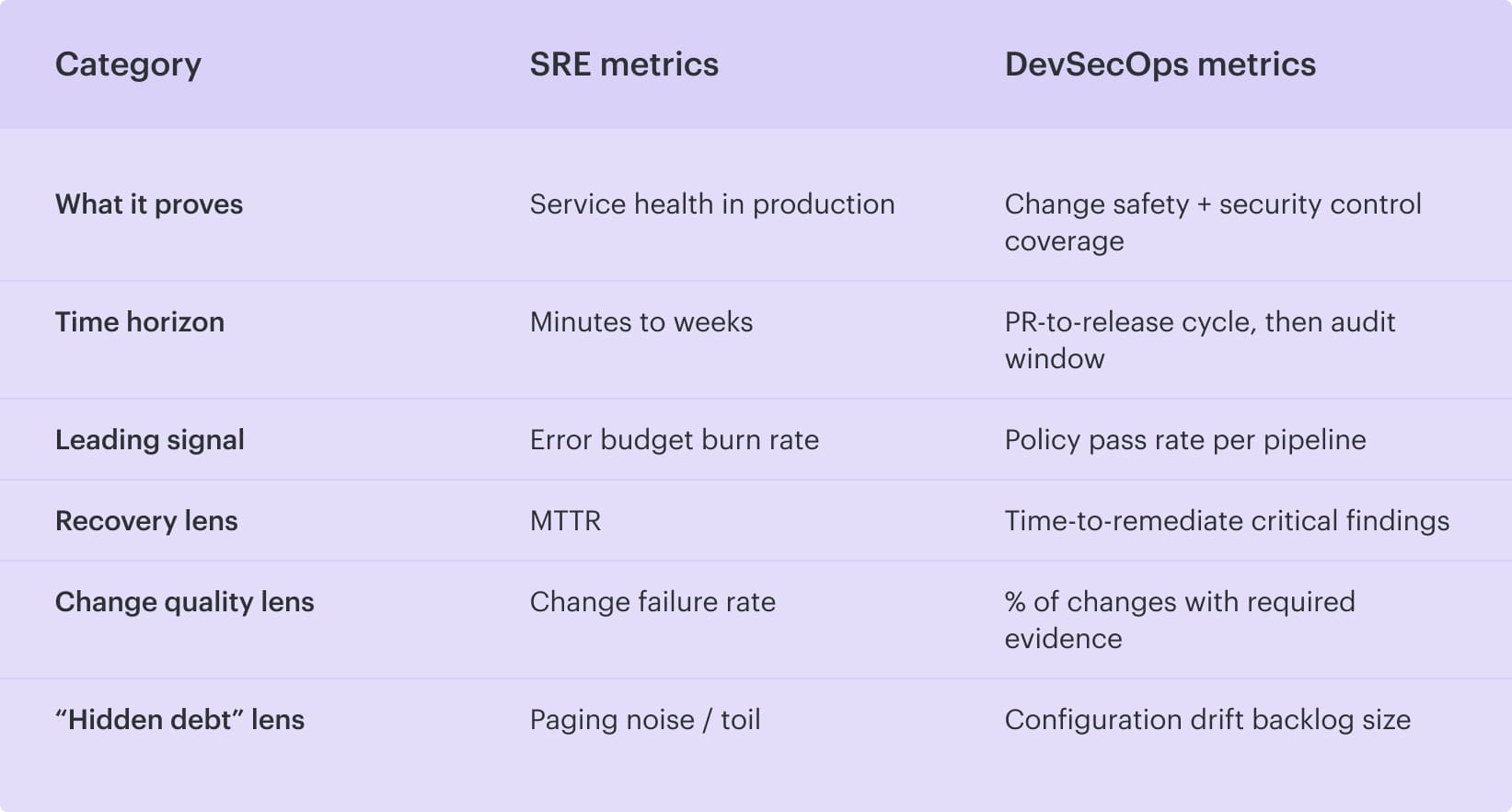
#5 Metrics each discipline tracks
If you want to settle DevSecOps vs SRE debates fast, skip the org chart and look at the dashboards. The metrics each team obsesses over tell you what they’re paid to protect and when.
SRE metrics
SRE measures reliability the way customers feel it, then turns it into numbers:
- SLI compliance rate (are we meeting the target right now?)
- Error budget burn rate (how fast are we spending allowed failure?)
- Availability (uptime, usually by service tier)
- MTTR (how fast we recover)
- Change failure rate (how often releases cause incidents)
That’s runtime. DevSecOps lives earlier, closer to the change.
DevSecOps metrics
DevSecOps measures how safely you ship and how clean your evidence trail is in continuous delivery:
- Time-to-remediate critical findings (from detection to fix)
- Policy pass rate per pipeline (by repo/service/environment)
- % of changes with required evidence (approvals, checks, traceability)
- Configuration drift backlog size (how much “reality vs intended state” debt exists)
And here’s the clean comparison view.
Read also: DevSecOps Maturity Model. A Practical Scorecard You Can Measure, Store, and Improve
#6 How they handle incidents
Incidents are where the split becomes obvious. One team is trying to get customer-facing services stable again. The other is trying to prove what happened and prevent the same exposure from shipping tomorrow.
SRE: owns the reliability incident track
SRE runs the operational playbook end to end. They declare severity, pull in the right responders, coordinate mitigation, and keep the room calm while the clock is loud. The objective is blunt: restore reliability fast, protect users, and then document what actually broke.
And they don’t stop at “fixed.” Postmortem happens. Follow-ups get owners. The loop closes when the action items are done, not when the doc is written. That’s how operations teams avoid reliving the same outage every sprint.
DevSecOps: owns the security incident track in parallel
DevSecOps kicks in when the incident is a breach, a vulnerable path, or a policy miss that could turn into one. Containment first. Rotate keys, block access, isolate workloads, and patch the vulnerable component. Then comes the part that leaders always need: a clean audit trail. What changed, who approved it, what controls ran, what got bypassed, and what evidence exists.
From there, DevSecOps updates the system so the same class of mistake gets caught earlier in the software delivery flow: tighter policies, better guardrails, and fewer “we’ll remember next time” gaps.
#7 Team ownership and on-call models
Ownership gets messy fast when nobody agrees on what “urgent” means. One queue is about keeping services alive tonight. The other is about stopping risky changes from becoming tomorrow’s mess. Different clocks, different owners.
SRE teams: on-call for production reliability In most organizations, SRE teams either fully own on-call responsibilities or share them with operations teams and the service engineers. When production pages occur, SRE is responsible for coordination, recovery, and follow-up work that reduces future pages. That includes alert tuning, runbooks, rollback patterns, and pushing fixes upstream so development doesn’t repeat the same failure mode. That’s the “keep it running” lane. DevSecOps sits in a different lane, with different queues. | DevSecOps: exception queue + findings backlog Devsecops typically doesn’t carry on-call for availability. Instead, they own two high-friction backlogs that decide how safely teams can ship:
|
And the handoff is clean when it’s explicit: SRE answers pages about runtime behavior, DevSecOps answers questions about whether a change should ship and under what constraints.
Read also: GCP DevSecOps. Pipeline, Tools, and Delivery Model
What DevSecOps and SRE have in common
DevSecOps and SRE look like two different teams until you watch what they obsess over. Same enemy, different angles: surprise. Surprise outages, surprise access paths, surprise “wait, who changed that?” moments at 2 a.m.
- Both treat the system like something you can engineer down to boring. Automation over heroics. Guardrails over tribal knowledge. If a control works only when someone remembers a checklist, it won’t survive a busy week.
- That shows up in how they run work. SRE lives on SLOs, burn-rate alerts, and rollback triggers. DevSecOps lives on policy checks, approval routing, and evidence captured while the change is still warm. Different tools, same intent: shorten the feedback loop so the fix happens before the blast radius grows.
- They also share a hard dependency on context. Service ownership, criticality, environment, recent deploys, and config diffs. Without that, you get noisy alerts and useless scan results. With it, the team can route work to the right owner fast and cut MTTR or remediation time, in a way you can measure.
- And yeah, both worship metrics. Reliability trends for SRE. Control coverage and policy pass rates for DevSecOps. Put them together and you get fewer pages, fewer policy breaches, and a release process that doesn’t collapse under its own “process.”
Read also: Azure DevSecOps. Operational Patterns, Controls, and Gates That Work
DevOps vs DevSecOps vs SRE: Side-by-side comparison
People google DevOps vs DevSecOps vs SRE because all three sit in the same room during a release. Someone needs fast delivery. Someone worries about security. Someone gets paged when reliability drops. Same system, different lenses.
So here’s the clean side-by-side, the kind you can use in a planning meeting without starting a holy war.
| Criteria | DevOps | DevSecOps | SRE |
|---|---|---|---|
| Main goal | Ship changes faster and more safely | Ship changes with built-in security + compliance | Keep services reliable at scale |
| Primary focus | Collaboration + automation between development and operations | Risk controls in the delivery path | SLOs, error budgets, incident response |
| Where it intervenes | CI/CD, infra automation, deploy workflows | PR checks, build gates, staging validation, approval routing | Progressive rollout, burn-rate alerts, rollback triggers |
| What “risk” means | Deployment and operational friction | Policy breaches, misconfigs, insecure access, missing evidence | User impact, SLO miss, paging load |
| Typical artifacts | Pipelines, IaC modules, deployment runbooks | Policy-as-code, approval logs, evidence trails, drift reports | SLO/SLI definitions, postmortems, alert rules |
| Core metrics | Lead time, deploy frequency, change failure rate | Policy pass rate, time-to-remediate findings, % changes with evidence | Error budget burn rate, availability, MTTR |
And once you’ve got this picture, the overlap becomes useful: DevOps sets the engine, DevSecOps adds the brakes and seatbelts, and SRE watches the road and keeps the car from flipping when something unexpected happens.
Read also: Implementing Zero Trust in DevSecOps Workflow
When to use each approach: DevOps, DevSecOps, and SRE
You don’t “pick one” in real life. You stack them based on what’s hurting today. The trick is knowing which lever fixes the pain fastest, without creating a new mess.
- Use DevOps when your bottleneck is shipping. Start here when releases feel heavy: handoffs, manual steps, brittle pipelines, environment drift, and “works on my machine.” DevOps is your engine room. You’ll know it’s the right move when you’re aiming to improve things like lead time, deploy frequency, and change failure rate, and the main blocker is workflow friction between teams.
- Add DevSecOps when speed starts creating risk. DevSecOps earns its spot when changes are moving quickly but controls lag behind. Think policy breaches, insecure permissions, missing approvals, audit stress, or security reviews turning into a release tax. This is the moment to wire checks into PRs and pipeline runs, track policy pass rate per pipeline, and drive time-to-remediate for critical findings down, not “eventually,” but predictably.
- Bring in SRE (Site Reliability Engineering) when reliability becomes a product requirement. SRE makes sense when user impact has a real cost: revenue, trust, contractual SLAs, or a leadership team that’s tired of surprise pages. SLOs (Service Level Objectives) and error budgets provide you with a decision system based on measurable performance criteria, not just opinions. If MTTR is stubborn, incidents repeat, or teams ship into a burning error budget, you need SRE practices like progressive delivery controls, burn-rate alerts, and postmortems that close the loop.
DevOps keeps delivery fast and repeatable. DevSecOps makes that delivery safe and provable. SRE keeps the running services calm and measurable. If you’re choosing what to start this quarter, fix the pipeline first, wire security into the path next, and then formalize reliability when production pain starts dictating your roadmap.
Read also: DevSecOps Velocity - Ship Faster Without Growing Security Debt
How Cloudaware helps you run DevSecOps + SRE without turning releases into meetings
When DevSecOps and SRE collide, teams usually “solve” it with calendar invites. Cloudaware pushes that coordination back into the workflow, so the release itself carries the context: what changed, who did it, what it impacts, and whether it’s safe to promote.
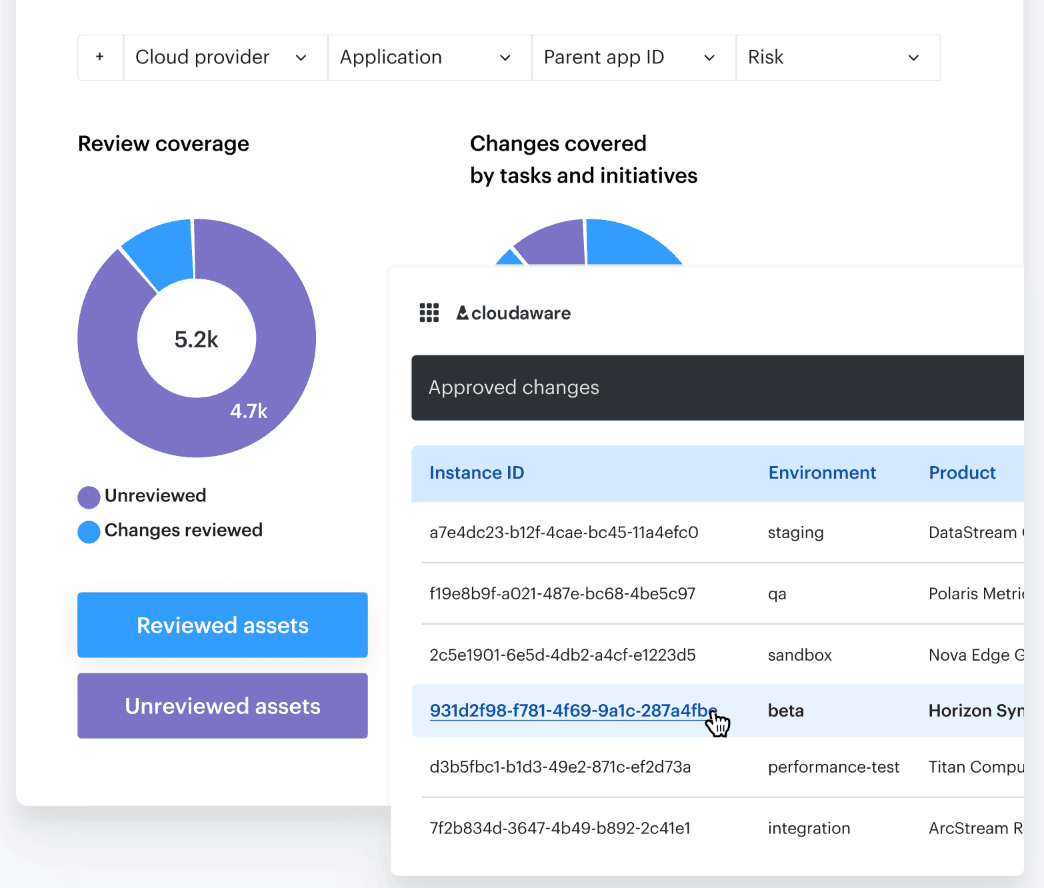
Which means fewer syncs, because you’re not reconstructing reality after the fact.
It does that with:
- Go/no-go promotion policies using violations data (including signals from tools like Wiz, Palo Alto, Trusted Advisor).
- Smart approval workflows that auto-approve low-risk changes, route critical ones by scope, and support time windows.
- Notifications to Slack, Jira, ServiceNow, PagerDuty so approvers show up where work already happens.
- Baselines + drift tracking + exportable histories, so “what changed” is searchable, not a debate.
- Traceability + continuous evidence collection for audits, from code commit to deployment with check results attached.
And once that’s in place, DevSecOps can guard the change path while SRE protects the running service, without dragging everyone into a weekly “alignment” ritual.