


Your pipeline is shipping faster than ever, yet security still shows up like a surprise tax: noisy findings, last-minute exceptions, and that familiar “just deploy it, we’ll fix it later” moment. That’s why DevSecOps vs CI/CD isn’t semantics. If you don’t understand the difference, you either over-gate and kill velocity or under-gate and ship risk you can’t explain during an audit.
To make this practical, I interviewed Cloudaware DevSecOps experts, then sanity-checked their advice against delivery research from Jez Humble and Gene Kim. The result is a field guide to DevSecOps CI CD that doesn’t turn into process theater.
- So what belongs in CI, what must wait for CD, and what has to keep running after deploy?
- Which gates prevent real incidents versus train teams to bypass?
- How do you prove “secure enough” without slowing releases?
TL;DR
- CI/CD ships changes. DevSecOps governs risk. CI/CD is the machinery that turns commits into releases. DevSecOps is the rule set, ownership model, and evidence trail that keeps those releases defensible.
- If you only do CI/CD, you’ll ship fast and argue later. The “later” is usually an audit scramble, a production incident, or a growing pile of exceptions nobody remembers approving.
- If you only do DevSecOps, you’ll slow down and teams will route around you. The moment gates feel random, people bypass them. Velocity always wins unless the system makes the safe path the easiest path.
- The practical pattern is: fast checks early, strict checks late. You shift left what’s cheap to run and cheap to fix, then enforce tougher controls close to deploy where they actually protect production.
- A secure pipeline is built on predictable decisions. Good security gates block critical issues introduced by the change, warn on lower risk items, and time-box exceptions with an owner.
- Pipeline security doesn’t stop at deploy. New CVEs, config drift, and permission creep show up after release, so runtime signals need to feed back into ownership and remediation.
- Best tool stack: one CI/CD platform plus a few high-signal controls. Start with secrets detection, SCA, IaC scanning, container scanning, and SBOM + signing. Add policy-as-code gates and runtime monitoring once the basics are stable.
- Measure the integration, not the tooling. Track new critical issues per week, vuln MTTR for newly introduced findings, drift events on tier-1 services, and how often releases require manual approval.
What “DevSecOps CI CD” really means in practice
If you’re running a pipeline, you’ve already felt the tension: ship fast, stay safe, don’t drown in false positives, and don’t turn every release into a negotiation. “DevSecOps CI/CD” is basically that tension, engineered into something repeatable.
Think of it as the difference between sprinkling scanners on top and building a workflow where security feedback is timely, actionable, and tied to ownership, so teams keep shipping instead of bypassing gates.
Now let’s get crisp on what DevSecOps and CI/CD mean, so we’re using the same definitions before we map controls to each stage.
Read also: DevSecOps Statistics (2026) - Market, Adoption, and AI Trends
What is DevSecOps
DevSecOps is an operating model where security work is designed into the same system that builds, tests, ships, and runs software. Not as a separate phase. Not as a quarterly audit panic. It’s the discipline of making security controls repeatable and automatable, so they run with every change and produce evidence you can trust.
If DevOps is “make delivery reliable,” DevSecOps is “make delivery reliable and defensible.” The practical goal is fewer late surprises, less manual review, and a tighter loop from finding → fixing → proving it’s fixed. That’s what people mean when they say DevSecOps CI/CD in the real world.
Key features of DevSecOps
- Security as code. Policies and checks live in version control. You review changes to security rules the same way you review app code.
- Shift-left feedback that’s actually usable. Findings show up where developers work: PRs, build logs, tickets with context. The best signal is specific, reproducible, and tied to the change that introduced it.
- Risk-based gates, not “block everything”. Critical issues stop the line. Lower-severity items get tracked, prioritized, and fixed without turning the pipeline into a brick wall.
- Evidence by default. You don’t “collect proof” later. The pipeline produces it: scan reports, SBOMs, signatures, approvals, deployment metadata.
- Ownership and routing. A vulnerability without an owner is just noise. Mature setups map issues to the right team and service, with SLAs that make sense.
- Continuous security after deploy. Because the real world changes after release: new CVEs, config drift, new cloud resources, new permissions.
Read also: 10 DevSecOps Best Practices That Actually Survive Production
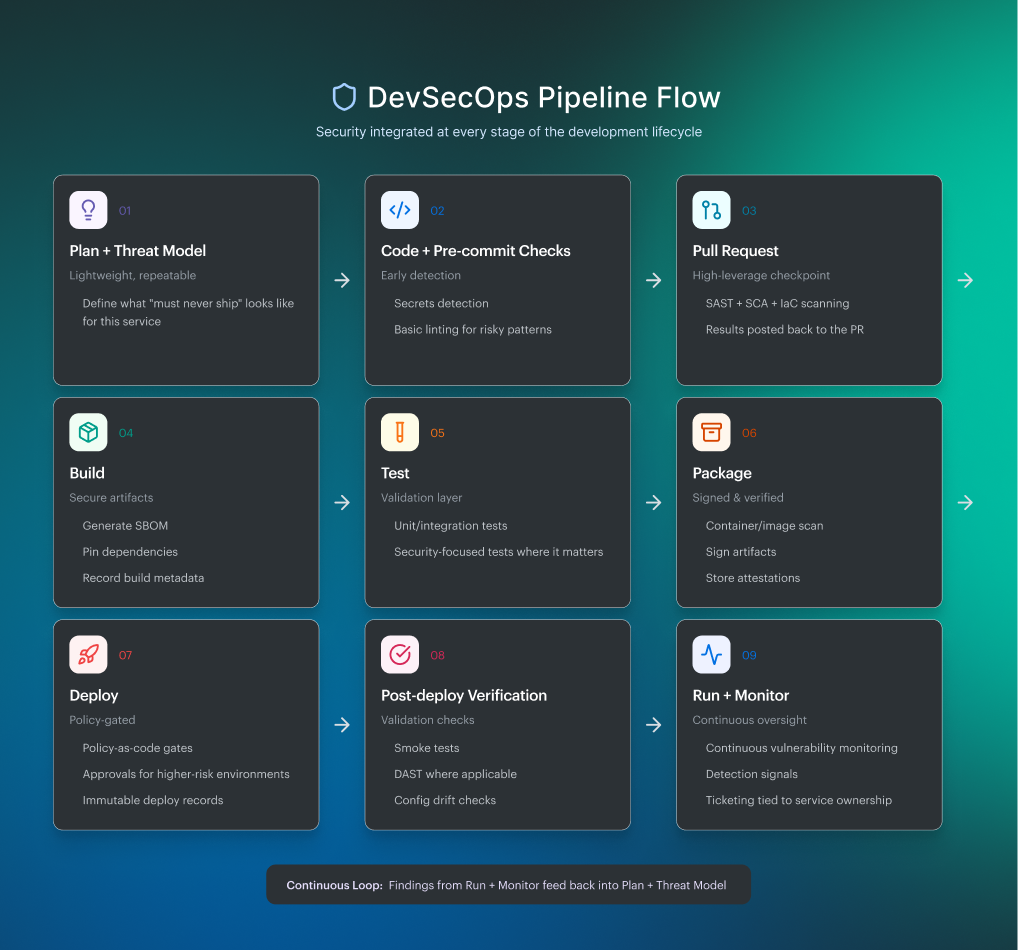
DevSecOps pipeline flow
Here’s the flow most teams converge on when they want stronger security without sacrificing velocity:
Read also: Inside the DevSecOps Lifecycle - Decisions, Gates, and Evidence
What is CI/CD
CI/CD is the automation backbone that takes a change from commit to production with as few human handoffs as possible. Continuous Integration keeps your main branch releasable by building and testing every merge. Continuous Delivery or Deployment is what turns those verified artifacts into releases that are repeatable, traceable, and fast to roll back.
That’s why CI/CD matters even before we talk security. When your delivery path is deterministic, adding controls becomes engineering, not chaos. Now let’s unpack what makes a CI/CD setup “real” in practice, so the DevSecOps layer has something solid to attach to.
Key features of CI/CD
- Small changes are merged often. You reduce blast radius by default. The pipeline stays fast because each diff stays small.
- Automated build + test on every change. No “it works on my machine” debates. The system decides whether the change is viable.
- Reproducible artifacts. Same inputs, same outputs. The artifact you test is the artifact you ship, not a recompiled surprise.
- Environment consistency. IaC, containers, or golden images keep drifting from turning deploys into archaeology.
- Fast feedback loops. Minutes, not days. When the pipeline is slow, people stop trusting it and start bypassing it.
- Release control. Progressive delivery patterns (canary, blue/green), feature flags, and one-click rollback reduce fear around shipping.
All of this is the reason “CI CD DevSecOps” isn’t two separate conversations. CI/CD is the track. DevSecOps is how you keep the train safe at speed. Let’s walk the flow.
CI/CD pipeline flow
A typical CI/CD path looks like this when it’s working the way platform teams want it to:
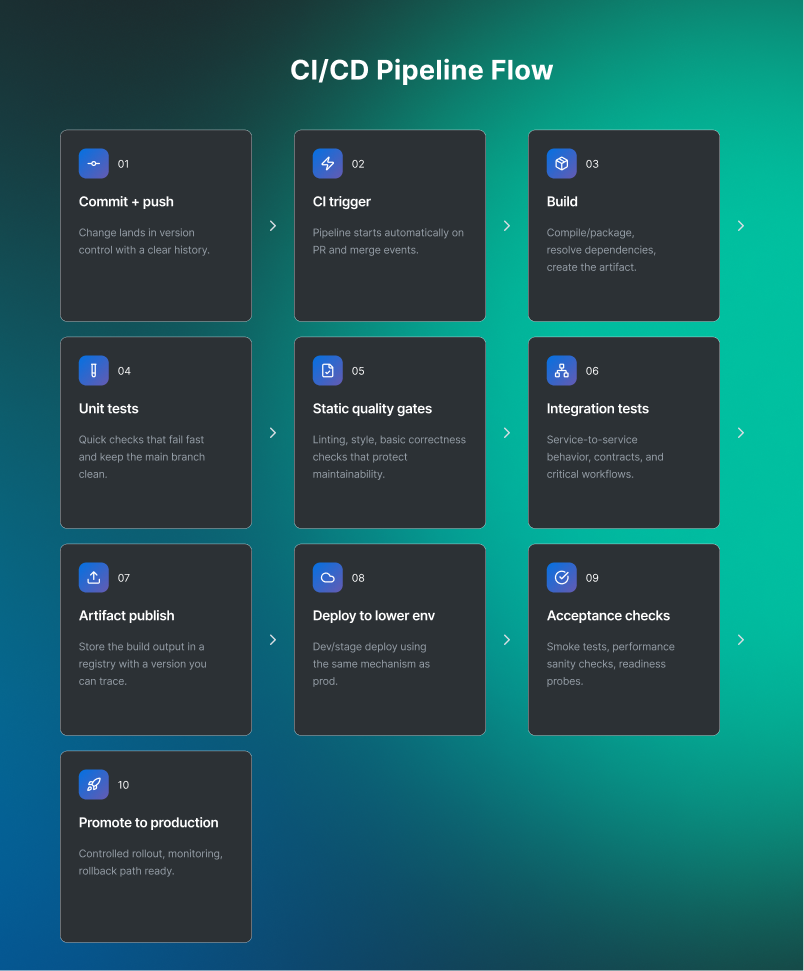
CI/CD is the delivery path. DevSecOps is how you add security checks to that path without slowing releases. Next, let’s visualize where DevSecOps plugs into the CI/CD pipeline, stage by stage.
Read also: DevSecOps vs DevOps - What’s the Difference [Explained by a Pro]
Relationship of DevSecOps with CI/CD Pipeline
CI/CD is the assembly line. DevSecOps is the set of quality controls you build into that line so you don’t ship avoidable risk, and you don’t need a human “security checkpoint” to approve every release. When teams talk about CI/CD DevSecOps, they’re really asking how to make security feedback show up early, stay consistent, and still let delivery move at a sane pace.
Here’s the clean mental model: CI is where you prevent and catch issues while the change is still small. CD is where you enforce, prove, and observe. If a control is cheap to run and cheap to fix, it belongs closer to the PR. If it’s about production safety, environment policy, and evidence, it belongs closer to deploy. Then runtime closes the loop, because new CVEs and drift don’t wait for your next sprint.
How DevSecOps fits, stage by stage
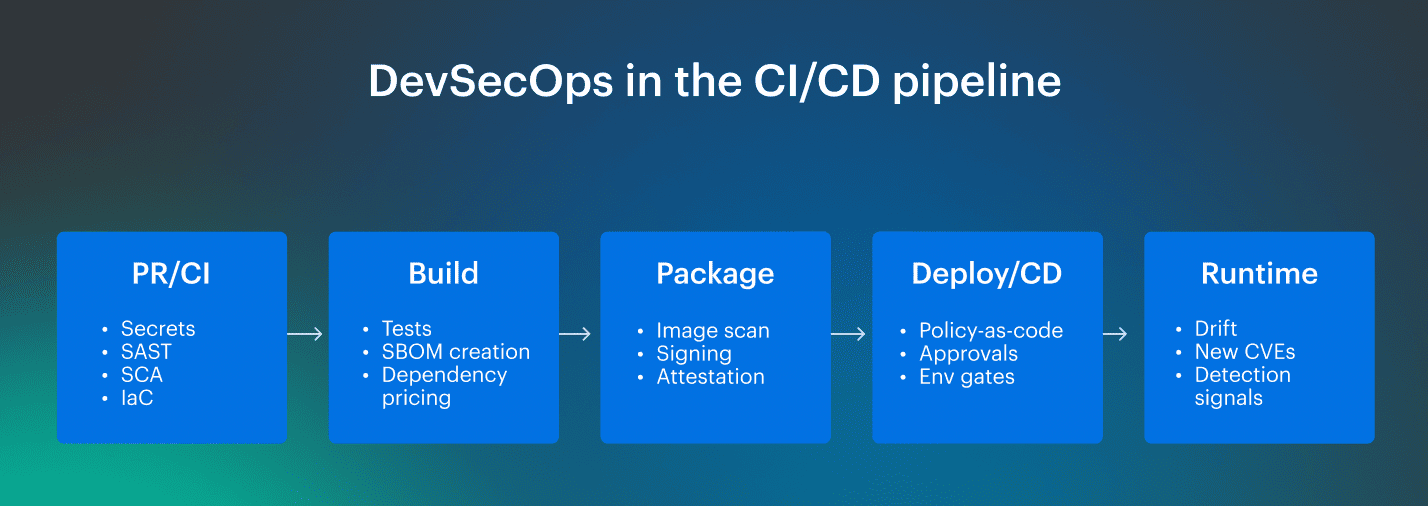
1️⃣ Pull request (fast feedback, minimal friction). This is where you win the week. Run checks that are quick and precise:
- Secrets detection
- SAST for the change you just made
- SCA for new dependencies
- IaC scanning for Terraform/K8s changes
Output should be PR annotations people can act on, not a 40-page report.
2️⃣ Build + package (make the artifact trustworthy). You’re turning code into a shippable unit, so add controls that improve integrity:
- Generate an SBOM
- Scan container images
- Sign artifacts and store attestations
This is where DevSecOps CICD starts feeling real, because you’re building a chain of custody, not just running scanners.
3️⃣ Deploy (policy gates that are predictable). Deploy is where teams tend to over-gate and kill velocity. The trick is stable rules:
- Policy-as-code checks (environment, permissions, network exposure)
- Severity-based blocking (stop Critical, warn High, track the rest)
- Time-boxed exceptions with owners
This turns security from “a person you wait for” into “a system you can reason about.”
4️⃣ Post-deploy + runtime (close the loop). The pipeline shouldn’t go blind after shipping:
- DAST/smoke checks where it makes sense
- Config drift detection
- Continuous vuln monitoring for newly disclosed CVEs
Now, findings aren’t just “a list.” They’re tied to the deployed service, environment, and owner, so they can actually get fixed.
Read also: DevSecOps Roles and Responsibilities - Who Does What and Teams Structure
Understand the difference between DevSecOps vs CI/CD
If your pipeline is already “fast,” CI/CD probably isn’t the problem. The friction shows up when security asks for one more scan, one more approval, one more spreadsheet. That’s where DevSecOps vs CI/CD becomes a real, practical distinction.
CI/CD is your delivery mechanism: the automation that takes a commit and reliably turns it into a deployed change. DevSecOps is the operating model that decides what must be true at every step before that change is allowed to move forward, especially when you’re shipping dozens of times a day. AWS describes it as security testing integrated at every stage, plus a culture shift where security becomes a shared responsibility.
In CI CD DevSecOps done right, security checks don’t “pause” delivery. They become deterministic gates with clear pass/fail criteria, tuned to risk. Your hotfix path still exists, but it’s instrumented and auditable.
“DevSecOps refers to integrating security practices … into existing pipelines (e.g., CI/CD)…”
What changes in real life:
- You stop arguing about whether to scan and start agreeing on where and how strict, based on asset criticality.
- You treat policies like code reviews: versioned, testable, and tied to environments. That’s security as code in the only way that scales.
- You make compliance evidence a pipeline output, not a quarterly scramble. NIST explicitly calls out automatically generating security and compliance artifacts across build, packaging, distribution, and deployment.
- You invest in developer ergonomics: caching, incremental scans, diff-aware SAST, and “warn vs block” modes for low-severity findings so DevSecOps culture doesn’t turn into pipeline hostility.
| Dimension | CI/CD | DevSecOps |
|---|---|---|
| Primary goal | Ship changes reliably | Ship changes reliably with security built into the flow |
| What it is | Automation + workflows | Practices + controls + ownership model that wraps the pipeline |
| Success metric | Lead time, deployment frequency, failure rate | Risk reduced per release, fewer escape defects, audit readiness |
| Where it lives | CI jobs, CD stages, release orchestration | Same places, plus policies, evidence generation, and runtime feedback loops |
| Typical “gotcha” | Fast pipeline that ships risky defaults | Too many blocking gates if you don’t tune by risk |
So when someone says DevSecOps vs CI CD, the clean mental model is: CI/CD moves work forward; DevSecOps defines the conditions that keep it safe, repeatable, and provable. That’s why CICD DevSecOps conversations always land on gates, artifacts, and feedback loops, not which build runner you use.
Now let’s get concrete and map CI CD and DevSecOps to the exact stages 👇
Read also: 6 Core DevSecOps Automation Stages Across CI/CD
How to integrate DevSecOps with CI/CD pipelines?
A good integration doesn’t start with “add more scanners.” It starts with one uncomfortable truth: your pipeline already makes decisions. It decides what gets built, what gets promoted, and what gets rolled back. CI/CD DevSecOps is simply making those decisions security-aware, consistent, and provable.
Start with a “no drama” baseline: what you will block, what you will warn on
Pick 5–10 rules that are both high-signal and hard to argue with. Think: public object storage, wildcard IAM, exposed admin ports, unencrypted databases, missing mandatory tags, and critical CVEs introduced by the change. Then separate them into:
- Hard stop (break the build/block promotion)
- Soft stop (warn + ticket + SLA)
- Exception path (time-boxed, owned, expires)
This is how DevSecOps CI CD stays fast. Your developers learn the rules once, then the pipeline enforces them the same way every time.
Use Cloudaware as the “go/no-go brain” on top of your existing CI/CD
You don’t need to rip out Jenkins, GitHub Actions, GitLab, or Argo. You keep your runner and your deploy tool, then layer policy, approvals, drift, and audit trails over the release path. Cloudaware explicitly positions itself this way: it integrates with your existing pipelines and adds approvals, drift checks, and audit readiness.
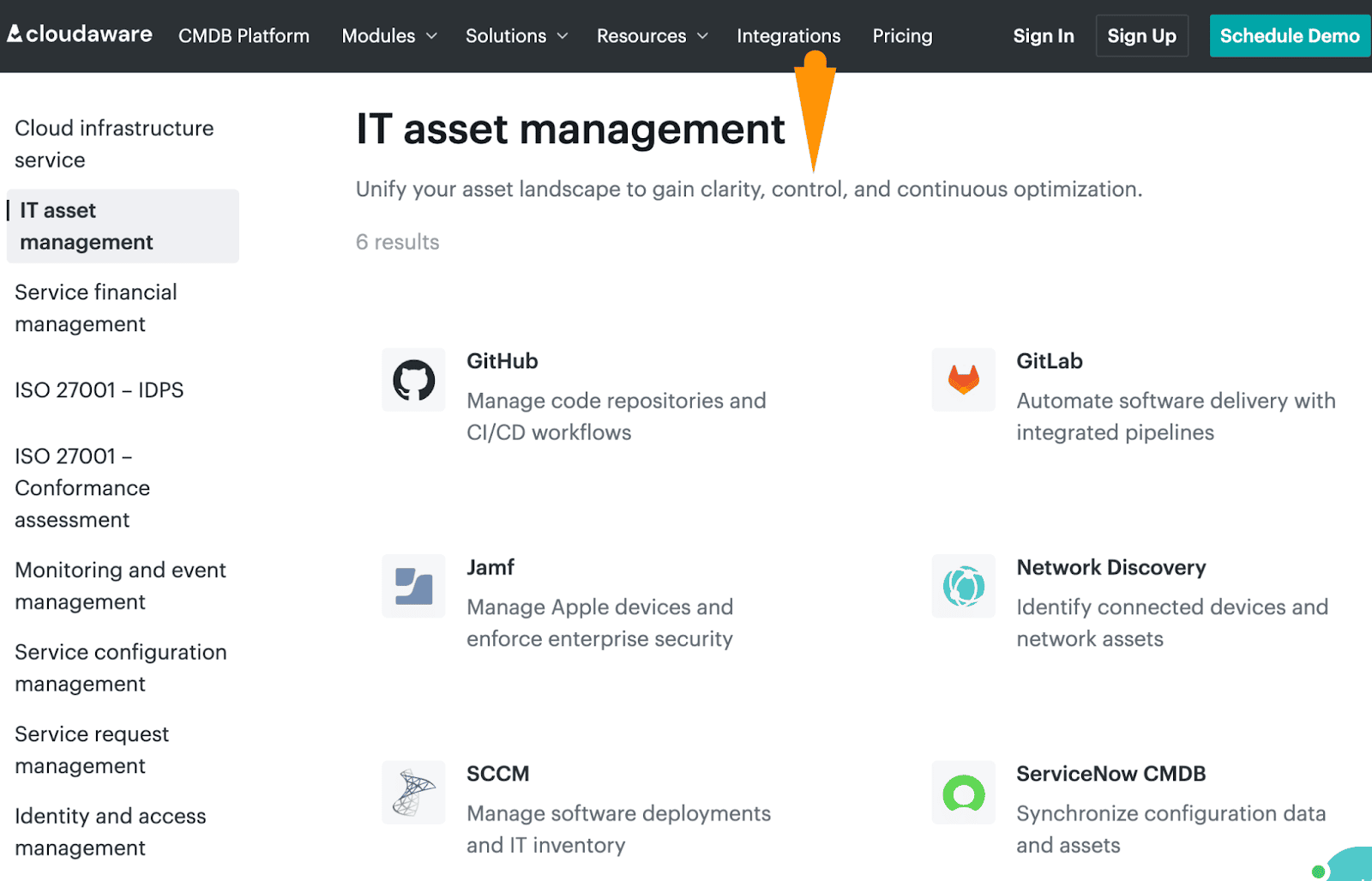
Implementation move that feels real in a pipeline:
- CI runs build/test + your usual security scans.
- Cloudaware consumes violations/compliance signals and enforces “promote or stop” rules for infrastructure and code releases.
Wire in policy signals, not raw noise
If your pipeline gates on “all findings,” you’ll teach people to bypass it. Instead, gate on the inputs you can actually defend in an audit: normalized policy check results and violation states tied to real assets and accounts. Cloudaware ingests security posture data from your cloud providers and connected sources (e.g., AWS Trusted Advisor) and can also consume external posture outputs via integrations (e.g., Wiz or Palo Alto).
It then applies Cloudaware’s compliance/CSPM policies to that data, produces clear violations (what rule failed, on which asset, in which account), and uses those violation results to enforce go/no-go decisions in the release path.
Here is an example of how this process goes:
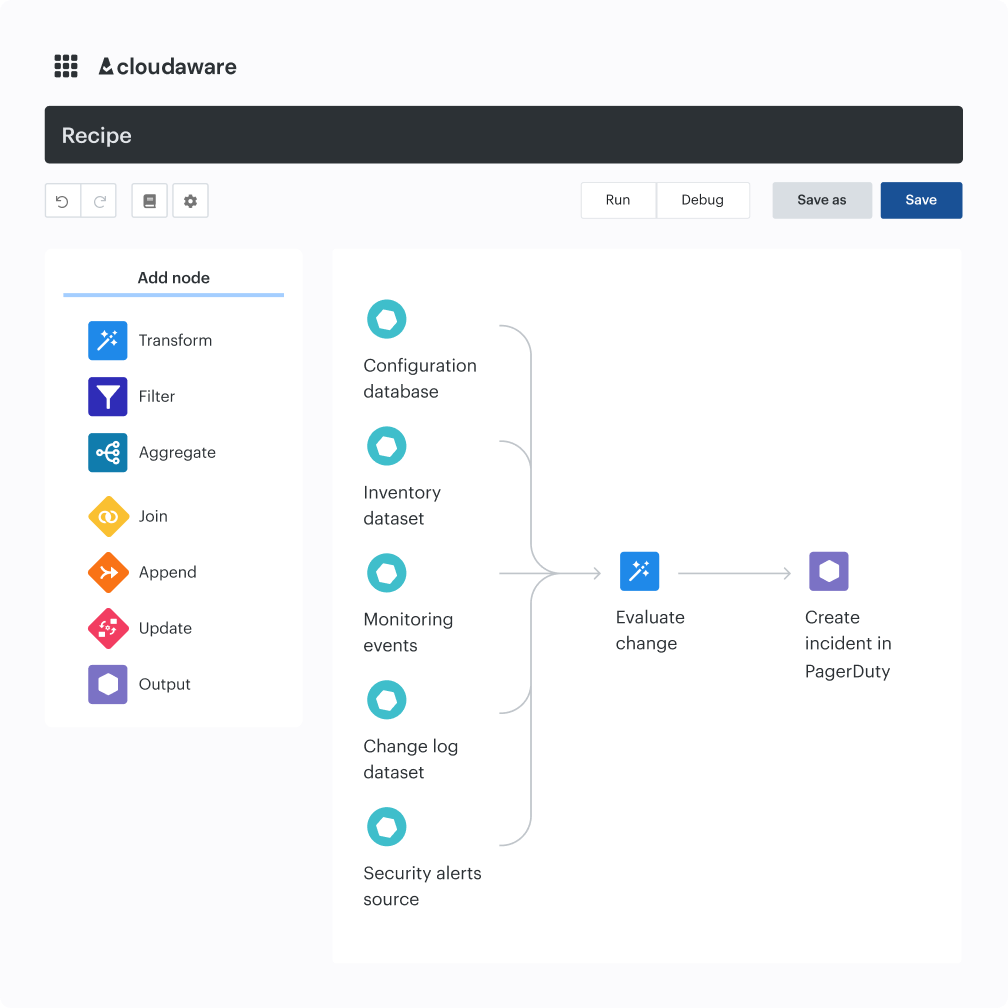
That’s your filtering layer. You’re not debating every low-risk deviation; you’re gating on violations that already match your standards.
Read also: DevSecOps vs Agile: Agile DevSecOps Explained for Delivery Teams
Turn approvals into an automated workflow, not a daily ritual
Manual approvals are fine when they’re rare and meaningful. They’re brutal when they’re constant. Cloudaware’s pitch here is pragmatic: auto-approve low-risk change patterns, route only the risky ones, and avoid “just in case” tickets.
What this looks like in practice:
- Route approvals by account/environment /group (prod is strict, dev is loose).
- Use time windows for planned changes, so you don’t slow releases during approved periods.
- Push the right approval request to the tools teams already live in (Slack, Jira, ServiceNow, PagerDuty).
Here is an example of how such a message can look like in Slack:
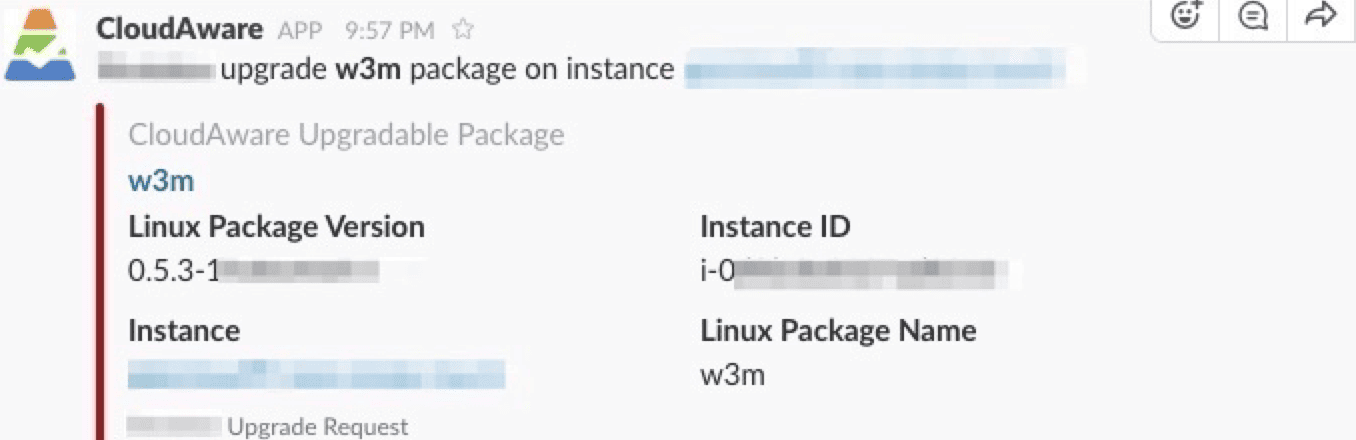
This is where DevSecOps CI integrations stop being a buzzword and turn into fewer pings, fewer meetings, fewer “who owns this?” moments.
Read also: How to Build a Secure DevSecOps Toolchain Without Alert Fatigue
Add drift control so “secure at deploy” doesn’t quietly rot
Most violations don’t come from the pipeline doing something wild. They come from the environment drifting after the fact. Cloudaware describes baseline comparisons and drift detection across cloud and Kubernetes, with examples like EKS and Azure VMs.
A clean rollout pattern:
- Establish baselines for critical resources (EKS clusters, IAM roles, perimeter security groups).
- Alert instantly when drift hits something high-risk.
- Detect unexpected change and force it back through the same approval path.
Read also: 9 DevSecOps Benefits for Security Leaders [With Proof]
Make audit evidence a byproduct of delivery
If compliance is still spreadsheet season, you’re doing extra work forever. Cloudaware emphasizes automatic logging of what auditors actually ask for: who approved or rejected a change, when it happened, what exactly was changed, and where it was deployed.
Instead of “evidence collection,” it keeps a continuous evidence trail (approval records, pipeline results, policy checks, and change logs).
And instead of abstract “traceability,” it gives you a clear chain from a specific commit and CI/CD run to the exact infrastructure change and deployment it triggered — with timestamps and owners.
So instead of “prove this control existed,” you hand over the pipeline output: who approved, what changed, which checks ran, and when.
Measure whether your integration is helping or just adding friction
Cloudaware explicitly calls out DevSecOps dashboards and suggests tracking measurable outcomes like policy violations remediation time and change failure rate.
So don’t track “everything.” Track a small set your platform team can actually move:
- % of releases auto-approved vs. manual.
- Policy violations by environment (prod vs non-prod.)
- Drift events on tier-1 services.
- Vulnerability MTTR for issues introduced this week (not the legacy backlog you’re still paying down.
And if false positives are still killing attention, treat it like a pipeline bug: tune rules until alerts mean something.
Cloudaware also claims “95% fewer false alarms,” explaining that the signal improves when high-risk changes are identified and paired with service catalog context so teams can focus on what matters.
Once the workflow is clear, the next decision is tooling 👇
Read also: 15 DevSecOps Tools - Software Features & Pricing Review
Enhance infrastructure security with Cloudaware DevSecOps
When I see teams get CI/CD DevSecOps right, it’s rarely about “more tools.” It’s about fewer surprises. Cloudaware shows up as the layer that makes infrastructure change predictable: you can see what changed, who changed it, and whether it violated the rules you care about before it quietly becomes tomorrow’s problem.
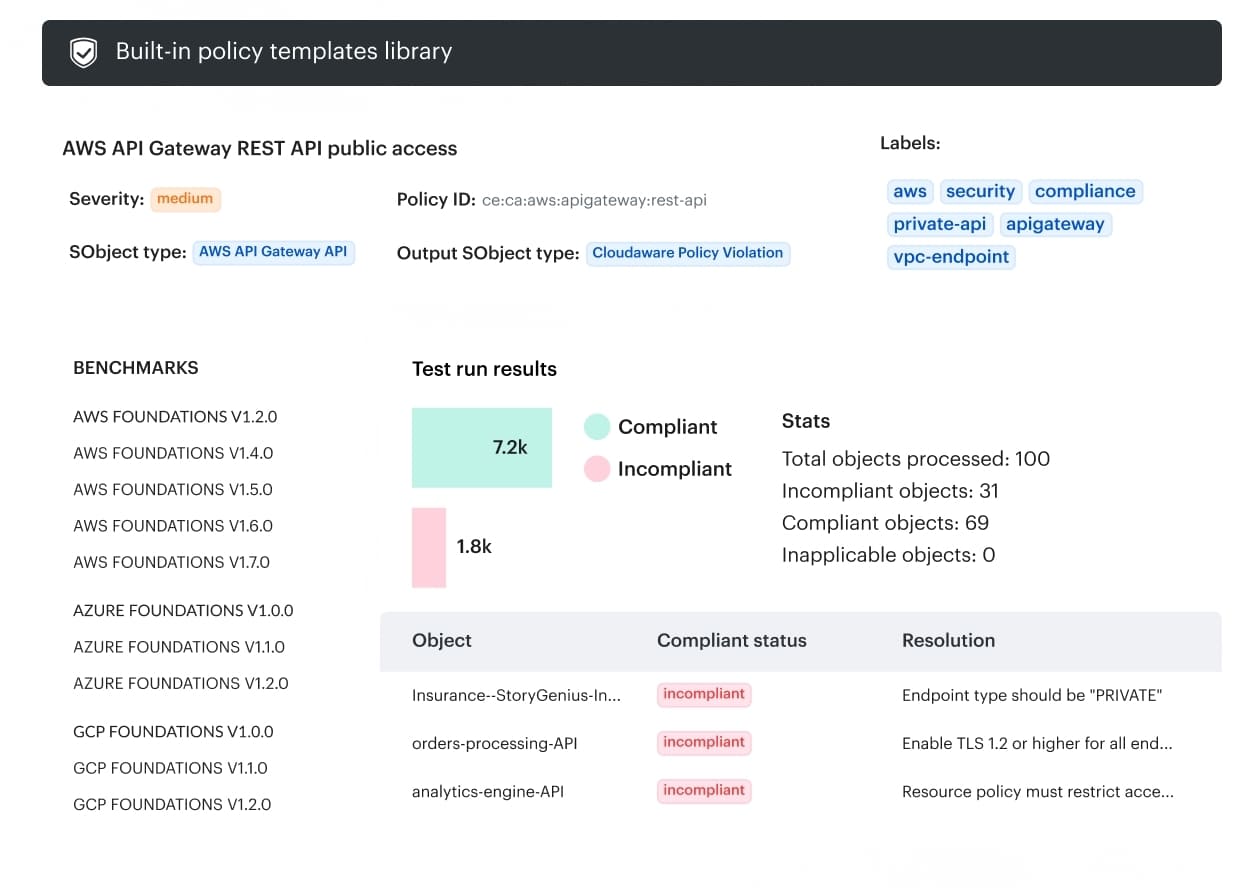
The practical win is how it handles DevSecOps CI integrations in the places your team already lives. Instead of inventing a new workflow, teams wire approvals and notifications into Slack, Jira, ServiceNow, or PagerDuty, then route decisions by account, group, or environment, so prod doesn’t get treated like a sandbox.
What Cloudaware users lean on in real pipelines:
- Change visibility across hybrid environments, so you’re not relying on “did anyone touch prod?” memory.
- Real-time change review that keeps velocity, because review is targeted to what’s risky.
- Smarter signal, less noise. Companies using Cloudaware claim “95% fewer false alarms” by adding service-catalog context.
- Policy-based release gating using violations data from CSPM/compliance sources (example integrations include Wiz, Palo Alto, and AWS Trusted Advisor).
- Configuration drift control via baselines, including coverage for cloud infrastructure and Kubernetes.
- Audit-ready reporting + traceability from commit to deployment, with continuous evidence collection.
- Security as code via policies so IaC templates stay compliant before deployment.
- Dashboards for DevSecOps metrics like vulnerability MTTR and change failure rate, so you can prove it’s working.