


Most vulnerability assessment tools produce a long findings list. The useful ones also show whether scans covered expected assets and which findings deserve trust. Without that context, more results mean a larger triage queue.
Recent disclosure volume raises that triage cost. The CVE Program's Q2 2026 report, published August 25, 2026, records 20,709 CVE Records. That was 36.46% more than the 15,176 records reported for Q1. A larger feed punishes weak scope control and noisy prioritization.
The comparison covers 10 tools, from focused software to broader security solutions. Each system faced seven checks, starting with coverage, accuracy, and cost. As of October 2026, our evidence included Cloudaware's first-party data alongside public sources. Documentation sometimes set the limit. We call those cases reviewed or verified, never tested.
Detection starts the shortlist; it does not finish it. Before approving a POC, verify the asset denominator, sample false positives, and challenge the highest-ranked findings.
Key insights
Assessment jobs produced different shortlists; vendor size told us very little.
- Breadth versus depth is the first fork. Unknown assets favor broad discovery; known systems with configuration questions demand deeper inspection.
- The hidden bill? False positives. Sample 100 findings, or the full set if smaller. Count every result needing manual validation before an analyst can trust it.
- During a POC, credentials can matter more than the logo. Tenable's scan documentation shows why authenticated checks can reach local detail unavailable to remote-only scans.
- Multi-cloud changes the math. Unify asset identities and finding fields before comparing scanner feeds.
- Few marketing claims survived our documentation review unchanged. A qualifier often appeared in prerequisites, scope tables, or plan notes. Read those before shortlisting.
For a first shortlist, use this three-way split:
| Scenario | Start with |
|---|---|
| Unknown assets or uncertain scope | Discovery-led assessment software |
| Known systems needing package and configuration depth | Credentialed vulnerability scanner |
| Several clouds and overlapping scanner feeds | Unification layer with shared asset context |
What is vulnerability assessment software?
Vulnerability assessment tools are software that scan systems, networks, and applications to find and rate known vulnerabilities.
In practice, good vulnerability assessment software also exposes its scope, evidence, and coverage gaps. Assessment tools find and rate; vulnerability management tools (manage and remediate) track findings until teams fix them.
What separates a scanner from an assessment platform
Category labels overlap. Before comparing features, pin down the job and the tool's vantage point.
| Category | What it does | Vantage point |
|---|---|---|
| Vulnerability scanner | Runs checks against defined targets and returns individual findings | Network, host, application, or cloud target |
| Vulnerability assessment tool | Adds scope, rating, evidence, and reporting around scan results | A defined asset set during one assessment |
| Vulnerability management platform | Tracks assessed findings through ownership, exceptions, and fix status | The program backlog over time |
| Attack surface management | Discovers externally reachable assets and exposures | Outside-in, from the internet |
| Penetration testing | Uses human-led testing to validate exploitability and chained weaknesses | Time-boxed attacker perspective |
| CMDB/asset context | Maps findings to assets, applications, owners, and dependencies | Inside-out inventory and relationships |
A scanner may sit inside an assessment tool. CMDB context then explains what the affected asset supports.
That context changes business priority, not the scanner's technical evidence.
The vulnerability assessment process in one pass
One pass should preserve the same asset scope from discovery through re-scan. Credentials change what the scanner can see.
- Discover: Define the asset denominator, including exclusions and unsupported targets.
- Scan: Run unauthenticated scans for the exposed view; use authenticated scans for local packages and configuration.
- Rate and prioritize: Blend technical severity with exploitation signals, exposure, and evidence confidence.
- Report: Keep the asset, proof, scan time, rating inputs, and coverage gaps together.
- Re-scan: Repeat the same scope after changes, then compare findings and coverage.
Rating is where teams often flatten three different signals into one number. CVSS scores severity; it does not assign your priority.
For near-term probability, EPSS estimates exploitation over the next 30 days. Already exploited? CISA KEV lists vulnerabilities seen in the wild.
None replaces asset context or a clearly defined assessment scope.
Types of vulnerability assessment tools
The asset decides the tool class. A familiar console should not.
| Type | What it assesses |
|---|---|
| Network | IP ranges, ports, services, operating systems, and device exposures |
| Web-app | Routes, parameters, sessions, APIs, and response behavior in running applications |
| Host/agent | Installed packages, patches, and local configuration through an agent or credentials |
| Container/cloud | Image layers, registries, workloads, and provider-supplied security findings |
| Database | Database versions, exposed services, missing patches, and security configuration |
| Open-source | Coverage depends on the project and enabled plugins; open-source describes delivery, not the assessment target |
For mixed estates, map each type to asset classes before comparing vendor totals.
How we built this shortlist
We shortlisted ten vulnerability assessment tools only after each cleared the same evidence and scope gates. A familiar logo was not enough.
The longlist came from market coverage, vendor documentation, public pricing, Gartner Peer Insights, Reddit, and practitioner discussions. Then came the unglamorous work: opening technical documents, tracing pricing, and checking what each product actually assessed.
Three gates decided the final ten:
- Still maintained? Active support and accessible documentation were mandatory.
- At least one defined asset class had to be assessed, not merely inventoried.
- No public trail, no profile. Verifiable capability evidence had to exist; missing pricing or plan data remained visible.
The cuts were equally deliberate. Abandoned projects left first. So did products with claims we could not trace to public evidence.
Pure vulnerability management or remediation workflows stayed out when they could not find and rate vulnerabilities themselves. Managed services and configuration-only tools solve different buying jobs, so we did not score them as peers.
There is a conflict to disclose: Cloudaware publishes this article and appears among the ten. Its profile received the same seven checks, and first-party data names Cloudaware as the source.
- Start with reviewed. We used practitioner reviews to judge usability, friction, and observed limits, not to prove product capabilities.
- A claim counted as verified only when it matched current vendor documentation, pricing, or official product material.
- Then comes compared: we checked the same fields across all ten tools. Anything we could not confirm stayed visible.
- Tested is different. We reserve it for a documented first-hand run. No run, no label.
The evidence snapshot is current as of October 2026. Pricing and plans move, so recheck both before procurement.
Desk research still has a hard boundary. Kelley Dempsey and co-authors of NISTIR 8011 Volume 4 (2020) put one acquisition check plainly:
“Ensure that the false positive and false negative rates of the scanner are acceptable. No test is 100% reliable.”
That check cannot be settled from documentation. Use the shortlist to choose a proof of concept, not replace one.
Seed known-vulnerable and known-clean targets. Record feed versions, settings, and exclusions before comparing outputs.
What to look for in a vulnerability assessment tool
Bring the same test pack to every proof of concept. Otherwise, a polished demo can hide coverage gaps, weak authentication, and analyst effort.
Score each product against the seven checks below. They become the columns in the comparison table that follows.
1. Scan coverage
Coverage starts with a denominator: supported, in-scope assets expected to be assessed during the test window. Map the estate before the demo: network devices, hosts, web applications, databases, containers, Kubernetes, cloud workloads, and serverless services. Ask the vendor to label each class as native, connector-fed, limited, or unsupported. Coverage rate = successfully assessed assets / supported, in-scope assets expected during the window
Run the POC against known inventory, then inspect every miss. Separate unsupported classes from authentication failures and unscanned assets. A 98% claim means little when serverless or Kubernetes sits outside the denominator.
2. Detection accuracy
Two scanners can report the same CVE count while proving very different things. Credentialed assessment runs more checks than unauthenticated scanning, but only when the granted privileges are sufficient. Include one patched host whose banner still exposes an old version. Add one outdated local package hidden from remote fingerprinting. Compare authenticated and unauthenticated results on the same hosts. Require authentication status beside each finding.
One awkward vendor question helps: which checks were skipped, and can we export that list?
3. False-positive load
False positives cost analyst time, so count the work rather than trusting an accuracy claim. Sample 50 findings across asset classes and severity bands. Have analysts validate each against package, configuration, or runtime evidence.
Use two measures:
- False-positive share = disproved findings / findings reviewed
- Validation load = analyst minutes / findings reviewed
Keep inconclusive findings separate. Otherwise, missing credentials masquerade as detection errors. Re-scan the sample after a feed update. A useful product preserves evidence and shows whether the result changed.
4. Prioritization
A useful rank combines CVSS severity, EPSS likelihood, CISA KEV, exposure, and asset context.
Take 20 findings with similar CVSS scores. Include a KEV-listed CVE, an internet-facing asset, and a critical internal service. The order should change for visible reasons, not because the vendor's score says so. Art Manion and ten co-authors set a useful boundary in FIRST's CVSS implementation guide (version 1.0; accessed October 2026):
“CVSS Base scores provide a common baseline, but used alone, they lack the deployment-specific context that many programs need.”
That gap is what the POC should expose. Export one ranked finding and trace every input. If the inputs disappear, the rank is hard to defend.
5. Asset context and unification
One CVE on three scanner feeds should not become three assets. Check whether the platform preserves every source while resolving findings to a canonical asset. The minimum context is current owner, application, environment, cloud account, subscription or project, exposure, and last-seen time.
During the POC, send one ephemeral workload through two scanners and the cloud inventory. Pass only if one asset remains, both findings stay attributable, and stale IP reuse does not merge another workload. Then change the owner source. Verify the finding follows the current asset relationship rather than a copied owner value.
6. Reporting and compliance
Assessment evidence should survive outside the dashboard. Export a report and try to reconstruct the scan without vendor help. Can you see target scope, exclusions, scanner version, feed date, authentication result, timestamps, raw evidence, and rating inputs?
If any field vanishes, the report is weak audit evidence. Ask for both machine-readable export and a human-readable view. Confirm that filters, time zones, and timestamps survive both formats.
A clean report does not prove compliance. It proves what was assessed, under which conditions, and when.
7. Pricing and deployment
Price the operating shape you will actually scan. Model steady-state and peak assets separately, including ephemeral workloads, containers, external targets, scanner appliances, connectors, and retained history. Ask what triggers billing: discovered, assessed, active, unique, or concurrent assets. Deployment can change the result as much as price. Confirm where consoles and scanners run, including SaaS, private cloud, and on-premises options.
Test one representative network segment and one cloud account through each required path: agent, credentialed, agentless, connector, or appliance. Record setup time, permissions, egress needs, unreachable assets, and checks unavailable in that mode.
Finally, request a 12-month quote using those counts. A low entry price can hide the deployment tier you actually need.
The comparison table next applies these seven columns to all ten tools.
Vulnerability assessment tools compared at a glance
Use this evidence-backed table to remove obvious mismatches before booking demos. Start with Best for, then test the column most likely to disqualify a product. It will not replace a controlled POC.
| Tool | Best for | Scan coverage | Detection / authenticated | Prioritization signals | Asset context & unification | Reporting & compliance |
|---|---|---|---|---|---|---|
| Cloudaware | Multi-scanner cloud estates | Hosts, IPs/URLs, container images | Breeze; credentialed IP scans | CVSS, exploitability, CMDB context | CMDB plus scanner unification | Dashboards, exports, scheduled delivery |
| Tenable | Broad hybrid assessment | Hosts, networks; web add-on | Credentialed, agent, remote scans | VPR; Advanced-tier ACR | Asset identity; ACR tiered | PDF; CSV/JSON; audit evidence |
| Qualys VMDR | Distributed hybrid estates | Hosts, networks, cloud workloads | Agents; authenticated scanner appliances | TruRisk, QDS, criticality | Inventory, tags, criticality | PDF/XML/CSV; PCI reports |
| Rapid7 InsightVM | Engine-based network assessment | Hosts, networks, services | Credentials, engines, optional agent | Active Risk: CVSS+KEV | Groups, tags, owners | PCI/SCAP reports; XML exports |
| OpenVAS Community Edition | Open-source network scanning | Hosts, networks, services | Credentialed or unauthenticated | CVSS-based severity | Host-centric asset records | PDF/CSV/XML compliance reports |
| Wiz | Agentless cloud assessment | VMs, containers, serverless | Agentless; sensor runtime validation | Exposure, identity, data context | Security Graph; scanner feeds | CSV/API; POA&M reports |
| Acunetix | Web applications and APIs | Web applications and APIs | Authenticated DAST; proof-based | CVSS-based severity | Target-level web context | Audit-ready PDF reports |
| Intruder | Lean cloud security teams | Infrastructure, web apps, containers | External; agent/DAST tiered | CVSS, EPSS | Target inventory: cloud sync | Dashboards and compliance reports |
| Microsoft Defender Vulnerability Management / Defender for Cloud | Microsoft-centric hybrid estates | Endpoints, VMs, container images | Endpoint sensor; agentless cloud | CVSS+EPSS+context, phased rollout | Device inventory; security graph | Vulnerability and compliance reports |
| Nuclei | Custom template-driven checks | Web, APIs, network protocols | Templates; secret-file authentication | Template severity and tags | — | JSONL, SARIF, PDF exports |
Best for is our practitioner reading of documented scope; — and Not published mark unverified public evidence. Snapshot checked in October 2026; packaging, pricing, and feature gates can change.
10 vulnerability assessment tools reviewed
Each profile shows where the tool earns a shortlist place, what usually breaks, and one POC check worth running.
Cloudaware
Rating: G2: 4.0/5 from 13 reviews, as of October 21, 2026. Treat this small sample as directional.
Best for: Multi-cloud vulnerability teams combining several scanners with one CMDB-backed assessment view.
Not a fit if: You only need a standalone DAST or container scanner and no CMDB layer.
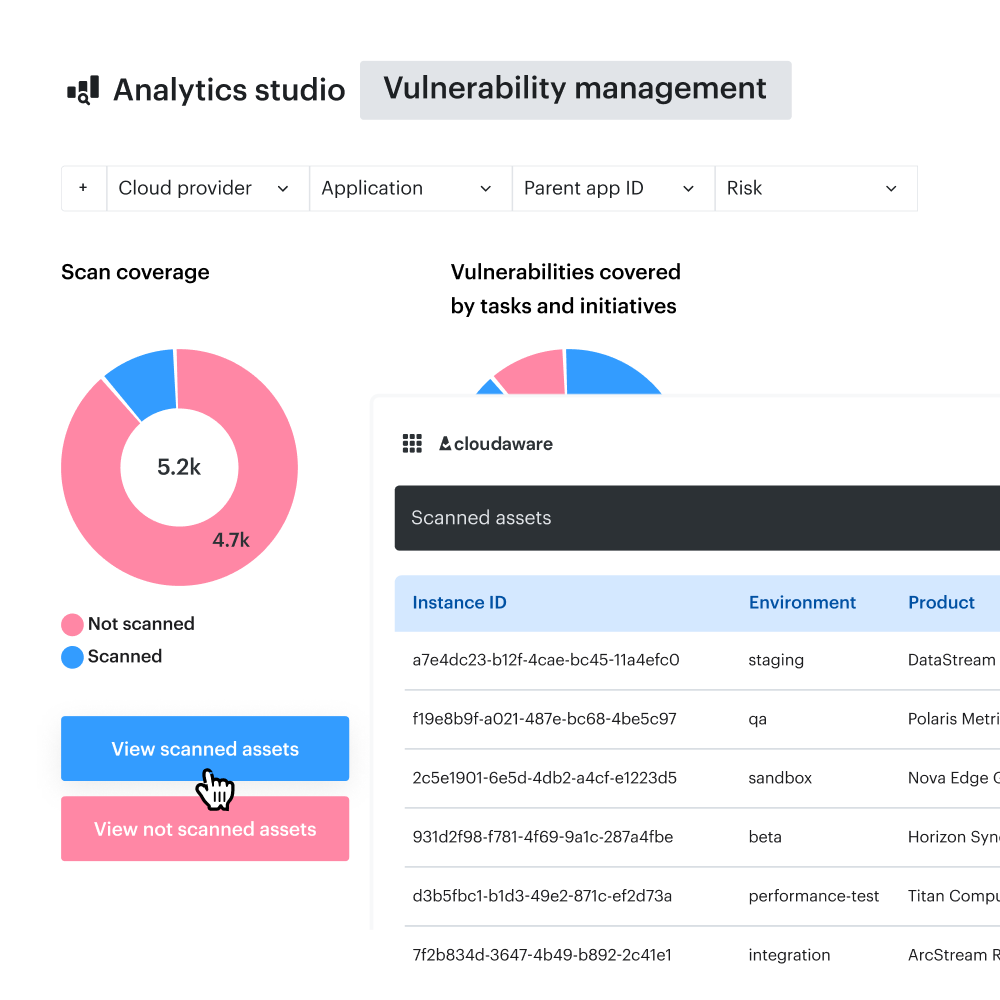
Several scanners can report the same CVE while disagreeing on asset identity and ownership. Cloudaware Vulnerability Management maps Cloudaware-managed, cloud-native, and third-party findings into a shared record model. Those records inherit CMDB relationships to applications, environments, owners, organizational units, and business criticality. The assessment queue then reflects asset context alongside scanner severity.
The scanning layer is broader than a connector hub. Breeze Agent supports default host scans; optional workflows cover credentialed IPs, URLs, and container images. Cloudaware documents assessment at least every seven days for scoped assets. Depth still depends on the selected scan type and vendor backend.
The practical gain appears after findings arrive. Cloudaware normalizes source details, CVEs, severity, exploitability, and status, then groups overlaps against CMDB assets. A vulnerability manager can isolate unowned production findings or stale scan coverage without rebuilding spreadsheet joins. Remediation still happens through responsible teams, connected systems, or separate Cloudaware modules.
That model asks for setup. Asset identities, scanner connectors, ownership sources, and CMDB relationships must be trustworthy before the priority view is trustworthy. A team needing only deep DAST or container scanning will carry more platform than it needs.
POC rule: Connect one existing scanner, then run a Breeze-based scan across 20 overlapping hosts. A pass requires duplicate CVEs to resolve to one CI while preserving source, owner, and Last Scan Date. Fail the POC if unmatched assets or ownerless records disappear inside an aggregate score.
Features that matter here
- Managed scanning with explicit prerequisites. Breeze Agent supports default host checks. Credentialed IP, URL, and container scans have separate scope and access requirements.
- Multi-source intake. Cloudaware-managed scans, cloud-native services, and configured third-party tools feed a common record model. Original source remains visible.
- CMDB-backed context. Findings link to assets, applications, environments, owners, organizational units, and criticality.
- Risk signals beyond severity. Prioritization can combine CVSS, exploitability, exposure, business impact, age, and ownership context.
- Coverage evidence. Last Scan Date, vulnerability counts, coverage, and age help separate scan gaps from risk findings.
Pricing
Cloudaware's public calculator estimates CMDB cost from server count and CI capacity. It does not publish a complete vulnerability-assessment package. As of October 2026, the pricing calculator lists USD starting estimates from 50 servers. Each includes capacity for up to 25,000 CIs:
- Core starting estimate: $67/month
- Enterprise starting estimate: $200/month
Those figures annualize to $804 and $2,400. Treat them as CMDB entry estimates, not the final assessment budget. VSaaS pricing varies by scope and vendor backend. Request a custom quote for the assessment configuration. Confirm whether VSaaS, optional scan types, connectors, and vendor-backend fees are included before comparing totals.
Pros and cons
Reviewers consistently describe multi-cloud inventory and dependency visibility as the useful part. Friction appears in navigation, audit reporting, and perceived cost.
These are verbatim quotes from G2 and PeerSpot. The sample is thin, and several PeerSpot contributors share one employer. Treat the pattern as directional, then retest it in your POC. Pricing opinions describe perceived value, not current list prices.
- ✅ Multi-cloud inventory in one view: TusharGoel, Cloud Engineer at TO THE NEW Digital: “Multi-cloud inventory tracking is another feature that gives us a unified view of all assets, which is a huge help for managing resources efficiently.” (PeerSpot, May 24, 2026)
- ✅ Infrastructure relationships stay visible: PRIYANKA PRAKASH, Deputy General Manager at Agriculture Skill Council of India: “We now maintain a real-time, accurate view of the infrastructure dependencies, leading to faster troubleshooting and very positive impact analysis for the organization.” (PeerSpot, July 1, 2026)
- ⚠️ Performance and navigation friction: Pourya M., Senior Consultant, small business: “Cloudaware can be slow at times, and the user interface can be overwhelming and difficult to navigate.” (G2, April 9, 2023; validated incentivized review)
- ⚠️ Entry price can feel high: ParthasarathyT, Senior Infrastructure Engineer at Publicis Sapient: “For 50 servers, they charge $200, which is quite high.” (PeerSpot, June 9, 2026)
- ⚠️ Audit reporting needs scrutiny: Purnambica Kolavennu, Project Manager at ASCI: “Additionally, establishing a full-fledged audit control reporting structure is needed, especially since we conduct risk assessments.” (PeerSpot, June 3, 2026)
Tenable (Nessus and Tenable One Vulnerability Management)
At a glance: Best for credentialed host and network assessment across mixed infrastructure. Look elsewhere when DAST depth or open-source control leads.
Rating: G2 records 4.6/5 from 154 reviews, captured October 21, 2026.
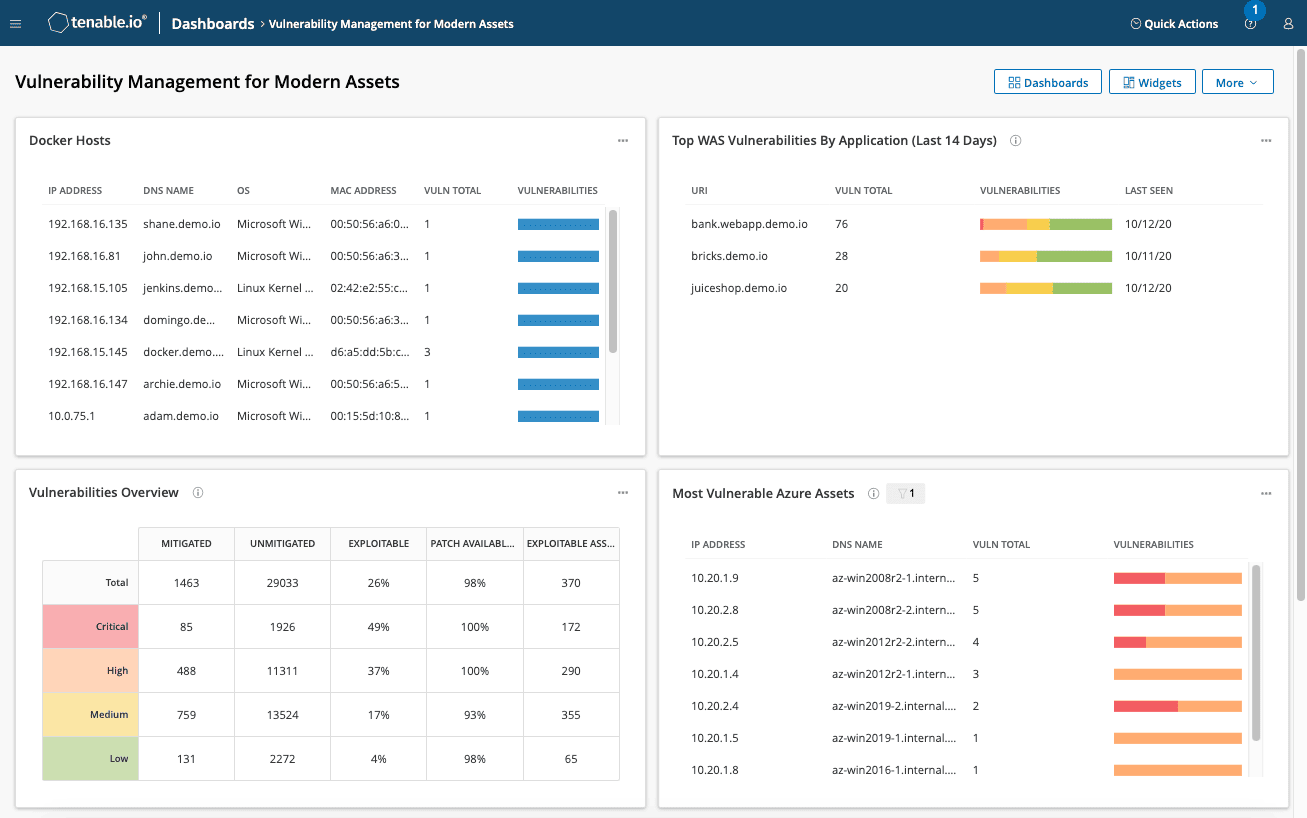
Image source.
Run the same host twice. Keep the target, plugin set, and route unchanged; add credentials only for the second scan.
The result gap exposes Tenable’s practical value. Local access enables wider checks, while account privileges determine their depth. When that gap stays small, inspect authentication first.
Failed or underprivileged credentials can make a broad scanner look shallow.
Nessus supplies the checks. Tenable One Vulnerability Management brings assets, findings, reports, and risk signals into its cloud console. Tenable says Nessus covers 336,000-plus CVEs and includes 450-plus templates. Those vendor figures describe library breadth, not independent accuracy.
A headline severity rarely settles a disputed finding. Analysts can inspect plugin output, ports, protocols, scores, and authentication recency.
Keep web assessment on a separate scorecard. Tenable One Web App Scanning carries its own FQDN-based license. For multi-scanner estates, Cloudaware can ingest Tenable findings and add CMDB context. Tenable remains the finding source.
POC rule: Prepare one host with a remotely visible CVE, a credential-dependent CVE, and a benign false-positive control. Scan without credentials, then repeat with privileged access and identical scope.
Record detection delta, authentication failures, false positives, and runtime.
Pass when authentication succeeds, both seeded CVEs appear, and false positives remain below your agreed ceiling. Reject any score hiding a miss.
Features that matter here
- Credentialed depth: Local access unlocks checks unavailable remotely. Verify that the POC account reaches the required privilege level.
- Sensor choice follows topology: Scanners, agents, and cloud scanners reach different network conditions. Agents still require deployment.
- Can an analyst reproduce the result? Plugin output, ports, protocols, scan origin, and timestamps make disputed findings traceable.
- VPR and EPSS add context: Both sit beside CVSS. They refine rating but cannot repair missed coverage.
- Reports and exports serve different readers: PDF supports human review; CSV and JSON support analysis. Render your actual audit sample.
Coverage starts before any plugin fires. One practitioner found an unexpected benefit during discovery:
“One unexpected benefit has been how effective it is as a continuous asset inventory tool.”
Luis Fernando A., Professional Service Unit Engineer II (G2, September 23, 2026) His review describes discovery scans, agents, and network monitoring uncovering shadow IT. Compare discovered assets against cloud and CMDB inventories.
Count unexplained additions and omissions separately. Otherwise, an inventory win can conceal a coverage gap.
Shortlisting rule: Choose Tenable when credentialed hybrid-infrastructure depth dominates. Deprioritize it when DAST depth or open-source control decides the purchase.
Pricing
The first pricing trap is a unit mismatch. Tenable One charges by assets; Nessus Professional uses a fixed scanner license.
As of October 21, 2026, Tenable publishes these annual prices:
- Tenable One Vulnerability Management, 100 assets: $3,500 for one year; $6,825 for two; $9,975 for three.
- Nessus Professional, one license: $4,790 for one year; $9,330.95 for two; $13,637.54 for three.
- Nessus Professional add-ons: $400 for Advanced Support and $275 for one year of on-demand training.
- Tenable One Web App Scanning, five FQDNs: $3,578 through the official purchase page.
Both product pages offer a free evaluation, although neither publishes its duration.
At 100 assets, Tenable One starts at $35 per asset for year one. That is not equivalent to one Nessus license.
Price your steady-state asset count. Then add web FQDNs, scanner needs, support, training, taxes, and any Tenable One options.
Model transient assets against Tenable’s elastic licensing rules. Inactive assets can be reclaimed; sustained overages require a true-up.
Pros and cons
Favorable reviews center on overlooked findings, light agents, and scheduled reporting. Friction shifts toward validation, price pressure, and auditor-ready detail.
Documentation establishes capability; these quotes describe reported experience. The 2021 Nessus review is older, so remeasure its concern during your POC.
- ✅ Finds issues other processes miss: Anonymous SOC Analyst at an energy company with 1,001-5,000 employees: “Operationally, Tenable Vulnerability Management finds issues that would otherwise be missed, but I don't have an ROI.” (PeerSpot, June 17, 2025)
- ✅ Lightweight agents with accurate results: Chethan Gowda, Windows Security Patching Operation III at CBTS: “Tenable Vulnerability Management agents are very lightweight, and the results we get are very accurate.” (PeerSpot, September 23, 2025)
- ✅ Scheduled reporting is easy to operate: Mani Bommisetty, Infrastructure Patching Manager at a 1,001-5,000-employee manufacturer: “Tenable is user-friendly and excels in reporting. It allows me to easily fetch and schedule reports.” (PeerSpot, December 17, 2024)
- ⚠️ False positives still require review: Thusitha K., Information Security Analyst: “As per my 2+ years of experience with the Nessus tool, sometimes it contains false-positive results.” (Capterra, May 15, 2021)
- ⚠️ Pricing faces competitive pressure: TarunKumar2, Deputy Global CISO at Nissan Digital: “The only area which possibly is not a part of the feature, but Tenable can look at, is to make their pricing more competitive.” (PeerSpot, January 13, 2026)
- ⚠️ Compliance reports may lack needed detail: HARI EDARA, IT Manager at State of Texas: “The reporting capabilities for compliance are bad. I can get the compliance reporting on certain cases, but it is not detailed.” (PeerSpot, March 26, 2024) Tenable now separates stakeholder reports from raw exports. Test the auditor-facing template, not only export availability.
Qualys VMDR
Best for: Security teams assessing thousands of office, cloud, and roaming hosts through agents and network scanners.
Skip it if: Your small team needs a scanner that requires little sensor planning or identity cleanup.
Ratings: G2: 4.4/5 from 168 reviews, captured October 21, 2026.
PeerSpot: 4.2/5 from 102 reviews, captured October 22, 2026.
PeerSpot groups VMDR and Enterprise TruRisk feedback under Qualys Exposure Management.
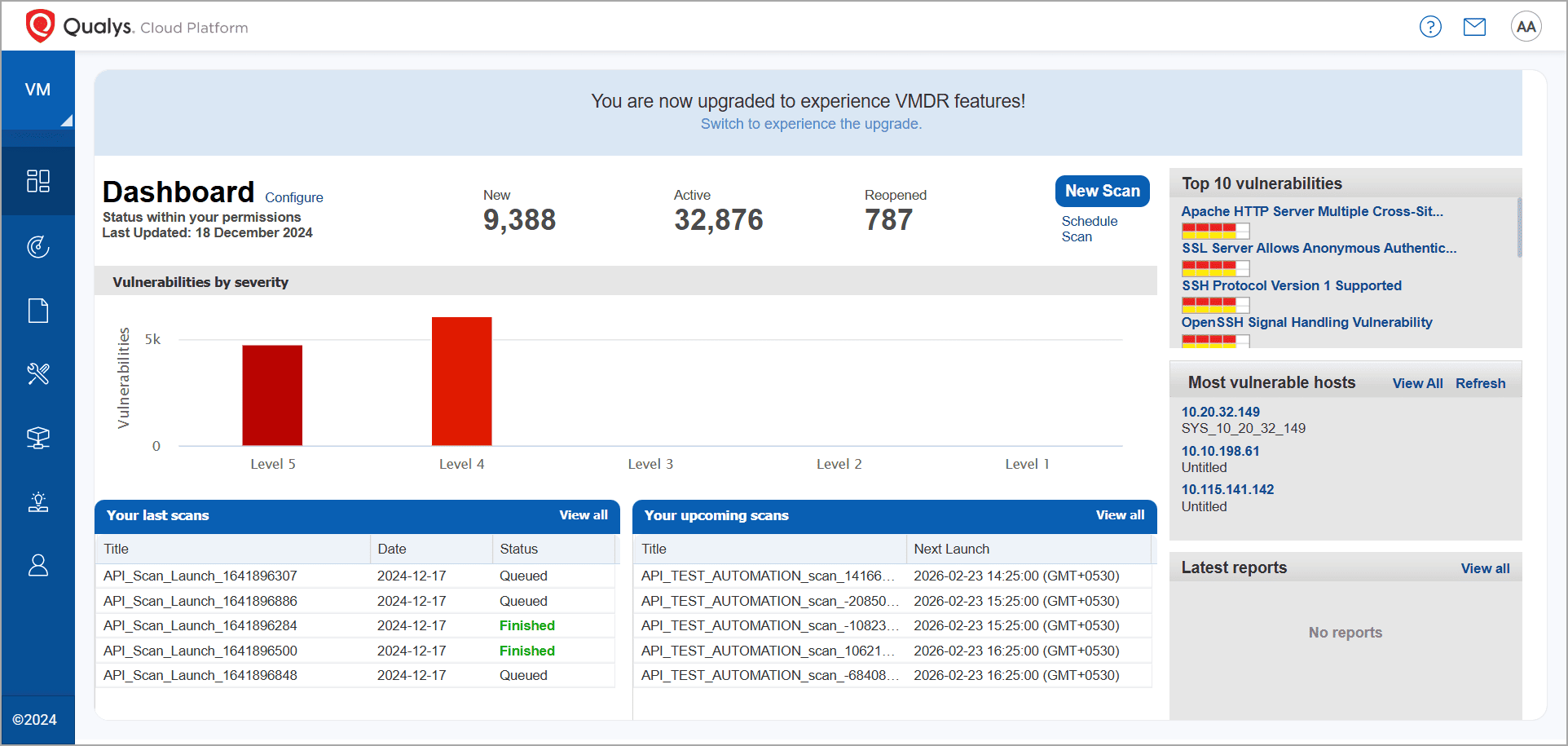
Once the estate reaches thousands of hosts, a flat CVSS queue stops helping. Qualys adds QDS, exposure, and asset criticality, so teams can inspect why one finding moved above another.
In the dashboard, exploitation evidence can move a lower-CVSS item above a higher one.
Coverage creates a different problem. Cloud Agent and scanner appliance data may describe the same host twice.
Qualys recommends combining sensors to close gaps across roaming endpoints, credentialed hosts, and network-visible devices. That mix supports agent-based and scanner-based vulnerability assessment, but duplicate identities can distort coverage and risk.
Features that matter here
Sensor coverage is only the first check. A failed login or ignored QID can quietly change the result.
- Where does each sensor reach? Cloud Agents follow roaming hosts, while appliances scan reachable devices with or without credentials.
- Keep authentication failures beside the result. Credentialed workflows reveal local details remote probes miss. A failed login can make a shallow scan look clean.
- Why did this asset move up? TruRisk uses QDS, asset criticality, and exposure. QDS draws on CVSS, EPSS, CISA KEV, and exploitation evidence.
- Will your auditor see the same scores? Sort the report by Host, and PDF retains ARS, ACS, and QDS. Sort by vulnerability, and only CSV and XML retain them.
- Ignored does not mean gone. Ignored QIDs leave default lists and dashboards, yet filters can retrieve them. Count ignored findings, then check who can apply that state.
Scale makes the identity problem less theoretical. One verified TrustRadius consultant described this estate:
“We have a big customer which has over 2 million devices to manage and it is a very complex infrastructure.”
Verified User, Consultant in Information Technology, IT services company with 10,001+ employees, TrustRadius, December 24, 2022.
The same review describes hundreds of devices entering or leaving daily. At that churn, your POC must verify current identity matching.
For multi-scanner estates, identity and ownership often sit outside Qualys. Cloudaware can attach Qualys findings and scan dates to related CMDB records.
Qualys still creates the finding. Missing connections leave gaps in the asset view.
POC rule: measure state freshness, then identity.
- Seed a known, reversible CVE on a disposable host. Wait until VMDR detects it.
- Patch outside Qualys, then record that moment as T0.
- The dashboard and scheduled report may disagree for a while. Rescan with credentials or wait for the Cloud Agent check-in. Mark the dashboard change to Fixed as T1, then mark the first report showing it as T2.
- Agree on T0-to-T1 and T0-to-T2 limits before testing. An unexplained overrun fails the POC. Do not redraw the line afterward.
Identity check: Pick a host with two IP addresses or a recently changed hostname. Let both sensors observe it.
An agent may still report the old name while the appliance sees the new one. You still want one asset record. Repeated QIDs or an inflated inventory count expose the split. Ask Qualys which fields should merge those records before rollout.
Shortlisting rule: Keep Qualys when agent and appliance data land on one asset, with ranking inputs visible beside it.
A stale hostname creating two assets is enough to pause. So is a patched CVE that misses the agreed Fixed deadline.
Pricing
Qualys prices VMDR per asset, while direct subscriptions remain quote-based. The US-only AWS Marketplace listing provides public host-package benchmarks as of October 2026.
The Marketplace tiers use one-month contracts; annual figures below are monthly prices multiplied by twelve.
- 128 hosts: $596 monthly, $7,152 annually, or about $56 per host yearly.
- 1,024 hosts: $2,352 monthly, $28,224 annually, or about $28 per host yearly.
- 5,120 hosts: $6,805 monthly, $81,660 annually, or about $16 per host yearly.
Across those packages, annual cost per host falls about 3.5 times. The nearest package boundary can shape your budget more than the entry price.
A 12-month contract advertises savings up to 17%. Do not apply that discount to the annualized monthly figures above. Direct subscription quotes vary with applications and quantities. Qualys also offers a 30-day VMDR trial. Before comparing totals, confirm included sensors, connectors, reporting modules, support, and regional terms.
Pros and cons
Users value Qualys when a huge estate needs risk ordering and auditable records. Friction starts when fixes reach reports late or support follow-up drags.
The PeerSpot quotes below are verbatim, though current behavior may differ. Ajay Paul's complaint maps directly to the T1 and T2 clocks in your POC.
- ✅ Risk prioritization across 10,000+ servers. Abdul Samad Irfan Shaik, Senior Technical Lead at Numeric Technologies: “The risk prioritization feature has significantly helped my team by allowing us to focus on the most critical vulnerabilities detected across our 10,000+ servers.” (PeerSpot, October 15, 2026)
- ✅ Auditable data for regulators. Pramod Borana, Senior Manager at a financial services company with 10,001+ employees: “Most of our data comes from Qualys itself, making all data auditable from the standpoint of Indian regulators.” (PeerSpot, February 23, 2026)
- ⚠️ Fixed findings can reach reports late. Ajay Paul, System Engineer at an outsourcing company with 10,001+ employees: “The primary issue is with the reporting functionality. Even though we fix vulnerabilities, the reports do not reflect the changes immediately.” (PeerSpot, August 7, 2026)
- ⚠️ Support and RCAs can lag. Vaibhav Ghule, SOC Lead and EDR Administrator at Persistent Systems: “The support has not been very responsive, and we are receiving RCAs a little delayed whenever we raise support cases or communicate with the TAMs.” (PeerSpot, January 8, 2026)
Rapid7 InsightVM
Best for: A security team covering thousands of mixed assets across segmented networks, with enough capacity to tune templates.
Skip it if: Web applications dominate the scope, or buyers expect scan results to change hosts by themselves.
Ratings, checked October 22, 2026: G2: 4.4/5 from 81 reviews.
PeerSpot: 4.0/5 from 66 reviews.
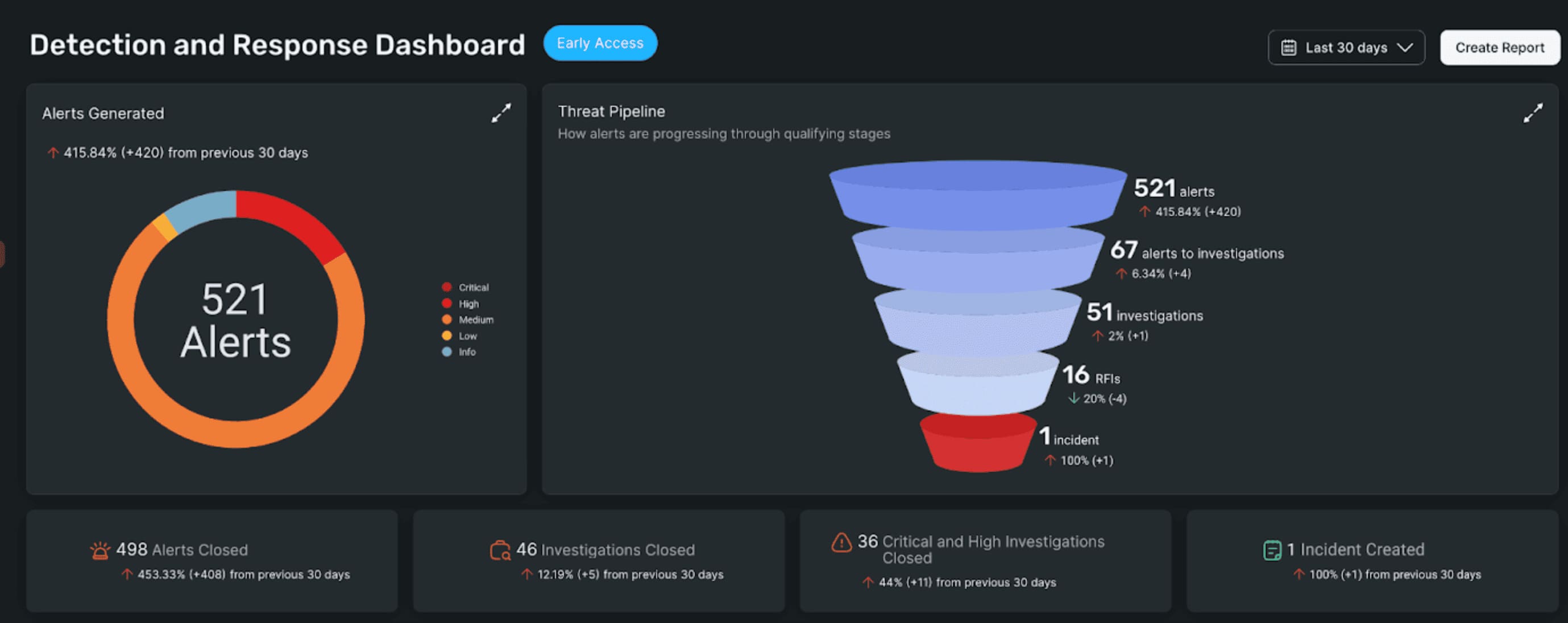
A web server can finish with a neat report and no application findings. The template, rather than the host, may explain that result. The selected template appears in the site's scan configuration. Rapid7 defaults new sites to Full Audit without Web Spider, mainly for non-web assets.
For vulnerability assessment, template choice becomes part of evidence quality. That configuration controls which checks the analyst receives. InsightVM works best when sites mirror real asset classes. Teams can copy a template, narrow its checks, and watch the accuracy-versus-runtime tradeoff. Active Risk then gives analysts a 0-to-1000 queue. The score blends current CVSS with CISA KEV, AttackerKB, Metasploit, ExploitDB, and other feeds.
The useful distinction is timing. A vulnerability's position can change when exploitation evidence changes, without waiting for another CVSS release. InsightVM still needs local scanning components. It installs a Security Console and scan engines, then pairs the console with Rapid7's platform. Rapid7 defines Nexpose as its on-premises scanner. InsightVM adds cloud-connected analytics around that scanning architecture.
That difference affects data residency, console operations, and integrations. Here, “cloud” means connected analytics around locally deployed scanning components.
Large subnet counts show reach. Coverage depth still depends on the template attached to each site. One practitioner described a demanding network:
“We handle a lot of video equipment and Rapid7 InsightVM helps us to scan subnets, around 150,000 of them.”
Christian Kyony, Senior Security Engineer at DRS, PeerSpot, February 7, 2024.
At that size, the wrong template repeats one blind spot very efficiently. Check the template-to-asset mapping before celebrating scan speed.
Cloudaware adds a separate context layer for teams already using both products. Its read-only Rapid7 connector brings assets and vulnerability context into the CMDB. That supports asset correlation and coverage reporting. Rapid7 remains the scanner; Cloudaware reads imported findings without writing back.
POC rule
Use one disposable web host with known operating-system and application issues. Compare the default template with a vendor-assisted, web-aware configuration.
| POC check | Pass | Fail |
|---|---|---|
| Template swap | Copied template is visible; discovered web paths or checks increase | Template name changes; checked paths and services stay identical |
| Application boundary | Report lists tested URLs; separate DAST scope is written beside it | One clean network report is presented as full application coverage |
| Workflow handoff | Ticket shows Assigned; named owner and host-change step remain visible | A created ticket is reported as a completed host fix |
For the last row, follow one finding from detection to the proposed action. Note who changes the host and confirms success.
This check marks where assessment ends and host remediation begins. A pass keeps scan evidence, ticket state, owner, and host change distinct.
Features that matter here
- Templates set the ceiling. Sites define assets, engines, and a chosen scan template. Rapid7 supports preconfigured and custom templates for different asset types.
- Did Active Risk move without a new scan? Compare the last scan time with the finding's exploit context. New threat intelligence can change the queue.
- During the POC, ask an analyst to explain that shift from the dashboard.
- Need more scanning capacity? Distributed engines can sit inside segmented networks. Measure each site's completion time during the real maintenance window.
- An auditor will ask for the record behind the score. Keep the asset, check, scan date, risk inputs, and certainty together.
Shortlisting rule: Keep InsightVM when tuned templates expose meaningful coverage differences and analysts can explain the resulting queue.
Pause when web scope remains vague. Also pause when a workflow handoff is sold as a host change.
Pricing
Rapid7 licenses vulnerability management by billable asset. The former InsightVM pricing URL now redirects to its product page.
As of October 22, 2026, the live Rapid7 pricing page shows one public reference:
- 500 assets: $1.62 per asset monthly.
- Annualized rate: $19.44 per asset.
- Annualized total: $9,720 for 500 assets.
That page no longer publishes the earlier five-band table or a 512-asset minimum. Avoid building a budget from those retired figures.
Current Exposure Command packages use annual, asset-based custom quotes. Rapid7 says volume discounts commonly apply above 1,000 assets.
Request the billable-asset definition and a 12-month quote at your steady-state count. Confirm cloud, application, premium-support, and other module costs.
Pros and cons
Reviewers report useful scan reach and fewer exploitable findings. Trouble starts around web depth and automation that stops before the host changes.
The excerpts below are verbatim from vetted PeerSpot reviews. Recheck both boundaries through the template and workflow tests in your POC.
- ✅ Reduced exploitable findings. Michael Sands, Manager, Information Security at ePlus Technology: “We have reduced exploitable vulnerabilities by around 50%, which has made a significant difference for my team.” (PeerSpot, January 13, 2026)
- ✅ Agentless scans work in a large estate. Anusha Sadasivani, Enterprise Security Architect at an energy and utilities company with 10,001+ employees: “The agentless scan in Rapid7 InsightVM is effective and represents the functionality I primarily work with.” (PeerSpot, May 22, 2025)
- ⚠️ Automation may end at coordination. Furqan Latif, Senior Manager, Pre-Sales at Trillium Information Security Systems: “This basic feature that Rapid7 calls an automated remediation process is actually manual.” (PeerSpot, May 12, 2025)
- ⚠️ Default templates can miss web depth. Manager at a financial services firm with 5,001-10,000 employees: “However, we use the default policies more, the template, so Rapid7 InsightVM on-premise version is not that effective in the web-related systems.” (PeerSpot, November 11, 2025)
OpenVAS / Greenbone
Best for: Security teams with Linux and Docker skills that need low-cost, self-hosted network scanning.
Skip it if: The scanner would become another unowned Linux service after the POC.
Ratings and community signal, checked October 22, 2026: G2: 4.4/5 from 32 reviews. The OpenVAS Scanner repository has 4.9K stars and 805 forks.
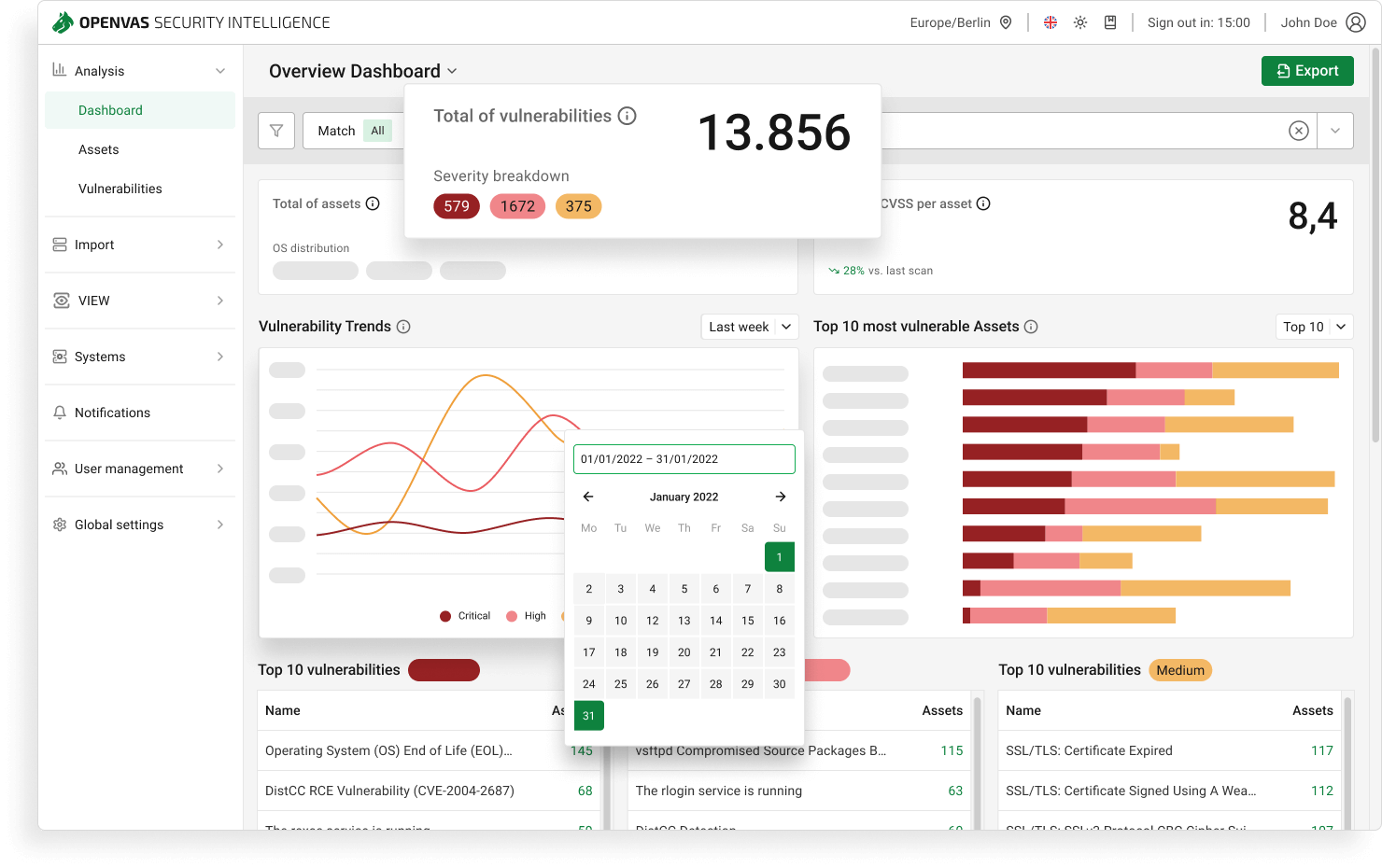
How many engineering hours can a €0 scanner consume before it becomes the costly choice?
Among open-source vulnerability assessment tools, OpenVAS gives experienced teams a genuine self-hosted network scanner. The license invoice can stay at zero. Operations cannot.
Feed choice then changes what “current” means. Greenbone describes the Community Feed as irregular and focused mainly on home-user software. The Enterprise Feed adds business-software tests, compliance policies, and updates several times daily. Greenbone gives no standard delay for Community updates. Your POC has to measure freshness itself.
POC rule
A 14-day engineering budget keeps this POC honest. Agree the hour ceiling and scan window before installation.
The time sheet needs deployment, initial feed loading, one routine update, and one failed-scan recovery.
Is the feed current enough? Choose two recent CVEs affecting software you run. Record the feed timestamp and each applicable VT.
Does it fit the window? Scan a fixed target group twice, then make one documented tuning change. Count unfinished hosts and elapsed time. A pass needs two yes answers, with hands-on time below the agreed ceiling. Any unexplained gap or overrun fails.
For a year-one labor estimate, keep deployment hours separate. Multiply fortnightly recurring work by 26, or one monthly cycle by 12. Then add measured tuning and recovery time at the expected annual frequency.
Features that matter here
- The engine is inspectable. Greenbone publishes the scanner source under GPL licenses and develops it as Community Edition's scanning component.
- No applicable VT means no check. Search the feed for each business product selected for the POC before trusting coverage.
- QoD changes the result list. Greenbone's Quality of Detection runs from 0% to 100%. Anything below 70% stays hidden by default. Lower the filter once and inspect what returns.
- Need raw evidence? GMP scripts can start tasks and export reports. Raw XML keeps every result; Vulnerability Report PDF stops after 500 per host.
- A separate DAST remains necessary for application depth. Greenbone states that OPENVAS SCAN is not a web application security scanner.
One vulnerability-management reviewer uses QoD more aggressively:
“Using the QoD at 80% brings me good results by reducing false positives and avoiding triage issues.”
Victor Hugo M., Security Delivery Senior Analyst, G2, May 30, 2023.
Treat 80% as a comparison point. Run 70% and 80%, then record hidden true findings and manual triage time.
Teams comparing free vulnerability assessment tools should give feed operations a named owner. Otherwise, yesterday's signatures can make today's report look reassuring.
Shortlisting rule: Keep OpenVAS when Community coverage matches your software and scans finish within the agreed engineering budget.
Move to Greenbone's paid OPENVAS BASIC when Enterprise Feed coverage justifies the license. Choose another scanner when support ownership remains the blocker.
Pricing
Greenbone separates free software from commercial feed and appliance packaging. As of October 22, 2026:
- Greenbone Community Edition: €0 license for the self-hosted, open-source stack using the Community Feed.
- OPENVAS FREE: €0 entry appliance for private and non-professional environments, with limited functions and the Community Feed.
- OPENVAS BASIC: €2,524 yearly, positioned for fewer than 150 assets and including the Enterprise Feed. A 14-day trial is available.
- OPENVAS SCAN: Pricing is unpublished; Greenbone asks buyers to request a quote.
BASIC annualizes to about €210.33 monthly. Its Enterprise Feed subscription excludes Greenbone support by default.
Labor usually decides this comparison.
Illustrative year one: 10 deployment hours + 12 update hours + 8 tuning hours + 4 recovery hours = 34. The update allowance assumes one hour monthly. At €75 per hour, this sample costs €2,550.
Replace those inputs with the annualized measurements from your POC.
That slightly exceeds one BASIC year. The comparison excludes BASIC administration, infrastructure, and separately purchased support. Before choosing Community Edition, price deployment, feed operations, upgrades, tuning, backups, and failed-scan recovery for twelve months.
Pros and cons
In the forum, praise comes from getting a useful scanner running on infrastructure the team controls. The rough edges appear later: feed upkeep and scan duration.
The excerpts are verbatim Greenbone Community Forum posts. This is community evidence, not a vetted review set. Two posts come from 2019 and 2023. Neither settles how the current build behaves.
Reproduce feed updates and scan runtime during your POC. Current software, hardware, and target behavior can change both outcomes.
- ✅ Useful inside a SIEM project. dchenhi (Dave Chen): “Firstly, Thanks a lot for OpenVAS team to provide this kind vulnerability solution. It’s very useful for my SIEM project.” (Greenbone Community Forum, August 21, 2019)
- ✅ The Portainer stack worked before feed upkeep became the blocker. Disrupt2471: “I have built out my Greenbone Community Edition stack in Portainer and it works great.” (Greenbone Community Forum, October 17, 2024)
- ⚠️ Scan duration can expand quickly. sjwk (Steve): “First scan of one Windows+IIS server and one Ubuntu+Apache+Wordpress server took 5h30.” (Greenbone Community Forum, February 24, 2023)
- ⚠️ Feed synchronization can remain stale. mahidhar190699 (Sai): “I have tried to do feed syn but it still shows NVT Feed too old (39 days)” (Greenbone Community Forum, October 18, 2024)
Wiz
Best for: A cloud security team tracing exposed workloads across several accounts before isolated findings become breach paths.
Skip it if: Most targets stay on-premises, and nobody will deploy sensors beyond the cloud boundary.
Ratings, checked October 22, 2026: G2: 4.7/5 from 898 reviews. PeerSpot: 4.4/5 from 73 reviews.
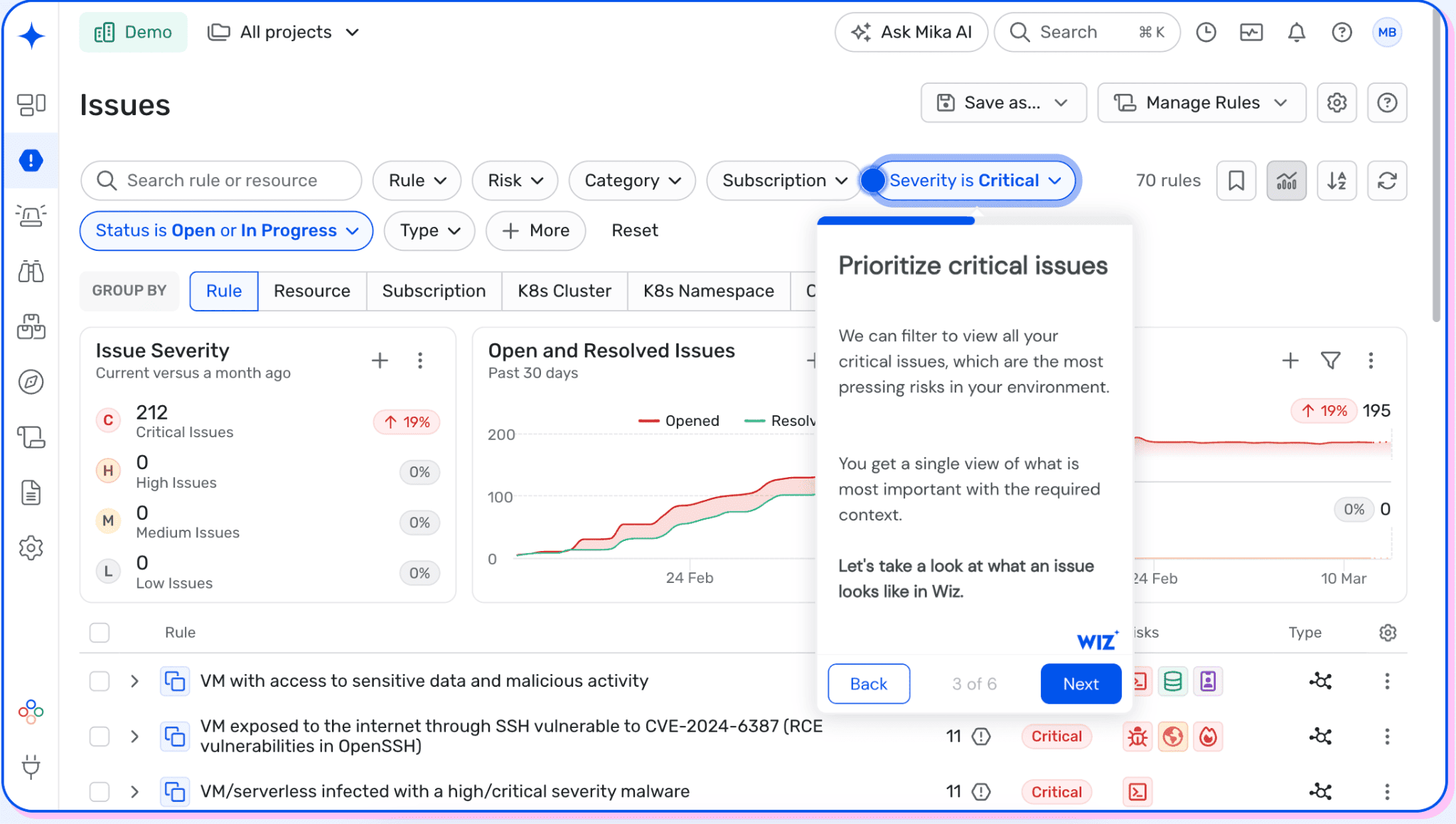
Network scanners usually start with an IP, open port, or installed service. Wiz starts with the cloud relationships around a workload. That shift matters when an exposed endpoint and excessive permission converge on one vulnerable machine. The analyst gets a starting point beyond CVE severity.
For agentless vulnerability assessment, Wiz reads cloud APIs and analyzes workload snapshots. Connected cloud hosts need no per-host deployment for that workflow. In practice, VM disks come from snapshots; registry images and serverless configurations arrive through cloud APIs. A snapshot captures disk state at one moment. Live memory and running processes require the optional Wiz Sensor.
Coverage stops at the connection boundary. An unconnected cloud account stays invisible, however complete the connected inventory looks.
Private infrastructure has two documented routes: Sensor Workload Scanner, or imported third-party findings. The first adds direct hybrid coverage; the second keeps an existing scanner in the evidence chain. If routers or switches matter, make Wiz name their connector and exact checks before counting those devices as covered.
For Wiz, real-time CSPM applies to new resources and configuration changes. Suppose an autoscaling node lives for six hours. Its vulnerable package still follows the workload scan interval. For one benchmark, a CMS deployment memo records 24-hour scans for its rollout. Wiz publishes no universal public interval for every customer. Make the proposal state yours, then verify it during the POC.
Security Graph becomes useful when it changes the analyst's route. Open one Issue and follow every relationship to the affected machine.
For buyers, the immediate issue is contractual: who signs the deal, and whether AWS and Azure support stays equivalent. Google completed the Wiz acquisition on March 11, 2026; Wiz kept its brand and stated multi-cloud commitment.
POC rule
Before connecting anything, write separate acceptance limits for configuration detection and workload scanning. Give the first minutes and the second hours.
- Day 0: Connect one sandbox account and note its permissions. A function is easily missed when teams build the expected list from compute inventory. Expect five objects overall: VM, container image, function, storage resource, and public endpoint.
- Day 1: Make the reversible public-access change first, then note when its Issue appears. Wait for the displayed workload scan before adding a known vulnerable package to the disposable VM. If both changes precede the baseline, their intervals become impossible to separate.
- Day 7: Put four timestamps side by side: cloud event, Issue creation, snapshot, and finding appearance. Then launch one six-hour workload between planned scans. Did inventory record it, and did assessment cover it?
Call it a pass when all five classes appear, both intervals meet written limits, and the graph lands on the machine.
Put the shortlist on hold when the six-hour node disappears silently. Do the same if Wiz cannot separate configuration and workload intervals.
Features that matter here
A clean result can hide an old snapshot. Agentless scanning uses provider APIs and snapshot analysis. Keep the last-scan time beside each workload result.
Why did an Issue move? The Security Graph should expose the relationship that changed its path. Ask an analyst to explain that movement onscreen.
If private hosts matter, add Sensor Workload Scanner to the POC and record operating-system coverage after deployment. Leave its scan interval vague, and the hybrid scope stays vague too.
With Wiz Code, IaC checks and cloud-to-code tracing can surface the responsible repository. Run each suggested fix through that project's tests.
Shortlisting rule: Keep Wiz when connectors match the estate, scan intervals are explicit, and graph paths reach exact workloads. Pause when required sensors erase the expected deployment advantage. Repository failures should also stop acceptance of proposed IaC fixes.
Pricing
Wiz prices the public AWS offer in annual blocks. Larger enterprise deals usually move into custom or private offers.
When checked on October 22, 2026, AWS Marketplace listed four public 12-month bundles:
- Essential starts with 100 workloads for $24,000 yearly, which works out to $240 each.
- A 100-workload Advanced block costs $38,000 yearly. Its per-workload rate is $380.
- Need Sensors? The Advanced add-on costs $28,000 yearly for 100, or $280 per sensor.
- Wiz Code adds $58,500 yearly for 100 licenses, or $585 each, and requires Wiz Cloud.
The public Essential block sets a $24,000 annual floor, even when fewer than 100 workloads need coverage.
Pairing Advanced with 100 Sensors brings the visible annual total to $66,000. Code, overages, and extra AWS infrastructure sit outside it.
During procurement, ask whether paused VMs still count. Then model short-lived containers and serverless functions under the same rules.
Marketplace figures are planning references. Confirm module entitlements, support, data retention, Sensor limits, and private-offer discounts before comparing quotes.
A 14-day free trial is available. Use it for coverage and scan timing, then request a twelve-month workload model.
Pros and cons
PeerSpot users repeatedly praise quick cloud onboarding and exposure-aware ordering. Friction appears when code policies or proposed fixes meet a real repository.
These are verbatim quotes from vetted PeerSpot reviews. Wiz changes quickly, so repeat the workload-timing test and repository checks during your POC.
- ✅ Results arrived the next day. Peter Whelan, CISO at a computer software company with 1,001-5,000 employees: “The initial deployment of Wiz was super easy. It only took a few hours, so we were getting results the next day.” (PeerSpot, February 13, 2026)
- ✅ Exposure changes the queue. Information Security Analyst at a manufacturing company with 10,001+ employees: “The threat detection algorithms and mapping prioritized vulnerabilities based on actual exposure, allowing us to see critical, high, medium, or low priorities instantly.” (PeerSpot, September 3, 2026)
- ⚠️ IaC policies need more maturity. Aditya Sarkar, Assistant VP at NatWest Group: “The areas that have room for improvement in Wiz Code are their IaC policies, which require a little more maturity.” (PeerSpot, April 8, 2026)
- ⚠️ Suggested fixes can conflict with the codebase. Sanket Shinde, Senior Engineer at an insurance company with 10,001+ employees: “While Wiz provides excellent data and reports, sometimes the suggested fixes for vulnerabilities are not always accurate based on our code compatibility.” (PeerSpot, April 24, 2026)
Acunetix by Invicti
Best for: Your AppSec team already has a route inventory and wants scanning evidence developers can reproduce.
Skip it if: Authentication changes every sprint and nobody checks whether protected routes vanished from the crawl.
Ratings, checked October 22, 2026: G2: 4.1/5 from 105 reviews.
PeerSpot: 3.9/5 from 36 reviews.
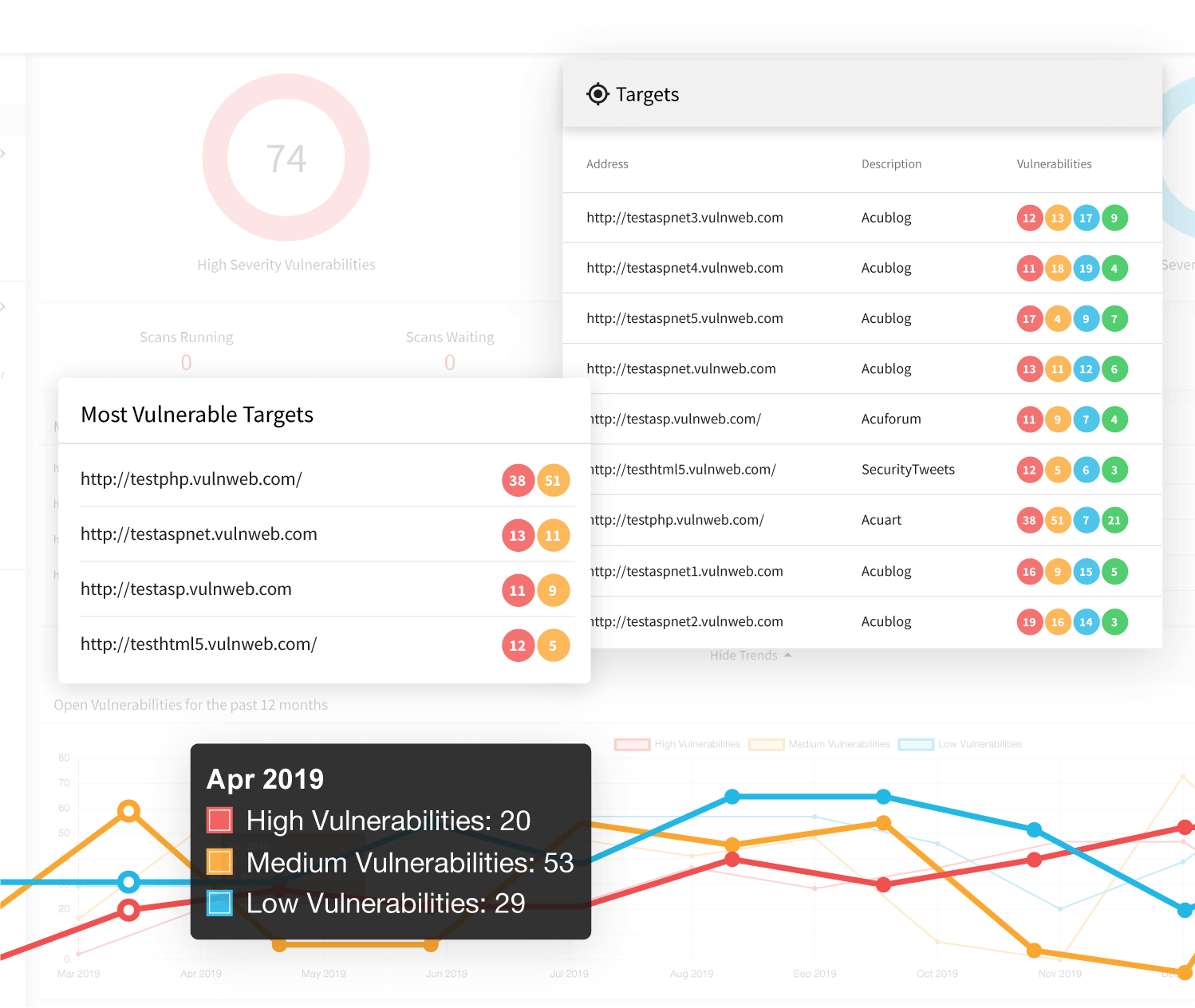
The common buying mistake is scoring Acunetix by findings alone. Any route the crawler misses vanishes from that report.
Invicti now sells the Acunetix lineage as Invicti Web + API; standalone Acunetix is no longer sold. Legacy reviews and documentation still use Acunetix, so match each feature to the quoted SKU. Among these ten tools, only Acunetix centers on dynamic application security testing (DAST), making reachable routes the useful denominator.
A web vulnerability assessment looks reassuring until one protected page never enters the crawl. DeepScan executes JavaScript in single-page applications and recognizes Angular, React, and Vue.
Known APIs need a second route into the scan. Acunetix accepts OpenAPI3, Swagger2, RAML, WADL, and Postman definitions. GraphQL follows the same discipline. Import or link its schema, then count exercised operations against that source. Protected pages add another failure point. The Login Sequence Recorder replays user actions and checks whether the session remains valid.
Do not treat a completed login replay as coverage proof. Keep one protected canary route in the expected list and confirm it appears. Private applications require reachable scanning infrastructure. Premium+ Online can place an internal agent behind the perimeter, including Windows or Docker deployments.
That design makes the proxy part of assessment quality. If the agent cannot reach one route, the dashboard cannot explain the missing test.
POC rule
Run the POC against OWASP Juice Shop or another isolated, deliberately vulnerable application. Never aim an unrestricted scan at production.
Ask the application team for its route ledger before scanning. The illustrative scorecard uses 92 routes, 42 API operations, 16 protected routes, and eight proof-eligible seeds.
Import the API definition, replay the login sequence, and route one private target through the internal agent. Then record five ratios.
| Measure | Calculation | Illustrative result |
|---|---|---|
| Crawl coverage | Discovered routes / known routes | 86 / 92 = 93.5% |
| API operation coverage | Operations exercised / imported operations | 38 / 42 = 90.5% |
| Protected-area coverage | Protected routes reached / known routes | 14 / 16 = 87.5% |
| Confirmation coverage | Proof-backed results / proof-eligible seeds | 6 / 8 = 75% |
| False-positive rate | Invalid findings / reviewed findings | 2 / 40 = 5% |
A 93.5% headline crawl still fails when protected-area coverage reaches only 87.5%. Repair session handling, then rerun the same ledger.
Six proof-backed results tell little against 40 mixed findings. Against eight eligible seeds, however, they show 75% confirmation coverage. Set acceptance thresholds before the scan. Otherwise, the cleanest chart wins after everyone sees the results. Pass only when critical routes appear, protected coverage clears its threshold, and sampled false positives stay below the agreed ceiling.
If proxy-routed scanning fails without bypassing controls, stop the evaluation. A clean public-target scan cannot rescue that deployment.
Features that matter here
- Start with the crawl export. Compare unique discovered routes against the external ledger, then investigate every protected or API gap.
- An API definition adds orphaned operations the browser never calls. Replace uploaded files after schema changes, or link the current specification.
- For login drift, keep a canary route. Its absence exposes a broken session before a low finding count misleads reviewers.
- A confirmed field deserves its own report column. Keep proof-backed, manually validated, and unresolved findings separate.
Because PUT, POST, or DELETE requests may change data, one forgotten route can erase test records during a successful scan. Use a disposable environment or exclude destructive operations before production.
Shortlisting rule: Keep Invicti Web + API if every route threshold passes and proof status survives the export.
A missing login canary ends the trial. So does an internal agent that only works after weakening proxy controls.
Pricing
Invicti asks buyers to request a quote for Web + API. Its pricing page gives neither a target count nor a trial term.
Budget owners still have one public yardstick. On October 22, 2026, AWS Marketplace showed these 12-month units:
- Five FQDN targets under Acunetix Online Premium carry a $7,000 annual price, which is $1,400 each.
- Invicti Enterprise On Demand lists a 50-target block at $37,000 yearly. That comes to $740 per FQDN.
- The Invicti Enterprise On Premise unit keeps that 50-target, $37,000 annual structure.
A target is one FQDN representing a website, web application, API, or web service. The 50-target bundle sets a $37,000 floor.
Treat the Acunetix unit as a Marketplace reference because standalone sales have ended. The per-target price falls 47% between the visible bundles. Public pages disagree on delivery. The pricing page marks Web + API on-premises as “coming soon,” while Marketplace lists an on-premises unit.
Put deployment mode, target-count rules, support, and target reassignment into the quote. Also ask how subdomains, ports, and non-production environments consume capacity.
Pros and cons
PeerSpot now groups Acunetix under Invicti Web + API. Authenticated visibility and a faster interface earn the clearest praise.
Friction starts with proxy setup. Another reviewer still wants fewer false positives, better report control, and newer DevOps connections.
The comments below are verbatim PeerSpot reviews from 2024 through 2026. Packaging changed, so retest these claims during your POC.
- ✅ Authenticated areas become visible. Himanshu Tyagi, Lead Cybersecurity at TBO: “When the application is configured in authenticated scan mode with Acunetix, it provides good visibility about the security vulnerabilities in the application.” (PeerSpot, November 24, 2025)
- ✅ The current interface feels fast. Adetunji Adeoje, Team Lead, Application Security at a financial services firm with 5,001-10,000 employees: “On the latest platform, Invicti, I appreciate the speed, which is quite fast, and the interface is also great.” (PeerSpot, March 11, 2026)
- ⚠️ Proxy setup can block deployment. Kamil Matusik, Head of Operations, Supply Chain at Lyreco Deutschland GmbH: “The deployment process must be improved. It is difficult to create a proxy connection.” (PeerSpot, June 25, 2024)
- ⚠️ False positives and workflow gaps remain. Kashif Jamil, CEO at Xcelliti: “Acunetix should improve by further reducing false positives and providing more customized reports, plus better integration with newer tools such as GitHub and Azure DevOps.” (PeerSpot, May 27, 2025)
Intruder
Best for: A lean security team that wants recurring checks across a modest public estate without maintaining scanner servers.
Skip it if: Your MSP cannot prove client authorization quickly, or production owners refuse active scanner traffic.
Ratings, checked October 22, 2026: G2: 4.8/5 from 222 reviews.
Gartner Peer Insights: 4.7/5 from 145 ratings.
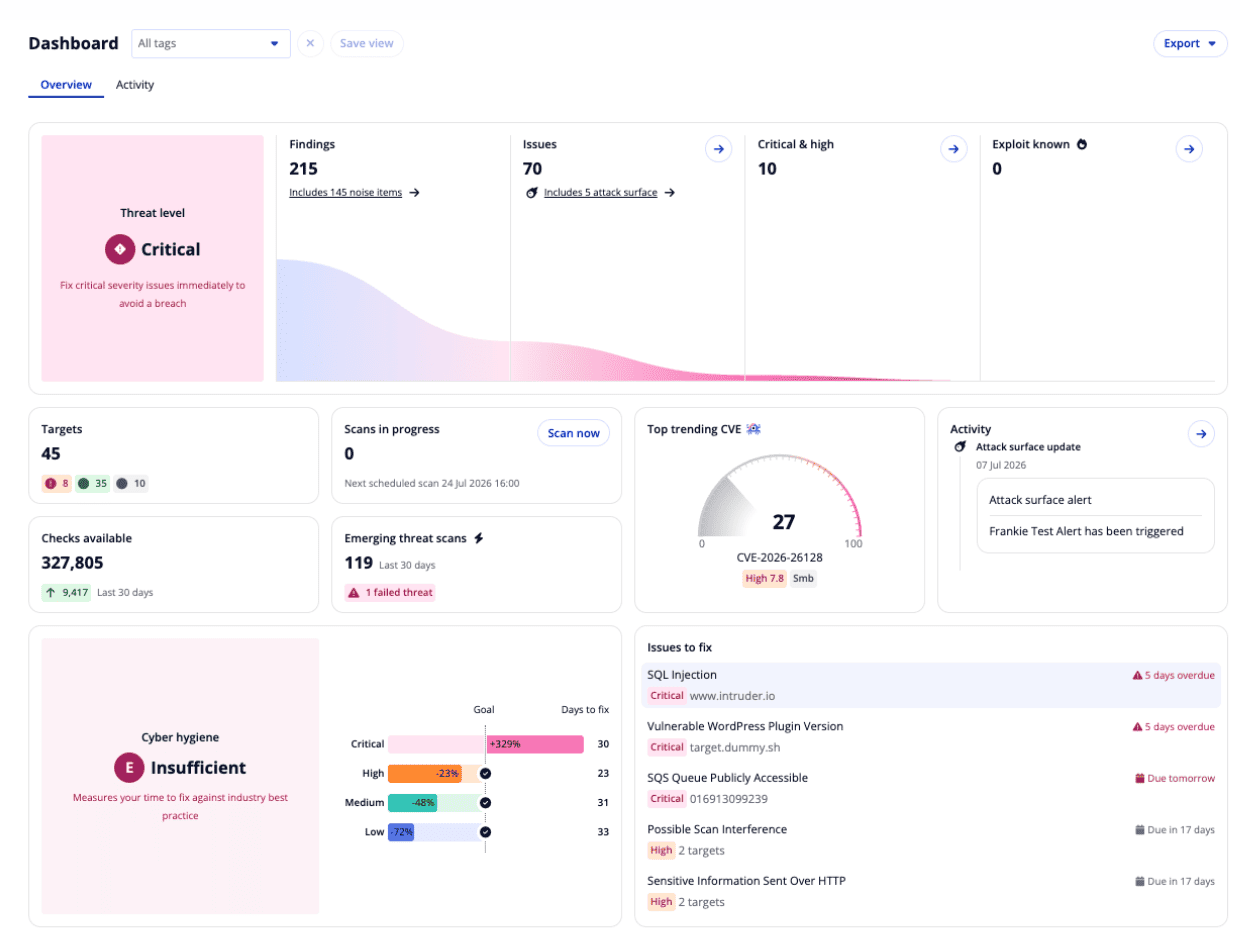
Image source: Intruder vulnerability management reporting dashboard
For a small team, Intruder turns external vulnerability assessment into a managed background service. The external engines run without local scanner infrastructure.
Targets can arrive through cloud sync. Scheduled scans then cover them, while Emerging Threat Scans react to selected critical CVEs. That is the practical appeal behind “setup and forget.” Yet the phrase covers automation, not the coordination around active probing. A blocked scanner can return reassuringly little. Intruder therefore publishes scanner ranges for WAF, IPS, and IDS allowlisting.
Keep the perimeter firewall unchanged. The goal is to bypass inspection interference without exposing private services. MSPs have another checkpoint. Current terms require permission from target owners and any relevant infrastructure provider.
The Free Plan cannot serve end-customer systems. Rehearse client authorization on one low-risk domain before importing a customer range. Emerging Threat Scans, or ETS, are genuinely automatic on Cloud and higher plans. A Tuesday critical check need not wait for Friday's scheduled scan. Intruder runs it across licensed, active external targets.
However, unresponsive or unlicensed targets are skipped. The ETS page should expose those gaps rather than burying them.
Gareth P., a Director of Software Engineering, described the value after replacing periodic reviews:
“That gives us confidence we're not sitting exposed to a known vulnerability for hours or days while waiting on a routine check.”
G2, September 18, 2026.
His outcome depends on licensing and reachable targets. Your POC should prove both before anyone adopts the same confidence.
POC rule: follow the first scan from approval to evidence
Before: Pick a disposable public host, obtain written authorization, and warn its owner, hosting provider, WAF team, and SOC. If cloud discovery finds an unapproved asset, exclude it before enabling automatic scanning.
Choose an approved window, then save ten minutes of normal access logs. Record median latency separately, alongside CPU and 5xx totals. Cloud and higher plans support custom schedules, so keep recurring scans inside that approved window.
During: Start a balanced scan while the host owner watches service health. Meanwhile, the SOC follows requests from Intruder's published ranges. Look first for repeated scanner-IP denials. WAF challenges or clustered 403 responses can explain why the host looks clean.
Example guardrails: no added 5xx responses, less than 10% latency change, and no hosting abuse alert. On Pro or higher, repeat once with Throttle Scan Speed. Then try the web-ports-only setting. Public documentation describes a throttle toggle, without promising a requests-per-second limit. Ask support what your selected engine actually sends.
Application scans cannot be throttled. That distinction matters when a production API shares capacity with ordinary customer traffic.
After: Match request bursts to Intruder's raw scanner output. If WAF events show blocking, that zero-finding result is unusable.
In ETS history, match one recent check against the licensed targets. Unresponsive and License exceeded are coverage gaps, even with zero issues.
Pause the rollout if traffic breaches a guardrail or ownership verification stalls. A tidy report does not cancel either failure.
Features that matter here
- Coverage changes with the plan. Free uses Nuclei; Cloud uses OpenVAS and Nuclei; Pro uses Tenable Nessus.
- Enterprise combines Nessus with Nuclei. That matters when a trial on Free finds less than the quoted production plan.
- In the Issues view, CVSS and EPSS filters separate impact from likely exploitation. Sample the hidden Noise view as well.
- Private systems enter at Pro. Its agent covers internal servers and employee devices; Application licenses add web and API testing.
- A paid-plan report can show an auditor that external infrastructure was scanned. Free exports arrive watermarked and redacted.
Cloud sync can add or remove supported assets as the estate changes. New arrivals still need automatic scanning enabled.
Shortlisting rule: A clean first run earns a place only when latency and 5xx stay within your limits. Every licensed target must appear in ETS history.
A zero-finding report fails if WAF logs show blocked scanner traffic. MSPs should clear one client domain's authorization before importing production ranges.
Pricing
Intruder prices infrastructure and application licenses separately. One license stays assigned to a scanned target for 30 days.
An Infrastructure license covers an IP, hostname, server, device, container rule, or cloud target. An Application license adds web and API testing.
As of October 22, 2026, the official pricing page lists four plans and a 20% annual discount.
Public entry pricing is scarce. Gartner's current Intruder profile lists the monthly starting points for Cloud and Pro.
- Free: $0 for five infrastructure targets, with weekly external checks. Web application licenses are excluded.
- Cloud: Gartner lists a $299 monthly starting point. Applying the published annual discount gives about $2,870 yearly at base scope.
- Pro: The public starting point is $499 monthly, or about $4,790 yearly after that discount. Internal scanning starts here.
- Enterprise: Custom pricing adds broader discovery, all-port monitoring, priority ETS, and higher cloud-account capacity.
Those annual figures are calculated starting points. Target count, Application licenses, tax, and contract terms can move the quote.
The 30-day lock deserves its own budget line. An ETS can assign an unused license or restart its consumption period.
A hostname and its IP may consume separate licenses. The same system scanned internally and externally also needs two.
Before signing, price the busiest 30-day target set. Include short-lived assets and every client domain that might enter an emergency scan.
Vanguard remains documented as a managed, human-assisted tier, but its price is unpublished. That service exceeds this assessment comparison.
Pros and cons
Positive feedback centers on low setup and steady external scanning. The friction appears in scan volume and client-target authorization.
The two negative posts are unverified Trustpilot reviews, so they cannot establish a market pattern. Treat them as POC questions.
Quotes below are verbatim. The suspension post dates from 2022, so repeat its client-authorization path before assuming that friction remains.
- ✅ Low-touch setup. IT Services Associate at an insurance company under $50 million: “It has been a "setup and forget" solution since then.” (Gartner Peer Insights, August 27, 2026)
- ✅ External fleets fit the model. Jarrod Meyer, Infrastructure Engineer at Bulksms: “We use Intruder to scan for external vulnerabilities across the various fleets of servers.” (TrustRadius, February 8, 2022)
- ⚠️ Scan volume needs a guardrail. James Westfall: “They hammer the servers they scan an unreasonable number of times (up to 48 000 hits on the SAME port in one night).” (Trustpilot, March 11, 2026)
- ⚠️ Client-target verification caused friction. Anna ten Bensel: “However, every other time I tried to scan a target from a client, my account would get "suspended".” (Trustpilot, September 16, 2022)
Microsoft Defender Vulnerability Management
Best for: Your Microsoft shop already pays for E5 or Endpoint P2, but nobody knows how many devices actually report.
Skip it if: Most devices sit outside Defender, and no Defender for Cloud plan covers the server estate.
Ratings, checked October 22, 2026: G2: 4.4/5 from 34 reviews. PeerSpot: 4.1/5 from 18 reviews.
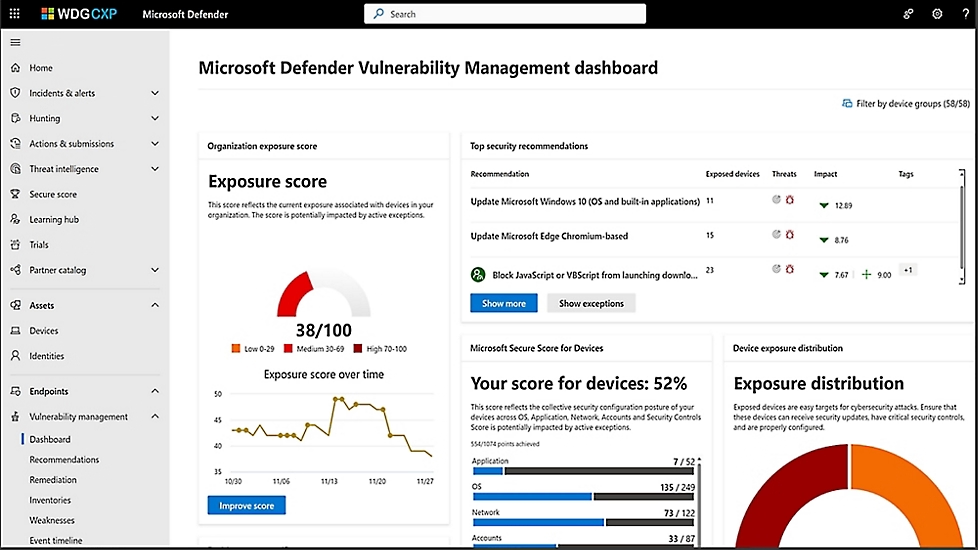
Before buying another scanner, open your Microsoft tenant. Microsoft 365 E5 includes Defender for Endpoint P2, which carries core Defender VM capabilities. Bundle renewals can hide that entitlement.
Core covers discovery, vulnerability and configuration assessment, prioritization, continuous monitoring, and software inventory. Premium adds baselines plus browser-extension, certificate, network-share, hardware, and firmware assessment. Standalone brings both layers to teams retaining another EDR.
That licensing wrinkle appears in client work. Suraj Verma, Solution Consultant at BIM Group of Companies, described the E5 route:
“My clients usually have M365 E5 subscriptions, which include Defender for Endpoint Plan 2, making it clear that they utilize Microsoft Defender Vulnerability Management.”
PeerSpot, May 27, 2025.
For buyers, the first comparison is entitlement versus active reporting coverage. An unused P2 entitlement contributes nothing to the assessed-device denominator.
Once endpoints are onboarded, vulnerability assessment follows sensor telemetry instead of waiting for a scheduled scan. Windows, macOS, and Linux devices can report while users work remotely. A laptop offline for a week may remain inventoried while its assessment evidence quietly goes stale.
A discovered-only device is still an inventory record until Defender produces vulnerability data. Network switches and appliances now need another scanner, documented beside the Defender coverage map. Microsoft retired Windows authenticated scanning on December 18, 2025, without a direct replacement.
Servers outside Azure follow the Defender for Servers route. Plan 2 adds agentless assessment and premium features. Cloudaware documents Defender for Cloud findings ingestion into its CMDB. Its guide omits direct Defender VM ingestion, so confirm the exact path before claiming integration.
POC rule: map each license to a reporting device
Build a 32-device cohort: eight Windows clients, eight Macs, eight Linux endpoints, and eight servers outside Azure.
- If E5 or Endpoint P2 covers a user: confirm weakness, software, configuration, and recommendation data for that device.
- If premium is licensed: inspect one browser extension and one certificate that core does not expose.
- For an AWS or GCP server: trace its Defender for Cloud connection and record P1 or P2. Premium fields require P2.
- If a device is merely discovered: mark it found-only until onboarding produces vulnerability records.
- On Mac and Linux: match each build against Microsoft's support matrix. Record fields missing from the comparable Windows sample.
Pass when every row shows its entitlement, connection state, recent evidence, and expected fields. A discovered-only device counted as assessed fails the POC.
Features that matter here
- Open one weakness first. Check affected software, exposed devices, available evidence, and the current recommendation.
- When priority shifts, can the analyst see why? Device context and threat signals should explain the movement.
- Premium inventories expose browser extensions, certificates, network shares, hardware, and firmware beyond installed software.
- Seed one known baseline misconfiguration. The selected benchmark should identify the correct device and setting.
[DASHBOARD PLACEHOLDER] Coverage beside findings: Pair the Vulnerability Management dashboard with Device Inventory, filtered to the 32-device cohort. Show OS, entitlement path, onboarding state, last seen, exposed devices, and one premium inventory field.
Caption: A finding total becomes useful when every expected device has a live sensor path and visible assessment evidence.
Shortlisting rule: Keep Defender VM when P2 already covers most users and the mixed-device cohort reports completely.
Pricing
Microsoft licenses client-side Defender VM per user, and one license covers every endpoint that person uses. Core comes with Endpoint P2 and Microsoft 365 E5. As of October 22, 2026, Microsoft's pricing page lists the add-on at $2 monthly, or $24 yearly, billed annually.
Microsoft still documents standalone licensing, but its current US page omits the list price. The last public baseline was $3 monthly, or $36 yearly. Confirm it in writing.
For 500 users, those baselines equal $12,000 for add-on and $18,000 for standalone. Existing P2 or E5 licensing decides the real difference.
Defender for Servers P2 includes premium server features and agentless assessment. Microsoft bills that route through Defender for Cloud consumption.
Pros and cons
For Microsoft shops, continuous assessment follows laptops beyond the office. Reviewers mainly struggle with stale dashboards and hard-to-follow documentation. Check both against your licensed cohort.
The quotes below are verbatim from vetted 2024–2025 PeerSpot reviews.
- ✅ Continuous assessment without periodic scans. Krishna R, DGM. Technical Security at a tech services company with 10,001+ employees: “Microsoft Defender Vulnerability Management is capable of continuously monitoring and assessing vulnerabilities without requiring periodic scans.” (PeerSpot, May 16, 2025)
- ✅ Assessment results lead to useful recommendations. Vaishali Thakare, Senior Cloud Security Consultant at MetLife: “The most valuable aspect is the kind of assessment results I get, and the recommendations provided in Microsoft products really help in taking care of the resources. I can fix vulnerabilities and see the current state of the security posture of those devices or particular resources. The recommendations, scores, and steps to remediate actions are highly useful.” (PeerSpot, December 11, 2024)
- ⚠️ Documentation, price, and update speed create friction. Cloud Security Engineer at a computer software company with 51-200 employees: “The documentation from Microsoft needs significant improvement. The documents are disorganized, with one document linking to another, making the steps unclear and difficult to follow. Regarding updates, it is not truly real-time as it takes between eight to twelve hours for updates to occur. It would be beneficial if updates could happen more quickly, perhaps within 10 minutes to half an hour. Support for integration and documentation needs to be more straightforward. The pricing is expensive, even though it is part of the E5 package.” (PeerSpot, October 22, 2025)
- ⚠️ Dashboard freshness and macOS support need checking. Abdulrahman Muhammadi, Information Security and IT Manager at Discover Dollar Technologies Pvt Ltd.: “The worst aspect is the refresh rate of the dashboard. A vulnerability I patch within 15 minutes takes 24 additional hours for an update. Some competitors offer a four-hour refresh. I would like to see an update in the refresh rate and increased support for macOS.” (PeerSpot, January 31, 2025)
Nuclei by ProjectDiscovery
Best for: A security team that wants one new check in Git today and across thousands of authorized targets tonight.
Skip it if: You need a ready-made asset register and durable reporting without building storage around scan output.
Community signal, checked October 22, 2026: Nuclei has 32.2K GitHub stars. ProjectDiscovery reports about 13,600 public templates, written by roughly 1,300 authors.
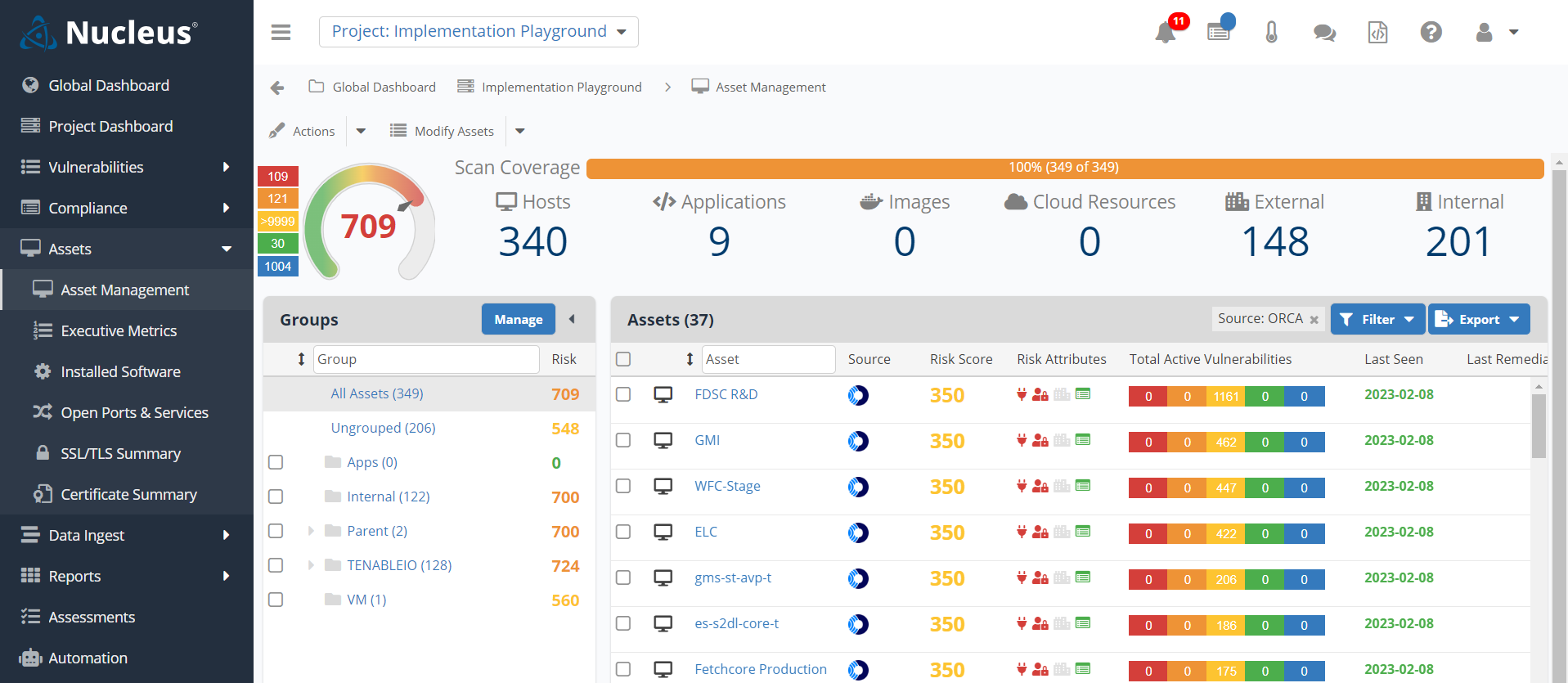
Nuclei earns its place when the check you need does not exist yet. An engineer encodes the request and matcher in YAML, then versions the file beside service code.
This deliberately small example checks a lab-only response header. That keeps the POC safe and its result easy to inspect.
id: internal-debug-header
info:
name: Internal debug header exposed
author: assessment-team
severity: medium
http:
- method: GET
path:
- "{{BaseURL}}/health"
matchers:
- type: word
part: header
words:
- "X-Debug-Mode: true"
The template says exactly what Nuclei should send and what counts as a match. Asset ownership must come from somewhere else.
Template quality sets the detection boundary. A stale matcher can miss a changed response, while a loose one floods the queue.
Elastic’s Clement Fouque describes why custom checks matter:
“With Nuclei, I can easily write my own templates while benefiting from rapid coverage provided by community-driven templates.” (ProjectDiscovery, April 24, 2025)
The same vendor case reports 14,500 assets scanned within five minutes for CVE-2025-29927. That result belongs to one customer incident. Your targets and safety limits will change throughput.
Give the CLI a target list and it returns matches. Finding history lives in JSONL, SARIF, ProjectDiscovery Cloud, or your datastore. If an owner asks whether a result is recurring, the CLI alone cannot answer. No resident endpoint agent fills that gap.
That places Nuclei inside vulnerability assessment as a detection engine. Another system must hold the program’s enduring record. Picture a payments engineer asking which medium to fix first. Same template, two hosts: the live payment API wins, the isolated test box waits.
POC rule: make one template prove itself
Create a vulnerable lab endpoint and a patched twin. Both URLs go into poc-targets.txt. Check the YAML first, then start the run:
nuclei -validate -t ./templates/internal-debug-header.yaml
nuclei -l ./poc-targets.txt -t ./templates/internal-debug-header.yaml -rl 20 -c 5 -jsonl -o ./poc.jsonl
Pass when only the vulnerable twin matches and JSONL records the template ID. Target logs must stay beneath the agreed request ceiling.
A patched match fails the detection logic. Any 429 or 5xx burst fails the run settings, even when the result looks correct.
Store the template repository commit with the artifact. Otherwise, tomorrow’s rerun may execute changed detection logic without an application change.
Features that matter here
- For a private service, write a private check. Encode its request and matcher in YAML. Let service owners review the file.
- Public checks arrive automatically, because Nuclei downloads template updates unless -duc disables them. Route changes through a controlled validation job.
- Before a large target file runs, set -rl, -c, and -bs below infrastructure tolerance. Increase them only after logs stay clean.
- Need CI evidence elsewhere? JSONL preserves scan detail, while SARIF feeds GitHub Code Scanning. Treat exported requests and responses as sensitive.
The official CI/CD guidance supports staging scans and SARIF export. The CLI still leaves long-term finding history to another system.
[DASHBOARD PLACEHOLDER] Upload the POC JSONL through Nuclei’s current ProjectDiscovery dashboard flow. Capture the resulting finding view. Show the target, template ID, severity, timestamp, and scan context only when the live interface exposes them.
Suggested caption: Hosted retention adds continuity to Nuclei findings while the template remains the detection source.
Shortlisting rule: Keep Nuclei when engineers can own templates and findings already have a durable destination. Choose a broader platform when asset ownership must come ready-built.
Pricing
As of October 22, 2026, Nuclei CLI and its public templates remain free under MIT.
Hosted Nuclei scanning lives in ProjectDiscovery Cloud Platform. PDCP keeps findings and asset data in a shared dashboard.
- PDCP Free: $0, with current asset and scan limits shown inside the product.
- Paid PDCP: Custom quote. ProjectDiscovery’s September 24, 2026 terms make paid access order-form only.
Each order defines assets, seats, enabled features, and support. Public documentation gives no current starting price.
Earlier self-serve prices no longer appear in the current documentation index. Existing self-serve subscriptions may continue until cancellation or expiry.
For a quote, confirm the billable asset definition, hosted scan allowance, retention, internal coverage, and support. Private templates also eat someone's hours for regression tests, so put that time in the budget.
Pros and cons
Fair warning: these come from GitHub issue threads written between 2022 and 2025, not vetted reviews. Some were fixed and closed later.
Rerun each setup on today's binary and templates before you count it against Nuclei.
- ✅ Useful reach into unusual TLS configurations. mzpqnxow, GitHub contributor: “It's very useful when dealing with endpoints that have SSLv2/SSLv3 and/or obscure cipher-suites- which are obviously rare, but not non-existent, especially when working at scale.” (GitHub #2621, September 19, 2022)
- ✅ Long runs handle interruptions. dogancanbakir, GitHub contributor: “One thing that the Nuclei CLI does really well is handling interrupts.” The report describes a resume file that avoids repeating completed hosts. (GitHub #6078, February 28, 2025)
- ⚠️ Proxy throughput needs a current replay. Nishantbhagat57, GitHub contributor: “Nuclei runs super slow when using a proxy. Nuclei doesn't follow concurrency values when using a proxy.” (GitHub #6029, February 6, 2025)
- ⚠️ Large host-spray jobs once exhausted memory. JoshuaMart, GitHub contributor: “For my test, I'm using a list of 5000 URLs (urls.txt file). With the following command, RAM increases progressively until it crashes.” (GitHub #5453, July 26, 2024)
Best vulnerability assessment tools by use case
Start with the job, not the leaderboard. The top vulnerability assessment tools separate by asset, scan method, and evidence requirement. Each verdict names the trade-off your POC should settle.
[VISUAL PLACEHOLDER: Decision tree from asset type and scan method to the eight picks below.]
Caption: Start with the asset, then choose the scanning method. The final branch gives the strongest shortlist candidate.
Alt text: Decision tree matching asset types and scan methods to eight vulnerability assessment tools.
Multi-cloud estates with several scanners
When several scanners already exist, choose Cloudaware if nobody trusts the combined asset count. Findings land on CMDB assets with owners and cloud relationships, so missing coverage becomes visible. Wiz is runner-up when cloud exposure paths matter more; Cloudaware still lacks specialized web and container depth.
Credentialed networks and hybrid infrastructure
For credentialed hosts and network devices, Tenable remains the depth-first pick. Its local checks leave plugin evidence analysts can inspect, although separate web licensing widens the stack. Nmap covers host discovery. Rapid7 InsightVM moves ahead when segmented sites need distributed engines and tuned templates.
Large agent fleets with audit scrutiny
Once agents cover thousands of hosts, Qualys VMDR earns the enterprise pick. Auditors can trace TruRisk factors in exports, but make Qualys prove sensor identity and reporting freshness during the POC. Microsoft Defender Vulnerability Management wins when E5 or Endpoint P2 already covers most devices. After Microsoft retired Windows authenticated scanning, network equipment needs another scanner.
Cloud workloads, containers, and Kubernetes
Short-lived cloud workloads change the choice. Pick Wiz when Security Graph must tie an exposure path to one cloud resource. On-premises depth and scan timing remain boundaries. Cloudaware becomes runner-up when CMDB ownership matters, while Trivy adds container-image checks inside build pipelines.
Web applications and APIs
An application can pass every infrastructure check while authenticated routes stay unseen, so start with Acunetix. After login, compare the routes Acunetix reached against your OpenAPI or Postman list, then investigate each gap. Infrastructure breadth stays narrow, and no second dedicated DAST appears among these profiles. Pair Acunetix with Burp Suite for manual validation; Nikto remains a quick web-server check.
Small teams without a dedicated vulnerability engineer
When nobody owns vulnerability assessment full time, Intruder is the practical pick for continuous perimeter scanning. Recurring checks and Emerging Threat Scans reduce daily babysitting. Traffic limits and target authorization still need POC proof. OpenVAS / Greenbone is runner-up when license budget is zero and someone can own feed and recovery work.
Free self-hosted network assessment
Among free vulnerability assessment tools, OpenVAS / Greenbone is the practical network pick. Coverage is broad, but feed care and recovery consume engineering time. Community Feed freshness and scan duration should become acceptance gates. Nuclei is runner-up when versioned checks matter more than a maintained scanner service.
Custom checks inside CI/CD
Need a private check this sprint? Nuclei is the better fit. YAML sits beside code and JSONL or SARIF travels into pipelines, but asset history needs external storage. Acunetix is runner-up when crawling, authenticated routes, and repeatable DAST matter more than hand-authored checks.
If two tools remain, turn the last column into your final POC test.
| Scenario | Pick | Runner-up | Deciding factor |
|---|---|---|---|
| Several scanners, multi-cloud | Cloudaware | Wiz | Scanner unification vs cloud paths |
| Credentialed hybrid infrastructure | Tenable | Rapid7 InsightVM | Local depth vs template control |
| Large agent fleet, audit scrutiny | Qualys VMDR | Defender VM | Mixed sensors vs existing Microsoft licenses |
| Cloud, containers, Kubernetes | Wiz | Cloudaware | Exposure paths vs CMDB context |
| Web applications and APIs | Acunetix | None; pair Burp Suite | Automated coverage plus manual validation |
| Small team, continuous perimeter | Intruder | OpenVAS / Greenbone | Automation vs self-hosting time |
| Free self-hosted networks | OpenVAS / Greenbone | Nuclei | Network breadth vs custom templates |
| Custom checks in CI/CD | Nuclei | Acunetix | Versioned YAML vs DAST crawling |
Other notable tools
These four sit beside broader vulnerability scanning tools when one narrow assessment job needs a sharper instrument. Each stops before findings gain full asset context, priority, and evidence history. Prices and licenses were checked on October 22, 2026.
- Nmap. Start here when you must prove which hosts answer inside an approved range. -sn builds the live-host list; -sV identifies services, although version guesses still need verification. Discovery is where Nmap stops, so feed the scoped inventory into Tenable or OpenVAS. Nmap is free for end users under its NPSL; proprietary embedding may require an OEM license.
- Trivy. Put Trivy in CI when images or IaC must fail before deployment. Pair --exit-code 1 with severity and exception rules; an inherited backlog can freeze every build. Run trivy config separately for Terraform and Kubernetes manifests. Trivy supplies the build gate; Wiz remains the broader cloud assessment layer. The CLI is free under Apache 2.0.
- Nikto. Once Nmap finds HTTP, Nikto gives the server a quick baseline. -Tuning and -maxtime narrow test classes and keep each host inside its scan window. Teams often mistake banner and file checks for application coverage; Acunetix should handle the deeper web assessment. Nikto's code is free under GPL v3; its test databases carry separate redistribution limits.
- Burp Suite. Burp earns its seat when an analyst must alter one request and inspect the response. Repeater helps validate an Acunetix finding by hand. Community Edition is free and manual; Professional adds the automated scanner. PortSwigger lists Professional at $499 per user per year. Asset inventory and fleet-wide prioritization remain outside Burp's job.
How to choose the right vulnerability assessment tool
Make the choice by proving fit against your estate, evidence needs, and steady-state cost. These six steps create a decision another reviewer can audit.
[VISUAL PLACEHOLDER Type: Six-stage selection funnel. Show: Inventory, weighted scorecard, shortlist, POC evidence, steady-state cost, and finding ownership. Notice: Every gate produces evidence before a vendor advances. Caption: Six steps from estate scope to owned findings. Alt text: Vulnerability tool selection workflow. Status: Illustrative. Stack vertically on mobile.]
1. Build the denominator before comparing
Export every system the vulnerability assessment solution must assess. Group it by asset class, platform, environment, and exposure. Keep unsupported classes on the list. A big discovery count can quietly hide thin scan coverage. The signed inventory records source, owner, expected count, and required assessment method.
2. Turn the seven criteria into weights
Start with this 100-point model, then move weight toward the bottleneck your team actually owns.
| Illustrative weight | Criterion |
|---|---|
| 20 | Scan coverage |
| 15 each | Detection accuracy; false-positive load; prioritization; asset context and unification |
| 10 each | Reporting and compliance; pricing and deployment |
Three competing scanner feeds may justify raising asset context while lowering scan depth. Freeze the approved scorecard before demos begin.
3. Keep only two or three viable tools
Apply the hard gates next. Remove any vulnerability assessment software missing a mandatory asset class, deployment rule, or export requirement. Keep two or three vendors and an exclusion log naming each failed gate.
4. Make the POC falsifiable
Use representative lab assets with known, reversible vulnerabilities, plus one clean control host. Record found seeds, misses, false positives, duplicate records, and evidence quality. Have one analyst review the same sample across every vendor. The resulting POC pack contains pass/fail decisions, screenshots, and raw exports.
5. Price the estate you will operate
Calculate total cost at today's asset count, the steady-state count, and the next licensing boundary. Include mandatory modules, connector fees, scanner infrastructure, implementation, and operator time exposed during the POC. Annualize each quote under one term, then calculate cost per assessed asset. Finance receives the assumptions and totals in one challengeable worksheet.
6. Choose the finding home and owner
Settle where findings will live before the purchase order goes out. Assessment tools find and rate. Vulnerability management tools track findings through ownership and a verified fix. Document the source identifier, asset key, responsible team, authoritative status, exception location, and reassessment evidence. The final data-flow map names every handoff and owner.