


Your scanners work fine. That is the problem. Most security teams do not lack findings. They drown in them. Thousands of open CVEs, a backlog nobody trusts, no clear priority. The right vulnerability management tools cut that noise into a short, owned, prioritized list. The wrong ones just add another dashboard.
Finding vulnerabilities was solved years ago. In 2024, the CVE Program published more than 40,000 vulnerabilities, and the number passed 48,000 in 2025. No team patches them all. The job that still hurts is triage: which flaw is exploitable, who owns the asset, and did the fix hold. That is where these tools win or waste your budget.
So we evaluated 12 of them the way a buyer would. We inspected Cloudaware's own vulnerability data and verified each vendor against current documentation and pricing, as of September 2026. Then we scored them on one set of criteria. One pattern held across all 12. Detection is commodity. The separation shows up after the scan. It is how a tool ranks findings, and whether it drives them to a verified close.
Key insights
A few patterns held across all twelve tools. Read these first, then use the profiles to confirm the fit for your estate.
- Prioritization separated the tools more than coverage did. The strongest ranked by exploitability, using EPSS and the CISA KEV catalog. A flaw attackers use now outranks a high CVSS score nobody touches.
- Deployment model is the real fork. Agentless coverage reaches the whole cloud in minutes but trades runtime depth. Agent-based tools go deeper, and miss anything without the agent installed. Behavioral detection is a third axis: it watches what assets do after deployment, whichever scan model you pick. That is the layer Cloudaware NeoSec covers.
- For most multi-cloud teams, finding vulnerabilities is the easy part. The bottleneck is pulling findings from several scanners into one owned, deduplicated queue.
- Cloudaware integrates with six of the tools here. So the real question splits in two: which scanner to run, and how to unify what they all report.
- Marketing rarely survived the documentation: a vendor's promise of complete or real-time coverage often narrowed by edition or by cloud.
For the short answer, match the tool to your risk. Agentless cloud scanning and attack paths point to Wiz; enterprise compliance to Tenable; unifying several scanners to Cloudaware. The full reasoning and pricing sit in the profiles below.
What is vulnerability management software?
Vulnerability management software finds security weaknesses across your assets, ranks them by risk, and tracks each one to a fix. The last verb carries the weight. Anything can produce a list of flaws. Software earns the name management when it does four things. It discovers the asset, scores the risk, assigns an owner, and confirms the fix held.
The difference shows up in practice. Say a scan flags a critical CVE on forty hosts. Weak software adds forty rows to a queue. Strong software groups them, maps each host to its owner, and reopens the ticket if the flaw returns next scan.
Get that loop right and the backlog shrinks. Miss it, and you inherit an expensive spreadsheet. The sections below draw the lines that decide which one you buy. We start with the tools it gets confused with.
What separates a scanner from a management platform
A scanner finds flaws. A management platform decides what to do about them. That one difference explains most of the confusion in this market, and a handful of adjacent tools deepen it.
Buyers often compare a scanner against a full platform. Others expect a SIEM to cover vulnerabilities it was never built to track. The table below sorts the categories by the job each one owns and the vantage point it works from.
| Category | What it does | Vantage point |
|---|---|---|
| Vulnerability management platform | Finds, prioritizes, and tracks flaws to a verified close | Inside-out, across known assets |
| Vulnerability scanner | Detects flaws in a point-in-time scan | Inside-out, one scan at a time |
| Attack surface management (ASM) | Finds internet-facing assets you did not know you had | Outside-in, the attacker's view |
| SIEM | Correlates logs to detect active threats | Event stream, after something happens |
| Patch management | Deploys the fixes | The remediation mechanism |
| CMDB and asset context | Maps each flaw to its owner, dependencies, and service | The system of record |
Read the vantage-point column and the overlap makes sense. A scanner and a platform both look inside-out, which is why buyers conflate them. Only the platform carries a finding to closure. ASM looks the other way, from the attacker's side, so it catches the assets your scanner never knew to check. A SIEM reacts to events after they happen; it is not a vulnerability tool.
The row that decides real programs is the last one. Vulnerability management scanning tools tell you a flaw exists. A finding without an owner and a service context is a finding nobody acts on. That is why the strongest setups pair a scanner with the asset relationships a CMDB holds. Keep that row in mind through the profiles below.
The vulnerability management lifecycle in one pass
Every platform runs the same five-step loop: discover, assess, prioritize, remediate, verify. Written down, it looks solved. In practice, two steps separate a good tool from a noisy one.
Prioritize is the first. Ranking is not the CVSS score, which only rates how severe a flaw could be. EPSS estimates how likely it is to be exploited. The CISA KEV catalog lists what attackers are using right now. A KEV-listed flaw on an exposed host beats a CVSS 9 nobody touches. The criteria section below turns that idea into a buying test.
Verify is the second. A tool that closes a ticket without rescanning has not confirmed anything. The flaw either returned or it did not, and only a rescan tells you which. To see where these flaws come from, read cloud security vulnerabilities.
How we built the shortlist
We started with more than 30 named tools. The candidate pool came from where buyers actually look: search results, Reddit threads, and Gartner Peer Insights. Most did not belong in a vulnerability management review.
One rule cut the list down. A tool had to manage vulnerabilities as a core job. Surfacing CVEs as a side effect of a firewall or an endpoint agent did not count. It also had to matter to a multi-cloud team, not just a Windows shop.
That left twelve platforms and one group of open-source tools. Each of the twelve then ran through the seven-dimension scorecard above.
Three categories fell out on purpose. Managed services like Arctic Wolf are a different purchase, so they belong in a separate guide on vulnerability management services. Network-led platforms such as Check Point and Zscaler prioritize vulnerability data inside a wider security stack, so they get a brief mention later. And endpoint-first names with thin cloud coverage were left to a brief mention later.
What to look for in a vulnerability management tool
We scored the twelve on the seven dimensions above. You should score your shortlist the same way, on your own estate. A tool that fits us may not fit you. Each dimension below looks fine in a demo and fails somewhere in production. What follows is where, and the move that exposes it. They run in weight order, so the higher the bullet, the more it should decide your pick.
- Prioritization. Every vendor says "risk-based." Most mean CVSS with a fresh coat of paint. Open a single finding and ask why it ranks where it does. If you cannot see an EPSS score, a KEV flag, and the asset's exposure, the ranking is severity in disguise.
- Coverage. A clean demo account proves nothing. Point the tool at your messiest environment and diff the result against your cloud inventory, not its own list. The assets it fails to find on its own are the number that matters: unmanaged hosts, forgotten accounts, containers.
- Remediation and verification. Marked resolved and confirmed gone are different claims. Fix one flaw and make the tool prove closure with a fresh scan, not a checkbox.
- Automation. Push a real finding to Jira or ServiceNow, then close it there. If the tool misses the update, or reopens it as a duplicate on the next scan, its integration is tracking tickets, not risk.
- Compliance. A dashboard of control names will not survive an audit. Ask for the export you would hand an auditor, then show it to yours. If it needs a spreadsheet of manual edits first, it will not save the week you think it will.
- Noise. Read the first hundred findings by hand. The number that matters is how many are actionable: real, owned by someone, and fixable now. A true finding nobody can act on erodes trust as fast as a false positive.
- Pricing. Model the bill at today's asset count and at your eighteen-month projection. Then pin down what counts as an asset, because a stopped VM and a container can each ring the meter.
Cloudaware Vulnerability Management
G2: 4.0/5 from 13 reviews, as of Sep. 4, 2026
Capterra: 4.0/5 from 3 reviews, as of Sep. 4, 2026
Best for: multi-cloud teams that already run several scanners and want them unified on a CMDB, with each finding tied to an owner, environment, and cost. Not a fit if you need a scanner or attack-path analysis.
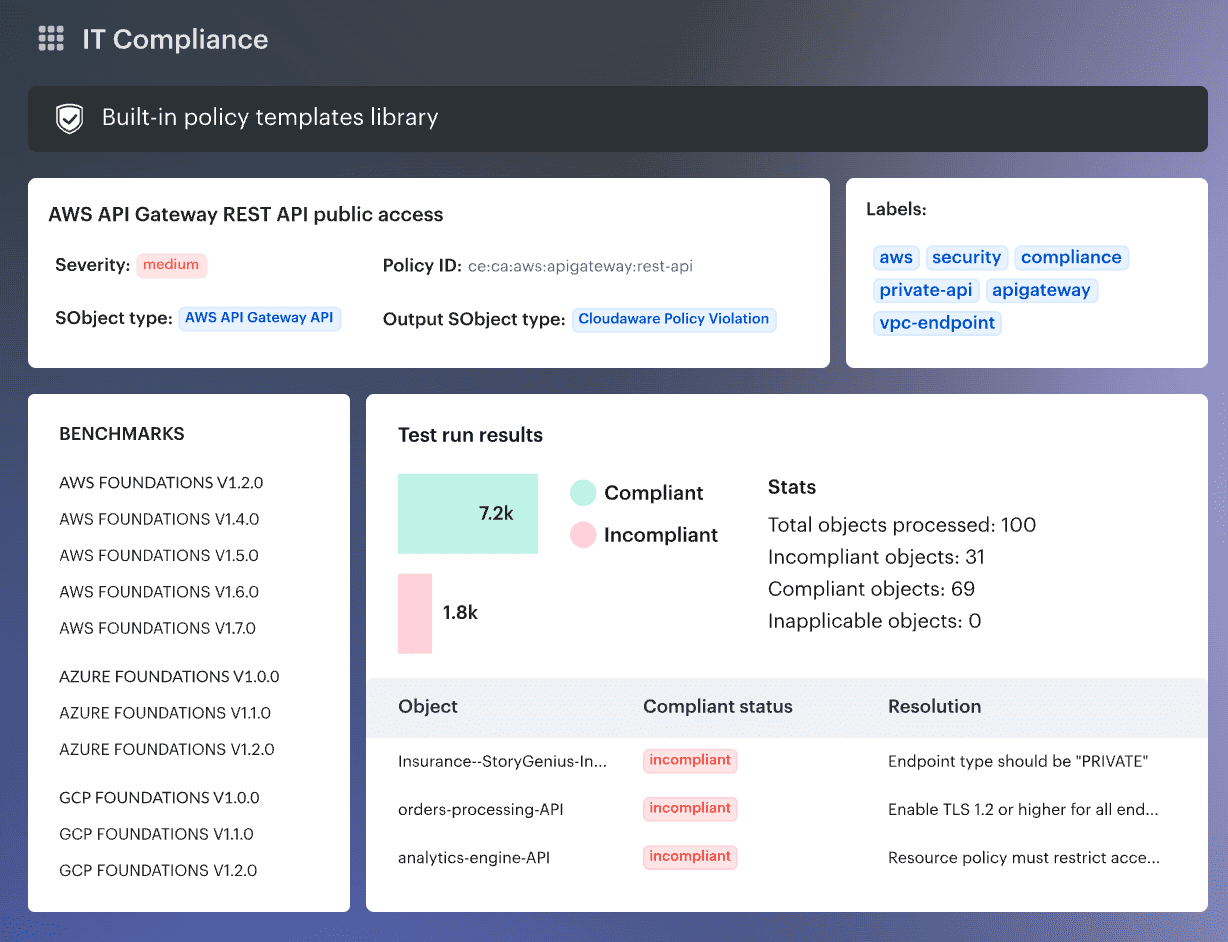
Cloudaware reaches vulnerability management from the opposite end of the others. It is a CMDB platform first, so a finding never arrives as a lonely CVE. Each one is already tied to its asset, owner, environment, and cost. Triage stops being investigation and becomes assignment.
Two things follow that no scanner in this guide can match. First, the CMDB carries each asset's cost and criticality, so you weigh exposure against business value. Ranking by CVSS alone is no longer the only option. Second, one CVE reported by Qualys and Tenable collapses into a single task, not two tickets. The scattered queue becomes an owned, prioritized list.
Be clear on the limits, because we are. Cloudaware is CSPM, not CNAPP, so it skips the attack-path analysis Wiz offers. Its data is only as complete as the scanners you feed it, plus the 7-day managed scan. Host scanning needs the Breeze Agent, so it is not fully agentless. And the model pays off on multi-cloud estates, so a single-cloud team may find it more than they need. Runtime threat detection is a separate module: NeoSec adds per-asset behavior baselines and AI investigation on the same CMDB, for teams that need exploitation evidence, not another scanner.
POC rule: connect the scanners you already run and watch what context appears automatically. Check whether each finding lands with an owner and an environment. Then confirm the routing and 7-day rescan close the loop without manual work.
Features
- Findings arrive with an owner: every vulnerability lands tied to its asset, application, environment, owner, and business criticality. That is what turns a CVE into a task someone can act on today.
- Prioritize with business context, not just CVSS: the same CMDB carries each asset's cost and criticality, so exposure gets weighed against business value. No pure scanner has that data.
- One task, not five tickets: overlapping findings from your scanners collapse into one record, then route to owners or to Jira and ServiceNow. SLA policies, due dates, and risk acceptance are built in.
- Blind-spot tracking: dashboards flag unscanned assets by Last Scan Date, so coverage gaps surface before an auditor does. Most tools report what they scanned, not what they missed.
- Ingests the scanners you already run: Cloudaware pulls findings from Tenable, Qualys, Rapid7, CrowdStrike, Orca, Snyk, and AWS Inspector, alongside its own Vulnerability Scanning as a Service. 63 integrations feed the wider CMDB.
- An MCP server for AI queries: through the Model Context Protocol, ChatGPT, Claude, and Copilot can query your CMDB read-only. Ask which internet-facing hosts carry critical, unpatched CVEs, and who owns them.
Shortlisting rule: Cloudaware fits when the problem is unifying findings and ownership, not detection. Weigh it against Nucleus for pure aggregation, or a CNAPP if you need attack paths. Its edge is the CMDB context the others lack.
Pricing
Cloudaware pricing is modular. The public CMDB starting price is $200 per month for 50 servers. Security capabilities like Vulnerability Management and CSPM are priced on top of that baseline, not included automatically.
The clearest way to read the model is Cloudaware's pricing and ROI calculator. In one illustrative configuration, 500 cloud assets, 500 physical assets, 50 cloud accounts, and four modules estimate $7,000 per month. Those four are CMDB, Software Asset Management, CSPM, and Vulnerability Management.
That estimate is illustrative, not a published package price. Change the asset counts, modules, or accounts and it shifts, so treat enterprise pricing as custom. Cloudaware also offers a 30-day free trial.
Check Cloudaware’s value for your company now
Pros and cons
Cloudaware's public reviews cover the broader platform, since the vulnerability module's own review base is thin. The strongest signal for this article comes from a security officer, alongside recurring notes on UI, integration, and cost.
These are real G2 and Capterra reviews, attributed by role. Both bases are small, so weigh them against a proof of concept, not the star count.
- ✅ Surfaces and reports problems — Pedro K., Information Security Officer, computer software, Capterra: it lets you "easily identify problems in the cloud environment," with "reporting capabilities to management." (Capterra)
- ✅ Deep, enriched asset data — SEO Marketer, small business, G2: "I really like how deep, flexible, and well-enriched the data is." (G2)
- ✅ One unified view of resources — Senior Consultant, small business, G2: "It provides a unified view of all cloud resources." (G2)
- ⚠️ Overwhelming interface — Senior Consultant, small business, G2: "the user interface can be overwhelming and difficult to navigate." (G2)
- ⚠️ Integration takes effort — reviewer, computer software (mid-market), G2: "Integrating [Cloudaware] with existing systems or workflows were challenging." (G2)
- ⚠️ Costly for small orgs — Enterprise reviewer, G2: "It's not free and price may not be okay for smaller organization." (G2)
Wiz
G2: 4.7/5 from 845 reviews, as of Sep. 4, 2026
Capterra: 4.7/5 from 3 reviews, as of Sep. 4, 2026
Best for: mid-market and enterprise cloud teams whose core problem is cloud risk context, not scanner unification. Buy it for the graph, and add runtime only where a workload earns it.
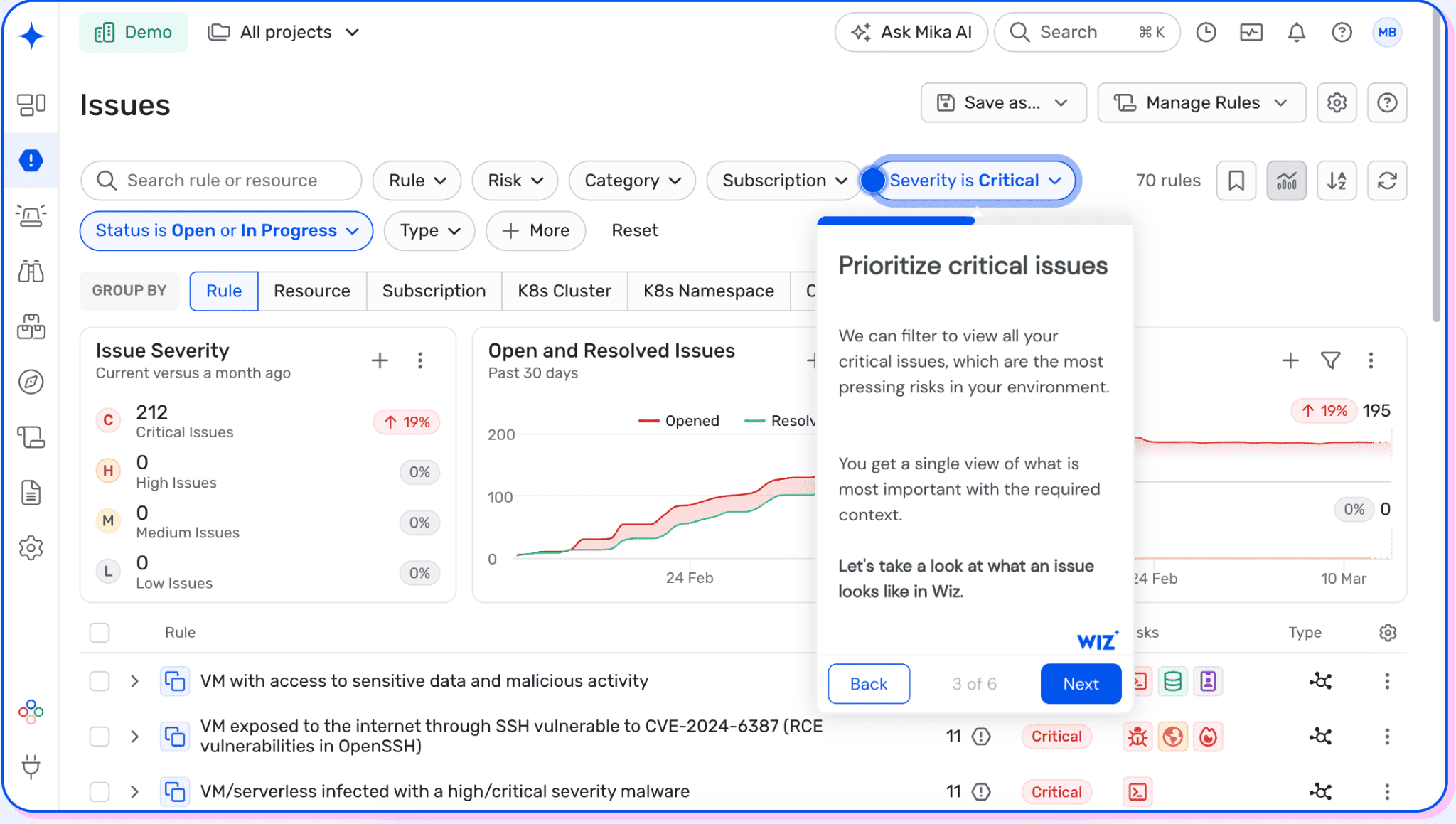
Wiz is a CNAPP, and you came here for vulnerability management, so read it in that light. Its scanning is agentless. API connectors inventory the estate, and the Security Graph ties each finding to its exposure, identity, and data. That context is the real product. A raw CVE list tells you severity. The graph tells you which flaw sits one hop from the public internet and a secret. That is the one you fix first.
The tradeoff is deliberate and worth naming. Agentless coverage is fast and broad, but it reads configuration and snapshots, not live process behavior. For runtime detection you add the Wiz Sensor, a separate eBPF agent and a separate line item. So size Wiz as two purchases: broad graph-based posture, and selective runtime depth where a workload earns it.
For a pure vulnerability-management job, two cautions matter. First, you pay for breadth you may not use. CSPM, CIEM, DSPM, and code scanning are strong, but they sit idle if your real problem is unifying scanner findings. Second, Wiz consolidates on its own terms. Its UVM capability pulls in third-party scanner findings, and a ServiceNow connector syncs its inventory into the CMDB. Check whether that fits the workflow you already run. Its 2025 reviewers flagged downstream gaps, thin ticket granularity and missing MTTR reporting. Those are the fields a vulnerability-management program lives on.
POC rule: pick one production attack path and make the team trace it end to end. Follow it from the initial finding through exposure, identity or data context, affected resource, and owner. If engineers still need several consoles to decide, the graph is adding less than the demo suggests.
Features
- The Security Graph, not the module count: the graph is the reason to shortlist Wiz. It ranks a finding by what surrounds it, exposure, permissions, and data, so criticality reflects a real path, not a CVSS score in isolation.
- Agentless coverage with a runtime boundary: connectors inventory workloads, containers, and clusters in minutes. But posture is not detection. Live threats need the Sensor, so do not let a clean posture demo stand in for incident-response readiness.
- Code-to-cloud tracing: Wiz Code scans Terraform, CloudFormation, ARM, Kubernetes, Docker, dependencies, and secrets, and traces a deployed risk back to its source. That fixes a recurring flaw at origin instead of re-patching the running resource.
- Where it stops for VM teams: Wiz surfaces and correlates vulnerabilities well. It routes issues to Jira and ServiceNow and syncs inventory into ServiceNow CMDB. Reviewers still name ticket granularity and exception handling as the seam, so test both in your POC.
Shortlisting rule: evaluate agentless coverage and sensor-based runtime protection separately. A clean posture demo does not prove you have the runtime telemetry needed for incident response on critical workloads.
Pricing
Wiz uses workload-based pricing, and modules are priced separately. Quotes depend on the number of cloud workloads and the capabilities required.
As of September 2026, AWS Marketplace gives a public baseline for a 12-month contract covering 100 workloads:
- Wiz Essential: $24,000/year
- Wiz Advanced: $38,000/year
- Wiz Sensor: $28,000/year per 100 sensors, added to Advanced
- Wiz Code: $58,500/year per 100 licenses, added to Wiz Cloud
- Wiz Defend: $18,000/year per 300 GB of monthly log ingestion, added to Advanced
Enterprise pricing stays custom and can be negotiated through a private offer. Wiz offers a free trial with full access.
Do not stop at the $24,000 entry figure. An environment that needs Advanced plus runtime sensors, code scanning, and Defend stacks four priced dimensions on top of each other. At 100 workloads that path clears six figures before negotiation. Model the architecture you intend to run in year two, not the cheapest configuration that gets through procurement.
Pros and cons
The strongest Wiz feedback centers on multicloud visibility and risk context. The recurring friction sits downstream, in ticket granularity, exception workflows, and reporting metrics, which is telling for a vulnerability-management buyer.
These examples come from individual vetted TrustRadius reviews published in April 2025. Validate the limitations in your own proof of concept, since they may have changed.
- ✅ Multicloud visibility: "Ability of Wiz to integrate with all of our cloud platforms makes it easy to deploy and centralizes our insights into all environments." The reviewer ran Wiz for CSPM across a multicloud estate. (TrustRadius)
- ✅ Contextual risk prioritization: "Create a risk mapping that takes into account not only one parameter but the entire risk scope." The example behind it combines exposure, sensitive data, and an exploitable vulnerability. (TrustRadius)
- ✅ Consolidation across security domains: one enterprise reviewer cited "Contextualizing risks" and "Eliminating isolated solutions" after deploying Wiz Cloud, Code, Sensor, and Defend. For a consolidation project, check whether that breadth truly removes consoles. (TrustRadius)
- ⚠️ Ticketing granularity: "I would like tickets for specific findings not just issues." The same reviewer flagged assignment as a primary concern. This matters when application teams route individual findings through internal ticketing. (TrustRadius)
- ⚠️ Remediation metrics: "There is no visibility into MTTR metrics or MTTD." Another reviewer struggled to use resolved dates for reporting. If MTTR is a program KPI, make the vendor show that report in your POC. (TrustRadius)
- ⚠️ Exception-management workflow: a large-enterprise reviewer wanted better "Exception Management" with exception-number tracking and "bi-directional status updates (ServiceNow)." A useful test where accepted risk and ServiceNow status must stay synchronized. (TrustRadius)
Orca Security
G2: 4.7/5 from 314 reviews, as of Sep. 4, 2026
Capterra: 4.8/5 from 60 reviews, as of Sep. 4, 2026
Best for: cloud teams that want agentless breadth with data security at the center, and that would rather feed one scanner into a CMDB than run several. If real-time runtime detection is the priority, look harder at agent-based tools first.
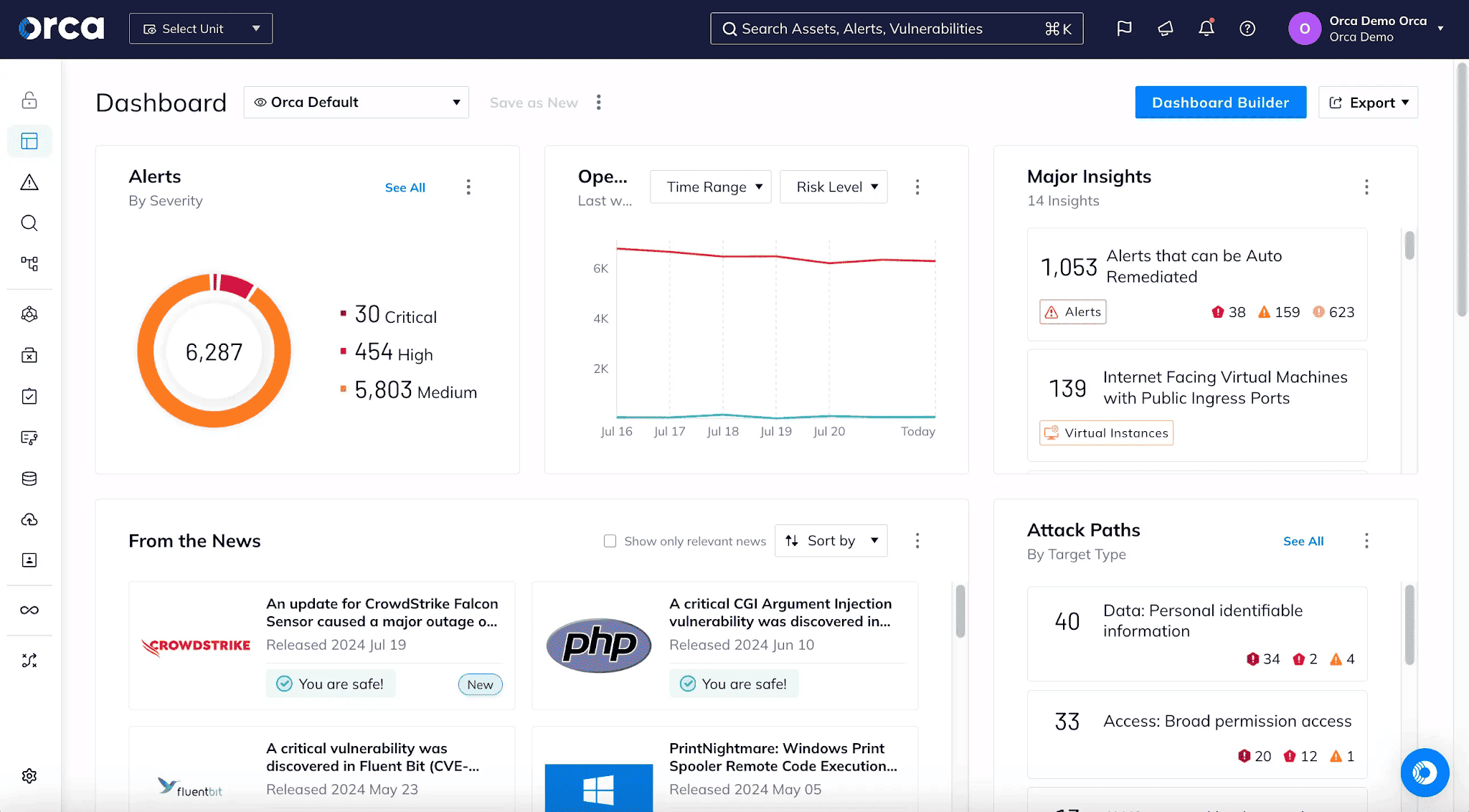
Orca and Wiz solve the same problem with the same philosophy, so the differences are in the details. Orca's approach is SideScanning. It reads your cloud's block storage and configuration out of band, with no agent and no network scanner. From those snapshots it builds one model covering vulnerabilities, malware, misconfigurations, secrets, and sensitive data. The payoff shows up in data security. Orca is consistently strong at finding shadow data. Think production databases copied into forgotten dev accounts, which no agent would cover.
For a Cloudaware buyer, one fact separates Orca from Wiz. Cloudaware ingests Orca findings, so you can run Orca as your scanner and track its results in the Cloudaware CMDB for ownership. Wiz is not a listed Cloudaware source. It syncs to ServiceNow CMDB through its own connector instead. That does not make Orca better, but it changes the consolidation math if unifying findings is your goal.
The tradeoff is the same one agentless always carries. SideScanning reads snapshots on a schedule, not live process activity. Orca has added runtime detection, but real-time depth is not its heritage. Confirm the current runtime coverage in a POC rather than assuming parity with an always-on agent.
POC rule: point Orca at an account you think is clean and count what SideScanning finds that your agents miss. Then check cadence. When a critical CVE lands, ask how many hours until Orca reflects it, because snapshot timing is the real limit.
Features
- SideScanning, not agents: Orca reads block storage and cloud config out of band, so coverage includes unmanaged and forgotten assets. The limit is cadence. It scans snapshots periodically, not continuously.
- Data security posture (DSPM): this is Orca's strongest differentiator. It discovers and classifies sensitive data across managed, unmanaged, and shadow stores, which is where many breaches begin.
- Unified data model and attack paths: one model correlates vulnerabilities, identity, exposure, and data. A finding is ranked by real reachability, not by a CVSS score in isolation.
- Host and workload triage: reviewers credit Orca for flagging which vulnerabilities sit on internet-facing hosts tied to privileged identities. That is the context a VM team needs to sequence work.
Shortlisting rule: if data security is a driver, weight Orca's DSPM heavily and test it on a real account. If runtime detection is the driver, treat Orca's runtime as unproven until your own POC shows otherwise.
Pricing
Orca is quote-based, priced by cloud workload count, with modules added through a private offer. As of September 2026, AWS Marketplace publishes monthly starter packs by concurrent EC2 workload count:
- Small: $7,000/month
- Small-Medium: $12,000/month
- Medium: $17,000/month
- Large: $30,000/month
Larger and multi-cloud licensing moves to a private offer, and a free trial is available.
Read those as monthly figures. The Small pack alone is $84,000 a year, so Orca sits at the enterprise end even at entry scale. Price it at your steady-state workload count, and confirm whether multi-cloud coverage and DSPM are inside the pack or priced on top.
Pros and cons
Orca's reviews cluster around agentless visibility and remediation the team can act on. The friction points are pricing for smaller organizations and occasional false positives, plus an older coverage gap worth re-checking.
These are verbatim quotes from vetted PeerSpot and TrustRadius reviews. Ratings and coverage shift over time, so confirm the current behavior in your own proof of concept.
- ✅ Agentless AWS visibility — Nykole Denoo, Cyber Security Analyst at BNY: "it allows agentless deployments. Since it is integrated into my AWS environment, it gives me comprehensive visibility across my whole AWS environment." (PeerSpot)
- ✅ Remediation the team can act on — Assistant Manager at a manufacturing company (10,001+ employees): "They show us the specific path that needs to be fixed in order to remove the vulnerability or alert. Sometimes we don't need to log in directly and investigate ourselves." (PeerSpot)
- ✅ Risk identification — Krishnakumar Mahadevan, CISO at Spink Solutions: "Orca Security excels in identifying risks, tool poisoning and broken paths, which Orca Security identifies effectively." (PeerSpot)
- ⚠️ Expensive for smaller teams — Krishnakumar Mahadevan, CISO: "I work in an SMB organization and find Orca Security quite expensive. For enterprises, I find Orca Security to be fairly priced, whereas it is a bit more expensive for SMBs." (PeerSpot)
- ⚠️ Occasional false positives — Assistant Manager, manufacturing (10,001+ employees): "occasional false positives, which is a normal part of security. There are a few false positives and some areas where the product needs improvement." (PeerSpot)
- ⚠️ Older coverage gap — Verified User, Director in R&D (51-200 employees), 2021: "It's good for finding issues in SSH, ec2 instances, and so on. But it's not good at finding stuff for Serverless lambdas, for containers and some more." Orca has since expanded container and Kubernetes scanning, so verify current serverless coverage in a POC. (TrustRadius)
Tenable Vulnerability Management
G2: 4.5/5 from 127 reviews, as of Sep. 4, 2026
Capterra: 5.0/5 from 2 reviews, as of Sep. 4, 2026
Best for: enterprise and regulated teams that want the deepest, most trusted detection and defensible compliance reporting, and will trade cloud-native graph depth for breadth and pedigree.
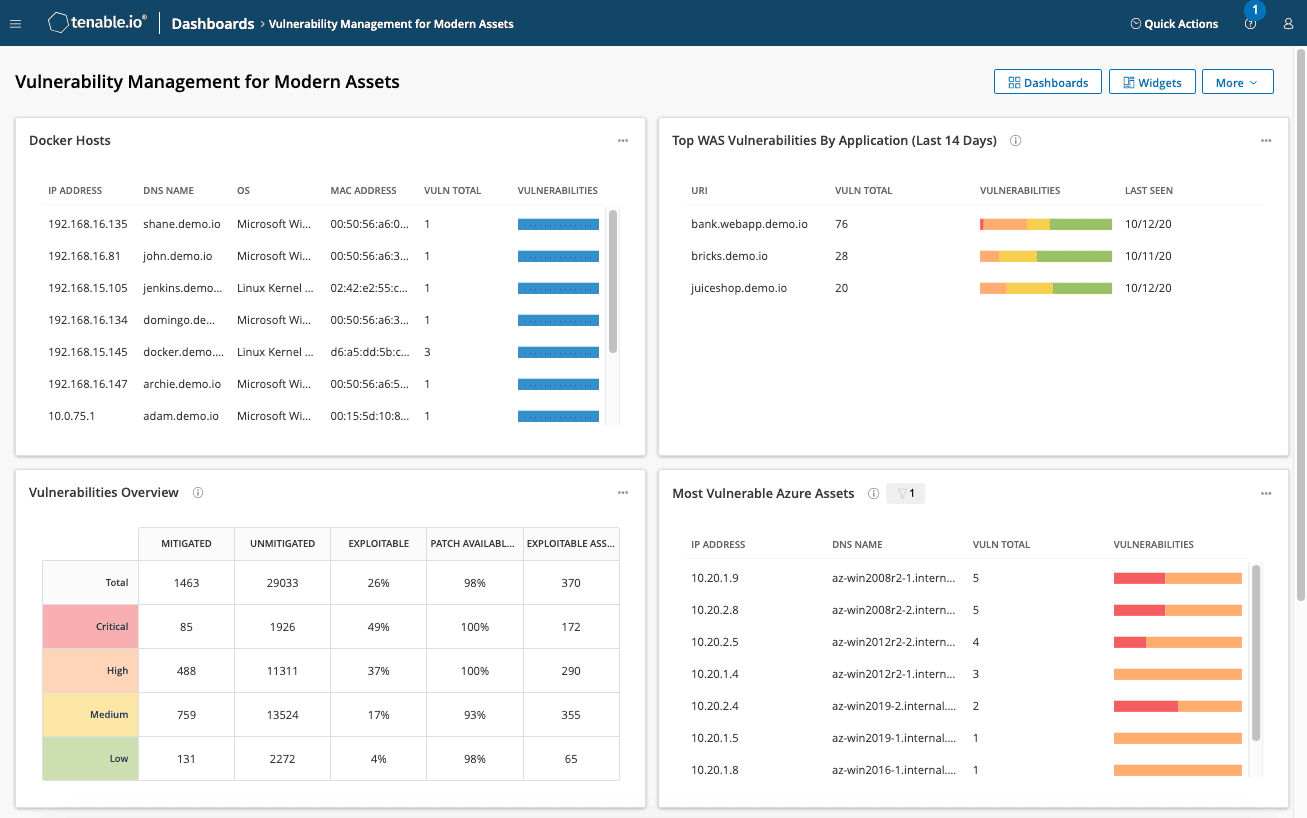
If Wiz and Orca are the cloud-native challengers, Tenable is the incumbent they are challenging. It is the company behind Nessus. Roughly twenty years of plugin coverage keeps its detection the reference standard. For breadth of what it can find across servers, network devices, and operating systems, few tools match it.
Prioritization is Tenable's real pitch beyond raw detection. VPR, its Vulnerability Priority Rating, blends CVSS with threat intelligence like exploit availability and active exploitation. That pushes the flaws attackers actually use to the top, which is the same job EPSS and KEV do. It packages that as one Tenable score. Whether you trust a vendor score or prefer open signals is a genuine POC question.
Two things shape the current platform. Tenable bought Vulcan Cyber in 2025, adding third-party finding aggregation and remediation orchestration. So the roadmap is moving from find-and-prioritize toward closing the loop. And for our readers, Cloudaware ingests Tenable findings, so Tenable can sit as your detection engine while a CMDB handles ownership and tracking.
The boundary is heritage. Tenable grew up as a network and agent scanner, not a cloud-native graph. It covers cloud and containers, but not with the agentless attack-path depth of Wiz or Orca. If your estate is mostly cloud-native, weigh that gap. If it is mixed enterprise infrastructure, Tenable's breadth is the point.
POC rule: run Tenable and one agentless tool against the same subnet and the same cloud account. Compare what each finds on the servers versus the cloud workloads. Tenable usually wins the first, and the agentless tools win the second.
Features
- Nessus detection depth: twenty years of plugins give Tenable the widest, most trusted coverage across operating systems, network gear, and applications. For traditional infrastructure, this is detection few competitors match.
- VPR prioritization: Tenable scores each flaw by exploitability and threat activity, not CVSS alone. It answers the same question as EPSS and KEV, but as a single vendor score you either trust or audit.
- Compliance and audit reporting: Tenable ships CIS benchmarks, audit files, and framework-aligned reports. For regulated teams, this is often the reason it stays in the stack.
- Remediation via Vulcan (2025): the Vulcan Cyber acquisition adds finding aggregation and remediation workflows. It is newer, so test the closed loop rather than assuming it matches the maturity of detection.
Shortlisting rule: separate detection from remediation. Tenable's detection is proven, and its remediation orchestration is a 2025 addition, so validate that half on your own workflow.
Pricing
Tenable One Vulnerability Management is asset-based, and unlike the agentless platforms, it publishes real numbers. As of September 2026, tenable.com lists:
- 100 assets, 1 year: $3,500 (about $35 per asset)
- 100 assets, 3 years: $9,975
- Nessus Professional: $4,790/year, one scanner, unlimited IPs
Larger estates move to volume pricing through Tenable or a partner. The per-asset model is transparent, but it climbs close to linearly, so a 5,000-asset estate is a very different number before discounts. Reviewers call Tenable a premium product, and the price reflects that.
Pros and cons
Tenable's feedback is consistent. Practitioners praise detection accuracy and configurability, and push back on asset management, reporting, and price.
One data note: the Tenable Vulnerability Management listing on Capterra is thin at two reviews. Its Nessus engine carries more signal, at 4.7/5 from 94 Capterra reviews and 306 reviews on G2.
These are verbatim TrustRadius reviews with their links. Some date to 2019, so treat older reporting and UI complaints as items to re-check, not current fact.
- ✅ Detection accuracy — Information Security Analyst (201-500 employees): "The best in the business when it comes to plugin accuracy and coverage." (TrustRadius)
- ✅ Deep configurability — Cloud Security Architect / SQL Server DBA (51-200 employees): "Tenable.io provides a comprehensive set of features that can be configured in detail." (TrustRadius)
- ⚠️ Asset churn is hard — Information Security Analyst (201-500 employees): "Asset management is difficult to work with if you have a lot of asset turnover." (TrustRadius)
- ⚠️ Reporting and auto-remediation gaps — Manager in IT (11-50 employees), Dec 2024, on what to improve: "Better email notification, auto remediation, templated client facing reports." (TrustRadius)
- ⚠️ Premium pricing — Director in IT (201-500 employees): "Expensive. You do pay a slight premium for the best product in the space." (TrustRadius)
Qualys VMDR
G2: 4.4/5 from 168 reviews, as of Oct. 2, 2026
Capterra: 4.0/5 from 33 reviews (listed as Qualys Cloud Platform), as of Oct. 2, 2026
Best for: enterprise and hybrid estates that want scanning, prioritization, and patching from one vendor in one console, and will budget for the add-ons that complete the loop.
Qualys is the other half of the classic enterprise scanner shortlist, next to Tenable. VMDR is its flagship app. One license covers asset discovery, vulnerability and CIS configuration assessment, prioritization, and patch detection. Virtual scanners, Cloud Agents, passive sensors, and container sensors come unlimited, so sensor count never becomes a budget line.
Prioritization runs on TruRisk. Each detection gets a Qualys Detection Score from 1 to 100, built from CVSS, EPSS, CISA KEV, exploit maturity, malware, and active threat actors. Asset criticality, rated 1 to 5, then weights the asset's TruRisk score, capped at 1,000. Like Tenable's VPR, it is one vendor score. Unlike a raw CVSS sort, it already leans on what attackers exploit.
The real pitch is the step after the scan. VMDR maps each vulnerability to the latest superseding patch and builds ready-to-deploy patch jobs. Read the packaging closely, though. Patch detection is included, but patch deployment through Cloud Agents is an add-on. Mitigation when no patch exists, and host isolation, sit in TruRisk Eliminate, a separate license. Cloud and container security assessment are add-ons too, so price them before you compare against an agentless CNAPP.
Cloudaware ingests Qualys findings: a read-only integration pulls vulnerability counts by severity and last scan dates onto cloud VMs and physical servers in the CMDB. Qualys stays the scanner, and ownership stays with the asset record.
POC rule: price the configuration you will actually run, not the base VMDR SKU. Then push one critical CVE end to end: detection, TruRisk rank, ticket, patch job, rescan. Count how many of those steps need a module you have not bought.
Features
- Unlimited sensors in the license: virtual scanners, Cloud Agents, passive scanning sensors, and container sensors are all included. You scale coverage by asset count, not by appliances.
- TruRisk prioritization: the detection score blends CVSS with EPSS, CISA KEV, and threat activity, then asset criticality lifts what matters to the business. It is a single vendor score, so audit how it ranks your known exploited flaws.
- Vulnerability-to-patch correlation: VMDR finds the latest superseding patch per host and turns it into a patch job. Deployment for Windows, Linux, Mac, and third-party apps needs the Patch Management add-on.
- Ticketing and CIS checks included: rule-based ServiceNow and Jira integrations assign tickets automatically. CIS benchmark configuration assessment ships in the base license.
Shortlisting rule: shortlist Qualys when the same team owns finding and patching. If patching belongs to another tool or team, compare it on detection and TruRisk alone, and the add-on question disappears.
Pricing
Qualys prices VMDR per asset and offers a free trial or a quote on qualys.com. The public numbers live on AWS Marketplace. As of October 2026, the Qualys VMDR (US Only) listing shows these 1-month packages:
- 128 hosts: $596/month (about $56 per host per year)
- 1,024 hosts: $2,352/month (about $28 per host per year)
- 5,120 hosts: $6,805/month (about $16 per host per year)
A 12-month contract saves up to 17%. The VMDR FixIT listing, which adds patch management, starts at $550/month for 64 hosts. The per-host rate drops steeply with volume, so model your real asset count before comparing vendors.
Pros and cons
Qualys reviews reward breadth and the single scan-to-patch workflow, and push back on price, the interface, and module clutter. The pattern holds from 2022 through 2025.
These are verbatim TrustRadius reviews, each opened and verified at its link, with dates. Most date to 2022 and 2023, so re-check interface complaints in a live demo.
- ✅ Scan and patch in one app – Director in IT (1001-5000 employees), Jul 2025: "Patching - having it done by same app as vuln scans is great" (TrustRadius)
- ✅ Agent and network scanning – Consultant in IT (10,001+ employees), Dec 2022: "Qualys VMDR supports both remote scanning and as well as agent based scanning." (TrustRadius)
- ✅ Makes the backlog workable – Engineer in IT (1001-5000 employees), Jan 2023: "tools like Qualys VMDR help break it down into chunks that are much easier to address." (TrustRadius)
- ⚠️ Premium pricing – Technician in IT (51-200 employees), Dec 2022: "Qualys VMDR should focus on more competitive pricing as it is very expensive." (TrustRadius)
- ⚠️ Clunky interface – Engineer in IT (1001-5000 employees), Jan 2023: "UI is a bit clunky" (TrustRadius)
- ⚠️ Unbought modules clutter the console – Director in IT (1001-5000 employees), Jul 2025: "it'd be nice NOT to see features you haven't purchased. CLUTTER." (TrustRadius)
Rapid7 InsightVM
G2: 4.4/5 from 80 reviews, as of Sep. 4, 2026
Capterra: 4.3/5 from 18 reviews, as of Sep. 4, 2026
Best for: mid-market and enterprise teams that want exploit-grounded prioritization and a console analysts enjoy using. Pricing is transparent and per-asset.
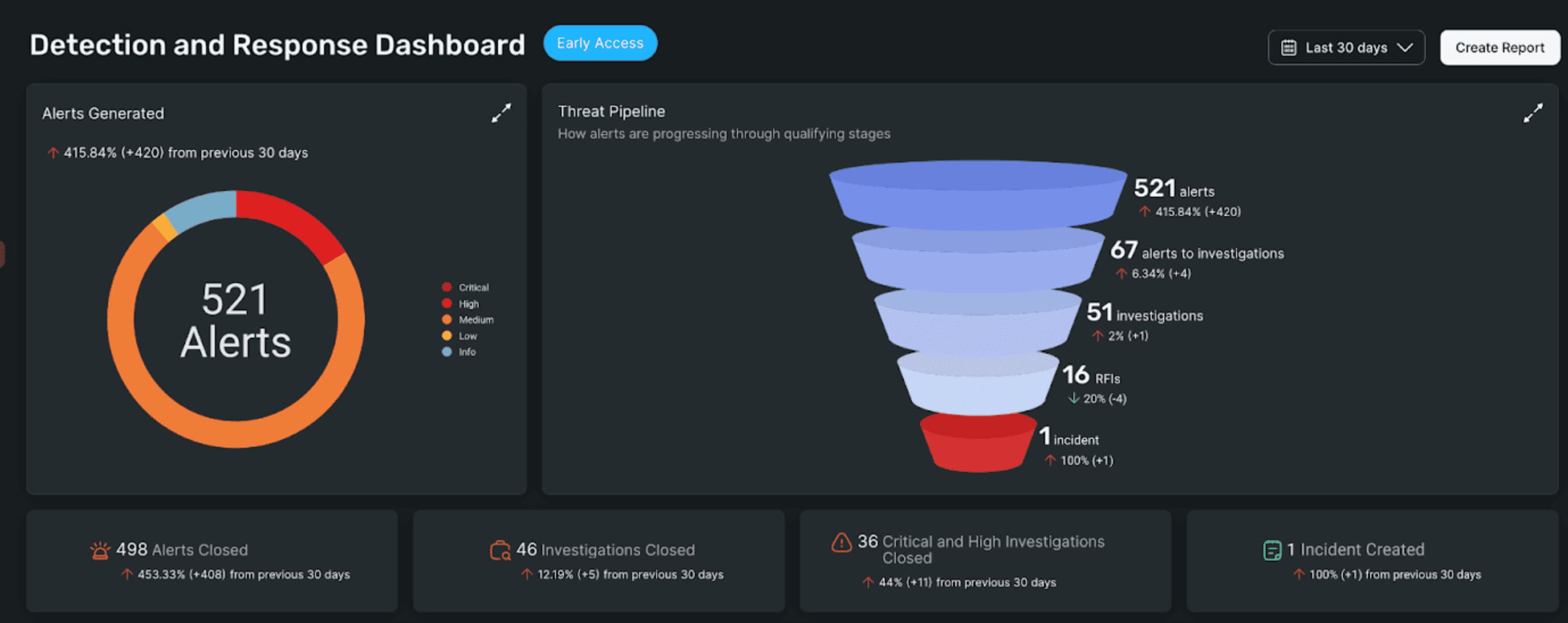
Rapid7 holds a card Tenable and Qualys do not. It owns Metasploit, the exploit framework pentesters and attackers actually use. An engineer who ran InsightVM for pentesting credits that lineage for covering more attack scenarios than rival scanners.
The lineage shows up in how findings rank. Active Risk runs 0 to 1000, blending CVSS with exploit intelligence from Metasploit, AttackerKB, and CISA KEV. It replaced Real Risk in January 2026. A flaw with working exploit code beats a theoretical high-CVSS flaw. VPR and TruRisk chase the same outcome, but Rapid7's signal leans on exploit tooling it builds itself.
The second draw is the console itself. Reviewers who compared InsightVM with Tenable picked it for daily experience, not detection depth. Live dashboards, clear remediation steps, and Remediation Projects that sync to ServiceNow or Jira keep analysts in the tool.
Two limits temper that. Rapid7 grew up as Nexpose, a scanner, so cloud-native depth sits in a separate product, InsightCloudSec. And scan speed and false positives recur in reviews across years, so tune engines and expect some noise. Cloudaware ingests Rapid7 findings, allowing InsightVM to detect issues while a CMDB maintains ownership across the estate.
POC rule: run InsightVM and one incumbent scanner against the same hosts. Compare the Active Risk order against your read of which flaws are exploitable. Then time a full authenticated scan, because scan duration is the most common complaint.
Features
- Active Risk from exploit intelligence: the 0 to 1000 score factors working exploits from Metasploit, AttackerKB, and CISA KEV, not CVSS alone. A flaw attackers can actually use rises above a theoretical one.
- A console analyst uses live dashboards and clear remediation steps are the recurring praise in reviews. For daily operation, usability is a real differentiator against heavier consoles.
- Remediation Projects and ITSM integration: assign vulnerabilities, track them to closure, and sync with ServiceNow or Jira. This is the ticketing loop that pure scanners leave to you.
- Transparent per-asset pricing: Rapid7 publishes a per-asset rate on its own site. Budgeting is straightforward, which is rare in this category.
Shortlisting rule: if analyst adoption and clear prioritization matter more than the deepest cloud-native coverage, InsightVM is the enterprise scanner to beat. If your estate is cloud-first, pair it with a CNAPP or look agentless.
Pricing
Rapid7 publishes InsightVM pricing, which is unusual in this category. As of September 2026, rapid7.com lists it starting at $1.62 per asset per month at 500 assets.
That is roughly $19 per asset per year, or about $9,700 a year for 500 assets. Larger volumes lower the per-asset rate and move to a quote. The transparency is a genuine advantage when you are comparing real numbers across vendors.
Pros and cons
Rapid7's reviews reward prioritization, usability, and integrations, and flag scan speed, false positives, and reporting depth. The pattern holds from 2019 through 2024.
These are verbatim TrustRadius reviews, each one opened and verified at its link, with dates.
- ✅ Actionable vulnerability data — Mark Knutson, Manager of Information Security (501-1000 employees), Dec 2024: "InsightVM provides rich vulnerability data that is actionable." (TrustRadius)
- ✅ ServiceNow integration — Contributor in IT (5001-10,000 employees), Dec 2024: "Rapid7 InsightVM integration with ServiceNow works very well." (TrustRadius)
- ✅ Metasploit pedigree — Engineer in Engineering (1001-5000 employees), Jan 2023: "historically, it was based on metasploit which is a powerful pentesting and exploiting tool." (TrustRadius)
- ⚠️ Scan execution time — Engineer in Engineering (1001-5000 employees), Jan 2023: "time to execute scans can be improved." (TrustRadius)
- ⚠️ False positives — Consultant in IT (51-200 employees), Sep 2019: "sometimes it gives more false positives." A December 2024 reviewer echoes the same point. (TrustRadius)
- ⚠️ Reporting depth — Contributor in IT (5001-10,000 employees), Dec 2024: "There should be more canned reports include that are most used." (TrustRadius)
CrowdStrike Falcon Exposure Management
G2: 4.5/5 from 9 reviews, as of Sep. 4, 2026
Capterra (Falcon platform): 4.7/5 from 56 reviews, as of Sep. 4, 2026
Best for: teams already running Falcon for endpoint protection. They want vulnerability visibility from the same agent, with no scanner to stand up.
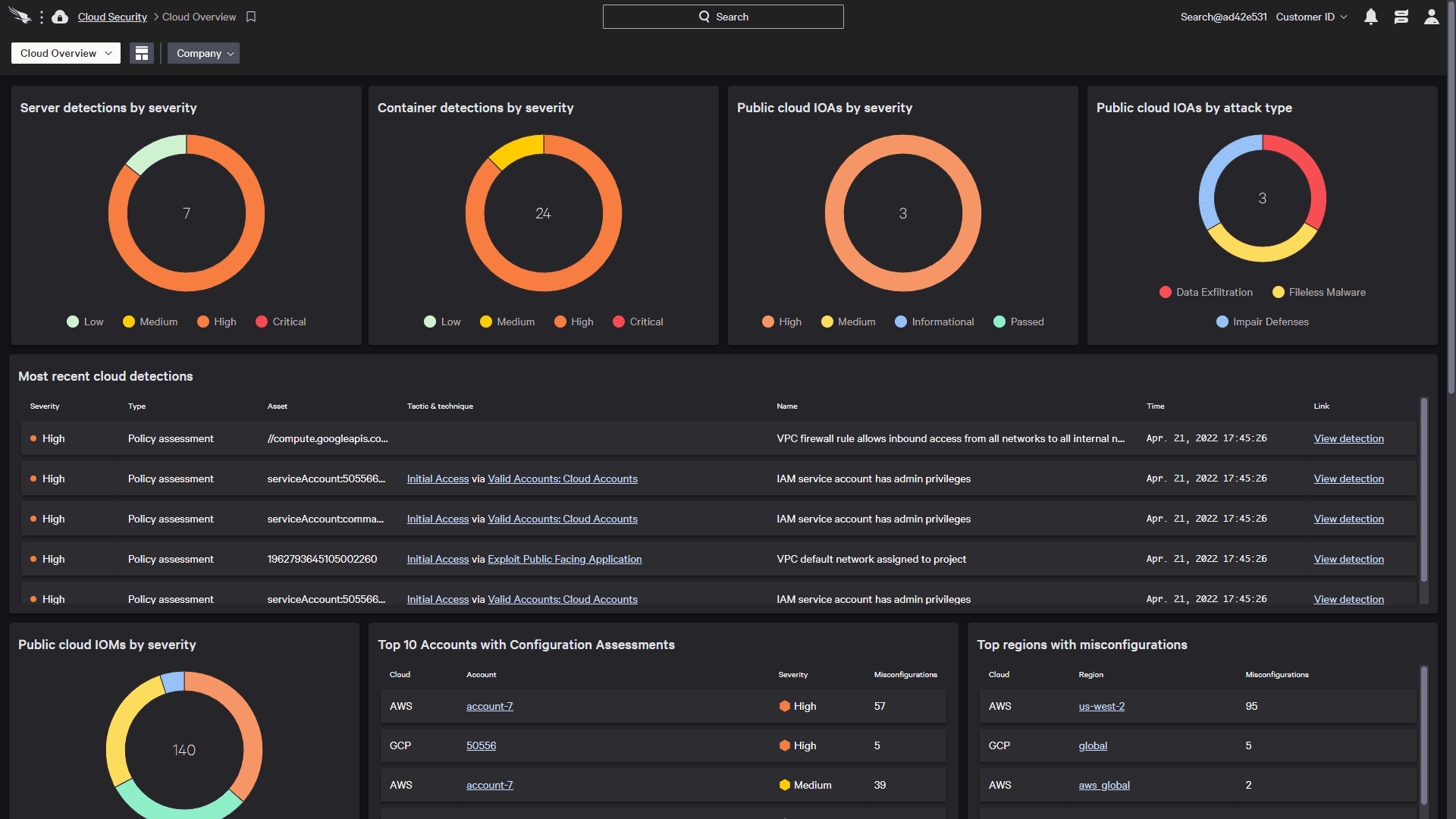
Every tool so far starts with a scanner. CrowdStrike starts with its agent. Falcon Exposure Management reads vulnerability data from the same lightweight sensor that already runs endpoint detection. If Falcon is on the host, assessment is continuous and real-time. No scan window, no separate appliance.
That changes who should look at it. This is not a tool you buy to start a vulnerability program. It is the module you switch on when Falcon is already your EDR. A security analyst running the full suite credits Exposure Management for catching OS and application flaws before attackers reach them.
Prioritization leans on CrowdStrike's threat intelligence. ExPRT.AI rates each vulnerability by predicted exploitation, drawing on the adversary activity CrowdStrike tracks. Rapid7 grounds its score in exploit code, and CrowdStrike grounds its in what its sensors see attackers doing. That live telemetry is the argument for the score.
The boundary defines the tool. An agent-based model only sees hosts where the sensor runs. Network gear and unmanaged devices are reachable only through Network Vulnerability Assessment, which scans from your existing sensors and is licensed separately beyond a small free allowance. Even satisfied users describe the coverage as partial for vulnerability work. Run it as the VM layer for your Falcon-managed fleet, and keep a broader scanner for everything else. Cloudaware ingests CrowdStrike findings, so those results can join the rest of your estate in a CMDB.
POC rule: list every asset class you must cover for compliance. Check how many can run the Falcon sensor. Then check which of the rest Network Vulnerability Assessment can reach, and at what licence cost. What is left is the gap.
Features
- Vulnerability data from the EDR agent: the same sensor that does detection reports OS and application vulnerabilities, continuously and without a scan. For a Falcon fleet, coverage is immediate.
- ExPRT.AI prioritization: CrowdStrike rates exploitation likelihood using its own adversary telemetry, not CVSS alone. The score reflects what its sensors observe attackers doing now.
- One agent, one console: vulnerability findings sit beside detections, identity, and threat intel in the Falcon UI. Analysts already living there add no new tool.
- Where it stops: coverage follows the sensor. Unmanaged and network devices need Network Vulnerability Assessment, scanned from nearby Falcon hosts and licensed separately past the free allowance. Segments with no Falcon host stay dark.
Shortlisting rule: treat Exposure Management as an add-on, not a platform. It earns its place if you own Falcon and want VM without new infrastructure. It does not replace a scanner that covers what the agent cannot reach.
Pricing
CrowdStrike publishes base Falcon pricing, but not for this module. As of September 2026, crowdstrike.com lists per-device annual bundles:
- Falcon Go: $59.99 per device
- Falcon Pro: $99.99 per device
- Falcon Enterprise: $184.99 per device
Exposure Management is an add-on, quoted separately and not included in those bundles. So the real cost is the Falcon platform first, then the module on top. If you already run Falcon, the incremental price is small. If you do not, you are buying an EDR platform to get a scanner, which rarely makes sense.
Pros and cons
CrowdStrike's feedback rewards running vulnerability work from the one agent, and flags premium pricing and the limits of agent-only coverage. On vulnerability work specifically, even fans call it partial.
These are verbatim TrustRadius reviews, each opened and verified, trimmed only where ellipses appear, with dates. The Exposure Management module's own review base is thin, so weigh Gartner Peer Insights for volume.
- ✅ Vulnerabilities from the agent — Prajwal Deshmukh, Cyber Security Analyst (51-200 employees), Jan 2026: "The Exposure Management function helps in identifying application and OS vulnerabilities before attackers exploit them." (TrustRadius)
- ✅ VM without new tooling — Prajwal Deshmukh, Cyber Security Analyst (51-200 employees), Jan 2026: "combining ... exposure management ... within a single lightweight agent and unified console, enabling ... reduced tool sprawl." (TrustRadius)
- ⚠️ VM coverage is partial — Prajwal Deshmukh, Cyber Security Analyst (51-200 employees), Jan 2026: "Exposure management partially help in vulnerability assessment." (TrustRadius)
- ⚠️ Premium pricing — Administrator in IT (10,001+ employees), Aug 2025: "CrowdStrike is a premium solution and expensive and so it is less appropriate for small organizations." (TrustRadius)
- ⚠️ Needs connectivity — Administrator in IT (10,001+ employees), Aug 2025: "it is not suited where there is no internet." (TrustRadius)
Microsoft Defender Vulnerability Management
G2: 4.4/5 from 34 reviews, as of Sep. 4, 2026
Gartner Peer Insights: 4.3/5 from 46 reviews, as of Sep. 4, 2026
Best for: Microsoft shops on Defender for Endpoint or Microsoft 365 E5, who want vulnerability management inside the stack they already run, with remediation handed to Intune.
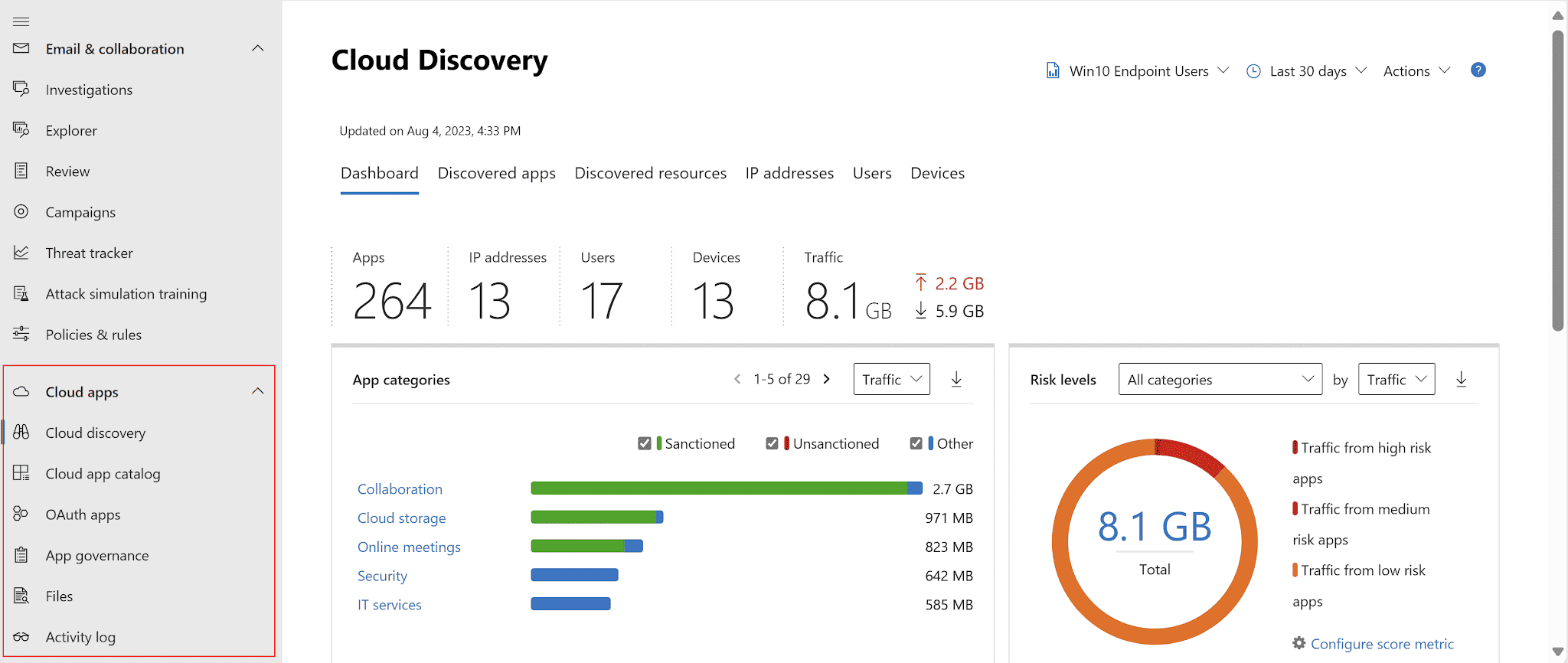
With most tools you start with price. Here you start with what you already own. Core vulnerability management ships inside Defender for Endpoint Plan 2 and Microsoft 365 E5, and premium assessments cost extra.
Prioritization runs on an exposure score and threat context, tied to Microsoft Secure Score for Devices. There is no single named rating, just a read from Microsoft's telemetry that reviewers credit for structured patching.
Remediation is where the stack shows its hand. Defender raises a request that flows to IT through Microsoft Intune. Security and desktop teams work the same fix without leaving the console.
Two caveats. Coverage is deepest on Windows. Reviewers report weaker Linux handling, a heavy agent, and refresh lag of hours that leaves fixed items showing open. And Cloudaware pulls Microsoft findings only through Defender for Cloud on Azure workloads. Endpoint findings from Defender Vulnerability Management have no direct Cloudaware connector, unlike Tenable or CrowdStrike.
POC rule: if you already hold Plan 2 or E5, turn on the core set and measure coverage before paying for the add-on. Then run one remediation from Defender to Intune and time how long the dashboard takes to confirm it.
Features
- VM inside the license you own: core capabilities ship with Defender for Endpoint P2 and Microsoft 365 E5. For a Microsoft shop, the tool is already paid for, which changes the whole cost question.
- Exposure score and Secure Score: findings are ranked by exposure and threat context, tied to Microsoft Secure Score for Devices. It is prioritization built from Microsoft's telemetry rather than a separate named rating.
- Remediation through Intune: Defender files a remediation request that flows to IT in Intune. Security and desktop teams work the same fix without leaving the Microsoft console.
- Premium assessments cost extra: security baseline, browser extension, and certificate assessment sit behind the add-on or standalone tier. Price them only if the core set leaves a real gap.
Shortlisting rule: this is a stack decision, not a standalone one. If you live in Microsoft security, Defender Vulnerability Management is the path of least resistance. If your estate is mixed or heavy on Linux and network gear, pair it with a broader scanner.
Pricing
Microsoft bundles the core capabilities into Defender for Endpoint P2 and Microsoft 365 E5, and sells the premium set separately. As of September 2026, Microsoft's plan comparison shows what each tier includes. Reported pricing puts the add-on near $2 per user per month and the standalone near $3, billed per user rather than per device.
The economics only work if you are already in the Microsoft stack. Buying E5 to get vulnerability management would be an expensive way in. Reviewers who hold E5 still call the premium tiers costly, so weigh the add-on against what the core set already covers.
Pros and cons
Reviewers reward Defender Vulnerability Management for prioritization, remediation guidance, and living inside the Microsoft stack. They flag refresh lag, weaker non-Windows coverage, and cost even for E5 holders.
These are verbatim reviews from PeerSpot, read directly on the product's review page. Its TrustRadius base is nearly empty, so PeerSpot carries the practitioner detail here.
- ✅ Structured, prioritized patching — Krishna R, DGM Technical Security (10,001+ employees), May 2025: "Risk prioritization ... allowing me to apply the patches in a very structured and more important way." (PeerSpot)
- ✅ Actionable remediation guidance — Vaishali Thakare, Senior Cloud Security Consultant, MetLife, Dec 2024: "The recommendations ... really help in taking care of the resources. I can fix vulnerabilities and see the current state of the security posture." (PeerSpot)
- ✅ Continuous, broad assessment — Abdulrahman Muhammadi, Information Security and IT Manager, Jan 2025: "it assesses our systems, applications, virtual machines, laptops, operating systems, Linux, Unix, and network devices 24/7 ... and notifies us of vulnerabilities." (PeerSpot)
- ⚠️ Not truly real-time — Cloud Security Engineer, computer software (51-200 employees), Oct 2025: "it is not truly real-time as it takes between eight to twelve hours for updates to occur." (PeerSpot)
- ⚠️ Weaker on Linux, heavy agent — Takayuki Umehara, Security Specialist, Prudential Systems Japan, Feb 2025: "there is a gap between Windows and Linux management. The product is not stable; it often uses excessive memory and CPU." (PeerSpot)
- ⚠️ Costly even inside E5 — Cloud Security Engineer, computer software (51-200 employees), Oct 2025: "The pricing is expensive, even though it is part of the E5 package." (PeerSpot)
Snyk
G2: 4.5/5 from 135 reviews, as of Sep. 4, 2026
Capterra: 4.6/5 from 21 reviews, as of Sep. 4, 2026
Best for: engineering-led teams that want to catch vulnerabilities in code, open-source dependencies, and containers before they ship, inside the developer workflow.
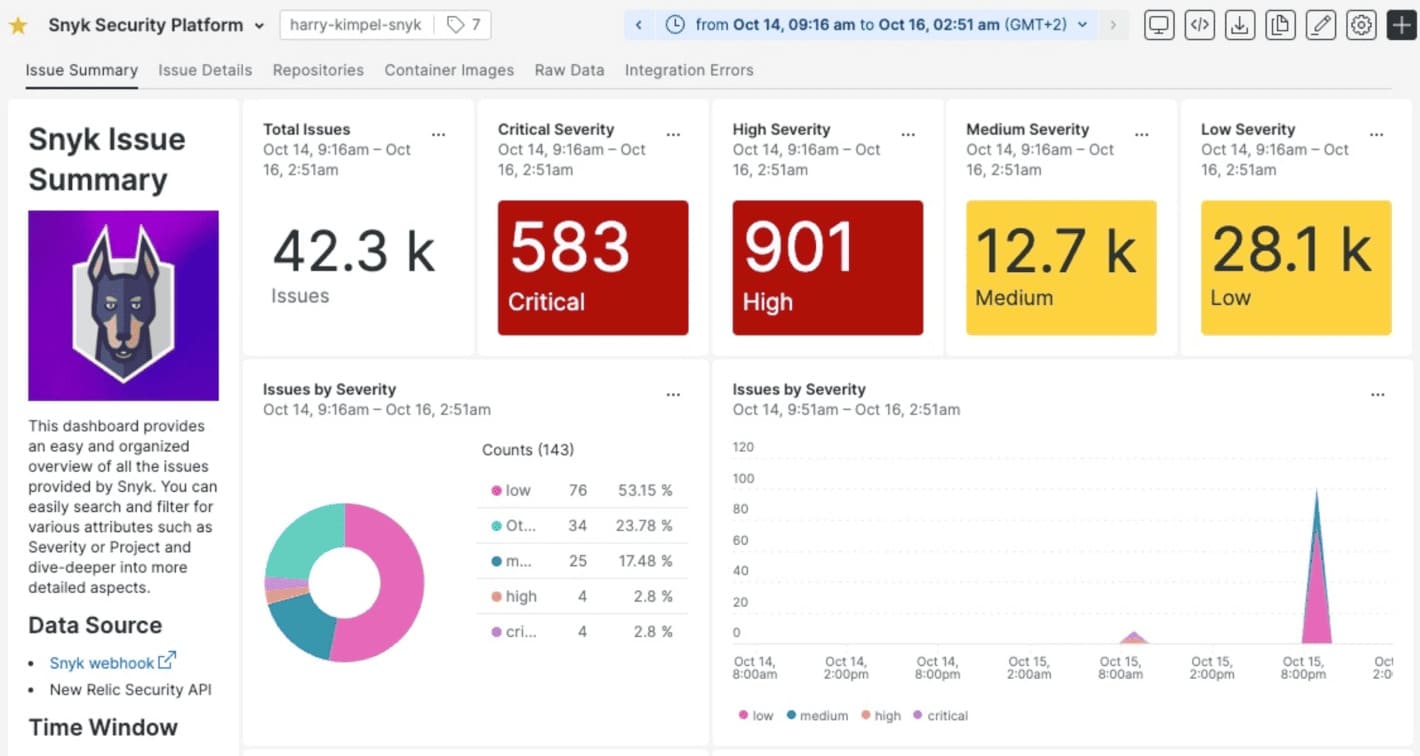
Every tool so far looked at running systems. Snyk looks upstream, at the code and open-source dependencies before they deploy. It lives in the developer's world: the IDE, the pull request, the CI/CD pipeline. This is application and supply-chain security, not host scanning.
The pitch is fixing, not just finding. Snyk maps a vulnerable dependency to a safe version and opens a fix pull request for the developer. Reviewers credit the IDE plugin for accurate findings and the auto-fix PRs for closing them fast.
The boundary is scope. Snyk secures what your teams write and import, not the servers and network gear a host scanner covers. Reviewers routinely run it beside another tool, and even fans call day-to-day management in the platform clunky. Cloudaware ingests Snyk findings (Snyk Enterprise plan required), so its app-layer results can sit in a CMDB next to your infrastructure scans.
POC rule: point Snyk at your messiest repo, not a clean one. Count the false positives in the first hundred findings. Then check whether the fix PRs merge without breaking the build.
Features
- Open source and dependency scanning: Snyk maps known CVEs in npm, Maven, pip, and more, then opens a fix PR with a safe version. This is the job it does best.
- Developer-workflow integration: it runs in the IDE, Git, and CI/CD, so findings reach engineers where they work, not in a separate console. That is why adoption sticks.
- Code, container, and IaC coverage: beyond dependencies, Snyk scans first-party code, container images, and Terraform or Kubernetes config. One platform spans the application layer.
- Where it stops: Snyk does not scan hosts or networks. Its cloud scans cover deployed AWS, Azure, and Google Cloud config, but only on the Enterprise plan. For a full program, it sits beside an infrastructure scanner, not instead of one.
Shortlisting rule: judge Snyk on developer adoption and fix speed, not raw coverage. If engineers ignore its findings, it fails no matter how good the scan is. It complements an infrastructure scanner; it does not replace one.
Pricing
Snyk publishes its rates. Free and Team are flat plans. Enterprise runs on prepaid credits. As of September 2026, snyk.io lists:
- Free: $0, with dependency, code, IaC, and container scanning
- Team: $25 per month per contributing developer
- Enterprise (Platform Subscription): credit-based, 1 credit = $1. Code and Open Source draw 1 credit per active contributor per day. Credits are bought through sales.
The unit is a contributing developer, meaning anyone who committed to a monitored private repo in the last 90 days. That model is cheap for small teams and, as reviewers note, cost-prohibitive at enterprise scale.
Pros and cons
Snyk's reviews reward the developer experience, accurate findings, and automatic fixes. They flag enterprise pricing, setup and false positives, and clunky day-to-day management.
These are verbatim TrustRadius reviews, each opened and verified, with dates.
- ✅ Shift-left in the IDE — Engineer in Engineering, e-learning (10,001+ employees), Jul 2025: "The Snyk Code IDE plugin ... really works very well and brings out the true shift left story." (TrustRadius)
- ✅ Automated fix pull requests — Engineer in IT, computer software (5001-10,000 employees), Jul 2025: "Suggests automated fix PRs with updated, secure versions." (TrustRadius)
- ✅ Dependency monitoring — Manager in Corporate, IT & services (10,001+ employees), Jan 2023: "Snyk is great for monitoring library vulnerabilities which would be very difficult to keep on top of without a tool like this." (TrustRadius)
- ⚠️ Enterprise pricing — Engineer in IT, computer software (5001-10,000 employees), Jul 2025: "enterprise pricing can be cost-prohibitive for larger teams or startups scanning many repositories or containers." (TrustRadius)
- ⚠️ Setup and false positives — Alex Campos, Head of Engineering, inSided (51-200 employees), Jan 2023: "Setting up is complex and ... provides too many false positives." (TrustRadius)
- ⚠️ Clunky day-to-day management — Engineer in Engineering, e-learning (10,001+ employees), Jul 2025: "using them operationally within the platform on a day to day basis for managing vulnerabilities is not a good experience." (TrustRadius)
SentinelOne Singularity
G2: 4.7/5 from 213 reviews, as of Sep. 4, 2026
Capterra: 4.8/5 from 116 reviews, as of Sep. 4, 2026
Best for: teams that run SentinelOne for endpoint protection and want baseline vulnerability coverage from the same agent, without buying a second scanner.
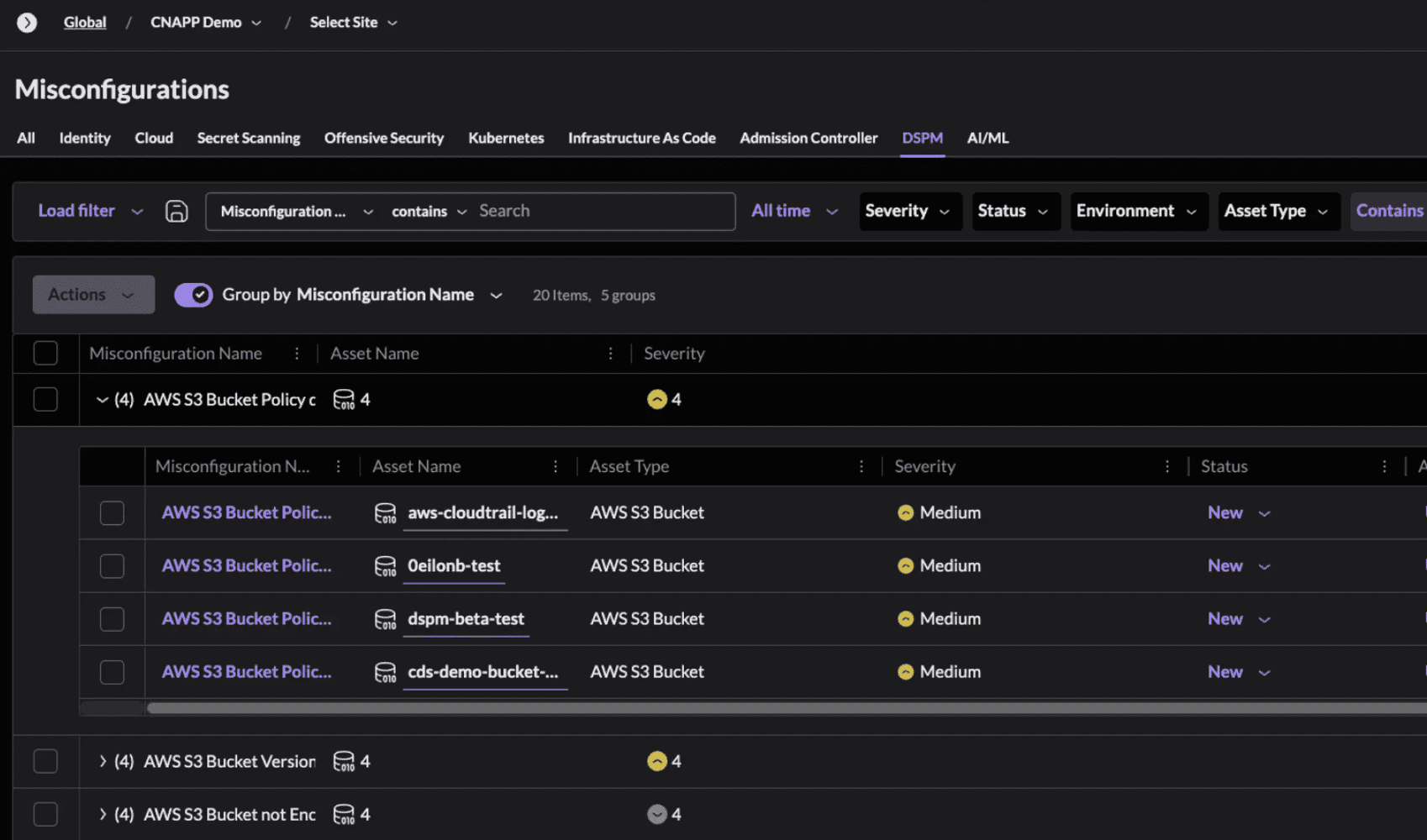
SentinelOne is the tool teams shortlist against CrowdStrike. Its vulnerability management works the same way: the endpoint agent that runs autonomous detection also assesses application and OS flaws. No separate scanner to deploy. If SentinelOne is already your EDR, vulnerability visibility is a setting, not a project.
Two things distinguish it from a CrowdStrike clone. Prioritization uses EPSS and CISA KEV, folded into a SentinelOne Risk Score. The queue reflects real exploitability, not raw CVSS. And Network Discovery finds the unmanaged and IoT devices the agent cannot reach. On price, a reviewer who compared both chose it for costing less than CrowdStrike.
The honest ceiling is depth. One MSP reviewer said it saved a second scanner, then wished for better vulnerability scanning than Nessus. That is the trade: convenient baseline coverage from the agent, not a dedicated scanner's depth. Coverage also stops where the agent stops. And Cloudaware does not ingest SentinelOne, so unlike CrowdStrike, it cannot feed a CMDB.
POC rule: run SentinelOne's VM against a subnet you also scan with a dedicated tool. Compare the findings. If the gap is small and you already own the agent, the consolidation is worth it.
Features
- VM from the EDR agent: the same SentinelOne agent that stops threats also assesses application and OS vulnerabilities on Windows, macOS, and Linux. No separate scanner to deploy.
- EPSS and KEV prioritization: the SentinelOne Risk Score weights real-world exploitability, not CVSS alone. The top of the queue reflects what attackers actually use.
- Automated and on-demand assessment: automated scans run across the managed fleet on a regular cadence, set by policy, and you can trigger one on demand. Same console as detections.
- Network Discovery for blind spots: it finds unmanaged, IoT, and unknown devices the agent has not reached. Discovery is not assessment, but it maps the gap.
- Where it stops: VM depth trails a dedicated scanner, and assessment covers only agent-managed hosts. It is a baseline inside the EDR, not a Nessus replacement.
Shortlisting rule: SentinelOne VM makes sense if you run its EDR and want baseline coverage without another tool. Judge it against CrowdStrike on price and console, and against a dedicated scanner on depth.
Pricing
SentinelOne sells per endpoint, through authorized partners. As of September 2026, sentinelone.com publishes two tiers for 5 to 100 workstations:
- Singularity Complete: $179.99 per endpoint per year
- Singularity Commercial: $229.99 per endpoint per year
- Singularity Enterprise: quote-based
The pricing page does not state which tier includes Vulnerability Management, so confirm that in a quote. Larger fleets and enterprise terms move to a channel quote, and one reviewer said the reseller price beat CrowdStrike.
Pros and cons
SentinelOne is an EDR platform first, so most public praise is for threat response, not vulnerability management. The vulnerability-relevant feedback is thin and measured, mostly from one MSP that runs its VM module.
These are verbatim TrustRadius reviews, each opened and verified, with dates.
- ✅ Consolidates a second scanner — Director in Corporate, IT services (11-50 employees), MSP, Mar 2025: it "helped save on a second vulnerability scanning tool" and gives "a good baseline for vulnerabilities on devices." (TrustRadius)
- ✅ Less manual vulnerability checking — Director in Corporate, IT services (11-50 employees), MSP, Mar 2025: "It's reduced our time spent checking for issues." (TrustRadius)
- ✅ Lightweight agent — Director in IT, retail (51-200 employees), Oct 2024: "Light weight agent." (TrustRadius)
- ⚠️ VM depth trails a scanner — Director in Corporate, IT services (11-50 employees), MSP, Mar 2025: wants "Better vulnerability scanning I.e compared to Nessus." (TrustRadius)
- ⚠️ Heavy agent footprint — C-Level Executive, real estate (201-500 employees), Mar 2025: "the application consumes quite a bit of RAM from the endpoint." (TrustRadius)
- ⚠️ Console layer complexity — Director in IT, retail (51-200 employees), Oct 2024: "Sites vs location vs org layer can get confusing," with "occasional false positives." (TrustRadius)
Sysdig
G2: 4.8/5 from 111 reviews, indexed figures checked September 5, 2026.
Capterra: 4.4/5 from 7 reviews, indexed figures checked September 5, 2026. This is the broader Sysdig listing, including monitoring.
Best for: Kubernetes and platform-security teams whose container vulnerability backlog needs prioritization based on production activity.
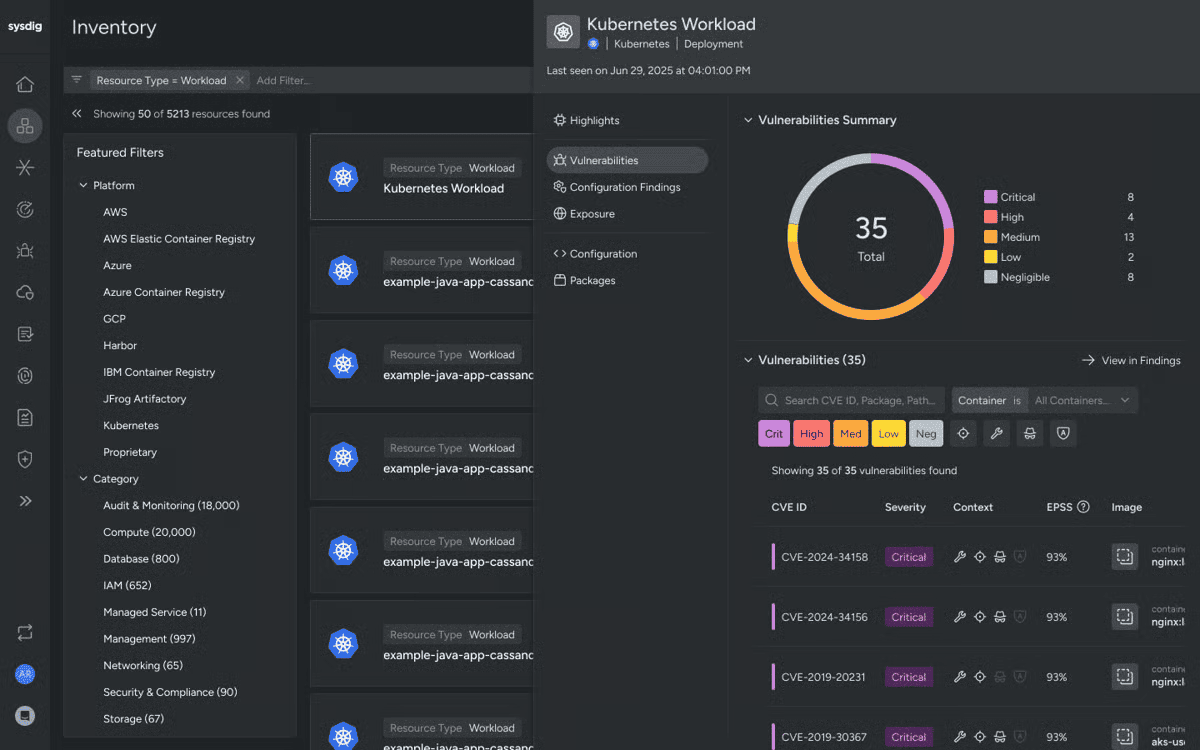
A vulnerable library appears in your production image. Before asking engineering to interrupt a release, you want to know whether the application actually loads it.
Sysdig adds that evidence. Its agent observes workload activity and correlates it with package inventory, marking supported packages as In Use. That gives the analyst a reason to move a finding up the queue beyond its severity score. Sysdig’s documentation explains the mechanism and its dependencies.
There is a consequential limit: scanning support is broader than runtime tracking. Currently, In Use supports Java, Go, JavaScript/TypeScript, Python, and Ruby. C#/.NET, PHP, and Rust are among the unsupported languages. A team running mostly .NET should examine that gap before buying for runtime prioritization.
My evaluation rule follows from that distinction: absence of an In Use signal cannot establish safety. Confirm instrumentation and language support, then exercise scheduled jobs and less frequent application paths. A quiet observation period is weak grounds for deferring a patch.
Features
The useful capabilities connect the finding to a deployment and a fix:
- Pipeline, registry, and runtime scanning: assess container images before deployment and running workloads afterward. Sysdig also covers Linux and Windows hosts, extending assessment beyond Kubernetes.
- Risk context around the CVE: combine runtime activity with exposure, exploitability, and asset importance. CVE360 brings affected resources and remediation information into the investigation.
- Fixes at the source: identify base-image updates that address vulnerabilities across downstream images. This gives engineering a shared change to assess instead of separate tickets for every affected container.
These capabilities are documented on Sysdig’s vulnerability management page. Fix guidance still needs build validation and deployment verification.
To evaluate Sysdig, use a representative service with both web traffic and scheduled processing. Check whether runtime evidence changes your patch order, then rebuild and redeploy one affected image. Verify that the replacement workload clears the finding.
Pricing
The public purchasing floor is substantial enough to affect the shortlist. As of September 2026, AWS Marketplace lists CNAPP Enterprise at $72 per unit per month, with a 20-unit minimum. That calculates to $1,440 monthly, before pay-as-you-go overages. A 12-month contract lowers the rate.
Sysdig’s pricing page describes host-based CNAPP licensing; negotiated enterprise pricing is quote-based. Confirm how your hosts, serverless workloads, and additional usage map to the order. A current trial duration could not be verified.
For a small cluster needing image scanning alone, that minimum deserves scrutiny. The purchase becomes easier to justify when runtime protection and broader cloud-security capabilities also replace existing spend.
Pros and cons
✅ Less time spent on vulnerability triage: “We have seen a measurable return on investment with Sysdig Secure, as it has reduced the time spent on incident investigation and vulnerability triage.” Mumu Muhaemin, DevSecOps Engineer, December 2025.
✅ Explanations that support remediation decisions: “It provides links to the threat and explains the threat and the resolution possible.” Peter Du, CISO, May 2024. His review describes using that context to decide whether an issue needs immediate attention or can wait for planned remediation.
✅ Integration with delivery workflows: “The integration with CI/CD pipelines and Kubernetes environments is seamless, helping teams maintain a secure DevOps workflow.” Prasanna G., G2 review reproduced on AWS Marketplace, May 2025.
⚠️ Setup requires container-security knowledge: “While Sysdig Secure offers strong cloud-native security capabilities, the initial setup and configuration can be complex, especially for teams new to Kubernetes or container security.” Syed Shahid A., SOC and Endpoint Lead, April 2026.
⚠️ Executive reporting needs a closer evaluation: “I need to roll all that in-depth information into a quick summary, and their maturity level isn't there.” Dan185638, Global Information Security Officer, April 2024. This criticism concerns an older deployment. Ask Sysdig to reproduce the vulnerability summary your leadership actually uses before treating reporting as a solved requirement.
⚠️ Regional support coverage deserves checking: “Additionally, increasing support coverage, especially in the Asia Pacific region, could enhance customer support.” KS10, Senior Presales Consultant at Techlab Security, March 2025. For an APAC-based team, confirm support hours and escalation coverage during procurement.
Palo Alto Networks Cortex Cloud
G2: 4.1/5 from 128 reviews, indexed figures checked September 5, 2026.
Capterra: No rating, 0 reviews on the Cortex Cloud listing, indexed figures checked September 5, 2026.
Best for: Enterprise cloud-security teams bringing vulnerability remediation and SOC investigation into a shared workflow, particularly those already investing in Cortex.
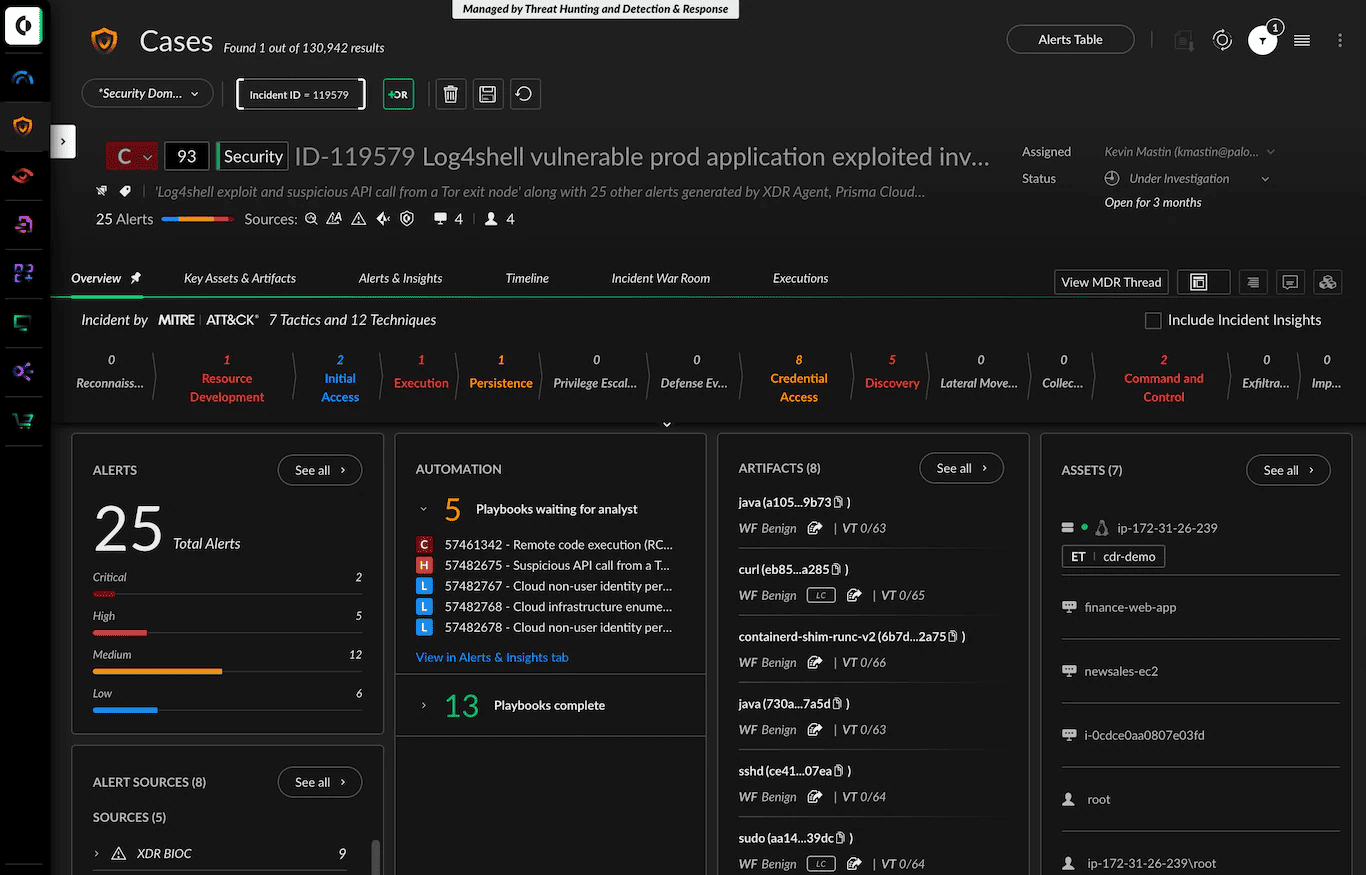
Cortex Cloud earns a place on the shortlist when vulnerability triage repeatedly turns into an investigation across several consoles.
Palo Alto Networks rebuilt its Prisma Cloud offering on the Cortex platform, connecting code, configuration, identity, and runtime evidence. An exposed workload’s CVE can then be investigated alongside the permissions and activity that affect its risk. For the vulnerability manager, the practical benefit is a more defensible escalation: engineering gets the affected component and exposure context; the SOC can investigate related activity. That connection is central to Cortex Cloud’s architecture.
The purchasing boundary matters. Cloud Posture Security and Cloud Runtime Security have different coverage. Runtime adds agent-based protection to the posture capabilities, while Application Security is a separate add-on. A demonstration spanning all three can therefore show more than the proposed license includes. Check the package definitions against the actual quote.
During evaluation, take one exposed workload with a known vulnerable package. Ask the analyst to explain its priority, identify the remediation owner, and investigate associated activity using the quoted configuration. Record every missing connector, permission, or entitlement.
Features
For Palo Alto Networks vulnerability management, these are the capabilities that change the remediation decision:
- Prioritization beyond severity: public exposure, EPSS, and exploitability help rank findings across hosts, containers, and serverless functions. Check whether the ranking reflects your production exposure. Workload protection capabilities.
- Code-to-cloud investigation: connect vulnerability findings with permissions and attack paths. The useful output is an explanation of how a weakness contributes to risk, with enough context to justify the fix. Vulnerability management.
- Remediation playbooks: orchestrate response actions through configured workflows. Evaluate permissions, approval steps, and failure handling before enabling changes to production. Containment still needs a separate check that the vulnerable component was patched. Automation and approval model.
Pricing
Cortex Cloud uses annual subscriptions. Public reseller listings provide these budget reference prices, in USD excluding tax, as of September 2026:
| Package | Published reference price | What you’re paying for |
|---|---|---|
| Cloud Posture Security | $200 per workload/year | Posture management, agentless scanning, and related CNAPP coverage |
| Cloud Runtime Security | $400 per workload/year | Posture coverage plus workload protection, cloud detection and response, and WAAS |
| Application Security add-on | $500 per developer/year | Infrastructure-as-code, software composition analysis, and secrets scanning |
These listings currently show sold out, so treat the amounts as reference rates. Enterprise contracts remain custom / quote-based, with no published maximum price, as of September 2026. Request pricing through an authorized reseller.
For an illustrative deployment of 100 billable workloads, those rates translate to $20,000 annually for Posture or $40,000 for Runtime. Adding AppSec for 20 developers contributes another $10,000 annually, before tax, services, and additional usage. Check the inventory against Palo Alto’s metering guide: storage and managed services can contribute to the workload count.
I’d price Posture first for a team focused on vulnerability assessment. Runtime becomes easier to justify when the same purchase also serves workload protection and incident response.
Trial: A fixed free-trial duration could not be verified as of September 2026. Palo Alto offers a Cortex Cloud demo; evaluation terms require confirmation.
Pros and cons
✅ Useful package-level evidence: “The raw JSON format and software bill of materials are also cool features that are very helpful.” Ankit Pandagre, Assistant Security Architect at Cloudnomics, February 2026. For vulnerability triage, that gives evaluators specific evidence views to inspect beyond the severity score.
✅ Remediation guidance alongside findings: “It detects misconfigurations, suggests remedial actions, and helps identify vulnerabilities across cloud platforms. It provides action recommendations for CVEs against particular vulnerabilities.” Senior consultant, March 2025.
✅ Configurable response playbooks: “We can develop playbooks inside the platform, which is easy and effective.” Wagner Azevedo, Cloud Security Manager at T-Systems, March 2026. His review describes proof-of-concept work, making this a useful capability to reproduce during your own evaluation.
⚠️ Time needed to learn the combined platform: “Right now, it is a little complex and users would take their own time to know the tool better.” Sonali Jha, Technical Solutions Architect at IBM, March 2026. She connects that complexity to bringing previously separate capabilities together.
⚠️ Detection breadth can add triage work: “This approach can sometimes become excessive and lead to alert fatigue, which is a common challenge in SOC environments.” Tejas Jain, Principle Cloud Architect, January 2026. He is discussing behavioral and anomaly detections. Measure how many resulting alerts your team can investigate during the pilot.
⚠️ A substantial purchase for smaller organizations: “Cortex Cloud by Palo Alto Networks has a really high price. This product is for very mature companies.” Nuno-Santos, cybersecurity analyst and reseller/integrator, November 2025. His assessment reinforces the need to compare the full annual commitment with the capabilities your team will actually use
Vulnerability management tools comparison table
Shortlist by the work you need to improve: scanning infrastructure, prioritizing cloud risk, fixing code, or coordinating remediation across scanners.
| Tool | Best fit | Main differentiator | Pricing snapshot |
|---|---|---|---|
| Cloudaware | Multi-scanner environments | CMDB ownership and business context | Custom: assets + modules |
| Wiz | Cloud exposure prioritization | Security graph and attack paths | Essential: $24,000/year, 100 workloads |
| Orca Security | Agentless cloud assessment | SideScanning and contextual risk scoring | EC2 packs from $7,000/month |
| Qualys VMDR | Hybrid scanning and patching | Connected vulnerability-to-patch workflow | From $596/month, 128 hosts (AWS Marketplace) |
| Tenable One Vulnerability Management | Broad infrastructure assessment | Nessus scanning and VPR prioritization | $3,500/year, 100 assets |
| Rapid7 InsightVM | Infrastructure remediation tracking | Active Risk prioritization | From $1.62/asset/month at 500 assets |
| CrowdStrike Falcon Exposure Management | Threat-led exposure management | Adversary intelligence and asset context | Custom quote |
| Microsoft Defender Vulnerability Management | Microsoft endpoint programs | Defender and Intune remediation workflow | Core in Endpoint P2; premium extra |
| Snyk | Developer-led vulnerability fixes | Dependency, code, and image scanning | Free; Team from $25/developer/month |
| SentinelOne Singularity VM | SentinelOne-managed endpoints | Existing agent; EPSS/KEV prioritization | Custom VM quote |
| Sysdig Secure | Containers and Kubernetes | Prioritization by packages in use | CNAPP: $72/unit/month; 20-unit minimum |
| Palo Alto Networks Cortex Cloud | Cloud security consolidation | Agentless assessment plus runtime protection | Custom: per workload |
| Greenbone / OpenVAS | Teams operating their own scanner | Self-hosted network vulnerability scanning | $0 Community Edition license |
USD pricing checked September 2026. Figures cover the named offers; add-ons and enterprise terms vary. Snyk pricing varies by product. Confirm Orca pack capacity and Cortex AppSec licensing separately.
Best vulnerability management tools by use case
Shortlist around the team that will make the change. A container rebuild and a managed laptop update involve different owners, so the vulnerability management solutions below serve different remediation workflows.
Cloud and multi-cloud environments
If cloud assessment is the gap, start with Wiz or Orca for agentless scanning and attack-path context. The useful distinction is how exposure and permissions change a vulnerable workload’s priority.
Cloudaware suits teams whose existing scanners produce findings that still need application and owner context. It connects supported scanner findings to CMDB records for remediation routing. Orca can also feed it, so these choices can be combined.
Containers and Kubernetes
A rebuilt image can pass its scan while older pods still run the vulnerable version. Deployment state therefore belongs in the buying decision.
Sysdig uses runtime evidence to prioritize vulnerable packages in use. Trivy fits image checks in CI, before deployment. Teams with backlogs at both stages need both workflows covered. A passing pipeline scan alone cannot establish that production has been updated.
Enterprise and compliance programs
Tenable and Rapid7 suit mixed estates requiring agents and network scanning. If the purchase also needs to cover patch deployment, include Qualys VMDR with Patch Management. For compliance work, compare how clearly each preserves a finding’s history through a maintenance window. An approved exception, a failed authenticated scan, and a verified fix must remain distinguishable in the evidence reviewers receive.
Microsoft and endpoint-heavy estates
An established endpoint deployment gives you somewhere practical to start:
- Microsoft Defender Vulnerability Management can send remediation requests to Intune, where administrators pick up the work.
- Singularity Vulnerability Management uses existing SentinelOne agents, making it a candidate for customers expanding that deployment.
- CrowdStrike brings adversary intelligence into exposure prioritization, relevant when active threats influence the patch queue.
Before extending a license, check the required capabilities and operating-system coverage. An existing agent rollout does not settle either question.
Developer and AppSec teams
Consider a vulnerable library introduced through another dependency. The developer needs an upgrade path they can review and release. Snyk Open Source supports that work with dependency scanning and fix pull requests containing recommended upgrades. That makes it a strong fit when repository owners also control releases. The remaining engineering work is to check compatibility and run regression tests before merging the change.
Lean teams and open-source stacks
Greenbone Community Edition provides network vulnerability assessment, while Trivy scans container images. DefectDojo can centralize supported scan outputs for tracking and deduplication.
The deciding constraint is maintenance capacity. Someone must keep feeds current, handle imports, and arrange rescans. Budget that work alongside hosting before comparing this stack’s cost with a managed service.
Other notable vulnerability management tools
These platforms cover parts of the same workflow inside a wider exposure-security stack. Add them when that operating model is part of the buying decision.
- Check Point Exposure Management suits teams prioritizing scanner findings with threat intelligence, compensating controls, and enforceable remediation paths. Confirm which scanners will supply its vulnerability data.
- Zscaler UVM consolidates, deduplicates, and routes findings from Zscaler and third-party sources. Evaluate it as a prioritization and workflow layer alongside your scanners.
- Darktrace Proactive Exposure Management connects imported CVEs to attack paths and behavioral security context. Its clearest fit is a Darktrace-centered detection and response stack.
How to choose the right vulnerability management tool
Evaluate each tool against the remediation workflow your team already runs. Feature lists do not show whether it discovers the expected assets or reaches the correct owner. They also say little about how closure is verified in production.
- Define the coverage denominator. Export the assets you expect the tool to assess, grouped by class and environment. Include short-lived cloud instances, Kubernetes workloads, registries, network devices, servers, and endpoints. Record the inventory source and owner for each group. Without that denominator, a “95% scanned” dashboard cannot show which systems are missing.
- Match each asset class to an assessment method. List where you need agents, authenticated network scans, cloud API access, registry scanning, or CI checks. Inspect the last successful assessment rather than the last attempted scan. Treat authentication failures and unsupported images as coverage gaps. For agents, break rollout success down by operating system and network segment.
- Challenge the prioritization model. Build a small test set containing a CISA KEV entry and a CVE with a high EPSS probability. Include internet-facing and business-critical assets. Ask the vendor to rank the findings and explain each position. If asset context does not change the order, determine whether it affects scoring or appears only as a label.
- Choose a scanner, a unifying layer, or both. Add a scanner when an asset class lacks a reliable assessment source. Select a unifying layer when existing scanners create duplicates, conflicting severity, or tickets without owners. Multi-cloud programs may need specialist scanners feeding one queue with defined owners and SLAs. Every normalized finding should preserve its original source and evidence.
- Follow one finding through the entire workflow. Route it to Jira or ServiceNow. Then request an exception, change ownership, deploy the fix, and rescan. Verify bidirectional status synchronization. A closed ticket should not close the finding unless the assessment source confirms remediation. If MTTR stops at ticket closure, the metric hides unfinished work.
- Score the proof of concept before it starts. Measure coverage by asset class, authenticated-scan success, duplicate rate, false-positive handling, owner assignment, and time to verified closure. Manually review the highest-ranked sample and record how many findings are actionable. Weight each criterion according to your current bottleneck, then use the agreed scorecard for every vendor.