


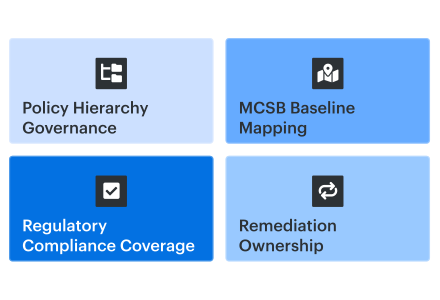
“We already pay for Microsoft. Isn’t Defender for Cloud enough for CSPM?” Sometimes yes. Sometimes no.
For Azure cloud security posture management, Microsoft Defender for Cloud’s free foundational plan provides continuous assessment, recommendations, Secure Score, and the Microsoft Cloud Security Benchmark.
Paid Defender CSPM adds attack-path analysis, risk prioritization, governance, regulatory compliance, and agentless scanning. That boundary matters. So does the gap between finding risk and getting the fix owned.
This is not our parent cloud security posture management guide, where definitions live, nor the broader Azure security best practices article, part of our wider cloud security architecture guidance. Here are five practitioner-grade practices, a candid free-versus-paid read, and third-party CSPM positioned as a complement, not a Microsoft replacement.
We built it from the freshest field patterns collected by Cloudaware’s Valentin Kel, Software Developer, and Igor K., DevOps Engineer, plus client-side CISOs, Azure architects, security leads, and platform engineers.
The case file:
- Which findings should be prioritized?
- Where does ownership disappear?
- When is native coverage enough?
- What must a third-party layer add?
Key insights for Azure CSPM in 2026
- Treat Azure CSPM as three connected systems. Defender for Cloud detects and prioritizes risk. Azure Policy enforces guardrails. The Regulatory Compliance dashboard organizes evidence. Their totals will differ because their scopes, logic, and control groupings differ.
- Know which CSPM tier you actually own. Foundational CSPM covers Secure Score, MCSB assessments, inventory, and baseline recommendations. Paid Defender CSPM earns its budget through attack paths, risk prioritization, Cloud Security Explorer, and agentless scanning. Compare Microsoft’s CSPM plans.
- Assign a policy above the subscription. Put MCSB and shared initiatives at the appropriate management group, let subscriptions inherit them, and keep exemptions in code with owners and expiry dates. Portal-only exceptions have a habit of becoming permanent.
- Use MCSB as the floor, not the entire program. Start with the Microsoft Cloud Security Benchmark. Layer PCI DSS, HIPAA, FedRAMP, CIS, or internal initiatives only where workload scope requires them. Review the MCSB.
- Compliance percentages are evidence, not remediation plans. Export assessments and compliance states over time. Then measure owner coverage, finding age, SLA breaches, and recurrence. A green dashboard means little when production findings still have no accountable team.
- Test AWS and GCP connectors against your inventory. Native multi-cloud coverage works well for Azure-heavy estates. Comparable cloud footprints usually expose gaps in resource coverage, evidence consistency, ownership routing, or hybrid visibility. See our AWS cloud security posture management guide.
- Keep Defender for Azure depth. Add Cloudaware when operations fragment. A CMDB-backed layer can join Defender, AWS, GCP, Kubernetes, VMware, and scanner findings to applications and owners, producing one queue of prioritized, assignable work instead of another security dashboard.
What is Azure cloud security posture management?
Azure cloud security posture management continuously evaluates Azure resource configurations against security controls to find and remediate risky misconfigurations.
Three Microsoft surfaces participate. They do not measure the same thing.
| Surface | What it actually does |
|---|---|
| Microsoft Defender for Cloud | Generates posture recommendations and Secure Score. Paid Defender CSPM adds risk prioritization and attack-path analysis; AWS and GCP connect through native connectors. |
| Azure Policy | Audits or enforces rules at the management group, subscription, resource group, or resource scope. Assignments inherit downward unless exclusions or exemptions alter the evaluated set. |
| Regulatory Compliance dashboard | Maps Defender assessments to MCSB, CIS Azure, NIST 800-53, ISO 27001, PCI DSS, HIPAA, HITRUST, FedRAMP, and SOC 2 controls. |
Open one subscription in all three, and the numbers rarely line up. That mismatch is expected.
Secure Score uses score-bearing MCSB recommendations, not every policy result. Microsoft recalculates its controls every eight hours; recommendation resource counts can refresh sooner. Policy compliance reflects the definitions, scopes, exclusions, and exemptions active in Azure Policy.
Regulatory compliance applies a different mapping. One recommendation may support several framework controls, some controls need manual evidence, and some Defender findings have no related policy definition.
Before opening a remediation ticket, verify:
- Assessment source
- Evaluated scope
- Exemption status
- Affected resource
Skip that check, and teams compare different denominators, file duplicate work, or chase a compliance control that no configuration change can fix.
Valentin Kel, Software Developer
CSPM Free vs Defender CSPM — what you get where
CSPM Free and Defender CSPM are the two posture plans inside Microsoft Defender for Cloud. Check the active plan first:
Environment settings → Azure subscription → Defender plans
“Defender for Cloud is enabled” does not confirm that the paid CSPM features are running.
Microsoft names the free plan Foundational CSPM. It is enabled when a subscription is onboarded and provides asset inventory, continuous assessments, MCSB recommendations, and Secure Score. AWS accounts and GCP projects need connectors before their resources appear.
What is the difference between CSPM Free and Defender CSPM?
CSPM Free reports failed baseline controls. Paid Defender CSPM correlates those findings with internet exposure, identities, vulnerabilities, sensitive data, and code relationships. That graph powers attack paths, contextual risk prioritization, and deeper investigation.
| Feature | CSPM Free | Defender CSPM |
|---|---|---|
| Coverage | Azure connected AWS and GCP | Same |
| Secure Score and MCSB | Included | Included |
| Regulatory assessments | MCSB baseline | CIS, NIST, ISO, PCI DSS, HIPAA, FedRAMP, SOC, and others |
| Attack paths | Not included | Included |
| Cloud Security Explorer | Not included | Visual graph-query builder and templates |
| Agentless scanning | Not included | VM vulnerabilities, secrets, Kubernetes discovery, and container-image vulnerabilities |
| Sensitive-data discovery | Not included | Smart sampling using Microsoft Purview classifications |
| DevOps posture | Repository inventory and basic recommendations | Adds PR annotations, code-to-cloud mapping, attack paths, and Explorer queries |
| Governance rules | Not included | Assign owners, set 7, 14, 30, or 90-day deadlines, and apply grace periods |
| Pricing | Free | About US$5 per billable resource/month; verify the tenant rate |
Do not estimate costs based on the total asset inventory. Microsoft bills defined compute, storage, database, and serverless units. From April 1, 2026, eight functions or web apps count as one billable resource; two running serverless containers count as one.
Confirm the rate and eligible resource count on the current Microsoft pricing page.
One configuration check matters before judging the paid plan. A user below the subscription owner can switch Defender CSPM on, but the agentless scanner may remain disabled. Attack paths and Explorer then miss vulnerability context.
Open the plan’s Settings page and verify:
- Agentless machine scanning
- Agentless Kubernetes discovery
- Container vulnerability assessment
- Sensitive-data discovery
Continuous posture management supplies current findings, but assessment readiness also depends on reconciled scope, control applicability, ownership, exceptions, and traceable evidence. Our Azure security assessment guide explains how to prepare those inputs for review.
Attack-path analysis and Cloud Security Explorer
Suppose Defender finds this route:
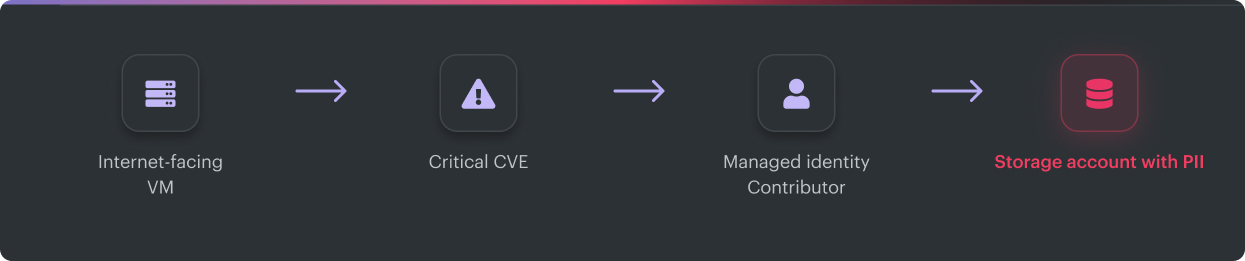
Four findings just became one remediation decision.
Patching the VM is valid, but it may not be the fastest break point. Removing public exposure or excessive identity rights can cut the route while the patch moves through change control.
Next, use Cloud Security Explorer to find similar paths:
Show internet-facing VMs whose managed identities can access a key vault.
The interface uses templates and dropdown filters over the cloud security graph, not KQL. Export the results, map the affected resources to their owners, and create a single scoped remediation batch instead of opening tickets for each finding.
Now compare third-party CSPM against what remains uncovered. Free-tier users should benchmark external products against paid Defender features first. Teams already running paid Defender CSPM should test for additional cloud coverage, CMDB and business-service relationships, owner accuracy, ITSM routing, exception management, and audit evidence.
Igor K., DevOps Engineer at Cloudaware
Best practice #1: Structure Azure Policy from Management Groups down
Azure Policy enforces whatever is assigned at the resource’s effective scope. Assign the same baseline separately across 12 subscriptions, and you create 12 places for parameters, effects, and exceptions to drift.
The scalable pattern starts above subscriptions:
| Management level | Put here |
|---|---|
| Tenant Root or intermediate root | MCSB and controls required everywhere |
| Landing Zones Management Group | Shared logging, monitoring, identity, and network requirements |
| Prod MG | Restrictive network, encryption, backup, and data-protection initiatives |
| Non-Prod MG | Similar controls, often introduced with audit effects |
| Sandbox MG | Essential deny controls plus broader audit coverage |
| Subscription or Resource Group | Documented exemptions for a specific workload or resource set |
Do not turn the Tenant Root into a policy cupboard. Microsoft recommends limiting root-level assignments to genuinely universal requirements. If every subscription must inherit MCSB, a root or intermediate-root assignment makes sense. PCI controls belong on the management group containing PCI workloads, not across the tenant.
A subscription added beneath either group inherits the applicable assignment automatically. Its owner cannot quietly replace that inherited baseline with a friendlier local version.
Use initiatives to keep assignments manageable
An initiative, also called a policy set, combines multiple policy definitions under one assignment. MCSB is itself a built-in initiative: 1f3afdf9-d0c9-4c3d-847f-89da613e70a8
Microsoft documents assigning MCSB at Management Group scope so existing and future subscriptions inherit it.
Organization-specific controls should follow the same pattern. A payments-PCI initiative might include the following:
- Storage encryption requirements
- Diagnostic settings sent to Log Analytics
- Approved private connectivity
- Backup enrollment
- Required application and owner tags
Assign that initiative to the PCI Management Group once. Avoid rebuilding the same control pack in every payment subscription.
Effects need different rollout paths:
- Start new controls with Audit and inspect what they would break.
- Move stable preventive controls to Deny.
- Use Modify for properties Azure Policy can safely correct, such as tags.
- Apply DeployIfNotExists when a related resource or configuration is missing, such as diagnostic settings or backup enrollment.
DeployIfNotExists handles new and updated resources after evaluation. Existing non-compliant resources still need a remediation task. Its managed identity also needs the required RBAC roles. Portal-created assignments can receive those roles automatically; Bicep, Terraform, CLI, and SDK deployments require you to grant them.
Sample Bicep: assign MCSB at Management Group scope
targetScope = 'managementGroup'
var mcsbPolicySetId = tenantResourceId(
'Microsoft.Authorization/policySetDefinitions'
'1f3afdf9-d0c9-4c3d-847f-89da613e70a8'
)
resource mcsbAssignment 'Microsoft.Authorization/policyAssignments@2024-04-01' = {
name: 'MCSB-RootAssignment'
location: 'eastus'
identity: {
type: 'SystemAssigned'
}
properties: {
displayName: 'Microsoft Cloud Security Benchmark'
description: 'MCSB baseline inherited by child subscriptions.'
policyDefinitionId: mcsbPolicySetId
enforcementMode: 'Default'
nonComplianceMessages: \[
  {
    message: 'Resource does not meet the inherited MCSB control.'
  }
\]
}
}
This template creates the policy assignment and managed identity. It does not grant remediation roles or repair existing resources.
Check for direct MCSB assignments before deploying it. Defender for Cloud can assign MCSB when a subscription is onboarded. Leaving both the inherited and subscription-level assignments active creates duplicate evaluation paths and confusing exemption behavior.
Handle exceptions without hiding resources
An exclusion in notScopes removes a child scope from the assignment. That is a blunt instrument. Reserve it for structural cases where the entire initiative should not apply.
For individual controls or temporary risk acceptance, create a policy exemption containing:
- The affected assignment and policy reference
WaiverorMitigatedcategory- Named owner
- Business justification
- Approval reference
expiresOndate
Keep the exemption in Bicep or Terraform. A portal-only waiver with no expiry can survive longer than the workload it was created for.
Run the hierarchy as a remediation queue
A single compliance percentage obscures too much information. The management group report should show the following:
| Metric | What it exposes |
|---|---|
| Inherited assignment coverage | Subscriptions sitting outside the governed hierarchy |
| New failures in 7 days | Fresh drift rather than old backlog |
| Failed resources without owners | Findings that cannot become work |
| Exemptions expiring in 30 days | Controls needing review before enforcement resumes |
| Overdue remediation tasks | Assigned work that is not moving |
| Duplicate assignments | The same initiative applied through multiple scopes |
There is no universal “healthy” compliance percentage. A 95% result can still hide one exposed production database. Use the percentage for trends, then prioritize failed resources by environment, exposure, business service, and owner.
Valentin Kel, Software Developer at Cloudaware
How this appears in a Cloudaware client dashboard
In Cloudaware client environments, the useful representation is not another scorecard. It is a CMDB report that connects policy state with the operating context required for remediation.
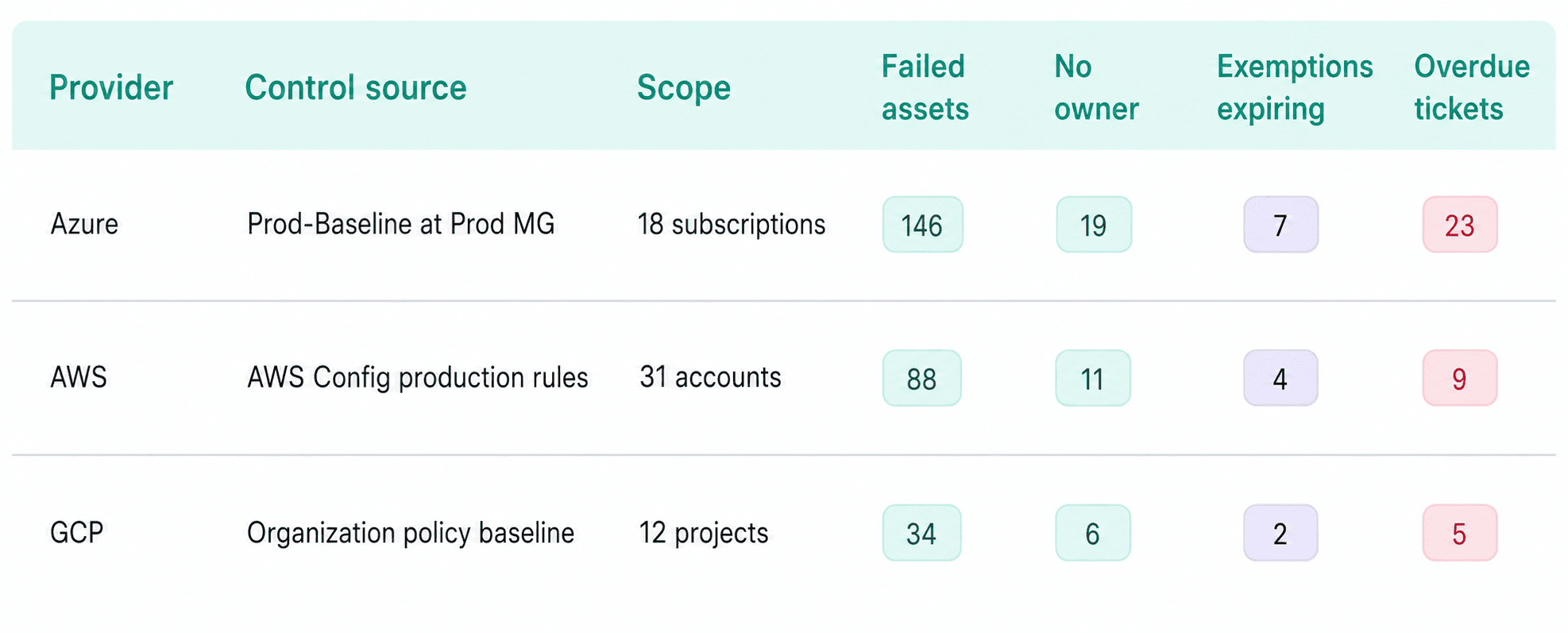
This is an illustrative report structure, not a customer benchmark.
The Cloudaware CMDB is relevant for viewing Azure Policy compliance alongside AWS, GCP, application, owner, exception, and ticket data. It does not replace Azure Policy enforcement. Azure remains the control plane; the CMDB supplies the cross-cloud inventory and ownership layer.
For an Azure-only estate with reliable ownership and ticket routing already in place, Azure Policy’s native compliance views may be enough. A third-party layer earns its place when teams cannot answer, in one query:
- Which production assets fail the equivalent control across providers?
- Who owns each asset?
- Which failures have approved exceptions?
- Which remediation tickets are overdue?
- Did the finding close after the configuration changed?
Practical demo test: bring one inherited Azure Policy failure to the Cloudaware demo. Ask the team to trace it from management group assignment to asset, application, owner, exemption, and ticket, then show the equivalent AWS or GCP control. That proves whether the additional platform closes an operational gap or merely adds another compliance dashboard.
Best practice #2: Use the Microsoft Cloud Security Benchmark (MCSB) as your baseline
The Microsoft Cloud Security Benchmark (MCSB) is the default baseline Defender for Cloud applies when an Azure subscription is onboarded. It replaced the retired Azure Security Benchmark and extended Microsoft’s control guidance across Azure, AWS, and GCP.
Use MCSB before writing a custom baseline. Microsoft maintains the initiative, Defender generates its core posture recommendations from it, and the classic Secure Score uses built-in MCSB recommendations.
Know the boundary:
| MCSB provides | MCSB does not provide |
|---|---|
| A Microsoft-maintained cloud security baseline | Proof of PCI, ISO, CIS, or FedRAMP compliance |
| Built-in recommendations for Azure, AWS, and GCP | Coverage for every internal security requirement |
| Input to classic Secure Score | Scoring for every Defender recommendation |
| Control mappings to major frameworks | A replacement for framework-specific initiatives |
Microsoft maps MCSB controls to NIST SP 800-53 Rev. 5, PCI DSS v4, CIS Controls v8.1, NIST CSF 2.0, ISO 27001:2022, and SOC 2. Microsoft’s documentation is explicit: mapping means an Azure control can fully or partially address a requirement. It does not prove compliance.
How to operate MCSB at enterprise scale
- Assign it high enough to prevent subscription drift. Use the tenant root or intermediate-root management group when every governed subscription needs the same baseline.
- Check for duplicate assignments. Defender can assign MCSB directly during subscription onboarding. If the same initiative comes from a management group, remove the redundant subscription assignment.
- Layer custom controls above MCSB. Add organization-specific initiatives for approved regions, private endpoints, backup tiers, owner tags, or internal key-management requirements.
- Assign regulated standards separately. PCI DSS, HIPAA, FedRAMP, NIST, and ISO workloads need the corresponding initiative enabled in the Regulatory Compliance dashboard. Keep MCSB active underneath.
- Review changes before enforcing them. MCSB v2 is currently available in preview. Test new controls in audit, count newly affected resources, assign owners, and then promote through policy-as-code.
MCSB versus CIS Microsoft Azure Foundations Benchmark
MCSB and the CIS Microsoft Azure Foundations Benchmark overlap, but they are not interchangeable.
| Decision | Use |
|---|---|
| Default Azure and multicloud posture baseline | MCSB |
| Formal CIS assessment or customer requirement | MCSB plus the CIS Azure initiative |
| Cross-cloud Secure Score | MCSB |
| Prescriptive Azure configuration evidence | CIS Azure |
Do not hardcode the older CIS Azure v2.0.0 initiative into a new deployment. Microsoft’s current standards catalog lists v2.1.0 and v3.0. Check the version available in the target cloud and region before updating policy-as-code.
Read the secure score with its scope attached
Defender now exposes two score models:
| Score | What drives it |
|---|---|
| Classic Secure Score, Azure portal | Built-in MCSB recommendations |
| Risk-based Cloud Secure Score, Defender portal | Recommendation risk, exposure, and asset criticality |
Label the model, scope, and collection date on every report. Otherwise, two teams can present different numbers for the same estate and both be correct.
Coverage changes also move the score. On June 30, 2026, Microsoft added more than 200 AWS and GCP recommendations across roughly 90 additional resource types. A lower score after that release may indicate broader assessment coverage rather than new configuration drift.
Classic controls recalculate every eight hours. For useful reporting, pair the percentage with:
- Critical failed resources
- New failures during the last seven days
- Findings without owners
- Exemptions expiring within 30 days
- Overdue remediation tasks
- Changes in assessed subscriptions or connectors
How Cloudaware clients turn MCSB into work
In Cloudaware client reporting, the MCSB score is one field. The working view joins the failed control to the asset record, application, environment, owner, exception, and ticket.

Cloudaware dashboard element.
Cloudaware uses CMDB context and cross-framework mapping so one technical failure can appear against MCSB and its related CIS, NIST, PCI DSS, ISO 27001, or HIPAA references without becoming five separate remediation tickets. Its UCF-enabled dashboards cover 900+ authority documents.
That capability matters when the organization has several cloud providers, multiple compliance programs, or unreliable asset ownership. For one Azure tenant with clean tags, established ticket routing, and no cross-framework reporting problem, Defender’s MCSB and Regulatory Compliance views may already be sufficient.
A useful product evaluation should test one real failed MCSB control:
- Trace it to the affected cloud asset.
- Identify its application and owner.
- Show every applicable framework reference.
- Verify whether an exemption exists and when it expires.
- Open one ticket and close it automatically when the resource becomes compliant.
If the additional CSPM platform cannot complete that path, it is adding another posture dashboard rather than fixing the operating gap.
Igor K., DevOps Engineer at Cloudaware
Best practice #3: Map controls to the regulatory compliance dashboard
The Regulatory Compliance dashboard translates Defender for Cloud recommendations into framework-specific control views. Assign a standard at the highest applicable scope, usually a Management Group, and Azure evaluates the resources below it. One failed recommendation may appear under several controls, so fixing the underlying resource can improve multiple framework scores after reassessment.
Assessments run approximately every 12 hours, not immediately. Microsoft documents the workflow here.
Microsoft’s current catalog includes NIST SP 800-53 R5.1.1, ISO/IEC 27001:2022, PCI DSS v4.0.1, FedRAMP High and Moderate, SOC 2, CIS Azure Foundations, HIPAA, and HITRUST CSF 11.3.0. A couple of naming details prevent confusion during evaluation: HIPAA and HITRUST are separate standards; SOC 2 uses the Trust Services Criteria, formerly called SOC TSP.
MCSB is enabled by default. Additional standards require at least one eligible paid Defender for Cloud plan. Defender CSPM qualifies, but it is not the only paid plan that unlocks the catalog. Check the current licensing prerequisites before treating a Defender CSPM upgrade as a compliance requirement.
If ISO is in scope, ISO 27017 cloud security controls add the cloud-specific responsibility and evidence layer needed beyond framework-level control mapping.
Run the dashboard like an operating tool
- Assign only the standards tied to real obligations. MCSB plus two to four audit-driven frameworks is usually manageable. Enabling the full catalog creates repeated controls and work that nobody owns.
- Read the score carefully. Green means the mapped technical assessment passed. Grey controls cannot be assessed automatically. Neither status proves certification. Manual controls still need attestation and supporting evidence.
- Work from a failed resource to control, not control to control. Start with the affected asset, remediate the configuration once, then let its mappings update across PCI DSS, NIST 800-53, CIS Azure, and other assigned standards.
- Export the history. Continuous Export can send compliance data to Log Analytics or Event Hubs as a continuous stream or weekly snapshot. That gives GRC teams trend evidence instead of a portal screenshot captured before an audit.
- Know the customization boundary. Azure Policy-based custom recommendations are broadly available. KQL-based recommendations across Azure, AWS, and GCP require Defender CSPM. Microsoft explains the distinction here.
Continuous Export preserves assessment history. It still cannot tell the remediation team which application depends on a failed resource, who owns the fix, whether an exception expires next week, or whether AWS and GCP carry the same risk.
In a Cloudaware-backed workflow, the Defender assessment is attached to the affected asset’s CMDB record:

One technical finding can retain its mappings to MCSB, PCI DSS, NIST 800-53, and the relevant internal controls without becoming four separate work items. Defender remains the Azure assessment source; Cloudaware adds CMDB relationships, ownership, and cross-cloud policy context.
For an Azure-only estate with reliable ownership and ticketing, the native dashboard may be sufficient. Cloudaware becomes useful when compliance findings must cross tenants, cloud providers, application dependencies, and GRC workflows before the work can be closed.
Best practice #4: Use Defender for Cloud multi-cloud connectors (with realistic expectations)
A multi-cloud connector earns its place when the coverage survives a service-by-service check. Defender for Cloud can onboard AWS accounts and GCP projects, assess supported resources against MCSB, and include their findings in the combined Secure Score. That is genuine multi-cloud CSPM.
Microsoft expanded the coverage in June 2026 with more than 200 AWS and GCP recommendations across roughly 90 additional resource types. Identity, networking, databases, analytics, storage, compute, and containers are now better represented. Those recommendations contribute to Secure Score, so record your baseline before onboarding. A lower score may mean Defender found more of the estate. Check the current coverage release before explaining the change to leadership.
A few operational details matter during rollout.
The AWS connector must use the AWS management account for organization-level onboarding. Delegated administrator accounts are not supported. The GCP connector can onboard an organization or individual project through workload identity federation; organization onboarding supports project and folder exclusions. Initial recommendations may take up to six hours to appear. Microsoft’s AWS and GCP onboarding guides document the setup.
Coverage still varies by provider. Microsoft’s Defender for Servers matrix lists Cloud Security Explorer and just-in-time VM access for AWS, but not GCP. Azure Arc can extend machine inventory, patch assessment, and selected protections to AWS, GCP, and on-prem servers. It does not make every managed database, identity service, or PaaS configuration behave like an Azure resource.
Decide from measured coverage
| Your operating model | Sensible choice |
|---|---|
| Azure is roughly 70% or more of the estate, non-Azure workloads use supported services, and security operations already run through Sentinel and Defender XDR | Keep the native connectors |
| AWS or GCP carries comparable production or regulatory scope, while control evidence and ownership differ by provider | Evaluate a cross-cloud CSPM |
| Defender provides useful Azure depth, but remediation must span cloud, Kubernetes, VMware, and on-prem dependencies | Keep Defender and add a normalized operating layer |
Treat 70% as a shortcut, not a procurement rule. Pilot the services you actually run. Track four numbers:
Discovered resources ÷ provider inventory
Assessed resources ÷ discovered resources
Critical findings with owners ÷ critical findings
Median time from detection to assigned ticket
Green connector health confirms authentication. Those four measurements show whether the tool covers the estate and moves work.
Cloudaware clients commonly keep Defender as the Azure assessment source. Their shared dashboard then places the Defender finding beside AWS and GCP results, with the application, owner, environment, SLA, ticket, and exception expiry attached.
Take public object storage. Azure Storage, Amazon S3, and Google Cloud Storage remain provider-specific resources, but the dashboard presents one control intent:
Public storage → affected application → business owner → exception status → remediation ticket
Security can filter for production assets that are exposed, ownerless, or past SLA without reconciling three exports. Native findings remain intact. Cloudaware handles the common inventory and workflow.
If Defender’s connectors deliver acceptable coverage and your existing process resolves findings cleanly, another CSPM will duplicate capability. When the pilot exposes unsupported services, inconsistent evidence, or ownerless queues, a cross-cloud layer has a measurable job to do.
Read the broader hybrid cloud security best practices or examine AWS-specific CSPM controls.
Best practice #5: Bridge Defender for cloud findings to CMDB, SIEM, and GRC
Start with one production finding and follow it.
Defender flags public network access on a storage account. Continuous Export sends the assessment to Log Analytics or Event Hubs. At ingest, the Azure resource ID is matched to the CMDB. That lookup should return the application, environment, owner, data classification, compliance scope, and active exception.
If it cannot resolve those fields, stop. Automating the ticket will only create an orphaned Jira or ServiceNow issue with a resource ID nobody recognizes.
Log Analytics is the practical destination for Sentinel, KQL, and Azure workbooks. Event Hubs works better when Splunk, a GRC platform, or another data pipeline consumes the findings. Export these three records:
Assessmentssupply the findings and affected resources.SecureScoressupplies posture trends.RegulatoryComplianceAssessmentsupplies control state for GRC reporting.
The compliance state is useful evidence input. It is not a finished audit package.
Streaming export runs when the assessment state changes. Weekly snapshots are worth enabling for reconciliation because an unchanged finding does not keep appearing in the stream. Microsoft documents the behavior here.
Use this deployment pattern
targetScope = 'resourceGroup'
param workspaceResourceId string
param eventHubResourceId string
@secure()
param eventHubConnectionString string
resource defenderExport 'Microsoft.Security/automations@2023-12-01-preview' = {
name: 'export-defender-posture'
location: resourceGroup().location
properties: {
isEnabled: true
scopes: [
{
description: 'Subscription posture export'
scopePath: subscription().id
}
]
sources: [
{
eventSource: 'Assessments'
ruleSets: []
}
{
eventSource: 'SecureScores'
ruleSets: []
}
{
eventSource: 'RegulatoryComplianceAssessment'
ruleSets: []
}
]
actions: [
{
actionType: 'Workspace'
workspaceResourceId: workspaceResourceId
}
{
actionType: 'EventHub'
eventHubResourceId: eventHubResourceId
connectionString: eventHubConnectionString
isTrustedServiceEnabled: true
}
]
}
}
Two details in older examples are now misleading. Workspace is the valid Log Analytics action type, and 2023-12-01-preview is the newer automation schema. Microsoft lists the current Bicep properties.
Do not deploy that configuration manually in 80 subscriptions. Assign Microsoft’s built-in DeployIfNotExist policies at the management group:
- Log Analytics:
ffb6f416-7bd2-4488-8828-56585fef2be9 - Event Hubs:
cdfcce10-4578-4ecd-9703-530938e4abcb
Run a remediation task for existing subscriptions. Future subscriptions inherit the export. Microsoft provides the rollout procedure.
Turn the exported record into owned work
Cloudaware clients use the resource-to-CMDB join before creating a ticket. A Defender finding becomes a working record containing
Native evidence, asset, application, owner, environment, data class, exception, SLA, ticket
Routing can then follow operational rules. Create or update a ticket when the finding affects production, meets the agreed severity threshold, has no valid exemption, and resolves to an owner. Send ownerless resources to the cloud governance queue. Use the assessment ID and resource ID as the deduplication key.
Do not close from the ITSM status. Wait for Defender to reassess the resource as healthy. If the configuration drifts again, reopen the same work record.
For multi-cloud teams, Cloudaware applies the same operating fields to AWS Config and GCP Security Command Center findings. Public S3, Azure Storage, and GCS findings keep their provider evidence while sharing one internal control category. The dashboard can then report ownerless findings, overdue SLAs, expiring exceptions, recurrence, and median assignment time across clouds.
Keep the API paths straight. The Microsoft Graph Security API is for alerts and incidents. Query CSPM recommendations through Azure Resource Graph or the Defender for Cloud Assessments API. The legacy Graph /security/alerts endpoint retires on August 31, 2026. Microsoft’s migration guide covers the v2 endpoints.
If Azure tags already resolve applications and owners, and Defender’s native ServiceNow integration meets your SLA, use the native workflow. Microsoft currently documents a 24-hour synchronization cadence. A CMDB-backed layer becomes justified when several clouds feed one queue, ownership sits outside Azure, or GRC needs consistent evidence across providers.
Judge the result by four metrics: owner resolution rate, median detection-to-assignment time, duplicate-ticket rate, and findings reopened after remediation.
Continue into the CMDB-enriched SIEM workflow or see how the same records support multi-cloud IT compliance.
Keep Defender for Azure. Use Cloudaware to unify ownership and remediation across clouds
Cloudaware is a CMDB-backed multi-cloud management and CSPM platform. Azure-heavy security teams use it when Defender has identified the risk, but remediation still requires application context, ownership, cross-cloud evidence, and a ticket that reaches the correct team.
Defender stays in place. Keep using its Secure Score, MCSB assessments, Azure Policy integration, attack paths, regulatory compliance dashboard, and native AWS and GCP connectors. Cloudaware adds an operating layer across the wider estate.
A typical workflow looks like this:
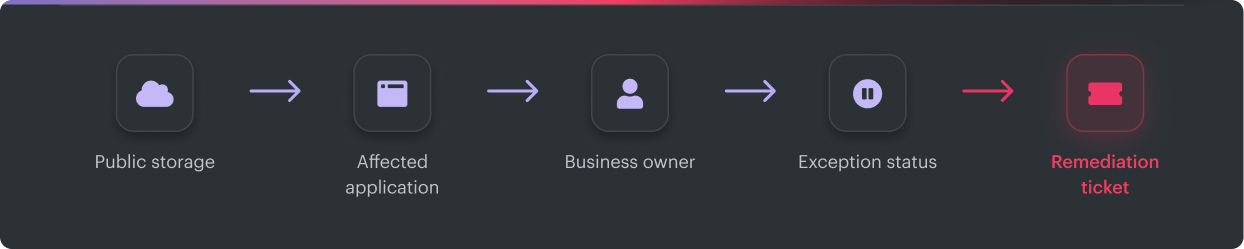
Consider a public Azure Storage account. Defender supplies the recommendation and Azure evidence. Cloudaware joins the resource to the application it supports, identifies the owner, checks for a valid exception, adds the remediation SLA, and routes the work. A public S3 or GCS bucket can follow the same process without losing its provider-specific evidence.
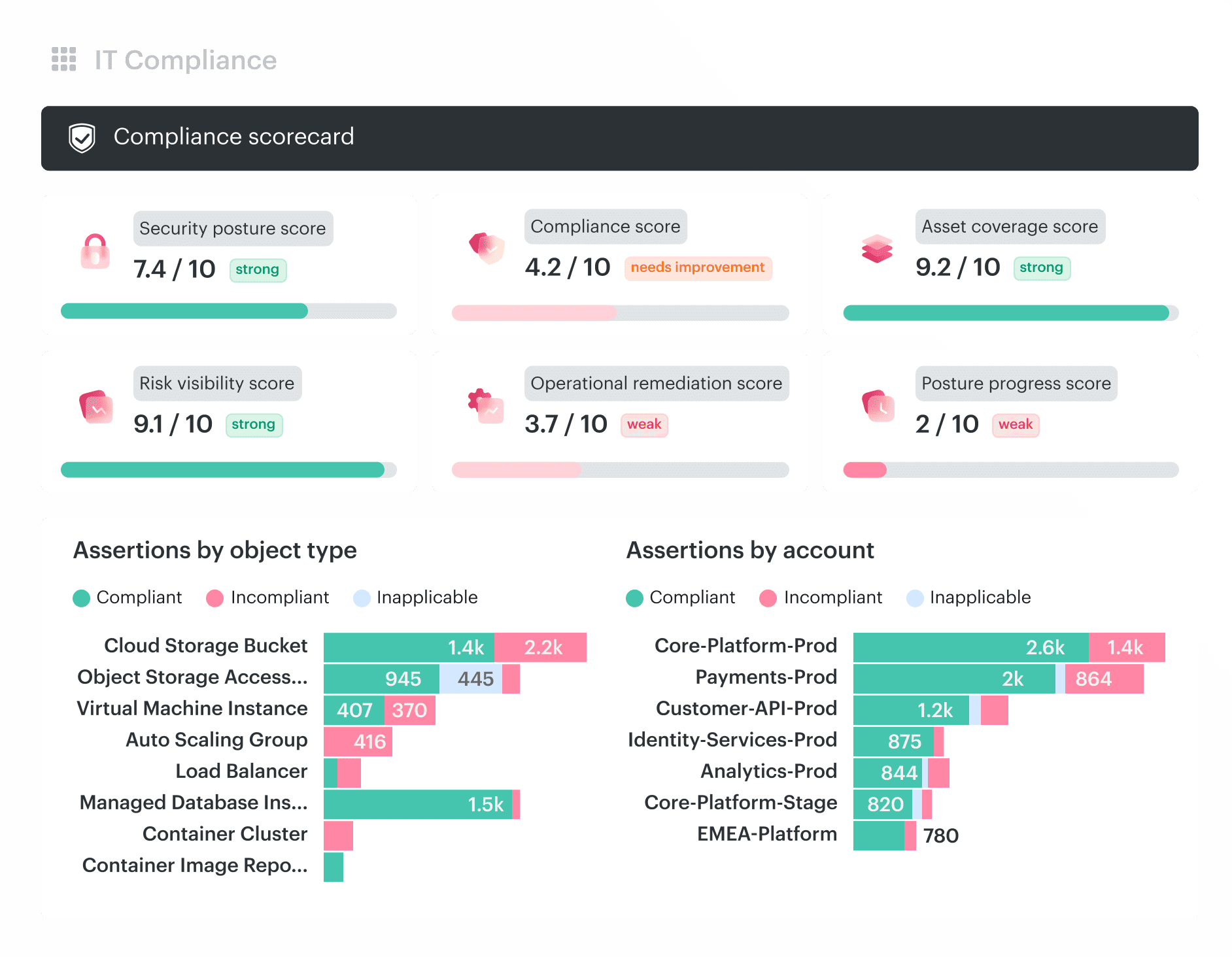
The capabilities that matter here are:
- Cross-cloud CMDB: Normalize Azure, AWS, GCP, Kubernetes, VMware, and on-premises inventory across 3,000+ supported services and CI types.
- CMDB-aware CSPM: Add application, owner, environment, exposure, exception, SLA, and ticket context to findings from native tools and scanners.
- UCF-enabled compliance: Map technical controls across 900+ authority documents. One result can support the relevant MCSB, CIS, NIST, PCI DSS, HIPAA, ISO 27001, or FedRAMP requirements without duplicating evidence.
- Closed-loop remediation: Route findings through Jira, ServiceNow, or Rally and keep ticket state aligned with reassessment.
The honest boundary is simple. An Azure-only organization with reliable tags, clear ownership, and working native ticket automation may not need another CSPM. Cloudaware becomes useful when several providers, on-premises assets, application dependencies, exceptions, and audit frameworks must share one operating model.