


An Azure cloud security assessment can mean Microsoft’s Cloud Adoption Security Assessment (CASA), a technical review of a deployed Azure environment, or an audit against external requirements. The distinction matters. Completing a questionnaire or improving a posture score does not prove that every in-scope subscription was evaluated, each material finding has an owner, or the evidence reflects the current production state.
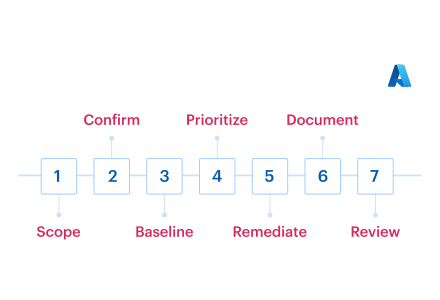
For a scheduled review, prepare the environment as an assessor will examine it: reconcile the declared scope with the live estate, confirm the governing criteria, establish a control baseline, remediate material gaps, assemble traceable evidence, and run an independent dry assessment. The result should be a defensible readiness decision, not a collection of screenshots and closed tickets.
This guide is written for the cloud, security, and IT teams being assessed. It applies to internal reviews, customer security reviews, independent assessments, and audits that require evidence of Azure control operation.
Key insights
- Microsoft CASA evaluates an organization’s cloud security approach. A technical assessment validates controls across deployed resources and operating processes.
- Readiness starts by reconciling tenants, management groups, subscriptions, and resources with the declared assessment scope.
- Defender for Cloud secure score is a useful posture input, but it does not establish complete scope, ownership, exception approval, or audit evidence.
- Prioritize findings by control materiality, exposure, privilege, resource criticality, and affected population, not by one tool’s severity label.
- Evidence should identify the control, evaluated population, source, collection time, owner, and current operating state.
- Remediation closes only after the affected production population passes the original validation.
- For the Azure-specific operating model behind continuous discovery, evaluation, prioritization, and remediation, see Azure cloud security posture management.
What is Microsoft CASA, and how does a technical Azure assessment differ?
Microsoft’s Cloud Adoption Security Assessment is a guided assessment of an organization’s cloud security maturity.
Its questions address areas such as security roles, posture modernization, incident readiness, confidentiality, integrity, availability, and security sustainment. The output helps teams identify improvements aligned with Microsoft’s Cloud Adoption Framework secure methodology.
A technical assessment asks a different question: are the required controls operating across the actual Azure estate? It examines tenant and subscription scope, identities, configurations, exposure, logging, findings, exceptions, and evidence. An audit may add sampling, interviews, approvals, and tests of operating effectiveness under a specific authority.
Related Azure mechanisms have distinct roles:
- CASA: evaluates the organization’s security approach and produces recommendations.
- Microsoft cloud security benchmark (MCSB): provides a control framework for securing cloud environments.
- Defender for Cloud secure score: measures posture based on assessed recommendations and resources.
- Technical assessment: validates configurations, controls, processes, exceptions, and evidence across an agreed population.
None of these outputs is automatically a certification. The assessment authority determines what must be tested and what evidence is acceptable.
For the broader method for defining scope, testing controls, documenting findings, and reporting results, use the cloud security assessment framework. If the review must connect weaknesses to material business exposure, apply the cloud security risk assessment method to resource criticality, exposure, and control impact.
What will assessors check in your Azure environment?
Assessors will test whether the Azure environment described in the assessment scope matches the estate operating in production, whether applicable controls work across that full population, and whether the results can be traced to current evidence.
Their review typically covers five connected areas: estate scope and governance boundaries, identity and privileged access, resource and workload configuration, data protection, and policy, logging, and response readiness.
Estate scope and governance boundaries
Start with Microsoft Entra tenants, management groups, subscriptions, resource groups, regions, and environments. Include Azure Arc resources when hybrid infrastructure falls within scope. Account for recently created, transferred, disabled, trial, and sandbox subscriptions rather than assuming that the finance or landing-zone register is complete.
Scope drift is a documented multi-cloud problem. In Fortinet and Cybersecurity Insiders’ 2025 survey, 55% of respondents cited loss of visibility and control, and 45% cited keeping up with the rate of change. Reconcile the declared scope with current resources, application context, criticality, owners, and approved exclusions. An unknown production subscription remains a blocker.
For mixed estates, use the same reconciliation discipline beyond Azure. The AWS cloud security assessment and Google Cloud security assessment guides cover provider-specific evidence and readiness gates.
Identity and privileged access
Review Azure RBAC and Microsoft Entra administrative roles together. The evidence should distinguish standing from eligible privilege, show Privileged Identity Management configuration, and explain the use of Conditional Access, MFA, emergency access accounts, managed identities, and service principals.
Workload identities deserve the same scrutiny as human administrators. Datadog found that 40% of Microsoft Entra ID applications in its dataset had credentials older than one year, while the share older than five years rose from 6% to 10%. Export credential age, last use, permissions, and ownership instead of using one compliant role assignment as evidence for the full population.
Resource, network, data, and workload controls
The technical review should test Azure cloud security controls at the service level. Typical areas include public endpoints, network security groups, firewall rules, private endpoints, storage access, encryption, key ownership, Key Vault configuration, backup and restore, certificates, and secrets.
Public access may be intentional, but it requires population-level evidence. Datadog found that 34% of AKS clusters in its 2025 dataset exposed the managed API server to the internet. Identify every exposed cluster, verify private-cluster settings or authorized IP ranges, and record exceptions.
Use the cloud security architecture review checklist when trust boundaries determine how a finding should be interpreted.
Policy, logging, and response readiness
Assessors may inspect Azure Policy assignments, exemptions, Defender for Cloud recommendations, diagnostic settings, retention, incident ownership, and production rechecks. In one Azure practitioner discussion, a team maintained non-applicable recommendation exclusions through landing-zone pipelines. That approach reduces noise, but each exclusion still needs a rationale, affected population, approver, and review or expiry condition.
The Azure shared responsibility model defines which platform controls Microsoft operates. Your evidence still has to cover customer-managed identities, configurations, workloads, data, and operating processes.
For the accountability model behind policy ownership, exceptions, escalation, and remediation, see cloud security governance.
Which criteria should your team prepare against?
Prepare against the authority governing the upcoming review, then map supporting benchmarks beneath it. A practical order is:
- Contractual, customer, regulatory, or certification criteria
- The organization’s internal control framework
- Microsoft cloud security benchmark
- CIS Microsoft Azure Foundations and applicable service benchmarks
- Azure service-specific security baselines
- Internal risk and configuration requirements
CASA is an assessment method, MCSB is a control framework, and CIS benchmarks provide prescriptive configuration recommendations. Treating them as interchangeable creates gaps. CIS Foundations, for example, does not cover every configuration requirement for every compute, storage, database, identity, or managed service in the estate.
Build one working crosswalk with these fields:
- Control and requirement
- Framework mapping
- Applicable Azure population
- Validation method
- Owner
- Evidence
- Exception
- Readiness status
Use cloud security compliance standards to compare common frameworks before building the crosswalk. If ISO 27001 governs the review, the ISO 27001 risk assessment guide connects identified risks with treatment decisions, owners, and retained evidence.
How do you prepare for an Azure cloud security assessment?
Preparation should produce seven verifiable outputs. Each step has a completion gate so the team can distinguish progress from readiness.
1. Reconcile the declared scope with the live estate
Obtain the formal scope statement, including tenants, management groups, subscriptions, environments, services, and relevant hybrid resources. Query the current hierarchy and compare it with the declared population. Investigate subscriptions that are new, disconnected, transferred, disabled, or categorized as trials and sandboxes.
Map resources to an application or service, environment, criticality, and accountable owner. Do not treat missing tags as proof that a resource is irrelevant. Trace it through subscription ownership, deployment records, network relationships, and billing context. Record approved exclusions with their reason, scope, authority, and review date.
Completion gate: Every discovered object is included, explicitly out of scope, or covered by an approved exclusion.
2. Confirm control applicability and evidence requirements
Record the exact criteria and versions the assessor will use. For each control, identify the applicable resource population, validation method, evidence type, owner, and expected reviewer. Resolve conflicts among MCSB, CIS, internal policies, and external requirements before remediation begins.
Separate what can be demonstrated through automated configuration data from what requires a procedure, interview, sample, test result, or attestation. Azure Policy and Defender for Cloud can validate many technical states, but they cannot prove every operating process or external requirement.
For regulated workloads, use the governing requirement rather than a generic Azure baseline. The HIPAA cloud security guide, for example, explains the operational responsibilities involved in protecting cloud-hosted health information.
Completion gate: Every applicable control has a defined population, validation method, evidence requirement, and owner.
3. Establish a current control baseline
Collect Defender for Cloud recommendations and secure score context, Azure Policy assignments and compliance results, Resource Graph query results, Entra role assignments, PIM settings, network exposure, storage and Key Vault configuration, encryption, backups, diagnostic settings, and relevant vulnerability data.
Track full, partial, failed, unknown, and not-applicable populations, including last evaluation time, population size, missed resources, and ownership. A practitioner reported Azure VMs that appeared locally onboarded and healthy while Defender for Cloud lacked device IDs and exposure data. Treat such conflicts as evidence-reconciliation failures until the affected population and authoritative validation source are established.
Completion gate: The team can state what was evaluated, what was missed, and how current the result is.
4. Prioritize gaps by assessment risk
Rank findings using control materiality, resource criticality, exposure, privilege, affected population, and remediation confidence. Microsoft reports that nearly 80% of organizations have attack paths leading to critical assets. An assessment backlog should therefore be prioritized by connected risk, not by one tool’s severity label.
Classify the backlog into assessment hard stops, high-impact remediation, bounded limitations, accepted exceptions, and lower-priority hygiene. A hard stop might be an unknown production subscription, unreviewed standing privilege, or missing security logging for a critical service. Each material finding needs an owner, due date, validation method, and escalation path.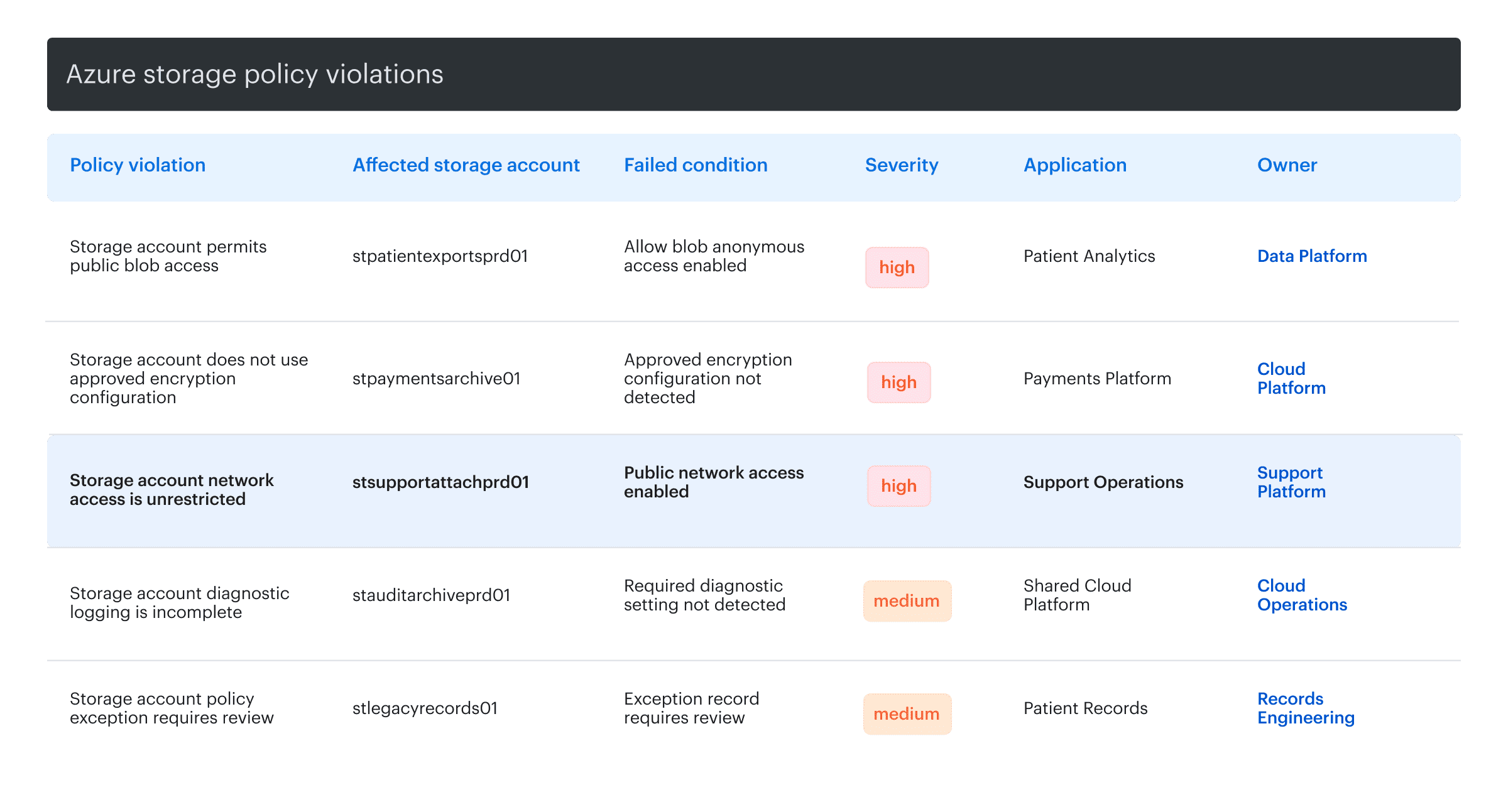 Example of Cloudaware view showing Azure storage policy violations by affected storage account, failed condition, severity, application, and owner.
Completion gate: Every material gap has an accountable treatment decision and a testable closure condition.
5. Remediate and revalidate the affected population
Test changes in a representative environment and preserve rollback paths. Use infrastructure as code or controlled Azure Policy remediation where appropriate. Avoid broad, late-stage RBAC or network changes without dependency analysis because an assessment fix that breaks production creates a larger control failure.
Record the change reference and affected resources, then rerun the original check after deployment. Ticket closure, a pull-request merge, or a successful policy assignment shows activity, not operating state. When controls are enforced through delivery workflows, apply Azure DevSecOps practices to test policy before production deployment.
Completion gate: The affected production population passes the original validation, and current evidence points to that result.
6. Build the evidence pack during remediation
Create an evidence manifest instead of collecting screenshots in the final week. For each item, record the control, Azure scope, resource population, evidence description, source system, collection method, timestamp, owner, reviewer, exception or limitation, and retention location.
Keep evidence types distinct:
- Design evidence: the policy, standard, architecture, or procedure defining the control.
- Operating evidence: records showing the control ran during the review period.
- Population evidence: the full set from which samples or results were drawn.
- Remediation evidence: the change record and post-change validation.
- Exception evidence: approval, rationale, affected population, compensating control, and expiry.
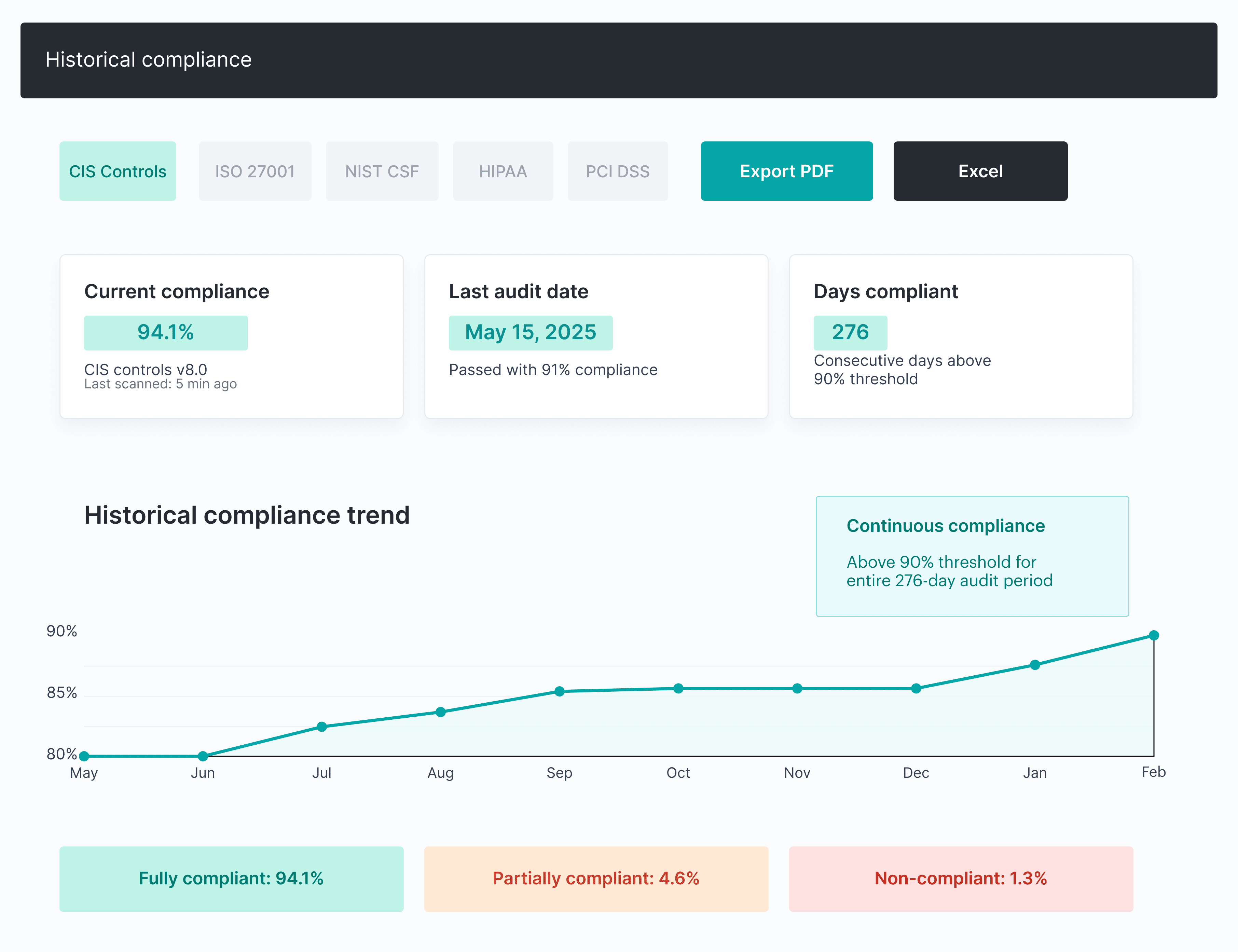 Evidence screenshots should identify the tenant, resource, date, and evaluated population. Prefer exports or queries when the reviewer must test completeness.
Completion gate: An independent reviewer can trace the requirement to the evaluated population and current proof.
7. Run a dry assessment and issue the decision
Use a reviewer who did not assemble the evidence pack. Have that person select samples from the declared population, follow evidence links, challenge exclusions, and test whether closed findings remain fixed. Prepared examples alone cannot reveal sampling or traceability failures.
Issue one documented decision:
- Proceed: Scope, controls, ownership, and evidence are usable, and no material blocker remains.
- Proceed with limitations: Known gaps are bounded, disclosed, owned, and do not invalidate the wider assessment.
- Pause and repair: Scope, control, or evidence gaps could materially undermine the result.
Completion gate: The assessment lead approves the scope, evidence manifest, unresolved limitations, and owner commitments.
Azure security assessment checklist: is your estate ready?
Use this Azure security assessment checklist as a final-state test. A “yes” answer should be supported by current evidence, not by a planned remediation task.
- Scope: Current tenants, subscriptions, and resources reconcile with the declared scope. Minimum evidence: Resource Graph export, hierarchy map, and exclusion register. Hard stop: an unknown production subscription.
- Ownership: Every critical population and material finding has an accountable owner. Minimum evidence: inventory or CMDB mapping. Hard stop: material findings without an owner.
- Identity: Privileged roles are controlled, reviewable, and time-bound where required. Minimum evidence: RBAC export, PIM settings, and access-review record. Hard stop: unexplained standing Owner or Global Administrator access.
- Network: The team can explain externally reachable paths. Minimum evidence: NSG, firewall, private endpoint, and exposure review data. Hard stop: unapproved public access to a sensitive service.
- Data and secrets: Encryption, keys, secrets, backups, and recovery controls operate across the required population. Minimum evidence: Key Vault settings, encryption state, and restore evidence. Hard stop: a required encryption or recovery control is absent.
- Policy and posture: All applicable populations were evaluated. Minimum evidence: policy assignments, compliance exports, and the findings register. Hard stop: in-scope resources missing from evaluation.
- Logging and response: Required logs are collected, retained, routed, and tied to an owned response process. Minimum evidence: diagnostic settings, Log Analytics configuration, and response procedures. Hard stop: no security logging for critical scope.
- Findings and exceptions: Material gaps are remediated and revalidated or covered by approved, time-bound exceptions. Minimum evidence: tickets, recheck results, and exception register. Hard stop: a critical gap without remediation or approved limitation.
- Evidence: Each required control is tied to identifiable, current proof. Minimum evidence: the evidence manifest. Hard stop: evidence with no resource, date, or population context.
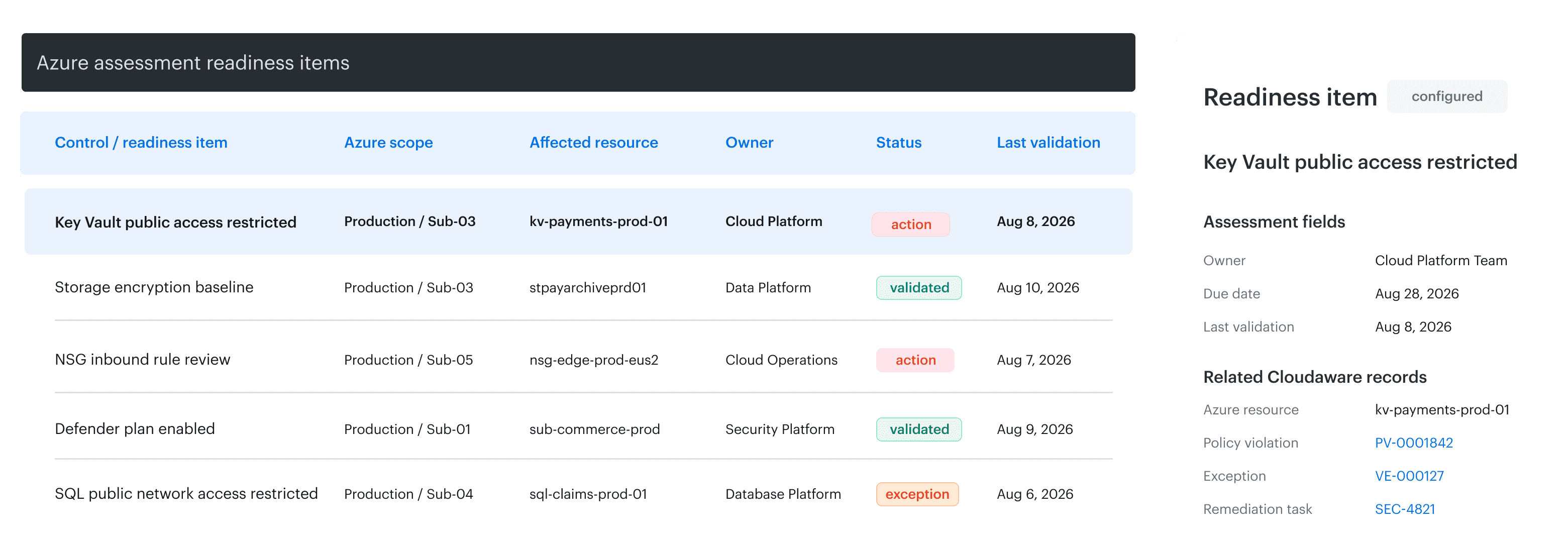 Example of Cloudaware CMDB list view connecting Azure readiness items with responsible owners, remediation records, exceptions, evidence, and validation dates.
For a reusable Azure cloud security checklist, add status, owner, due date, evidence URL, exception ID, and last validation date. These fields turn the checklist into a working readiness tracker instead of a static pre-audit questionnaire.
Why does a high Defender for Cloud secure score not prove readiness?
Defender for Cloud secure score helps teams assess posture, prioritize supported recommendations, identify affected resources, and measure risk-reduction work. It is a valuable cloud security posture management Azure signal, especially when teams use its recommendations and asset-risk context rather than chasing a number in isolation.
A high score does not independently prove that the assessment scope is complete. It also does not map every external requirement, establish ownership, provide procedural evidence, approve exceptions, or validate controls outside the supported assessment logic. The score can improve while an excluded subscription, unsupported service, stale exception, or manual control remains unresolved.
Use secure score as one input in a readiness model that also covers scope, ownership, evidence, exceptions, and verified closure. The cloud security posture management process explains how discovery, evaluation, prioritization, remediation, and revalidation connect.
How can Cloudaware keep an Azure estate assessment-ready?
Assessment preparation becomes fragile when inventory, policy results, ownership, and remediation evidence live in separate systems. Cloudaware provides an operational context layer across Azure and other infrastructure without replacing Microsoft-native posture signals, Azure Policy enforcement, or the assessor.
Core capabilities:
- Reconcile scope and ownership across the current estate. Segment the Azure estate by subscription and operational attributes, identify missing ownership or classification, and use a consistent inventory model when AWS, Google Cloud, VMware, or other infrastructure is within the assessment boundary.
- Connect policy violations, remediation, and current evidence. Use resource, application, environment, ownership, and relationship context from the CMDB to route violations into existing remediation workflows and evaluate the resource again after a change.
- Evaluate controls across the applicable resource population. Use scheduled and customizable policies to assess Azure resources against CIS-aligned checks, internal requirements, and configuration rules.
- Expose evidence gaps and configuration drift. Track policy results against current CMDB data so teams can identify resources that have changed, fallen outside the expected control state, or lack recent evaluation before the assessment begins.
- Put vulnerabilities into assessment context. Connect vulnerability and scan-coverage data with the affected resource, application, environment, owner, and related infrastructure.
- Maintain traceable exceptions and remediation status. Keep approved exceptions, affected resources, policy violations, and remediation workflow context connected to the underlying configuration item.