


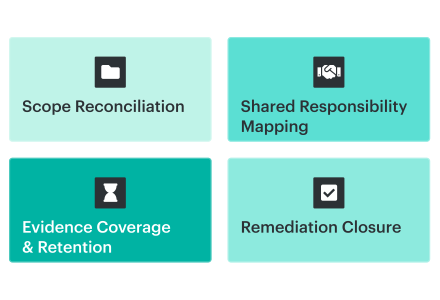
A credible Google Cloud security assessment validates the environment boundary, tests whether security controls are correctly designed and operating across the effective hierarchy, evaluates exploitable paths and business impact, and preserves the evidence behind every finding, exception, and closure decision.
A clean GCP security dashboard supports one point-in-time observation. The underlying result may come from effective controls, narrow detector activation, an uncollected project, a missing inherited policy, a stale export, or evidence that expired before review. The assessment separates these conditions before reporting risk.
TL;DR
- Establish the assessment denominator before reviewing findings. Reconcile the GCP hierarchy with identities, workloads, data, external control planes, and the scope reached by each collector.
- Map shared responsibility and threat scenarios by service. Customer-controlled surfaces differ across Compute Engine, GKE, Cloud Run, BigQuery, and other managed services.
- Test three layers for every control: design adequacy, effective inherited configuration, and operation throughout the required period. Include exclusions and potential bypass paths.
- Treat Cloud Asset Inventory, Security Command Center, and Cloud Audit Logs as evidence sources with defined coverage limits. Preserve collector permissions, rule or query versions, timestamps, retention, and unsupported populations.
- Separate control failures from missing evidence and unverified coverage. Do not interpret a low finding count or empty log query as proof that the environment is secure.
- Prioritize remediation using attack paths, privilege, exposure, data sensitivity, business criticality, and blast radius. Close findings only after the affected population has been retested or the appropriate risk disposition has been approved.
What a Google Cloud security assessment must prove
A Google Cloud security assessment evaluates customer-controlled architecture, identities, workloads, data, configurations, software delivery paths, and security operations.
It also records the provider-managed controls on which the environment depends. The final result should distinguish validated controls, control failures, and evidence limitations that prevent a conclusion.
Map responsibility and threat scenarios first
The customer control boundary changes across Compute Engine, GKE, Cloud Run, BigQuery, and SaaS integrations. Google’s shared responsibility guidance assigns customers continuing responsibility for access policies and data while the provider assumes more underlying controls in managed services.
For teams assessing GCP against ISO requirements, the ISO 27017 implementation guide shows how to map customer and provider responsibilities to control implementation and evidence.
Map that boundary by workload and service. Then identify the scenarios that the controls must address: stolen workforce credentials, service account abuse, exposed data, excessive network reachability, vulnerable workloads, compromised CI/CD pipelines, destructive actions, and failed detection or recovery. This gives each test a security purpose.
Also record whether each control is implemented through a provider-native feature, an internal team, or external cloud security services, because evidence ownership and retest authority differ across those operating models.
Test design, effective state, and operation
NIST defines three assessment methods: examine, interview, and test. Interviews establish the intended process, responsibility model, and exception rationale.
Technical evidence should then corroborate operating effectiveness across the review period through effective configurations, events, scan results, control executions, and sampled records.
A defensible assessment answers eight questions:
- Which business services, trust boundaries, identities, data, and workloads are in scope?
- Which customer responsibilities and threat scenarios apply?
- Is each control designed to address its stated scenario?
- What effective configuration reaches each assessed resource?
- Did the control operate throughout the required period?
- Which bypass paths, exclusions, unsupported resources, or evidence gaps remain?
- What business exposure follows from each failure?
- What technical result verifies remediation across the full affected population?
These questions apply the broader cloud security assessment methodology to GCP’s hierarchy and evidence services.
Define the assessment boundary from the GCP hierarchy
Assessment scope should begin with the Google Cloud resource hierarchy and an approved business register. A dashboard’s visible project list represents the reach of that view or integration. Use an independent source to prove coverage completeness.
Google Cloud organizes resources into organizations, optional folders, and projects. Allow, deny, and organization policies can be applied at several points in that hierarchy. The effective policy on a resource combines locally applied policy with policy inherited from ancestors. As a result, a project-level export can be internally accurate while omitting access grants or constraints inherited from a folder or organization.
Start with:
- Organization IDs, folder paths, project IDs, lifecycle state, and parent relationships
- Production, development, sandbox, suspended, and new projects
- Shared VPC host and service projects
- Central security, logging, networking, identity, and billing projects
- Folder- and organization-level IAM bindings, deny policies, and organization policies
- Expected APIs, SCC activation, log sinks, and evidence exports
- Projects missing the approved parent, owner, labels, or security services
The project inventory provides the first denominator. Extend the register to human identities, groups, service accounts, workload identities, privileged roles, GKE clusters, data services, KMS keys, secrets, Shared VPC dependencies, VPC Service Controls, and external identities that can change GCP resources. Use a cloud security architecture review checklist to trace trust boundaries, Shared VPC dependencies, and external control planes that a resource inventory alone cannot explain.
Each technical object needs application, environment, owners, data classification, regulatory scope, exposure, criticality, lifecycle state, and approved exclusion. App Hub can provide native application context for registered resources; a CMDB or service register can cover other resources and dependencies.
These scope, ownership, exception, and decision-rights fields also form the operating layer of a cloud security governance program. The assessment tests whether that governance model works across the actual GCP population.
Scope reconciliation should compare at least three independently maintained views:
- The actual Google Cloud hierarchy and asset inventory
- The expected application, service, or project register
- The scope reached by every evidence collector and detector
Suppose Resource Manager, billing records, and the approved application register indicate 201 expected projects, while the assessment inventory contains 194. Report coverage as 194 of 201 projects. The remaining seven stay classified as unresolved scope gaps until ownership, lifecycle state, and evidence collection are confirmed. A percentage without its denominator hides the part of the environment that still needs investigation.
Build the GCP assessment evidence map
The evidence map is the central assessment record. It connects each requirement to the exact scope, expected state, proof source, result, owner, exception, remediation action, and closure test.
Use one schema across resources, controls, and findings:
| Evidence field | What it records |
|---|---|
| Scope | Organization, folder, project, resource, identity, application, or defined population |
| Business context | Environment, owners, data class, regulatory scope, exposure, and criticality |
| Requirement | Internal policy, contractual requirement, or selected framework control |
| Expected state | The configuration or operating condition that must be true |
| Evidence source | Cloud Asset Inventory, Compliance Manager, SCC, Cloud Audit Logs, IAM analysis, ticket, or approved attestation |
| Observed result | Pass, finding, missing evidence, coverage unverified, or not applicable |
| Evidence window | Source event time, collection time, scan time, and applicable lookback period |
| Exception | Rationale, affected scope, compensating control, approver, and expiration |
| Remediation | Accountable owner, action, ticket, target date, and status |
| Closure proof | Configuration change, audit event, rescan, scope reconciliation, reviewer, and timestamp |
Use Google Cloud security best practices to define the expected technical state and cloud security compliance standards to map external requirements. The evidence map records how those requirements apply to the assessed population and what proves the result.
Consider a requirement to retain attributable data-access activity for regulated BigQuery datasets for 12 months:
| Evidence-map element | BigQuery logging example |
|---|---|
| Scope | Projects inherited from the regulated-workloads folder, plus documented inclusions and exclusions |
| Expected state | Applicable Data Access log types enabled through effective organization, folder, or project configuration |
| Configuration evidence | Timestamped audit configuration export |
| Operating evidence | Sample read and write events showing principal, method, resource, and event time |
| Continuity evidence | Sink status, filter, destination, retention setting, and missing-period check |
| Finding | Three expected projects lack valid evidence for the full lookback period |
| Owner | Named data-platform owner |
| Closure | Configuration change, generated test event, successful routing, rescan, and reviewer approval |
Data Access audit logs are disabled by default for most services and require explicit configuration. They normally flow to the _Default bucket unless routed elsewhere. Google currently assigns 30 days of default retention to _Default; project _Default and user-defined buckets can be configured from 1 to 3,650 days. The _Required bucket retains applicable logs for 400 days.
A 12-month evidence request depends on retention or routing that operated during the requested period. Evidence begins on the configuration’s effective date; unlogged or expired events remain unavailable.
This is the GCP-specific implementation of a cloud security assessment framework: every control must remain traceable from scope and expected state through evidence, disposition, and closure.
Use native GCP evidence sources for the proof they provide
Native Google Cloud services provide strong evidence when their role, scope, tier, timestamps, and retention limits are recorded. Assign each source a proof function and document the remaining gap.
| Source | What it can prove | Coverage test |
|---|---|---|
| Cloud Asset Inventory | Discovered asset metadata, hierarchy, policies, supported relationships, and recent changes | Compare project, folder, organization, asset-type, permission, and timestamp coverage |
| Security Command Center and Compliance Manager | Findings, resources, control source, severity, state, and timestamps | Verify tier, activation, frameworks, detector coverage, scan state, and exports |
| Cloud Audit Logs | Administrative activity, data access where enabled, policy-denied events, principal, resource, method, and time | Verify log types, inherited configuration, exempted principals, exclusions, sinks, retention, and missing periods |
| IAM analysis | Effective access and answers to defined principal-resource-permission questions | Verify hierarchy scope, permissions, query logic, and export time |
| BigQuery, Cloud Storage, or Pub/Sub exports | Preserved snapshots, event streams, and evidence for longer analysis windows | Verify filters, delivery continuity, deduplication, latest-record logic, and access controls |
Cloud Asset Inventory establishes discovered scope and recent change history
Cloud Asset Inventory lists assets and supported relationships at project, folder, or organization scope. It also supports resource and IAM searches, effective-policy analysis, metadata exports, and asset-change feeds.
Its history window is a critical assessment constraint. Google retains asset create, update, and delete history for up to 35 days. Assets unchanged during that period return their latest state. Assessment windows beyond 35 days therefore need scheduled snapshots, feeds, or another controlled repository.
An asset export records inventory at its timestamp. Asset history records supported metadata changes during the available window. Longer control-operation periods require additional evidence.
Security Command Center and Compliance Manager establish posture findings
Security Command Center records finding category, source, severity, state, resource, and event time. Compliance Manager adds deployable frameworks, cloud controls, and monitoring. Coverage depends on tier, activation level, deployed frameworks, supported controls, detector state, and scan completion.
For GCP Security Health Analytics findings, the detection path matters in 2026. Google directs new activations in several tiers to Compliance Manager for misconfiguration scanning. Migrated environments can receive equivalent findings from different providers. Some SHA findings carry launch_state="LAUNCH_STATE_DEPRECATED" and can disappear from console views under the default query. Equivalent SHA and Compliance Manager controls on the same resource can also create duplicates.
This posture evidence belongs within the wider cloud security posture management workflow, where findings are prioritized, assigned, tracked, and verified.
For every posture result, record:
- SCC tier and activation level
- Framework and cloud-control deployment
- Finding provider and API
- SHA migration state and deprecated-finding query treatment
- Initial and most recent completed scan
- Unsupported or disabled controls
- Continuous or bulk export configuration
Retention also affects the evidence window. Current SCC documentation lists seven days for inactive vulnerabilities, 30 days for inactive misconfigurations, 35 days for active Standard-tier findings, and 13 months for active Premium and Enterprise findings. Longer assessment windows require exports to another controlled location.
Cloud Audit Logs and IAM analysis establish activity and effective access
Cloud Audit Logs answer “who did what?,” “where?,” and “when?” when the required log type was generated and retained. Map those questions to principal, action, resource, event time, policy result, source, destination, and retention window.
This collection-to-investigation loop is the core of cloud security monitoring. Assessment evidence should show not only that logs exist, but also that relevant signals are reviewed, escalated, and acted on.
IAM Policy Analyzer and effective-policy analysis can answer defined access questions such as which principals can access a resource or which resources a principal can reach. Preserve the question, query scope, export timestamp, relevant policy inheritance, and result. Access evidence becomes actionable when it is paired with the resource owner, the access justification, and the approval or remediation record.
Exports need integrity controls. Google documents an SCC BigQuery case in which 100 ACTIVE findings are exported and 50 later become inactive. The state updates fail an ACTIVE-only filter, leaving BigQuery at 100 active findings while SCC shows 50. Cover state transitions, latest-record queries, deduplication, and source reconciliation.
Define control tests across the major security domains
Begin risk scoring after establishing how much of the approved scope each source covered. A low finding count can reflect strong controls, narrow activation, incomplete scans, unsupported resources, broken exports, or stale dashboards.
Use explicit denominators and failure signals:
| Coverage gate | Denominator | Failure signal |
|---|---|---|
| Project coverage | Expected projects | Missing, unknown, or unclassified project |
| Asset-type coverage | Expected asset types and populations | Unsupported type or large unexplained delta |
| Detector coverage | Applicable controls or detectors | Disabled control, missing framework, tier limitation, or project-only activation |
| Permission coverage | Required collector permissions | Access denied, partial export, or unresolved SCC error |
| Time coverage | Required evidence days | Oldest evidence falls inside the required start date or contains gaps |
| Export continuity | Expected deliveries or partitions | Failed sink, missing partition, stale latest record, or filtered state transition |
| Ownership coverage | In-scope resources or findings | Blank, generic, or conflicting owner |
Compliance Manager’s first scans can take up to 48 hours in Premium and Enterprise. Standard batch scans can produce initial latency of up to 96 hours. Framework findings can take six hours to appear; compliance counts may lag by 24 hours, and asset changes by 48 hours. Google classifies findings visible before onboarding finishes as preliminary and incomplete.
Record source event time, ingestion time, last completed scan, export time, and dashboard refresh time separately. A screenshot captured during onboarding should be classified as preliminary evidence. The assessment record should also state whether an apparent gap represents a control failure, unavailable evidence, unverified coverage, or an expected service latency.
Read also: Top 10 CNAPP Tools for Cloud Security (2026)
Prioritize findings by blast radius and business context
Assessment priority should combine native risk signals with the operating context of the affected resource. Severity describes the general importance of a finding category. Remediation order also depends on exposure, privilege, data sensitivity, workload criticality, hierarchy scope, compensating controls, and evidence confidence.
For supported vulnerability and misconfiguration findings, Google recommends prioritizing attack exposure score before static severity. The instance-specific score considers the resource, paths to high-value resources, and traversal difficulty. Attack-path simulations require eligible findings, the relevant tier, and organization-level activation. SCC finding severity and attack exposure
“The assessment team should verify that the high-value resource set reflects actual business criticality. A technically reachable database serving a retired development workload and a production identity store may otherwise receive similar treatment from an incomplete business model.” — Katerina L., Cloud Security Expert at Cloudaware
A practical Google Cloud risk assessment and GCP risk assessment workflow can rank each gap across:
- Internet exposure and reachable attack paths
- Human or non-human privileged identity involvement
- Sensitive or regulated data
- Production and business-service criticality
- Organization-, folder-, project-, or resource-level blast radius
- Exploitability and current threat evidence
- Compensating controls
- Evidence confidence and coverage gaps
- Exception age and review status
Collapse repeated findings into remediation units. Hundreds of project findings may result from one inherited folder policy. Repeated exposure findings may share a networking module. A failed organization-level export can create gaps across many projects. Root-cause grouping shows the amount and ownership of remediation work.
For assessments that feed an ISMS, the ISO 27001 risk assessment should keep organizational risk criteria, risk ownership, and acceptance thresholds separate from scanner severity and evidence confidence.
Turn each gap into owned remediation and proof of closure
A finding enters the record with an accountable owner, explicit disposition, and defined retest. This creates a continuous line from the GCP object to the decision and verification.
Assign ownership and disposition
Each record should contain the resource, project, application, requirement, finding, risk explanation, accountable owner, action, due date, ticket, and retest method. Use a named role or individual with authority over the resource. Generic queues obscure accountability across platform, application, and security groups.
Use distinct dispositions:
- Remediate
- Accepted risk
- Approved temporary exception
- False positive
- Duplicate
- Not applicable
- Deferred with an approved target date
An exception should record rationale, risk owner, approver, compensating control, affected scope, approval date, expiration, and reassessment trigger. Expiration restores the finding to active review.
Verify closure across the full affected population
Security Command Center allows manual state changes, and tier changes can move findings to INACTIVE. Treat INACTIVE as one closure field. Verified closure joins:
- Before-and-after configuration evidence
- Approved change record
- Relevant Cloud Audit Logs event
- Post-change native scan or control test
- Reconciliation of every resource in the remediation unit
- Reviewer identity and timestamp
“For a firewall finding, test whether the same inherited policy, Terraform module, or deployment template created the condition elsewhere. This extends verification from the selected resource to the root cause.” — Katerina L., Cloud Security Expert at Cloudaware
Jira or ServiceNow status can show that workflow advanced. The assessment package should retain a link between the ticket, GCP resource, finding, configuration change, rescan, exception history, and reviewer approval.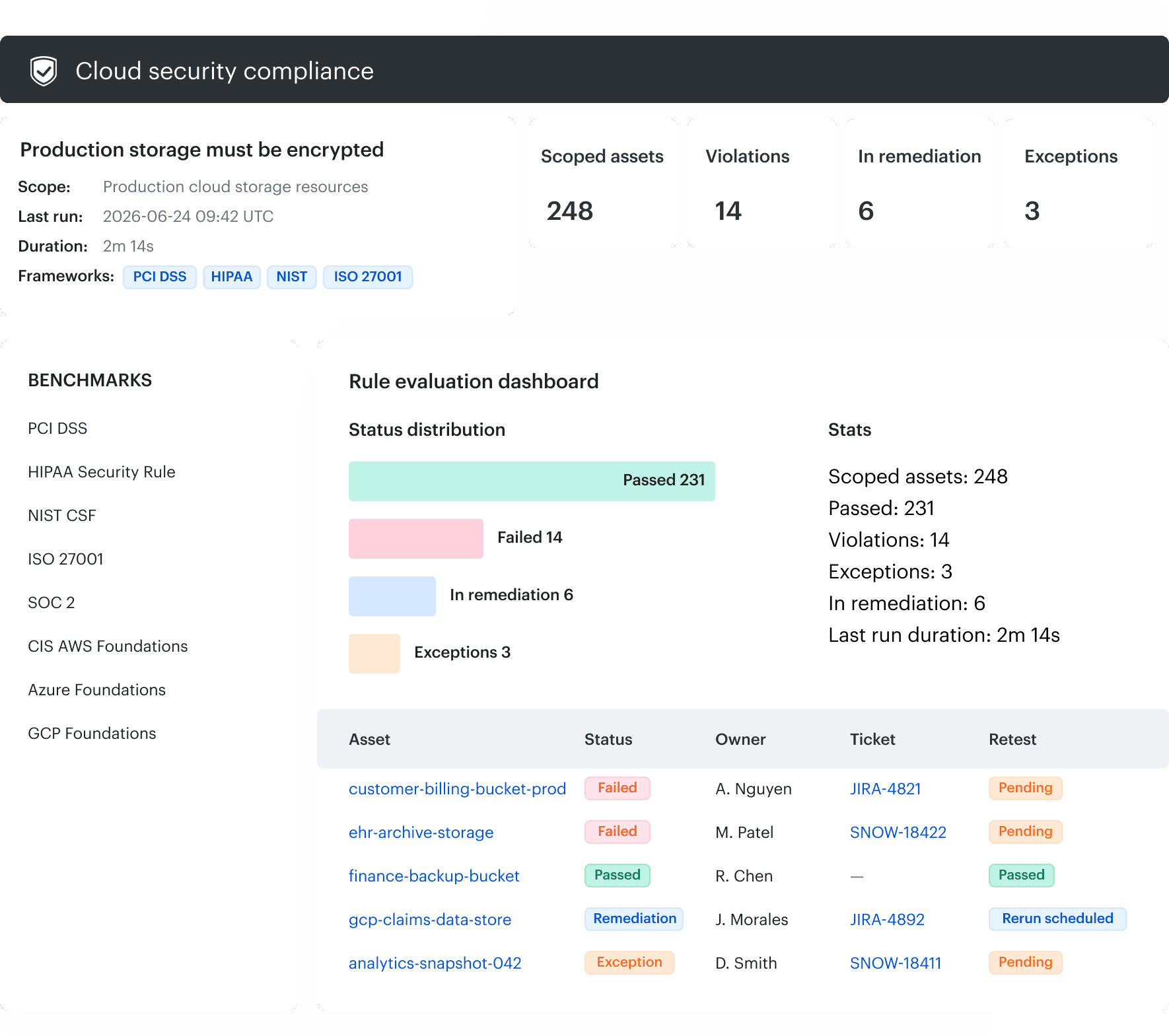
Define readiness metrics before the assessment begins
Assessment-readiness metrics should expose missing scope, stale evidence, unresolved ownership, and unverified closure. A single compliance percentage compresses these failure modes.
| Metric | Calculation | Decision supported |
|---|---|---|
| Scope coverage | Assessed projects ÷ expected projects | Whether the approved boundary was reached |
| Evidence coverage | Applicable requirements with valid evidence ÷ applicable requirements | Whether each requirement has current proof |
| Ownership coverage | Open findings with accountable owners ÷ open findings | Whether remediation can be routed |
| Fresh evidence rate | Evidence inside the required window ÷ collected evidence | Whether the package reflects the review period |
| Exception hygiene | Current approved exceptions ÷ all exceptions | Whether accepted risk remains governed |
| Closure verification | Closed findings with successful retest ÷ closed findings | Whether closure status is supported |
| Export continuity | Successful expected deliveries ÷ expected deliveries | Whether evidence repositories have gaps |
Define exit criteria while there is time to act: resolved project and evidence-source gaps, owners and dates for critical findings, current exceptions, full-period evidence, independent retests, and documented remaining risk.
“Readiness metrics should be presented with counts as well as percentages. 97% evidence coverage becomes operational when the reader also sees 388 of 400 applicable requirements, with 12 missing evidence records across seven projects.” — Katerina L., Cloud Security Expert at Cloudaware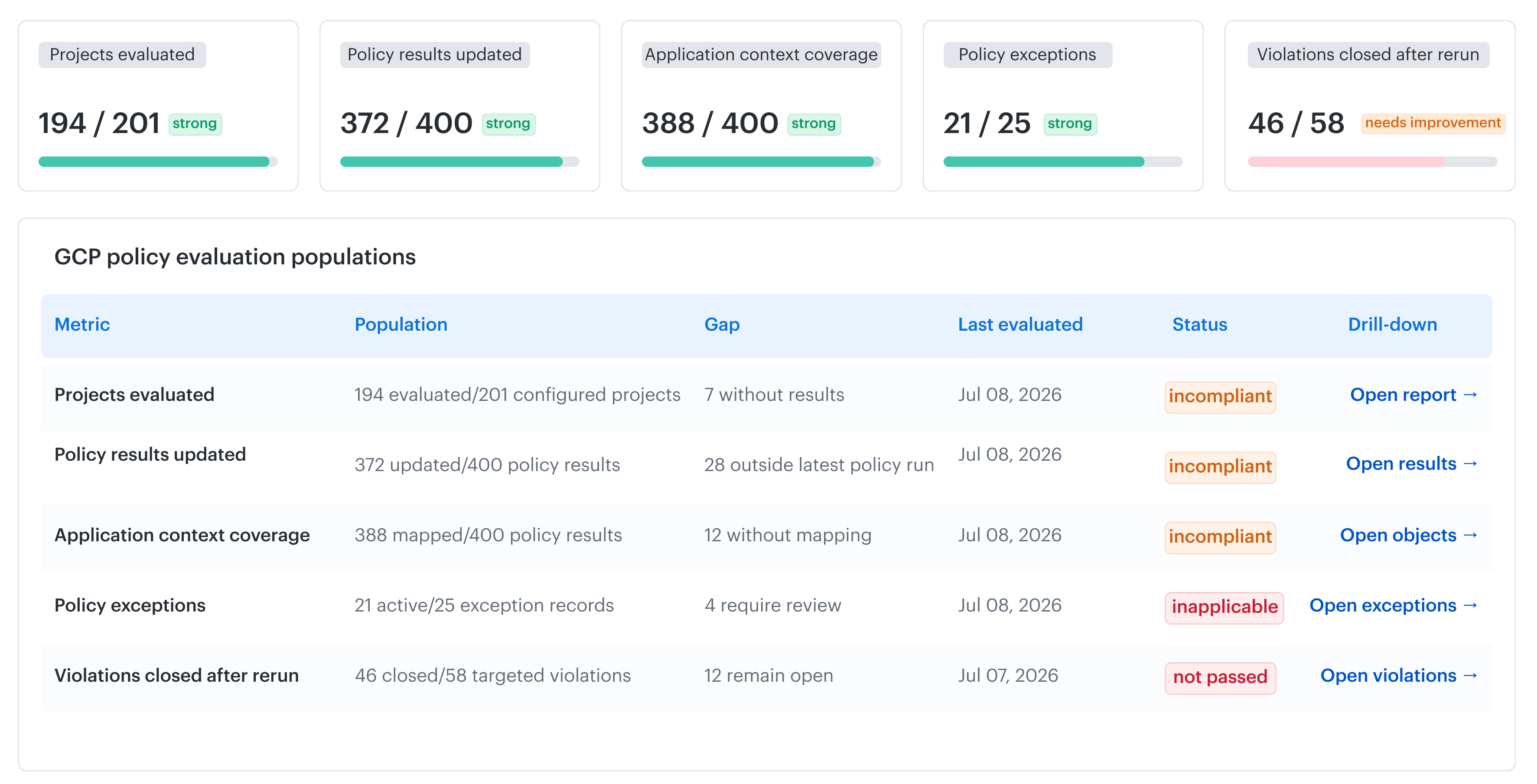
How Cloudaware connects GCP evidence to operational ownership
Cloudaware connects Google Cloud security and compliance evidence with CMDB ownership, application context, policy findings, exceptions, and remediation records, while Google-native sources remain the technical proof.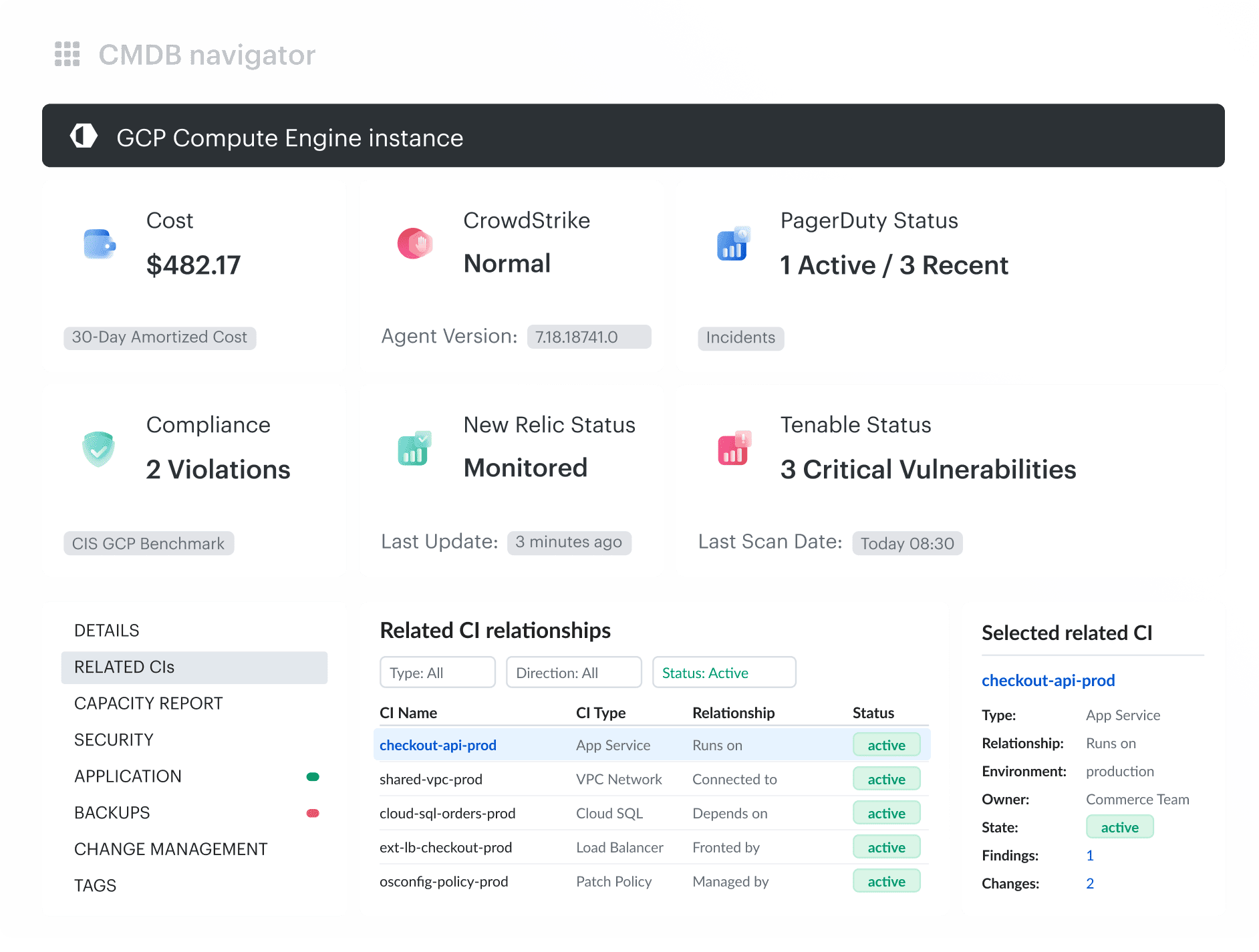 This allows assessment teams to reconcile the collected environment with the expected GCP hierarchy and connect technical results to the applications, environments, owners, and remediation processes affected by them. The same operating model can include third-party security sources, ITSM records, and hybrid or multi-cloud dependencies.
Сore capabilities are:
- Collect inventory at the GCP organization, folder, or project scope and represent discovered resources as CMDB configuration items
- Preserve resource relationships and enrich CIs with application, environment, owner, lifecycle, and other operational metadata
- Collect supported Security Command Center sources, findings, and mute configurations when the required access is configured
- Evaluate CMDB assets using supported CIS benchmark packs, Cloudaware-authored controls, or custom policies
- Query, filter, and report violations by application, environment, owner, project, severity, or other available CMDB attributes
- Route findings through Jira or ServiceNow, maintain bidirectional links between findings and tickets, and manage status changes and exceptions through related Compliance Engine records