


Google Cloud security gets messy when GCP joins a multi-cloud estate running AWS or Azure. One security team owns the risk, yet the control models do not line up neatly. A cloud architect who translates an AWS playbook control for control can miss how Google Cloud security is actually enforced.
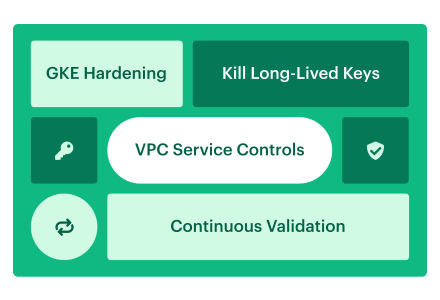
This guide draws on field experience from Cloudaware DevOps practitioners Igor K. and Valentin Kel, along with patterns seen across enterprise security and platform teams. We focus on four operating moves: replace long-lived keys with Workload Identity Federation, contain sensitive APIs with VPC Service Controls, build Google Cloud container security across GKE identity, admission, posture, and runtime evidence, and preserve Security Command Center findings through ownership and closure.
Google describes security through a shared responsibility model: it protects the underlying infrastructure; you remain responsible for data, access, and configuration. For the cross-provider foundation, start with this cross-cloud security operating model. Here, we will stay inside the GCP estate and build a security posture your team can actually operate.
Google Cloud security: key insights
Google Cloud security is the operating discipline for protecting identities, resource hierarchy, service boundaries, data, workloads, logs, and findings across GCP. The five takeaways below focus on gaps that behave differently from AWS or Azure and can turn one misconfiguration into a wider incident.
- Replace stored keys with short-lived trust. Workload Identity Federation lets external workloads access GCP without long-lived service account JSON keys that must be stored, rotated, and protected.
- Sensitive APIs need another boundary. VPC Service Controls works alongside IAM to reduce data exfiltration risk when an attacker obtains OAuth or service account credentials.
- For GKE, connect admission to runtime evidence. Autopilot reduces node-level configuration; Workload Identity Federation for GKE removes stored keys from pods; Binary Authorization checks deployable image digests; and the GKE security posture dashboard plus Container Threat Detection add configuration, vulnerability, and runtime signals that still need separate ownership and remediation.
- Cloud Audit Logs are not one feed. Admin Activity, Data Access, System Event, and Policy Denials have different purposes and defaults. Most Data Access logs, except BigQuery’s, require explicit enablement.
- Make encryption control provable. CMEK provides customer control, key-use logging, and rotation evidence. Cloud HSM performs cryptographic operations in FIPS 140-2 level 3 certified hardware.
How Google Cloud platform security differs from AWS and Azure
The concepts may look familiar, but GCP applies access, policy, logging, and data boundaries differently. Four differences matter in practice.
- Start with the hierarchy, not a list of projects. Resources sit beneath Organization → Folder → Project, and access controls plus organization policies flow down to descendants. One careless role grant at the organization or folder level can affect every project below it. A sound GCP security review therefore begins with inherited policy, not project-by-project screenshots. Google documents the inheritance model in its resource hierarchy guide.
- Cloud IAM creates two permission questions. Google provides basic, predefined, and custom roles. Yet the trickier detail is the service account: it acts as a principal that can access resources and as a resource that another principal can manage or impersonate. Review both paths. For external workloads, Workload Identity Federation adds short-lived trust without requiring stored service account keys. Google’s service account guidance explains why these identities must be managed in the context of the workloads using them.
- Audit evidence arrives through four streams. Cloud Audit Logs separates Admin Activity, Data Access, System Event, and Policy Denied events. Admin Activity and System Event logs are always written. Policy Denied logs are generated by default. Most Data Access logs, except BigQuery’s, require explicit enablement. That default can leave a perfectly tidy logging dashboard with the data-access evidence missing.
- Finally, IAM is not the last boundary. VPC Service Controls adds context-based service perimeters around supported Google-managed APIs, helping limit exfiltration even when credentials are stolen or IAM is misconfigured. Security Command Center then centralizes native findings. Together, these controls create defense in depth rather than a one-for-one translation of AWS or Azure services.
In Cloudaware, that mapping connects native Google Cloud security findings to the affected application, business owner, remediation queue, and evidence trail. The provider-specific control stays intact; the cloud security posture management workflow becomes consistent across GCP, AWS, and Azure.
Kill long-lived service account keys with Workload Identity Federation
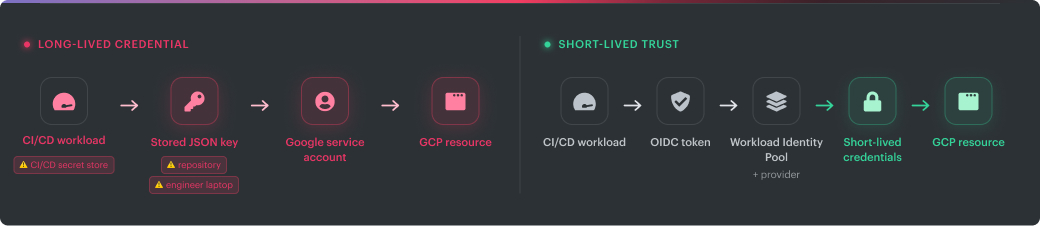
A service account JSON key is easy to create and surprisingly hard to retire. Months later, the file may be sitting in a repository, a CI/CD secret store, an engineer’s laptop, or all three. Nobody wants to disable it because nobody can prove what will break.
Rotation helps with hygiene, but it does not solve the design problem. You still have a long-lived credential that someone must store and protect. Workload Identity Federation changes that model. An external workload presents an AWS credential, SAML assertion, or OIDC token and receives short-lived Google Cloud credentials. There is no service account private key to distribute.
The risky part is not deciding whether to federate. The risk is deciding what to migrate first.
Start with an inventory containing:
- Service account and key ID
- Organization, folder, and project
- Application, environment, workload, and owner
- Key creation date and age
- Last recorded authentication
- Roles granted to the service account
- Repository exposure
- Workload identity pool and provider
- Direct federation or service account impersonation
- Migration status, exception expiry, and remediation ticket
Google exposes service account key activity through its key authentication metrics. Repository exposure requires a secret-scanning source. Ownership usually comes from the CMDB or service catalog. Keep that provenance visible.
A blank repository-exposure field must mean “scanner data unavailable,” not “key is safe.”
Prioritize exposure before age
Oldest-first cleanup sounds tidy. It often sends engineers after dormant development keys while an active production credential remains embedded in a repository.
Use three passes instead:
- Keys detected in source control. Google recommends deleting exposed keys immediately. Removing the file from the current branch is not enough because the repository history may preserve it.
- Active keys supporting production CI/CD. Start with pipelines where Workload Identity Federation has a clear, supported replacement path. GitHub Actions and GitLab CI/CD can present workload-specific OIDC claims. CircleCI, Jenkins, and on-premises workloads can follow when they have access to a verifiable OIDC token or SAML assertion.
- The long tail. Review unused keys, abandoned projects, legacy integrations, and workloads that need a more involved replacement.
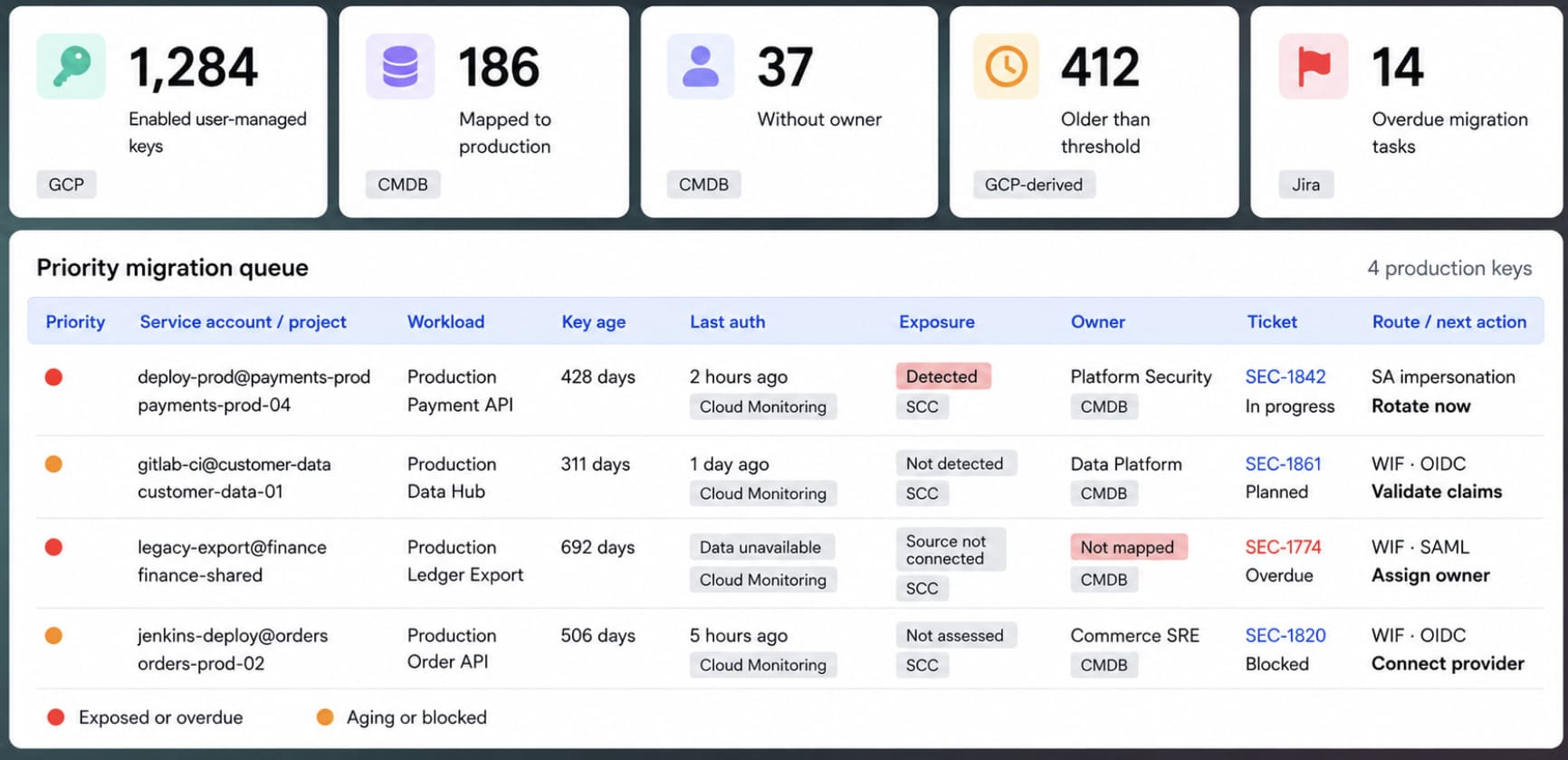
When Cloudaware is the cross-cloud CMDB, use the same inventory to create the migration queue. The GCP connector discovers service accounts, keys, IAM configuration, resource hierarchy, and supported relationships such as GCE instance-to-service-account links. Cloudaware can then enrich those records with application, environment, owner, and service-catalog context. External CI/CD dependencies may still require repository, pipeline, or manually maintained relationship data.
Sort active user-managed keys by repository exposure, production use, recent authentication, missing ownership, and key age. The first 20 records become the next platform sprint. Opening a row should reveal the affected workload and related configuration items, not another isolated credential record.
After the backlog exists, prevent it from refilling. Apply Google’s managed organization policy constraint iam.managed.disableServiceAccountKeyCreation at the organization level. The older iam.disableServiceAccountKeyCreation constraint remains available as the legacy equivalent.
A legitimate dependency may still require a key. Do not hide it from the report. Record the owner, business reason, compensating control, permitted scope, review date, and expiry. Permanent exceptions have a habit of becoming permanent blind spots.
Build narrow trust, not a federation free-for-all
Place workload identity pools and providers in a dedicated identity-management project. Google recommends using one provider per pool to reduce the risk of subject collisions. Shared issuers need another boundary because GitHub, GitLab SaaS, and similar platforms use one issuer across many organizations.
For GitHub Actions, map repository claims and add an attribute condition that restricts tokens to your organization, repository, protected branch, or deployment environment. Constrain GitLab with stable group and project identifiers. Never trust the issuer URL alone.
Grant the federated principal direct access to the required resource when the target API supports it. If it does not, use service account impersonation and keep the service account’s roles narrow enough to preserve least privilege.
Google documents both patterns in its deployment-pipeline federation guide.
AWS and Azure workloads follow the same federation principle with provider-specific credentials and trust configuration. On-premises workloads can participate when their identity provider supplies a verifiable OIDC token or SAML assertion.
Move each workload into production before touching its original key. Seven stable days is a sensible internal cutover threshold, not a Google requirement. Confirm that authentication succeeds, token refresh works, and no fallback still reads the JSON file. Then disable the old key. Google recommends disabling a key before deleting it, which gives the team a reversible observation window.
Platform engineering should own the migration. Security reviews trust conditions, permissions, and exceptions. Scan repositories whenever code changes, review the migration queue weekly, and inspect expiring exceptions monthly.
Useful internal targets include:
- Zero unmanaged keys for new workloads within 30 days
- Production CI/CD migration within 90 days
- A documented migration or exception decision for every remaining key within six months
Cleanup is only half the job. The next dashboard should reveal whether service account keys are quietly returning.
Track new keys discovered during the previous 30 days, projects where the organization policy is missing or overridden, exception aging, remediation SLAs, and overdue tickets. GCP remains the enforcement layer.
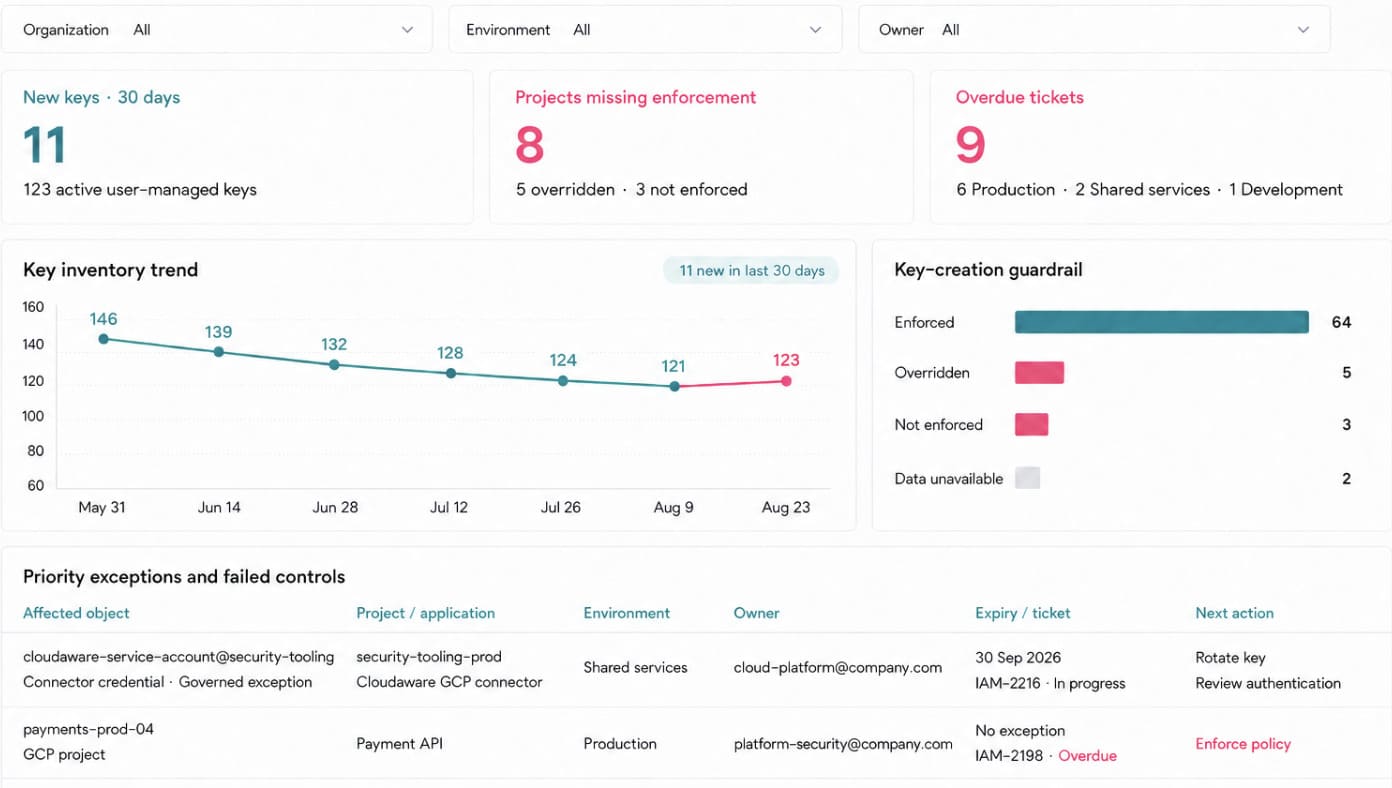
The Cloudaware view connects drift to the application and owner responsible for fixing it.
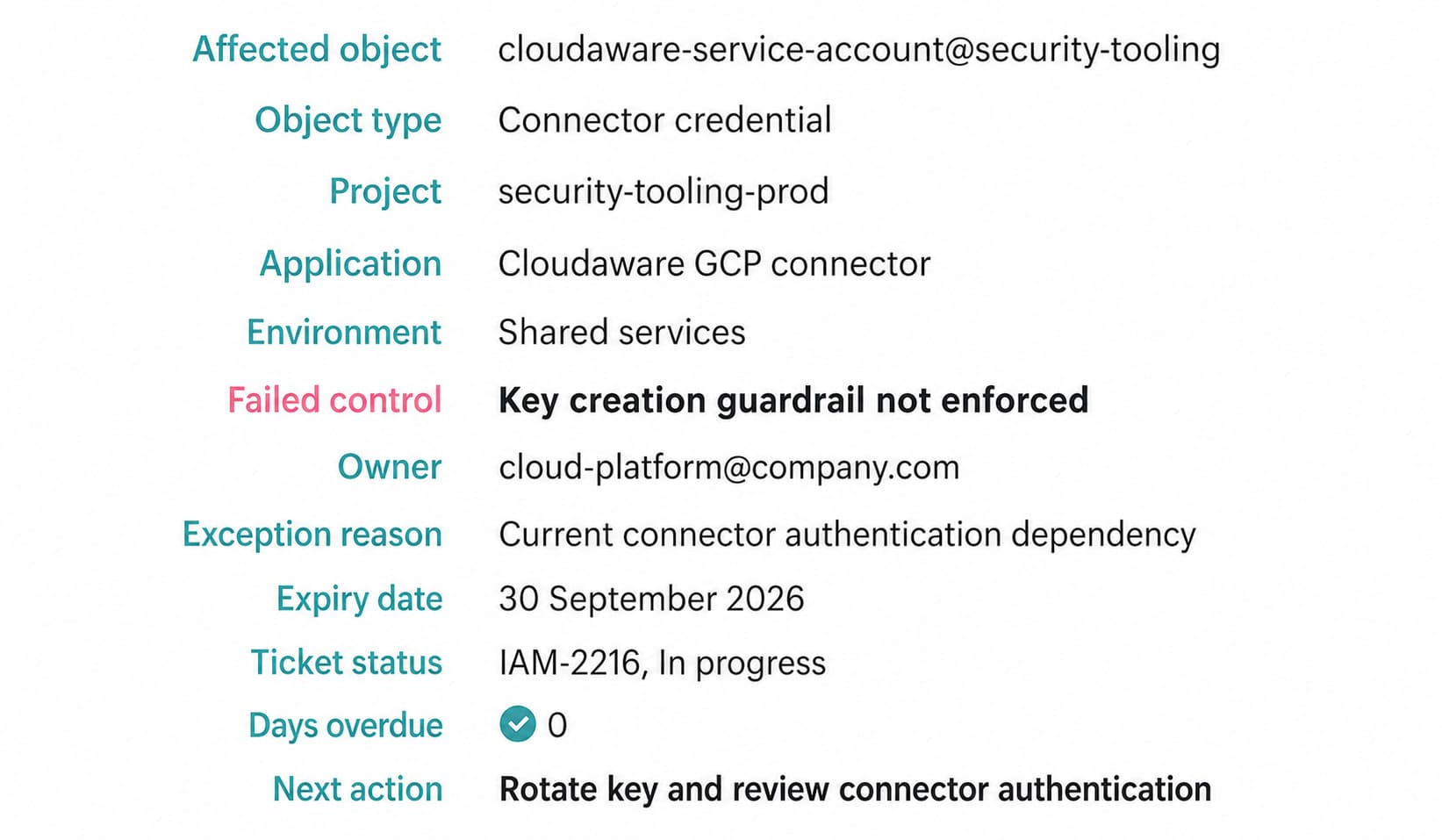
Cloudaware’s current GCP setup uses a dedicated Google service account and an uploaded JSON key, with Project Viewer as the documented minimum project role. When the credential’s project is inside the connected discovery scope, Cloudaware can inventory the associated service account and key metadata. Treating that credential as a governed exception still requires an explicit exception record, named owner, rotation schedule, and review date.
The useful target is zero unmanaged service account keys, not an artificial zero produced by hiding integration credentials.
GitHub Actions federation example
gcloud iam workload-identity-pools create github-pool \
--project="PROJECT_ID" \
--location="global" \
--display-name="GitHub Actions"
gcloud iam workload-identity-pools providers create-oidc github-provider \
--project="PROJECT_ID" \
--location="global" \
--workload-identity-pool="github-pool" \
--issuer-uri="https://token.actions.githubusercontent.com/" \
--attribute-mapping="google.subject=assertion.sub,attribute.repository=assertion.repository" \
--attribute-condition="assertion.repository_owner=='YOUR_ORG'"
gcloud iam service-accounts add-iam-policy-binding \
"deploy-bot@PROJECT_ID.iam.gserviceaccount.com" \
--project="PROJECT_ID" \
--role="roles/iam.workloadIdentityUser" \
--member="principalSet://iam.googleapis.com/projects/PROJECT_NUMBER/locations/global/workloadIdentityPools/github-pool/attribute.repository/YOUR_ORG/YOUR_REPO"
Use the project number, not the project ID, inside the **principalSet** identifier.
VPC Service Controls: stop data exfiltration even when IAM says yes
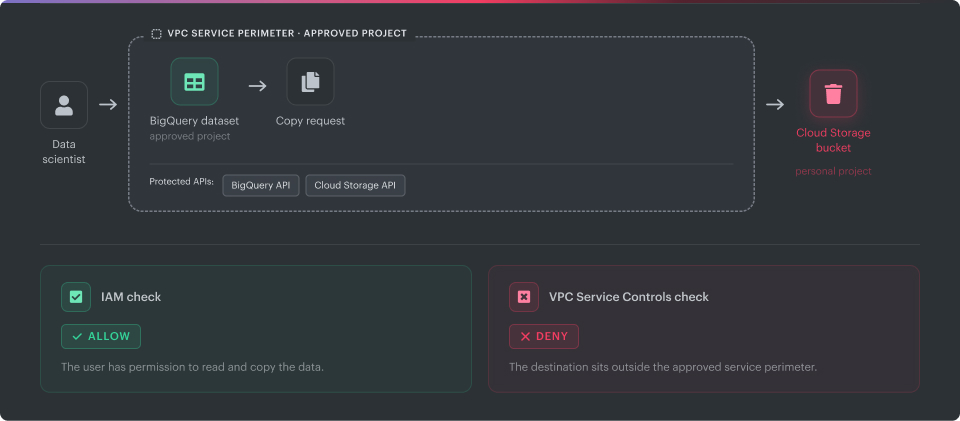
Picture a healthcare analytics project containing BigQuery datasets classified as PHI. IAM is configured correctly. A data scientist has permission to read the data because that is part of the job.
Then a script copies a dataset into a Cloud Storage bucket in an unapproved project.
IAM sees a permitted user performing a permitted action. From its perspective, nothing is wrong. Your Google Cloud data security model needs another boundary.
VPC Service Controls provides that boundary for supported Google-managed services. It evaluates whether an API request is allowed to cross a service perimeter, even when the identity already has valid IAM permissions. An enforced perimeter can block movement caused by stolen credentials, excessive permissions, or an insider using legitimate access in an unapproved way.
That does not make VPC Service Controls a firewall. It does not inspect packets, replace least-privilege IAM, classify sensitive data, or decide whether a dataset contains PHI. Its job is narrower: stop protected service data from crossing a boundary you do not trust.
Build the perimeter from data scope, not guesswork
A service perimeter contains projects or VPC networks and specifies which supported services are restricted. You cannot draw one directly around three individual BigQuery datasets while leaving everything else in the same project unaffected.
That changes the design process.
Start by identifying the assets that carry regulated or business-critical data. Standardize classifications such as PHI, PCI, CDE, and Confidential as GCP labels, CMDB attributes, or both. Next, map those assets to their projects and inspect every service involved in their normal data flows.
A BigQuery pipeline rarely stops at BigQuery. It may call Dataflow, write temporary objects to Cloud Storage, publish through Pub/Sub, or read secrets during execution. Protecting only the obvious API leaves gaps and creates troubleshooting theater later.
Google recommends considering all protected services when designing a perimeter because leaving APIs outside the configuration can create additional exfiltration paths.
The practical design sequence looks like this:
- Identify sensitive BigQuery, Cloud Storage, Cloud SQL, and other supported resources.
- Map each resource to its project, application, environment, and owner.
- Group projects that share the same trust and data-movement requirements.
- Check Google’s current supported-products list for every service in the workflow.
- Define the perimeter, restricted services, and expected external access before enforcement.
Perimeter design begins with knowing what should be inside. If classification is incomplete, the boundary will be too broad and interfere with ordinary work or too narrow and miss the data it was supposed to protect.
When Cloudaware is the CMDB, this is where the product fits naturally. Its GCP service coverage includes BigQuery datasets and tables, Cloud Storage resources, Cloud SQL instances, Dataflow jobs, and related project context. Normalize dataclass, application, environment, and owner as CMDB attributes. Compare each sensitive asset’s project against perimeter data supplied through a verified custom integration or import.
A CMDB-aware CSPM policy can evaluate the mismatch after the required perimeter data is available in the CMDB, turning it into a specific finding: “Sensitive asset belongs to a project outside an approved service perimeter.” That is more useful than a generic warning about VPC Service Controls because it identifies the dataset, the missing boundary, and the team responsible for fixing it.
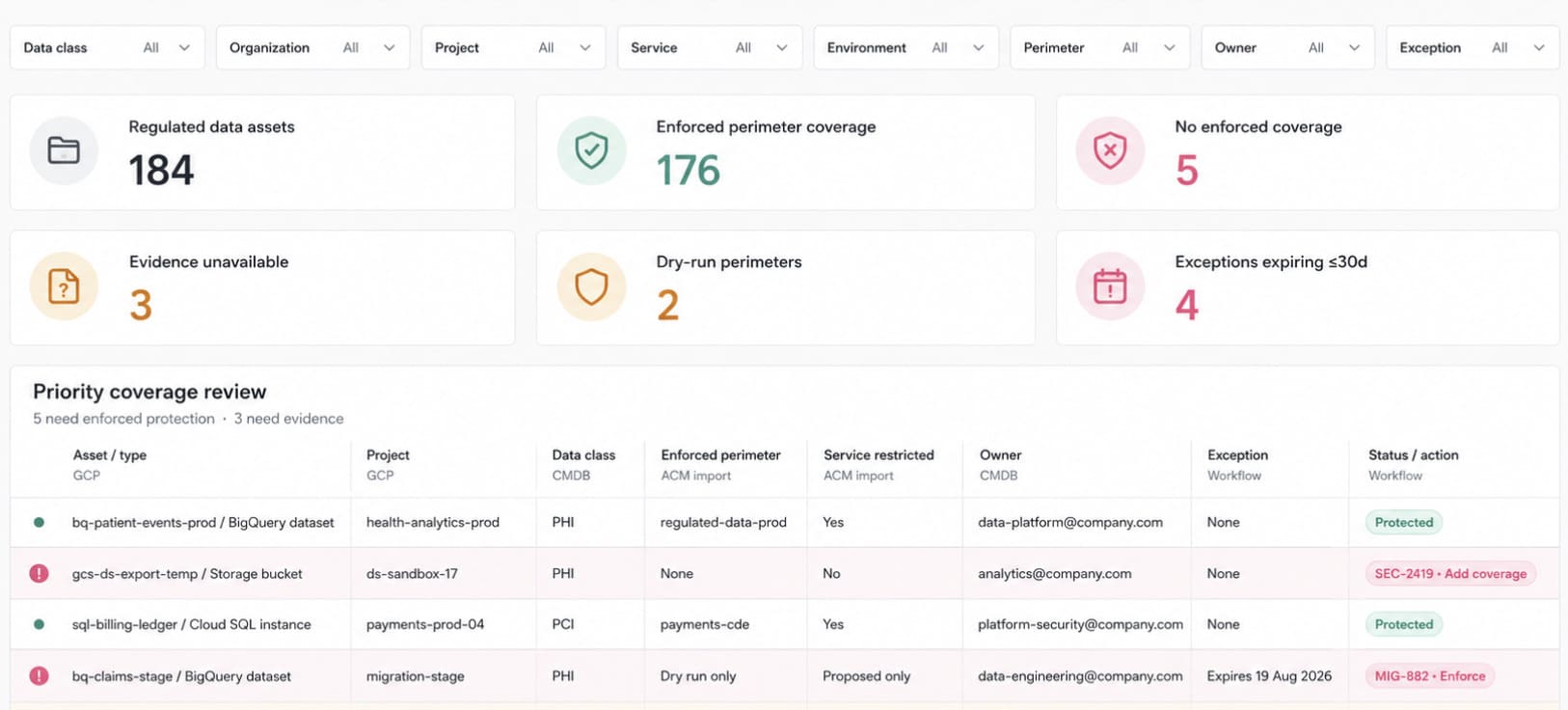
The five uncovered assets are the work to do. Perhaps two appeared after the original perimeter rollout. Another may sit outside temporarily during a migration. Those explanations belong in named, expiring exceptions. “We think Data Engineering still needs it” does not.
Treat dry-run as part of deployment
VPC Service Controls can disrupt legitimate pipelines that were never documented properly. Cross-project analytics, service agents, third-party platforms, and scheduled exports often reveal themselves only when a perimeter evaluates real traffic.
Use dry-run mode before enforcing a new perimeter or material change. Requests that violate the dry-run configuration are logged rather than blocked. The relevant audit record carries metadata.dryRun=True, which separates simulated violations from enforced denials.
Do not promote the perimeter after a quiet afternoon. Run it through at least one complete workload cycle. For many teams, 7 to 14 days is a reasonable internal starting point, but it is not a Google requirement. Month-end reporting, weekly exports, disaster-recovery tests, or infrequent partner transfers may require a longer observation window.
Review each simulated violation:
- Expected flow: add a narrowly scoped ingress or egress rule.
- Obsolete flow: remove the dependency instead of preserving it.
- Unknown flow: investigate the identity, source, destination, method, and affected application.
- Risky flow: keep it blocked and route the decision to the data owner.
Ingress rules allow approved identities and sources to reach protected resources from outside the perimeter. Egress rules permit approved movement from inside to external resources. Google recommends progressively adding the required methods in dry-run until legitimate violations cease, then moving the tested configuration into enforced mode.
A safer promotion threshold is zero unexplained legitimate violations across one full operating cycle. An arbitrary event count can hide the one monthly export that matters.
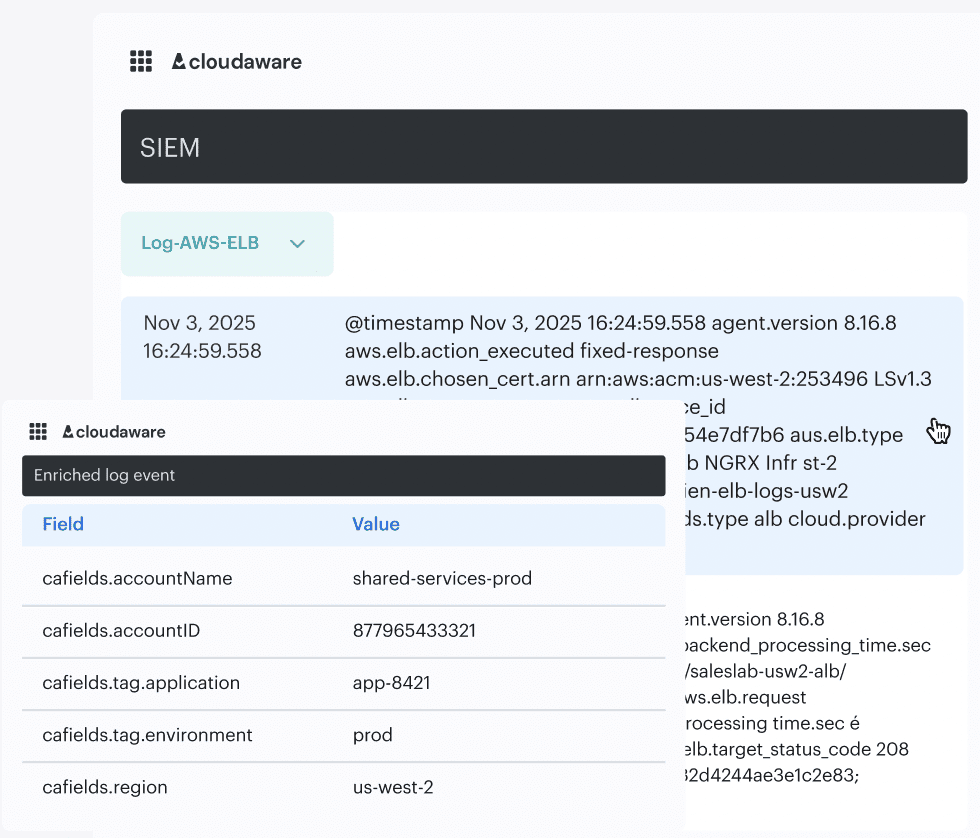
Cloudaware SIEM can ingest the resulting Policy Denied events and enrich them with CMDB context such as application, environment, owner, data class, and related assets. Keep the native Google violation details intact. The enrichment answers the question the raw log cannot: is this an attacker testing the boundary, a broken production pipeline, or an approved migration whose exception expired yesterday?
Layer organization policies around the perimeter
VPC Service Controls govern data movement across supported service APIs. Organization Policies prevent unsafe configurations from appearing beneath the organization or folder in the first place.
For regulated projects, useful companion constraints may include:
constraints/storage.uniformBucketLevelAccessconstraints/sql.managed.restrictPublicIpconstraints/compute.managed.requireOsLoginconstraints/iam.managed.disableServiceAccountKeyCreation
Apply only the constraints that match the workload’s operating model. Several are not retroactive, so enforcement does not automatically repair existing resources. The CSPM backlog still needs to identify the old bucket, database, VM, or key that predates the policy.
Security architecture owns the perimeter design. Data platform teams validate legitimate flows. Platform engineering manages organizational policies and configuration as code. Every ingress or egress exception needs a business reason, owner, approved methods, review date, and expiry.
There is no separate charge for VPC Service Controls, but the operational work is real. Not every Google service is supported, projects from different organizations cannot share one perimeter, and every cross-boundary workflow needs deliberate handling.
That is why this GCP perimeter model works when the perimeter is narrow enough to understand, broad enough to cover the entire data path, and tested long enough to expose the flows nobody remembered.
Google Cloud Kubernetes security: three GKE hardening layers
A production cluster can pass every scheduled vulnerability scan and still be one deployment away from trouble.
The nodes are patched, but a pod carries a Google service account JSON key inside a Kubernetes secret. The scanner finds CVEs, yet nothing stops an image built outside the approved pipeline from reaching production. Platform engineering manages the cluster. Security owns the policy. Each team sees its piece.
A defensible GKE security model covers three different layers:
- GKE Autopilot reduces the node infrastructure your team must configure and defend.
- Workload Identity Federation for GKE lets workloads reach Google Cloud APIs without stored service account keys.
- Binary Authorization checks whether the exact container image is approved for deployment.
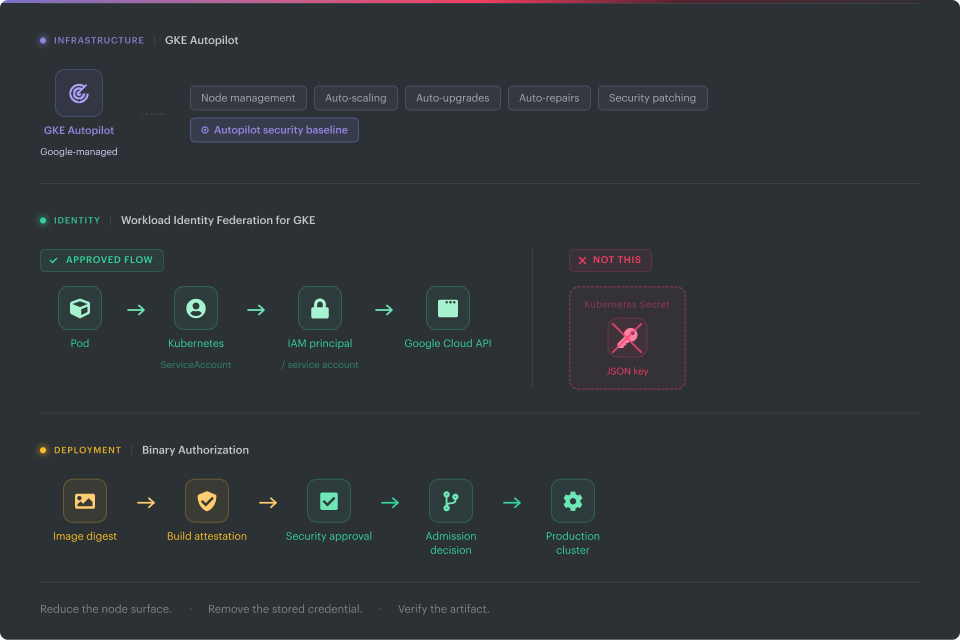
This is an operating sequence, not a technical dependency. A new platform can evaluate Autopilot first and remove a large set of node-level decisions early. An existing Standard cluster should not wait for a migration project. Workload identity and deployment controls can improve now.
Layer 1: Use Autopilot to shrink the node-security job
GKE Standard gives your team control over node pools, operating systems, upgrade behavior, machine configuration, and several workload-security settings. Occasionally that control is necessary. It also creates more opportunities for clusters to drift away from the approved baseline.
Autopilot moves much of the infrastructure configuration to Google. The service manages nodes, scaling, upgrades, repairs, and many hardened defaults. Google recommends Autopilot for the most streamlined GKE experience, while Standard remains available when teams need deeper infrastructure control. Google’s Autopilot overview explains that boundary.
For new production platforms, make Autopilot the default candidate. Ask the requesting team to document why Standard is necessary.
A legitimate reason might involve a specialized operating model, manual control of node infrastructure, or a workload configuration Autopilot does not support in the required form. An old checklist that sends every privileged workload to Standard is no longer accurate.
Autopilot normally rejects workloads that violate its default security constraints. Specific privileged partner and verified open-source workloads can run through approved allowlists. GKE 1.35 and later also lets eligible customers create allowlists for their own privileged workloads. That customer-owned path is disabled by default and requires organization-level authorization. Google documents the eligibility and allowlist model here.
Standard clusters also have a middle path. Selected workloads can run in Autopilot mode through ComputeClasses, while workloads that genuinely need manual infrastructure control stay on Standard nodes.
Review existing clusters in three groups:
- Keep on Standard: the workload has a documented technical requirement, and the owning team accepts responsibility for node hardening.
- Run selected workloads in Autopilot mode: use an appropriate ComputeClass where the workload and cluster support it.
- Migrate to an Autopilot cluster: choose this option when reducing long-term node administration justifies a controlled migration.
Autopilot does not complete the GKE security program. It will not repair excessive Kubernetes RBAC, decide whether a namespace contains regulated data, approve a vulnerable image, or determine whether an application should reach a production database.
What it does is valuable and narrower: it gives the identity and deployment layers a cleaner infrastructure foundation.
Layer 2: Remove Google Cloud keys from pods
This approach is different from the external Workload Identity Federation flow covered earlier.
Workload Identity Federation for GKE lets Kubernetes workloads authenticate to Google Cloud APIs through their Kubernetes identities. Pods receive short-lived credentials through the GKE metadata server instead of reading a service account private key from a mounted file.
In Autopilot clusters, Workload Identity Federation for GKE is always enabled. Standard clusters need it enabled at the cluster level, followed by configuration of the relevant node pools and workloads.
That distinction matters. A dashboard showing “Workload Identity enabled” does not prove that every pod uses it correctly.
For each cluster, verify five separate facts:
- Workload Identity Federation is enabled at the cluster level.
- Every relevant Standard node pool uses the
GKE_METADATAmode. - Each workload has an approved Kubernetes ServiceAccount-to-IAM access path.
- No application is still depending on the node’s Compute Engine service account.
- Pods using
hostNetwork: truehave been reviewed separately.
Google warns that pods running on the host network normally bypass the GKE metadata server and reach the Compute Engine metadata server instead. There is a narrow documented exception for certain newer cloud storage FUSE configurations, but hostNetwork should still appear as its own review population. Google lists these restrictions in its Workload Identity Federation for GKE documentation.
Now identify the credential patterns you want to retire.
An approved secret scanner or another source capable of classifying secret material should look for:
- Service account JSON fields such as
private_key,private_key_id, andclient_email - Mounted secret files referenced by
GOOGLE_APPLICATION_CREDENTIALS - Environment variables containing or pointing to service account credentials
- Several workloads sharing one broadly privileged Google service account
- Applications falling back to the node service account
Do not copy secret values into a CMDB, report, or dashboard. The remediation queue needs the Secret name, namespace, affected workload, credential type, key ID when available, owner, and scanner evidence. That is enough to plan the migration without reproducing the credential somewhere else.
Where Kubernetes discovery supplies Secret references, relate the named Secret to the pod, deployment, namespace, application, and owning team. Keep credential classification separate:
- Secret-to-workload relationship: Kubernetes discovery
- Credential classification: approved secret scanner or custom detection source
- Google service account and key metadata: GCP IAM inventory
- Application, environment, and owner: CMDB
- Exception and remediation ticket: Cloudaware workflow
A blank scanner field must mean “evidence unavailable.” It must not render as “no credential detected.”
Give each workload its own Kubernetes ServiceAccount. Grant the corresponding workload principal direct access to the required Google Cloud resource when the API supports it. Service account impersonation remains available where an application or API requires the traditional IAM service account model.
Keep the permissions narrower than the old configuration. A Kubernetes ServiceAccount payments-api should not inherit everything granted to the cluster’s node service account simply because the legacy deployment worked that way.
Run the federated path before disabling the JSON key. Confirm that authentication succeeds, token refresh works, and no fallback configuration still points to the mounted file. Disable the old key first. Delete it after the observation window proves that the application no longer depends on it.
Layer 3: Make image approval enforceable
A successful container scan is evidence. It is not enforcement.
Without an admission control, someone can deploy an old tag, an image built on a laptop, or an artifact that never passed the approved pipeline. Binary Authorization evaluates the image during deployment and decides whether it satisfies the configured policy.
Make the decision based on immutable image digests. A tag such as latest or release-7 can later point to different content. An attestation applies to the digest and records that a required activity occurred, such as an approved build or security review. Google’s attestation documentation describes the artifact-level model.
A production policy might require two independent attestations:
- A build attestor confirms that the image came from the authorized CI/CD pipeline.
- A security attestor confirms that the digest has passed the agreed vulnerability and policy thresholds.
The pipeline or an approved integration must evaluate the evidence and sign the digest. A scanner result does not automatically become a binary authorization attestation.
Cloudaware can carry the vulnerability, application, ownership, exception, and remediation context around that decision. It should not be described as the attestation signer unless the organization has implemented and verified that exact integration.
Start with DRYRUN_AUDIT_LOG_ONLY. Images that do not satisfy the policy can still deploy, while violations appear in audit logs.
Run the policy through a complete deployment cycle. Then classify each violation:
- The image came from an unapproved build path.
- A required build attestation is missing.
- Security approval was never generated.
- The deployment uses a mutable tag.
- An emergency or Google-managed image needs a documented exception.
- The attestation exists, but generation or verification is broken.
Thirty days is a reasonable internal starting window for a busy production environment. It is not a Google requirement. The better promotion gate is evidence:
- Every production repository generates the required attestations.
- No legitimate deployment failures remain unexplained.
- The break-glass process has been tested and audited.
- Exempt image patterns are narrow, documented, and owned.
- Deployment teams know who handles a blocked release.
Once that evidence is clean, move production to ENFORCED_BLOCK_AND_AUDIT_LOG. Development can stay in dry run where the extra flexibility is justified. Production should not remain there forever. Permanent dry-run is monitoring, not prevention.
Binary Authorization policy example
name: projects/PROJECT_ID/policy
globalPolicyEvaluationMode: ENABLE
defaultAdmissionRule:
evaluationMode: REQUIRE_ATTESTATION
enforcementMode: DRYRUN_AUDIT_LOG_ONLY
requireAttestationsBy:
- projects/PROJECT_ID/attestors/build-attestor
- projects/PROJECT_ID/attestors/vulnerability-approval-attestor
clusterAdmissionRules:
us-central1.prod-cluster:
evaluationMode: REQUIRE_ATTESTATION
enforcementMode: DRYRUN_AUDIT_LOG_ONLY
requireAttestationsBy:
- projects/PROJECT_ID/attestors/build-attestor
- projects/PROJECT_ID/attestors/vulnerability-approval-attestor
The policy name and default admission rule are required. The cluster key follows the CLUSTER_LOCATION.CLUSTER_NAME format. Both listed attestors must approve the image. Replace the project, location, cluster, and attestor values before importing the policy. Google’s policy YAML reference contains the complete schema.
Admission control answers one question at deployment time: may this image start now?
It does not guarantee that the image remains vulnerability-free. A critical CVE can be published days after the pod enters production.
Binary Authorization continuous validation can reassess running pods against a platform policy and log findings, including vulnerabilities discovered after deployment. It reviews running images at least every 24 hours. Those findings still need an owner and remediation path.
This distinction should remain visible in the dashboard. An enforced admission policy beside two critical CVEs is not a contradiction. It may mean the image passed its original release gate and new vulnerabilities appeared later.
Turn Google Cloud container security into one remediation queue
Admission, posture, vulnerability, and runtime evidence answer different questions. The GKE security posture dashboard surfaces workload configuration concerns, security bulletins, and eligible vulnerability findings in the Google Cloud console. Container Threat Detection can report supported runtime attack signals into Security Command Center when it is enabled and the SCC tier supports it. Neither source replaces Binary Authorization's deployment decision.
Keep the image digest, cluster, namespace, workload, finding source, observed time, application owner, exception, and ticket as separate fields. When evidence is missing, use Not evaluated or Not connected. A blank container-scanning field is not a clean result.
Three clusters can be checked manually. Forty clusters, along with their node pools, workloads, identity mappings, image findings, exceptions, and tickets, make this exercise an inventory problem.
Cloudaware’s supported GKE object coverage includes clusters, node pools, nodes, namespaces, pods, containers, services, Kubernetes ServiceAccounts, roles, bindings, and secrets. CMDB relationships add application, environment, business service, and owner context. Cloudaware’s supported-object reference provides the current coverage details.
Use that model to build a hardening scorecard. Each cluster row should open into the affected node pools, namespaces, workloads, identities, vulnerabilities, exceptions, and tickets.
Do not start automatically with the lowest raw score. A production cluster supporting a regulated application can deserve attention before a worse-looking development environment.
Risk becomes clearer when several gaps meet in the same place:
- A standard production cluster has an incomplete node-pool migration.
- Workloads still depend on the node service account.
- A scanner detects a service account key referenced by a pod.
- Binary Authorization remains in dry run or is turned off.
- Critical CVEs appeared after admission.
- Nobody owns the exception or ticket.
The scorecard makes prioritization mechanical without making it simplistic.
gke-claims-prod goes first because several controls fail around a sensitive production workload. The development cluster can move through a scheduled migration. gke-customer-api needs scanner evidence and an admission policy before anyone calls it clean. An unowned production cluster gets an owner before its green controls inspire confidence.
Cloudaware’s CMDB-aware CSPM can flag clusters where expected configurations are missing, add application and ownership context, and route findings into remediation workflows. Connected vulnerability tools supply image risk. CI/CD and Binary Authorization remain the evidence sources for attestations and admission decisions.
If binary authorization and continuous validation logs are forwarded into Cloudaware SIEM, and the relevant fields are parsed and mapped to CMDB objects, the events can be enriched with the cluster, application, environment, and owner affected by the release.
Enforcement still belongs to GKE, IAM, Binary Authorization, and the CI/CD signing process. Cloudaware reveals the gap, attaches operational context, routes the repair, and shows whether the exception quietly outlived its deadline.
Do not mistake three layers for the entire GKE baseline
These controls close important gaps. They do not replace the rest of cluster security.
Control-plane access, private nodes, Kubernetes RBAC, network policies, Pod Security Standards, Secrets handling, logging, patch governance, and workload-level segmentation remain separate controls. Each solves a different failure mode.
Use the CIS GKE Benchmark as a validation framework, not as proof that a workload is safe. A cluster can report strong benchmark coverage while one pod still mounts a service account key or one production environment accepts images from an unapproved build.
The useful targets are concrete:
- New production platforms evaluate Autopilot first.
- Every relevant Standard node pool uses the GKE metadata server.
- Each workload has an approved Kubernetes-to-IAM access path.
- Node-service-account dependencies and
hostNetworkworkloads remain visible until reviewed. - No Google service account private key exists inside a workload without a named, expiring exception.
- Production images are deployed by digest with verifiable build and security evidence.
- Binary Authorization moves from dry run to production only after legitimate releases consistently satisfy the policy.
- Continuous validation identifies image risk that appears after admission.
- Every failed control has an application, owner, ticket, and deadline.
That is the real order. Reduce the infrastructure surface first. Stored cloud credentials disappear next. Deployment approval becomes enforceable. Then keep the exceptions visible, because that is where the old risk usually tries to return.
Cross-cloud CMDB vs Security Command Center: use each for the job it does best
A high-severity finding appears in Security Command Center: a Cloud Storage bucket is publicly accessible. Useful. The detector has identified the resource, the issue, the severity, and the time it was observed.
Then the incident lead asks what happens if public access is removed. The bucket is used for a nightly analytics export. A downstream job runs in AWS. Its owner sits in the service catalog, while the temporary exception expired last week and the Jira ticket belongs to another team.
That second story is not “more detection.” It is an operating context.
Short answer: Security Command Center should remain the authoritative source for Google-native security findings, attack exposure, and finding status. A cross-cloud CMDB connects that evidence to applications, dependencies, owners, exceptions, and remediation work across the wider estate. Neither should replace the other.
Keep Security Command Center in charge of native risk evidence
Security Command Center brings together vulnerability and misconfiguration findings, threat detections, security postures, compliance controls, and exportable security data. Built-in, integrated, and supported third-party services can all create findings.
Coverage depends on activation scope. Google recommends organization-level activation because it can inspect resources across folders and projects. A project-level deployment only sees the project where it is enabled, and some detectors or integrations that require broader data will be unavailable or incomplete. Before comparing dashboards, confirm the Security Command Center activation level. A tidy project view can still hide an organization-level gap.
Do not undersell the native context either. SCC can model attack paths and high-value resources. When a resource is registered to an application in App Hub, the finding details can also display that application context. The CMDB earns its place where the operating model extends beyond those registrations: service owners, non-GCP dependencies, scanner coverage, approved exceptions, ITSM state, and infrastructure that lives outside Google Cloud.
Time-sensitive product note, August 2026: Google currently supports AWS and Azure configuration connectors through Security Command Center Enterprise, so calling SCC “GCP-only” would be wrong. Enterprise is now deprecated, however, and is scheduled to shut down on May 21, 2027. Organizations will move to Premium on or after that date.
Use the CMDB for the relationships a finding needs to become work
The useful join starts with the original SCC record and ends with a named owner who can close it.
Cloudaware can collect GCP organizations, folders, projects, compute, network, storage, database, and GKE objects in one CMDB model. Additional permissions provide deeper GCP integration coverage for Security Command Center, billing accounts, backups, and tags. Imported SCC findings can then be related to the affected configuration item and reported beside AWS, Azure, Kubernetes, VMware, and on-premises contexts.
The relationship has a boundary. Cloudaware does not become the threat detector, while SCC remains a poor substitute for a cross-cloud service catalog.
| Operating job | Security Command Center | Cross-cloud CMDB | Keep this evidence authoritative |
|---|---|---|---|
| Detect a GCP threat or misconfiguration | Native and integrated security services create the finding | Imports the finding and relates it to the affected asset | SCC source, finding name, category, severity, class, state, and timestamps |
| Prioritize technical exposure | Risk Engine, high-value resources, and attack paths add security context where the tier supports them | Adds business criticality, data class, application impact, and dependencies outside the SCC graph | Preserve the SCC score; calculate business priority separately |
| Understand the application | App Hub can add application context for registered resources | Service-catalog data can span clouds, clusters, SaaS, on-premises systems, and support teams | Retain both application identifiers and their source |
| See AWS and Azure alongside GCP | Enterprise connectors currently add AWS and Azure posture data, but that tier has a published shutdown date | Normalizes inventory and relationships across providers without making SCC the inventory system of record | Record provider, account, subscription, project, and connector coverage |
| Prove control coverage | SCC offers Google security postures, controls, and compliance features | CMDB-aware policies can evaluate cross-provider conditions and attach workflow evidence | Keep native findings and Cloudaware policy results as separate record types |
| Finish remediation | Findings can be reviewed, muted, queried, and exported | Adds owner, SLA, exception, ticket state, escalation, and closure evidence | Sync states without overwriting the source record |
This separation matters for Google Cloud security reporting. A copied severity is evidence from the detector. Business priority is a decision made with more context.
For example, SCC may classify two findings as HIGH. The first affects an abandoned development project with no data and no inbound path. The second sits on a production identity used by the payments application, reaches a PCI-scoped database, and has an overdue exception. They should not enter the same remediation queue with the same deadline.
Preserve the native finding before enriching it
Do not flatten SCC into “asset," "risk," or "status." That shortcut removes the fields investigators need later.
At minimum, retain the native finding name and canonical name, source, category, finding class, severity, active or inactive state, mute status, event time, create time, and affected resource name. These fields are part of the SCC Finding resource. Store the raw source link or JSON reference as well, subject to your retention and access rules.
Enrichment comes next:
- CMDB context: cloud hierarchy, application, environment, business service, technical owner, data owner, data class, internet exposure, and upstream or downstream dependencies
- Workflow context: ticket, assignee, SLA, exception reason, approver, expiry date, escalation state, and validation evidence
- Coverage context: scanner connection, logging status, backup coverage, related policy results, and the timestamp of each supporting source
Missing evidence needs its own state. Use Unknown, Not evaluated, or Not connected. A blank owner is not “no owner required.” An absent scanner result does not mean zero vulnerabilities.
SCC supports continuous exports to Pub/Sub, BigQuery, and Cloud Logging. If an export or API workflow feeds another platform, use the canonical finding name as the deduplication key and preserve event time separately from ingestion time. Otherwise, the same finding can look new whenever the connector republishes or updates it.
Practitioner rule: never overwrite SCC severity with CMDB priority. Keep both. HIGH explains what the detector reported. P1 can explain that the asset is production, externally reachable, PCI-scoped, tied to a high-value service, and already outside its remediation SLA.
Make ownership routing deterministic
"The platform probably owns it” is not routing. It is a delay with a friendly name.
Start with the owner of the affected business service. Where that relationship is missing, fall back to the workload or application owner, then the project or folder owner. The final fallback should be a monitored security queue with a short assignment SLA, not an unobserved Unassigned bucket.
Reassignment logic needs the same discipline. When a project moves folders or an application changes teams, the open finding should follow the current ownership relationship while preserving the previous assignee in its history. That is what makes ownership routing auditable rather than merely automatic.
Cloudaware can use the CMDB service catalog to group and route findings by application, environment, team, or other linked attributes. Keep imported SCC evidence distinct from a Cloudaware CSPM rule finding. Both can refer to the same asset; they do not have the same origin, evaluation logic, or lifecycle.
Compliance mappings require similar care. Cloudaware’s CSPM can map its policy results to authority documents supported through the Unified Compliance Framework (UCF).
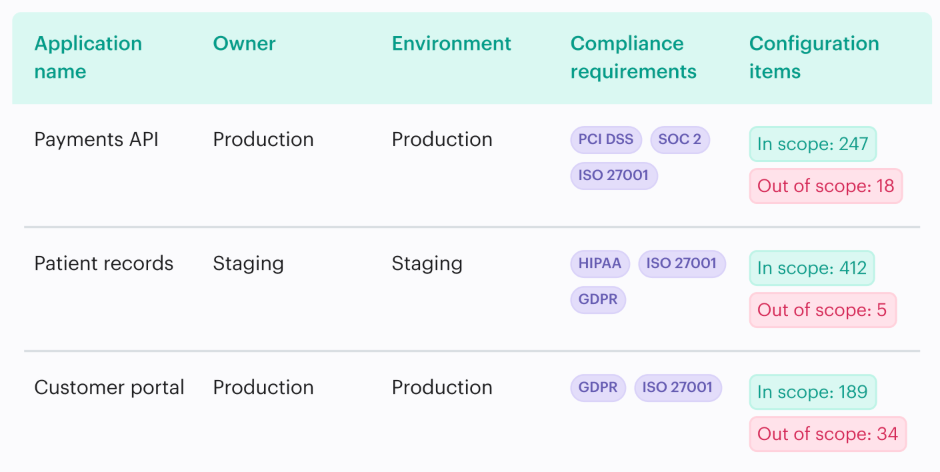
Do not attach a framework citation to an imported SCC category unless that mapping has been configured and reviewed. A plausible relationship is not audit evidence.
Close on evidence, not ticket status
A resolved Jira issue does not make an SCC finding inactive. An inactive finding does not prove that the right configuration change caused it to disappear. The final check needs both sides.
Closure should show the native finding state, the current asset configuration, the remediation change, the ticket resolution, and any exception decision. If the resource was deleted, record deletion as the outcome. When a finding was muted, keep the mute rule and its justification visible; “muted” and “fixed” are not synonyms.
The practical boundary is clean. SCC retains the security truth produced by Google’s detectors and integrations. The cross-cloud CMDB adds the business and operational facts needed to rank that truth, route it, and prove what happened next.