


Most assessments break before anyone reviews a misconfiguration.
The scope is fuzzy. Evidence lives in screenshots, tickets, exports, and “ask DevOps” threads. The process changes by cloud, team, assessor, and audit deadline.
A cloud security assessment framework fixes that by forcing every finding into the same operating structure: framework + control matrix + artifacts.
Inside this guide, you’ll see how to turn AWS, Azure, GCP, Kubernetes, SaaS, and on-prem risk into assessment-ready work:
- Controls mapped to assets
- Evidence attached to each requirement
- Owners assigned by CI, service, environment, or business app
- Findings ranked by exposure, policy impact, and remediation path
- Exceptions tracked with expiry dates, not buried in spreadsheets
That is why Cloudaware assessment dashboards usually start with inventory, not controls. A failed IAM policy, exposed storage bucket, unencrypted database, or missing logging rule only matters when the team can see where it lives, who owns it, what framework it affects, and what evidence proves the fix.
The cloud security risk assessment guide provides the broader methodology for scoping, evidence collection, risk analysis, and follow-through. For provider-specific execution, apply the five readiness gates in the AWS cloud security assessment guide or use the Google Cloud security assessment guide to validate GCP scope, native evidence, coverage, and remediation closure.
Use this article for the structure and deliverables: a cloud security assessment checklist, cloud security assessment questionnaire, and cloud security assessment template your team can actually run.
Key insights for a working cloud security assessment framework
- A cloud security assessment framework only works when it has three layers: structure, control matrix, and working artifacts.
- The control matrix is the durable layer. Build it around controls, map it to NIST, CIS, ISO, PCI, HIPAA, SOC 2, and reuse it across audits.
- The checklist, questionnaire, and template do different jobs. Assessor verification, owner input, and final reporting should not live in one spreadsheet.
- CMDB, CSPM, SIEM, and vulnerability scanners supply evidence. They do not decide assessment scope or control logic.
- Continuous assessment keeps CSPM findings, scanner results, SIEM coverage, exceptions, and remediation status current between formal attestations.
- In Cloudaware reports, a failed control should resolve to one record: affected CI, owner, evidence, framework mapping, exception status, and ticket.
- Without a unified CMDB, the same workload becomes multiple findings with different names, owners, and evidence trails.
- For cloud-specific control mapping, the Cloud Controls Matrix helps translate assessment scope into testable control objectives across infrastructure, identity, data, logging, and governance.
What is a cloud security assessment framework?
A cloud security assessment framework is the control structure your team uses to test cloud security across AWS, Azure, GCP, Kubernetes, SaaS, and on-prem.
Not a policy doc. Not a checklist sitting in Confluence.
A cloud security assessment framework organizes what to evaluate, how to score it, and how to retain evidence. For design patterns and control placement, use the cloud security architecture guide.
A real framework defines three things:
- Controls: what must be true, such as MFA on privileged access, encrypted storage, restricted public exposure, complete logging, approved network paths
- Evaluation procedures: how each control gets tested against live assets
- Evidence artifacts: screenshots, config snapshots, policy results, tickets, exceptions, owner notes, and remediation proof
The framework defines what gets assessed.
The methodology defines how the assessment runs: scope, identify, score, treat, validate, report.
Both matter. A control list without methodology becomes audit shelfware. A methodology without a control set becomes another risk workshop with no repeatable baseline.
In Cloudaware, this usually shows up as an assessment dashboard tied to CMDB inventory. A failed encryption control is not just “non-compliant storage.”
For example:
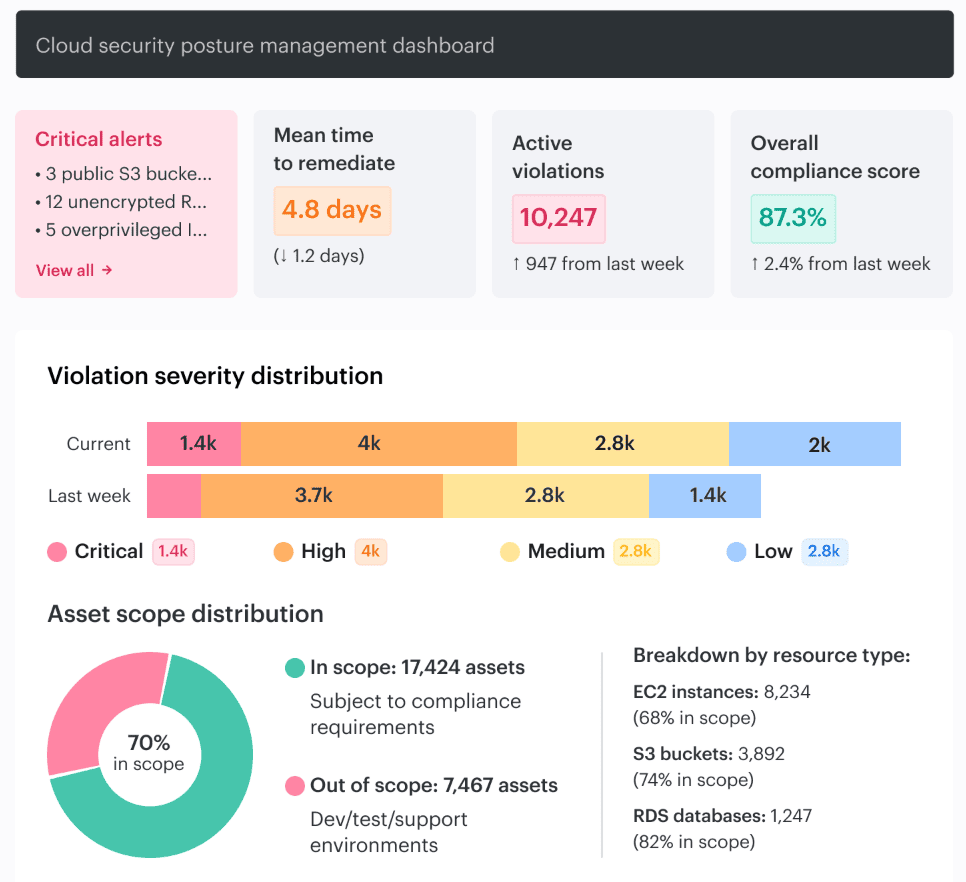
It is an S3 bucket, Azure disk, GCP database, or Kubernetes volume with an owner, environment, business service, evidence record, policy mapping, and remediation status.
That is what makes the assessment executable.
Adjacent terms, without the blur:
| Term | Practitioner meaning |
|---|---|
| Compliance framework | External requirement set: HIPAA, PCI DSS, SOC 2, ISO 27001, NIST, FedRAMP. |
| Control framework | Internal control library used to test posture. |
| Audit framework | Evidence model auditors use to verify control performance. |
| Assessment methodology | The workflow for running the assessment. |
Mature programs use one assessment framework mapped to multiple standards, similar to the UCF model. This approach reduces duplicate evidence requests and prevents teams from testing the same IAM, logging, encryption, and exposure controls in five different ways.
Use the methodology that complements this framework for the assessment workflow. Use this guide for the matrix, cloud security assessment checklist, cloud security assessment questionnaire, and cloud security assessment template that make the framework operational.
Mikhail M., General Manager, Cloudaware:
The three layers of a working cloud security assessment framework
A cloud security assessment framework only works when it separates architecture, controls, and execution evidence.
Blur those layers, and the assessment gets messy fast: one team argues scope, another exports screenshots, GRC keeps asking for mappings, and engineering gets findings with no owner or asset context.
Here’s the clean model.
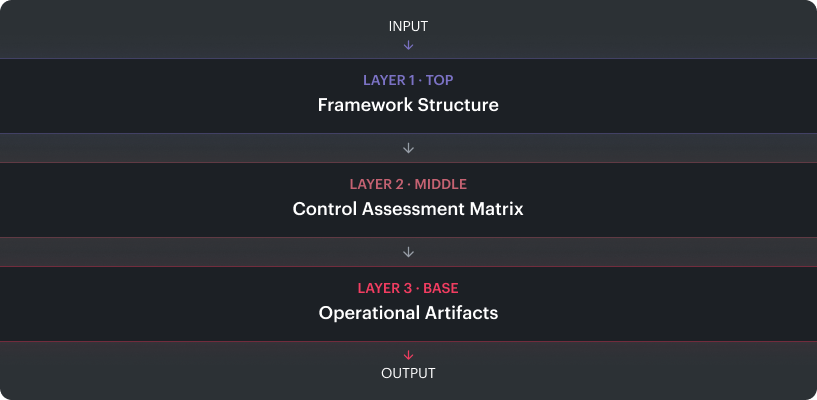
Layer 1: Framework structure
This is the assessment meta-model. It defines which domains are in scope: identity, data, workloads, network exposure, vulnerability posture, logging, compliance, and remediation ownership.
It also defines the scoring model. Some teams use CMM maturity levels from 1 to 5. Others use NIST CSF tiers. The point is consistency: AWS accounts, Azure subscriptions, GCP projects, Kubernetes clusters, SaaS apps, and on-prem systems get assessed through the same structure.
Layer 2: Control assessment matrix
The matrix is the control catalog. It maps each requirement to standards such as NIST 800-53, CIS Benchmarks, ISO 27001, SOC 2, PCI DSS, HIPAA, or FedRAMP.
This is the artifact that survives tool changes, team changes, and audit cycles.
In a Cloudaware assessment report, one failed control can show the affected CI, related business application, policy result, evidence, owner, and remediation status in the same view.
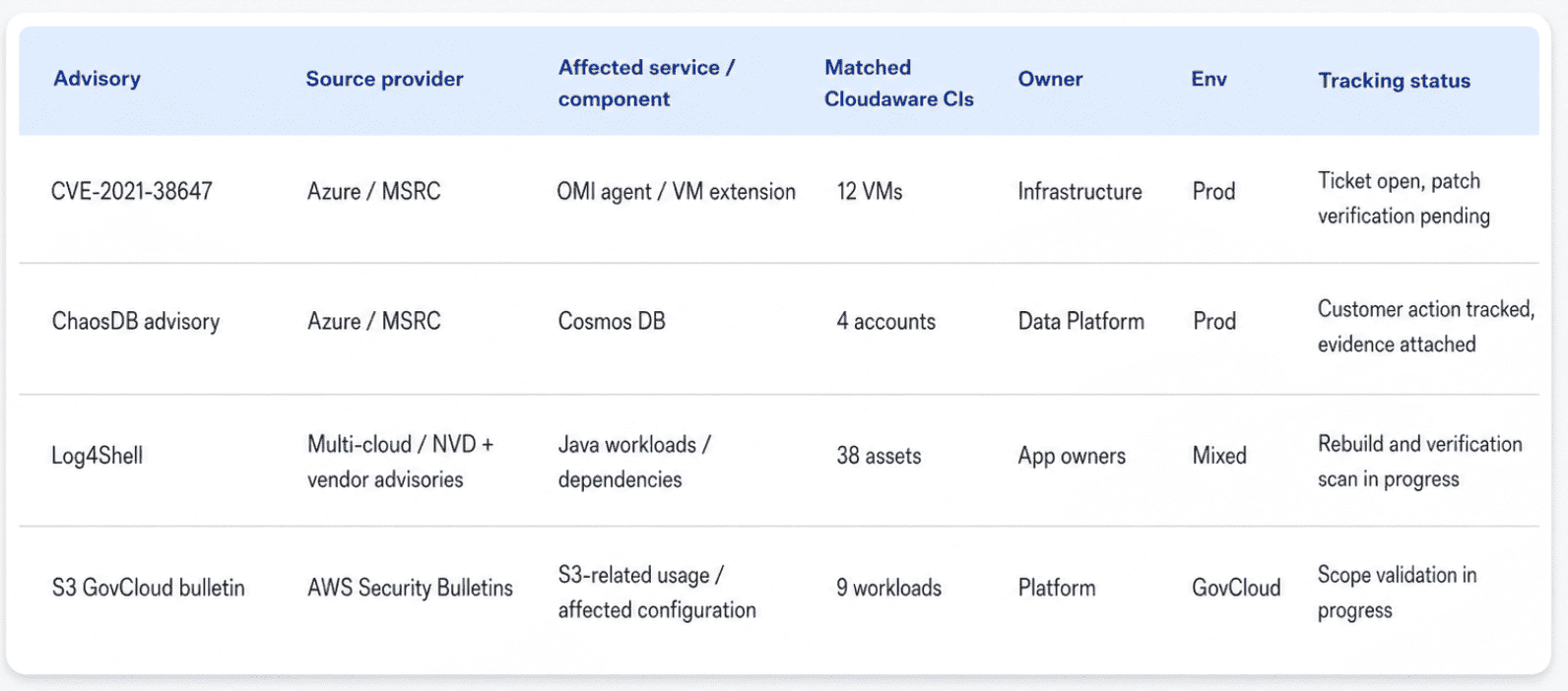
That matters because “logging not enabled” is not actionable. “CloudTrail disabled in production account owned by Platform Security, mapped to SOC 2 CC7.2 and CIS AWS 3.1, ticket open for 11 days.” is.
Layer 3: Operational artifacts
These are the deliverables auditors and operators actually touch:
| Artifact | Purpose |
|---|---|
| Checklist | Assessor’s running validation document. |
| Questionnaire | Inputs from system owners, vendors, and platform teams. |
| Template | Report structure for scope, findings, evidence, owners, exceptions, and remediation. |
These artifacts go in the data room because they prove how the assessment ran.
If the control matrix has no asset owner, evidence link, or exception expiry, it is not an assessment artifact. It is a control inventory pretending to be operational.
Read also: Popular DevSecOps Frameworks for Cloud Security in 2026
The cloud security control assessment matrix — structure and sample rows
A cloud security control assessment matrix is the assessment’s working table: one row per control, mapped to standards, assets, owners, evidence, exceptions, and remediation status.
This is the artifact that makes one assessment reusable across NIST 800-53, CIS Benchmarks, ISO 27001, PCI DSS, HIPAA, and CSA CCM v4. Without the cross-walk, teams end up proving the same IAM, logging, encryption, vulnerability, and vendor-risk controls in different formats for every audit.
A strong control matrix usually includes:
| Field | Why it matters |
|---|---|
| Control ID | Keeps the row stable across audits and tool changes. |
| Control statement | Defines what must be true. |
| Standard mapping | Links the row to NIST, CIS, ISO, PCI, HIPAA, CSA CCM, or internal policy. |
| Asset scope | Shows which AWS accounts, Azure subscriptions, GCP projects, clusters, SaaS apps, or on-prem systems are tested. |
| Evidence source | Points to CSPM result, CMDB record, SIEM ingestion, scanner output, ticket, config snapshot, or owner attestation. |
| Owner | Assigns remediation to a real team. |
| Exception expiry | Prevents “temporary” risk from becoming permanent. |
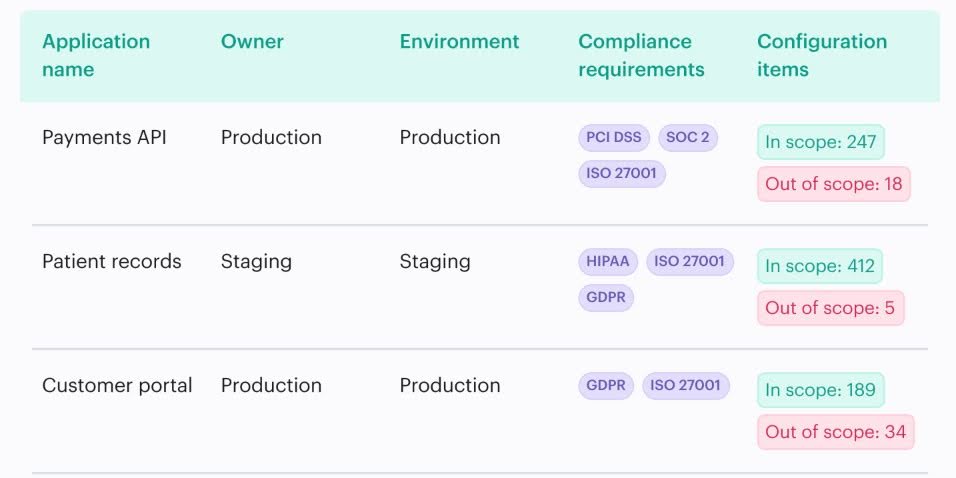
In a Cloudaware assessment report, the useful row is not “MFA failed.” It looks closer to this:
IA-2(1) admin MFA control → mapped to CIS 1.5 and PCI 8.3.1 → 14 failed identities → 3 production accounts → Identity team owner → CSPM evidence attached → 2 exceptions expiring this quarter → Jira tickets open.
That format gives security, GRC, and platform teams the same object to work from.
| Control | NIST 800-53 | CIS / ISO | PCI / HIPAA | Owner |
|---|---|---|---|---|
| MFA on admin access | IA-2(1) | CIS 1.5 / ISO A.9.4.2 | PCI 8.3.1 / HIPAA 164.312(d) | Identity / CSPM evidence |
| Encryption of data at rest | SC-28 | CIS 2.1.1 / ISO A.10.1.1 | PCI 3.4 / HIPAA 164.312(a)(2)(iv) | Data / KMS config |
| Audit logging on control plane | AU-2, AU-3 | CIS 3.1 / ISO A.12.4.1 | PCI 10 / HIPAA 164.312(b) | SecOps / SIEM ingestion |
| Vulnerability management | RA-5, SI-2 | CIS 7 / ISO A.12.6.1 | PCI 6 / HIPAA 164.308(a)(8) | Vuln mgmt / scanner output |
| Configuration drift detection | CM-3, CM-6 | CIS 5 / ISO A.12.5.1 | PCI 2.2 / HIPAA 164.308(a)(1) | Platform / CSPM |
| Least privilege on IAM roles | AC-6 | CIS 1.16 / ISO A.9.2.3 | PCI 7.1 / HIPAA 164.308(a)(4) | Identity / IAM evidence |
| Network segmentation | SC-7 | CIS 5.4 / ISO A.13.1.3 | PCI 1.3 / HIPAA 164.310(d) | Network / VPC + SG config |
| Incident response testing | IR-1 to IR-8 | CIS 19 / ISO A.16.1.1 | PCI 12.10 / HIPAA 164.308(a)(6) | SecOps / IR playbook |
| Backup recovery testing | CP-9, CP-10 | CIS 11 / ISO A.12.3.1 | PCI 9.5 / HIPAA 164.308(a)(7) | Platform / backup test logs |
| Third-party / BA risk evaluation | SR, SA-9 | CIS 15 / ISO A.15 | PCI 12.8 / HIPAA 164.308(b) | GRC / TPRM register |
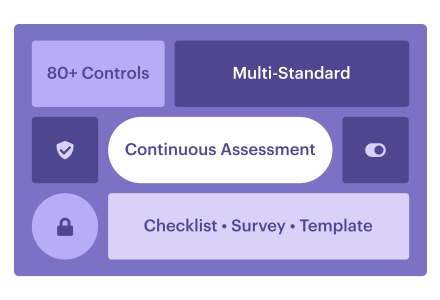
Use these ten rows as a preview. The full matrix should cover 80+ controls across Identity, Data, Workload, Posture, Network, Detection, Compliance, Resilience, and Vendor Risk.
Read also: 12 Best Cloud Security Assessment Tools for 2026
The cloud security assessment checklist — embedded 20-row version
A cloud security assessment checklist is the assessor’s live worklist: one control check, one severity, one verification path, one evidence source.
The matrix handles standards mapping. The questionnaire collects owner input. The checklist is what security, GRC, SecOps, and platform teams use to confirm whether a control passed, failed, needs evidence, or requires an exception.
For most enterprise assessments, a focused cloud security assessment checklist with 20 to 50 rows works better than a 200-row spreadsheet that dies halfway through review. Start with the controls that create real exposure: privileged access, data encryption, public assets, vulnerability SLA breaches, missing logs, expired exceptions, and third-party risk.
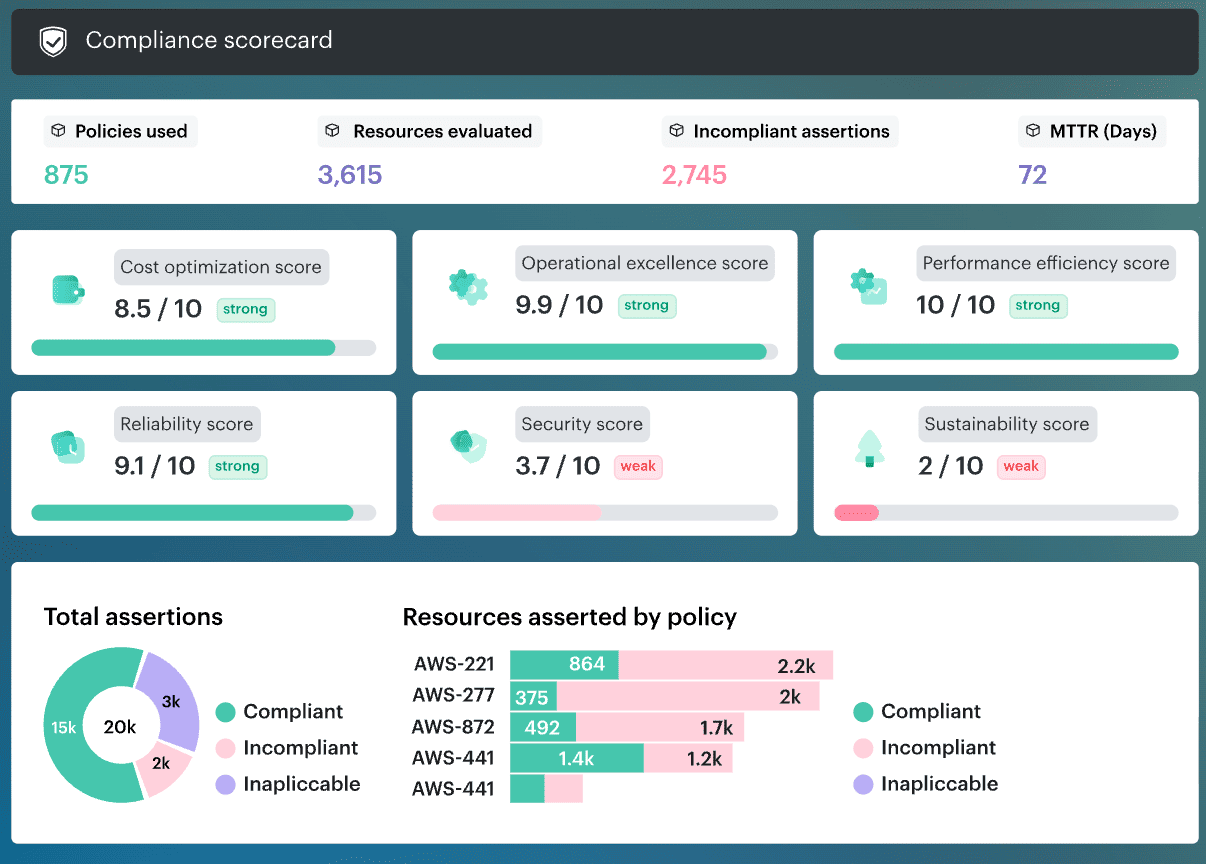
A Cloudaware checklist view can turn each failed check into an operational record: affected CI, business service, policy result, owner, evidence, exception status, and remediation ticket. That gives the assessor a proof path, not another screenshot folder.
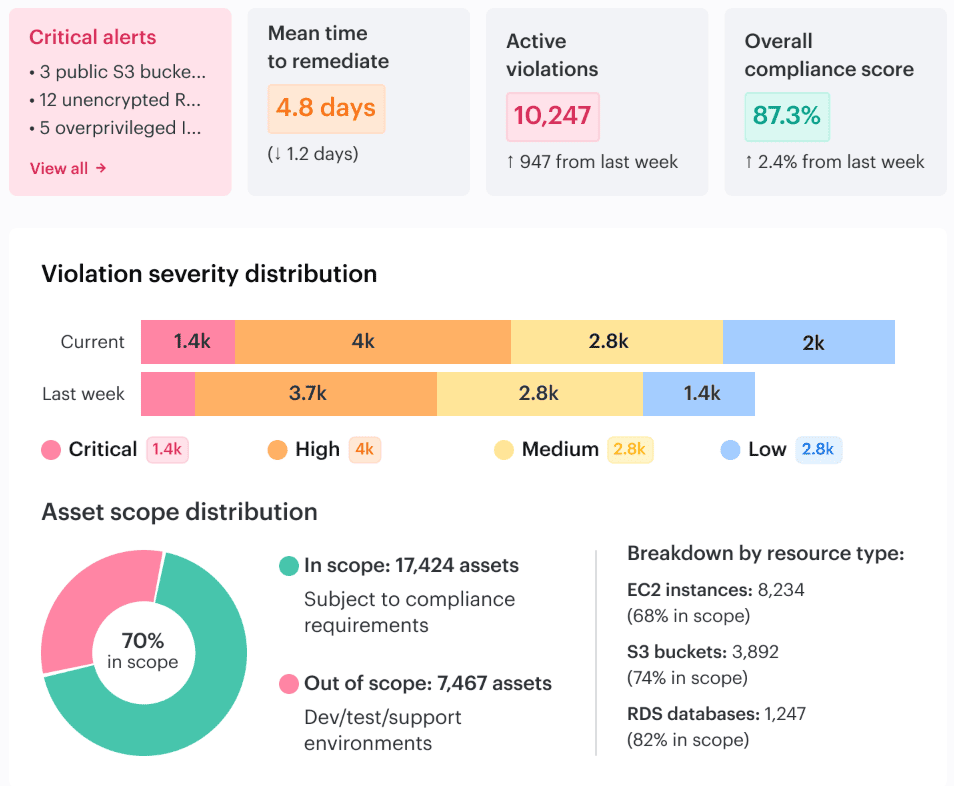
Here is one of the numerous reports our clients use during audit:
What goes in a cloud security assessment checklist?
Each row should include control area, control check, severity, verification method, and expected evidence. Treat the table below as a focused cloud security risk assessment checklist for the controls most teams review first.
| Control area | Check | Severity | How to verify / evidence |
|---|---|---|---|
| Identity | MFA enforced on all admin and root accounts | Critical | IAM policy, login history, 10 admin-session samples with MFA flag |
| Identity | No long-lived access keys older than 90 days | High | IAM key age report, CMDB ownership lookup |
| Identity | Service accounts have owners and expiry dates | High | CMDB query for service accounts with empty owner or expiry fields |
| Identity | Privileged access logs retained for at least 1 year | Medium | SIEM retention policy, sample 12-month-old IAM events |
| Data | Encryption at rest enabled for production data stores | Critical | CSPM findings for S3, EBS, RDS, Cosmos DB, databases, and volumes |
| Data | TLS 1.2+ enforced for data in transit | High | Load balancer, gateway, ingress, and web app configuration evidence |
| Data | Sensitive data tagged as PHI, PCI, or PII | High | CMDB query for production data stores missing data classification |
| Data | Retention policies implemented and tested | Medium | Storage lifecycle policy plus restore test from the last 90 days |
| Workload | Vulnerability scanner covers in-scope assets | Critical | CMDB query for assets not scanned in the last 7 days |
| Workload | Critical and High CVEs outside SLA are zero in prod | High | Vulnerability dashboard filtered by prod, severity, and SLA age |
| Workload | Container images scanned before deployment | High | CI/CD logs showing scan step for production image pipelines |
| Posture | CIS or NIST CSPM baseline meets target pass rate | High | CSPM score by environment, documented failed-control deltas |
| Posture | Configuration drift reviewed weekly | Medium | Drift report, review date, remediation ticket history |
| Network | Public exposure inventory is current | Critical | External scan plus CMDB cross-check for public IPs, buckets, and endpoints |
| Network | Prod and non-prod segmentation enforced | High | VPC, subnet, firewall, and security group rule review |
| Detection | SIEM ingests all in-scope log sources | Critical | Log-source completeness dashboard, gap list, ingestion status |
| Detection | Critical alerts have runbooks and owners | High | Runbook library matched to critical detections, sample 5 for currency |
| Compliance | Evidence collection runs continuously | High | Rule finding lifecycle, 10 sampled findings with evidence attached |
| Compliance | Exceptions have owner, expiry, and review date | High | Exception register, expired-but-active exception count |
| Vendor risk | Business associates and third parties are inventoried | Medium | CMDB records with BAA status, PHI volume, and last attestation date |
Extra tip: Add a separate test for zero-day vulnerability response readiness: affected asset discovery, temporary mitigation, owner escalation, exception expiry, monitoring coverage, and verification once a fix becomes available.
The downloadable checklist can add another 30 rows for medical devices, AI vendors, sovereign cloud, break-glass access, regulated data flows, backup immutability, SaaS admin sprawl, and disaster recovery.
The cloud security assessment questionnaire
A cloud security assessment questionnaire is the owner-facing artifact for system owners, app teams, platform teams, and vendors. Its job is not to collect opinions. Its job is to collect evidence references the assessor can verify.
The checklist tells the assessor what to test.
The questionnaire tells the owner what to prove.
That difference matters. In Cloudaware client assessments, questionnaire answers are checked against discovered CMDB inventory. If an owner lists two AWS accounts but the CMDB shows five related production accounts, the response is incomplete before the control review even starts.
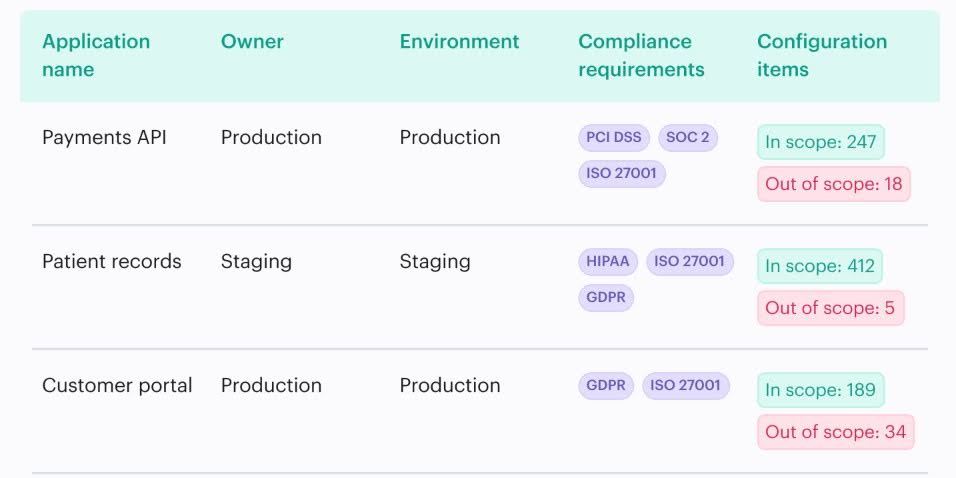
For risk scoring and treatment logic, use the cloud security risk assessment questionnaire. This version supports the framework: scope, evidence, ownership, and control validation.
| Category | Question |
|---|---|
| Scope | Which AWS accounts, Azure subscriptions, GCP projects, Kubernetes clusters, SaaS apps, and on-prem systems are in scope? Provide CMDB view or account list. |
| Scope | What data classification exists in scope: PHI, PCI, PII, confidential, public? Provide classification source. |
| Scope | Who owns each in-scope system? Provide CMDB ownership export. |
| Identity | Is MFA enforced for admin and privileged access? Provide IAM policy, login sample, and exception list. |
| Identity | How are service accounts and machine identities owned, reviewed, and expired? Provide register or CMDB query. |
| Identity | How fast is access revoked after termination? Provide last-quarter offboarding sample. |
| Data | Is encryption at rest enabled for every in-scope production data store? Provide CSPM evidence and KMS ownership. |
| Data | Is TLS 1.2+ enforced on exposed endpoints? Provide load balancer, ingress, gateway, or app config. |
| Data | How is sensitive data identified and tracked? Provide DSPM output, tags, or classification report. |
| Posture | Which CSPM baseline is enforced: CIS, NIST, or custom? Provide current scorecard. |
| Posture | How is configuration drift detected and remediated? Provide drift register and ticket history. |
| Detection | Which log sources feed the SIEM? Provide log-source inventory and completeness ratio. |
| Detection | What were MTTD and MTTR for the last 90 days? Provide SOC metrics. |
| Compliance | Which frameworks does this scope support: HIPAA, PCI, SOC 2, ISO 27001, FedRAMP? Provide evidence repository and cadence. |
| Exceptions | How are accepted risks and compensating controls approved, reviewed, and expired? Provide exception register. |
Vendor-risk questionnaires need more depth: business associate status, PHI volume, subcontractors, hosting model, data residency, incident disclosure, audit rights, and breach notification timelines.
Read also: Cloud Data Security Challenges: 10 Issues & Fixes
The cloud security assessment template: section structure
A cloud security assessment template is the report shell that keeps scope, findings, evidence, risk decisions, and remediation traceable after the assessment ends.
Bad reports fall apart in the second review cycle. Nobody can tell which assets were tested, which control failed, whether the exception expired, or why the owner accepted the risk. A strong cloud security assessment report template prevents that by forcing every finding to carry the same fields: asset, control, evidence, owner, severity, SLA, exception status, and remediation path.
Use this structure:
| Report section | Required content |
|---|---|
| Executive summary | Scope, assessment window, top 5 findings, risk posture, priority actions. |
| Scope and methodology | Included accounts, subscriptions, projects, clusters, SaaS apps, on-prem systems, exclusions, frameworks used. |
| Asset inventory snapshot | CMDB export with CI name, environment, owner, business service, data class, exposure. |
| Control matrix evaluation | Pass/fail status by control, mapped to NIST, CIS, ISO, PCI, HIPAA, or internal policy. |
| Findings catalog | Severity, affected CIs, evidence, impact, owner, ticket, remediation guidance. |
| Risk register update | Accepted risks, compensating controls, transferred risks, SLAs, review dates. |
| Compliance summary | Framework scorecards with evidence references. |
| Remediation plan | POAM actions, dependencies, target dates, ticket status. |
| Evidence appendix | CSPM exports, SIEM queries, scanner output, CMDB views, ticket history. |
| Sign-offs | Assessor, system owner, GRC, security owner, business owner. |
In a Cloudaware, a failed control resolves to a record:
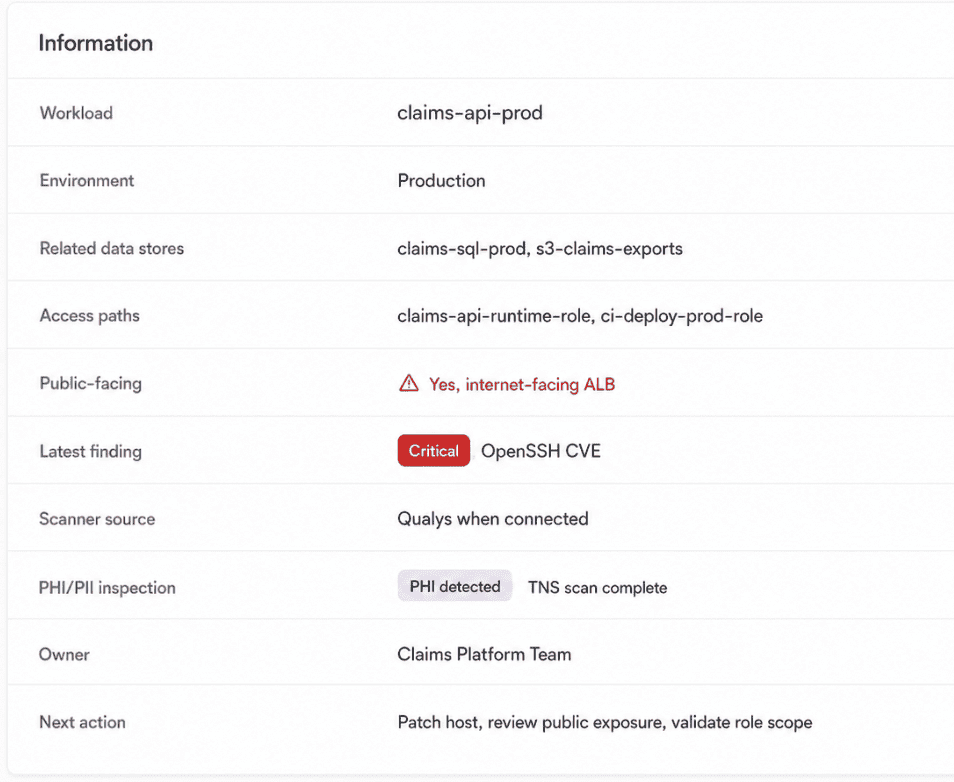
That is the difference between a cloud risk assessment template and a report people can actually operate from.
Read also: 2026 Guide on How to Conduct a Cloud Security Assessment
How assessment tools (CMDB, CSPM, SIEM, Qualys) feed the framework
A cloud security assessment framework needs live evidence from the tools already running in the environment. Otherwise, the matrix becomes a static control list and the report becomes a screenshot archive.
Use the tools by evidence type:
| Tool layer | Evidence it contributes | Assessment use |
|---|---|---|
| CMDB | Asset discovery, owner, environment, business service, data class, relationships | Scope validation, affected CIs, ownership |
| CSPM | Policy pass/fail, drift, public exposure, encryption, IAM posture | Control matrix status, checklist evidence |
| Vulnerability scanner | CVEs, affected workloads, scan age, severity, SLA breach | Workload-security findings |
| SIEM | Log-source coverage, alert history, MTTD, MTTR, audit trail | Detection and monitoring controls |
| IT Compliance / GRC | Rule findings, exceptions, evidence packets, sign-offs | Compliance scorecards, report appendix |
In Cloudaware assessment reports, the CMDB usually becomes the join layer. AWS accounts, Azure subscriptions, GCP projects, VMware assets, Kubernetes clusters, SaaS apps, and on-prem systems resolve to CIs. CSPM, Qualys, SIEM, scanner, and compliance findings then attach to those CIs.
Qualys cloud security assessment
A qualys cloud security assessment should feed the workload-security rows of the matrix. Qualys may show a critical CVE. The assessment still needs exposure, owner, business services, patching SLA, compensating control, exception status, and remediation tickets.
Scanner output becomes evidence only after it is tied to an asset and control.
SIEM cloud security assessment
A SIEM cloud security assessment verifies detection coverage across all relevant log sources. SIEM data from Cloudaware Conflux, Splunk, Microsoft Sentinel, Chronicle, Datadog SIEM, or another platform should prove log-source completeness, alert coverage, MTTD, MTTR, PCI Req. 10 evidence, and HIPAA §164.312(b) audit activity.
“Logs connected” is too weak for assessment evidence. The assessor needs coverage across the asset scope, including control-plane events, privileged access, data access, network flow, and critical workload logs.
Read also: A 2026 Practitioner Guide to Cloud Security Vulnerabilities
The cloud security assessment process — running the framework continuously
A cloud security assessment process is the operating rhythm behind the framework. The framework defines the controls. The process decides how often evidence refreshes, who reviews failures, and when risk owners sign off.
Igor K., DevOps Engineer at Cloudaware
Most teams land in one of three modes.
- Annual point-in-time assessment. The team collects screenshots, exports, scanner reports, SIEM queries, and owner answers once a year. It satisfies the calendar. It rarely reflects the environment by the time remediation starts.
- Quarterly assessment cycle. Better. Scope, findings, evidence, and exceptions get refreshed four times a year. Still, a 90-day gap is a long time in cloud. One new public bucket, unmanaged service account, or dropped log source can sit unnoticed until the next review.
- Continuous assessment with quarterly attestation. This is the model that scales. CSPM updates posture evidence. Vulnerability scanners refresh workload risk. SIEM confirms detection coverage. CMDB ownership keeps scope tied to real assets. The quarterly meeting becomes attestation, not data collection.
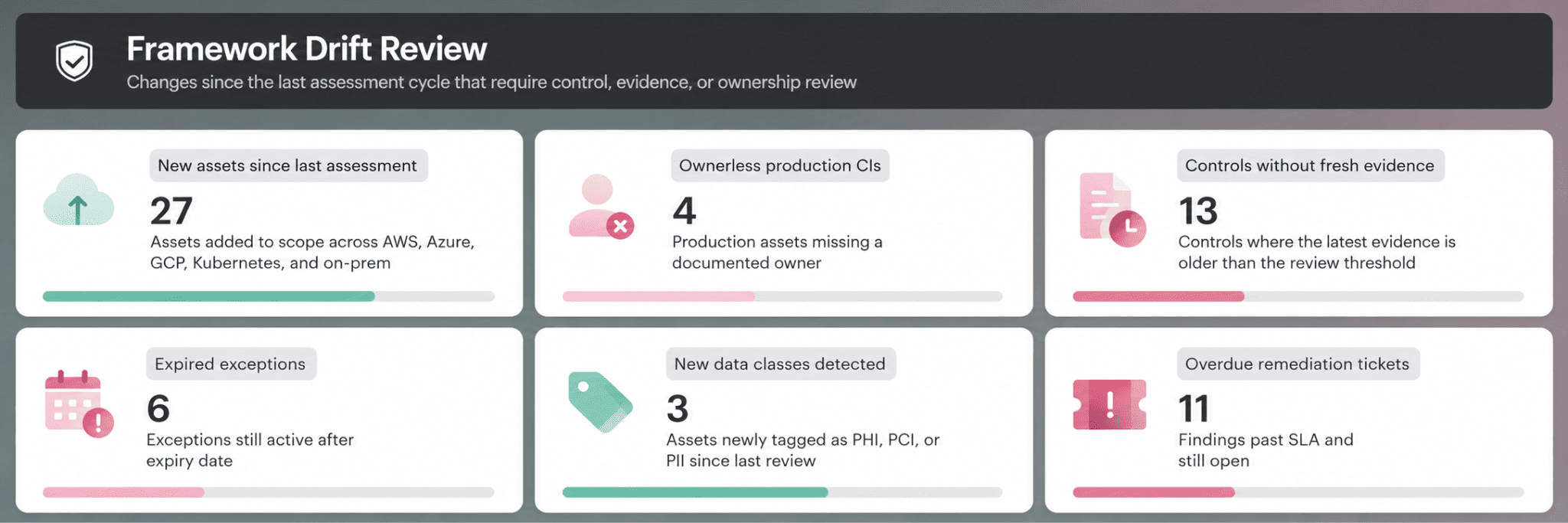
In a Cloudaware report the useful screen is the delta view. Show what changed since the last sign-off:
That is what a reviewer can act on.
Continuous does not mean running the questionnaire every morning. It means the evidence behind the framework stays current, while formal reviews produce the signed record for SOC 2 Type II, FedRAMP continuous cloud security monitoring, ISO 27001 surveillance, PCI, HIPAA, and internal risk committees.
For the operational methodology, including scope, identify, score, and treat, see the Cloud Security Strategy article.
Pitfall to avoid: if every quarterly review starts with “send fresh screenshots,” the process is still manual. It just has a shorter deadline.
4 mistakes applying the cloud security assessment framework
1. Treat the framework like an operating system, not a setup task
The first assessment usually looks clean. Controls mapped. Owners assigned. Evidence linked. Exceptions documented. Everyone feels slightly too proud of the matrix.
Then the estate changes.
A new AWS account appears for analytics. Azure subscriptions move to another platform team. A GCP project starts processing regulated data. Kubernetes labels drift. Someone adds a privileged SaaS role during an urgent rollout. On-prem systems get pulled back into scope after an acquisition.
Nothing dramatic happens in one day. That is why the framework gets stale quietly.
By the next assessment, the team may be testing last year’s control model against this year’s environment.
Valentin Kel, Cloudaware DevOps Engineer
Here is the report our clients use in this case:
Use it before quarterly attestation. Look for the ugly gaps first:
- New assets not mapped to controls
- Controls with stale or missing evidence
- Exceptions past expiry
- Production CIs without owners
- Framework mappings that no longer match the compliance scope
- Tickets still open after SLA
The practical rule is simple: if scope changes, the framework changes.
A control matrix that does not follow the estate becomes audit wallpaper. It may look complete. It will not protect the assessment.
2. Stop letting the report template choose the assessment
The fastest way to make an assessment look complete and still miss risk is to start with the report.
Sounds harmless. Open the old cloud security assessment template, keep the same sections, update the dates, ask teams for fresh evidence.
That is how gaps disappear. Not because anyone hides them. Because the template has already decided what counts.
IAM gets a section. Encryption gets a section. Logging gets a section. Vulnerabilities get a section. Fine.
Then the ugly stuff lands outside the frame: a new SaaS admin group, orphaned service accounts, non-prod assets exposed to the internet, Kubernetes workloads with no owner, a vendor system processing regulated data, an on-prem dependency nobody included in the cloud scope.
If Kubernetes is in scope, the assessment should also map Kubernetes security options in cloud to the control matrix, because admission, runtime, RBAC, network policy, image risk, and posture checks produce different evidence.
A better sequence:
- Confirm scope from inventory
- Map controls to the actual estate
- Validate evidence against live systems
- Write the report from the findings
In a Cloudaware repots, the useful signal is mismatch. If the framework contains 120 active controls, but the draft cloud security assessment report template only carries 78 into the findings section, the gap should be visible before the report goes to GRC. Same for assets: if 14 production CIs have failed controls and only 9 appear in the report, the template is filtering reality.
Igor, Cloudaware DevOps Engineer:
Practical rule: frame first, template last. The template is the packaging layer. The framework is the assessment brain.
Read also: 25 Cloud Security Best Practices: Strategy, Checklist, Monitoring, and Automation
3. Run the questionnaire before audit pressure changes the answers
Three days before the audit, a questionnaire stops being assessment input. It becomes survival writing.
The system owner is not trying to mislead anyone. They are trying to answer 40 security questions between deployment reviews, incident follow-ups, and a platform migration. A major migration should trigger a focused cloud migration data security review before the assessment team accepts the new environment as stable.
So the answers get cleaner than reality:
| Audit-week answer | What the assessor still needs |
|---|---|
| “MFA is enabled.” | Which admin paths, which exceptions, which login sample? |
| “Logs go to SIEM.” | Which sources, which accounts, what coverage ratio? |
| “Data is encrypted.” | Which stores, which keys, who owns rotation? |
| “Service accounts are managed.” | Owner, purpose, last review, expiry date. |
A cloud security assessment questionnaire should not arrive at the end of the cycle. It should run as a live owner record inside the cloud security assessment framework.
When a team adds a production workload, changes a data classification, creates a machine identity, accepts a compensating control, or brings in a vendor, the answer should update then. Quarterly attestation should confirm the record still reflects the estate.
That is where the questionnaire earns its place.
Valentin Kel, Cloudaware DevOps
Practical rule: questionnaire first, attestation later. If the first time an owner sees the form is audit week, the process already failed.
4. Anchor every artifact to the CMDB
The framework falls apart when asset identity is treated like admin metadata.
One VM shows up as an IP in Qualys.
As a workload in the CSPM scan.
As a log source in the SIEM.
As “Payments API” in the questionnaire.
As “critical app dependency” in the report.
Same asset. Five names. Five owners, sometimes. Three different risk stories by Friday.
That is how a cloud security assessment framework gets messy in hybrid environments. The matrix cannot prove which control failed. The checklist cannot verify scope. The questionnaire depends on what the owner remembers. The final template turns into a stitched report with screenshots that almost match.
In practice, every artifact needs the same join key: the CI.
A Cloudaware finding resolves to one record:
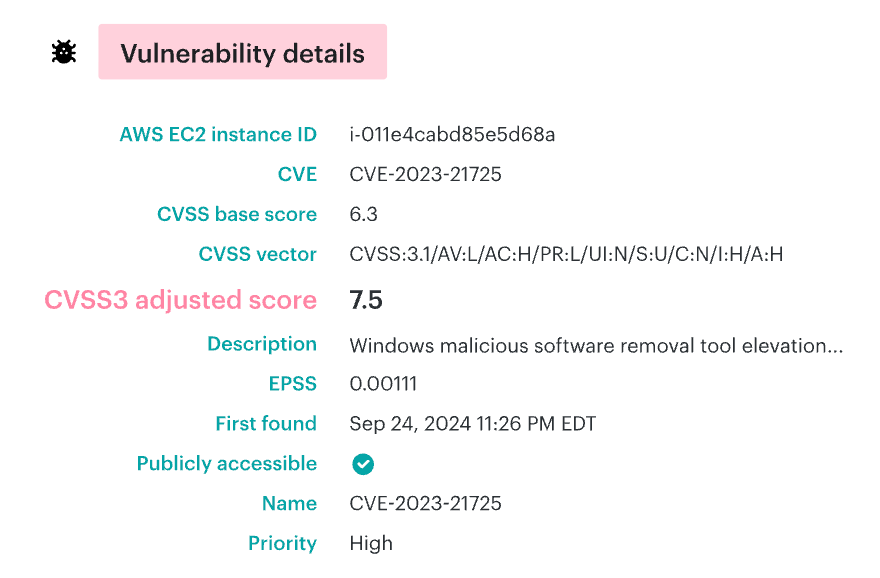
That record can feed the matrix, checklist, questionnaire, and report without renaming the asset four times.
Igor K., DevOps Engineer at Cloudaware
Before trusting the assessment, check this:
- Can every failed control resolve to a CI?
- Does each questionnaire answer match discovered assets?
- Can scanner output inherit owner, environment, and business service?
- Does SIEM coverage show by in-scope asset, not just by log source?
- Does the report keep the same CI name from finding to remediation?
No CMDB join, no reliable assessment trail.
Make the assessment framework executable in Cloudaware
Cloudaware helps cloud security, DevSecOps, SecOps, and GRC teams run the assessment framework from live infrastructure data instead of static files.
The practical value: every row in the matrix, every checklist item, every questionnaire answer, and every report finding resolves to the same object: a CMDB asset with owner, environment, business service, evidence, exception status, and remediation history.
That is what keeps the framework usable after the audit call.
A Cloudaware assessment view can show the full trail: Failed control → affected CI → framework mapping → evidence packet → owner → exception expiry → Jira / ServiceNow ticket
So “encryption missing” becomes a real finding: unencrypted production RDS instance, Payments API, Data Platform owner, SC-28 mapped to HIPAA and PCI, CSPM evidence attached, no exception, remediation overdue by 6 days.
The modules behind that workflow:
- CMDB anchors the framework with asset inventory across AWS, Azure, GCP, Oracle, Alibaba, VMware, Kubernetes, and on-prem, covering 3,000+ service types.
- IT Compliance evaluates controls continuously with YAML / DSL policies, UCF mapping to 900+ authority documents, and rule findings with owner, SLA, evidence, and lifecycle.
- CSPM supplies posture evidence: policy failures, coverage scores, configuration drift, and exemption lifecycle.
- Vulnerability Management feeds workload-security rows from Qualys, Tenable, Wiz, Nessus, CrowdStrike, AWS Inspector, and other scanners, then adds CMDB context for prioritization and ticket routing.
- SIEM / Conflux supports detection controls with log-source completeness, CMDB-enriched events, MTTD, MTTR, and false-positive metrics.
- Intrusion Detection covers file integrity and log inspection rows for HIPAA §164.312(c)(1), PCI Req. 11.5, and SOC 2 CC6.6.