


Search “cloud security posture management AWS,” and you’ll find plenty of setup guidance. Useful in month one. By month eighteen, the problem has changed.
Suppose AWS Security Hub CSPM and AWS Config have been running across 22 accounts for a year. Monday’s queue contains 20,000 findings. The CFO wants to know whether another CSPM license would reduce risk or duplicate tools already funded. Application owners still cannot tell which fixes are theirs.
Native AWS coverage is substantial. AWS Security Hub CSPM collects findings and runs checks against security standards. Resource configurations are recorded by AWS Config, which also evaluates them against rules. Trouble starts where those services meet account structure, cost control, ownership, and remediation.
This guide skips the beginner tour. For the baseline, start with our cloud security posture management guide. Here, you’ll place your program on a maturity curve, apply five senior operating moves, and inspect the failures that emerge as it scales. We’ll use the AWS Security Reference Architecture as the design reference, then finish with four concrete triggers for deciding whether the native stack is enough.
What AWS CSPM actually is: the six-service reality (and the AWS SRA)
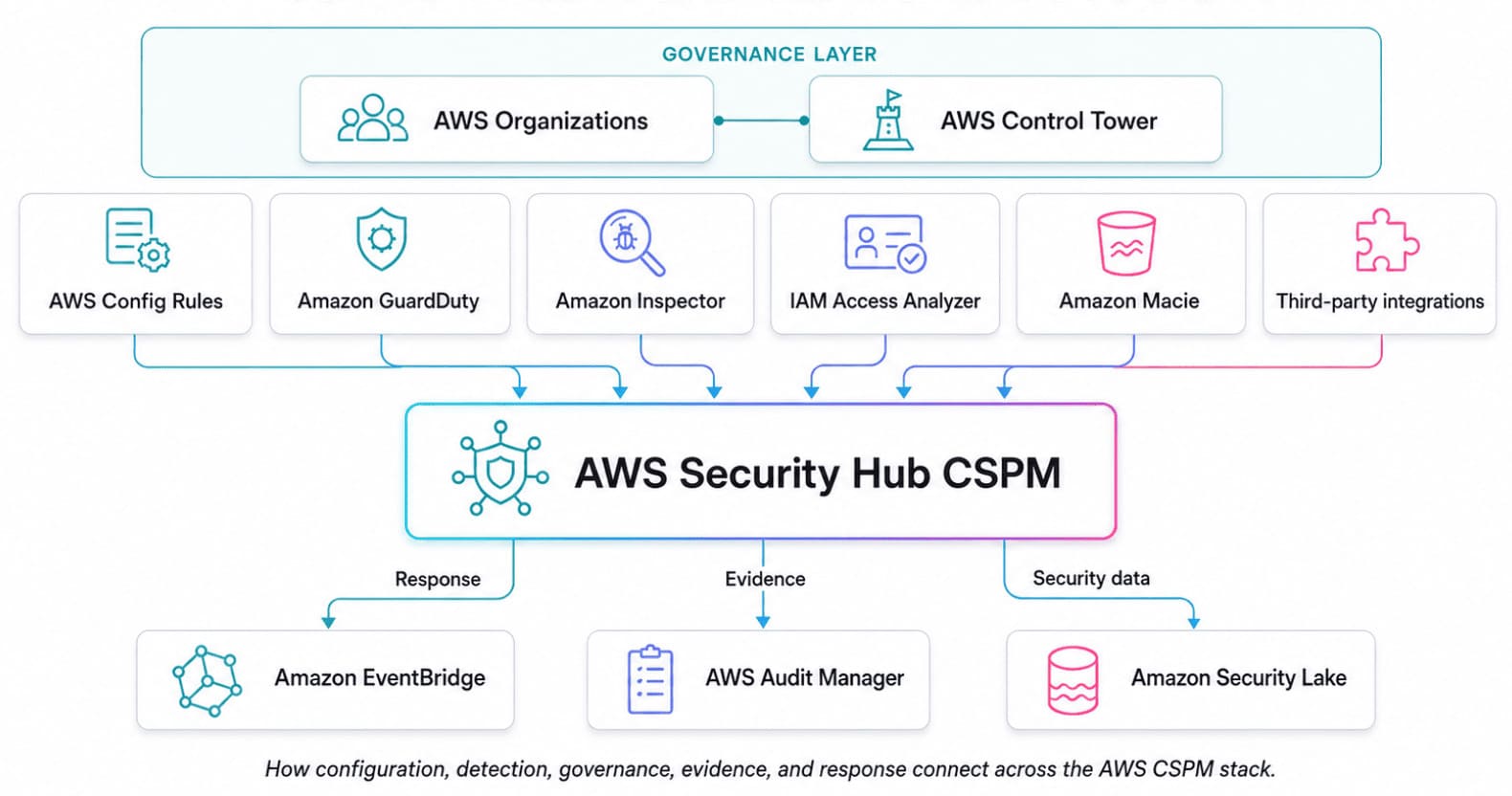
AWS cloud security posture management is not a single service. It is six connected parts, several inspecting the same resource for different reasons.
| Part | Job |
|---|---|
| AWS Security Hub CSPM | Runs standards-based controls and normalizes findings. |
| AWS Config and AWS Config Rules | Record supported configurations and evaluate managed or custom rules. Most Security Hub controls rely on service-linked Config rules. |
| AWS Organizations and SCPs | Limit permissions available in member accounts. SCPs do not grant access. |
| AWS Control Tower | Governs the multi-account landing zone with preventive, detective, and proactive controls. |
| GuardDuty, Inspector, IAM Access Analyzer, and Macie | Add threat, vulnerability, external-access, and sensitive-data findings. |
| AWS Audit Manager | Collects evidence against framework controls but does not determine compliance. |
Trace one finding, and the model clicks. A Config Rule, detection service, or supported integration produces the signal. Security Hub CSPM receives or creates the finding and represents it in the AWS Security Finding Format. New and updated findings then reach EventBridge, where filtered rules can trigger response workflows.
Amazon Security Lake adds an analytics route. It can collect Security Hub CSPM findings with other security logs and events, then normalize supported AWS sources to the Open Cybersecurity Schema Framework (OCSF). It complements Security Hub; it does not replace posture checks or finding management.
The AWS Security Reference Architecture maps security services to recommended accounts and organizational units. Use the AWS SRA to place delegated administration, security tooling, and logs. Then test the design: pick one failed control and identify its source, account, Region, administrator, downstream route, and evidence destination. A missing link means the stack may be enabled without being operational.
If Azure is also in scope, compare this model with our Azure cloud security posture management guide.
Where you are on the AWS CSPM maturity curve
Treat the years as stage labels, not deadlines or industry benchmarks. A ten-year AWS estate can still operate at Year 0. Your stage is the lowest row whose criteria you cannot prove with current evidence.
| Stage | Illustrative timing | What good looks like | What still hurts |
|---|---|---|---|
| Year 0: foundation | 0–6 months | AWS Security Hub CSPM, AWS Config, GuardDuty, and AWS Foundational Security Best Practices cover the intended accounts and Regions. | Findings remain in separate consoles. Coverage is uneven, while ownership depends on tags or memory. |
| Year 1: multi-account operations | 6–18 months | An AWS SRA-aligned security tooling account holds delegated administration. AWS Control Tower or an equivalent landing-zone process governs enrollment. Security Hub uses central configuration and a defined home Region for cross-Region aggregation. | Standards and Config recording expand faster than triage. Exceptions accumulate, logging coverage varies, and application ownership remains patchy. |
| Year 2: scale and evidence | 18–36 months | AWS Audit Manager, EventBridge routing, Amazon Security Lake or a SIEM, and IAM Access Analyzer support evidence, investigation, and response. Owners, exceptions, ticket age, and remediation status are tracked. | Duplicate work distorts metrics. Temporary exceptions linger, evidence still needs assembly, and another cloud or hybrid estate may enter scope. |
| Year 3+: closed-loop operations | 36+ months | Findings carry application and owner context, enter engineering workflows, and are rechecked after remediation. Evidence persists across the estate while native AWS services remain in place. | Policy parity, identity relationships, and evidence quality become harder to maintain as the environment changes. |
Do not score maturity by counting enabled services. Test the operating chain:
- Can you prove coverage across accounts and Regions?
- Does every high-risk finding reach a named owner?
- Are exceptions visible with approvers and expiry dates?
- Is remediation validated against a fresh technical check?
- Can an auditor trace the failed control, fix, and final resource state?
The first “no” becomes the next operating objective. Another platform will not move the program forward if findings still have no owner. Conversely, a native-only setup can be mature when AWS dominates the estate and those five checks pass.
Repeat the assessment quarterly and retain the evidence behind each answer. That turns the curve into a working part of your cloud security governance program, rather than a diagram everyone agrees with and nobody uses.
Best practice #1: Design the audit account per the AWS SRA
The AWS Security Reference Architecture calls this the Security Tooling account. AWS Control Tower uses "Audit" as the default name for its security account.
Either way, the design is the same: place a dedicated member account inside the Security organizational unit (OU) and then make it the delegated administrator for supported services such as AWS Security Hub, AWS Config, Amazon GuardDuty, Amazon Inspector, IAM Access Analyzer, and Amazon Macie.
➡️ Keep daily security administration out of the AWS Organizations management account. That account performs privileged organization and billing operations, and service control policies do not restrict its users or roles. AWS therefore recommends using it only for tasks that require it and delegating other responsibilities to member accounts. Security Hub central configuration also prevents the management account from serving as its own delegated administrator.
Delegation happens per service. From the management account, register the audit account against each supported service’s exact principal:
aws organizations register-delegated-administrator \
  --account-id "$AUDIT_ACCOUNT_ID" \
  --service-principal "<service-specific-principal>"
That command registers the account and grants access to AWS Organizations data. It does not complete the service’s organization-wide configuration. GuardDuty, Inspector, Macie, AWS Config, and Security Hub still require their respective setup steps, policies, and Region configuration.
Verify each result with the service API instead of assuming that one successful registration configured all of them. AWS documents this distinction in the register-delegated-administrator command reference.
➡️ For Security Hub, use the service-specific Terraform resource, executed with credentials for the management account:
provider "aws" {
  alias  = "management"
  region = var.home_region
}

resource "aws_securityhub_organization_admin_account" "audit" {
  provider         = aws.management
  admin_account_id = var.audit_account_id
}
This resource designates only the Security Hub organization administrator. It assumes trusted access is already enabled and does not configure the other security services.
➡️ Next, choose a Security Hub home Region, link the Regions you operate in, and configure cross-Region aggregation in the audit account. Central configuration applies policies from that home Region, while aggregation brings findings from linked Regions into one view.
Aggregation does not enable missing services or AWS Config recorders, so verify coverage separately for every account and Region. AWS documents the central-configuration behavior and its Region boundaries.
➡️ Consider a year-two takeover: Security Hub, an AWS Config aggregator, and GuardDuty were configured from the management account by three different engineers. Start by inventorying delegated administrators and service settings through AWS APIs. Then use a Cloudaware CSPM view grouped by AWS account and Region to compare asset and finding coverage, enriched with application and owner context. AWS remains the authority for delegation state; the cross-account view shows which workloads and teams the migration will affect.
Best practice #2: Scope AWS Config Recorder to avoid the cost blowout
AWS Config cost follows activity, not just resource count. Before narrowing a recorder, identify which accounts and resource types generate configuration items, map them to the controls that need those items, and then adjust scope or frequency. Otherwise, you may reduce the bill by quietly disabling the evidence behind AWS Security Hub and AWS Config Rules.
AWS Config pricing has three primary dimensions: configuration items recorded, active rule evaluations, and conformance pack evaluations. Advanced Query is not listed as a separate charge. In AWS’s US East pricing example, continuous recording costs $0.003 per configuration item.
Here is the cost pattern in plain arithmetic: 20 accounts × 5,000 resources × one recorded change per resource per day × 30 days × $0.003 equals $9,000 per month, before evaluations. This is an illustrative scenario, not a typical bill. It also corrects the $27,000 calculation in the original brief.
Set each RecordingGroup according to workload behavior:
- Production: continuously record the resource types required by security controls, investigations, and AWS Firewall Manager.
- High-churn workloads: consider daily recording or exclusions only after checking control dependencies. AWS identifies Spot Instances, Amazon EMR jobs, and Auto Scaling as common sources of elevated recording activity in its AWS Config guidance.
- Sandbox: use daily recording or a narrow inclusion list. Do not disable the recorder if Control Tower detective controls or Security Hub controls depend on it.
- Audit account: record the resources hosted there. An aggregator does not require
AllSupported = true; each source account and Region needs its own active recorder.
A workload-account configuration might look like this:
resource "aws_config_configuration_recorder" "workload" {
  name     = "workload-recorder"
  role_arn = aws_iam_role.config_role.arn

  recording_group {
    all_supported = false

    resource_types = [
      "AWS::IAM::Role",
      "AWS::IAM::User",
      "AWS::IAM::Policy",
      "AWS::KMS::Key",
      "AWS::S3::Bucket",
      "AWS::EC2::VPC",
      "AWS::EC2::SecurityGroup",
      "AWS::EC2::Instance",
      "AWS::RDS::DBInstance",
      "AWS::Lambda::Function",
      "AWS::ElasticLoadBalancingV2::LoadBalancer"
    ]

    recording_strategy {
      use_only = "INCLUSION_BY_RESOURCE_TYPES"
    }
  }
}
Treat that list as a starting pattern, not a universal baseline. Map every enabled rule and Security Hub control to its required resource types first. Record global IAM resources once per account in a supported Region to avoid duplicate items and evaluations.
The HashiCorp AWS provider documentation also notes that the recorder requires separate delivery-channel and recorder-status resources.
When AWS Control Tower manages Config, apply changes through the supported landing-zone customization workflow. An SCP can stop unauthorized roles from changing the recorder, but it cannot configure the recorder because SCPs limit permissions rather than deploy resources.
Illustrative scenario: AWS Config spend rises from $1,200 to $8,400. Cost Explorer isolates five expensive accounts and shows whether configuration items or evaluations drove the increase. Run a Cloudaware query across those accounts and Regions to inspect their resource mix, applications, and owners.
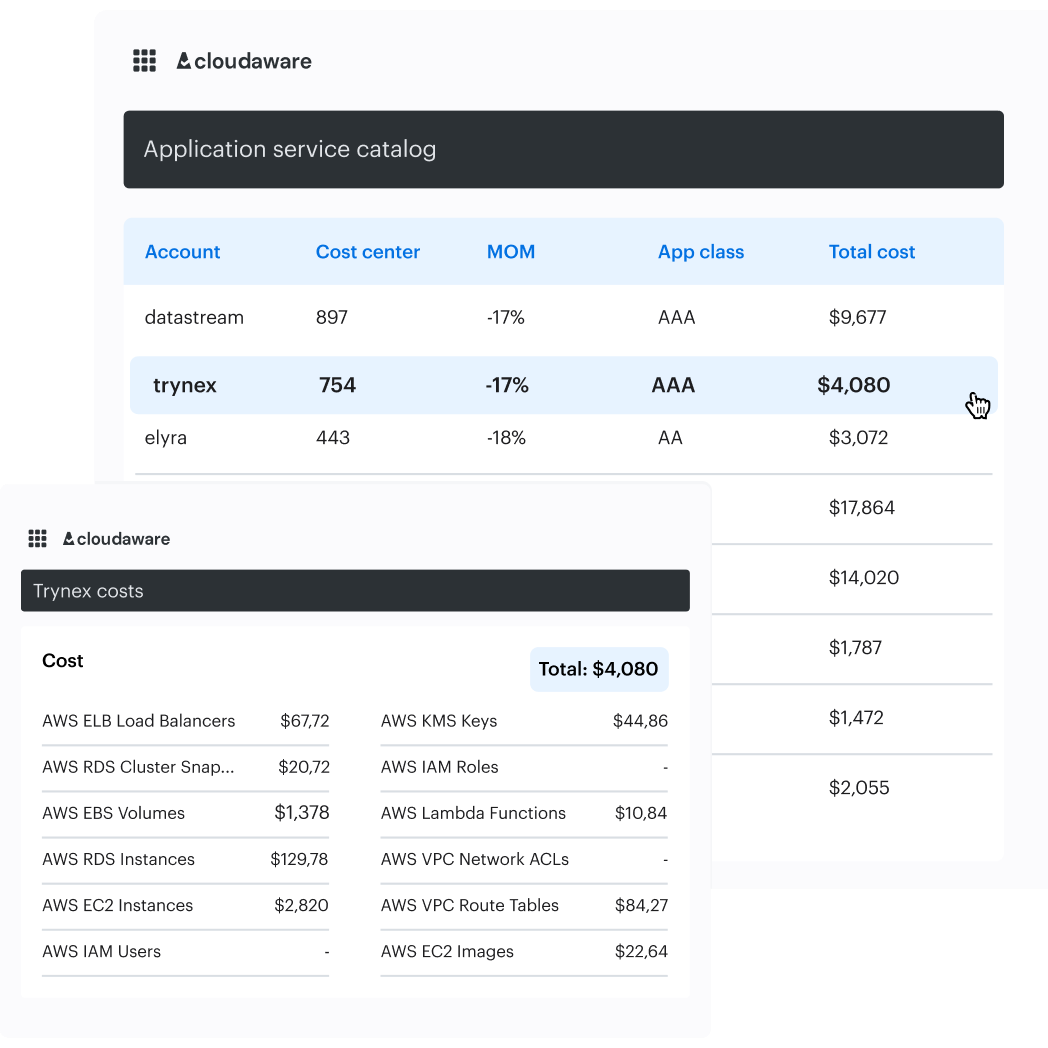
Validate suspected high-churn types in AWS Config history before changing Terraform. After deployment, use Cost Explorer for billing truth and the Cloudaware CSPM view to check that asset and finding coverage did not unexpectedly shrink.
| Dashboard signal | Authoritative source | Decision it supports |
|---|---|---|
| Monthly Config cost by account | Cost Explorer or Cost and Usage Report | Where to investigate |
| Configuration-item and evaluation usage | AWS billing usage types | What created the increase |
| Assets and CSPM findings in changed accounts | Cloudaware CMDB and CSPM | Whether scoping created a visibility gap |
Best practice #3: Configure AWS Security Hub aggregation correctly
Two separate settings determine whether your AWS Security Hub queue is incomplete or artificially inflated. Cross-Region aggregation changes where findings appear. Consolidated control findings change how many findings a shared control produces.
From the delegated administrator account, choose a home Region and open
Settings → Regions → Finding aggregation
Link every Region where Security Hub CSPM operates. Findings, updates, insights, control statuses, and security scores, then replicate into the home Region. Aggregation does not enable Security Hub CSPM in missing accounts or Regions, so blank coverage is not proof of a clean environment. The AWS Security Reference Architecture recommends cross-Region aggregation.
Next, open Settings → General → Controls and verify consolidated control findings. When enabled, Security Hub CSPM creates one standard-agnostic finding for a control check, even when that control belongs to several enabled standards. When disabled, it creates a separate finding for every applicable standard. Accounts that enabled Security Hub CSPM on or after February 23, 2023, receive consolidation automatically; older deployments require checking.
AWS may take up to 24 hours to create the consolidated findings and archive the old standard-based records. Because AWS Security Finding Format fields change, test existing automations before switching. AWS documents those effects here.
Verify the configuration from the home Region:
aws securityhub list-finding-aggregators --region "$HOME_REGION"

aws securityhub get-finding-aggregator \
  --region "$HOME_REGION" \
  --finding-aggregator-arn "$AGGREGATOR_ARN"

aws securityhub describe-hub \
  --region "$HOME_REGION" \
  --query 'ControlFindingGenerator'

aws securityhub get-enabled-standards \
  --region "$HOME_REGION"
The expected ControlFindingGenerator value is SECURITY_CONTROL. STANDARD_CONTROL means findings are still generated per standard. Use get-enabled-standards, not describe-standards, which lists available standards rather than enabled subscriptions.
Illustrative scenario: the team enables the CIS AWS Foundations Benchmark besides AWS Foundational Security Best Practices, and the finding count doubles. Compare active findings by account, Region, resource ID, and security control ID. If otherwise identical records differ only by standard, the increase is duplicate work rather than new exposure.
Track a duplicate ratio:
active control findings ÷ unique account-Region-resource-control combinations
After the 24-hour transition, the ratio should approach 1.0. Keep unique failed controls and mean time to remediate next to it. A smaller queue is useful, but it is not remediation.
For the operational view, filter a Cloudaware CSPM dashboard to the same accounts and Regions. Display the asset, policy result, framework references, application owner, and service-level agreement status.
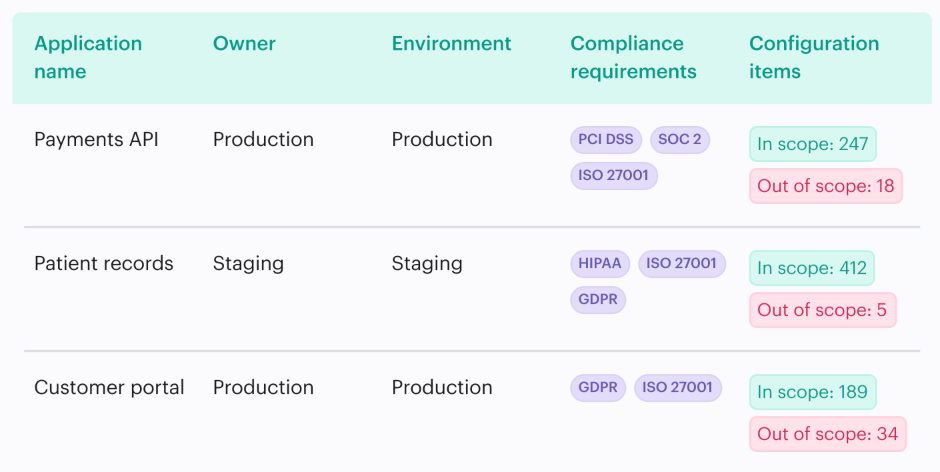
UCF-enabled reports map Cloudaware policy results to relevant authority documents, helping the team route each failed check as one owned task. Use AWS CLI output, not the dashboard, to prove that native aggregation and consolidation are configured correctly.
Best practice #4: Enable CloudTrail data events on tagged sensitive resources
CloudTrail may show how an identity entered the environment without showing which data it touched. That gap exists because management events are recorded by default, while data events require explicit configuration and generate additional charges.
| Event category | What it records | Default and cost |
|---|---|---|
| Management events | Control-plane activity such as AssumeRole, AttachRolePolicy, and CreateTrail | CloudTrail provides a free, searchable 90-day event history. The first copy delivered to Amazon S3 in each Region has no CloudTrail charge. |
| Data events | Data-plane activity such as S3 GetObject, Lambda Invoke, and DynamoDB item operations | Not logged by default. AWS currently lists a price of $0.10 per 100,000 events delivered. |
| Insights events | Unusual API call-rate or error-rate activity | Opt-in and billed according to the events analyzed. |
Consider the incident nobody wants to explain on Monday morning. GuardDuty flags suspicious activity involving an assumed role and an S3 bucket containing customer records. CloudTrail management events identify the role session, source IP, and authentication path. No GetObject events exist because data-event logging never covered that bucket.
The board asks which objects were accessed. You cannot prove it from CloudTrail. Neither can the incident-response team.
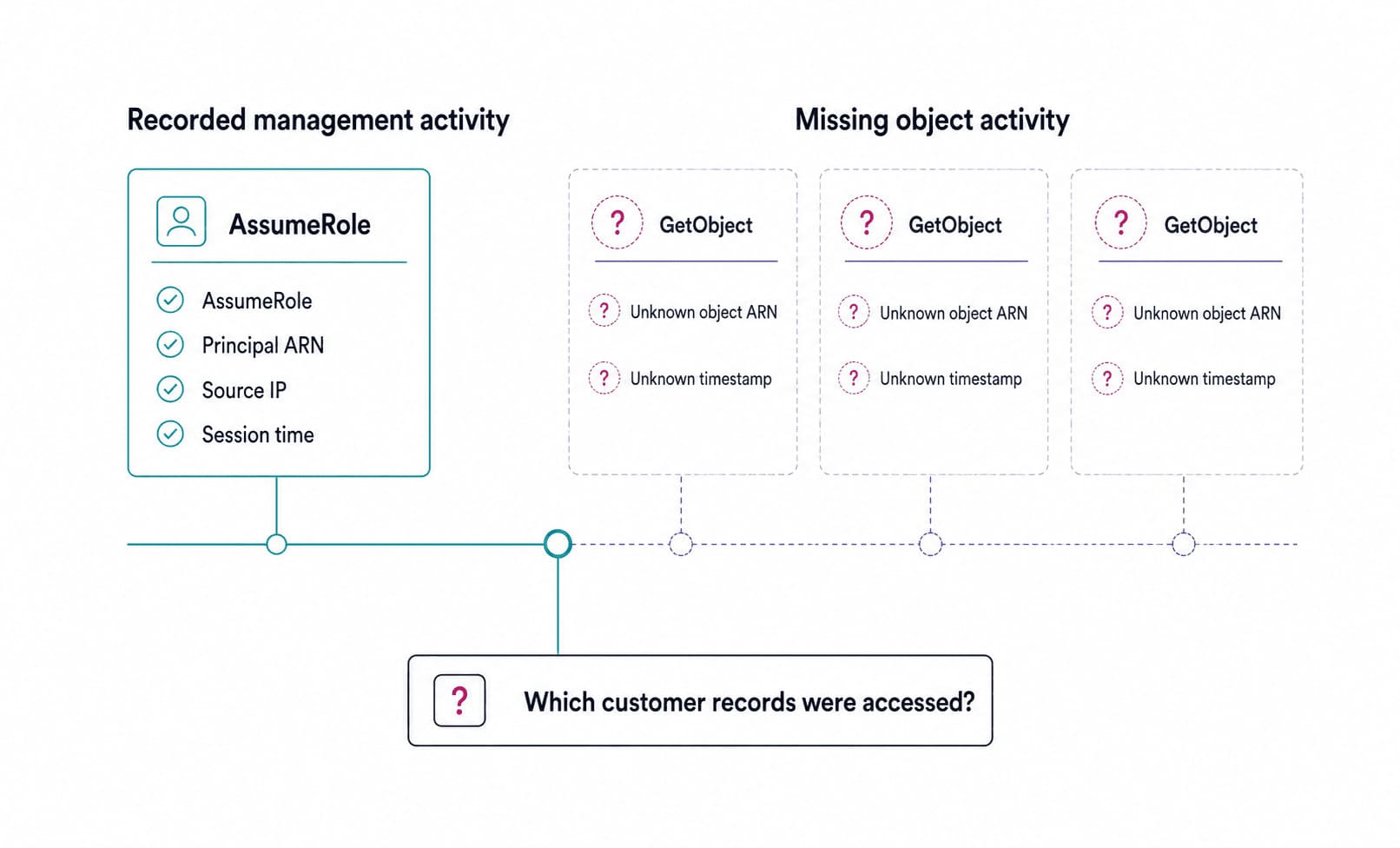
Management events can prove how credentials were used. S3 data events reveal which objects were accessed.
Logging every data event is rarely the sensible answer. Volume decides the bill. At the current listed rate, 500 million events cost $500, while 20 million cost $20, before storage and analytics charges. Both figures are illustrative. Estimate request volume first, then apply coverage where the forensic value justifies it.
AWS specifically recommends logging data events for S3 buckets containing sensitive or business-critical data. Turn that advice into a control:
For each recorded S3 bucket, read its dataclass tag. If the dataclass is PHI, PCI, CDE, or Confidential:
- Inspect applicable CloudTrail trails or event data stores
- Confirm an event selector covers the bucket ARN
- Confirm required read and write events are included
- Return NON_COMPLIANT when coverage is missing
Implement the check as an AWS Config custom Lambda rule. Trigger it after relevant S3 configuration changes and run it periodically as a backstop. Start by routing failures to an owner. Automatic selector changes should come later, once you have tested centralized-trail ownership, selector limits, and the effect on event volume.
Where the necessary CloudTrail selector data is available in the CMDB through a supported integration, the same control can be expressed as a custom Cloudaware CSPM policy. Cloudaware documents YAML-based custom checks, tag-defined policy boundaries, CMDB ownership routing, and dashboards for pass/fail results, exceptions, and owner service-level agreements. That supports the workflow without implying that Cloudaware generated the original CloudTrail events.
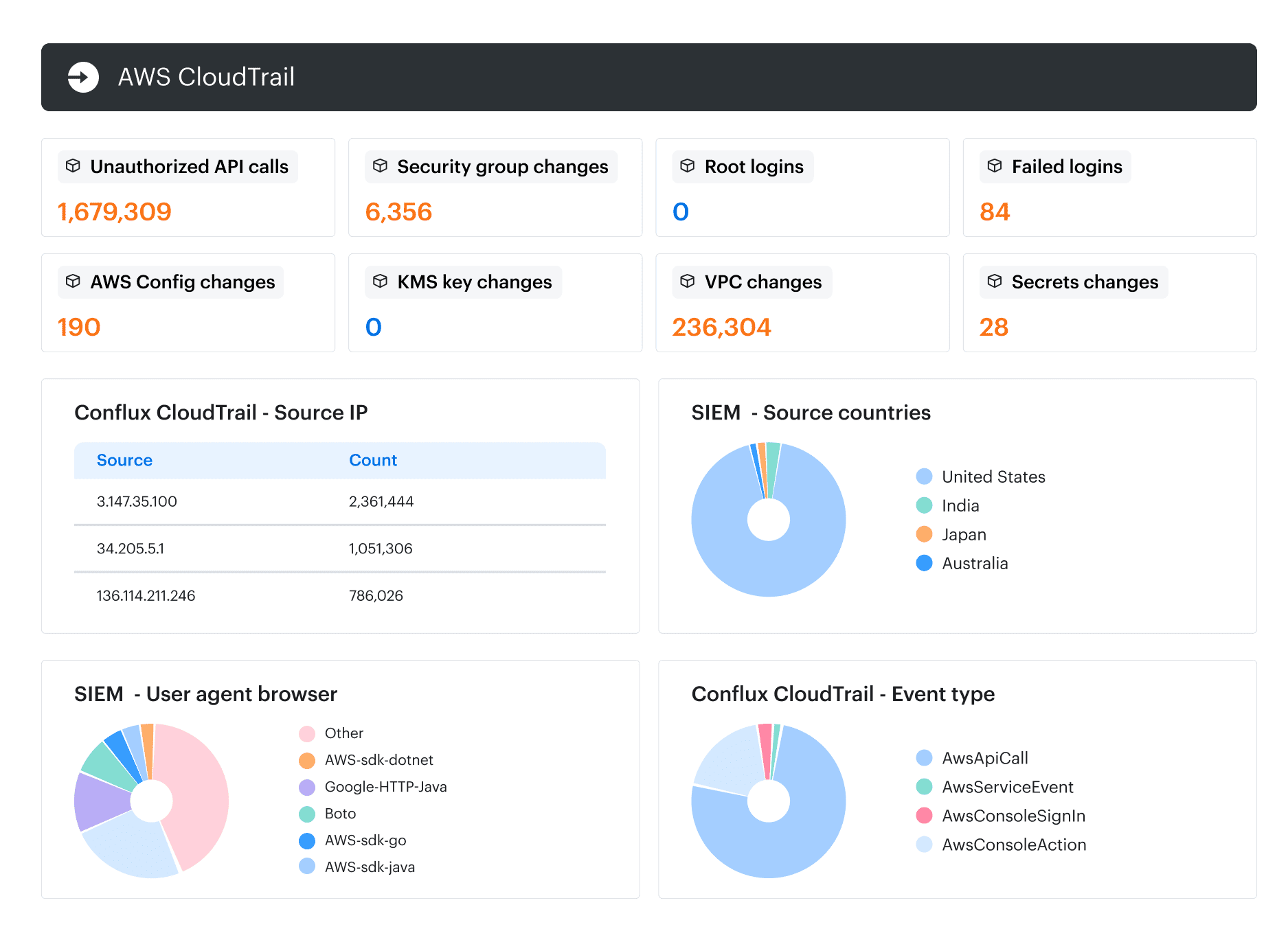
For teams building custom analytics, Amazon Security Lake can collect CloudTrail management events plus S3 and Lambda data events, normalize them to the Open Cybersecurity Schema Framework (OCSF), and make them available to subscribers. Enablement still matters. A beautifully normalized lake cannot recover events that were never recorded.
Best practice #5: Pair SCPs with IAM Access Analyzer
The first time a service control policy stops someone from disabling AWS Config in production, it feels like the guardrail has done the whole job. It has not. An SCP limits the permissions available inside member accounts. It cannot review a proposed IAM policy, and it will not notice that an old administrator role has sat untouched for two years.
That takes three controls working at different moments: an SCP around the account, a custom policy check inside the deployment pipeline, then unused-access analysis once permissions reach production.
SCPs never grant access. An identity policy must allow the action, while every inherited SCP must leave it available. One explicit deny wins. Under an allow-list model, the permission needs an allow at each level from the organization root to the account.
There is one uncomfortable exception. SCPs do not affect the AWS Organizations management account. Keep workloads out of it, then use the separate Security Tooling and Log Archive accounts recommended by the AWS Security Reference Architecture.
SCPs constrain access. Policy checks challenge new permissions. Unused-access findings clean up what survived.
Start with a narrow SCP that protects the services holding your security evidence:
{
  "Version": "2012-10-17",
  "Statement": [{
    "Sid": "DenyDisablingSecurityServices",
    "Effect": "Deny",
    "Action": [
      "securityhub:DisableSecurityHub",
      "securityhub:DisassociateFromAdministratorAccount",
      "config:StopConfigurationRecorder",
      "config:DeleteConfigurationRecorder",
      "guardduty:DeleteDetector"
    ],
    "Resource": "*",
    "Condition": {
      "ArnNotLike": {
        "aws:PrincipalArn":
          "arn:aws:iam::*:role/OrganizationSecurityAdmin"
      }
    }
  }]
}
Replace the example exception with your protected security-administration role. Test the policy on a staging organizational unit first. Otherwise, your guardrail may block the same recovery workflow you need during an incident.
Now catch excessive access before deployment. IAM Access Analyzer custom policy checks, released in November 2023, can compare a proposed policy with an approved reference. The pipeline fails when the change introduces access the team did not intend to add:
RESULT="$(aws accessanalyzer check-no-new-access \
  --existing-policy-document file://approved-policy.json \
  --new-policy-document file://proposed-policy.json \
  --policy-type IDENTITY_POLICY \
  --query result \
  --output text)"

test "$RESULT" = "PASS"
A passing result proves that no new access appeared relative to the reference. It does not prove that the reference policy was appropriate Security engineering still owns that part.
Then the audit arrives.
Illustrative scenario: an unused-access analyzer finds 340 inactive IAM roles across 22 accounts. Some still carry broad permissions. Others belonged to applications that were retired years ago. The analyzer can show that a role has crossed your chosen 90-day inactivity threshold, but it cannot decide whether deleting it will break Friday’s deployment.
That decision needs ownership. Cloudaware’s documented AWS resource coverage includes IAM Access Analyzer findings, IAM roles, policies, and policy attachments. Query the active findings alongside those objects.
Where a role is mapped to an application in the Cloudaware CMDB, assign the review to that application owner. Put unmapped roles in their queue. “No owner” is not a reason to postpone the finding. It is another finding.
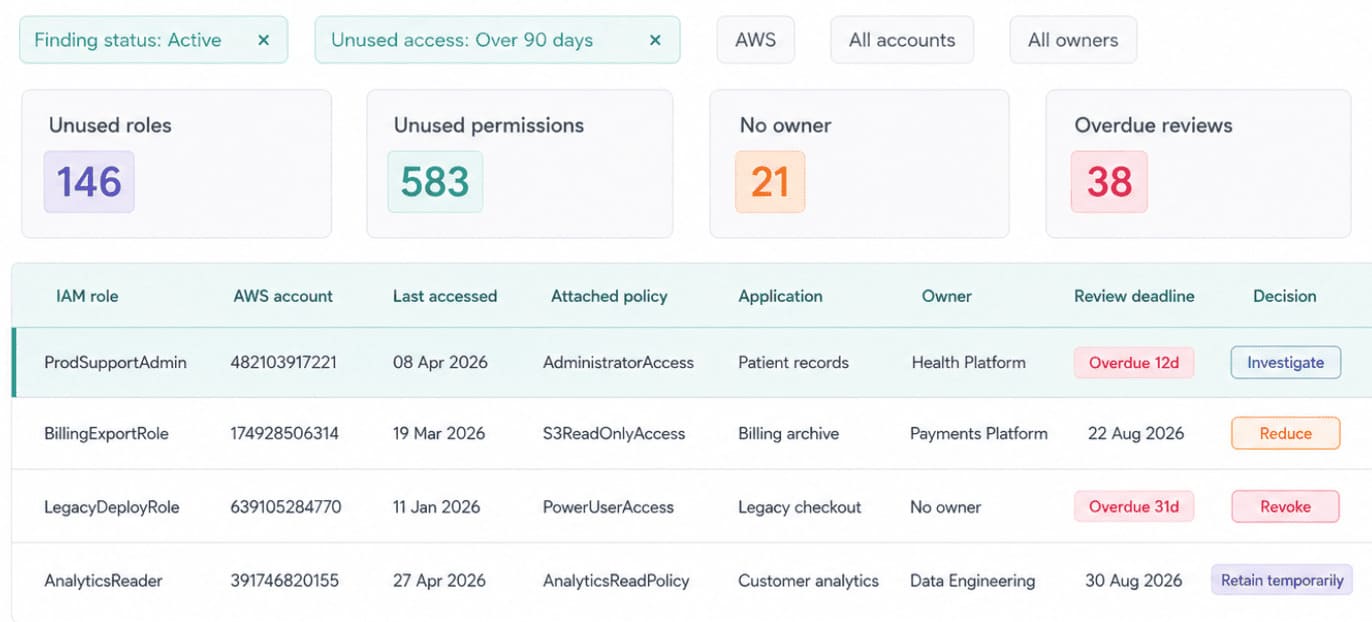
Unused access becomes removable when the finding, permission, application, owner, and deadline sit in one view.
Watch three numbers over time: SCP exceptions without expiry, policy changes rejected before merge, and unused-access findings closed by their review deadlines. The first exposes governance debt. The other two show whether least privilege is getting stronger before and after deployment.
What breaks in year 2 of AWS CSPM
Year one rewards setup. Year two asks whether that setup survives more workloads, more exceptions, a surprise acquisition, and the departure of the one engineer who remembers why everything works. The problems rarely arrive as dramatic outages. They show up as five operating signals that slowly stop moving in the right direction.
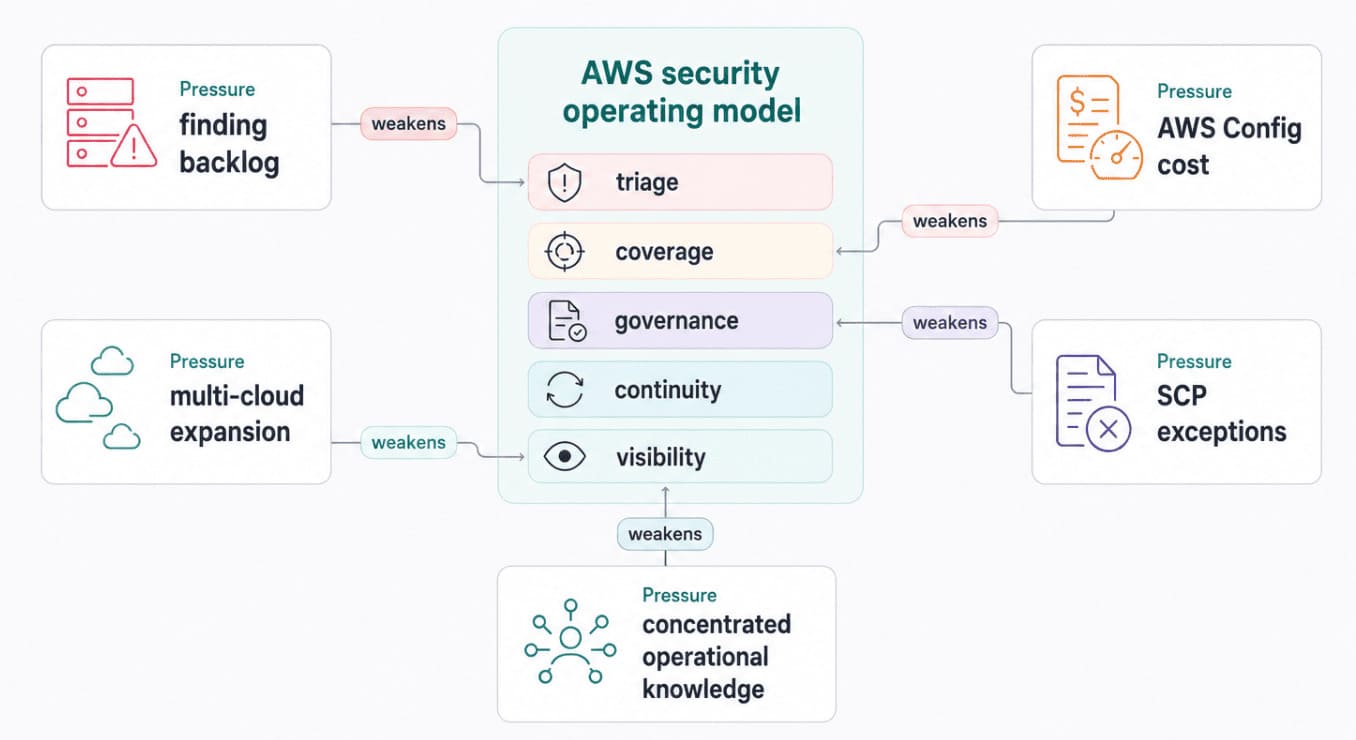
AWS CSPM usually cracks where native controls meet ownership, cost, institutional knowledge, and cloud sprawl.
- The queue usually fails before the tooling does. Picture an illustrative estate where active findings climb from 8,000 to 22,000 after new accounts, Regions, workloads, and standards enter scope. Analysts stop following exposure and start working whatever appears in leadership reports. Raw volume will not reveal the damage. Watch the share of critical findings with an owner, the oldest unresolved item, and remediation SLA breaches.
- Cost trouble arrives quietly. Nobody touched the recorder, but AWS Config kept recording a larger, busier estate. Configuration items, active rule evaluations, and conformance pack evaluations all affect the AWS Config bill. If an illustrative monthly charge moves from $1,500 to $3,700, break usage down by account and resource type before narrowing coverage. Otherwise, you may remove the evidence Security Hub controls still expect.
- Temporary SCP exceptions have a habit of surviving their original workload. One team needs a vendor action; another carries a legacy permission through migration. Six months later, an illustrative register holds 43 exceptions, 26 without review dates. AWS Organizations enforces the attached policy, but your operating process must preserve the owner, justification, compensating control, and expiry. Without those fields, an exception is simply undocumented policy.
- Then the engineer who built the security account leaves. The handover explains what exists, not why one Region owns aggregation or which Lambda backs a custom Config rule. Someone eventually “simplifies” an odd setting and breaks a dependency nobody recorded. Keep the decision, owner, validation command, dependency, and rollback step beside every non-default control. A clean architecture diagram cannot replace that reasoning.
- An acquisition changes the boundary overnight. Azure subscriptions arrive first; a GCP analytics project follows. Security Hub CSPM still assesses the AWS environment. Partner products can exchange findings with it, but that is not native Azure or GCP policy coverage. Keep the AWS controls doing their local jobs. Now decide whether inventory, ownership, exceptions, and evidence need one operating view across the wider estate.
Put those signals beside each other, and year two becomes much easier to diagnose.
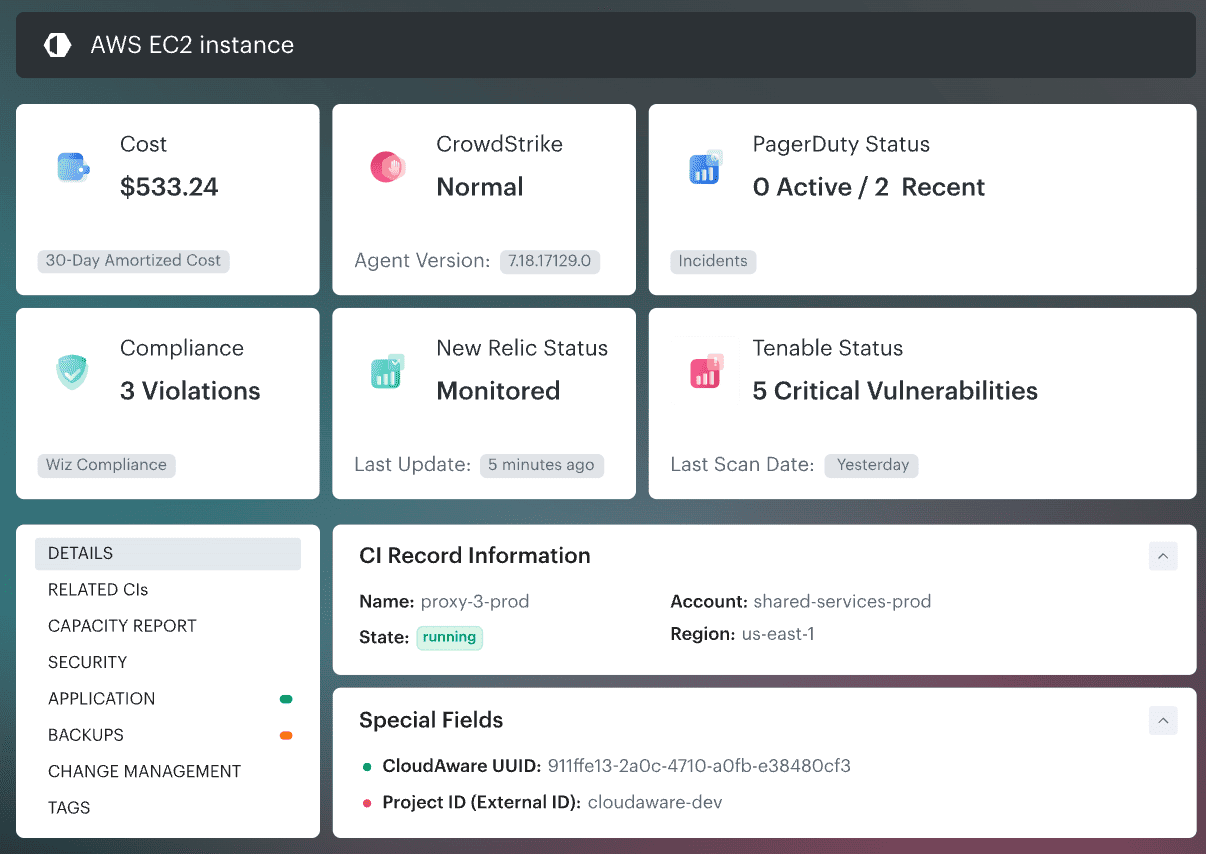
The year-two view: where volume, cost, exceptions, ownership, and cloud coverage have stopped moving together.
None of these failures automatically justifies another platform. Two or three deteriorating together do justify a focused cloud security risk assessment. That evidence gives the next section’s native-versus-third-party decision something firmer than backlog panic.
Read also: Attack surface management vs vulnerability management comparison
When native AWS is not enough: the four triggers
I would not add another CSPM because Security Hub feels busy. A busy queue can mean poor tuning, broken ownership, or duplicate controls. None of those problems requires a new platform by default.
Look beyond AWS only when the operating boundary has genuinely moved. Here is the rule I use: no triggers, stay native; one trigger, measure it; two triggers, run a controlled evaluation; three or four, quantify the drag you are already paying for. These are decision criteria, not industry benchmarks.
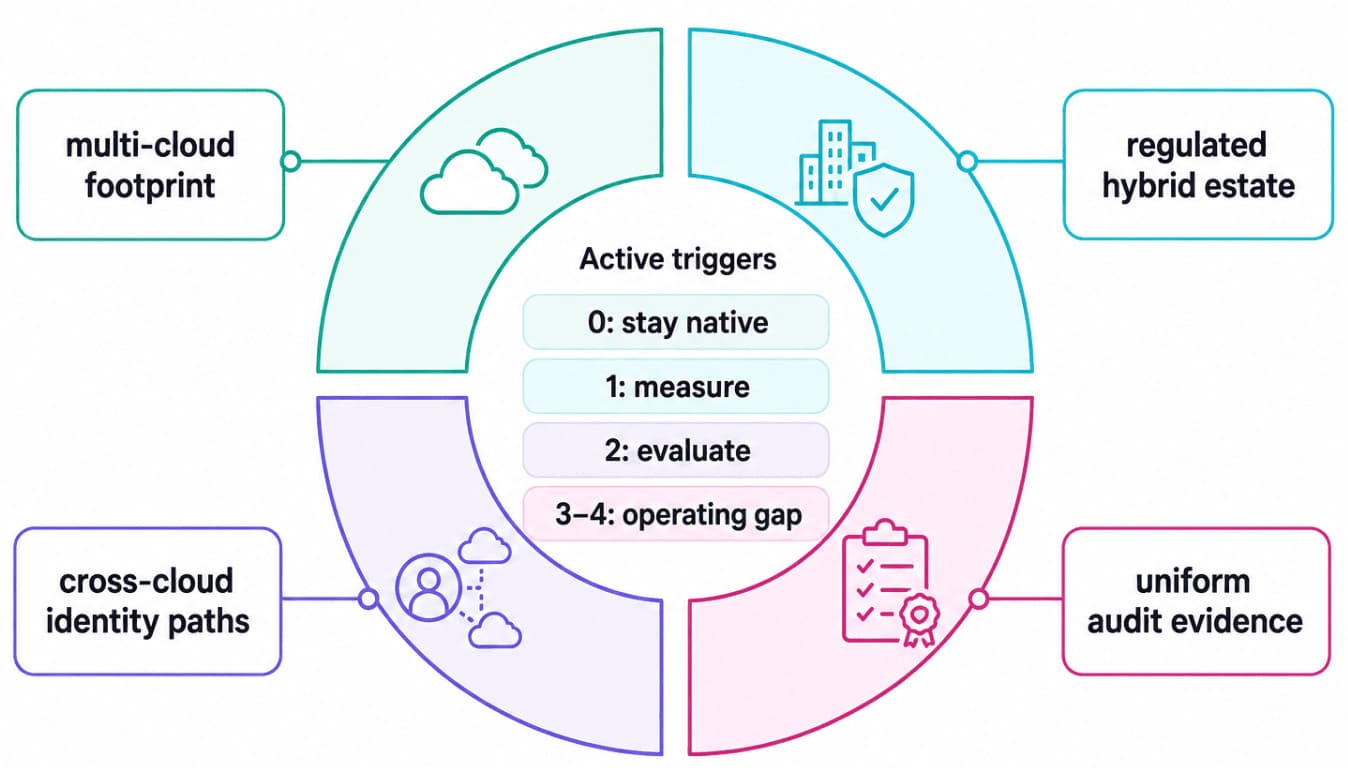
The case for another CSPM starts with operating evidence, not finding volume.
| Trigger | How it shows up in practice | What AWS cannot solve alone |
|---|---|---|
| A material non-AWS footprint | Azure or GCP now hosts more than 30% of critical services, or one non-AWS workload carries enough regulated data to change the risk picture. Treat 30% as an internal threshold, not a universal standard. | Security Hub CSPM assesses AWS. Third-party products can send findings into it, but imported findings do not turn AWS controls into native Azure or GCP checks. |
| Regulated hybrid infrastructure | VMware, private-cloud, or physical workloads must follow the same control intent as AWS. Evidence still arrives through separate processes. | AWS Systems Manager manages hybrid and multicloud nodes, but Security Hub does not apply one posture baseline across every environment. |
| Identity paths cross providers | Entra ID grants AWS access, an AWS workload reaches GCP, or CI/CD identities cross several control planes. During review, nobody can show the complete trust path and owner together. | AWS IAM documents inbound federation and outbound federation. Native evidence still describes the AWS side of a path whose permissions continue elsewhere. |
| Auditors expect one evidence model | PCI DSS, ISO 27001, SOC 2, HIPAA, or FedRAMP controls produce separate evidence packages per provider. Mapping equivalent checks becomes recurring manual work. | Audit Manager automates evidence from AWS-native data sources. Other environments still require separate collection and mapping. Our cloud security compliance standards guide explains where those control requirements overlap. |
A trigger becomes credible when you can attach a number to it. “We hate switching consoles” will not survive a budget review. “We spent 96 hours rebuilding the same control evidence across three providers last quarter” probably will.
When none of the four appears, keep the native stack and fix its operating gaps. Two active triggers earn a pilot. Judge that pilot by manual hours removed, ownership gaps closed, and evidence reused. A larger finding count is not a successful result.
Running AWS CSPM when the estate extends beyond AWS
If two or more triggers from the previous section are active, the temptation is to replace the whole stack with one shiny console. Resist it.
Security Hub CSPM and AWS Config should continue assessing AWS posture. GuardDuty and Detective keep their threat-detection and investigation roles. Organizations, service control policies, and Control Tower remain the multi-account governance layer. Audit Manager collects AWS evidence, while IAM Access Analyzer validates permissions. That division follows the AWS Security Reference Architecture.
Cloudaware belongs above those controls as the operating context, not underneath them as a substitute. The native service still produces or enforces its finding. Cloudaware connects that result to the wider asset, application, owner, policy, exception, ticket, and evidence model.
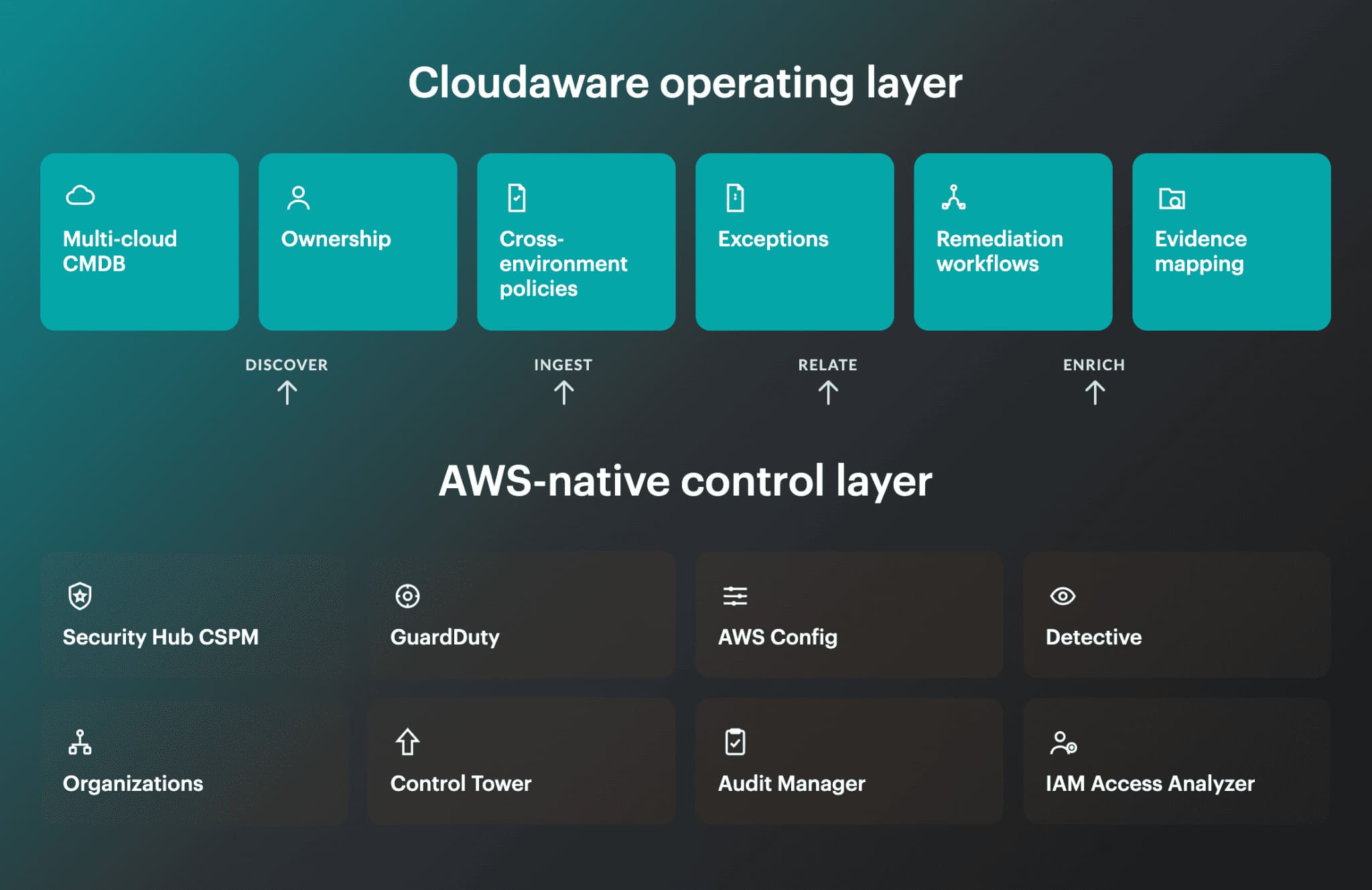
AWS services remain the source and enforcement layer. Cloudaware adds the context needed to operate across cloud and on-premises boundaries.
Here is what changes when the four triggers become real:
| Trigger | What the practitioner does in Cloudaware |
|---|---|
| Multi-cloud footprint | Query the Cloudaware CMDB across connected AWS accounts, Azure subscriptions, GCP projects, and supported on-premises integrations. Compare coverage and findings without pretending every provider uses the same native control. |
| Regulated hybrid estate | Scope a policy by application, environment, tag, or compliance boundary. Cloudaware can evaluate configuration data available in the CMDB through supported integrations, so the same control intent can be tested across different asset types. |
| Cross-cloud identity paths | Inspect supported AWS IAM roles, Microsoft Entra service principals, Google IAM service accounts, policies, and relationships. Cloudaware supports relationship and Graph queries, but the analyst still has to validate whether the returned path creates exploitable access. |
| Uniform audit evidence | Use UCF-enabled Cloudaware reports to map policy results to relevant authority documents, then retain the owner, exception, ticket, timestamps, and remediation state beside the affected asset. |
The useful moment is not “all clouds on one screen.” It is Tuesday’s remediation review.
Suppose Payments uses an AWS application, an Entra identity, a GCP analytics project, and a VMware database. A failed control appears. Instead of debating which cloud team owns it, filter the Cloudaware CSPM view to the Payments application. Check the affected asset, provider, source finding, policy result, owner, exception, and ticket status together. The provider record proves the technical failure. CMDB context tells you who can fix it.
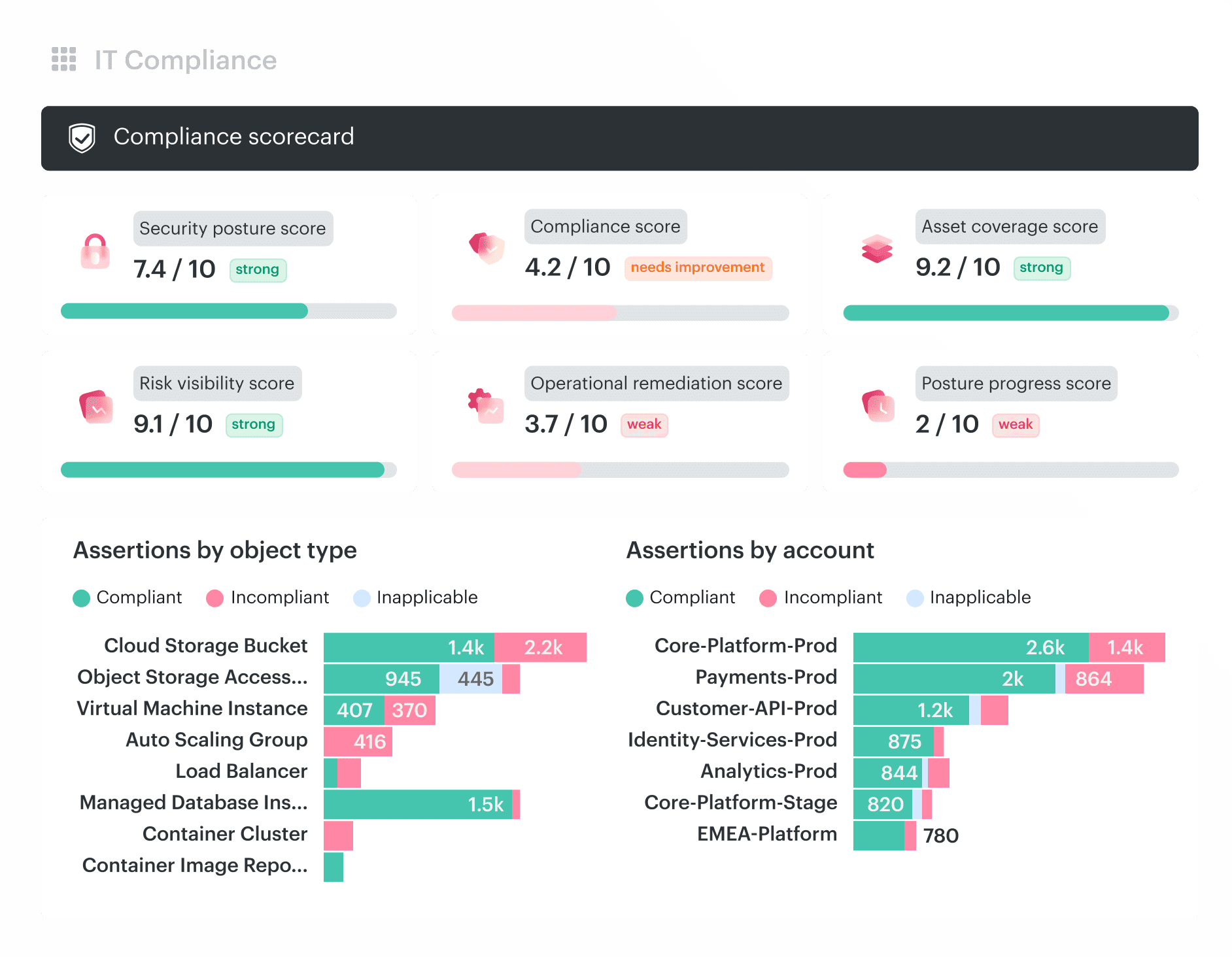
One remediation view integrates provider findings, CMDB ownership, policy evidence, exceptions, and tickets.
Cloudaware reports support for 3,000+ cloud services and configuration-item types, while its UCF-enabled dashboards map results to more than 900 authority documents. Both are current vendor-reported figures on the Cloudaware CSPM page. A Caterpillar case study also documents centralized dashboards across AWS, Azure, GCP, and SCCM-managed infrastructure.
Those numbers establish coverage. They do not prove the operating outcome in your estate.
Run the pilot against the two triggers that justified it. Measure ownership gaps, repeated evidence work, unresolved exceptions, and remediation handoffs before and after. Keep Cloudaware only if it reduces that friction while the AWS-native controls continue doing their jobs.