



A configuration item, or CI, is any component that needs to be tracked because it affects how an IT service runs. In a CMDB, CIs are not just listed. They are recorded with status, ownership, attributes, and relationships to other components.
This guide explains what a configuration item is, what counts as a CI, how CIs differ from assets, what data a CI record should include, and why CI accuracy matters in a working CMDB.
Quick answers
- What is a CI? A CI is any managed component that supports or affects a service.
- What counts as a CI? Servers, databases, applications, network components, cloud resources, and other managed service components.
- How is a CI different from an asset? An asset is tracked for ownership, cost, and lifecycle. A CI is tracked for service impact, configuration state, and dependencies.
- What does a CMDB store about a CI? Its type, owner, environment, status, version, related services, dependencies, and change history.
When you ensured what is CMDB check the insights we have collected on how to apply it in 2026 in the linked article.
What is a configuration item in CMDB?
A configuration item (CI) is any component that needs to be tracked because it affects how an IT service runs.
In a CMDB, a CI is not just a record of something that exists. It is a controlled object with context. Each CI is stored with attributes such as type, status, and environment, along with relationships to other CIs that show how services are actually built and operate.
A configuration item can be physical, virtual, logical, or service-level. What matters is not the form, but the impact on service behavior.
| CI category | Examples | Why it is tracked as a CI |
|---|---|---|
| Physical | servers, network devices, storage systems | hardware failures or changes affect service availability |
| Virtual | virtual machines, containers | scaling, configuration, or failures impact workloads |
| Cloud resources | EC2 instances, Azure SQL databases, S3 buckets | dynamic infrastructure directly affects service delivery |
| Applications | business apps, internal tools, SaaS platforms | application state and changes affect user experience |
| Network components | VPCs, subnets, load balancers, DNS | connectivity issues can disrupt multiple services |
| Service-level | customer-facing services, APIs, internal platforms | represent how systems are consumed and delivered |
For example, a production database that supports a customer-facing application is a CI. The CMDB does not just list it. It shows which application depends on it, who owns it, what environment it runs in, and what other components are connected to it. That context is what makes the CMDB operationally useful.
Configuration item definition: what counts as a CI?
A configuration item is any component that needs to be controlled because changes to it can affect service delivery, availability, security, or compliance.
That definition is intentionally broad, but in practice, teams apply a simple filter. An item is usually treated as a CI when it plays an active role in how a service runs and when changes to it need to be tracked, reviewed, or audited.
A component typically qualifies as a CI if it meets one or more of these conditions:
- It supports a live or business-critical service
- It has dependencies or is depended on by other components
- It changes over time and those changes need to be tracked
- It requires ownership, status, or version control
- It can introduce risk, drift, or service impact
Not every technical object needs to be included in the CMDB. Teams usually avoid tracking low-impact or short-lived items that do not affect service behavior or operational decisions. The goal is not to model everything, but to model what matters.
This is where many CMDB programs start to lose value. Teams capture configuration items as static records, but do not model them in a way that supports operations. A CI only becomes useful when it carries context: what service it supports, what it depends on, who owns it, and what downstream impact a change can create.
That distinction matters in practice, because CI quality is shaped less by definition than by how teams model real components in the environment. The next step is to look at common configuration item examples and the CI types teams usually track in a working CMDB.
Read also: What Is CMDB? Meaning, Examples & Benefits
Configuration item examples: 5 CI types teams actually track
Configuration items usually represent different layers of the environment, from foundational infrastructure to applications, services, and cloud platforms. Most teams group them into a small number of consistent CI types so the CMDB stays structured, searchable, and usable across operations.
Below are the configuration item examples teams most commonly track and the way those records are usually organized.
1. Infrastructure CIs
Infrastructure CIs cover the foundational components that provide compute, storage, and connectivity. This group usually includes:
- Physical servers
- Storage systems
- Load balancers
- Firewalls
- On-prem network devices
Teams track these items because failures, capacity issues, or misconfigurations at the infrastructure layer can affect multiple services at once. In a CMDB, their records usually include the CI name, type, model, status, environment, IP address, and owner.
2. Application and software CIs
Application and software CIs cover the software layer that runs on infrastructure and supports business operations. In most environments, that includes:
- Operating systems
- Business applications
- Middleware
- SaaS platforms
These records matter because software issues rarely stay isolated. Version drift, unsupported releases, or misconfiguration can break service behavior, create security gaps, and complicate support. In a working CMDB, teams track these CIs so they can see what is running, which service it supports, who owns it, and how changes at the software layer may affect the rest of the environment.
3. Network CIs
Network CIs define how traffic moves between systems and how components communicate across the environment. Teams commonly track:
- Routers and switches
- DNS components
- VPCs and subnets
- Gateways and load balancers
These CIs matter because network problems rarely stay isolated. A failed component or misconfigured route can disrupt several services at the same time. Their records often include the network type, region or location, status, related services, dependency links, and change history.
4. Service and database CIs
Some of the most important configuration items sit closer to business logic than to raw infrastructure. Service and database CIs usually include:
- Customer-facing services
- Internal platforms
- APIs
- SQL and NoSQL databases
Teams track them because they are directly tied to service delivery and often sit in the middle of multiple dependencies. If one of these CIs changes or fails, users or downstream systems usually feel the effect quickly. Their records typically include the service name, criticality, owner, environment, related applications, and dependency context.
5. Cloud and platform CIs
Cloud and platform CIs represent the parts of the environment that change fastest. This category often includes:
- Managed database services
- EC2 instances
- Azure SQL databases
- Kubernetes clusters
- IAM roles and policies
- Cloud storage buckets
These are strong configuration item examples because they are created, modified, and removed continuously, often across multiple teams and accounts. Without accurate records, ownership becomes unclear and service relationships are harder to trace.
Teams usually store the cloud provider, account or project, region, environment, owner, tags, and any relevant compliance flags in the CI record. Here is how it looks in Cloudaware: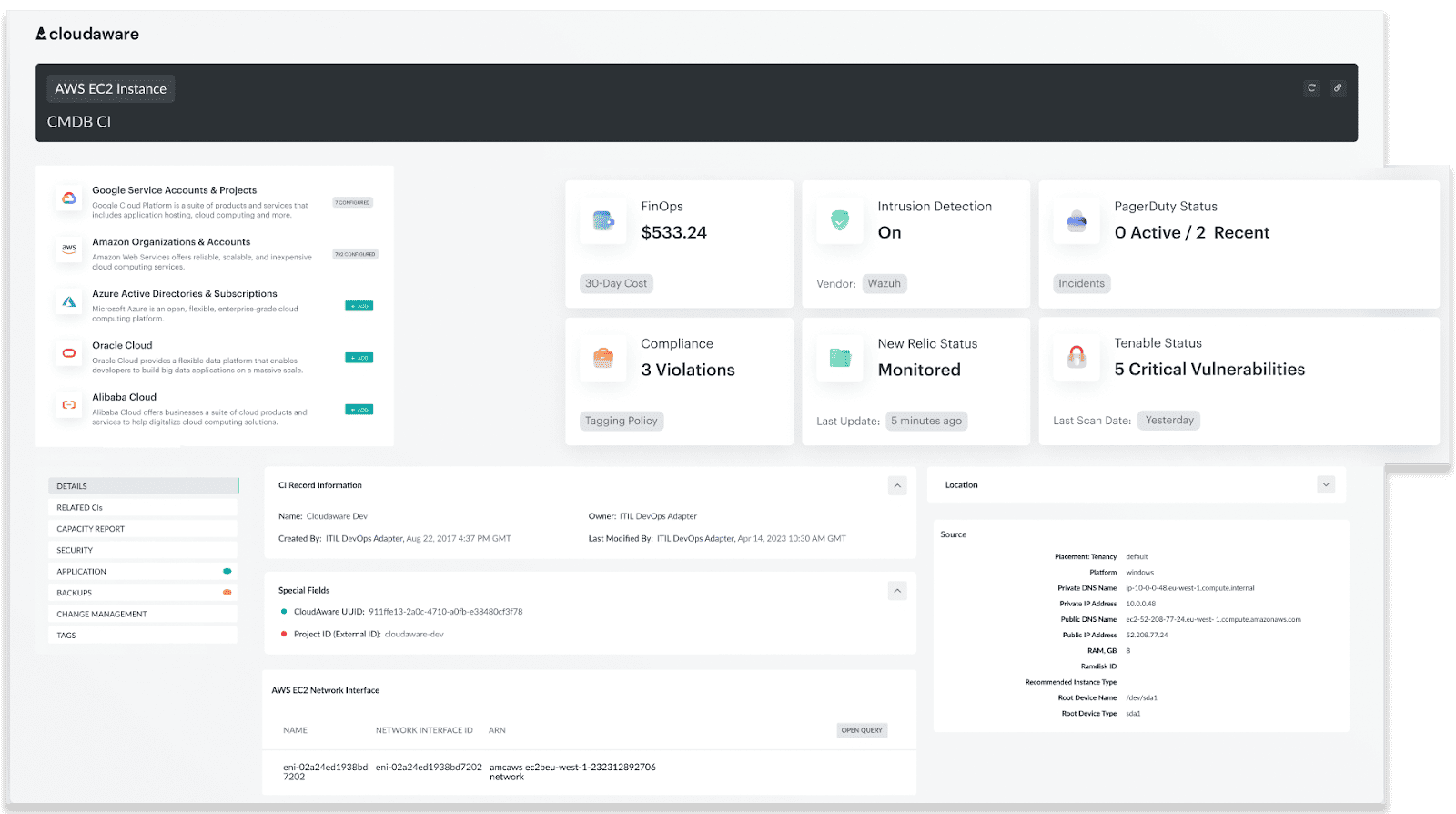 With the right data, you can prevent over-provisioning and maximize your cloud investments.
Read also: ITIL Configuration Management: Examples & Best Practices for 2025
What should a configuration item record include?
A configuration item becomes useful only when its record contains enough context to support operations, incident response, and change decisions.
A CI record is a structured set of data that explains what the component is, where it runs, who owns it, and how it relates to other parts of the system. Without that context, the CMDB becomes a list instead of a working model.
Core fields in a CI record
Most teams standardize a core set of fields so CI data stays consistent and usable across services.
- CI name: the identifier teams use to recognize the item in day-to-day work. Depending on the CI, this may be a hostname, resource ID, instance name, or application name.
- CI type: the class the item belongs to, such as server, application, database, network component, or cloud resource.
- Environment: the operating context of the CI, usually production, staging, development, or sandbox. Without environment data, even accurate records are harder to use during incidents and change review.
- Owner: the team or individual accountable for the CI. In practice, this field matters less for documentation than for support, escalation, and change coordination.
- Service or application context: the service the CI supports or belongs to. This is what turns an isolated record into something operationally useful.
- Version or model: the software version or hardware model associated with the item. Teams rely on this data for patching, compatibility checks, lifecycle planning, and troubleshooting.
- State or status: the current condition of the CI, such as active, inactive, under maintenance, or retired.
- Related CIs: the other components this item depends on or supports. This is the field that shows where the CI sits in the service chain.
- Change history: a record of what changed and when. Teams use it to understand whether an issue lines up with a recent update, replacement, or configuration change.
- Location or platform: where the CI runs, whether that is a data center, cloud region, account, cluster, or another platform boundary. This helps teams place the record in the right operational context.
- Compliance or risk flags: indicators that the CI supports a regulated service, handles sensitive data, or carries elevated operational risk. These flags help teams prioritize review and control.
Standard vs custom attributes
Most CMDB models start with a standard attribute set, then expand only where the environment or operating model requires more detail.
Standard attributes create consistency across CI records. They give teams a common structure for search, filtering, reporting, and governance, which is what keeps the CMDB usable as it grows across platforms and services.
Custom attributes are useful when default fields are not enough to describe how the organization actually works. Teams often add them for lifecycle stage, internal service labels, support ownership, business context, or other data points that matter in daily operations but do not exist in a generic schema.
A good attribute model is not the one with the most fields. It is the one that captures the right fields consistently.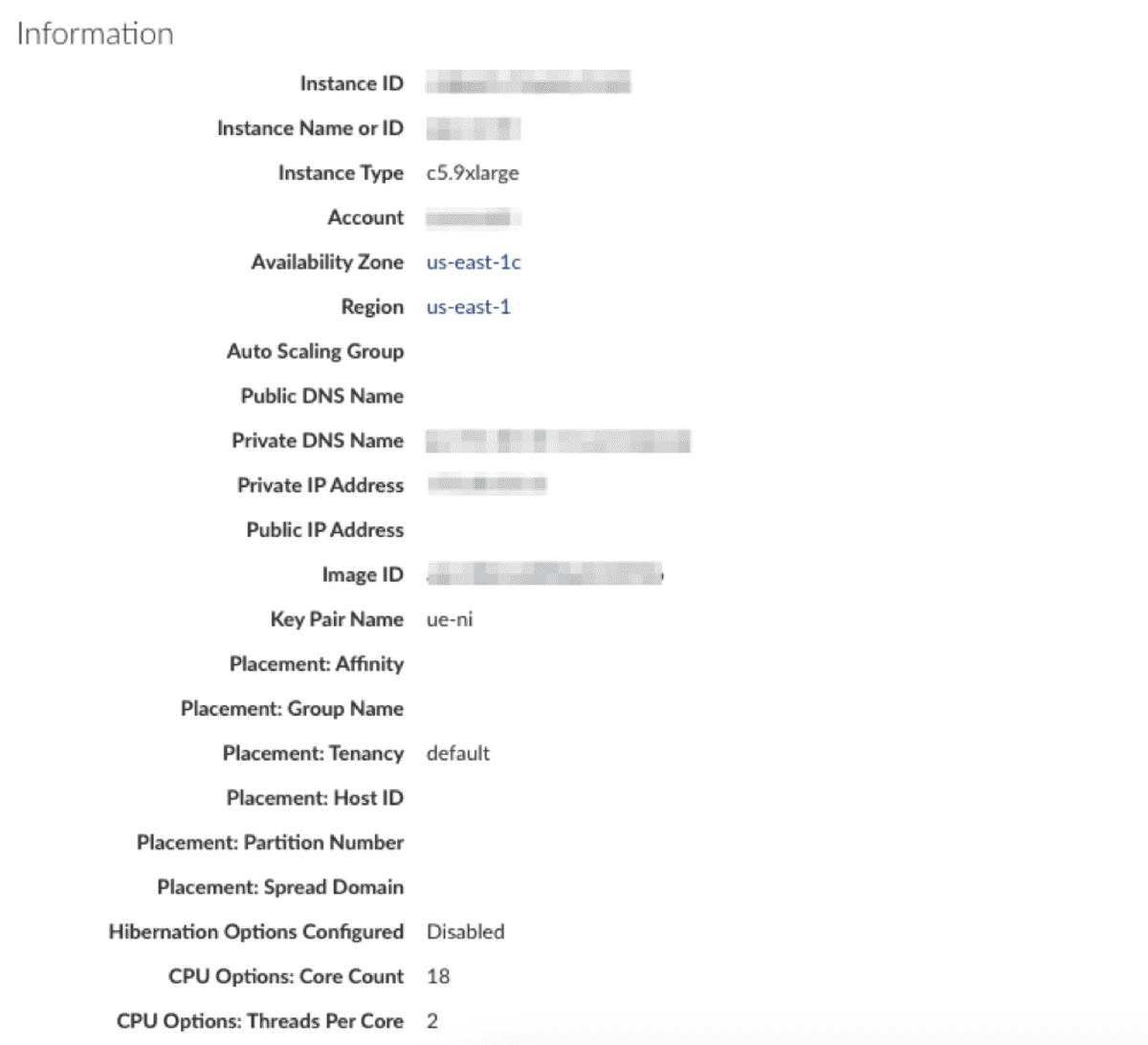 By organizing CI attributes into tabbed CMDB views or even hiding less critical information, Cloudaware ensures that your reports is both powerful and user-friendly. This approach makes it easier for your team to focus on what truly matters, driving operational efficiency.
Why CI data quality matters
A CI record is only useful while it reflects the real state of the environment.
If ownership is unclear, relationships are missing, or versions are outdated, the CMDB stops supporting real operations. Incident response slows down, change impact becomes harder to assess, and audit work requires manual verification.
Read also: What Is Configuration Management? Definition. Processes. Examples
What is the difference between a configuration item and an asset?
A configuration item and an asset are often related, but they are not the same thing.
Asset is usually tracked for business and financial reasons. Teams want to know what the company owns, who is responsible for it, what it costs, where it is in asset lifecycle, and when it should be renewed, replaced, or retired. Asset records support procurement, inventory control, depreciation, warranty tracking, and broader IT asset management processes.
CI is tracked for operational reasons. Teams use CI records to understand how a component behaves inside a service, what it depends on, what depends on it, what state it is in, and what might happen if it changes or fails. A CI exists in the CMDB because it matters to service delivery, incident response, change assessment, or support.
The difference becomes clearer when you look at the questions each record is meant to answer.
| Record type | Main question it answers |
|---|---|
| Asset | What do we own, pay for, renew, or retire? |
| Configuration item | What supports this service, what is connected to it, and what breaks if it changes? |
Some objects are both. A cloud VM, for example, can be tracked as an asset for ownership and cost control, while the same VM is tracked as a CI because it supports a production service, has dependencies, and carries operational risk. The same is true for a server, a database appliance, or a business-critical software platform.
How configuration item relationships work in a CMDB
A configuration item rarely matters in isolation. Most CIs sit inside a larger service path: they depend on other components, are hosted somewhere, are owned by someone, and can affect other systems when they change.
In practice, most CMDB models rely on a small set of relationship types.
Dependency relationships
Dependency relationships show that one CI relies on another to function. An application may depend on a database, a message queue, an identity service, or a network path. When those links are modeled properly, teams can move from a surface symptom to the likely source of failure much faster. Without dependency data, incident triage becomes guesswork.
Containment relationships
Containment relationships show where a CI lives or what it is hosted within. A physical server may host virtual machines, a Kubernetes cluster may run multiple workloads, and a cloud account may contain several service components. This structure helps teams understand placement, scope, and operational boundaries across hybrid and multi-cloud environments.
Ownership relationships
Ownership relationships connect a CI to the team or person responsible for it. This is not just reference data for the record. In day-to-day operations, ownership determines who responds, who approves changes, and who is expected to maintain the item over time. If that link is missing, even accurate technical data becomes harder to act on.
Impact relationships
Impact relationships show what else is affected when a CI changes, degrades, or fails. A network component may affect multiple services. A database issue may surface through every application that depends on it. This is the relationship type teams rely on when they need to assess blast radius before a change or understand service consequences during an outage.
Without relationships, a CMDB is little more than structured inventory. With them, it becomes a working model of how the environment is actually built and operated.
Read also: The Real Benefits of CMDB: 8 Wins You’ll Actually Feel
How to keep configuration item data accurate
Accuracy tends to degrade over time. Infrastructure changes, services evolve, ownership shifts, and new dependencies appear. Maintaining accurate configuration item data is not a one-time task. It is an ongoing process that keeps the CMDB aligned with how the environment actually works.
Standardize key fields
CI data only scales when records follow the same rules. Teams need consistent naming, CI classes, environment values, and ownership logic so records can be searched, compared, and governed across clouds, accounts, and support groups. Without that consistency, the CMDB fills up quickly but becomes harder to trust and harder to use.
Review and clean data regularly
Discovery helps populate the CMDB, but it does not guarantee clean data. Records still need review for duplicates, stale entries, broken ownership, and incomplete fields. In multi-cloud environments, drift happens fast, so regular cleanup is not maintenance overhead. It is what keeps the dataset usable for incidents, change review, and audit work.
Track changes as they happen
CI records should move with the environment. When a component is updated, replaced, reconfigured, or retired, the CMDB needs to reflect that state without delay. If records lag behind real changes, teams stop working from actual configuration data and start working from assumptions, which is where the CMDB starts to lose value.
Limit unnecessary attributes
A bigger record is not always a better record. Once teams start collecting fields that do not support any real operational use case, data quality drops because no one treats those fields as worth maintaining. A stronger model is usually a tighter one: keep the attributes that support incidents, ownership, dependency mapping, change impact, and governance, and remove the rest.
Read also: 9 Configuration Management Best Practices for Multi-Cloud Setups
CI discovery in a CMDB
In modern environments, manual tracking does not scale. Infrastructure changes too quickly, especially across cloud and hybrid systems, where resources can be created, modified, or removed in minutes. Discovery is what keeps the CMDB aligned with what actually exists.
Most teams use a mix of discovery methods depending on the environment and the level of detail they need.
- Agentless discovery is usually the starting point. It pulls CI data from cloud APIs, credentials, and existing integrations. That works well across AWS, Azure, GCP, and other systems where provider metadata already gives you enough coverage. It is easier to roll out and much easier to scale.
- Agent-based discovery is what teams use when API data is not enough. It gives you host-level detail such as installed software, local configuration, OS data, and other information you will not always get cleanly from the platform itself. The tradeoff is obvious: better depth, more overhead.
- Continuous discovery is what keeps the CMDB usable. Multi-cloud environments change constantly. New resources appear, existing ones are modified, dependencies shift, and ownership changes. If discovery is treated as a project step instead of an ongoing process, the data starts going stale almost immediately.
Discovery does not solve the CMDB by itself. It fills records, but it does not decide what should be tracked, how CI classes should work, or which relationships actually matter. That part still comes down to the data model and the discipline behind it.
5 expert tips for managing CIs at scale
Managing configuration items becomes harder as environments grow, not because teams lack tools, but because CI data loses structure, ownership, and meaning over time. Across multi-cloud environments, most problems show up when records cannot support incidents, change review, or audit work.
Cloudaware practitioners see the same patterns across client environments. These practices reflect what keeps CI data usable in real operations.
Define what qualifies as a CI
If everything is treated as a configuration item, the CMDB becomes difficult to use. Teams need clear criteria based on service impact, dependencies, and operational relevance.
As Anna, ITAM specialist at Cloudaware, puts it, “The problem usually starts when teams confuse discovery coverage with CMDB quality. Just because you can collect something does not mean it should be modeled as a CI.”
A CI should exist because it helps answer operational questions, not because it exists in the environment.
Keep CI records useful
CI records often become overloaded with fields that no one uses. This increases maintenance effort without improving decision-making.
Kristina S., Senior Technical Account Manager at Cloudaware, notes that teams get more value when they reduce noise: “We often see environments where records look complete, but still fail during incidents. The issue is not missing data, but irrelevant data that hides what actually matters.”
A good CI record focuses on ownership, service context, state, and relationships.
Map relationships early
Most CMDB gaps appear when teams know what exists but cannot see how components are connected.
According to Iurii K., Technical Account Manager at Cloudaware, “Teams usually realize they are missing relationships only during an incident. At that point, they are trying to reconstruct dependencies under pressure instead of using them.”
Mapping relationships early turns the CMDB into a working model, not just a list of components.
Automate discovery, then verify the results
Automation improves coverage, but it does not guarantee usable data. Discovery tools can collect large volumes of CI records, but without validation, those records can remain incomplete or misclassified.
Alla L., Technical Account Manager at Cloudaware, highlights this gap: “Automation solves collection, not structure. Without ownership, classification, and review rules, the CMDB still degrades over time.”
Teams that combine automated discovery with regular verification maintain higher data quality.
Assign ownership before incidents expose the gap
Ownership is one of the first things teams look for during incidents, and one of the most common gaps in CMDB data.
As Mikhail M., General Manager at Cloudaware, explains, “If a CI does not have clear ownership, it is not really managed. The record exists, but no one is accountable for it.”
Clear ownership improves accountability, speeds up incident response, and makes change coordination more predictable.
How Cloudaware helps manage CMDB CIs across multi-cloud environments
For many teams, the challenge is not creating a CMDB, but keeping it aligned with how the environment actually behaves. As infrastructure scales across AWS, Azure, GCP, VMware, and SaaS, configuration items multiply, relationships become harder to track, and ownership gets fragmented.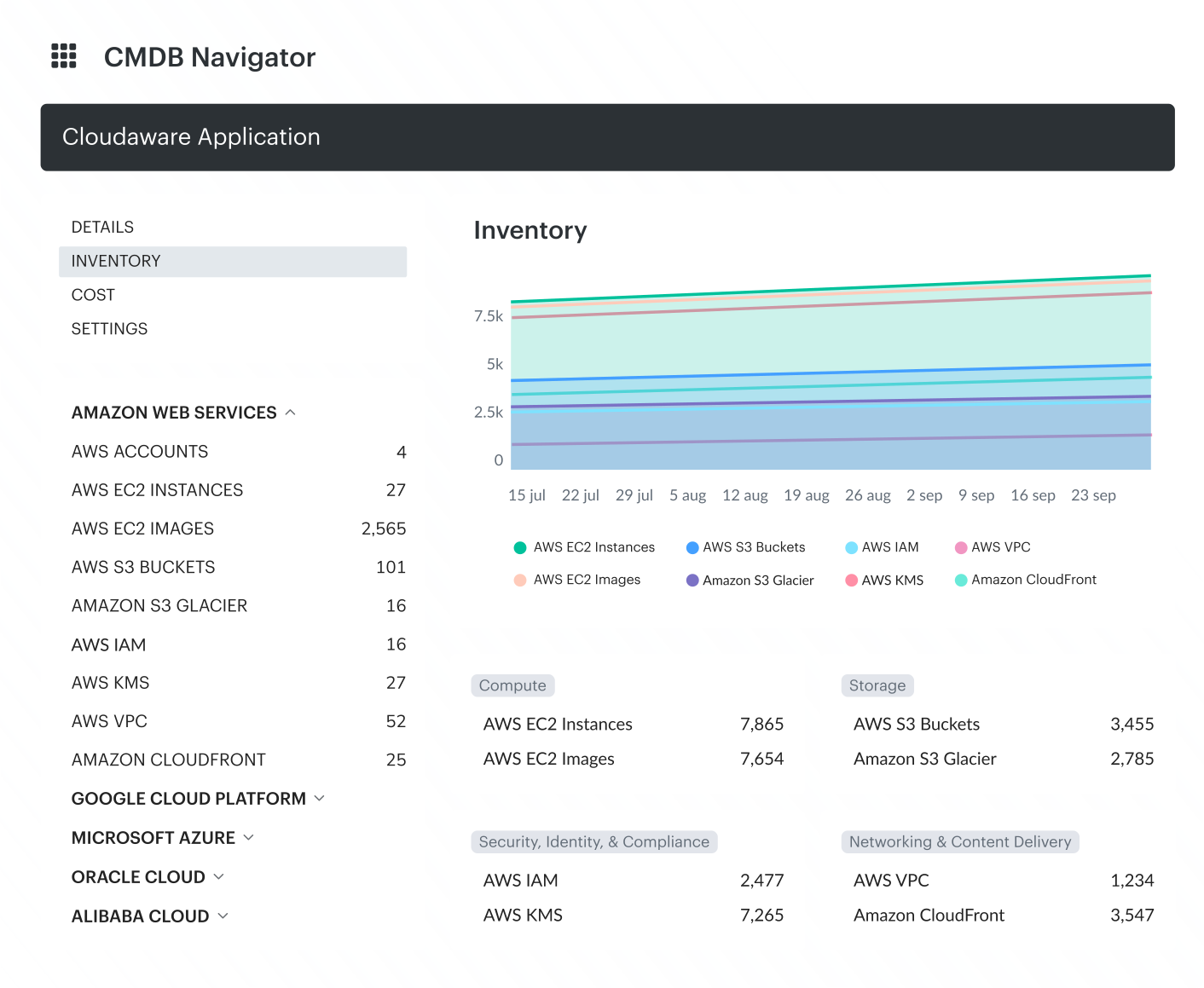 Cloudaware helps teams manage CMDB CIs across complex environments by combining:
- Unified CI visibility across platforms, so teams can see configuration items from cloud and on-prem systems in one CMDB instead of working from separate inventories
- Relationship mapping with service context, so infrastructure, applications, and services are connected in a model that shows dependencies and impact paths
- Ownership and operational context, so each CI can be tied to the right team, service, or support workflow
- Continuous discovery and updates, so CI attributes and relationships stay aligned with the current environment instead of drifting over time
- Scalable structure for large CI volumes, so teams can classify, filter, and work with configuration data without losing consistency