


A renewal lands on your desk. The price went up, a simple workflow change needs specialist help, and the team still exports asset data to spreadsheets. Replacing all of ServiceNow can be an expensive way to solve one bad module, so start by naming the job that is actually failing.
ServiceNow alternatives cover several different jobs: employee support, infrastructure discovery, software licensing, risk management, and custom application development. Moving the service desk will not repair missing cloud inventory. A better discovery feed will not replace change approvals.
This comparison covers ten products using official documentation, published pricing, customer cases, and user reviews checked on October 29, 2026. The research did not include product trials or migrations, so a feature page is not treated as proof of implementation quality. Instead, each profile defines the replacement scope, relevant costs, limitations, and a proof of concept you can run before committing.
Choose the replacement by module, then decide whether to replace, coexist with, or retain ServiceNow.
Disclosure: Cloudaware publishes this article and appears first for its CMDB and asset-governance use case. Other products are stronger fits for service desk, enterprise software licensing, GRC, or application development.
Key insights
ServiceNow competitors solve different jobs. There is no single drop-in substitute, so shortlist the product built for the work you need to move.
- Cloudaware — best for cloud inventory and CMDB context: replace fragmented cloud and hybrid asset data while retaining ServiceNow ITSM where it still works.
- Device42 — best for infrastructure discovery and dependency mapping: replace or augment ServiceNow Discovery when application-to-infrastructure relationships drive migration and impact decisions.
- Flexera One ITAM — best for software asset management: replace ServiceNow SAM work that depends on publisher entitlements, use rights, and defensible license positions.
- Lansweeper — best for broad device discovery: replace general asset inventory across endpoints, servers, and network equipment without buying a full workflow platform.
- Jira Service Management — best for support tied to engineering: replace ITSM when incidents, changes, and development work need to meet in the Atlassian ecosystem.
- Freshservice — best for employee service operations: replace ITSM and add explicitly packaged ITAM when a managed, integrated service platform is the priority.
- ManageEngine ServiceDesk Plus — best for deployment choice: replace ITSM, ITAM, and CMDB workflows when cloud versus on-premises control is a deciding factor.
- Archer — best for enterprise risk and compliance: replace ServiceNow IRM/GRC workflows rather than the service desk or discovery layer.
- Appian — best for selected custom process applications: rebuild specific ServiceNow App Engine workflows when the organization can own application delivery and maintenance.
- GLPI — best for open-source service management and inventory: replace the service desk and asset inventory when self-hosting, extensibility, or a choice of support model matters.
If ServiceNow already runs valuable approvals or ticket workflows, price coexistence as well as migration. A maintained integration may be lower risk than recreating a mature process in a product chosen for a different strength.
Entry prices in this article describe different units and configurations. An agent, device, configuration item, and Asset Unit are not interchangeable billing units.
Why teams look for a ServiceNow alternative
Teams rarely start researching a ServiceNow alternative because the platform suddenly stopped being capable. The search usually begins after a renewal, a growing administration backlog, or one more “small” change that needs specialist help. Those triggers sound similar, but they point to different fixes.
The review pattern is broader than one angry comment. G2's current pros-and-cons summary groups complaints around licensing and implementation cost (60 mentions) and configuration or customization complexity (56 mentions). TrustRadius synthesized 16 verified reviews published in the previous 18 months; nine mentioned a complex or inconsistent interface. These are dated platform samples, not a universal verdict, but they explain why the same three issues keep reaching a shortlist meeting.
- Budget and licensing: “Pricing is difficult and excessive in some cases,” wrote a verified enterprise reviewer who still described the platform as strong and valuable. (TrustRadius, March 6, 2026.)
- Administration and customization: “Customizations are difficult and expensive. You will need dedicated administrators to run this platform at scale.” (Gartner Peer Insights, March 30, 2026.)
- Requester experience: “The UI is diabolical. I'll use anything but the UI if I can help it.” (TrustRadius, verified IT employee at a company with more than 10,000 employees, August 2026.)
These complaints do not prove that ServiceNow is a poor platform. They show where fit can erode as the estate, operating team, or budget changes. A regulated enterprise with working approvals and years of linked evidence may be better off replacing its discovery feed while keeping service management. A mid-market team using mainly the help desk and cloud inventory may have a credible case for a narrower migration.
ServiceNow also supports automated cloud discovery. Compare coverage, freshness, configuration effort, and ownership rather than assuming its CMDB must be updated manually. For the narrower product comparison, see Cloudaware vs ServiceNow.
Comparison methodology and buyer criteria
The unit of comparison is a replacement job and its production configuration. Ten products were included because current documentation and market evidence support a relevant use case; this is a scoped shortlist, not a census of every IT platform.
Official product and pricing pages establish documented capabilities and commercial terms. G2, Capterra, and selected TrustRadius reviews provide reported user experience. Customer stories are attributed vendor evidence. No numerical product score or weighted ranking was created, and review ratings are not averaged across platforms.
The module names used here are IT service management (ITSM), IT asset management (ITAM), software asset management (SAM), integrated risk management (IRM), and governance, risk, and compliance (GRC). A configuration management database (CMDB) stores configuration items (CIs) and their relationships; IT operations management (ITOM) is a broader operating category.
Use these seven checks to challenge a proposal:
- Module coverage: name the workflow or data service being replaced, including the functions that stay elsewhere.
- Time to value: require a plan for identity, data cleanup, approvals, reports, and migration. A short trial is not proof of a short deployment.
- Production cost: count the required edition, users, devices or objects, connectors, support, and implementation.
- Cloud and hybrid coverage: compare a known resource list with discovered records, relationships, and refresh timestamps.
- Coexistence: identify the authoritative system for CI identity, ownership, deletion, and ticket state; inspect connector prerequisites.
- Scale and operating ownership: establish who maintains schemas, workflows, upgrades, and recovery at your actual volume.
- Deployment rights: distinguish a hosted subscription from self-hosted software, and open-source licensing from paid support.
Facts are labeled through their source: verified against vendor documentation, reviewed through user accounts, or compared through the shared criteria above. Pricing and ratings are October 29, 2026 snapshots. Historical reviews are identified; suite-wide ratings do not become ratings for a narrower module. All 40 Pros and cons points use direct reviewer wording; attribution and relevant review context appear beside each excerpt.
ServiceNow alternatives comparison
Use the second column to define the replacement job. Then apply the shortlist and rejection rule before comparing prices. These are entry signals, not equivalent full-platform quotes; GLPI's managed-cloud rates are in euros.
| Tool | Best ServiceNow replacement job | Shortlist when / rule out when | Commercial starting point |
|---|---|---|---|
| Cloudaware | Cloud/hybrid CMDB, inventory, and asset context | Shortlist: ownership and application context are missing across clouds. Rule out: the purchase must also deliver a turnkey service desk or publisher-grade SAM. | Calculator estimate: Core $67/month; Enterprise $200/month at 50 servers |
| Device42 | Discovery, CMDB, and application dependency mapping | Shortlist: change or migration decisions depend on infrastructure relationships. Rule out: employee request and approval workflows are the primary gap. | Custom annual device-based quote; 14-day, 100-device evaluation |
| Flexera One ITAM | SAM and license-position analysis | Shortlist: renewals or audits require entitlement-to-consumption reconciliation. Rule out: you only need device inventory or ticketing. | Custom quote; no public numeric starting or enterprise rate |
| Lansweeper | Broad device discovery and inventory | Shortlist: you need fast visibility across a mixed estate. Rule out: the project also requires mature ITSM workflows or license-use rights. | Asset-based plans: free to 100 assets; paid entry includes 2,000; 14-day trial |
| Jira Service Management | ITSM linked to engineering work | Shortlist: support and development already meet in Atlassian. Rule out: deep standalone discovery or GRC is the main requirement. | Displayed monthly rates: Standard $21.50/agent; Premium $55.28/agent |
| Freshservice | Employee ITSM with packaged ITAM options | Shortlist: a managed service platform and agent experience matter most. Rule out: the budget assumes entry ITSM includes every discovery, mapping, and SAM function. | Annual-billing ITSM rates: $19/$49/$99 per agent/month; Enterprise custom |
| ManageEngine ServiceDesk Plus | ITSM, ITAM, and CMDB by edition | Shortlist: cloud/on-premises choice or combined ticket-and-asset work is decisive. Rule out: no one can own self-hosted operations or advanced configuration. | Cloud entry: Professional $645/year; Enterprise $1,595/year for displayed two-technician configurations |
| Archer | IRM/GRC, audit, controls, and exceptions | Shortlist: risk records, evidence, and remediation must stay linked. Rule out: the missing system is a help desk or discovery engine. | Custom quote; no public numeric rate card |
| Appian | Selected custom App Engine workflows | Shortlist: the process itself must be rebuilt and an application team can maintain it. Rule out: you want a prebuilt, whole-platform ServiceNow clone. | Per user/month/app; numeric rates custom |
| GLPI | Open-source service desk and inventory | Shortlist: hosting control, extensibility, or support-model choice matters. Rule out: “open source” is expected to remove implementation and operating responsibility. | Self-hosted license free; Public Cloud €19/user/month excluding tax; 45-day cloud trial |
An attractive agent price has a habit of growing once the required tier, connector, and asset package join the call. Three rules prevent false comparisons. First, discovery products can feed an ITSM platform you keep. Second, Jira, Freshservice, and ServiceDesk Plus must be tested in the edition that contains your required asset schema and workflows. Third, Flexera, Archer, and Appian solve specialist jobs a lower-cost help desk does not cover. Price the production configuration only after those boundaries are fixed.
Cloudaware for cloud inventory and CMDB context
G2: 4.0/5
Capterra: 4.0/5
Best for: Cloud platform and infrastructure teams replacing fragmented cloud inventory or rebuilding the CMDB context used by operations, security, and asset governance.
Not a fit if: you need a turnkey IT service desk, enterprise GRC workflows, or proven parity with complex software-publisher license reconciliation.
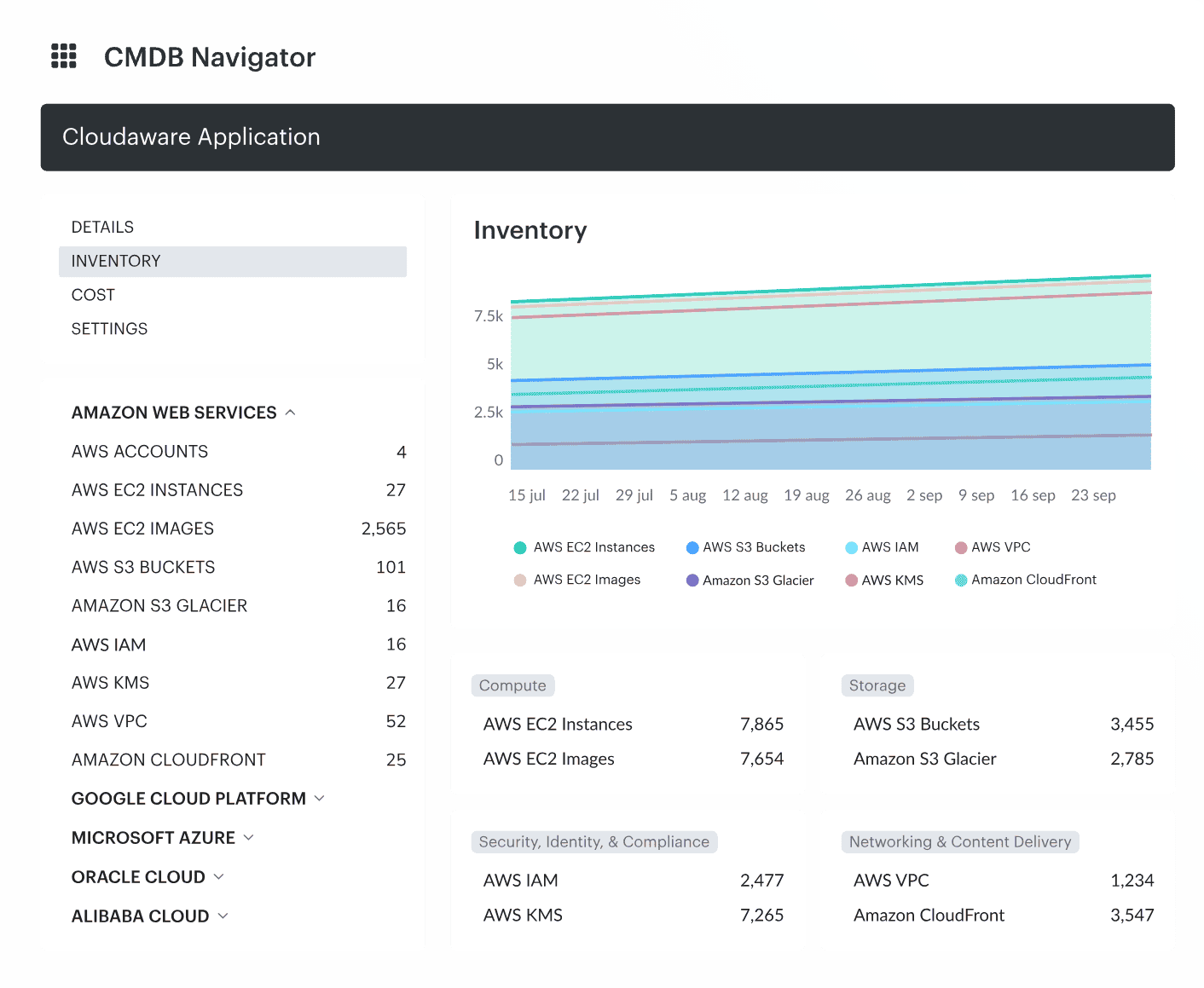
A CMDB administrator needs more than a list of virtual machines. Each resource must connect to its account, application, current owner, and relevant operational evidence. Cloudaware's ITAM approach builds around that resource model, allowing asset records and relationships to support several teams' decisions.
Cloudaware's Company S compliance case illustrates asset evidence used for audit work. The customer is anonymized, and the account does not establish a ServiceNow migration result.
Edition choice changes the operating experience. Core and Enterprise documentation specifies daily refresh for Core, while Enterprise supports source-dependent intervals from five minutes to 24 hours and adds Salesforce-native analytics, flows, and granular permissions. Choose against the age of data your decisions can tolerate.
To inspect the difference between a populated inventory and usable context, look at an asset list beside its relationships.
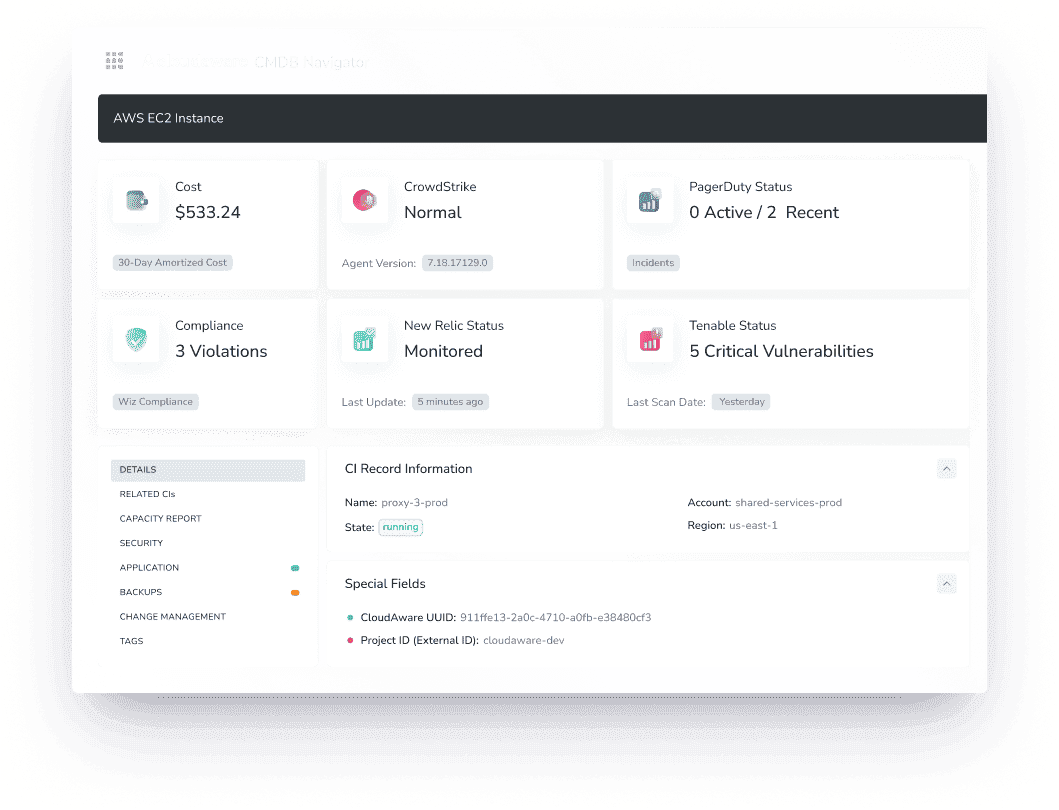
An ownership gap should produce an assignable correction, not another export. For a proof of concept, connect two cloud accounts and one supported on-premises source, then compare a known resource set with the resulting CIs. Change an owner, retire a resource, and verify the updates within the documented refresh window.
Evidence used: verified product/edition documentation, reviewed customer accounts, and compared replacement scope. No product test was performed for this article.
Features
The relevant capabilities follow the administrator's work from collection to a maintained record:
- Discover and ingest assets: bring supported cloud and hybrid sources into the inventory; permissions and source coverage determine what appears.
- Relate operational context: use resource and business relationships to inspect ownership and application context rather than relying on an unqualified asset count.
- Work with the chosen operating layer: Core supplies CMDB access without Salesforce user licenses; Enterprise adds the documented Salesforce reporting and workflow environment.
- Keep ServiceNow where useful: documented push, pull, and combined integration patterns support coexistence. Mapping, setup, and licensing must be scoped; universal instantaneous synchronization is not implied.
- Where it stops: service-desk processes and an enterprise GRC program still need their own system. Software inventory also needs separate validation before it can be treated as a publisher license position.
Cloudaware earns its place when the missing deliverable is maintained asset context. Include the ServiceNow application prerequisites in your estimate if IntegrationHub and Workflow Studio are part of the proposed connection.
Pricing
Cloudaware's pricing calculator, checked October 29, 2026, starts estimates at 50 servers and displays capacity for up to 25,000 configuration items:
- Core: estimated starting price of $67/month, or $804 across twelve months at that rate.
- Enterprise: estimated starting price of $200/month, or $2,400 across twelve months at that rate.
- Larger or tailored configurations: request a custom quote; no fixed enterprise ceiling is published.
These are calculator estimates, not complete production quotes or an annual-billing discount. Confirm source coverage, users, storage, modules, and integration costs; do not extrapolate a large estate by multiplying the minimum estimate.
The current account creation page advertises a 30-day free trial without a credit card. Core is worth evaluating when daily refresh meets the job. Enterprise needs a separate assessment of workflow, permission, and reporting requirements.
Pros and cons
The small review set highlights consolidated visibility and reporting, with friction around onboarding and integration. Historical experiences below should become evaluation questions for the edition you intend to buy.
✅ Unified resource visibility: “It provides a unified view of all cloud resources, which allows for better visibility and control over the entire cloud environment. The platform offers a range of features, including automated tasks, inventory management, cost optimization, compliance management, and security” (Pourya M., Senior Consultant, small business, April 9, 2023, incentivized; G2 review collection.)
✅ Reporting across teams: “This software is easy to use and provides many features that help different teams in my organization. We like the reporting capabilities to management or the ability to easily identify problems in the cloud environment with recommendations to remediate.” (Information Security Officer, 3–5 years of use, May 26, 2022; Capterra review collection. This predates Core.)
⚠️ Interface learning curve: “What I find most challenging is the steep learning curve of the user interface. Since it is designed for deep technical management, the navigation can feel overwhelming and counter-intuitive for non-IT professionals, often requiring significant time to locate specific survey sections or compliance tools.” (Verified Reviewer, Architectural specialist, May 26, 2026, non-incentivized; Capterra review collection.)
⚠️ Complex integration work: “Integrating CloudAware with existing systems or workflows was challenging for me, especially when I have complex IT environments.” (Verified Computer Software user, mid-market company, March 28, 2024, incentivized; G2 review collection.)
Device42 for infrastructure discovery and dependencies
G2: 4.7/5
Capterra: 4.8/5
Best for: Infrastructure teams that need discovery, CMDB records, and application dependencies across data centers and cloud.
Not a fit if: the immediate purchase must replace employee request handling, change approvals, or a GRC program.
A migration plan can fail because the application has dependencies nobody recorded. Device42 focuses on finding infrastructure and showing those relationships, so the evaluation should follow an application from its servers to the systems it communicates with.
Device42 is a Freshworks company, in the same corporate family as Freshservice. Its customer case directory includes infrastructure stories from organizations such as SoftBank and Imperial College London. Those references establish relevant deployments, not a promise that your own discovery or ServiceNow exit will match their outcomes.
For coexistence, the documented ServiceNow connector can transfer infrastructure data into the service-management environment. Inspect class and relationship mappings before deciding which CMDB owns each record. Keeping both systems without that rule can create two plausible versions of the same server.
Use a dependency map to inspect a known application's discovered relationships.
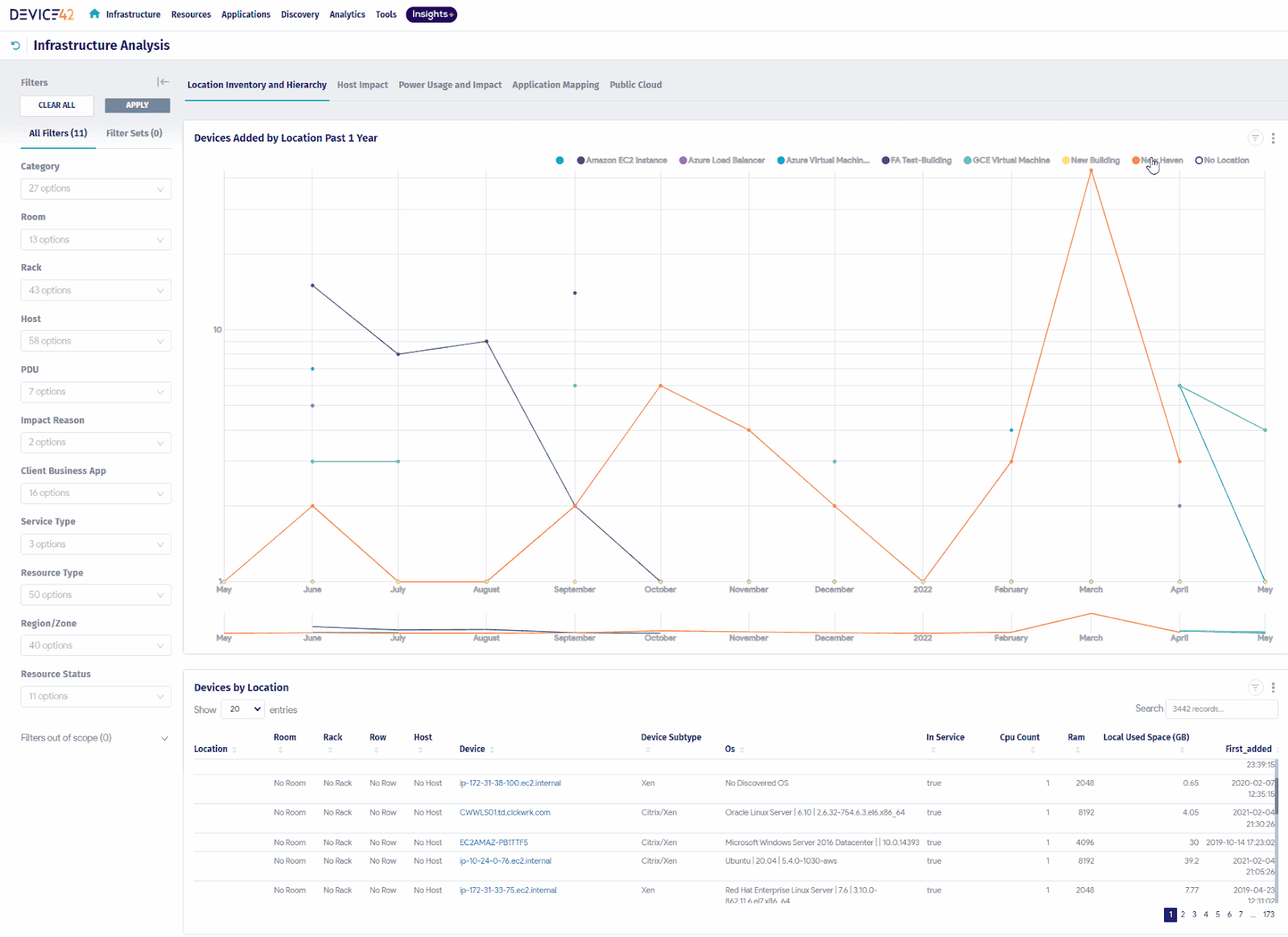
POC rule: discover one bounded subnet and an application with known dependencies. Reconcile missing nodes, false relationships, and stale records with the application owner; repeat discovery after a controlled change.
Features
Device42's useful output is a documented estate and its connections. Check these capabilities against the required data sources:
- Agentless discovery: collect supported infrastructure information through configured discovery methods; credentials and reachability remain implementation work.
- Application dependency mapping: inspect discovered relationships for change impact and migration planning. Validate important edges rather than treating every detected connection as a business dependency.
- CMDB and IP address management: maintain device and addressing context alongside the discovered estate.
- ServiceNow coexistence: transfer supported data through the documented connector and verify mapping and update behavior.
- Where it stops: Device42's discovery role does not by itself supply the full ITSM capabilities of Freshservice or ServiceNow.
Choose Device42 when dependency evidence changes a migration or incident decision. Compare the narrower inventory job separately in Cloudaware vs Device42.
Pricing
Expect an annual subscription driven by device count, with unlimited users and a custom quote. Device42's pricing page does not publish current numeric starting or maximum enterprise prices as of October 29, 2026.
The official evaluation FAQ offers a 14-day evaluation for up to 100 devices. A provisional license issued after ordering is a different commercial stage.
Ask the quote to name device-counting rules, required functionality, discovery infrastructure, support, and ServiceNow integration. Device pricing can suit a team where many people consume the inventory, but the device denominator needs checking against your actual estate. Annualize the quoted configuration rather than relying on old reseller price lists.
Pros and cons
Current feedback supports Device42's discovery and dependency focus while identifying interface and reporting friction. Older administrator accounts are useful for designing a POC, provided the same behavior is checked in the current release.
✅ Dependency-aware migration planning: “We used Device42 during an infrastructure migration, and the application dependency mapping proved invaluable. Understanding which servers, databases, and services were connected helped us avoid unexpected downtime and gave the team greater confidence when scheduling migrations. It removed much of the guesswork from change planning.” (Anonymous analyst, less than one year of use, July 7, 2026; Capterra.)
✅ Automated discovery for the CMDB: “What I like most about Device42 is its strong automated discovery, accurate CMDB visibility, and clear dependency mapping. It helps reduce manual effort by automatically discovering infrastructure assets and relationships, while giving IT teams a centralized view of on-prem and cloud environments.” (Anonymous CMDB manager, 3–5 years of use, May 26, 2026; Capterra.)
⚠️ Learning resources: “The documentation could be more comprehensive, as most available learning resources are limited to basic YouTube videos and lack the depth needed for advanced use cases.” The same reviewer summarizes the trade-off: “Provides robust ITAM and incident management features at a fair price, but limited documentation and a lack of advanced guides make complex use cases more difficult to address.” (Anonymous software engineer, free-trial user, July 24, 2026; Capterra.)
⚠️ Interface and add-on costs: “One of the main drawbacks of D42 is it’s ui. It is not upto the current standards and the pricing increases exponentially for add ons and customisations.” The same reviewer credits the product with “great asset and CMDB management” and change-management workflows that are easy to customize. (Anonymous senior recruiter, less than one year of use, October 21, 2026; Capterra. Original spelling preserved.)
Flexera One ITAM for software license positions
G2: 4.4/5
Gartner Peer Insights: 4.4/5
Best for: Enterprise SAM and ITAM teams that must reconcile installations, entitlements, and publisher use rights.
Not a fit if: the principal requirement is a service desk or a general-purpose cloud CMDB.
Counting installations is the beginning of a software audit. The harder work is deciding which licenses cover them after virtualization, product bundles, and use rights enter the calculation. Flexera One ITAM targets that problem with license-position analysis and publisher intelligence for vendors including Microsoft, Oracle, and IBM.
An inventory tool can supply evidence to this process without replacing it. Flexera deserves a place on the shortlist when the missing deliverable is a defensible entitlement-to-consumption reconciliation. Its case directory specifically associates DEICHMANN with Flexera One ITAM; other Flexera stories may concern different products.
For the visual evidence, inspect a license position rather than a cloud-cost dashboard.
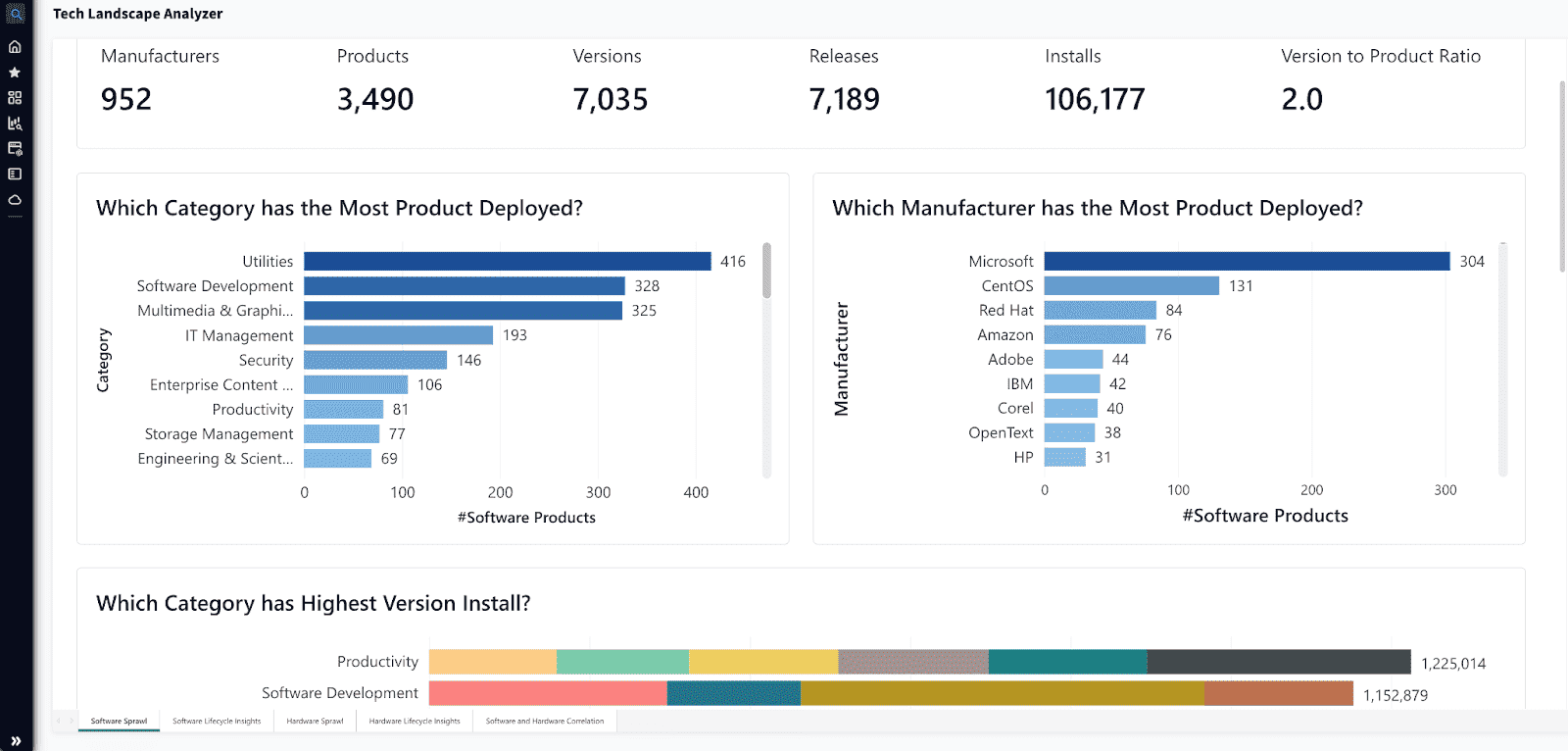
POC rule: give the vendor one publisher's entitlement records and a known installation set. Trace exceptions and consumption assumptions back to source evidence before accepting the resulting license position.
Features
Prioritize capabilities that change the renewal or audit decision:
- License-position analysis: compare consumption with entitlements using applicable use rights; data quality and licensing assumptions still require validation.
- Normalization and publisher intelligence: turn inconsistent software records into usable product information.
- Renewal and reclamation analysis: identify unused or underused licenses for review before renewal. A recommendation needs an accountable software owner before removal.
- ServiceNow integration: verify the required integration entitlement, data direction, and source mappings in the proposed configuration.
- Where it stops: this profile covers ITAM/SAM. It does not establish an out-of-the-box replacement for ServiceNow's service desk, GRC, or custom apps.
Flexera fits when publisher licensing is the expensive unresolved job. Keep the broader asset-context discussion separate in Cloudaware vs Flexera.
Pricing
Flexera One ITAM is custom/quote-based as of October 29, 2026. The official product page does not disclose numeric starting or maximum enterprise prices, and no current self-serve trial duration was verified.
Request a quote that identifies the licensed estate, modules, data sources, implementation, publisher coverage, and support. Ask which integrations are included and which require separate entitlement. There is no defensible annual total until those commercial units are defined.
This is a specialist shortlist for teams with material licensing complexity. If you only need to locate devices and installed software, price a narrower inventory product before taking on a broader SAM implementation.
Pros and cons
The reviews describe useful centralized data alongside configuration and reporting effort. Because Flexera One includes several modules, the observations below must be matched to the ITAM workflow under evaluation.
✅ Centralized asset work across sites: “What I like most about Flexera One is the ability to manage IT assets from multiple global locations within a single platform. By having all asset information centralized, I can generate reports faster, easily track asset data across regions, and maintain better visibility of our asset inventory.” (Agata K., IT Specialist, manufacturing enterprise, September 24, 2026, updated September 30, 2026; G2. G2 labels the English text AI Translated.)
✅ License tracking from merged data: “We use Flexera ONE as a main system of insights to manage the entire IT estate. Our ITAM and Finops teams uses it to daily track the license consumption,monitor cloud usage and automate the messy data from multiple source. It eliminates the duplicate of Saas subscription by identifying the licenses.” (Tripti Kashaudhan, SDE, KSOLVES, February 10, 2026; TrustRadius. Original wording preserved.)
⚠️ Setup and maintenance effort: “Well this is very good tech to manage all the it work but still it has a lot of feature which sometimes feel complex to understand it properly. The initial setup is complex. Ongoing maintenance is difficult to handle.” In the same review: “It is very powerful tool so it is complex to understand.” (Tripti Kashaudhan, SDE, KSOLVES, February 10, 2026; TrustRadius. Original wording preserved.)
⚠️ Reporting navigation: “Flexera One provides many powerful capabilities, but new users may need time to become familiar with all available features and configuration options. Some administrative and reporting tasks require multiple navigation steps, which can make routine activities more time-consuming.” (Agata K., IT Specialist, manufacturing enterprise, September 24, 2026, updated September 30, 2026; G2. G2 labels the English text AI Translated.)
Lansweeper for mixed-estate asset inventory
G2: 4.4/5
Capterra: 4.5/5
Best for: IT teams that need to discover a mixed estate and reuse device information in support, security, or CMDB workflows.
Not a fit if: discovery alone must deliver a complete ITSM, GRC, or complex SAM program.
An unknown device is a different problem from a badly routed ticket. Lansweeper is worth evaluating when the first task is finding assets and inspecting the hardware, software, and network context behind them. Its customer material lists organizations including NVIDIA and Maersk; those references are not evidence of a particular customer's savings or ServiceNow migration.
Connector choice deserves unusual attention here. Lansweeper's partner-built CI Sync route is offered for Pro/Enterprise and lists a Windows VM and Azure AD integration among its prerequisites. Its separate Service Graph connector requires ServiceNow ITOM Discovery licensing. A generic “ServiceNow integration included” line would hide a material difference in the bill and architecture.
Compare an inventory record with the evidence collected during the scan.
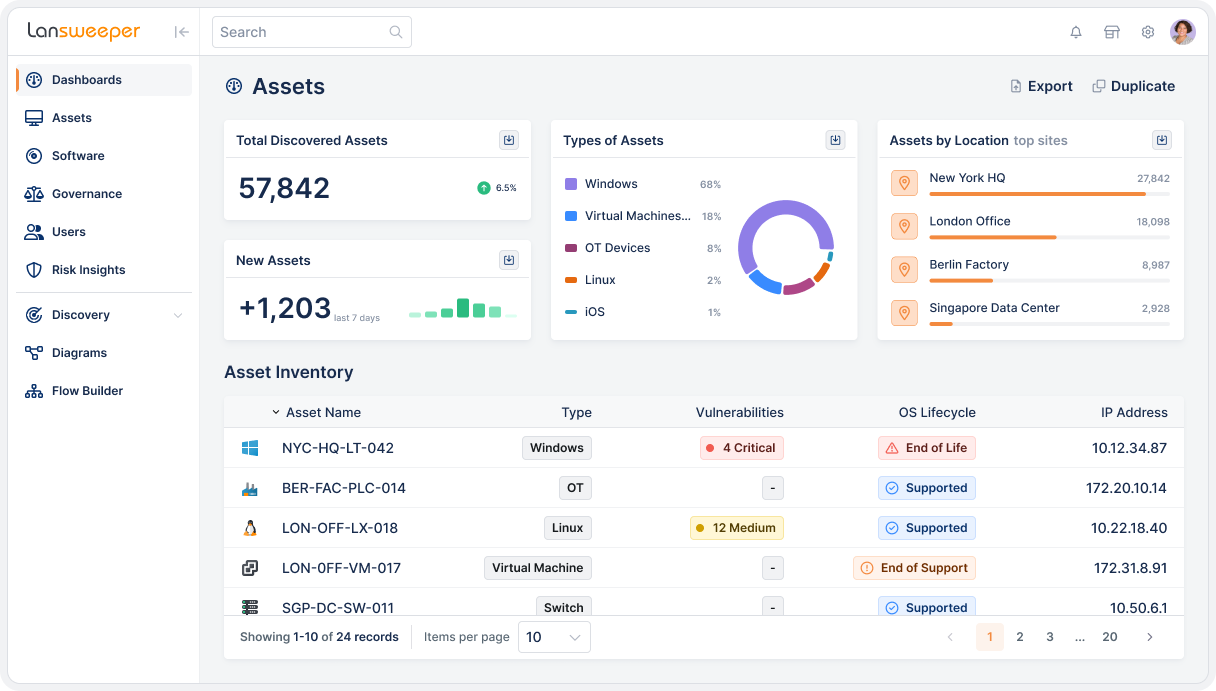
POC rule: scan one site, including unmanaged devices, then compare the results with a known asset list. Change an IP address, inspect duplicate handling, and exercise the exact export or connector your workflow needs.
Features
An inventory project should prove coverage and reuse before expanding into extra workflows:
- Asset discovery: inspect supported IT, OT, and cloud sources against your actual device mix.
- Hardware and software detail: use discovered attributes for asset identification and investigation; software presence does not establish license compliance.
- Reporting and enrichment: provide reusable inventory information to the tools handling service or security work.
- Tier-dependent integrations: Starter limits integrations to service-desk ticket enrichment; Pro supplies the broader integration set in the current plan grid.
- Where it stops: inventory is the central job. Validate any service-management, publisher licensing, or governance requirement separately.
Lansweeper is the pragmatic option when missing device evidence is the bottleneck. Choose the connector and plan before calculating the replacement cost.
Pricing
The current plan page lists annual billing and unlimited user seats. As of October 29, 2026, the USD starting rates are:
- Free: 14 days of full access, then continued discovery for up to 100 assets.
- Starter: from $299/month billed annually, or $3,588/year, including 2,000 assets and one installation.
- Pro: from $528/month billed annually, or $6,336/year, starting at 2,000 assets and expandable to 9,000; up to three installations.
- Enterprise: custom pricing from 10,000 assets.
The paid entry commitment matters if your estate is only a few hundred assets. For larger teams, unlimited seats can be useful, but confirm counted assets, regional currency, integration rights, and the scale-related quote. Older review sites still show lower rates; use the current regional vendor quote.
Pros and cons
Reviewers value detailed discovery while raising questions about interface effort and commercial packaging. Separate Classic-era experiences from the current Platform and verify the features included in your quote.
✅ Less manual inventory work: “Lansweeper excels at giving IT teams a comprehensive, unified view of the entire asset inventory—hardware, software, and users—all in one place. Its automated discovery and detailed reporting make it remarkably easy to stay on top of your infrastructure without manual effort.” (Pankaj K., Lead Consultant, IT Asset & Infrastructure Discovery, consulting, August 25, 2026; G2.)
✅ Network relationship detail: “Super tool to sweep our LAN to find IT assets. Anything from computers, servers, switches and printers etc to even screens connected to the computers. It helps us easily see what is connected to our LAN and even on which switch ports it is connected.” (Verified C-level IT executive, healthcare company with 1,001–5,000 employees, March 12, 2026; TrustRadius.)
⚠️ Reporting and setup effort: “The interface feels dated and some reports take more clicks than they should. Setup can be a bit fiddly depending on your network topology.” He still calls it a “solid tool for IT asset management if that’s your main need,” with data that is “actually useful for audits and compliance work.” (Nabil N., IT Manager, computer software company with 51–200 employees, April 16, 2026; Capterra.)
⚠️ Rising cost and tiered features: “Price has doubled/tripled in the past 2-3 years and many features like vulnerability scanning are further paywalled into an even higher tier package.” His summary: “Love the product overall, but they have priced themselves out of the SMB market segment.” (John S., IT Sysadmin, retail company with 51–200 employees, October 16, 2025; Capterra. Verify current packaging against your quote.)
Jira Service Management for support linked to engineering
G2: 4.3/5
Capterra: 4.5/5
Best for: IT and engineering teams that want service requests, incidents, and changes connected to their Atlassian work.
Not a fit if: the purchase must reproduce every ServiceNow SAM, GRC, and custom-application function without additional design or products.
The strongest reason to choose Jira Service Management is often the handoff between support and engineering. A request can stay connected to the development work needed to resolve it, rather than becoming a separate conversation in another system. Atlassian's product customer material includes Applied Systems, Breville, and 24 Hour Fitness in service-management scenarios.
Asset requirements deserve a fresh evaluation. Assets licensing explicitly covers asset and configuration management, with object allowances for Standard, Premium, and Enterprise. Dismissing Jira as a ticket queue without a CMDB would remove a credible candidate before checking its schema, relationships, imports, and discovery approach.
The current cloud commercial page presents Service Collection, which includes Jira Service Management and Assets. Match the quote to that offering; older JSM plan descriptions may no longer describe the package you buy.
POC rule: configure one service request, approval, change, and incident. Import a known asset schema, use its relationships during the incident, and project object growth before approving the commercial proposal.
Features
Evaluate the work across team boundaries, not just the portal:
- Request and incident workflows: centralize intake, queues, ownership, and service-level tracking; process design determines how much work agents still do manually.
- Engineering collaboration: connect support work with Jira and knowledge in Confluence, checking permissions and the actual handoff.
- Assets configuration management: model objects and relationships. Standard includes 5,000 objects, Premium 50,000, and Enterprise 500,000 under the captured licensing rules.
- Change management and advanced capabilities: verify the required tier against the current plan matrix.
- Where it stops: Assets is real CMDB functionality, but that does not establish parity with a specialist publisher-license engine or your full ServiceNow IRM implementation.
JSM moves ahead when the Atlassian connection removes a costly support-to-engineering handoff. Make asset schema quality and object consumption part of the same decision.
Pricing
As of October 29, 2026, Atlassian's live English pricing page displays Free for three agents, Standard at $21.50/agent/month, and Premium at $55.28/agent/month. Enterprise is a custom annual offer; paid-plan trials are 14 days.
Illustrative straight-rate arithmetic for 20 agents is $430/month for Standard or $1,105.60/month for Premium. Twelve months at those monthly rates would be $5,160 or $13,267.20. Those figures are not annual-plan quotes and exclude volume effects and extras.
Additional Assets usage starts at $0.02/object/month under the published object licensing, with rollout/billing conditions to confirm. Include apps, identity/security requirements, and the tier needed for change workflows. The lowest paid agent rate is only a useful comparison after those requirements are fixed.
Pros and cons
User accounts support the value of Atlassian integration and visible ticket communication. They also show that reporting and configuration can remain administrative work after the service desk is running.
✅ Support linked to engineering work: “The integration with Jira is one of its greatest strengths. Requests can be escalated or linked to development work while retaining their history and context, making collaboration between support, engineering and product teams more efficient.” (Adam M., Senior Technical Writer, 1–3 years of use, October 5, 2026; Capterra.)
✅ Less manual tracking: “Before Jira Service Management, tracking of requests and incident follow-up involved many manual checks, which are now replaced by the queues, SLAs and automated workflows in Jira, allowing me to keep most of the recurring tasks automatically processed and up-to-date. For the regular requests, I would estimate that it saves me about 30% of tracking, ticket assignment and status control time.” (Anit S., Enterprise Architect, 3–5 years of use, September 2, 2026; Capterra.)
⚠️ Configuration needs ongoing ownership: “Steep learning curve due to too many knobs. Initial configuration can take time, particularly when designing request types, workflows, SLAs, permissions, automation rules, and reporting. The interface feels complex for what it should be.” (Anonymous DevOps reviewer, less than one year of use, September 21, 2026; Capterra.)
⚠️ Admin effort and agent costs: “Setting up custom workflows and permission schemes in the admin UI is still way too confusing and takes too many clicks. The interface can also feel pretty slow and heavy when loading large queues, and the per-agent pricing adds up fast as the team grows.” (Anil Baki D., System Administrator, 1–3 years of use, November 4, 2026; Capterra.)
Freshservice for employee service operations
G2: 4.6/5
Capterra: 4.5/5
Best for: Service teams evaluating employee support, catalog, incident, and change workflows with an explicitly scoped asset program.
Not a fit if: an entry ITSM subscription is expected to include every discovery, SAM, mapping, and AI capability.
Seagate's Freshservice project covered 30,000 employees and, according to the vendor-published case, rolled out in three months. The detail that matters is the work around the software: the project redesigned service categories and service-level agreements (SLAs) and used Device42 for discovery. Its timetable is evidence from one combined implementation, not a default deployment promise.
Freshservice, a Freshworks product, offers a service platform plus a separately defined ITAM lineup. Growth covers discovery, lifecycle management, and CMDB; Pro adds SAM and SaaS discovery; Enterprise adds application dependency and business service mapping. Calling this only “light asset management” would obscure the real buying question: which package, sources, and operating model will your quote include?
Follow one incident through the workspace and its related asset or change.
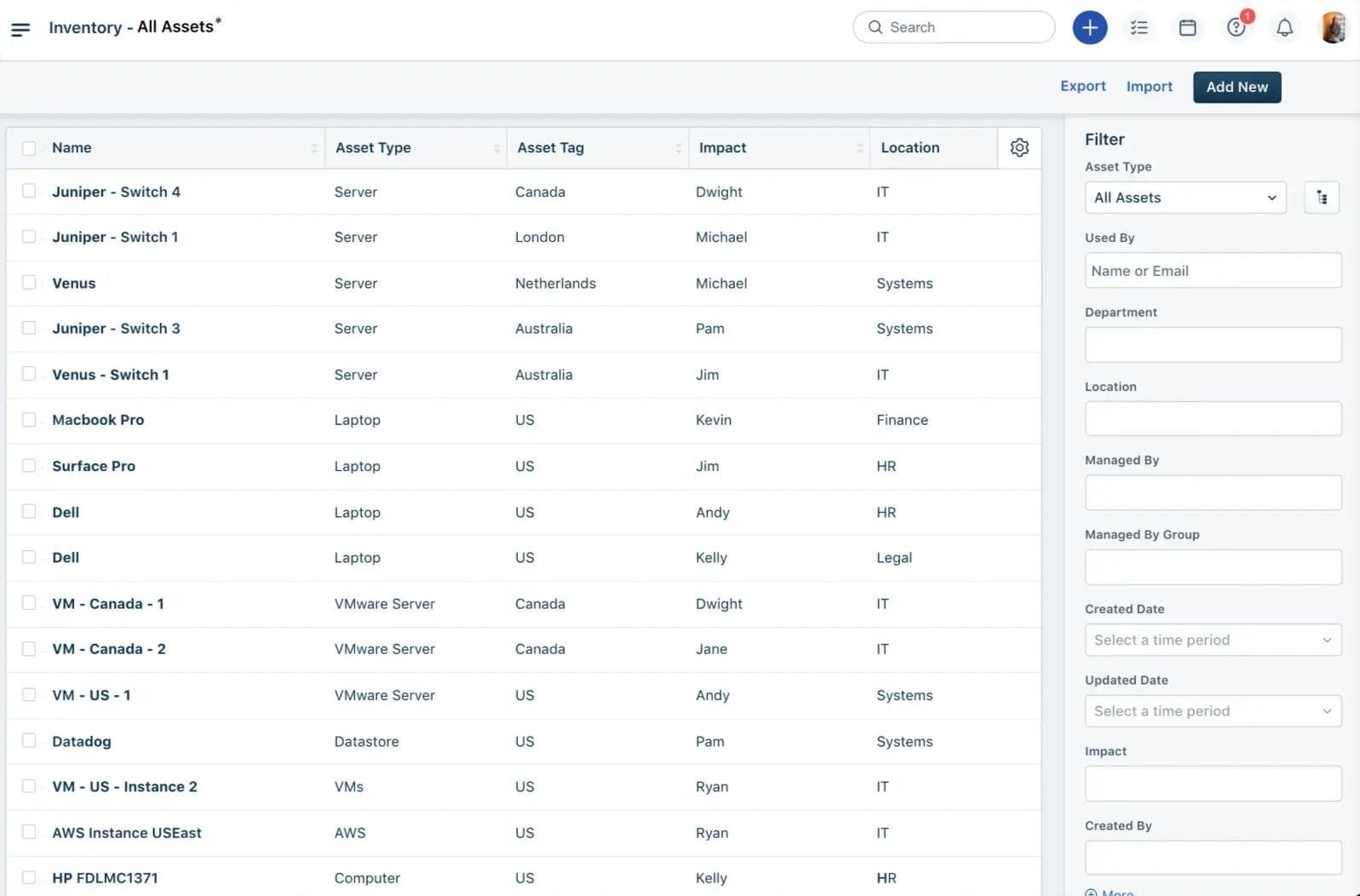
POC rule: onboard one team with a real catalog item, approval, change, and incident. Include an ambiguous AI question and a Jira handoff. Record configuration effort and whether the chosen form fields and data transfer meet the actual process.
Features
Check the service experience and asset model as separate parts of the evaluation:
- Employee intake and catalog: configure the required portal, request forms, and routing in the relevant tier.
- Incident, problem, and change workflows: match the required practices to the plan; the current ITSM grid places problem/change/major-incident capabilities in Pro.
- Asset and configuration management: use the ITAM package matrix to establish discovery, CMDB, software, and service-mapping scope.
- AI assistance: validate answers against your knowledge corpus and price the required AI offer. An enabled assistant does not establish answer accuracy.
- Where it stops: a broad product family does not mean every feature is included in one agent subscription or that your enterprise GRC/custom apps are already covered.
Freshservice belongs on the shortlist when the team can simplify service delivery during migration. Use the POC to distinguish product setup from the process redesign that creates much of the value.
Pricing
Freshworks' ITSM prices, checked October 29, 2026, are $19 Starter, $49 Growth, and $99 Pro per agent/month billed annually; Enterprise is custom. The trial lasts 14 days. Freddy AI Copilot is shown separately at $29/agent/month.
For 20 agents, Pro totals $23,760/year at the published annual-billing rate. Copilot for all 20 adds $6,960/year. Compare this configuration if you require Pro's change/problem workflows, rather than using the $19 entry rate as a full ITSM budget.
ITAM requires its own Asset Unit calculation. Servers, VMs, and network devices count as four AUs each; endpoints count as one, with packs of 500. An illustrative 100 servers plus 500 endpoints uses 900 AUs. Request the package price and included allowance before annualizing the complete bill.
Pros and cons
The selected accounts show an approachable service platform and practical knowledge management. Form design and AI behavior still need evaluation against your own requests and documentation.
✅ Lower administration after ServiceNow: “We moved from ServiceNow to Freshservice because our ServiceNow environment was outdated and required a lot of development work to keep it running the way we needed. Freshservice, on the other hand, makes it easier for non-IT folks to manage and offer services, and it supports doing that across multiple workspaces.” (Jack S., NLCIO Freshservice Working Group Chair, November 2, 2026; Capterra.)
✅ Fast implementation: “I like Freshservice’s UI. It’s really good and easy to use, and I find it quite customizable. Using web requests within workflows is super useful, and I like the automations and how easy the workflows are to use. Setup was pretty easy and seamless. The implementation team helped with technical questions, and we implemented it within six weeks. Freshservice was also a lot cheaper than ServiceNow.” (Ben W., November 4, 2026; Capterra.)
⚠️ Configuration beyond the basics: “Freshservice offers a lot of functionality, but some features require more configuration than expected. Simple changes can sometimes require custom workflows or APIs, and permissions and workspace access can be confusing. We also encountered migration issues that required cleanup.” (Maura K., Helpdesk Services Supervisor, 1–3 years of use, October 29, 2026; Capterra.)
⚠️ AI answer quality: “Freddy AI’s performance could improve, especially when identifying the skills needed for a request and understanding what someone is asking. It sometimes gives misleading answers even when more relevant information is available in our resources.” (Parisa B., IT Operations Team Lead, 3–5 years of use, October 29, 2026; Capterra.)
ManageEngine ServiceDesk Plus for ITSM deployment choice
G2: 4.2/5
Capterra: 4.4/5
Best for: IT teams that want service management and asset capabilities with a choice of cloud or on-premises deployment.
Not a fit if: the proposal assumes identical features, asset allowances, and operating responsibilities across every edition and deployment model.
ManageEngine publishes an unusually relevant ServiceNow replacement case. An anonymized cosmetics manufacturer adopted ServiceDesk Plus Enterprise Cloud for 120 technicians and 2,000 assets while retaining a connection to its parent's ServiceNow environment. The vendor reports a 15-day implementation and license costs around one-third of the previous arrangement.
That is useful evidence of replacement with coexistence, with an important boundary: the earlier instance was controlled through the parent organization and an MSP. The project changed administrative control as well as software. Treat its timetable and savings as case-specific.
ServiceDesk Plus is part of ManageEngine, a Zoho division. The product's edition matrix distinguishes Standard service desk, Professional with assets, and Enterprise with broader ITSM, ITAM, and CMDB. Choose the edition before judging either capability or price.
Use the same incident to inspect ticket handling and the linked asset.
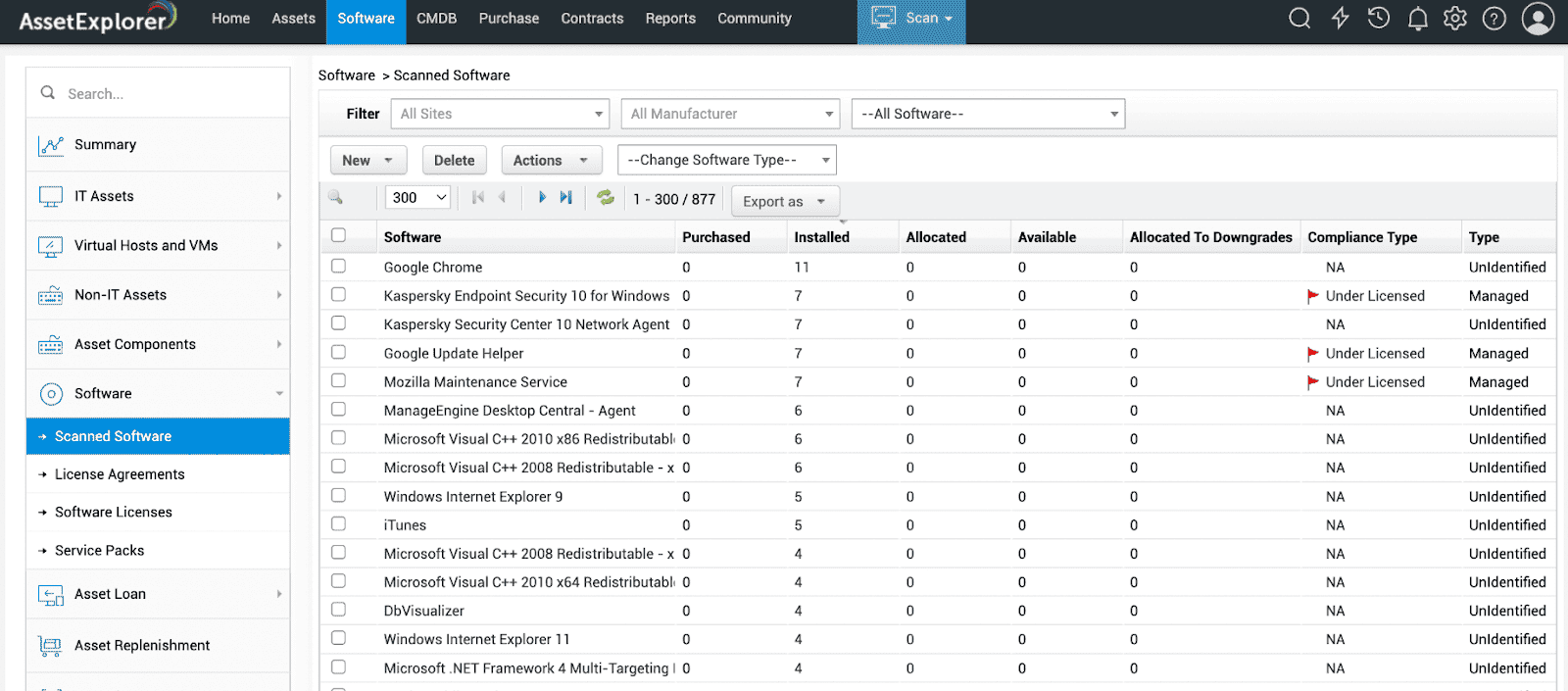
POC rule: complete an incident, approval-based change, and management report in the proposed deployment. Test email intake, identity, and the automation that would replace your current customizations at a realistic workload.
Features
The deployment decision affects who operates the service as well as where it runs:
- Edition-based coverage: Standard handles service-desk work; Professional adds assets; Enterprise includes the broader ITSM/CMDB scope.
- Cloud or on premises: compare administration, patching, backup, and recovery ownership with the proposed service terms.
- Configurable workflows: validate required triggers, approvals, and reports in the selected environment.
- Where it stops: ITSM and asset coverage do not establish an equivalent replacement for every ServiceNow application or cloud-governance process.
ServiceDesk Plus fits when deployment control or a combined ticket-and-asset configuration matters. Ask the implementation owner to demonstrate the actual required workflows.
Pricing
The official annual pricing, checked October 29, 2026, starts at:
| Deployment | Standard paid entry | Professional entry | Enterprise entry |
|---|---|---|---|
| Cloud | $1,545/year for 10 technicians | $645/year for 2 technicians/250 assets | $1,595/year for 2 technicians/250 assets |
| On premises | $1,195/year for 10 technicians | $495/year for the displayed 2-technician entry | $1,195/year for the displayed 2-technician entry |
Standard is free for up to five technicians; the trial is 30 days. Larger configurations require their own quote. Confirm asset allowances and add-ons in writing, since page descriptions and table wording differ. For asset work, compare Professional; for broader change/CMDB needs, begin with Enterprise. Self-hosted infrastructure and operating labor sit outside the license figure.
Pros and cons
The selected reviews describe useful integration and combined ticket/asset work. They also make a practical distinction between an easy initial service desk and the expertise needed for advanced automation.
✅ Integration and service expansion: “Our start was with IT but it then expanded to other business units such as ‘People & Culture’, ‘Facilities’ and Finance Each of the business unit works independently yet able to interact with each other is an amazing achievement for our service delivery. The out-of-box integration, ability to use APIs for complex integration and not to mention new AI capabilities has given more flexibility to optimise our organisation service delivery.” (Anonymous IT consultant, 3–5 years of use, July 24, 2026; Capterra. Original wording preserved.)
✅ Combined ticket, change, and asset work: “The amount of additional functionality is great too - we originally went in expecting to use it for just a helpdesk but eventually it evolved into change management and asset tracking. We also started using the invoicing addon which helped massively and allowed us to track items from point of purchase to decommission.” The same reviewer lists “License cost per technician” as the main con. (Verified IT administrator, banking company with 51–200 employees, May 27, 2025; TrustRadius.)
⚠️ Automation needs scripting skills: “To fully utilise the automative functions requires some scripting knowledge and skills. The terminology tends to lean away from recognised universal standards, such as in relation to ITIL for the change management features.” His overall verdict: “A very powerful tool that I would advise to any team that wants to implement heavy customisations and process automation whilst keeping associated costs minimal.” (Connor Q., IT Team Lead, 3–5 years of use, March 19, 2026; Capterra. Original wording preserved.)
⚠️ Scale and edition limits: “Customization can also be complex, and advanced workflows and forms often require administrator expertise. Reporting and dashboards are powerful, but there’s a learning curve for new users. Integrations with some third-party tools may require additional configuration or premium editions. In larger environments with high ticket volumes, performance can slow down if the system isn’t properly optimized.” (Gabriel S., Helpdesk Support Specialist Level 3, 5+ years of use, November 4, 2026; Capterra.)
Archer for enterprise risk and compliance workflows
G2: 3.6/5
Capterra: 3.9/5
Best for: Enterprise risk, compliance, and audit teams replacing ServiceNow IRM/GRC processes.
Not a fit if: the missing system is a service desk, infrastructure discovery tool, or software-license engine.
Archer belongs in this comparison because a risk program needs more than tickets. Controls, evidence requests, exceptions, assessment records, and remediation owners must stay connected through a defined review cycle. Its current product portfolio covers risk, compliance, audit, and third-party programs, alongside Evolv products.
The Turkcell client story describes expanding from IT risk into a wider program. That illustrates enterprise GRC scope. It also cautions against expecting a configurable risk platform to remove the need for program design or administration.
If ServiceNow remains elsewhere, the documented integration supports specified incident, finding, and device feeds with configurable mappings. Additional licensing fees apply, and complex or bidirectional work can require professional services. Name the exact Archer product and release in the proposal.
POC rule: model one risk, control, evidence request, expiring exception, and remediation assignment. Test business-unit access restrictions and an auditor's view, then verify any ServiceNow handoff.
Features
Evaluate whether the risk program can preserve its relationships and access rules:
- Risk and control workflows: track assessment and remediation work against the relevant risk model.
- Audit and evidence processes: establish evidence ownership and review state; a stored document alone does not prove a control operated.
- Third-party risk: assess the applications and configured workflows required by your supplier program.
- ServiceNow coexistence: quote the specific feed, mappings, and integration entitlement.
- Where it stops: Archer's GRC scope does not supply the asset discovery or employee service desk evaluated elsewhere in this list.
Archer is worth a closer look for a structured enterprise risk program with an implementation owner. Evaluate a narrower compliance-automation product separately if that is the actual job.
Pricing
Archer is custom/quote-based as of October 29, 2026. Its pricing destination does not publish numeric starting or maximum enterprise rates; no current self-serve trial duration was verified.
Request the exact platform/Evolv offer, applications, users, deployment, integration licenses, content, and services. Price the complete risk workflow and annual support commitment. A comparison with ServiceNow's ITSM agent price would use the wrong baseline; the relevant baseline is your IRM/GRC implementation.
Pros and cons
Archer's public review history includes useful workflow examples and substantial customization concerns. The older accounts below concern established Archer, so use them to design questions rather than describe an unreviewed Evolv interface.
✅ Findings and assessment workflows: “RSA Archer is a great tool for findings management, security assessments and overall Governance. I like the dashboard functionality and the reports where I can customize enterprise finding. As with security assessments, it can be customized to have an assessment module and perform tasks like mailing and alerting with ease.” (Anonymous Information Security Analyst, 3–5 years of use, February 13, 2019; Capterra. Historical experience with established Archer.)
✅ Custom risk workflows: “RSA Archer met my team’s needs for building out a Vendor Risk Management program, allowing full control and build out of our customized workflows for all SMEs and stakeholders.” He describes the result as “a full end to end vendor risk management program allowing for systematic review, documentation repository, approval, annual risk review and renewal capabilities with workflows to all relevant SMEs by vendor type and risk score weighting.” (Michael B., Senior Account Director, enterprise, January 19, 2021, incentivized; G2.)
⚠️ Specialist implementation resources: “Although the platform allowed for customization and met our team’s needs, it was very nuanced to create the custom dashboards + necessary approval workflows and required multiple resources on our end including hiring a full-time dedicated Archer RSA expert on our team, who dually worked as the primary admin, and contracting with multiple consulting firms for many years to assist in the build out.” (Michael B., Senior Account Director, enterprise, January 19, 2021, incentivized; G2.)
⚠️ Business-unit access restrictions: “It was a bit tedious to create an environment where one group could not view details of another groups data. For example, HR Compliance risk event investigation documents often contained an employees NPPI, such as pay or health data, that other compliance teams in the organization should not have had access to. Creating this barrier to full access was challenging.” (Anonymous Sr HR Compliance Specialist, 1–3 years of use, April 8, 2019; Capterra. Historical experience with established Archer.)
Appian for custom process applications
G2: 4.5/5
Capterra: 4.2/5
Best for: Enterprise application teams replacing selected ServiceNow App Engine workflows with maintained process applications.
Not a fit if: the goal is a ready-to-run replacement for the entire ITSM, CMDB, and GRC estate.
Before choosing Appian, count the applications you will need to rebuild. Forms are only part of that inventory. Permissions, integration behavior, historical records, reports, and deployment processes also belong in the migration estimate.
Appian combines process automation, application development, and data access. Its historical Aviva customer case describes an operating layer bringing together 22 systems. That supports an orchestration use case; it is not a documented ServiceNow App Engine migration.
External connections are made through documented connected systems, including supported API and database routes with centrally managed credentials. Integration capability gives developers a path to connect systems. It does not move the application model or historical data automatically.
Inspect a process model alongside the task form it creates.
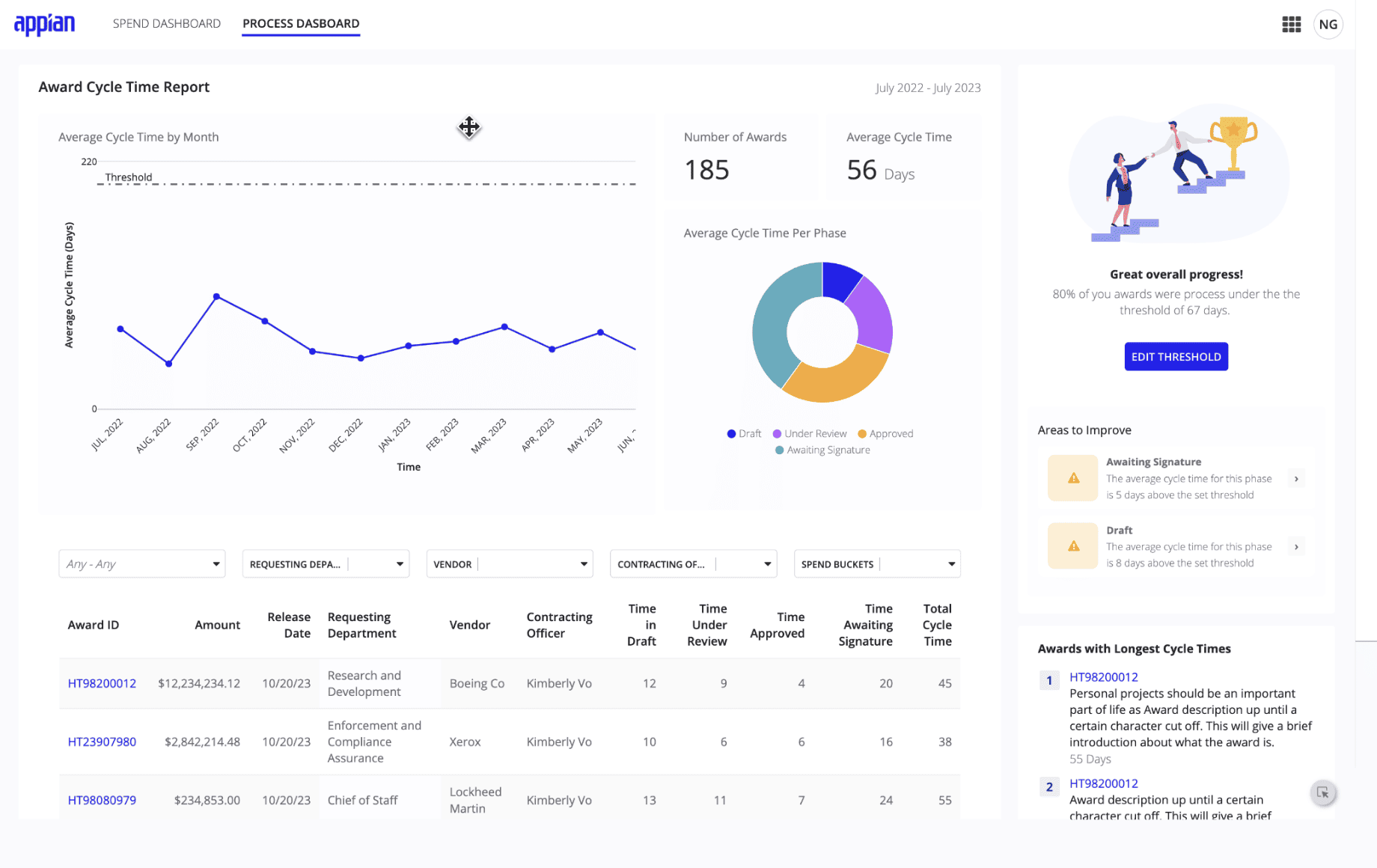
POC rule: rebuild one representative ServiceNow app, including permissions, history, reports, and one failed integration. Change the process after the first build and deploy it between environments. Record both build effort and the expertise required to maintain it.
Features
The relevant Appian plan matrix separates capabilities and allowances across Standard, Advanced, and Premium:
- Process and application development: build forms, task routing, and workflow logic; your team owns the application design.
- Data fabric: connect application work to enterprise data while checking supported sources, access, and scale.
- Connected systems: centralize supported connection configuration and credentials; test failure and retry behavior in the actual integration.
- Automation and AI allowances: establish the bots, portals, data capacity, and AI usage included in the chosen plan.
- Where it stops: low-code development still requires a delivery and maintenance team. A platform license is not a finished ServiceNow replacement application.
Choose Appian when the process itself needs to be rebuilt and your organization can own the resulting applications. Compare a prebuilt ITSM product when the requirement is primarily standard service management.
Pricing
Appian's current pricing matrix states a per-user, per-month, per-app model, with Standard, Advanced, and Premium. Numeric starting and enterprise prices are custom/quote-based as of October 29, 2026; no production trial duration was verified.
Quote internal and external users, application count, environments, data scale, automation, and AI allowances. Add rebuilding, testing, and migration effort before comparing the first year with ServiceNow App Engine. A developer or learning environment does not establish production pricing or usage rights.
This model needs particular care for applications with large external-user populations. Request a complete scenario price rather than reusing an old per-user figure from a software directory.
Pros and cons
Appian feedback describes adaptable workflows and useful process integration. Developer accounts also identify debugging and licensing questions that should be tested on the intended application, rather than inferred from a simple demo.
✅ Fast workflow automation: “What I liked most about Appian was how quickly it allowed my small business to build and automate workflows without needing a large development team. The drag-and-drop interface made it easier to create applications and improve internal processes in a short amount of time. It also helped centralize tasks and data, which improved visibility and communication across the business.” (Verified Reviewer, Owner, May 27, 2026; Capterra.)
✅ Cross-system process work: “Appian’s integration capabilities allow us to connect data across multiple systems, which improves visibility and supports more informed, risk-based decision-making. In addition, the reporting and monitoring features help reinforce governance by providing real-time insight into process performance and potential risk exposures.” (Greystone Chimwemwe M., Risk Analyst, October 12, 2026; G2.)
⚠️ Troubleshooting friction: “While Appian is a powerful platform, some advanced customizations and integrations can be complex and may require specialized technical expertise… troubleshooting certain workflow configurations and integration issues can take longer than expected, especially when the setup is highly tailored.” (Greystone Chimwemwe M., Risk Analyst, October 12, 2026; G2.)
⚠️ Large-user licensing exposure: “The biggest downside of Appian is its steep learning curve for advanced features and high licensing costs, which can make it restrictive for smaller teams and budgets.” (Verified reviewer, Information Technology and Services, October 25, 2026; G2.) Obtain a current quote for the proposed population.
GLPI for open-source service management and inventory
G2: 4.5/5
Capterra: 4.5/5
Best for: IT teams choosing an open-source service desk and inventory with either self-managed operations or paid hosting/support.
Not a fit if: community software alone is expected to include implementation, recovery, and a negotiated enterprise support commitment.
GLPI changes the ownership model as much as the software bill. Teclib and its community develop the GPL-3.0 project, covering service desk and asset management. Self-hosting gives the operator responsibility for the environment; paid offers provide a different division of work.
Open source does not automatically mean small deployments. The vendor's August 2026 Grupo DPSP case reports 40,000 monthly tickets and more than 30,000 assets with a local implementation partner. It demonstrates an enterprise use case, while leaving your own capacity, support, and recovery requirements to be verified.
For a visual check, follow the relationship between a ticket and the equipment involved.
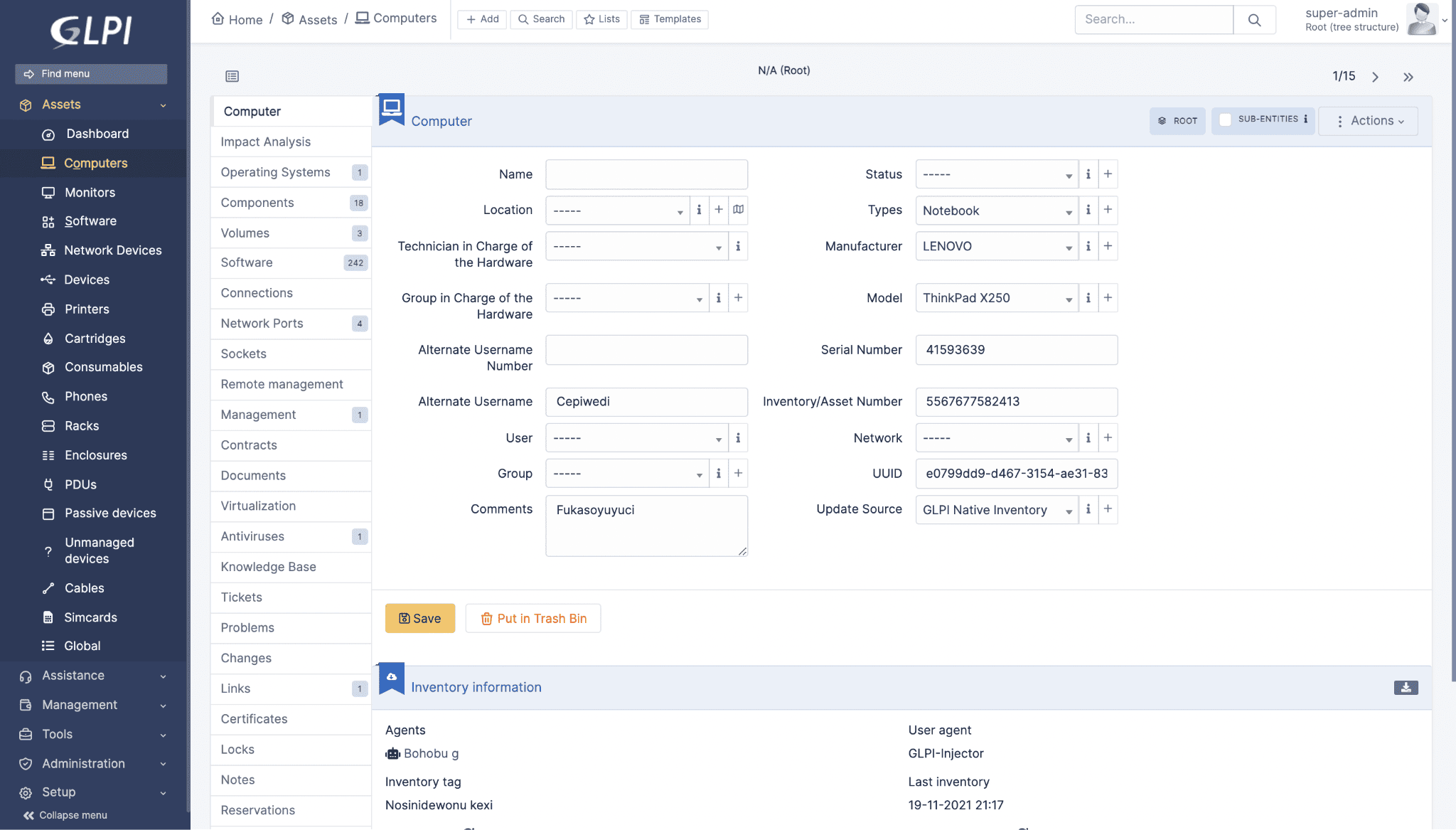
POC rule: configure routing and an SLA, import a known inventory, and exercise one required plugin. For self-hosting, rehearse an upgrade and backup restore. For managed cloud, inspect contractual recovery and support terms instead of assuming they match self-managed operations.
Evidence used: verified license and commercial offers, reviewed deployment-specific user accounts, and an attributed large-estate case.
Features
Judge the combined workflow alongside its operating requirements:
- Service desk and inventory: connect support activity with equipment/application records.
- Asset administration: maintain relevant financial, contract, software, and lifecycle information within the configured model.
- Plugins and customization: extend required workflows while checking version compatibility and support ownership.
- Deployment options: select self-hosted software, support subscriptions, or managed cloud according to who will operate the service.
- Where it stops: free source code does not supply a managed SLA, specialist implementation, or automatic equivalence to every enterprise ServiceNow module.
GLPI is a credible shortlist when control over hosting and extensibility is part of the requirement. Assign an operating owner before treating license savings as a budget reduction.
Pricing
The 2026 GLPI offers, checked October 29, 2026, distinguish software rights from managed service:
- Open-source self-hosting: no software license fee; infrastructure, maintenance, and support are separate costs.
- Public Cloud: €19 per standard-interface user/month excluding tax, minimum one user, with unlimited assets and end users.
- Private Cloud: €21/user/month excluding tax, minimum 25 billed users. That is at least €525/month or €6,300 over twelve months.
- Other support/custom offers: quote the required service scope. The managed-cloud trial is 45 days.
Five Public Cloud users would cost €95/month, or €1,140 over twelve months before tax. These are arithmetic equivalents, not a currency conversion or assumed annual discount. Compare availability, storage, recovery, plugin rights, and support terms before choosing the cheaper offer.
Pros and cons
The selected reviews show real combined service-desk and inventory use, plus room to adapt the system. Installation and maintenance comments refer to particular deployments and versions, not a measurement of the current managed-cloud service.
✅ Ticketing and inventory together: “GLPI is our internal IT support and ticketing solution, we also use it as an inventory of computer equipment and applications. It is a flexible and powerful solution.” (Víctor Carrión Hontoria, Sysadmin, CARTIF, October 30, 2023; TrustRadius.)
✅ Extensible configuration: “With the massive catalogue of plugins, you can change or add so many features and if you have the right team, you can turn it into a completely unique piece of software. So, if the default setup isn’t to your liking you can tweak it extensively.” (Verified IT administrator, government organization with 501–1,000 employees, January 9, 2025; TrustRadius.)
⚠️ Installation documentation: “Diffucult installation and scattered documentation for installation that did not always address issues that came up along the way. Does not always pickup significant peripherals.” (Tom R., IT Specialist, February 13, 2025; Capterra. Original spelling preserved.)
⚠️ Customization and onboarding effort: “The distribution and official support for the product are not the best. In daily operations, some features, such as customizing ticket forms, are often problematic for new users. As a team leader, onboarding new members to the system often takes quite a long time. Many features are not very intuitive.” (Verified Reviewer, Coordinator, December 10, 2024; Capterra.)
Best ServiceNow alternatives by use case
Use the job's required output to reduce the ten profiles to two or three candidates. The branches below address the decision that should separate otherwise plausible products.
ServiceNow ITSM alternatives
Start with Jira Service Management when support must remain closely connected to engineering. Freshservice deserves a parallel evaluation for employee service operations; ServiceDesk Plus adds a cloud/on-premises deployment choice. Run the same approval and change scenario in each. Eliminate a candidate if the required workflow needs a tier or customization your operating team cannot support.
ServiceNow CMDB alternatives for cloud and hybrid estates
Evaluate Cloudaware for shared cloud asset context, Device42 for infrastructure dependency evidence, and Lansweeper for broad device inventory. First determine whether your existing ITSM platform can consume the missing data. If it can, compare the discovery/integration configuration with a full CMDB migration before expanding scope. This branch covers discovery and CMDB work, not every ITOM function.
Software asset management alternatives
Flexera One ITAM is the specialist candidate when the required output is a publisher license position. Lansweeper can help establish installed inventory; Cloudaware can supply asset context. Neither role alone proves entitlement reconciliation. Ask the SAM owner to identify the exact publisher, metric, and use rights the new system must model, then require a traceable result.
ServiceNow GRC alternatives
Archer fits the enterprise risk-program branch. For a narrower compliance evidence/control job, consider a separate evaluation of Vanta or Hyperproof; they were not fully profiled here. Define the required risk relationships, access restrictions, and evidence lifecycle before assuming the smaller scope will cover your IRM deployment. A product's framework list is insufficient proof.
Alternatives to ServiceNow App Engine
Appian is the profiled option for process-centric applications. OutSystems is another platform to evaluate when broader application development is central, but it was not assessed as a full profile here. Inventory application behavior and maintenance ownership first. Rebuilding a custom app is a development project even when the target platform uses visual tools.
Open-source ServiceNow alternatives
GLPI offers a service-desk/inventory path; iTop is another candidate for CMDB/service-management requirements outside this full-profile set. Decide whether the organization will self-host or purchase support/hosting. A credible shortlist includes a named upgrade owner, a tested recovery route, and a supported plugin set, rather than a comparison of license fees alone.
How to choose the right ServiceNow alternative
Build the decision around one production workload and a defined cutover boundary. The result should be a signed-off scope, a comparable cost estimate, and evidence that the proposed configuration can perform the work.
1. Name the module and accountable owner. Write one sentence such as: “The infrastructure team needs maintained cloud inventory for incident impact analysis.” List the records and workflows in scope. A request to “replace ServiceNow” is too broad to price or test.
2. Decide replace, coexist, or retain. Mark each workflow's destination and each dataset's authoritative source. Retain working ServiceNow approvals when replacing only the inventory source would meet the requirement. For coexistence, assign responsibility for updates, deletion, and integration failure before implementation begins.
3. Compare production total cost of ownership (TCO). Use the required tier and real estate counts. For year one, add subscription, implementation, migration, integration, internal operating labor, and overlap/exit costs. Separate recurring costs from one-time work. Quote agent seats, objects, devices, and Asset Units in their own units; apply contractual minimums and currency consistently.
4. Give candidates the same known inputs. Use a representative resource set or workflow, including an awkward case: an unowned CI, a failed approval, a complex license entitlement, or an integration outage. A clean demonstration record will not expose the problems you are paying to remove.
5. Record acceptance evidence. The table below is a recommended POC template, not a vendor benchmark. Agree thresholds with the operational owner before the trial starts.
| Check | Evidence to record | Acceptance decision |
|---|---|---|
| Coverage | Expected records, discovered/imported records, excluded classes, unexplained gaps | Every unexplained critical gap has an agreed resolution; exclusions stay visible |
| Freshness and lifecycle | Source timestamp, changed field, retirement behavior | Updates meet the agreed window; deletion does not silently erase needed evidence |
| Workflow completion | Request/incident/change or risk/app scenario with owner and output | The intended role can complete the task with required approvals and permissions |
| Integration failure | Failed delivery, visible error, retry/reconciliation result | An accountable operator can detect and recover failure without creating silent duplicates |
| Operating effort | Setup work, ongoing tasks, required skills, upgrade/recovery responsibility | The named team can sustain the configuration after implementation support ends |
| Commercial scope | Required tier, counted units, minimums, connectors, support, services | The written quote covers the configuration that passed the POC |
6. Approve the cutover and exit plan. Identify which history moves, which remains accessible in an archive, how users find it, and when overlapping licenses can end. Rehearse the critical workflows and a rollback before closing the previous service. The decision is complete when the operating owner accepts the evidence and cost, not when the feature grid looks full.
For an illustrative 100-resource inventory POC, report 92 discovered records and eight gaps rather than “92% coverage” alone. If three gaps are unsupported classes, preserve them explicitly and investigate the remaining five. The denominator tells the buyer whether to change the connector, extend scope, or reject the candidate.