


Your vulnerability queue keeps growing, yet the patch report shows another successful rollout. When patching is driven by how many updates can ship, urgent fixes can wait behind easier work. In vulnerability and patch management, a successful patch job still leaves one question: which urgent findings did it clear?
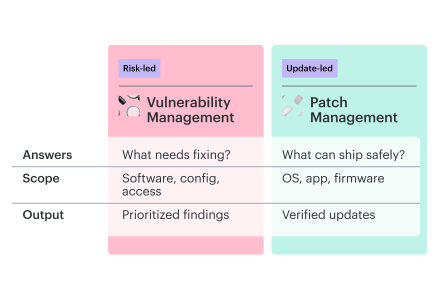
Is patch management the same as vulnerability management? No. Vulnerability management identifies, prioritizes, and tracks weaknesses; patch management fixes some of those weaknesses by deploying software and firmware updates, and each fix still needs verification.
Why is patch management important? Attackers can reuse a known exploit while its patch waits in your backlog. The vendor’s fix helps once it’s installed on the systems they can reach.
You’ll leave with a find-to-fix workflow for cloud and on-premises systems, connecting security priorities to safe patching and rescan evidence. The policy template gives your team a place to agree on ownership, remediation deadlines, and what evidence closes a finding on each affected asset.
Key insights
- A patch total can hide a half-finished fix. Track the fix per finding and asset, including those left out of a rollout. A successful deployment on one host must not close the same weakness on the servers still waiting for it.
- An exploited flaw can outrank a higher severity score. On a reachable production service, evidence of active exploitation can justify patching ahead of a more severe issue on an isolated test host. Put that reason in the task so the patch owner understands why it moves first.
- When the application breaks, a healthy host proves little. A patch can leave CPU and uptime looking normal while breaking the service’s database connection. Gate the next deployment ring on an application check, such as a successful transaction, and a recovery plan you can execute.
- A temporary control leaves a patching decision open. A firewall restriction may block the exposed route while the vulnerable package remains installed. Record the protection, its owner, and the next review date. Keep mitigated findings visible separately from patched findings.
- No response means unknown status. If the host never answered the scanner, an empty result cannot establish that it is fixed. Keep the finding open until a successful re-scan assesses that asset and checks the original weakness.
Vulnerability management vs patch management: where responsibility changes
One database server has two findings: an outdated OS package and a service account with excessive database permissions. An OS patch will not narrow the service account’s database permissions. Send both weaknesses to the patch queue, and the access problem can sit there waiting for an update that cannot help.
The difference between patch management and vulnerability management is scope: vulnerability management covers security weaknesses in software, configuration, and access; patch management handles software and firmware updates.
Operations may manage the host while an application team controls the account. A policy can have a precise vulnerability and patch management definition and still route the work badly. Within the vulnerability management lifecycle, the RACI needs to name the team that can change the permissions.
Patch management vs. vulnerability management: scope, ownership, and evidence
| Dimension | Vulnerability management | Patch management |
|---|---|---|
| Main decision | Which weaknesses need action? | Which updates can ship safely? |
| Scope | Software, configuration, and access | OS, application, and firmware updates |
| Working record | Finding tied to an affected asset | Update tied to deployment targets |
| Typical lead | Security; component teams implement fixes | IT, operations, or platform teams |
| Output | Prioritized findings and risk decisions | Deployment records and installed versions |
| Progress measure | Exposure reduced; findings resolved | Target coverage; patch deadlines; service health |
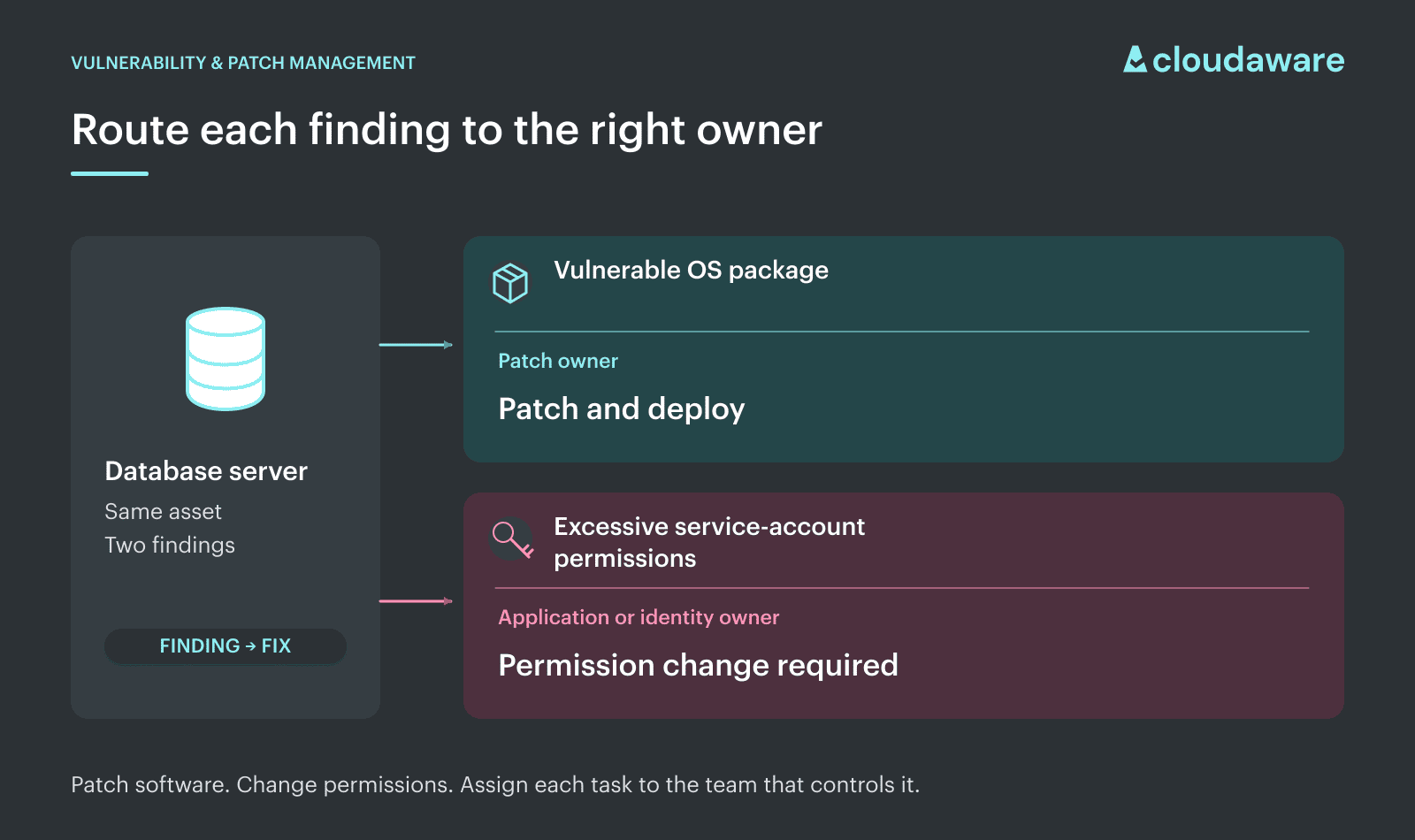
Vulnerability vs patch management on the same server: the package needs an update; the service account needs a permission change.
A subtler distinction appears with vendor-supported packages: an older version number can still include the security fix. Red Hat backports fixes to older releases, so a version-only check can flag a package that has already been corrected.
Valentin Kel., Senior Security Engineer, Cloudaware:
There is also patching work that closes no security finding: a reliability update can prevent crashes without addressing a CVE. That rollout still has value for uptime. It simply answers a different question from whether your security backlog is shrinking.
The vulnerability and patch management process in a hybrid fleet
One OpenSSL CVE, three different jobs. EC2 hosts can take a supported package update; on-prem servers need their own rollout; the vendor appliance has no patch available yet. Leaving that appliance out would make the host rollout look like the only fix.
In this hypothetical fleet, all three cohorts run affected OpenSSL code in TLS services that accept client certificates. With CVE-2022-0778, a crafted certificate can hang certificate parsing before its signature is checked.
How patch management and vulnerability management handle the same OpenSSL finding
| Stage | Owner | What moves forward in this case | Where it breaks |
|---|---|---|---|
| Discover and confirm | Inventory team + security | EC2 and on-prem asset IDs; vendor confirmation of affected appliance firmware | Appliance missing from the host scan export |
| Prioritize and assign | Security + service owner | Priority, due date, and treatment owner for each cohort | Appliance gets no deadline because no patch exists |
| Choose patch or compensating control | IT operations + network team; service owner and risk authority approve any compensating control | Supported host updates; approved source restriction for the appliance’s TLS service | Vendor delay becomes a reason to do nothing |
| Deploy | Cloud, server, and network teams | Host deployment results; appliance rule-change record | An on-prem host is omitted from the deployment batch |
| Re-scan and check the control | Security + network team | AWS hosts cleared; missed on-prem host still affected; appliance restriction tested | A working restriction is mistaken for a cleared CVE |
| Report and review | Program owner | On-prem host requeued; appliance vendor follow-up dated; AWS work closed | The host rollout closes the entire case |
The priority decision comes before deployment scheduling: prioritize by risk, then book the slots.
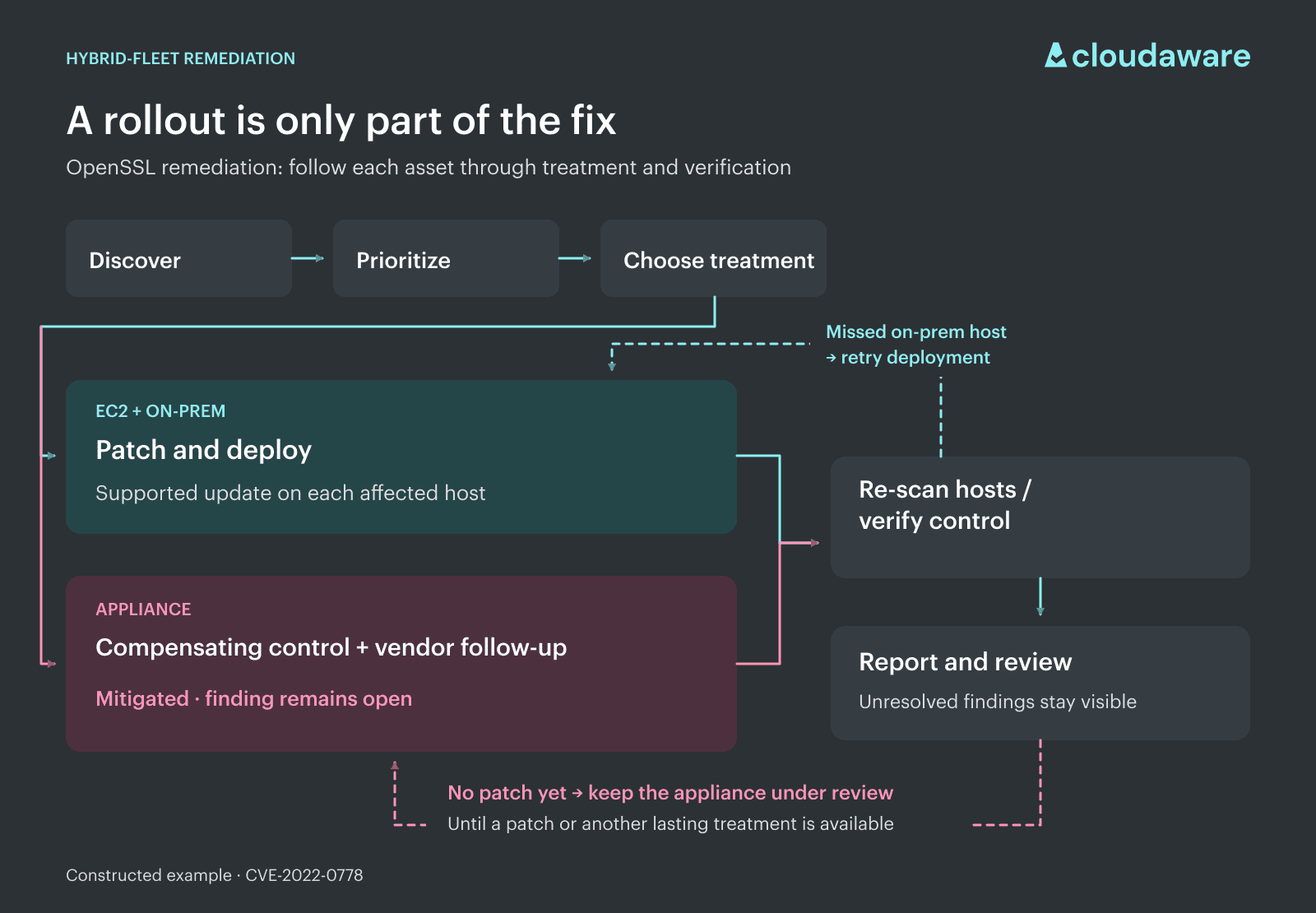
The return paths connect patching and vulnerability management: the missed host goes back to deployment; the appliance stays with its control owner and vendor follow-up.
For the appliance, patch management and vulnerability remediation run in parallel: the vendor follow-up tracks the missing update while the network team applies the approved restriction. The appliance’s finding remains recorded as vulnerable, with mitigation verified.
At the next review of your patch and vulnerability management program, the remaining decisions are concrete: who will retry the missed on-prem host, and when the appliance owner will revisit patch availability.
Vulnerability patch management best practices from Cloudaware’s security team
A patch can be ready while the fix is stuck: the service owner is waiting for an approved window, and security sees an overdue task. The seven practices below adapt vulnerability management best practices to patch deployment, production approval, and verified closure.
| # | Practice | What it fixes | Where to see it in Cloudaware |
|---|---|---|---|
| 1 | Link the finding and fix in one system | Security and operations report different states for the same work | Remediation Tasks: linked findings, affected assets, ownership, due dates, and workflow status; synchronization with Jira or ServiceNow. |
| 2 | Prioritize patches by risk | Easy updates consume capacity while exposed, exploitable findings wait | Vulnerability Management → Prioritization / Risk Models: configurable risk bands or scores combine severity, exploitability, exposure, asset criticality, and finding age. These fields support sorted list views, dashboards, and remediation queues. |
| 3 | Stage patches: canary, ring, fleet, with rollback ready | A compatibility failure spreads before the rollout stops | Patch Management → Job Orchestration / Verification & Rollback: patch groups, canary waves, broader rollout waves, and parallelism limits; remaining waves can be paused or canceled. Rollback uses per-host Linux scripts or Windows snapshot restoration. |
| 4 | Gate production patching with a maintenance window and change control | Urgent fixes stall in approval queues or arrive as surprise changes | Patch Management → Maintenance Windows / Change Approvals: jobs restricted to defined windows, blackout controls, linked change records, and designated approver or CAB approval before production execution. |
| 5 | Use compensating controls when you can't patch | A missing or unsafe patch leaves risk without an active treatment | Vulnerability Management → Exceptions & SLAs → Vulnerability Exception records: linked findings, documented compensating controls, justification, owner, approver, and expiry dates. Active exceptions remain visible in exception reports and audit views. |
| 6 | Prove remediation with a re-scan | Deployment status is used as closure evidence | Verification & SLAs: verification scan results update finding status and the Deleted From Scanner timestamp; related tasks or tickets can then be updated or closed. |
| 7 | Measure risk reduction and patch-SLA compliance | Completed work obscures remaining exposure and overdue fixes | Vulnerability dashboards and reports: exposure, scan coverage, remediation progress, vulnerability age, SLA compliance, and exception governance. |
Start with the row that explains your last missed remediation deadline. When a ready patch repeatedly waits for production approval, practice 4 is the place to begin. If deployments stop because nobody can recover from a failed update, focus on practice 3.
1. Link the finding and fix in one system
A short hostname in the scanner and an FQDN in the patch console can describe the same machine. Before chasing a missing fix, check that both inventories resolve to the same asset. A replacement instance needs its own CI even when its hostname stays the same; keep the previous patch evidence with the old instance.
- Which asset does each tool mean? Each tool’s native asset ID needs to resolve to the same CMDB CI ID. On AWS, reconcile by account, region, and instance ID; keep hostnames as aliases.
- The machine is only half the match. For the finding, a practical matching key is
CI ID + scanner source + finding ID, with component/location added when needed. That reference belongs on the remediation task. - If ITSM changes, the existing task should follow. The ticket ID stays on the remediation task, with the patch job reference in ITSM. In vulnerability management automation, incoming status updates should reuse the existing task link instead of creating another task.
With the IDs reconciled, Cloudaware’s Remediation Tasks retain finding and CMDB links; configured Jira or ServiceNow integration can return work status.
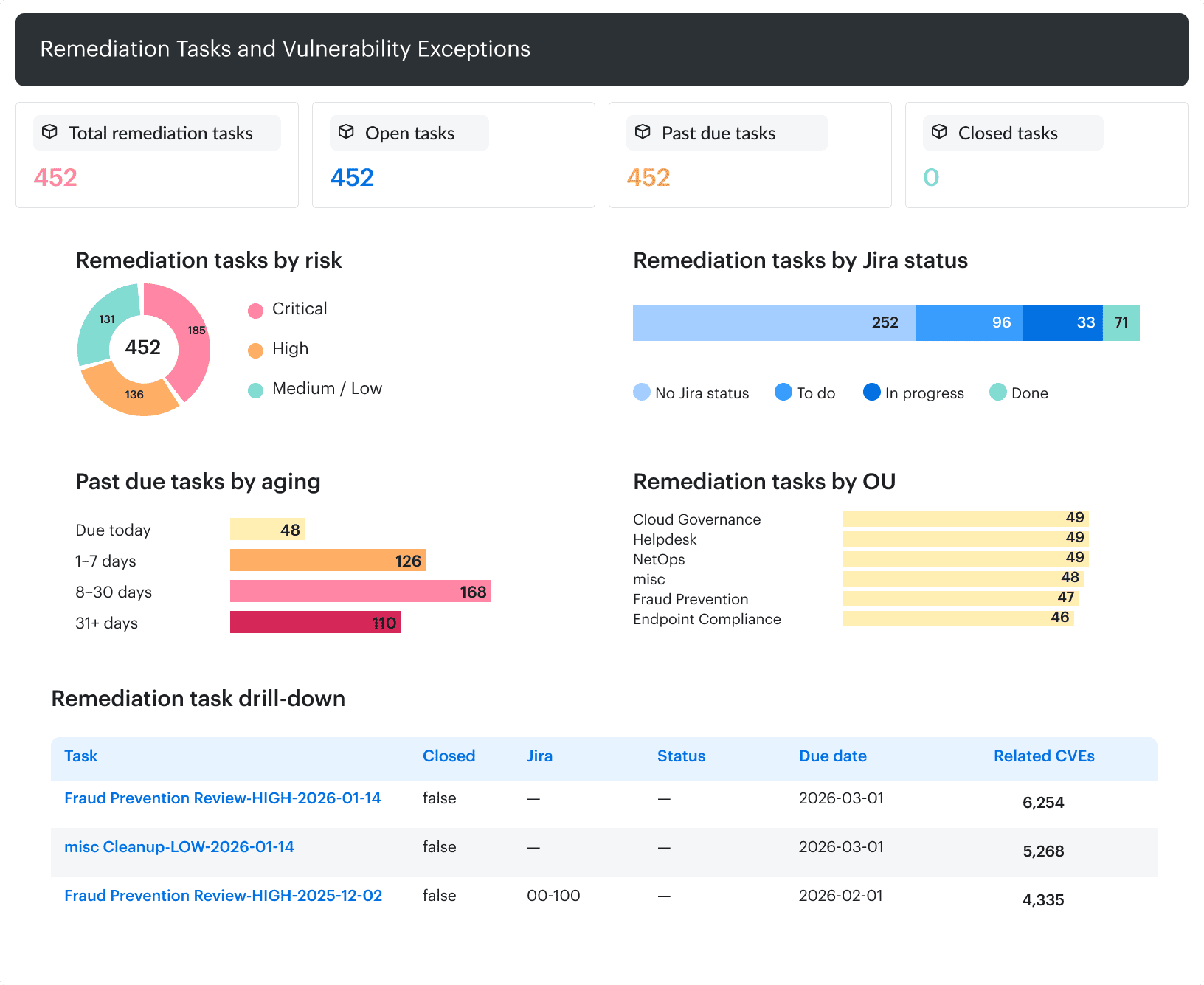
Remediation tasks: compare risk, due dates, related CVEs, and Jira status in one review.
An ITSM ticket marked “Implemented” beside a task still marked “In Progress” points you toward the status mapping. Check that link before escalating to operations for a stalled patch.
2. Prioritize patches by risk, not Patch Tuesday volume
By the time Patch Tuesday turns into a deployment schedule, urgent fixes need a reserved slot. Otherwise, a full calendar becomes the reason they wait.
After matching updates to installed products and versions, use risk-based vulnerability management to set patch priority from exploitation evidence, service exposure, and asset criticality. Ops should be able to see why a patch needs an earlier slot without opening a separate risk report.
Here's how a hypothetical batch of 120 applicable updates could split after that review:
| Batch after risk review | Scheduling decision |
|---|---|
| 3 updates address KEV-listed flaws on reachable, business-critical services | Accelerated remediation slots |
| 117 other updates; no urgent trigger identified in the review | Routine rollout within policy deadlines |
The routine batch stays on the schedule. Before accepting the plan, check that every applicable update appears in one of those queues; anything left between them can miss both.
3. Stage patches: canary, ring, fleet, with rollback ready
Five lightly used VMs can all pass a patch while the production fleet’s older storage driver remains untested. Choose canaries by configuration, then limit their blast radius through redundancy and controlled traffic.
For patch testing, group affected hosts by OS/kernel version, EDR or agent version, workload role, and any driver or runtime the update could disturb. Start with at least one host per material combination. More representatives may be needed where traffic is sparse or behavior varies; keep comparable, unpatched peers as the baseline.
With 40 relevant combinations, that starting canary contains at least 40 hosts, rather than five convenient machines or an arbitrary 5% of the fleet. Leave working replicas outside the wave; both members of an HA pair should not be patched together.
Build the rings around evidence. In a staged deployment, the patch owner expands the cohort after checking the results from the previous wave. The plan below separates recovery testing, configuration coverage, broader production exposure, and the remaining fleet.
| Ring | Who is in it | What is checked | Condition for advancing | Example observation window |
|---|---|---|---|---|
| 0: Lab | Production-like clones covering affected configurations | Install, reboot, workload replay, recovery drill | Tests pass; recovery succeeds within the service’s recovery objective | 1–4 hours of testing |
| 1: Canary | At least one host per material configuration group | Promotion gates below under representative work | Gates pass; enough traffic and relevant jobs observed | 4–24 hours |
| 2: Early production | More hosts per group, staggered across failure domains | Same gates under broader load | No stop condition during representative busy periods | 24–48 hours |
| 3: Fleet | Remaining eligible hosts in controlled batches | Same gates after each batch | Each batch passes; failures halt remaining batches | 8–24 hours after the final batch |
An overnight job that has not run leaves a gap, even when the example waiting period has elapsed. A representative replay can provide the missing evidence sooner. Silence from an idle canary does not establish readiness for the next ring.
Turn “looks stable” into explicit promotion gates:
- Error rate and p95 latency: compare the patched cohort with unpatched peers under comparable load. Example stop thresholds might be a sustained p95 regression above 10% or an error-rate increase above 0.2 percentage points. Set the observation period and minimum request sample before deployment, using the service’s SLOs.
- Unexpected restarts hold the rollout. Separate the planned service restart from new crash loops or repeated restarts afterward.
- After reboot, did security coverage return? Require the EDR or management agent to resume its heartbeat within its configured reporting interval.
- Boot and scheduled work must finish: confirm a successful reboot, the expected running kernel when it changes, and completion of the relevant batch job with expected output.
- New relevant monitoring alerts block promotion until explained or resolved. A fleet-wide average can hide a failing canary, so inspect signals by ring and configuration group.
Before ring 1, rehearse recovery and record elapsed time. On RHEL, verify that the retained previous kernel actually boots and that the operator can reach the recovery console. Without a usable fallback, recovery may require a known-good image. Shared schema changes can affect unpatched hosts too, so rehearse database migrations on a separate data copy. If an update destroys schema or data, reinstalling the old package cannot undo that loss; test a restore or forward fix, including its effect on writes made since the backup.
For an urgent KEV item, a prepared workload replay can replace a lengthy lab workload cycle, observation can shrink from days to hours, and rings 2–3 can merge into monitored batches. Keep the representative canary and verified rollback as entry conditions for this accelerated route. Replays do not replace boot or recovery tests. A change without safe rollback stays out of that route: put a compensating control in place first while the team prepares a tested recovery plan, as covered in practice 5.
Those deployment groups can use the CMDB attributes connected to patch data through Cloudaware’s patch management; your patching engine, or Cloudaware Premium Patch Management through Breeze Agent on supported hosts, executes the rollout.
4. Gate production patching with a maintenance window and change control
Sunday at 2 a.m. looks quiet on the traffic dashboard. Then the patch job interrupts a payroll run, a backup, or an export that feeds another service. Low customer traffic does not make a slot available for maintenance.
Choose the window from request patterns and actual job histories, including queue backlogs, backups, and month-end work. Compare normal weeks with business peaks. The useful gap is after dependent jobs finish and before the next workload starts, with enough time for the expected interruption. For a global service, check whose working day that “overnight” slot falls in.
Make the window part of the service record. In the CMDB, give the service CI a window ID or calendar link, start and end times, an explicit time zone, recurrence, and applicable freeze periods. Name the service owner who approves the interruption and the patch owner who schedules execution. Cloudaware supports custom fields on selected CI classes, which can hold these scheduling attributes.
Host CIs can reference that service window. A shared database needs coordination with every affected service owner; inheriting the first application’s window would leave the others out. Revisit the record when workloads or ownership change.
Valentin Kel., Senior Security Engineer, Cloudaware:
Pre-approve repeatable work, with boundaries. A standard-change catalog keeps routine patches out of the weekly CAB queue once the low-risk procedure and its limits are approved. Record each execution against that model.
For your catalog, use this split as a starting rule:
| Type of patch | Change route | Why |
|---|---|---|
| Monthly OS security updates for a stateless web tier behind a load balancer; a routine golden-image refresh for its autoscaling group | Standard candidate, after procedure approval | Repeatable work with known dependencies and interruption, within the approved scope. |
| Kernel update on a database cluster, firmware update, or vendor-appliance patch | Normal by default | Shared state, hardware behavior, or vendor dependencies need a change-specific assessment. |
| Urgent patch that cannot wait for the normal approval schedule | Emergency | A named emergency authority authorizes the accelerated route; urgency alone is not approval. |
Move a standard request into normal review when an update introduces a new dependency, changes reboot requirements, affects a stateful service, or widens the approved scope. Reserve CAB discussion for changes needing a cross-team decision, rather than making the weekly CAB meeting the only route to approval.
Recorded results from several successful cycles through the rings in practice 3, without patch-related incidents, give CAB evidence to consider that specific procedure for standard-change approval.
An emergency patch still needs an authorization record; the label does not authorize it.
What if the calendar offers no usable window?
Take a hypothetical payroll service with quarterly maintenance and a KEV remediation deadline seven days away. Its next quarterly slot falls on a Sunday and overlaps payroll processing. The owner finds a gap after a completed midweek run and requests an out-of-cycle normal change.
- If normal approval cannot arrive in time, the emergency route becomes necessary.
- If a month-end change freeze covers that slot, request an exception from the designated freeze authority at the same time, naming the CIs, work, and execution window.
A missing window belongs with the service owner for resolution; it is not a standing exemption from patching. If no safe slot can meet the deadline, escalate for a temporary control and a time-bound risk decision, as covered in practice 5. Neither automatically satisfies a mandatory patch deadline.
A patch change ticket should answer these questions:
- What changes? Affected CIs and service, advisory or CVEs, current and target package versions.
- Who is accountable? Service owner, executor, and approving authority.
- When can it run? Start and end times, time zone, window reference, and expected service interruption.
- Which approval applies? Standard-change model ID or normal/emergency approval, plus any freeze exception.
- Why this date? Remediation deadline and its policy or directive source; link the remediation task and execution procedure.
With those fields populated, an approver can see whether the obstacle is a calendar conflict, missing ownership, or an actual change risk. Each needs a different decision.
5. Use compensating controls when you can't patch
On an unpatchable system, a compensating control needs to block the route into the vulnerable function. Start with the vendor advisory's exploitation conditions: the reachable port, enabled module, or request the flaw depends on. “WAF enabled” says nothing about whether that particular route is blocked.
Match the restriction to the route, then test it:
- An exposed management port can often be restricted immediately. Remove unnecessary ingress and allow only the required administration source. On AWS, inspect every attached security group: their allow rules combine, so another group can preserve access. Try a fresh connection to the management port from a workstation outside the admin network. From the approved admin host, the interface should still open.
- If exploitation requires an optional module, disable that module or feature. Check the deployed configuration and attempt to invoke the affected endpoint through an authorized test. Removing its menu entry is not enough if the endpoint still runs.
- For a vulnerable HTTP endpoint that must stay available, use a targeted WAF rule or virtual patch. Match the rule to the advisory, not just a generic attack category. An approved test request should be blocked and logged against that rule, while legitimate requests pass. In AWS WAF, a Count action alone does not block traffic.
- An unrelated web server should not have a route to the legacy appliance just because both sit on the corporate network. With segmentation, keep only the application and admin connections the appliance actually needs. Verify denied connections from ordinary workload networks, not just the internet; required application flows should still succeed.
- Monitoring alone is the weakest option here. It can reveal exploitation without stopping it. If prevention is temporarily unavailable, test that the relevant event reaches an alert and a named responder. Record the remaining exposure explicitly; an alert is not evidence of a blocked path.
If the WAF sits at a proxy, include a direct-origin check: traffic bypassing that proxy must not reach the vulnerable endpoint unfiltered. Use the detecting scanner or assessment team to validate the restriction with a safe, authorized test; record the source network, target, result, and enforcing rule. OWASP's virtual-patching guidance calls for retesting and checking for evasions.
A credentialed scan may still identify the installed vulnerable version after a network restriction. That finding belongs in the record alongside the control test. It describes vulnerable software; the test establishes which access path has been blocked.
Igor K., Senior Security Engineer, Cloudaware:
Give the exception an exit, not just an approval. A reviewer picking up the exception or risk acceptance next month should be able to answer:
- Which systems and findings does this exception cover? Link the affected CIs to their findings or CVEs. Describe how the flaw can be reached and why the patch cannot be installed, such as an unavailable vendor fix.
- Who keeps the control working, and who signs off on the remaining risk? Name both people; the engineer maintaining a firewall rule may not have authority to accept the business exposure.
- What proves the control works, and what risk remains? Record the deployed restriction, verification result and date, remaining reachable paths, and the patch or replacement plan.
- When does the approval expire, and what brings the review forward? Set an explicit expiration date; review earlier if the CVE enters KEV, a vendor fix becomes available, or exposure changes.
Say a hypothetical EOL appliance has a vulnerable web administration interface and no supported fix. Its data service must remain available. Restrict the administration port to a hardened jump host while preserving required data connections.
An external check and a scan from an ordinary server network should confirm that administration is unreachable there; the jump-host check confirms the permitted route. Compromise of that jump host remains a risk, and replacement remains the exit plan.
Active and expiring exceptions remain open findings in the report, with the mitigation and acceptance status visible. At expiry, the acceptance lapses; keep the protective control running while the owner resolves the item. Renewal requires current verification and a fresh risk decision, rather than quietly moving the date. That expired approval belongs beside the finding in the owner's backlog.
6. Prove remediation with a re-scan
The patch job can finish successfully while yesterday's kernel is still running. The installation result does not establish what code is running.
A service can keep an old library loaded even after its package has been updated. In Kubernetes, rebuilding an image does not replace the Pods already running it; the Deployment needs a rollout.
For post-remediation vulnerability testing, reuse the detection scan’s profile and credentials, with current vulnerability checks. If the credentials have changed, confirm that the replacement account has equivalent inspection access. Without the original CI, scanner finding ID, and check ID attached, you could be looking at a clean result for another host or a check that never tested this flaw. A completed job is insufficient if authentication failed or the relevant check never ran.
The check must inspect the thing that needed fixing. A package-only assessment can report an updated package without establishing that a process has stopped using its old library, a failure mode covered in the PHP2Shell patch verification workflow. Where the finding concerns running code, include evidence of the active kernel, the affected service's restart, or the image digest of the running container. Otherwise, the re-scan can give you another false closure.
Valentin Kel., Senior Security Engineer, Cloudaware:
Use three verification states in your remediation workflow:
| State | What supports it | What happens to the finding |
|---|---|---|
| fixed-unverified | Installation reported; verification pending or incomplete, or a required reboot or restart has not happened yet | Remains open |
| fixed-verified | Valid check on the same CI clears the finding; required runtime evidence confirms activation | Eligible for closure |
| reopened | A valid later check detects the flaw on that CI after verified closure | Returns to remediation |
These are workflow labels, not Cloudaware's default status names. Reserve reopened for a finding that previously passed verification. If a valid check still detects the flaw after the update is active, the fix failed: the finding returns to remediation without the reopened label, because it was never closed. In the ticket, ops leaves the installation log and notes whether a reboot or service restart is still waiting to happen. The verification workflow or security reviewer closes the remediation ticket against valid scan evidence, rather than the installer closing it on job success alone.
On billing-worker-01, a hypothetical host, the kernel package update succeeds, but the scheduled reboot never happens. The package check passes; the running-kernel check does not. The item stays fixed-unverified. Once the replacement kernel is active, a successful verification assessment clears the original finding and supplies the evidence for closure.
Cloudaware's verification workflow records finding disappearance dates and remediation status; connected tickets can be updated where configured. In that view, an implemented patch beside an incomplete verification tells the vulnerability manager exactly what to chase: scanner access, a missed restart, or a check that has not run. A disappearance date alone cannot settle that decision.
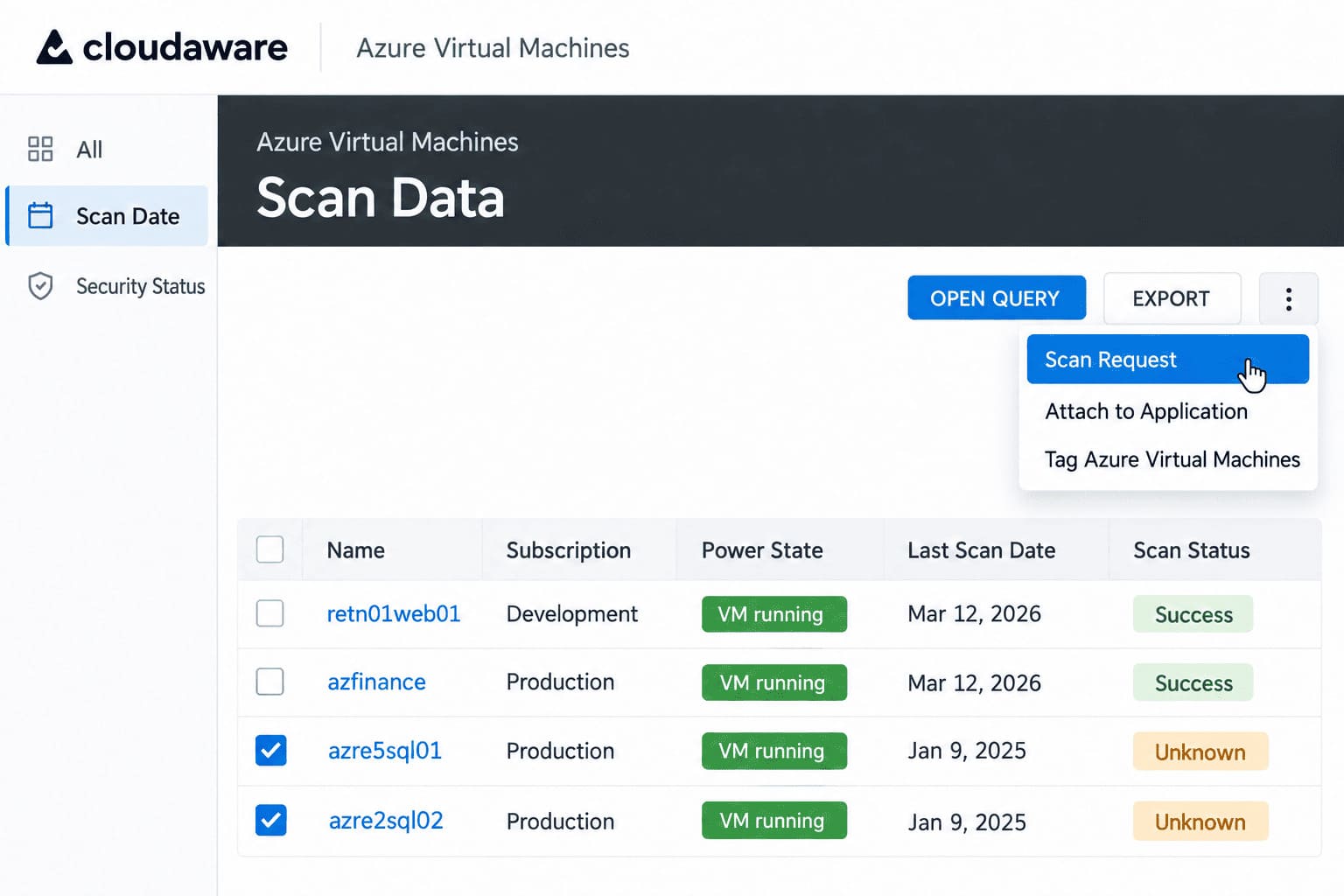
Asset-level scan history: check the last scan date and request a new assessment when needed.
A terminated host needs a retirement record, not a “fixed” label. Confirm its removal through cloud-provider and CMDB lifecycle evidence, preserve the finding history, and record the disposition as retired or decommissioned. When the scanner's only update is “host unreachable,” leave the finding open and find out what broke. Assess any replacement separately, using the CI mapping from practice 1.
7. Measure risk reduction and patch-SLA compliance
Closing 1,200 findings can mean clearing the easiest low-severity items while a KEV-listed flaw remains on an internet-facing production server. Risk reduction shows up in what remains exposed and how long it stays there. In that hypothetical scenario, the closure count rises, but the dangerous backlog has not moved.
Build the report around four measures. Use one finding–CI pair as the reporting unit, with duplicate scanner records reconciled as in practice 1.
| Measure | How to calculate it | What it helps you decide |
|---|---|---|
| Open priority exposure | Count open KEV or high-priority findings on internet-facing or business-critical CIs; show affected CI count alongside it | Which services still need urgent work |
| Oldest priority finding | Days from first detection to today for the oldest open item in that group | Which stalled fix needs escalation |
| SLA attainment by tier | Of findings due in the period: verified on time ÷ total due × 100 | Whether the team meets deadlines, including items still open |
| Mean time to remediate (MTTR) to a verified fix | Mean elapsed days from first detection to verified remediation, for findings verified in the period | Where the find-to-fix cycle is getting faster or slower |
For MTTR, use the verification evidence from practice 6, not the patch-job completion time. Calculate it separately by risk tier; a fast batch of low-severity fixes should not improve the critical tier's average. Even then, the average covers completed fixes only. Keep the oldest open priority finding beside it so a stalled critical fix cannot disappear from the story.
Put actual targets behind the SLA chart. The following calendar-day values are examples for your policy:
| Tier | Example target for a verified fix |
|---|---|
| KEV-listed or critical and internet-facing | 7 days |
| High | 30 days |
| Medium | 90 days |
| Low | 180 days |
These are example targets, not regulatory requirements. If PCI DSS applies, Requirement 6.3.3 requires applicable security patches for critical vulnerabilities to be installed within one month of release. Other applicable security updates must follow time frames determined by the organization’s risk assessment.
For these targets, start the clock at first confirmed detection on the CI: a scanner finding or a vendor advisory matched to installed components, whichever comes first. If an existing finding enters KEV, use the earlier of its current deadline and the KEV listing date plus the urgent target; an overdue finding stays overdue. A later vendor fix belongs in the record as a readiness date, not a reason to reset First Seen. Where patching is unavailable, follow practice 5 and keep that delay visible.
Inventory growth needs its own explanation. Adding an AWS account can raise the finding count because the report finally includes its hosts. Show the newly assessed assets separately from the assets assessed in both periods. Within each group, report affected CIs as a share of successfully assessed, in-scope CIs, alongside the raw counts. Keep scan coverage visible too; losing results must not make the exposure chart look better.
Exceptions stay in the exposure report, with accepted deferrals shown separately. For the SLA calculation above, retain them in the due-period denominator; approval alone does not count as a verified fix. The team can drill into overdue exceptions using the records from practice 5.
Igor K., Senior Security Engineer, Cloudaware:
For leadership, take three numbers: how many exposed or business-critical CIs still carry priority findings, the age of the oldest such finding, and SLA attainment for the urgent tier. Put the assessed asset count beside the first number. MTTR by application, expired exceptions, failed verification jobs, and repeat detections belong in the team's working view, where someone can act on them.
Cloudaware's vulnerability dashboards bring coverage, finding age, risk bands, and SLA views together. When a vulnerability manager sees an application accumulating overdue priority findings while its scan coverage holds steady, the next conversation is about that application's remediation capacity. If coverage has fallen, investigate the missing assessments before presenting a risk improvement.
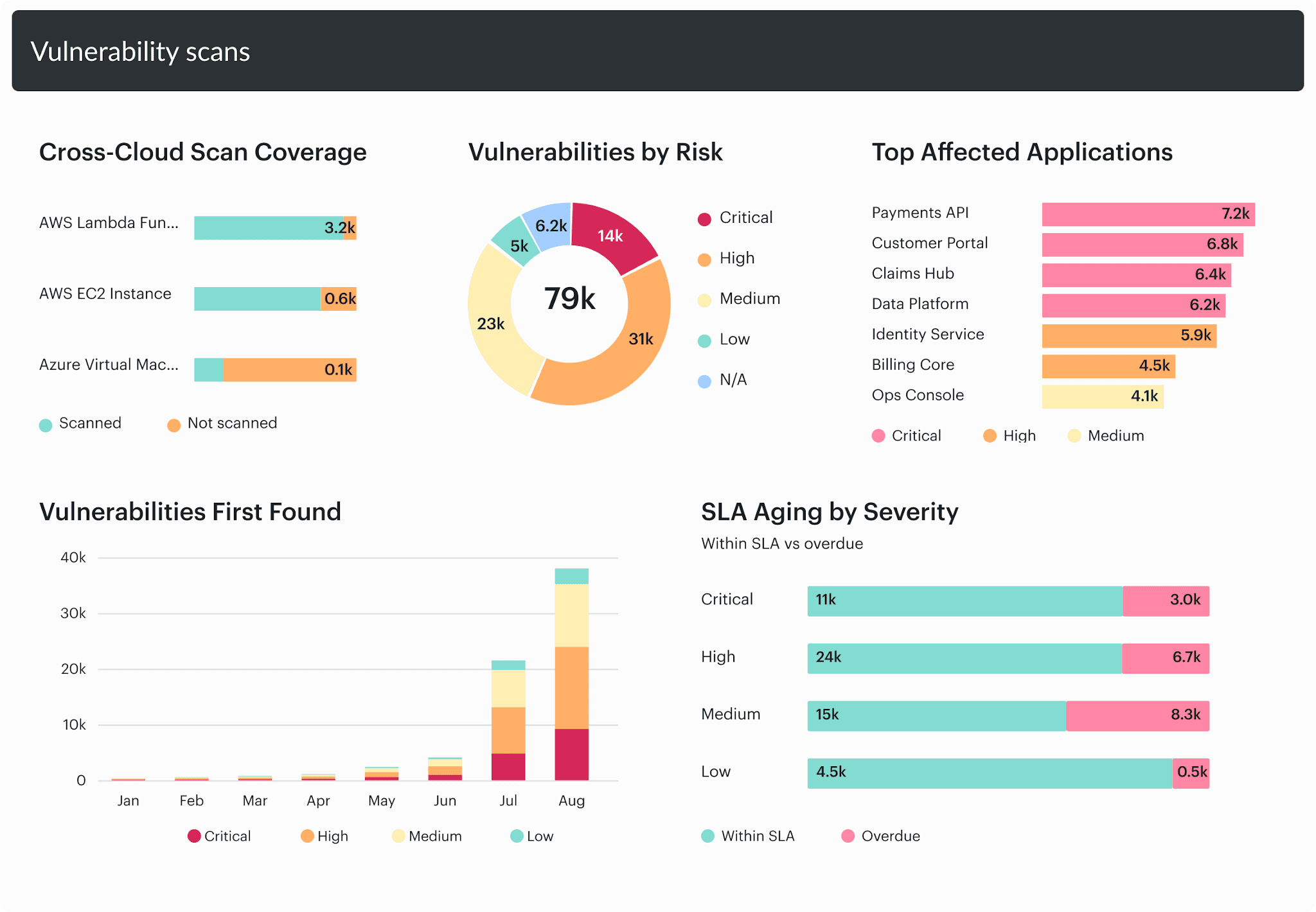
Read SLA aging alongside scan coverage, risk, and affected applications.
Vulnerability and patch management policy template
A downloaded policy PDF can promise patch deadlines your team cannot meet, leave exception ownership unstated, and cover servers while overlooking the build runners that disappear after each job. Those gaps matter when someone chooses a sample from last month's production changes. The template below gives each obligation an owner and a record that can be checked.
Replace the brackets with your organization's values and document references. Populate the SLA schedule from the table in practice 7, with approved targets; the example day counts are not repeated here. This is a starting template to adapt, not a compliance certification.
Policy title: [Organization] Vulnerability and Patch Management Policy
Policy ID and version: [ID] / [Version]
Owner: [Named policy owner and role]
Approved by: [Authorized approver]
Effective date / next review: [Date] / [Date]
Evidence repository and retention: [Repository] / [Retention period]
1. Purpose and scope
[Organization] must identify, prioritize, remediate, verify, and report vulnerabilities across:
- Cloud: [Accounts, subscriptions, projects, and managed services].
- Containers: [Registries, clusters, images, and running workloads].
- On-premises: [Servers, virtualization platforms, and endpoints].
- Appliances: [Network, security, and vendor systems].
Short-lived resources, including [Build runners and autoscaling instances], remain in scope for their operating lifetime.
The scope register must identify customer-managed components and provider-managed responsibilities. Records proving this policy's operation must be retained in [Evidence repository] for [Retention period], including records for resources that have been removed.
Evidence: Approved scope register, responsibility mapping, dated inventory snapshots, and retained lifecycle records.
2. Roles and RACI
Each activity must have one accountable owner. Across business units, enterprise vulnerability management standardizes risk and exception rules while routing technical changes to the teams authorized to perform them. [Policy owner] must maintain named role assignments and authorized deputies in [Responsibility and delegation register].
R = performs the work; A = accountable; C = consulted; I = informed. “Risk authority” means [CISO or authorized risk approver].
| Activity | Security | IT / ops | Service owner | Risk authority |
|---|---|---|---|---|
| Approve policy, risk tiers, and SLAs | R | C | C | A |
| Maintain inventory and ownership | C | R | A | I |
| Identify and prioritize findings | A/R | C | C | I |
| Test and deploy patches | C | R | A | I |
| Maintain exception records | R | C | A | I |
| Accept residual risk | C | C | R | A |
| Verify remediation | A/R | C | I | I |
| Produce program reports | A/R | C | C | I |
Evidence: Current role assignments, delegation dates and limits, ticket ownership, and approval history.
3. Asset inventory and ownership
Every in-scope CI must have a stable identifier, service relationship, accountable owner, environment, criticality, and lifecycle state in [Inventory / CMDB]. New resources must enter that inventory within [Onboarding interval]. The provisioning process must assign [Named fallback owner or team] until the service-owner assignment is confirmed.
[Inventory team] must reconcile [Cloud APIs, virtualization inventory, endpoint sources, container platforms, and appliance register] at [Reconciliation cadence]. Finding-to-fix records must use [Approved CI identity and finding-mapping standard; see practice 1].
Evidence: Source-to-inventory reconciliation, ownership records, onboarding timestamps, and resource creation/retirement history.
4. Scanning cadence and coverage
[Security team] must maintain an assessment schedule in [Scan plan], specifying:
- Internet-facing resources: [Assessment interval].
- Internal cloud and on-premises hosts: [Authenticated assessment interval].
- Container images and running workloads: [Build-time and runtime assessment triggers / intervals].
- Appliances and provider-managed components: [Supported assessment method and interval].
Coverage must reach [Approved target] of [Defined eligible, in-scope population] within [Freshness window]. Failed authentication, unsupported checks, and resources that expire before assessment must be recorded as coverage gaps and assigned to [Coverage remediation owner] for resolution within [Response target]. An exclusion requires the exception process in section 8.
Evidence: Approved scan plan, expected asset population, assessment timestamps, authentication/check-completion results, and coverage-gap tickets.
5. Risk tiers and remediation SLA
Each finding must receive a risk tier under [Prioritization standard, version] and a deadline under [Approved remediation SLA schedule, version; see practice 7]. The finding record must preserve the reason for its priority, first confirmed detection on the CI, applicable deadline, and verification date.
SLA clock and escalation rules must follow [Approved SLA clock rules; see practice 7]. KEV additions and vendor-fix availability must trigger reassessment within [Reassessment interval], without overwriting the original detection history. Overdue findings must be escalated to [Escalation owner] through [Escalation route].
Evidence: Versioned tier/SLA schedule, priority rationale, original timestamps, deadline history, and escalation records.
6. Patch testing and deployment
Before broad production deployment, [IT / ops] must record test results, release-gate decisions, and validated recovery arrangements required by [Patch deployment standard; see practice 3]. Each rollout must identify its approved package or image version, affected CIs, execution owner, and result.
Irreversible changes require [Designated approver]'s approval of a documented recovery or forward-repair plan before deployment.
Evidence: Test records, release approvals, recovery validation, approved artifact identifiers, and deployment logs.
7. Change control and emergency treatment
Production patching must use an approved service maintenance window, or an out-of-cycle window authorized through the normal or emergency change route, and a change record in [ITSM system]. Standard changes must remain within [Approved standard-change models]; changes outside those conditions require [Normal or emergency approval route].
Emergency treatment must identify the authorized decision-maker, affected service, reason for urgency, and approvals required before execution. [Change owner] must complete the emergency review within [Review interval]. Window selection and change classification must follow [Approved change procedure; see practice 4].
Evidence: Service window records, applicable change-model version, change tickets, timestamped approvals, and emergency-review outcomes.
8. Exceptions and compensating controls
When a requirement cannot be met, [Service owner] must obtain approval from [Risk authority] through [Exception register]. [Security team] maintains that register; the service owner acts as, or names, the exception owner. Each exception must link its affected CIs/findings to a named exception owner, control owner, authorized approver, and justification. Expiration, residual risk, review triggers, and the patch or replacement plan must also be recorded. Approval requires evidence that the proposed compensating control works under [Control-validation procedure; see practice 5].
[Exception owner] must review the record at [Review cadence] and on its stated triggers. Expired approval must trigger escalation to [Risk authority]; renewal requires a new recorded decision. Exceptions must remain visible in exposure and SLA reporting.
Evidence: Exception register, authorized approval, control-validation results, expiry/review history, and tracked exit plan.
9. Remediation verification
[Security team] must verify remediation against the original CI and finding before authorizing closure, using [Remediation verification standard; see practice 6]. The closure record must identify the completed assessment, relevant checks, verification time, and supporting runtime evidence where required.
Installation success alone must not authorize closure. Confirmed retirement must receive a separate disposition with lifecycle evidence; lost scanner contact must remain unresolved.
Evidence: Linked verification results, assessment scope, closure authorization, and separate retirement records.
10. Metrics and reporting
[Reporting owner] must issue [Weekly / monthly / quarterly] reports to [Operational recipients and leadership recipients], using [Approved metric definitions; see practice 7]. Reports must include priority exposure, oldest priority finding, SLA attainment by tier, MTTR to verified remediation, and scan coverage.
Each report must state its period, scope, data freshness, and metric denominators. Inventory or scoring changes must be identified, and exception-covered findings must remain visible. [Escalation owner] must record decisions and follow-up owners for overdue priority items.
Evidence: Dated reports, saved calculation/filter definitions, source snapshots, and review actions with accountable owners.
11. Review and document control
[Policy owner] must review this policy every [Review interval] and after [Major incidents, material infrastructure changes, changed obligations, or repeated control failures]. Amendments require [Approver]'s authorization, a version history, and communication to [Affected teams].
The approval record must identify the policy version, effective date, referenced procedures, and SLA schedule. Previous versions must remain available for the period specified in [Retention schedule].
Evidence: Review minutes, approval records, version history, updated procedure references, and communications to affected teams.
Before approval, walk one overdue finding through your patch and vulnerability management policy. Can the named owners produce every required record from the systems they already use? Fix any missing handoff or evidence source before signing.
This template does not by itself establish compliance with PCI DSS, SOC 2, or ISO/IEC 27001.
Keep the vulnerability and patch management policy PDF and its editable source under the same version. The distributed copy must identify the approved SLA schedule so a detached PDF does not send another team back to superseded targets.
Keep vulnerability findings and patch work connected in Cloudaware
When an application owner asks what's left to fix, Cloudaware brings affected CIs, patch information, and remediation tasks into the same review. That gives security and ops a shared basis for running your vulnerability and patch management program: deciding what can move next and what still needs a decision.
In Cloudaware vulnerability management, Remediation Tasks connect findings to affected assets and applications. Configured ITSM workflows carry that context into the work queue.
Its patch management module stores package state in the CMDB and correlates security updates with vulnerability findings where the source data supports that match.
At the application review, use that shared context to separate three next actions:
- Ready to schedule: patch work with the required change approval.
- Needs a decision: tasks waiting on a change or risk acceptance.
- Needs evidence: implemented work awaiting remediation verification.
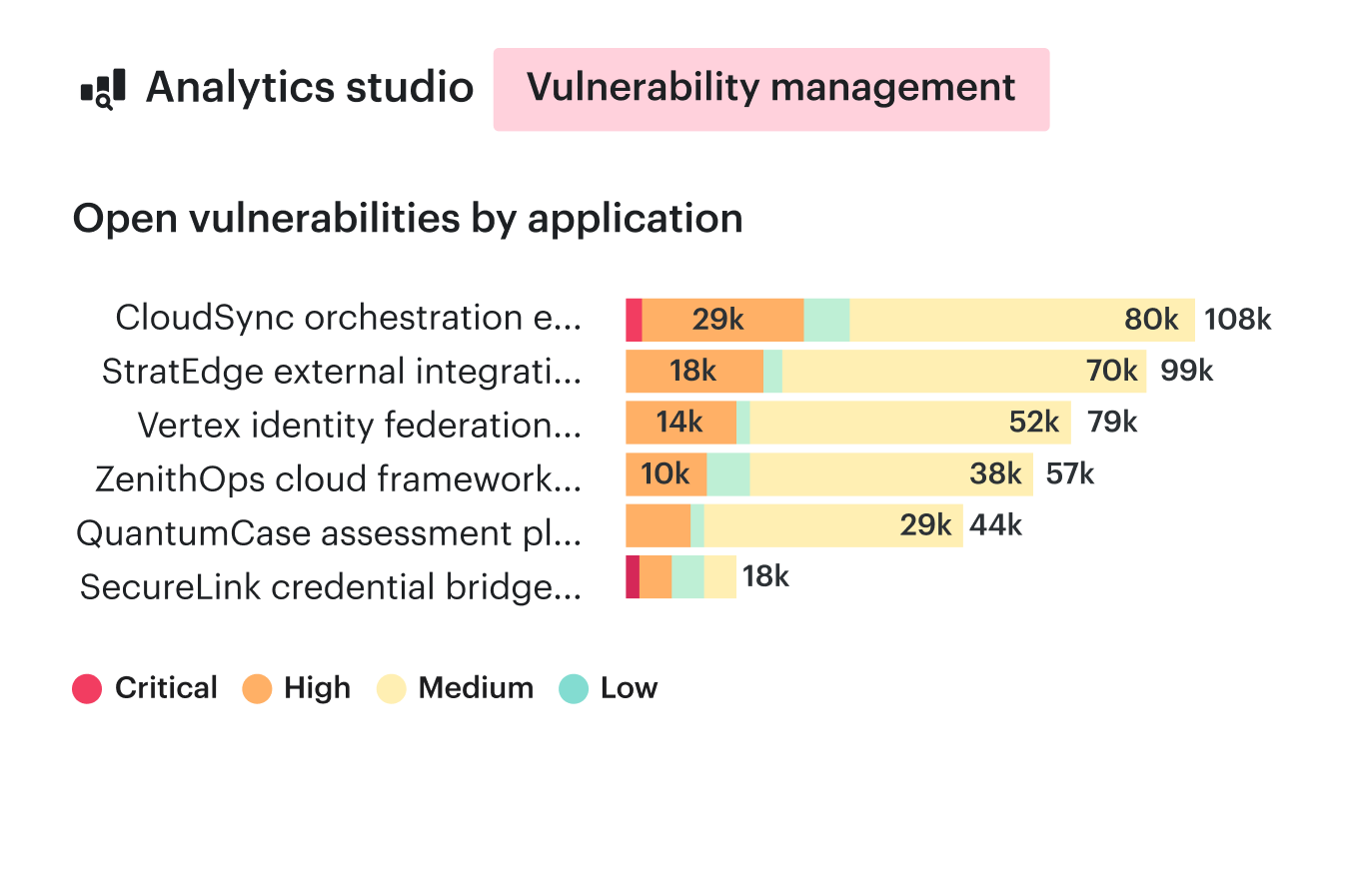
Start the application review with its open vulnerability backlog, split by severity.
The useful drill-down is from the application to the item holding up progress. Its owner can see whether the next step belongs to change approval, patch execution, or verification.
Relevant capabilities for this review include:
- CMDB-based grouping: scope patch work by application, environment, owner, or tags.
- A clear service boundary: Standard Patch Management covers discovery and correlation; Premium adds deployment through Breeze Agent on supported Linux and Windows hosts.
What to ask patch management vendors on a demo
When evaluating vulnerability and patch management software, ask for a walkthrough using an application and operating systems that resemble your estate:
- Can you take one finding through to its CI, accountable owner, and remediation ticket?
- What happens when autoscaling replaces that host while the task is open?
- Which record proves a verified fix, and which assessment produced it?
- For these operating systems, what is collected, what can be deployed, and which agents are required?
- How does the SLA report handle deferred findings and missing assessments?
- Which parts of this walkthrough require additional modules, integrations, or custom configuration?
For the vulnerability side of your shortlist, see our vulnerability management tools comparison. Use the questions above to test the patching half against your own workflow.