


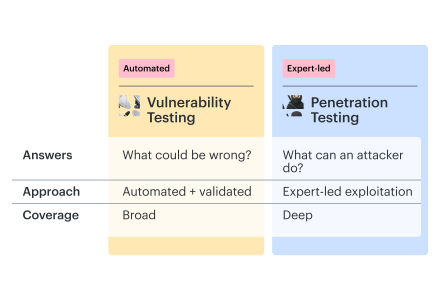
Your team pays for a pen test. Its PDF lands in a folder while scanner findings keep moving through tickets. Vulnerability and penetration testing answer different questions: vulnerability checks flag what could be wrong; a scoped pen test investigates what an attacker can actually do.
At the handoff, nobody turns the pen-test evidence into an owned remediation item. The closed-ticket count rises while the demonstrated attack path stays open.
Here’s how to choose the right testing mix, scope the pen test around meaningful exposure, and carry both sets of findings through to a verified fix.
Key insights
- Several moderate weaknesses can form one high-impact attack path. If exploitation connects an exposed service to sensitive data, prioritize the demonstrated chain. Assessing each weakness in isolation can hide the combined impact.
- A clean test result depends on the attacker position tested. Compare the starting access and exclusions with your actual threat scenario. Testing only with a privileged internal account leaves the unauthenticated external scenario unanswered.
- The CVE count can stay flat while exposure changes. Check how a new public endpoint or an IAM permission change affects exposure after the last engagement. Revisit the affected attack scenario.
- A returning weakness can reveal a deployment problem. If the same insecure default reappears after releases, add a check for the template or policy that recreates it. Track recurrence by root cause.
- For a PCI assessment, prepare the test-to-retest trail. Keep the agreed scope, dated results, correction record, and retest outcome tied to the relevant finding.
Vulnerability testing vs penetration testing: the difference
A vulnerable library on a public API can warrant a patch before exploitation is proven. The difference between penetration and vulnerability testing is the evidence: an identified weakness versus demonstrated attacker access or impact. Both methods use tools; the objective determines what the results can establish.
Vulnerability vs penetration testing: compare the evidence, coverage, and effort.
| Factor | Vulnerability testing | Penetration testing |
|---|---|---|
| Goal | Identify weaknesses | Demonstrate achievable access or impact |
| Method | Automated checks plus validation | Expert-led exploitation using tools |
| Coverage | Configured, supported assets | Authorized targets, identities, and scenarios |
| Cadence | Recurring; after relevant changes | Periodic; after material changes; retests |
| Evidence | Asset, condition, detection result | Tested path, prerequisites, observed outcome |
| Cost drivers | Asset count, tooling, validation | Scope, complexity, specialist time |
Even when vulnerability testing and penetration testing cover the same customer-export API, fixing its outdated library does not establish whether one tenant can retrieve another tenant’s records. For the API example, testing authorization boundaries needs accounts in different tenants and attempts to retrieve exports across that boundary. Another package scan keeps answering the library question.
Valentin Kel, Software Developer, Cloudaware:
Ask for that distinction in the statement of work, so an application test is not later treated as coverage of cloud permissions.
Penetration testing vs vulnerability testing: what to fund first
| Situation | Next investment | Required evidence |
|---|---|---|
| Checks exist; attacker impact is unclear | Targeted pen test | Tested paths and outcomes |
| PCI assessment approaching | Quarterly scans plus annual pen test, mapped to controls | Scope, dated results, retests |
| Cloud assets change frequently | Recurring checks plus targeted tests | Change coverage; impact validation |
| No baseline; no imminent release changing access | Recurring vulnerability testing | Supported assets checked |
| Imminent release changes login, permissions, or tenant isolation | Scoped pen test first | Changed access boundaries tested |
With limited funds, the release condition decides the order. An imminent change to access boundaries gets the scoped pen test first, followed by recurring coverage. Without that release pressure, establish the baseline first. If a compliance deadline comes before the release, the deadline sets the order instead.
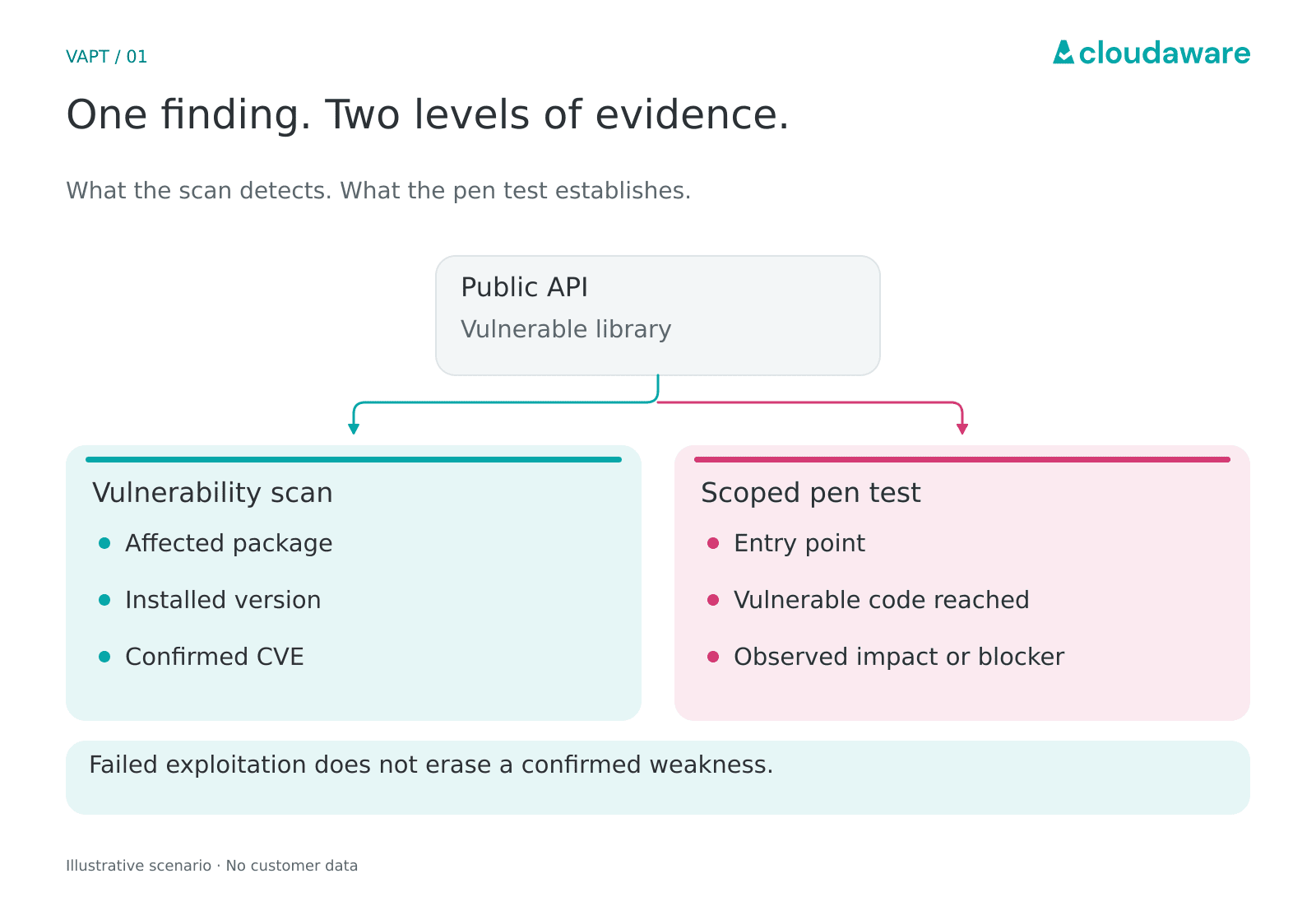
One finding, two levels of evidence. Failed exploitation does not erase a confirmed weakness.
New findings still need prioritization and owners between engagements. That ongoing responsibility is the practical distinction in vulnerability management vs penetration testing: the vulnerability management lifecycle continues after the scoped test ends. For your public API, vulnerability scans and penetration testing follow the same library finding to different depths.
If building the baseline means buying software, compare vulnerability and penetration testing tools against your asset types and validation workload. The linked guide covers vulnerability management tools; specialist exploitation remains a separate requirement.
How vulnerability and penetration testing work together (VAPT)
An attack path is only half the deliverable. In vulnerability assessment and penetration testing (VAPT), engineering also needs the control to change and the test that will verify it.
The handoff between penetration testing and vulnerability analysis should leave the tester a question to prove or reject.
- Security prepares the input pack. From recurring checks, security supplies findings, asset IDs, observation times, and exposure context. The tester also gets approved targets and questions needing validation.
- The tester returns evidence to the queue. Tested paths, prerequisites, reproduction steps, outcomes, and affected resources go back to security. Preserve both source records when vulnerability analysis and penetration testing report the same underlying weakness.
- Engineering owns the change; security verifies closure. Assign remediation to the team that controls the faulty component. Keep the original evidence attached; practice 5 covers the closure checks.
- The test owner adds lasting coverage. Turn the demonstrated condition into a named regression check with an owner, trigger, and expected result. If safe automation cannot reproduce the path, retain a scheduled manual test.
If you’re buying a service sold as “vulnerability penetration testing” or “penetration vulnerability testing,” put the input-pack owner and remediation acceptance criteria in the statement of work.
Igor Kachurin, DevOps / Platform Engineer, Cloudaware:
Let's say, for an S3 bucket intended to be private, the tester confirms a public-read finding by retrieving an approved dummy object without credentials. After the permission change, verify both the configuration and the same read attempt. A denied bucket listing cannot substitute for a denied GetObject request against an existing object.
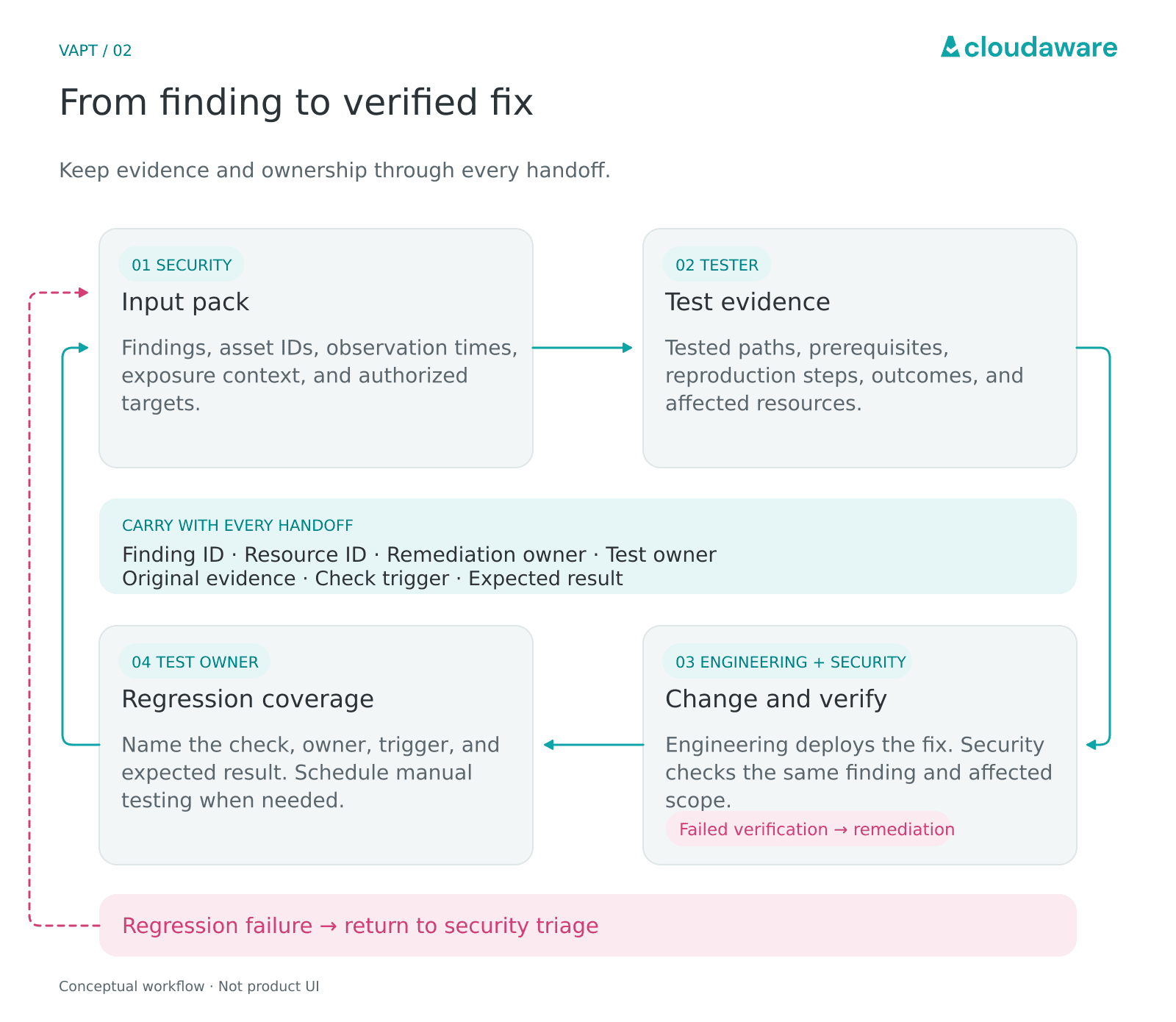
One finding keeps its evidence and ownership through every handoff.
Best practices for running vulnerability and penetration testing together
Two accurate reports can still leave a proven attack path without a fix owner. When a scan names a host and a pen test names an application, separate queues can hide their connection. These seven practices keep vulnerability testing and pen testing connected across coverage, test scope, ownership, and follow-up.
| Practice | What to look at | Where it breaks |
|---|---|---|
| 1. Use continuous vulnerability testing as the baseline, pen testing for depth | New supported deployments; last successful checks | In-scope deployments have no check evidence |
| 2. Hand pen testers your vulnerability findings before they start [Cloudaware V1] | Observation date; asset-to-application links | Test brief describes a replaced deployment |
| 3. Scope pen tests by risk, not the whole estate | Authorized targets; business impact | Many assets, no attacker objective |
| 4. Consolidate pen-test and scan findings into one tracked workflow [Cloudaware V2] | Linked records; fix owner; status | Related records have conflicting closure decisions |
| 5. Re-test both halves after remediation | Changed control; build; test identity | Retest misses an affected route |
| 6. Map both to your compliance evidence [Cloudaware V3] | Control; assessment period; supporting evidence | Evidence covers a different scope |
| 7. Turn pen-test findings into recurring checks | Shared cause; affected deployments; repeatable check | Other affected deployments remain untested |
If there’s time for one change, start with practice 4 when a demonstrated attack path has no fix owner. Where ownership is already clear, new supported deployments without successful checks point to practice 1. Following one affected application through the table will show which break to address first.
1. Use continuous vulnerability testing as the baseline, pen testing for depth
Once an instance is replaced, yesterday’s successful scan no longer describes the host running today. A usable baseline shows recent, successful checks for current, supported, in-scope assets. Watch for these coverage gaps:
- Replacement instances still rely on results from retired asset IDs.
- Hosts are reachable, but authentication or required local checks fail.
- After a new account or region is added, inventory lists its in-scope hosts, but the scan results don’t include them.
- Open a host’s latest result: it’s dated last week, despite the daily jobs showing as completed.
Compare the running inventory with the checks that actually succeeded.
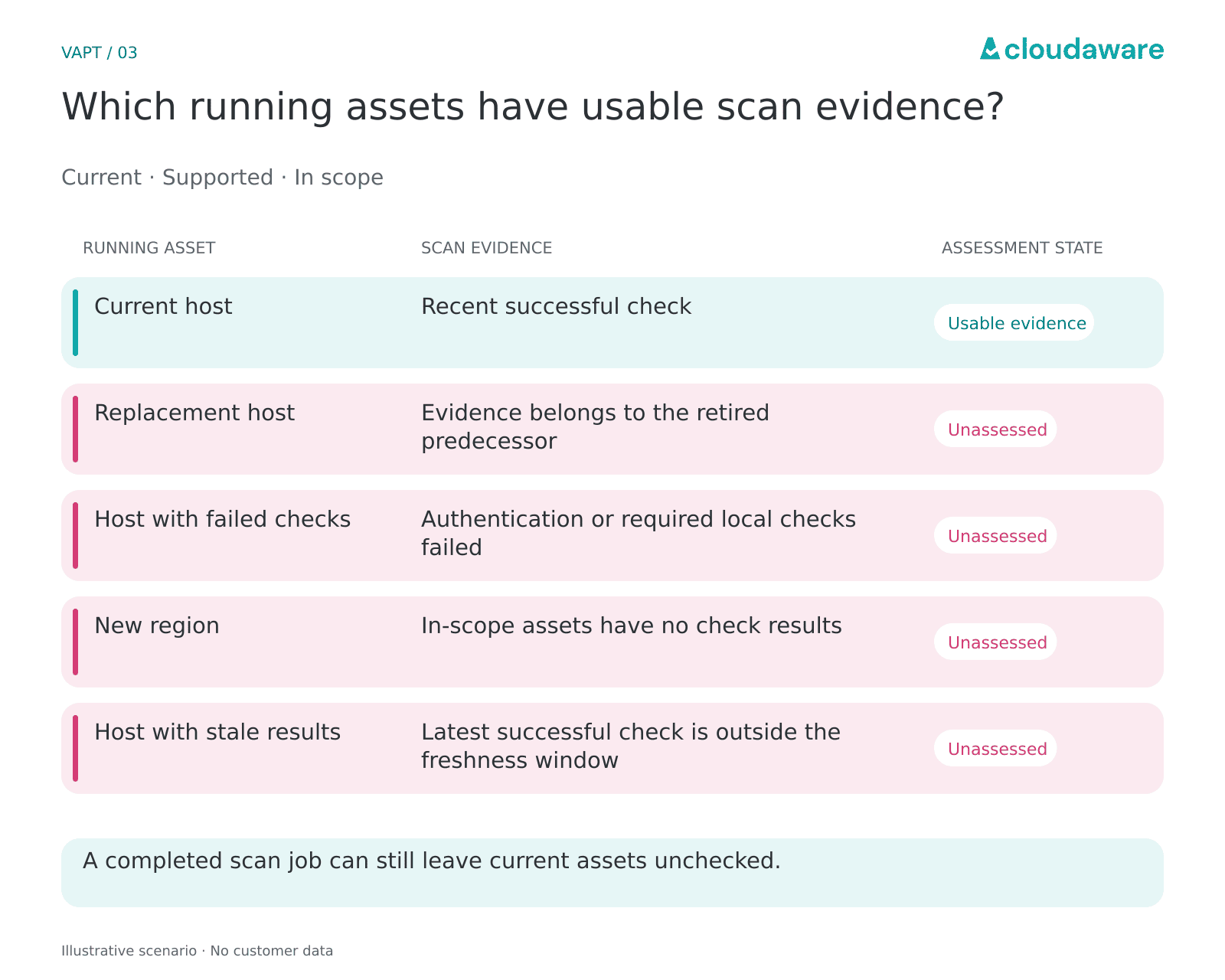
A completed scan job can still leave current assets unchecked.
Treat those assets as unassessed when planning the engagement; an empty findings list provides no basis for excluding them. Recurring findings on an exposed build server give the next periodic pen test a deeper objective. Could compromising that server expose production deployment credentials? If you follow CIS Controls, external reconnaissance stays in scope under Safeguard 18.2 of CIS Control 18.
If that discovery reveals a supported host missing from scan targets, assign the scanning team a coverage issue; fixing the vulnerability alone does not put the host into the next scan.
2. Hand pen testers your vulnerability findings before they start
An export made this morning can still point to a weakness patched last week. Pair the scanner’s evidence with what changed afterward.
For this workflow, gray-box testing with shared findings is the practical default: it gives the tester leads for exploitation and chaining. Reserve black-box testing for a deliberate goal, such as unaided external discovery. Add four details to the handoff:
- Use the last positive observation date to flag findings older than the freshness window agreed with the tester.
- Patched since the scan? Without the deployed version and date, the tester may chase a finding from a build you no longer run. Later access or configuration changes belong in the same note.
- A suppressed finding left out of the export is one less lead for the tester to investigate. Its exception reason and any expiry date belong alongside the in-scope record.
- For known false positives, attach dated validation evidence. Unconfirmed dismissals stay labeled as suspected.
The tester also needs to know which service each record belongs to. In a Cloudaware report filtered to authorized assets, retain finding fields such as scanner source, linked asset/application, severity, Last Seen, and exception state.
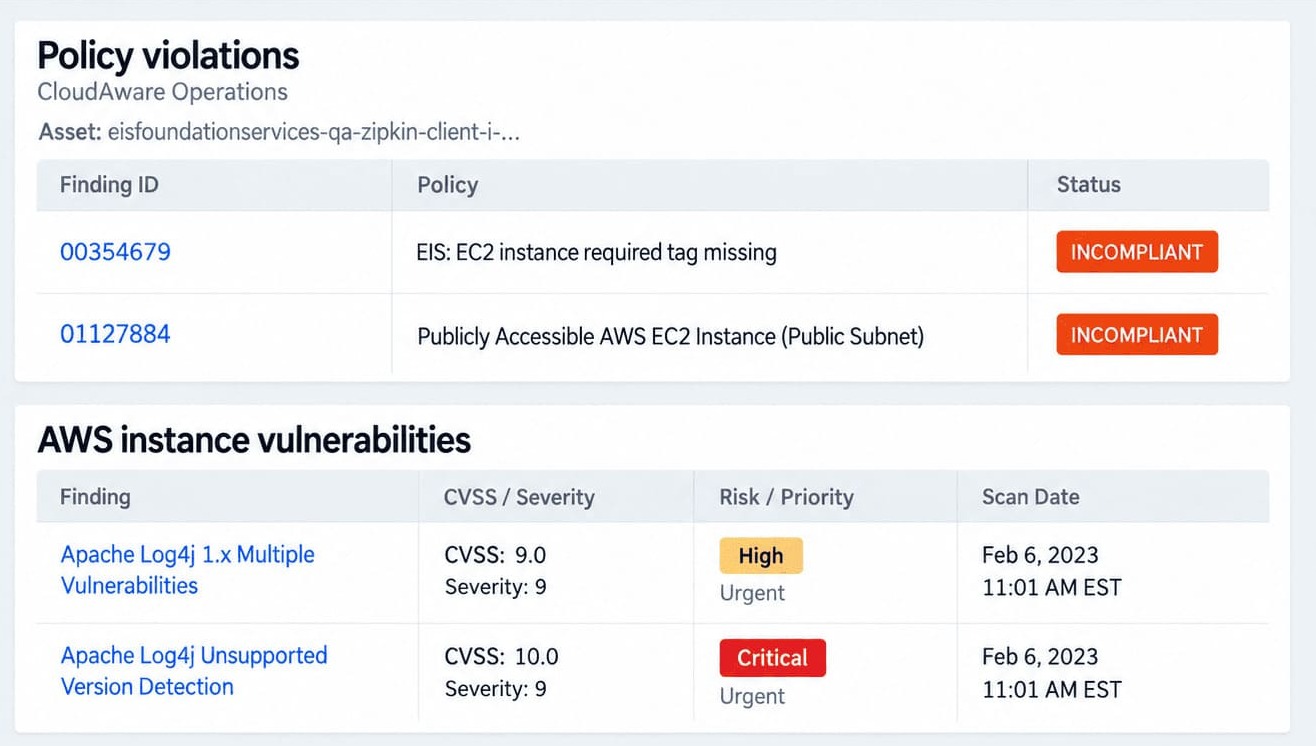
Send the exported report and notes together. Let the tester challenge the dismissals and investigate how the remaining weaknesses connect.
If a black-box phase is followed by an informed phase, timestamp the handoff and distinguish those results in the report so a route found after disclosure is not credited to unaided discovery.
3. Scope pen tests by risk, not the whole estate
“All IPs, all accounts” can buy plenty of surface checks and too little investigation of the role that controls production backups. With fixed tester days, every extra target competes with time spent proving impact.
Leave the routine host and configuration sweeps to recurring scans. Within the pen test, independent discovery still matters when it helps investigate the selected path. When you scope by risk, a support role’s access to production recovery points matters more than the number of hosts that share its account.
For that risk-based engagement, the scope becomes:
| Scope decision | What the engagement specifies |
|---|---|
| Starting position | Assumed compromise of a named AWS support role |
| Objective | Can it delete production recovery points? |
| Authorized targets | Named role and specified AWS Backup vaults |
Prove the delete capability without deleting production data, for example against a designated test recovery point, and check whether AWS Backup Vault Lock applies. If the route crosses an unapproved account, agree a scope change or record where testing stopped.
Valentin Kel, Software Developer, Cloudaware:
## 4\. Consolidate pen-test and scan findings into one tracked workflow
All scanner tickets can be closed while the demonstrated attack path remains unresolved. The parent needs its own closure decision, backed by evidence about that path.
Keep the work connected at two levels:
- Parent: Proven path, tested asset IDs, report/reproduction evidence, accountable path owner, SLA, and overall status.
- Children: Component fixes, assigned teams, due dates, status, and links back to the parent.
If IAM and infrastructure own different components, keep both assignments. The path owner coordinates the dependencies and remains accountable for the parent.
The parent closes only when security confirms that the agreed remediation, not a temporary workaround, blocks the demonstrated path and the path owner accepts that evidence.
For an affected application, comparing owners, SLA due dates, and status reveals whether to chase a component fix or arrange path verification. Scanner Remediation Tasks arrive in Jira or ServiceNow with asset/application context through Cloudaware’s configured remediation workflow. Alongside them sits the manually entered pen-test parent.
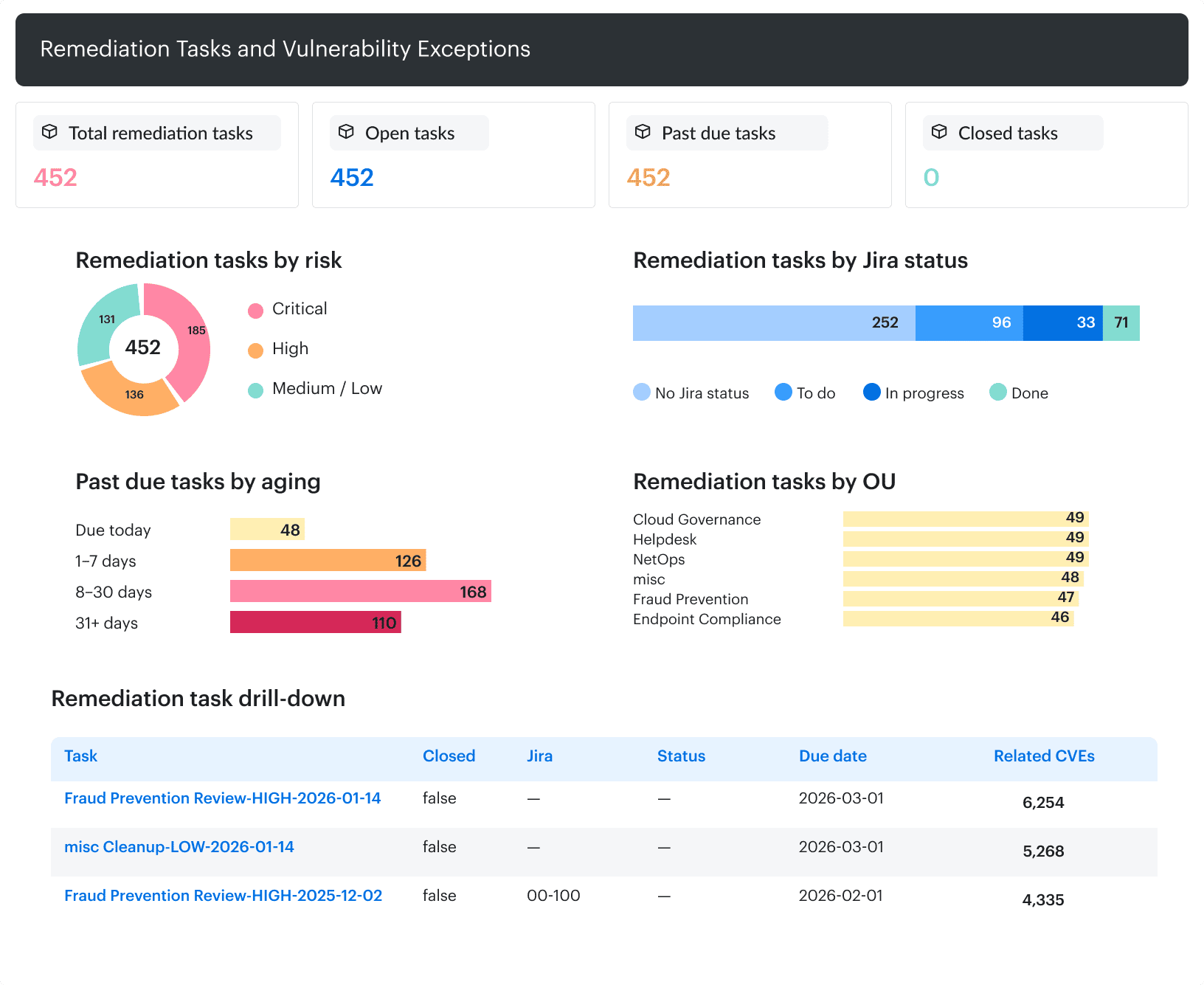
Cloudaware dashboard: remediation tasks by risk, Jira status, and age.
Keeping the tester’s confirmation date alongside ticket creation exposes delays before intake; otherwise, a late handoff can look like a newly discovered weakness.
5. Re-test both halves after remediation
An expired test session can make an unchanged permission flaw look fixed. The request fails, but it may never reach the permission check you meant to repair.
For that re-test, use a valid session with the original privilege level. If removing access was the agreed remediation, verify that removal instead.
Keep two verdicts in the remediation record:
| Check | What the result must show |
|---|---|
| Re-scan | Original scanner finding absent or still present after a successful check of the affected asset |
| Exploit-path re-test | Original unauthorized outcome blocked, with evidence of what stopped it |
“No longer detected” needs a successful check behind it. A timeout leaves exploit-path verification inconclusive. A compensating control that stopped exploitation is different from missing test permissions; record which one explains the outcome.
One permitted action alongside the blocked attack helps rule out a broken service passing the negative test simply because nothing works.
A temporary firewall rule may block the exploit while leaving the vulnerable software installed. Record the path as mitigated, keep the patch work open, and monitor the workaround until it is replaced.
6. Map both to your compliance evidence
A new payment service can turn a recent pen-test report into incomplete audit evidence. Keep the tested scope and significant-change record together, so GRC can explain what that report actually covers.
For PCI DSS 4.0.1’s defined approach, three useful control mappings are:
- Scan history → 11.3. Internal and Approved Scanning Vendor (ASV) external scans at least every three months, plus applicable rescans and significant-change scans.
- Pen-test scope and results → 11.4.2–3. Internal and external testing at least every 12 months and after significant infrastructure or application changes.
- Finding-linked corrections and re-test results → 11.4.4. A “fixed” label alone leaves the assessor without evidence that corrections were verified.
For SOC 2, map those records to your documented testing controls and cadence; don’t automatically copy the PCI timetable.
Igor Kachurin, DevOps / Platform Engineer, Cloudaware:
Cloudaware’s asset-linked control results and history support that review. Compare them with the external testing register before the evidence export: a missing report needs retrieval; an untested significant change needs testing.
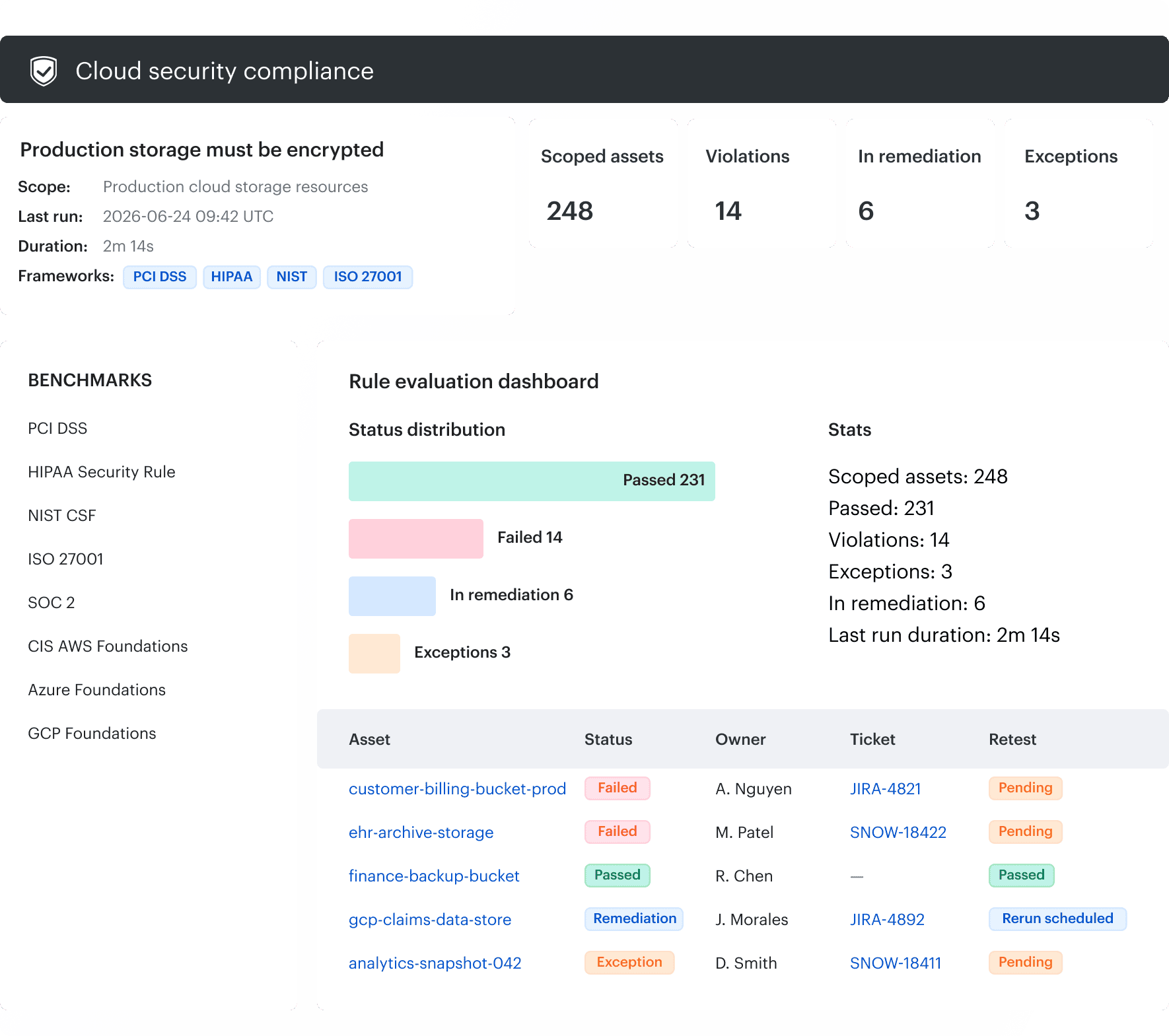
Cloudaware dashboard: control scope, evaluation results, remediation, and exceptions.
The broader cloud security compliance workflow connects those records to control ownership and exceptions.
7. Turn pen-test findings into recurring checks
Fixing one running instance buys time. If the deployment template still contains the flaw, the next deployment can bring it back under a new asset ID. The lasting fix belongs in the shared source.
When a shared Helm chart supplies the privileged setting used in a proven container-escape path, the platform team owns that source fix. Every affected application then needs the corrected chart version deployed. Two automated checks keep the feedback loop working:
| Check | What it catches | Owner |
|---|---|---|
| Before deployment | Unapproved securityContext.privileged: true in rendered application manifests | Platform |
| In deployed workloads | The same setting, including manual overrides | Security |
The Kubernetes Pod Security Standards identify the privilege fields that these checks need to inspect.
Beyond Kubernetes, trace the finding back to whatever keeps reproducing it:
- Terraform module: check the generated plan against a policy that rejects the unsafe configuration before another service inherits it.
- A vulnerable package baked into a golden image/AMI needs a vulnerability scan of a VM launched from the rebuilt image.
- For an IAM role template, an Access Analyzer custom policy check can test whether its generated policy still grants the specific access you meant to remove.
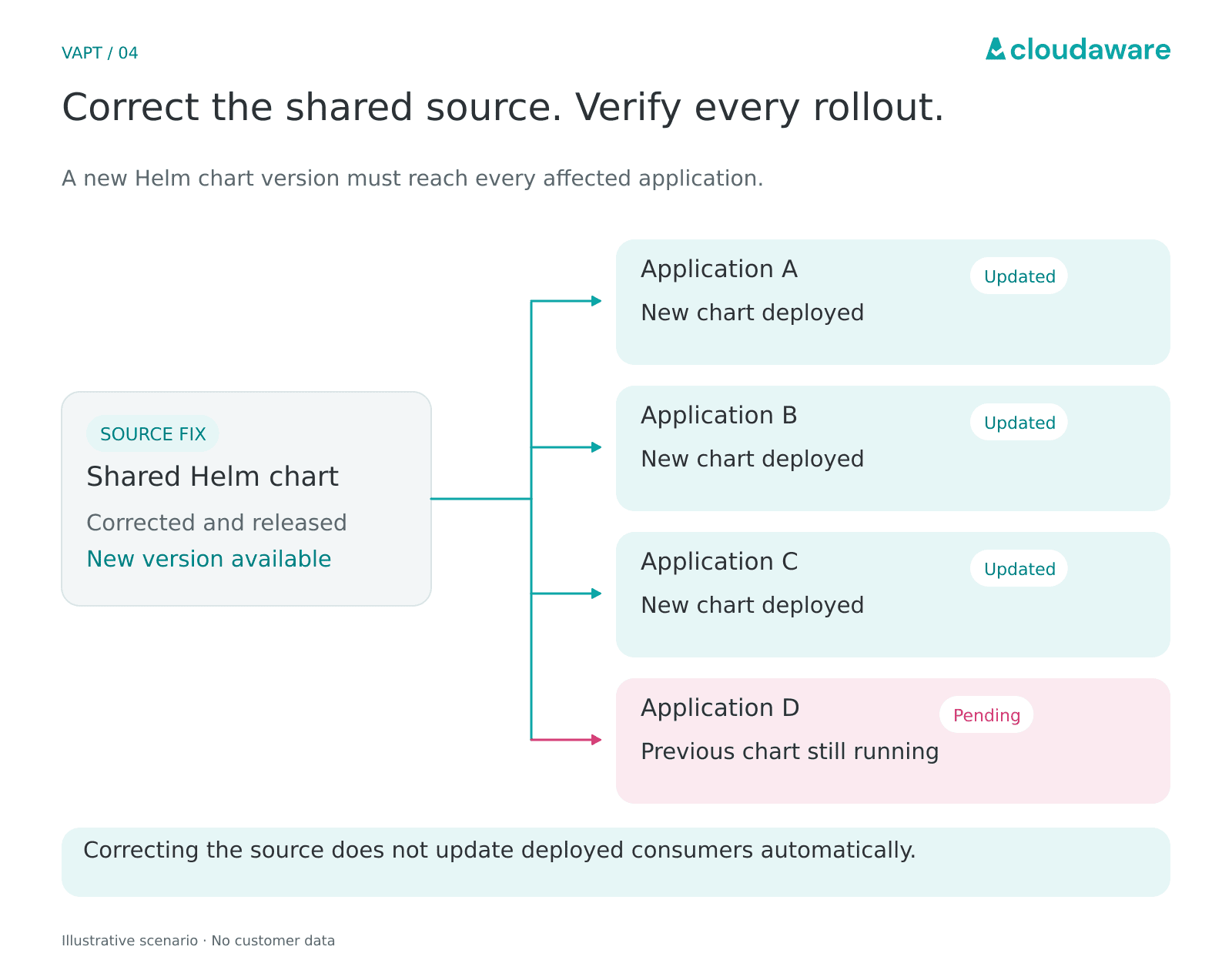
Correcting the source does not update its deployed consumers automatically.
At the next pen test, count repeat findings tied to the same shared source, using comparable scope and coverage. Zero repeats among the tested consumers is a concrete progress signal. That closes the seven-practice cycle: pen-test evidence drives a source fix, ongoing checks catch recurrence, and the next pen test can spend more time probing deeper paths.
Run the continuous side of your VAPT program with Cloudaware
Between specialist engagements, Cloudaware supports your vulnerability management and penetration testing program with an ongoing scan baseline and a tracked route into remediation. Your pen-test team proves attack paths and performs retests; engineering teams apply the fixes.
For example, Cloudaware stores Last Scan Date on the affected asset, separate from a finding’s Last Seen date. Its configured ITSM synchronization can update the linked scanner-remediation ticket when Cloudaware detects that the vulnerability has been remediated. The scan record stays connected to the work item as fixes land.
Across the cycle, that support looks like this:
- Coverage: recurring scans and asset scan dates expose gaps in the baseline.
- Pen-test handoff: current findings carry application, environment, and ownership context.
- One fix queue: scan-remediation tasks flow into Jira or ServiceNow; external pen-test issues are added there manually.
- Verification and evidence: rescan results support validation, while control results and evaluation history support the compliance review alongside the tester’s retest evidence.
At the review end of that cycle, aging shows which scan findings are still awaiting remediation. The illustrative view below groups open vulnerabilities by severity and age, alongside SLA targets.
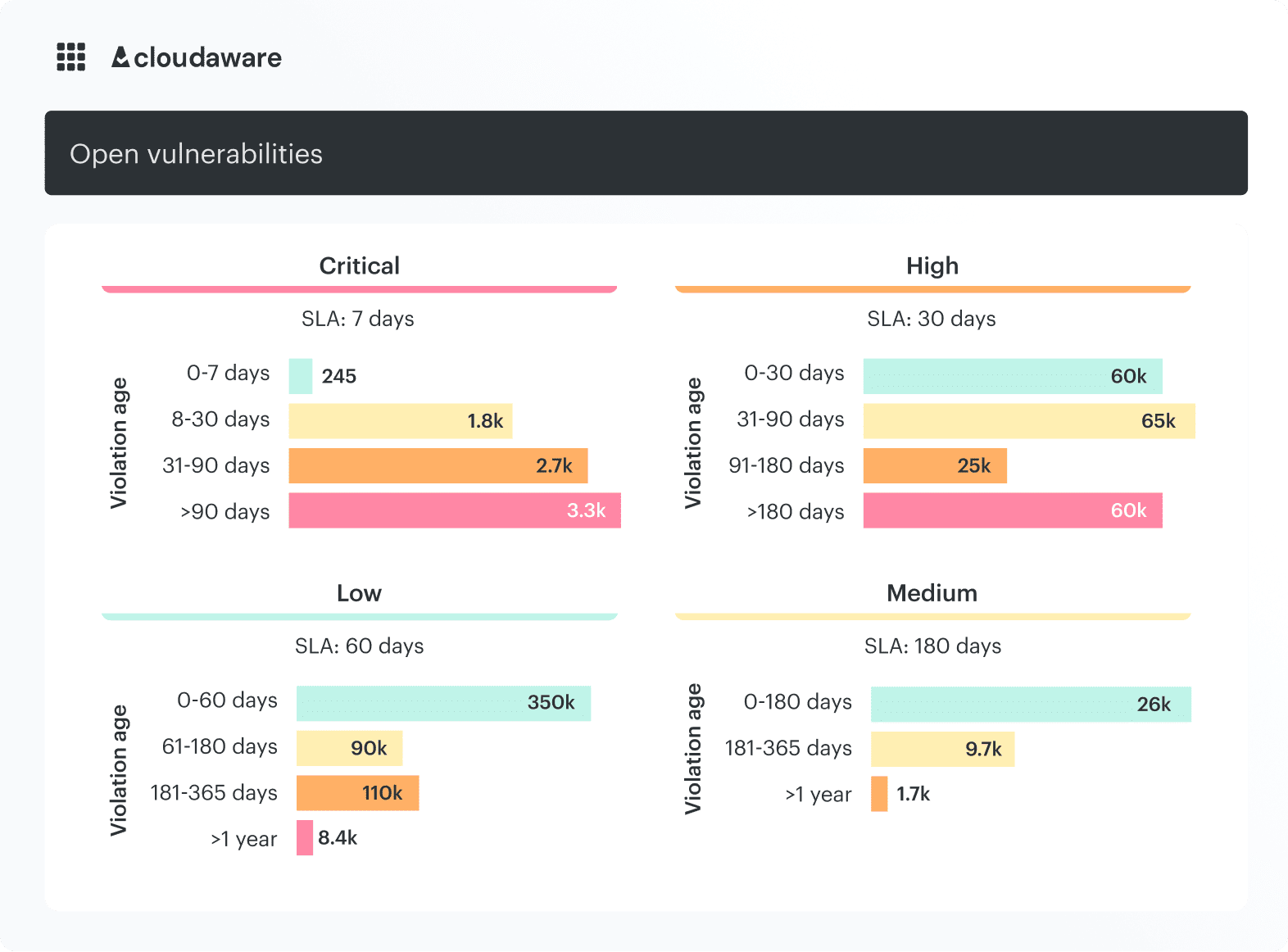
Cloudaware dashboard: open vulnerabilities grouped by severity and age, with SLA targets.
Notice where unresolved scan findings persist across remediation cycles.
Review that pattern alongside pen-test items in your shared ITSM queue. Older findings that persist across reviews flag work to follow up with the responsible team.
The underlying capabilities include:
- Managed scanning: scheduled host and credentialed IP checks, plus URL and container-image scanning where configured.
- Findings consolidation: Cloudaware-managed and supported external scanner results.
- Reporting: exportable vulnerability status for evidence reviews.