


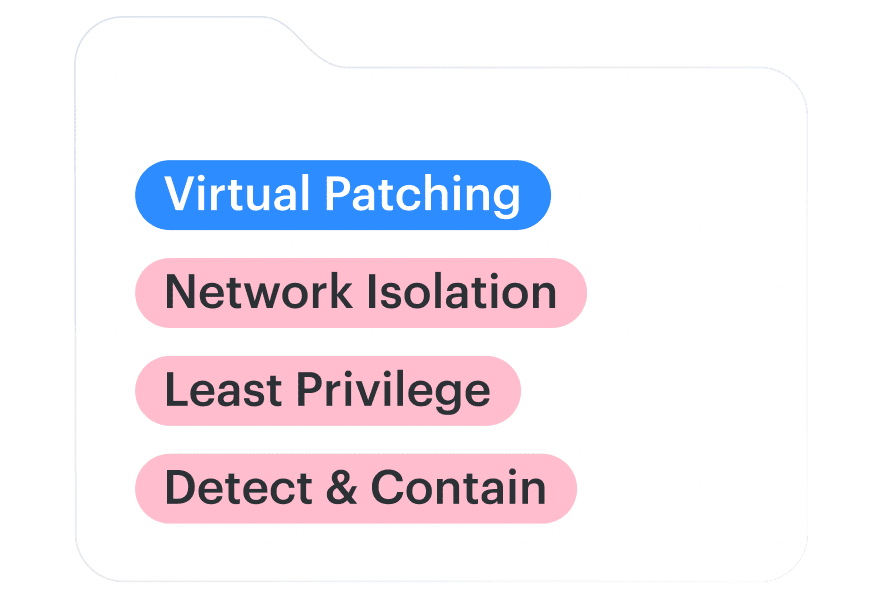
A critical vulnerability affects a production application, but the team can't deploy the patch until compatibility testing is complete. The service must remain available, and the security team must reduce exposure before the next maintenance window.
Until the fix is ready, the team needs an interim control with a testable outcome: a blocked request, a denied connection, or a restricted API action. Record what the control prevents, what exposure remains, and when its effectiveness must be reviewed.
The five strategies below include implementation steps, cloud-specific examples, and tests for confirming that each control works.
Key insights
- Confirm affected assets before mitigating: Reconcile cloud inventory with vulnerability scan coverage to identify unscanned systems that may be missing from the findings
- Match controls to the attack path: Use WAF rules for vulnerable HTTP traffic, network segmentation to restrict access, and least privilege to limit post-exploitation damage
- Test whether mitigation works: Verify blocked exploit requests, denied network connections, or restricted API actions rather than relying on configuration changes alone
- Track vulnerabilities until permanent remediation: Document compensating controls, accountable owners, residual risk, and exception expiry, then verify the permanent fix through follow-up scans
What is vulnerability mitigation?
Vulnerability mitigation applies security controls that reduce the likelihood or consequences of exploiting a vulnerability without necessarily correcting the underlying weakness.
The NIST glossary, referencing SP 800-216, defines mitigation as temporarily reducing a vulnerability's impact or likelihood of exploitation.
For example, a web application may continue running a vulnerable software version while an application-layer firewall blocks requests associated with a known exploit. The vulnerability remains present, but the identified exploitation path is restricted.
Vulnerability mitigation vs remediation: when to use each
Mitigate a vulnerability when an immediate fix is unavailable, would interrupt a critical service, or requires additional testing. Apply a compensating control that addresses the relevant exploitation path.
Remediate a vulnerability when a tested patch, configuration correction, or component replacement can remove the underlying weakness. A mitigated vulnerability may still appear in scanner results and should remain subject to review.
| Vulnerability mitigation | Vulnerability remediation | |
|---|---|---|
| Objective | Reduce exploitation likelihood or impact | Correct or remove the vulnerability |
| Example | Restrict network access to a vulnerable service | Deploy a fixed software version |
| Verification | Test whether the control blocks or limits exploitation | Confirm that the vulnerable condition has been corrected |
| Remaining vulnerability | May still be detected by scanners | Should be resolved after successful correction |
Risk acceptance is a third treatment decision. An approved exception documents who accepts the residual risk and under what conditions. It does not demonstrate that a compensating control is effective.
Both mitigation and remediation belong to the vulnerability management lifecycle. A mitigation task can be completed once its control is verified, while the underlying finding remains tracked until the vulnerable condition is corrected or another approved disposition applies.
Vulnerability mitigation process: 5 steps
To mitigate vulnerabilities without immediate patching, first confirm which assets are affected and how the vulnerable service can be reached. Then select a control, test whether it blocks or limits exploitation, and document residual risk until the permanent fix is verified.
The following five steps provide that workflow.
1. Confirm affected assets and scan coverage
Reconcile potentially affected assets with scanner records using stable asset identifiers. Check the last successful assessment, authentication status, and whether the source can detect the affected component. An inventory record without a current assessment requires investigation; a scanner finding is not the only way to establish that an asset is affected.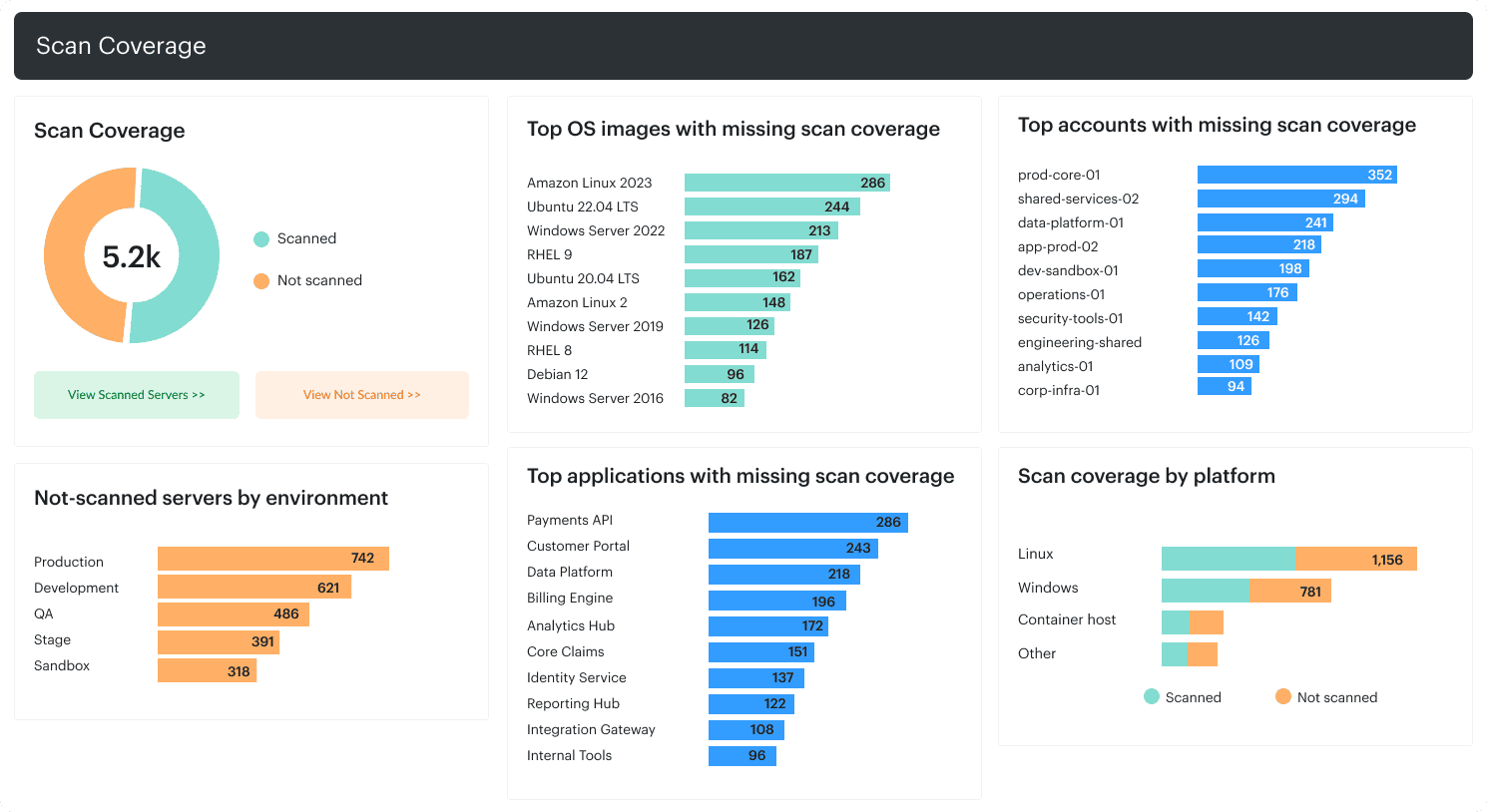 Scan coverage by asset group. Investigate missing or stale assessments before treating the inventory as fully assessed.
A completed scan does not guarantee complete coverage. During an SC Media webinar with runZero, Adrian Sanabria described an organization that had configured scans for 14 websites but entered 13 domain names incorrectly. Results from the remaining website made the scan appear functional, although most intended targets were not assessed.
2. Validate the exploitable attack path
A CVE match does not necessarily mean the affected function is reachable or enabled.
Confirm which component is vulnerable, what an attacker needs to access it, whether authentication is required, and which network routes expose it. Check how existing controls affect those paths.
Use CISA's Known Exploited Vulnerabilities catalog for evidence of known exploitation and FIRST EPSS for an estimate of exploitation probability over the next 30 days. Neither establishes whether the vulnerability is exploitable in a particular deployment.
An application may have no public endpoint but remain reachable through a peered VPC, corporate VPN, or compromised internal workload. The mitigation must address the relevant path.
For deeper investigation criteria, see vulnerability analysis and risk-based vulnerability management.
3. Select and approve the mitigation
Choose a control appropriate to the exploitation mechanism and the production constraints.
A WAF rule may protect an HTTP endpoint. Network segmentation can restrict access to an affected service. IAM changes can limit the permissions available after exploitation.
Record the affected resources, implementing owner, control objective, success criteria, application dependencies, approval, and rollback conditions. Set a review date and escalation trigger. If the permanent fix will miss the approved remediation deadline, obtain a time-limited exception through the designated risk authority.
4. Implement and verify the control
Deploy the control through the appropriate security system and test the targeted attack path under authorized conditions.
For a network restriction, attempt connections from permitted and prohibited locations. For a WAF rule, test the request patterns it should block, including relevant variants and alternate routes.
Verify that required application functions continue operating. Preserve the change record, test results, and any identified limitations.
5. Track residual risk until permanent remediation
Keep the underlying vulnerability associated with its owner, mitigation evidence, review date, and permanent remediation task.
Revalidate the mitigation after relevant changes to network routing, application deployments, access permissions, or exploitation intelligence.
Once the permanent fix is deployed, run appropriate verification scans and tests. Retire temporary controls and exceptions when the evidence supports doing so.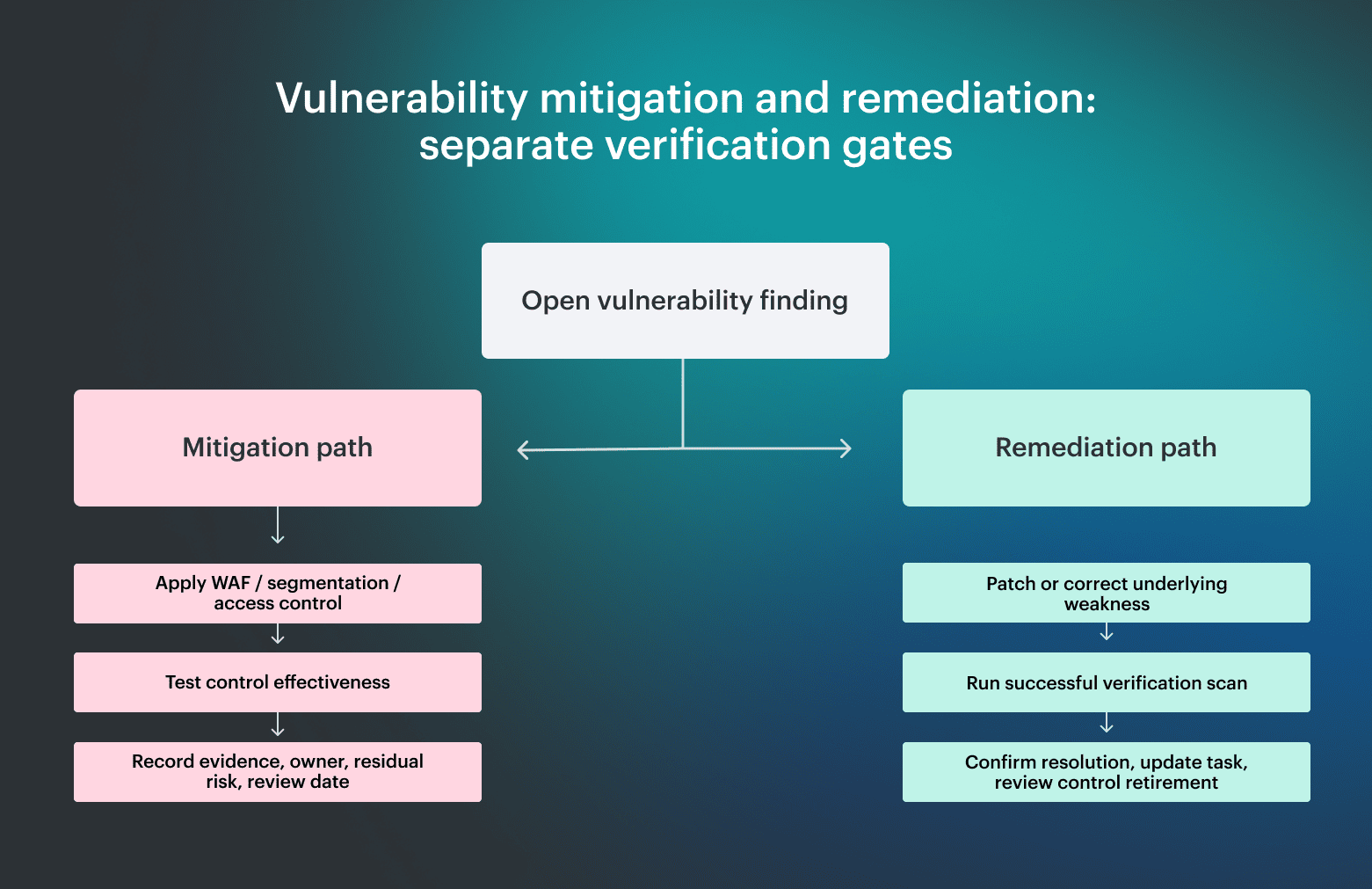 Mitigation verification tests whether an interim control reduces the relevant exposure. Remediation verification confirms that the underlying vulnerability has been corrected. Each requires different evidence before the treatment workflow can be closed.
5 vulnerability mitigation strategies with examples
The 2026 Verizon DBIR reported a median of 43 days from detection to full remediation for CISA Known Exploited Vulnerabilities in its dataset, up from 32 days the previous year. During that interval, affected systems may require compensating controls.
The five strategies below are based on established security practices documented by NIST, OWASP, and cloud providers.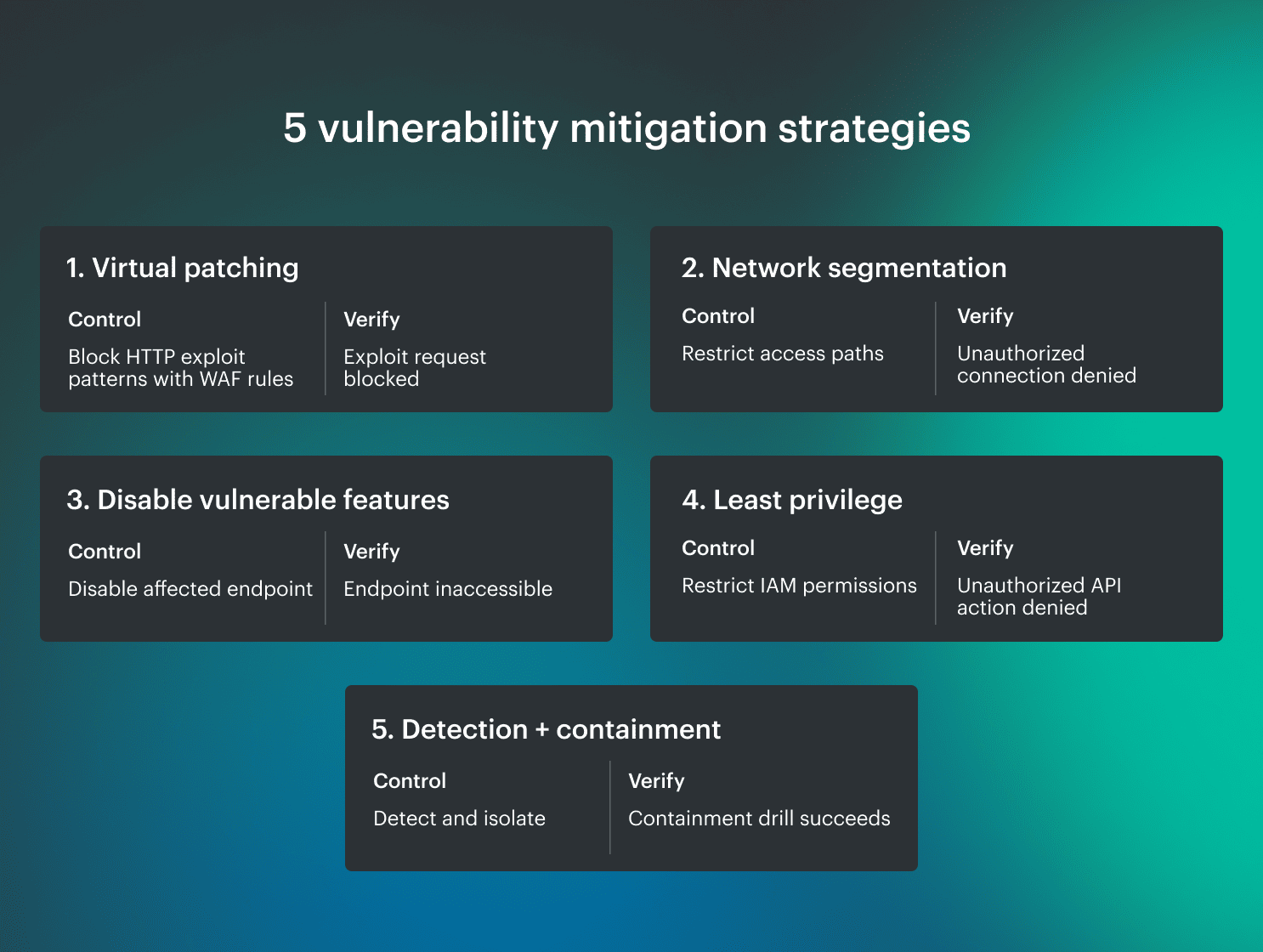 Five vulnerability mitigation strategies with example controls and verification tests. The appropriate approach depends on the affected system, exploitable attack path, and remaining risk.
1. Apply virtual patching to vulnerable application traffic
Virtual patching blocks applicable exploitation attempts at a security enforcement point without changing the vulnerable application code. It is commonly used for web application vulnerabilities when you can't deploy a software fix immediately.
Example: An application behind an AWS Application Load Balancer
A production API contains a vulnerable HTTP endpoint. The application team has prepared a fixed release, but compatibility tests are still running.
The security engineer can apply a targeted AWS WAF rule to the Web ACL associated with the Application Load Balancer.
Implementation:
- Identify the request characteristics associated with the vulnerability, including the affected URI, parameters, and HTTP methods
- Create a targeted rule for the known exploitation pattern
- Use Count mode to validate matching behavior and false positives during an approved test window; Count mode does not block exploitation attempts
- Enable blocking after validating the expected matches
- Review WAF logs and request samples for blocked traffic and unexpected behavior
AWS WAF documentation describes how logging, metrics, and sampled requests support rule testing.
Verification: Submit authorized exploit-pattern requests and relevant variants through the protected route. Confirm that blocking is enforced and legitimate requests still succeed. Test alternate load balancers, direct origins, and internal routes to the same vulnerable endpoint. Any reachable path that bypasses the Web ACL needs its own restriction or compensating control.
2. Restrict network reachability and lateral movement
Network segmentation limits which systems can communicate with a vulnerable service, reducing the paths available for exploitation.
This is useful for applications that cannot immediately be patched, unsupported infrastructure, and management interfaces that do not need broad network access.
Example: An affected EC2 application server
An application server accepts connections from an entire corporate network, although only a specific application tier and administration environment require access.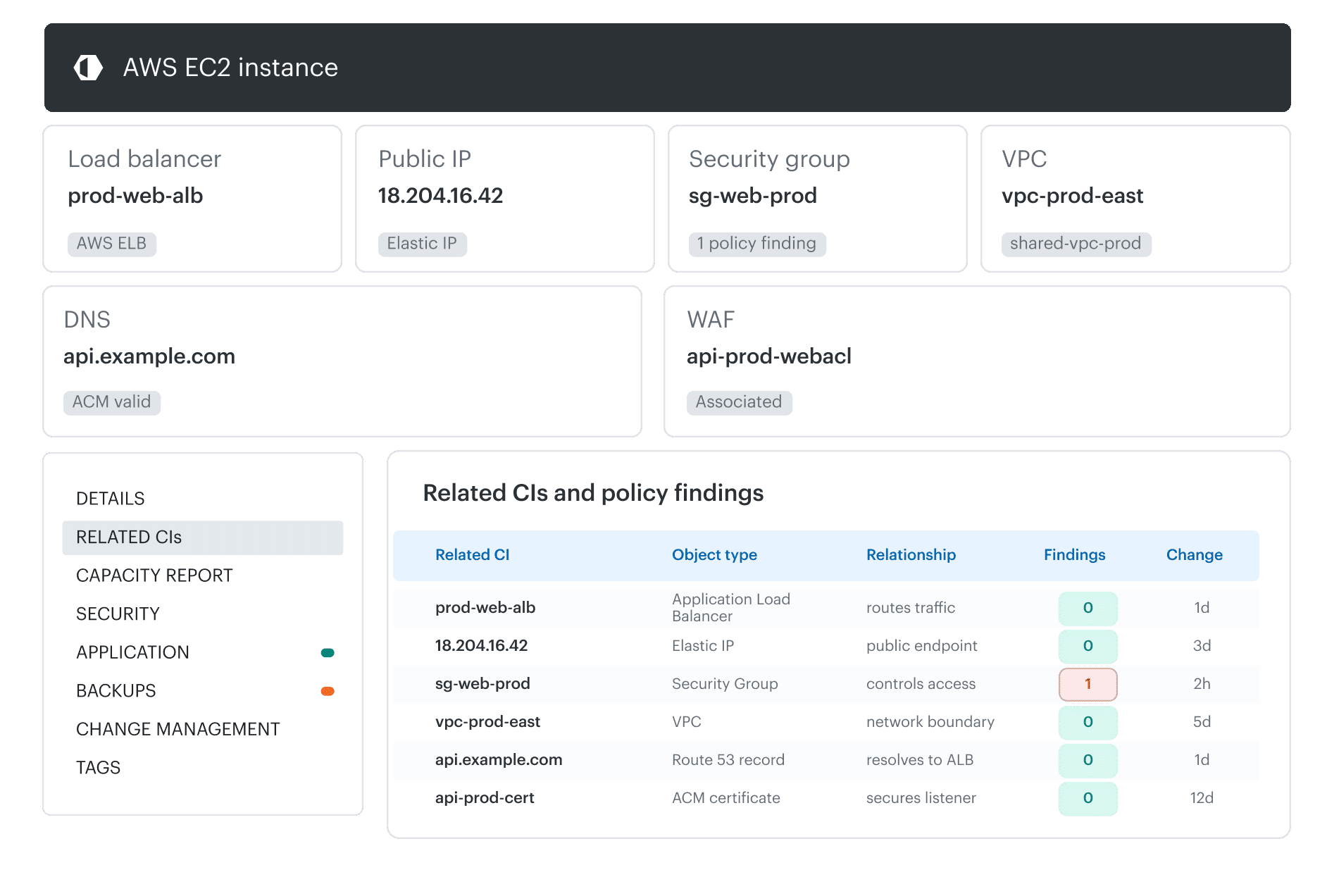 Cloudaware CMDB, AWS EC2-related CIs: Review the instance's associated Security Group, VPC, load balancer, public IP, and WAF to identify network controls that require inspection before restricting access.
The platform team can:
- Identify the required source networks, services, and administrative connections
- Review the instance's Security Groups and any additional network controls
- Remove unnecessary broad allow rules across all attached security groups, then permit only the required sources, ports, and protocols
- Review connectivity through VPC peering, Transit Gateway, VPN, and public interfaces
- Test application dependencies after the change
AWS Security Group rules support controls based on ports, protocols, CIDR ranges, and, where supported, Security Group references. For Azure, the equivalent review may involve Network Security Groups. Google Cloud environments use VPC firewall rules and other applicable network controls.
Verification: Attempt connections from approved and unauthorized network locations, including connected networks.
A private IP address does not establish effective isolation. An attacker who compromises an authorized workload may still be able to reach the vulnerable service. In those cases, additional restrictions or compensating controls may be necessary.
3. Disable vulnerable functionality and reduce the attack surface
Disabling an affected feature can remove its exploitation path when the application does not require that functionality. This can work for optional services, administrative interfaces, exposed endpoints, and vulnerable protocols.
Treat feature disablement as mitigation while the vulnerable component or an alternative exploitation path remains. Classify it as remediation only when technical evidence confirms that the affected condition has been removed from the in-scope deployment.
Example: An unused administrative endpoint
A legacy application exposes a management endpoint that contains a known vulnerability. Production traffic does not depend on the endpoint, but the service is enabled in the deployment configuration.
The application team can:
- Identify the vulnerable endpoint and the configuration controlling it
- Confirm that production operations, deployment, and monitoring do not depend on the feature
- Disable the endpoint or remove the affected listener
- Update the application or infrastructure deployment configuration to preserve the change
- Confirm that the endpoint is inaccessible after deployment
Verification: Test the endpoint from relevant network locations, inspect the running configuration, and repeat the check after the next deployment.
A manual configuration change may be lost when a container, virtual machine, or application release is recreated from an older template. If the vulnerable feature cannot be disabled safely, the team must choose a different control or combine restrictions to reduce its reachability.
4. Limit privilege escalation and post-exploitation access
Least-privilege access reduces the resources and actions available to an attacker after exploiting a vulnerability or obtaining a workload's credentials.
A compromised application identity should not provide access to unrelated storage, secrets, or administrative APIs.
Example: An AI agent with excessive AWS permissions
An internal AI agent retrieves documents from an S3 bucket. Its integration uses an IAM role that also permits modifying and deleting objects, although the agent only requires read access.
The security team can:
- Identify which tools and AWS API actions the agent needs for its approved tasks
- Remove unnecessary write and delete permissions from the IAM role
- Restrict resource scope to the required bucket or object prefixes
- Require separate authorization or human approval for sensitive operations
- Test expected requests and confirm unauthorized actions are denied
OWASP LLM06:2025 Excessive Agency identifies excessive functionality, permissions, and autonomy as sources of risk in LLM-based applications.
Verification: Test the agent's ability to perform permitted operations and confirm that unwanted API actions fail, including when the agent receives unexpected or manipulated instructions.
Restricting IAM permissions does not prevent the underlying application vulnerability or prompt-injection weakness. It limits what an attacker or compromised agent can do with the granted identity.
5. Pair targeted detection with tested containment
Targeted detection combined with an executable containment response can limit the consequences of exploitation when preventive controls are unavailable or incomplete.
This approach depends on detecting relevant behavior and responding before the attacker completes the intended action.
Example: A production workload awaiting an emergency patch
A business-critical server cannot be restarted until a maintenance window. Security engineers have identified exploitation behavior associated with the vulnerability.
The team can:
- Identify observable exploitation behavior using the vendor advisory and available threat intelligence
- Configure appropriate detections in the EDR, runtime security, or network monitoring system
- Route alerts to the responsible on-call team
- Prepare and authorize a containment action, such as isolating the host or restricting network access
- Exercise the alert and containment procedure in a controlled environment
Verification: Record the time of the test event, alert creation, responder acknowledgment, and completed containment. Compare the end-to-end interval with the approved response target for this scenario. Confirm that isolation blocks the intended attacker action and that the service recovery or rollback procedure remains workable.
NIST SP 800-61 Rev. 3 provides guidance for incorporating incident response into cybersecurity risk management.
Monitoring alone cannot demonstrate reduced vulnerability risk. If detection occurs after an attacker has already achieved the intended objective, the control may provide investigative evidence without preventing the immediate impact.
Choosing the right vulnerability mitigation control
Choose the control that interrupts the validated attack path with the least operational disruption. For each candidate, confirm where it is enforced, which routes or identities it covers, how success will be tested, and what residual risk remains. Combine controls when one cannot cover the full path.
| Vulnerability scenario | Candidate control | Configuration action | Verification |
|---|---|---|---|
| Public HTTP endpoint with a known exploit pattern | Virtual patching | Deploy targeted WAF rule | Exploit-pattern requests blocked without breaking legitimate traffic |
| Unpatchable internal service | Network segmentation | Restrict source networks | Unauthorized connections denied |
| Unnecessary vulnerable feature | Service hardening | Disable affected endpoint or service | Feature inaccessible after deployment |
| Vulnerable workload with excessive IAM access | Least privilege | Restrict actions and resources | Unauthorized API actions denied |
| Production workload awaiting maintenance | Detection and containment | Configure targeted alert and response procedure | Controlled containment exercise succeeds |
Reject a control if the team cannot verify its effect on the actual deployment or preserve required service functions. Record the remaining exposure and the deadline for a permanent treatment decision.
In a 2026 study by 1Password's Off-by-1 Labs, researchers evaluated 6,080 AI-generated patches for six complex, recently disclosed CVEs. An average of 26% fully resolved the vulnerability without materially changing application behavior. Another 20.1% resolved the vulnerability but changed application behavior, while 53.9% failed to fix the vulnerability, introduced a new vulnerability, or both.
These figures describe AI-generated code patches, not WAF rules or other compensating controls. For an AI-generated patch, reproduce the original finding, review the code change, build the affected application, and run security and regression tests. Check alternative inputs that may still reach the vulnerable logic. Require human approval before deployment.
Zero-day and legacy vulnerability mitigation
Zero-day and legacy vulnerabilities create different constraints, but both may require compensating controls when a patch cannot be deployed.
For a zero-day vulnerability, use vendor guidance where available and corroborated threat intelligence to identify potentially affected products, versions, configurations, and exposed services. Compare those indicators with the current asset inventory. Do not wait solely for a vendor advisory, CVE assignment, or scanner detection plugin before investigating credible exposure.
For example, if a newly disclosed vulnerability affects a network appliance's management interface, security engineers can restrict administration to approved network locations while following vendor guidance.
Confirm whether the system was exposed before the control was applied. When exploitation is suspected, investigate the relevant logs and indicators of compromise. Restricting access now does not reverse an earlier compromise. The complete assessment and response process is covered in What Is a Zero-Day Vulnerability guide.
For legacy and end-of-life systems, the permanent fix may require replacement rather than patching, as with unsupported PHP branches discussed in the PHP2Shell remediation guide.
An unsupported server may continue supporting specialized equipment while no longer receiving vendor security updates. The team should document required connections, restrict unnecessary access, reduce privileges, and maintain a reviewed risk exception with a replacement plan.
An absence of critical CVEs does not establish that the system is safe. Published vulnerability coverage and scanner compatibility may both be incomplete.
Track vulnerability mitigation through verified remediation with Cloudaware
A mitigation can be implemented while the underlying vulnerability remains open. Cloudaware links supported findings to affected assets, responsible teams, and remediation work, helping SecOps track treatment decisions without treating task completion as proof that the vulnerability has been resolved.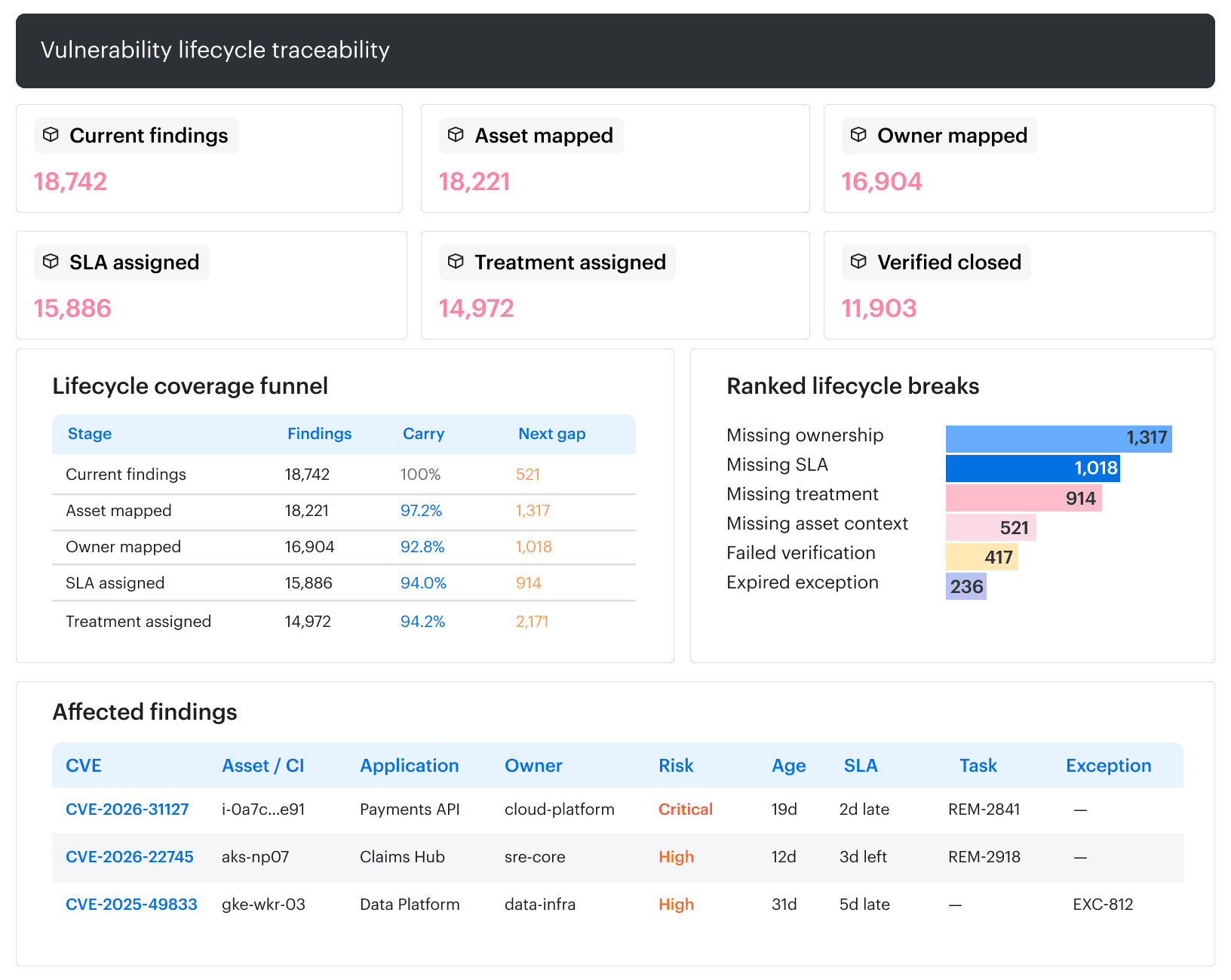 Core capabilities:
- Identify affected assets: Correlate findings from supported vulnerability scanners with CIs, applications, owners, and infrastructure dependencies using CMDB.
- Investigate treatment gaps with AI: Use Cloudaware MCP with a compatible AI assistant to query the configured BigQuery export. For example, identify production assets associated with a selected CVE that have public IP addresses but no linked remediation task.
- Route mitigation work: Create and track Remediation Tasks using asset ownership and risk context, with Jira or ServiceNow integration for assignment and progress tracking.
- Govern compensating controls: Document risk acceptance, affected assets, compensating controls, responsible owners, and expiration dates using Vulnerability Exceptions.
- Verify permanent fixes: Check assessment scope and retain the verification evidence before updating the related finding and remediation task. Missing or stale scanner results do not establish that the vulnerability has been resolved.
Cloudaware MCP provides read-only access to CMDB data through BigQuery. It can accelerate investigation and reporting, while firewall changes, virtual patching, and technical mitigation tests remain in the relevant security systems.