


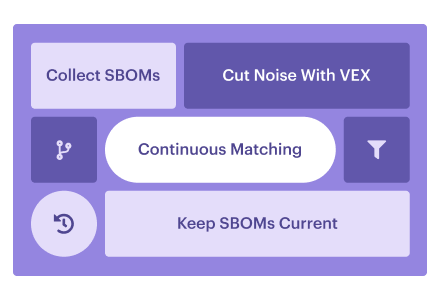
SBOM vulnerability management uses your software bill of materials to find, prioritize, and fix vulnerable dependencies. Producing the SBOM is the easy part.
Then CVE matches start pouring in. The package is present; the vulnerable code may never execute. Before long, you're checking the same dependency across releases while trying to find who can actually change it.
Start with a finding your team cannot confidently close. Follow the component into what actually ships, identify the owner, and check what would prove the fix reached production. The six practices below follow that path across your own software and supplier components.
Key insights
- Collecting SBOMs does not fix vulnerabilities. Keep matching components against newly disclosed CVEs, then use exploitability evidence to decide what needs fixing.
- When most matches point to unreachable code, opening more tickets only spreads the noise. Use Vulnerability Exploitability eXchange (VEX) assessments alongside reachability evidence to decide which findings need action.
- One vulnerable Log4j version can travel through dozens of applications. Map each occurrence to its application, running assets, and owner.
- A mandate may be why an SBOM landed on your desk. EO 14028 guidance can prompt procurement requests. Saving that file still leaves the vulnerability work ahead of you.
What is SBOM vulnerability management?
SBOM vulnerability management connects a release's component inventory to vulnerability assessments, remediation decisions, and evidence that the response worked. Keep three inputs separate when building that process:
| Term | What it is | Its job in the workflow |
|---|---|---|
| SBOM | A machine-readable component inventory | Identifies the components, versions, and dependency relationships recorded for the software. |
| SCA (software composition analysis) | Analysis of software dependencies | Finds known-vulnerable dependencies as part of application vulnerability testing. |
| VEX (Vulnerability Exploitability eXchange) | A statement about a vulnerability's impact on a product | Records whether the product is affected, unaffected, fixed, or still under investigation. |
An SCA alert can name a vulnerable dependency while VEX says the finished product is unaffected. Check that both refer to the same product version before carrying that decision forward. Follow that version through the loop below.
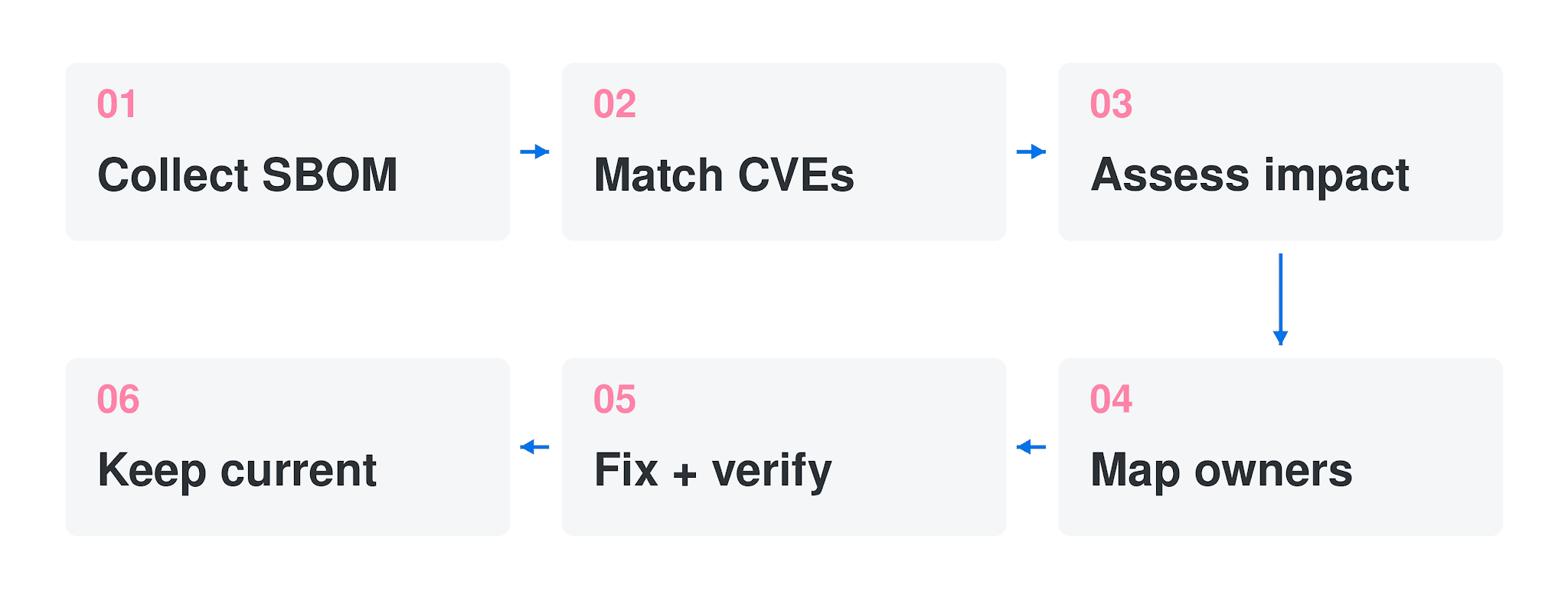
A new advisory can reopen assessment without a software change; a changed build needs a matching inventory.
A new CVE can change the assessment of an unchanged release. That is why SBOM management continues after delivery.
What should an SBOM contain? Check component names, exact versions, producers, identifiers, and dependency relationships, plus the author and timestamp. SPDX and CycloneDX provide standard structures for exchanging that data. For the full baseline, use CISA's 2026 minimum elements, which build on NTIA's 2021 minimum elements. Added fields cover hashes, licenses, tool details, and generation context, among others.
A valid file can still be a bad inventory. If an indirect dependency is missing, SBOM matching cannot flag its CVEs. Using lockfiles gave Zhou and colleagues more accurate inventories in their 2025 study. That finding covers the package ecosystems they tested. Before trusting a clean report, compare the SBOM against the resolved dependency list for that build.
Is an SBOM legally required? Sometimes; the product and market decide. FDA requirements cover SBOMs in applicable cyber-device premarket submissions.
Shipping a product covered by the Cyber Resilience Act? Work backward from December 11, 2027, when its SBOM obligations apply. With a federal buyer, check the contract: EO 14028 guidance can also lead to requests for SBOM access.
SBOM vulnerability management best practices
These six practices form one operating model: collect the component inventory, assess the findings, and carry fixes through verification. Each step preserves what the next team needs to act.
1. Generate or collect an SBOM for every build, app, and supplier
Your build pipeline can be perfect while a critical vendor remains outside the component inventory. Generate a build-time SBOM in SPDX or CycloneDX for every build. Retain its build identifier so you can retrieve the right file later.
Alongside that pipeline, request a supplier SBOM for each vendor product or service supporting the application. Put supplier requests in the same SBOM management backlog as failed build-time collection. For SaaS, ask which service release or snapshot date the inventory describes.
Once that inventory exists, Cloudaware ingests supported scanner findings; SBOM generation stays with build tools and suppliers.
For example: The team generates SBOMs for every application it builds. Its payment workflow also relies on a critical SaaS vendor, but nobody has requested that vendor's inventory. During a component incident, the internal search finds nothing. A later vendor advisory identifies a vulnerable component inside that service.
Add the SaaS service to the coverage list and request its SBOM. Until it arrives, mark the component inventory incomplete.
Igor Kachurin, DevOps Engineer at Cloudaware:
"Supplier software is the half of the inventory people forget once their own pipeline turns green. Without an owner and follow-up date, an unanswered request quietly becomes an accepted blind spot."
For the coverage review, line up each application with its internal and supplier inventory sources. Keep the vendor on that list even when its SBOM hasn't arrived.
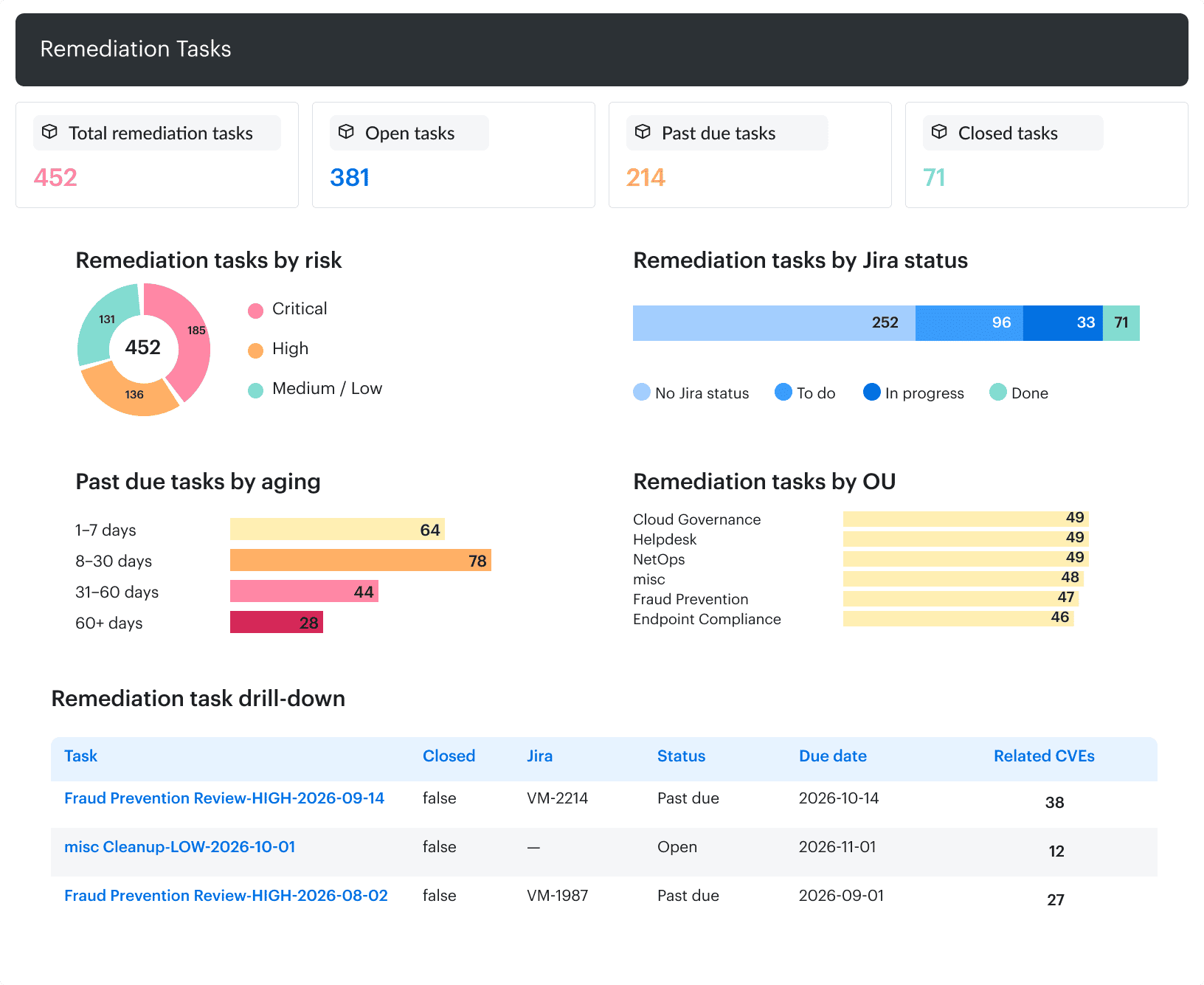
Cloudaware Scan Coverage highlights gaps in infrastructure scanning. Supplier SBOM coverage needs a separate inventory check.
A blank supplier row leaves component exposure unknown. Route that gap to the person chasing the vendor response.
2. Continuously match components to known vulnerabilities
On the next CVE disclosure, rerun matching against every component and version already in inventory. Include older releases that nobody has rebuilt.
The trigger should also pick up revised advisories, because affected-version ranges can change after publication. Refresh NVD data alongside supplier advisories to keep component-to-vulnerability matching continuous. Record the advisory update and the last successful matching run.
Use Log4j as a dry run: which applications ship the version named in the advisory? Query your SBOM index for log4j-core against the advisory's affected-version range. The answer should include application and release identifiers, plus the dependency path. An application still belongs in the results when a framework brings Log4j in as a transitive dependency.
Check the query against a release known to contain the component before trusting an empty result. Carry the match evidence into the vulnerability management process. Exploitability is the next check.
3. Cut the noise with VEX and reachability
Accurate SBOMs did not spare Zhou and colleagues a noisy queue. Their study, first posted in 2025, was revised in April 2026.
Across 113 manually reviewed findings, roughly 92% turned out to be false positives. The main culprit was unreachable code. Checking function calls helped: the authors reported removing about 62% of those false alarms. Those case-study rates are not a forecast for your backlog.
Before escalating a match, work through the evidence:
- Confirm the VEX scope. Check the product version and CVE, then retain the issuer, timestamp, and justification. Share that assessment with downstream teams.
- Inspect the execution path. Check whether the component loads and the vulnerable function can execute. For a blocking control, retain evidence of its configuration and effectiveness.
- Leave unknowns under investigation. An unobserved function call during testing does not establish that the vulnerable code is unreachable.
Valentin Kel, Software Developer at Cloudaware:
"If the vulnerable function cannot execute in this build, the library's CVE should not dictate an emergency change. VEX and reachability should let the next engineer reuse that decision without repeating the investigation."
When reachable findings compete for attention, CISA KEV identifies CVEs already exploited in the wild. EPSS adds the probability of exploitation in the wild over the next 30 days. Keep CVSS as the severity input, rather than treating it as proof of local exploitability.
For the prioritization review, keep confirmed non-impact separate from unknown reachability. The view should expose that distinction alongside exposure.
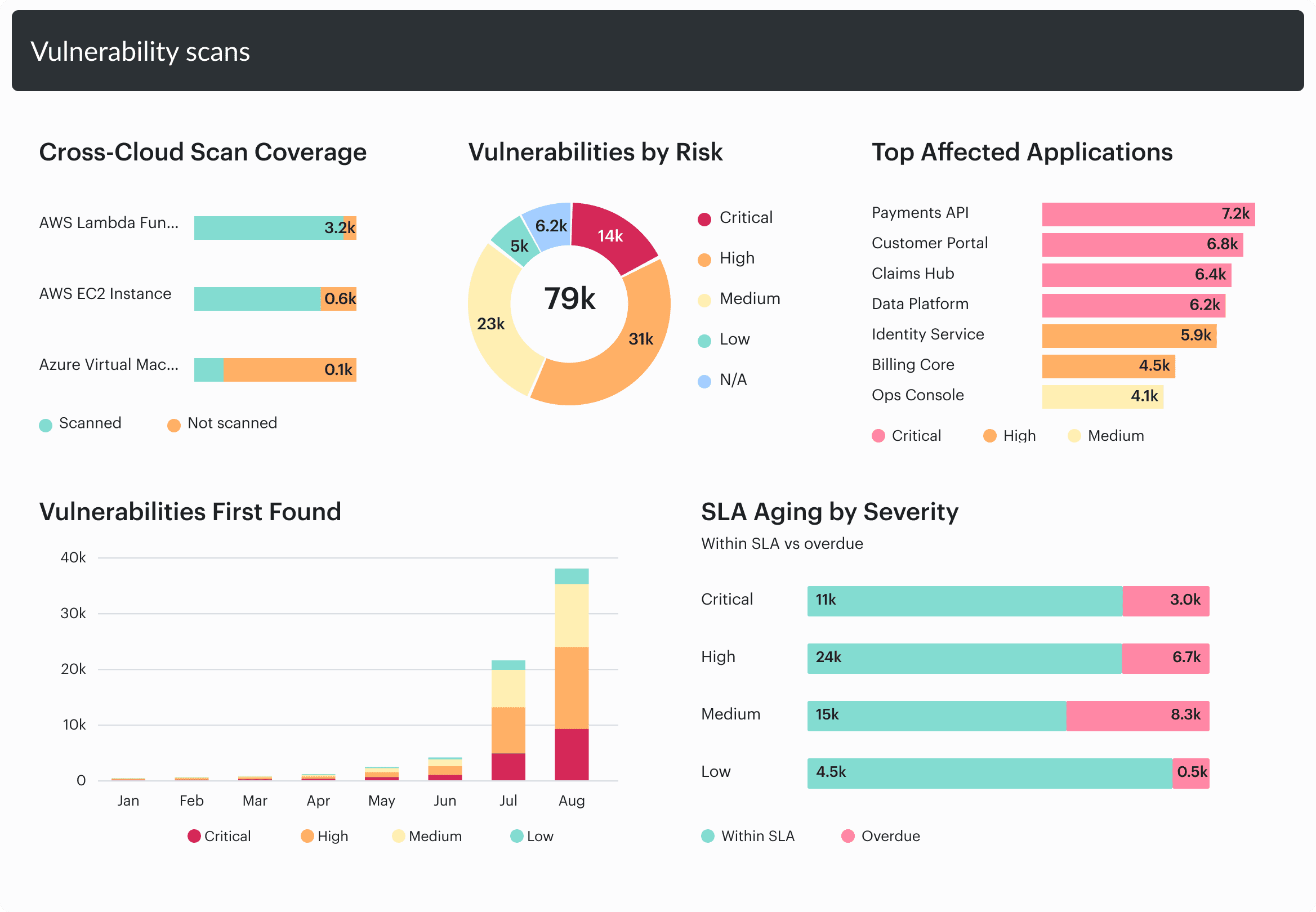
Cloudaware shows vulnerability risk, affected applications, and SLA aging. Add VEX and reachability evidence from the tools that produce those assessments.
Inspect the unresolved group before reporting the reduced queue. Someone still has to check those findings, however short the fix list looks.
4. Map every vulnerable component to the apps, assets, and owners that ship it
Let’s say one vulnerable library appears in 40 services across six teams. Each team can coordinate a single rollout for its affected services. Assign six owned tasks, with each team's service list attached.
If one team's services need separate changes or release schedules, split its work further.
To make the handoff possible, preserve component lineage through the build and into the running environment. For each component and version, retain the build identifier or image digest, application, and assets running that build. The CMDB should preserve those relationships so the finding can reach the team that controls the build.
Working backward from the running service helps distinguish the build owner from the team maintaining its host. Application mapping supplies the service relationship; asset context shows where the affected build is running. Keep both attached to the task.
Igor Kachurin, DevOps Engineer at Cloudaware:
"A component CVE with no owner is a rumor. The useful test is whether the named team recognizes those applications and accepts the work."
Trace one sample row from component to running asset and named team before approving the mapping.
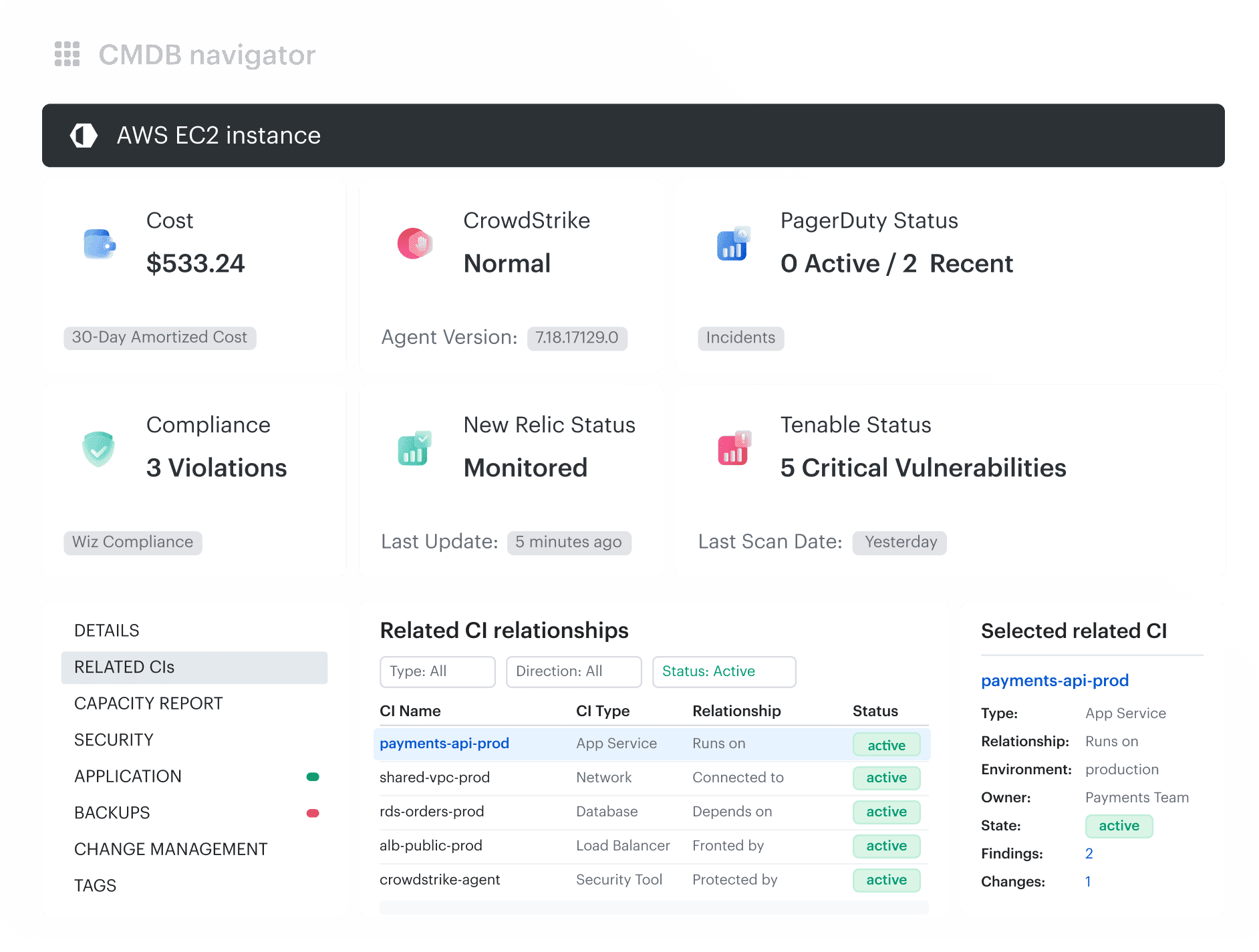
Related CIs connects an EC2 instance with its application and owner context. Component-to-build lineage still needs evidence from the software inventory.
When a row stops at a host owner, return it for application ownership review.
Read also: Put the right CI on every Jira issue
5. Remediate at the source and dedupe by component version
Fix the dependency declaration that selects the vulnerable version. A version bump may be enough; otherwise, apply a maintained patch or replace the dependency. For a transitive fix, start with the parent dependency that brings the vulnerable component in, then check the resolved version.
Deduplication starts with component identity and affected version. Link repeated findings to the fix at source, retaining the affected builds beneath that record. Keep separate changes where patch lineage or the required upgrade differs.
The same base-library version sits behind all 40 services from Practice 4. One tested dependency update supplies the fix for that CVE across the group. The six teams rebuild and roll out their consumers through their existing tasks.
Once all 40 services run the corrected builds, that CVE can close across the group. Until then, keep each outstanding occurrence visible under the shared remediation record.
6. Keep SBOMs current, track drift, and store them for compliance
A recent timestamp can hide an SBOM from the wrong build. Regenerate the inventory on every build, including hotfixes. After deployment, compare the running artifact's digest with the artifact identified by its SBOM.
For example: A hotfix adds a diagnostic library to the production image. The team reuses the release tag without refreshing the SBOM. Comparing the digests exposes the drift. A refreshed inventory identifies the new component and sends it through vulnerability matching.
For SBOM freshness reviews, keep the deployed digest beside the inventory's build identifier and last successful comparison. A supplier SBOM needs the same version discipline; agree when the vendor will supply updates or corrections.
Keep a version history in your SBOM management repository, including VEX statements shared with customers.
Retain the SBOM and associated VEX versions you supplied for EO 14028 requests or applicable EU CRA documentation. Confirm retention against the support period, applicable rules, and the customer's contract. When asked for compliance evidence, retrieve the record for that customer's release rather than sending whichever file is newest.
Restrict overwrite access in the archive; SBOM security includes preserving the evidence you're relying on.
Valentin Kel, Software Developer at Cloudaware:
"A filed SBOM can satisfy a document request and still miss the hotfix running now. The useful measure is how quickly a changed build gets a matching inventory, not how many files you've stored."
Sort mismatched or missing artifact links ahead of age alone in the coverage review. Reuse V1 to show both.
The supplied screen shows integration update and scan timing. A recent update or scan does not establish that an SBOM matches the deployed artifact.
Resolve the artifact mismatch before answering a component exposure question from that row.
SBOM vulnerability management tools: what to look for
Ask vendors to trace one component across your proposed stack, from build record to assigned remediation task. Watch where someone has to copy data manually.
Build-time generators should export SPDX or CycloneDX with transitive dependencies intact. For SCA scanners, inspect matching evidence and refresh behavior when advisories change, not just when new CVEs appear. Vulnerability management tools belong on the shortlist only if findings enter your existing queues without losing component identifiers.
A VEX checkbox proves little. Have the SBOM/VEX management layer show whose assessment applies, to which version, and when it changed. Reachability evidence should remain inspectable alongside exploitability decisions, including unresolved cases. Check what survives export.
Through the CMDB, follow application relationships to running assets and accountable owners. Remediation tracking should preserve those links through closure, with retained SBOM and VEX versions available as compliance evidence. When comparing CNAPP tools, run that same walkthrough. An integrated suite still needs to pass the handoff test.
Operationalize your SBOM and component data with Cloudaware
When a scanner names a component, the next question is who can fix the release carrying it. SBOM vulnerability management stalls if that answer lives in another team's spreadsheet.
Cloudaware Vulnerability Management ingests findings from supported scanner/SCA integrations and relates them to CMDB asset context. Coverage depends on configured sources and CMDB relationships. SBOM generation and VEX/reachability analysis stay with your existing tools.
In SBOM management, use those relationships to move findings into the right queue:
- Follow application mappings to affected assets and their responsible teams.
- Route findings through configured ownership workflows. Keep missing owners visible for follow-up.
- Track remediation status while your team's tools perform the fix.
The dashboard should make a missing owner as obvious as an overdue fix.
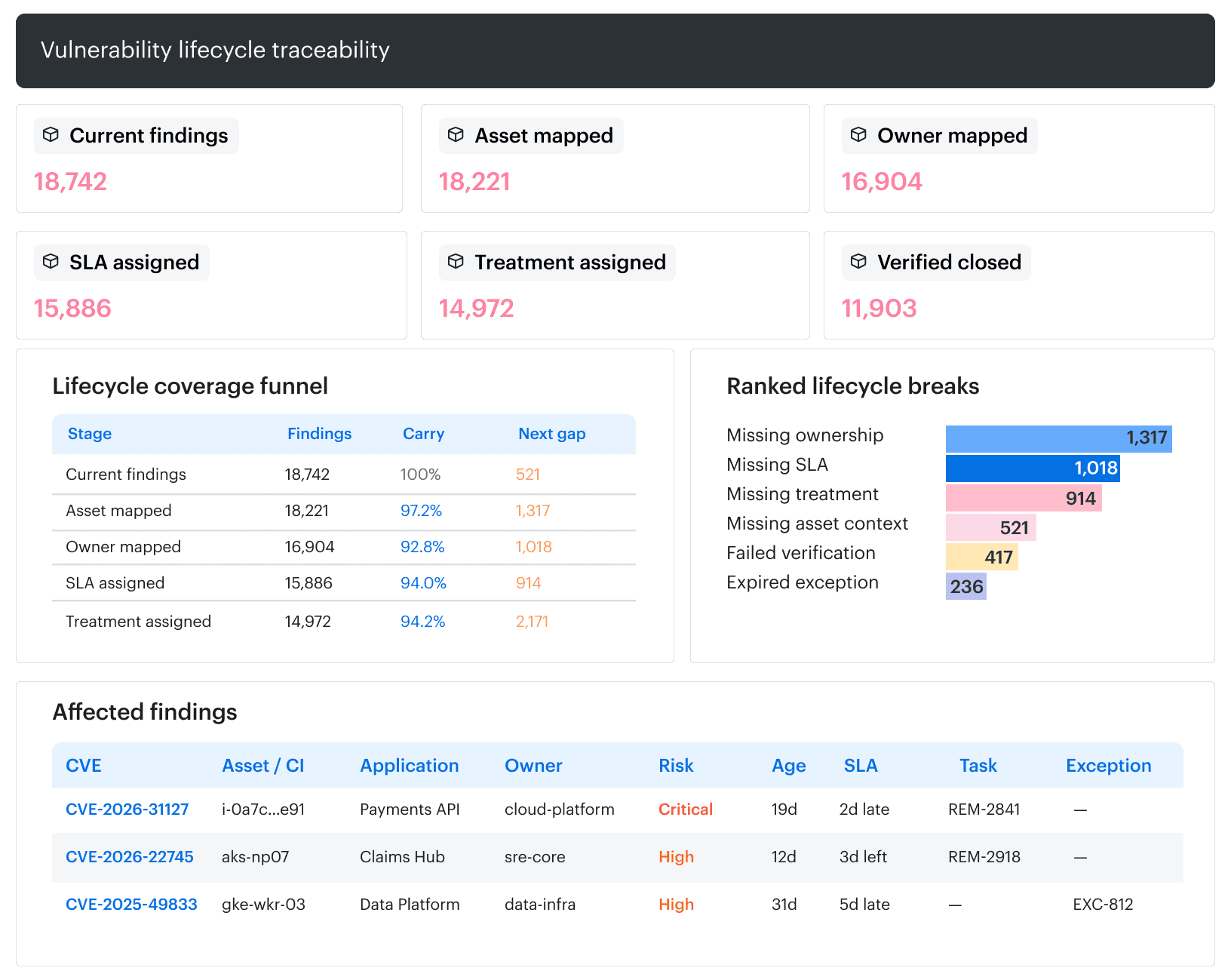
The lifecycle view keeps ownership gaps visible alongside affected assets, applications, SLAs, and remediation tasks.
Remediation Tasks shows open, overdue, and closed work, with Jira status, due dates, and related CVEs.
For SBOM security reviews, check scanner confirmation before treating a closed ticket as proof of remediation.